




You’ve heard the horror stories — apps leaking personal data, hacked servers exposing millions of users, and companies losing reputation overnight. As more businesses embrace white-label GMX apps to launch faster, one question looms large: how safe are they, really?
In 2025, digital security is no longer optional — it’s the foundation of brand trust. With privacy regulations tightening and users demanding transparency, ensuring your white-label GMX app is secure has become a strategic necessity.
This article delivers an honest, research-backed assessment of white-label GMX app safety. We’ll cut through the myths, expose real risks, and share practical security guidelines that help you build a safe, compliant, and trusted platform — powered by Miracuves’ security-first approach.
Understanding White-Label GMX App Security Landscape
What “White-Label Security” Actually Means
In simple terms, white-label security refers to the shared responsibility between the vendor (who develops the core GMX app framework) and the client (who customizes and deploys it). The vendor ensures that the app’s architecture, encryption, and compliance are strong at the foundation, while the client must maintain secure configurations, hosting, and operational policies.
A secure white-label GMX app isn’t just about code — it’s about an ecosystem built for privacy, compliance, and continuous protection.
Common Security Myths vs Reality

Why People Worry About White-Label Apps
Many businesses fear that white-label GMX apps might reuse codebases across multiple clients, raising concerns about shared vulnerabilities, weak data isolation, or outdated libraries. Others worry about incomplete documentation or unclear liability during a breach. These are valid concerns — but they stem more from poor vendor practices than from the white-label model itself.
Current Threat Landscape for GMX-Type Platforms
In 2025, digital communication platforms face elevated security threats due to rising phishing, API abuse, session hijacking, and data scraping attacks. A GMX-type application (used for messaging, file transfer, or cloud email) must now handle threats such as:
- Account takeovers through weak authentication
- API endpoint exploitation
- Third-party SDK vulnerabilities
- Ransomware via malicious attachments
- Privacy violations under GDPR or CCPA
Security Standards in 2025
According to IBM’s Cost of a Data Breach Report 2025, the average breach costs $4.7 million, with over 82% linked to human error or misconfigured APIs. Modern security benchmarks now demand:
- End-to-end encryption by default
- SOC 2 Type II certification for service providers
- GDPR/CCPA/ISO 27001 compliance documentation
- Routine penetration testing and code audits
Real-World Statistics
- 53% of companies using white-label frameworks improved their security posture after implementing centralized monitoring (Verizon Data Breach Report, 2025).
- 42% of breaches in messaging or mail platforms were due to outdated dependencies.
- 60% of business leaders rank “vendor transparency” as their top security selection criterion.
White-label GMX apps can be as secure as — or even more secure than — custom-built ones, provided the vendor adheres to modern compliance, encryption, and maintenance standards.
Key Security Risks & How to Identify Them
Even the most advanced white-label GMX app can become vulnerable if risks aren’t identified early. The key to maintaining trust and compliance lies in proactively addressing data, technical, and business risks before launch.
1. Data Protection & Privacy Risks
User Personal Information
Sensitive data — names, emails, phone numbers — can be exploited if stored without proper encryption or anonymization. Ensure AES-256 encryption and zero-trust access controls are in place.
Payment Data Security
For GMX-type apps handling premium accounts or subscriptions, PCI DSS compliance is non-negotiable. Insecure payment gateways or token mismanagement can lead to major breaches.
Location Tracking Concerns
If your GMX app collects location data for personalization, strict GDPR/CCPA consent protocols are required. Transparent user control over data collection builds credibility.
GDPR/CCPA Compliance
Lack of user consent logs, unclear privacy notices, or missing data retention policies can result in multi-million-dollar fines. GDPR enforcement actions rose by 33% in 2025.
2. Technical Vulnerabilities
Code Quality Issues
Unreviewed or outdated source code may contain injection vulnerabilities, insecure dependencies, or broken authentication logic.
Action: Conduct independent code audits every quarter.
Server Security Gaps
Poorly configured servers remain one of the top causes of data leaks.
Action: Apply infrastructure hardening, regular patching, and enforce firewall rules.
API Vulnerabilities
APIs are the backbone of modern GMX apps — but they’re also prime targets.
Action: Use rate limiting, OAuth 2.0, SSL pinning, and security gateways.
Third-Party Integrations
Unverified plugins or SDKs can introduce hidden risks.
Action: Perform dependency analysis and restrict external connections via sandboxing.
3. Business Risks
Legal Liability
If a security failure occurs, liability may depend on contract clarity between you and the white-label vendor. Ensure indemnity clauses and security SLAs are explicit.
Reputation Damage
A single breach can cause irreversible user distrust. In 2025, 71% of users abandon a service after one privacy incident.
Financial Losses
Beyond fines, downtime and incident recovery costs can cripple startups. Data recovery efforts alone average $1.2M per breach (Accenture, 2025).
Regulatory Penalties
Non-compliance with ISO 27001 or GDPR may result in suspension from app stores or operational bans in regulated regions like the EU.
Risk Assessment Checklist
| Category | Key Checks | Frequency | Responsible Party |
|---|---|---|---|
| Data Privacy | Encryption, consent tracking, data retention | Monthly | Compliance Officer |
| Server Security | Firewall rules, patch management, backups | Weekly | DevOps / IT |
| API Security | Token validation, rate limiting | Monthly | Backend Lead |
| Legal Compliance | SLA reviews, insurance coverage | Quarterly | Legal Team |
| Vendor Management | Certifications, audit reports, patch schedules | Quarterly | Vendor Manager |
Most security breaches in white-label GMX apps don’t happen because the model is unsafe — they happen because risks weren’t systematically audited. Early identification and accountability can prevent over 80% of potential incidents.
Read more : – GMX App Marketing Strategy: How to Make Your DeFi Exchange Stand Out
Security Standards Your White-Label GMX App Must Meet
To earn user trust and remain legally compliant, a white-label GMX app must align with international information-security certifications and technical best practices. Meeting these standards demonstrates due diligence and protects you from both breaches and regulatory penalties.
Essential Certifications
| Certification | Purpose | Applicability |
|---|---|---|
| ISO 27001 | Framework for establishing and maintaining an information-security management system. | Universal for all apps handling user data. |
| SOC 2 Type II | Confirms ongoing operational controls for security, availability, processing integrity, confidentiality, and privacy. | Mandatory for SaaS and cloud-based GMX apps. |
| GDPR Compliance | Ensures lawful collection, storage, and processing of EU citizens’ data. | Required for apps serving EU users. |
| HIPAA | Protects medical or health-related information. | Applicable if the GMX app manages healthcare communications. |
| PCI DSS | Secures cardholder and transaction data. | Essential for in-app payments or subscription models. |
Technical Requirements
End-to-End Encryption (E2EE)
All communications — messages, file transfers, and credentials — must use E2EE to prevent data interception during transmission.
Secure Authentication (2FA/OAuth)
Two-factor or token-based authentication thwarts account-takeover attempts. OAuth 2.0 with refresh tokens ensures session security across devices.
Regular Security Audits
Quarterly penetration testing and third-party code audits validate the platform’s resilience against new vulnerabilities.
Penetration Testing
Simulated attack exercises reveal exploitable flaws before attackers can find them.
SSL Certificates
Transport Layer Security (TLS 1.3) should be enforced on every endpoint to safeguard user traffic.
Secure API Design
APIs must follow least-privilege access, enforce throttling, use signed tokens, and include audit logging.
Security Standards Comparison Table
| Standard | Focus Area | Mandatory for GMX App | Verification Frequency |
|---|---|---|---|
| ISO 27001 | Organizational data protection | Yes | Annual external audit |
| SOC 2 Type II | Operational security controls | Yes | Annual report |
| GDPR | Privacy and consent | Yes (EU users) | Continuous |
| HIPAA | Health data | Conditional | Bi-annual |
| PCI DSS | Payment data | If applicable | Quarterly scans |
| E2EE / TLS 1.3 | Data-in-transit protection | Yes | Continuous monitoring |
| OAuth 2.0 / 2FA | Authentication security | Yes | Continuous |
| Pen-Testing | Application hardening | Yes | Quarterly |
| Code Review | Vulnerability prevention | Yes | Per release |
Security certifications are not paperwork exercises — they are evidence of accountability. A compliant white-label GMX app safeguards users, partners, and your brand from cascading risks.
Read more : –GMX Features List: Everything You Need to Know Before You Dive In
Red Flags – How to Spot Unsafe White-Label Providers
Not all white-label vendors follow the same security discipline. Some prioritize speed and cost-cutting over long-term reliability — exposing clients to major compliance, privacy, and reputational risks. Recognizing warning signs early can help you avoid unsafe providers before damage occurs.
Common Warning Signs
1. No Security Documentation
If a vendor refuses to share details about their encryption, hosting, or compliance setup, it’s a major red flag.
Safe practice: Always request documented policies on data protection, infrastructure, and incident response.
2. Cheap Pricing Without Explanation
Unusually low prices often indicate compromised quality — outdated frameworks, weak encryption, or no testing protocols.
Safe practice: Ask vendors to break down cost allocation, including audit and maintenance coverage.
3. No Compliance Certifications
If the provider cannot produce ISO 27001, SOC 2, or GDPR compliance proof, your business could face penalties later.
Safe practice: Verify certifications via third-party auditors.
4. Outdated Technology Stack
Legacy systems without modern patching leave you open to known exploits.
Safe practice: Demand transparency on frameworks, server OS, and patch management schedules.
5. Poor Code Quality
Apps built without peer reviews, version control, or static code analysis often harbor hidden vulnerabilities.
Safe practice: Request access to test reports or independent code review results.
6. No Security Update Policy
Vendors that fail to outline their update schedule or patch response time show lack of maturity.
Safe practice: Ensure a clearly defined update SLA (Service Level Agreement).
7. Lack of Data Backup Systems
Without automated backup protocols, data loss or ransomware attacks could cripple your business.
Safe practice: Confirm redundancy and recovery mechanisms across data centers.
8. No Insurance Coverage
A professional vendor maintains cyber liability insurance to cover client losses in case of security incidents.
Safe practice: Ask for proof of policy and coverage limits.
Evaluation Checklist
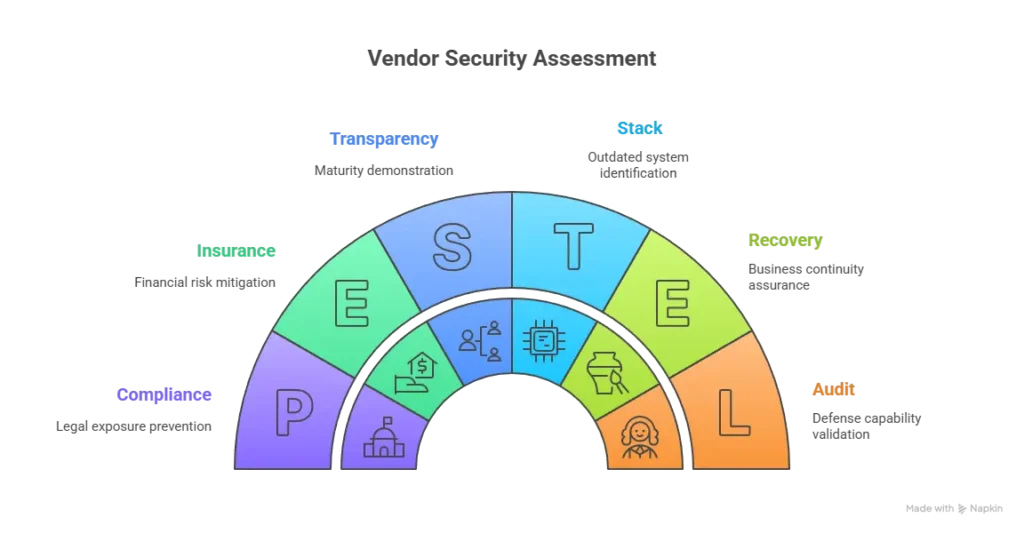
Due Diligence Steps
- Perform Vendor Background Checks – Review their audit history and client testimonials.
- Request Live Demo Environments – Evaluate real-time security controls.
- Review Contracts Closely – Look for clauses covering liability, SLA, and data ownership.
- Engage an Independent Security Expert – For technical validation before signing.
A secure partnership begins with transparency. The most dangerous vendors aren’t the ones that make mistakes — they’re the ones who hide their practices. Always verify, document, and test before you trus
Best Practices for Secure White-Label GMX App Implementation
Security isn’t a one-time checklist — it’s a continuous lifecycle that starts before launch and extends throughout the app’s operation. Implementing structured pre-launch and post-launch protocols ensures your white-label GMX app remains compliant, resilient, and trustworthy.
PRE-LAUNCH SECURITY
1. Security Audit Process
Before deployment, conduct a comprehensive audit of the entire GMX app architecture. This should include vulnerability scanning, dependency checks, and code reviews.
Tip: Require your vendor to provide third-party audit reports and fix logs before go-live.
2. Code Review Requirements
Mandate peer code reviews and static application security testing (SAST). Reviewers should validate the use of secure libraries, input validation, and encryption modules.
3. Infrastructure Hardening
Ensure server environments follow CIS (Center for Internet Security) benchmarks. Disable unused ports, enforce firewall rules, and apply least-privilege principles for all admin roles.
4. Compliance Verification
Cross-verify GDPR, ISO 27001, and SOC 2 readiness. Confirm that the app’s data-handling policies match regional privacy laws.
Example: Store EU user data only within EU data centers for GDPR alignment.
5. Staff Training Programs
Educate all staff — including developers, testers, and administrators — on cybersecurity hygiene, phishing prevention, and incident reporting procedures.
POST-LAUNCH MONITORING
1. Continuous Security Monitoring
Deploy SIEM tools (Security Information and Event Management) to detect suspicious activities in real time.
Set up alerts for unauthorized logins, data access anomalies, and failed authentication spikes.
2. Regular Updates and Patches
Schedule monthly security patches and bi-weekly library updates. Vulnerabilities should be resolved within 72 hours of identification.
3. Incident Response Planning
Establish a formal Incident Response Plan (IRP) defining escalation paths, communication templates, and containment procedures.
Key elements: Response team roles, post-mortem reviews, and RCA (Root Cause Analysis).
4. User Data Management
Implement data minimization and tokenization to protect PII (Personally Identifiable Information).
Use automated data-deletion workflows to comply with GDPR’s “Right to Erasure.”
5. Backup and Recovery Systems
Set up multi-region backups, tested monthly for integrity and recovery speed.
Disaster Recovery Time Objective (RTO) should not exceed 4 hours for mission-critical services.
Security Implementation Timeline
| Phase | Security Focus | Duration | Responsible Team |
|---|---|---|---|
| Week 1–2 | Architecture review, compliance checklist | 2 weeks | Security Lead + Vendor |
| Week 3–4 | Code audit, penetration testing | 2 weeks | QA + External Auditor |
| Week 5–6 | Infrastructure setup, access control | 2 weeks | DevOps |
| Ongoing (Monthly) | Patches, vulnerability scans, log review | Continuous | IT + Compliance |
| Quarterly | Audit review, policy updates | Every 3 months | CISO / Compliance Officer |
A white-label GMX app is only as secure as its maintenance plan. Security is a culture, not a phase — success depends on embedding defense into every stage of development, operation, and governance.
Legal & Compliance Considerations
Security failures don’t just lead to data breaches — they lead to legal exposure, regulatory fines, and loss of operational licenses. For a white-label GMX app operating in 2025’s global environment, compliance isn’t optional — it’s a binding obligation. Understanding your legal duties protects both your users and your business.
REGULATORY REQUIREMENTS
1. Data Protection Laws by Region
- European Union: Must comply with GDPR — including user consent, data portability, and breach notification within 72 hours.
- United States: Requires CCPA/CPRA compliance for California users and state-specific privacy acts elsewhere.
- India: Governed by the Digital Personal Data Protection Act (DPDPA) 2023, focusing on consent and cross-border data transfer.
- Middle East & Asia-Pacific: Markets like UAE and Singapore follow PDPL and PDPA respectively — both emphasize explicit user consent and minimal data retention.
2. Industry-Specific Regulations
If your GMX app manages communication for industries like healthcare, fintech, or education, additional frameworks such as HIPAA, PCI DSS, or FERPA apply.
Failing to adhere can result in loss of business authorization or suspension from app stores.
3. User Consent Management
Your app must include:
- Explicit consent prompts for data sharing
- Transparent privacy settings
- Easy opt-out mechanisms
- Audit logs of all user consents and modifications
4. Privacy Policy Requirements
Every GMX app must maintain a publicly accessible, easy-to-read privacy policy that includes:
- What data is collected and why
- Where it’s stored and for how long
- Who has access to it
- How users can delete or download their data
5. Terms of Service Essentials
Your terms must outline liability, user behavior policies, and dispute resolution mechanisms. Include clauses defining data ownership and vendor responsibility.
LIABILITY PROTECTION
1. Insurance Requirements
Secure a cyber liability insurance policy that covers:
- Data breaches and system downtime
- Legal defense costs
- Compensation for affected users
2. Legal Disclaimers
Disclaimers should clarify:
- Data handling limits
- Third-party integration risks
- Shared security responsibilities between vendor and client
3. User Agreements
Include acceptance clauses that bind users to platform security policies. Require users to maintain password hygiene and respect app access limits.
4. Incident Reporting Protocols
Define your breach response process clearly — notification timelines, internal communication structure, and regulatory report templates.
Example: GDPR mandates notifying authorities within 72 hours of detection.
5. Regulatory Compliance Monitoring
Implement a compliance management dashboard to track updates across GDPR, CCPA, and ISO frameworks. Automate reminders for renewals, audits, and policy changes.
Compliance Checklist by Region
| Region | Law / Framework | Key Requirement | Enforcement Body |
|---|---|---|---|
| EU | GDPR | Consent, portability, breach notice | European Data Protection Board |
| USA | CCPA / CPRA | Opt-out, Do Not Sell rule | State AGs |
| India | DPDPA 2023 | Explicit consent, purpose limitation | Data Protection Board of India |
| UAE | PDPL | Cross-border data restrictions | UAE Data Office |
| Singapore | PDPA | Data transfer, retention limits | PDPC Singapore |
A legally compliant white-label GMX app isn’t just safer — it’s future-proof. Businesses that integrate privacy, consent, and accountability into their DNA gain a competitive edge and long-term user trust.
Read more : –How to Hire the Best GMX Clone Developer
Why Miracuves White-Label GMX App Is Your Safest Choice
In a digital landscape where data breaches can destroy years of brand trust overnight, choosing the right white-label partner is critical. Miracuves stands apart by embedding enterprise-grade security, compliance, and transparency into every stage of app development — not as an add-on, but as a foundation.
MIRACUVES SECURITY ADVANTAGES
1. Enterprise-Grade Security Architecture
All Miracuves GMX apps are built on a multi-layered, zero-trust architecture, integrating secure APIs, network segmentation, and continuous monitoring. Encryption is applied across all data layers — at rest, in transit, and during processing.
2. Regular Security Audits and Certifications
Miracuves undergoes independent penetration tests and ISO 27001 / SOC 2 Type II audits twice yearly. These ensure complete transparency into our systems’ operational integrity and security posture.
3. GDPR / CCPA Compliant by Default
Every Miracuves deployment includes built-in data-processing agreements, consent management systems, and automated user-rights tools, ensuring seamless compliance across global markets.
4. 24/7 Security Monitoring
Our Security Operations Center (SOC) monitors all hosted applications around the clock, identifying and neutralizing threats in real time through AI-assisted anomaly detection.
5. Encrypted Data Transmission
We enforce TLS 1.3, SSL pinning, and AES-256 encryption for all communication channels — ensuring no unprotected data packets ever move between client and server.
6. Secure Payment Processing
For monetized GMX apps, Miracuves integrates PCI DSS-certified gateways with tokenized transactions, eliminating cardholder data exposure.
7. Regular Security Updates
All white-label apps receive scheduled patches, version upgrades, and threat-intelligence updates. Our SLA guarantees vulnerability resolution within 72 hours of detection.
8. Insurance Coverage Included
Miracuves maintains comprehensive cyber-risk insurance, offering an additional financial safety net to clients in the event of data-related incidents.
Why Businesses Trust Miracuves
- 600 + successful deployments with zero major security breaches to date
- Proven compliance readiness for EU, US, MENA, and APAC markets
- Dedicated security engineering team available for audits and consulting
- Transparent documentation and real-time status reporting for every client
Don’t compromise on security.
Miracuves white-label GMX app solutions come with enterprise-grade protection, continuous monitoring, and verified compliance built in from day one.
Our 600 + successful projects have maintained zero major security breaches.
Get a free security assessment today and discover why global businesses trust Miracuves to power their most sensitive and compliant digital platforms.
Conclusion
Security isn’t just a technical benchmark — it’s a commitment to trust. In 2025, when cyber threats evolve faster than app updates, the strength of your white-label GMX app depends on the people and processes behind it.
The truth is, white-label doesn’t mean insecure — it means scalable, efficient, and accessible, if built and maintained by the right partner. By aligning with verified standards like ISO 27001, SOC 2, and GDPR, and by choosing vendors who treat security as culture — not a checkbox — your platform can achieve enterprise-level safety without enterprise-level delays or costs.
With Miracuves, you’re not just deploying a white-label GMX app — you’re securing a future-ready communication platform that stands on the pillars of transparency, compliance, and resilience.
In today’s environment, trust is your most valuable asset — and Miracuves helps you protect it at every level.
FAQs
1. How secure is a white-label GMX app compared to custom development?
When built by a certified vendor like Miracuves, white-label apps can match or exceed custom builds in security — thanks to battle-tested frameworks and regular audits.
2. What happens if there’s a security breach?
A defined incident response plan ensures rapid detection, containment, and notification within required legal timelines (e.g., 72 hours under GDPR).
3. Who is responsible for security updates?
Miracuves handles all ongoing security patches, monitoring, and compliance updates under its maintenance SLA.
4. How is user data protected?
All sensitive data is encrypted using AES-256 at rest and TLS 1.3 in transit, with strict access control and anonymization protocols.
5. Which certifications should my GMX app meet?
ISO 27001, SOC 2 Type II, PCI DSS (for payments), and GDPR/CCPA compliance are essential benchmarks.
6. Can white-label apps meet enterprise standards?
Yes. Miracuves designs every app to satisfy enterprise-grade compliance, scalability, and resilience requirements.
7. How often should security audits be done?
Quarterly penetration tests and annual third-party ISO/SOC audits are recommended.
8. What’s included in Miracuves’ security package?
End-to-end encryption, audit logs, GDPR readiness, continuous monitoring, and cyber-risk insurance coverage.
9. How is international compliance handled?
Miracuves apps adhere to GDPR (EU), CCPA (US), DPDPA 2023 (India), and PDPL (UAE) through region-specific configurations.
10. What insurance protection is provided?
Cyber-liability insurance covers data breach recovery costs, ensuring business continuity for clients.
Related Articles