Swiggy Clone
Seamless Food & Grocery Delivery – Launch Your Own Platform Today!
A complete Swiggy-like experience! Miracuves’ customizable white-label solution integrates food, grocery and on-demand delivery services effortlessly.
Go Live in 6 Days with 60 Days Platform GuidanceComplete Source CodesComplete RebrandingComplete WhitelabelingApp Publishing Support6 Months Bug Fixes + 12 Months Updates
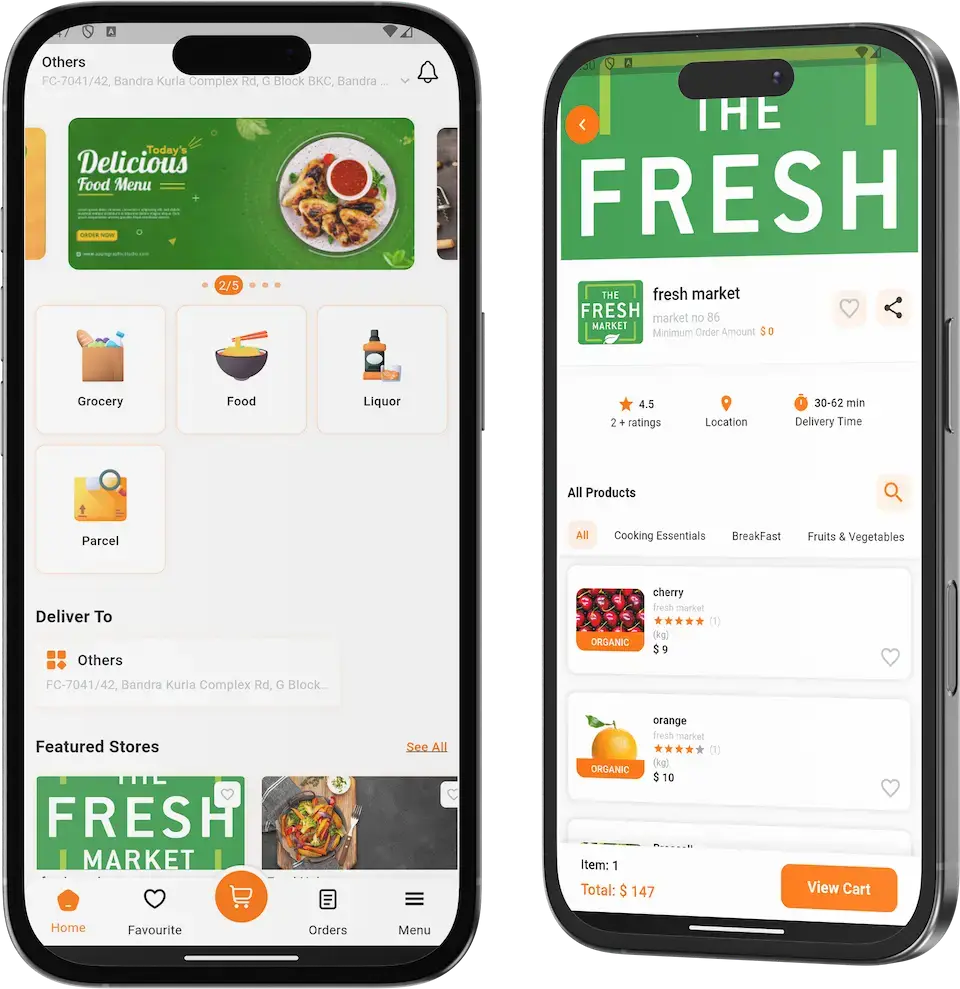









Swiggy Clone allows you to offer, Food, Alcohol & Grocery Delivery Services.
A complete Swiggy-like experience! Miracuves' customizable white-label solution integrates food, grocery and on-demand delivery services effortlessly.
Quick Market Entry: Swiggy Clone enables you to swiftly enter the online food delivery , grocery delivery as well as genie runner market, capitalizing on its proven business model.
Operational Efficiency: The clone can provide a streamlined platform with tested features, enhancing your operational efficiency and reducing development time.
User Familiarity: A Swiggy Clone offers users a familiar interface, increasing user adoption and engagement due to their existing experience with similar platforms.
Competitive Advantage: Utilizing a well-crafted clone allows you to focus on unique value propositions, giving you a competitive advantage in a rapidly growing industry.
Multiple Restaurants & Stores
The Swiggy Clone facilitates access to a diverse range of dining options by integrating multiple restaurants and stores onto a single platform, offering customers a wide selection.
Automation Functionality
The clone provides flexibility in delivery by offering various options like express, standard, or scheduled delivery, accommodating different customer needs and timeframes.
Multiple Delivery Options
Enhancing user customization, the clone allows customers to personalize their orders by adding extra items or customizing their meals with addons, catering to individual preferences.
Live Tracking
With real-time tracking, users can monitor their orders' progress from preparation to delivery, ensuring transparency and building trust in the delivery process.
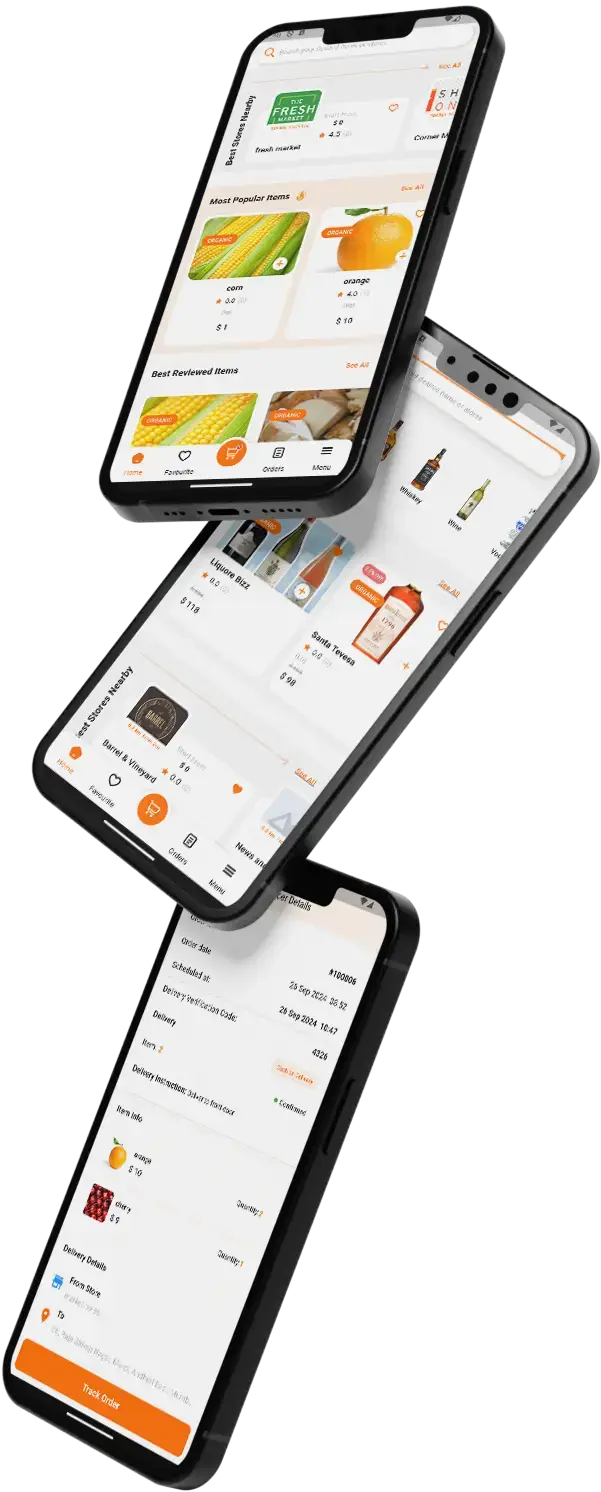
Key Features of Swiggy App Clone
Cutting-edge Features
that drive
Swiggy Clone
The Swiggy Clone incorporates a range of cutting-edge features that redefine the food and grocery delivery experience. AI-driven recommendations personalize choices for users, while contactless delivery ensures safety and convenience. The integration of virtual kitchens taps into emerging culinary trends, enhancing variety.
AI-Powered Recommendations
Utilize AI algorithms to suggest personalized food and grocery options, enhancing user convenience and engagement.
Contactless Delivery
Implement a seamless contactless delivery process to address health and safety concerns, gaining customer trust.
Virtual Kitchens Integration
Integrate virtual kitchens to diversify offerings and cater to evolving culinary trends, expanding your market reach.
AR Menu Visualization
Offer an augmented reality menu experience, allowing users to visualize dishes before ordering, enhancing decision-making.
Voice-Enabled Ordering
Incorporate voice recognition technology for effortless and hands-free order placement, setting a new standard for user convenience.
Blockchain-Powered Supply Chain
Employ blockchain to ensure transparency and traceability in the supply chain, ensuring food safety and quality.
Dynamic Delivery Pricing
Introduce dynamic pricing based on demand, time of day, and location, optimizing profitability and customer value.
Comprehensive Features Across Web, App, and Admin

- User Profiles: Create personalized user accounts for seamless order history tracking and customized experiences.
- Restaurant / Stores Selection: Offer a wide range of restaurant choices with advanced filters and search options for easy selection.
- Real-time Tracking: Provide live order tracking, enabling users to monitor their delivery progress in real time.
- Secure Payments: Integrate multiple secure payment options, ensuring hassle-free and safe transactions.
- Rating & Reviews: Allow users to rate and review restaurants, enhancing transparency and aiding decision-making.
- Scheduled Orders: Enable users to place orders for future delivery, providing flexibility and convenience.
- Dashboard: Furnish administrators with an overview of key metrics, order trends, and user behavior for informed decision-making.
- Restaurant / Stores Management: Facilitate efficient management of restaurants, menus, and offerings with an easy-to-use interface.
- Order Monitoring: Provide real-time order tracking and management tools to ensure smooth operations and timely deliveries.
- User Management: Manage user accounts, reviews, and feedback, enhancing customer service and engagement.
- Analytics & Reports: Generate detailed reports and analytics on sales, revenue, and customer behavior to guide strategic planning.
- Promotions & Offers: Enable the creation and management of promotional campaigns, discounts, and loyalty programs to attract and retain customers.

- Intuitive Interface: Offer a user-friendly mobile app design for effortless navigation and a seamless ordering experience.
- Geolocation: Leverage GPS to enable accurate location tracking, enhancing delivery efficiency and accuracy.
- Push Notifications: Send real-time updates on order status, promotions, and offers, keeping users engaged and informed.
- In-App Chat: Incorporate a chat feature for users to communicate directly with restaurants or customer support.
- QR Code Scanning: Integrate QR code scanning for quick access to restaurant menus and information.
- Multiple Platforms: Develop the app for both iOS and Android platforms, maximizing market reach and user accessibility.
User Flow of our Swiggy Clone

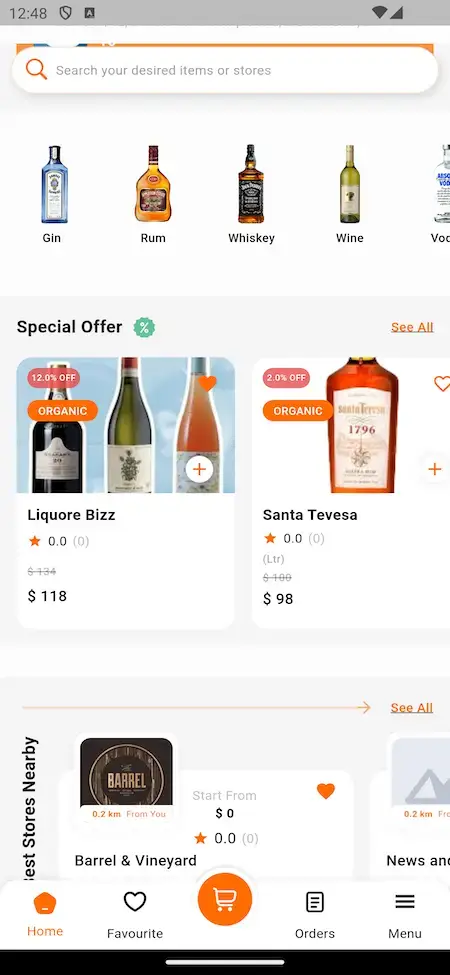
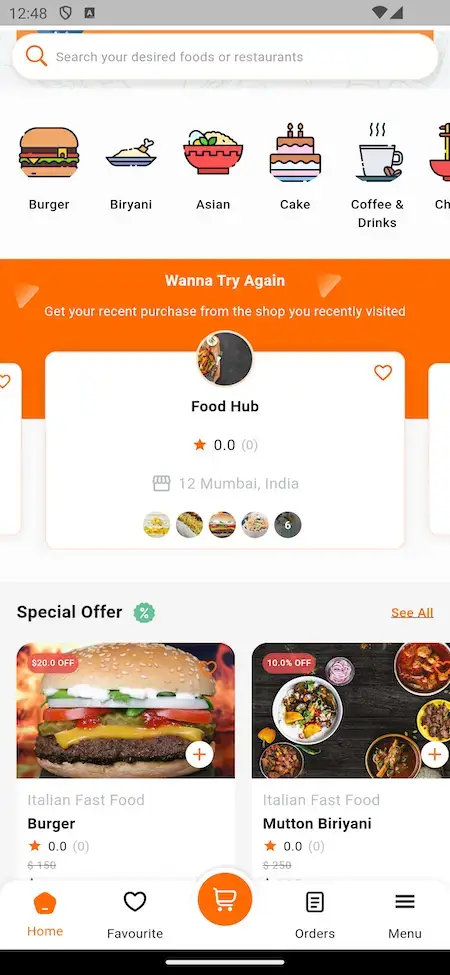
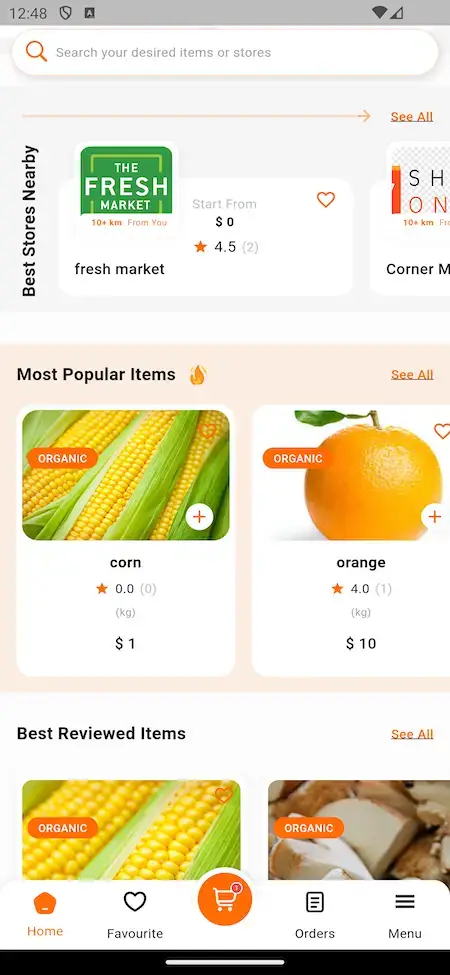
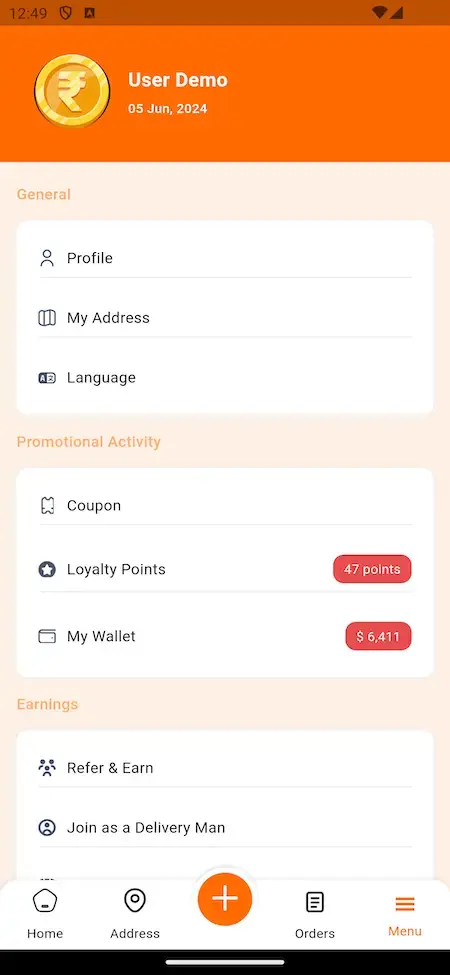
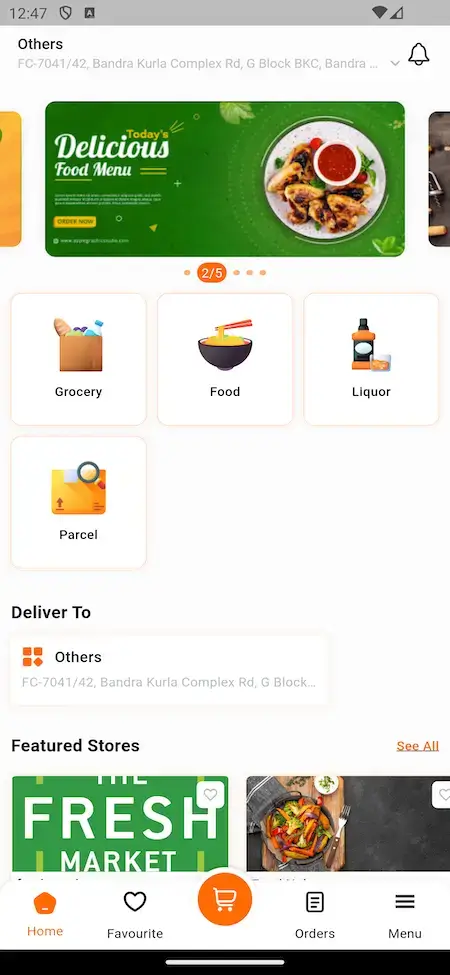
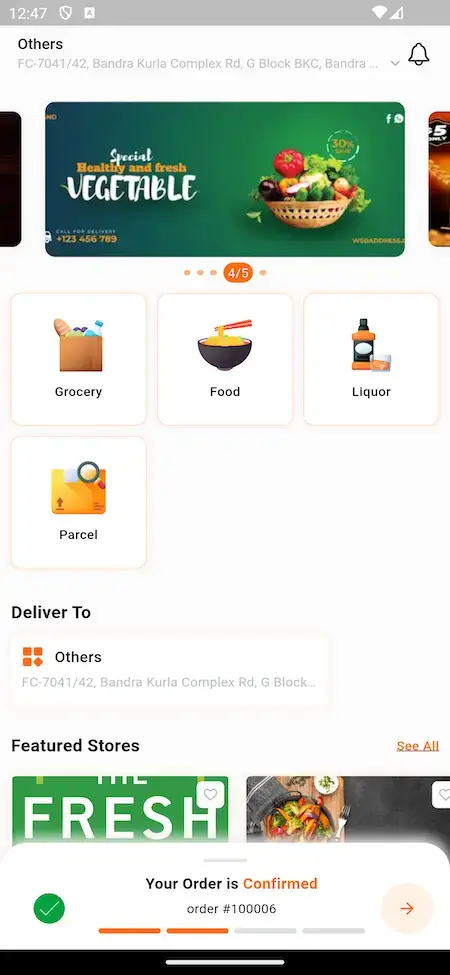
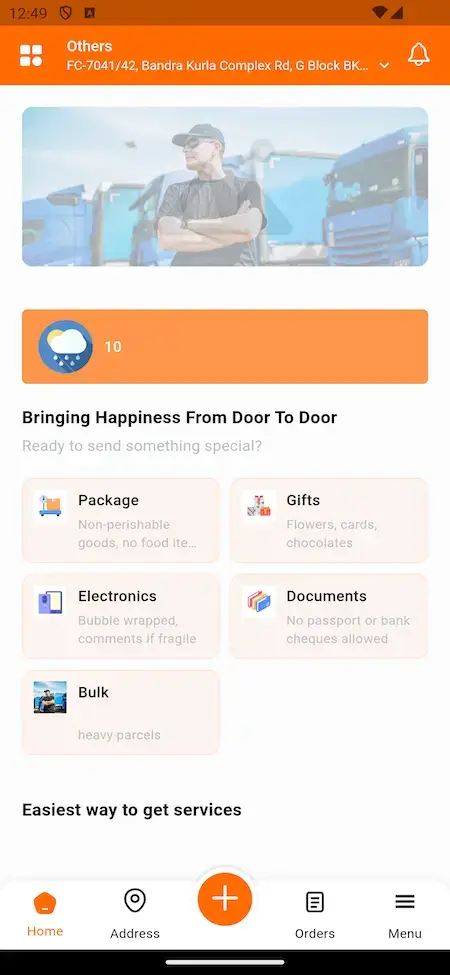
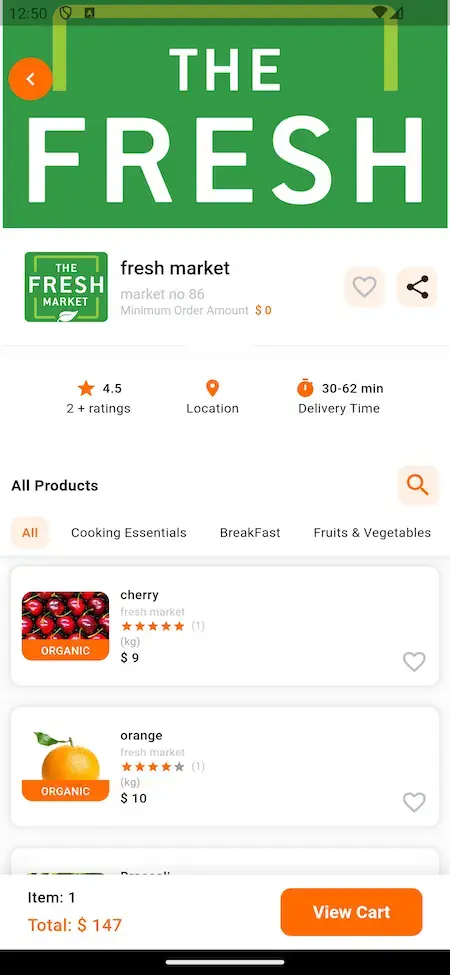
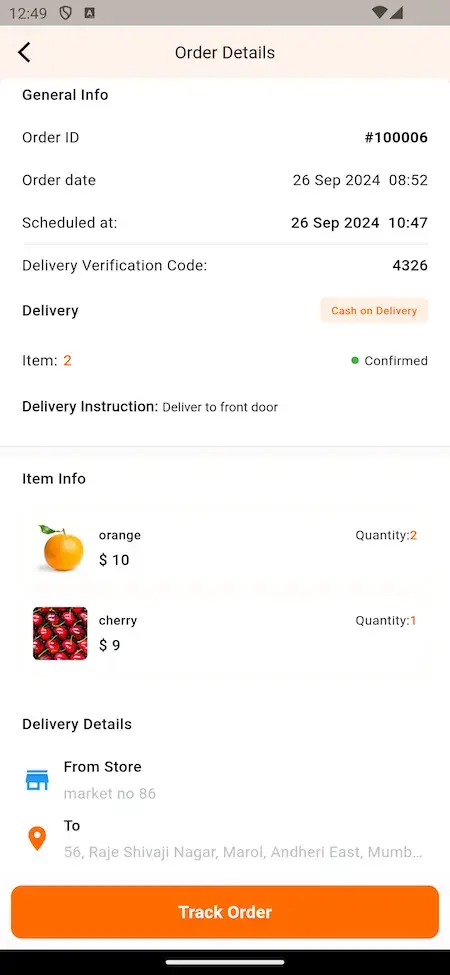
User Registration
Users sign up with their details or log in to their accounts.
Browse Restaurants
Users explore a list of available restaurants and their menus.
Select Item
Users add desired food items to their cart.
Customize Orders
Users modify orders by adding special instructions or extras.
Checkout
Users review the order, select delivery options, and make payment.
Payment
Users make secure payments using various methods.
Order Tracking
Users track their order's real-time status.
Delivery & Review
Users receive the order, provide ratings, and complete the process.
Benefits and Seamless Implementation
Ready
Pre-built and readily available, reducing development time and enabling quick implementation.
Now
Immediate access to modern technologies, enabling businesses to stay current and competitive.
Set
Configured to suit specific needs, minimizing the need for extensive customization before deployment.
In
Customization to suit own needs is essential for everyone and we do it all for you.
Go
Once deployed, can be quickly integrated into existing systems, enabling seamless adoption.
Time
Readymade Approach saves you a deal of time and gives you edge with early launch.
Demo Video in Action
Access Demo
Delivery App
Access the delivery app on both platforms.
➤ +91 9876543211 | Driver_321
Technology Stack
Web & Admin
PHP with Bootstrap Framework | NodeJS | MySQL
Android Apps
Flutter Full Components Apps with Latest Dependencies
iOS App
Flutter Full Components Apps with Latest Dependencies
3rd Party API
Google Maps, Twilio, Firebase, Pay Api, Translate & MTR.

Deliverables - What You'll Get
User App
Access the user app on both platforms.
Store App
Access the store app on both platforms.
Delivery App
Access the delivery app on both platforms.
Free Deployment
We do complete rebranding of your web and apps with your logo, icons & color scheme and deploy them.
Source & Project Codes
We provide you with complete source codes with no encryption so you can work on them as per your custom needs.
Apps Publishing
We take care of publishing your apps in both the stores on your developer accounts and get them approved.
Support Timeline
We include 60 days of dedicated platform guidance, 6 months of priority bug resolution and 12 months of continuous product evolution at no extra cost.
Explore Every Angle of the Swiggy Clone
One focused guide on cost, going deeper than this overview can.
Addons Available
Offer users the choice to opt for eco-friendly packaging for their orders, aligning with sustainable practices and reducing environmental impact.
Clients Love Us For Our Commitment
To Deliver Transformative Excellence
Every HMS I tried was built for general physicians, with no lesion mapping, no before/after tracking, and no procedure-based billing. Their MXHealth base gave us the patient app, doctor app, EMR and video consult out of the box. Front-desk time on scheduling and follow-ups is down ~70%, and we went fully digital in 9 months, where a fully custom job would have been 18.

Dr. Vivek Rungta
Founder & Chief Dermatologist, Dermacian
Turo is the obvious reference, but the Caribbean specifics, from different insurance norms to different payment rails, meant we needed a real partner, not just a clone. Miracuves’s MXRental base covered the listing, the trip flow, and the host payouts. We launched in 10 weeks and are live in three islands.

Andre Gittens
CEO, Ride Corporation
The team was running it on a dispatcher and a Google Sheet, and we needed a real platform quickly, because we were about to onboard a major retail client. Miracuves’s Delivery Genie base gave us the rider app, the dispatch console, and live tracking. We launched in 6 weeks and cleared 4x the previous order volume in the first month.

Marsha Williams
Founder, Bmore On Demands LLC
We were running it on phone calls and a paper calendar, and we were losing bookings to bigger OTAs. Miracuves’s GetmyBoat Clone base gave us the calendar, the booking flow, and the payment engine. Online bookings are up roughly 70% in the first six months, and the ops team finally has a live view of the fleet.

Tiffany Dandrea
Operations Director, Best Cabo Yacht Rentals
Building a compliant telehealth stack from scratch in three markets would have been a year-plus effort. Miracuves’s MXHealth base covered the patient and doctor apps, video consult, e-prescription and the pharmacy integrations. We launched in our first market in 9 weeks and rolled out to two more in the following six months.

Dr. Carlos A. Palermo
Co-founder & CEO, Doctta Health
We were juggling spreadsheets, a third-party GPS provider, and a phone. We needed a single operations console. Miracuves’s MXLogistics base covered the trip lifecycle, the driver app, and the customer tracking page. We’ve cut operations admin time by about 40%.

Brian Lataille
VP Logistics Technology, IBC Tanks Canada


Why Choose Miracuves
Fully Customizable
Miracuves provides customization services to ensure that our clients get the exact features & flows they need for their specific needs.
Complimentary Tech Support
At Miracuves we ensure that all your support needs are met in time and with discretion to ensure no downtime.
Free Bug Support
Miracuves provides complimentary bug support timeline to clients to ensure that the platform runs smoothly and without any issues.
Complete Source Code
Miracuves ensures you get complete usage ownership of the Swiggy clone by offering you the complete source code.
Custom development requires a high budget but our ready-made clone script comes with ample features and free rebranding service at a budget price.
Waiting is boring, that is why we bring you this ready-to-launch clone script which is completely customizable as per your needs.
We have vast experience in developing cryptocurrency-based applications to make your deployment capable enough to boost your crypto trading business.
We know the seriousness of security in the current times of data breach. That is why we have already verified our clone script with rigorous security testing.
Our dedication to providing a comprehensive solution, we’ve also optimized the script for enhanced speed, ensuring that users experience swift and efficient performance.
Combining al the key points we come to the stage of efficient functioning solution which delivers the right purpose and functions for everyone.
Why Our Premium Swiggy Clone Script Over Custom Development?
Cost Effective
Custom development requires time and budget with our ready-made Swiggy clone script get all features and rebranding service at a pocket friendly price.
Time to Market
Our ready-to-launch Swiggy clone script is completely customizable as per your needs and is constantly updated to meet market standards.
Expertise
Having vast experience in developing all in one services-based apps to provide, Swiggy clone capable enough to boost your food delivery services business.
Security
We know the seriousness of security in all in one apps like Swiggy. That is why we do QAT & various Code Assesments on the Swiggy clone script to keep data safe.
Insights For Multi-Delivery Platform Entrepreneurs
- Concept
- Feature
- Capabilites
- Inclusions
- Marketability
- Revenue
- Prospects
A Swiggy-like food delivery platform enables users to order meals from nearby restaurants with real-time tracking and seamless payments. A robust on-demand food delivery system ensures swift service, user satisfaction, and restaurant scalability.
Multi-Restaurant Integration: Extensive menu options from various eateries.
Real-Time Order Tracking: GPS-enabled live updates.
AI-Powered Recommendation System: Personalized meal suggestions.
Seamless Digital Payments: Multiple payment gateways.
User-Friendly Interface: Simple navigation for easy ordering.
Instant & Scheduled Deliveries: Flexible food delivery options.
Dynamic Pricing & Discounts: Offers, deals, and surge pricing.
Loyalty & Subscription Models: Increased customer retention.
A comprehensive food ordering app like Swiggy enhances efficiency for restaurants, delivery personnel, and users alike.
A feature-packed meal delivery solution should include:
User & Restaurant Registration: Easy onboarding.
Advanced Search & Filters: Cuisine, price, and restaurant preferences.
Live Order Status & Notifications: Keeps users informed.
AI-Powered Smart Cart Suggestions: Upselling & better experience.
Seamless Checkout & Multiple Payment Options: Cards, wallets, and UPI.
Delivery Partner App with Route Optimization: Fastest routes for efficiency.
Review & Rating System: Enhances credibility and service quality.
Promotional Campaigns & Discounts Management: Boosts user engagement.
Admin Dashboard with Analytics: Data-driven business insights.
Multi-Currency & Multi-Language Support: Global accessibility.
A scalable food delivery app like Swiggy ensures streamlined ordering and optimized logistics.
A Swiggy-inspired meal delivery platform should offer:
Cloud-Based Infrastructure: Handles high traffic seamlessly.
Smart AI-Based Order Allocation: Optimized delivery assignments.
Real-Time Fleet Management: Efficient tracking & dispatch.
Geo-Fencing for Delivery Personnel: Ensures optimized operations.
Multi-Vendor & Single-Vendor Support: Adaptable for different businesses.
Subscription-Based Loyalty Programs: Encourages repeat customers.
In-App Chat & Call Feature: Direct communication with support.
Contactless Delivery Options: Post-pandemic safety feature.
Data Encryption & Secure Transactions: Protects user and business data.
White-Label Customization: Branding flexibility for businesses.
An intelligent meal ordering system like Swiggy enhances the user experience and oper
A ready-to-launch food ordering and delivery solution includes:
User & Restaurant Mobile Apps (iOS & Android): Complete digital ecosystem.
Delivery Agent App with Navigation Tools: Optimized delivery experience.
Powerful Admin Panel for Business Management: Tracks operations and revenue.
Live Order Tracking System: Enhances customer engagement.
Advanced Payment Gateway Integrations: Secure online transactions.
Restaurant Menu Management System: Real-time updates for vendors.
Discount Coupons & Promotions Engine: Engages and retains users.
Push Notifications & SMS Alerts: Keeps users updated.
Revenue Analytics & Business Reports: Informed decision-making.
Customizable UI/UX Design: Branding possibilities for businesses.
A full-fledged meal delivery platform ensures a seamless customer journey and business efficiency.
The on-demand food delivery market is booming due to:
Rise in Online Food Ordering Trends: Increased convenience factor.
Cloud Kitchens & Virtual Restaurants Growth: Expands food business models.
AI-Driven Personalization for User Engagement: Enhances order experience.
Subscription-Based Loyalty Plans for Customer Retention: Increases repeat orders.
Hyperlocal & Quick Commerce Growth: Faster delivery models.
Partnerships with Grocery & Beverage Services: Expands service range.
Social Media & Influencer Promotions: Boosts brand visibility.
Corporate Tie-Ups & Catering Services: Additional revenue streams.
Blockchain-Integrated Secure Payments: Enhances transaction security.
Expansion to International Markets: Wider reach for food businesses.
A well-marketed food delivery app like Swiggy can capture a massive audience and ensure profitability.
A highly profitable food ordering system generates revenue through:
Commission-Based Earnings from Restaurants: A standard model.
Delivery Fee Charges Based on Distance & Demand: Dynamic pricing.
Subscription-Based Loyalty Plans & VIP Memberships: Ensures recurring revenue.
Surge Pricing During Peak Hours: Maximizes earnings.
Premium Restaurant Listings & Promotions: Paid vendor features.
Third-Party Advertisements on the Platform: Monetization strategy.
White-Label Licensing for Businesses: Expands revenue streams.
Referral & Affiliate Marketing Revenue: Encourages user growth.
Bulk Corporate Food Ordering & Catering: Expands service offerings.
In-App Merchandise & Food Partner Integrations: Additional sales opportunities.
A multi-dimensional revenue approach ensures sustainability and business expansion.
The future of online meal delivery services includes:
AI-Based Smart Meal Recommendations: Personalized food choices.
Blockchain-Powered Transparent Reviews & Ratings: Enhances trust.
Cloud Kitchen & Virtual Food Court Expansion: Future growth model.
Integration with Smart Wearables & Voice Assistants: Faster ordering.
Autonomous Drone & Robot Food Deliveries: Next-gen logistics.
Predictive Order Analytics for Vendors: Helps businesses plan efficiently.
Subscription-Based AI Health & Diet Guidance: Personalized nutrition.
AR & VR-Based Restaurant Previews: Enhanced user experience.
Partnerships with Grocery & Retail Delivery Services: Multi-vertical expansion.
Expansion into Hyperlocal & Ultra-Fast Food Delivery: 10-minute deliveries.
An AI-driven, scalable, and tech-integrated Swiggy-like platform is the future of food delivery, ensuring long-term success.
Our Development Process for Swiggy Clone App
Requirements Gathering
We start by understanding your requirement in regards to purpose, goals and future targets. Following the same we start customizing our Swiggy Clone script to match to your specific needs.
Design
Our next step is the designing part where our skilled designers will understand your creative needs and will work with you closely to get the idea in ui/ux design ready to implement.
Development
At this stage, Miracuves start the rebranding process as we offer a ready-to-launch Swiggy Clone App. Here we do setup, configurations and required modifications as agreed.
Testing
We use a rigorous testing process to ensure that the Swiggy clone is completely free of bugs and meets all of your requirements before it is deployed on your requested servers.
Deployment
Once the quality team passes us the green signal we will proceed to the deployment process, ensuring your Swiggy clone is smoothly deployed and runs as you have wanted.
Support & Maintainence
We offer 60 days of free support and maintenance services including technical support, and bug support to ensure that your Swiggy clone continues to meet your business goals.
Check Out Our Full Range of App Clone Solutions


Check Out Other Solutions Offered By Miracuves
Miracuves offers a comprehensive suite of ready-to-deploy solutions tailored for seamless functionality across various industries. Designed with user-friendliness at their core, our products enhance efficiency and simplify processes, ensuring a hassle-free experience for all your business needs
Frequently Asked Questions & Release Log
Absolutely! The platform is designed to handle multiple users, vendors, and delivery partners simultaneously, making it suitable for both startups and large enterprises.
Yes, we provide ongoing support, updates, and maintenance services to ensure your platform operates smoothly and securely.
Yes, users have the option to schedule orders for a later time or date based on their convenience.
The app includes an in-app support system where users can report issues directly, or contact customer support for quick resolutions.
Yes, vendors can create special offers, discounts, and promotional deals to attract more customers directly from their dashboard.
Payments are processed through the platform and settled to vendors periodically, based on the agreed payout schedule.
Delivery partners can sign up through the app or website by submitting necessary documents, undergoing verification, and getting approved by the admin.
Delivery partners are paid per delivery, with additional incentives for peak hours or high performance. Payments are settled weekly or as per your business model.
Yes, delivery partners have access to an earnings dashboard where they can view completed deliveries, earnings, and incentives.
The admin panel allows you to manage users, vendors, delivery partners, monitor orders, set commission rates, manage payments, and generate detailed reports.
Yes, the platform supports multiple payment gateways, and you can integrate additional ones through the admin panel.
Yes, the admin panel includes detailed analytics and reporting tools to track user activity, revenue, vendor performance, and more.
– Added a Call-to-Action section in product details for improved engagement
– Made the system compatible with Google Tag Manager, Google Analytics, Meta Pixel, LinkedIn Insight Tag, TikTok Pixel, Snapchat Pixel, X (Twitter) Pixel, and Pinterest Pixel.
– Managed COD on/off from the admin panel
– Resolved issues with order calculation in the POS system
– Improved the user experience on the login page
– Redesigned the refund details page for better usability and design.
– Enhanced various UI elements and content across the platform.
– Resolved multiple issues to improve overall system performance and reliability.
– Made the Flutter apps compatible with Flutter SDK 3.27.1
– Refined and optimized asset files to enhance application responsiveness and overall performance
– Updated system messages and labels to improve clarity and usability
– Improved overall user experience with UI/UX refinements
– Fixed various issues for increased stability
– Made the Flutter app compatible with Flutter SDK 3.24.5
– Managed restock requested product list in the customer profile
– Managed export with filters for customers in the Admin Panel
– Improved POS section in the admin panel, store panel and store app including a new feature to show Paid amount and change Amount
– Redesigned admin panel login and related pages with a modern look
– Optimized database queries with caching and improved performance
– Managed export with filters for subscribers in the Admin Panel
– Enhanced UI and content across apps for improved user experience
– Fixed various issues for increased stability
– Made the Flutter app compatible with Flutter SDK 3.24.4
– Added option to partially preview the digital items
– Added option to filter digital products by (author/creator/artist and publishing house)
-Added advanced maintenance mode with more detailed control options for specific modules
– Resigned some UI
– Centralized login by three login methods: Manual, OTP-based, and Social media. All options are managed by the admin.
– Integrated Firebase Authentication using mobile OTP
– Added shipping policy page
– Enhanced some UI and content for apps.
– Fixed some issues
– Improved some queries and optimized performance
– Made the Flutter app compatible with Flutter SDK 3.24.3
– Fixed some issues in the vendor app
– Note: No changes in the User app and Delivery Man ap
– Integrated 3rd party storage connection with Amazon S3 for efficient and scalable storage solutions.
– Added variation support for digital products to provide more options.
– Implemented an SEO section control for better search engine visibility.
– Enhanced translation features for multi-language support.
– Added a review reply feature, allowing sellers to respond to customer reviews.
– Improved user experience across the platform.
– Enhanced chatting functionality for smoother communication.
– Enabled adding multiple products at a time in Flash Deal & Feature Deal setup.
– Added a feature to send printable invoices via email for easier record-keeping.
– Fixed known issues to enhance system stability and performance.
– Make the apps compatible with Flutter’s latest version 3.22.2
– Dynamic email template for all kinds of emails
– Warning with popup notification in both admin and vendor panels for low stock
– Enabled selected product checkout and ensured that remaining products stayed in the cart after placing an order
– Improved design and format of Excel for all vendor-related export data options
– Create account checkmark for the guest users on the checkout page with already inputted data
– Enhanced the seller registration page to be more informative and user-friendly
– Managed buy now checkout separately without removing other items from the cart
– Migrate firebase push notification API from legacy FCM APIs to HTTP v1
– Fixed lots of improvements related issues in both web panels and app
– Made the apps compatible with Flutter SDK 3.19.6
– Improved all chatting in the admin panel and seller panel
– Added option to toggle Google Map display
– Ability to block/unblock and approve/deny for different users with notifications via email
– Redesigned invoices with some custom data and translation-supported
– Managed empty states across the entire system
– Improved overall UI interactions and design for the whole admin, store panel, apps, and website
– Prioritized in-house shop to appear at the top of the vendor list
– Improved design and format of Excel for some export data options
– Fixed lots of improvements related issues in both web panels and app
– Made the apps compatible with Flutter SDK 3.19.4
– Optimized and restructured the full codebase for apps.
– Modified some business logic in both web and apps.
– Alphanet SMS gateway added.
– Improvements on the order review section.
– Chatting with admin option added from user website and app
– Added some new mail and push notifications for different cases.
– Improved lots of database queries
– Fixed lots of improvements related issues in web panels, websites, and apps.
– Made the apps compatible with Flutter SDK 3.16.9
– Made the app and web compatible with new payment and sms
gateways addon
– Made the backend compatible with new lifestyle theme (Will release the front-end part as an addon)
– Partially compatible with React website (Will release as an addon)
– Add fund to wallet from user web and app
– Add fund bonus
– Guest checkout (Now customer can place an order with login/signup)
– Delivery/ Billing address edit option
– Minimum order amount managed by both admin and seller
– Free delivery over amount (If the order amount cross this value the delivery charge will be free)
– Reorder option from previous orders
– Managed Refer and earn (The customer will get the amount after referral customer’s first order successfully delivered)
– Dynamic url managed from admin for admin and admin’s employee login (Default route is your_domain/login/admin)
– Order delivery verification by image and OTP
– Apple login for user app
– Fixed translation related issues
– Fixed some small issues
– Made the apps compatible with flutter latest version 3.13.6
Go deeper on this platform
The detail pages, the guides behind it, and where it fits.
Food delivery app development
See the service→ Talk to an expert →Business model
How this kind of platform is structured and where its revenue comes from.
Read the guide→ GuideRevenue model
The income streams and fee structure, broken down.
Read the guide→Miracuves is an independent software development company. We are not affiliated with, connected to, sponsored by, or endorsed by Swiggy.
“Swiggy Clone” is used descriptively. It is how the software industry refers to building a platform with functionality similar to Swiggy, and how clients search for it.
The entire design and codebase is built by our own team. The product contains no code, design, graphics, or content originating from the Swiggy website or applications.
Swiggy and all other third-party names and marks are the property of their respective owners, referenced here solely to describe the category of software offered.