Banking Solution
Effortless Banking Solutions | Manage Money Easily
From savings to investments, handle all your financial needs with our powerful and easy-to-use banking solutions.
Go Live in 6 Days with 60 Days Platform GuidanceComplete Source CodesComplete RebrandingComplete WhitelabelingApp Publishing Support6 Months Bug Fixes + 12 Months Updates
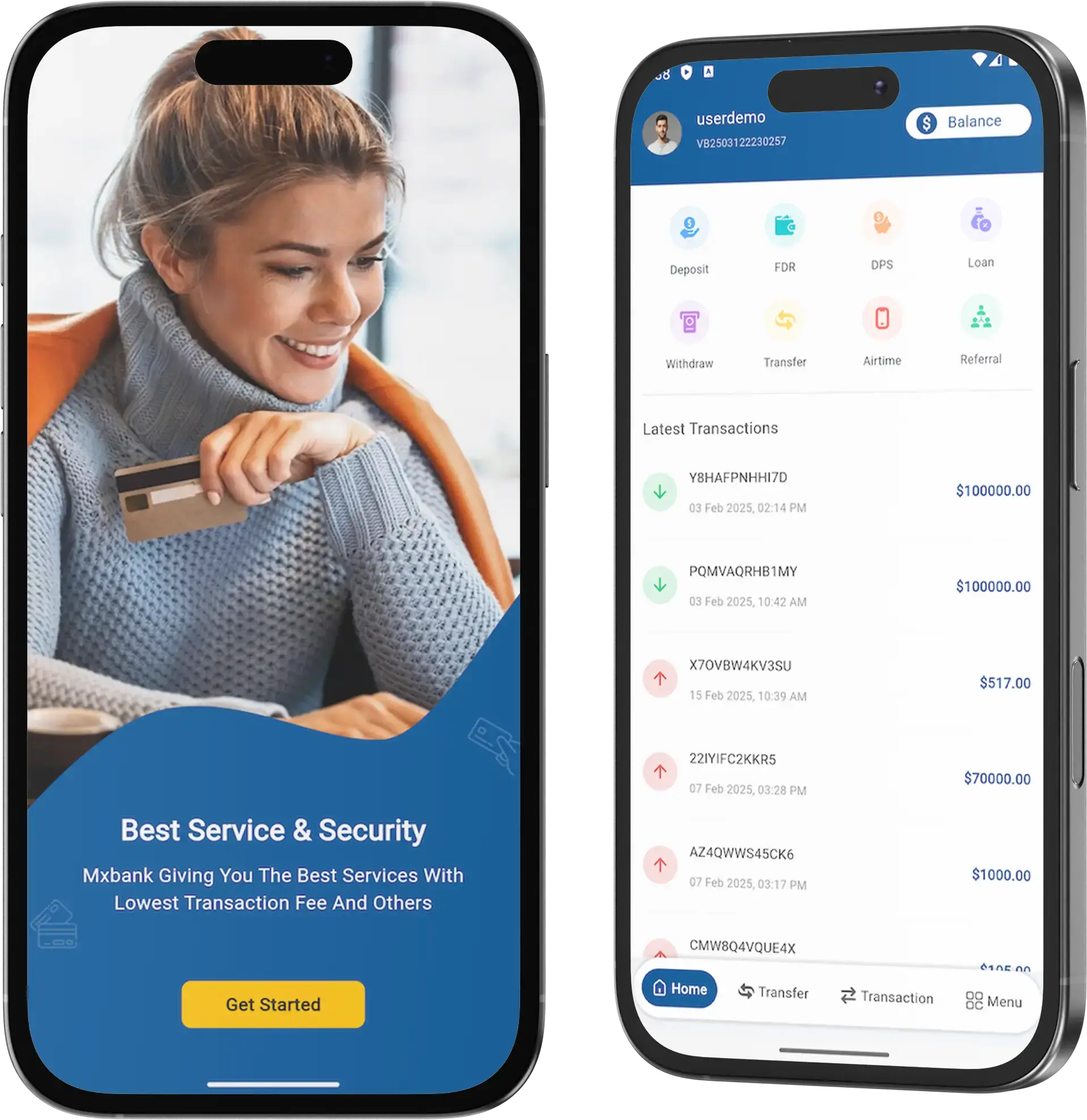









Banking Solution - Banking Made Simple – Anytime, Anywhere!
Access your money anytime with safe, reliable banking solutions. Make transactions in just a few clicks!
Elevate your financial institution’s capabilities with a professionally developed Banking Solution, offering a strategic advantage in today’s competitive landscape.
- Enhanced Efficiency: Streamline operations and optimize workflows for improved efficiency and productivity.
- Superior Customer Experience: Deliver personalized services and intuitive interfaces to exceed customer expectations and foster loyalty.
- Innovative Offerings: Stay ahead of market trends by integrating cutting-edge technologies and introducing innovative financial products and services.
- Strategic Growth: Position your institution for long-term success by tapping into new revenue streams and expanding market reach with agile and scalable solutions.
Comprehensive Digital Platform
Provide customers with a seamless digital banking experience, offering a wide range of services accessible across various devices, from account management to loan applications.
Robust Security Measures
Implement multi-layered security protocols and encryption techniques to safeguard sensitive data and transactions, ensuring peace of mind for both customers and the institution.
Personalized Financial Insights
Utilize advanced analytics to deliver tailored recommendations and insights, empowering customers to make informed financial decisions that align with their goals and preferences.
Agile Integration Capabilities
Enable seamless integration with third-party fintech solutions and APIs, allowing for rapid adaptation to evolving market trends and customer demands while enhancing operational efficiency
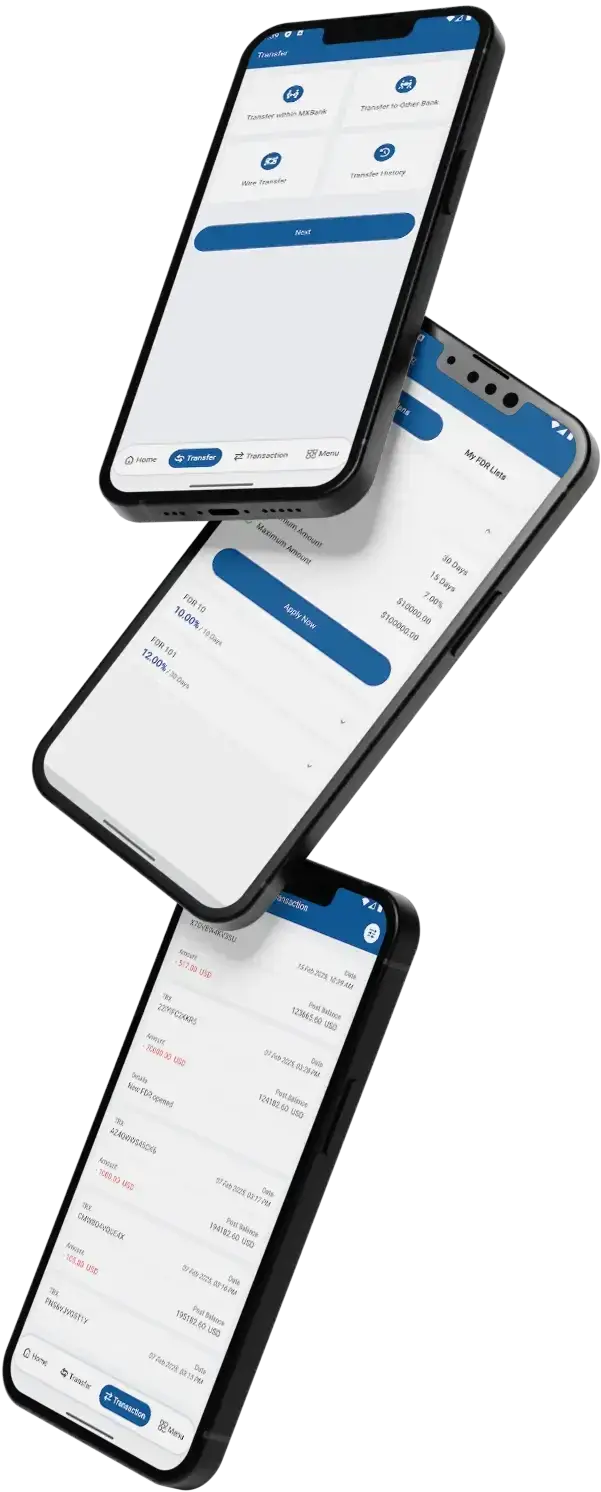
Key Features of Online Banking App Clone
Cutting-edge Features
that drive
Banking Solution Clone
Cutting-edge features in online banking solution scripts include real-time transaction monitoring, AI-driven financial insights, and biometric authentication for enhanced security, revolutionizing the digital banking experience. These advanced functionalities streamline banking operations, optimize user experience, and ensure robust security measures for users accessing their financial accounts remotely.
AI-Powered Personalization
Tailoring banking experiences to individual needs with artificial intelligence.
Blockchain Integration
Ensuring secure and transparent transactions with distributed ledger technology.
Biometric Authentication
Enhancing security and user experience with fingerprint or facial recognition.
Open Banking APIs
Facilitating seamless integration with third-party services for expanded functionality.
Chatbot Assistance
Providing instant support and guidance for customers through AI-driven chatbots.
Predictive Analytics
Anticipating customer needs and behaviors to offer proactive financial solutions.
Voice Banking
Enabling hands-free banking transactions and inquiries through voice-controlled interfaces.
Comprehensive Features Across Web, App, and Admin

Account Management: Users can view account balances, transaction history, and manage account settings such as account preferences, notifications, and security settings.
Transfer Funds: Users can transfer funds between accounts, schedule recurring payments, and set up one-time transfers to other accounts within the same bank or to external accounts.
Bill Payment: Users can pay bills electronically, set up automatic bill payments, and view past payment history, providing convenience and flexibility in managing financial obligations.
Mobile Check Deposit: Users can deposit checks remotely by capturing images of the front and back of the check using their mobile devices, accelerating the deposit process and eliminating the need to visit a physical bank branch.
Budgeting and Financial Planning Tools: Users can access budgeting tools, expense tracking features, and financial planning calculators to manage their finances effectively and achieve their financial goals.
Customer Support: Users can access customer support resources such as FAQs, live chat, or support tickets within the web panel for assistance with account-related inquiries or technical issues.
User Management: Admins can manage user accounts, permissions, and access levels, including the ability to add, edit, or deactivate user accounts as needed.
Transaction Monitoring: Admins can monitor transaction activity in real-time, flag suspicious transactions for review, and generate transaction reports for auditing and regulatory compliance purposes.
Security Settings: Admins can configure security settings such as password requirements, two-factor authentication, and session timeouts to enhance the security of the online banking platform and protect user accounts from unauthorized access.
Content Management: Admins can manage website content, including announcements, promotions, and informational resources, to keep users informed and engaged with the online banking platform.
Financial Product Management: Admins can manage financial products and services offered through the online banking platform, including loan products, savings accounts, and credit cards, with the ability to adjust rates, terms, and eligibility criteria.
Analytics and Reporting: Admins can access analytics dashboards and generate reports on user activity, transaction volume, customer demographics, and other key metrics to gain insights into platform performance and inform strategic decision-making.

Mobile Banking: Users can access account information, transfer funds, pay bills, and perform other banking activities directly from their mobile devices, providing convenience and accessibility on the go.
Mobile Wallet Integration: Users can link their mobile banking app with mobile wallet services such as Apple Pay, Google Pay, or Samsung Pay, enabling contactless payments and enhancing the shopping experience.
Biometric Authentication: Users can log in to the mobile banking app using biometric authentication methods such as fingerprint or facial recognition, adding an extra layer of security to account access.
Personalized Notifications: Users can receive personalized push notifications for account activity, transaction alerts, payment reminders, and other relevant updates, keeping them informed and engaged with their finances.
Branch and ATM Locator: Users can locate nearby bank branches and ATMs using GPS or search functionality within the mobile app, helping them find convenient access points for in-person banking services.
Mobile Check Deposit: Users can deposit checks remotely by taking photos of the front and back of the check using their mobile device’s camera, enabling quick and convenient deposit processing without visiting a physical bank branch.
User Flow of our Banking Solution Clone

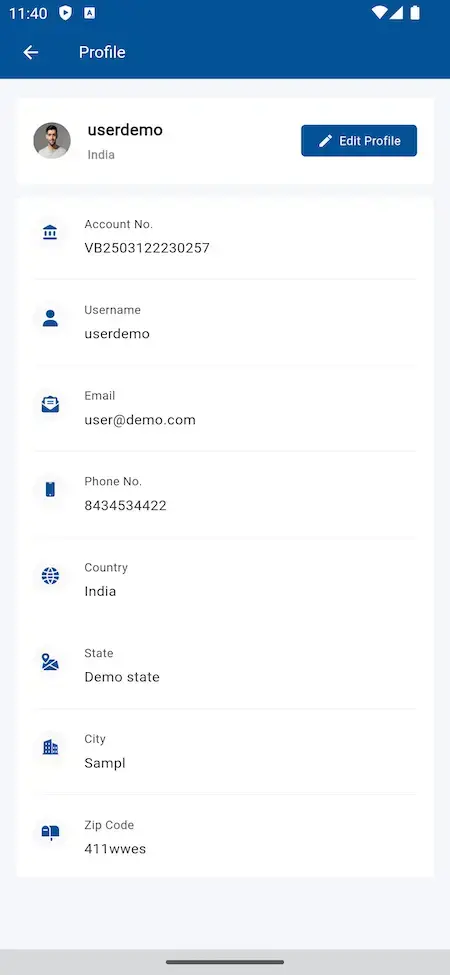
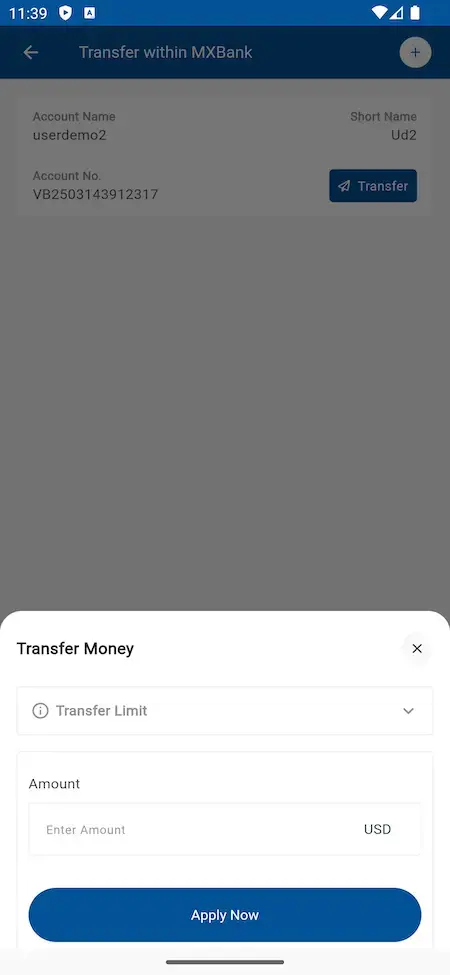
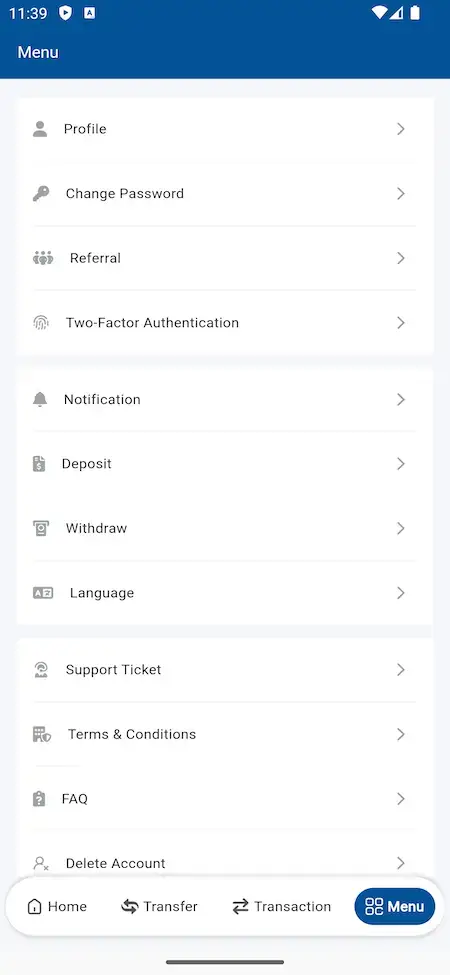
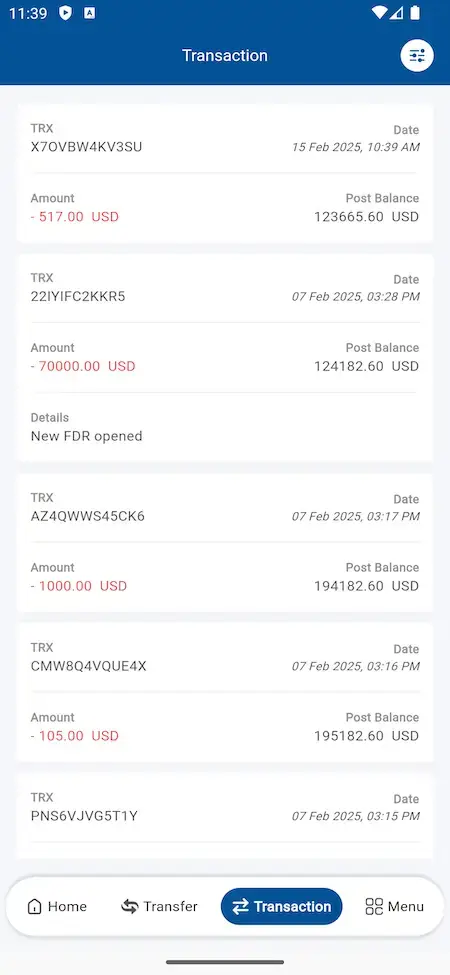

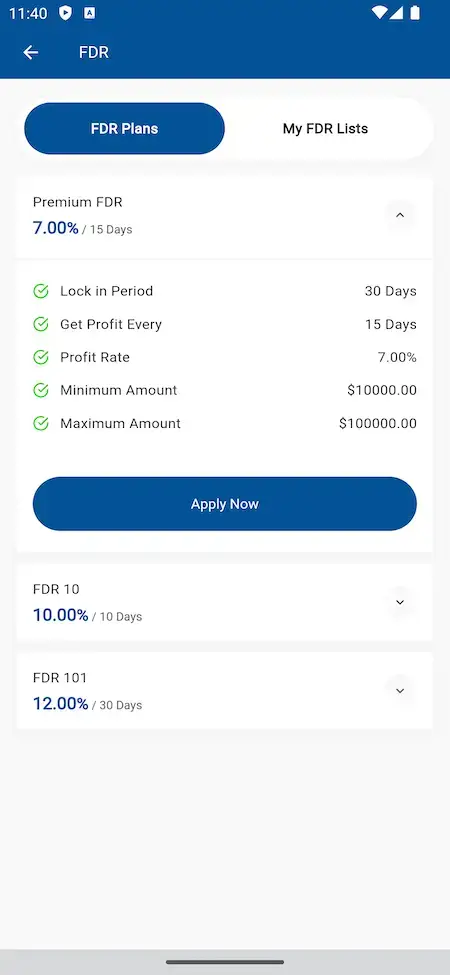
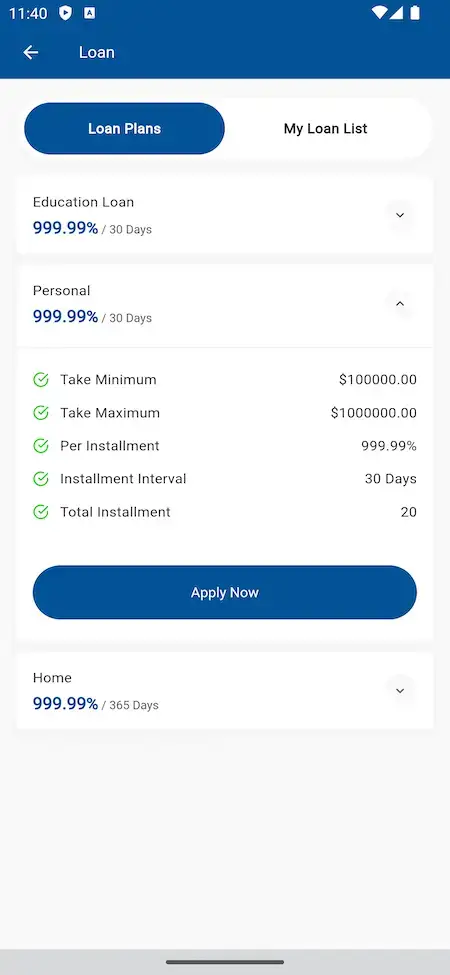
User Registration
New users sign up for the banking solution by providing basic information and creating login credentials.
Account Verification
Users verify their identity through secure methods such as email verification or SMS authentication.
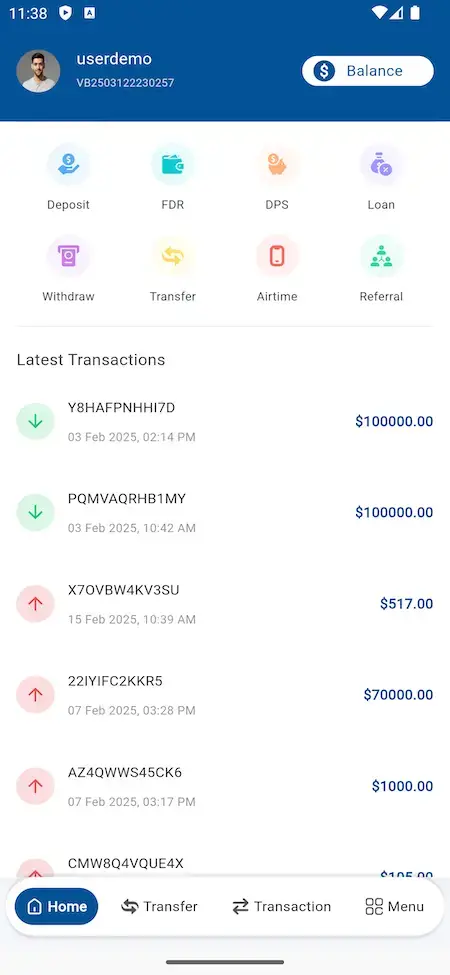
Dashboard Access
Upon successful verification, users gain access to their personalized dashboard displaying account summaries and recent transactions.
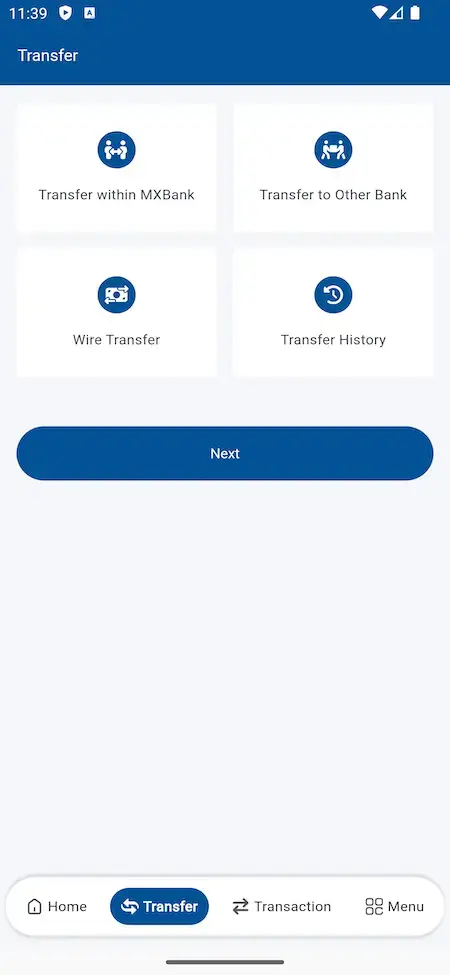
Transaction Initiation
Users initiate various transactions such as fund transfers, bill payments, or account deposits through the designated interface.
Security Confirmation
For sensitive transactions, users authenticate their identity using biometric verification or one-time passwords.
Transaction Review
Users review transaction details and confirm accuracy before finalizing the transaction.
Confirmation Receipt
Upon completion, users receive a confirmation receipt or notification verifying the successful execution of the transaction.
Feedback and Support
Users have the option to provide feedback or seek assistance from customer support if needed, ensuring a seamless banking experience.
Benefits and Seamless Implementation
Ready
Pre-built and readily available, reducing development time and enabling quick implementation.
Now
Immediate access to modern technologies, enabling businesses to stay current and competitive.
Set
Configured to suit specific needs, minimizing the need for extensive customization before deployment.
In
Customization to suit own needs is essential for everyone and we do it all for you.
Go
Once deployed, can be quickly integrated into existing systems, enabling seamless adoption.
Time
Readymade Approach saves you a deal of time and gives you edge with early launch.
Demo Video in Action
Access Demo
Web Panels
Explore the multiple web panels of the solution
Technology Stack
Web & Admin
PHP with Bootstrap Framework | NodeJS | MySQL & MongoDB
Android Apps
Flutter Full Components Apps with Latest Dependencies
iOS App
Flutter Full Components Apps with Latest Dependencies
3rd Party API
Google Maps, Twilio, Firebase, Pay Api, Translate & MTR.

Deliverables - What You'll Get
Web Panels
Explore the multiple web panels of the solution
Free Deployment
We do complete rebranding of your web and apps with your logo, icons & color scheme and deploy them.
Source & Project Codes
We provide you with complete source codes with no encryption so you can work on them as per your custom needs.
Apps Publishing
We take care of publishing your apps in both the stores on your developer accounts and get them approved.
Support Timeline
We include 60 days of dedicated platform guidance, 6 months of priority bug resolution and 12 months of continuous product evolution at no extra cost.
Addons Available
Provide access to financial education resources such as articles, videos, and webinars within the banking solution script, empowering users with knowledge and skills to make informed financial decisions.
Clients Love Us For Our Commitment
To Deliver Transformative Excellence
Every HMS I tried was built for general physicians, with no lesion mapping, no before/after tracking, and no procedure-based billing. Their MXHealth base gave us the patient app, doctor app, EMR and video consult out of the box. Front-desk time on scheduling and follow-ups is down ~70%, and we went fully digital in 9 months, where a fully custom job would have been 18.

Dr. Vivek Rungta
Founder & Chief Dermatologist, Dermacian
Turo is the obvious reference, but the Caribbean specifics, from different insurance norms to different payment rails, meant we needed a real partner, not just a clone. Miracuves’s MXRental base covered the listing, the trip flow, and the host payouts. We launched in 10 weeks and are live in three islands.

Andre Gittens
CEO, Ride Corporation
The team was running it on a dispatcher and a Google Sheet, and we needed a real platform quickly, because we were about to onboard a major retail client. Miracuves’s Delivery Genie base gave us the rider app, the dispatch console, and live tracking. We launched in 6 weeks and cleared 4x the previous order volume in the first month.

Marsha Williams
Founder, Bmore On Demands LLC
We were running it on phone calls and a paper calendar, and we were losing bookings to bigger OTAs. Miracuves’s GetmyBoat Clone base gave us the calendar, the booking flow, and the payment engine. Online bookings are up roughly 70% in the first six months, and the ops team finally has a live view of the fleet.

Tiffany Dandrea
Operations Director, Best Cabo Yacht Rentals
Building a compliant telehealth stack from scratch in three markets would have been a year-plus effort. Miracuves’s MXHealth base covered the patient and doctor apps, video consult, e-prescription and the pharmacy integrations. We launched in our first market in 9 weeks and rolled out to two more in the following six months.

Dr. Carlos A. Palermo
Co-founder & CEO, Doctta Health
We were juggling spreadsheets, a third-party GPS provider, and a phone. We needed a single operations console. Miracuves’s MXLogistics base covered the trip lifecycle, the driver app, and the customer tracking page. We’ve cut operations admin time by about 40%.

Brian Lataille
VP Logistics Technology, IBC Tanks Canada


Why Choose Miracuves
Fully Customizable
Miracuves provides customization services to ensure that our clients get the exact features & flows they need for their specific needs.
Complimentary Tech Support
At Miracuves we ensure that all your support needs are met in time and with discretion to ensure no downtime.
Free Bug Support
Miracuves provides complimentary bug support timeline to clients to ensure that the platform runs smoothly and without any issues.
Complete Source Code
Miracuves ensures you get complete usage ownership of the Banking Solution clone by offering you the complete source code.
Custom development requires a high budget but our ready-made clone script comes with ample features and free rebranding service at a budget price.
Waiting is boring, that is why we bring you this ready-to-launch clone script which is completely customizable as per your needs.
We have vast experience in developing cryptocurrency-based applications to make your deployment capable enough to boost your crypto trading business.
We know the seriousness of security in the current times of data breach. That is why we have already verified our clone script with rigorous security testing.
Our dedication to providing a comprehensive solution, we’ve also optimized the script for enhanced speed, ensuring that users experience swift and efficient performance.
Combining al the key points we come to the stage of efficient functioning solution which delivers the right purpose and functions for everyone.
Why Our Premium Banking Script Over Custom Development?
Cost Effective
Custom development requires time and budget with our ready-made Banking Solution clone script get all features and rebranding service at a pocket friendly price.
Time to Market
Our ready-to-launch Banking Solution clone script is completely customizable as per your needs and is constantly updated to meet market standards.
Expertise
Having vast experience in developing complete Banking Solution apps to provide, Banking solution clone capable enough to boost your online banking for customers and branches.
Security
We know the seriousness of security in Banking Solution apps. That is why we do QAT & various Code Assesments on the Banking solution clone script to keep data safe.
Insights For Online Banking Platform Entrepreneurs
- Concept
- Feature
- Capabilites
- Inclusions
- Marketability
- Revenue
- Prospects
A banking software solution is a comprehensive digital infrastructure that enables banks, fintech firms, and financial institutions to provide seamless and secure banking services. With the increasing demand for digital-first financial solutions, this platform offers customized banking operations, automated transactions, and real-time financial management for individuals and businesses.
Core Banking System (CBS): Manages accounts, transactions, and financial operations.
Digital & Mobile Banking: Provides secure mobile apps and web interfaces.
Automated Loan & Credit Management: Streamlines lending and credit approvals.
AI-Driven Fraud Detection & Risk Assessment: Enhances security.
Multi-Currency & International Transactions: Enables global banking.
KYC & AML Compliance Integration: Ensures regulatory adherence.
Blockchain-Based Security & Smart Contracts: Adds transparency and security.
Embedded Finance & Open Banking APIs: Expands fintech partnerships.
AI-Powered Chatbots & Customer Support: Improves user engagement.
Real-Time Analytics & Financial Insights: Enhances decision-making.
A banking software platform transforms traditional banking into a fast, secure, and fully automated ecosystem for the digital age.
A fully integrated banking software offers:
Multi-Account Management & Digital Wallets: Users can manage multiple accounts effortlessly.
Secure Fund Transfers & Instant Payments: Supports domestic & cross-border transactions.
AI-Powered Credit Scoring & Loan Approval: Enhances lending processes.
Real-Time Notifications & Transaction Alerts: Keeps users informed.
Customizable User Dashboards & Financial Planning Tools: Enhances user experience.
Seamless Integration with Payment Gateways: Supports various payment methods.
Multi-Tier Authentication & Biometric Security: Strengthens account safety.
Robust API Framework for Third-Party Integrations: Enhances flexibility.
AI-Based Risk Management & Fraud Prevention: Ensures transaction security.
Regulatory Compliance & Tax Automation: Simplifies compliance management.
A banking software system ensures secure, flexible, and scalable financial operations for modern institutions.
A scalable and high-performance banking software enables:
Cloud-Based & On-Premise Deployment: Provides operational flexibility.
24/7 Secure Access Across Multiple Devices: Supports mobile & web banking.
AI-Driven Financial Insights & Budgeting Tools: Empowers users with analytics.
Seamless API Integration with Fintech Services: Expands banking functionalities.
Personalized Banking Solutions with AI-Based Automation: Improves efficiency.
Multi-Language & Multi-Currency Support: Enhances global usability.
High-Speed Transaction Processing & Instant Settlements: Reduces operational delays.
Customizable Workflows for Banking Operations: Enhances business adaptability.
Blockchain-Powered Secure Transactions & Smart Contracts: Increases transparency.
Data Encryption & Cybersecurity Protection Measures: Ensures robust security.
A comprehensive banking software solution delivers efficiency, security, and innovation to financial institutions.
A ready-to-deploy banking solution package includes:
User & Admin Dashboard with Customizable Modules: Enhances usability.
Mobile Banking & Web-Based Banking Applications: Supports seamless banking.
Automated Loan Processing & Credit Management System: Speeds up approvals.
Payment Processing Gateway Integration: Enables diverse payment options.
AI-Powered Risk Assessment & Fraud Detection Tools: Improves security.
Automated Tax Calculation & Compliance Reporting: Simplifies regulations.
Multi-Currency Support & Forex Trading Integration: Expands global reach.
API Framework for Open Banking & Third-Party Services: Enhances connectivity.
Live Chat, AI Chatbot & Customer Support Modules: Ensures smooth operations.
Real-Time Analytics Dashboard for Financial Insights: Improves decision-making.
A next-gen banking solution is designed to streamline operations, enhance customer satisfaction, and drive financial innovation.
A strong market demand for digital banking solutions is fueled by:
Growth in Fintech & Digital-Only Banking Trends: Increasing preference for online financial services.
Rising Adoption of AI & Automation in Banking: Enhances efficiency.
Open Banking & API-Based Financial Services Expansion: Enables seamless integrations.
Increase in Cross-Border Transactions & Multi-Currency Payments: Boosts global transactions.
Integration of Blockchain & Smart Contracts in Banking: Adds transparency & security.
Emergence of Embedded Finance & Banking-as-a-Service (BaaS): Creates new business models.
Mobile-First Banking Demand & Super App Growth: Expands customer reach.
Regulatory Compliance & Fraud Prevention Technologies: Ensures safe banking.
Neobank Growth & Digital Wallet Adoption: Increases financial inclusivity.
AI-Powered Personal Finance & Wealth Management Tools: Improves user experience.
A modern banking solution provides financial institutions with competitive advantages, enhanced security, and customer-centric services.
A banking software platform generates revenue through:
Subscription-Based SaaS Model for Banks & Fintechs: Recurring revenue stream.
One-Time Licensing Fee for Full Banking Software Deployment: Direct ownership model.
Transaction-Based Fees on Payments & Transfers: Revenue from usage.
Commission-Based Earnings from Loan & Credit Processing: Profit from lending operations.
API Monetization for Open Banking Integrations: Expands partnerships.
Premium Customization & White-Label Solutions: Additional revenue from branding.
Affiliate & Referral Programs for Financial Institutions: Expands market reach.
B2B Partnerships with Neobanks & Digital Wallets: Drives cross-industry collaborations.
Microtransaction Fees for Forex & Cryptocurrency Transactions: Adds new revenue streams.
Embedded Finance Services & BaaS Offerings: Supports fintech innovation.
A fully scalable banking solution ensures long-term profitability and innovation-driven growth.
A next-gen banking solution will evolve with:
AI-Driven Hyper-Personalized Banking & Financial Management: Enhances user engagement.
Blockchain-Powered Decentralized Banking Systems: Introduces security & transparency.
Metaverse & Virtual Banking Services for Digital Transactions: Expands future banking landscapes.
Real-Time Crypto & Digital Asset Banking Integrations: Supports decentralized finance (DeFi).
5G & Edge Computing for Ultra-Fast Banking Operations: Optimizes transaction processing.
Voice-Activated & Biometric Banking Solutions: Enhances accessibility.
AI-Based Robo-Advisory & Automated Investment Tools: Improves financial decision-making.
Expansion of Central Bank Digital Currencies (CBDCs) in Banking Systems: Redefines digital currencies.
Autonomous Finance & AI-Powered Loan & Risk Management Systems: Drives financial automation.
RegTech & Compliance Automation for Seamless Regulatory Adherence: Simplifies banking regulations.
A future-ready banking platform offers AI-driven automation, secure transactions, and scalable financial solutions for a digital-first world.
Our Development Process for Banking solution Clone App
Requirements Gathering
We start by understanding your requirement in regards to purpose, goals and future targets. Following the same we start customizing our Online Banking solution Clone script to match to your specific needs.
Design
Our next step is the designing part where our skilled designers will understand your creative needs and will work with you closely to get the idea in ui/ux design ready to implement.
Development
At this stage, Miracuves start the rebranding process as we offer a ready-to-launch Online Banking solution Clone App. Here we do setup, configurations and required modifications as agreed.
Testing
We use a rigorous testing process to ensure that the Online Banking solution clone is completely free of bugs and meets all of your requirements before it is deployed on your requested servers.
Deployment
Once the quality team passes us the green signal we will proceed to the deployment process, ensuring your Online Banking solution clone is smoothly deployed and runs as you have wanted.
Support & Maintainence
We offer 60 days of free support and maintenance services including technical support, and bug support to ensure that your Online Banking clone continues to meet your business goals.
Check Out Our Full Range of App Clone Solutions



Check Out Other Solutions Offered By Miracuves
Miracuves offers a comprehensive suite of ready-to-deploy solutions tailored for seamless functionality across various industries. Designed with user-friendliness at their core, our products enhance efficiency and simplify processes, ensuring a hassle-free experience for all your business needs
Frequently Asked Questions & Release Log
We offer comprehensive post-purchase support, including setup assistance, troubleshooting, and regular maintenance updates. You can opt for our extended support packages to ensure your platform remains up-to-date with the latest security and feature enhancements.
Yes. Our platform supports multiple payment gateways and banking networks for seamless fund transfers, utility bill payments, and more. Users can also schedule recurring payments or set up auto-debits for various services.
- [ADD] Download Statement from User Panel
- [ADD] Download Statement from Branch Staff Panel
- [ADD] Statement Download Fee (Applicable for Downloads via Branch Staff Panel)
- [FIX] Loan approved notification system
- [FIX] Policy page showing issue
- [FIX] Withdrawal page error in Admin Panel
- [FIX] Manual payment gateway duplicate currency showing issue in User Panel
- [ADD] Export table data in CSV/Excel/PDF
- [ADD] Filter table data by necessary columns for almost all tables
- [ADD] Selectable columns to show on tables
- [ADD] Sort table data by specific columns
- [ADD] Option to select how many rows to show in a table
- [ADD] Login with Google, Facebook, LinkedIn accounts
- [ADD] Configure XML sitemap
- [ADD] Configure robots.txt
- [ADD] In-App purchase for mobile app
- [ADD] Upload flag for languages
- [ADD] “Added On” column on Branch Staff list table
- [ADD] Date-wise filter on deposit & withdraw chart on Admin Dashboard
- [ADD] Date-wise chart on transaction report chart on Admin Dashboard
- [ADD] Notify filtered users
- [ADD] Option to set how many rows will show on one page in pagination from general settings
- [ADD] Option to set the format for showing amount with currency from general settings
- [ADD] View KYC Data, Login As User, View Login History, Send Notification, View All Notifications options from Accounts table
- [ADD] Search roles table data by name
- [ADD] “Closed On” column on FDR list table
- [ADD] Upload image for maintenance mode page
- [ADD] Search option on subscribers table list
- [ADD] “Account Number” and “Opened On” columns on support ticket list table
- [ADD] Binance Payment Gateway
- [ADD] Aamarpay Payment Gateway
- [ADD] SslCommerz Payment Gateway
- [ADD] Slug management for Policy Pages
- [ADD] SEO Content Management for Policy Pages
- [ADD] Input types Number, URL, Date, and Time in the Form Generator
- [ADD] Configurable input field width in the Form Generator
- [ADD] Configurable hints/instructions for input fields in the Form Generator
- [ADD] Sorting option for input fields in the Form Generator
- [ADD] Automatic system update
- [ADD] Upload logos for payment methods
- [ADD] Upload logos for withdrawal methods
- [ADD] Resend code countdown on verification pages
- [ADD] Banned page for admin staff
- [FIX] FDR count on user details page
- [FIX] Page title for KYC pending users
- [FIX] Redirecting to OTP page even though sender’s account has insufficient balance for withdrawal
- [FIX] Invalid page title issues on branch staff panel
- [REMOVE] Account number on breadcrumb from Crystal Sky template
- [REMOVE] Remember me option for admin
- [UPDATE] Referral Settings UI
- [UPDATE] Improved UI for roles form
- [UPDATE] Manage Referral Settings in a single form
- [UPDATE] User Experience of the Admin Sidebar
- [UPDATE] Showing current fund on Admin Dashboard
- [UPDATE] Only super admin can configure cron
- [UPDATE] Notification sending process
- [UPDATE] Improved menu searching functionality on the Admin Panel
- [UPDATE] User Experience of the select fields on the Admin Panel
- [UPDATE] Centralized settings system
- [UPDATE] Form Generator UI on the Admin Panel
- [UPDATE] Google Analytics script
- [UPDATE] Notification Toaster UI
- [UPDATE] Support Ticket Attachment Upload UI
- [UPDATE] Notification Template Content Configuration
- [UPDATE] Overall User Interface of the Admin Panel
- [UPDATE] Grouped insights and analytics on Admin Dashboard
- [UPDATE] Search admin staff by name, email, role
- [UPDATE] Showing Phone, Fax, Routing No., Swift Code, Address, Added On column on All Branches list table
- [UPDATE] Pagination design in admin panel
- [UPDATE] Search Branch Staff by name
- [UPDATE] Showing State, City, Zip, Registered At column on Accounts list table
- [UPDATE] Search accounts by full name
- [UPDATE] Change UI for deposit money page for account holders
- [UPDATE] Change UI for withdraw money page for account holders
- [UPDATE] Change the menu name from Airtime to Mobile Top Up
- [UPDATE] Show current balance on transfer forms
- [UPDATE] Date range option on transactions filter
- [PATCH] Laravel 11
- [PATCH] PHP 8.3
- [PATCH] Latest System Patch
- [ADD] Airtime Top-up Through a Third-Party API
- [Fix] Cron-Commands Execution
- [Fix] Adding New Languages
- [Fix] Deposit Issue Fixed
- [PATCH] Latest System Patch
- [PATCH] Latest Security Patch
- [ADD] Automatic logout from user account if idle for a certain time
- [FIX] Showing wrong value in the transaction log
- [FIX] Showing error in notification body
- [FIX] Showing error in notification body from user panel
- [FIX] Showing error in language from admin panel
- [FIX] Due installment issue in fdr
- [FIX] Changing password from user panel from indigo_fusion template
- [FIX] Mobile code changing issue from indigo_fusion template on the registration page
- [FIX] SEO content updating issue
- [FIX] Showing error in dynamic form data
- [ADD] New frontend Template
- [ADD] New ui for user panel
- [FIX] Demo login credentials removed from branch staff login page
- [FIX] 404 error in the transfer history page if any transfer module is disabled
- [ADD] Report Download Pdf From The User’s Panel
- [ADD] Beneficiary Updated From The User Panel
- [ADD] Report Download Pdf Csv From The Admin Panel
- [ADD] Show KYC-verified Users
- [ADD] Multiple Staff Module
- [ADD] Role Permission Module
- [ADD] Update Uploader
- [ADD] Dynamic Cron Setting
- [ADD] BTCPay Payment Gateway
- [ADD] NOWPayments Payment Gateway
- [ADD] Group Distinct Mail Sending Option
- [PATCH] Notification System
- [PATCH] Latest Laravel Version
- [PATCH] Latest PHP Version
- [FIX] Showing the invalid final amount of other bank transfers.
- [FIX] Small fractional values rounding to integer numbers in Transfer charge.
- [FIX] Invalid table header in transaction table of branch panel.
- [ADD] Push notification added.
- [ADD] API added for Bank mobile app.