













Byju's Clone App - White-Label K-12 Learning Platform
EdTech Clone Script with Live Classes, Question-Bank Quizzes, Noticeboard and Admin Panel
A white-label learning app built around the school day. Students join live classes, practice with quizzes drawn from a question bank, read the noticeboard and keep an eye on their own progress, while teachers run sessions and tests and the owner follows it all from one admin panel.
One codebase serves the student website and app, the instructor app and panel, and the admin panel. It is delivered rebranded to you, with the complete source code, and goes live in 6 days.
Launch in 6 Days with
- 60 Days Platform Guidance
- Complete Source Code
- Complete Rebranding
- Complete White-Labeling
- App Publishing Support
- 6 Months Bug Fixes + 12 Months Updates
Classroom activity
- Live class startedClasses
- Paid meeting bookedMeetings
- Quiz results postedQuizzes
- Webinar reminder sentReminders
- New student approvedStudents
- Noticeboard post publishedNoticeboard
- Course purchasedOrders
- Certificate issuedCertificates
- Live class startedClasses
- Paid meeting bookedMeetings
- Quiz results postedQuizzes
- Webinar reminder sentReminders
- New student approvedStudents
- Noticeboard post publishedNoticeboard
- Course purchasedOrders
- Certificate issuedCertificates

The Platform in Numbers
our build time, store review is separate
Zoom, BB, Jitsi and Google counted on the dashboard
Home, Courses, Categories, Cart and Settings
delivered whole, nothing encrypted
A Classroom With Roles
Students, instructors and the admin each sign in to their own panel. Students can be approved before they enter, and an edited course waits for the admin to accept it.
Practice, Test, Review
A question bank feeds quizzes that include true-false questions, quiz reports show how a class did, and the admin certificate report covers attendance as well.
01Try it now
Hands-On Demo
Try the Byju’s Clone - Student, Instructor & Admin Demos
Two demo logins are open, one for a student and one for an instructor. Use the student one to browse the catalog and open a course, then move to the teacher side to see where classes and courses are set up. For the admin side, ask us for the login when we speak.

Byju’s Clone - Student App
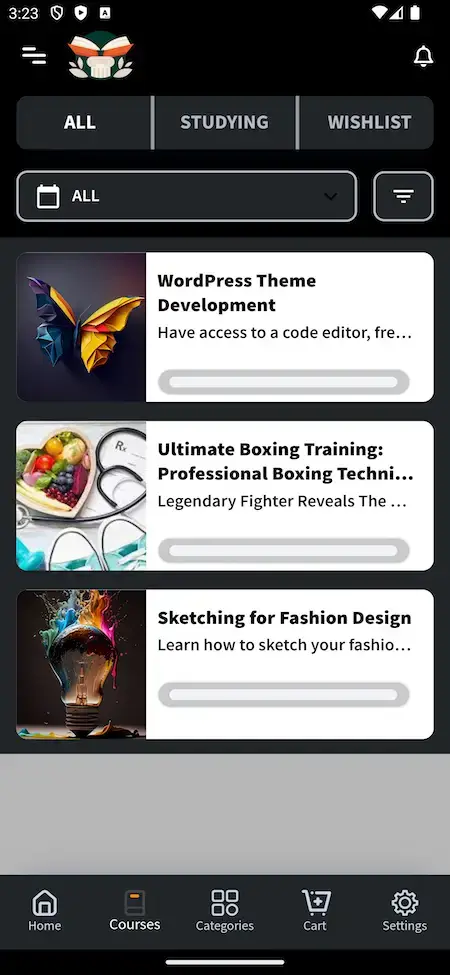
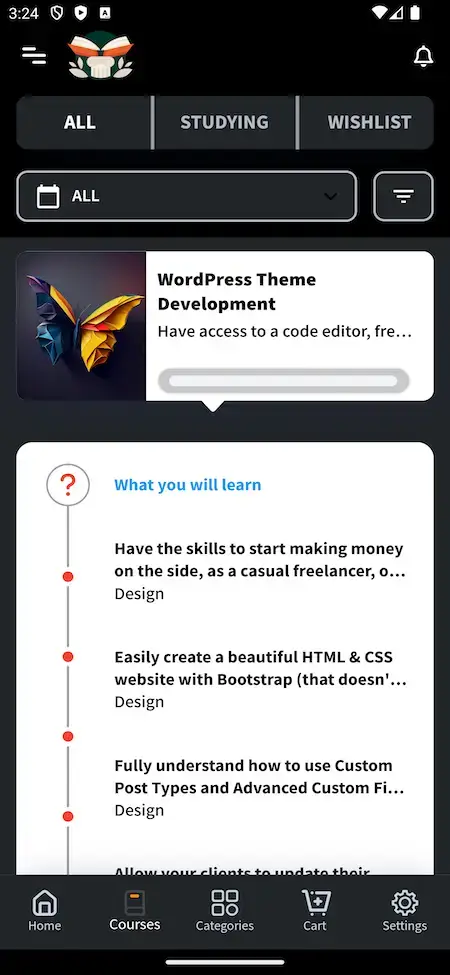
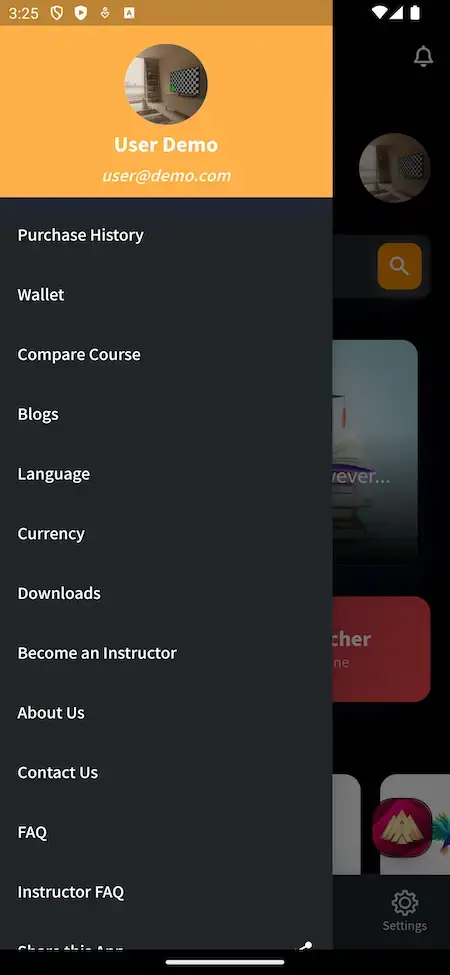
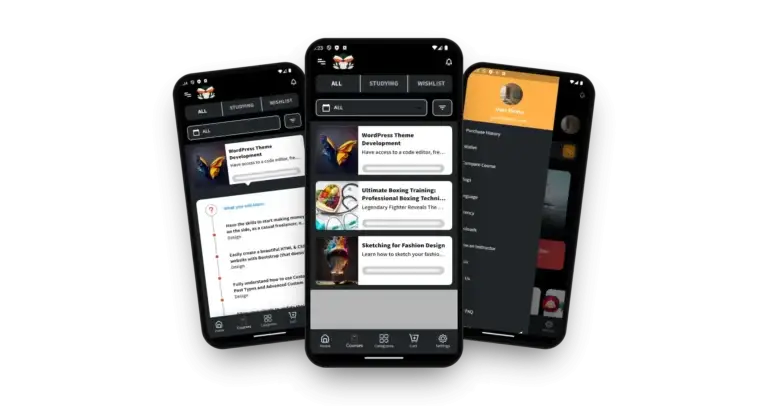
The learner's phone: a home screen with course search, categories, the All, Studying and Wishlist lists, course pages with lesson outlines, institutes and a side menu for wallet, history and downloads.
- 1Choose your phone on the app portal
- 2Log in as the demo student
- 3Tap through Home, Courses, Categories, Cart and Settings
user@demo.com | User_321
Byju’s Clone - Instructor App
The teacher's phone: the same portal with an instructor role, where an approved teacher runs their own courses, uploads lessons and quizzes and sets the prices.
- 1Choose your phone on the app portal
- 2Log in as the demo instructor
- 3Follow courses, lessons, quizzes and enrollments
instructor@demo.com | Instructor_321
Public Site & Teacher Panel
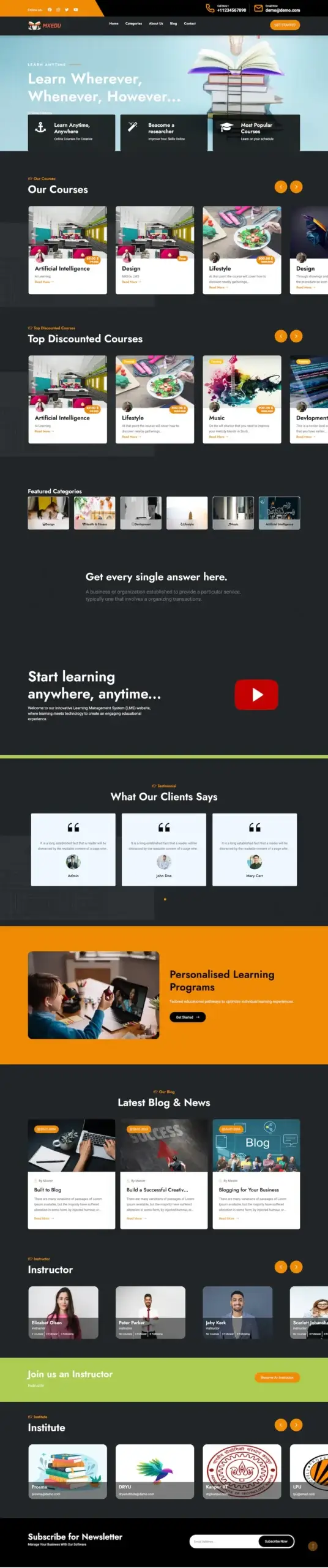
The responsive public site with course rows, discounted courses, a video block, instructors and institutes, plus the instructor panel for teachers who prefer a desktop.
- 1Load the demo site in a browser tab
- 2Log in with either demo account from the phone cards
- 3Scan the course sections, institutes and teacher tools
the two phone-app logins work here too
Admin Console - Users, Courses, Meetings & Certificates
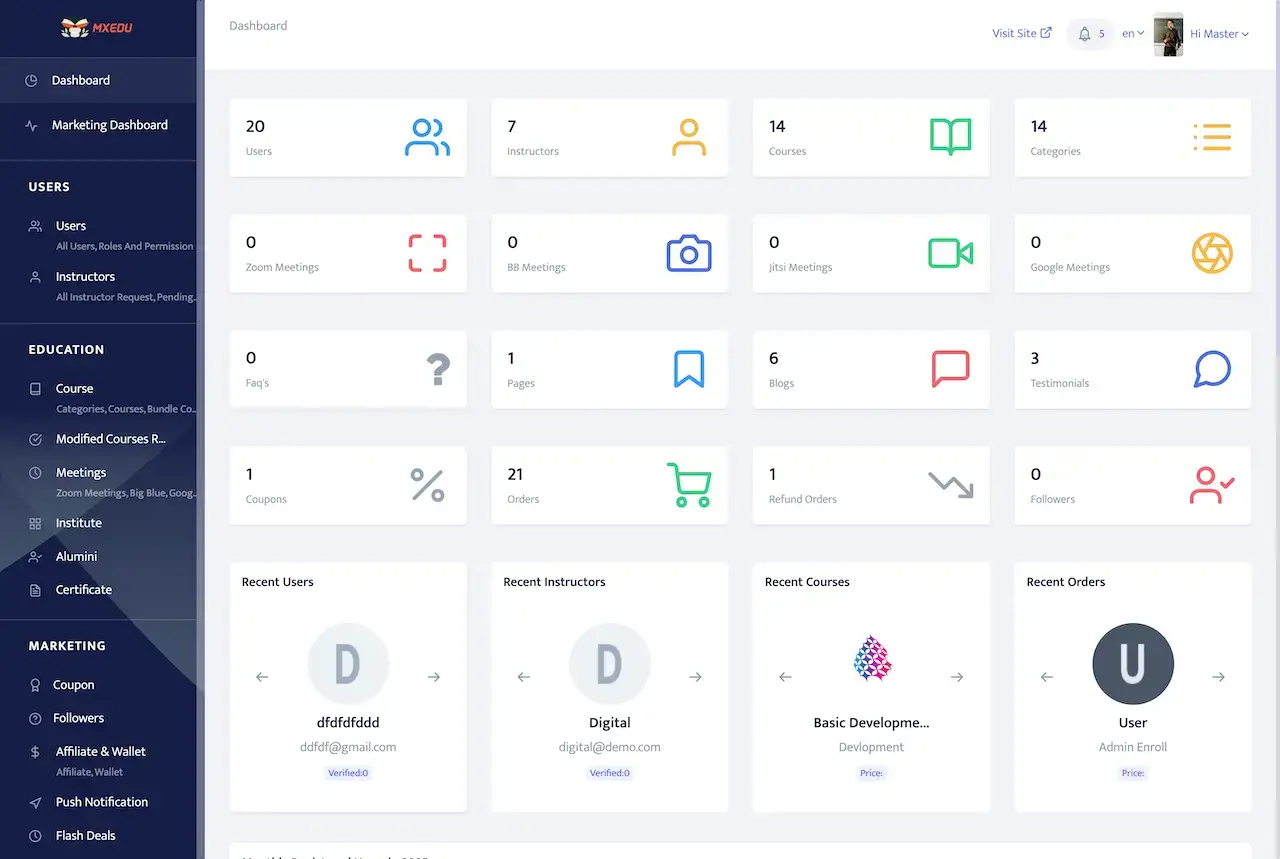
The operator console: tiles counting users, instructors, courses, orders and coupons, meeting tiles for Zoom, BB, Jitsi and Google, and sidebar modules for institutes, alumni, certificates and marketing.
- 1Find the login page on the demo site
- 2Request the admin credentials from us
- 3Review the dashboard, courses, meetings and certificates
ask the team for the credentials
See It With Us
Byju’s Clone Walkthrough: Live Classes, Quizzes, Noticeboard & Admin Panel
A live call shows the entire classroom faster than clicking around alone. We open the student app, the teacher side and the admin panel and hold each one up against your plan: your classes, your teachers, your pricing and your launch date.
Schedule a live walkthrough call.Every Screen Mapped
Byju’s Clone App Flows - Home, Courses, Institutes, Admin Dashboard & Website
Nine real phone screens, the admin dashboard and the public student site. Scroll through them to see how a course is found, opened, priced and followed up.
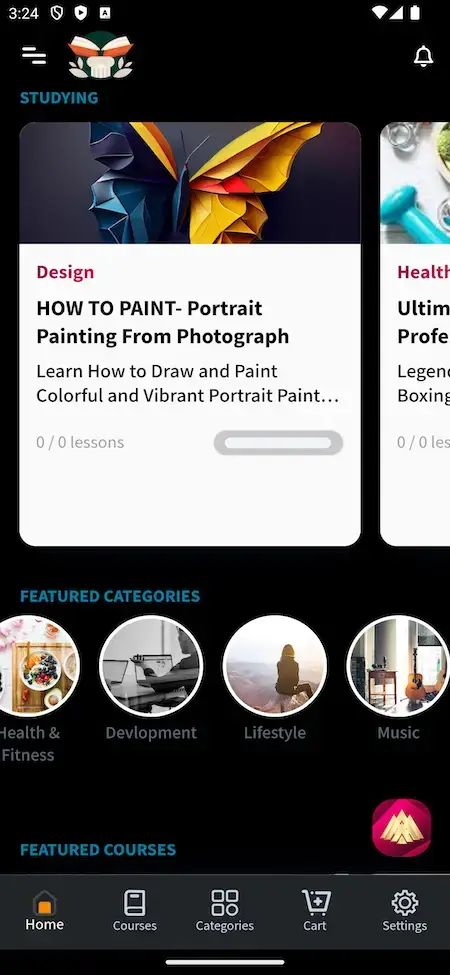
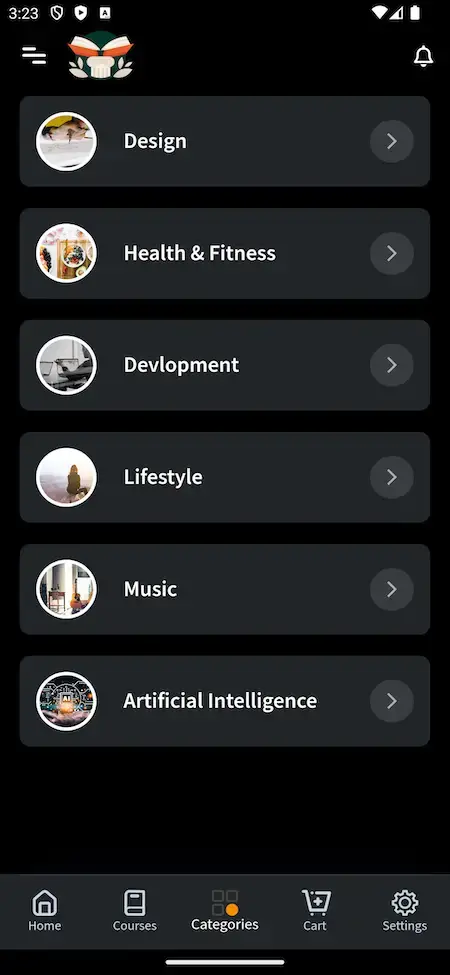
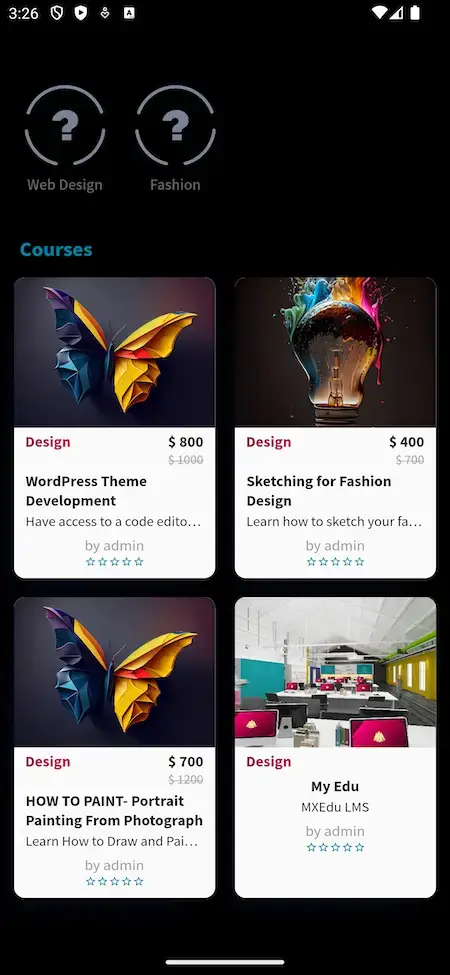
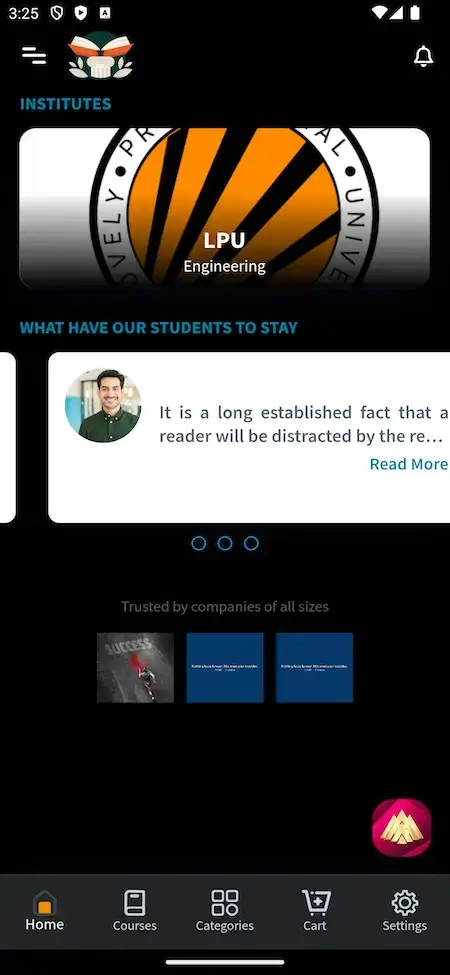
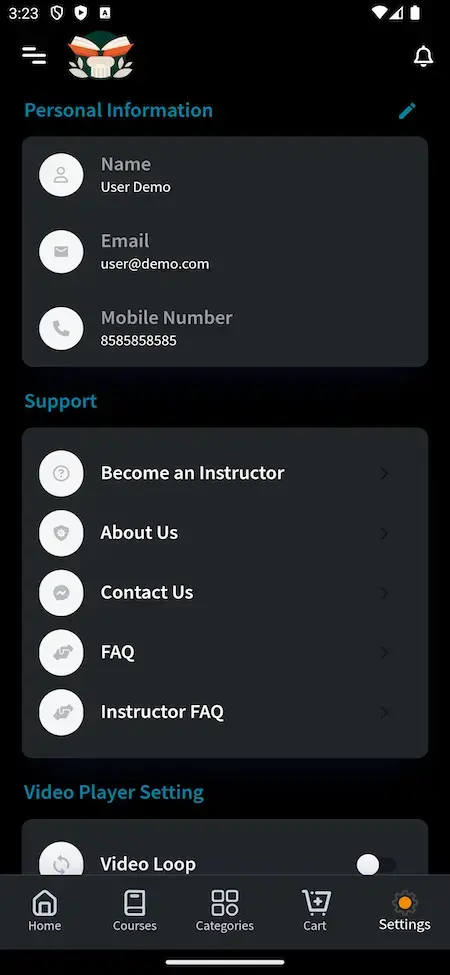


Trace a student from the home search through categories, a course page and a priced list to institutes and the profile menu, and trace an admin from the counts on the dashboard to the modules in its sidebar.
02Proof
Client Voices
Byju’s Clone Client Reviews - Founders on Building With Miracuves
Real words from clients who built on Miracuves bases. Two come from learning and coaching businesses; the other six come from other industries and none describes this exact product. Every quote appears exactly as its author gave it.
“Video, calendar and payments are the three things that are hard to get right, and their base had all three. We added coach verification, the matching quiz and package pricing. Live in under a month, and coach churn dropped because the experience is finally consistent.”
“Tower University is an online learning platform with a Netflix-style UX — courses as 'shows', recommended paths, and a polished streaming experience. The shape of the product is well-known, but the combination of LMS and OTT is genuinely hard to build. Miracuves's MXFlix + MXLearn combination gave us the player, the catalog, the user progress tracking, and the quiz/assignment layer. We added our path-recommender, our cohort-management module, and a custom certificate engine. We launched in 12 weeks. Course completion rates are 2x what we used to see on our old platform, and learners actually come back to finish.”
“Every HMS I tried was built for general physicians, with no lesion mapping, no before/after tracking, and no procedure-based billing. Their MXHealth base gave us the patient app, doctor app, EMR and video consult out of the box. Front-desk time on scheduling and follow-ups is down ~70%, and we went fully digital in 9 months, where a fully custom job would have been 18.”
“Turo is the obvious reference, but the Caribbean specifics, from different insurance norms to different payment rails, meant we needed a real partner, not just a clone. Miracuves’s MXCar base covered the listing, the trip flow, and the host payouts. We launched in 6 working days and are live in three islands.”
“The team was running it on a dispatcher and a Google Sheet, and we needed a real platform quickly, because we were about to onboard a major retail client. Miracuves’s Delivery Genie base gave us the rider app, the dispatch console, and live tracking. We launched in 6 weeks and cleared 4x the previous order volume in the first month.”
“We were running it on phone calls and a paper calendar, and we were losing bookings to bigger OTAs. Miracuves’s GetmyBoat Clone base gave us the calendar, the booking flow, and the payment engine. Online bookings are up roughly 70% in the first six months, and the ops team finally has a live view of the fleet.”
“Building a compliant telehealth stack from scratch in three markets would have been a year-plus effort. Miracuves’s MXHealth base covered the patient and doctor apps, video consult, e-prescription and the pharmacy integrations. We launched in our first market in 9 weeks and rolled out to two more in the following six months.”
“We were juggling spreadsheets, a third-party GPS provider, and a phone. We needed a single operations console. Miracuves’s MXLogistics base covered the trip lifecycle, the driver app, and the customer tracking page. We’ve cut operations admin time by about 40%.”
What We Can Show
Byju’s Clone Case Study - What Is on Record and What You Can Verify
No client has agreed to be named for this exact product yet, so instead of a story this section lists the evidence a buyer can open today.
No client has agreed to be named for this exact product, so this page invents none. Below is what a buyer can open and check, the lines we will not cross and the next steps.

- Two demo logins, one for a learner and one for a teacher
- Meeting tiles for Zoom, BB, Jitsi and Google on the admin dashboard
- A question bank, quiz reports and true-false questions in the release notes
- Certificates with a serial number and a URL that an admin can verify
- Release notes that list each version and what it changed
- Borrow another company's client and call it ours
- Invent a student count, a pass rate or a revenue figure
- Present a modelled scenario as a case study
- Promise outcomes for classes we have never run
- Try the demo as a learner and then as a teacher
- Book a call and watch the admin panel in use
- Read a related learning case study from another base
- Ask for scope and price in writing, then decide
When a client goes live on this product and agrees to be named, the scope and what they supplied will be written up here. Until that day, the demo and a guided call are the evidence we can offer.Miracuves product team · about this section
03The product
The Basics
What the Byju’s Clone App Does for Students and Teachers
A Byju’s Clone is a ready-made learning app for school-style teaching. Students attend live classes, work through lessons, take quizzes and read the noticeboard, instructors teach and test them, and the operator runs classes, users and sales from an admin panel.

Beyond the Video Page
What makes it a classroom is everything around the lesson: live meetings, quizzes, a question bank, a noticeboard and an admin console that follows users, orders and certificates.
Not a Locked Box
You get the complete source code with no encryption, so your team can change flows and screens as the school or brand grows, and no seat fee follows it.
Plain About What Is Extra
Virtual reality, group projects, extra languages and study plans carry their own price tags. We list them as extras and never count them as part of the base.
Web, Android & iOS
What Is a Byju’s Clone Script?
Slow work in a learning app is rarely the video page. It is the classroom machinery behind it: meeting links, session reminders, a question bank feeding quizzes, results, certificates and the approvals that keep content in order. That machinery arrives working.

- 01Live classes with reminders before each session
- 02Video lessons, text courses and quizzes
- 03A question bank and quiz reports
- 04Noticeboard, paid meetings and institutes
- 05Certificates, approvals and an admin panel with reports
In your hands at handover: the student site and app, the teacher app and panel, the admin panel, Flutter apps and every line of source code.
Everything Included
Byju’s Clone Features - Live Classes, Quizzes, Question Bank, Noticeboard & Admin
Every capability here has a screen, a dashboard tile or a release-log line behind it. Where a feature needs an extra module, the add-on section says so instead of counting it as part of the base.
Live Classes & Meetings
Teachers hold scheduled sessions through the Zoom library built into the script, and the admin dashboard counts Zoom, BB, Jitsi and Google meetings side by side.
- Zoom runs inside the script, with its library kept current
- Dashboard tiles count Zoom, BB, Jitsi and Google meetings
- Reminders go out ahead of a meeting or webinar
- Students can book and pay for a paid meeting
Quizzes & Question Bank
A question bank feeds the quizzes, and the true-false question type sits beside the others. Quiz reports show how a class performed.
- A question bank holds reusable questions
- True-false is one of the question types
- Quiz reports summarize results
- Questions can be reordered by dragging
Courses, Lessons & Text Courses
A course holds video lessons and text lessons, and its page shows a What you will learn list above a lesson outline.
- The course page opens with a What you will learn list
- A lesson outline names every lesson in order
- Each course card carries a lessons counter
- Text courses can be PowerPoint or Notepad style
- Subtitle styling can be changed in the player
- A course edited after publishing waits for an admin to accept it
Video Player & Storage
One video player runs lessons everywhere, with skin, loop and Chromecast options, and video files can be kept on Bunny or Wasabi storage.
- Choose a player skin
- Loop a video for revision
- Cast to a TV with Chromecast
- Screen capture is blocked in the app
Noticeboard & Reminders
A noticeboard carries announcements to the whole class, and reminders for meetings and webinars keep sessions from being missed.
- The noticeboard publishes announcements
- Meeting and webinar reminders reduce no-shows
- A push notification menu sits in the admin sidebar
- A support section takes questions from users
- Blogs and pages are edited from the admin
- FAQs and testimonials are managed in the same console
Student Progress & Goals
Students keep a profile, set goals and see their unfinished courses in one list, with a lesson counter on every card.
- The Studying tab lists courses already started
- The Wishlist tab saves courses for later
- Students can set a learning goal
- A student profile page holds personal details
Institutes, Batches & Alumni
Institutes get a profile with student comments, batches appear on the front end and an alumni section shows former students.
- An institute profile includes a student comment
- Institutes are featured on the home page
- Batches are listed on the public site
- An alumni section keeps past students visible
- Users, institutes and jobs can be bulk imported
- The operator manages institutes from the admin sidebar
Student Approval & Roles
Learners can be validated and approved before they get in, and roles and permissions decide which panel each account can open.
- New students can be validated and approved
- Roles and permissions control each account
- Instructors earn a badge through set rules
- Users can request deletion of their account
Certificates & Attendance
Learners earn certificates they can view and download, each one numbered and reachable at its own URL, and admins can verify them.
- Every certificate has a serial number and its own URL
- An admin can verify a certificate
- One report covers certificates and attendance
- Learners open a certification hub
- A Certificate menu sits in the admin sidebar
- Certificates are issued on completion of a course
Pricing, Wallet & Orders
Courses carry a price and a sale price, buyers pay from a cart or a wallet, and the admin follows orders and refund orders.
- Each course card shows a price and a sale price
- The app menu holds the wallet and purchase history
- Guests can check out without an account
- Several currencies are supported
- Invoices have their own design
- Courses can be compared side by side
Coupons & Flash Deals
Coupons, flash deals and full-discount codes live in the marketing menu, and discount badges show on the home page.
- Coupons are created in the marketing menu
- Flash deals can be reordered by dragging
- An admin can issue codes worth 100% off
- The home page flags discounted courses
Admin Console & Languages
The dashboard counts users, instructors, courses, orders, refunds and testimonials in one view, with dark and light modes and translated screens.
- One dashboard counts users, courses and orders
- The admin panel offers a dark and a light mode
- Admin colors can be changed
- Arabic content can be edited right to left
- Newsletter signups feed Mailchimp
- Screens are translated into the supported languages
One thing to know before you buy: You receive the platform rebranded and deployed. Your side of the table: server space and a domain name, Apple and Google developer accounts, your brand assets and business details, a payment gateway account that has cleared its verification, and any third-party keys. The store reviews run on Apple's and Google's timetable, apart from our 6-day build.
Run the Platform
Byju’s Clone Admin Panel - Users, Courses, Meetings, Certificates & Reports
The console follows the operator through a working week: who signed up, which courses and edits are waiting on a decision, which sessions are running, what was paid and what the public site shows.


Admin Panel Sections
- 01
Dashboard & Counts
Tiles for users, instructors, courses, categories, FAQs, pages, blogs, testimonials, coupons, orders and refund orders, plus lists of recent users, instructors, courses and orders.
- 02
Users & Instructors
Every account with its roles and permissions, instructor requests awaiting a decision, and bulk import for a school that brings many users at once.
- 03
Courses & Approvals
Categories, courses and bundles, plus a queue of modified-course requests: a changed course reaches students only once an admin accepts it.
- 04
Meetings
Counts for Zoom, BB, Jitsi and Google meetings on the dashboard, with a Meetings menu behind each of those numbers.
- 05
Institutes & Alumni
Institute records and an alumni section, which feed what the public site shows for each.
- 06
Certificates & Reports
A certificate menu for serial-number and URL checks, one report for certificates and attendance, and separate quiz and financial reports.
- 07
Marketing
Coupons, followers, affiliate and wallet, push notifications and flash deals sit in one marketing group, alongside a marketing dashboard.
- 08
Site, Languages & Settings
Pages, blogs, testimonials and FAQs for the public site, language and currency controls, mail settings with a test mail option, and admin colors with dark and light modes.
Money & Orders
The finance side of the console, from a first purchase to a refund.
- Orders and refund orders on the dashboard
- Financial reports for the finance team
- Offline payments exportable to Excel
- Currency symbols that follow the chosen currency
Settings & Safety
The controls behind the public site and the daily operation.
- A user can raise an account deletion request
- Screen capture is blocked in the app
- Release 6.0 improved cross-site scripting protection
- Mail settings include a test email
Want a different console? Extra reports, another approval step or a custom role are scoped on their own. Tell us what your academic or operations team needs and we will quote it in writing.
04Price and package contents
The Full Package
Package Contents: Source Code, Apps & Deployment for Your Byju’s Clone
What arrives is a working learning platform and not a pile of parts: student site, both apps, instructor panel, admin console, source code and the schema under them. Ownership transfers in full, with nothing billed per seat and no renewal to keep it alive.
$ git clone your-learning-app Full Source Code
The complete source for the web platform and both mobile apps, with no encryption, so your team can reshape it to suit your school or brand.
- Web platform source, unencrypted
- Flutter source for the Android and iOS apps
- Yours to modify, extend and redeploy
- Delivered into your own repository
Schema & Setup
The database structure behind users, courses, lessons, quizzes, orders and certificates, delivered so it can be rebuilt from empty.
- Database schema included
- MySQL data tier
- Users, courses, quizzes and orders
- Certificates and content tables
Sessions & Alerts
Zoom sessions, reminders for meetings and webinars and one-time-code sign-in, the pieces that connect a class to its students.
- Zoom library inside the script
- Reminders for meetings and webinars
- Sign-in codes sent through Twilio
- Push notification menu in the admin

Public Site & Teacher Panel
The responsive public site with course rows, discounted courses, instructors and institutes, plus the teacher panel for desktop work.
- Course rows and categories
- Institutes and instructors on the site
- Teacher panel for courses and quizzes
- Blogs, pages and languages
Learner & Teacher Apps
Two Flutter apps, one for learners and one for teachers, covering search, courses, the cart, the wallet and settings.
- Learner app: search, courses, cart, wallet
- Teacher app behind its own login
- Tabs for Home, Courses, Categories, Cart, Settings
- Publishing from your own developer accounts


Admin Panel
The operator console with count tiles, meetings, institutes, alumni, certificates, coupons, orders and reports.
- Dashboard counts and recent lists
- Courses, categories and bundles
- Meetings, certificates and attendance report
- Marketing, pages and settings
Access & Safety Layer
Distinct logins and permissions for learner, teacher and admin, along with the protections already built into the web platform.
- Distinct roles with their own permissions
- Sign-in codes through Twilio
- Cross-site scripting protection
- Account deletion requests and blocked screen capture
Handover & Support
Branding and deployment handled for you, a handover pack, and three support periods that run side by side from launch.
- Rebranding with your logo, icons and colors
- Deployment to your hosting
- Setup notes and the release notes
- 60 days guidance, 6 months bug fixes, 12 months updates
Prefer to look first? Open the demo with the student or the teacher login, or request a guided tour. We can step through a course page, a live-class setup, a quiz and the certificate report with your own plan in mind.
Transparent Pricing
How Much Does an App Like Byju’s Cost to Build and Launch?
The launch-ready white-label Byju’s Clone has a fixed price of $2,499. Work past the base, such as add-ons, extra integrations or custom flows, gets its own written scope and quote before it starts.
Professional
Launch-Ready Base PackageChosen by: Coaching institutes, test-prep brands, schools going digital, training providers
Apps and website arrive looking as the demo does, in your logo, icons and colors, running on your own hosting.
Get StartedEnterprise
Custom Builds for Larger ScopeChosen by: Multi-campus groups, education networks, regional operators
Want flows the base lacks? We build to your brief, and scope and price are settled in writing first.
Request a Quote05Who it is for
Know Your Buyer
Who Should Launch a Byju’s Clone App?
It suits anyone who teaches students on a schedule and would rather run that teaching under their own name than hand the class, the data and the relationship to a shared app.
Centers that teach in batches and want live sessions, practice tests and a noticeboard under their own name, rather than a shared app that shows competitors beside them.
Operators who sell exam practice: a question bank, true-false and other quiz questions, quiz reports and sale-priced courses.
Schools and school groups that need a branded app for lessons, announcements and certificates, with students approved before they enter.
Teachers who want one place for courses, paid sessions and webinars instead of juggling meeting links and separate payment tools.
Skills and workplace trainers who issue certificates with a serial number and need attendance and certificate reports.
Founders who need a proven learning base to launch a school-age or exam-prep brand without writing the classroom machinery first.
If your business depends on classes, tests and certificates reaching the right students, a branded learning app keeps the sessions, the results and the payments on your side, with the source code to prove it.
Talk to Our TeamWhere It Fits
Byju’s Clone Use Cases - Live Academies, Test Prep, Schools, Tutors & Institutes
Operators start from different parts of the product. A test-prep brand opens with the question bank and quiz reports, a school with the noticeboard and approvals, and a tutor group with paid sessions. Where the weight falls is a configuration choice.
Swipe · 6
Run timetabled sessions through Zoom with a reminder before each one, and keep recorded video lessons beside them for students who missed the live slot.

Build practice sets from the question bank, mix true-false with other question types and read the quiz reports to see where a class struggles.

Give a school a branded app with a noticeboard, course pages and certificates, with every student approved before joining.

Let several teachers sell courses and paid meetings under one brand, with edited courses held for admin approval before students see them.

Show institutes and batches on the public site, each with a profile and student comments, and let the operator manage them from one panel.

Hand out certificates that have their own serial number and web address, then verify them and pull the attendance report from the admin panel.

One product, six ways to run it. Every case uses the same student site, apps and admin panel. What varies is the classes you offer, the teachers you invite, your prices and your branding, which leaves one codebase to maintain.
Talk to Our TeamIndustries
Industries We Serve
The Byju’s Clone suits any business that teaches students on a schedule. Coaching centers run batches with live classes. Schools add a branded app beside their classrooms. Test-prep brands sell practice and mock exams. Tutoring businesses bundle sessions and courses. Skill and vocational trainers issue certificates. Corporate learning teams train staff. Language schools teach by level. Alumni and institute networks keep former students connected.
one codebaseMXEdu
- 01CcCoaching Centers
- 02KsK-12 Schools
- 03TpTest Prep
- 04TbTutoring Businesses
- 05StSkill Training
- 06ClCorporate Learning
- 07LsLanguage Schools
- 08HeHigher Ed Support
- 09AnAlumni Networks
- 10CbCertification Bodies
- 11TmTraining Marketplaces
- 12EpExam Practice
Miracuves’ Byju’s Clone is a learning platform you can adapt to any teaching model, with live classes, quizzes and certificates carrying your name from the first screen.
06Under the hood
End to End
Inside a Class Day on the Byju’s Clone - Search, Choose, Study, Test & Certify
For a learner the app is a few taps. Underneath sits a chain of catalog, purchase, session, quiz and certificate. The chain is traced below from the home screen to a paid course, followed by the architecture that carries it.
Learner Journey - From the Home Screen to a Paid Course
Swipe · 6
- 1Open the App & Search
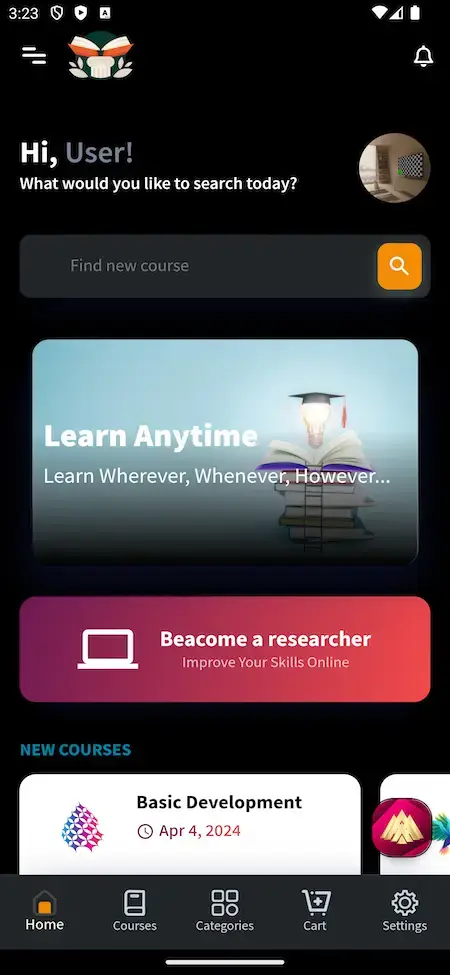
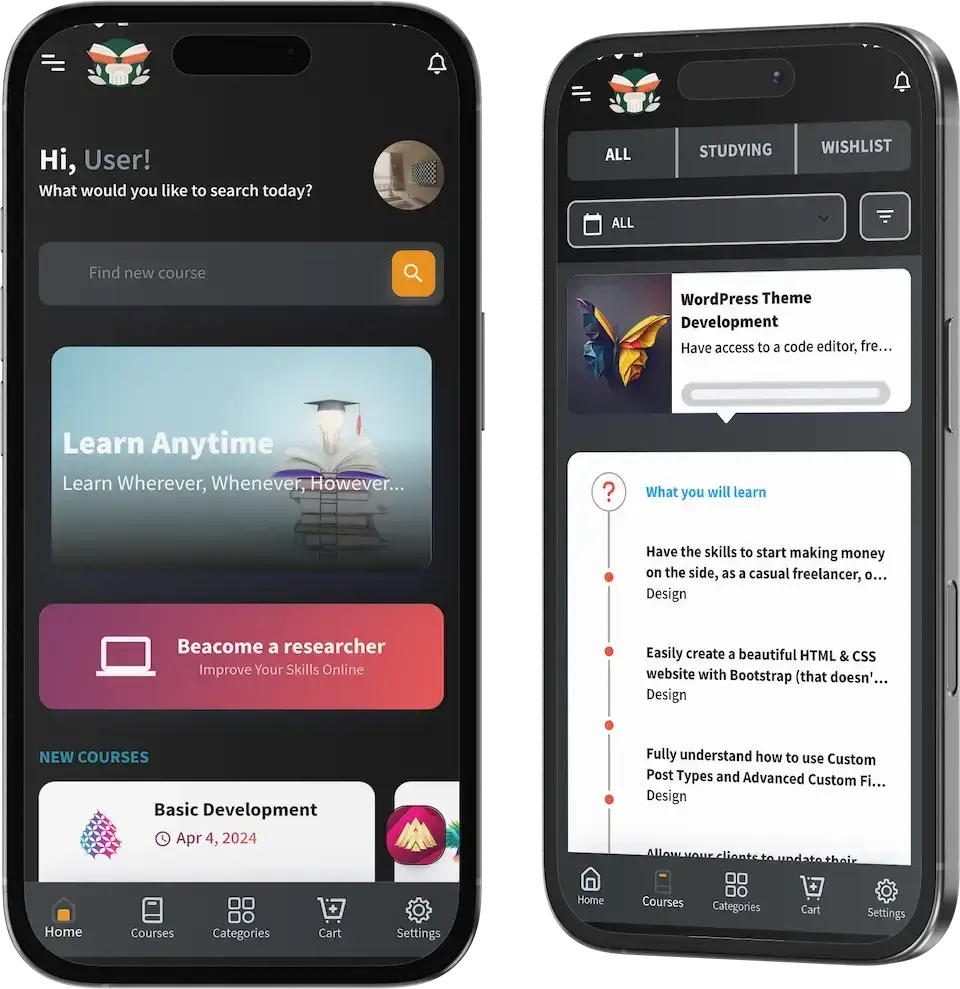
A student lands on a home screen with a greeting and a course search, then scrolls banners, new courses and featured categories.
- Hi User greeting and a Find new course search
- Learn Anytime and Become a researcher banners
- New courses and featured categories rows
- 2Pick a Category
Categories list subjects as rows, so a learner narrows the catalog before choosing. The demo shows Design, Health and Fitness, Development, Lifestyle, Music and Artificial Intelligence.
- One row per category with an icon
- Bottom tabs for Home, Courses, Categories, Cart and Settings
- Categories managed in the admin panel
- 3Browse the Courses
The courses screen splits into All, Studying and Wishlist, with a filter above a list of course cards.
- All, Studying and Wishlist tabs
- Filter control above the list
- A card per course with its lesson counter
- 4Open a Course
A course page lists what the student will learn and a lesson outline beneath it, so the plan is visible before the first lesson.
- What you will learn list
- Lesson outline with each lesson named
- Category shown on every item
- 5Compare Prices & Buy
Course cards carry a price and a sale price, and buyers pay from a cart or a wallet, with guest checkout also available.
- Price and sale price on each card
- Cart and wallet
- Guest checkout and multiple currencies
- 6Visit Institutes & Manage the Account
Institute screens show a profile with student comments, and the side menu holds purchase history, wallet, downloads and Become an Instructor.
- Institute profile and a student comment
- Purchase history, wallet and downloads
- Become an Instructor entry
How It's Built
Byju’s Clone Platform Architecture & Class Flow
- 01Part 01
Three Roles, Separate Panels
Student, instructor and admin each have their own login and panel, so a teacher never opens the operator console.
- 02Part 02
Course Lifecycle
A course is created, priced and submitted, and edits to a live course wait for admin acceptance before students see them.
- 03Part 03
Meetings & Reminders
Sessions run through the Zoom library, and a reminder goes out before each meeting or webinar.
- 04Part 04
Pricing & Deals
A course carries a price, an optional sale price, coupons and flash deals, and the admin can issue 100% off codes.
- 05Part 05
Orders & Payments
Purchases become orders, refund orders are tracked apart from them, and offline payments can be exported.
- 06Part 06
Results & Certificates
Quiz results, attendance and certificates feed reports, and every certificate is numbered and reachable at its own URL.
Under the Hood
Byju’s Clone Tech Stack - Laravel, VueJS, MySQL, Flutter & Zoom
Three things hold a learning app up: a steady web tier, a database that keeps results and orders consistent, and phone apps that feel native. Below is what this platform is made from, as its product page lists it and its release notes confirm.
Web & Admin Layer
PHP · Laravel · VueJS- Public site, teacher panel and admin panel
- Laravel 10 and PHP 8.2 named in the release notes
- VueJS drives the front end
- WebP images and generated slugs
Database
MySQL- MySQL stores the data
- Users, courses, quizzes and orders
- The schema travels with the source
- Can be rebuilt from empty
Learner & Teacher Apps
Flutter · two apps · Android & iOS- Flutter apps with all components on current dependencies
- One app for learners, one for teachers
- Five tabs on the learner side
- Published from your own developer accounts
Video & Storage
Bunny · Wasabi · Player- Bunny or Wasabi can hold video files
- A refreshed video player
- Skin, loop and Chromecast choices
- Screen capture blocked
Live Sessions
Zoom · BB · Jitsi · Google- Zoom library bundled in the script and kept current
- Reminders for meetings and webinars
- Meetings that students pay for
- A dashboard count for each meeting tool
Outside Services
Google Maps · Twilio · Firebase- Twilio sends sign-in codes
- Google Maps and Firebase are listed
- Gateway APIs on your own accounts
- Translation services
The web and admin side runs on PHP with Laravel and VueJS over MySQL, while the apps are built in Flutter. According to the release notes, Laravel 10 and PHP 8.2 are the versions in use. Google Maps, Twilio, Firebase, gateways and translation each call for your own account and keys, which you supply at deployment. Developers for these tools are widely available.
Build to Scale
Room to Grow - Separate Roles, Offloaded Video & Headroom
The platform divides work by role and keeps heavy files off the web server, so taking on more students, teachers and courses is a matter of capacity and settings rather than a rewrite.
Three Roles, Three Panels. Student, instructor and admin each work in their own panel with their own permissions, so a change for one group need not ship with the others.
Video Off the Web Server. Lessons can be stored on Bunny or Wasabi, leaving the web tier lean while the catalog and audience grow.
Sessions Through a Maintained Library. Live classes lean on the Zoom library inside the script, which the release notes show being brought up to the current version.
Reports You Can Reconcile. Orders, refund orders, financial reports and the certificate and attendance report give the operator numbers that can be checked against each other.
Separate Roles
Student, instructor and admin panels each carry their own permissions, so each side can change without touching the other two.
Video Storage Options
Lesson video can live on Bunny or Wasabi rather than the web server, which suits a catalog that keeps growing.
- Bunny storage
- Wasabi storage
- Refreshed video player
- Media manager in the admin panel
Live Sessions
Classes run through the Zoom library, backed by reminders and paid meetings, while the dashboard counts meetings by tool.
- Zoom library kept current
- Reminders for meetings and webinars
- Paid meetings
- Counts for Zoom, BB, Jitsi and Google
Approvals & Badges
Students can be approved, teachers earn badges and changed courses wait for acceptance, so quality stays managed as numbers rise.
- Students validated before entry
- Badges for instructors
- Admin acceptance of changed courses
- Roles and permissions per account
Reports That Reconcile
Orders, refunds, financial reports and the certificate and attendance report form a set of figures that can be checked against one another.
Documented Hand-Over
Source, schema, setup notes and release notes are handed over, so another team can run the platform without help.
Room to Change. Each school or brand ends up wanting something specific to its curriculum or its teachers. With full source code on a conventional stack, a new screen, rule or integration is ordinary development work for your team or ours.
If you are launching a learning brand: Begin with the teachers and classes you can bring in, and grow on the single deployment you already own. When the audience rises, capacity becomes a hosting and settings decision, and anything past the base is quoted on its own.
07Security and trust
Built to Be Checked
Byju’s Clone Security - Role Separation, Verified Sign-In & Honest Limits
A learning app keeps student identities, results and payment references, so three controls matter most: who can sign in, who can see what, and what happens to content before students reach it. What follows states what the platform does and what remains your job.
- 01 · RolesRole Separation
Students, teachers and admins sign in to separate panels, and roles and permissions decide what each account can open, so a teacher never reaches the operator console.
- Course Edit Approval: A changed course goes live only once an admin accepts it, so edits to a course that is already being taught cannot reach students unchecked.
- 02 · LoginOne-Time Code Login
A one-time code sent through Twilio can confirm a sign-in, adding a second check on top of a stored password.
- Delete-Account Requests: A user can file a request to have their account deleted, which leaves the operator a record to act on.
- 03 · ContentContent Protection
The app blocks screen capture, and lesson video can sit on Bunny or Wasabi storage instead of being served from the web host.
- 04 · ApprovalApprovals Before Access
Students can be validated and approved before entry, and changed courses wait for acceptance, so both people and content are checked at the door.
- Student Validation: New students can be validated and approved on the way in, which stops an academy meant for enrolled learners from filling with strangers.
- Certificate Verification: A certificate has its own serial number and web address, and an admin can verify it, so someone who did not issue it can still check it.
- 05 · UpdatesKept Up to Date
The framework moved from Laravel 9 to Laravel 10 and PHP 8.2, and the release notes record better cross-site scripting protection.
- 06 · PaymentsPayments Stay at the Gateway
Cards are charged through the gateways you connect, for example PayPal, Stripe or Razorpay, so card entry happens at the gateway and not inside the learning app.
- Payout Rules: What a teacher receives and when payouts happen are admin settings, so the pay a teacher gets after the platform share is your call.
- Named Launch Tasks: A penetration test, key rotation, a trial restore and a review of your gateway settings sit on the pre-launch list and are never assumed done.
No security certification is held by the platform, and Miracuves does not claim ISO 27001. The base aims at the controls such frameworks expect, and the release notes trace what changed. Penetration tests, rotating secrets and a trial restore are launch chores we schedule with you.
Discuss Security Before LaunchLearning Platform Readiness
Byju’s Clone Operator Readiness - What the Software Gives You and What Stays With You
A learning app puts teachers in touch with students, many of them young. Miracuves builds the tooling for classes, quizzes, certificates and approvals. Which teachers you admit, which students you may enroll, what you record and what local law asks of you are decisions that remain with you.
“Ready” on this page means a capability you can open and use in the demo or the admin console. It is not a license, an accreditation or an approval from any body, for the platform or for Miracuves, and it is not legal advice.
Built Into the Software
Student and teacher logins with roles, Zoom sessions with reminders, a question bank with quizzes, a noticeboard, numbered certificates, student approval, account deletion requests and an admin panel with reports.
Left to the Operator
Your terms and privacy policy, which teachers you accept, how you vet their qualifications, refund and fee rules beyond your defaults, and who reviews course content before it goes live.
Children & Student Data
Where learners are minors, parental consent, data protection and the recording of live classes come into play, and the rules vary by country and state. The software can approve students and log deletion requests. It cannot decide whether you may enroll a child.
Where You Operate
Accreditation, whether certificates are recognized, tutoring licenses and consumer protection differ from market to market. A certificate from this platform is issued by you and is not an accredited qualification. Take qualified local advice for each market before enrollment opens.
08Extend it
- Live classes & meetings
- Quizzes & question bank
- Student, instructor & admin panels
- Certificates & reports
How an add-on works
- 1Choose a module
Immersive lessons, group projects, more languages or study plans, now or after launch.
- 2Quote first
Every module gets its own written scope and price before work begins.
- 3Becomes your code
Once complete, the module is folded into the code base you hold.
Extras
Byju’s Clone Add-Ons - Virtual Reality, Group Projects, Languages & Study Plans
The platform works end to end as delivered and can be walked through in the demo. These four modules are the extras buyers ask about most, and each one is quoted by itself because the scope depends on your curriculum and audience.
Drag to explore · hover to pause
- 01Learning
Virtual Reality Classrooms
Immersive lessons and three-dimensional visualizations for subjects that are hard to picture on a flat screen, added on top of the learning app you already have.
Virtual · Reality - 02Learning
Collaborative Projects
Group work for students: shared project spaces where a team can build something together and apply what a course taught them.
Project · Teams
- 03Reach
Language Support
More interface languages for learners from different linguistic backgrounds, extending the translations the web platform already carries.
More · Languages - 04Reach
Personalized Study Plans
AI-driven plans that adapt to each student's progress and suggest what to study next, scoped separately because the logic depends on your curriculum.
Study · Plans
The Learning & Skills Suite
Teaching Is Only One Product Line. These Four Sit Close to It.
The Byju’s Clone is one platform in a wider catalog. If your plan reaches beyond school-style learning, these four connect to it naturally.
01The same product positioned as an open course marketplace, where instructors and institutes publish courses and the operator keeps a share of each sale.
Explore Solution
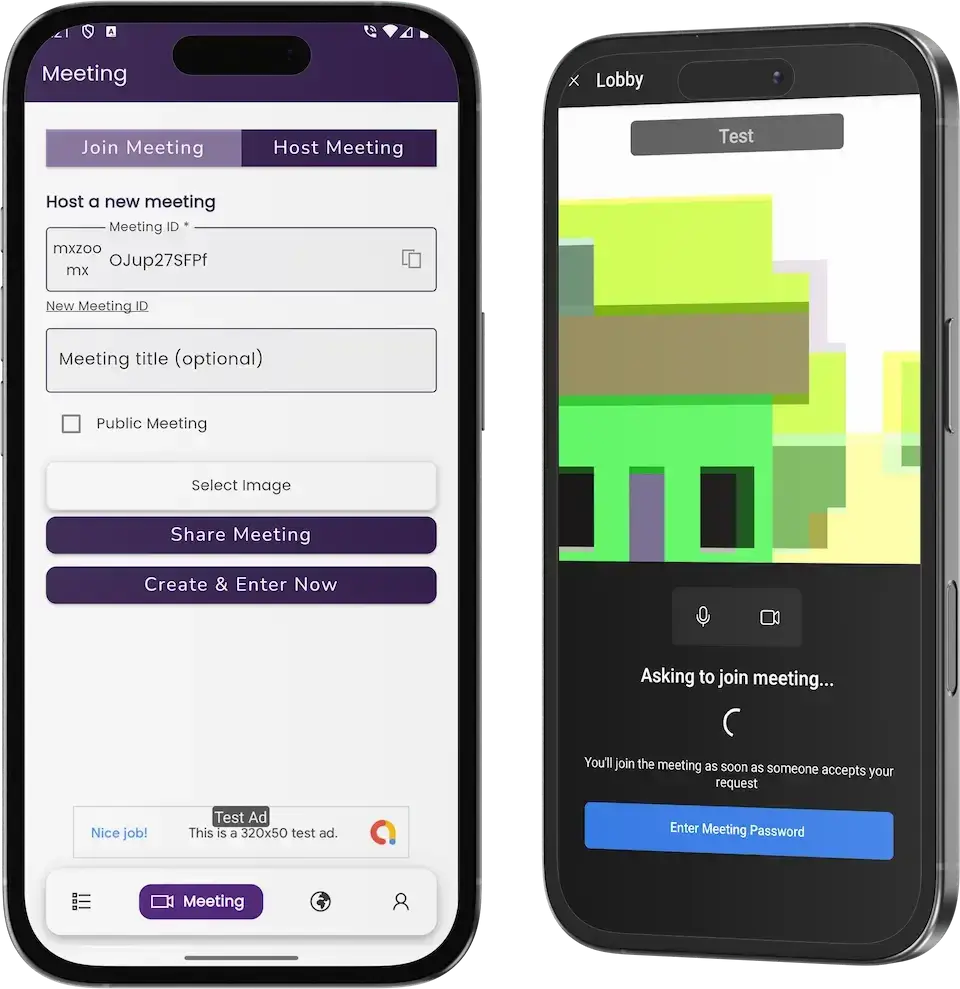
02Scheduled video meetings with rooms, participant controls and recording, a standalone product for teams and webinars.
Explore Solution
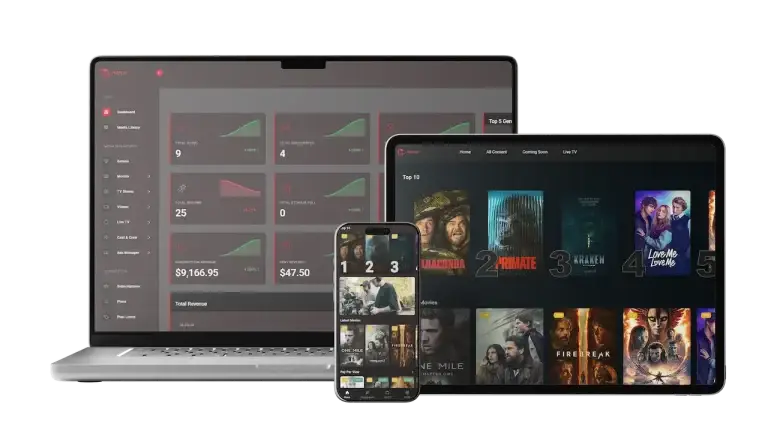
03An on-demand video platform with a catalog, subscription tiers and a producer back office, for lessons presented like shows.
Explore Solution
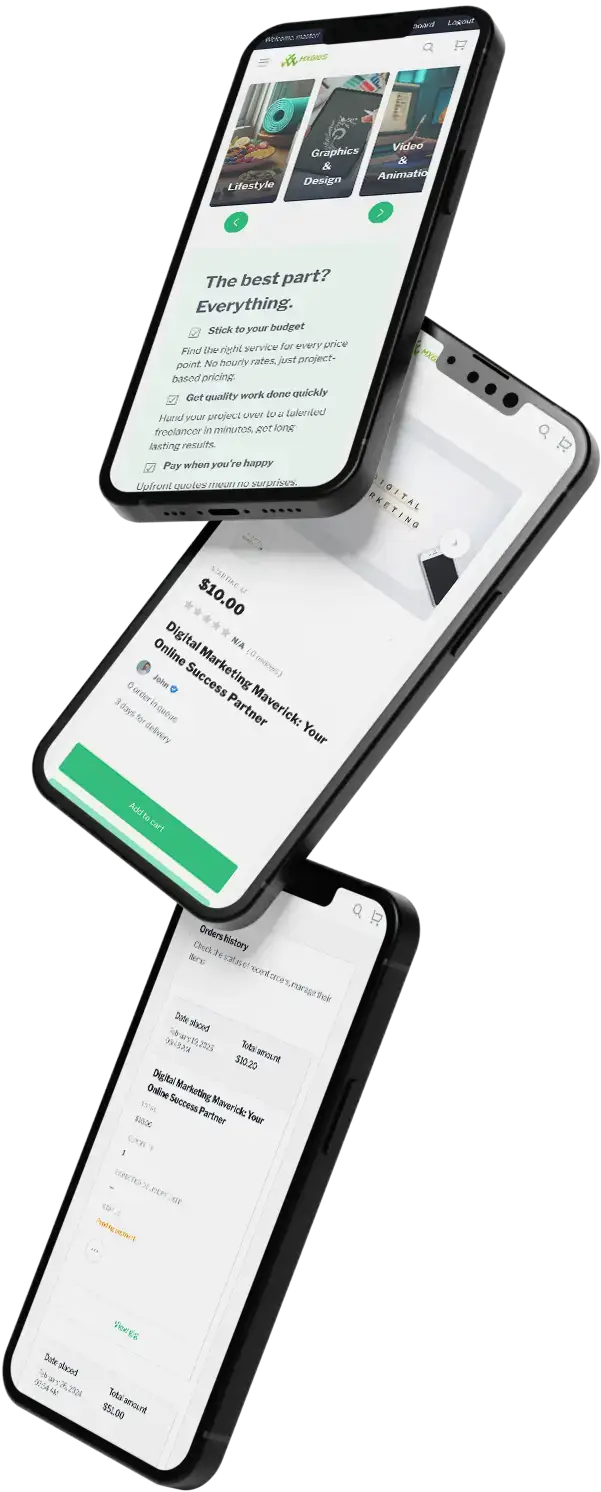
04A freelance marketplace where specialists list services and clients order them, with payouts and reviews around each order.
Explore Solution09Revenue and market
Where the Money Comes From
Byju’s Clone Revenue Models - Subscriptions, Course Sales, Paid Classes & Institute Plans
A learning app earns in more places than the course catalog, and the platform keeps each line apart so one can change without disturbing the rest.
In practice two lines tend to lead: what students pay for courses and plans, and what a group buyer pays for seats.
- 01
Learner Subscriptions
Offer a monthly or yearly plan for access to a catalog of lessons. The admin panel tracks subscription models next to payments, so a plan can sit beside single purchases.
- 02
Course & Bundle Sales
Every course has a price and an optional sale price, and buyers check out from a cart. Bundles are sold the same way, and the admin dashboard follows orders and refund orders.
- 03
Paid Live Sessions
Paid meetings let a teacher charge for a live session or a webinar, so a class can earn by itself, apart from the course catalog.
- 04
Institute & Batch Plans
Institutes and batches show on the public site, which gives a school-style operator a structure to build a group offer around instead of selling to one learner at a time.
- 05
Instructor Revenue Share
When outside teachers publish on your platform, the operator retains a cut of each sale and the teacher is paid the remainder. The admin sets that proportion.
- 06
Wallet Balances
Learners hold credit in a wallet inside the app, and the admin sees wallet and affiliate activity in one menu, so prepaid balances can be tracked.
| Revenue line | How it is billed | Take rateTypical rate | What caps it |
|---|---|---|---|
| Learner Subscriptions | A recurring fee for access, billed monthly or yearly. | Coursera Plus lists INR 2,099 a month or INR 13,999 a year on its India page. | Stores keep part of in-app subscriptions. Apple pays out 70% in year one and 85% afterwards. In the US, UK and EEA, Google Play instead charges 10% on subscriptions and adds a 5% billing fee; elsewhere it takes 15%. |
| Course & Bundle Sales | A one-time price per course or bundle, paid at checkout. | Udemy: $221.3m of $265.8m consumer revenue in 2025 came from single purchases, about 83% (our arithmetic). | Card processing. Stripe UK lists 1.5% + 20p for standard UK cards and 3.15% + 20p for international ones, plus 2% when currency conversion is needed. |
| Instructor Revenue Share | The operator keeps a share of each sale and the teacher receives the rest. | Udemy's instructor pool: 17.5% of subscription revenue in 2025, scheduled to fall to 15% in 2026. | What teachers will accept. Coursera reports content costs of 38.6% of consumer and 30.3% of enterprise revenue, so a platform share must still leave creators paid. |
| Institute & Batch Plans | A group price for an institute, school or training batch. | Coursera Enterprise is 34% of its revenue ($255.3m of $757.5m) and Udemy Business 66% (our arithmetic). | Group buyers negotiate by contract and no public rate card exists. Coursera reports 93% net retention for Paid Enterprise Customers, against 87% a year earlier. |
How to read this. The Coursera and Udemy figures are taken from their Coursera and Udemy annual reports on Form 10-K, the plan price from the Coursera Plus page, and the store terms from Apple and Google Play, with card pricing from Stripe UK. The shares marked as our arithmetic are computed from reported revenue. These are other companies' published numbers, offered as inputs for your own model: not a quote, and not a forecast of what your platform will earn.
Market Benchmarks
Online Learning Marketplace Benchmarks - Independent 2025-2026 Data
The revenue models above are ours. The figures below are not. They come from the Coursera and Udemy annual reports on Form 10-K, Eurostat and UNESCO, reproduced as published. They show how much revenue the two largest listed course marketplaces earn, how they split it between consumers and employers, and how many learners exist outside the platforms, so you can test your own business case against numbers you can check.
$757.5m Coursera Revenue and 197m Learners in 2025
Coursera reports 2025 revenue of $757.5 million, up 9 percent from $694.7 million, in its annual report on Form 10-K. Consumer revenue was $502.2 million and Enterprise revenue $255.3 million. It ended the year with 197.3 million Registered Learners, up 17 percent, and 1,730 Paid Enterprise Customers.
Enterprise Is 66% of Udemy's $789.8m Revenue
Udemy's annual report on Form 10-K shows 2025 revenue of $789.8 million, with Enterprise (Udemy Business) at $524.1 million, up 6 percent, and Consumer at $265.8 million, down 9 percent, or 34 percent of the total. Udemy also reports that instructor revenue share on subscriptions was cut from 20 percent to 17.5 percent in 2025.
16% of EU Adults Took an Online Course in 2025
Eurostat reports that 16 percent of individuals aged 16 to 74 in the EU had done an online course in 2025. Ireland (30 percent), Finland (29 percent), the Netherlands (28 percent) and Spain (27 percent) had the highest shares. It is an independent measure of how many people already buy or use online courses in a large, regulated market.
269 Million Students Enrolled in Higher Education
UNESCO's 2026 Higher Education Global Trends Report, produced by its Institute for Higher Education in Latin America and the Caribbean, reports 269 million enrolled students in higher education worldwide and an enrollment ratio of 44 percent, more than double 2000 levels. It sizes the pool of degree-level learners that online learning marketplaces and test-prep platforms address.
Coursera, Inc., Annual Report on Form 10-K for the year ended 31 December 2025, filed 23 February 2026 - sec.gov
Udemy, Inc., Annual Report on Form 10-K for the year ended 31 December 2025, filed 19 February 2026 - sec.gov
Eurostat, Digital economy and society statistics - households and individuals, Statistics Explained, data extracted December 2025 - ec.europa.eu
UNESCO, 2026 Higher Education Global Trends Report, launched 12-13 May 2026 - iesalc.unesco.org
All figures are the publishers’ own, reproduced as published from annual filings, a statistics office and a UN agency. Segment names and metrics are as each company defines them, and the Eurostat share is of all individuals aged 16 to 74. They describe the organizations and populations named, not any platform Miracuves builds, and nothing here is a revenue projection for your business.
Why Now
Why Start a K-12 Learning App in 2026?
Learning now runs on two habits at once: live classes that meet on a timetable and lessons watched whenever suits the student. An app under your own brand can serve both while you keep the student relationship, the results and the repeat purchase.
01Students Expect a Teacher They Can Join Live
Live sessions with reminders turn a course library into a class that meets, which is what many learners now look for in an education app.
02Practice Is What Test-Prep Buyers Pay For
A question bank, true-false questions and quiz reports let a brand sell practice and measured progress, not only video.
03Verification Builds Trust With Families
Student approval, certificate serial numbers and admin verification give parents and employers something they can check for themselves.
04Your Name Beats a Listing on a Shared App
On a shared app your classes are one tile among thousands. On your own, the students, the results and the repeat purchases stay with you.
05Phone-First Learning Is Settled
Students look for lessons on a phone. The Flutter apps cover Android and iOS, and the website answers in any browser.
06Buying Is Quicker Than Building
Classroom tooling is most of a learning app. After 6 days of our build time, a white-label copy is running on your hosting while you write the first course.
Platform by the Numbers
Meeting Tools Counted
Phone Screens Shown
App Tabs
Days of Build Time
Most of a learning app is the unglamorous middle: meeting links, reminders, question banks, results and certificates. Here that middle is already built.
The Commercial Case
Marketability, Revenue Potential & Business Prospects
A learning app earns when teachers trust it enough to teach on it and students trust it enough to pay. Everything below is about making those two decisions easier, and about keeping the relationship once they are made.
- 01
Several Lines, One Console
Course sales, paid sessions, plans and group offers are separate levers in the same admin panel, so you can switch one on without redesigning the rest.
- 02
Reasons to Come Back Weekly
Reminders, a noticeboard and student goals give learning a weekly rhythm, which is what turns a one-time buyer into a returning student.
- 03
Students and Results You Own
Learner accounts, quiz results and certificates live in your database, so the platform's value accrues to you and not to a listing site.
- 04
Freedom to Move
You hold the complete source code and the schema, so a later change of host, team or direction needs nobody's permission.
- Learner Subscriptions
- Course & Bundle Sales
- Paid Live Sessions
- Institute & Batch Plans
- Instructor Revenue Share
- Wallet Balances
Defensibility comes from teachers, results and habit more than from features.
- 01Teachers who built classes here rarely leave
- 02Students holding certificates and goals have reasons to return
- 03The base begins forming on launch day in your database
- 04Strict vetting of courses and students ranks second
The three cases vary only in how many courses are live, and each names the lever that leads at that size. They are material for planning talks, never a prediction of what a learning business will earn.
Paid courses and live sessions carry the early revenue.
One coaching brand with a handful of teachers, where course sales and a few paid meetings cover running costs. An illustrative size, offered only for planning.
Plans and sessions join course sales.
A regional brand with many courses, where recurring plans and paid sessions begin to count beside single purchases. An illustrative size, offered only for planning.
Institute plans and teacher shares both switched on.
A network of institutes and teachers where group offers and the operator share add up beside retail sales, and the admin reports point to where to focus. An illustrative size, offered only for planning.
10Why Miracuves
Why Miracuves
Miracuves Against Other Byju’s Clone Developers
A learning app can come from a generic LMS script, a freelancer, an agency or a ready-made base from a team that has shipped it before.
Why Founders Choose Miracuves
- 01
Live Classes Included
Zoom sessions with reminders and paid meetings ship in the base, where many LMS scripts stop at recorded video.
- 02
Practice and Testing Built In
A question bank, true-false questions and quiz reports are part of the release history, so testing is not a separate project.
- 03
Three Roles, One Codebase
Student, instructor and admin arrive as panels that already work together, instead of three projects to stitch.
- 04
Full Source Code Ownership
The whole codebase arrives unencrypted with the schema and setup notes, so nobody can reprice it or change the terms later.
- 05
A Release Log That Reads Plainly
The notes record what changed in each version, from Laravel updates to the question bank, so you can see how the product has been maintained.
- 06
Plain Readiness Language
This page says what is base, what is an add-on and what you supply yourself, including hosting, gateway accounts and store developer accounts.
How the Byju’s Clone Stacks Up Against LMS Scripts and Agencies, Row by Row
| Criteria | MiracuvesMiracuves Byju’s Clone | Generic LMS Script | Custom Dev Agency |
|---|---|---|---|
| Time to Launch | 6 days of our build time | Unknown or DIY | Scoped per project, usually months |
| Source-Code Ownership | Complete, unencrypted | Often limited or locked | Usually yes |
| Live Classes | Zoom sessions, reminders and paid meetings | Recorded video only | Whatever the budget allows |
| Quizzes & Question Bank | Question bank, true-false questions, quiz reports | Basic quizzes at best | Built to order |
| Certificates & Reports | Serial numbers, URLs, attendance report | Varies by script | Built to order, extra cost |
| Admin & Approvals | Counts, approvals, meetings and marketing | Thin or absent | Built to order |
| Security & Compliance | Role logins, OTP login, honest limits | Minimal | Varies widely |
| Cost vs Speed vs Quality | Fixed price, fast, tested base | Low price, high risk | Expensive and slow |
| Ongoing Support & Updates | 60 days guidance, 6 months bug fixes, 12 months updates | Rarely offered | Set by the contract |
The first real term tests every route to a learning app. Here is where they diverge.
Talk to Our TeamChangelog
Byju’s Clone Release Notes - Versions & Changes
The vendor notes for the web platform, newest first and in their original wording. They carry no dates, repeated lines are merged and the earliest releases are grouped because the source does not number each one.
| Version | Changes | What changed |
|---|---|---|
| V6.7 | 2 entries and 1 repair | New or improved Improved Currency System Improved overall SEO Repairs Minor Bug Fixed |
| V6.6 | 1 entry and 1 repair | New or improved Update Some Packages Repairs Minor Bug fixed |
| V6.5 | 4 entries | New or improved PHP update: 8.2 SEO Improved Responsive UI Improved Video Player Features: Skin Change, Loop Video, Player Google Analytics, Chrome Cast |
| V6.0 | 19 entries and 1 repair | New or improved Responsive Ui Improved Question Bank Feature Added Noticeboard Feature Added Paid Meeting Feature Added OTP login By Twilio UI Improved Screen Capture Disabled Zoom Library Updated. Supported with current version Laravel 10 Update Support Section Delete Account Request by user Bunny Storage Wasabi Storage Dark & Light mode in the admin panel Webp images supported Slug Auto Generated Ultimate Video player Updated Test Mail in the mail settings XSS attack improved. Repairs Minor Bug fixed |
| V5.0 | 23 entries and 3 repairs | New or improved Laravel 9 Update Ai Tool Integration Security Improved Front New Layout UI Improved Front UI New Layout Added New Installer Installer removed Language Translation Improved PHP Version 8.1.13 Set Goal Feature Our Services Section Our Features Section Alumni Section Edited courses also need to be accepted by the admin Quiz question type added: true-false Mobile only mode Discount Badge show in home page Multiple category select Student validation and approval instructor badge logic set Meeting and webinar reminder on meeting customer menu footer institute show in home page Repairs Minor Bug fixed Stability Improved Code Optimized |
| V4.0 and earlier | 40 entries and 3 repairs | New or improved Job Search in home page menu customized according to admin Batch show in frontend Fully translated on other supported languages Placeholder translation Drag & Drop in FAQ's, Quiz, Flash deal Menu Customization Affiliate Dashboard Course Dashboard Report for Certificate & Attendance Featured Instructor in homepage Admin Color Customization Newsletter Mailchimp Student Profile Page Bulk import on User, Institute, Job User Roles and Management Currency Symbol Dynamic Rest API Updated Admin Sidebar Customizations RTL in the editor for Arabic content Added Top Discounted Courses, Best Selling Courses in home page Zoom Inside Script Courses by Geolocation Financial reports Admin can generate 100% off discount codes Flash Deal on courses Marketing dashboard Subtitle style changing Text Courses (PowerPoint & Notepad) Certificate serial number & URL Admin Certificate Verification URL option on course tags Multiple Currency Quiz Reports Guest Checkout Compare options on courses Invoice Design Media Manager Suggestion Search Share option on bundle courses Repairs Minor Bug fixed Stability Improved Excel export error for offline payments |
Let's build together
Let's take your learning app idea and make it a working platform.
Book a free call and leave with a plan: a timeline, a written price and straight answers. We would rather earn your trust than hurry you into a sale.
- Replies inside 2 hours
- The consultation is free
- No lock-in contracts
- You own the full source code
11Learn more
Blog & Resources
Byju’s Clone App: Newest Guides & Insights
Reading for anyone weighing a learning app: how a developer would build one, which features matter and how the models compare.




General7 questions
01What exactly is a Byju’s Clone, and how does it work?
A Byju’s clone is a ready-made learning app modeled on a school-style education platform. The Miracuves Byju’s Clone gives students a website and an app, teachers an instructor app and panel, and the operator an admin panel. Classes run through Zoom sessions, lessons are videos or text courses, quizzes draw on a question bank and certificates carry a serial number. You rebrand it, add your content and launch under your own name.
02Can I launch a learning app like Byju’s legally?
Software with learning-app features is generally lawful to build and sell. The Miracuves Byju’s Clone follows ordinary education-platform patterns, uses no code, design or content from Byju’s and launches under your own brand, terms and fees. Never put the Byju’s name or logo on your own product. If your learners are minors, ask local counsel about consent, data protection and recorded classes in every market you serve. This is not legal advice from Miracuves.
03How customizable is your Byju’s Clone solution?
Branding is part of delivery: we rebrand the web platform and both apps with your logo, icons and colors, then deploy them. You also name the categories, courses and institutes, so the catalog can follow your own classes and subjects, whether you focus on school-age learners, test prep or professional courses. With the complete unencrypted source code, your team or ours can change flows and screens later. Anything past the base is scoped and quoted in writing first.
04Will I need technical skills to run this platform?
No. The admin panel is built for the person who runs the academy: it shows counts for users, courses and orders and it handles courses, instructors, meetings, certificates and coupons without any code. You do need server space, a domain and the accounts described above the pricing section. Deployment is our technical work, and our guidance runs for 60 days after launch.
05Does the app run on both iOS and Android?
Yes. The learner app and the teacher app are Flutter builds for Android and iOS, and the public website opens in any browser. We publish the apps from your own developer accounts. Apple and Google review them on their own timetable, which sits outside our 6-day build.
06What do I need to bring, and what do I get for the price?
The fixed price of $2,499 covers the ready-made base: the web platform, both apps, the admin panel, rebranding, deployment and the complete source code. You provide server space and a domain, Apple and Google developer accounts, your brand assets, a payment gateway account that has cleared its checks and any third-party keys. Add-ons and custom work are quoted separately in writing.
07What makes Miracuves a good fit to build your Byju’s clone?
Miracuves has been building software since 2010, with 9,000+ projects and 6,000+ clients, and this base includes live sessions, quizzes, certificates and approvals that would take a long time to build alone. You get a fixed price, the full source code, a 6-day build, 60 days of guidance, 6 months of priority bug fixes and 12 months of updates, running side by side from launch.
Students3 questions
08How do I enroll in a course on the platform?
Open the app or website, register or sign in, then browse the categories or search for a course. Tap the course, look at its price and sale price and add it to the cart. Pay through a gateway or from the wallet and the course lands in the Studying list. Guests can check out without an account, and a one-time code sent by Twilio can confirm sign-in.
09Can I download course materials for offline viewing?
The app menu has a Downloads entry, so some material can be kept on the device. What can be downloaded depends on the course and on the settings the admin or the teacher chooses. Check a course in the demo, or ask us on a guided call how downloads behave for your content.
10How do I track my progress and performance?
On the Studying tab a student sees every course already started, with a lesson counter on each card, and can set a goal and keep a profile. Quiz scores appear once a quiz is submitted, and quiz reports show how the whole class did. Once a course is finished, the certificate is available to view and save from the certification hub.
Instructors3 questions
11How do I become an instructor and upload my content?
The app menu carries a Become an Instructor entry, and the admin sees each request in the panel. Once approved, the teacher logs in to the teacher app or panel, builds courses, adds video and text lessons and quizzes, sets prices and follows enrollments. A later edit to a course is held until an admin approves it.
12What kind of revenue split or commission is there?
You decide what the platform keeps from each sale and what the instructor receives, because the split is an admin setting. Orders, refund orders and financial reports let you reconcile the figures, and payout timing is also your call. Publish the terms for teachers so they know the arrangement before listing a course.
13Can I interact with my students directly?
Contact runs through live Zoom sessions, paid meetings and webinars, the noticeboard, reminders and the support section. Discussion forums appear in the product description but not in the demo, so we confirm their current state with you on the demo call before you decide. Anything beyond the base, such as live chat, is scoped and quoted separately.
Admin & launch5 questions
14How do I manage and update courses on the platform?
Categories, courses and bundles are listed in the admin panel, next to a queue of modified-course requests. You can add or edit courses, set prices and approve or reject instructors. A changed course needs admin acceptance before it goes live, and students can be managed through validation, approval, roles and permissions.
15Is there an integrated payment gateway, and can I add others?
The product page names PayPal, Stripe and Razorpay as gateways it works with, and the app has a cart and a wallet. You connect your own gateway account, and its verification must be complete before live payments. Another gateway can be added by customizing the platform, and our team can scope that work with you.
16How do I track platform performance and user engagement?
Dashboard tiles count users, instructors, courses, categories, orders, refund orders, coupons and testimonials, beside lists of recent users, courses and orders. A marketing dashboard, financial reports, quiz reports and the certificate and attendance report give more detail. Read them together to see sign-ups, sales and how classes are going.
17What is a realistic route to first revenue in a learning app?
Early revenue usually comes from selling a course or a paid live session, since both need only what the app already has: a price, a cart and a meeting. Plans and group offers come later, once a catalog deserves a recurring fee or an institute wants a shared deal. Teacher revenue shares and affiliate partnerships rest on your own agreements, so they are arranged and not built in.
18How defensible is a K-12 learning app?
Defensibility comes from teachers, results and habit more than from features. Teachers who built classes here rarely leave, and students holding certificates, a wallet balance and a goal still to finish keep coming back, and the platform lets that base start forming on launch day and keeps it in your database. Strict vetting of courses and students ranks second, since a learning brand lives on its reputation.
Dig further into this platform
Jump to step-by-step guides, its industry, our delivery service, the fixed cost and a sibling platform.
EdTech development service
Browse the service→GuideDeveloper guide
How a developer would approach an app like this one: stack choices, data design and scaling.
Read the guide→App features
The features a learning app needs to hold students, and how to group them.
Read the guide→Related platformUdemy Clone
The same product built for an open marketplace of courses from many instructors.
Open the platform→Disclaimer
Miracuves is an independent software development company. We are not affiliated with, connected to, sponsored by, or endorsed by Byju’s.
Read our full Legal Notice & Disclaimer →“Byju’s Clone” is used descriptively. It is how the software industry refers to building a platform with functionality similar to Byju’s, and how clients search for it.
The entire design and codebase is built by our own team. The product contains no code, design, graphics, or content originating from the Byju’s website or applications.
Byju’s and all other third-party names and marks are the property of their respective owners, referenced here solely to describe the category of software offered.