


Imagine writing a report in Word, analyzing data in Excel, preparing slides in PowerPoint, and replying to emails in Outlook—while an AI quietly helps you draft, summarize, analyze, and refine everything in real time. That’s not a separate tool you switch to; it’s built directly into the software you already use every day. This is exactly what Microsoft Copilot is designed to do.
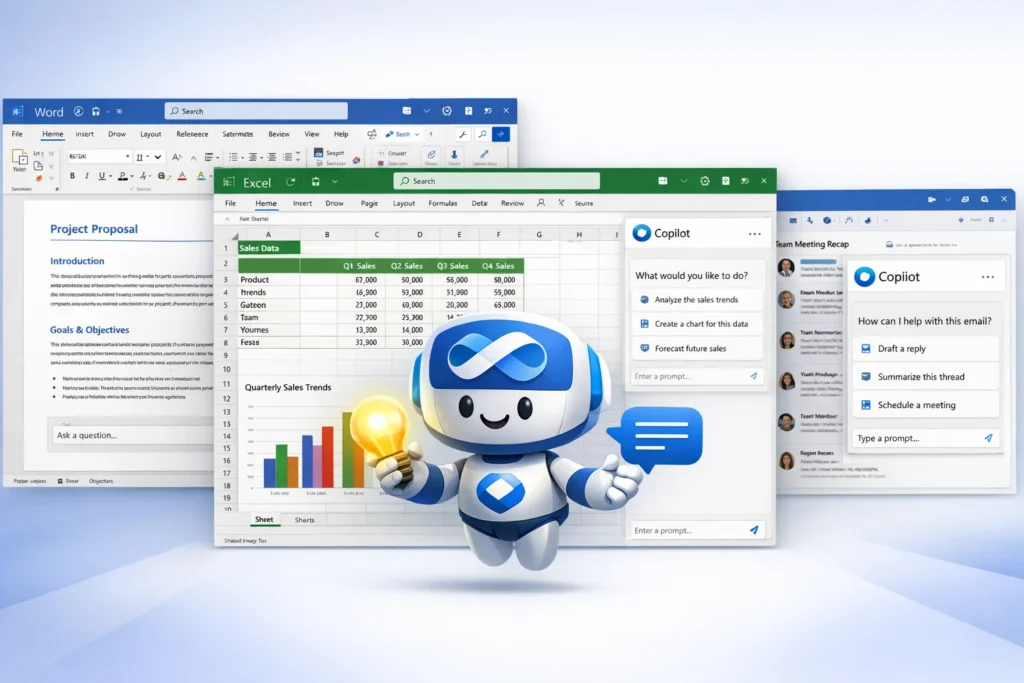
Microsoft Copilot is an AI-powered assistant embedded across Microsoft products like Word, Excel, PowerPoint, Outlook, Teams, Windows, and more. Instead of acting as a standalone chatbot, Copilot works inside your workflow, helping you think, write, analyze, and communicate more efficiently.
What makes Microsoft Copilot unique is its deep integration with business data and tools. It doesn’t just generate text—it understands documents, emails, meetings, spreadsheets, and calendars, and uses that context to provide relevant, actionable assistance.
What Is Microsoft Copilot? The Simple Explanation
Microsoft Copilot is an AI assistant built directly into Microsoft products to help people work faster and smarter. In simple terms, it acts like a helpful coworker inside apps such as Word, Excel, PowerPoint, Outlook, Teams, and Windows—assisting with writing, analysis, summaries, and decision-making using the context of your work.
The Core Problem Microsoft Copilot Solves
Modern work involves constant context switching—writing documents, analyzing data, responding to emails, attending meetings, and searching for information. Microsoft Copilot reduces this friction by:
- Helping create and edit content without starting from scratch
- Turning raw data into insights and summaries
- Saving time on repetitive tasks
- Keeping assistance inside the tools people already use
Instead of learning a new AI tool, users get AI help where the work already happens.
Target Users and Use Cases
Microsoft Copilot is commonly used by:
• Professionals writing documents and emails
• Teams collaborating in meetings and chats
• Analysts working with spreadsheets and reports
• Managers reviewing summaries and action items
• Enterprises looking to improve productivity securely
Current Market Position
Microsoft Copilot is positioned as a workplace-first AI assistant, deeply integrated with business software and enterprise data. It stands out by combining AI capabilities with existing permissions, files, emails, calendars, and conversations—something standalone AI tools can’t easily replicate.
Why It Became Successful
Microsoft Copilot gained traction because it feels natural and practical. Users don’t have to change how they work; Copilot enhances familiar tools with AI-driven help, making productivity gains immediate and tangible.
How Microsoft Copilot Works — Step-by-Step Breakdown
For Users (Individuals & Teams)
Starting Copilot inside apps
Users access Copilot directly within Microsoft apps like Word, Excel, PowerPoint, Outlook, Teams, or Windows. There’s no separate tool to open—Copilot appears as a side panel or inline assistant inside the app.
Understanding context automatically
Copilot reads the context of your work before responding. This can include:
- The document you’re editing
- Data in a spreadsheet
- Emails in a thread
- Calendar events and meeting notes
- Chat conversations (where permitted)
Because it understands this context, Copilot can give more relevant and actionable help.
Performing tasks with natural language
Users simply type what they want in plain language, such as:
- “Summarize this document”
- “Create a presentation from this report”
- “Analyze trends in this spreadsheet”
- “Draft a professional reply to this email”
Copilot translates these requests into actions inside the app.
Generating and refining outputs
Copilot produces drafts, summaries, charts, or insights. Users can then:
- Ask Copilot to rewrite or refine the output
- Change tone or format
- Drill deeper into data or explanations
- Add or remove details
This creates a fast feedback loop between user and AI.
Example user workflow
User opens Word → asks Copilot to draft content → refines with follow-up prompts → moves to Excel for data analysis → Copilot summarizes insights → sends summary via Outlook.
For Organizations (Business Use)
Secure data access
Copilot respects existing permissions. It only uses data that the user already has access to, ensuring sensitive information stays protected.
Team collaboration support
In Teams, Copilot can summarize meetings, highlight action items, and answer questions about discussions—helping teams stay aligned even if someone joins late.
Technical Overview (Simplified)
Microsoft Copilot works by combining:
- Large language models for understanding and generation
- Deep integration with Microsoft apps and services
- Context retrieval from files, emails, and meetings
- Security and permission enforcement
All of this happens in the background to deliver relevant assistance at the right moment.
Microsoft Copilot’s Business Model Explained
How Microsoft Copilot Makes Money
Microsoft Copilot follows a premium, add-on productivity model. It is not ad-based and not a standalone free tool. Instead, Copilot is sold as a paid AI layer on top of Microsoft’s existing products and subscriptions.
The primary revenue streams include:
- Enterprise add-ons: Copilot is sold as a paid add-on to Microsoft 365 business and enterprise plans
- Workplace licenses: Per-user pricing for organizations deploying Copilot across teams
- Product-specific Copilots: AI features bundled into tools like Windows, security, development, and business applications
- Long-term enterprise contracts: Large organizations adopt Copilot at scale through multi-year agreements
This model aligns directly with productivity value rather than user attention.
Pricing Structure
Microsoft Copilot pricing is generally based on:
- Per-user, per-month licensing
- Enterprise plan tiers
- Scope of enabled applications (Word, Excel, Outlook, Teams, etc.)
Organizations pay more as adoption grows, while individuals benefit from AI embedded in tools they already pay for.
Fee Breakdown
- Monthly or annual Copilot license per user
- Enterprise-level deployment and support costs
- Optional Copilot capabilities tied to specific Microsoft products
There are no commissions, ads, or usage-based token fees exposed to end users.
Market Size and Demand
The market for AI-powered workplace productivity is massive, driven by:
- Global adoption of Microsoft 365
- Growing demand for automation in knowledge work
- Pressure to improve employee efficiency
- Enterprises seeking secure, governed AI tools
Copilot benefits from being embedded in one of the world’s most widely used productivity ecosystems.
Profitability Insights
Microsoft Copilot improves profitability by:
- Leveraging existing customer relationships
- Upselling AI features to current subscribers
- Driving higher retention of Microsoft 365 plans
- Scaling AI value across millions of users with the same core models
Revenue Model Breakdown
| Revenue Stream | Description | Who Pays | Nature |
|---|---|---|---|
| Copilot Licenses | AI add-on for productivity tools | Businesses | Recurring |
| Enterprise Deals | Large-scale deployments | Enterprises | Contract-based |
| Product Copilots | AI in specific Microsoft tools | Organizations | Bundled |
| Platform Expansion | AI across ecosystem | Businesses | Long-term |
Key Features That Make Microsoft Copilot Successful
1) Works inside Microsoft 365 apps (no switching tools)
Copilot shows up right where people already work—Word, Excel, PowerPoint, Outlook, and Teams—so it feels like a built-in productivity layer, not a separate chatbot.
2) Word drafting + rewriting that feels “first-draft fast”
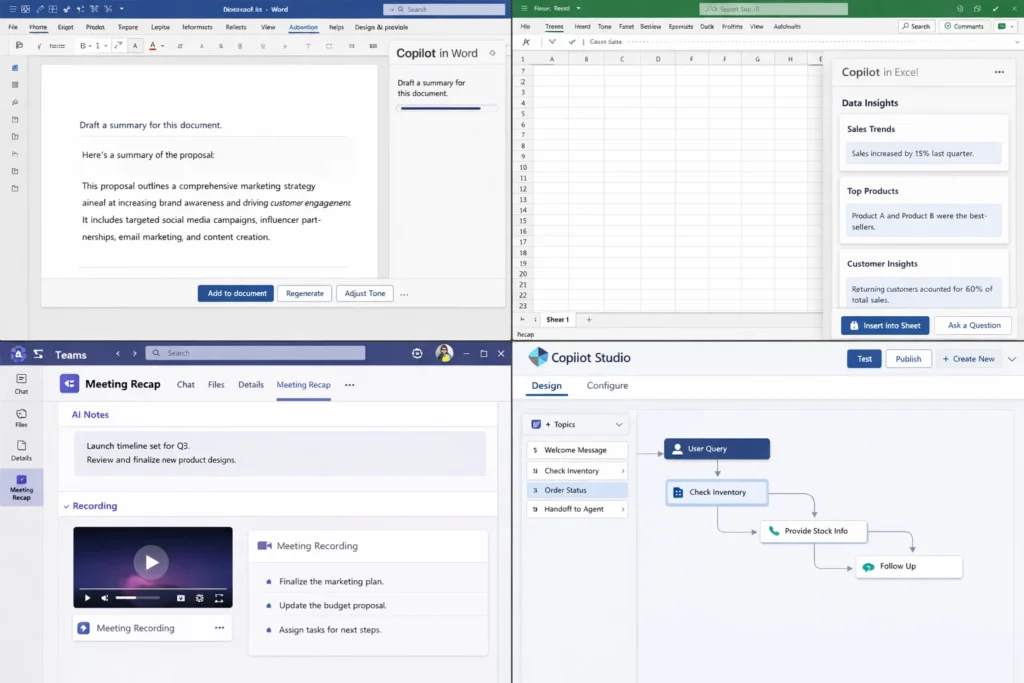
In Word, Copilot can help create a document from a prompt, rewrite sections, adjust tone, and summarize long content so you can move from blank page to usable output quickly.
3) Excel help for formulas, insights, and analysis
In Excel, Copilot can suggest formulas and help interpret data in plain language—useful when you know what you want (like “show the trend” or “explain the variance”) but don’t want to wrestle with spreadsheet complexity.
4) PowerPoint creation and slide structuring
Copilot can turn a document or outline into a presentation structure, then help refine slide text and flow—great for getting a clean “storyline” quickly.
5) Outlook email thread summarization and reply drafting
Instead of reading a long thread, Copilot can summarize what matters and help draft a reply with the right tone and context—especially useful for busy inboxes.
6) Teams meeting intelligence: recap, action items, key points
Copilot in Teams can summarize discussions, highlight decisions, and suggest action items during or after meetings—helping people catch up fast (even if they joined late).
7) Context-aware answers powered by your work data (with permissions)
A big differentiator is that Copilot can use relevant context from your Microsoft 365 environment (documents, emails, meetings) while respecting access permissions—so results are tied to real work, not generic guesses.
8) Copilot Studio for customization and AI agents
Organizations can build custom agents using Copilot Studio and publish them for internal workflows—turning Copilot from “assistant” into “workflow automation.”
9) “Computer use” style automation for tasks without APIs (Copilot Studio)
Copilot Studio has introduced capabilities where agents can interact with websites and desktop apps (clicking, typing, navigating), which is powerful for automating messy real-world processes.
10) Enterprise readiness: governance, admin controls, and scaling
Copilot is positioned for business adoption with service descriptions, admin considerations, and ongoing platform updates—important for companies rolling it out across teams.
Recent 2025 updates and direction (high level)
Microsoft has continued expanding Copilot capabilities and especially Copilot Studio updates for agents and governance.
AI/ML integrations (what’s really happening)
Copilot blends large language models with your Microsoft 365 context to produce drafts, summaries, and action-oriented outputs inside apps.
What sets it apart
Copilot’s biggest edge is “AI in the flow of work”: it uses the context of the app you’re in (and your permitted work data) to produce outputs that are immediately usable—documents, emails, summaries, and insights—without jumping between tools.
Read More :- AI Chat Assistant Development Costs: What Startups Need to Know
The Technology Behind Microsoft Copilot
Tech stack overview (simplified)
Microsoft Copilot is built on a deeply integrated AI + productivity stack. Instead of working as a standalone chatbot, it sits inside Microsoft’s ecosystem and combines several layers:
- Large language models for understanding and generation
- Microsoft 365 app integrations (Word, Excel, PowerPoint, Outlook, Teams)
- Context retrieval from documents, emails, meetings, and chats
- Enterprise-grade security and permission enforcement
- Cloud infrastructure for scalability and reliability
All of this works together so Copilot can act inside your work, not outside it.
Context retrieval from your work data
One of Copilot’s most important technical strengths is context awareness. When you ask Copilot for help, it can reference:
- The document you’re editing
- Data in the current spreadsheet
- Email threads you’re part of
- Meeting transcripts and chats you have access to
Crucially, Copilot only uses data you are already permitted to see. This makes it safe for enterprise environments.
Large language model reasoning
Copilot uses advanced language models to:
- Interpret natural-language instructions
- Reason across text, numbers, and structured data
- Generate drafts, summaries, formulas, and explanations
- Maintain consistency across longer tasks
The model doesn’t just generate text—it reasons about what action makes sense inside each app.
App-level action execution
Unlike generic AI tools, Copilot can take actions inside applications. For example:
- Creating or rewriting Word content
- Generating PowerPoint slides from a document
- Suggesting Excel formulas or insights
- Drafting Outlook replies
- Summarizing Teams meetings
This is possible because Copilot is tightly connected to Microsoft app APIs and internal services.
Security, permissions, and compliance
Copilot inherits Microsoft’s enterprise security model:
- Respects user permissions automatically
- Does not expose data across teams or roles
- Works within existing compliance boundaries
- Supports admin controls and governance
This makes it usable in regulated industries where standalone AI tools may be risky.
Scalability and performance
Copilot runs on Microsoft’s global cloud infrastructure, which allows it to:
- Serve millions of users simultaneously
- Maintain low response times
- Handle large enterprise workloads
- Scale AI capabilities without disrupting existing apps
Performance is critical because Copilot is embedded in everyday work tools.
Why this technology matters for business
Microsoft Copilot’s technology turns AI into a workplace capability, not just a feature. By combining language models with real business context, permissions, and app actions, it delivers AI help that is immediately usable, secure, and scalable—exactly what modern organizations need.
Microsoft Copilot’s Impact & Market Opportunity
Industry impact
Microsoft Copilot has reshaped expectations for workplace AI by embedding intelligence directly into daily productivity tools. Instead of asking users to adopt a new app or workflow, Copilot enhances familiar software, making AI feel practical, reliable, and immediately useful.
This shift accelerates AI adoption across organizations because employees don’t need retraining to see value. Drafting, analyzing, summarizing, and collaborating all become faster without changing how work gets done.
Market demand and growth drivers
Demand for Copilot-style workplace AI is driven by:
- Massive global adoption of Microsoft 365
- Increasing pressure to improve knowledge-worker productivity
- Growing volume of emails, documents, meetings, and data
- Enterprise demand for secure, governed AI solutions
- Need to reduce repetitive work and decision fatigue
As organizations look for measurable ROI from AI, productivity-embedded assistants gain an advantage.
User segments and behavior
Microsoft Copilot is widely used by:
- Knowledge workers creating documents and presentations
- Managers reviewing summaries and action items
- Analysts working with spreadsheets and reports
- Teams collaborating across meetings and chats
- Enterprises standardizing AI usage across departments
A common behavior pattern is daily, in-flow usage. Users rely on Copilot repeatedly throughout the day rather than using it as a one-off tool.
Enterprise adoption trend
Enterprises increasingly prefer AI that:
- Works within existing security and permissions
- Understands business context automatically
- Produces outputs that are immediately usable
- Integrates with collaboration and communication tools
Copilot fits this model well, making it a natural choice for large-scale deployment.
Future direction
The evolution of Copilot-style systems points toward:
- Deeper automation of multi-step workflows
- AI agents that act across apps on a user’s behalf
- More personalization based on role and work patterns
- Stronger analytics on productivity and outcomes
- Expansion into more business functions beyond documents
Opportunities for entrepreneurs
There are strong opportunities to build Copilot-inspired platforms for:
- Industry-specific productivity tools
- Internal knowledge and reporting assistants
- AI copilots for finance, HR, legal, and operations
- Workflow automation layered on existing software
- Secure AI assistants for regulated industries
This growing demand explains why many founders want to build AI that lives inside workflows, not outside them.
Building Your Own Microsoft Copilot-Like Platform
Why businesses want Copilot-style AI systems
Microsoft Copilot shows that the real power of AI comes when it is embedded directly into workflows, not used as a separate tool. Businesses want Copilot-like platforms because:
- Users adopt AI faster when it lives inside familiar software
- Productivity gains are immediate and measurable
- Context from real work data improves output quality
- Enterprises can enforce security, permissions, and governance
- AI becomes part of daily operations, not an experiment
This makes Copilot-style systems ideal for long-term enterprise adoption.
Key considerations before development
If you plan to build a Copilot-like platform, these decisions are critical:
- Where the AI will live (inside apps, dashboards, or tools)
- What context it can safely access (documents, data, messages)
- How permissions and role-based access are enforced
- What actions the AI can take (draft, analyze, automate)
- How users interact (chat, commands, inline suggestions)
- Compliance, audit logs, and admin controls
Copilot-style platforms succeed when AI is useful, controlled, and trusted.
Read Also :- How to Market an AI Chatbot Platform Successfully After Launch
Cost Factors & Pricing Breakdown
Microsoft Copilot-Like App Development — Market Price
| Development Level | Inclusions | Estimated Market Price (USD) |
|---|---|---|
| Basic AI Productivity Assistant MVP | Core web interface or sidebar assistant, user authentication, integration with one productivity suite or editor (e.g., docs/email or code), basic prompt → response flows, context from current document/email, simple usage logging, standard admin panel, basic analytics | $90,000 |
| Mid-Level Workplace AI Assistant Platform | Multi-app integrations (documents, email, chat), contextual suggestions (summaries, drafts, replies), basic workflow shortcuts, team/workspace structure, permissions, conversation and document history search, usage analytics dashboard, feedback collection loops, polished web UI and extensions | $170,000 |
| Advanced Microsoft Copilot-Level AI Productivity Ecosystem | Deep integrations across productivity tools (docs, sheets, slides, email, meetings, code, CRM, etc.), role-aware assistance, task and workflow automation, enterprise SSO & RBAC, governance & safety controls, observability and logging, extension/plugin framework, multi-tenant & multi-region, cloud-native scalable architecture | $260,000+ |
Microsoft Copilot-Style AI Productivity Platform Development
The prices above reflect the global market cost of developing a Microsoft Copilot–like AI productivity and work-assistant platform — typically ranging from $90,000 to over $260,000, with a delivery timeline of around 4–12 months for a full, from-scratch build. This usually includes secure user and workspace management, integrations with core productivity tools, context and document handling, guardrails and safety layers, analytics, and production-grade infrastructure suitable for teams or enterprises.
Miracuves Pricing for a Microsoft Copilot-Like Custom Platform
Miracuves Price: Starts at $15,999
This is positioned for a feature-rich, JS-based Microsoft Copilot–style AI productivity platform that connects to your chosen LLM provider(s) and covers secure user/workspace management, multi-app/context-aware assistance (documents, email, chats, etc.), prompt and workflow shortcuts, conversation and activity logging, core analytics, and a modern admin console plus user-facing web app or side panel. From this foundation, the platform can be extended into deeper automations, richer governance and safety controls, cross-system orchestration, and multi-tenant enterprise features as your AI roadmap evolves.
Note: This includes full non-encrypted source code (complete ownership), complete deployment support, backend & API setup, admin panel configuration, and assistance with publishing companion mobile apps on the Google Play Store and Apple App Store—ensuring you receive a fully operational AI assistant ecosystem ready for launch and future expansion.
Delivery Timeline for a Microsoft Copilot-Like Platform with Miracuves
For a Microsoft Copilot–style, JS-based custom build, the typical delivery timeline with Miracuves is 30–90 days, depending on:
- Depth of assistant features (per-app capabilities, workflow automation, orchestration, etc.)
- Number and complexity of productivity, communication, and data-source integrations
- Complexity of governance, safety/guardrail policies, logging, and analytics requirements
- Scope of admin console, user portal, browser/desktop add-ons, branding, and long-term scalability goals
Tech Stack
We preferably will be using JavaScript for building the entire solution (Node.js/Nest.js/Next.js for the web backend + frontend) and Flutter / React Native for mobile apps, considering speed, scalability, and the benefit of one codebase serving multiple platforms. Other tech stacks can be discussed upon request — Contact us
Essential features to include
A strong Copilot-style MVP should include:
- Context-aware AI inside existing workflows
- Natural-language task execution
- Secure data access with permissions
- Drafting, summarization, and analysis tools
- Actionable outputs (not just text)
- Admin dashboards and usage controls
High-impact extensions to add later:
- AI agents that handle multi-step tasks
- Role-specific copilots (manager, analyst, HR, sales)
- Workflow automation across multiple systems
- Performance and productivity analytics
- Custom copilots for departments or teams
Read More :- How to Develop an AI Chatbot Platform
Conclusion
Microsoft Copilot shows how AI becomes truly valuable when it blends seamlessly into everyday work. By living inside tools people already use, Copilot removes friction and turns AI from a novelty into a practical productivity partner—helping users write, analyze, summarize, and collaborate more effectively without changing habits.
For entrepreneurs and product builders, Copilot is a clear signal of where the AI market is heading. The future isn’t about standalone chatbots—it’s about context-aware AI embedded into workflows, designed with security, trust, and real business value at the core.
FAQs :-
What is Microsoft Copilot used for?
Microsoft Copilot is used to assist with writing, analyzing data, summarizing information, managing emails, and improving collaboration directly inside Microsoft apps like Word, Excel, PowerPoint, Outlook, Teams, and Windows.
How does Microsoft Copilot make money?
Microsoft Copilot is monetized through paid, per-user licenses sold as an add-on to Microsoft 365 and other Microsoft enterprise products. It is not ad-based.
Is Microsoft Copilot available for individuals or only businesses?
Microsoft Copilot is primarily targeted at business and enterprise users, though some Copilot features also appear in consumer versions of Microsoft products.
What makes Microsoft Copilot different from standalone AI tools?
Copilot works inside existing Microsoft applications and uses real work context—documents, emails, meetings, and data—while respecting user permissions. Standalone AI tools usually lack this deep integration.
Does Microsoft Copilot use my company’s data?
Copilot can use organizational data only if the user already has permission to access it. It does not bypass security or share data across users.
Can Microsoft Copilot summarize meetings and emails?
Yes. In Outlook and Teams, Copilot can summarize email threads, meetings, and chats, highlight key points, and identify action items.
Is Microsoft Copilot secure for enterprise use?
Yes. Copilot follows Microsoft’s enterprise security, compliance, and governance standards, making it suitable for regulated and large-scale business environments.
What types of tasks can Copilot automate?
Copilot can help with drafting documents, creating presentations, analyzing spreadsheets, preparing emails, summarizing discussions, and supporting workflow automation.
Can Microsoft Copilot be customized for specific business needs?
Yes. Organizations can customize Copilot behavior and build task-specific AI agents using Microsoft’s customization tools and admin controls.
Can I build a platform similar to Microsoft Copilot?
Yes. Copilot-style platforms can be built by combining AI models with context-aware data access, workflow integration, and permission controls.
How can Miracuves help build a Copilot-like platform?
Miracuves helps businesses and startups build Copilot-style AI assistants with secure context handling, workflow automation, enterprise-ready architecture, and full customization—allowing you to launch powerful, embedded AI solutions efficiently.