



Imagine you’re building an app and you want it to do something “smart” on demand—like answer customer questions, summarize documents, generate product descriptions, analyze images, or power an AI assistant inside your product. Instead of training a model from scratch, the OpenAI API lets you plug in powerful AI models through simple API calls, so your app can generate outputs (text, and in many cases multimodal responses) based on what the user asks.
At its core, the OpenAI API is a developer platform that provides endpoints (like the Responses API) to generate model outputs, and it’s designed to support “stateful” interactions (so your app can continue a conversation) and tool integrations like function calling.
From a practical perspective, most builders start by creating an API key and authenticating requests using Bearer auth—then calling the API from their server to keep keys secure.
By the end of this guide, you’ll understand what the OpenAI API is, how it works step by step (for developers and product teams), how pricing is structured, the main features and capabilities, and what it takes to build OpenAI-API-powered products—plus how Miracuves can help you launch faster with a solid, scalable foundation.
What Is OpenAI API? The Simple Explanation
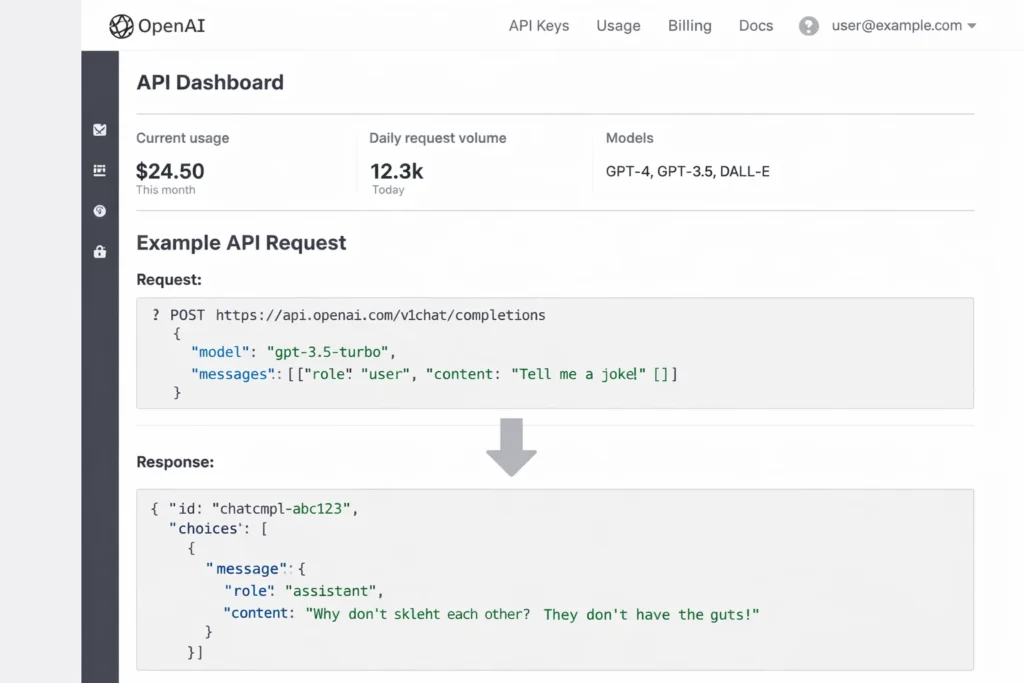
The OpenAI API is a developer platform that lets you add powerful AI capabilities to your own product using simple web requests (API calls). Instead of training your own model, you send input (like text—and in some cases images/audio depending on the model) and the API returns an output you can show to users or plug into your workflow.
The core problem it solves
Building AI features from scratch is expensive and slow. Most teams struggle with:
- Training or hosting models
- Keeping quality high across many tasks (writing, summarizing, extraction, chat)
- Scaling reliably and safely
- Shipping features fast
The OpenAI API solves this by giving you ready-to-use AI models and endpoints so you can focus on your product experience.
Target users and common use cases
Who uses it:
- Startups building AI-first products
- SaaS companies adding AI features inside existing apps
- Enterprises automating internal workflows
- Developers building assistants, copilots, and chat experiences
Common use cases:
- Customer support bots and internal helpdesks
- Content generation (product descriptions, emails, ads)
- Summarization (meetings, docs, tickets)
- Data extraction (turn text into structured fields)
- Multimodal apps (text + images/audio, depending on model)
Market position (why it’s widely adopted)
It’s popular because it offers a clear path from idea → prototype → production: create an API key, call the endpoint, and integrate the output into your app. The Responses API is positioned as the recommended interface for new projects.
Why it became successful
- High-quality models that work across many tasks
- Simple authentication and developer onboarding (API key + Bearer auth)
- Built-in tool support and function calling so apps can go beyond “just chat”
How Does OpenAI API Work? Step-by-Step Breakdown
For builders (developers + product teams)
Account creation process
- Create an account on the OpenAI platform and generate an API key.
- Store the key securely (typically on your server, not inside your mobile app).
- Send requests to the OpenAI API using Bearer authentication.
Main features walkthrough (what you can do with it)
With the OpenAI API, teams commonly build:
- Chat/assistant experiences (Q&A, support bots, copilots)
- Text generation (blogs, emails, summaries, extraction)
- Structured outputs (return reliable JSON using a schema)
- Tool use (connect the model to web search, file search, computer use, or your own tools)
- Image/vision workflows (depending on the model and endpoint)
Typical user journey (simple example)
Let’s say you’re building a “Support Reply Assistant” inside your SaaS:
- User pastes a customer ticket
- Your app sends that text to the Responses API with instructions like “Draft a polite, short reply and ask 1 clarifying question.”
- The API returns a clean draft reply
- Your user edits/approves it
- Your app sends the final reply to the customer
Key functionalities explained
- Responses API: The primary endpoint for generating model responses; supports stateful interactions and tool integrations.
- Streaming: Lets your app show partial output as it’s generated (useful for speed and UX).
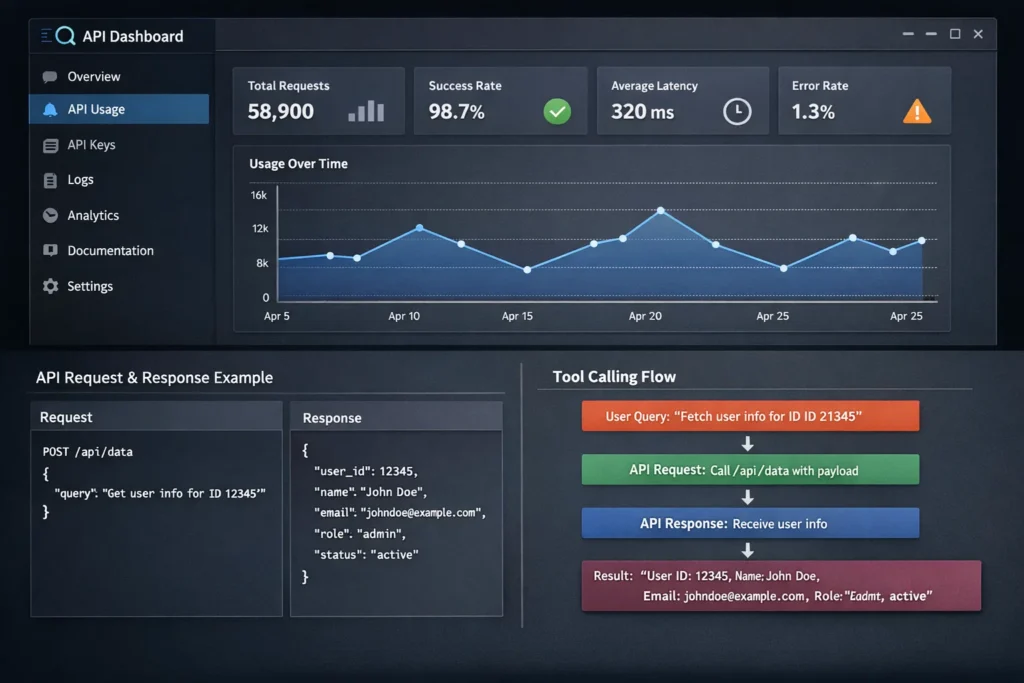
- Function calling (tool calling): The model can output structured “call this function with these arguments” so your system can take real actions (e.g., search your database, create a ticket).
- Usage & cost visibility: You can track usage/spend with dedicated endpoints.
For service providers (if applicable)
For the OpenAI API, “service providers” usually means your app/backend acting as the provider to end users:
- You handle authentication, rate limits, and safety rules
- You decide which model to use and how to format prompts
- You control budget limits and monitor usage
- You integrate outputs into your product workflows
Technical overview (simple, no jargon)
OpenAI API works like this:
- Your app sends input (instructions + user content)
- OpenAI processes it with a selected model
- The API returns output (text or other supported formats)
- Optional: the model can request tools (function calls, web/file search, etc.) to complete a task
Read More :- How to Develop an AI Chatbot Platform
OpenAI API’s Business Model Explained
How OpenAI API makes money (all revenue streams)
OpenAI API is a usage-based platform business. You pay for what you consume—primarily input tokens (what you send) and output tokens (what the model returns). Pricing varies by model, and some models also support cached input pricing (cheaper repeats when cache applies).
Beyond pay-as-you-go usage, OpenAI also monetizes through enterprise-grade API platform offerings (governance, security, admin controls, higher limits, support), typically sold via larger contracts for organizations operating at scale.
Pricing structure with current rates (how it’s priced)
OpenAI publishes per-model prices in a table format showing Input / Cached input / Output costs. That means your bill depends on:
- Which model you choose
- How many tokens you send as input
- How many tokens you receive as output
- Whether cached input applies (when available)
OpenAI also offers a Batch API for non-urgent workloads (asynchronous) priced at 50% off standard shared prices, which is a cost lever for teams doing large offline jobs like summarization or classification.
Fee breakdown (what you’re effectively paying for)
Think of it like cloud compute billing:
- Token spend: main cost driver (input + output; sometimes cached input)
- Rate limits and tiers: your throughput depends on your account limits; OpenAI documents rate limits as part of operating the API
- Monitoring & reconciliation: OpenAI provides usage and costs tooling; for financial reconciliation they recommend using the Costs endpoint / Costs tab rather than only raw usage data
Market size and growth stats (signals)
The API market grows as more products embed AI features (support assistants, copilots, summarization, extraction, search, etc.). OpenAI positions its API platform as “enterprise-grade” with controls for operating at scale—this is a strong indicator it targets large, repeat usage from businesses, not only hobby developers.
Profit margin insights (what drives profitability)
OpenAI’s API economics tend to improve when:
- Customers move from prototype to production (higher sustained volume)
- Workloads use cheaper options like Batch when latency isn’t needed
- Apps optimize token usage (shorter prompts, caching where possible)
Revenue model breakdown
| Revenue stream | What it includes | Who pays | How it scales |
|---|---|---|---|
| Token-based usage | Input + output (and sometimes cached input) pricing by model | Startups, developers, SaaS teams | Grows with API calls and tokens |
| Batch workloads | Discounted async processing for non-urgent jobs | Teams with offline/bulk tasks | Cheaper unit cost → more volume |
| Enterprise-grade API platform | Governance, access controls, cost visibility, support | Mid-market + enterprise | Larger contracts + long retention |
| Usage/cost management tooling | Usage dashboard + costs reconciliation endpoints | All serious production users | Improves retention by reducing “billing surprises” |
Key Features That Make OpenAI API Successful
1) Responses API as the modern “do everything” interface
The Responses API is positioned as OpenAI’s most advanced interface for generating model responses. It supports stateful interactions (multi-turn), and it can be extended with built-in tools like web search, file search, and computer use.
2) Built-in tools that make models actually useful in real apps
Instead of only generating text, the API can let models use tools to fetch information and take actions—like:
- Web search (for current info)
- File search (retrieve from your uploaded/connected documents)
- Remote MCP servers and third-party services
This is how you build “agentic” products (assistants that can do tasks).
3) Function calling (tool calling) to connect your systems
Function calling allows the model to return structured arguments so your app can run real actions—query your database, create tickets, run calculations, update records, etc. It’s the clean bridge between “AI text” and “software behavior.”
4) Structured Outputs for reliable JSON you can trust in production
If you need outputs that your code can safely parse (like {name, email, intent, priority}), Structured Outputs help enforce a schema, reducing brittle parsing and prompt hacks.
5) Streaming responses for faster, smoother UX
Streaming lets you display or process output as it’s generated (instead of waiting for the whole response). It’s a big win for chat UIs, long outputs, and tool-call flows.
6) Agentic loop support (multiple tool calls in one request)
OpenAI’s docs describe Responses as “agentic by default,” meaning the model can chain multiple tool calls (web search, file search, code interpreter, remote MCP, your functions) within a single request flow.
7) Real-time multimodal apps with the Realtime API
For voice-first or low-latency experiences (speech-to-speech, audio transcription, multimodal inputs/outputs), the Realtime API is designed for interactive, live applications.
8) A clear upgrade path from older endpoints
Chat Completions still exists, but OpenAI’s docs explicitly recommend Responses for new projects to access the latest platform features—helpful for teams who want a future-proof integration.
The Technology Behind OpenAI API
Tech stack overview (simplified)
The OpenAI API is essentially a cloud AI runtime: you send input to an endpoint, the selected model processes it, and you receive an output your app can use. The core pieces are:
- Models (the “brains” that generate outputs)
- Responses API (the main endpoint to generate outputs and run tool-enabled flows)
- Tools + function calling (to connect the model to real actions and data)
- Usage/cost tracking (so teams can monitor spend and optimize)
How “agent-style” apps work with the API
OpenAI’s newer guidance centers on building apps where the model can:
- Read your instructions and the user’s request
- Decide if it needs a tool (like a database lookup, web search, or your internal function)
- Call the tool with structured arguments
- Use the tool result to produce a final answer
This is the practical backbone behind assistants that can do real work, not just generate text.
Real-time features (fast, interactive experiences)
If you’re building voice or live interactions, the Realtime API is designed for low-latency conversations (think: speak → model responds quickly), which is useful for voice assistants, live customer support, or interactive tutors.
Structured Outputs (making AI safe for production code)
A big challenge in AI apps is getting consistent formatting. Structured Outputs help you enforce a schema (like JSON fields), so your software can reliably parse the response without fragile prompt tricks. This is critical for workflows like form filling, ticket routing, lead qualification, and analytics extraction.
Data handling and privacy (what developers control)
In most API setups, your system controls:
- What data you send (you decide what to include/exclude)
- How long you store user content on your side
- Access control (who can call your backend)
- Safety filters and moderation logic at the app layer
OpenAI provides platform documentation on building responsibly and operating in production, including guidance on safety and best practices. (platform.openai.com)
Scalability approach (how it handles growth)
OpenAI API systems are built for production workloads, but your app still needs smart engineering to scale smoothly, such as:
- Using streaming for better UX and perceived speed
- Optimizing token usage to control cost
- Handling rate limits and retries gracefully
Mobile app vs web platform (how developers ship it)
Most production apps use this pattern:
- Call OpenAI from a secure backend (server)
- Return results to your web/mobile frontend
This keeps API keys safe and lets you enforce your own business rules, logging, and safety checks.
API integrations (what you connect it to)
The OpenAI API becomes most valuable when connected to your real business systems, like:
- CRM and support tools (tickets, emails, call notes)
- Internal knowledge bases (docs, policies, SOPs)
- Product databases (catalog, pricing, inventory)
- Analytics tools (tagging, summarizing, extracting insights)
This is typically done via function calling + your internal APIs.
Why this tech matters for business
The OpenAI API lets companies ship AI features quickly because it provides:
- A reliable endpoint (Responses) for generation + tools
- Structured outputs for automation
- Real-time options for voice/live apps
- Cost controls through pricing transparency and tracking
OpenAI API’s Impact & Market Opportunity
The disruption it created
The OpenAI API made “AI features” feel like a standard product component—similar to payments, maps, or notifications. Instead of needing a dedicated ML team to train and host models, product teams can integrate AI through a few API calls and ship real user value quickly.
That shift has changed expectations across industries: customers now assume apps can summarize, explain, draft, extract fields, and act like an assistant—right inside the product.
Where it’s being used most
OpenAI-API-powered apps show up everywhere, especially in:
- Customer support and helpdesk automation (ticket summaries, reply drafts, routing)
- Sales and marketing (personalized outreach, content generation, lead research)
- Document workflows (summaries, extraction into structured formats, compliance checks)
- Product copilots (in-app assistants that guide users)
- Voice and real-time experiences (live assistants, call center copilots)
Why the market is expanding
Demand keeps rising because the platform supports:
- A modern “single interface” for building AI experiences (Responses API)
- Tool use and function calling, so assistants can actually do tasks, not just talk
- Structured outputs, which makes AI reliable enough for automation
- Real-time capabilities for voice-first products
Who benefits the most
- Startups: ship an AI-first MVP fast and iterate
- SaaS companies: add premium AI features and increase retention
- Enterprises: automate internal workflows, search knowledge, standardize processes
- Agencies and dev shops: build AI apps for clients across niches
Geographic reach
Because it’s a cloud API, OpenAI integration isn’t limited to one country—builders can create global products as long as they follow applicable availability, compliance, and data-handling requirements for their region and industry.
Future direction
The opportunity is moving toward “AI that works inside your business,” meaning:
- More tool-connected assistants (CRM, ERP, support, analytics)
- More reliable automation via schemas and structured outputs
- More real-time, voice and multimodal experiences
- More cost optimization via streaming, batching, and smarter token usage
Opportunities for entrepreneurs
This massive success is why many entrepreneurs want to create similar platforms and products, such as:
- AI customer support suites for specific industries (travel, e-commerce, fintech)
- AI document processors (KYC, contracts, invoices)
- AI sales copilots and outreach automation
- AI research assistants connected to internal company docs
- Voice agents for scheduling, support, and lead qualification
This massive success is why many entrepreneurs want to create similar platforms—because the OpenAI API makes it possible to build “AI-powered software” without building AI infrastructure from scratch.
Building Your Own OpenAI-API-Powered Platform
Why businesses want products built on the OpenAI API
The biggest reason is simple: companies want AI features, but they don’t want the cost and complexity of training and hosting their own models. With an API-first approach, they can:
- Launch AI features faster (chat, summarization, extraction, copilots)
- Improve customer experience without rebuilding their stack
- Automate repetitive work and reduce operational load
- Create new revenue via premium AI add-ons
- Keep iterating as models and capabilities improve
Key considerations for development
If you’re building an OpenAI-powered product, plan around these foundations:
- Clear product use cases (support bot, content tool, workflow automation, etc.)
- Prompting strategy and safety rules
- Tool calling / function calling to connect the model to real systems
- Structured Outputs to return clean, reliable JSON your code can trust
- Cost control (token optimization, streaming UX, batching where possible)
- Security: store API keys on server, apply access control, logging, and rate limits
Read Also :- How to Market an AI Chatbot Platform Successfully After Launch
Cost Factors & Pricing Breakdown
OpenAI API–Like Platform Development — Market Price
| Development Level | Inclusions | Estimated Market Price (USD) |
|---|---|---|
| 1. Basic AI API Infrastructure MVP | Core backend API gateway setup, authentication & API key management, single AI model integration (via a provider), rate limiting, usage metering, API usage logs, basic developer portal with docs & API explorer, simple admin panel, basic usage analytics | $90,000 |
| 2. Mid-Level AI API Platform | Multi-endpoint API support (text, embeddings, image generation, moderation), fine-grained API key quotas, usage dashboards, dashboards for billing & quotas, webhook integrations, SDKs (Node/Python), stronger security & safety policies, polished developer portal UI | $180,000 |
| 3. Advanced OpenAI API-Level Developer Platform | Enterprise API gateway with multi-tenant orgs & RBAC/SSO, advanced observability (metrics, tracing, rate dashboards), marketplace integrations, automated API billing (invoicing/subscriptions), API versioning & rollback tools, SLA controls, audit logs, cloud-native scalable architecture | $300,000+ |
OpenAI API–Style Developer Platform Development
The prices above reflect the global market cost of developing an OpenAI API-style generative AI API and developer platform — typically ranging from $90,000 to over $300,000, with a delivery timeline of around 4–12 months for a full, from-scratch build. This usually includes secure API key handling, multi-endpoint support, developer documentation and portal, usage metering and billing hooks, security and quota policies, and scalable infrastructure capable of supporting high request volumes with low latency.
Miracuves Pricing for an OpenAI API–Like Custom Platform
Miracuves Price: Starts at $15,999
This is positioned for a feature-rich, JS-based OpenAI API–style developer platform that can include:
- Multi-endpoint API routing (text, embeddings, image, moderation, etc.)
- API key creation & quota enforcement
- Developer portal with interactive docs, SDK snippets, examples
- Usage tracking dashboards for API consumers
- Credits or subscription billing integration
- Webhooks & event delivery support
- Core moderation & safety policy enforcement
From this foundation, the platform can be extended into enterprise usage dashboards, API marketplace integrations, SLA & quota tools, advanced observability, and cloud-native scaling as your API ecosystem grows.
Note: This includes full non-encrypted source code (complete ownership), complete deployment support, backend & API setup, admin panel configuration, and assistance with setting up your developer portal — ensuring you receive a fully operational AI API ecosystem ready for launch and future expansion.
Delivery Timeline for an OpenAI API–Like Platform with Miracuves
For an OpenAI API-style, JS-based custom build, the typical delivery timeline with Miracuves is 30–90 days, depending on:
- Depth of API endpoints and models supported
- Number and complexity of quota, billing, and moderation integrations
- Complexity of developer portal features (API explorer, SDKs, docs)
- Scope of enterprise features (RBAC, SLAs, audit logs)
Tech Stack
We preferably will be using JavaScript for building the entire solution (Node.js / Nest.js / Next.js for the web backend + frontend) and Flutter / React Native for mobile apps, considering speed, scalability, and the benefit of one codebase serving multiple platforms.
Other technology stacks can be discussed and arranged upon request when you contact our team, ensuring they align with your internal preferences, compliance needs, and infrastructure choices.
Essential features to include (recommended MVP)
A strong OpenAI-powered MVP typically includes:
- A simple chat or task UI
- Responses API integration
- Basic system instructions + prompt templates
- Streaming output for better UX
- Tool calling for 1–2 key actions (like search your database)
- Structured output for at least one workflow (like ticket routing)
- Usage tracking + budget limits
Read More :- AI Chat Assistant Development Costs: What Startups Need to Know
Conclusion
The OpenAI API made AI practical for product teams. Instead of treating AI as a separate research project, it lets businesses plug intelligence directly into everyday workflows—support, content, search, automation, and real-time experiences—using the same kind of integration mindset they already use for payments or analytics.
For founders, the big opportunity is not “build a chatbot.” It’s to build a focused product that solves one painful problem end-to-end—and use the API to make it faster, smarter, and more scalable than traditional software.
FAQs :-
How does OpenAI API make money?
OpenAI API primarily makes money through usage-based pricing (you pay for input/output tokens by model) and also through enterprise-grade API platform offerings for organizations operating at scale.
Is OpenAI API available in my country?
Availability can vary by region and compliance requirements. The best way is to check OpenAI’s supported countries/regions and your account eligibility on the OpenAI platform pages.
How much does OpenAI API charge users?
Pricing depends on the model and the number of input and output tokens used. OpenAI publishes a pricing table showing per-model rates (and sometimes cached input rates).
Is there a commission for service providers?
No. OpenAI API is not a marketplace, so there is no commission model. You pay based on usage (tokens) and plan/contract terms.
How does OpenAI ensure safety?
OpenAI provides safety-related tools and guidance for developers, including best practices for production use and responsible development. Many safety controls are implemented by developers at the app layer (filters, policies, logging, and review flows).
Can I build something similar to OpenAI API?
You can build an AI platform, but training and serving frontier models is extremely complex and expensive. Most teams instead build products on top of OpenAI (assistants, automation tools, vertical SaaS) rather than building the underlying model infrastructure.
What makes OpenAI API different from competitors?
OpenAI’s API stands out for its modern Responses API, tool/function calling support, structured outputs, and real-time options—features that help teams ship production-grade AI apps faster.
How many users does OpenAI API have?
OpenAI does not consistently publish a single public “API user count” number. Adoption is visible through widespread developer usage and enterprise offerings, but exact user totals may not be publicly stated.
What technology does OpenAI API use?
It provides access to OpenAI’s AI models through endpoints like the Responses API, plus tools like function calling, structured outputs, streaming, and real-time APIs for voice/live use cases.
How can I create an app using OpenAI API?
You typically: create an API key, call the Responses API from your backend, stream output for UX, add function calling for actions, and use structured outputs for reliable automation—then layer safety, logging, and cost controls.