


Key Takeaways
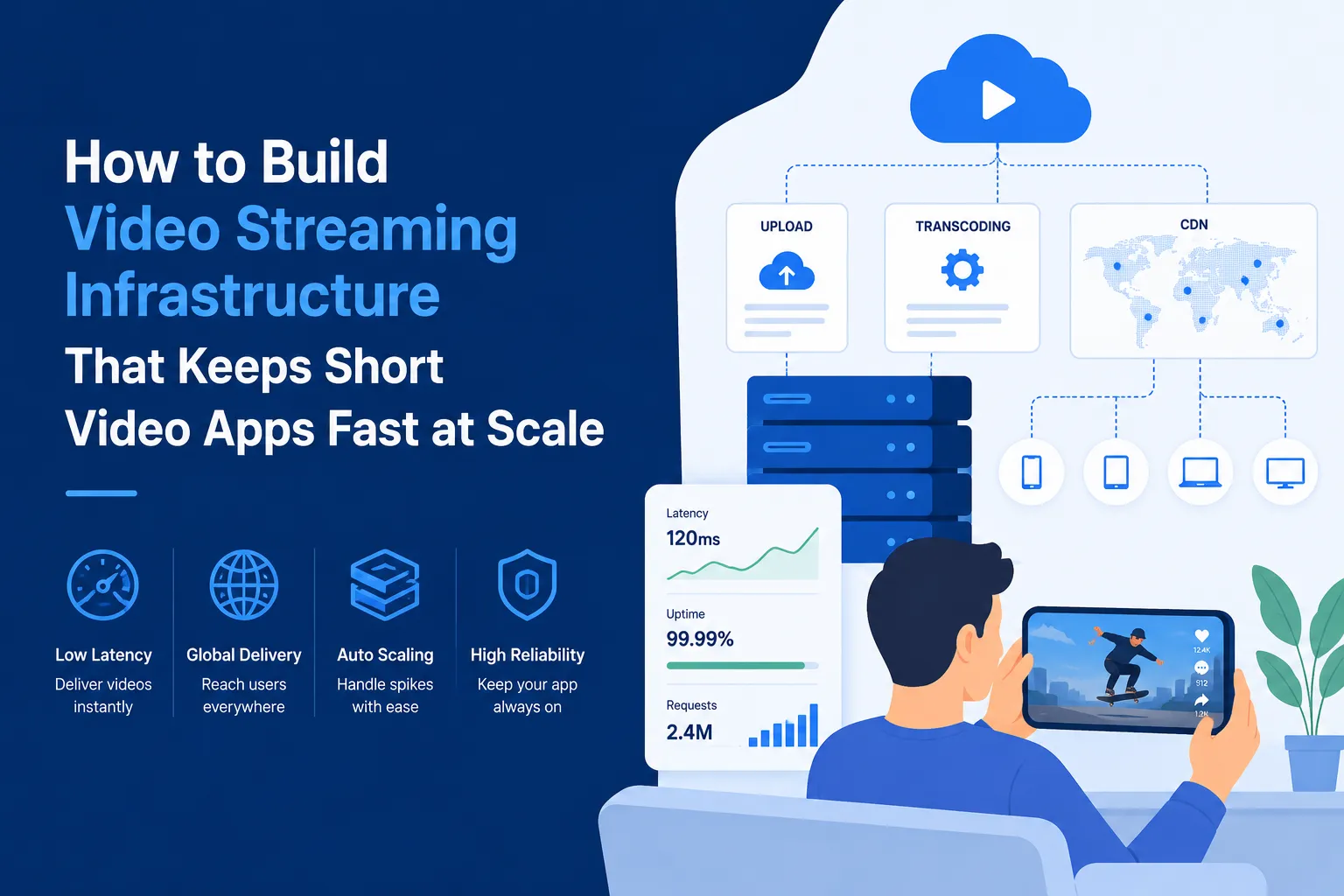
- Video streaming infrastructure keeps short video apps fast during uploads, playback, and high traffic.
- CDN delivery reduces buffering by serving videos from locations closer to users.
- Transcoding and compression help videos play smoothly across devices and networks.
- Scalable storage supports growth as more creators upload videos daily.
- A strong backend setup improves speed, reliability, user retention, and platform performance.
What You’ll Learn
- How video streaming infrastructure supports short video app performance.
- Upload systems manage creator videos, file validation, and storage flow.
- Encoding workflows prepare videos for different screen sizes and internet speeds.
- CDN and caching help deliver videos faster with lower latency.
- Growth depends on playback speed, backend scalability, monitoring, and cost control.
Real Insights
- Short video users expect instant playback with little to no buffering.
- Poor infrastructure can hurt retention even if the app design looks good.
- Background processing keeps uploads smooth without slowing the main app.
- Streaming costs need control as video traffic and storage demand increase.
- The best strategy is to build fast, scalable, and cost-aware streaming infrastructure from the start.
Short Video Apps look simple from the user side. A person opens the app, watches a video, swipes to the next one, likes a clip, follows a creator, and keeps scrolling. But behind this smooth experience, a complex video streaming infrastructure is working continuously.
For a TikTok clone or short-video platform, speed is not only a design feature. It is the foundation of retention, creator activity, and monetization. If videos take too long to upload, creators become frustrated. If playback buffers, users leave. If the feed cannot preload the next video quickly, the app feels slow even if the UI looks good.
This is why founders need to understand how video infrastructure works before building a short-video app. A scalable system must manage the full video journey: upload, validation, transcoding, storage, CDN delivery, adaptive playback, preload logic, and analytics.
Miracuves helps founders build TikTok-like short-video platforms with scalable infrastructure, white-label flexibility, creator tools, monetization modules, admin control, and source code ownership.
Why Video Streaming Infrastructure Decides the Speed and Growth of a Short-Video App
Video streaming infrastructure is the technical system that moves a video from a creator’s device to a viewer’s feed. It manages everything behind the scenes, including upload, validation, processing, storage, delivery, playback, and performance.
In a short-video app, this infrastructure starts working as soon as a creator uploads a video. The system checks the file format, compresses the video, converts it into different quality versions, stores it securely, and prepares it for fast playback through CDN delivery.
This matters because short-video users expect speed. They swipe quickly, judge content within seconds, and leave if the feed feels slow. Even a small delay between videos can reduce watch time, engagement, and session length.
A strong video streaming infrastructure supports three important areas:
- Creator experience: smoother uploads, fewer failures, faster processing, and clear publishing status.
- Viewer experience: quick video start, smooth playback, adaptive quality, and next-video preloading.
- Platform growth: better traffic handling, scalable storage, CDN delivery, moderation support, and analytics tracking.
For a TikTok-like app, infrastructure is not just a backend requirement. It directly affects retention, creator activity, monetization, and long-term scalability.
How Short-Video Infrastructure Differs From Traditional OTT Streaming Platforms
Many founders compare short-video apps with OTT platforms like Netflix or Prime Video. But the infrastructure needs are very different.
OTT users usually search, select, and watch one long video for a longer duration. Short-video users behave differently. They swipe rapidly, expect instant playback, and consume many videos in one session.
A short-video app must prepare videos before the user asks for them. It must predict the next content, preload it, and keep the feed ready for continuous scrolling.
| Infrastructure Area | OTT Platform | Short-Video Platform |
|---|---|---|
| User behavior | Search and watch | Swipe and discover |
| Video type | Long-form content | Short-form creator videos |
| Playback expectation | Stable long playback | Instant video start |
| Content source | Controlled content library | User-generated uploads |
| Feed system | Search/category based | Recommendation-driven feed |
| Upload frequency | Limited | Very high |
| Main challenge | Quality long streaming | Fast feed delivery at scale |
This means a TikTok clone needs infrastructure built for high-volume uploads, fast processing, CDN delivery, feed preloading, and real-time engagement signals.
How the Complete Upload-to-Playback Pipeline Works in a TikTok Clone
A TikTok clone needs a structured upload-to-playback pipeline to keep videos fast, safe, and smooth. The app does not show raw uploaded videos directly in the feed. Each video is first checked, optimized, stored, delivered, and prepared for playback.
Creator Upload → File Validation → Processing Queue → Transcoding → Cloud Storage → CDN Delivery → Feed Preloading → Adaptive Playback
Creator Upload
The creator uploads a video from the app. A good system supports upload progress, retry options, and resumable uploads so creators do not lose progress if the network drops.
File Validation
The system checks the video format, size, duration, resolution, audio compatibility, and basic safety rules. This prevents broken, oversized, or unsupported files from entering the platform.
Processing Queue
Video processing is heavy, so the file moves into a queue instead of slowing the main app server. Background workers handle compression, transcoding, thumbnail creation, and moderation checks.
Transcoding
The video is converted into multiple quality versions. This helps users on slow mobile data watch lighter versions, while users on strong connections get better quality.
Cloud Storage
The platform stores the original file, optimized versions, thumbnails, previews, captions, and metadata in cloud storage. This keeps video assets organized as the platform grows.
CDN Delivery
The CDN delivers videos from servers closer to users. This reduces loading time, buffering, and pressure on the main server.
Feed Preloading
The app prepares the next video in the background while the current video is playing. This creates the instant swipe experience users expect in short-video apps.
Adaptive Playback
The player automatically adjusts video quality based on internet speed and device performance, helping videos play smoothly without interruption.
Why This Pipeline Matters
Each step improves performance. Validation protects quality, queues keep the backend stable, transcoding improves playback, CDN speeds up delivery, and preloading keeps the feed smooth. For a TikTok clone, this pipeline directly supports better retention, creator activity, and scalable video delivery.
Building a Reliable Creator Upload Layer for High-Volume Short-Video Platforms
The creator upload layer is the first major step in a short-video app’s video streaming infrastructure. This is where every video enters the platform before it moves into processing, storage, CDN delivery, and playback.
For a TikTok-like app, creators are the main content source. If uploading feels slow, confusing, or unreliable, creators may stop posting. That directly affects content supply, feed freshness, user engagement, and platform growth.
A reliable upload layer should make video submission simple even when creators use mobile data, public Wi-Fi, or unstable internet connections.
A strong upload system should support:
- video format validation
- file size and duration limits
- upload progress tracking
- retry option after failure
- resumable uploads
- background upload support
- duplicate upload detection
- secure upload URLs
- creator-side status updates
For example, if a creator uploads a 60-second video and the connection drops at 80%, the app should not force them to restart from zero. A resumable upload system can continue from the same point, saving time and reducing frustration.
This layer improves creator experience and helps the platform receive more videos consistently. For a high-volume short-video platform, smooth uploads are not just a convenience; they are part of the growth engine.
Why Raw Uploaded Videos Should Be Processed Before They Reach the Feed
Creators upload videos from different phones, cameras, editing apps, and file formats. Some videos may be too large, some may have unsupported audio, and some may not match the platform’s playback standards.
If these raw files are sent directly to the feed, users may face slow loading, buffering, poor quality, high data usage, or playback errors. This can make the app feel unstable, especially in a fast swipe-based experience.
That is why every uploaded video should pass through a video processing layer before it reaches viewers.
This layer prepares each video for smooth delivery by handling:
- Compression: reduces file size for faster loading.
- Transcoding: creates multiple quality versions for different network speeds.
- Format standardization: makes videos playable across iOS, Android, and web.
- Audio optimization: improves volume consistency and playback compatibility.
- Thumbnail generation: creates preview images for feeds, profiles, and admin panels.
- Metadata extraction: captures duration, resolution, file size, format, and aspect ratio.
- Moderation scanning: checks content before wider distribution.
- Watermarking: adds branding or creator protection when needed.
The purpose is simple: turn inconsistent creator uploads into optimized, playback-ready video assets.
For a TikTok-like app, this step is critical because users expect every video to start quickly and play smoothly. A strong processing layer reduces buffering, saves bandwidth, improves feed quality, and helps the platform scale without wasting infrastructure resources.
How Transcoding Makes One Uploaded Video Work Across Different Devices and Networks
Transcoding is the process of converting one uploaded video into multiple versions.
A creator may upload one video, but the system can create different playback qualities such as:
| Version | Best Use Case |
|---|---|
| 240p | Slow mobile internet |
| 480p | Average mobile data |
| 720p | Standard high-quality playback |
| 1080p | Strong Wi-Fi or premium playback |
This matters because every user does not have the same internet speed or device quality.
A user on a slow network should still be able to watch the video without buffering. A user on a strong connection should get better quality. Transcoding allows both experiences to happen from the same uploaded file.
For short-video apps, transcoding also helps reduce bandwidth cost. Instead of sending heavy HD files to every user, the platform sends the most suitable version.
Choosing the Right Storage Structure for Millions of Short Videos
In a short-video app, storage is not just a place to save videos. It is a structured system that keeps every video asset organized, accessible, and cost-efficient as the platform grows.
Every creator upload can create multiple files and data points:
| Video Asset | Purpose |
|---|---|
| Original video file | Backup and future reprocessing |
| Optimized video versions | Smooth playback across devices |
| Thumbnail image | Feed, profile, and search preview |
| Preview clip | Faster browsing experience |
| Caption file | Accessibility and content understanding |
| Metadata record | Duration, size, format, creator ID, hashtags |
| Moderation status | Safety review and publishing control |
| Engagement data | Views, likes, shares, watch time, replays |
If storage is not planned properly, thousands of uploads can quickly turn into millions of files. This increases cost, slows management, and makes the system harder to scale.
A better storage structure separates files by purpose:
- Original files can be stored safely for backup or future editing.
- Processed files should be stored for fast playback.
- Thumbnails and previews should be easy to access for feeds, profiles, and admin panels.
- Metadata and engagement records should be organized separately so the recommendation system can use them quickly.
Storage should also include lifecycle rules. High-performing videos can stay in fast-access storage because users request them often. Old, inactive, or low-view videos can move to lower-cost storage tiers.
This helps founders control storage cost without affecting video speed, feed quality, or user experience.
Why CDN Delivery Is Essential for Fast Video Playback at Scale
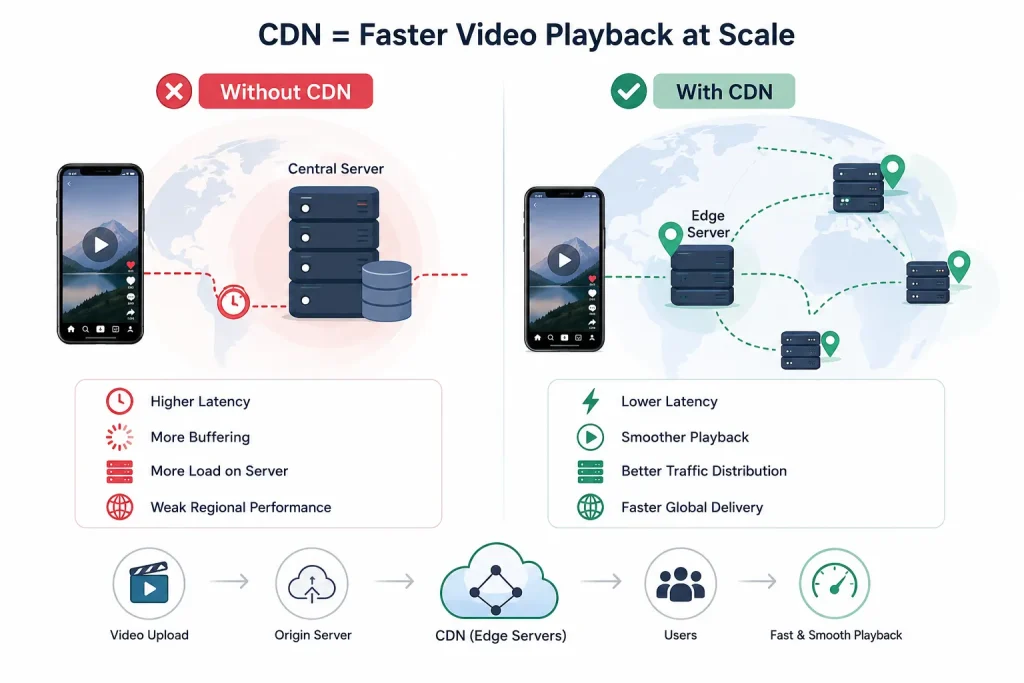
A CDN, or Content Delivery Network, helps short-video apps deliver videos faster by serving content from locations closer to users.
Without a CDN, every video request may travel back to the main server or central storage location. If the user is far from that server, the video takes longer to start. In a swipe-based app, even a small delay can make the feed feel slow.
A CDN solves this by using edge servers. These servers keep video copies closer to active users, reducing distance, delay, and buffering.
Here is how it works:
| Without CDN | With CDN |
|---|---|
| Video loads from central server | Video loads from nearby edge server |
| Higher latency | Lower latency |
| More buffering risk | Smoother playback |
| More pressure on main server | Better traffic distribution |
| Weak regional performance | Faster global delivery |
For example, if a user in India watches a video, the CDN can deliver it from a nearby regional server instead of a distant main server. This improves video start time and keeps the feed moving smoothly.
A CDN improves:
- faster video start time
- smoother regional playback
- better bandwidth distribution
- lower pressure on main servers
- stronger high-traffic stability
- better global content delivery
For a TikTok-like app, CDN planning should be part of the core infrastructure from the beginning. Short-video users expect videos to start instantly, and CDN delivery helps create that fast, seamless experience.
How Adaptive Bitrate Streaming Reduces Buffering in Mobile-First Video Apps
Adaptive bitrate streaming helps a short-video app choose the right video quality based on the user’s internet speed and device performance.
In a mobile-first app, every user does not have the same connection. Some users watch on strong Wi-Fi, some use mobile data, and some move between different network zones while scrolling. If the app forces every user to load the same high-quality video, slow connections may create buffering and delayed playback.
Adaptive bitrate streaming solves this by switching video quality automatically.
| User Condition | Playback Response |
|---|---|
| Strong Wi-Fi | Higher-quality video |
| Average mobile data | Medium-quality video |
| Slow network | Lighter video version |
| Network drops suddenly | Quality reduces to avoid buffering |
| Network improves | Quality can increase again |
This keeps the video running smoothly without asking the user to change settings manually.
For a TikTok-like app, this is important because users swipe quickly and expect every video to start fast. Adaptive bitrate streaming helps reduce buffering, improve feed flow, save bandwidth, and keep users engaged for longer sessions.
How Smart Preload Logic Creates the Instant Swipe Experience Users Expect
Short-video apps feel fast because they do not wait for the user to swipe before loading the next video. While the current video is playing, the app quietly prepares the next video in the background.
This is called preload logic.
In a TikTok-like app, preload logic helps create the instant swipe experience. When the user moves to the next video, the content is already partially or fully ready, so playback starts without noticeable delay.
A smart preload system usually considers:
| Factor | Why It Matters |
|---|---|
| Network speed | Decides how much video can be loaded in advance |
| Device performance | Prevents low-end devices from becoming slow |
| Swipe speed | Helps predict whether the user needs quick preview loading |
| Video length | Controls how much content should be preloaded |
| Feed position | Helps prepare the next likely video |
| Watch behavior | Shows whether the user usually skips or watches fully |
| Data saver settings | Reduces unnecessary mobile data usage |
| Predicted next video | Helps load the most likely upcoming content first |
Preloading must be balanced carefully. If the app loads too many videos in advance, it wastes mobile data and increases CDN cost. If it loads too little, users may see delays between swipes.
For example, if a user is swiping quickly, the app may preload only the first few seconds of upcoming videos. If a user usually watches videos fully, the app can preload the next video more confidently.
This balance improves both performance and cost efficiency. For a short-video platform, smart preload logic helps keep the feed smooth, reduces buffering, and encourages users to keep watching longer.
Read More : Why Niche Creator Platforms Are Becoming the Next Big Growth Opportunity
Building Backend Architecture That Can Handle Uploads, Views, Likes, Shares, and Replays
A short-video app backend must handle much more than video files.
Every user action creates data. Views, likes, shares, comments, skips, replays, follows, reports, and gifts all need to be processed.
If all of this runs inside one system, the app may slow down as traffic grows.
A scalable backend separates major responsibilities into different services.
| Backend Service | What It Handles |
|---|---|
| User service | Login, profiles, account data |
| Video service | Uploads, publishing, metadata |
| Processing service | Transcoding, thumbnails, compression |
| Feed service | Content ranking and delivery |
| Engagement service | Likes, comments, shares, saves |
| Analytics service | Watch time, skips, replays, retention |
| Moderation service | Reports, unsafe content checks |
| Payment service | Coins, gifts, wallet, creator payouts |
| Admin service | Dashboard, controls, platform management |
This makes the platform easier to scale. If video uploads increase, the processing service can scale separately. If engagement grows, analytics and event processing can scale separately.
Why Queue-Based Processing Keeps the App Fast During Heavy Upload Activity
In a short-video app, video upload is only the first step. After upload, the platform still needs to compress the file, transcode it into different quality versions, generate thumbnails, extract metadata, run moderation checks, and update the publishing status.
These tasks need time and backend resources. If the app tries to handle everything on the main server, the platform can become slow during heavy upload activity. Creators may see delays, users may experience slow responses, and some videos may fail to process properly.
Queue-based processing prevents this problem by moving heavy tasks into the background.
When a creator uploads a video, the system places the processing job into a queue. Background workers then pick up each task one by one and complete the required steps without blocking the main app experience.
Queue-based systems help with:
- video compression and transcoding
- thumbnail and preview generation
- AI moderation checks
- metadata extraction
- push notifications
- analytics updates
- engagement event processing
For a TikTok clone, this is especially useful during traffic spikes. If many creators upload videos at the same time, the queue manages the workload in an organized way. This keeps the app responsive, protects the backend from overload, and helps videos move smoothly from upload to publishing
How Event-Driven Architecture Supports Real-Time Engagement in Short-Video Apps
Short-video platforms create thousands or millions of small events.
A view is an event. A like is an event. A skip is an event. A replay is an event. A comment is an event. A share is an event.
These events are important because they power recommendation systems, creator analytics, moderation signals, and monetization decisions.
An event-driven architecture allows the platform to collect and process these actions without slowing down the main user experience.
For example:
- Watch time can improve recommendation quality.
- Skip rate can show weak content relevance.
- Replay behavior can signal high interest.
- Reports can trigger moderation review.
- Gifts can update creator earnings.
- Shares can influence content ranking.
This architecture helps the app respond to user behavior at scale.
How Video Metadata Helps the Feed, Search, Moderation, and Analytics Work Better
Every video in a short-video app needs more than a file URL. The platform also needs video metadata, which gives the system important context about each upload.
Metadata helps the app understand what the video is, who created it, when it was uploaded, how it should appear in the feed, and how users are responding to it. Without proper metadata, the platform may store videos, but it becomes difficult to organize, rank, search, moderate, or analyze them at scale.
Useful video metadata can include:
- creator ID, upload time, video duration, and file format
- thumbnail URL, caption, hashtags, language, and audio details
- moderation status, approval status, and content visibility
- view count, watch time, engagement rate, skips, and replays
This data supports multiple parts of the platform. The feed can use upload time, watch time, engagement rate, and user behavior to decide which videos should appear next. Search can use captions, hashtags, language, and audio details to make videos easier to discover.
Metadata also helps moderation teams, creators, and admins. Moderation systems can track whether a video is approved, limited, blocked, or under review. Creators can understand which videos are performing well. Admins can analyze content quality, user behavior, and platform growth.
For a TikTok-like app, metadata becomes more valuable as content volume increases. When thousands of videos are uploaded daily, metadata keeps the system organized, searchable, measurable, and easier to scale.
Read More : CDN Optimization for Short Video Apps: How to Deliver Videos Faster With Lower Latency
How Security and Moderation Fit Inside Video Streaming Infrastructure
Fast video delivery is important, but speed alone is not enough. A short-video platform also needs secure uploads, protected delivery, and moderation checks built into the infrastructure.
If the upload system is weak, users may upload harmful files, spam content, copyrighted material, or unsafe videos. If APIs are not protected, bad actors can abuse the platform. If moderation happens too late, problematic content may already reach the feed and damage user trust.
Important security layers include:
| Security Layer | Purpose |
|---|---|
| Signed upload URLs | Allows only authorized uploads |
| Creator authentication | Confirms who is uploading content |
| File type validation | Blocks unsupported or risky files |
| Malware scanning | Detects harmful files before processing |
| Encrypted data transfer | Protects video and user data in transit |
| Access control | Limits who can view, edit, or manage content |
| Admin role permissions | Prevents unauthorized dashboard actions |
| Activity logs | Tracks important system and admin actions |
| Secure CDN access | Protects video delivery from misuse |
| API rate limits | Reduces spam, abuse, and automated attacks |
Moderation should also be connected to the video pipeline. A video can be checked before it receives wider distribution. If the system detects unsafe, spammy, copyrighted, or policy-breaking content, the platform can limit reach, send it for review, or block publishing.
For short-video platforms, moderation is not just a separate safety feature. It is part of the video streaming infrastructure. A strong moderation layer protects the feed, improves content quality, builds user trust, and supports healthier long-term growth.
Common Video Infrastructure Mistakes That Make Short-Video Apps Slow and Expensive
Many short-video apps do not become slow because the idea is weak. They become slow because the video infrastructure is not planned properly from the beginning. Once uploads, views, swipes, and engagement events start increasing, small backend mistakes can turn into major performance and cost problems.
Serving Raw Videos Without Optimization
Raw uploaded videos are often too heavy for smooth mobile playback. They may have large file sizes, unsupported formats, or inconsistent quality.
This creates problems like:
- slow video start time
- buffering during playback
- higher bandwidth cost
- poor experience on low-speed networks
A better approach is to process every video through compression, transcoding, and format standardization before it reaches the feed.
Adding CDN Too Late
Some founders treat CDN as a growth-stage upgrade. But short-video users expect fast playback from the first session.
Without CDN delivery, videos may load from a central server, which can create delays for users in different regions. This affects video start time, feed speed, and retention.
A CDN should be part of the core video streaming infrastructure from the beginning.
Poor Transcoding Planning
Transcoding helps one uploaded video work across different devices and network speeds. But if it is not planned properly, it can slow down publishing and increase processing cost.
For example, creating too many unnecessary video versions can waste resources, while creating too few versions can hurt playback quality.
The goal should be balanced transcoding: enough quality versions for smooth playback, but not so many that processing becomes expensive.
No Preload Logic for the Feed
A TikTok-like app depends on instant swiping. If the next video starts loading only after the user swipes, the feed feels delayed.
Preload logic solves this by preparing the next video in the background while the current video is playing.
Without preload logic, the app may face:
- delayed video starts
- lower watch time
- shorter sessions
- weaker user retention
Weak Storage Planning
Every video creates more than one file. A single upload can generate original files, compressed versions, thumbnails, previews, captions, and metadata.
If all assets are stored the same way, storage cost can rise quickly. High-performing videos need fast access, but old or low-view videos can move to lower-cost storage.
Good storage planning keeps the app scalable and cost-efficient.
Relying Only on Manual Moderation
Manual moderation may work when uploads are low, but it cannot handle a high-volume short-video platform alone.
At scale, the app needs automated checks, report handling, review queues, and admin workflows. Otherwise, spam, unsafe videos, copyrighted content, and fake engagement can enter the feed too easily.
Moderation should be part of the video pipeline, not an afterthought.
Read More : How Short Video Apps Can Reduce Streaming Costs Without Losing Playback Quality
How Miracuves Helps Founders Build Fast and Scalable TikTok-Like Video Platforms
Miracuves helps founders build TikTok-like short-video platforms with a stronger foundation for speed, scalability, branding, and monetization. The focus is not just on creating a swipe-based video feed, but on building a complete platform that can support creators, viewers, admins, and revenue growth.
For founders, this matters because a short-video app needs more than video upload and playback. It needs a system that can manage creator content, process videos, deliver them quickly, track engagement, control moderation, and support future business models.
Miracuves can support core platform layers such as:
- Video infrastructure: creator uploads, video processing, transcoding, CDN delivery, adaptive playback, and scalable storage.
- User and creator experience: creator profiles, user accounts, short-video feed, likes, comments, shares, follows, and content discovery.
- Admin and control systems: admin dashboard, content management, moderation support, user controls, and performance tracking.
- Monetization modules: wallet and coin systems, virtual gifting, paid promotions, live streaming, creator subscriptions, and social commerce options.
- Business flexibility: white-label branding, source code ownership, customization scope, and scalable backend structure.
This approach helps founders reduce early development complexity while keeping the platform ready for future growth. A business can start with the core short-video experience and later expand into live streaming, creator rewards, brand campaigns, premium content, paid boosts, or commerce-led monetization.
For startups planning a TikTok clone or short-video platform, Miracuves provides a faster and more structured way to launch with the technical base needed for engagement, retention, and long-term scalability.
Final Thoughts: Build Your Short-Video App on Fast Video Infrastructure
A short-video app cannot grow only with an attractive interface or swipe-based design. Behind every smooth video feed, there must be strong video streaming infrastructure that supports creator uploads, video processing, transcoding, cloud storage, CDN delivery, adaptive playback, preload logic, and scalable backend performance.
For a TikTok clone or short-video platform, infrastructure directly affects business growth. If uploads are slow, creators may stop posting. If videos buffer, users may leave the app early. If storage is not planned well, costs can increase quickly. If CDN and preload logic are weak, the feed may feel slow even when the app design looks good.
That is why founders should plan infrastructure from the beginning, not after traffic grows. A strong foundation helps improve retention, creator activity, content delivery, monetization, and long-term scalability.
If you are planning to launch a TikTok-like app, Miracuves can help you build a fast, scalable, and white-label short-video platform with creator tools, video delivery systems, monetization modules, admin control, and source code ownership.
FAQs
What is video streaming infrastructure in a short-video app?
Video streaming infrastructure is the backend system that handles video upload, processing, transcoding, storage, CDN delivery, and playback. In a short-video app, it helps videos load faster, play smoothly, and scale as users and creators increase.
Why is CDN important for a TikTok clone?
CDN helps deliver videos from servers closer to users. This reduces loading time, buffering, and pressure on the main server, which is important for fast swipe-based video feeds.
Why is transcoding needed in short-video apps?
Transcoding converts one uploaded video into multiple quality versions. This helps the app play videos smoothly on different devices, internet speeds, and screen sizes.
How does preload logic improve short-video app performance?
Preload logic loads the next video in the background before the user swipes. This creates a faster feed experience and reduces waiting time between videos.
How does Miracuves help with video streaming infrastructure?
Miracuves helps founders build TikTok-like apps with video upload flows, transcoding support, CDN-based delivery, adaptive playback, creator tools, admin control, monetization modules, and scalable backend structure.