



Building a marketplace app like Amazon or Alibaba is one of the most ambitious and rewarding opportunities in digital business. These platforms do not just sell products. They create an ecosystem where buyers, sellers, logistics, payments, support, and data all work together in one scalable system.
For entrepreneurs, startups, and established businesses, the appeal is obvious. A marketplace model can support multiple vendors, a wide product catalog, repeat purchases, and long-term revenue growth. But building such a platform is not as simple as creating an online store. A marketplace app needs strong architecture, seller management, trust systems, search performance, payment handling, and smooth order operations from day one.
In this guide, Miracuves explains how to build a marketplace app like Amazon or Alibaba, what features matter most, which business model to choose, and what mistakes to avoid before launching.
What Is a Marketplace App Like Amazon or Alibaba?
A marketplace app is a digital platform where multiple sellers can list products and multiple buyers can browse, compare, and purchase those products in one place.
Unlike a traditional eCommerce store where one business sells its own inventory, a marketplace platform manages interactions between third-party vendors and customers.
Core Marketplace Structure
A marketplace app typically includes:
- Buyer app or website
- Seller dashboard
- Admin panel
- Product catalog management
- Payment system
- Order and shipping workflows
- Reviews and trust features
- Analytics and reporting
Amazon vs Alibaba: Business Model Difference
Although both are marketplace giants, their models are slightly different.
| Platform | Core Focus | Main Model |
| Amazon | Direct-to-consumer and third-party retail | B2C and hybrid marketplace |
| Alibaba | Wholesale and supplier network | B2B marketplace |
| Amazon-like app | Fast consumer buying experience | Product discovery, checkout, delivery |
| Alibaba-like app | Bulk sourcing and supplier negotiation | Supplier listings, MOQs, RFQs |
This difference matters because your feature set, user flow, and monetization plan depend on whether you are building for B2C, B2B, or a hybrid model.
Why Businesses Want to Build Marketplace Apps
The marketplace model is attractive because it can scale faster than inventory-heavy businesses. Instead of managing every product yourself, you create the infrastructure that connects demand and supply.
Key Benefits of a Marketplace App
- Wider product range without owning all inventory
- Multiple revenue channels
- Better scalability across regions and categories
- Strong network effects as buyers and sellers grow together
- Easier category expansion over time
A successful marketplace can begin with one niche, such as electronics, fashion, groceries, industrial products, rentals, or wholesale sourcing, and then expand gradually once operations stabilize.
Choose the Right Marketplace Model First
Before design or development begins, define the business model clearly. This decision affects technology, operations, onboarding, and revenue.
Popular Marketplace Types
B2C Marketplace
Businesses or sellers offer products directly to consumers.
Examples:
- Amazon-style retail marketplace
- Fashion marketplace
- Electronics marketplace
B2B Marketplace
Manufacturers, wholesalers, or suppliers sell to businesses in large quantities.
Examples:
- Alibaba-style wholesale platform
- Industrial sourcing platforms
- Bulk procurement systems
C2C Marketplace
Individuals sell to other individuals.
Examples:
- Resale apps
- Used goods platforms
- Community-based product marketplaces
Hybrid Marketplace
Supports more than one transaction model.
Examples:
- B2B + B2C
- Retail + wholesale
- Products + services
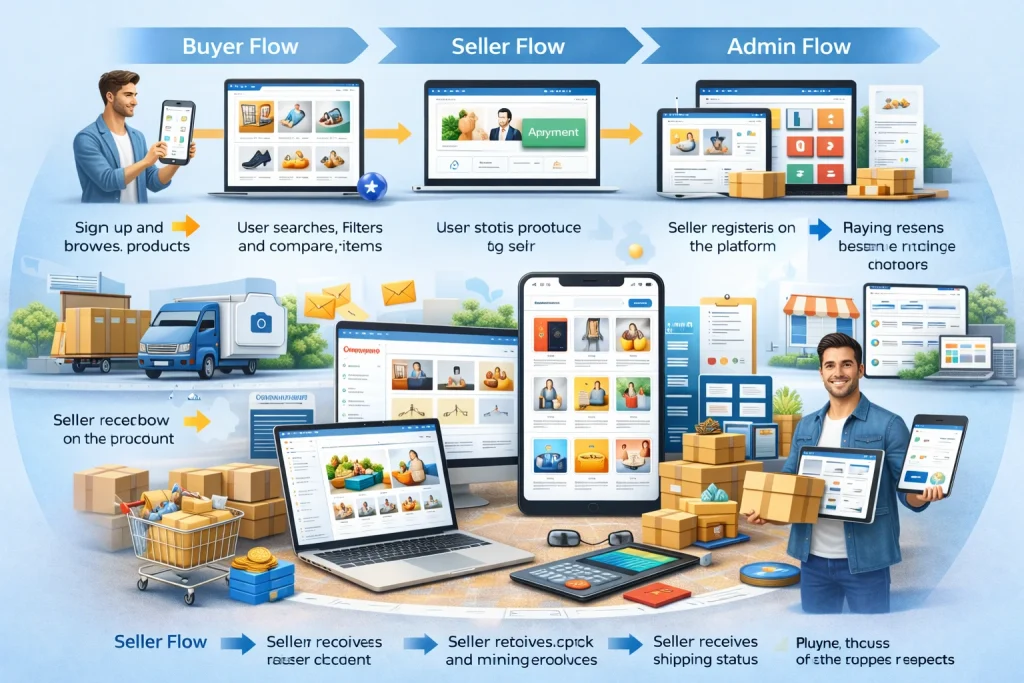
How a Marketplace App Like Amazon or Alibaba Works
A marketplace platform has more moving parts than a normal app. Here is a simple view of the process.
Buyer Flow
- User signs up and browses products
- User searches, filters, and compares items
- User adds products to cart
- Payment is completed
- Order is sent to the seller
- Shipping and tracking begin
- Delivery is completed
- Buyer leaves feedback or raises support requests
Seller Flow
- Seller registers on the platform
- Admin approves seller account
- Seller uploads products and pricing
- Seller receives and manages orders
- Seller updates stock and shipping status
- Seller receives payout after order completion
Admin Flow
- Approves sellers and product categories
- Monitors orders, disputes, payments, and commissions
- Manages content, banners, offers, and policies
- Tracks business performance through reports
Must-Have Features for a Marketplace App
To compete with serious marketplace platforms, you need more than just product listings and checkout.
Buyer App Features
User Registration and Profiles
Allow sign-up through email, phone, or social login. Profiles should store addresses, payment preferences, order history, and wishlists.
Smart Search and Filters
Search quality directly affects conversions. Filters should include category, price, brand, ratings, shipping options, and availability.
Product Detail Pages
Every product page should include:
- Product images
- Descriptions
- Specifications
- Pricing
- Seller information
- Ratings and reviews
- Return or shipping details
Cart and Checkout
The checkout process should be simple, fast, and mobile friendly. Support for coupons, multiple payment methods, and saved addresses improves conversions.
Order Tracking
Users expect real-time order updates from confirmation to delivery.
Reviews and Ratings
These build trust and help reduce buyer hesitation.
Seller Panel Features
Seller Onboarding
Vendors should be able to register, upload compliance documents, and set up payout details.
Inventory Management
Sellers need tools to manage stock, product variants, SKUs, and pricing.
Order Management
A seller dashboard should allow order acceptance, fulfillment updates, cancellations, refunds, and shipment handling.
Analytics
Sellers should see product performance, sales trends, top-selling items, and payout summaries.
Admin Panel Features
Vendor Approval and Control
The admin should approve sellers, review compliance, and manage quality standards.
Commission and Revenue Settings
Admins should be able to set category-wise commissions, featured placement pricing, and promotional fees.
Catalog Moderation
Product content must be reviewed for quality, duplication, pricing misuse, or policy violations.
Dispute and Refund Handling
A central support workflow is necessary for managing complaints and trust issues.
Reports and Insights
The admin panel should provide data on GMV, orders, user growth, vendor performance, refunds, and category health.
Read more: Building an Automated Refund and Dispute Resolution System in Retail Apps
Advanced Features That Improve Marketplace Performance
Once the core product is stable, advanced features can strengthen your platform.
AI-Powered Product Recommendations
Useful for increasing average order value and repeat purchases.
Personalized Search Ranking
Products can be reordered based on browsing behavior, location, seller quality, or popularity.
Dynamic Pricing and Promotions
Promotional tools help sellers compete and improve seasonal sales.
Multi-Language and Multi-Currency Support
Essential if your marketplace targets multiple countries or supplier regions.
RFQ and Negotiation Tools
Especially important in Alibaba-style B2B platforms where buyers request quotes from sellers.
Bulk Ordering and MOQ Management
A must-have for wholesale and industrial marketplaces.
Escrow or Milestone Payment Logic
Useful in high-value B2B or custom procurement transactions.
Marketplace Monetization Models
Your marketplace should not depend on one revenue stream only.
Common Revenue Models
| Revenue Model | How It Works | Best Use Case |
| Commission on sales | Platform takes a percentage of each order | B2C and hybrid marketplaces |
| Seller subscription | Vendors pay monthly or yearly to list | Large seller ecosystems |
| Featured listings | Sellers pay for better product visibility | Competitive categories |
| Advertising revenue | Brands pay for banner or search placement | High-traffic marketplaces |
| Transaction fees | Flat fee added per transaction | B2B and niche platforms |
| Value-added services | Logistics, photography, warehousing, analytics | Mature marketplaces |
Many successful platforms combine commission, subscription, and ad revenue for stronger long-term sustainability.
Read more: Recommendation Engines for Retail: Using Collaborative Filtering in Amazon Clones
Technology Stack for a Marketplace App
The right technology stack depends on scale, expected traffic, and roadmap.
Frontend
- Flutter or React Native for mobile apps
- React.js or Next.js for web platform
Backend
- Node.js
- Laravel
- Python-based backend for some advanced workflows
Database
- PostgreSQL
- MySQL
- MongoDB for some flexible catalog cases
Infrastructure
- AWS, Google Cloud, or Azure
- CDN for media delivery
- Scalable storage for product images and documents
Integrations
- Payment gateway
- Shipping APIs
- SMS and email notifications
- Search engine
- Analytics tools
- Fraud detection tools
Step-by-Step Process to Build a Marketplace App Like Amazon or Alibaba
1. Define the Niche and Audience
Do not start by trying to build the next Amazon for everything. Start with a specific category or user problem.
Examples:
- B2B building materials marketplace
- Fashion and accessories marketplace
- Electronics resale platform
- Regional wholesale sourcing app
A focused niche helps reduce complexity and improves early traction.
2. Validate the Business Model
Talk to potential buyers and sellers. Understand:
- What problem you are solving
- Why sellers would join
- Why buyers would trust the platform
- Which category gaps still exist
3. Decide MVP Scope
Your first version should solve the core transaction flow well.
Good MVP Features
- User registration
- Seller onboarding
- Product listings
- Search and filters
- Cart and checkout
- Order management
- Basic reviews
- Admin dashboard
Avoid overloading the MVP with every advanced feature.
4. Design the User Experience
A marketplace app should feel clean, trustworthy, and easy to navigate.
Focus on:
- Fast product discovery
- Clear seller information
- Easy checkout
- Strong mobile usability
- Consistent layout across categories
5. Build Buyer, Seller, and Admin Modules
Marketplace platforms usually require three different systems running together. That is why planning architecture early matters.
6. Integrate Payments, Shipping, and Notifications
Without these, the app cannot operate smoothly in real conditions.
7. Test for Real Marketplace Conditions
Testing should cover:
- Seller approval flows
- Out-of-stock scenarios
- Refund cases
- Slow shipping updates
- High catalog volume
- Multiple payment conditions
8. Launch in a Controlled Market
Start with one geography, one niche, or one seller group. Learn from real users, then scale step by step.
Biggest Challenges in Building a Marketplace App
Marketplace businesses are powerful, but they are also operationally complex.
Trust and Quality Control
If product quality, seller credibility, or delivery reliability fails, user trust drops quickly.
Supply and Demand Balance
A marketplace needs both buyers and sellers. Too much of one side creates friction.
Search Relevance
Large catalogs become difficult to manage without strong search and categorization.
Returns, Refunds, and Disputes
These workflows must be clear and fair from the beginning.
Scalability
As vendors, users, and products increase, your architecture should handle traffic and data efficiently.
Mistakes to Avoid
Trying to Build Too Broad a Platform Too Early
Start focused. Expansion is easier after product-market fit.
Ignoring Seller Experience
If the seller dashboard is weak, product quality and operations will suffer.
Weak Verification Systems
Unverified sellers can damage trust and increase fraud risk.
Poor Search and Product Discovery
Even great inventory performs badly if users cannot find products easily.
Complicated Checkout
Too many steps in checkout reduce conversions.
Amazon-Like vs Alibaba-Like Marketplace: Which One Should You Build?
| Factor | Amazon-Like Marketplace | Alibaba-Like Marketplace |
| Buyer type | Consumers | Businesses and wholesalers |
| Order size | Small to medium | Medium to bulk |
| Key priority | Fast buying experience | Supplier discovery and negotiation |
| Core trust feature | Reviews, returns, delivery | Supplier verification, RFQ, MOQ |
| Revenue style | Commissions, ads, subscriptions | Memberships, lead generation, transaction services |
| Product focus | Retail goods | Bulk, manufacturing, sourcing |
If your audience needs fast consumer purchases, build an Amazon-like model. If they need sourcing, supplier comparison, and bulk procurement, an Alibaba-like structure is more suitable.
Best Practices for Launching Successfully
Start With a Strong Category
Pick a niche where demand exists but the user experience is still weak.
Onboard Quality Sellers First
A smaller number of good sellers is better than a large number of unreliable ones.
Build Trust Early
Use verified profiles, transparent policies, real reviews, and responsive support.
Make Search Excellent
Marketplace success often depends on how quickly users find what they want.
Track Metrics That Matter
Monitor:
- Seller activation rate
- Conversion rate
- Cart abandonment
- Repeat purchase rate
- Average order value
- Refund rate
Contact us to build your marketplace app with the right strategy, scalable architecture, and launch-ready feature set.
Miracuves can help you plan, design, and develop a marketplace platform tailored to your business model, whether you want to build a B2C app like Amazon, a B2B platform like Alibaba, or a hybrid marketplace solution.
Conclusion
Building a marketplace app like Amazon or Alibaba requires much more than a good-looking interface. It demands the right business model, strong platform architecture, reliable seller workflows, trust-building systems, and scalable operations. The most successful marketplace apps start with a clear niche, a focused MVP, and a thoughtful expansion strategy.
If your goal is to build a serious multi-vendor platform, the smartest approach is to begin with the core transaction flow, validate it in the market, and then expand into advanced features as demand grows.
FAQs
1. What is the difference between a marketplace app and an eCommerce app?
A marketplace app allows multiple sellers to sell through one platform, while a standard eCommerce app usually sells products from a single business.
2. Should I build a B2B or B2C marketplace first?
That depends on your target audience. B2C works well for consumer-focused categories, while B2B is better for wholesale, sourcing, and industrial demand.
3. Can I launch a marketplace with an MVP first?
Yes. In most cases, starting with an MVP is the smartest approach because it helps validate demand before major expansion.
4. What are the most important features in a marketplace app?
Search, seller onboarding, product management, checkout, order tracking, reviews, and admin controls are the most important features.
5. How do marketplace apps make money?
They usually earn through commissions, subscriptions, featured listings, ads, and value-added services.
Related Article: