
Key Takeaways
What You’ll Learn
- A white-label Dropbox app must be built around security-first architecture, not just file upload and sharing features.
- Core security layers include encryption, access control, authentication, and secure file storage to protect user data.
- Role-based permissions are essential for managing who can view, upload, download, edit, or share files.
- Compliance planning matters from day one, especially for apps handling business, personal, or sensitive documents.
- A secure cloud storage platform builds trust by protecting files, user accounts, and sharing workflows.
Stats That Matter
- Cloud storage apps handle high-value user data, making encryption and access control critical.
- Weak sharing permissions increase security risk, especially when users share files across teams or external links.
- Secure authentication reduces account misuse, including unauthorized logins and file access.
- Audit logs and admin controls improve visibility into file activity, user behavior, and potential misuse.
Real Insights
- The biggest risk is not only data loss, but losing user trust through weak security controls.
- Security must cover every layer, from login and file upload to sharing, storage, and admin access.
- Permission design directly impacts safety, especially for teams, businesses, and multi-user workspaces.
- White-label platforms need customization without weakening security, so branding and features should not compromise protection.
- A secure Dropbox-like app succeeds when privacy, file control, performance, and trust work together as one system.
You’ve heard the horror stories about data breaches, leaked files, and private documents showing up in the wrong hands. And if you’re planning to launch a white-label Dropbox-style app, it’s normal to wonder: Is it actually safe? Or am I taking a risk that could destroy trust in one incident?
In 2026, cloud storage apps are a prime target for attackers because they hold what matters most—business documents, user IDs, contracts, and sometimes even identity proofs. Safety is not just a “tech issue” anymore. It directly impacts your legal compliance, customer retention, and long-term brand credibility.
In this guide, I’ll give you an honest security assessment of white-label Dropbox-style apps, the real risks to watch for, and practical steps to make your platform secure. And yes, we’ll also cover how Miracuves approaches security-first development for cloud storage platforms.
Understanding White-Label Dropbox-Style App Security Landscape
What “white-label security” actually means
White-label security means you’re launching a ready-to-deploy Dropbox-style app, but the safety of your platform depends on how the code is built, how servers are configured, and how updates are managed.
So the “app” may be ready, but security is only real when it’s properly implemented + continuously maintained.
Read more : – What is Dropbox App and How Does It Work?
Why people worry about white-label Dropbox-style apps
People worry because cloud storage apps handle:
- Private files (documents, photos, contracts)
- User identity information
- Sharing links (public/private access)
- Team folders and permissions
- Admin dashboards with full control
A single mistake can expose thousands of user files instantly.
Current threat landscape for cloud storage platforms (2026)
Dropbox-style apps face threats like:
- Account takeovers (password reuse + credential stuffing)
- Ransomware-style file encryption attacks
- Link-sharing abuse (public links leaked or guessed)
- Insider misuse (employees/partners accessing sensitive files)
- API exploitation (upload/download endpoints abused)
- Misconfigured cloud buckets (public file exposure)
Security standards in 2026
In 2026, a secure cloud storage app is expected to follow:
- Zero Trust access principles
- Encryption at rest + in transit
- Strong identity and access management (IAM)
- Secure API architecture
- Regular penetration testing
- Audit logs + anomaly monitoring
- Compliance readiness (GDPR/CCPA + SOC 2 / ISO 27001)
Real-world statistics on app security incidents
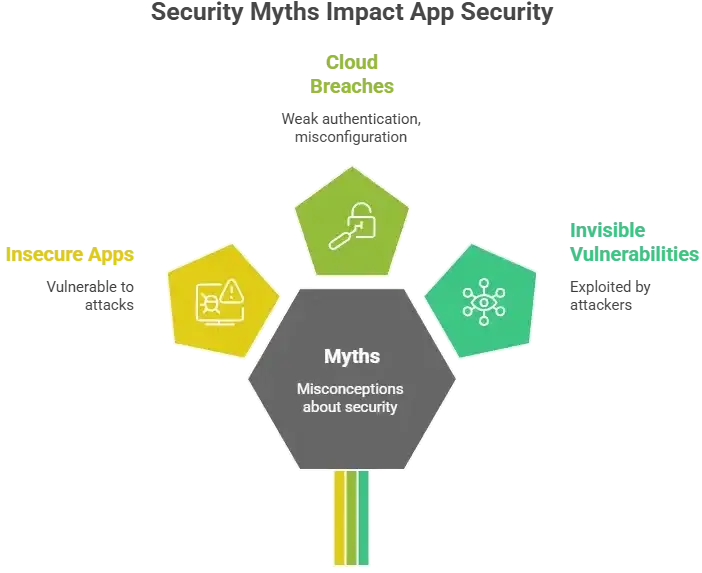
Here’s the practical truth: cloud apps are attacked constantly. In 2026, the most common patterns behind major incidents include:
- Weak passwords and missing MFA
- Unpatched vulnerabilities in frameworks/plugins
- Insecure file-sharing permissions
- Misconfigured cloud storage and backups
- Exposed API keys and admin panels
Most breaches are not “movie-style hacks”—they’re basic security gaps that were ignored too long.
Key Security Risks & How to Identify Them
Data Protection & Privacy Risks
Dropbox-style apps store and move sensitive files daily, so privacy risks are the first major concern.
User personal information
Even if your app is “file storage focused,” it still collects:
- Name, email, phone
- Login history and device data
- IP address and location signals (sometimes)
If this data leaks, it becomes a legal + trust problem immediately.
Payment data security
If your app has paid plans, upgrades, or subscriptions, payment-related risks include:
- Storing card data incorrectly (high risk)
- Weak checkout integrations
- Exposure of transaction metadata
Best practice is to avoid storing raw card details and rely on PCI-compliant payment gateways.
Location tracking concerns
Cloud storage apps usually don’t need live location, but risk appears when:
- Device location is logged unnecessarily
- Activity logs reveal sensitive patterns (workplace, travel, business ops)
Collect only what you truly need.
GDPR/CCPA compliance
For privacy laws, the biggest risks are:
- No consent flow
- No clear data retention policy
- No “delete my account/data” option
- No breach reporting readiness
Technical Vulnerabilities
Most real breaches happen here, especially in file upload/download systems.
Code quality issues
Common issues in unsafe platforms include:
- Hardcoded secrets (API keys inside code)
- Weak input validation
- Poor error handling exposing system details
- No secure coding standards followed
Server security gaps
A secure app is not just the frontend. Server risks include:
- Open ports and weak firewall rules
- Poor database access controls
- Missing patching and updates
- No rate limiting (easy brute-force attacks)
API vulnerabilities
Dropbox-style apps depend heavily on APIs. Risks include:
- Broken authentication (tokens leaked or reused)
- Broken authorization (users accessing others’ files)
- Insecure file preview endpoints
- No throttling on download APIs
Third-party integrations
Integrations can create silent risks, like:
- Analytics scripts collecting sensitive data
- Email/SMS providers leaking metadata
- Cloud storage misconfigurations
- Vulnerable plugins and SDKs
Business Risks
Even if the issue starts technical, the damage becomes business-critical fast.
Legal liability
If user files leak, you may face:
- Regulatory investigations
- Customer claims
- Contract violations (B2B clients)
Reputation damage
For cloud storage apps, trust is everything. One incident can lead to:
- App uninstalls
- Bad reviews
- Lost enterprise deals
Financial losses
Breaches often cause direct costs like:
- Incident response + forensics
- Downtime and refunds
- Customer support overload
- Legal fees
Regulatory penalties
Depending on region, penalties can include:
- GDPR fines
- Mandatory breach disclosures
- Audit requirements
Risk Assessment Checklist (Quick Self-Audit)
Use this checklist before launching your white-label Dropbox-style app:
- Do we have MFA / 2FA for users and admins?
- Are files encrypted in transit (HTTPS/TLS) and at rest?
- Do we have role-based access control (RBAC) for teams?
- Are file-sharing links expiring + permission-controlled?
- Do we prevent broken access control (user cannot access other users’ files)?
- Are uploads protected against malware files and unsafe formats?
- Do we have rate limiting to stop brute force attacks?
- Are backups encrypted and tested for recovery?
- Do we maintain audit logs for downloads, shares, deletes, and admin actions?
- Do we have a defined incident response plan?
Security Standards Your White-Label Dropbox-Style App Must Meet
Essential Certifications
For a Dropbox-style app, these standards are not “extra.” They are the baseline for trust in 2026.
ISO 27001 compliance
ISO 27001 focuses on building a complete Information Security Management System (ISMS), including:
- risk assessment processes
- access control policies
- incident response readiness
- internal audits and documentation
It proves your security is managed like a system, not just a feature.
SOC 2 Type II
SOC 2 Type II validates security controls over time, not just one day. It checks areas like:
- security
- availability
- confidentiality
- processing integrity
- privacy
This is especially important if you sell to B2B clients.
GDPR compliance
If you serve users in the EU, GDPR is mandatory. Key requirements include:
- lawful basis for data collection
- user consent + transparency
- right to delete data
- breach notification readiness
- data processing agreements (DPAs)
HIPAA (if applicable)
HIPAA applies only if your platform stores healthcare-related records or patient data. If yes, you need:
- strict access control
- audit logs
- encryption
- business associate agreements (BAA)
PCI DSS for payments
If you accept online payments, PCI DSS is required. Best practice:
- do not store card data
- use PCI-compliant gateways
- secure payment workflows end-to-end
Technical Requirements
These are the minimum technical controls expected in secure cloud storage apps.
End-to-end encryption
For a Dropbox-style app, encryption must cover:
- encryption in transit (TLS/HTTPS)
- encryption at rest (stored files + database)
- secure key management
For high-security use cases, client-side encryption can be added.
Secure authentication (2FA/OAuth)
Authentication must include:
- strong password policies
- multi-factor authentication
- secure session handling
- OAuth support (optional, but useful for enterprise login flows)
Regular security audits
Audits should include:
- vulnerability scanning
- access control review
- misconfiguration checks
- dependency and library reviews
Penetration testing
Pen testing helps detect:
- API exploitation paths
- privilege escalation risks
- file access bypass issues
- admin panel vulnerabilities
SSL certificates
SSL/TLS is non-negotiable:
- all traffic must be HTTPS
- HSTS should be enabled
- weak cipher suites must be disabled
Secure API design
Dropbox-style apps rely heavily on APIs, so security must include:
- proper authentication + authorization
- signed URLs for downloads
- rate limiting and throttling
- input validation
- logging and monitoring
Security Standards Comparison Table
| Standard / Requirement | What It Covers | Why It Matters for Dropbox-Style Apps |
|---|---|---|
| ISO 27001 | Security management system | Builds long-term security discipline |
| SOC 2 Type II | Control validation over time | Required for enterprise trust |
| GDPR | Privacy + user rights | Mandatory for EU users and global trust |
| HIPAA (if applicable) | Healthcare data protection | Needed if storing medical documents |
| PCI DSS | Payment security | Protects subscription billing workflows |
| Encryption (Transit + Rest) | Data confidentiality | Prevents file leaks during storage and transfer |
| MFA / 2FA | Account security | Stops most account takeover attempts |
| Pen Testing | Real attack simulation | Finds vulnerabilities before hackers do |
| Secure APIs | Access control | Prevents unauthorized file access |
Red Flags: How to Spot Unsafe White-Label Providers
If you are choosing a Dropbox-style white-label app, some red flags directly indicate an unsafe provider:
- Provider does not share proper security documentation
- Pricing feels “too cheap” without any clear explanation
- No proof of compliance (ISO/SOC reports, etc.)
- Technology stack is outdated and the update plan is unclear
- Admin panel is exposed without basic protection
- Security updates or patch policies are not mentioned
- Backup and recovery process is not properly defined
- No incident handling process exists (what happens during a breach?)
Evaluation Checklist (What You Should Ask the Provider)
Questions to ask providers
- How is data encryption handled both at rest and in transit?
- Is MFA / 2FA available for both users and admins?
- What access control model is used (RBAC, roles, permissions)?
- Do file-sharing links expire or stay permanent?
- Are audit logs available (downloads, shares, deletes)?
- How frequently are security patches released?
- Do you perform penetration testing? When was the last report generated?
- What is the disaster recovery plan and backup retention policy?
Documents to request
- Security architecture overview (high-level)
- Data Processing Agreement (DPA) template
- Privacy policy + data retention policy draft
- Compliance proof (ISO 27001 / SOC 2 if available)
- Incident response policy summary
Testing procedures (before finalizing)
- Basic vulnerability scan report
- API security checks (auth + access control validation)
- File permission testing (user A cannot access user B data)
- Upload security checks (malware / restricted formats)
- Rate limiting validation (brute force resistance)
Due diligence steps
- Check the provider’s past security history
- Clearly define security responsibilities in the contract
- Confirm support SLA for security-related issues
- Get the update policy in written form
- Confirm the backup recovery drill plan
Best Practices for Secure White-Label Dropbox-Style App Implementation
Pre-Launch Security
Before launch, security should not be treated as just a “checklist item.” It should be treated as a complete process. In Dropbox-style apps, file access and sharing carry high risks, making the pre-launch stage extremely important.
Security audit process
- Review API endpoints (upload, download, share, preview)
- Verify admin panel access checks
- Validate cloud storage configuration
- Test permissions and roles (team folders, shared files)
Code review requirements
- Verify authentication and authorization logic
- Ensure token and session handling is secure
- Validate input handling (file names, file types, metadata)
- Avoid hardcoding secrets like API keys
Infrastructure hardening
- Configure firewall rules and private networking
- Restrict database access (avoid public exposure)
- Secure file storage buckets (block public access)
- Enable rate limiting and WAF protection
Compliance verification
- GDPR/CCPA readiness check (consent + deletion flow)
- Audit logs enabled (user activity tracking)
- Data retention policy defined
- Breach response steps documented
Staff training programs
- Admin access rules (least privilege)
- Phishing awareness (support team ke liye bhi)
- Incident escalation process (who to call, what to do)
Post-Launch Monitoring
After launch, the real security testing begins because attackers usually target live environments.
Continuous security monitoring
- Login anomaly alerts (new device, new country)
- Suspicious download spikes detection
- Brute force attempts tracking
- Admin panel access monitoring
Regular updates and patches
- Monthly security patch cycle minimum
- Critical vulnerabilities par urgent patching
- Dependency updates (libraries, frameworks)
Incident response planning
- Clear incident classification (low/medium/high severity)
- Containment steps (disable share links, revoke tokens)
- User notification plan (region laws ke according)
- Post-incident report and fixes
User data management
- Role-based access control enforce
- Share link permissions (view-only, edit, expiry)
- File versioning + restore options
- Secure deletion and retention rules
Backup and recovery systems
- Encrypted backups
- Backup frequency defined (daily/weekly)
- Restore testing schedule
- Disaster recovery plan documented
Security Implementation Timeline (Simple)
- Week 1: Security audit + access control validation
- Week 2: Infrastructure hardening + encryption verification
- Week 3: Pen testing + bug fixes
- Week 4: Monitoring setup + incident response drill + launch readiness
Legal & Compliance Considerations
Regulatory Requirements
In Dropbox-style apps, legal risks are mostly related to data protection and user privacy. If you are targeting global users, it is safer to plan compliance from the early stages.
Data protection laws by region
Different regions follow different rules, but the common expectation is responsible handling of user data.
- EU: GDPR (strong consent + user rights)
- UK: UK GDPR
- USA: CCPA/CPRA (California) + state-level privacy laws
- India: DPDP Act (data handling + consent)
- Middle East: data residency and sector rules can apply
- APAC: country-specific privacy frameworks
Industry-specific regulations
If your Dropbox-style app is used in sensitive industries, compliance requirements become stricter:
- healthcare documents (HIPAA type requirements)
- finance documents (strong audit and encryption expectations)
- legal/enterprise contracts (confidentiality + access logging)
User consent management
Consent is not just a checkbox. You must ensure:
- Users clearly understand what data is being collected
- Users can withdraw consent anytime
- Tracking and analytics remain controlled
Privacy policy requirements
A strong privacy policy should clearly explain:
- What data is collected
- File storage and encryption methods
- Third-party tools being used (email, analytics, payments)
- data retention and deletion rules
- breach notification process
Terms of service essentials
Your terms should clearly define:
- account suspension rules
- file ownership and responsibility
- limitation of liability
- dispute resolution process
Liability Protection
To protect the business during security incidents, legal safeguards are essential.
Insurance requirements
Common coverage areas:
- cyber liability insurance
- data breach response coverage
- business interruption coverage
- legal defense coverage
Legal disclaimers
Disclaimers help clarify expectations regarding:
- user data handling boundaries
- service availability limits
- third-party integration responsibility
User agreements
For B2B clients, important agreements include:
- data processing agreement (DPA)
- service level agreement (SLA)
- security responsibility matrix (shared responsibility)
Incident reporting protocols
You should maintain a predefined process for:
- internal reporting timeline
- regulatory notification readiness
- customer communication templates
- evidence preservation steps
Regulatory compliance monitoring
Compliance is not a one-time setup. Continuous monitoring should include:
- policy updates tracking
- audit logs retention
- periodic access reviews
- security training refresh
Compliance Checklist by Region (Quick View)
- EU: GDPR readiness + user rights + breach response
- USA: CCPA/CPRA privacy controls + opt-out support
- India: DPDP consent + secure processing practices
- Global: encryption + access control + audit logs + incident response
Read more : – Dropbox App Marketing Strategy: From Startup to Staple
Global Cost Factors & Pricing Breakdown
The technology architecture behind your Dropbox-like platform directly impacts development cost, storage scalability, file synchronization performance, security handling, and long-term infrastructure management. Some businesses need a lightweight cloud storage solution for simple file sharing, while others require enterprise-grade systems with encrypted storage, real-time sync, team collaboration, and large-scale distributed file operations.
PHP/Laravel is often the most practical choice for launching a Dropbox-like cloud storage platform quickly and affordably. Node.js/Python becomes more suitable when real-time file synchronization and collaborative storage workflows grow more important, while Go microservices are better suited for enterprise-scale Dropbox-like platforms with higher concurrency and complex distributed storage infrastructure.
Miracuves Dropbox-Like App Solution Cost and Tech Stack
Miracuves Pricing for a Dropbox-Like File Sharing and Cloud Storage Platform developed in PHP/Laravel with Flutter Apps for $2,499 USD (One-Time Price) in just 6 days
Get a fully developed, deployment-ready platform modeled after Dropbox. Built on a rock-solid PHP/Laravel foundation, this complete package includes everything you need to launch and scale:
Core Workflows: Secure file uploads, cloud storage management, folder sharing, file synchronization, and multi-device access.
Built-in Storage Logic: User storage limits, file version history, encrypted file transfers, access permissions, and seamless sharing controls.
Management Hub: Centralized admin backend for user management, storage monitoring, file activity tracking, and platform controls.
Launch-Ready: Fully prepared for your custom branding, deployment, configuration, and immediate market launch.
Why Is Dropbox-Like App Development More Affordable?
Most advanced cloud storage platforms push businesses toward expensive architectures like Node.js, Go, or distributed microservices. Building such infrastructure from scratch requires highly specialized backend engineers, DevOps teams, and long development cycles — driving costs into the tens or hundreds of thousands of dollars.
We took a smarter, more practical approach:
You Aren’t Paying for Ground-Up Development: Our cloud storage engine is already developed, tested, and deployment-ready. You avoid the massive costs and long timelines associated with building an entire file infrastructure from zero.
The Power of PHP / Laravel: We built this on one of the most reliable and globally adopted frameworks available today. This not only reduces upfront development costs but also keeps long-term maintenance practical and affordable. With PHP’s massive global developer ecosystem, finding developers for future upgrades or scaling becomes significantly easier and more cost-effective.
You get an enterprise-capable, heavy-duty cloud storage foundation without the inflated development cost.
Note: This cost is for the solution, re-branding, deployment, and source code only.
Final Thought
Don’t compromise on security. Miracuves white-label Dropbox-style app solutions come with enterprise-grade security built-in. Our 9k+ successful projects have maintained zero major security breaches. Talk to Our Security Experts Now and see why businesses trust Miracuves for safe, compliant platforms.
A white-label Dropbox-style app can be safe, but only when security is treated as a long-term responsibility, not a one-time launch task. so choose the right provider like miracuves, verify compliance, and follow secure implementation practices, you can build a storage platform users genuinely trust.
FAQs
1) How secure is white-label vs custom development?
White-label apps can be equally secure if they follow strong encryption, access control, and regular audits. Custom development is only safer when security is implemented properly.
2) What happens if there’s a security breach?
A breach can lead to data exposure, legal penalties, and reputation loss. You need an incident response plan, quick containment, and user notification based on local laws.
3) Who is responsible for security updates?
Usually the provider handles core updates, but the business owner must ensure updates are applied on time and infrastructure stays secure.
4) How is user data protected in white-label apps?
User data is protected through encryption, secure authentication, role-based access control, and restricted file permissions with audit logging.
5) What compliance certifications should I look for?
Look for ISO 27001 and SOC 2 Type II for enterprise readiness, plus GDPR/CCPA compliance support for privacy protection.
6) Can white-label apps meet enterprise security standards?
Yes, if the app includes strong access controls, encryption, monitoring, audit logs, and regular penetration testing.
7) How often should security audits be conducted?
At minimum, run quarterly security reviews and yearly penetration tests. Critical updates should be patched immediately when risks are identified.
8) What’s included in Miracuves security package?
Miracuves provides secure architecture, encryption, access controls, compliance-ready setup, monitoring support, and regular security update planning.
9) How to handle security in different countries?
Follow region-based privacy laws, use proper consent management, support data deletion requests, and maintain audit logs for compliance proof.
10) What insurance is needed for app security?
Cyber liability insurance is recommended, including breach response coverage, legal defense, and business interruption protection.
Related Articles
Miracuves is an independent software development company. We are not affiliated with, connected to, sponsored by, or endorsed by any company or product named in this article.
Terms such as “X Clone” are used descriptively. It is how the software industry refers to building a platform with functionality comparable to a known service, and how clients search for it.
The entire design and codebase of our products is built by our own team. Our products contain no code, design, graphics, or content originating from any third-party website or applications.
All third-party names and marks referenced in this article are the property of their respective owners, referenced solely to identify the services discussed.