




Imagine editing a podcast or video the same way you edit a Google Doc. You highlight a sentence, press delete, and the audio or video changes instantly. No timelines, no waveforms, no complicated tools. That’s the simple idea behind Descript.
Descript is a US-based AI-powered audio and video editing platform that turns media into text and lets you edit by editing the transcript. It’s widely used by podcasters, YouTubers, marketers, and remote teams to create, clean up, and publish content faster.
What makes Descript stand out is how it blends transcription, AI voice tools, screen recording, and video editing into one workflow. Instead of jumping between five different apps, creators can record, edit, polish, and publish in a single place.
By the end of this guide, you’ll understand what Descript is, how it works step by step, how it makes money, the features behind its popularity, the technology powering text-based media editing, and why many founders want to build Descript-like platforms—plus how Miracuves can help you launch one quickly.
What Is Descript? The Simple Explanation
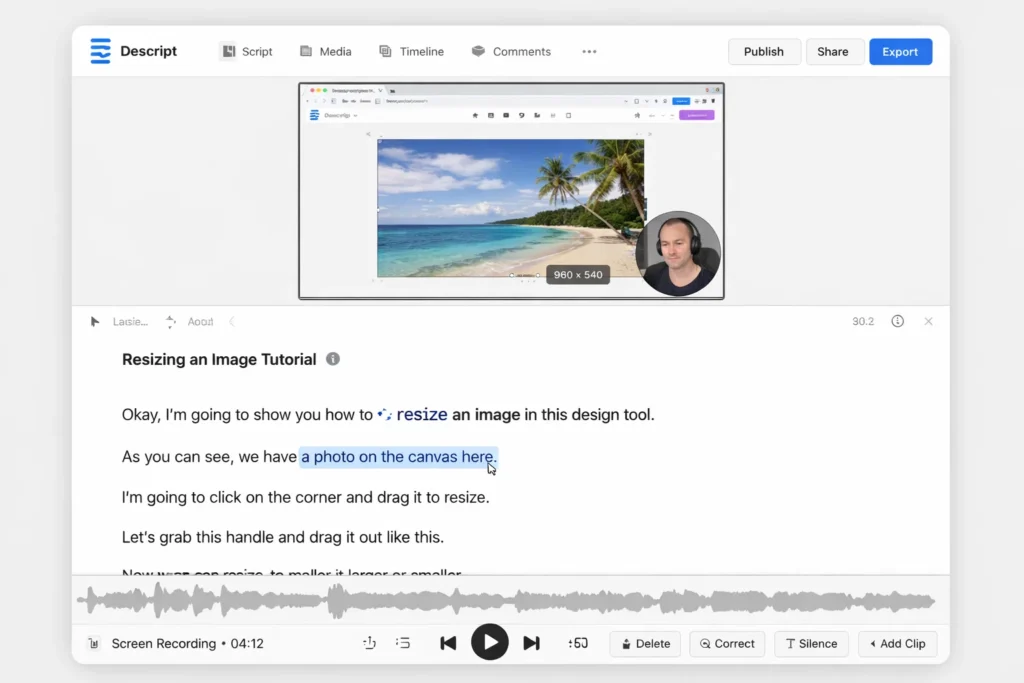
Descript is an AI-powered audio and video editing platform that lets you edit media by editing text. In simple terms, Descript transcribes your audio or video into a document, and when you change the text—delete a sentence, fix a word, move a paragraph—the corresponding audio or video changes automatically.
The Core Problem Descript Solves
Traditional editing software can be intimidating and slow, especially for people who aren’t professional editors. Descript solves this by:
- Replacing complex timelines with a text document
- Making edits as simple as typing and deleting
- Automating transcription and cleanup
- Reducing the learning curve for creators and teams
It turns editing into writing, not technical production.
Target Users and Use Cases
Descript is commonly used by:
• Podcasters editing episodes
• YouTubers and video creators
• Marketing teams producing content
• Educators creating tutorials
• Remote teams recording meetings and training
Typical use cases include podcast editing, video content creation, screen recordings, interviews, and internal communication.
Current Market Position
Descript is positioned as a creator-friendly, AI-first media editor. It bridges the gap between casual creators and professional tools by focusing on simplicity and automation.
Why It Became Successful
Descript gained traction because it removed fear from editing. People who never touched a traditional editor could suddenly clean up audio and video just by working with text.
How Descript Works — Step-by-Step Breakdown
For Creators (Podcasters, YouTubers, Teams)
Recording or uploading media
Users can either record directly inside Descript (audio, video, or screen recordings) or upload existing files. This keeps the entire workflow in one place from start to finish.
Automatic transcription
Once the media is uploaded or recorded, Descript automatically converts speech into text transcripts. This transcript becomes the main editing interface.
Editing by editing text
Here’s the magic part:
- Delete a sentence in the transcript → that part of the audio/video is removed
- Fix a word in the transcript → captions and subtitles update
- Move a paragraph → the media timeline changes to match
Editing feels like working in a document instead of a traditional editor.
Using AI cleanup tools
Descript includes features that help polish content, such as:
- Removing filler words (um, uh, you know)
- Detecting long pauses
- Improving audio clarity and levels
- Fixing transcription errors
These tools save hours of manual cleanup.
Generating AI voice or replacing words
With voice cloning-style features, users can type in new words and have Descript generate matching audio in the speaker’s voice. This is useful for fixing mistakes without re-recording.
Exporting and publishing
Once edits are done, users can export audio or video files or publish directly to platforms, depending on their workflow.
Typical workflow
Record/upload → auto-transcribe → edit text → apply AI cleanup → preview → export.
Technical Overview (Simple)
Descript combines:
- Speech-to-text models for transcription
- Text-based editing logic that maps words to media timestamps
- Audio processing for cleanup and enhancement
- AI voice synthesis for word replacement
- Video rendering and export pipelines
- Cloud infrastructure for processing and storage
This allows text edits to control the underlying media in real time.
Read More :- How to Develop an AI Chatbot Platform
Descript’s Business Model Explained
How Descript Makes Money
Descript operates on a subscription-based SaaS model aimed at creators, teams, and businesses. Instead of ads, it charges for access to its AI-powered editing tools and collaboration features.
Main revenue streams include:
- Monthly and annual subscriptions: Different plans for individuals, creators, and teams
- Usage-based limits: Plans often include limits on transcription hours, exports, and AI voice usage
- Team and enterprise plans: Collaboration tools, admin controls, and higher limits for organizations
- Premium AI features: Advanced voice, cleanup, and automation tools in higher tiers
This model scales with how much content users produce.
Pricing Structure (Typical Approach)
Descript pricing usually depends on:
- Subscription tier (free, creator, pro, enterprise)
- Monthly transcription hours
- Access to AI voice and advanced editing tools
- Team collaboration features
Free tiers allow testing, while paid plans support production workflows.
Fee Breakdown
- Monthly or annual subscription fee
- Limits on transcription time and AI features
- Team and enterprise pricing for collaboration and admin tools
- No ads and no commissions
Market Size and Demand
Demand for Descript-style platforms is driven by:
- Growth in podcasting and video content creation
- Remote work and recorded meetings
- Businesses producing more internal video
- Creators wanting simpler editing tools
- Rising adoption of AI-assisted production
Text-based editing lowers the barrier for millions of new creators.
Profitability Insights
Descript improves profitability by:
- Encouraging recurring subscriptions
- Expanding within teams and organizations
- Offering premium AI tools that justify upgrades
- Retaining users through all-in-one workflows
Revenue Model Breakdown
| Revenue Stream | Description | Who Pays | Nature |
|---|---|---|---|
| Subscriptions | Platform access | Creators/Teams | Recurring |
| Usage Limits | Transcription & AI tools | Heavy users | Usage-based |
| Team Plans | Collaboration | Businesses | Tiered |
| Enterprise Deals | Org-wide access | Enterprises | Contract |
Key Features That Make Descript Successful
Text-based media editing
Descript’s signature feature is editing audio and video by editing text. This removes the complexity of timelines and makes editing accessible to non-professionals.
Automatic transcription
Every recording or upload is quickly turned into a transcript, which doubles as captions and subtitles for published content.
AI filler word and silence removal
Descript can automatically detect and remove “um,” “uh,” and long pauses, dramatically cleaning up content with one click.
AI voice generation and correction
Users can type new words and have Descript generate matching audio in the speaker’s voice, helping fix mistakes without re-recording.
Screen recording and video capture
Descript includes built-in tools for recording screens, webcams, and presentations, making it an all-in-one content creation platform.
Multitrack editing for podcasts and interviews
Creators can manage multiple speakers and tracks, making it suitable for podcast production and interviews.
Templates and publishing tools
Descript offers templates and export options for different platforms, helping creators format content for podcasts, YouTube, and social media.
Collaboration and commenting
Team plans allow multiple users to edit, comment, and review projects together, similar to document collaboration.
Captioning and accessibility tools
Built-in caption generation improves accessibility and helps content reach wider audiences.
Creator-friendly interface
The platform is designed to feel like a document editor rather than a technical production suite, which lowers the learning curve.

The Technology Behind Descript
Tech stack overview (simplified)
Descript is built around the idea that text controls media. Its technology stack connects speech recognition, text editing, and media rendering into one smooth pipeline.
At a high level, it includes:
- Speech-to-text models for fast, accurate transcription
- Word-to-timestamp mapping systems that link text to audio/video frames
- Audio processing engines for cleanup and enhancement
- AI voice synthesis for word replacement and voice cloning-style features
- Video rendering and export pipelines
- Cloud infrastructure for storage, processing, and collaboration
How transcription becomes an editor
When media is uploaded or recorded, Descript:
- Transcribes speech into text
- Aligns each word with precise time markers in the audio/video
- Builds a live link between the transcript and the media timeline
So when you delete a sentence in the document, Descript knows exactly which frames to remove in the video or audio.
AI cleanup and enhancement logic
Descript’s cleanup tools work by:
- Detecting filler words and long pauses using speech patterns
- Identifying background noise and inconsistent volume
- Applying audio filters and leveling algorithms
- Preserving natural speech flow while improving clarity
This makes content sound more professional without manual editing.
AI voice and word replacement
For voice correction features, Descript:
- Analyzes the speaker’s voice to learn tone and pronunciation patterns
- Uses text-to-speech models to generate new words in a matching voice
- Splices the generated audio into the original track smoothly
This lets creators fix mistakes as easily as editing a document.
Real-time collaboration and versioning
Because Descript is cloud-based, multiple users can:
- Edit the same project simultaneously
- Leave comments and suggestions
- Track changes and revert versions
This turns media projects into something closer to collaborative documents.
Performance and scalability
Descript relies on cloud compute to:
- Transcribe and process large files quickly
- Render exports reliably
- Support many users at once
- Scale for team and enterprise usage
Why this technology matters for business
Descript’s technology removes the technical barrier to media production. By turning editing into writing, it allows more people inside a company to create, update, and publish audio and video—making content production faster, cheaper, and more scalable.
Descript’s Impact & Market Opportunity
Industry impact
Descript changed how people think about editing by proving that media can be edited like text. This shift opened audio and video creation to a much wider audience—marketers, educators, founders, and remote teams who never considered themselves “editors” before.
By combining transcription, cleanup, and publishing in one tool, Descript reduced the need for complex production stacks and made content workflows faster and more collaborative.
Market demand and growth drivers
Demand for Descript-style platforms is driven by:
- Growth in podcasts and video-first content
- Remote work and recorded meetings
- Businesses producing internal training and updates
- Creators seeking simpler editing tools
- Increased use of captions and accessibility features
These trends favor tools that lower skill barriers and speed up production.
User segments and behavior
Descript attracts:
- Podcasters and interview hosts
- YouTubers and video creators
- Marketing and content teams
- Educators creating tutorials
- Remote teams documenting meetings and training
A common behavior pattern is repeat editing and repurposing. Users often take one recording and turn it into multiple formats—long-form video, short clips, captions, and transcripts.
Geographic reach
As a cloud-based platform with multilingual transcription support, Descript is used globally by creators and teams across different regions and time zones.
Future direction
Descript-style platforms are likely to expand into:
- Better AI voices and natural speech generation
- Automatic highlight and clip generation for social media
- Deeper integrations with publishing platforms
- Stronger collaboration and workflow automation
- Real-time transcription and live editing
Opportunities for entrepreneurs
This massive success is why many entrepreneurs want to create similar platforms—especially for:
- Podcast production tools
- Training and education platforms
- Internal communications software
- Video content automation
- Industry-specific media editors (legal, healthcare, education)
Building Your Own Descript-Like Platform
Why businesses want text-based media editing platforms
Descript proves that simplicity scales. When audio and video editing feels like writing a document, more people across an organization can create content—not just professional editors. Businesses want similar platforms because:
- Content production becomes faster and cheaper
- Teams don’t need specialized editing skills
- Updates are as easy as changing text
- One tool can handle recording, editing, and publishing
- Subscription models fit ongoing content needs
This makes Descript-style platforms attractive for both creators and enterprises.
Key considerations before development
If you’re planning to build a Descript-like platform, focus on:
- High-accuracy speech-to-text for clean transcripts
- Reliable word-to-timestamp mapping
- Simple, document-style editing interface
- AI cleanup tools (filler words, noise, silence)
- Voice generation and correction features
- Collaboration and version control
- Export and publishing workflows
The user experience should feel like a writing tool, not a video editor.
Read Also :- How to Market an AI Chatbot Platform Successfully After Launch
Cost Factors & Pricing Breakdown
Descript–Like App Development — Market Price
| Development Level | Inclusions | Estimated Market Price (USD) |
|---|---|---|
| 1. Basic Audio/Video Editing MVP | Core web app for audio/video uploads, timeline-based editing basics (trim, cut, reorder), basic transcription (via provider/API), subtitle export, simple project library, basic exports (MP4/WAV), minimal user roles, standard admin panel, basic usage analytics | $80,000 |
| 2. Mid-Level Creator Editing Platform | Advanced editor (multi-track timeline, captions styling, templates), faster transcription with speaker labels, collaboration (comments/share links), screen recording module, basic noise removal/enhancement (via providers), richer exports, workspace/projects, credits/usage tracking, analytics dashboard, polished web UI and mobile-ready experience | $170,000 |
| 3. Advanced Descript-Level Creative Suite Ecosystem | Large-scale multi-tenant creator platform with real-time collaboration, version history, advanced audio enhancement, AI voice features (via providers), team admin & approvals, enterprise orgs & RBAC/SSO, integrations (Drive/Dropbox), detailed observability, robust moderation/policy controls, cloud-native scalable architecture | $300,000+ |
Descript-Style Audio/Video Editing Platform Development
The prices above reflect the global market cost of developing a Descript-like audio/video editing and transcription platform — typically ranging from $80,000 to over $300,000+, with a delivery timeline of around 4–12 months for a full, from-scratch build. This usually includes editing pipelines, transcription integrations, export/render infrastructure, collaboration features, usage metering, analytics, and production-grade storage/CDN and scaling for creator workflows.
Miracuves Pricing for a Descript–Like Custom Platform
Miracuves Price: Starts at $14,999
This is positioned for a feature-rich, JS-based Descript-style creator platform that can include:
- Audio/video uploads with timeline-based editing workflows
- Transcription via your chosen AI model/API providers
- Captions/subtitles generation and export
- Projects, workspaces, versioning basics, and collaboration-ready sharing
- Usage and credit tracking with optional subscription or pay-per-use billing
- Core moderation and safety hooks aligned with content policies
- A modern, responsive web interface plus optional companion mobile apps
From this foundation, the platform can be extended into advanced audio enhancement, deeper collaboration and approvals, AI voice features (via providers), enterprise SSO/RBAC, and richer integrations as your creator product matures.
Note: This includes full non-encrypted source code (complete ownership), complete deployment support, backend & API setup, admin panel configuration, and assistance with publishing on the Google Play Store and Apple App Store—ensuring you receive a fully operational audio/video editing ecosystem ready for launch and future expansion.
Delivery Timeline for a Descript–Like Platform with Miracuves
For a Descript-style, JS-based custom build, the typical delivery timeline with Miracuves is 30–90 days, depending on:
- Depth of editing features (multi-track, templates, exports, etc.)
- Number and complexity of transcription, storage/CDN, and billing integrations
- Complexity of collaboration, roles/approvals, and enterprise controls (RBAC/SSO)
- Scope of web portal, mobile apps, branding, and long-term scalability targets
Tech Stack
We preferably will be using JavaScript for building the entire solution (Node.js / Nest.js / Next.js for the web backend + frontend) and Flutter / React Native for mobile apps, considering speed, scalability, and the benefit of one codebase serving multiple platforms.
Other technology stacks can be discussed and arranged upon request when you contact our team, ensuring they align with your internal preferences, compliance needs, and infrastructure choices.
Essential features to include
A strong Descript-style MVP should include:
- Audio and video recording
- Automatic transcription
- Text-based editing linked to media
- AI filler word and silence removal
- Caption and subtitle generation
- Export for common platforms
- Team collaboration tools
- Subscription and usage limits
High-impact extensions later:
- Automatic social clip generation
- Real-time live transcription
- Advanced AI voice customization
- Publishing integrations (YouTube, podcast hosts, LMS)
- Analytics on content performance
Read More :- AI Chat Assistant Development Costs: What Startups Need to Know
Conclusion
Descript shows how powerful it can be to rethink an entire workflow, not just add AI on top of an existing one. By turning editing into writing, it opened media creation to a much broader group of people and dramatically sped up how content is produced.
For founders and product builders, the key lesson is clear: the biggest opportunities often come from changing the interface to a problem, not just the technology behind it. When tools feel natural and familiar, adoption follows—and that’s where long-term value is created.
FAQs :-
What is Descript used for?
Descript is used to edit audio and video by editing text. It’s popular for podcasts, YouTube videos, screen recordings, training content, and internal communication.
How does Descript make money?
Descript makes money through subscription plans and usage-based limits, where users pay for transcription hours, AI voice features, and collaboration tools.
Is Descript suitable for beginners?
Yes. Descript is designed for non-technical users. If you can edit a document, you can edit audio and video in Descript.
Can Descript replace traditional editing software?
For many creators, yes. Descript can handle most common podcast and video editing needs, though advanced filmmakers may still use specialized tools.
Does Descript support team collaboration?
Yes. Team and business plans include shared projects, comments, and versioning for collaborative editing.
Can I use Descript commercially?
Yes. Many businesses use Descript for commercial content, including marketing, training, and internal communication.
How accurate is Descript’s transcription?
Descript’s transcription is generally highly accurate, especially for clear audio, though users can manually correct errors.
Does Descript work for video as well as audio?
Yes. Descript supports both audio and video editing, including screen recordings and webcam videos.
Can I build a platform like Descript?
Yes. Descript-style platforms can be built by combining speech-to-text, text-based editing interfaces, AI cleanup, and media rendering systems.
How can Miracuves help build a Descript-like platform?
Miracuves helps founders build AI-powered media editing platforms with transcription engines, text-based editing workflows, collaboration features, and subscription billing—enabling rapid launch and scalable growth.