

Key Takeaways
- Background processing keeps creator platforms fast by moving heavy tasks away from the main app.
- Queues help manage uploads, encoding, thumbnails, moderation, and notifications smoothly.
- Video encoding should run separately so creators do not wait during upload workflows.
- Payout tasks need background systems for wallet updates, earnings, commissions, and retries.
- A scalable creator platform needs workers, queues, monitoring, retries, and strong backend planning.
What You’ll Learn
- How background processing improves creator platform speed and stability.
- Upload workflows can handle validation, compression, encoding, and storage step by step.
- Background workers process heavy jobs without blocking user actions.
- Payout workflows support creator earnings, wallet updates, and payment records.
- Platform growth depends on fast UX, reliable queues, monitoring, and backend scalability.
Real Insights
- Heavy tasks slow platforms when they run directly on the main server.
- Creators expect fast uploads even when videos still need processing behind the scenes.
- Retry systems reduce failures in encoding, notifications, moderation, and payouts.
- Monitoring helps teams find failed jobs, delays, and backend bottlenecks.
- The best strategy is to keep the app fast while heavy work runs safely in the background.
Creator platforms look simple from the outside. A user uploads a video, adds a caption, publishes it, receives likes, earns money, and gets paid. But behind this smooth experience, the platform is constantly handling heavy backend tasks.
Every upload may need compression, encoding, thumbnail generation, moderation checks, storage updates, CDN delivery, analytics tracking, notifications, wallet updates, and payout calculations. If all these tasks run at the same time on the main application server, the platform can become slow, unstable, or even crash during high traffic.
This is where background processing creator platform architecture becomes important.
Background processing allows creator platforms to move heavy tasks away from the main user experience. Instead of making users wait while the system processes videos, payments, or notifications, the platform sends those tasks to a queue and lets background workers handle them separately.
For a TikTok-like app, fan platform, creator marketplace, live streaming app, or short video platform, this is not just a backend improvement. A strong background processing creator platform setup directly affects user experience, creator trust, platform speed, and long-term scalability.
What Is Background Processing in a Creator Platform?
Background processing means running time-consuming tasks behind the scenes instead of processing everything instantly during the user’s request.
For example, when a creator uploads a video, the app should not freeze until the video is compressed, encoded, moderated, and distributed. Instead, the platform can accept the upload, show a “processing” status, and continue handling the heavy work in the background.
A simple flow looks like this:
User uploads video → App accepts upload → Task enters queue → Background workers process video → Video becomes ready for feed
This keeps the main app fast because the user-facing system is not blocked by heavy operations.
Main App vs Background Workers
A creator platform usually has two major parts:
| System Part | Main Role |
| Main application | Handles user actions like login, upload request, likes, comments, profile views, and feed browsing |
| Background workers | Handle heavy tasks like encoding, notifications, payouts, moderation, analytics, and retries |
The main app should focus on quick user responses. Background workers should handle tasks that take more time.
This separation helps the platform stay responsive even when thousands of users are uploading, watching, liking, and earning at the same time.
Read more: How Short Video Apps Can Reduce Streaming Costs Without Losing Playback Quality
Why Creator Platforms Cannot Process Everything in Real Time
Creator platforms deal with more complex backend operations than normal websites. A blog website may only need to publish text and images. But a creator platform must manage large media files, user activity, payments, recommendations, and real-time engagement.
If everything is processed in real time, the app becomes slow.
Imagine a creator uploads a 2-minute video. The system may need to:
- check the file format
- scan the video for safety
- compress the file
- generate multiple resolutions
- create a thumbnail
- extract metadata
- upload to storage
- push to CDN
- notify followers
- update creator analytics
If all of this happens before the upload request finishes, the user may wait too long. In some cases, the upload may fail.
Background processing solves this by breaking heavy work into smaller tasks and processing them separately.
The Problem With Blocking Tasks
A blocking task is any task that makes the user wait until it is completed.
For example:
- waiting for video encoding before confirming upload
- waiting for payout verification before updating wallet status
- waiting for notification delivery before completing a post
- waiting for analytics calculation before showing the dashboard
Blocking tasks create poor user experience. Users expect creator platforms to feel instant. If the app feels slow, creators may lose trust and users may leave the platform.
The Hidden Workflow Behind Every Video Upload
Video upload is one of the best examples of why background processing matters.
When a creator uploads a video, the platform does not simply save the file and publish it. A full video workflow happens behind the scenes. The system may need to validate the file, compress the video, generate multiple playback versions, create thumbnails, scan the content for safety, save metadata, and prepare the video for CDN delivery.
If all these tasks run instantly on the main server, the creator may face slow uploads, failed processing, or long waiting times. Background processing solves this by moving these heavy tasks into separate queues, allowing the app to confirm the upload quickly while workers handle the technical processing in the background.
Upload Validation
The first step is validation. The platform checks whether the uploaded file is supported.
It may check:
- file type
- file size
- video duration
- resolution
- aspect ratio
- creator account status
- upload limits
This step can happen quickly, but after validation, heavier work begins.
Video Compression
Raw video files can be very large. Large files consume more storage, bandwidth, and delivery cost. Compression reduces file size while keeping acceptable quality.
Without compression, a creator platform may become expensive to run. It may also load videos slowly for users with weaker internet connections.
Video Encoding
Encoding converts the uploaded video into formats that can play smoothly across different devices and browsers.
A short video platform may need different versions of the same video, such as:
| Version | Purpose |
| 360p | Low internet speed |
| 480p | Basic mobile playback |
| 720p | Standard quality |
| 1080p | High-quality playback |
This process is resource-heavy. That is why video encoding should run in the background.
Thumbnail Generation
A thumbnail helps represent the video in feeds, profiles, search pages, and creator dashboards. The system can automatically generate thumbnails from video frames or allow creators to upload custom thumbnails.
Thumbnail generation is not as heavy as encoding, but it still should not block the main app.
Metadata Extraction
The platform may extract technical information from the video, such as:
- duration
- resolution
- bitrate
- file size
- audio format
- orientation
- upload timestamp
This metadata helps with search, feed ranking, moderation, and analytics.
CDN Distribution
Once the video is processed, it can be pushed to a CDN. A CDN helps deliver videos from servers closer to users, improving playback speed and reducing buffering.
For global creator platforms, CDN distribution is essential because users may watch videos from different countries and regions.
Moderation Checks
Modern creator platforms also need moderation. The system may scan videos, captions, thumbnails, comments, and hashtags for unsafe or policy-violating content.
Moderation can include:
- AI-based scanning
- copyright checks
- spam detection
- adult content detection
- abusive language filtering
- manual review queues
This is another task that works better in the background.
Why Queue-Based Processing Keeps Creator Platforms Fast
Queues are the backbone of background processing.
A queue stores tasks until workers are ready to process them. Instead of forcing the main app to complete every heavy task immediately, the system places tasks into a queue.
For example:
New video uploaded → Add encoding job to queue → Worker picks job → Video gets processed
This makes the platform more stable.
How Queues Prevent Server Overload
Without queues, heavy tasks may hit the server all at once. If many creators upload videos at the same time, the server may slow down or crash.
With queues, tasks are organized and processed in order. The system can control how many jobs run at once.
This helps during:
- viral upload spikes
- creator campaigns
- live events
- festival traffic
- influencer launches
- high payout cycles
Queues allow the platform to stay calm even when user activity increases suddenly.
Retry Systems Improve Reliability
Sometimes tasks fail. A video encoding job may fail due to a corrupted file. A payout confirmation may fail due to a payment gateway issue. A notification may fail because the user’s device token is expired.
A strong background processing system can retry failed jobs automatically.
For example:
| Task | Possible Failure | Background Retry Benefit |
| Video encoding | File error or server timeout | Retry without user reuploading |
| Payout processing | Gateway delay | Retry after confirmation |
| Notification | Delivery failure | Retry or mark failed |
| Moderation scan | API timeout | Recheck in queue |
| Analytics update | Database load | Process later safely |
This improves reliability without creating a poor user experience.
Priority Queues for Important Tasks
Not all tasks have the same importance.
For example, a password reset email is more urgent than a weekly analytics report. A live stream notification may be more urgent than a delayed dashboard update.
Creator platforms can use priority queues to process urgent tasks first.
High-priority tasks may include:
- login OTPs
- payout status updates
- live stream alerts
- content approval notifications
- failed upload recovery
Low-priority tasks may include:
- monthly reports
- bulk analytics
- old video reprocessing
- recommendation recalculation
This helps the platform deliver the right task at the right time.
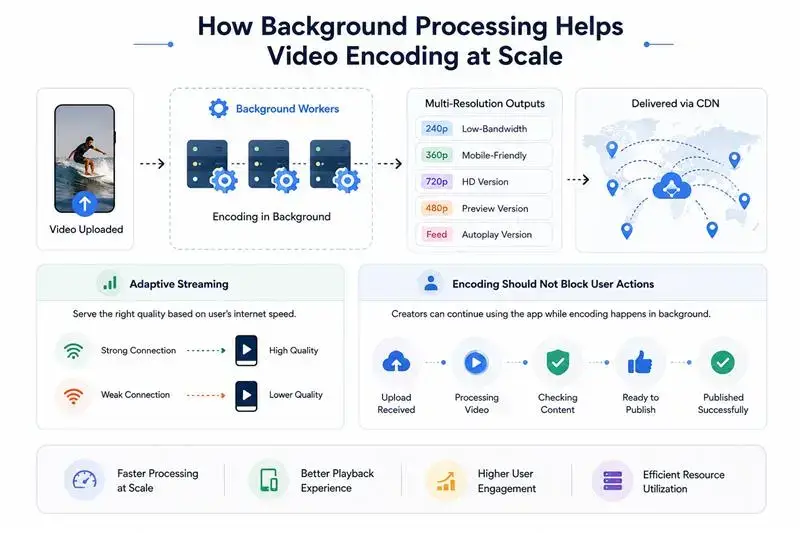
How Background Processing Helps Video Encoding at Scale
Video encoding is one of the heaviest tasks in creator platforms. It consumes CPU, memory, and storage resources. If encoding is handled poorly, the entire platform can become slow.
Background workers help by processing encoding jobs separately from the main app.
Multi-Resolution Encoding
Users watch videos on different devices and internet speeds. A creator platform must prepare multiple versions of each video.
For example, one uploaded video may become:
- mobile-friendly version
- low-bandwidth version
- HD version
- compressed preview version
- feed autoplay version
This improves playback quality and reduces buffering.
Adaptive Streaming Preparation
Adaptive streaming allows the platform to serve the right video quality based on the user’s internet speed.
If the user has strong internet, the app can show higher quality. If the connection is weak, the app can switch to lower quality.
This keeps playback smooth.
For short video apps, smooth playback is extremely important because users swipe quickly. Even a small delay can reduce engagement.
Encoding Should Not Block User Actions
A creator should be able to continue using the app after uploading a video. They may want to edit profile details, check analytics, reply to comments, or upload another video.
If encoding blocks the app, the creator experience becomes frustrating.
Background processing allows the app to show a simple status like:
- Upload received
- Processing video
- Checking content
- Ready to publish
- Published successfully
This gives transparency without slowing the platform.
How Background Processing Supports Creator Payouts
Payouts are another major area where background processing matters.
Creator platforms may support different earning models, such as:
- subscriptions
- virtual gifts
- ad revenue sharing
- paid content
- live stream gifts
- brand campaigns
- affiliate earnings
- creator tips
- course sales
- social commerce commissions
Each earning event may need calculation, verification, wallet update, and payout processing.
Wallet Updates
When a creator earns money, the platform may update the wallet balance. But wallet updates should be accurate and traceable.
A background job can process:
- earning event
- platform fee deduction
- creator share
- tax or commission logic
- wallet credit
- transaction history
This reduces errors and keeps the payout system organized.
Revenue Share Calculations
Many creator platforms use revenue sharing. For example, the platform may keep a percentage and send the rest to the creator.
A background processing system can calculate earnings based on:
| Revenue Source | Processing Requirement |
| Subscriptions | Monthly recurring calculation |
| Virtual gifts | Coin-to-cash conversion |
| Ads | Impression or view-based revenue |
| Paid content | Purchase-based creator share |
| Live sessions | Session revenue split |
| Social commerce | Commission tracking |
These calculations may become complex as the platform grows. Processing them in the background keeps the system stable.
Webhooks and Payment Confirmation
Payment gateways often send updates through webhooks. A webhook tells the platform when a payment is successful, failed, refunded, disputed, or settled.
Background workers can listen to these events and update the system safely.
For example:
Payment successful → Webhook received → Background job verifies payment → Wallet updated → Creator notified
This is much safer than assuming payment is complete immediately.
Fraud and Risk Checks
Before releasing payouts, creator platforms may need to check for suspicious activity.
Fraud checks may include:
- fake engagement
- duplicate accounts
- bot activity
- refund abuse
- unusual earning spikes
- policy violations
- suspicious payment sources
These checks should happen in the background because they may require multiple data points and external verification.
Delayed Settlement Handling
Not every payout is instant. Some payments may take time to settle. Some creator earnings may need to stay pending until the refund window is over.
Background jobs help manage payout states such as:
- pending
- processing
- approved
- failed
- reversed
- paid
This improves creator trust because the platform can show clear payout status.
Notifications Also Depend on Background Processing
Notifications are small individually, but at scale, they become heavy.
A creator platform may send notifications for:
- new followers
- likes
- comments
- shares
- live streams
- content approval
- payout updates
- subscription renewal
- gift received
- new message
- creator milestone
If the platform sends every notification instantly from the main server, it can slow down user actions.
Push Notifications
Push notifications should be processed through background jobs. This allows the system to send notifications in batches, retry failed deliveries, and avoid overloading the main app.
For example, if a creator with 1 million followers goes live, the platform should not try to notify all followers directly from the main request. It should create a background notification job and distribute the work safely.
Email and SMS Notifications
Email and SMS messages also work better in the background. They depend on third-party services, and those services may have delays or limits.
Background processing helps manage:
- email queues
- SMS retries
- delivery tracking
- unsubscribe handling
- failed message logs
This keeps the platform reliable.
Read more: How Smart Video Feed Design Keeps Users Watching Longer in Short Video Apps
Analytics and Recommendations Need Async Event Processing
Creator platforms generate huge amounts of user activity.
Every view, like, comment, share, pause, replay, skip, follow, purchase, and gift creates an event.
If the platform tries to process all these events instantly, performance can drop.
Engagement Tracking
Engagement events should be collected and processed in the background.
These events help calculate:
- watch time
- completion rate
- replay rate
- engagement rate
- creator growth
- content performance
- user interest signals
This data supports both creator analytics and feed recommendations.
Creator Analytics Dashboard
Creators expect analytics dashboards, but dashboard calculations can be heavy.
A background system can prepare analytics data periodically instead of calculating everything live.
This helps creators see useful insights without slowing the platform.
Recommendation Updates
Short video platforms depend on recommendation engines. These systems need fresh engagement data, but they do not always need to update instantly for every single event.
Background processing can help update recommendation signals in batches.
For example:
- user watched full video
- user replayed video
- user skipped quickly
- user followed creator
- user shared content
- user watched similar topics
These signals can be processed asynchronously and used to improve the feed over time.
What Happens Without Proper Background Processing?
Without background processing, a creator platform may work in the early stage, but it can break as traffic grows.
Slow Uploads
Creators may wait too long after uploading. If processing fails, they may need to upload again. This creates frustration.
Frozen Feeds
If video processing, analytics, and notifications overload the main server, the feed may become slow. Users may experience delays, buffering, or app crashes.
Failed Payouts
Without reliable payout jobs, creators may see wrong balances, delayed payments, or unclear transaction status. This directly damages trust.
Delayed Notifications
Users may miss live sessions, creator updates, or important account alerts. This reduces engagement.
Weak Creator Trust
Creators care about reliability. If uploads fail, earnings are unclear, or payouts are delayed, creators may move to another platform.
For creator platforms, backend reliability is not invisible. It directly affects creator confidence.
Recommended Background Processing Architecture for Creator Platforms
A strong creator platform needs a clear backend architecture.
API Layer
The API layer receives user requests. It handles actions like upload request, like, comment, login, wallet check, and profile update.
Its job is to respond quickly.
Queue Layer
The queue layer stores tasks that need background processing.
Examples:
- encode this video
- generate this thumbnail
- send this notification
- calculate this payout
- update this analytics event
- scan this upload
Worker Layer
Workers pick tasks from the queue and process them.
Different workers can handle different tasks.
| Worker Type | Responsibility |
| Encoding worker | Compresses and converts videos |
| Notification worker | Sends push/email/SMS |
| Payment worker | Handles wallet and payout events |
| Moderation worker | Scans content and flags issues |
| Analytics worker | Processes engagement data |
| Recommendation worker | Updates feed signals |
Storage and CDN Layer
Processed videos are stored in cloud storage and delivered through CDN. This improves speed and reduces load on the main server.
Monitoring and Retry Layer
Monitoring helps track failed jobs, slow queues, processing delays, and server load.
A good background system should answer:
- Which jobs failed?
- Why did they fail?
- How many jobs are pending?
- Which worker is overloaded?
- Are payouts delayed?
- Are videos stuck in processing?
- Are notifications failing?
This helps the technical team fix issues before users notice them.
Technologies Commonly Used for Background Processing
Creator platforms may use different tools depending on scale, budget, and architecture.
Common technologies include:
| Technology | Use Case |
| Redis Queue | Fast job queues for small to mid-scale apps |
| RabbitMQ | Reliable message handling |
| Kafka | High-volume event streaming |
| AWS SQS | Cloud-based queue processing |
| BullMQ | Node.js background jobs |
| Celery | Python task processing |
| Sidekiq | Ruby background jobs |
| Cloud Functions | Serverless async tasks |
The best choice depends on the platform’s needs. A startup may begin with a simpler queue system and later move toward event-driven architecture as traffic grows.
Background Processing Workflow for a TikTok-Like Creator App
A TikTok-like creator platform handles much more than simple video uploads. Behind every published video, the platform continuously manages encoding, moderation, analytics, notifications, creator earnings, wallet updates, and payout events.
If all these operations run directly on the main application server, the app can become slow during heavy creator activity. Background processing solves this by moving heavy tasks into queues and allowing background workers to complete them step by step without blocking the creator or viewer experience.
| Workflow Stage | What Happens in the Background | Why It Matters |
|---|---|---|
| Video Upload | The creator uploads a video from the mobile app or web platform. | Starts the publishing process without forcing the creator to wait too long. |
| File Validation | The platform checks file type, size, duration, format, and upload permissions. | Prevents unsupported or risky files from entering the system. |
| Original File Storage | The original video is securely saved before processing starts. | Keeps a backup version for reprocessing, recovery, or quality control. |
| Encoding Queue | The encoding task is sent to a background queue instead of running instantly on the main server. | Prevents upload activity from slowing down the app. |
| Video Compression & Conversion | Background workers compress and convert the video into optimized formats. | Helps videos play smoothly across devices and internet speeds. |
| Thumbnail Generation | The system creates preview images for feeds, profiles, search pages, and recommendations. | Improves content visibility and makes the platform more engaging. |
| Moderation Scan | AI or safety systems scan the video, caption, hashtags, and thumbnail. | Protects the platform from spam, unsafe content, copyright issues, and policy violations. |
| Metadata Saving | Details like duration, resolution, bitrate, caption, hashtags, creator ID, and upload time are stored. | Helps with search, recommendations, analytics, and admin control. |
| CDN Preparation | The processed video is distributed through CDN infrastructure. | Reduces buffering and improves playback speed for users in different locations. |
| Processing Status Update | The creator sees statuses like “upload received,” “processing,” “under review,” or “ready to publish.” | Builds trust by keeping the creator informed. |
| Feed Publishing | Once processing is complete, the video appears in feeds, profiles, hashtags, or search results. | Makes the content available without slowing the upload journey. |
| Engagement Tracking | Views, likes, comments, shares, watch time, replays, and skips are collected. | Provides signals for recommendations and creator performance insights. |
| Analytics Processing | Creator dashboards and recommendation systems update asynchronously. | Keeps dashboards useful without overloading the main app. |
| Earnings Calculation | Revenue from ads, gifts, subscriptions, paid content, or tips is calculated in the background. | Keeps monetization accurate and scalable. |
| Wallet Update | Verified earnings are added to the creator wallet after platform fees and validation checks. | Helps creators track income clearly. |
| Payout Processing | The system checks payout rules, payment gateway status, settlement timing, and eligibility. | Reduces payout errors and improves creator trust. |
| Payout Notification | The creator receives an update when payout is approved, processing, failed, or completed. | Improves transparency and reduces support queries. |
This workflow keeps the app fast because every heavy task is separated from the main user experience. It also improves reliability because failed jobs can be retried safely, processing status can be tracked clearly, and creators do not face silent delays during uploads or payouts.
Key Metrics Founders Should Track for Platform Speed
Founders should not ignore backend performance. Background processing has business impact.
Important metrics include:
| Metric | Why It Matters |
| Upload success rate | Shows whether creators can publish smoothly |
| Average encoding time | Measures how fast videos become ready |
| Queue wait time | Shows backend load |
| Failed job rate | Reveals reliability issues |
| Notification delivery rate | Impacts engagement |
| Payout processing time | Affects creator trust |
| CDN playback performance | Impacts user retention |
| Moderation processing delay | Affects safety and feed quality |
| Worker utilization | Helps plan scaling |
| Retry success rate | Shows recovery strength |
These metrics help founders understand whether the platform can handle growth.
How Miracuves Builds Creator Platforms That Stay Fast Behind the Scenes
Miracuves helps founders build creator platforms with backend systems designed for real platform activity, not just basic app screens. A creator platform needs more than upload, profile, and feed features. It needs a backend that can manage video processing, creator payments, notifications, analytics, moderation, and admin control without slowing down the user experience.
For a TikTok-like app, short video platform, fan community, or creator monetization app, Miracuves can support background workflows for uploads, encoding, notifications, moderation, wallet updates, and payout processing. These workflows help the platform stay smooth when creators upload content, users engage with videos, and monetization activity increases.
Miracuves can support creator platforms with:
- video upload workflows
- queue-based processing
- background encoding
- creator wallet systems
- payout processing logic
- notification infrastructure
- engagement tracking
- admin dashboards
- scalable backend architecture
- white-label branding
- monetization modules
- source code ownership
This helps founders avoid building everything from zero while still keeping flexibility for customization. A platform may begin with basic creator uploads and monetization, then expand into live streaming, virtual gifting, social commerce, paid communities, premium subscriptions, advanced analytics, or AI-powered recommendations as the business grows.
Read more: Why AI-Powered Content Moderation Is Critical for User-Generated Video Apps
Conclusion
Background processing is one of the most important parts of modern creator platform infrastructure.
It keeps the app fast while heavy tasks run behind the scenes. Uploads can continue smoothly. Videos can be encoded safely. Notifications can be delivered without slowing the app. Payouts can be calculated and verified properly. Analytics and recommendations can improve without overloading the main system.
For founders, this matters because creator platforms are built on speed, trust, and reliability.
If uploads are slow, creators become frustrated. If payouts are delayed, trust drops. If notifications fail, engagement falls. If encoding overloads the app, users leave.
A strong background processing system helps prevent these problems before they damage growth.
In simple terms, background processing is not just a technical backend feature. It is the invisible system that keeps creator platforms fast, scalable, and reliable as uploads, users, videos, earnings, and engagement continue to grow.
Contact us today to build a scalable creator platform with fast background processing, smooth video uploads, and reliable payout infrastructure.
FAQs
What is background processing in a creator platform?
Background processing means handling heavy tasks like video encoding, payout calculation, notifications, and analytics behind the scenes so the main app stays fast for users and creators.
Why is background processing important for creator platforms?
It prevents the app from slowing down when many creators upload videos, users interact with content, or payout systems process earnings at the same time.
How does background processing help video uploads?
It allows the platform to accept the upload quickly and then process compression, encoding, thumbnails, moderation, and CDN delivery in the background.
What are background workers?
Background workers are backend systems that pick tasks from a queue and process them separately from the main app, such as encoding videos or sending notifications.
Why should video encoding run in the background?
Video encoding is resource-heavy. Running it in the background prevents uploads from blocking the app and helps creators continue using the platform while the video is being prepared.
How does background processing support creator payouts?
It helps calculate earnings, verify payment events, update wallet balances, process payout requests, and handle failed or delayed transactions safely.
What happens if a creator platform does not use background processing?
The app may face slow uploads, failed video processing, delayed payouts, missed notifications, frozen feeds, and poor creator trust during high activity.
Which tasks should run in the background?
Common background tasks include video encoding, thumbnail generation, moderation scanning, push notifications, email delivery, analytics updates, wallet calculations, and payout processing.
How do queues help creator platforms scale?
Queues organize heavy tasks and allow background workers to process them step by step. This prevents server overload during upload spikes, viral traffic, or payout cycles.
Is background processing useful only for large creator platforms?
No. Even early-stage creator platforms benefit from background processing because it creates a stronger technical foundation for smoother uploads, reliable payouts, and future scalability.
Miracuves is an independent software development company. We are not affiliated with, connected to, sponsored by, or endorsed by any company or product named in this article.
Terms such as “X Clone” are used descriptively. It is how the software industry refers to building a platform with functionality comparable to a known service, and how clients search for it.
The entire design and codebase of our products is built by our own team. Our products contain no code, design, graphics, or content originating from any third-party website or applications.
All third-party names and marks referenced in this article are the property of their respective owners, referenced solely to identify the services discussed.