
Key Takeaways
- Cloud infrastructure helps short video platforms scale as users, uploads, and playback demand grow.
- Compute, storage, CDN, and databases must work together for smooth app performance.
- Video workloads need separate processing so encoding does not slow the main app.
- Autoscaling and load balancing help manage traffic spikes and high user activity.
- The right cloud setup improves speed, reliability, cost control, and long-term growth.
What You’ll Learn
- How cloud infrastructure supports high-performance short video platforms.
- Storage systems manage creator videos, thumbnails, and media files.
- CDN delivery helps reduce buffering and improve playback speed.
- Backend architecture supports APIs, feeds, notifications, and admin actions.
- Growth depends on scalability, monitoring, security, uptime, and cost optimization.
Real Insights
- Short video apps need more than hosting; they need infrastructure built for media-heavy usage.
- Poor cloud planning can increase costs as uploads, storage, and streaming traffic grow.
- Background workers keep the app fast during encoding, compression, and moderation tasks.
- Monitoring helps teams detect issues before users face slow feeds or failed uploads.
- The best strategy is to build scalable, secure, and cost-aware cloud infrastructure from day one.
Short video platforms look simple on the surface, but they are technically demanding products. Users only see a fast feed, instant playback, quick swipes, likes, comments, shares, and smooth uploads. Behind that experience, the backend is continuously managing video storage, encoding, CDN delivery, feed requests, analytics, moderation, notifications, and creator activity.
This is why choosing the right cloud infrastructure video platform setup matters from the beginning. A short video app cannot rely on basic hosting or a single-server backend. It needs a cloud foundation that can support large media files, fast uploads, smooth playback, high engagement events, secure storage, and future monetization features.
For founders, cloud infrastructure is not just a technical decision. It directly affects user retention, creator satisfaction, platform speed, server cost, and long-term scalability. A strong setup helps the platform stay stable as uploads grow, traffic increases, and users expect faster video experiences.
Why Cloud Infrastructure Is the Foundation of Short Video App Growth
A short video platform depends heavily on speed. Users expect videos to load instantly. Creators expect uploads to work smoothly. Admin teams need visibility into content, users, reports, and performance. If the infrastructure is weak, the product experience starts breaking quickly.
Unlike a normal mobile app, a short video app handles heavy video files and frequent user actions at the same time. Every scroll, view, like, comment, share, upload, and follow creates backend activity. When the platform starts growing, this activity multiplies fast.
Strong cloud infrastructure helps the platform handle:
- fast video upload workflows
- smooth feed playback
- reduced buffering
- traffic spikes
- background video processing
- creator analytics
- regional video delivery
- secure content storage
- scalable user engagement tracking
If the cloud setup is poor, users may face slow feeds, failed uploads, delayed video processing, and unstable playback. For short video apps, even a few seconds of delay can reduce engagement.
Why Short Video Platforms Need More Than Basic App Hosting
Basic hosting may be enough for a blog, portfolio website, or simple business app. But a short video platform has much heavier requirements.
A normal app mostly handles text, images, user profiles, and database requests. A short video platform handles all of that plus large video files, media processing, feed ranking, CDN delivery, and real-time engagement data.
The platform needs separate systems for different tasks. The main app server should manage user requests, profiles, feeds, and admin actions. Video files should be stored in cloud object storage. Heavy processing tasks should run through background workers. CDN should deliver videos closer to users.
If everything runs on one server, the app becomes slow and unstable. For example, if video encoding runs on the same server that handles user feed requests, the server may become overloaded during upload spikes. This can slow down the entire app.
A better infrastructure separates responsibilities so each layer can scale independently.
Core Cloud Infrastructure Components Every Video Platform Needs
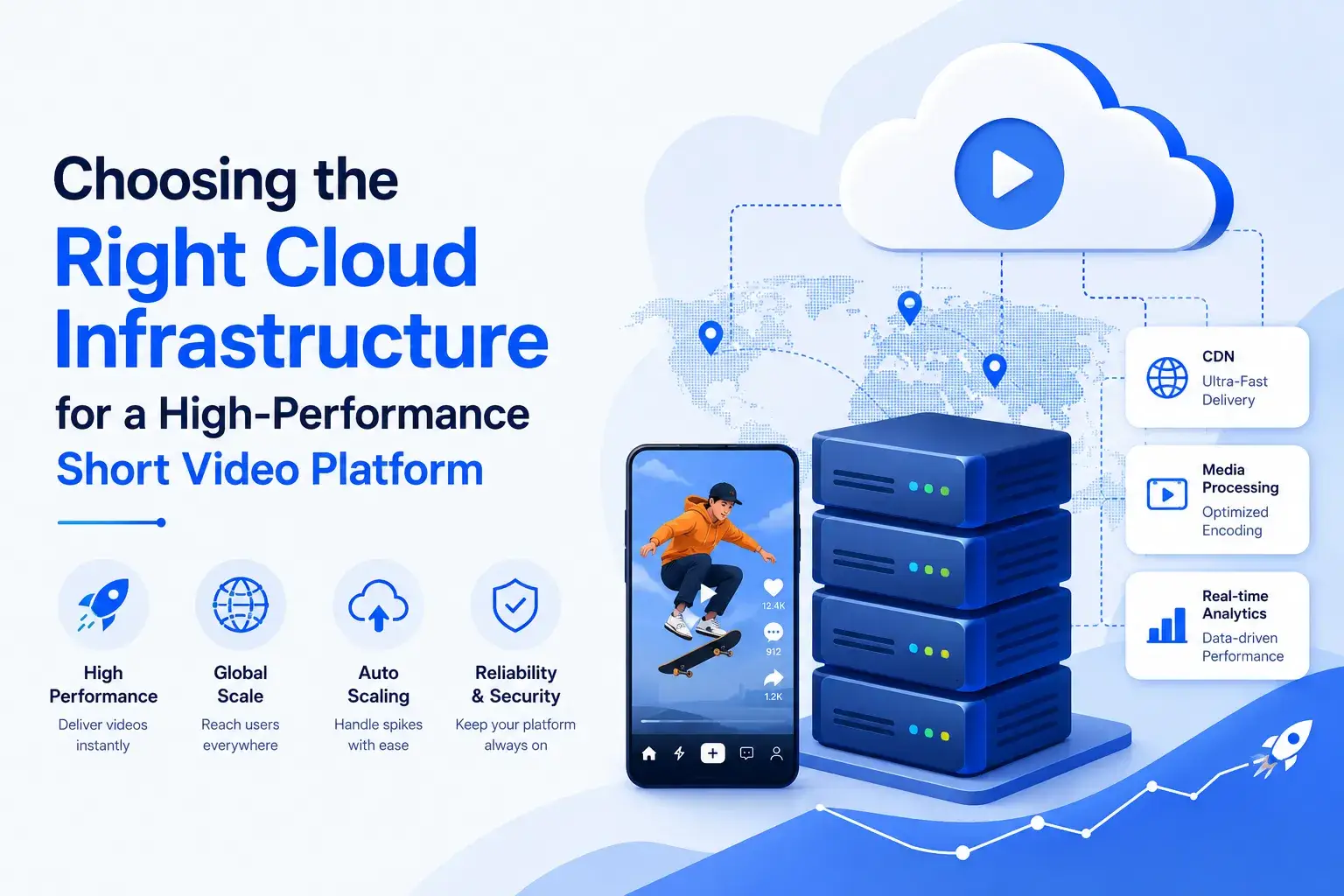
A short video platform usually needs four major cloud layers: compute, storage, CDN, and media processing. Each layer has a different role, but they must work together as one system.
| Cloud Layer | Main Function | Business Impact |
|---|---|---|
| Compute | Runs APIs, backend logic, admin panel, and user actions | Keeps the app responsive |
| Storage | Stores raw videos, processed videos, thumbnails, and backups | Keeps media organized and secure |
| CDN | Delivers videos from nearby edge locations | Improves playback speed |
| Media Processing | Encodes, compresses, and prepares videos | Makes uploads playable across devices |
Founders should not choose cloud infrastructure only by server price. They should check whether the setup can support video uploads, playback, processing, security, and future scale.
Compute Infrastructure That Keeps App Logic Fast as Video Workloads Grow
Compute is the layer that runs the main backend of a short video platform. It handles user login, feed loading, creator profiles, likes, comments, notifications, wallet updates, admin actions, and API requests. In simple terms, compute is what keeps the app responsive when users are actively scrolling, uploading, reacting, and managing their accounts.
For an early launch, a managed cloud server or simple compute setup may be enough. But as the platform grows, the backend must handle more users, more API calls, more uploads, and more real-time engagement. This is where founders need autoscaling, load balancing, dedicated workers, and better separation between user-facing actions and heavy backend tasks.
The most important rule is clear: the main app server should not handle heavy video processing directly.
Video encoding consumes CPU, memory, and processing time. If encoding runs on the same server that handles feed requests and user actions, the app can become slow during upload spikes. Users may face delayed responses, failed uploads, slow feed loading, or even temporary crashes.
A stronger compute setup separates responsibilities into:
- API servers for user requests, feeds, profiles, comments, and likes
- Worker servers for background jobs such as notifications, analytics, and moderation
- Media processing servers for encoding, compression, thumbnails, and video conversion
- Autoscaling groups for handling sudden traffic spikes without slowing the app
This separation helps the platform stay stable when creators upload many videos, users scroll heavily, or a video suddenly goes viral.
Read More : How to Build Video Streaming Infrastructure That Keeps Short Video Apps Fast at Scale
Storage Infrastructure: Organizing Raw Videos, Processed Files, and Thumbnails
Storage is one of the most important cost and performance areas in a short video platform. Every uploaded video creates multiple files. The original raw file must be stored safely. Processed versions need to be saved for playback. Thumbnails, previews, and compressed versions also need storage.
A good storage structure separates different file types instead of putting everything in one place.
| File Type | Recommended Storage Approach |
|---|---|
| Raw uploaded videos | Private cloud object storage |
| Processed video versions | CDN-connected storage |
| Thumbnails | Lightweight image storage |
| Preview clips | Fast-access storage |
| Old inactive videos | Cold/archive storage |
| Sensitive files | Private storage with signed access |
This structure improves security, performance, and cost control.
For example, raw videos do not always need to be publicly accessible. They can remain private. Processed videos can be connected to the CDN for playback. Old videos with low traffic can move to cheaper storage to reduce cost.
Without proper storage planning, founders may face rising cloud bills as more creators upload content.
CDN Infrastructure: Reducing Buffering and Improving Playback Speed
A CDN, or Content Delivery Network, is essential for short video platforms. It helps deliver videos from locations closer to users instead of sending every request back to the main server or storage location.
Short video apps depend on fast playback. Users swipe quickly and expect the next video to start almost instantly. If the video takes too long to load, users may leave the app.
CDN improves performance by:
- reducing video start time
- lowering buffering
- serving users from nearby edge locations
- reducing load on main servers
- improving regional playback quality
- handling viral video traffic better
For example, if a user in India watches a video, the CDN can deliver the video from a nearby regional edge location instead of a faraway server. This makes playback faster and smoother.
For a serious short video platform, CDN is not optional. It is a core infrastructure layer.
Media Processing Layer That Prepares Every Upload for Smooth Short-Video Playback
When a creator uploads a video, the platform should not serve that original file directly to every user. One raw video may be too large, too heavy, or unsuitable for different devices and network conditions. A user on a high-speed connection may watch in HD, while another user on slower internet may need a lighter version for smooth playback.
This is where media processing becomes important. It converts one uploaded file into multiple playback-ready versions so the app can deliver the right quality based on device, screen size, and connection speed.
A single uploaded video may be processed into:
- low-resolution version for slower networks
- medium-quality version for regular mobile viewing
- HD version for stronger connections
- compressed mobile version for faster feed loading
- feed autoplay version for quick scrolling
- thumbnail image for previews
- short preview clip for discovery sections
This process usually includes encoding, transcoding, compression, format conversion, thumbnail generation, and adaptive streaming preparation.
For a short video platform, media processing should always run in the background. The creator should be able to continue using the app after uploading, while workers process the video separately. Once the final versions are ready, the platform can publish the video into the feed.
This keeps the app faster, protects backend stability, and gives users smoother playback across different devices and internet speeds.
Queue-Based Processing: Protecting the App During Heavy Upload Activity
Video processing is too heavy to run directly inside the main app flow. Queue-based processing solves this problem.
When a creator uploads a video, the platform stores the file and creates a processing job. That job goes into a queue. Background workers then pick up the job and process it step by step.
A queue-based workflow looks like this:
- Creator uploads video
- Raw video is saved in cloud storage
- Processing job is created
- Queue holds the job
- Worker picks the job
- Video is transcoded
- Thumbnails are generated
- Processed files are saved
- CDN delivers final video
This keeps the main app fast because heavy processing happens separately.
Queues are useful for more than video encoding. They can also handle moderation checks, push notifications, analytics updates, wallet calculations, and payout processing.
For creator platforms, background jobs are important because many actions happen behind the scenes.
Choosing the Right Cloud Provider for Your Video Workload
Choosing a cloud provider for a short video platform should not be based only on brand popularity or low server pricing. Founders often compare AWS, Google Cloud, Azure, or smaller cloud providers, but the right choice depends on how the platform will actually use video infrastructure.
A short video app needs support for multiple workloads, such as:
- Compute for APIs, feeds, user actions, and admin operations
- Storage for raw uploads, processed videos, thumbnails, and backups
- CDN delivery for faster playback and lower buffering
- Media processing for encoding, compression, and adaptive streaming
AWS is commonly used because it offers a mature ecosystem for compute, storage, CDN, and media services. Google Cloud can be useful for data-heavy platforms, analytics, AI workflows, and media delivery. Azure may fit enterprise businesses that already use Microsoft infrastructure. Smaller cloud providers may reduce early costs, but they can require more manual setup.
Founders should compare providers based on storage pricing, CDN coverage, bandwidth cost, transcoding support, regional availability, scaling options, monitoring tools, security features, developer familiarity, and long-term cost predictability.
The best cloud provider is not always the cheapest one. It is the provider that supports smooth playback, reliable uploads, scalable processing, and future platform growth.
Read More : How Smart Video Feed Design Keeps Users Watching Longer in Short Video Apps
Cloud vs On-Premise vs Hybrid Infrastructure for Short Video Platforms
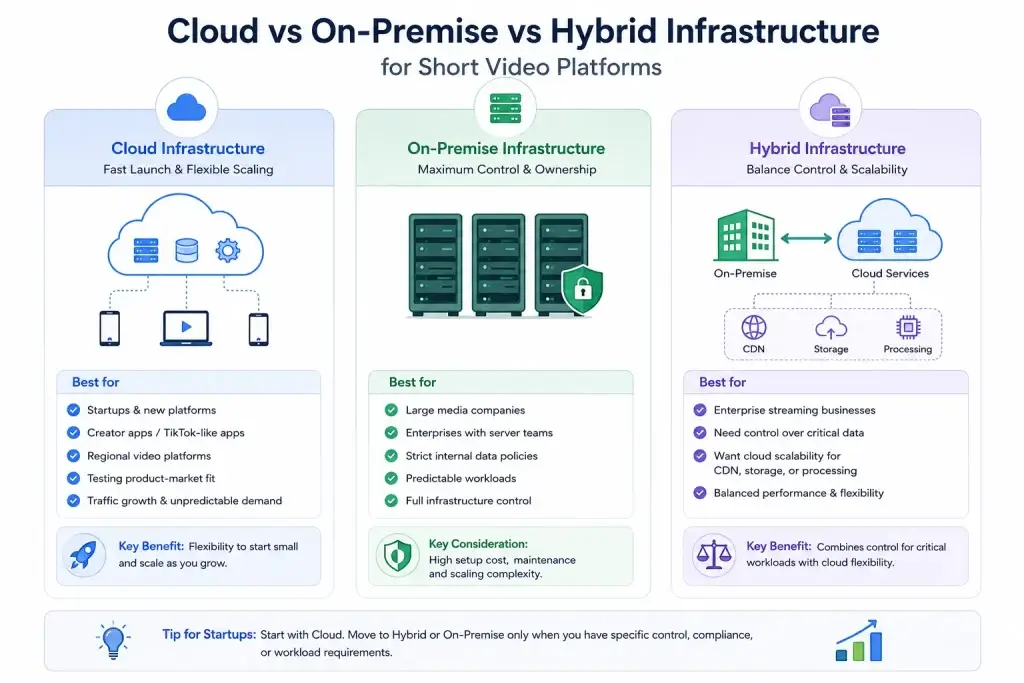
Not every short video platform needs the same infrastructure model. The right choice depends on launch stage, budget, security needs, traffic expectations, and how much control the business wants over its backend systems.
For most startups, cloud infrastructure is the most practical option because it supports faster launch and flexible scaling. However, enterprise media businesses may prefer on-premise or hybrid setups when data control, compliance, or existing infrastructure matters more.
| Infrastructure Model | Best For | Main Benefit | Main Limitation |
|---|---|---|---|
| Cloud Infrastructure | Startups, creator apps, TikTok-like apps, regional video platforms | Fast launch, flexible scaling, lower upfront setup | Long-term cost can increase with high storage and bandwidth usage |
| On-Premise Infrastructure | Large media companies, enterprises, control-heavy use cases | Full infrastructure control and data ownership | High setup cost, slower scaling, maintenance responsibility |
| Hybrid Infrastructure | Enterprise streaming platforms needing both control and scalability | Balances private control with cloud-based delivery and processing | More complex to manage than pure cloud setup |
Cloud Infrastructure for Fast Launch and Flexible Scaling
Cloud infrastructure is usually the best starting point for short video startups. It allows founders to avoid buying physical servers and scale resources as uploads, users, and playback demand increase.
Cloud works well for:
- new short video platforms
- creator apps and TikTok-like apps
- startups testing product-market fit
- regional platforms expecting traffic growth
The biggest advantage is flexibility. A founder can start with cloud storage, CDN, managed compute, and media processing, then increase capacity as the platform grows.
On-Premise Infrastructure for Control-Heavy Enterprise Needs
On-premise infrastructure means the business owns or manages its own physical servers. This gives stronger control over infrastructure, security policies, and data storage, but it also requires a larger technical team and higher upfront investment.
On-premise may make sense for large media companies, enterprises with existing server teams, businesses with strict internal data policies, or platforms with predictable workloads. For most early-stage short video startups, it is usually too heavy and expensive at the beginning.
Hybrid Infrastructure for Balancing Control and Cloud Scalability
Hybrid infrastructure combines private infrastructure with cloud-based services. For example, a business may keep sensitive data or internal systems on-premise while using cloud storage, CDN, or media processing for video delivery.
This model is useful for enterprise streaming platforms that need stronger control but still want the scalability of cloud infrastructure. It can offer the best of both worlds, but it also needs stronger planning, monitoring, and technical management.
Hybrid is useful when a platform needs both security control and scalable delivery.
Ideal Cloud Workflow for a Short Video Platform
A strong short video platform needs a clear workflow from video upload to final playback. The goal is simple: users should enjoy smooth playback while heavy backend tasks happen quietly in the background.
| Workflow Stage | What Happens | Why It Matters |
|---|---|---|
| Video Upload | Creator uploads a video from the mobile app | Starts the content creation flow |
| Cloud Storage | Raw video is saved in object storage | Keeps the original file secure |
| Processing Queue | Backend creates a processing job | Prevents the main app from slowing down |
| Media Processing | Workers transcode, compress, and create thumbnails | Makes the video ready for different devices |
| CDN Delivery | Final video versions are connected to CDN | Reduces buffering and improves playback speed |
| Feed Delivery | Feed API serves video metadata to users | Helps users discover and watch content |
| Analytics Tracking | Views, watch time, likes, and shares are tracked | Supports recommendations and creator insights |
In a well-planned setup, the creator does not need to wait for every technical task to finish manually. Once the upload is complete, the backend can process the video through queues and workers. The final video versions are then delivered through CDN so users can watch them faster from nearby edge locations.
This workflow keeps the user-facing app responsive while encoding, thumbnail creation, moderation checks, and analytics updates run separately.
Database Infrastructure: Handling Views, Likes, Comments, and Watch Time
A short video platform does not only manage videos. It also manages millions of small engagement actions that happen continuously inside the feed. Every swipe, replay, like, comment, share, save, follow, report, and watch-time signal becomes useful platform data.
This data helps the platform improve:
- recommendations based on user behavior
- creator analytics for content performance
- moderation systems for reports and unsafe content
- monetization logic for rewards, payouts, and engagement-based earnings
However, storing all this data in one main database can slow down the platform. User profiles, creator accounts, app settings, admin records, and video metadata should remain fast and stable. High-volume engagement data should be handled separately through analytics pipelines, event databases, or background processing systems.
A better architecture separates core app data from high-frequency event data. This keeps feed loading, profile access, comments, and admin actions fast while analytics systems process large engagement volumes in the background.
Read More : How Background Processing Keeps Creator Platforms Fast During Uploads, Encoding, and Payouts
Security Infrastructure: Protecting Content, Users, and Admin Access
Security is a major part of cloud infrastructure for video platforms. A short video app may contain user data, creator content, payment information, private media, and admin controls.
Founders should plan security from the beginning instead of adding it later.
Important security elements include:
- encrypted file transfers
- private storage buckets
- signed video URLs
- secure upload flow
- role-based admin access
- API authentication
- audit logs
- backup policies
- content moderation workflows
- restricted access to raw files
If the platform supports paid content, creator subscriptions, or premium videos, access control becomes even more important.
Security should protect both the platform and the business model.
Cloud Cost Planning: Avoiding Expensive Surprises After Launch
Cloud cost can grow quickly in video platforms. This happens because video apps consume more storage, bandwidth, and processing resources than normal apps.
The biggest cost areas are usually:
| Cost Area | Why Cost Increases |
|---|---|
| Storage | More creators upload more videos |
| CDN bandwidth | More users watch more content |
| Transcoding | Every uploaded video needs processing |
| Compute | More users create more API activity |
| Database | More engagement events are stored |
| Monitoring | More services need tracking |
| Backups | More media files need protection |
Bandwidth and transcoding are often the biggest surprises. A platform may seem affordable during development, but costs can rise when videos start getting views.
Cost control methods include:
- compressing videos properly
- using CDN caching
- moving old files to archive storage
- separating raw and processed files
- monitoring bandwidth usage
- using lifecycle storage policies
- avoiding unnecessary re-encoding
- setting alerts for sudden cost spikes
Founders should treat cost planning as part of architecture, not as a finance-only problem.
Common Cloud Infrastructure Mistakes Founders Should Avoid
Many short video platforms face performance issues because the early infrastructure is built like a basic app instead of a media-heavy platform. During testing, everything may look fine because uploads are limited and playback demand is low. But once creators start uploading regularly and users begin scrolling the feed, weak infrastructure can slow down quickly.
Founders should avoid mistakes such as:
- Using one server for everything: App requests, uploads, encoding, admin actions, and analytics should not compete for the same resources.
- Running video encoding on the main app server: Encoding uses heavy CPU and memory, so it should run through background workers.
- Launching without CDN: Without CDN delivery, videos may load slowly and buffering can increase.
- Ignoring monitoring and cost alerts: Failed jobs, traffic spikes, and rising bandwidth bills can go unnoticed.
These issues may not appear serious at launch, but they become expensive when traffic grows. Good cloud planning helps founders build with secure storage, CDN delivery, queue-based processing, monitoring, and scalable infrastructure from the beginning.
Choosing the Right Cloud Setup Based on Platform Stage
A founder does not need enterprise-level infrastructure on day one. But the platform should be built in a way that can grow.
| Platform Stage | Recommended Cloud Setup |
|---|---|
| Early launch | Cloud storage, basic CDN, managed backend |
| Growing creator app | Queue workers, transcoding, autoscaling |
| Regional platform | Strong CDN, regional storage, monitoring |
| High-traffic app | Microservices, analytics pipeline, distributed workers |
| Enterprise platform | Hybrid/cloud-native setup, governance, advanced security |
The goal is to avoid both extremes. Do not overbuild too early, but also do not choose a setup that blocks growth.
A practical founder approach is to start with cloud storage, CDN, background processing, and clean backend separation. Then scale into advanced infrastructure as traffic grows.
How Miracuves Helps Founders Build Cloud-Ready Short Video Platforms
Miracuves helps founders move beyond a simple “upload-and-play” app and build a short video platform designed for real growth. In a short video business, the backend has to do much more than show videos. It must manage creator uploads, video processing, CDN-ready delivery, engagement activity, admin control, monetization, and future scaling without slowing down the user experience.
With Miracuves, founders can start with a stronger platform foundation instead of building every workflow from scratch. The system can be planned around practical cloud needs such as secure video storage, queue-based processing, scalable APIs, processed video delivery, creator tools, and business control panels.
Miracuves can support founders across key growth layers:
- Creator-to-cloud video flow: from video upload and raw storage to compression, thumbnails, processed versions, and CDN-ready playback.
- Performance-ready backend: queue workers, background jobs, structured APIs, scalable database planning, and smoother handling of traffic spikes.
- Engagement and creator experience: short video feed, creator profiles, likes, comments, follows, notifications, analytics, and moderation-ready workflows.
- Revenue and control systems: admin dashboard, monetization modules, wallet logic, payout flows, white-label branding, and source code ownership.
This approach helps founders launch faster while keeping room for expansion. A platform can begin with short video feed, uploads, and engagement tools, then grow into live streaming, virtual gifting, subscriptions, creator wallets, social commerce, AI-powered recommendations, or advanced analytics.
For founders planning a TikTok-like app, creator community, or niche video platform, Miracuves helps turn cloud infrastructure into a business-ready product foundation.
Final Thoughts: Build a Short Video Platform That Can Scale Without Slowing Down
A short video platform cannot grow on weak infrastructure. If your cloud setup is not ready for uploads, playback, CDN delivery, media processing, and traffic spikes, users may face buffering, slow feeds, and poor app performance.
The right cloud infrastructure video platform setup helps founders build with confidence from the start. It keeps videos loading faster, uploads running smoothly, backend systems stable, and cloud costs easier to control as the platform grows.
This is where Miracuves can help. With cloud-ready backend architecture, CDN-ready delivery, queue-based processing, video upload workflows, monetization modules, admin control, white-label branding, and source code ownership, Miracuves helps founders move from idea to scalable short video platform faster.
If you are planning to launch a TikTok-like app, creator platform, or short video business, start with infrastructure that supports growth — not one that needs rebuilding after traction begins. Schedule a consultation with Miracuves to plan a short video platform built for smooth playback, scalable cloud workflows, and long-term growth.
FAQs
What is the best cloud infrastructure for a short video platform?
The best setup usually includes cloud compute, object storage, CDN, media processing, background queues, database scaling, monitoring, and security controls. The right choice depends on your users, upload volume, target region, and budget.
Why is CDN important for a short video app?
A CDN delivers videos from locations closer to users. This reduces buffering, improves video start time, and helps the platform handle viral traffic without overloading the main server.
Should video encoding run on the main app server?
No. Video encoding should run through background workers or media processing services. If encoding runs on the main app server, uploads can slow down the feed, APIs, and overall app performance.
Which is better for a short video platform: cloud or on-premise?
Cloud is usually better for startups because it supports faster launch, flexible scaling, and lower upfront cost. On-premise is mostly useful for large enterprises with strict infrastructure control needs.
How does Miracuves help with cloud infrastructure for video platforms?
Miracuves helps founders build short video platforms with cloud-ready backend architecture, video upload workflows, CDN-ready delivery, queue-based processing, admin dashboards, monetization modules, white-label branding, and source code ownership.
Miracuves is an independent software development company. We are not affiliated with, connected to, sponsored by, or endorsed by any company or product named in this article.
Terms such as “X Clone” are used descriptively. It is how the software industry refers to building a platform with functionality comparable to a known service, and how clients search for it.
The entire design and codebase of our products is built by our own team. Our products contain no code, design, graphics, or content originating from any third-party website or applications.
All third-party names and marks referenced in this article are the property of their respective owners, referenced solely to identify the services discussed.