Key Takeaways
- Clone app customization helps turn a ready-made app into a unique brand experience.
- Brand identity matters across logo, colors, UI, screens, and user flows.
- Feature customization helps match the app with real business needs.
- Local integrations improve relevance for payments, language, location, and users.
- The right customization strategy makes the clone feel original, trusted, and market-ready.
What You’ll Learn
- How to customize a clone app for a stronger brand experience.
- UI and UX changes can make the app feel unique and user-friendly.
- Workflow customization helps match customer, vendor, admin, or provider journeys.
- Third-party integrations support payments, maps, analytics, chat, and notifications.
- Growth depends on branding, usability, performance, and market fit.
Real Insights
- A clone app should not look copied if the goal is long-term brand trust.
- Small design changes can improve recall when they match the brand voice.
- Custom workflows create differentiation beyond basic app features.
- User experience decides retention after the first download or signup.
- The best strategy is to start with proven app logic and customize it around your brand.
A clone app gives founders a faster way to enter the market with a proven product model. But speed alone is not enough. If your app looks, feels, and works exactly like another platform, users may not see a reason to choose your brand.
That is why customization matters.
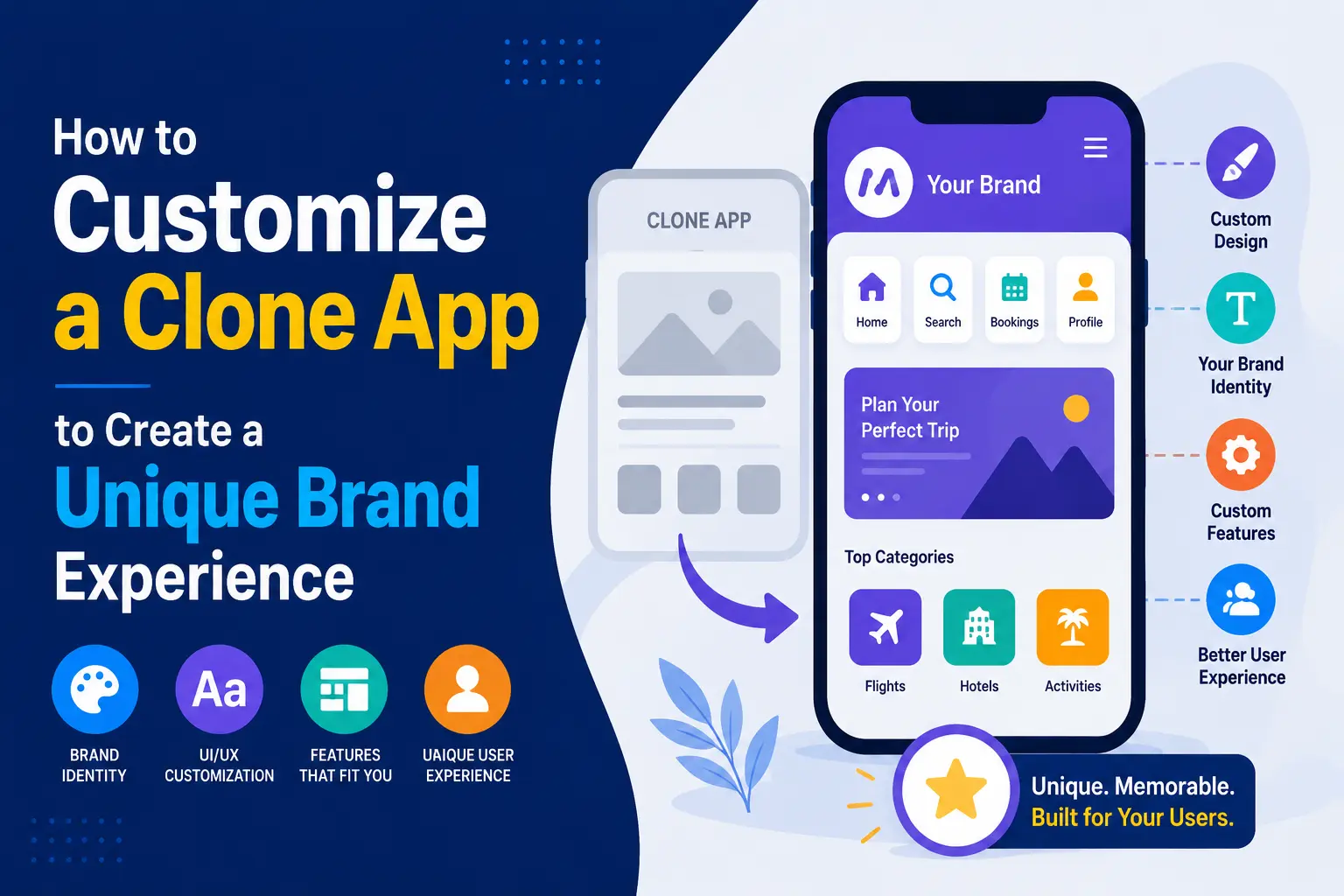
When founders search for how to customize clone app solutions, they are usually not asking about changing only the logo or color palette. They want to know how to turn a ready-made app foundation into a product that reflects their brand, market, customer behavior, operational model, and growth strategy.
A clone app should not be a copy. It should be a shortcut to a stronger first market version.
Miracuves helps founders build ready-made and white-label clone app solutions that can be customized with branding, UI/UX, workflows, integrations, local features, admin controls, and monetization logic. The goal is not to imitate another app blindly. The goal is to use a proven product structure and shape it into a business-ready digital platform.
Why Customization Matters More Than Copying the Original App
A clone app becomes valuable when it helps you launch with less development risk. But the business value comes from what you change, not only what you reuse.
Founders often choose clone app development because the core product logic is already familiar. A food delivery app needs customer ordering, restaurant management, delivery tracking, payments, and admin control. A taxi booking app needs rider, driver, booking, fare, map, and dispatch flows. A marketplace app needs listings, payments, reviews, vendor panels, and dispute handling.
The structure may be proven. But your brand experience still needs to answer:
- Who is your target user?
- What market are you launching in?
- What pain point are you solving better than existing platforms?
- What workflows need to match your business model?
- What local features will improve adoption?
- How will the app make money?
- What should users remember about your brand?
This is where clone app customization becomes a strategic advantage. Instead of spending months building common modules from zero, founders can focus on the layers that create differentiation.
For example, a delivery app can be customized for premium restaurants, student meal plans, hyperlocal grocery delivery, pharmacy delivery, or eco-friendly courier services. The base structure may look similar, but the positioning, user journey, pricing, integrations, and operational rules can be completely different.
That is the difference between launching a generic clone and building a brand-ready platform.
Read more: Clone App Development: The Fastest Way to Validate a Market Without Starting From Zero
What It Really Means to Customize a Clone App
To customize a clone app means adapting a ready-made product foundation to match your brand identity, user expectations, market behavior, operational workflows, and revenue model.
Many founders think customization means changing only surface-level elements such as:
- Logo
- Brand colors
- App name
- Icons
- Splash screen
- Fonts
These are important, but they are only the first layer.
A stronger customization strategy includes:
| Customization Layer | What It Includes | Why It Matters |
|---|---|---|
| Brand identity | Logo, colors, typography, tone, visual style | Makes the product recognizable and trustworthy |
| UI/UX | Screens, navigation, onboarding, interaction design | Improves user comfort, retention, and conversion |
| Workflows | Booking, ordering, matching, approval, delivery, payout flows | Aligns the app with real business operations |
| Features | Add, remove, modify, or prioritize modules | Prevents unnecessary complexity and supports differentiation |
| Integrations | Payments, maps, CRM, analytics, KYC, chat, marketing tools | Connects the app to your business ecosystem |
| Local features | Language, currency, tax, maps, delivery zones, payment preferences | Improves market fit |
| Admin controls | Dashboards, permissions, pricing, disputes, approvals, reports | Gives the operator control without constant developer dependency |
| Monetization | Commission, subscription, ads, featured listings, delivery fees | Turns product usage into revenue logic |
A ready-made clone app gives you the foundation. Customization turns it into your business.
Branding Customization: Making the App Feel Like Your Business
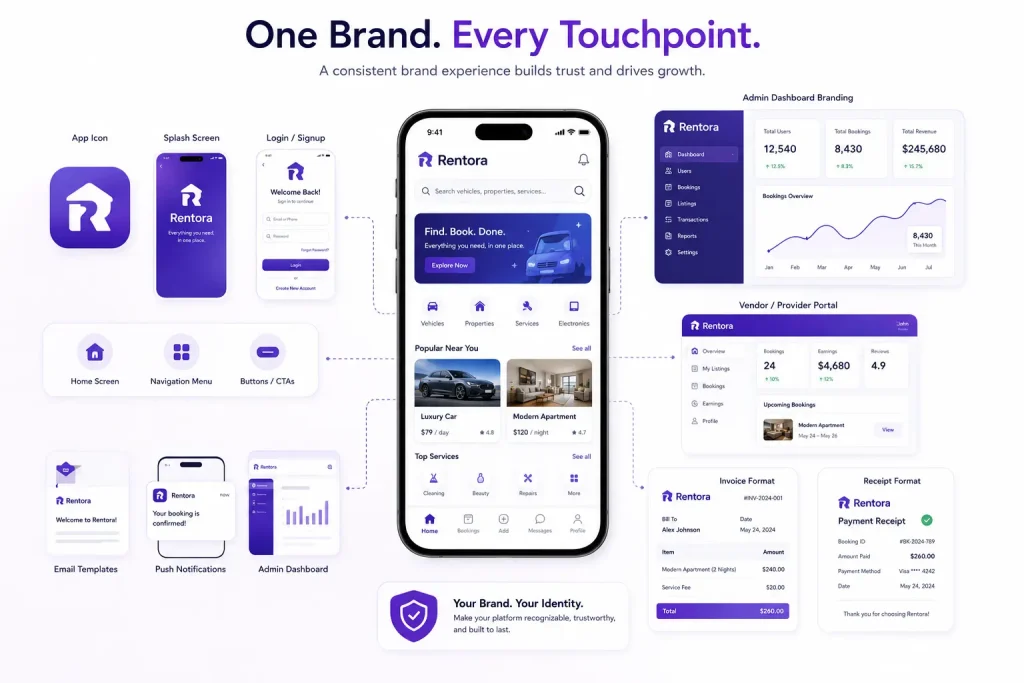
Branding is the first thing users notice. But it should not stop at changing the logo.
A strong branded clone app should feel consistent across every touchpoint, including:
- App icon
- Splash screen
- Login and signup pages
- Home screen
- Navigation menu
- Buttons and calls-to-action
- Email templates
- Push notifications
- Admin dashboard branding
- Vendor or provider portals
- Invoice and receipt formats
The goal is to make users feel they are interacting with your platform, not a recycled interface.
For founders, this matters because trust begins before the first transaction. A poorly branded app can make users question whether the platform is reliable. A polished brand experience, on the other hand, can help the business feel more credible from day one.
Branding customization should also reflect your positioning. A premium rental marketplace should not look like a discount classifieds app. A fintech wallet should not use playful visuals if the core promise is security and financial control. A creator platform may need a bold, expressive design system that feels different from a healthcare booking platform.
The right brand layer makes the clone app feel intentional.
UI/UX Customization: Turning Familiar Flows Into a Distinct Experience
A clone app often starts with familiar user flows because the reference product has already shaped user expectations. That is useful. Users do not want to relearn basic behaviors every time they open a new app.
But familiar does not mean identical.
UI/UX customization helps you improve the app experience based on your target users. This includes:
- Simplifying onboarding
- Redesigning the home screen
- Adjusting navigation patterns
- Improving search and filters
- Changing booking or checkout steps
- Adding personalized recommendations
- Improving empty states and error messages
- Making dashboards more useful
- Optimizing mobile responsiveness
For example, a taxi app targeting corporate users may need a faster repeat-booking flow, invoice management, and business account switching. A grocery delivery app for local neighborhoods may need category-first browsing, store-based discovery, and language localization. A short video app may need creator-first onboarding, better content upload flows, and engagement prompts.
The best UI/UX customization decisions come from user behavior, not personal preference.
A founder should ask: “What action do we want users to complete faster, with less confusion, and more confidence?”
That question leads to better product decisions than simply asking whether the app looks attractive.
Founder Decision Signals
Speed
Use a ready-made foundation when you want to launch faster and avoid rebuilding standard app modules from zero.
Brand Fit
Invest in UI, content, visual design, and onboarding customization when differentiation matters to customer trust.
Operational Fit
Customize workflows when your order, booking, approval, payout, delivery, or vendor process differs from the reference app.
Market Fit
Add local features such as language, currency, payment options, service zones, and regional user preferences before launch.
Workflow Customization: Matching the App to Your Real Operations
Workflow customization is where a clone app becomes truly business-specific.
A workflow is the sequence of actions that moves a user, provider, vendor, driver, creator, or admin from one step to the next. In a delivery app, that may include order placement, restaurant acceptance, delivery assignment, pickup, tracking, payment, and review. In a marketplace app, it may include listing approval, booking request, payment hold, completion, review, and dispute handling.
Founders should customize workflows when the default process does not match their real-world operations.
Common workflow customization areas include:
- User onboarding and verification
- Vendor or provider approval
- Booking rules
- Order acceptance rules
- Delivery assignment logic
- Cancellation policies
- Refund and dispute handling
- Commission calculation
- Payout schedules
- Subscription access
- Loyalty and referral flows
- Content moderation workflows
- Admin approval layers
For example, a rental marketplace may need manual listing approval before properties go live. A healthcare booking platform may need doctor verification and appointment confirmation. A fintech product may need KYC workflows and transaction monitoring support. A creator platform may need content review queues and abuse reporting.
Workflow customization reduces operational friction. It also prevents the founder from forcing the business to fit the software.
The app should support how your business works, not the other way around.
Read More : The Hidden $4,000 Monthly Tax: How Poorly Coded App Clones Bleed Cash via APIs
Feature Customization: Choosing What to Add, Remove, or Improve
One of the biggest mistakes founders make is adding too many features too early.
A clone app may come with many modules, but not every feature should be active at launch. The stronger approach is to prioritize features based on user need, business model, and operational readiness.
Feature customization can include:
| Feature Decision | Founder Question | Example |
|---|---|---|
| Add | What feature improves differentiation? | Add loyalty points to a food delivery app |
| Remove | What feature creates unnecessary complexity? | Disable wallet if payment gateway is enough for launch |
| Modify | What feature needs to fit our model? | Change fixed pricing to bidding in a service marketplace |
| Prioritize | What feature affects user activation? | Improve onboarding before adding advanced analytics |
| Phase later | What can wait until demand is validated? | Add subscription plans after user retention is clear |
A founder does not need the largest feature list. They need the right feature set for the first serious launch.
For example, if you are launching a ready-made clone app solution, the first focus should be core usability, admin control, payment flow, user trust, and monetization readiness. Advanced features can be added once you understand real customer behavior.
This makes the product easier to launch, easier to test, and easier to improve.
Integration Customization: Connecting the App to Your Business Tools
Integrations help your clone app work with the tools your business already uses.
Depending on the app category, integrations may include:
- Payment gateways
- Maps and location APIs
- SMS and email providers
- Push notification services
- CRM systems
- Analytics tools
- Customer support chat
- KYC and identity verification tools
- Accounting software
- Marketing automation tools
- Inventory systems
- Delivery partner APIs
- Calendar and scheduling tools
- Cloud storage
- Video streaming or CDN services
Integration customization matters because most digital products do not operate in isolation. A taxi app depends on maps and live tracking. A delivery app depends on payments, notifications, order updates, and merchant dashboards. A fintech platform may need identity verification, wallet logic, transaction monitoring, and reporting workflows. A creator platform may need video processing, moderation, and payout integrations.
The right integrations can improve user experience and operational efficiency. The wrong integrations can increase cost, complexity, and maintenance risk.
Founders should evaluate integrations based on business need, reliability, scalability, compliance requirements, and long-term cost.
Local Feature Customization: Adapting the App for Your Market
A clone app that works in one country, city, or niche may not automatically work in another.
Local customization helps the app feel relevant to the target market. This can include:
- Local languages
- Regional currencies
- Local tax rules
- Local payment methods
- Local map providers
- Delivery zones
- Service radius rules
- Local address formats
- Regional content preferences
- Time zone settings
- Local compliance workflows
- Cultural UI preferences
- Local vendor or provider onboarding rules
For example, a food delivery app in one market may depend heavily on cash payments, while another may be wallet-first. A ride-hailing app in one city may need fare bidding, while another may need fixed pricing. A marketplace in one region may require stronger document verification before providers are approved.
Localization is not only translation. It is product-market adaptation.
This is especially important for founders targeting underserved local markets. A large global app may not serve local habits well. A customized clone app can win by being more relevant, more practical, and easier to use for a specific audience.
Admin Dashboard Customization: Giving Founders Better Control
The admin dashboard is one of the most important parts of clone app customization because it decides how much control the business owner has after launch.
A strong admin panel should allow the platform operator to manage:
- Users
- Vendors, providers, drivers, creators, or merchants
- Listings, products, services, or content
- Pricing and commission rules
- Orders, bookings, or transactions
- Refunds and disputes
- Promotions and coupons
- Notifications
- Reports and analytics
- Reviews and ratings
- Access roles and permissions
- Payment and payout status
- Service zones and availability
- Content moderation where relevant
Without admin customization, founders may depend on developers for every small operational change. That slows down decision-making.
For example, if a founder wants to adjust commission for a specific vendor category, create a seasonal promotion, approve high-value listings manually, or suspend a suspicious provider, the admin dashboard should support those actions.
Admin control is not just a backend feature. It is a business operations tool.
This is why Miracuves focuses on source-code-owned and admin-controlled app foundations. A founder should have the flexibility to manage, customize, and evolve the platform as the business grows.
Clone App Customization Areas and Business Value
| Customization Area | Business Value | Founder Impact |
|---|---|---|
| Branding | Creates trust and recognition | Helps the app feel owned, polished, and market-ready |
| UI/UX | Improves usability and conversion | Reduces friction in onboarding, booking, ordering, or checkout |
| Workflows | Matches software to business operations | Prevents manual workarounds and operational confusion |
| Integrations | Connects the app to payments, maps, CRM, analytics, and support tools | Improves efficiency and reduces disconnected processes |
| Local Features | Improves product-market fit | Makes the app more relevant for target users and regions |
| Admin Controls | Gives the business owner operational flexibility | Allows faster decisions without depending on developers for every update |
Monetization Customization: Aligning Revenue With Your Business Model
A clone app should not only work well. It should also support how your business plans to make money.
Monetization customization can include:
- Commission fees
- Subscription plans
- Featured listings
- Delivery fees
- Booking fees
- Surge pricing
- Premium accounts
- In-app ads
- Creator commissions
- Transaction fees
- Wallet charges
- Vendor promotion packages
- Membership plans
- Service add-ons
The right monetization model depends on the app category.
A delivery app may combine commission, delivery charges, ads, and restaurant promotion fees. A marketplace may use listing fees, booking commissions, and featured placements. A creator platform may use subscriptions, tips, paid content, and creator commission. A fintech app may use transaction fees, FX margins, subscription tiers, or card-related services, depending on the business model and regulatory setup.
Founders should avoid adding monetization mechanics that hurt early adoption. If users are still learning the platform, too many fees can reduce trust. A better approach is to match monetization with the value users receive.
The app’s admin panel should also make monetization flexible. Founders may need to change commissions, create promotional campaigns, or test new pricing models after launch.
Security and Trust Layers That Support Brand Credibility
Customization should also include trust and security layers, especially if the app handles payments, user-generated content, personal data, bookings, wallets, healthcare information, or marketplace transactions.
Depending on the product category, important trust layers may include:
- Encrypted data transfer
- Secure payment gateway integration
- Role-based access control
- User verification
- Vendor or provider verification
- Admin access controls
- Audit logs
- Dispute management
- Abuse reporting
- Content moderation
- Transaction monitoring
- Refund workflows
- Activity logs
- Permission-based dashboards
For fintech, healthcare, marketplace, delivery, and creator platforms, security should not be treated as an optional add-on. It is part of the product foundation. Miracuves’ security language rules recommend careful positioning such as “compliance-ready foundation” or “supports compliance workflows,” rather than making guaranteed legal or regulatory claims.
Final compliance depends on jurisdiction, legal review, integrations, and the operating model. But building the right control layers early helps founders prepare for safer scaling.
Read More :-How Miracuves Delivers Enterprise-Grade Apps in Just 6 Days Without Cutting Corners
Ready-Made vs Custom Development: Which Customization Route Makes Sense?
Founders often ask whether they should customize a ready-made clone app or build a fully custom product from zero.
The answer depends on your launch goal, budget, timeline, technical complexity, and differentiation needs.
| Build Route | Best For | Advantage | Limitation |
|---|---|---|---|
| Ready-made clone app customization | Founders who want faster launch and proven core flows | Faster deployment, lower development risk, existing modules | Needs thoughtful customization to avoid generic experience |
| White-label app customization | Brands that want their own identity on an existing product foundation | Brand control, faster market entry, practical for validation | Deep architecture changes may require extra development |
| Fully custom development | Complex products with unique logic, heavy compliance, or unusual architecture | Maximum control over product and architecture | Longer timeline and higher development effort |
| Hybrid approach | Founders who want speed now and deeper customization later | Launch faster, then evolve based on real user feedback | Requires roadmap discipline |
A ready-made solution works well when the core business model is already proven, but the founder wants to customize the experience for a specific audience or market.
A custom build makes more sense when the product logic is highly unique, the workflows are complex, or the business requires deep technical differentiation from day one.
For many founders, the practical route is hybrid: start with a launch-ready foundation, customize the most important brand and workflow layers, then improve the product based on real market feedback.
Miracuves supports this founder-focused approach through ready-made, white-label, and source-code-owned app foundations that can be adapted for different industries and launch goals.
Mistakes Founders Should Avoid When Customizing a Clone App
Mistakes Founders Should Avoid
Changing only the logo and calling it customization
Branding matters, but a unique app experience also requires UI/UX, workflows, features, integrations, and admin logic that match the business model.
Adding too many features before launch
A large feature list can slow down launch and confuse users. Start with the features that support activation, trust, transactions, and monetization.
Ignoring local user behavior
Payment habits, language preferences, delivery expectations, booking rules, and cultural behavior can differ by market. Localization improves adoption.
Overlooking admin control
If the admin dashboard is weak, founders may struggle to manage users, pricing, disputes, vendors, reports, and operational changes after launch.
How Miracuves Helps Founders Customize Clone Apps Faster
Miracuves helps founders, startups, agencies, and businesses launch digital products faster using ready-made, white-label, and source-code-owned clone app solutions.
Instead of starting from zero, founders can begin with a launch-ready product foundation and customize the parts that matter most:
- Brand identity
- UI/UX screens
- User workflows
- Vendor, provider, driver, creator, or merchant panels
- Admin dashboard controls
- Payment and third-party integrations
- Local market features
- Monetization logic
- Security and access layers
- Reporting and operational dashboards
For founders exploring clone app development solution, this approach can reduce avoidable development effort while still allowing the product to feel aligned with the brand and market.
If you are building in fintech, you can explore Miracuves’ fintech app development ecosystem. If your product is a creator or short video platform, the TikTok clone app solution can be customized with creator flows, video features, moderation workflows, and monetization layers. For technical planning, related Miracuves resources such as video streaming infrastructure for short video apps and background processing for creator platforms can help founders understand the backend layer behind scalable user experiences.Conclusion
The real value of clone app development is not copying another platform. It is using a proven product pattern to launch faster, reduce avoidable development risk, and customize the experience around your brand, users, workflows, and market.
A founder who wants to customize clone app solutions should think beyond surface-level branding. The strongest customization decisions happen across UI/UX, workflows, features, integrations, local market needs, admin controls, monetization, and trust layers.
A ready-made app can help you start faster. Thoughtful customization helps you stand apart.
Miracuves helps founders turn ready-made clone app foundations into branded, scalable, and business-ready platforms built for faster validation and long-term product growth.
Want to customize your clone app with the right branding, UI/UX, workflows, and integrations? Contact Us
FAQs
What does it mean to customize a clone app?
To customize a clone app means adapting a ready-made app foundation to match your brand, UI/UX, workflows, features, integrations, local market needs, admin controls, and monetization model. It goes beyond changing the logo or color scheme.
How can I make a clone app look unique?
You can make a clone app look unique by customizing the visual identity, app screens, typography, icons, onboarding flow, navigation, content tone, push notifications, and dashboard experience. The goal is to make the app feel like your brand, not a reused template.
Can clone app workflows be customized?
Yes. Clone app workflows can be customized around booking, ordering, delivery assignment, vendor approval, provider verification, payout logic, refunds, disputes, subscriptions, content moderation, and admin approvals.
What integrations can be added to a clone app?
Common integrations include payment gateways, maps, SMS, email, push notifications, CRM, analytics, customer support chat, KYC tools, inventory systems, calendar tools, cloud storage, and marketing automation platforms.
Why is local customization important in clone app development?
Local customization helps the app match regional user behavior. This may include language, currency, tax rules, local payment methods, address formats, delivery zones, service radius, and cultural preferences.
Is a customized clone app better than building from scratch?
A customized clone app is often better when the founder wants faster launch and proven core functionality. A fully custom build may be better for highly complex, unusual, or deeply differentiated products. Many founders use a hybrid approach: launch with a ready-made foundation and customize based on real feedback.
Can Miracuves help customize a clone app?
Yes. Miracuves helps founders customize ready-made and white-label clone app solutions with branding, UI/UX, workflows, integrations, local features, admin dashboards, monetization logic, and source-code ownership.
Miracuves is an independent software development company. We are not affiliated with, connected to, sponsored by, or endorsed by any company or product named in this article.
Terms such as “X Clone” are used descriptively. It is how the software industry refers to building a platform with functionality comparable to a known service, and how clients search for it.
The entire design and codebase of our products is built by our own team. Our products contain no code, design, graphics, or content originating from any third-party website or applications.
All third-party names and marks referenced in this article are the property of their respective owners, referenced solely to identify the services discussed.