Retail Grocery App · Production Ready

FreshDirect Clone App - White-Label Online Supermarket App

Miracuves' ready-made, white-label FreshDirect clone puts a supermarket or organic grocer online, with apps for customers, stores and delivery men on Android and iOS, a storefront, three role panels and all the unencrypted code as yours, deployed to your hosting after six working days.

Your in-house shop heads the store list, with your branches and any outside suppliers you approve listed beneath it, each keeping its own catalog and panel. Booked delivery slots, subscription billing and an in-store picker are not in the base, and four extras, a wishlist, an assistant, recipe import and smart lists, are quoted separately. A made-to-measure approval step or a new report is priced in writing first, then typically built in 2-8 weeks.

Launch in 6 Days with

  • Source Code
  • Customer App
  • Store App
  • Delivery Man App
  • Web Storefront
  • Admin Panel

StackFlutter · PHP · Bootstrap · MySQL · Gateway APIs · Firebase

MXGroc console · RetailIllustrative
Orders today164
Branches open12
Low-stock alerts9

Orders, stock and counter activity

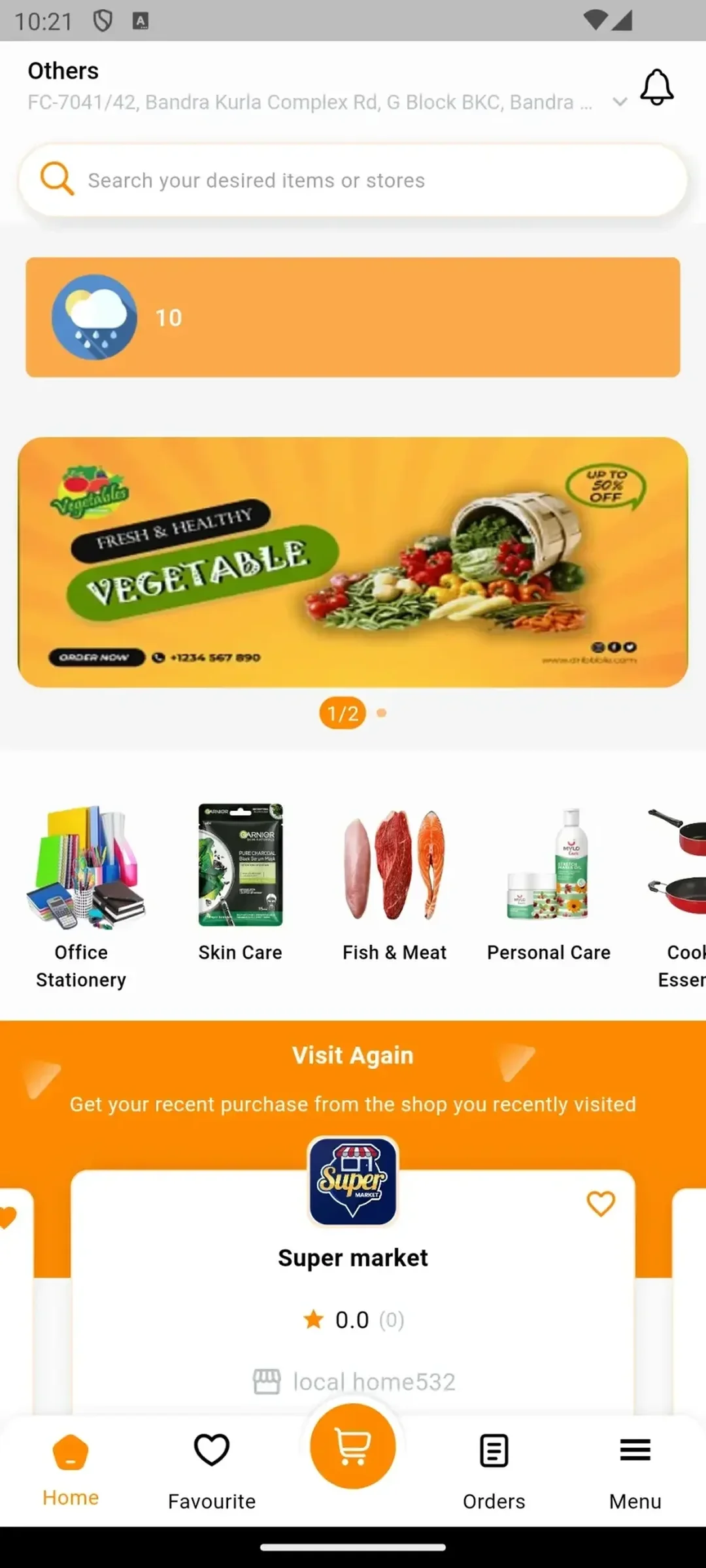
FreshDirect Clone customer app home screen: location bar, one search field for items and stores, a produce banner, category tiles and a Visit Again row.
Every branch works in its own panelwhile you watch all of them
  • 3Stock Care Toolslow-stock pop-ups, customer restock requests and a clearance section for surplus
  • 1Counter Screen, Three Placesadmin panel, store panel and store app, each showing amount paid and change
  • 0%Revenue Share With Miracuvesnothing taken from counter sales or online orders
  • 5Order Stages Customers Seeplaced, confirmed, being prepared, out for delivery and delivered
  • 6Days to Launchand if the delay is ours, we keep going free
  • $2,499Paid Once, Not Rentedsource code yours, no per-seat fee, no monthly rental

Live in six working days, or we keep working free until you launch. Every build carries 60 days guidance, 6 months bug fixes and 12 months updates.Verify every figure

Invoices Printed or Emailed

Any invoice can be printed or sent by email, and version 14.5 redesigned the layout to carry custom data and translation.

Basket Rules You Set

The admin and each store set a minimum order value, delivery turns free above a chosen total, and a note on missing items travels with the order.

Cash on Delivery Is Your Switch

The wallet can settle an order, the admin decides whether cash on delivery is offered, and cards go through whichever gateways you link to your own account.

Taking a supermarket or organic grocery online?Talk to Product Expert

Chosen by 6,000+ clients across the globe

Miracuves is listed by Expertise.com as a managed IT service provider.Miracuves is an official member of the Forbes Business Council.Miracuves is a verified agency on DesignRush, listed among top design agencies in India.Miracuves is reviewed on Trustpilot as a software development company.Miracuves is listed by The Manifest among top managed software development companies.Miracuves is listed by DesignRush as a top software development company.Miracuves is recognized by GoodFirms as a top software development company.Miracuves is ranked among the top 1000 companies globally by Clutch.Miracuves is a top managed service provider in the United States on Clutch.

01See it live

Live in Action

Test Drive a Grocery App Like FreshDirect as a Customer, a Store and a Delivery Man

Try the FreshDirect clone Miracuves built in each role it serves. The apps come with a customer login, a store login and a delivery-man login, and the web demo shows the storefront and leads to the panels. Pick a place, walk into a store, read an order and watch it move across the map.

FreshDirect Clone customer app home screen: location bar, one search field for items and stores, a produce banner, category tiles and a Visit Again row.FreshDirect Clone store page in the customer app: store logo, rating, distance and delivery time, category chips and an All Products list with prices.
Customer app

The FreshDirect Clone on a Customer's Phone

Choose where to deliver, search for products or stores, tap a category tile, open a store, read an order and follow its progress on a map.

  1. 1Put the customer app on your phone
  2. 2Sign in using the details below
  3. 3Try Home, a store page, Orders and the account menu
Customer login:+91 9876543210 | User_321
FreshDirect Clone order details screen: order number, payment method, ordered items, the route from store to delivery address and a Track Order button.FreshDirect Clone live tracking screen: a map plus the five steps Order Placed, Order Confirmed, Preparing Item, Delivery on the Way and Delivered.
Store + delivery

Apps for Stores and Delivery Men

Every store, and every delivery man, gets an app of its own. The store owner deals with orders and products there, the delivery man picks up and completes drops, and the customer screens shown here react to what those two do.

  1. 1Install the store app, or else the delivery app
  2. 2Use the matching login below
  3. 3Try orders, products and deliveries
Logins for store and delivery:grocery@demo.com | Store_321 (store)
+91 9876543211 | Driver_321 (delivery man)
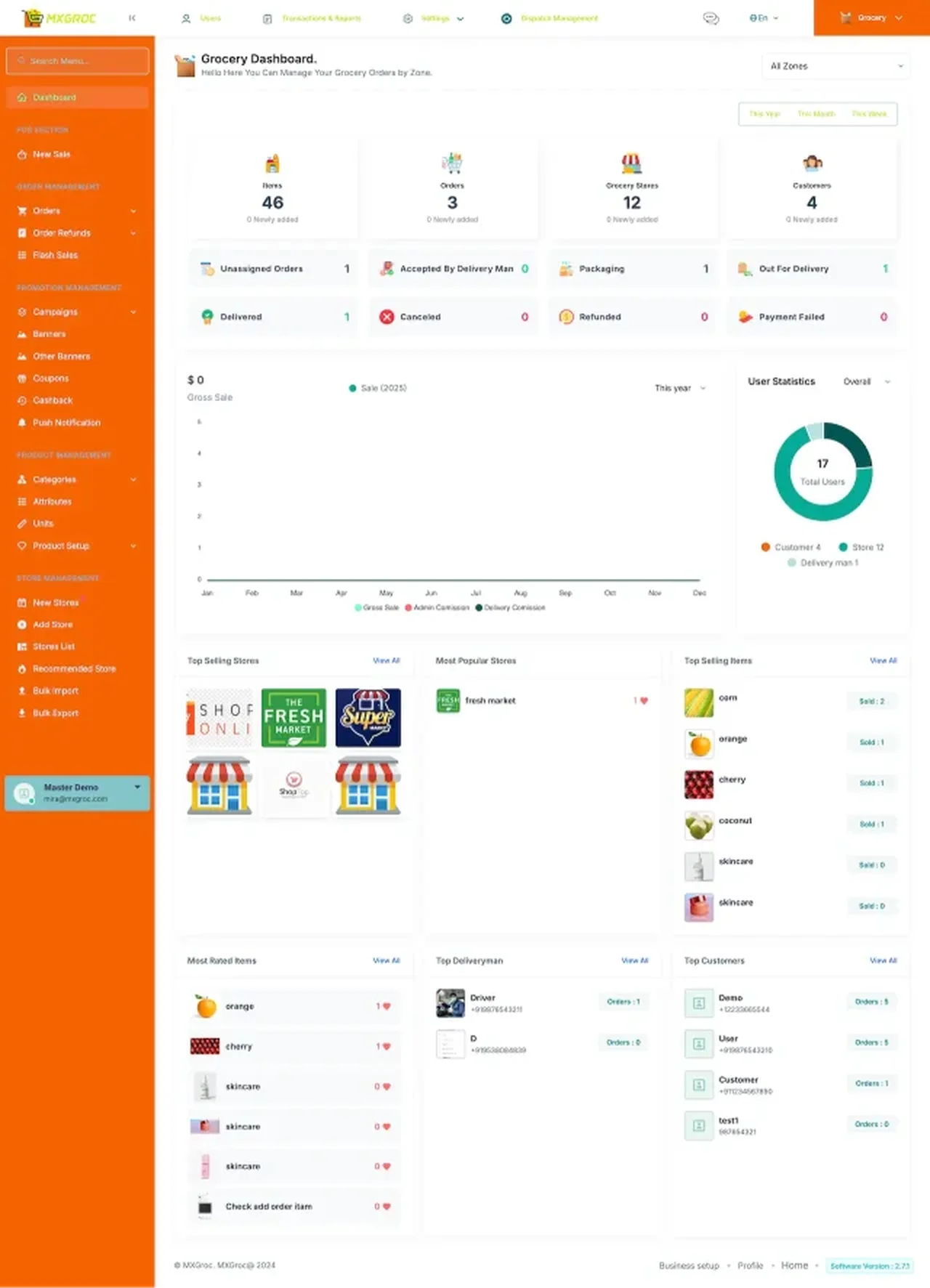
FreshDirect Clone admin dashboard: item, order, store and customer counts, order status tiles, a yearly sales chart, user statistics and top stores and items.
Web demo

Storefront Plus Admin and Store Panels

The public site offers place search, categories and stores. An admin panel and a store panel wait behind login pages, and their access details are given out in a guided call.

  1. 1Visit the demo site beside this page
  2. 2Pick the storefront or a panel sign-in page
  3. 3Look at the storefront, the dashboard and the stores
Logins for the web panel:shared during a guided call
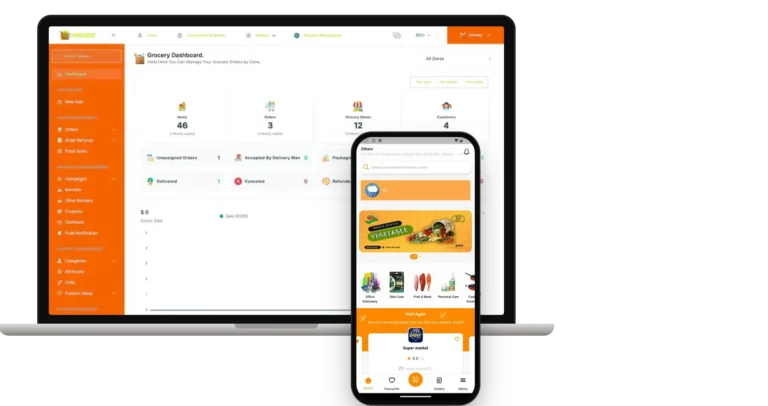
FreshDirect Clone shown across a laptop and phone: the admin grocery dashboard by zone and the grocery home with categories and offers

See It With Us

FreshDirect-Style Grocery Walkthrough: A Basket From Store Shelf to Customer Door

Nothing explains a retail platform faster than a live look. During roughly thirty minutes we open the customer app, then one store's panel with its stock warnings and its counter screen, then the admin console, and tie each piece to what you intend to run: how many branches, which basket rules and which district comes first.

Book a Guided Demo

Screen by Screen

Screens of an Online Supermarket Like FreshDirect: the Customer App and the Operator Dashboard

Miracuves puts the genuine customer-app screens of this FreshDirect clone in the order a buyer meets them, next to the dashboard an operator opens to start the day.

FreshDirect Clone customer app home screen: location bar, one search field for items and stores, a produce banner, category tiles and a Visit Again row.
FreshDirect Clone store page in the customer app: store logo, rating, distance and delivery time, category chips and an All Products list with prices.
FreshDirect Clone order details screen: order number, payment method, ordered items, the route from store to delivery address and a Track Order button.
FreshDirect Clone live tracking screen: a map plus the five steps Order Placed, Order Confirmed, Preparing Item, Delivery on the Way and Delivered.
FreshDirect Clone account menu: profile, my address, language, coupon, loyalty points, my wallet, refer and earn and join as a delivery man.
5 screens · scroll →
FreshDirect Clone admin dashboard: item, order, store and customer counts, order status tiles, a yearly sales chart, user statistics and top stores and items.
1 screen

A single customer from first screen to last: home, a store, an order, the tracking map and the account menu, followed by the admin dashboard that adds up the same activity.

Explore Our Solutions

02Proof

In Their Words

FreshDirect Clone Client Reviews - Operators on Their Own Launches

Operators describe what starting on a Miracuves base was like. Two of them run grocery and delivery businesses, the rest work in other industries, and each quote is printed exactly as its author wrote it.

CCharles EveillardManaging Partner, Izi Technologies
“Talokitoko is grocery and food delivery for the African diaspora market in Europe. The rider app, dispatch and the merchant console were already built, so we spent the engagement on our own local payment mix, the vendor onboarding flow and the regions we actually operate in. The platform was live inside a month, which was months faster than our internal estimate.”
CClick2Deliver TeamFounding team, Click2Deliver
“Two order types, one courier fleet. The base handled multi-vertical ordering, so the work was our merchant mix and the grocery-specific substitution and weight rules. Live inside a month.”
DDr. Vivek RungtaFounder & Chief Dermatologist, Dermacian
“Every HMS I tried was built for general physicians, with no lesion mapping, no before/after tracking, and no procedure-based billing. Their MXHealth base gave us the patient app, doctor app, EMR and video consult out of the box. Front-desk time on scheduling and follow-ups is down ~70%, and we went fully digital in 9 months, where a fully custom job would have been 18.”
AAndre GittensCEO, Ride Corporation
“Turo is the obvious reference, but the Caribbean specifics, from different insurance norms to different payment rails, meant we needed a real partner, not just a clone. Miracuves’s MXCar base covered the listing, the trip flow, and the host payouts. We launched in 6 working days and are live in three islands.”
MMarsha WilliamsFounder, Bmore On Demands LLC
“The team was running it on a dispatcher and a Google Sheet, and we needed a real platform quickly, because we were about to onboard a major retail client. Miracuves’s Delivery Genie base gave us the rider app, the dispatch console, and live tracking. We launched in 6 weeks and cleared 4x the previous order volume in the first month.”
TTiffany DandreaOperations Director, Best Cabo Yacht Rentals
“We were running it on phone calls and a paper calendar, and we were losing bookings to bigger OTAs. Miracuves’s GetmyBoat Clone base gave us the calendar, the booking flow, and the payment engine. Online bookings are up roughly 70% in the first six months, and the ops team finally has a live view of the fleet.”
DDr. Carlos A. PalermoCo-founder & CEO, Doctta Health
“Building a compliant telehealth stack from scratch in three markets would have been a year-plus effort. Miracuves’s MXHealth base covered the patient and doctor apps, video consult, e-prescription and the pharmacy integrations. We launched in our first market in 9 weeks and rolled out to two more in the following six months.”
BBrian LatailleVP Logistics Technology, IBC Tanks Canada
“We were juggling spreadsheets, a third-party GPS provider, and a phone. We needed a single operations console. Miracuves’s MXLogistics base covered the trip lifecycle, the driver app, and the customer tracking page. We’ve cut operations admin time by about 40%.”
Read More Client TestimonialsOperators and founders, unedited

Test Before You Commit

FreshDirect Clone Case Study: What Evidence Exists and How You Can Test It

A candid summary of what evidence is available for this product right now, and of the ways to test it yourself first.

Case Study
No named launch of this exact product is published yet

No client has released a case study for this build, so none appears here and none has been made up. Below are ways to test the product yourself, and a plain statement of what we will not pass off as proof.

UnpublishedClient named
Demo + callHow to verify
Retail grocerModel
3Demo apps
4Web surfaces
6Days of build
FreshDirect Clone admin dashboard: item, order, store and customer counts, order status tiles, a yearly sales chart, user statistics and top stores and items.
Challenges
  • A grocer needs the shop window, the stock routine and the delivery handover to agree with each other
  • Low shelves, missing items and clearance prices must show up before a customer notices them
  • Counter sales, wallet money and commission have to add up at the end of the day
Goal
  • See a basket move from a store to a delivery man ahead of any payment
  • Judge store sign-up and approval against how you plan to recruit branches and suppliers
  • Inspect the source code for anything a demo leaves out
Solution by Miracuves
  • Demo access to the customer, store and delivery apps
  • A storefront and web panels you can open at once
  • A dashboard tour during a guided call
  • Release notes spanning versions 14.0 to 15.0
  • A price agreed before work starts, plus 6 days of building

No invented client, borrowed logo or unverified result stands in for proof on this page. Once a real launch of this product has been published, it gets its own case study and a link right here.Miracuves · How we treat proof

Browse real portfolio workThe portfolio shows delivery builds, grocery included, finished on related Miracuves bases.

03The product

Product Overview

What a FreshDirect-Like Grocery App Gives a Supermarket or Organic Grocer

Delivered ready-made by Miracuves, this is an online grocery delivery app and platform for retailers. A customer chooses a place, enters a store and fills a basket, a delivery man carries it across town, and the admin panel takes care of approvals, orders and commission. Your own shop can head the list, with other stores and suppliers underneath.

FreshDirect Clone shown across a laptop and phone: the admin grocery dashboard by zone and the grocery home with categories and offers

Retail Tools, Not Only a Shopfront

Low-stock warnings, restock requests, clearance offers and a sale screen for the counter sit next to the catalogue, which suits a shop that is already trading every day.

Source You Can Open

All the code is handed over unencrypted, so your developers can reshape screens and flows later and no licence fee is charged per seat.

Add-Ons Stay Add-Ons

Four modules cost extra and are quoted separately: a wishlist, an assistant, recipe import and smart lists. None of them is counted as part of the base.

On Web and Mobile

What Is a FreshDirect Clone Script?

Going online is hardest for a grocer on the stock side: units, prices, offers, alerts for low shelves and a counter that still sells face to face. Those parts come working, together with the customer and delivery flows around them.

FreshDirect Clone admin dashboard: item, order, store and customer counts, order status tiles, a yearly sales chart, user statistics and top stores and items.
  1. 01Your own shop, branches and suppliers listed together
  2. 02Place search, store pages and one search for items
  3. 03Basket rules, a wallet and live order tracking
  4. 04Separate apps for customers, stores and delivery men
  5. 05A dashboard for the admin covering orders, stores and reports

Three iOS and Android phone apps for customers, stores and delivery men come in the package, together with four web surfaces (the storefront and one panel per role) and all of the Flutter and web code.

Inside the Box

FreshDirect Clone Feature List: Stores, Stock Care, Counter Sales, Deals, Delivery & Admin

Every point below is built into Miracuves' FreshDirect clone and can be traced to a demo screen, the admin dashboard or a release note. Anything that needs a module outside the base is named as an add-on lower on the page.

Feature 01 / 10

Aisles, Stores & Search

A customer pins a place by typing, GPS or a spot on the map and then sees the stores nearby. The search box on the first screen finds products and stores together.

  • Place the delivery point by typing, by GPS or with a map pin
  • One search field on the first screen covers items and stores alike
  • The Best Stores Nearby list gives distance and star rating per store
  • Category tiles open a catalogue, and a Visit Again row returns customers to stores they know
  • Service areas are divided into zones by the admin
Feature 02 / 10

Branches, Suppliers & Your Own Shop

Every store is a seller with its own page, catalogue and panel. A retailer can list its branches, bring in outside suppliers and keep the in-house shop at the head of the list.

  • A store applies in the vendor portal and supplies business details
  • Each store loads and maintains its own catalogue
  • Customers see a store only after the admin has approved it
  • Pending applications wait in a New Stores queue, or the admin adds a store by hand
  • The admin's in-house shop heads the vendor list (v14.5)
  • A switch on the Stores list marks a Recommended Store
  • Stores and items can be imported or exported in bulk
  • The store page opens on its logo, rating, location and delivery time
Feature 03 / 10

Stock Care & Restock Requests

Items carry a price and a unit, a shelf running low raises a warning, and customers can ask for a missing item to return and hear back when it does.

  • Pop-up warnings about low stock reach admin and vendor panels (v14.6)
  • A customer can request a restock of a missing item (v14.9)
  • Admin and store both work through restock requests
  • The customer is told once the requested item is available again (v14.9)
  • Requested items are collected in the customer profile (v14.9)
  • Shared category, attribute and unit lists keep every catalogue in step
  • The All Products list has category chips and shows price and unit
  • Vendor data can be exported to Excel in a tidier layout (v14.6)
Feature 04 / 10

Basket Rules & Checkout

Whatever is still unpaid remains in the cart. At the till the customer pays, writes a delivery note and says what to do about an item that cannot be supplied.

  • Check out just the ticked lines; the rest wait in the cart
  • A Buy Now button bypasses the cart and leaves it untouched
  • Guest checkout with a tick box to open an account on the same page
  • A past order can be repeated in one tap
  • The admin and every store may set a minimum order value
  • Delivery costs nothing once the order total reaches a chosen figure
  • A delivery note and a note about missing items go along with the order
  • Saved addresses sit under My Address, and delivery and billing details can be edited (v14.0)
Feature 05 / 10

Counter Sales & Invoices

A New Sale screen serves as a counter for walk-in customers and displays the amount paid and the change. Printing an invoice or emailing it are both possible.

  • New Sale, a point-of-sale screen, lives in the admin panel
  • The store panel and the store app have the same counter screen (v14.9)
  • Each sale displays the amount paid and the change (v14.9)
  • Fixes for how totals are calculated at the counter (v15.0)
  • Invoices can be printed or emailed (v14.7)
  • Invoices were redesigned, with custom data and translation (v14.5)
Feature 06 / 10

Delivery & Live Tracking

Delivery men sign up inside the app, await approval and then get matched to orders. Each order passes five stages on a map, and the release notes name delivery verification by image and OTP.

  • Verifying a delivery by image and OTP arrived in v14.0
  • Each order gets a map screen with five stages
  • Stages shown: placed, confirmed, being prepared, out for delivery, delivered
  • A message stays visible until a delivery man accepts the order
  • The account menu offers delivery-man sign-up
  • Applicants send documents and are checked before approval
  • Matching of orders considers location, availability and rating
  • Each delivery man can review completed drops, earnings and bonuses
  • The admin top bar opens Dispatch Management
Feature 07 / 10

Deals & Clearance

Admin menus offer campaign work, banners, coupons, cashback and flash sales, and each store may discount its own items. A clearance area helps surplus stock find a buyer.

  • A clearance discount area on store pages and the home page (v15.0)
  • An admin menu for campaigns
  • Banner menus, with spare banner slots
  • Separate menus for coupons and for cashback
  • A Flash Sales menu
  • A single flash or feature deal can include many products (v14.7)
  • Stores can set discounts and offers of their own
  • A tapped push message can open a page chosen in advance (v14.8)
  • v15.0 added an optional call-to-action block on the product page
Feature 08 / 10

Wallet, Referral & Loyalty

A wallet that customers can fund and spend, a reward for bringing in friends and loyalty points make up this area, and the account menu leads to every one of them.

  • The wallet balance can settle an order
  • Customers top up on web or app, and a bonus on the amount is optional (v14.0)
  • Refer and Earn rewards a customer once the friend invited gets a first delivery (v14.0)
  • Loyalty Points and My Wallet are entries in the account menu
  • Coupons are redeemed from the same list
Feature 09 / 10

Reviews, Chat & Refunds

Buyers rate what they bought and sellers may reply. The admin team is reachable by chat from the site and the app, and a refund has its own menu and details page.

  • Ratings and reviews are shown for items and for stores
  • Sellers can write a reply to a review (v14.7)
  • Customers message the admin team through website and app chat (v14.4)
  • Chat inside the admin and seller panels was smoothed out (v14.5)
  • An Order Refunds menu serves the admin
  • The refund details page got a new design (v15.0)
Feature 10 / 10

Control Dashboard & Settings

The first admin screen is a grocery dashboard that can be limited to one zone. Reports and analytics sit behind it, along with the settings that govern sign-in, languages, payments and tags.

  • A zone filter sits above the totals for items, orders, stores and customers
  • Tiles count orders by status: unassigned, delivered, canceled, refunded and more
  • A gross sales chart, with commission lines kept separate for admin and delivery
  • Rankings of the best stores, items, delivery men and customers, plus user statistics
  • Transactions and Reports have menus of their own
  • Sign-in options picked by the admin: manual, OTP or social (v14.8)
  • Sign-in by mobile OTP runs on Firebase (v14.8)
  • Cash on delivery can be enabled or disabled by the admin (v15.0)
  • Language switching plus better translation tools (v14.7)
  • Tag Manager, Analytics and advertising pixels are supported (v15.0)
  • Maintenance mode can be set for individual modules (v14.8)
  • Files can be stored on Amazon S3 (v14.7)
  • Every email template can be edited by the admin (v14.6)

What you bring: developer accounts at Apple and Google that are verified, a domain with hosting, branding and legal details, third-party keys where needed, and a payment gateway account whose KYC is complete. We rebrand and deploy the platform, and app store review keeps its own clock, apart from our 6 build days.

Chat With Our Team

Where the Money Comes From

Where a FreshDirect Clone Earns: Vendor Commission, Own-Shop Margin, Delivery Charges, Featured Placement & Wallet Top-Ups

On a retailer-led FreshDirect clone from Miracuves, several lines of income are possible, and each has a setting of its own, so adjusting one does not upset the rest.

Early months are normally carried by commission and delivery charges, while featured placement and the margin on your own shelves tend to join when traffic settles.

  1. 01

    Vendor Order Commission

    The admin sets one commission rate and the platform applies it to each store order, so a store is paid after your share is taken and your income climbs with order volume.

  2. 02

    Own-Shop Margin

    An admin shop of the operator's own can be listed first, which puts margin on goods you buy and resell next to commission from other stores.

  3. 03

    Delivery Charges & Free-Delivery Threshold

    Minimum order value, delivery charge and the amount at which delivery becomes free can all be adjusted, so small baskets pay for the trip and big ones travel free.

  4. 04

    Featured Placement & Banners

    A Recommended Store switch and banner menus let stores pay for a prominent place on the home screen, something you can sell once customers are browsing.

  5. 05

    Clearance & Flash Deals

    Flash sales, coupons, cashback and a clearance area help stores move surplus goods, and hand you a campaign tool for quiet weeks.

  6. 06

    Wallet Top-Up Bonuses

    Customers can load a wallet and you may add a bonus, a modest reward for cash that remains on your platform until it is spent.

Published numbers behind five of the income lines a grocery platform can run, each drawn from a fee page, an annual filing or a card processor's published rates.
Revenue streamHow it is chargedTake rateTypical take rateWhat sets the ceiling
Vendor Order CommissionThe operator keeps a share of every store order before the store is paid.Uber Eats shows marketplace plans at 20%, 25% and 30%, DoorDash shows 15%, 25% and 30% for delivery, and Instacart reports transaction revenue near 7.2% of order value.Whatever a store could get elsewhere. Pickup is cheaper on both fee pages (7% and 6%), and each says rates may vary by market.
Own-Shop MarginMargin earned on goods the operator buys in and resells in a shop of its own.Eternal reported that around 80% of net order value in its quick-commerce business came from the own-inventory model in Q2 FY2026.Stock and spoilage stay with you. This model books the whole sale as revenue, so it is not comparable with a commission percentage.
Delivery Charges & Free-Delivery ThresholdA fee per order that falls away once the basket passes a chosen value.No fee amount is published; for Instacart+ members, delivery costs $0 on qualifying orders of $10 or more at each retailer.The basket size at which waiving the fee still covers the trip. Per the same help page, non-member delivery fees depend on retailer, time window and order total.
Featured Placement & BannersA paid slot or campaign that a store buys in addition to its commission.Advertising and other revenue comes to roughly 2.9% of Instacart order value, and all revenue to roughly 10.1% (our arithmetic).How much reach each slot delivers. Instacart calls its advertising investment rate effectively flat from year to year, so this income tracks volume.
Wallet Top-Up BonusesThe card processor keeps a fee on every top-up, which you either pass on or absorb.Stripe lists 2.9% + $0.30 on each US card payment.Gateway, country and card mix. The bonus is a cost you pick, so no published rate applies to it.

How to read this. Marketplace plans are quoted from the fee pages of Uber Eats and DoorDash, and the free-delivery rule comes from an Instacart help page. The percentages of order value are our own arithmetic on figures printed in the Instacart annual report on Form 10-K. Eternal states its own-inventory share in a results post, and Stripe lists its US card price on a support page. Take each figure as a single input for your own model. None is an offer or a prediction of what your platform will earn, and the rates you apply are chosen in the admin panel.

Revenue Model

FreshDirect Clone Revenue Model, Stage by Stage

Because your own shop can head the list, the FreshDirect clone Miracuves delivers earns from day one and widens its income as branches and suppliers come on board.

Launch

Margin on your own shop needs no other seller, and commission on branch or supplier orders adds to it from the first paid basket.

Traction

Delivery charges and a free-delivery threshold start to pay once a zone fills with customers, and the clearance area plus flash deals turn surplus stock into sales.

Scale

With outside suppliers listed, featured placement and banners become paid slots, and wallet top-up bonuses keep customer money on your platform between shops.

Vendor commission, the minimum order, the delivery charge, the free-delivery point and any wallet bonus are your team's settings, and not a cent of a basket, counter sales included, goes to Miracuves.

Want a revenue plan fitted to your own supermarket or grocery?Design My Revenue Model

Run the Operation

FreshDirect Clone Admin Panel: Orders, Stores, Stock Alerts, Delivery Men and Reports

Miracuves answers an operator's first questions of the day on one dashboard: unassigned orders, open stores, the state of gross sales and applications still waiting for approval.

FreshDirect Clone admin dashboard: item, order, store and customer counts, order status tiles, a yearly sales chart, user statistics and top stores and items.

What Sits Inside the Admin Panel

  • 01

    Zone-Filtered Dashboard

    Narrow the Grocery Dashboard to one zone and it adds up items, orders, stores and customers, plots a year of gross sales and separates the admin's commission from the delivery share.

  • 02

    Order Status Tiles

    Tiles group orders by state: unassigned, accepted by a delivery man, being packed, on the road, delivered, canceled, refunded or payment-failed.

  • 03

    Branches & Suppliers

    Applications land under New Stores, a store can also be added manually, the Stores list carries a Recommended Store toggle, and bulk import and export keep branches and suppliers orderly.

  • 04

    Catalog & Stock Setup

    Product setup comes with categories, attributes and units, warnings flag thin shelves, and top-selling and best-rated lists reveal what really moves.

  • 05

    Dispatch & Delivery Men

    Dispatch Management opens from the top bar, a leaderboard ranks the delivery men, and user statistics tally customers, stores and delivery men one by one.

  • 06

    Offers & Push

    Push notifications, flash sales, cashback, coupons, banners and campaign tools share a single heading.

  • 07

    Finance Menus

    Order Refunds, Transactions and Reports stand next to the commission totals that tell the operator what is kept.

  • 08

    Counter Sale & Settings

    A counter for walk-in buyers is the New Sale screen, business setup lives under Settings and a language switcher sits in the page header.

Where the Money Goes

Finance menus trace an order from what the customer paid to what the store receives.

  • Paying from the wallet, and topping it up
  • Order Refunds, plus a redesigned details page
  • Transactions and Reports menus
  • Commission worked out order by order

Settings & Controls

The controls behind the public site and daily running.

  • Business setup and settings menus
  • A switch that enables or disables cash on delivery
  • A language switcher in the page header
  • Maintenance mode that can be aimed at one module

Wish the console could handle more? A new report, a different payout rhythm, additional languages or a made-to-measure approval step is quoted one job at a time. Share what your operations team requires and you get a written quote in return.

Chat With Our Team

04Package and price

The Full Package

FreshDirect Clone Script Package: the Code, Three Apps, the Panels and Deployment

Miracuves gives you a working grocery platform, not a box of parts: three apps, a storefront, browser panels for operators, stores and delivery staff, and all the code beneath it, which becomes yours outright. The pieces that push grocery quotes up elsewhere, a catalog spread over many stores, stock signals both ways, a counter that shares the books and delivery matching, already sit inside the one-time $2,499.

01

All of the Source Code

Every part of the web platform and of both mobile apps comes as readable source with no encryption, leaving your developers free to adapt whatever the business needs next.

  • Web platform code, unencrypted
  • Flutter projects for both Android and iOS
  • Free to adapt, extend and redeploy
  • Project codes delivered with the source
02

Storefront for Customers

A responsive website where customers set a place, browse categories and stores, save favorites and fill a cart.

  • Home, Categories, Favorites and Stores pages
  • A box for the place, or a map to choose it
  • Sign-in and a language selector
  • The header includes a Join Us link
03

Alerts & Messaging

Push, SMS and email messages, together with a chat line connecting customers, sellers and the admin team.

  • A push message can open a chosen page
  • An SMS gateway delivers text messages
  • Each email has a template you may edit
  • Chat works on the site, inside the apps and inside the panels
FreshDirect Clone admin dashboard: item, order, store and customer counts, order status tiles, a yearly sales chart, user statistics and top stores and items.
04

Web Panels for Each Role

Admin, store and delivery panels run in a browser, giving the operator a console, each store its own and delivery staff theirs.

  • Admin: dashboard, orders, stores, reports
  • Store: catalogue, orders, offers
  • Delivery: drops assigned to staff
  • A separate sign-in per role
05

Apps for Customers, Stores & Drivers

Flutter runs all three apps on Android and iOS, and one app portal installs them.

  • Customer app covers the home screen, stores, orders and the menu
  • Store app: a single store's orders and products
  • Delivery app: drops and earnings
  • App listings go into your own developer accounts
FreshDirect Clone customer app home screen: location bar, one search field for items and stores, a produce banner, category tiles and a Visit Again row.
06

Wallet & Gateways

Connections to payment gateways, a wallet that takes top-ups plus a bonus, and a cash-on-delivery option that the admin can disable.

  • Gateway APIs tied to your merchant account
  • Top-ups of the wallet, with an optional bonus
  • Cash on delivery can be switched off by the admin
  • Each refund opens a details page
07

Roles & Verification

Roles and sign-in methods kept apart, vetting of stores and delivery men, blocking of users, and the delivery verification the release notes mention.

  • Four logins: customer, store, delivery man, admin
  • Manual, OTP or social sign-in, as you choose
  • People are approved or denied, and told by email
  • Verification of delivered orders by image and OTP
08

Your Brand & Support

Your identity across web and apps, deployment done on your behalf and three overlapping cover periods.

  • Logo, icons and palette applied throughout
  • Deployment onto hosting you own
  • Source and project codes handed across
  • Guidance runs for 60 days; bug fixes and updates run for 6 and 12 months respectively

Rather test it first? Log in to the demo as any of the three roles, or have us trace one basket from shelf to doorstep and judge it against your own plan.

Chat With Our Team

Transparent Pricing

What Does a Ready-Made FreshDirect Clone Cost?

A fixed $2,499 launches the white-label FreshDirect Clone. Anything extra, an add-on, a new integration or a changed flow, gets a written scope and price first.

Most Popular

Professional

Ready-Made Launch Package
$2,499paid once
Go live in 6 days

Ideal for: Supermarkets and regional chains going digital, organic and specialty grocers, and delivery startups that add groceries

What you see in the demo is handed over with your logo, icons and colors, running on hosting that is yours.

Start Your Launch

Enterprise

Custom Work for Bigger Plans
Customquote
Timeline set by scope

Ideal for: Retail groups with unusual flows, plus operators who need delivery slots, subscriptions, an in-store picker role or multi-address orders

If a flow you need is absent from the base, we build it from your brief and settle scope and price first.

Request a Quote
Development Cost

FreshDirect Clone Development Cost in 2026

Miracuves sells the FreshDirect clone for $2,499, paid once. A supermarket gets the customer, store and delivery man apps, the storefront, three role panels, low-stock warnings, customer restock requests and the New Sale counter screen, plus the code behind every shelf and basket, unencrypted, with its first branch trading on your hosting within six working days.

$2,499 Paid once
6 working days Deployed to your hosting
0% Cut of your orders

Bills that come from your own providers

  • Verified Apple and Google developer accounts
  • A domain and hosting for the platform
  • A payment gateway account with KYC complete
  • Third-party keys for maps, SMS and push
  • Amazon S3 storage, if you link it

Booked delivery windows, recurring subscription baskets, a picker walking the aisles or one basket shipped to several addresses are built from your brief at a price agreed on paper, and such custom work typically runs 2-8 weeks.

Compare Your Options

Ready-Made FreshDirect Clone vs Custom Development vs SaaS

A retailer-led grocery store like FreshDirect needs stock care, a counter screen and tracked delivery from day one, and the ready base from Miracuves ships all three. Here is how our ready base, a bespoke build and a hosted grocery tool compare.

CriteriaMiracuvesReady-Made FreshDirect CloneCustom DevelopmentSaaS
Launch time6 working days, your branding appliedScoped in writing, about 2-8 weeksFast setup, limited control
Upfront cost$2,499 once for the platformEstimated from your requirementsMonthly fee for as long as used
Source code ownershipUnencrypted code, yours outrightSubject to the agreementStays on the provider side
CustomizationStock rules, deals, counter in codeAnything written into the briefWithin the provider toolkit
Ongoing feesNo per-order charge from usOngoing support invoicedPlan fees plus order fees
Branding & app-store listingThree grocery apps in your nameDesigned around your shopProvider name may show
Best forSupermarkets and organic grocers going onlineUnusual supply chainsTesting grocery demand quickly

Putting It to Work

Ways Grocers Put a FreshDirect-Style Platform to Work: Supermarket Rollouts, Organic Suppliers, Counter-Plus-Web Selling & Clearance Campaigns

Grocers lean on different corners of the same FreshDirect clone from Miracuves. A supermarket begins with its own shop and branch pages, an organic grocer begins with supplier approval, and a promotion-led shop begins with clearance and flash deals. The difference lies in configuration, not in code.

SupermarketOnlineSupermarket Goes Online

Put a supermarket's range on the web, list its in-house shop at the top and hand baskets to your own delivery men, while the admin panel follows every order.

01
FreshDirect Clone customer app home screen: location bar, one search field for items and stores, a produce banner, category tiles and a Visit Again row.
ChainBranchesBranch-by-Branch Rollout

Open one branch as a store, then the next, each with its own page, catalogue, delivery time and panel, and widen the service area a zone at a time.

02
FreshDirect Clone store page in the customer app: store logo, rating, distance and delivery time, category chips and an All Products list with prices.
OrganicSuppliersOrganic Grocer With Suppliers

Sell your own organic range and add outside suppliers as stores, each approved by you before a single product of theirs reaches a customer.

03
FreshDirect Clone admin dashboard: item, order, store and customer counts, order status tiles, a yearly sales chart, user statistics and top stores and items.
CounterWebCounter and Web, One Back Office

Ring up in-person purchases on the New Sale screen while web orders land in the same admin panel, with the amount paid and the change displayed on every sale.

04
FreshDirect Clone order details screen: order number, payment method, ordered items, the route from store to delivery address and a Track Order button.
ClearanceOffersClearance-Led Promotions

Shift surplus stock through the clearance area, then follow up with flash sales, coupons, cashback and a push message that opens the right page.

05
FreshDirect Clone live tracking screen: a map plus the five steps Order Placed, Order Confirmed, Preparing Item, Delivery on the Way and Delivered.
ReorderWalletRepeat-Basket Customers

Draw households back with one-tap reorder, a Visit Again row, a funded wallet, Refer and Earn rewards and loyalty points gathered from every order.

06
FreshDirect Clone account menu: profile, my address, language, coupon, loyalty points, my wallet, refer and earn and join as a delivery man.
Business Model

FreshDirect Clone Business Model: Three Ways to Run It

The FreshDirect clone business model starts from a shop that already buys, stocks and sells, and Miracuves' platform lets a grocer take it online in three ways.

Own shop first

A supermarket lists its in-house shop at the top, sells its own range at retail margin and hands baskets to its own delivery men.

Retailer plus suppliers

Outside suppliers and specialty sellers join as approved stores beneath your shop, adding commission and range without adding stock.

Counter and web together

Walk-in sales on the New Sale screen and online orders land in one admin panel, so a store sells face to face and on the web from one back office.

In each model the grocer chooses which sellers trade, what commission applies and which districts open first.

One product, six ways to run it. Each of them leans on one set of apps and one admin panel. Only a few choices differ: the stores you admit, the commission you charge, the zones you open and the branding you apply, so a single codebase needs maintaining.

Chat With Our Team

Market Timing

Why Take a Grocery Business Online in 2026?

A grocer's customers already use their phones for most other errands, which is why Miracuves built a FreshDirect clone for taking the shop online. A platform under your own brand turns shelves, branches and repeat visits into one place that you control.

01

Your Shelves Are Already an Asset

A grocer with stock, suppliers and regulars has finished the hard part. Software that already offers a catalogue, ordering and delivery lets that range go online without anything being written from scratch.

02

Customers Pick a Store They Trust

The first screen lists the best stores nearby with their rating and distance, so a trusted supermarket or organic grocer is picked the way people pick a regular shop.

03

Prices and Units Stay in Your Hands

Each store decides its own prices and units and can discount its own items, which is what keeps good sellers on your platform.

04

Stock Signals Reach the Right People

Warnings about low stock go to the admin and the vendor, and customers can ask for a missing item to return, so thin shelves are spotted early and demand is on record.

05

Repeat Orders Are Built In

One-tap reorder, a Visit Again row, a funded wallet and a referral reward each give a customer a reason to open the app for the next shop.

06

Buying Beats Building Here

Most of what a grocery platform needs is already in the box: stores, catalogues, a cart, wallet, delivery handling and admin tooling. Six days of building puts a white-label copy on your hosting.

The Platform in Four Numbers

3

Phone Apps

4

Web Surfaces

5

Tracking Stages

6

Days to Build

Most of the labor in a grocery platform lies in the dull middle: onboarding stores, tidying catalogues, spotting low stock and reconciling commission. That middle comes finished in this product.

Industries

Industries We Serve

Any retailer wanting its shelves and suppliers seen by household buyers can use this platform. A supermarket or chain brings each branch online, organic and health food grocers keep their own categories, butchers, delis and bakeries each receive a store page, couriers fold groceries into the routes they already drive, and wholesalers list through the same catalogue layout.

  1. 01Organic Grocers
  2. 02Supermarkets
  3. 03Health Food Stores
  4. 04Butchers & Delis
  5. 05Bakeries
  6. 06Regional Chains
  7. 07Convenience Stores
  8. 08Wholesale Suppliers
  9. 09Pantry & Household
  10. 10Neighborhood Grocers
  11. 11Delivery Operators
  12. 12Platform Studios

Store onboarding, stock alerts, delivery and an admin panel that wears your name from the opening screen let the Miracuves FreshDirect Clone suit many kinds of grocery and retail business.

06Under the hood

End to End

One Basket, Start to Finish: the FreshDirect Clone at Work

Behind a few taps, Miracuves' FreshDirect clone runs a chain of events: place, store, cart, assignment, handover. Trace it below from the first screen to a tracked drop, then see the architecture that carries it.

A Customer in Five Steps: Place, Store, Order, Map, Account

  1. FreshDirect Clone customer app home screen: location bar, one search field for items and stores, a produce banner, category tiles and a Visit Again row.
    1Set the Delivery Area and Search Groceries

    Start by setting a delivery place in the top bar; one user friendly search box then finds products or stores, and category tiles plus promo banners fill the screen.

    • A place bar filled from the map or by GPS
    • One search across items and stores
    • Category tiles above offer banners
  2. FreshDirect Clone store page in the customer app: store logo, rating, distance and delivery time, category chips and an All Products list with prices.
    2Open a Grocery Store

    A store opens on its logo, star rating, distance and estimated delivery, and its products sit under category chips, each priced by unit.

    • Rating, distance and delivery time at the head
    • Category chips for filtering, plus a search box
    • A price and a unit beside every item
  3. FreshDirect Clone order details screen: order number, payment method, ordered items, the route from store to delivery address and a Track Order button.
    3Check the Basket Before Paying

    Before paying, the customer sees the order reference, date, payment type, quantities, prices and two notes, one for the courier and one for items out of stock.

    • Order reference, date and payment method
    • Each item on its own line, with quantity and price
    • Notes for the courier and for unavailable items
  4. FreshDirect Clone live tracking screen: a map plus the five steps Order Placed, Order Confirmed, Preparing Item, Delivery on the Way and Delivered.
    4Track the Grocery Delivery

    On the real-time order tracking map the drop-off is pinned while the order passes five statuses; release notes also mention image and OTP proof at handover.

    • A map pin for the drop
    • Five stages, Order Placed through Delivered
    • A message while no delivery man has accepted the order
  5. FreshDirect Clone account menu: profile, my address, language, coupon, loyalty points, my wallet, refer and earn and join as a delivery man.
    5Manage Wallet, Coupons and Rewards

    The account menu gathers language, profile, saved addresses, coupons, the wallet, loyalty points and referrals in a single list.

    • Profile, addresses and language settings
    • Coupons, points and the wallet balance
    • Referral rewards and a delivery-man sign-up
Visual Flow DiagramPlaceShelfBasketDoorstepReview

Anatomy of the Platform

Architecture of a Grocery Delivery App Like FreshDirect: The Path of One Basket Across the Platform

Chat With Our Team
  1. Part 01

    Separate Doors per Role

    Admin, store and delivery staff each have their own panel and login, so a store owner cannot wander into the operator console.

  2. Part 02

    How an Order Changes State

    Orders move from placed to confirmed, prepared, sent and delivered, and the dashboard also tallies the detours: unassigned, canceled and refunded.

  3. Part 03

    Each Store Owns Its Shelf

    An item belongs to a single store, and common lists of categories, attributes and units keep the shelves of different sellers consistent.

  4. Part 04

    Rules Applied at the Till

    Prices, the minimum order and the free-delivery value are settings that the cart applies at the very moment the customer pays.

  5. Part 05

    A Money Trail per Order

    Every order notes how it was paid, whether by wallet, cash on delivery or gateway, with multiple payment options, and commission is worked out on each store order.

  6. Part 06

    Confirmation at the Door

    Release 14.0 introduced checking a delivery with an image and an OTP, so the final stage of an order has something to confirm.

Under the Hood

Technology Behind a Grocery App Like FreshDirect: PHP, MySQL, Flutter and Payment Gateways

Miracuves' FreshDirect clone stands on PHP on the web, a MySQL database and Flutter apps, joined to outside services through accounts you own, as recorded in its product pages and release notes.

WEB SIDE

Browser Side

PHP Bootstrap
  • One web layer serves the storefront and the three panels
  • Bootstrap lets pages adapt to the screen
  • v14.9.1 introduced caching on both ends
  • Each email message has its own editable template
DATA

Data Layer

MySQL
  • MySQL stores stores, items, orders and users
  • Queries were tuned and cached in v14.9
  • Exports of customers take filters
  • Files may be kept on Amazon S3 (v14.7)
PHONES

Phone Apps

Flutter Android iOS
  • Flutter apps with current dependencies
  • One app for customers, one for stores, one for delivery men
  • Release 15.0 builds against Flutter SDK 3.27.1
  • Store listings go out from your developer accounts
MONEY

Money Rails

Gateway APIs Wallet Cash on delivery
  • Your merchant account connects through gateway APIs
  • Wallet top-ups, with a bonus if wanted
  • Cash on delivery is toggled in the admin panel
  • You finish the gateway account, KYC included
OUTSIDE

Outside Services

Firebase Google Maps Twilio
  • Mobile OTP sign-in rides on Firebase (v14.8)
  • Google Maps drives place search and the map views
  • FCM HTTP v1 carries the push messages (v14.6)
  • Ad pixels, Analytics and Tag Manager can be turned on
YOURS

What You Keep

Source Branding Hosting
  • Source and project codes without encryption
  • We apply your logo, icons and colors
  • We deploy it on your hosting
  • Three support periods that overlap
For your engineers:

Web and admin run on PHP with Bootstrap, MySQL holds the data and Flutter builds the apps. Mapping, messaging, push notifications, payments and translation plug in through your own accounts and keys, entered when we deploy. The stack is ordinary, so hiring developers is straightforward.

Chat With Our Team

Room to Expand

Built to Scale - Zones, Branches & Headroom to Grow

In the Miracuves build, panels and apps are separate pieces that reuse common building blocks, which means more branches, zones and orders call for extra capacity and a few settings, never a rebuild.

Zones Lead the Way. Service areas are drawn as zones by the admin, so the next district opens once a zone exists and the branches that cover it are attached.

Branches Slot In. Each new branch adds a catalogue and a panel and leaves the platform underneath untouched.

Big Lists Stay Fast. Caching and tuned queries arrived in later releases so that lengthy lists of stores, items and orders still load briskly as the range widens.

Files Can Move Out. Product images and other assets can be kept in storage you select, through a link to Amazon S3.

01

Districts & Cities

Filter the admin dashboard to one zone, and note that the platform copes with several cities, so a second area is configured and not rebuilt.

02
DistrictsBranchesOrders

Branches Under One Roof

Stores can be added singly or in bulk, and every one has a panel, a catalogue and orders of its own, while the admin supervises them all in one console.

  • New store applications wait in a queue
  • Stores can also be added by hand
  • Stores can be imported and exported in bulk
  • The complete Stores list is one click away
03

Speed as the Range Grows

In versions 14.9 and 14.9.1 caching reached both ends of the stack and database queries got faster.

  • Both the back end and the front end are cached
  • Tuned and cached database queries
  • Settings and list APIs were first in line
  • A fresh layout for vendor Excel exports
04
RolesPanelsLogins

Separate Surfaces

Customers, stores, delivery and admin each use their own surface, so a heavy load or a change in one place stays there.

  • Storefront and apps
  • Store panel
  • Delivery panel
  • Admin panel
05

Files Off the Web Server

Through the S3 connection (v14.7) images and files can be placed in storage of your choice, outside the web server.

  • Amazon S3 as a place to store files
  • Media kept outside the web server
  • Linked to an account of your own
  • Turned on from the admin side
06

Code You Can Hand On

You receive the source and project codes, so another team can take over running and extending the platform.

Space to Adapt. Each grocer eventually wants something specific to its city or its range. Holding all the source on a common stack, you can have a screen, a rule or an integration added by your developers or by ours.

Nearly ready? Open the branches and zones you can staff now, running on a single deployment. If orders rise, the question turns to hosting and settings, and any gap in the base is quoted separately.

Chat With Our Team

07Security and trust

Security in Plain Terms

Security in a FreshDirect-Style Store: Who Sees What, How Handover Is Checked and Where the Limits Are

Customers entrust a grocery platform with names, addresses, purchase histories and payment references, and Miracuves answers with separate role surfaces and vetted sellers. Four questions follow: who may see what, how logins work, how a delivery is checked and what happens before launch. The answers divide what the platform does from what stays with you.

  1. 01 · Access
    Who Sees What

    Customers, stores, delivery men and admins each get a separate surface, so a store owner never reaches the operator console.

    • Admin Sign-In Path: Since v14.0 the admin login address can be changed in the admin panel, so the default path can be replaced.
  2. 02 · Login
    Login & Maintenance

    Each of manual, OTP and social login is enabled or disabled by the admin, Firebase mobile OTP and Apple login are on offer, and maintenance mode can be aimed at chosen modules.

    • Maintenance Toggle: Maintenance mode can be applied to selected modules, and the admin can go on browsing the live site while it runs.
  3. 03 · Vetting
    Vetting & Blocking

    Stores and delivery men need the admin's approval, and any user can be shut out, restored, accepted or refused, with email notices going out.

    • Store Vetting: Each new store waits in a queue for the admin to accept it, which stops unchecked sellers from swamping the platform.
    • Courier Vetting: Before any order reaches him, a delivery man has to submit documents, pass verification and win approval.
  4. 04 · Handoff
    Checked Delivery

    Image-and-OTP checking of deliveries came in with release 14.0, giving the handover a step that can be confirmed.

    • Delivery Check: Verifying a delivery with an image and an OTP arrived in v14.0, and the precise flow can be seen on a guided call.
  5. 05 · Money
    Payment Routes & Refunds

    Cards pass through the gateway accounts you link, the admin may disable cash on delivery, and refunds come with a menu and a details page.

    • Refund Route: Refunds are handled from an Order Refunds menu for the admin, whose details page was restyled in v15.0.
  6. 06 · Go-live
    Launch Checks, Scheduled

    A test by outsiders, fresh keys and a restore trial are booked with you ahead of go-live and never taken for granted.

    • Pre-Launch Checklist: The list before go-live: an independent security test, new keys, a backup restore shown to work and a review of gateway settings. None of it is treated as finished.

Its controls are documented so any reviewer can verify its behavior. Security testing, new keys and a trial restore from backup are scheduled into the launch with you. What we build answers the controls set by ISO 27001, SOC 2 and GDPR in code. Independent audit partners lead the review with you, and the attestation sits with your company, as set out in our audit terms.

Plan Security Work With Us

Operator Readiness

Readiness of an Online Supermarket Like FreshDirect: The Software's Part and Yours

Platforms like this carry food from many sellers into strangers' kitchens. Miracuves builds the tooling for stores, stock signals, orders, the wallet and delivery. Choosing which sellers may trade, deciding what they can claim about their food and meeting what your market's law requires fall to you as the operator.

Grocery software built for the job, controls included.

In this text, ready refers to software you can find in the demo, on the dashboard or in the notes that accompany each release. Licensing for your grocery operation stays with you as operator.

In the Software

Store applications that need approval, one catalogue per seller arranged by category, attribute and unit, low-stock warnings, restock requests, orders that show their status, vetted delivery men, a wallet, a referral reward, coupons, computed commission, role-specific logins and a reporting dashboard.

Yours as Operator

Terms of service and a privacy policy, the sellers you let in and the proof you require from them, how far disputes and refunds go past the defaults, the payout method and tax reporting.

Scoped as Custom Work

Some online grocers send an employee through the aisles to pick for the customer, offer booked delivery slots or sell by subscription. Here, a delivery man collects orders that each store has prepared in its own app or panel. A picker app, delivery slots or subscription billing are available as scoped custom work, and the image-and-OTP delivery check from v14.0 is easy to review on a guided call.

Local Rules

Countries, and frequently cities, set their own rules on personal data, consumer protection, food handling, labeling, age-restricted goods, weights and measures and delivery. Study the rules in every market you plan to enter, with qualified local advisers, before you accept an order.

08Extend the platform

In the baseMXGroc
  • Stores, stock & baskets
  • Wallet, referral & orders
  • Three role apps
  • Admin panel & reports

How a module gets added

  1. 1
    Pick a module

    Take one today, or return after launch when the roadmap is clearer.

  2. 2
    Price first

    No module starts before you hold its written scope and price.

  3. 3
    Joined to your code

    A finished module becomes part of the source that is already yours.

Request a Custom Module

Go Further

Extra Modules for a FreshDirect-Like Grocery App: Smart Lists, Recipes, an Assistant and a Wishlist

The demo works fully without any of these. The four modules below cost extra, are quoted one by one and are worth adding only once your range and customer base ask for them.

  • Planning

    Smart Shopping Lists

    Offers a starting list built from earlier orders, saved preferences and coming occasions, so no customer faces an empty basket.

    Lists · Ideas
  • Planning

    Recipe Integration

    Pulls in recipes from websites or from users' own writing, then drops every ingredient of the chosen dish into the basket at once.

    Recipes · Basket
  • Engagement

    Virtual Assistant

    An assistant that talks in plain language, using natural-language processing to guide customers around a shop, answer questions and make suggestions.

    Assistant · NLP
  • Engagement

    Community Wishlist

    Customers name the items they wish you stocked, so real demand shows which products and suppliers to recruit next.

    Wishlist · Community

More Delivery Products

Selling More Than Groceries? Look at a Neighboring Product.

Among our delivery products, the FreshDirect Clone is the one led by the retailer. Should your goods or your fleet be different, these four are the closest.

Courier delivering a box of fresh products to a doorstep, the page image of the Blinkit Clone.01
Pick it if: Fast local hubs suit you better than a full supermarket rangeBlinkit Clone

A quick-commerce platform in which branch stores prepare orders and riders deliver them out of a local hub.

Explore Solution
Kitchen worker sending out food delivery orders, the page image of the Swiggy Clone.02
Pick it if: One app should carry meals, parcels and groceries togetherSwiggy Clone

A delivery app spanning several categories, with groceries, meals and parcels behind a single home screen.

Explore Solution
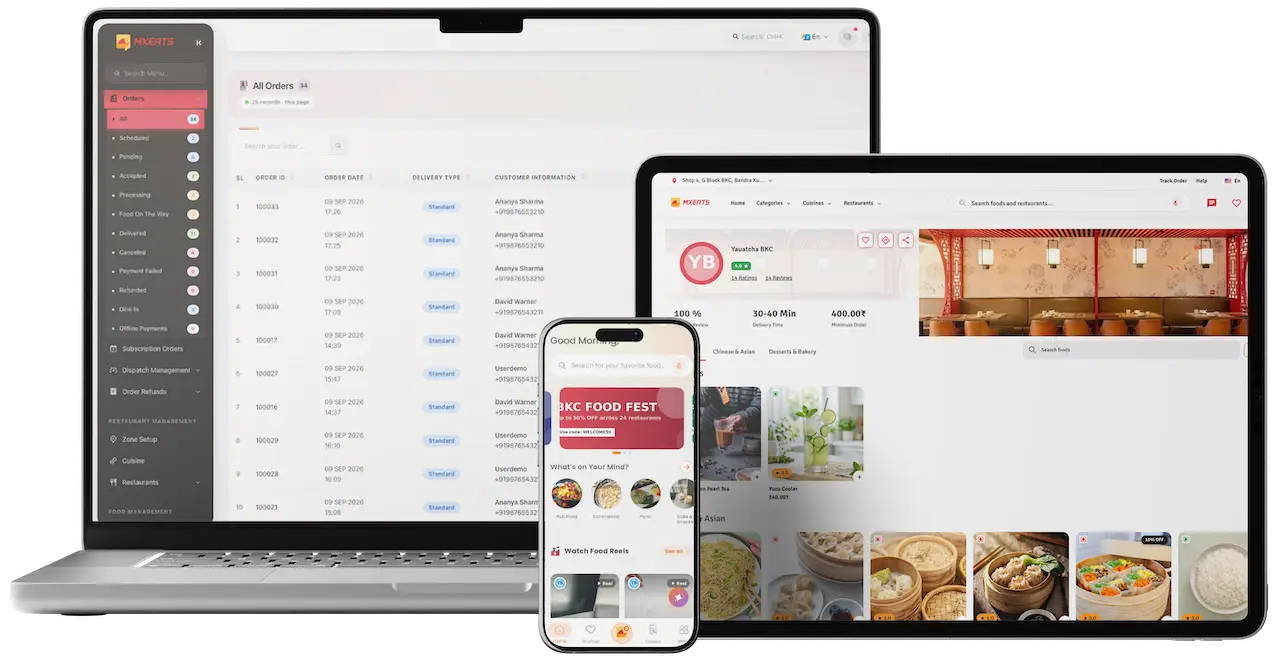
Ubereats Clone food delivery platform shown across a laptop, a tablet and a phone.03
Pick it if: Cooked meals, not packaged groceries, are your productUbereats Clone

Ordering and delivery for restaurants, built around menus, kitchens and couriers rather than grocery listings.

Explore Solution
Courier carrying a parcel to a doorstep, the page image of the Uber Delivery Clone.04
Pick it if: Parcels, not baskets, are what you moveUber Delivery Clone

Parcel delivery software: a courier app, dispatch from one place and live tracking of each job.

Explore Solution
The whole catalogueSee all 90+ ready-made solutions

09The business case

Market Benchmarks

Grocery Delivery Market Benchmarks - Independent 2025-2026 Data

The revenue models above are ours. The figures below are not. They come from the Instacart (Maplebear) and Walmart annual reports on Form 10-K, Kroger's full-year 2025 results and Swiggy's Q4 FY2026 shareholder letter, reproduced as published. Together they show what grocery delivery looks like at scale in the US and India, so you can test a business case against numbers you can check.

Instacart 10-K01

$37.2bn in Instacart Order Value in 2025

Maplebear, the parent of Instacart, reports in its 2025 annual report on Form 10-K that gross transaction value (GTV) increased 11 percent to $37,224 million on 338.8 million orders, up 15 percent. Revenue was $3,742 million, made up of $2,677 million in transaction revenue and $1,065 million in advertising and other revenue. Transaction revenue is about 7.2 percent of GTV.

Kroger02

$16bn+ in Kroger eCommerce Sales in 2025

Kroger reports in its fourth quarter and full-year 2025 results, released 5 March 2026, that it delivered more than $16 billion in eCommerce sales in fiscal 2025, and that adjusted eCommerce sales increased 20 percent in the fourth quarter. Kroger also reports it completed an eCommerce strategic review expected to deliver $400 million of operating profit improvement in 2026.

Swiggy03

Instamart GOV Up 68.8% to INR 7,881 Crore

Swiggy's Q4 FY2026 shareholder letter reports that quick commerce gross order value (GOV) grew 68.8 percent year on year to INR 7,881 crore, with average order value up 33 percent to INR 700 and 1,143 dark stores across 129 cities. Contribution margin improved to negative 1.8 percent of GOV, and negative 1.1 percent for March 2026.

Walmart 10-K04

eCommerce Added 4.3% to Walmart U.S. Comp Sales

Walmart's annual report on Form 10-K for the fiscal year ended 31 January 2026 states that Walmart U.S. eCommerce sales positively contributed approximately 4.3 percent to comparable sales, against 2.9 percent in fiscal 2025. Walmart attributes the growth primarily to store-fulfilled pickup and delivery, alongside customer and Walmart+ member engagement with omnichannel offerings.

Where each figure comes from.

Maplebear Inc. (Instacart), Annual report on Form 10-K for the fiscal year ended December 31, 2025, filed February 2026 - sec.gov

The Kroger Co., Kroger Reports Fourth Quarter and Full-Year 2025 Results and Announces Guidance for 2026, 5 March 2026 - s202.q4cdn.com

Swiggy Limited, Q4 FY2026 Shareholder letter, May 2026 - swiggy.com

Walmart Inc., Annual report on Form 10-K for the fiscal year ended January 31, 2026, filed March 2026 - sec.gov

All figures are the publishers’ own reported results and statements, reproduced as published. The 7.2 percent transaction-revenue ratio is our arithmetic on reported figures ($2,677 million divided by $37,224 million). They describe the market, not the performance of any platform Miracuves builds, and nothing here is a revenue projection for your business.

The Commercial Case

Marketability, Revenue Potential & Business Prospects

Sellers join the platforms they trust, and customers keep coming back to the ones they trust as well. This section aims to ease both decisions and to leave the relationship in your hands afterwards.

  1. 01

    Commission on Each Order

    Whatever a store sells earns the operator a percentage, so income grows with stores and orders and not with the size of your team.

  2. 02

    Many Income Lines, One Console

    Delivery charges, featured placement, clearance deals and your own shop are individual switches inside one admin panel, and each can start earning without a redesign.

  3. 03

    Accounts That Belong to You

    Stores, reviews, wallet balances and past orders are recorded in a database you own, so the platform grows in worth on your books, not on an outside listing site.

  4. 04

    Freedom to Move

    You own the full source code, so switching host, team or direction later needs no one's permission.

Main Revenue Levers
  • Vendor Order Commission
  • Own-Shop Margin
  • Delivery Charges & Free-Delivery Threshold
  • Featured Placement & Banners
  • Clearance & Flash Deals
  • Wallet Top-Up Bonuses
Long-Term Value

Durability depends on stores that keep trading and customers who keep returning, not on a longer list of features.

  1. 01A store with a built catalogue and reviews rarely leaves
  2. 02Favorites, reorders and a funded wallet pull customers back
  3. 03The platform begins that accumulation on day one, in your own database
  4. 04Careful screening of newcomers adds another safeguard
Example Revenue Scenarios

Across these three cases only the size of the operation moves, and each names whichever income line leads at that size. They are for planning, never earnings predictions.

One Retailer, Three Branches3Branches Live

Margin on your own shop plus store commission meets early running costs.

One retailer runs three branches in a single district, a few dozen households order, and the margin on its own shelves plus commission from the branches pays for hosting and support. Sample size only, not a forecast.

Regional Chain40Branches Live

Delivery charges and clearance deals start to count beside commission.

A chain of forty branches spread over several zones, where delivery charges and clearance offers start to matter beside commission and the dashboard points to where effort pays. Sample size only, not a forecast.

Retailer Plus Suppliers250Stores Listed

Featured placement and wallet top-ups join the mix.

A retailer that has let outside suppliers onto its platform, so featured stores, the in-house shop and wallet top-ups join commission across many zones. Sample size only, not a forecast.

10Why Miracuves

Why Miracuves

Miracuves Against Other FreshDirect Clone Developers

A grocer can pick a boxed multi-vendor script, a freelancer on a custom job, an agency project or a proven ready-made base. Check any vendor on four points: can your own shop lead with branches and suppliers beneath it, what happens when a shelf runs low, do walk-in and web sales meet in one ledger, and who owns the code and in what form.

Why Founders Choose Miracuves

  • 01

    Retail Tools Come Standard

    The base ships with low-stock warnings, restock requests, clearance offers and a counter-sale screen, a layer that many grocery scripts leave out for the sake of a plain shop site.

  • 02

    Payments Wired From Day One

    Wallet payments and per-order commission already work, so money can be followed from the very first sale.

  • 03

    One Codebase, Three Apps

    Three apps (customer, store, delivery) and four web surfaces arrive wired to each other, not as loose projects that somebody has to stitch together.

  • 04

    Source Code Without Strings

    You get the full codebase and its project codes unencrypted, so nobody can reprice the product or rewrite the terms down the line.

  • 05

    Release Notes You Can Audit

    Each release records what it added, letting you verify what the product holds instead of relying on a feature brochure.

  • 06

    Honest Scope Language

    This page keeps three lists distinct: what the base holds, what is optional and what you must provide, which means a gateway, hosting and developer accounts.

Development Company

How to Choose a FreshDirect Clone Development Company

A grocery app development company worth hiring proves that its software can run a real shop, shelves and counter included.

What to look for Miracuves

  • Your own shop can lead The in-house shop heads the vendor list
  • Stock signals both ways Low-stock warnings plus customer restock requests
  • One back office for counter and web A New Sale screen in admin, store panel and store app
  • Proof in the product Logins for the customer, store and delivery man apps
  • Source ownership All source and project codes, unencrypted
  • Support after launch Guidance for 60 days, priority bug fixes for 6 months, updates for 12 months

Walk away from any vendor who

  • Cannot list your own shop above other sellers
  • Lets shelves run empty unnoticed
  • Runs walk-in sales in a separate system
  • Takes a cut of every order
  • Rents you encrypted code

Miracuves FreshDirect Clone Set Against Boxed Scripts and Agencies

CriterionMiracuvesMiracuves FreshDirect CloneBoxed Multi-Vendor ScriptAgency Project
Launch TimeSix working days of buildingTough to forecastMonths, priced per task
Code OwnershipYours entirely, unencryptedFrequently restrictedNormally yours
Grocery ScopeStores, catalogs, cart, wallet, tracking, chatMainly product listingsLimited only by your budget
Stock & Counter ToolsLow-stock alerts, restock requests, New Sale screenRarely includedOrdered as extras
PaymentsWallet, cash on delivery, gateway APIs built inDepends on the scriptBespoke integration
Operator ReportsDashboard by zone, refunds, reportsSparse or absentDeveloped to order for an extra charge
Security PostureRole logins, approvals, stated limitsMinimalRanges widely
Price, Speed, QualityFixed fee, fast, proven baseCheap yet riskyExpensive and slow
Support & Upgrades60 days guidance, 6 months bug fixes, 12 months updatesRarely offeredPer the contract

Weak spots tend to appear in the first busy month, once the sales call is a distant memory.

Chat With Our Team

Changelog

Release Notes of the FreshDirect-Style Base: Every Version and What It Added

Web platform and apps are listed with the newest release at the top. No dates are attached to releases, and notes on modules not in this build have been omitted.

ReleaseScopeDetails
V15.07 new, 2 fixedAdded or changed
Stock clearance section with markdowns, shown in store details and on the home page
Product-page call-to-action area
Cash on delivery switched on or off by the admin
Pinterest, X, Snapchat, TikTok, LinkedIn and Meta pixels, plus Tag Manager and Analytics, supported
Refund details page restyled
Easier login screen
Flutter SDK 3.27.1
Fixed
Point-of-sale order calculation
Several performance and reliability faults
V14.9.15 new, 1 fixedAdded or changed
Backend and frontend caching, with business settings and list APIs first
Asset files refined for speed
Clearer system labels and messages
Interface and usability refinements
Flutter SDK 3.24.5
Fixed
Stability faults
V14.97 new, 1 fixedAdded or changed
Restock requests for out-of-stock products, handled by admin and store, with customer notification on return
Customer profile shows restock requests
Customer exports filtered from the admin panel
Point-of-sale area reworked across admin panel, store panel and store app, showing paid amount and change
Modernized admin login pages
Database queries cached and tuned
Flutter SDK 3.24.4
Fixed
Stability faults
V14.86 new, 1 fixedAdded or changed
Notification taps now redirect to a specified page
One login hub for manual, OTP and social sign-in, all managed from the admin
A shipping policy page
Phone OTP login via Firebase Authentication
Maintenance mode can now target individual modules
Flutter SDK 3.24.3
Fixed
A number of bugs and sluggish queries
V14.78 new, 1 fixedAdded or changed
Third-party storage on Amazon S3
SEO section control
Improved translation features for several languages
Review replies by sellers
Chat refinements
Several products at once in flash and feature deal setup
Invoices to print or send by email
Flutter 3.22.2
Fixed
Unresolved issues in the admin and vendor panels, in the website and in the vendor app
V14.610 new, 1 fixedAdded or changed
Custom sorting on every admin list
Dynamic email templates
Low-stock pop-up warnings in admin and vendor panels
Selected-product checkout, with remaining items kept in the cart
Better Excel layout for vendor exports
Account-creation tick box for guests on checkout
More informative seller registration
Buy-now checkout handled apart from the cart
Push messaging moved to the FCM HTTP v1 API
Flutter SDK 3.19.6
Fixed
Assorted improvements across web panels and apps
V14.59 new, 1 fixedAdded or changed
Maintenance mode that lets the admin browse
Chat improvements in admin and seller panels
Google Map display toggle
Block, unblock, approve and deny actions for users, with email notices
New invoice design with custom data and translation
Empty states covered across the system
In-house shop shown first in the vendor list
Overall interface improvements in admin, store panel, apps and website
Flutter SDK 3.19.4
Fixed
Assorted small improvements in the panels and apps
V14.48 new, 1 fixedAdded or changed
Interface and design upgrades for the default theme, apps and the admin and store panels
Apps restructured at code level
An additional SMS gateway option
Order review section upgraded
Chat with the admin offered on the user site and in the app
Extra mail and push notifications
Many database queries improved
Flutter SDK 3.16.9
Fixed
Assorted improvements in panels, websites and apps
V14.012 new, 1 fixedAdded or changed
Customer app redesigned
Wallet top-up from user web and app, with a top-up bonus
Guest checkout
Delivery or billing address editing
Minimum order value set by admin and seller
Free delivery over a set order value
Reorder from past orders
Refer and earn, credited after the referred customer's first successful delivery
Sign in with Apple in the customer app
Admin login URL controlled by the admin
Order delivery verification by image and OTP
Flutter SDK 3.13.6
Fixed
Fixes to translation errors and some minor items

Start the conversation

Your grocery can move online and keep every customer it already has.

Book a free consultation and come away with a firm timeline and plain answers to your questions. A fast sale means less to us than earning your trust in that first conversation.

  • First reply in under 2 hours
  • Free consultation
  • No lock-in contracts
  • Full source code ownership

11Learn more

Blog & Resources

Reading for Founders Planning a FreshDirect-Style Grocery Platform

Three posts on what a grocery app needs, how two big online grocers market and earn, and what to weigh before choosing a clone script.
The product5 questions

01What exactly is a FreshDirect Clone?

Think of it as a grocery platform that Miracuves hands over ready-made and white-label, for supermarkets, organic grocers and startups moving groceries online. Independent stores keep catalogues on it, customers buy from them, and delivery men carry the baskets. The product consists of three phone apps, a storefront and several web panels, and it belongs to the same category as FreshDirect without any connection to that company.

02Can the FreshDirect Clone carry my brand and my design?

Yes. Your logo, icons and colors are placed across the web and the apps as part of the package. Since you own the source code, screens, flows and integrations can be changed afterwards, and whatever falls outside the base is scoped and priced in writing before any work begins.

03Will the FreshDirect Clone cope with a large operation?

The structure rests on zones, many stores and a panel for every role, so more branches or whole districts mostly mean changed settings. Releases 14.9 and 14.9.1 added caching and speedier queries, and Amazon S3 can store the files. Very heavy traffic may need bigger hosting, and sizing that is something we do with you when deploying.

04Which technologies sit under the FreshDirect Clone?

Flutter powers the Android and iOS apps. The web and admin side uses PHP with Bootstrap, and MySQL stores the data. Maps, SMS, push, payments and translation come from outside services (Google Maps, Twilio, Firebase, gateways) that you connect with your own accounts and keys.

05What help do I get once the platform is live?

On launch day three periods start together and run in parallel, covering 60 days of dedicated platform guidance, 6 months of priority bug fixes and 12 months of product updates.

Shopping & delivery8 questions

06What does a customer do to place a grocery order in the app?

The customer picks a place, then searches or taps a category, enters a store, fills the cart and pays. Afterwards the order screen lists what was bought, how it was paid and the path from store to door, with a Track Order button beside it.

07Can customers follow a delivery on a map?

Yes. A map marks where the order is going, and five named stages run from Order Placed to Delivered. Until a delivery man accepts the order, the screen tells the customer that nobody has yet.

08What proves that an order was delivered?

Release 14.0 of the product lists verifying a delivery with an image and an OTP. A guided call shows the real flow end to end before your launch date.

09Which ways of paying does the platform support?

A customer can pay from the wallet in the app, and the admin chooses whether cash on delivery is offered. Cards and local wallets pass through whichever gateways you link to your own account, so your gateway choice sets what you can take.

10Where does a customer turn when an order has a problem?

Chat with the admin team is built into the website and the app. If money must go back to the customer, the admin handles it through the Order Refunds menu, which includes a details page.

11Can customers choose a delivery time slot for later?

Delivery slots are available as custom work: a scheduled or express window is shaped to your operation and priced in writing before work starts.

12Are orders to several addresses, combo bundles or bulk ordering supported?

These are available as custom work. A customer can already save several addresses and edit delivery and billing details, and splitting one order across addresses is built to your brief. Should your plan need combo bundles, multi-address orders, bulk-order pricing or subscription plans, we handle it as custom work, quoted in writing.

13What can a customer do when an item is out of stock?

The customer can request a restock (v14.9) and gets a notice when the item is back. Requests are gathered in the customer profile, and the admin and the store can both work through them. A note box at checkout also states what should happen when something in the basket cannot be supplied.

Stores & stock7 questions

14How does a grocery store join the platform?

A store applies in the vendor portal, gives its business details, loads a catalogue and waits for the admin's approval. The admin may also set a store up by hand, or load stores and items in bulk.

15How do stores handle stock and orders day to day?

Each vendor uses its own store panel or store app to keep products, prices, orders and sales in order. Low-stock pop-ups (v14.6) show in vendor and admin panels, and the admin follows every store from one console.

16Can stores run their own discounts and promotions?

Yes. A store can price its own discounts and offers, while the admin can start campaign tools, banners, coupons, cashback and flash sales platform-wide. Since v15.0 a clearance area on store pages and the home page displays discounted surplus.

17How is commission on vendor orders set?

The admin panel is where you decide it, and the platform then calculates it on each store order. A percentage of the order is the usual choice, and it can be changed whenever the business model shifts.

18How do vendors get paid?

Payments for orders are recorded on the platform. The admin settles with each vendor according to a timetable the admin picks.

19Can my own supermarket be listed first, ahead of other stores?

Yes. An in-house shop run by the admin can head the vendor list (v14.5), with your branches or outside suppliers listed as stores below it. Outside stores stay hidden from shoppers until you approve them.

20Can the platform ring up in-person sales at a store counter?

The New Sale screen works as a counter for point-of-sale purchases. It started in the admin panel and, from version 14.9, is also in the store panel and the store app. Each sale shows the amount paid and the change.

Delivery men & admin8 questions

21How does someone become a delivery man on the platform?

It begins in the app's account menu. The applicant uploads documents and goes through verification, and no order reaches him until the admin has approved him.

22How are deliveries assigned to delivery men?

Assignment weighs location, availability and measures like rating and delivery time. The admin also gets Dispatch Management and a leaderboard of the best delivery men.

23Can delivery men see what they have earned?

Yes. Every delivery man has a view of completed deliveries, earnings and bonuses.

24What does the admin panel include?

You get a zone-filterable grocery dashboard, order status tiles, tools for stores and items, dispatch for delivery men, campaign and coupon menus, refunds, money reports, the New Sale counter screen and settings that cover languages and sign-in methods.

25Can one admin run several regions or cities?

Yes. The dashboard cuts the service area into zones, and several regions and cities can be managed on one platform.

26How are new vendors and delivery men approved?

Each group has its own approval list, where the admin accepts or rejects applications. The admin can also block or unblock a user and email them about it.

27Can I connect a payment gateway of my own choosing?

A gateway links to your own merchant account through its API. Some work out of the box, and further ones can be added as scoped work.

28What reporting does the admin panel offer?

Totals, a yearly sales chart that shows commission, user statistics and rankings of leading stores, items, delivery men and customers appear on the dashboard. For money, use the Transactions and Reports menus.

Money & launch12 questions

29How do the wallet and the referral scheme work?

Customers add money to a wallet on the web or in the app, and you may attach a bonus. Refer and Earn pays its reward after the invited friend's first order is delivered. Version 14.0 brought in both, and both appear in the account menu.

30How does a retailer-led platform earn its first revenue?

Early income usually comes from two sources: the margin on your own shop, which needs no other seller, and commission on orders placed with the stores you approve. Delivery charges start to pay once enough customers share a zone and basket size counts, and featured placement follows when stores begin competing for the top of the home screen. Wallet bonuses are a cost you decide on, and any supplier or brand deals depend on agreements you negotiate yourself.

31What keeps a grocery platform ahead of copycats?

Durability depends on stores that keep trading and customers who keep returning, not on a longer list of features. A store with a built catalogue, collected reviews and a familiar panel seldom leaves, and a customer with favorites, a reorder history and a funded wallet has reasons to come back. The platform begins that accumulation on day one and holds it in your own database. Vetting new stores closely adds a second shield, because a platform with selected sellers is hard to copy.

32How soon can the platform be live?

It goes live on your hosting once our 6 days of building are done. Apple and Google review apps on their own schedule, and a custom feature beyond the base comes with a written scope and date.

33Will I own the source code?

Yes. You receive unencrypted source for the site, both apps and the whole project, all of it yours.

34What must I supply before launch?

Developer accounts for the app stores that are verified, a domain and hosting, your branding and legal details, any third-party keys and a payment gateway account whose KYC is complete. We then rebrand the platform, deploy it and publish the apps through your accounts. Gateway applications, legal pages and running the hosting are not part of our scope.

35What makes Miracuves the right team for a FreshDirect clone?

Day one brings retail tooling that already works, namely stock warnings, restock requests and a counter screen, together with a wallet, an admin dashboard and release notes you can read. Miracuves has completed 9,000+ projects for 6,000+ clients, and keeps 90+ ready-made solutions available as starting points. The FreshDirect Clone costs a fixed $2,499, goes live after 6 working days of build work, and comes with 60 days of guidance, 6 months of priority bug fixes and 12 months of product updates. A first answer arrives within 2 hours, Monday to Saturday, 10:00-19:00 IST.

36What does a FreshDirect clone cost?

A single payment of $2,499 buys the ready-made FreshDirect clone: three phone apps, the storefront, the web panels, unencrypted source and deployment under your brand. Stock warnings, restock requests and the counter screen are part of that price. Miracuves takes no cut of your orders, and any add-on module or custom flow is priced in writing first.

37Ready-made FreshDirect clone or a custom grocery build: which is better for a grocer?

For a grocer moving online, the ready-made base is usually the stronger choice. Your own shop can lead, independent stores can join beneath it, stock care and counter sales already work, and the platform is live 6 working days after kick-off for $2,499. A custom grocery build is estimated from requirements and takes far longer. Extra modules on our base are scoped in writing, typically 2-8 weeks.

38What are the steps to launch my FreshDirect clone?

Place a grocery order in the demo, then switch to the store and delivery man logins. Agree the opening shape with us: your own shop, the stores you let in, delivery areas and fees. We brand the apps and panels, deploy them to your hosting and publish through your developer accounts. Six working days cover the build; the two stores then vet the grocery apps at their own pace.

39Who is a FreshDirect clone best suited to?

It suits supermarkets, organic grocers and startups that want to move groceries online. The platform is led by the retailer, so your own shop can head the store list while other stores and suppliers sit underneath it. Customers, stores and delivery men each get their own app, and the admin runs approvals, orders and commission from one panel.

40How can my existing grocery shop go online with a FreshDirect clone?

Your shop becomes the in-house store on the platform, with its own catalogue, prices, offers and low-stock alerts. The hardest part of going online for a grocer is stock, and those tools come working, together with a counter screen for face-to-face sales and the customer and delivery flows around them. Other stores can join later under your own.

Disclaimer

Miracuves is an independent software development company. We are not affiliated with, connected to, sponsored by, or endorsed by FreshDirect.

Read our full Legal Notice & Disclaimer →
Why this name

“FreshDirect Clone” is used descriptively. It is how the software industry refers to building a platform with functionality similar to FreshDirect, and how clients search for it.

Who built this

The entire design and codebase is built by our own team. The product contains no code, design, graphics, or content originating from the FreshDirect website or applications.

Trademarks

FreshDirect and all other third-party names and marks are the property of their respective owners, referenced here solely to describe the category of software offered.