Dark-Store Grocery App · Production Ready

Blinkit Clone App - White-Label Quick Commerce Platform

Miracuves' ready-made, white-label Blinkit clone gives a dark-store operator unencrypted source for shopper and rider apps, the web store, a branch panel per store and the operator console, rebranded and set up on your servers so the first branch takes orders within six working days.

A shopper buys from the catalog of a nearby branch, which accepts and packs the order before a rider collects it, and the admin deducts commission automatically. Flutter builds both apps for Android and iOS from your developer accounts, with store review left to Apple and Google; shopping lists and a virtual assistant are priced add-ons. A time-of-day surge rule or a custom approval step is scoped in writing, then typically built over 2-8 weeks.

Launch in 6 Days with

  • Source Code
  • Customer App
  • Delivery App
  • Branch Panels
  • Web Storefront
  • Admin Panel

StackFlutter · Google Maps · Firebase · Bootstrap · Laravel 10 · PHP 8.1 · MySQL

MXCore console · Dark storesIllustrative
Orders in progress38
Branches live6
Riders on shift21

Network activity

Blinkit Clone app home screen with a banner, popular categories and daily needs.
Branches hear about each orderin real time
  • 5Order Status Stagesplaced, accepted, preparing items, on the way and delivered
  • 4Ways Shoppers Paycards, UPI, wallets and cash on delivery
  • 0%Revenue Share With Miracuveswe take no cut of the commission on each order
  • 1Branch Panel per Dark Storeorders arrive in real time and each store edits its own stock
  • 6Days to Launchand if the delay is ours, we keep going free
  • $2,499Paid Once, Not Rentedsource code yours, no per-seat fee, no monthly rental

Live in six working days, or we keep working free until you launch. Every build carries 60 days guidance, 6 months bug fixes and 12 months updates.Verify every figure

Sold-Out Items Leave the Shelf

Every branch keeps reorder points and prices, and an item that runs out is pulled from the catalog or swapped for a suggested alternative.

Charges That Follow the Map

The admin draws the serviceable areas, then prices delivery by branch, by postcode or area, as a fixed sum per order, plus an extra for weight.

Cards Stay at Your Gateway

Card details go to the gateway you connect, under your own account and KYC, and the platform keeps the order with a payment reference rather than the card.

Ready to open your own dark-store grocery business?Talk to Product Expert

Chosen by 6,000+ clients across the globe

Miracuves is listed by Expertise.com as a managed IT service provider.Miracuves is an official member of the Forbes Business Council.Miracuves is a verified agency on DesignRush, listed among top design agencies in India.Miracuves is reviewed on Trustpilot as a software development company.Miracuves is listed by The Manifest among top managed software development companies.Miracuves is listed by DesignRush as a top software development company.Miracuves is recognized by GoodFirms as a top software development company.Miracuves is ranked among the top 1000 companies globally by Clutch.Miracuves is a top managed service provider in the United States on Clutch.

01See it live

Live in Action

Blinkit Clone Demo - Customer App, Delivery App, Web Panels & Admin

Miracuves opens its Blinkit clone app to you hands-on, before any contract. The customer app and the delivery app are on Google Play with demo logins, the web storefront and the branch panel open from the links below, and the admin panel is shown on a guided call. Browse a category, follow an order, then see the same order from the branch and rider side.

Blinkit Clone app home screen with a banner, popular categories and daily needs.Blinkit Clone app screen with featured items and most reviewed items, each with price and rating.
Customer app

Blinkit Clone - Customer App

The shopper side on a phone: browse categories, pick featured items, check out and follow an order from placed to delivered.

  1. 1Install the customer app from Google Play
  2. 2Sign in with the demo login below
  3. 3Explore: Categories, Featured items, Order tracking
Try:+91 9876543210 | User_321
Blinkit Clone track order screen: order placed, accepted, preparing items, on the way and delivered.
Delivery app

Delivery Partner App

The rider side on a phone: delivery requests with pickup and drop-off details, map navigation and an earnings view by day, week and month.

  1. 1Install the delivery app from Google Play
  2. 2Sign in with the demo login below
  3. 3Explore: Requests, Navigation, Earnings
Try:driver@demo.com OR +91 9876543212 | Driver_321
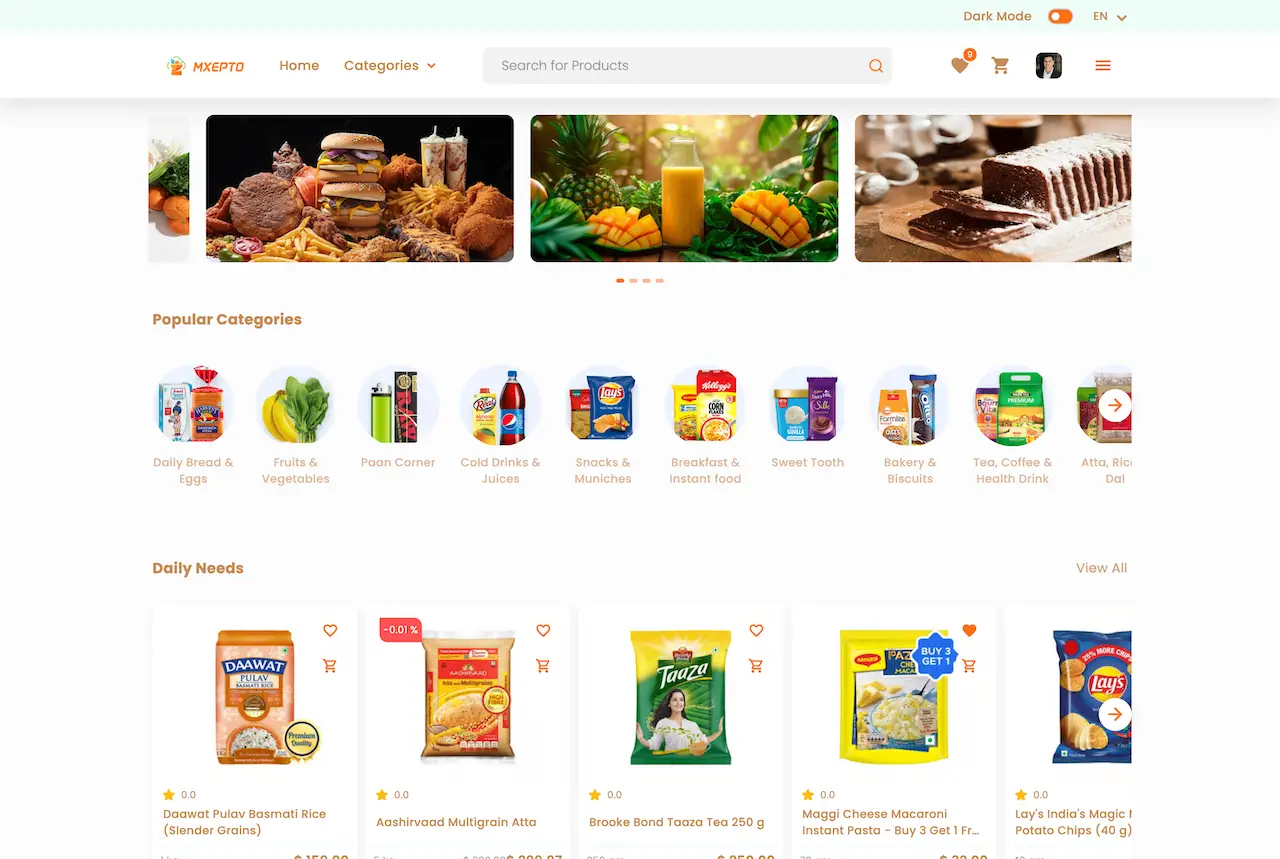
Blinkit Clone web storefront with a banner carousel, popular categories and daily needs product cards.
Web & branch panels

Web Storefront & Branch Panel

The storefront shoppers use in a browser, and the branch panel where a dark store receives orders and keeps its own stock.

  1. 1Open the web demo or the branch panel
  2. 2The panel logins are shared on a guided call
  3. 3Explore: Catalogue, Branch orders, Inventory
Panel logins:shared on a guided call
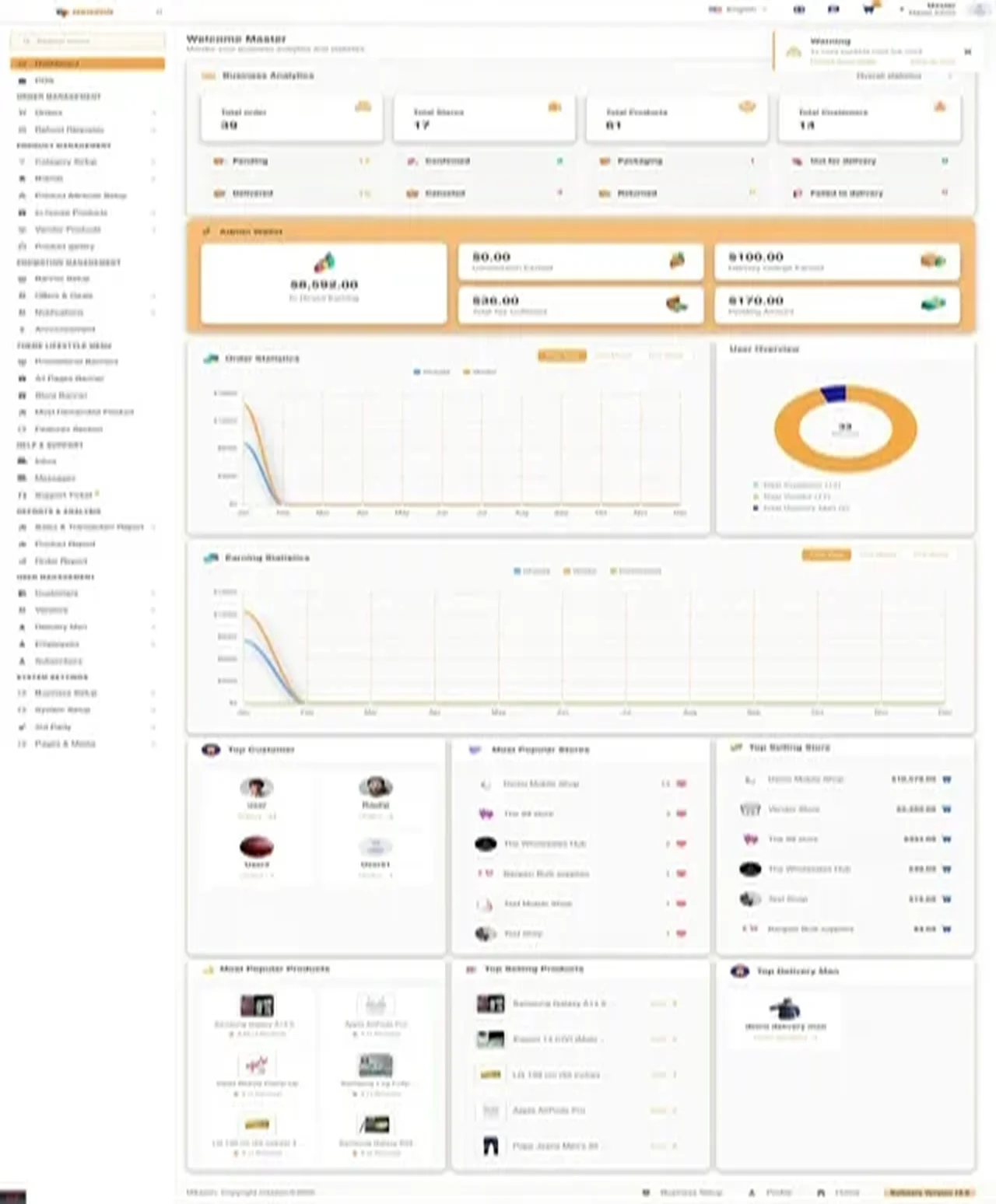
Blinkit Clone admin dashboard with order and store tiles, a wallet panel, order and earning charts and top lists.
Admin panel

Admin Panel - Stores, Orders, Delivery & Reports

The operator console: the store and branch network, orders, delivery zones and charges, commissions, payouts and reports.

  1. 1Ask for a guided demo
  2. 2We open the admin panel with you
  3. 3Explore: Orders, Zones, Commissions, Reports
Admin demo:available on request
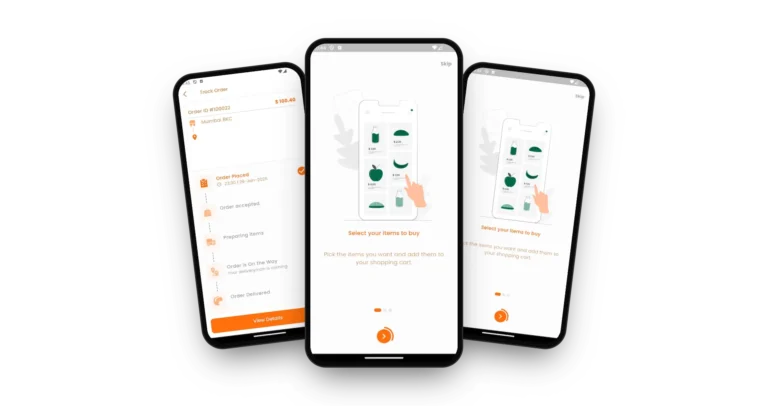
Blinkit Clone on three phones: the shopper onboarding screen, the order tracking screen with status steps and the shopper onboarding screen

See It With Us

Video Walkthrough of a Grocery App Like Blinkit: Catalog, Branch Orders, Delivery App & Admin Panel

The quickest way to see all four surfaces is a guided call. In about 30 minutes we open the customer app, a branch panel, the delivery app and the admin panel, and tie each one to your own plan: your dark-store locations, your delivery charges, your commission and your launch date.

Schedule a live walkthrough call.

Every Screen Mapped

Blinkit-Like App Flows - Mobile App, Admin Dashboard & Web Storefront

These are real screens from Miracuves' Blinkit clone, arranged as an order travels from onboarding and the home screen through categories and featured items to live tracking.

Blinkit Clone onboarding screen with the line Select your items to buy.
Blinkit Clone app home screen with a banner, popular categories and daily needs.
Blinkit Clone all categories screen with a category rail on the left.
Blinkit Clone app screen with featured items and most reviewed items, each with price and rating.
Blinkit Clone track order screen: order placed, accepted, preparing items, on the way and delivered.
5 screens · scroll →
Blinkit Clone admin dashboard with order and store tiles, a wallet panel, order and earning charts and top lists.
1 screen
Blinkit Clone web storefront with a banner carousel, popular categories and daily needs product cards.
1 screen

Follow a shopper from onboarding through categories and featured items to a tracked order, then open the admin dashboard and the web storefront to see where the same business lands on the operator side.

Explore Our Solutions

02Proof

Client Voices

Blinkit Clone Client Reviews - Delivery Operators in Their Own Words

Speedyven's CTO says dispatch and the rider app were where the team had to move fastest. Talokitoko, Click2Deliver and Makaalu make up the rest of this set of four, each with a different order mix and store setup.

CCharles EveillardManaging Partner, Izi Technologies
“Talokitoko is grocery and food delivery for the African diaspora market in Europe. The rider app, dispatch and the merchant console were already built, so we spent the engagement on our own local payment mix, the vendor onboarding flow and the regions we actually operate in. The platform was live inside a month, which was months faster than our internal estimate.”
CClick2Deliver TeamFounding team, Click2Deliver
“Two order types, one courier fleet. The base handled multi-vertical ordering, so the work was our merchant mix and the grocery-specific substitution and weight rules. Live inside a month.”
MMustafa H.CTO, Speedyven Networks
“Speedyven is a hyperlocal courier network — packages, food, and same-day essentials across a few metros. The dispatch and rider app were the parts where we needed to move fastest, because riders have low tolerance for clunky tools. Miracuves's Delivery Genie base gave us the rider app, the dispatch console, and live tracking. We added our custom surge-pricing engine, our multi-merchant order router, and a custom rider-incentives module. We launched in 7 weeks. Rider activation is high and the platform's been stable through weekend peaks.”
MMakaalu TeamFounding team, Makaalu
“We needed three apps that agree with each other: customer, driver and store. The shared state model was already built, which is the part people underestimate. Live inside a month with all three in the stores.”
Read More Client TestimonialsOperators and founders in their own words

Proof You Can Check

Blinkit Clone Case Study - What Is Published and What You Can Verify

An honest status report on proof for this model, and the ways you can test the product yourself before you decide.

Case Study
No named deployment is published for this model

Miracuves has not published a named client launch of the Blinkit Clone, so this page does not borrow one. What it offers instead is a list of what you can check for yourself and a plain statement of what we will never put in its place.

Not publishedNamed client
Demo and guided callHow to verify
Dark-store groceryModel
4Surfaces to open
8Order steps shown
6 daysBuild window
Blinkit Clone web storefront with a banner carousel, popular categories and daily needs product cards.
Challenges
  • Stock held in several branches has to match what the app offers
  • Delivery charges differ by area, branch and basket weight
  • Branches, riders and shoppers must all see the same order at once
Goal
  • See an order move through every panel before you pay
  • Test the delivery charge rules against your own zones
  • Check the source code and project codes for the rest
Solution by Miracuves
  • A live demo with logins for the customer and delivery apps
  • A web storefront and a branch panel you can open yourself
  • A guided call that walks through the admin panel
  • Release notes for versions 7.2 to 7.6 showing what shipped
  • Fixed pricing, with a build time of 6 days

We will not publish an invented client, a made-up quote or a result nobody measured for this product. When a named deployment is published, it belongs here, linked to its own case study.Miracuves · Our position on proof

See the case studies that we have publishedReal food and grocery delivery builds on other Miracuves bases are listed in the portfolio.

03The product

The Basics

What the Blinkit Clone App Does for Shoppers and Dark Stores

A Blinkit clone is a ready-made quick-commerce grocery platform, and Miracuves builds its version around a network of dark stores, each with its own panel and stock. Shoppers order from a catalogue, the nearest branch picks and packs the order, a rider delivers it, and the operator runs the whole network from an admin panel that sets zones, delivery charges and commissions.

Blinkit Clone on three phones: the shopper onboarding screen, the order tracking screen with status steps and the shopper onboarding screen

More Than a Storefront

The value sits behind the cart: branch consoles, stock control, rider dispatch, delivery charges and an admin that follows orders, commissions and payouts.

Not a Locked Box

The full source code arrives unencrypted. Your own developers can change a flow, add a screen or move hosts without asking us for permission.

Plain About What Is Extra

Smart shopping lists, recipe integration, a virtual assistant and a community wishlist are add-ons priced on their own. Each one can be added whenever your catalog and customers are ready for it.

Web, Android & iOS

What Is a Blinkit Clone Script?

The difficult part of quick commerce is the operation behind the cart: stock held in several branches, orders that must reach the right branch at once, riders who take the pickup and fees that change from area to area. Those parts ship working.

Blinkit Clone web storefront with a banner carousel, popular categories and daily needs product cards.
  1. 01Catalogue by category, with search and filters
  2. 02Cart, checkout and order tracking on a map
  3. 03Branch panel with orders and stock control
  4. 04Delivery app with requests, navigation and earnings
  5. 05Admin panel with zones, commissions and reports

You receive four surfaces: the customer app and web storefront, a branch panel for each store, the delivery app and panel, and an admin panel. Flutter apps and the complete source code come with it.

Everything Included

Blinkit Clone Features - Catalog, Branches, Inventory, Delivery Charges, Riders & Admin

Each feature of the Miracuves Blinkit clone below can be seen in the demo, the user flow or the release log. Anything that needs an extra module is named as an add-on further down the page.

Feature 01 / 12

Browse & Search the Catalog

Shoppers move through categories, search and filters, with product pages that show pictures and product information. Riders can be assigned jobs automatically or offered them to accept or decline, whichever suits how you pay and schedule them.

  • Categories, search and filters in the app and on the web
  • Popular categories and daily needs on the home screen
  • Featured items and a most reviewed shelf with ratings and prices
  • Product information, images and allergy warnings
  • Banner carousel on the web storefront
Feature 02 / 12

Dark Stores & Branch Network

A branch works as a dark store with its own panel and its own stock, and one admin console runs several branches across several cities.

  • Multi-location support across cities with multiple branches
  • A branch panel for each store
  • Orders reach the branch in real time to accept, prepare and dispatch
  • Branch owners add, update and manage their own inventory
  • Multi-store and multi-warehouse setup to keep products available
Feature 03 / 12

Inventory & Reorder Control

Each branch keeps stock levels with reorder points and prices, and an item that runs out is removed from the catalogue or replaced by a suggestion.

  • Inventory with reorder points and pricing in the admin
  • Out-of-stock items removed automatically or swapped for alternatives
  • Stock edited from each branch owner dashboard
Feature 04 / 12

Cart, Checkout & Scheduling

Shoppers fill a cart, choose an address, pay and receive a confirmation, with instant delivery or a scheduled time slot picked at checkout.

  • Add to cart and secure checkout
  • Delivery address chosen from the saved location
  • Instant delivery or a scheduled time slot
  • Minimum order value set per location or store
  • Order confirmation after payment
  • Image upload when placing an order
Feature 05 / 12

Payments at Checkout

Checkout offers the payment methods you connect, from cards and UPI to wallets and cash on delivery.

  • Credit and debit cards
  • UPI payments
  • Wallets
  • Cash on delivery
  • Your own gateway account and KYC are needed to go live
Feature 06 / 12

Live Order Tracking

After checkout the shopper follows the order from placed and accepted to preparing, on the way and delivered, with a map view and a notification when a rider is assigned.

  • Track order screen with five status stages
  • Order progress shown on a map
  • Shopper notified when a rider is assigned
  • Push notifications about orders and promotions
  • Firebase order alerts for the admin and branch panels
Feature 07 / 12

Delivery Partner App

Riders see delivery requests with pickup and drop-off details, accept or reject where your model allows it, navigate with maps and read their earnings.

  • Real-time order notifications for riders
  • Accept or reject, or auto-assign deliveries, depending on your model
  • Google Maps and GPS navigation with optimized routes
  • Earnings by day, week and month, with incentives and tips
  • Rider management and delivery performance in the admin
Feature 08 / 12

Delivery Charges & Zones

Delivery charges can be set per branch, by postcode or area, as a fixed amount per order and with an extra by weight, and the admin defines the serviceable areas.

  • Branch-wise delivery charge setup
  • Postcode or area-based delivery charge
  • Fixed delivery charge per order
  • Weight-wise extra charge, per unit or by weight range
  • Serviceable areas and delivery zones set by the admin
  • Minimum order value adjustable per location
Feature 09 / 12

Offers, Loyalty & Reviews

Shoppers reorder from their history, rate what they received and collect deals and loyalty rewards, while the admin runs banners and offers.

  • Order history with reorder
  • Ratings and reviews after delivery
  • Exclusive deals and loyalty programs
  • Banner and offer tools in the admin panel
Feature 10 / 12

Sign-In, Access & Alerts

Shoppers sign up with a social login or email, the admin decides which login methods are on and the release log adds OTP login and reCAPTCHA v3.

  • Social login or email sign-up
  • OTP login
  • Login methods managed by the admin with centralized login
  • reCAPTCHA v3 on forms
  • Advanced maintenance mode
Feature 11 / 12

Admin Dashboard & Reports

The admin home shows tiles for orders, stores, products and customers, order and earning charts and top lists, and the reports section turns it into sales and trend decisions.

  • Tiles for total orders, stores, products and customers
  • Order and earning statistics charts
  • Top customers, stores, products and delivery men
  • Sales and trend reports
  • Export of subscribed customers
  • Admin wallet panel
Feature 12 / 12

Languages, Maps & Support

The app can be offered in more than one language and uses maps for addresses, with help reached through in-app chat, email or a helpline number.

  • Multi-language support
  • Google Maps for addresses and delivery routes
  • In-app chat support
  • Email and helpline contact options
  • Checkout without Google Maps as a system option
  • SMS gateway integration

What stays on your side: Miracuves rebrands the platform and deploys it to your hosting. You bring the hosting and domain, a developer account the stores have verified, your branding and business details, a payment gateway with KYC completed and any third-party keys. Apple and Google review the apps on their own timetable, outside our 6-day build.

Talk to Our Team

How Operators Earn

Blinkit Clone Revenue Models - Commission, Delivery Fees, Express Pricing & Featured Placement

A quick-commerce app like Blinkit earns in several places at once, so Miracuves separates each line in the admin and changing one leaves the others as they were.

Two lines tend to carry the most weight: the commission on each order and the delivery charges, with express pricing as the lever you tune for busy hours.

  1. 01

    Order Commission

    The operator keeps a percentage of each order placed with a vendor or store. The admin deducts the commission automatically, and payouts to stores can be made by hand.

  2. 02

    Delivery Fees by Zone

    Charges set per branch, per postcode or area, as a fixed amount per order and with an extra by weight turn every delivery into a priced line of its own.

  3. 03

    Express & Peak-Hour Fees

    A higher charge for fast delivery or a busy window. The base gives you the charge rules to price it; an automatic time-of-day surge rule is custom work, quoted separately.

  4. 04

    Banners & Featured Placement

    Banner slots and the featured and most reviewed shelves on the home screen can be offered to brands and vendors for a period.

  5. 05

    In-House Products

    The admin keeps in-house products apart from vendor products, so you can stock and sell your own range beside the stores' lines and keep that margin.

  6. 06

    Payment & Wallet Fees

    A small fee on card or wallet payments passes the gateway cost on to the order instead of absorbing it.

Published figures behind four of the six streams: marketplace commission, delivery charges, advertising and card fees, each traced to a fee page or an annual report.
Revenue streamHow it is chargedTake rateTypical take rateWhat sets the ceiling
Order CommissionA percentage of each order value, deducted before the store is paid out.Uber Eats lists 20%, 25% and 30% marketplace plans and a 15% self-delivery fee. DoorDash lists 15%, 25% and 30% for delivery and 6% for pickup.What stores accept against their own margin. Both pages list grocery as a merchant type but publish no grocery rate, and Uber Eats notes that fees may differ by market.
Delivery & Express FeesA charge on each delivery, set higher for express or busy windows if you choose.No grocery rate is published. Instacart+ members pay $0 delivery on eligible orders of $10 or more per retailer; other shoppers pay a fee that varies by retailer, window and order total.Basket size and what shoppers accept at checkout. Instacart gives no fixed amount, so a figure for your zone has to start from your own rider cost.
Banners & Featured PlacementA fee or a bid for a slot on the home screen or a featured shelf.Instacart reports $1,065 million of advertising and other revenue in 2025, about 2.9% of its $37,224 million gross transaction value.Brand budgets and the traffic your catalog carries. At Instacart it is the smaller line, beside transaction revenue of about 7.2% of that value.
Payment & Wallet FeesA card or wallet fee passed on to the order, or absorbed by the operator.Stripe lists 2.9% + 30c per US card payment; its India page lists 2% for domestic cards.The gateway price in your country and your card mix. Store commissions apply to digital sales, so for groceries the card fee is the cost that applies.

How to read this. The commission plans come from the Uber Eats merchant pricing page and the DoorDash Marketplace page. Delivery fees come from an Instacart retailer help page, and the advertising and transaction ratios from its 2025 annual report on Form 10-K, where the percentages are our arithmetic on reported figures. Card pricing is from Stripe support and its India pricing page. Apple's published commission covers digital goods and services, so it is not a rate for a basket of physical groceries. These are other companies' published terms, offered as modeling inputs: not a quote, not a forecast, and your own charges are configured in the admin panel.

Revenue Model

Blinkit Clone Revenue Model, Stage by Stage

Miracuves ships every income line of the Blinkit clone working from day one, and a dark-store operator brings them in as order density builds.

First Dark Stores

The admin deducts commission on the first basket and adds the zone delivery charge, while an in-house range stocked in your own dark stores keeps its full margin.

Busy Hours

Once evenings fill up, express and peak-hour service fees price fast delivery through the four shipped fee rules, and an automatic time-of-day surge can be added as quoted custom work.

City Density

Once orders span several zones, brands and vendors can rent home-screen banner slots or space on the featured or most reviewed shelf for an agreed period.

Commission, zones, peak-hour fees and banner slots each have their own admin screen, and Miracuves keeps none of the commission a basket earns.

Want a revenue model built around your own dark-store network?Design My Revenue Model

Operate It Day to Day

Admin Panel for a Quick-Commerce App Like Blinkit - Stores, Orders, Delivery Zones & Reports

Miracuves gives the Blinkit clone operator one console: which branches are live, what is in stock, where each order is, what riders earn, what each zone charges and what the platform has made.

Blinkit Clone admin dashboard with order and store tiles, a wallet panel, order and earning charts and top lists.
Blinkit Clone web storefront with a banner carousel, popular categories and daily needs product cards.

Admin Panel Sections

  • 01

    Dashboard & Statistics

    Tiles for total orders, stores, products and customers, order and earning charts across the year, and top lists of customers, stores, products and delivery men.

  • 02

    Stores & Branches

    Create and manage the stores and branches that fulfil orders, and see which ones are the most popular and the top selling.

  • 03

    Orders & Status Counts

    Follow orders through pending, confirmed, packaging, out for delivery and delivered, with canceled, returned and failed deliveries counted beside them.

  • 04

    Customers, Vendors & Delivery Men

    Manage customer accounts, vendors, delivery men, employees and subscribers from one user management area.

  • 05

    Delivery Zones & Charges

    Define the serviceable areas and set delivery charges by branch, postcode or area, per order and by weight.

  • 06

    Commissions, Payouts & Wallet

    Commission is deducted automatically, payouts can be made manually, and third-party payment integrations carry the money.

  • 07

    Banners, Offers & Notifications

    A promotion area for banners, offers and deals, notifications and announcements that reach shoppers.

  • 08

    Reports, Support & Settings

    Sales, product and order reports and analytics, an inbox with support tickets, and business, system and third-party integrations settings with pages and media.

Money Movement

The finance side of the console, from the first payment to the store payout.

  • Automated commission deduction
  • Manual payouts to stores
  • Third-party payment integrations
  • Earnings and delivery charge totals in the admin wallet

Operations Control

The levers an operator touches every day.

  • Live view of ongoing orders and delivery status
  • Minimum order value per location or store
  • Branch, area and weight-based delivery charge rules
  • Advanced maintenance mode

Need the console to do more? Extra reports, another payout rhythm, a time-of-day surge rule or a custom approval step are scoped separately. Tell us what your operations team needs and we will quote it in writing.

Talk to Our Team

04Package and price

The Full Package

Package Contents: The Blinkit Clone Script, Apps & Deployment on Your Hosting

From Miracuves you receive the Blinkit clone script as a running quick-commerce business system, not loose parts: customer apps, web storefront, branch panel, delivery app, admin panel and the project codes behind each, with unencrypted source and a deployment you run yourself. Express or peak-hour delivery is priced with the four fee rules that ship, per branch, by area, per order or by weight; only an automatic time-of-day surge is custom. Hosting, gateway fees, Google Maps, Firebase, SMS and developer accounts are billed by those providers.

01

Full Source Code

The complete source for the web platform and the mobile apps, with no encryption, so your team can change it to suit your business.

  • Web platform source, unencrypted
  • Flutter source for the Android and iOS apps
  • Yours to modify, extend and redeploy
  • Delivered into your own repository
02

Project Codes & Data Structure

The project codes for every app and panel, with the database structure that holds orders, stores, products, customers, zones and charges.

  • Orders and order items
  • Stores, branches and products
  • Customers, riders and employees
  • Zones, charges and commissions
03

Alerts & Notifications

The notifications that keep branches, riders and shoppers looking at the same order, from branch alerts to shopper push messages.

  • Real-time order alerts for branches
  • Firebase order notifications for admin and branch panels
  • Push notifications to shoppers
  • SMS gateway integration
Blinkit Clone web storefront with a banner carousel, popular categories and daily needs product cards.
04

Web Storefront & Panels

The responsive storefront with categories, search and banners, plus the web panels for branches, delivery and admin.

  • Storefront with categories, search and banners
  • Branch panel for each store
  • Delivery panel
  • Admin panel
05

Customer & Delivery Apps

Two Flutter apps, one for shoppers and one for riders, covering browsing, checkout, tracking, requests, navigation and earnings.

  • Customer app: browse, cart, checkout, track
  • Delivery app: requests, navigation, earnings
  • Flutter for Android and iOS
  • Publishing from your own developer accounts
Blinkit Clone app home screen with a banner, popular categories and daily needs.
Blinkit Clone admin dashboard with order and store tiles, a wallet panel, order and earning charts and top lists.
06

Admin Panel

The operator console with dashboard tiles, charts, stores, products, zones, commissions, payouts, users and reports.

  • Dashboard with order, store, product and customer tiles
  • Zones, charges, commissions and payouts
  • Customers, vendors, delivery men and employees
  • Reports, support and system settings
07

Access & Security Layer

Separate logins for each surface, plus the sign-in and form protections the release log lists.

  • Separate panels with their own logins
  • OTP login and admin-managed login methods
  • reCAPTCHA v3 on forms
  • Card details handled by the gateway
08

Handover & Support

Branding and deployment done for you, the project codes handed over, and the three support periods that run side by side from launch.

  • Rebranding with your logo, icons and colors
  • Deployment to your hosting
  • Project codes for every app and panel
  • 60 days guidance, 6 months bug fixes, 12 months updates

Want to see it before deciding? Sign in to the customer or delivery app with the demo logins, open the branch panel, or ask for a guided tour that follows one order from cart to doorstep, shown against your own zones and charges.

Talk to Our Team

Transparent Pricing

How Much Does It Cost to Build a Quick-Commerce Grocery App Like Blinkit?

The launch-ready white-label Blinkit Clone is a fixed price of $2,499. Work beyond the base, such as add-ons, extra integrations or custom flows, is scoped and quoted separately in writing.

Most Popular

Professional

Ready-Made Launch Package
$2,499paid once
Ships in 6 days

Chosen by: Dark-store startups, supermarket chains adding a fast lane, regional grocers

The platform arrives as the demo shows it, rebranded to your logo, icons and colors, and deployed on your own hosting.

Get Started

Enterprise

Custom Builds for Larger Scope
Customquote
Go-live: based on final scope

Chosen by: Retail groups, multi-city grocery networks, franchise operators

Need flows the base does not have, such as a time-of-day surge rule or an ERP link? We build to your requirements and agree the scope and price before work starts.

Request a Quote
Development Cost

Blinkit Clone Development Cost in 2026

The Blinkit clone from Miracuves costs $2,499. That one payment covers the dark-store platform shown in the demo: Flutter shopper and rider apps, a branch panel for each store, the web store and the operator console, with unencrypted source deployed to hosting you control in six working days.

$2,499 Paid once
6 working days Rebranded and live
0% Revenue share

Costs your own providers bill on their side

  • Hosting and domain for the storefront and panels
  • Gateway fees on each online payment
  • Google Maps, Firebase and SMS usage
  • Developer accounts on both app stores
  • Add-on modules such as smart shopping lists or a virtual assistant

Need an automatic surge schedule for evening rushes or a link to your stock ERP? Miracuves agrees that scope and price in writing before work starts, and custom work like this typically takes 2-8 weeks.

Compare Your Options

Ready-Made Blinkit Clone vs Custom Development vs SaaS

Three routes lead to a dark-store grocery app like Blinkit: the finished platform Miracuves sells, a commissioned build or a rented hosted storefront. Here is how the three stack up for a quick-commerce launch.

CriteriaMiracuvesReady-Made Blinkit CloneCustom DevelopmentSaaS
Launch time6 days to a branded platformCustom builds 15-30 days, larger 45-60Storefront up fast, apps limited
Upfront cost$2,499, fixedQuoted in writing per scopeMonthly hosted plan
Source code ownershipUnencrypted web and Flutter sourceSet by the agency contractNone, the vendor keeps it
CustomizationBranches, zones and fee rules are yoursAny feature, any timelineTheme and settings only
Ongoing feesNo per-seat charge, no order cutPaid maintenance after handoverSubscription plus order fees
Branding & app-store listingApps under your developer accountsYour listing at the endRarely your own native apps
Best forDark-store and hyperlocal grocery operatorsUnique supply chainsSingle-store sellers

Where It Fits

Use Cases for a Grocery Delivery App Like Blinkit - Dark Stores, Retail Chains, Hyperlocal & Multi-City

Operators who go live on Miracuves' Blinkit clone use different parts of the same product. A dark-store startup leans on branch consoles and delivery charges, a retail chain on its existing stores, and a rider network on dispatch and tracking. You set the emphasis in configuration.

DarkStoresDark-Store Quick Commerce

Run a small network of branches that each hold stock and pick orders, with delivery charges set per branch and orders alerting each store the moment they land.

01
Blinkit Clone app home screen with a banner, popular categories and daily needs.
RetailChainSupermarket Express Lane

Give each store of a retail chain a branch panel, so the same shelves serve walk-in shoppers and fast online orders.

02
Blinkit Clone web storefront with a banner carousel, popular categories and daily needs product cards.
MultiCityMulti-City Rollout

Open city by city, with branches, serviceable areas and delivery charges for each, all managed from one admin panel.

03
Blinkit Clone admin dashboard with order and store tiles, a wallet panel, order and earning charts and top lists.
LocalShopNeighborhood Shop Online

A convenience store takes orders from its own streets, uses the minimum order value to keep baskets worthwhile and delivers with its own riders.

04
Blinkit Clone all categories screen with a category rail on the left.
ScheduledSlotsScheduled Weekly Basket

Offer instant delivery for the forgotten item and a scheduled time slot for the bigger shop, both from the same catalogue.

05
Blinkit Clone app screen with featured items and most reviewed items, each with price and rating.
RiderNetworkRider Network Going Retail

A courier or delivery operator adds a catalogue, branch stock and a shopper app around the riders already on the payroll.

06
Blinkit Clone track order screen: order placed, accepted, preparing items, on the way and delivered.
Business Model

Blinkit Clone Business Model: Three Ways to Run It

An app like Blinkit sells speed from stock held close to the shopper, and the Blinkit clone Miracuves delivers lets that run three ways.

Own Dark Stores

A startup runs a few dark stores in one city, picks orders from its own shelves and earns commission, delivery fees and the full margin on in-house products.

Express Lane for a Chain

A supermarket chain sets each store up as a branch, so the same shelves serve walk-in customers and fast online orders under the chain's own name.

Courier Turned Retailer

A local courier business puts its existing rider fleet on the delivery app, adds a grocery catalog and branch stock, and fills quiet hours with basket orders under its own brand.

Zones, charges and branding change from model to model, while the codebase you look after stays single.

One product, six ways to use it. All six share the apps, the branch panel and the admin. What changes is where your branches are, which zones and charges you set and how the storefront is branded, so there is a single codebase to look after.

Talk to Our Team

Market Timing

Why Build a Quick-Commerce Grocery Platform in 2026?

Quick commerce rewards operators who keep small stock points close to their customers and run the whole operation from one screen. A platform under your own brand gives you the catalogue, the branches and the delivery charges that aggregator apps keep for themselves.

01

Shoppers Buy the Forgotten Item Now

A missing ingredient or a late snack gets bought when it is needed. A catalogue that checks the nearest branch and a tracker that shows the order moving turn a small basket into a habit.

02

Small Stock Points Shorten the Last Mile

Branches close to the customer cut the distance a rider covers. Every branch gets its own panel and stock, so a new dark store is a login and an onboarding call, not a project.

03

Delivery Charges Are a Margin Lever

Charges by branch, area, order and weight let you price the last mile on purpose instead of absorbing it, and express pricing can sit on top for busy hours.

04

Riders and Branches Need One Picture

When an order reaches the branch, the rider and the shopper at the same moment, fewer phone calls and corrections follow.

05

Your Brand, Not a Listing on Another App

When the catalogue, the checkout and the reviews carry your name, repeat orders and the customer relationship stay with you.

06

Buy Versus Build Is Quick to Settle

A quick-commerce stack is mostly plumbing: stock, dispatch, fees and payments. After 6 days of our build time, a white-label copy runs on your own hosting.

Platform by the Numbers

4

Surfaces, One Codebase

8

Steps From Cart to Review

5

Order Status Stages

6

Days of Build Time

The hard part of quick commerce is the unglamorous middle: stock per branch, dispatch, delivery charges and payouts that reconcile with each other. Here that middle is already built.

Industries

Industries We Serve

The Blinkit Clone suits any business that sells everyday goods to people who want them fast. Dark-store operators fulfil from small stock points. Supermarkets and grocery chains add an express lane. Convenience stores take orders from their own streets. Produce, bakery and dairy sellers deliver fresh. Household and personal-care retailers cover the daily list. Hyperlocal delivery businesses put a catalogue around their riders. Regional retail brands run one app over several cities.

  1. 01Dark Stores
  2. 02Supermarkets
  3. 03Convenience Stores
  4. 04Grocery Chains
  5. 05Fresh Produce
  6. 06Bakery & Dairy
  7. 07Household Goods
  8. 08Personal Care
  9. 09Snacks & Drinks
  10. 10Pet Supplies
  11. 11Hyperlocal Delivery
  12. 12Regional Retail

Miracuves’ Blinkit Clone is a quick-commerce platform you can adapt to any everyday-goods model, with the branch panels, delivery app and admin carrying your name from the first screen.

06Under the hood

End to End

How the Blinkit Clone Works - Sign In, Browse, Pick, Pay & Track

Ordering on the Blinkit clone app Miracuves builds takes a shopper only a few taps, and each order reaches a branch, a rider and a payment record together. Follow the shopper journey from sign-in to the doorstep, then the architecture that carries it.

Shopper Journey - From Onboarding to a Delivered Order

  1. Blinkit Clone onboarding screen with the line Select your items to buy.
    1Sign In & Set Location

    A shopper meets an onboarding screen, signs in with a social login or email and tells the app where the order should go.

    • Onboarding with Select your items to buy
    • Social login or email sign-up
    • Location found or address set for accurate delivery
  2. Blinkit Clone app home screen with a banner, popular categories and daily needs.
    2Browse the Grocery Catalog

    The home screen leads with a banner, popular categories and daily needs, and search and filters narrow the list.

    • Banner, popular categories and daily needs
    • Search and filters
    • Product information and images
  3. Blinkit Clone all categories screen with a category rail on the left.
    3Shop by Category

    The all-categories screen lists every aisle in a rail, so a shopper can jump from bread and eggs to fruit and vegetables.

    • Category rail with pictures
    • Items inside each category
    • Allergy warnings where a product has them
  4. Blinkit Clone app screen with featured items and most reviewed items, each with price and rating.
    4Add to Cart and Pay Online

    Featured and most reviewed items go into the cart, and checkout takes the payment method the operator has connected.

    • Featured items and most reviewed items
    • Cart with prices and discounts
    • Cards, UPI, wallets or cash on delivery
  5. Blinkit Clone track order screen: order placed, accepted, preparing items, on the way and delivered.
    5Track Your Delivery Live

    The order moves from placed to accepted, preparing, on the way and delivered, with a rider assigned along the way and a rating asked for at the end.

    • Five status stages on the track screen
    • Order progress shown on a map
    • Rate and review after delivery
Visual Flow DiagramSign inBrowseCategoryCartTrack

How It's Built

Platform Architecture & Order Flow of the Dark-Store App

Talk to Our Team
  1. Layer 01

    Four Surfaces, Separate Logins

    Customer, branch, delivery and admin each have their own app or panel and their own login, so a branch never sees the admin console.

  2. Layer 02

    Order Lifecycle

    An order moves through pending, confirmed, packaging, out for delivery and delivered, and the admin tiles count each stage as well as canceled, returned and failed deliveries.

  3. Layer 03

    Branch-Level Stock

    Each branch holds its own inventory against reorder points, which is what lets the catalogue hide or replace an item that has run out.

  4. Layer 04

    Charge Rules

    Delivery charges resolve by branch, postcode or area, fixed per order or extra by weight, and the admin sets the serviceable areas.

  5. Layer 05

    Commissions & Payouts

    Commission is deducted automatically, payouts can be made by hand, and third-party payment integrations carry the money in.

  6. Layer 06

    Notifications & Maps

    Firebase notifications reach the admin and branch panels, push alerts reach shoppers and riders, and Google Maps with GPS guides the route.

Under the Hood

Blinkit Alternative Tech Stack - PHP, MySQL, Flutter & Google Maps

Miracuves runs its Blinkit alternative on a reliable web tier, a database that keeps stock and orders consistent, and mobile apps that feel native. The list below sets out the platform's technology exactly as the product pages and release log give it.

WEB & ADMIN

Web Platform

PHP Laravel Bootstrap
  • Storefront, branch panel, delivery panel and admin panel
  • Bootstrap-based interface
  • Laravel 10 and PHP 8.1+ since release 7.3.12
  • PHP listed as the web layer
DATABASE

Data Tier

MySQL
  • MySQL listed for the data tier
  • Orders, stores, products and customers
  • Zones, charges and commissions
  • Caching added to backend and front end in 7.6
MOBILE

Customer & Delivery Apps

Flutter Android iOS
  • Flutter apps with current dependencies
  • Customer app and delivery app
  • Flutter SDK 3.27.1 supported in release 7.6
  • Published from your own developer accounts
PAYMENTS

Gateways & Checkout

Cards UPI Wallets Cash on Delivery
  • Card, UPI and wallet payments
  • Cash on delivery
  • Your own gateway account and KYC required
  • Payment gateway APIs listed among integrations
INTEGRATIONS

Third-Party Services

Google Maps Twilio Firebase
  • Google Maps and GPS for addresses and routes
  • Twilio listed among the integrations
  • Firebase push on HTTP v1 since release 7.4
  • Translation service listed
HANDOVER

Source & Project Codes

Source Project Codes Deployment
  • Complete source with no encryption
  • Project codes for each app and panel
  • Rebranding applied before deployment
  • Deployment to your hosting
Tech buyer notes:

The web and admin side is listed as PHP with the Bootstrap framework and MySQL, and the release log names Laravel 10 on PHP 8.1 or later. Both mobile apps are Flutter. Services such as Google Maps, Twilio, Firebase, payment gateways and translation need your own accounts and keys, which you supply at deployment. Everything named here is mainstream and easy to hire for.

Talk to Our Team

Build to Scale

Built to Scale - Branches, Delivery Zones & Network Growth

Growth on a Miracuves Blinkit clone usually means more branches, more zones and more riders, not a different product. The platform is organized so that each of those is a configuration step on the deployment you already have.

Branches as the Unit of Growth. Every dark store has its own panel, stock and sign-in, so adding one is an onboarding task rather than a code change.

Charges That Follow the Map. Delivery charges resolve per branch, per postcode or area, per order and by weight, so a new zone brings its own pricing.

Caching for the Busy Hour. Release 7.6 added caching on the backend and the front end, covering business settings and the home page APIs, to cut load times.

Alerts That Reach Everyone. Branches, the admin and riders are notified through Firebase and the apps, so a new order reaches the people who act on it.

01

Branches as Separate Units

Every branch has its own panel, sign-in and inventory, and the admin sees the whole network at once.

  • Branch panel per store
  • Own stock levels
  • Real-time order alerts
  • Network view in the admin
02
StockReorderStatus

Stock That Reorders

Each branch tracks stock against a reorder point, and an item that runs out is removed or replaced.

  • Reorder points
  • Auto-remove or substitute
  • Price control per item
  • Edits by branch owners
03

Charge Rules by Place

Delivery charges resolve by branch, postcode or area, fixed per order and by weight.

  • Branch-wise setup
  • Postcode or area charge
  • Fixed charge per order
  • Weight-wise extra
04
OTPLoginForms

Guarded Sign-In

The admin switches login methods on and off, with OTP and reCAPTCHA v3 added in release 7.5.

  • OTP login
  • reCAPTCHA v3
  • Centralized login control
  • Maintenance mode
05

Cached Where It Counts

Backend and front-end caching arrived in 7.6, covering business settings and the home page APIs.

  • Backend caching
  • Front-end caching
  • Optimized asset files
  • Leaner load times
06

Source Hand-Over

The full source and the project codes for every app and panel are handed over, so another team can maintain the platform.

Ordinary Development When You Need More. Every operator ends up wanting something specific to its city: a different slot rule, an ERP link, a surge schedule. With the complete source and a conventional stack, that is routine development for your team or ours.

If you are launching a network: start with the branches you can supply and the zones you can serve, and grow on the one deployment you have. As order volume rises, capacity becomes a hosting and configuration decision; anything beyond the base is scoped and quoted separately.

Talk to Our Team

07Security and trust

Built to Be Checked

Security in a Blinkit-Style App - Separate Panels, Login Controls & Honest Limits

The Blinkit clone from Miracuves holds addresses, phone numbers and payment references, so the controls that matter are who can see what, where card data goes and what is planned before launch. This section states what the platform does and what is still your work.

  1. 01 · Roles
    Role Separation

    Customer, branch, delivery and admin each sign in to their own surface, so a branch owner cannot open the admin console.

    • Branch Onboarding: New branches are set up through the admin, so you decide which stores take orders before shoppers can see them.
    • Rider Oversight: Deliveries can be auto-assigned or accepted and rejected by riders depending on your model, and the admin follows delivery performance.
  2. 02 · Login
    Login Controls

    The admin decides which login methods are on, and release 7.5 added OTP login and a centralized login setting.

    • Customer Data Export: The admin panel can export subscribed customers. Treat that list as personal data and decide who on your team may use it.
  3. 03 · Forms
    Form Protection

    reCAPTCHA v3 sits on public forms, which cuts down automated sign-ups and abuse.

    • Feedback Oversight: Ratings, reviews and support tickets reach the admin side, so a pattern of complaints is seen early rather than late.
  4. 04 · Downtime
    Controlled Downtime

    Advanced maintenance mode pauses the platform with more control options, so upgrades do not catch shoppers mid-order.

    • Named Launch Tasks: Penetration testing, key rotation, a restore drill and a review of your gateway and Maps settings are pre-launch work, not assumed to be done.
  5. 05 · Cards
    Cards Stay at the Gateway

    Card details go to the payment gateway you connect, and the platform keeps the order and a payment reference.

    • Payout Controls: Commission is deducted automatically and payouts can be made by hand, so you control when and how money leaves the platform.
  6. 06 · Backups
    Backups & Restore

    Scheduled backups and a tested restore belong on the pre-launch checklist we plan with you, because an untested backup is a guess.

The base is built to the controls reviewers expect and leaves an evidence trail behind every action. Our go-live plan with you covers pen tests, key changes and a restore rehearsal for the grocery stack. The evidence trail behind every action is built to ISO 27001, SOC 2 and GDPR controls. An independent audit partner carries out the audit with you, and your company, not Miracuves, receives the attestation (quick-commerce audit facts).

Discuss Security Before Launch

Marketplace Readiness

Quick-Commerce Readiness - Software Features Versus Operator Duties

A quick-commerce business sells food and household goods to people at their door. Miracuves builds the ordering, dispatch and payment tooling; which goods you may sell, how you store them and what the law requires where you operate stay with you as the operator.

Built as software; certified by no one.

Each feature this page describes can be tried in the demo or the admin panel, while licensing and approvals for your grocery operation run through your operating entity.

Built Into the Software

Catalogue and search, cart and checkout, branch panels with stock and reorder points, order tracking, a delivery app with navigation and earnings, delivery charge rules, commission and payout tools, and an admin panel with reports.

Left to the Operator

Your terms and privacy policy, which vendors and products you accept, your supplier agreements, refund and substitution rules beyond the defaults you configure, and how complaints are settled.

Food Safety & Goods

Storage temperatures, shelf life, labelling and the sale of age-restricted items are rules you carry. The platform lists products and allergy warnings; it does not inspect a product, a batch or a buyer's age.

Where You Operate

Food business licensing, rider employment rules, consumer protection and data protection differ by country and often by city. Check them for each market with qualified local advisers before you take orders.

08Grow the platform

Included coreMXCore
  • Catalogue, cart & checkout
  • Branch panels & stock
  • Delivery app & charges
  • Admin panel & reports

Adding a module

  1. 1
    Pick what you need

    Discovery, assistance or catalogue growth, now or after launch.

  2. 2
    Price agreed first

    Each module gets a written scope and quote before any work begins.

  3. 3
    Handed over as code

    The module is added to the source you already hold.

Ask About Custom Modules

Go Further

Add-Ons for an Instant Delivery App Like Blinkit - Shopping Lists, Recipes, Virtual Assistant & Wishlist

As delivered, the platform works end to end and can be shown in the demo. The four modules below are listed as add-ons, and each is priced separately because the scope depends on your catalogue and your customers.

  • Discovery

    Smart Shopping Lists

    A suggestion layer that drafts a shopping list from a shopper's preferences, past orders and coming occasions, so the basket starts half full.

    Shopping · Lists
  • Discovery

    Recipe Integration

    Link recipe sites or shopper-submitted recipes to the catalogue, so the ingredients of a dish go straight into the cart.

    Recipe · Cart
  • Assistance

    Virtual Assistant

    A conversational assistant built on natural language processing that walks shoppers through the catalogue, answers questions and recommends items.

    Virtual · Assistant
  • Catalogue

    Community Wishlist

    A place where shoppers ask for products they want to see, which engages customers and shapes what the catalogue stocks next.

    Community · Wishlist

The Delivery Suite

Selling Something Other Than Groceries? Pick the Neighbor That Fits.

The Blinkit Clone is one of several delivery platforms from Miracuves. If your plan moves a different kind of goods, these four are the closest fits.

Delivery courier in a face mask carrying a parcel, the page image of the Instacart Clone.01
Pick it if: Shoppers should pick from many stores, not your own dark storesInstacart Clone

A grocery delivery platform built around a shopper app, with inventory sync and a multi-store manager.

Explore Solution
Customer holding a bottle of red wine, the page image of the Vivino Clone.02
Pick it if: Your catalogue is wine and reviews drive the saleVivino Clone

A wine marketplace with reviews, recommendations, vendor stores, checkout and delivery tracking.

Explore Solution
Courier handing over a healthcare delivery, the page image of the Netmeds Clone.03
Pick it if: You sell medicines and need prescription handlingNetmeds Clone

An online pharmacy platform with prescription uploads, multiple vendors and order tracking.

Explore Solution
Parcel delivery service, the page image of the Uber Delivery Clone.04
Pick it if: You move parcels rather than groceriesUber Delivery Clone

A last-mile parcel network with driver apps, dispatch and live tracking.

Explore Solution
CatalogAll 90+ solutions

09The business case

Market Benchmarks

Grocery Delivery Market Benchmarks - Independent 2025-2026 Data

The revenue models above are ours. The figures below are not. They come from the Instacart (Maplebear) and Walmart annual reports on Form 10-K, Kroger's full-year 2025 results and Swiggy's Q4 FY2026 shareholder letter, reproduced as published. Together they show what grocery delivery looks like at scale in the US and India, so you can test a business case against numbers you can check.

Instacart 10-K01

$37.2bn in Instacart Order Value in 2025

Maplebear, the parent of Instacart, reports in its 2025 annual report on Form 10-K that gross transaction value (GTV) increased 11 percent to $37,224 million on 338.8 million orders, up 15 percent. Revenue was $3,742 million, made up of $2,677 million in transaction revenue and $1,065 million in advertising and other revenue. Transaction revenue is about 7.2 percent of GTV.

Kroger02

$16bn+ in Kroger eCommerce Sales in 2025

Kroger reports in its fourth quarter and full-year 2025 results, released 5 March 2026, that it delivered more than $16 billion in eCommerce sales in fiscal 2025, and that adjusted eCommerce sales increased 20 percent in the fourth quarter. Kroger also reports it completed an eCommerce strategic review expected to deliver $400 million of operating profit improvement in 2026.

Swiggy03

Instamart GOV Up 68.8% to INR 7,881 Crore

Swiggy's Q4 FY2026 shareholder letter reports that quick commerce gross order value (GOV) grew 68.8 percent year on year to INR 7,881 crore, with average order value up 33 percent to INR 700 and 1,143 dark stores across 129 cities. Contribution margin improved to negative 1.8 percent of GOV, and negative 1.1 percent for March 2026.

Walmart 10-K04

eCommerce Added 4.3% to Walmart U.S. Comp Sales

Walmart's annual report on Form 10-K for the fiscal year ended 31 January 2026 states that Walmart U.S. eCommerce sales positively contributed approximately 4.3 percent to comparable sales, against 2.9 percent in fiscal 2025. Walmart attributes the growth primarily to store-fulfilled pickup and delivery, alongside customer and Walmart+ member engagement with omnichannel offerings.

Where each figure comes from.

Maplebear Inc. (Instacart), Annual report on Form 10-K for the fiscal year ended December 31, 2025, filed February 2026 - sec.gov

The Kroger Co., Kroger Reports Fourth Quarter and Full-Year 2025 Results and Announces Guidance for 2026, 5 March 2026 - s202.q4cdn.com

Swiggy Limited, Q4 FY2026 Shareholder letter, May 2026 - swiggy.com

Walmart Inc., Annual report on Form 10-K for the fiscal year ended January 31, 2026, filed March 2026 - sec.gov

All figures are the publishers’ own reported results and statements, reproduced as published. The 7.2 percent transaction-revenue ratio is our arithmetic on reported figures ($2,677 million divided by $37,224 million). They describe the market, not the performance of any platform Miracuves builds, and nothing here is a revenue projection for your business.

The Commercial Case

Marketability, Revenue Potential & Business Prospects

A dark-store business on the Miracuves Blinkit clone earns when shoppers trust the speed enough to reorder and stores trust the platform enough to stay. Everything that follows is about making both decisions easier, and about keeping the customer relationship once they are made.

  1. 01

    Commission on Every Order

    Each order leaves the operator a commission, so income scales with branches and baskets, not staff. In-house products sit apart from vendor lines in the console, so a range of your own stocked in your dark stores keeps its full margin, while store payouts wait until you release them.

  2. 02

    Fees You Can Tune

    Delivery charges, express pricing and featured placement are separate levers in the same admin panel, so you can change one without redesigning the rest.

  3. 03

    Customers and Stock Data You Own

    Orders, addresses, reviews and branch stock sit in your database, so the value builds up with you and not with an aggregator.

  4. 04

    Exit Optionality

    Holding the full source code means a later move to a new host, a new developer or a new direction is your own decision.

Main Revenue Levers
  • Order Commission
  • Delivery Fees by Zone
  • Express & Peak-Hour Fees
  • Banners & Featured Placement
  • In-House Products
  • Payment & Wallet Fees
Long-Term Value

Defensibility comes from density and habit rather than features.

  1. 01Branches close to customers shorten the last mile
  2. 02Shoppers with an order history have a reason to reorder
  3. 03This history begins on launch day and lives in your database
  4. 04Reliable stock data and riders are the second moat
Example Revenue Scenarios

The three cases differ only in the count of live branches, with the strongest lever named for each size. Use them as planning examples, never as a forecast of any business's earnings.

Single-City Start6Branches Live

Commission and delivery charges carry early revenue.

A small launch scope in one city where a handful of branches take orders, and the commission and delivery charges on each one cover running costs. Illustrative size, not a forecast.

Multi-Zone City25Branches Live

Commission, delivery charges and express pricing.

A larger city where many zones, busy evening windows and branch stock make express pricing and banner placement worth switching on. Illustrative size, not a forecast.

Multi-City Network100Branches Live

Several cities, with fees and placement both active.

A network spanning cities, where charges are tuned zone by zone, brands buy featured placement and the admin reports show where to open the next branch. Illustrative size, not a forecast.

10Why Miracuves

Why Miracuves

How Miracuves Stacks Up Against Other Quick-Commerce App Builders

There are several ways to get a quick-commerce app: a generic grocery script, a freelancer, an agency doing quick commerce app development, or the ready-made Blinkit clone from Miracuves, a team that has delivered it before.

Why Founders Choose Miracuves

  • 01

    Branch Panels Included

    Each dark store gets its own panel with orders and stock, where generic scripts often stop at a single shop. You can hold the apps before paying: the two phone apps are on Google Play with sign-in details on the overview, and the branch panel and console are walked through live. An automatic surge fee or an ERP link is custom work, quoted in writing first.

  • 02

    Riders Have Their Own App

    A delivery app with requests, navigation and earnings ships with the platform instead of arriving as a separate project.

  • 03

    Charge Rules Built In

    Branch, postcode, fixed and weight-based delivery charges are configured in the admin from the first day.

  • 04

    Four Surfaces, One Codebase

    Customer, branch, delivery and admin arrive as parts that already talk to each other, instead of four projects to join.

  • 05

    Full Source Code Ownership

    The whole codebase arrives unencrypted with its project codes, so nobody can reprice it or change the terms later.

  • 06

    Plain Readiness Language

    This page says what is a base feature, what is an add-on and what you supply yourself, including gateway accounts, hosting and developer accounts.

Development Company

How to Choose a Blinkit Clone Development Company

A quick-commerce development partner should show dark-store operations working, not just a catalog and a cart.

What to look for Miracuves

  • Apps you can hold first Customer and delivery apps on Google Play with demo logins, and the branch panel walked through live
  • A panel per dark store Each branch receives its own orders and keeps its own stock
  • Zone pricing built in Delivery charges by branch, postcode, fixed amount and weight are set in the admin
  • Code you own Unencrypted Laravel 10 and Flutter source, plus the order and stock database structure
  • Cover after launch Guidance, bug fixing and product updates for up to a year

Walk away from any vendor who

  • Stops at a single shop with no branch panels
  • Sells the rider app as a separate project
  • Prices every zone the same
  • Keeps a cut of each order

How the Blinkit Clone Compares With Scripts and Agencies, Row by Row

CriteriaMiracuvesMiracuves Blinkit CloneGeneric Grocery ScriptCustom Dev Agency
Time to Launch6 days of our build timeUnknown or DIYScoped per project, usually months
Source-Code OwnershipComplete, unencryptedOften limited or lockedUsually yes
Quick-Commerce DepthBranch stock, order tracking, rider app and delivery chargesPlain catalog and cartWhatever the budget allows
Branch & Rider ToolsBranch panel and delivery appRarely includedBuilt to order
PaymentsCards, UPI, wallets and cash on deliveryVaries by scriptCustom integration
Admin & ReportsDashboard, zones, commissions and reportsThin or absentBuilt to order, extra cost
Security & ComplianceSeparate logins, OTP, reCAPTCHA, gateway-held cards, honest limitsMinimalVaries widely
Cost vs Speed vs QualityFixed price, fast, tested baseLow price, high riskExpensive and slow
Ongoing Support & Updates60 days guidance, 6 months bug fixes, 12 months updatesRarely offeredSet by the contract

Few routes to a quick-commerce app reach a first busy weekend unchanged. This is where they part ways.

Talk to Our Team

Changelog

Release Log - Versions & Updates to the Quick-Commerce Build

Release notes for the platform, newest first. The notes carry no dates, and vendor and script names are left out.

VersionChangesWhat changed
V7.65 updates, 1 fixAdded or updated
Backend and front-end caching, covering business settings and the home page APIs
Asset files refined for responsiveness
System messages and labels made clearer
UI and UX refinements
Apps made compatible with Flutter SDK 3.27.1, 3.24.5 and the latest Android Studio
Fixed
Fixes for smoother operation
V7.513 updates, 1 fixAdded or updated
Admin control of login methods with centralized login
OTP login
Advanced maintenance mode
Option to skip Google Maps at checkout for the whole system
reCAPTCHA v3
Branch-wise delivery charge setup
Postcode or area-based delivery charge
Fixed delivery charge per order
Weight-wise extra delivery charge, per unit or by weight range
Firebase order notifications for the admin and branch panels
Export of subscribed customers
Performance improvements
Flutter SDK 3.24.3 compatibility
Fixed
Small fixes across the admin panel, web and apps
V7.43 updates, 1 fixAdded or updated
Flutter packages updated and deprecated ones removed
Firebase push notifications moved from the legacy API to HTTP v1
Flutter SDK 3.19.6 compatibility
Fixed
Assorted fixes
V7.3.126 updatesAdded or updated
Page code restructured in the backend and web panels
SMS gateway integration
Image upload when placing an order
Laravel upgraded to version 10
PHP 8.1 or later
Flutter SDK 3.19.2 compatibility
V7.22 updates, 1 fixAdded or updated
Design improvements across the user app and web
Flutter SDK 3.16.0 compatibility
Fixed
Small fixes

Start the conversation

Let's turn your dark-store plan into a working platform.

Book a free consultation and leave with a timeline, a scope and honest answers to your questions.

  • First response under 2 hrs
  • Free consultation
  • No lock-in contracts
  • Full source code ownership

11Learn more

Blog & Resources

Guides & Insights on Starting a Grocery App Like Blinkit

Stay up to date with guides on building a grocery delivery app, what a clone script includes and what it costs, and how the business models compare.

The product5 questions

01What is the Blinkit Clone, and how does it work?

The Blinkit Clone is a ready-made quick-commerce grocery platform from Miracuves. It ships a customer app and web storefront, a branch panel for each dark store, a delivery app and panel, and an admin dashboard. Shoppers order, the branch accepts and prepares the order, a rider delivers it, and the admin sets zones, charges and commissions.

02Is the Blinkit Clone customizable?

Yes. Miracuves rebrands the platform with your logo, icons and colors before deployment, and the complete source code is yours, so features, screens and flows can be changed afterwards. Work beyond the base, including extra integrations, is scoped and quoted separately in writing.

03Does the solution support multiple cities or locations?

Yes. The platform supports several branches across several cities, each branch with its own panel and stock, and the admin defines serviceable areas and delivery charges for every location.

04How much time does it take to launch my platform?

A ready-made launch takes 6 days of Miracuves build time: we rebrand the platform, deploy it to your hosting and publish the apps from your developer accounts. App store review is separate and sits with Apple and Google. A custom build is scoped on its own, typically 15-30 days and up to 45-60 days for larger scope.

05What is the cost of purchasing the Blinkit Clone?

The launch-ready white-label Blinkit Clone carries a fixed price of $2,499. Written quotes are given separately for add-ons, further integrations and custom flows. Read the development cost guide to see what moves the price and how a ready-made platform stacks up against building from scratch.

Shoppers & orders5 questions

06How do users place orders on the app?

A shopper browses categories or searches, adds items to the cart, picks a delivery address, pays and receives a confirmation. After that the track order screen follows the order from placed to accepted, preparing, on the way and delivered.

07What payment options are available?

Checkout supports the methods you connect through payment gateways: credit and debit cards, UPI, wallets and cash on delivery. You bring your own gateway account with KYC completed.

08Can users schedule deliveries for later?

Yes. At checkout a shopper can choose instant delivery or a scheduled time slot that suits them.

09Is there a minimum order value?

The admin can set a minimum order value, and it can be adjusted per location or in the store settings.

10How do users contact customer support?

Shoppers reach support through in-app chat, email or a helpline number shown in the app.

Branches & riders7 questions

11How does the store receive orders?

Each branch panel receives a real-time notification for every new order, so the store can accept it, prepare it and hand it over for dispatch.

12Can stores manage inventory through the panel?

Yes. Branch owners add, update and manage their stock from their own dashboard, and the admin works with reorder points and prices.

13What happens if an item is out of stock?

The system can remove an out-of-stock item from the catalogue automatically, or let the store suggest an alternative to the shopper.

14How do delivery partners receive orders?

Riders get a real-time notification in the delivery app with the pickup and drop-off details of each order.

15Can delivery agents accept or reject orders?

That depends on your business model. Orders can be auto-assigned to riders, or riders can be allowed to accept or reject them.

16How do delivery agents track earnings?

The delivery app shows earnings by day, week and month, including incentives and tips.

17Does the app provide navigation support?

Yes. Google Maps and GPS guide riders to the pickup and the drop-off along an optimized route.

Admin, money & launch13 questions

18What controls does the admin have over the platform?

The admin panel manages stores, users, delivery agents, orders, pricing, payments and reports from one dashboard, with tiles for orders, stores, products and customers and charts for orders and earnings.

19Can the admin set delivery zones?

Yes. The admin defines the serviceable areas and sets delivery charges by branch, by postcode or area, as a fixed amount per order and with an extra by weight.

20How does the admin handle payments and commissions?

Commission is deducted automatically from each order and payouts can be made manually. Third-party payment integrations carry the payments themselves.

21Can the admin monitor real-time orders and deliveries?

Yes. A live view shows ongoing orders and their delivery status, and the order status tiles count pending, confirmed, packaging, out for delivery and delivered orders.

22Which route leads to first revenue in practice?

Most dark-store businesses start with order commission and delivery charges, because both are earned on the first paid order and need nothing extra to be sold. Express pricing for busy windows and banner placement come next, once there is traffic worth pricing. A time-of-day surge rule is available as scoped custom work, while affiliate offers and brand collaborations run as commercial deals you agree with partners.

23How defensible is a quick-commerce grocery business?

Density and habit, not features, are what make this hard to copy. Branches near customers cut the last mile, and shoppers who have an order history, saved addresses and reviews are given a reason to reorder. From launch the platform starts recording that history and holds it in your database. Dependable stock data and riders who arrive on time form the second moat, since they determine whether the fast promise is kept.

24Does the source code come with the product?

Yes. The complete source code for the web platform and the Flutter apps is delivered with no encryption, along with the project codes for every app and panel, so your team can change anything.

25What should I have ready before launch day?

Miracuves rebrands the platform and deploys it to your hosting. You supply the hosting and domain, a developer account the stores have verified, your branding and business details, a payment gateway with KYC completed, and any third-party keys such as Google Maps or SMS. Miracuves does not apply for gateways, write your policies or manage hosting.

26What is the case for Miracuves on a Blinkit clone project?

The track record is 9,000+ projects delivered, with 90+ ready-made solutions on the shelf. The Blinkit Clone launches in 6 days at a fixed price with the complete source code, and every ready-made solution carries 60 days of platform guidance, 6 months of priority bug fixes and 12 months of product updates, with a first response in under 2 hours, Monday to Saturday, 10:00-19:00 IST.

27Is a ready-made Blinkit clone better than custom development?

For a quick-commerce launch it usually is. Branch-level stock, delivery zones, rider dispatch, wallets and the admin panel are all working in the demo today, with launch in 6 days at a fixed price. Custom development suits a supply chain the base cannot model; that work is scoped in writing and typically takes 15-30 days, or 45-60 for larger scope.

28What is the business model of an app like Blinkit?

An app like Blinkit sells speed. Dark stores close to shoppers hold the stock, orders are picked in minutes and a rider covers a short last mile, so the operator earns on every basket through order commission and delivery charges, then on express pricing and featured placement once traffic builds. Repeat orders matter most, because density and habit are what make the model pay.

29What is the step-by-step process to launch my Blinkit clone?

Install the two phone apps from Google Play and test them with the demo logins, then walk through the branch panel and console with our team. Send your branding, domain, hosting, developer accounts, your KYC-cleared gateway account and the Google Maps, Firebase and SMS keys. We rebrand and deploy everything in 6 days of build time, and Apple and Google review the apps afterward.

30Can I charge extra for express or peak-hour delivery on a Blinkit clone?

Yes. Delivery charges can be set per branch, by area, per order or by weight, which lets you price express or busy-window orders higher. Only an automatic time-of-day surge would be custom work. The admin sets serviceable areas and charges for every location from one dashboard.

Disclaimer

Miracuves is an independent software development company. We are not affiliated with, connected to, sponsored by, or endorsed by Blinkit.

Read our full Legal Notice & Disclaimer →
Why this name

“Blinkit Clone” is used descriptively. It is how the software industry refers to building a platform with functionality similar to Blinkit, and how clients search for it.

Who built this

The entire design and codebase is built by our own team. The product contains no code, design, graphics, or content originating from the Blinkit website or applications.

Trademarks

Blinkit and all other third-party names and marks are the property of their respective owners, referenced here solely to describe the category of software offered.