
Key Takeaways
What You’ll Learn
- A white-label Zappos clone can be secure when it is built with strong architecture, safe coding, and proper deployment practices.
- Ecommerce security depends on multiple layers including login protection, payment safety, customer data security, APIs, and cloud infrastructure.
- Common risks include payment fraud, account takeover, API abuse, data leaks, DDoS attacks, and weak admin access control.
- Security is not only about the software; it also depends on regular updates, monitoring, vulnerability testing, and compliance readiness.
- Long-term platform safety depends on encryption, access control, secure integrations, fraud detection, and continuous maintenance.
Stats That Matter
- The article explains that Zappos-style ecommerce platforms handle sensitive data such as customer profiles, addresses, payment details, order history, and vendor information.
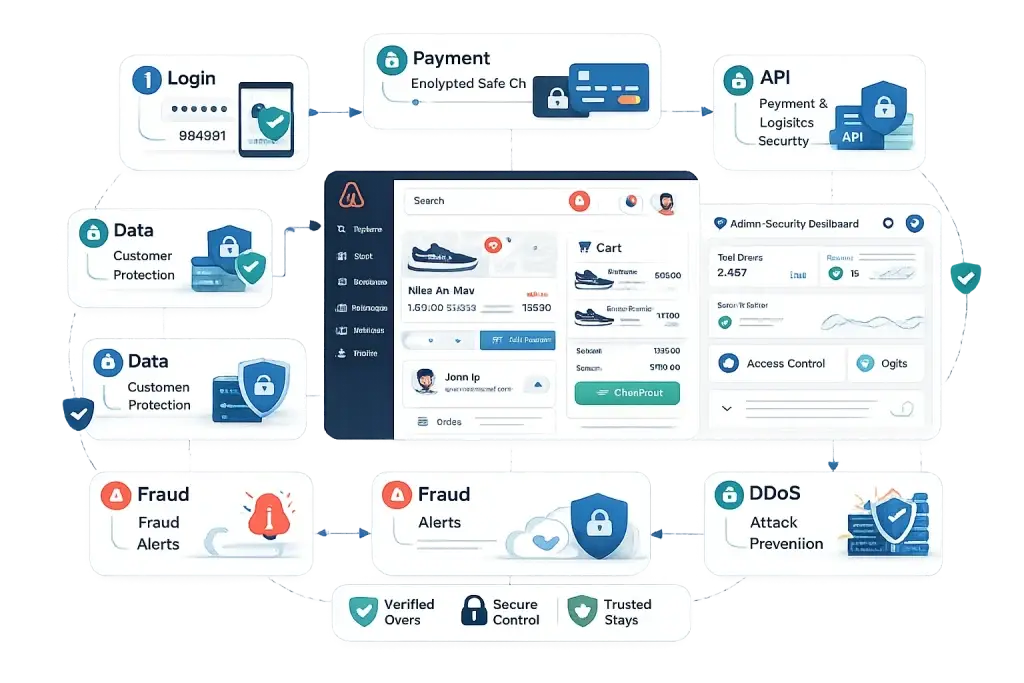
- Secure login, MFA/OTP, payment encryption, protected databases, API security, cloud access control, fraud alerts, DDoS protection, and vulnerability scanning are important security layers.
- The article highlights payment encryption and safe checkout as critical because ecommerce platforms process high-value customer transactions.
- It also says third-party integrations like payment gateways, logistics APIs, analytics tools, and marketing platforms can create risks if not secured properly.
- A secure white-label ecommerce app requires regular monitoring, patches, backups, access reviews, and security testing after launch.
Real Insights
- A Zappos clone becomes safer when security is planned from the foundation, not added after launch.
- Admin panel security is just as important as customer-facing security because weak admin access can expose orders, users, and business data.
- API protection is a major ecommerce priority because payment, shipping, inventory, and notification systems depend on connected services.
- Fraud detection and activity monitoring help protect revenue by identifying suspicious checkout, refund, and account behavior early.
- The strongest ecommerce security setup combines secure development, encrypted transactions, protected infrastructure, compliance readiness, and ongoing maintenance.
You’ve heard the horror stories—ecommerce platforms getting hacked, customer data leaked, and payment fraud damaging brand trust overnight. When it comes to launching a white-label Zappos clone, these concerns become even more serious because you’re handling sensitive user data, transactions, and brand reputation at scale.
In 2026, app security is no longer optional—it’s a business survival factor. Customers expect secure checkouts, protected data, and reliable platforms from day one. Any gap in security can lead to financial loss, legal penalties, and long-term trust damage.
This guide gives you a clear, honest breakdown of how safe a white-label Zappos clone really is, what risks you should watch for, and how to build a secure platform with the right approach. With solutions like Miracuves, businesses can move forward with confidence while keeping security at the core.
Understanding White-Label Zappos Clone Security Landscape
What White-Label Security Actually Means
A white-label Zappos clone is a pre-built ecommerce solution that can be customized and launched under your brand. But when it comes to security, it doesn’t mean “one-size-fits-all.” The safety of your platform depends on how well the base architecture is built, configured, and maintained.
White-label security includes everything from secure coding practices to infrastructure protection, payment encryption, and compliance readiness. A strong foundation can be highly secure—but a poorly built one can expose serious vulnerabilities.
Why People Worry About White-Label Ecommerce Apps
Data Sensitivity
Ecommerce platforms handle personal details, addresses, and payment data—making them high-value targets.
Third-Party Integrations
Payment gateways, logistics APIs, and analytics tools can introduce vulnerabilities if not secured properly.
Scalability Concerns
As your platform grows, weak architecture can lead to security gaps under high traffic or transaction loads.
Current Threat Landscape for Zappos-Style Platforms
Ecommerce platforms in 2026 face increasingly advanced threats, including:
- Payment fraud and card skimming attacks
- API-based attacks targeting checkout systems
- Account takeover via weak authentication
- Malware injections through third-party plugins
- DDoS attacks during high-traffic sales periods
According to recent cybersecurity reports, ecommerce platforms accounted for a significant portion of web-based attacks in 2025, especially during peak shopping seasons.
Security Standards in 2026
Modern ecommerce platforms are expected to meet strict security benchmarks:
- Strong encryption for data in transit and at rest
- Secure authentication mechanisms (multi-factor authentication)
- Continuous vulnerability scanning
- Compliance with global data protection laws
- Secure cloud infrastructure with access controls
Real-World Security Incidents (Context for Awareness)
- Major ecommerce platforms have faced payment data breaches due to unsecured APIs
- Retail apps have experienced account takeovers due to weak password policies
- Third-party integrations have been exploited to inject malicious scripts
These incidents highlight a key reality: security failures are rarely due to a single issue—they happen when multiple small gaps combine.
Understanding this landscape helps you avoid common mistakes and build a platform that customers can trust from day one.
Key Security Risks & How to Identify Them
Launching a white-label Zappos clone without understanding its risk areas can expose your business to serious consequences. Security issues are not always visible at the surface—they often exist in layers across data, infrastructure, and operations.
Data Protection & Privacy Risks
User Personal Information
Ecommerce platforms collect names, phone numbers, addresses, and order history. If this data is not encrypted or stored securely, it becomes an easy target for breaches.
Payment Data Security
Handling transactions requires strict compliance with payment standards. Weak encryption or improper gateway integration can lead to card data theft or fraud.
Location & Behavioral Data
User tracking for personalization can create privacy risks if data usage policies are unclear or non-compliant.
Compliance Gaps (GDPR/CCPA)
Failure to follow data protection regulations can result in heavy penalties and legal complications, especially when operating globally.
Technical Vulnerabilities
Code Quality Issues
Poorly written or untested code increases the risk of bugs that attackers can exploit.
Server Security Gaps
Unsecured servers, weak firewalls, or improper access controls can lead to unauthorized access.
API Vulnerabilities
Checkout systems, payment APIs, and third-party integrations are common entry points for attackers if not properly secured.
Third-Party Integration Risks
Plugins and external services can introduce hidden vulnerabilities if they are outdated or not verified.
Business Risks
Legal Liability
Data breaches can lead to lawsuits, regulatory actions, and compliance penalties.
Reputation Damage
Trust is critical in ecommerce. A single security incident can cause long-term brand damage and customer loss.
Financial Losses
Fraud, refunds, penalties, and downtime can directly impact revenue.
Regulatory Penalties
Non-compliance with laws like GDPR or PCI DSS can result in significant fines.
Risk Assessment Checklist
Before launching your white-label Zappos clone, evaluate these critical points:
- Is all user data encrypted (both in transit and storage)?
- Are payment systems PCI DSS compliant?
- Do APIs have authentication and rate limiting in place?
- Are regular security audits and penetration tests conducted?
- Is there a clear data privacy policy aligned with regulations?
- Are third-party integrations verified and regularly updated?
- Do you have backup and disaster recovery systems?
- Is role-based access control implemented for admin users?
Identifying these risks early allows you to fix vulnerabilities before they turn into costly problems. A secure ecommerce platform is not built by chance—it’s built through careful planning, testing, and continuous monitoring.
Read more : – Top Features Every Marketplace App Needs
Security Standards Your White-Label Zappos Clone Must Meet
In 2026, launching an ecommerce platform without meeting global security standards is a major risk. Customers, payment providers, and regulators expect your Zappos clone to follow strict compliance frameworks and technical safeguards from day one.
Essential Certifications & Compliance Requirements
ISO 27001 Compliance
This standard ensures your platform follows a structured approach to managing sensitive information securely. It covers risk management, access control, and data protection policies.
SOC 2 Type II
SOC 2 focuses on how customer data is handled over time. It verifies that your systems meet strict criteria for security, availability, and confidentiality.
GDPR Compliance
If you serve users in Europe, GDPR requires clear consent, data transparency, and the right for users to access or delete their data.
PCI DSS for Payments
Any ecommerce platform processing payments must comply with PCI DSS standards to protect cardholder data and prevent fraud.
CCPA and Regional Data Laws
For users in regions like California and beyond, privacy laws require clear data usage disclosures and user control over personal data.
Technical Security Requirements
End-to-End Encryption
All sensitive data must be encrypted both during transmission (SSL/TLS) and at rest in databases.
Secure Authentication Systems
Implement strong login systems including:
- Multi-factor authentication (2FA)
- OAuth-based logins
- Password hashing and salting
Regular Security Audits
Continuous testing helps identify vulnerabilities before attackers do. This includes automated scans and manual reviews.
Penetration Testing
Simulated cyberattacks are used to test how well your system can resist real-world threats.
SSL Certificates
A secure HTTPS connection is mandatory for protecting user data and building trust.
Secure API Architecture
APIs must include authentication, rate limiting, and encryption to prevent misuse or attacks.
Security Standards Comparison Table
| Security Area | Basic Implementation | Advanced (Recommended for 2026) |
|---|---|---|
| Data Encryption | SSL only | End-to-end encryption + encrypted storage |
| Authentication | Username & password | 2FA + OAuth + biometric options |
| Payment Security | Basic gateway integration | PCI DSS compliant secure payment system |
| API Security | Open or limited protection | Authenticated, rate-limited, encrypted APIs |
| Monitoring | Manual checks | Real-time monitoring with alerts |
| Backup & Recovery | Occasional backups | Automated, multi-region backups |
| Compliance | Partial or unclear | Full GDPR, SOC 2, ISO compliance |
Meeting these standards is not just about avoiding risks—it’s about building long-term trust with your users. A secure Zappos clone positions your business as reliable, professional, and ready to scale in a competitive ecommerce market.
Read more : – Business Model of Zappos : Complete Strategy Breakdown 2026
Red Flags: How to Spot Unsafe White-Label Providers
Choosing the wrong white-label provider can turn your Zappos clone into a security liability instead of a scalable business asset. Many risks don’t come from the app itself—but from the provider behind it.
Warning Signs You Should Never Ignore
No Security Documentation
If a provider cannot clearly explain their security architecture, encryption methods, or compliance standards, it’s a major red flag. Transparency is essential in ecommerce security.
Unrealistically Cheap Pricing
Extremely low pricing often means compromises in code quality, infrastructure, or security practices. Secure systems require proper investment.
No Compliance Certifications
A provider without certifications like ISO, SOC 2, or PCI DSS is likely not following industry-standard security protocols.
Outdated Technology Stack
Old frameworks and unsupported libraries are easier for attackers to exploit. Modern security requires up-to-date technology.
Poor Code Quality
Messy or unstructured code increases the chances of vulnerabilities and makes future security updates difficult.
No Security Updates Policy
Security is not a one-time setup. If the provider doesn’t offer regular patches and updates, your platform becomes vulnerable over time.
Lack of Data Backup Systems
Without proper backup and disaster recovery, even a small attack can result in permanent data loss.
No Insurance or Liability Coverage
Serious providers have cybersecurity insurance and defined responsibility in case of incidents. Lack of this indicates weak accountability.
Evaluation Checklist Before Choosing a Provider
Questions to Ask Providers
- What security standards and certifications do you follow?
- How do you handle data encryption and storage?
- Do you provide regular security updates and patches?
- What is your incident response process?
- How do you secure third-party integrations?
Documents You Should Request
- Security architecture overview
- Compliance certificates (ISO, SOC 2, PCI DSS)
- Data protection and privacy policies
- Penetration testing reports
- Service-level agreements (SLAs)
Testing Procedures to Perform
- Conduct a third-party security audit
- Test login and authentication flows
- Evaluate API security endpoints
- Perform vulnerability scans
- Check payment gateway security
Due Diligence Steps
- Review past client deployments
- Check for any history of breaches
- Analyze scalability and infrastructure readiness
- Verify ongoing support and maintenance policies
Selecting a secure provider is one of the most critical decisions in your ecommerce journey. A strong foundation reduces risk, ensures compliance, and protects your brand as you scale.
Best Practices for Secure White-Label Zappos Clone Implementation
Building a secure Zappos clone is not just about choosing the right provider—it’s about implementing the platform correctly from day one and maintaining it continuously. Security should be treated as an ongoing process, not a one-time setup.
Pre-Launch Security Measures
Security Audit Process
Before going live, conduct a complete security audit to identify vulnerabilities in code, APIs, and infrastructure. This helps fix issues before real users interact with the system.
Code Review Requirements
Ensure that the codebase is reviewed for:
- Secure coding practices
- Input validation
- Error handling
- Protection against common vulnerabilities
Infrastructure Hardening
Set up a secure hosting environment by:
- Configuring firewalls
- Restricting server access
- Using secure cloud environments
- Enabling intrusion detection systems
Compliance Verification
Verify that your platform meets all required standards such as GDPR and PCI DSS before launch. This avoids legal risks later.
Team & Staff Training
Train your internal team on:
- Data handling policies
- Access control practices
- Recognizing phishing or security threats
Post-Launch Security Monitoring
Continuous Security Monitoring
Use real-time monitoring tools to track unusual activities, login attempts, and system anomalies.
Regular Updates & Patches
Keep your platform updated with:
- Security patches
- Framework updates
- Plugin upgrades
Outdated systems are one of the biggest causes of breaches.
Incident Response Planning
Prepare a clear plan that defines:
- How to detect breaches
- Steps to contain the issue
- Communication protocols
- Recovery procedures
User Data Management
Ensure proper handling of user data:
- Limit data access based on roles
- Store only necessary data
- Regularly review and clean outdated records
Backup & Disaster Recovery
Implement:
- Automated daily backups
- Multi-location storage
- Quick recovery systems to restore operations
Security Implementation Timeline
| Phase | Key Actions |
|---|---|
| Planning Stage | Define security requirements, compliance needs, and infrastructure setup |
| Development | Secure coding, API protection, authentication implementation |
| Pre-Launch | Security audits, penetration testing, compliance verification |
| Launch | Enable monitoring tools, finalize backups, activate protection systems |
| Post-Launch | Continuous monitoring, updates, audits, and incident management |
A secure implementation ensures your Zappos clone is not only protected but also ready to scale without exposing your business to unnecessary risks. Strong processes today prevent major issues tomorrow.
Legal & Compliance Considerations
In 2026, running a white-label Zappos clone without proper legal and compliance frameworks can be more damaging than technical vulnerabilities. Security is not just about protection—it’s also about meeting legal obligations across regions where your users operate.
Regulatory Requirements
Data Protection Laws by Region
Different regions have strict rules for handling user data:
- Europe (GDPR): Requires explicit user consent, data transparency, and the right to access or delete personal data
- United States (CCPA & others): Focuses on user rights to know, control, and opt out of data usage
- India (DPDP Act): Emphasizes user consent, data minimization, and responsible data handling
- Other Regions: Increasingly adopting privacy-first frameworks similar to GDPR
Industry-Specific Regulations
For ecommerce platforms:
- Payment processing must follow PCI DSS
- Secure transaction logging and fraud prevention measures are expected
- Data retention policies must be clearly defined
User Consent Management
You must implement:
- Clear consent collection (cookies, tracking, marketing)
- Easy opt-in and opt-out mechanisms
- Transparent data usage policies
Privacy Policy Requirements
Your platform should include:
- What data is collected
- How it is used
- Who it is shared with
- How users can control their data
Terms of Service Essentials
Clearly define:
- User responsibilities
- Platform limitations
- Dispute resolution policies
- Refund and cancellation terms
Liability Protection Measures
Insurance Requirements
Businesses should consider:
- Cybersecurity insurance
- Data breach liability coverage
- Business interruption insurance
Legal Disclaimers
Protect your platform by including:
- Limitation of liability clauses
- Data usage disclaimers
- Third-party integration disclaimers
User Agreements
Ensure all users agree to:
- Privacy policies
- Terms of service
- Data usage consent
Incident Reporting Protocols
In case of a breach:
- Notify affected users within required timelines
- Report incidents to relevant authorities
- Maintain transparent communication
Compliance Monitoring
Legal requirements evolve continuously. You must:
- Regularly update policies
- Monitor regulatory changes
- Conduct compliance audits
Compliance Checklist by Region
| Region | Key Requirement | Mandatory Action |
|---|---|---|
| Europe | GDPR | Consent, data access, deletion rights |
| USA | CCPA & state laws | Data transparency, opt-out options |
| India | DPDP Act | Consent-based data collection |
| Global | PCI DSS | Secure payment processing |
| Global | General privacy standards | Secure storage and encryption |
Legal compliance is a critical layer of your platform’s security. It ensures that your Zappos clone not only protects user data but also operates confidently across global markets without regulatory risks.
Why Miracuves White-Label Zappos Clone is Your Safest Choice
When it comes to launching a secure ecommerce platform, the difference lies in the foundation. A white-label Zappos clone built without strong security architecture can expose your business to continuous risks. This is where Miracuves stands out as a security-first technology partner.
Miracuves Security Advantages
Enterprise-Grade Security Architecture
Miracuves builds platforms with a security-first approach, ensuring protection at every layer—from frontend interactions to backend infrastructure.
Regular Security Audits & Testing
Continuous vulnerability assessments and penetration testing help identify and eliminate risks before they impact your business.
Compliance-Ready by Default
Miracuves solutions are designed to align with global standards like GDPR, PCI DSS, and modern data protection frameworks, reducing your compliance burden.
24/7 Security Monitoring
Real-time monitoring systems track suspicious activities, unauthorized access attempts, and system anomalies to prevent potential breaches.
Encrypted Data Transmission
All sensitive data is protected using strong encryption protocols, ensuring safe communication between users and servers.
Secure Payment Processing
Integrated payment systems follow strict security guidelines, minimizing the risk of fraud and transaction vulnerabilities.
Regular Updates & Patch Management
Security threats evolve constantly. Miracuves ensures your platform stays protected with ongoing updates and patches.
Insurance & Risk Coverage Support
With defined security practices and structured processes, businesses get an additional layer of confidence and risk mitigation.
Final Thought
Security is no longer a backend concern—it is the foundation of your ecommerce business. A white-label Zappos clone can be a powerful way to enter the market quickly, but its success depends on how securely it is built, deployed, and maintained.
Ready to build a secure and scalable ecommerce platform? Connect with Miracuves today and get a free consultation to launch your Zappos clone with enterprise-grade security.
When security is treated as a priority from day one, your Zappos clone transforms from just another ecommerce app into a trusted digital marketplace.
FAQs
1. Is a white-label Zappos clone as secure as custom development?
Yes, if built by a reliable provider. Well-developed white-label solutions often undergo repeated testing, making them stable and secure. Security depends more on implementation and maintenance than the development approach.
2. What happens if there is a security breach?
A proper system should have an incident response plan, including detection, containment, recovery, and user notification. Fast response minimizes damage and legal impact.
3. Who is responsible for security updates?
It is a shared responsibility. The provider handles core updates, while the business must ensure timely implementation, monitoring, and configuration.
4. How is user data protected in a white-label ecommerce app?
User data is protected through encryption, secure storage, access controls, and compliance with privacy laws like GDPR and DPDP.
5. What compliance certifications should I look for?
You should look for ISO 27001, SOC 2 Type II, PCI DSS, and GDPR compliance as essential standards for ecommerce platforms.
6. Can white-label apps meet enterprise-level security standards?
Yes, with the right provider and infrastructure, white-label apps can meet or exceed enterprise-grade security requirements.
7. How often should security audits be conducted?
Regular audits should be conducted at least quarterly, along with continuous monitoring and periodic penetration testing.
8. What is included in Miracuves security package?
It typically includes secure architecture, encryption, compliance readiness, monitoring, regular updates, and support for maintaining platform security.
9. How to handle security across different countries?
You must follow regional data protection laws, implement consent systems, and adapt policies based on where your users are located.
10. What insurance is needed for app security?
Cybersecurity insurance, data breach coverage, and business interruption insurance are recommended to protect against financial risks.
Related Articles
Miracuves is an independent software development company. We are not affiliated with, connected to, sponsored by, or endorsed by any company or product named in this article.
Terms such as “X Clone” are used descriptively. It is how the software industry refers to building a platform with functionality comparable to a known service, and how clients search for it.
The entire design and codebase of our products is built by our own team. Our products contain no code, design, graphics, or content originating from any third-party website or applications.
All third-party names and marks referenced in this article are the property of their respective owners, referenced solely to identify the services discussed.