v2026 - Production Ready

Rover Clone App - White-Label Pet Care Marketplace

Pet Sitting Clone Script with Pet Profiles, Provider Panels and Booking Status

A white-label pet-care marketplace that puts owners and care providers together under your name. Owners add each pet as a card showing a photo, a name and a breed, choose boarding, grooming, training, walking or day care, pick a provider and follow the booking from pending to confirmed. Walkers, boarders and trainers each run their side from a panel of their own.

A pet shop sits beside the services, and an admin console with a revenue dashboard holds it together. The whole thing arrives rebranded, with the complete source code, an owner app, an employee app and the admin panel.

Launch in 6 Days with

  • 60 Days Platform Guidance
  • Complete Source Codes
  • Complete Rebranding
  • Complete Whitelabeling
  • App Publishing Support
  • 6 Months Bug Fixes + 12 Months Updates
Rover console · DashboardLive
Bookings today31
Awaiting confirmation6
Providers active24

Booking activity

  • Boarding stay booked by an ownerBookings
  • Trainer confirmed a sessionStatus
  • Pet card added for an ownerPets
  • Pickup time changed on a staySchedule
  • Payment cleared at the gatewayPayments
  • Earnings updated for a walkerEarnings
  • Review left for a boarderReviews
  • Basket checked out in the shopShop
  • Boarding stay booked by an ownerBookings
  • Trainer confirmed a sessionStatus
  • Pet card added for an ownerPets
  • Pickup time changed on a staySchedule
  • Payment cleared at the gatewayPayments
  • Earnings updated for a walkerEarnings
  • Review left for a boarderReviews
  • Basket checked out in the shopShop
Rover Clone app home screen with a Smart Pet Care Veterinary banner, Boarding, Veterinary and Grooming service tiles and an upcoming appointment card.
Three provider panelsplus an employee app

The Package in Brief

6
Days to Go Live

build time only, with the app store approval wait not included

6
Service Lines

boarding, veterinary, grooming, training, walking and day care

3
Provider Panels

Walker, Boarder and Trainer, plus an employee app

100%
Source Code

handed over unencrypted, with nothing held back

One Card per Pet

Each animal is added once, as a card with its picture, name and breed, and the owner chooses the right card for every stay or walk.

Providers in Their Own Space

Providers set their services and prices in their own panel and app, and owners book from the slots they publish.

Thinking of a pet-care marketplace under your own name?Talk to Product Expert

Chosen by 6,000+ clients across the globe

Miracuves is listed by Expertise.com as a managed IT service provider.Miracuves is an official member of the Forbes Business Council.Miracuves is a verified agency on DesignRush, listed among top design agencies in India.Miracuves is reviewed on Trustpilot as a software development company.Miracuves is listed by The Manifest among top managed software development companies.Miracuves is listed by DesignRush as a top software development company.Miracuves is recognized by GoodFirms as a top software development company.Miracuves is ranked among the top 1000 companies globally by Clutch.Miracuves is a top managed service provider in the United States on Clutch.

01Try it

Hands-On Demo

Rover Clone Live Demo - Owner App, Provider App, Panels & Operator Console

Test drive the Miracuves Rover Clone from either side of the marketplace. One shared login unlocks the owner app and another unlocks the employee app for providers. Anyone can open the web site, while the Walker, Boarder, Trainer and admin panels wait behind the demo login page and their logins come on request.

Rover Clone app home screen with a Smart Pet Care Veterinary banner, Boarding, Veterinary and Grooming service tiles and an upcoming appointment card.Rover Clone app Book Boarding form filled in with two pets, dates, a boarder, two extras ticked and a total with a Book Now button.
Live demo
OWNER APP

The Phone Experience for Customers

See what a pet owner sees: choose a service tile, pick a pet, fix times and a provider, tick extras, book, and then trace the booking through the list.

  1. 1Visit the app portal and select your phone
  2. 2Log in using the details displayed here
  3. 3Open My Pets, the shop, the bookings list and Book Boarding
Try:user@demo.com | User_321
Live demo
EMPLOYEE APP

Supply Side on a Phone

A trainer, walker or boarder signs in to a second app of their own, works through the bookings that arrive and cuts the list down with the booking filter.

  1. 1Open the app portal and choose your device
  2. 2Enter the employee login given here
  3. 3Study the bookings list and its filter
Try:trainer@demo.com | 12345678
Rover Clone web site home page with a welcome banner, a services section, a statistics strip and a photo gallery.
Open site
WEB SITE & PROVIDER PANELS

The Public Site and the Panels Behind It

A customer-facing web site, and behind it the Walker, Boarder and Trainer panels, where each kind of provider manages services, prices and bookings from a laptop.

  1. 1Load the demo site in a fresh tab
  2. 2Head to the panel login page
  3. 3Request the Walker, Boarder or Trainer login from us
Panel logins:on request
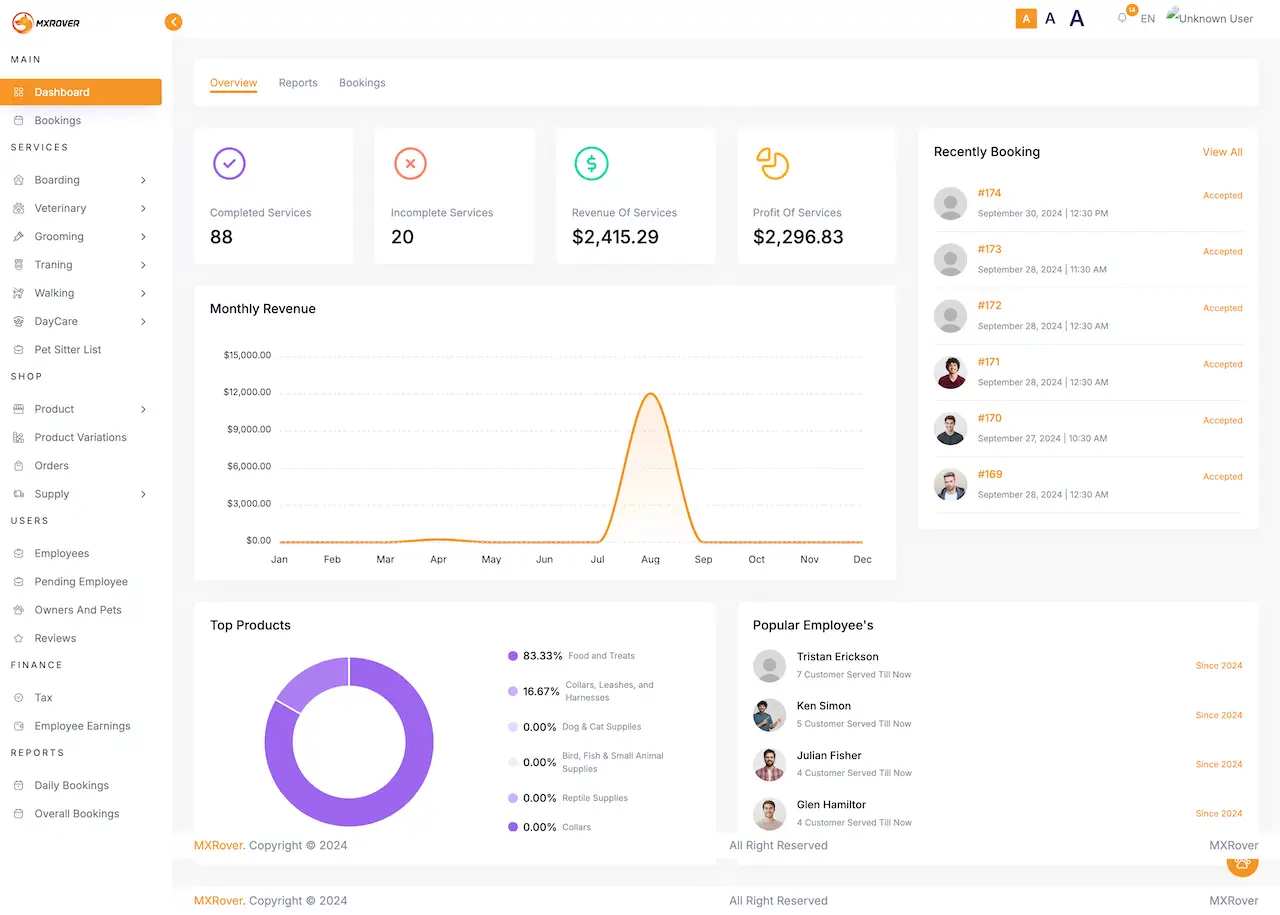
Rover Clone admin dashboard with completed and incomplete services, revenue and profit, a monthly revenue chart, recent bookings, top products and popular employees, beside a menu of services, shop, users, finance and reports.
Login on request
ADMIN PANEL

The Operator Console

Revenue dashboard, bookings, six service menus, the shop with its orders and supply, provider and owner lists, tax, earnings and reports, all in one place.

  1. 1Reach the login page on the demo host
  2. 2Message the team to receive the admin login
  3. 3Scan Dashboard, Services, Shop, Finance and Reports
Admin login:on request
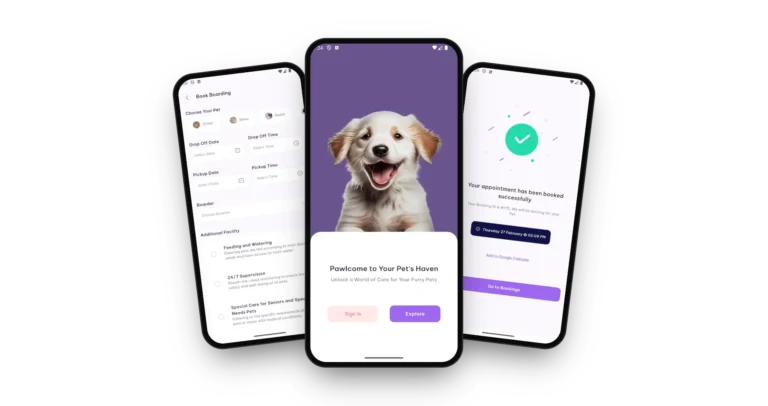
Rover Clone on three phones: the welcome screen with sign in and explore, the boarding booking form and the booking confirmation

Guided Tour

Rover Clone Walkthrough: Marketplace Roles, Bookings, Pet Shop & Operator Console

Watching a marketplace run explains more than reading about it. During a call of roughly thirty minutes we start with the owner app, move to the employee app, then the provider panels and finally the operator console, and relate each to your plan: the providers you will recruit first, the services you will sell, the commission you expect to keep and the date you want to open.

Reserve a live walkthrough.

Screen by Screen

Rover Clone App Flows - Owner Journey, Pets & Shop, Operator Dashboard

Genuine demo screens, grouped the way people meet them: an owner booking a stay, the pet list with the shop next to it, and the operator dashboard behind it all.

Rover Clone app onboarding screen with a smiling owner holding a puppy and the line Discover Pet Care Excellence.
Rover Clone app welcome screen with a puppy, the line Pawlcome to Your Pet's Haven and Sign In and Explore buttons.
Rover Clone app home screen with a Smart Pet Care Veterinary banner, Boarding, Veterinary and Grooming service tiles and an upcoming appointment card.
Rover Clone app Book Boarding form with the pet picker, date and time fields and a list of additional facilities with checkboxes.
Rover Clone app Book Boarding form filled in with two pets, dates, a boarder, two extras ticked and a total with a Book Now button.
Rover Clone app confirmation screen with a green tick, a booking number and an Add to Google Calendar link.
Rover Clone app bookings list with booking number, status, schedule, price, boarder, address and a Cancel button.
7 screens · scroll →
Rover Clone app My Pets screen listing pets with their photos, names and breeds and an Add Pet link.
Rover Clone app shop screen with product categories and featured products with prices.
2 screens · scroll →
Rover Clone admin dashboard with completed and incomplete services, revenue and profit, a monthly revenue chart, recent bookings, top products and popular employees, beside a menu of services, shop, users, finance and reports.
1 screen

Trace an owner from the welcome screen to a confirmed booking, take in the pet list and the shop, and end on the operator dashboard that those bookings feed.

Explore Our Solutions

02Evidence

Client Voices

Rover Clone Client Reviews - Founders in Their Own Words

Six clients describe building on Miracuves bases. None of them runs a pet-care business (they work in dermatology, car rental, courier delivery, yacht charters, telehealth and logistics), so read them as accounts of working with us, each printed exactly as its author wrote it.

DDr. Vivek RungtaFounder & Chief Dermatologist, Dermacian
“Every HMS I tried was built for general physicians, with no lesion mapping, no before/after tracking, and no procedure-based billing. Their MXHealth base gave us the patient app, doctor app, EMR and video consult out of the box. Front-desk time on scheduling and follow-ups is down ~70%, and we went fully digital in 9 months, where a fully custom job would have been 18.”
AAndre GittensCEO, Ride Corporation
“Turo is the obvious reference, but the Caribbean specifics, from different insurance norms to different payment rails, meant we needed a real partner, not just a clone. Miracuves’s MXCar base covered the listing, the trip flow, and the host payouts. We launched in 6 working days and are live in three islands.”
MMarsha WilliamsFounder, Bmore On Demands LLC
“The team was running it on a dispatcher and a Google Sheet, and we needed a real platform quickly, because we were about to onboard a major retail client. Miracuves’s Delivery Genie base gave us the rider app, the dispatch console, and live tracking. We launched in 6 weeks and cleared 4x the previous order volume in the first month.”
TTiffany DandreaOperations Director, Best Cabo Yacht Rentals
“We were running it on phone calls and a paper calendar, and we were losing bookings to bigger OTAs. Miracuves’s GetmyBoat Clone base gave us the calendar, the booking flow, and the payment engine. Online bookings are up roughly 70% in the first six months, and the ops team finally has a live view of the fleet.”
DDr. Carlos A. PalermoCo-founder & CEO, Doctta Health
“Building a compliant telehealth stack from scratch in three markets would have been a year-plus effort. Miracuves’s MXHealth base covered the patient and doctor apps, video consult, e-prescription and the pharmacy integrations. We launched in our first market in 9 weeks and rolled out to two more in the following six months.”
BBrian LatailleVP Logistics Technology, IBC Tanks Canada
“We were juggling spreadsheets, a third-party GPS provider, and a phone. We needed a single operations console. Miracuves’s MXLogistics base covered the trip lifecycle, the driver app, and the customer tracking page. We’ve cut operations admin time by about 40%.”
Read More Client TestimonialsFounders and operators, unedited

Proof You Can Check

Rover Clone Case Study - Nothing Published Yet and What You Can Check

Miracuves lists no named client running this marketplace base, which leaves no case study to summarize. In its place you get the demo, the owner screens, the admin dashboard and the release log, and the cards here show how to put them to work.

Case Study
This Marketplace Has No Published Client Deployment

Miracuves has not published a named client launch of this pet-care marketplace base, and will not stage one. What we can offer instead is a working demo, nine real owner-app screens, an admin dashboard and a release log that you can read line by line.

Owner app, employee app, panels, adminWhat opens
Releases 2.1.0 through 2.2.6Versions covered
Boarding, grooming, training, walking, shopServices shown
4Demo surfaces
6Logged versions
6 daysBuild time
Rover Clone app on two phones: the home screen with service tiles and the pet shop.
Check It Yourself
  • Open My Pets in the owner app using the demo login
  • Fill the Book Boarding form and read its tax-inclusive total
  • Locate your booking in the list, with its status and Cancel button
  • Go through each release log entry in turn
Off Limits for Us
  • Put a client name here before that client has agreed
  • Pass off a quote or figure from a different product as this one
  • Count a module like GPS tracking as part of the base
What a Build Involves
  • Apply your own logo, icons and colors to the apps and web platform
  • Set up your services, commission rates and tax rules
  • Install it on your hosting and pass you the full source code
  • Base build time: 6 working days

This space will name a deployment only after a client agrees to be named and its case study goes live.Miracuves · Our position on case studies

See the case studies already publishedOur portfolio features named builds of other products.

03What it does

Start Here

How the Rover Clone App Serves Owners, Providers and the Operator

A Rover Clone is a ready-made pet-care marketplace. An owner saves a card for every pet and books walking, boarding, grooming, training or day care with a provider of choice, providers work from their own panels and app, and the operator tracks revenue, bookings, shop orders and earnings in a single admin console.

Rover Clone on three phones: the welcome screen with sign in and explore, the boarding booking form and the booking confirmation

Supply Under Your Brand

Walkers, boarders and trainers sign in to panels and an employee app carrying your name, so the people who do the work learn your brand and not somebody else's.

Code You Can Open

The source arrives complete and unencrypted. Your own developers can reshape screens and flows later, and nothing is billed per seat.

Extras Stay Extras

Tracking, plans, collection and return, and boarding video are sold as modules with separate quotes and are never slipped into the base list.

Android, iOS & Web

What Does the Rover Clone Script Contain?

A pet-care marketplace stands or falls on its supply side. Walkers, boarders and trainers each need somewhere to set prices and take bookings, owners need a simple path from pet to payment, and you need a clear view of what everyone earned. The base arrives with those three jobs already done.

Rover Clone app My Pets screen listing pets with their photos, names and breeds and an Add Pet link.
  1. 01An owner app: tiles, pet list, booking form
  2. 02An employee app for providers
  3. 03Browser panels for Walker, Boarder and Trainer
  4. 04A shop with catalog, orders and supply
  5. 05An admin panel for revenue, earnings, tax and reports

The delivery covers two Flutter apps, one for owners and one for employees, a web site holding the Walker, Boarder and Trainer panels, the admin panel and every line of source code.

Full Capability List

Rover Clone Feature List - Services, Bookings, Provider Panels, Shop, Payments & Admin

Every capability listed can be spotted in the owner screens, the admin dashboard, the demo panel list, the FAQ or the release log. Whatever needs an extra module is labelled as an add-on lower on the page.

Feature 01 / 12

Six Service Lines

One marketplace sells boarding, veterinary visits, grooming, training, walking and day care. Every line has an entry in the admin Services menu, and three of them show as tiles on the owner home screen.

  • Boarding, Veterinary and Grooming tiles on the home screen
  • All six lines in the admin Services menu
  • A Pet Sitter List beside them
  • Explore link into the complete service list
  • Home banners the admin can toggle
Feature 02 / 12

Booking Form & Extras

The form starts from the pet, then asks for drop-off and pickup slots and a provider, lists optional extras and shows a tax-inclusive total ahead of the Book Now tap.

  • Pet picker across the top of the form
  • Dates and times for drop-off and pickup
  • A boarder chosen on the same screen
  • Extras such as Feeding and Watering, 24/7 Supervision and Special Care for Seniors and Special Needs Pets
  • Tax-inclusive total and an additional information field
Feature 03 / 12

Saved Pets

Every animal gets a card in My Pets showing a picture, the name and the breed. Owners choose from those cards when booking, and the admin console holds an Owners And Pets list.

  • Photo, name and breed on each card
  • An Add Pet link on the list
  • Different species side by side in the demo list
  • Fuller pet records are bespoke work, quoted on request
Feature 04 / 12

Provider Panels & Employee App

Walker, Boarder and Trainer panels give each provider type a desktop workspace, while a separate employee app covers the same work from a phone.

  • Three panels named in the demo: Walker, Boarder, Trainer
  • Employee app with a bookings list and a filter
  • Pending Employee list inside the admin Users menu
  • Each provider controls their own services and prices
  • Multi-vendor support added in version 2.1.0
Feature 05 / 12

Booking Cards & Status

Each booking sits on a card with its number, service, status, schedule, price, provider and address, and the owner can cancel from the card itself.

  • Booking number plus a status, for instance Pending or Confirmed
  • Schedule, price, boarder and address on the card face
  • A Cancel button beneath every booking
  • A confirmation page with an Add to Google Calendar link
  • Daily Bookings and Overall Bookings reports for the operator
Feature 06 / 12

Chat & Push Alerts

Owners and providers message each other inside the app, push alerts announce booking news, and the admin writes notification templates for each user role.

  • Owner-to-provider messaging in the app
  • Chat, a video call or progress updates, per the FAQ on provider contact
  • Push alerts delivered over Firebase
  • Notification wording per role, set by the admin
Feature 07 / 12

Checkout, Tax & Gateways

Owners pay inside the app through the gateway you connect. Tax is a percentage or a fixed amount, and a Tax entry sits under Finance in the console.

  • Gateways in the release notes: Sadad, Cinet, Paystack, Razorpay, Stripe
  • Tax set as a percentage or as a fixed sum
  • The booking form prints the total with tax
  • Mismatches in payment amount and address were fixed in version 2.2.3
Feature 08 / 12

Ratings & Feedback

Owners rate and review the providers who cared for their pets, and a Reviews entry in the admin Users menu keeps that feedback in view.

  • A rating and written review once the booking ends
  • Ratings shown on provider profiles
  • Reviews list in the admin console
Feature 09 / 12

Pet Supplies Shop

Inside the app a Shop tab stands next to Bookings, and in the console behind it are Product, Product Variations, Orders and Supply entries.

  • Shelves for food and treats, dog and cat gear, collars, reptile gear and bird, fish and small-animal supplies
  • Priced featured products with a cart and favorites
  • A search box over the whole shop
  • Brands, tags and units in the catalog
Feature 10 / 12

Commission & Provider Earnings

Commission is a percentage set for each service, and an Employee Earnings entry under Finance shows what every provider has made.

  • A commission percentage for each service
  • Employee Earnings entry in the Finance menu
  • Earnings logic corrected for walker staff and admins in version 2.2.5
  • Totals by date in the admin panel
Feature 11 / 12

Revenue Dashboard

The console opens on completed and incomplete services, revenue and profit of services, a monthly revenue chart, recent bookings, top products and popular employees.

  • Four headline figures along the top
  • Monthly revenue chart
  • Recent bookings list and a Top Products chart
  • Popular Employees panel
  • A guided setup for launch day
Feature 12 / 12

Sign-Up & Welcome

New owners pass an onboarding guide and a welcome screen, then register with basic details and a country, or with Google login if they prefer.

  • Onboarding guide plus a welcome screen offering Sign In and Explore
  • Registration with name and email
  • Country picker when registering
  • Google login option
  • A list of countries kept by the admin

Before you buy: the platform is delivered whole and branded as yours. What you bring is hosting and a domain, developer accounts for the app stores that you own, your logo and business details, a payment gateway account that has cleared its KYC, and any third-party keys the integrations need. Apple and Google review the apps themselves, and that review is not counted inside our 6-day build.

Talk to Our Team

Daily Operations

Rover Clone Admin Console - Dashboard, Service Lines, Providers, Shop & Earnings

An operator's daily checks fit in one console: what was booked, what each provider earned, which service carries which commission, what the shop sold and which complaints remain open.

Rover Clone admin dashboard with completed and incomplete services, revenue and profit, a monthly revenue chart, recent bookings, top products and popular employees, beside a menu of services, shop, users, finance and reports.

What the Console Menus Hold

  • 01

    Dashboard & Reports

    The console opens on completed and incomplete services, revenue and profit of services and a monthly revenue chart, with Daily Bookings and Overall Bookings reports a click away.

  • 02

    Bookings

    A Bookings menu next to the dashboard lists every booking with its address, extra information, tax and status, and offers search by number and filters.

  • 03

    Six Service Menus

    Boarding, Veterinary, Grooming, Training, Walking and Day Care each own a menu, and a Pet Sitter List sits next to them.

  • 04

    Providers & Employees

    Employees and a Pending Employee list live in the Users menu, while roles and permissions decide who can do what in the console.

  • 05

    Owners, Pets & Reviews

    Owners And Pets and Reviews lists keep customers, their animals and their feedback within reach, and a Create Customer pop-up adds a person manually.

  • 06

    Shop Back Office

    Product, Product Variations, Orders and Supply menus run the catalog, with brands, tags and units, and a Top Products chart on the dashboard.

  • 07

    Finance

    Tax and Employee Earnings sit under Finance, commission is set for each service, and the release notes name five payment gateways.

  • 08

    Disputes, Content & Setup

    A dispute desk takes in complaints, refund requests and support tickets, and the console also looks after app banners, events, countries, notification templates and a setup wizard.

Where the Money Shows

The finance end of the console, running from a booking total to a provider payout.

  • Revenue and profit figures on the dashboard
  • Earnings per employee under Finance
  • A tax rule: percentage or flat amount
  • One commission rate per service

Control & Setup

Settings covering visibility by role and the first-day configuration of a fresh platform.

  • Admin users with roles and permissions
  • A wizard for first-time setup
  • Notification wording for each role
  • Countries, banners and events

Should the console do something extra? A different payout schedule, an extra report, another gateway or a custom sign-off stage is scoped on its own. Explain what your operations team requires and we will send a written quote.

Talk to Our Team

04Price and package

The Full Package

In the Box: Code, Apps & Deployment for Your Rover Clone Marketplace

You are handed a working marketplace and not a heap of parts: an owner app, an employee app, a web site with provider panels, the admin panel and all of the source underneath. The code belongs to you outright, with no per-seat charge and no license to renew.

01

Complete Source Code

All the source for the web platform and the mobile apps, unencrypted, so your own developers can adapt it freely.

  • Web platform code, readable and unencrypted
  • Android and iOS code written in Flutter
  • Yours to alter, extend and redeploy
  • Delivered to a repository under your control
02

Marketplace Records

The data the platform keeps: owners and pets, bookings, providers and their services, shop products and orders, payments and tax settings.

  • Owners and their pets, each with photo, name and breed
  • Bookings carrying status, address and extra information
  • Providers with their services and prices
  • Products, orders, supply, categories, brands and units
03

Chat & Alerts

Owner-to-provider messaging, Firebase push alerts and notification templates written by the admin for every role.

  • In-app messaging
  • Firebase-based push alerts
  • One template set per user role
  • Calendar link on the confirmation screen
04

Owner App for Pet Parents

A Flutter app for Android and iOS spanning onboarding, service tiles, booking, the bookings list, the shop and the pet list.

  • Home screen with Choose Service tiles
  • A Book Boarding form for pets, times and extras
  • Tabs for Bookings, Shop and Profile
  • Store publishing from accounts you own
Rover Clone app home screen with a Smart Pet Care Veterinary banner, Boarding, Veterinary and Grooming service tiles and an upcoming appointment card.
05

Shop & Catalog Tools

The Shop tab and the back office behind it, which let goods be listed, grouped, ordered and restocked alongside the services.

  • Categories and featured products in the shop
  • Cart and favorites inside the app
  • Back-office menus for Product, Variations, Orders and Supply
  • Searchable shop
Rover Clone app shop screen with product categories and featured products with prices.
06

Employee App & Provider Panels

A further Flutter app aimed at providers, along with browser panels for walkers, boarders and trainers, giving each provider a place to work.

  • An employee app for working on the move
  • A booking filter with Clear Filter
  • Browser panels for Walker, Boarder and Trainer
  • Services and prices set by the provider
Rover Clone admin dashboard with completed and incomplete services, revenue and profit, a monthly revenue chart, recent bookings, top products and popular employees, beside a menu of services, shop, users, finance and reports.
07

Operator Console & Roles

The operator console with its dashboard, bookings, service menus, shop, finance, reports, disputes and settings, guarded by roles and permissions.

  • A dashboard with revenue, profit and a monthly chart
  • Tax and Employee Earnings entries under Finance
  • A dispute desk covering refunds and tickets
  • Permissions by role and a setup wizard
08

Handover & Support

We brand and deploy the platform, pass on the code, and start three support windows that run together from launch day.

  • Your logo, icons and colors applied
  • Deployment onto your hosting
  • The full source handed over
  • Three support tiers: guidance covers 60 days, bug fixes 6 months and updates 12 months

Want a look before deciding? Use the demo as an owner, or request a guided tour. We can walk you across the pet list, the booking form, the shop and the operator dashboard, each one tied to your own services and providers.

Talk to Our Team

Transparent Pricing

What Does a Pet-Care Marketplace Like Rover Cost to Launch?

The launch-ready white-label Rover Clone has a fixed price of $2,499. Anything past the base, be it an add-on, a further integration or a bespoke flow, receives a written scope and quote first.

Most Popular

Professional

Ready-Made Launch Package
$2,499/-one-time payment
Live in 6 days

Best for: Pet-care marketplace founders, regional boarding and walking networks, multi-service pet brands

You receive what the demo shows, rebranded with your logo, icons and colors, and installed on hosting you own.

Get Started

Enterprise

Custom Builds for Bigger Scope
Customquote
Go-live: set by the final scope

Best for: Pet franchises, multi-country operators, groups with their own clinic or retail chains

If the base lacks a flow you need, we build to your brief and agree scope and price in writing first.

Request a Quote

05Who uses it

Who Buys It

Which Businesses Should Use This Rover Clone App?

It fits anyone who wants to be the marketplace between pet owners and the people who care for their animals, under a brand of their own and not as one more listing on somebody else’s directory.

Who 01 of 06Pet-Care Marketplace Founders

Entrepreneurs opening a full marketplace with several service lines, provider panels, a shop and a console, as opposed to an app that sells just one service.

Who 02 of 06Walking & Sitting Networks

Operators who gather independent walkers and sitters beneath one neighborhood brand, with booking, payment and commission handled together.

Who 03 of 06Boarding & Day Care Hosts

Hosts and centers who want owners to pick drop-off and pickup times, add extras and see a clear status for each stay.

Who 04 of 06Trainers & Grooming Professionals

Independent trainers and groomers hoping for bookable slots, prices of their own and a marketplace that sends owners their way.

Who 05 of 06Pet Stores Adding Services

Stores that already sell food, supplies and accessories and would like walking, boarding or training bookings inside the same app.

Who 06 of 06Regional Pet Brands

Groups with several branches that want one app, one console and commission settings that vary by service.

If your business introduces owners to carers they can rely on and takes a share of each booking, a branded platform keeps the customer, the payment and the data with you, and holding the source proves it.

Talk to Our Team

Fit by Model

Rover Clone Use Cases - Marketplace, Boarding, Training, Walking & Shop

Operators rarely use every part of the product equally. A marketplace founder starts from the provider panels and the dashboard, a boarding host from stay times and extras, and a retailer from the catalog. Configuration determines which part comes first.

MarketplaceSix linesFull-Service Pet Marketplace

Launch with every service line at the same time: owners browse boarding, grooming, training, walking and day care, pick a provider and pay in the app, and you collect commission on each booking.

01
Rover Clone app home screen with a Smart Pet Care Veterinary banner, Boarding, Veterinary and Grooming service tiles and an upcoming appointment card.
SupplyProvidersProvider Roster You Curate

Invite walkers, boarders and trainers, review newcomers in the Pending Employee list, and follow their earnings and bookings from the operator dashboard.

02
Rover Clone admin dashboard with completed and incomplete services, revenue and profit, a monthly revenue chart, recent bookings, top products and popular employees, beside a menu of services, shop, users, finance and reports.
BoardingDay careBoarding & Day Care Network

List hosts who take stays, so an owner chooses a pet, picks drop-off and pickup slots, then adds extras like feeding and watering or supervision.

03
Rover Clone app Book Boarding form filled in with two pets, dates, a boarder, two extras ticked and a total with a Book Now button.
TrainingGroomingTraining & Grooming Studios

Offer training programs and grooming slots as service lines, with their bookings and commission reported alongside the rest.

04
Rover Clone app bookings list with booking number, status, schedule, price, boarder, address and a Cancel button.
ShopServicesShop-Led Pet Brand

Begin with a catalog of food, supplies and accessories, with orders and supply handled in the back office, and layer service bookings on top.

05
Rover Clone app shop screen with product categories and featured products with prices.
VetWellnessWellness & Veterinary Listings

Use the Veterinary line to list appointment types beside walks and grooming; each practice stays responsible for its own licensing.

06
Rover Clone app My Pets screen listing pets with their photos, names and breeds and an Add Pet link.

One product, six ways to run it. Behind all six cases sit the same apps and panels. Only the services you sell, the rate of commission, the people you invite and the brand you apply differ, so one codebase is all you maintain.

Talk to Our Team

Industries

Industries We Serve

Any company that arranges care for other people’s animals. Walking and sitting services sell visits by date; boarding hosts and day care centers sell stays with set times. Salons and trainers sell slots and programs, veterinary practices can add an appointment line, pet stores sell goods next to services, and transport firms add collection. Regional networks and franchises run the full range under one name.

  1. 01Pet Marketplaces
  2. 02Dog Walking
  3. 03Pet Sitting
  4. 04Pet Boarding
  5. 05Day Care Centers
  6. 06Grooming Salons
  7. 07Dog Training
  8. 08Veterinary Practices
  9. 09Pet Retailers
  10. 10Pet Hotels
  11. 11Pet Transport
  12. 12Pet Franchises

Miracuves’ Rover Clone is a marketplace base that bends to almost any pet-care model, with provider panels, shop and admin console wearing your name from the first screen.

06How it is built

Start to Finish

How the Rover Clone Works - Welcome, Choose, Add Pets, Book, Confirm & Follow Up

For the owner it is a handful of taps. Beneath those taps a chain links a pet, a schedule, a provider and a payment. The steps follow that chain from the welcome screen to a tracked booking, and the architecture after them shows what holds it up.

The Owner Path - From Welcome Screen to Booking List

  1. Rover Clone app welcome screen with a puppy, the line Pawlcome to Your Pet's Haven and Sign In and Explore buttons.
    1Welcome & Sign-Up

    A first-time owner meets a welcome screen offering Sign In and Explore, then registers with a name and an email, or taps Google login.

    • Welcome screen: Sign In or Explore
    • Registration with basic details
    • Pick a country, or use Google
  2. Rover Clone app home screen with a Smart Pet Care Veterinary banner, Boarding, Veterinary and Grooming service tiles and an upcoming appointment card.
    2Choose a Service

    On the home screen the owner finds a greeting by name, a banner, the Choose Service tiles and, lower down, the next appointment waiting.

    • Service tiles plus an Explore link
    • A card for the Upcoming Appointment
    • Bottom bar: Home, Bookings, Shop, Profile
  3. Rover Clone app My Pets screen listing pets with their photos, names and breeds and an Add Pet link.
    3Add the Pets

    Each animal gets a card carrying a picture, the pet's name and its breed, so the owner selects the right one at every booking.

    • My Pets with an Add Pet link
    • The breed printed under each name
    • A photo and a name per card
  4. Rover Clone app Book Boarding form filled in with two pets, dates, a boarder, two extras ticked and a total with a Book Now button.
    4Set Times & Provider

    The form gathers the pet, the drop-off and pickup slots and a provider, lists optional extras and prints a total with tax.

    • The Choose Your Pet strip leads the form
    • A provider and extra facilities
    • A tax-inclusive total beside Book Now
  5. Rover Clone app confirmation screen with a green tick, a booking number and an Add to Google Calendar link.
    5Booking Confirmed

    Once Book Now is tapped, a confirmation gives the booking number and time, and a link drops the appointment into Google Calendar.

    • The booking number appears
    • The scheduled date and time
    • Links to Google Calendar and to Bookings
  6. Rover Clone app bookings list with booking number, status, schedule, price, boarder, address and a Cancel button.
    6Follow, Message, Pay & Rate

    The list gathers every booking along with its status, price and provider. From it owners can message the provider, pay inside the app and rate the visit later.

    • A status like Pending or Confirmed
    • Price, schedule, provider and address in one card
    • Cancel, message, pay and rate
Visual Flow DiagramWelcomeChooseAdd petsSet timesConfirmFollow up

Inside the Platform

Rover Clone Architecture & Marketplace Flow

Talk to Our Team
  1. Part 01

    A Surface for Each Role

    Owners, employees, panel providers and admins each use a surface of their own, and permissions fix what each of them can read and change.

  2. Part 02

    The Booking Record

    Each booking is stored with its pet, schedule, provider, address, extra information and status, so the list can report where every one stands.

  3. Part 03

    Many Providers, One Operator

    Multi-vendor support lets boarders, walkers and trainers run their own services and prices beneath a single operator.

  4. Part 04

    Payments & Tax

    Payments pass through whichever gateway you connect, tax is added as a percentage or a flat amount, and earnings are calculated afterwards.

  5. Part 05

    Notifications

    Push alerts leave over Firebase on its current API, built from templates that the admin authors per role.

  6. Part 06

    Shop Back Office

    Goods are filed under categories, brands, tags, units and variations, orders and supply have menus of their own, and anything in use is protected from removal.

Technology Choices

Rover Clone Technology Stack - Laravel, MySQL, Flutter & Gateway APIs

Three kinds of user call for a steady web layer, a data store that keeps bookings and orders in agreement, and apps that feel native on a phone. Below is what the product runs on, as the product page itself lists it.

FRONT OF HOUSE

Web & Panels

Laravel · PHP
  • The public site, the provider panels and the console
  • Walker, Boarder and Trainer logins in the browser
  • A setup wizard for the first configuration
  • Permissions applied panel by panel
DATA

Database Layer

MySQL
  • MySQL is the engine named
  • Owners, pets, bookings, providers and shop orders
  • Commission, tax and country settings
  • Shipped alongside the source
MOBILE

Flutter Apps

Flutter · Android · iOS
  • Both apps on up-to-date Flutter dependencies
  • One app for owners, one for employees
  • Owner tabs: Home, Bookings, Shop, Profile
  • Store listings under your own accounts
MONEY

Payment Rails

Sadad · Cinet · Paystack · Razorpay · Stripe
  • Five gateways appear across the release notes
  • Tax applied as a percentage or a flat amount
  • The booking total already includes tax
  • You supply the gateway account and complete its KYC
SERVICES

Connected Services

Firebase · Twilio · Google Maps
  • Maps appears on the product page's integration list
  • Twilio appears on the same list
  • Push alerts run on the current Firebase HTTP v1 API
  • Google sign-in and translation are included
DELIVERY

Code & Notes

Repository · Config · Notes
  • The application source, readable and unencrypted
  • Android and iOS projects for the mobile apps
  • Deployment settings documented for your team
  • Platform guidance for 60 days after launch
For your technical lead:

According to the product page the web and admin sides use PHP with Laravel, and the data sits in MySQL. Both phone apps are Flutter, and the release notes show them tracking the 3.27 line. Maps, Twilio, Firebase, gateways and translation are outside services, so you register for each and hand us the keys at deployment. All of it is mainstream and easy to recruit for.

Talk to Our Team

Room to Grow

Made to Scale - Separate Surfaces, Lean App Calls & Space for Change

Separate apps and panels all read the same records, which turns extra providers, pets and bookings into a matter of capacity and settings and not a rewrite. We quote no throughput figure, because capacity follows the hosting you choose.

One Surface per Role. Every audience, from owners through providers to admins, uses a surface of its own, so an update meant for one group does not have to ride along with the rest.

Lean Calls From the Apps. One release removed configuration requests that the apps fired for no reason, keeping them light as usage grows.

Lists That Stay Fast. Console lists are paged and searchable, and filter by booking number, tag and date, so the admin stays fast as records pile up.

Guarded Entries. Image uploads refuse corrupted files, a country name cannot be added twice and catalog items in use cannot be removed.

01

One Surface per Role

The owner app, the employee app, the browser panels and the console each serve a single role, and permissions determine what that role may view and edit.

02
SlotsCapacityStatus

Lean App Start-Up

The apps request configuration only when required, since a release removed calls that fired needlessly.

  • Fewer requests at start-up
  • Flutter kept on a current line
  • Firebase push on its newest API
  • Notification templates by role
03

Paged Console Lists

Lists in the console are paged and searchable, so a long history of bookings is still easy to navigate.

  • Pagination throughout the panel
  • Search by booking number
  • Tag and date filters
  • Totals by date
04
RolesLoginsUploads

Vetted Uploads

Every image is checked before it is stored, so a damaged file never reaches a pet card or a product page.

  • Corrupted files turned away
  • A record keeps its image when edited
  • Cancelling an upload leaves the icon untouched
  • Covers pet and product pictures
05

Guarded Catalog

Categories, brands, tags and units in use are protected from deletion, and a country name cannot be entered twice.

  • In-use entries cannot be deleted
  • Variations handled in the catalog
  • Each country appears once
  • Shop search
06

Code You Can Build On

The code arrives complete, and twelve months of product updates run beside it, so growing never has to start with a rewrite.

Space for Change. Sooner or later every pet business needs something specific to its city or its providers. With the whole source and a conventional stack, a fresh screen, rule or integration is ordinary development for your team or ours.

About to launch? Recruit the providers and neighborhoods you can reach first, and grow on the single deployment you start with. As bookings climb, capacity becomes a question of hosting and settings, and work beyond the base is scoped and quoted on its own.

Talk to Our Team

07Safeguards

Open to Inspection

Rover Clone Safeguards - Access Roles, Gateway Payments, Vetted Uploads & Plain Limits

Behind a pet-care marketplace sit owners' identities and home addresses, their bookings, payment references and the profiles of their animals. The key questions are who may read what, where the money travels and what is tested before opening day. This section says what the platform does and what stays with you.

  1. 01 · Access
    Access by Role

    Owners, employees and admins work in separate apps and panels, and permissions restrict each one, so a walker never ends up in the operator console.

    • Provider Approval: The software performs no background check and no identity verification. A Pending Employee list lets you hold new providers back, yet whom you admit and which documents you require remain your own process.
  2. 02 · Login
    Login & Accounts

    Owners sign up with basic details or with Google, and the admin panel governs which users exist and which roles each holds.

    • Pet & Owner Data: Pet cards, addresses and booking history are owners' personal data. Retention, access rules and your privacy policy are yours to settle before launch, and any richer record you add, such as health notes, gets the same scrutiny.
  3. 03 · Money
    Money at the Gateway

    Money moves via the gateway you connect, Stripe or Razorpay for instance, and choosing one and passing its KYC belong to your onboarding.

    • Payout Controls: Commission rates, tax and the earnings logic for providers and admins are settings under your control, which makes every payout a decision you can audit.
  4. 04 · Files
    Vetted Uploads

    Every image is validated before saving and a corrupted file is turned away, so a damaged picture cannot land on a pet card or a product.

    • Catalog Protection: The catalog refuses to delete categories, brands, tags or units that are still used, and it refuses repeated country names, so an edit cannot quietly break a live booking or product.
  5. 05 · Ledger
    Ledger of Bookings

    Bookings, earnings and tax are computed and stored, so any payout or dispute leads back to the booking it came from.

    • Dispute Handling: The admin panel includes a dispute desk for complaints, refunds and support tickets, and each case can be checked against its booking record.
  6. 06 · Go-live
    Go-Live Checks

    We plan penetration tests, key rotation and a restore drill with you ahead of the first booking, since a backup nobody has restored is only a hope.

    • Named Launch Tasks: Penetration tests, key rotation, a restore drill and a gateway settings check are listed as work to finish ahead of launch, and are never assumed to be done.

No security certification is held by the platform, and Miracuves makes no ISO 27001 claim. The base follows the kinds of control those frameworks ask about, so an auditor can follow the trail. Penetration tests, key handling, a restore drill and a privacy review of owner and pet data are launch tasks we schedule with you.

Talk Through Safeguards Before Launch

Marketplace Readiness

Rover Clone Readiness for Operators - Software Scope Versus Your Responsibilities

In a pet-care marketplace, strangers look after other people's animals, often in a home. Miracuves supplies the booking, payment, profile and shop tooling. Who may offer care, what screening they undergo, what insurance applies and what the law demands where you operate all remain decisions for the operator.

Made for marketplaces; certified under no scheme.

On this page, ready means software you can watch working in the demo or read about in the release log. It does not say that the platform or Miracuves is licensed, certified or approved by any body, and none of it is legal advice.

Inside the Software

Pet cards, bookings that carry a status, tax and commission settings, three provider panels with their own services and prices, gateway payments, messaging, reviews, a pet shop with orders and supply, plus an admin panel that includes a dispute desk.

Yours to Decide

Your terms and privacy policy, which providers you approve and what you ask of them, how disputes end, and the cancellation and refund rules that go beyond the defaults you configure.

Screening, Safety & Insurance

No background checks, identity confirmation or insurance come from the software, and walk tracking is sold only as an add-on. You arrange how providers are screened and which cover protects a stay or a walk.

Local Law & Licensing

What boarding, day care, grooming, training and veterinary operators must satisfy differs between countries and frequently between states or cities, and veterinary care needs licensed professionals. Take qualified local advice on every market before accepting bookings.

08Extend and explore

Included corePet Care
  • Bookings and pet cards
  • Three provider panels
  • Shop and payments
  • Console and roles

Adding a module

  1. 1
    Pick what you need

    GPS, plans, collection or camera feeds, now or later.

  2. 2
    Sign off the quote

    You see a written scope and price first, and only then do we begin.

  3. 3
    Get the code

    The finished module is merged into the source you already hold.

Ask About an Add-On

Extend It

Rover Clone Add-On Modules - Tracking, Plans, Pickup & Drop and Camera Feeds

The base marketplace runs end to end and you can try it in the demo. The four modules here appear as extras on the product page and are quoted one by one, since the scope depends on your area and your providers.

  • Daily

    GPS Tracking

    Lets an owner see where a pet is while it walks or travels. The module is not in the base build and carries its own quote.

    GPS · Pet tracking
  • Daily

    Subscription System

    Recurring plans for owners who want regular walks or other care, with customizable terms and automatic billing so they stop rebooking each time.

    Plans · Billing
  • Stays

    Pickup & Drop

    Owners arrange and follow the collection and return of their pet, handy for providers who fetch animals from the front door.

    Collect · Return
  • Stays

    Boarding Live Video

    A live camera feed that lets an owner look in on a boarded pet from far away, adding reassurance on longer stays.

    Live · Camera

The Services Suite

Building a Booking Marketplace? These Siblings Share the Idea.

Among the service and appointment marketplaces in the catalog, the Rover Clone has four close relatives. If your plan reaches beyond pet care, start with these.
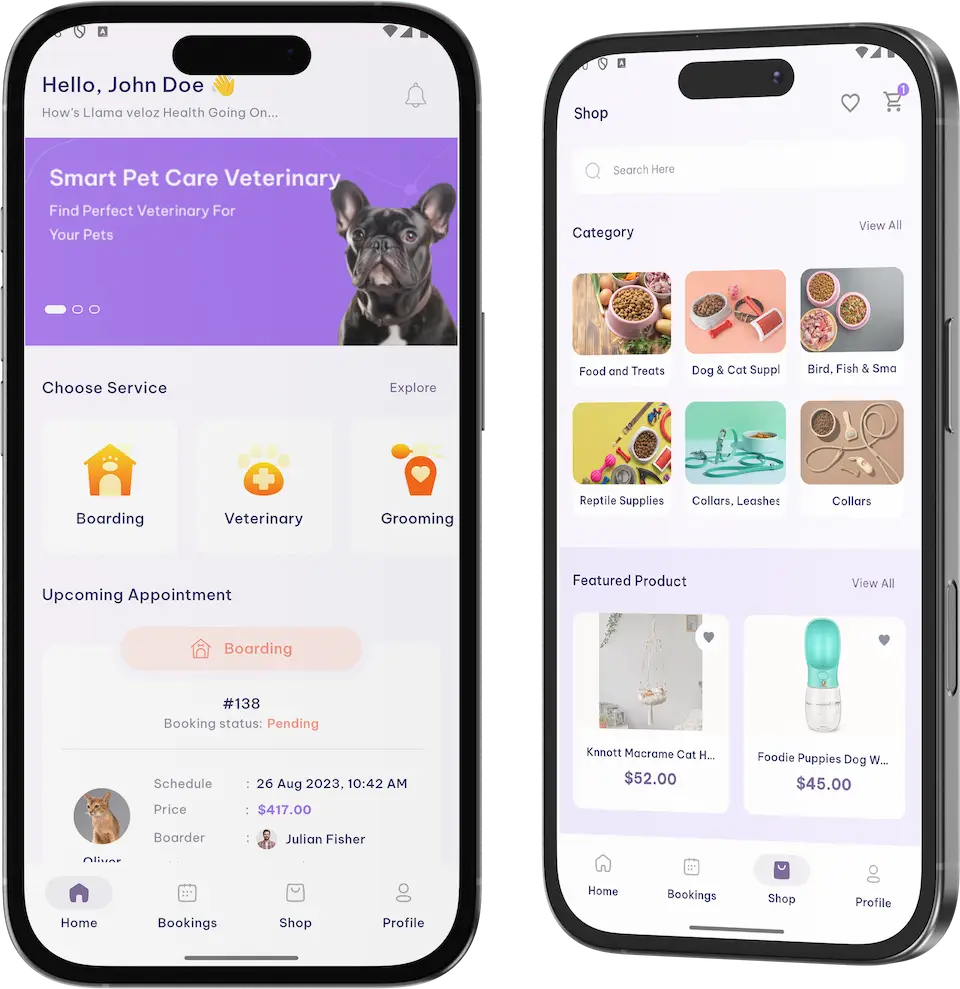
Dog Walk Clone app on two phones: the home screen with service tiles and the pet shop.01
Pick it if: You would rather open with dog walking aloneDog Walk Clone

This same product, sold walking-first: dog walkers, pet cards and bookings for operators who begin with a single service.

Explore Solution
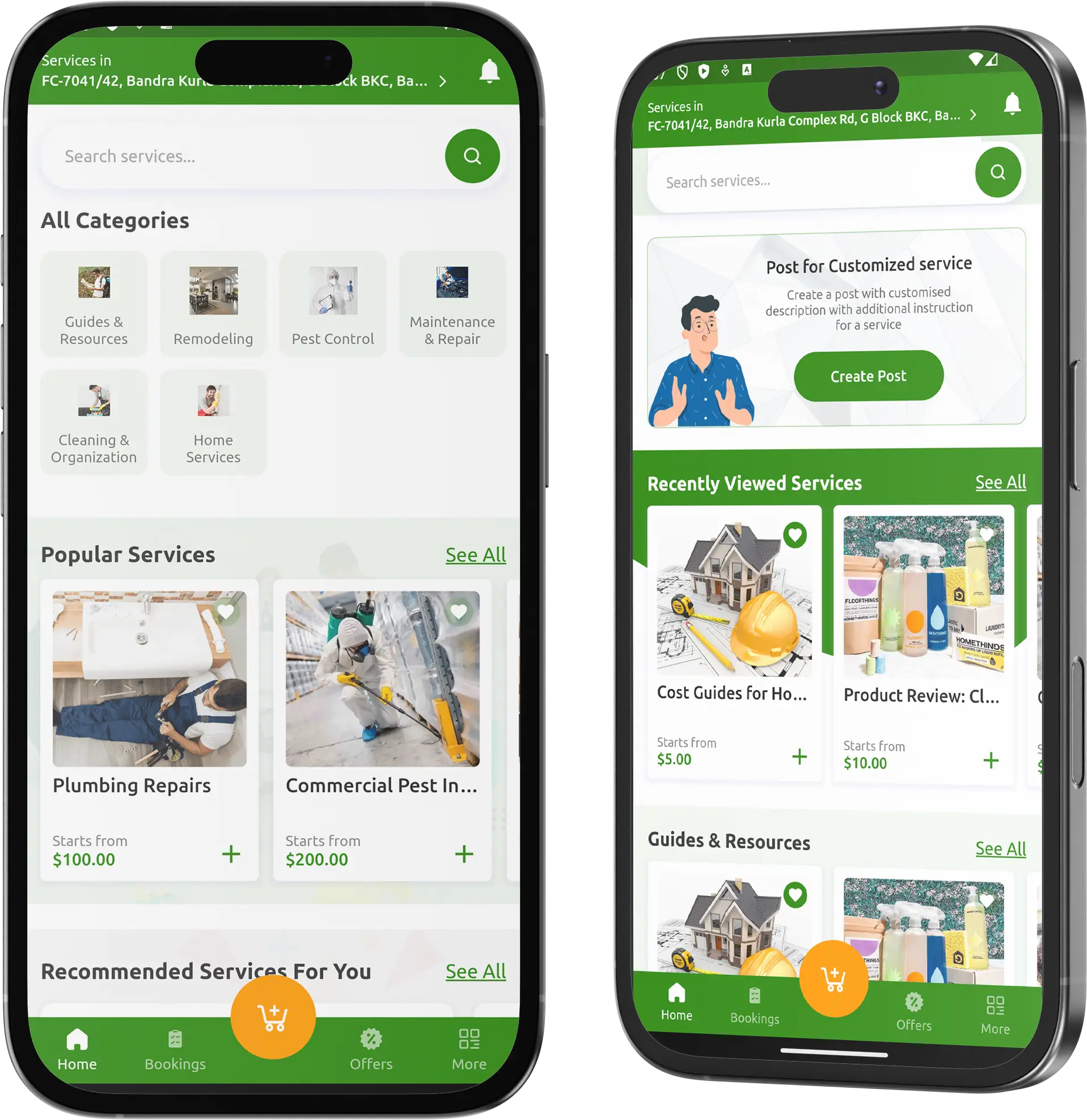
UrbanClap Clone home services app on two phones with categories, popular services and recently viewed services.02
Pick it if: Your providers visit homes and do not look after animalsUrbanClap Clone

A marketplace for home services, with categories, provider profiles and a console for the operator.

Explore Solution

Thumbtack Clone local services marketplace: two skilled tradespeople talking in a workshop.03
Pick it if: Your customers like to compare offers before choosingThumbtack Clone

A neighborhood services marketplace: customers post a job and nearby professionals answer with prices.

Explore Solution

Uber for Massage on-demand wellness booking: a rolled towel, candles and stones on a wooden table.04
Pick it if: You sell appointments for people and not for petsUber for Massage

On-demand booking for wellness treatments, delivered to your door or taken at the therapist's own premises.

Explore Solution
CatalogAll 90+ solutions

09The money side

Where the Money Comes From

Rover Clone Revenue Models - Commission, Extras, Shop Sales, Plans & Pickup

A pet-care marketplace can earn in more than one place, and because the console keeps each line separate, adjusting one never disturbs the others.

Commission on bookings is where most operators begin. The shop, plans and pickup are the lines that bring in repeat income and a second kind of order.

  1. 01

    Commission per Service

    A share of each booking is yours and the provider receives the balance. That share is an admin setting, so adjusting it requires no rebuild.

  2. 02

    Extras on the Form

    Optional extras on the booking form, such as feeding and watering, round-the-clock supervision or special care for older pets, add to the price of a stay.

  3. 03

    Shop & Supply

    Food, supplies and accessories are sold through the Shop tab while the console tracks products, orders and supply, adding a retail line to the marketplace.

  4. 04

    Subscription Plans

    The Subscription System add-on lets owners sign up to a recurring plan for regular care, billed automatically on terms you customize.

  5. 05

    Payment Costs

    Each gateway deducts a fee from the payment. Five of them appear in the release log, and how you recover that cost is a pricing choice that stays with you.

  6. 06

    Pickup & Drop

    The Pickup & Drop add-on turns collecting a pet from the door and returning it into a booking step that you can put a price on.

What published pet businesses charge or report on the lines this marketplace can run: a cut of each booking, retail margin, membership perks and card fees, with every figure sourced to a help page or an SEC filing.
Revenue streamHow it is chargedTake rateTypical take rateWhat sets the ceiling
Commission per ServiceA fixed percentage of each booking, kept separately for every service, with the rest going to the provider.Rover's help pages put its provider service fee at 20% in the US and Canada, leaving providers 80%, while UK walkers and sitters take home 85%.What providers will accept. Rover separately charges owners at checkout: 11% in the US, 11% up to CAD 65 in Canada and 15% up to GBP 49 in the UK.
Shop & SupplyThe difference between what a product costs you and what an owner pays for it in the Shop tab.Chewy's gross margin was 29.8% in fiscal 2025 against 29.2% a year earlier, a rise it attributes to sponsored ads.Retail margin is thin and rewards volume. Autoship customers account for $10.5bn out of Chewy's $12.6bn in net sales, roughly 83%.
Subscription PlansA recurring plan charge, collected automatically by the add-on, replacing a payment for each visit.Wag! Premium, according to its filing, gives 10% off all services booked and waives booking fees.A perk is funded by fees that would otherwise be yours. Wag! reported 2024 services revenue of $21.6m within $70.5m of total revenue.
Payment CostsThe gateway keeps its fee from every payment, and you choose which line absorbs it.Stripe's US list price is 2.9% plus 30 cents for a domestic card payment.Set by your country and your card mix. Stripe adds 1.5% on international cards and 1% when a currency conversion is involved.

Reading the table. Rover's own help pages supply the provider and owner fees, one each for the US, Canada and UK. Chewy's margin and Autoship sales are from its fiscal 2025 Form 10-K, the Wag! membership perk and services revenue are from its 2024 Form 10-K, and card pricing is from Stripe's US price list. These are fees and results published by other companies. Use them to sanity-check your own pricing; they are neither a quote nor a promise about what any platform will take in.

Want a revenue plan sized to your own pet-care marketplace?Shape My Revenue Plan

Market Benchmarks

Pet Care Market Benchmarks - Independent 2025-2026 Data

The revenue models above are ours. The figures below are not. They come from the American Pet Products Association and from the annual reports on Form 10-K of Rover, Wag! and Chewy, reproduced as published. Together they show how much US households spend on pets and what listed pet-care marketplaces and retailers actually earn from it.

APPA01

$158bn in US Pet Industry Spending in 2025

The American Pet Products Association reports that US pet industry expenditures reached $158 billion in 2025, up 3.7 percent, and are projected to reach $165 billion in 2026. It also reports that 95 million US households owned at least one pet in 2025, and that ownership remained stable. The release is dated 26 March 2026.

Rover 10-K02

$174.0m in Rover Revenue in 2022, Up 58%

Rover's annual report on Form 10-K for 2022, its latest annual filing, reports revenue of $174.0 million, up 58 percent from $109.8 million. Average booking value was $144, up 15 percent, and repeat bookings rose 36 percent to 4.6 million. Rover says it collects service fees from both pet parents and pet care providers.

Wag! 10-K03

$70.5m in Wag! Revenue in 2024, Down 16%

Wag!'s annual report on Form 10-K for 2024 reports revenue down 16.0 percent to $70.5 million from $83.9 million, citing a 25.8 percent fall in platform participants. About 445,000 participants transacted in the fourth quarter. Services revenue, mostly fees charged to pet caregivers, was $21.6 million, against $24.4 million in 2023.

Chewy 10-K04

$10.5bn in Chewy Autoship Sales in Fiscal 2025

Chewy's annual report on Form 10-K for fiscal 2025 reports net sales up 6.2 percent to $12.6 billion. Autoship customer sales rose 11.8 percent to $10.5 billion, net sales per active customer rose to $591, and active customers grew 4.0 percent to 21.3 million. Chewy also names sponsored ads as a driver of gross margin.

Where each figure comes from.

American Pet Products Association, U.S. Pet Industry Reaches $158 Billion in 2025, Poised for Continued Growth in 2026, 26 March 2026 - americanpetproducts.org

Rover Group, Inc., Annual Report on Form 10-K for the year ended 31 December 2022, filed 9 March 2023 - sec.gov

Wag! Group Co., Annual Report on Form 10-K for the year ended 31 December 2024, filed 24 March 2025 - sec.gov

Chewy, Inc., Annual Report on Form 10-K for the fiscal year ended 1 February 2026, filed 25 March 2026 - sec.gov

All figures are the publishers’ own, reproduced as published. Rover's figures are for fiscal 2022 because that is the most recent annual report it has filed, and Wag!'s are for fiscal 2024. Metric definitions differ by company and are as each publisher states them. They describe the companies and markets named, not any platform Miracuves builds, and nothing here is a revenue projection for your business.

Market Timing

Why Open a Pet-Care Marketplace in 2026?

Pet care is local and runs on trust, which suits an operator who recruits good providers and gives owners one reliable place to book them. A marketplace under your name keeps the customer relationship and the commission that a third-party directory would otherwise hold.

01

One App Beats Five Phone Numbers

An owner who needs a walker this week and a boarder next month would rather find both in one app. A marketplace with several service lines gives them one place to book and pay.

02

Providers Want a Workspace

Walkers, boarders and trainers value a panel where they set services and prices, and an app that shows incoming bookings. That workspace is what keeps good providers loyal to your brand.

03

A Pet Card Lowers Friction

When a booking begins from a saved pet, with its picture, name and breed attached, repeat bookings take seconds and the provider knows which animal is arriving.

04

Retail Rides on the Same Customer

Owners who book a stay also buy food and accessories. A shop in the same app adds a second kind of order without a second customer acquisition cost.

05

Plans Smooth Out Demand

Regular care suits a recurring plan. The subscription add-on bills it automatically, which is steadier than relying on owners to rebook every time.

06

Buying Beats Building Here

Roles, booking, payments, shop and console are the bulk of a pet marketplace, and they exist already. After our 6-day build, a white-label copy is running on your own hosting.

Counted Out

6

Service Lines

3

Provider Panels

4

Owner App Tabs

6

Build Days

The hard part of a marketplace is the quiet middle: provider workspaces, tax and commission settings, a shop back office and a console that adds it all up. In this base that middle is finished.

Commercial Outlook

Marketability, Revenue Potential & Business Prospects

A pet-care marketplace earns when owners trust it enough to hand over an animal and providers trust it enough to build their working week on it. Everything below aims to ease those two decisions, and to keep the relationship yours once they have been made.

  1. 01

    Commission Across Service Lines

    The operator keeps a share of every booking in every line, so revenue follows the number of stays, walks and sessions and not the size of your team.

  2. 02

    A Second Line in the Shop

    Shop sales and orders sit in the same console as bookings, so a retail line can start without a second system or a second customer base.

  3. 03

    Providers and Owners You Own

    Accounts, pet cards and booking history live in your database, so the worth of the marketplace accumulates under your control rather than a directory's.

  4. 04

    Freedom to Move

    Holding the complete source code means a later change of host, team or direction needs nobody's permission.

Main Revenue Levers
  • Commission per Service
  • Extras on the Form
  • Shop & Supply
  • Subscription Plans
  • Payment Costs
  • Pickup & Drop
Long-Term Value

Supply and trust, more than features.

  1. 01Providers with their own prices and clients rarely move
  2. 02Owners with saved pets and a history return
  3. 03The build-up starts at launch and stays in your database
  4. 04A careful approval process for new providers is the second barrier
Example Revenue Scenarios

These three cases vary only in provider count, and each names the line that leads at that size. Treat them as prompts for planning, not forecasts of any platform's earnings.

Neighborhood Marketplace10Providers Listed

Booking commission carries the early months.

A small local marketplace where a few walkers and hosts take bookings and commission covers running costs. An example size, not a forecast.

Citywide Network100Providers Listed

Commission, extras and the shop all contribute.

A network across a whole city, with walkers, boarders and trainers, where extras and shop orders top up commission. An example size, not a forecast.

Multi-City Pet Brand1,000Providers Listed

Many cities, every line switched on.

A brand that spans cities, where per-service commission, plans and shop sales stack up and the dashboard points to where to concentrate. An example size, not a forecast.

10Why us

Why Miracuves

Miracuves Against Other Rover Clone Developers

A pet-care marketplace can come from a freelancer, an agency, an off-the-shelf booking script, or a ready-made base from a team that has delivered it before. Each route balances cost, speed and risk differently.

What Founders Value

  • 01

    Supply Side Included

    Walker, Boarder and Trainer panels plus an employee app come with the base, so providers are designed in from day one instead of added later.

  • 02

    Pets Lead the Booking

    A booking starts from a saved pet, shown with a picture, name and breed, whereas a generic script usually knows only the customer.

  • 03

    Retail Beside Services

    A product catalog with orders and supply sits next to the service lines, in the same app and the same console.

  • 04

    Visible Money Logic

    Tax, commission by service, employee earnings and five gateways are all visible in the console and the release notes.

  • 05

    Full Code Ownership

    The entire codebase arrives unencrypted, leaving nobody able to reprice it or change the terms afterwards.

  • 06

    Honest Labels

    The page keeps base features, add-ons and your own tasks apart, and states that GPS tracking is an add-on.

Comparing the Rover Clone With Scripts and Agencies, Item by Item

FactorMiracuvesMiracuves Rover CloneOff-the-Shelf Booking ScriptCustom Agency Build
Launch Speed6 days of build timeUnknown, or DIYQuoted per project, often months
Code OwnershipAll of it, unencryptedOften restricted or lockedNormally yes
Pet-Care DepthPet cards, booking form, status list, shop and six service linesGeneric appointment pagesAs far as the budget reaches
Provider ToolsWalker, Boarder and Trainer panels along with an employee appHardly ever includedMade to order
Payments & TaxFive gateways in the notes; tax by percentage or flat amountVaries by scriptCustom integration work
Admin & DisputesDashboard, commission, earnings, dispute desk, setup wizardSlim or absentCustom work for an added charge
Security & ComplianceRole permissions, vetted uploads, plain statements of limitsBasic at bestDepends on the team
Cost, Speed & QualityFixed price, quick, a proven baseCheap but riskyExpensive and slow
Support & Updates60 days of guidance, 6 months of bug fixes, 12 months of updatesSeldom offeredWhatever the contract states

Not every route to a pet-care marketplace comes through its first busy season intact. The rows above show where they part ways.

Talk to Our Team

What Changed

Rover Clone Release History - Versions & Updates

Latest release first, covering both phone apps and the admin console. None of these notes is dated.

VersionChanges
V2.2.6New and changed
Tracked the Flutter 3.27 line
Cured a gray screen in the owner app that showed when every banner was off and the app refreshed
Gave the employee sign-up screen more breathing room
Made the Clear Filter button work in the employee booking filter
Repaired
Repaired a clipped thumbnail in the Create Customer pop-up
Blocked removal of categories, brands, tags and units that are still used
Corrected the layout when values are added in Create Variations
Repaired page numbering throughout the panel
Refused corrupted files at image upload
Fixed a record saving with its edited image, and the edit-mode case where cancelling an upload changed the icon
Refused a second entry for the same country
Removed an unexpected notification pop-up when Events was opened
V2.2.5Repaired
Restored role permissions
Corrected the tax calculation
Corrected totals grouped by date
Repaired search filters
Tidied layouts
Corrected the booking address display
Searching by ID works again
Corrected earnings so walker staff and admins receive the right amounts
Closed a loophole that allowed the same country twice
Repaired tag search
Repaired shop search
V2.2.4New and changed
Added an extra information section to bookings
Supported JDK 21
Polished the interface
Settled booking filter, tax percentage against fixed amount, Paystack dark-mode colors, Stripe and Razorpay issues
Introduced a Setup Wizard that guides first-time admin onboarding
V2.2.3New and changed
Introduced admin-panel notification templates, one set per user role
Put a country picker on the registration screen
Resolved wrong payment amounts, wrong addresses and Google login trouble
Sped up the apps
V2.2.0New and changed
Cut app configuration requests that served no purpose
Switched Firebase push over to its HTTP v1 API and away from legacy FCM
V2.1.0New and changed
Introduced multi-vendor support: boarders, walkers and trainers run their own services and prices
Added Cinet and Sadad to the supported gateways

Let's build together

Let's turn your pet-care marketplace idea into a platform people can book.

Request a free consultation to come away with a settled timeline and frank answers. Your trust counts for more with us than a fast sale.

  • Free first consultation
  • First reply in under 2 hours
  • No lock-in contract
  • The complete source code is yours

11Read on

Blog & Resources

Rover Clone Reading List: Fresh Guides & Insights

Follow our guides on how a Rover-style pet-care marketplace works, what a clone script contains and how such a platform stays safe.


The product5 questions

01What exactly is the Rover Clone?

Think of it as a pet-care marketplace you can put your own name on. Owners save a card for each animal and book boarding, grooming, training, walking, day care or veterinary appointments. Walkers, boarders and trainers use panels and an app of their own, the operator watches the business through an admin console with a revenue dashboard, and a pet shop sells beside the services. We deliver it rebranded in 6 days, along with the entire source code.

02Can I shape the platform around my own business model?

Certainly. We configure your branding, your service list, commission rates and tax rules before launch, and since the whole source code becomes yours, your developers or ours can reshape screens, flows and features afterward. Work outside the base, whether an add-on or a bespoke flow, gets a written scope and price before anything starts.

03Can I launch in my own country?

Anywhere you can arrange hosting and a payment gateway account. Registration includes a country picker, the console keeps a list of countries, and the release notes mention five gateways: Sadad, Cinet, Paystack, Razorpay and Stripe. Regulations for pet care vary between countries and often between states or cities, so research each market before opening.

04Is GPS tracking part of the Rover Clone?

No, the base build leaves it out. Neither the demo screens nor the release notes show a walk being tracked, so we sell GPS Tracking as an add-on that follows a pet through a walk or a ride. It receives its own scope and price.

05Will the apps run on both iPhones and Android phones?

Yes. Android and iOS are both covered by the two apps, the one for owners and the one for employees, which are Flutter builds released through developer accounts under your ownership. Apple and Google carry out their own reviews, which are not counted in our 6-day build.

Owners & bookings4 questions

06How does an owner book a stay or a service?

Once registered, an owner taps a service tile on the home screen, selects a pet, fixes drop-off and pickup slots, chooses a provider and ticks optional extras. The form shows the total including tax and Book Now submits it. A confirmation screen displays the booking number with a Google Calendar link, and the booking takes its place in the bookings list, where its status sits beside a Cancel button.

07Which services can owners book?

The console lists six lines: boarding, veterinary, grooming, training, walking and day care, plus a Pet Sitter List. On the owner home screen, tiles for Boarding, Veterinary and Grooming sit above an Explore link to the rest. Veterinary is only a booking category, and each practice must handle its own licensing.

08What does a pet card hold?

My Pets shows every animal showing a picture, a name and a breed, and offers an Add Pet link. Owners pick from that list at booking time, and the admin console holds an Owners And Pets list. Anything richer, health notes for instance, is outside the base build and can be quoted as custom work.

09Is there a pet shop in the app?

It does. A Shop tab sits next to Bookings, with shelves for food, dog and cat gear and collars, priced featured products, a cart, favorites and a search box. The admin console backs it with Product, Product Variations, Orders and Supply menus.

Providers & panels6 questions

10Which provider roles get a panel of their own?

The demo names Walker, Boarder and Trainer panels, and an employee app serves providers who work from a phone. Multi-vendor support came in release 2.1.0, so each of these providers manages their own services and prices. The admin Users menu includes a Pending Employee list for reviewing newcomers.

11How does a boarder list services and set prices?

A boarder registers, completes a profile, lists services, sets prices and states when they are free. Owners then book from that availability inside the app.

12Can a boarder look after several animals at the same time?

Yes. A boarder can cap capacity and run several bookings side by side from the dashboard, while an owner may save as many pets as they wish.

13How do trainers offer programs and fix their prices?

Trainers list every program they offer, from obedience and behavioral correction to puppy training, and set both the price and the length of a session. They reach owners through in-app messaging, which the V1 description says covers chat, video calls and updates.

14How and when do providers get paid?

When a booking completes, the platform processes the payment and the provider's share is sent to the bank account linked to their profile. An Employee Earnings entry under Finance shows each provider's earnings, and the exact transfer timing follows the gateway you connect.

15Is there a separate groomer panel?

Not one we advertise. Grooming is a service line with its own tile on the owner home screen and its own menu in the console, yet the demo's panel list names only Walker, Boarder and Trainer. If grooming is central to your plan, raise it on a call and we will show how it would be set up.

Operator, money & shop7 questions

16What can an operator do in the admin panel?

It opens on a dashboard showing completed and incomplete services, revenue and profit of services, a monthly revenue chart, recent bookings, top products and popular employees. Beyond that it covers bookings, the six service menus, employees and owners, reviews, the shop, tax, employee earnings, daily and overall booking reports, roles, notification templates, countries, app banners and a setup wizard.

17How are commission rates set for providers?

Each service carries a commission percentage that you set in the admin panel, so a walk, a grooming session and a training session may all have different rates. Altering a rate requires no rebuild.

18Where do complaints and disputes go?

They go to the admin panel's dispute desk, where complaints, refund requests and tickets are settled, with the booking record kept alongside.

19Which payment gateways are supported?

Sadad, Cinet, Paystack, Razorpay and Stripe are the gateways mentioned in the release notes. Tax is configured as a percentage or a flat sum, and the booking form shows the total with tax. You must hold your own gateway account, with KYC finished, before launch.

20Which ways of earning does the platform support?

At base level: commission on bookings, set service by service, extras that owners tick on the form, and sales through the shop. The Subscription System add-on brings recurring plans and the Pickup & Drop add-on brings a collection step you can price. Further income, such as partner offers, depends on deals of your own.

21How soon can a pet-care marketplace expect its first income?

Commission usually comes first, since selling it requires nothing additional: it is earned on the first paid booking. Extras on the form and the shop come next as services and products get listed. Plans and pickup depend on their add-ons, while partner or referral income relies on arrangements of your own, agreed separately and not built in.

22What makes a pet-care marketplace hard to copy?

Supply and trust, more than features. Providers who have built prices, diaries and regular clients on your platform rarely move, and owners with saved pets, a booking history and reviews have reasons to return. This base lets that build-up begin at launch and stay in your database. A careful approval process for new providers is the second barrier, since owners trust a platform that is choosy about who cares for their animals.

Launch & Miracuves5 questions

23What support and updates come with the platform?

Three windows open together at launch and run in parallel, free of charge: 60 days of dedicated platform guidance, 6 months of priority bug fixes and 12 months of continuous product updates.

24How quickly can the marketplace go live?

The build takes 6 working days, during which we brand the apps and the web platform as yours, install them on your hosting and prepare the apps for release from your own developer accounts. Review by Apple and Google happens on their schedule and is not part of those 6 days.

25Will I receive the source code?

You receive all of it, unencrypted, so your developers can modify, extend and redeploy the code. No per-seat fee applies, and no license must be renewed to keep it running.

26What do I need to bring before launch?

You supply hosting and a domain, developer accounts for the app stores that are yours and verified, your logo and business details, a payment gateway account with KYC completed, and any third-party keys the integrations need. Miracuves neither applies for gateways for you nor writes your privacy policy or terms of service.

27Why have Miracuves build a Rover clone?

Miracuves has delivered 9,000+ projects since 2010 for 6,000+ clients, with 90+ ready-made solutions in its catalog. The Rover Clone launches in 6 days with the full source code and three overlapping support windows, and this page is candid about what the base includes, what is an add-on and what falls to you.

Disclaimer

Miracuves is an independent software development company. This platform is our own product and is not affiliated with, connected to, sponsored by, or endorsed by any third-party service.

Read our full Legal Notice & Disclaimer →
Why this name

“Rover Clone” is used descriptively. It is how the software industry refers to building a platform of this category, and how clients search for it.

Who built this

The entire design and codebase is built by our own team. The product contains no code, design, graphics, or content originating from any third-party website or application.

Trademarks

All third-party names and marks that may appear on this page are the property of their respective owners, referenced solely to describe the category of software offered.