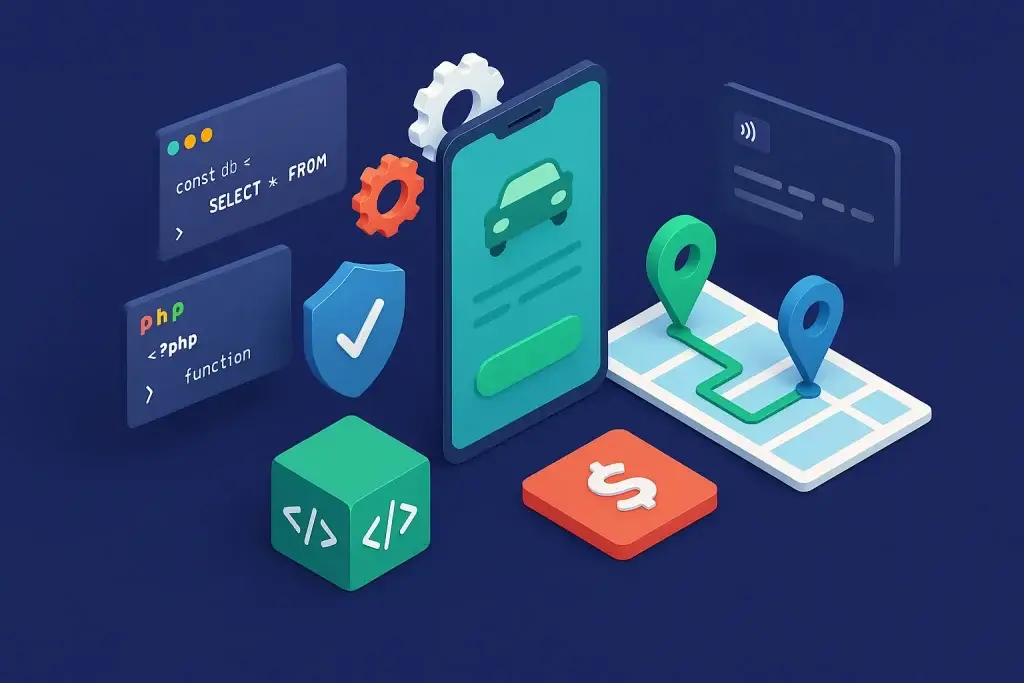
Fare Negotiation App · Production Ready

inDrive Clone App - Fare Bidding Ride-Hailing Platform

Built by Miracuves, this white-label, ready-made inDrive clone hands you source code you own for a Flutter rider app, a Flutter driver app with fleet-owner mode and a Laravel admin and dispatch console, live as your taxi brand within six working days.

Riders post a trip with the fare they want to pay, nearby drivers take it or propose their own, and the rider picks the driver; fixed fares, rentals, intercity trips and parcels run beside it on one platform, in 28+ languages with right-to-left layouts. A new service module or fare rule is custom work, quoted in writing and built in 2-8 weeks.

Launch in 6 Days with

  • Source Code
  • Rider App
  • Driver App
  • Fleet-Owner Mode
  • Dispatch Console
  • Android + iOS

StackFlutter · Vue · Laravel 12 · MySQL · Firebase

MXDrive console · DispatchIllustrative
Service modules11
Roles11
Payment gateways24+

Sample bid activity stream

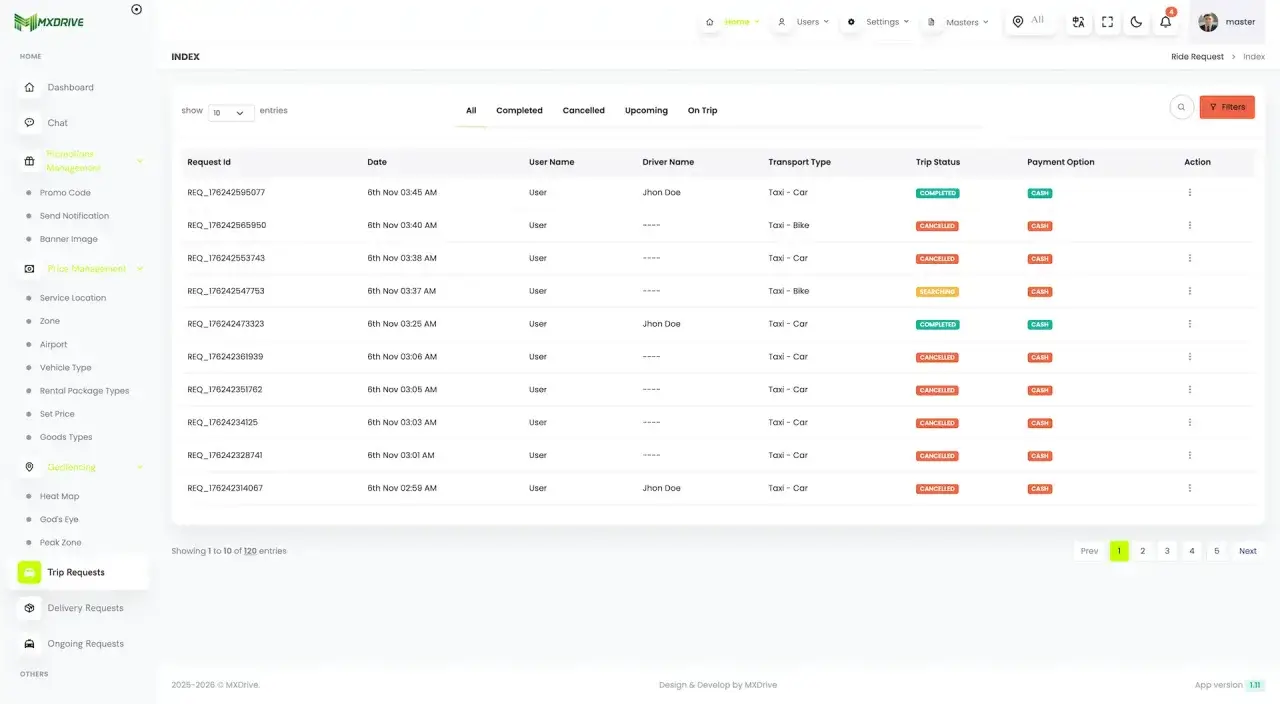
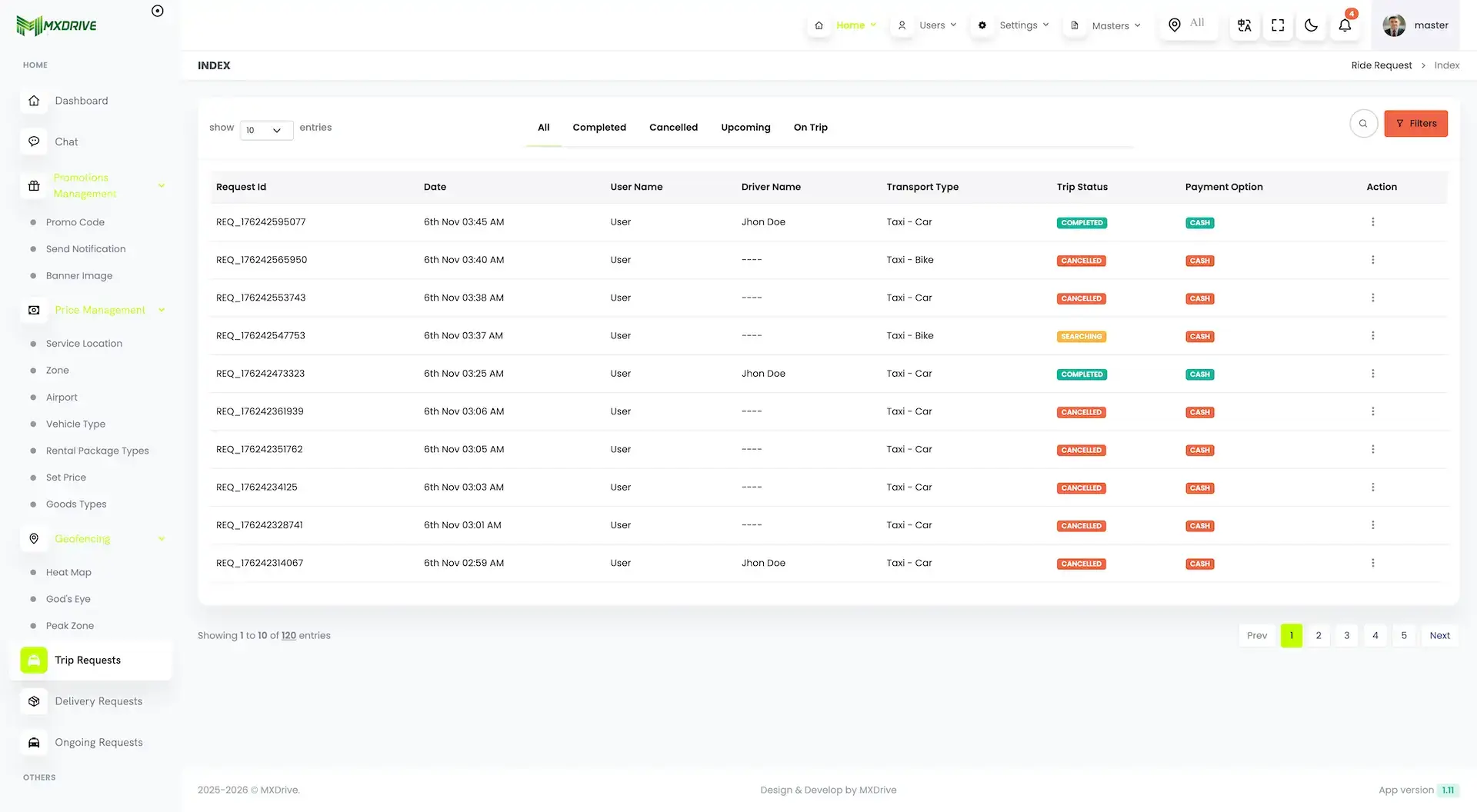
Admin · Trip RequestsReal screen
inDrive Clone App - Fare Bidding Ride-Hailing Platform - real admin screen, Trip Requests
App in action
Bidding and fixed faresone fare engine, one console
  • 11Service Modulessix for taxi, rental, outstation and delivery, three for bidding and two for shared rides
  • 134Permission Keysacross 11 roles in the admin and dispatch console
  • 0%Revenue Share With Miracuvesno royalty on any fare, bid or parcel, ever
  • 24+Payment Gatewaysplus cash, wallet and wallet-plus-cash
  • 6Days to Launchand if the delay is ours, we keep going free
  • $3,099Paid Once, Not Rentedsource code yours, no per-seat fee, no monthly rental

Live in six working days, or we keep working free until you launch. Every build carries 60 days guidance, 6 months bug fixes and 12 months updates.Verify every figure

Bidding Is a Switch, Not a Fork

Bidding, Bidding Outstation and Delivery Bidding are modules you turn on per service, with guardrails for bid ranges. Turn them off and drivers see fixed-fare offers only.

You Hold the License, We Supply the Platform

This is the software a ride-hailing operator runs, not a transport operator. Permits, driver licensing, trip insurance and any fare rules your city sets stay yours to obtain.

Card Numbers Stay on the Gateway Side

Card entry runs on gateway-hosted pages and saved cards are kept as gateway tokens, so no card number enters the platform; Stripe, Razorpay, PayPal and 21 more gateways come built in.

Ready to launch a fare-bidding ride-hailing app in your city?Book a Free Strategy Call

6,000+ companies across the globe choose to work with Miracuves

Miracuves recognised as an expertise providerMiracuves official member of the Forbes Technology CouncilDesignRush top design agencies in India badgeTrustpilot top software development company badgeThe Manifest top managed software development company badgeDesignRush top software development company badgeGoodFirms top software development company badgeClutch top 1000 company badgeClutch top managed service provider in the US badge

01See it live

Live in Action

inDrive Clone Demo - Rider, Driver, Operator & Website

Every surface below is the inDrive clone Miracuves ships as MXDrive, running on a shared demo environment, so look around but do not transact. It is seeded with sample riders, drivers and trips. Install the rider app and the driver app on two Android phones to see a request travel from one to the other. Then sign in to the admin console and watch the same trip from the operator side.
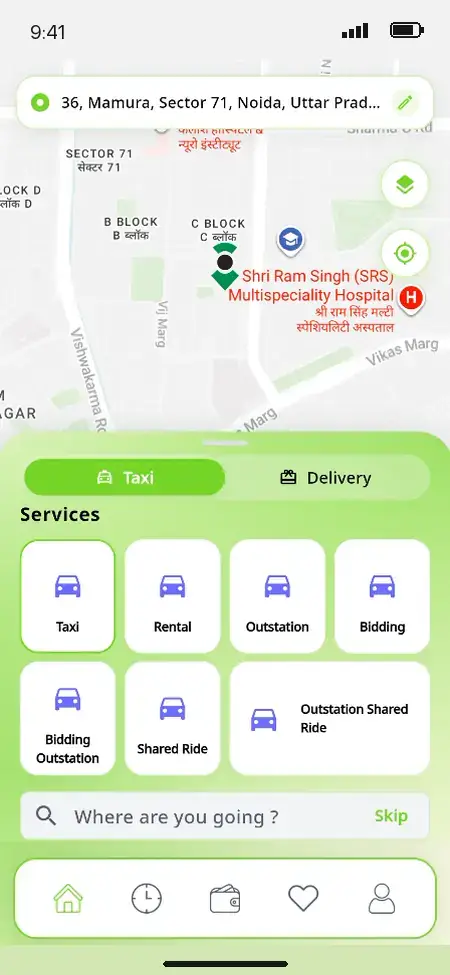
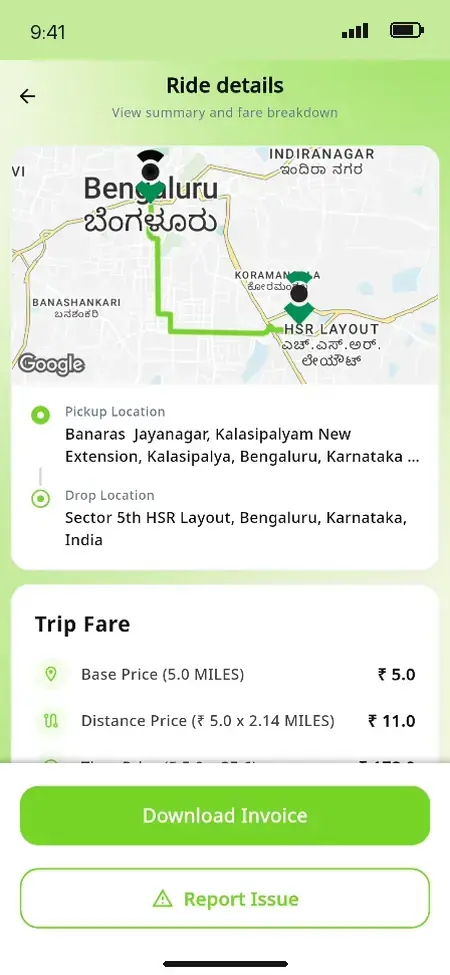
MXDrive rider app home screen with a live map, a Taxi and Delivery toggle and a services grid listing taxi, rental, outstation, bidding, bidding outstation and shared ridesMXDrive rider app ride details with the route on a map, pickup and drop-off, a fare breakdown, an invoice download and an issue report option
Rider app

inDrive Clone - Book, Offer a Fare & Pay

What a rider sees: a map home screen with Taxi and Delivery. A services grid puts Bidding and Bidding Outstation beside Taxi, Rental and Outstation, and ride details come with a fare breakdown and an invoice. The app also has a wallet with saved cards, ride history, saved places, SOS contacts and a language switch.

  1. 1Install the rider app on Android
  2. 2Login with the rider credentials below
  3. 3Review: Services, Ride details, Wallet
Try:9876543210 | User_321
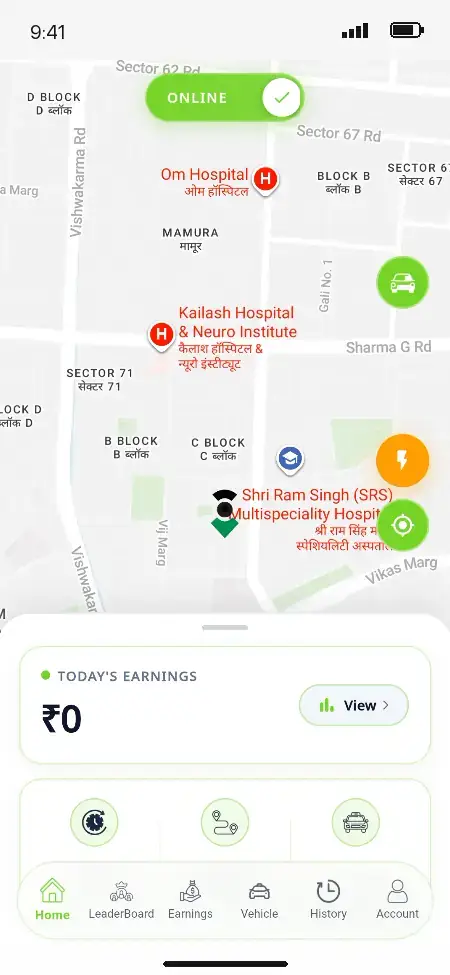
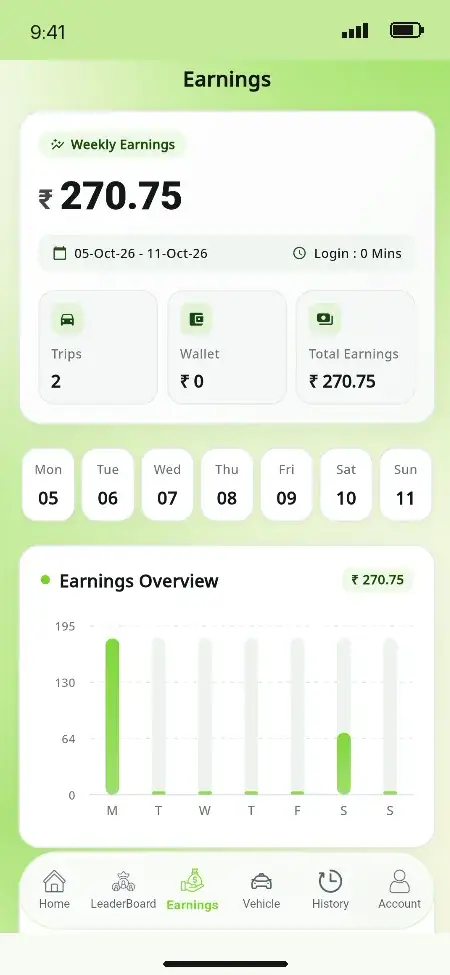
MXDrive driver app home screen with an online toggle, a live map of nearby requests and today's earningsMXDrive driver app weekly earnings with trip count, wallet, total earnings and a day-by-day earnings chart
Driver app

inDrive Clone - Go Online, Respond & Earn

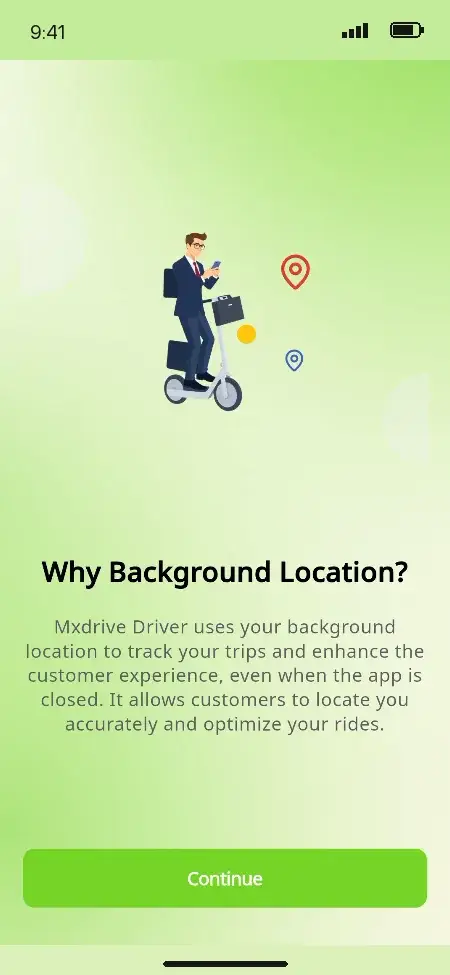
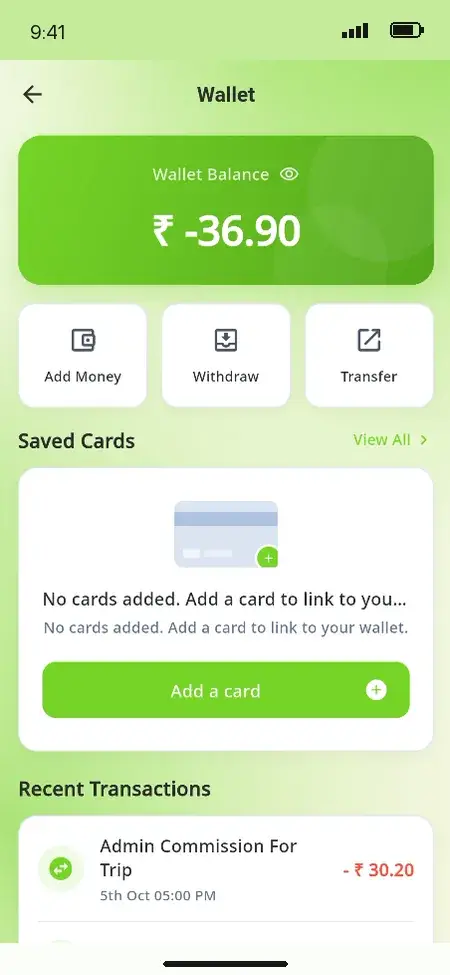
This is the supply side, and the app most clone scripts treat as an afterthought. Drivers go online and offline with background location and see incoming requests and trip details with the route and fare. Weekly earnings and a wallet showing the platform commission sit there too. The same app holds vehicle and document records, incentives, a leaderboard and a fleet-owner login.

  1. 1Install the driver app on Android
  2. 2Login with the driver credentials below
  3. 3Review: Home, Earnings, Wallet, Vehicle
Try:9876543212 | Driver_321
MXDrive operator console ride request queue with trip status, transport type and payment method, beside the price management, geofencing and promotions menus
Dispatch backoffice

inDrive Clone - Admin, Dispatch & Settings

Where the platform is run, with trip and delivery requests showing status, transport type and payment method. You also manage service locations and zones, fare cards, surge and peak zones, and the bid-ride settings. God's Eye and the heat map sit here, along with drivers and their documents, promotions, wallets and withdrawals. The dispatcher console handles bookings taken by phone.

  1. 1Launch the admin console through your browser
  2. 2Login with the admin credentials below
  3. 3Review: Requests, Zones, Fares, Bid settings
Try:admin@demo.com | Admin_$321
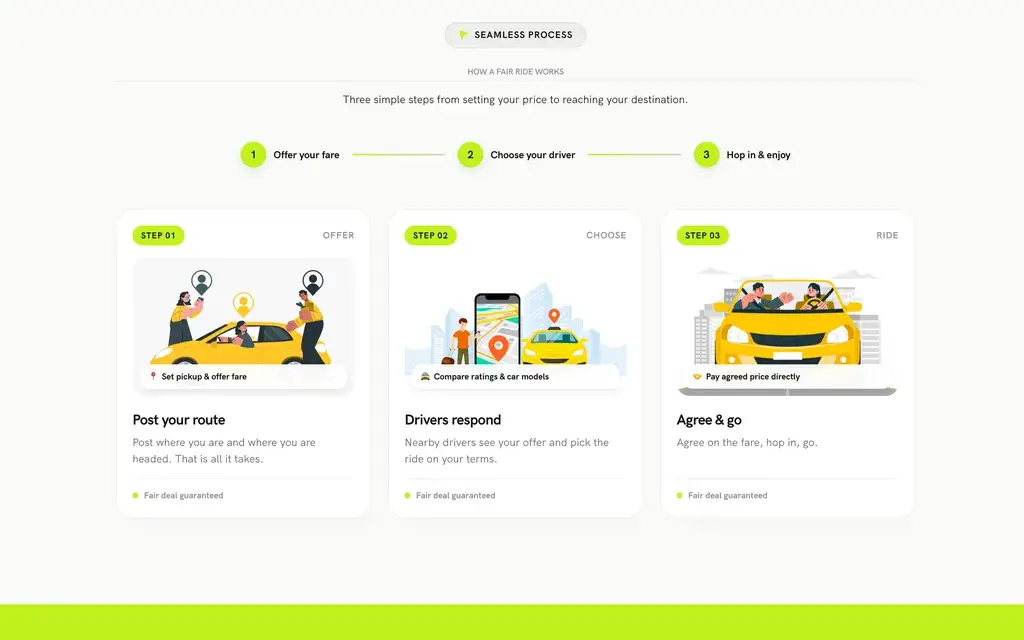
MXDrive public website showing how a negotiated ride works in three steps: post your route and offer a fare, drivers respond, agree and go
Website & partners

inDrive Clone - Website, Franchise & Agent

The public website ships with the platform and is edited from the admin CMS. It covers services, the three-step fair-ride explainer and driver sign-up. Behind it sit the partner logins the demo also carries: a franchise console for a regional licensee and an agent console for booking rides on behalf of a customer.

  1. 1Open the public website
  2. 2Read the services and fair-ride sections
  3. 3Then try the franchise or agent login
Franchise:franchise@demo.com | Franchise_321

See Bids Play Out

inDriver Clone App Video Demo: Fare Negotiation, Reverse Bidding & Ride Flow

This is our overview of the fare-negotiation model the platform is built around. The rider offers a price for the trip, drivers respond, and the ride goes ahead at the fare both sides agreed. It is an orientation, not a full walkthrough, so use it to judge whether the model fits your market. Then open the demo above to see the same flow in the rider app, driver app and admin console. If one part matters more to you, book a call and we will take you through it screen by screen.

Book a Free Strategy Call

Rider and Driver Screens Charted

Rider, Driver and Website Screens of a Fare-Bidding Taxi App

Miracuves' inDrive clone pairs two Flutter apps with the website they sit behind. The rider app and the driver app are native builds on the same Laravel API, not web pages in a wrapper, and the driver app carries a fleet-owner mode so a vehicle owner manages their drivers without a second install. The public website is the third surface, run from the admin CMS.

Flick through the tabs to follow one trip. The rider picks a service and posts the ride, and a driver goes online and takes the request. Both see the same route and fare breakdown, and the rider pays from the wallet or in cash. Earnings and commission land in the driver wallet. The admin, dispatcher, fleet-owner, franchise and agent consoles are live in the demo, and they are added here as their screens are captured.
MXDrive rider app home screen with a live map, a Taxi and Delivery toggle and a services grid listing taxi, rental, outstation, bidding, bidding outstation and shared rides
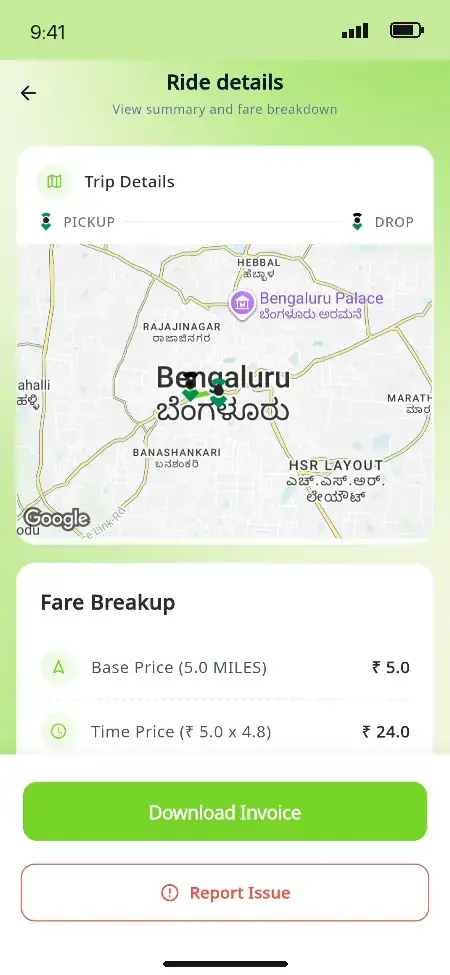
MXDrive rider app ride details with the route on a map, pickup and drop-off, a fare breakdown, an invoice download and an issue report option
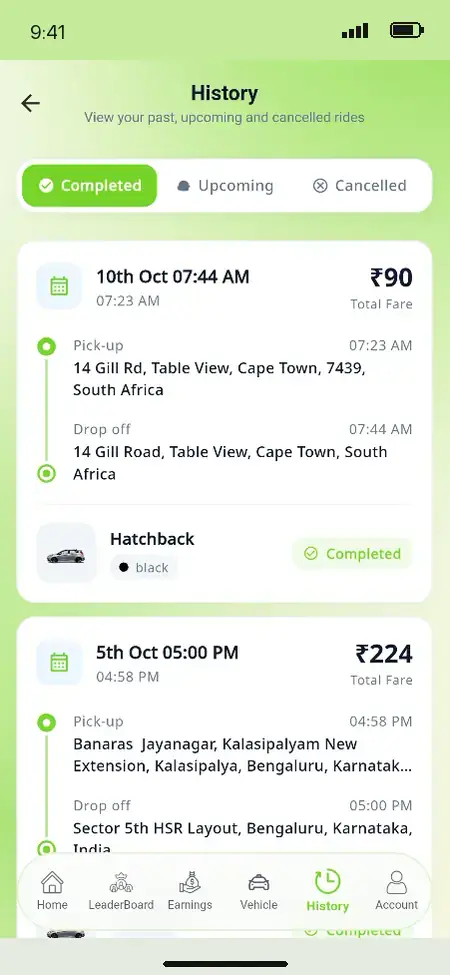
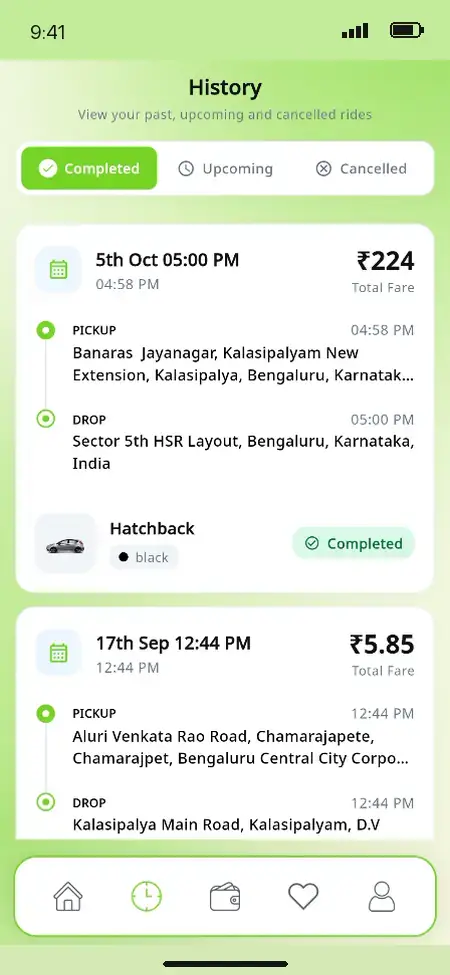
MXDrive rider app ride history showing completed, upcoming and cancelled trips with pickup, drop-off, vehicle and total fare
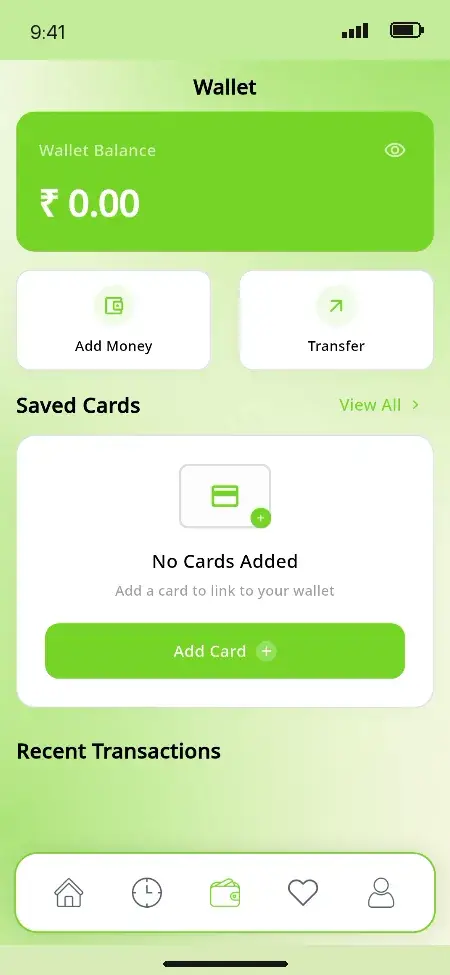
MXDrive rider app wallet with the balance, add money and transfer actions, saved cards and recent transactions
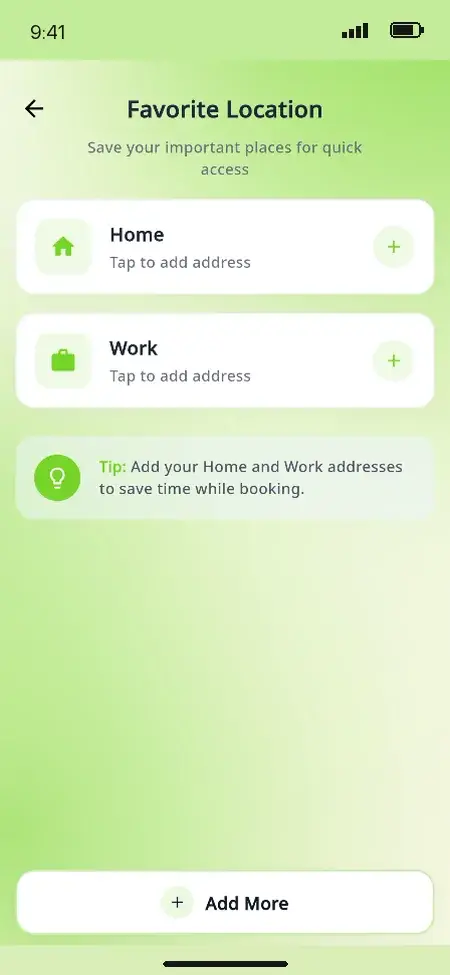
MXDrive rider app saved locations screen for home and work addresses used for quicker booking
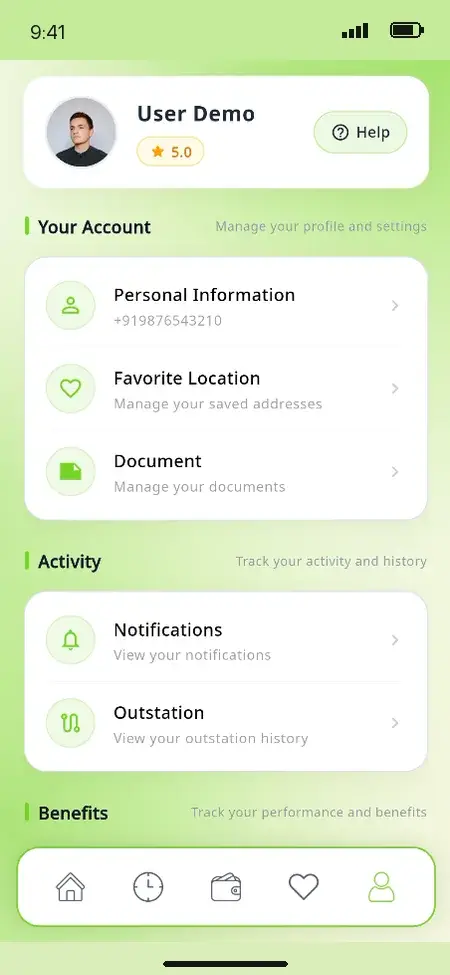
MXDrive rider app account page with the rider rating and links to personal information, saved locations, documents, notifications and outstation trips
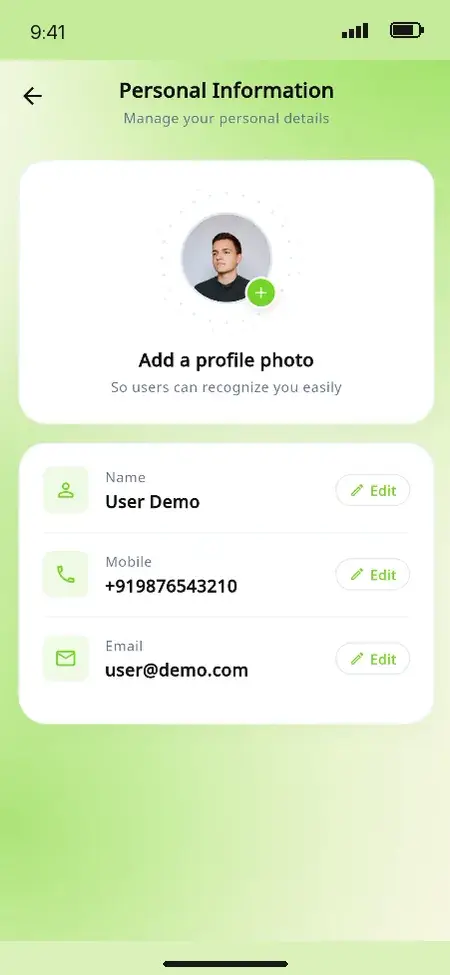
MXDrive rider app personal information screen with editable name, mobile number and email
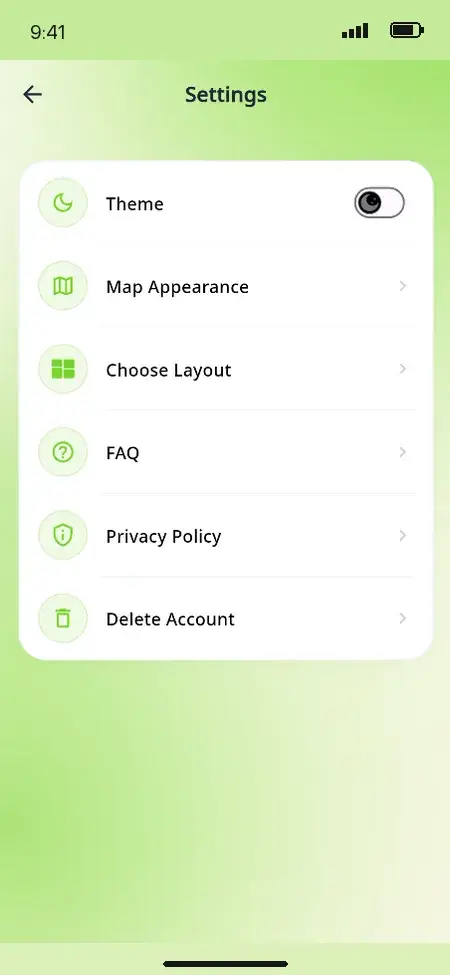
MXDrive rider app settings for theme, map appearance, layout, FAQ, privacy policy and account deletion
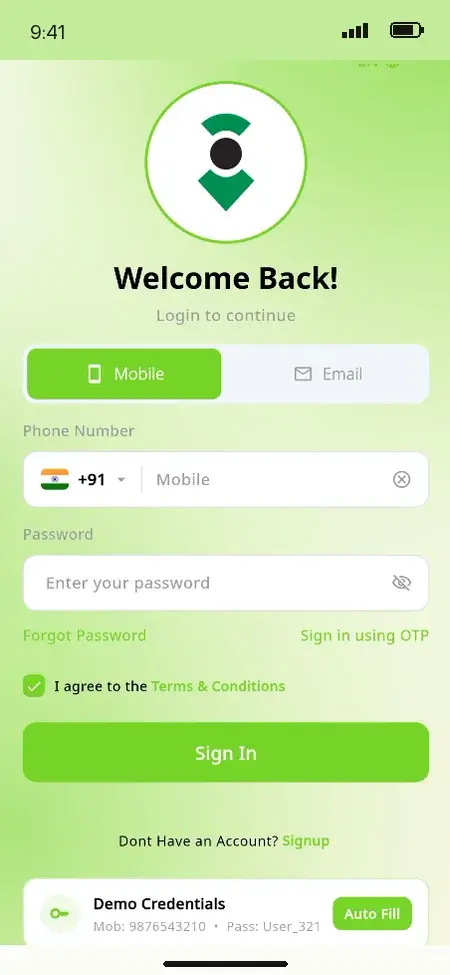
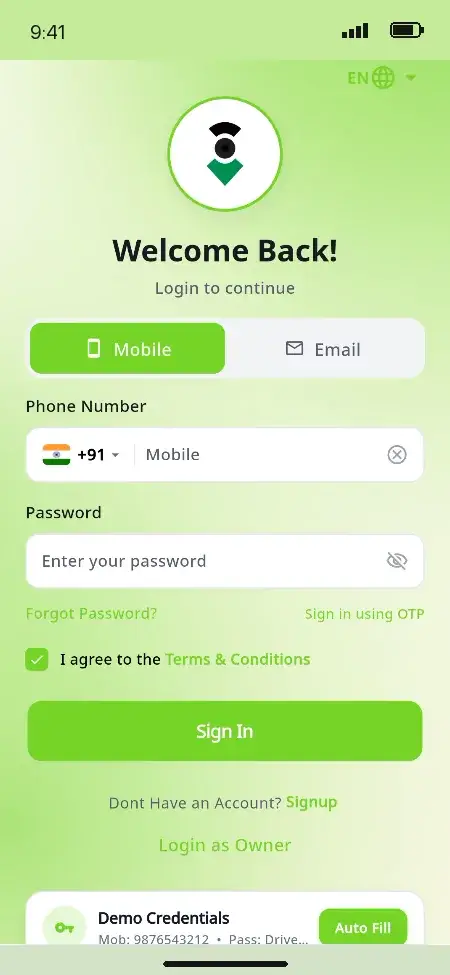
MXDrive rider app sign-in screen with mobile number or email login and a one-time password option
9 screens · scroll →
MXDrive driver app onboarding screen explaining why background location is used to track trips and match ride requests
MXDrive driver app sign-in screen with mobile number or email login and a fleet owner login link
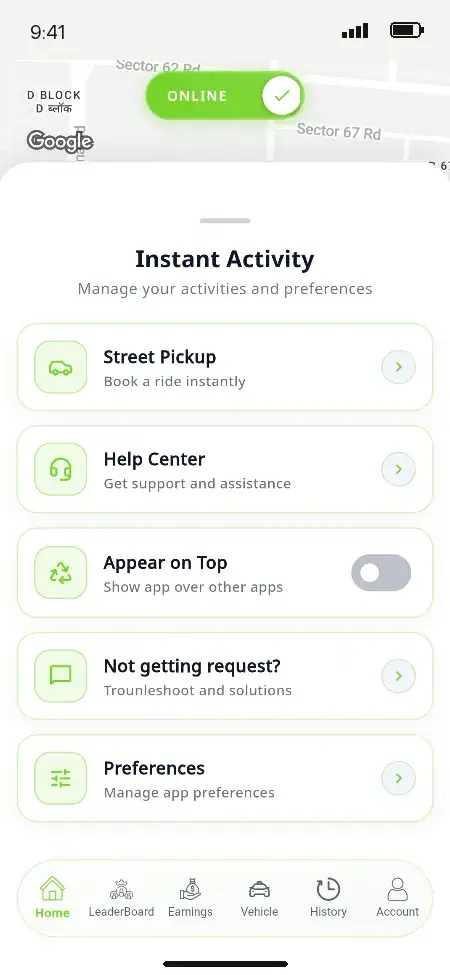
MXDrive driver app home screen with an online toggle, a live map of nearby requests and today's earnings
MXDrive driver app instant activity panel with street pickup, help centre, appear on top and preference settings
MXDrive driver app weekly earnings with trip count, wallet, total earnings and a day-by-day earnings chart
MXDrive driver app wallet showing the balance, withdraw and transfer actions, and the platform commission deducted for each completed trip
MXDrive driver app ride history showing completed, upcoming and cancelled trips with pickup, drop-off and fare
MXDrive driver app trip details with the route map, rider, vehicle, fare breakdown, invoice download and issue report
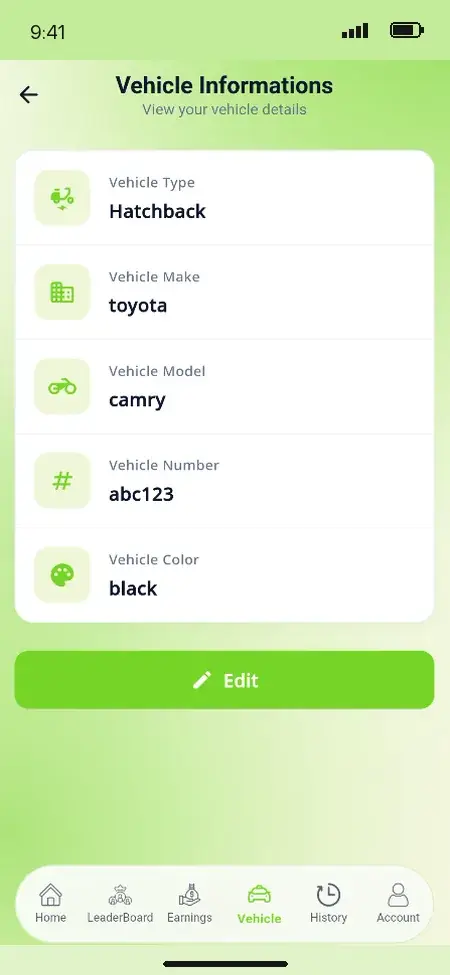
MXDrive driver app vehicle information with vehicle type, make, model, number and colour
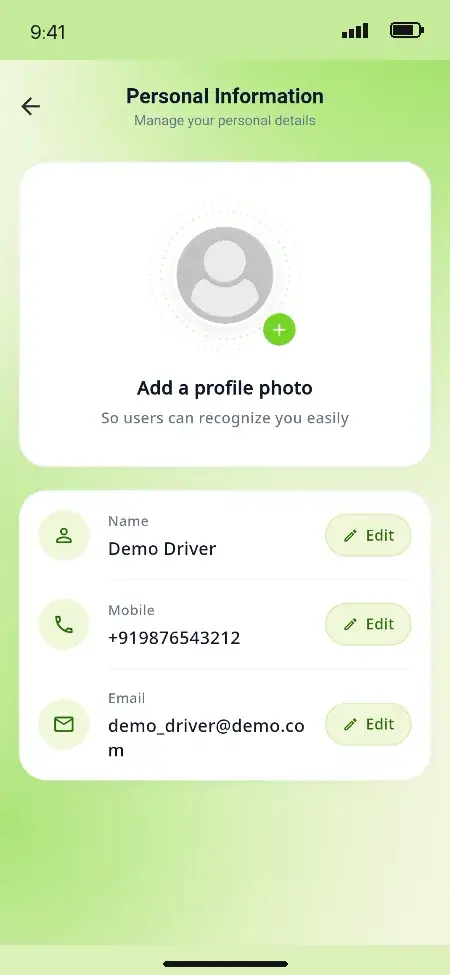
MXDrive driver app personal information screen with editable name, mobile number and email
10 screens · scroll →
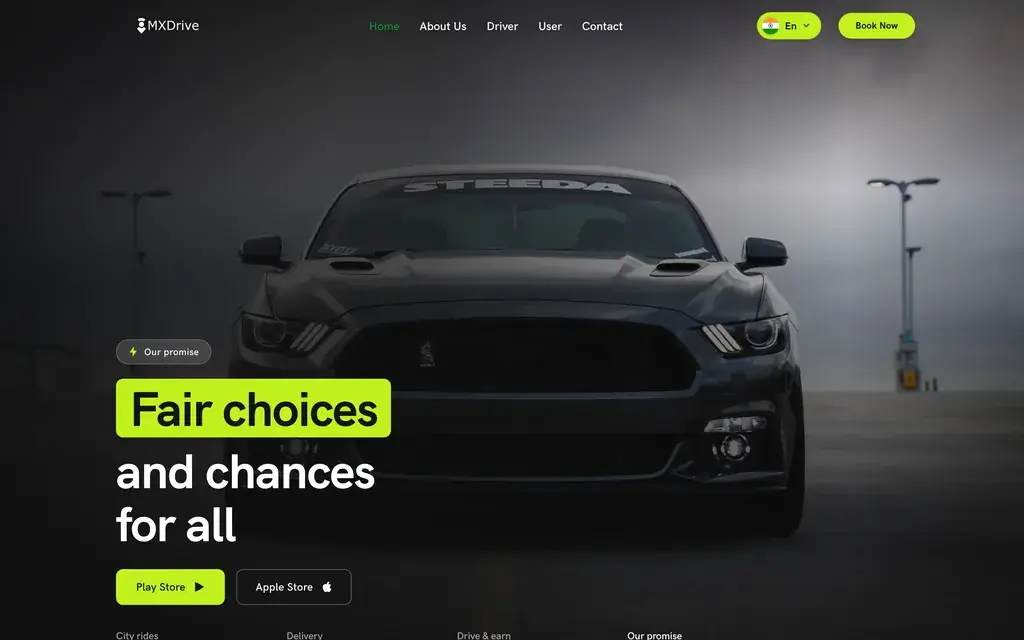
MXDrive public website hero with the headline fair choices and chances for all and app store download buttons
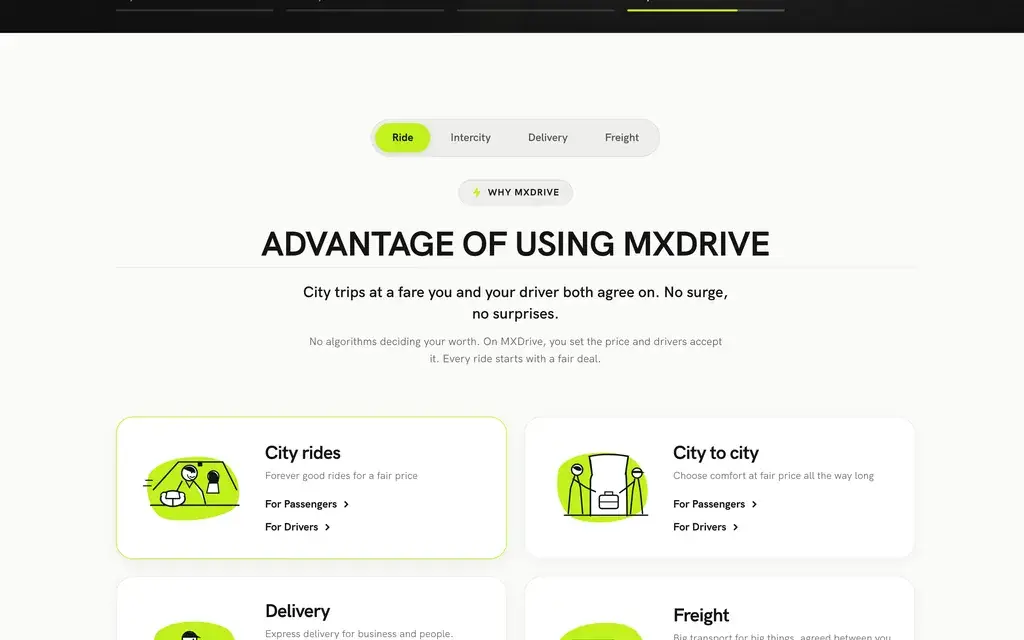
MXDrive public website services section covering city rides, city to city trips, delivery and freight
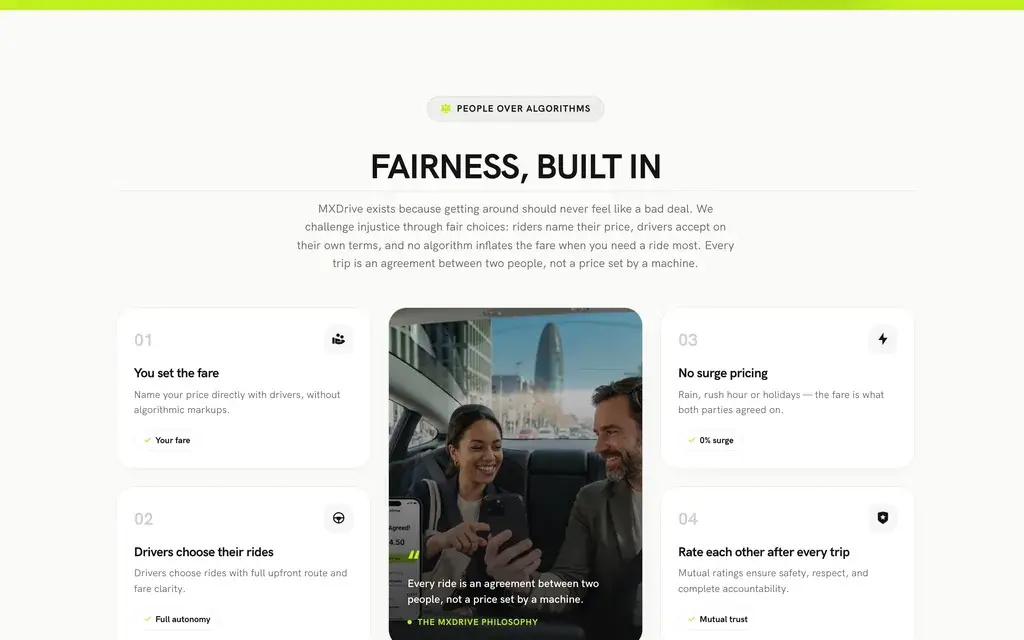
MXDrive public website fairness section: the rider sets the fare, drivers choose their rides, and riders and drivers rate each other
MXDrive public website showing how a negotiated ride works in three steps: post your route and offer a fare, drivers respond, agree and go
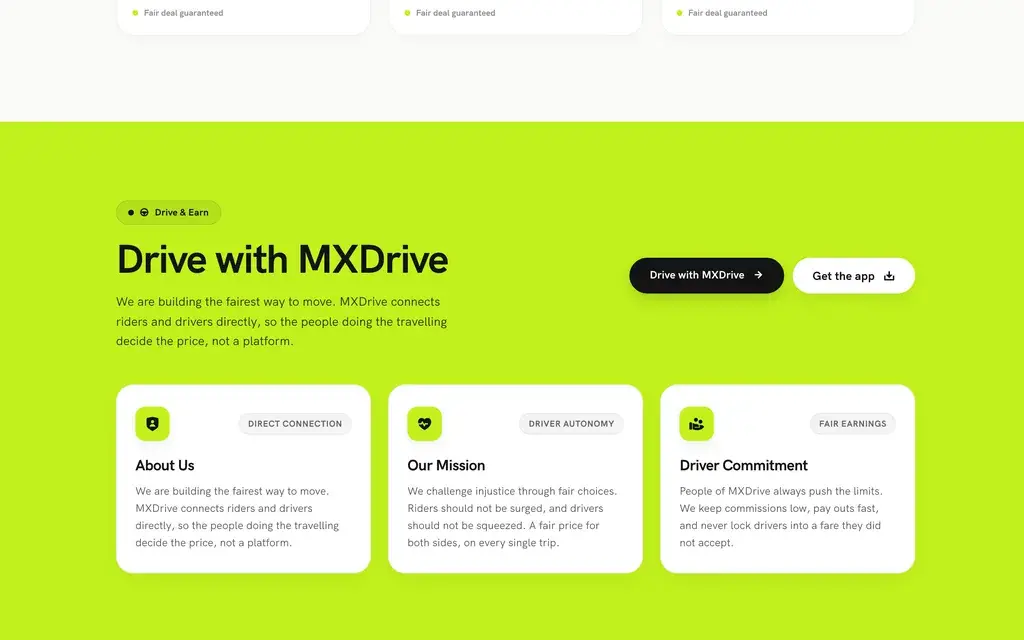
MXDrive public website driver recruitment section inviting drivers to join and set their own terms
5 screens · scroll →

02Proof

Client Voices

inDrive Clone Client Reviews - Real Platforms, Outcomes So Far

Four ride-hailing founders and teams who launched on a Miracuves base, quoted word for word from our testimonials page. The first is the Wave App founder, whose bid-and-ride platform was built on this exact product; the full engagement is told in the case study below.

MMarsha WilliamsFounder, Bmore On Demand Technologies, LLC
“Live GPS tracking, bookings, driver and customer apps and the admin dashboard were all in place. We reshaped the workflows to our bid-and-ride model and wired in our own payments and notifications. Live inside a month on infrastructure that was already proven.”
AAone TeamFounding team, Aone
“Fares, the city and the payment partner were ours to bring. Everything underneath - matching, live tracking, driver payouts, the operations console - came ready. From kickoff to real trips was under a month, which is the only reason we made our window.”
ccaninord TeamFounding team, caninord
“We did not need a global platform, we needed one that worked in our city with our drivers. The base covered matching, tracking and payouts, so the rest was configuration. Delivered under a month at a fraction of a custom quote.”
OOtoKab TeamFounding team, OtoKab
“The base gave us matching, tracking and payouts. We reshaped dispatch around our existing driver network and their working patterns rather than forcing them onto a generic model. Live in under a month.”
Read More Client TestimonialsFounders, CTOs and operator teams on our testimonials page

Client Case Study

inDrive Clone Case Study - Wave App, a Bid-and-Ride Platform

Wave App needed a fare-bidding ride-hailing platform, and the InDriver Clone base already carried the mechanics: the rider and driver apps, dispatch, payments, live tracking and the admin. So the engagement went where Wave App was actually different, its cities and zones, its service types and its bid rules, and the platform was deployed in 6 working days. These are the figures from the published case study; no outcome numbers were supplied, so none are shown.

Client Case Study
Wave App
Bid-and-Ride Platform

A fare-bidding ride-hailing platform for Bmore On Demand Technologies, LLC, built on the InDriver Clone base (MXDrive) in 6 working days, with the source code transferred to Wave App’s own account.

Bmore On Demand Technologies, LLCClient
InDriver Clone · MXDriveBase
2024Delivered
6 daysWorking days to build on the base
18 of 23Platform blocks reused unchanged
100%Source code transferred to the client
MXDrive public website showing how a negotiated ride works in three steps: post your route and offer a fare, drivers respond, agree and go
Challenges
  • A fare-bidding platform is 23 distinct pieces that all have to work before the first rider is served
  • Building dispatch, payments and the admin from zero would have used up the launch window
  • A bid-and-ride model that a fixed-fare ride-hailing flow does not cover
Goal
  • Launch on mechanics already proven on other engagements
  • Spend the engagement on what was theirs: cities and zones, service types, bid rules
  • Own the full inDrive clone source code, with a launch date in writing before work started
🛠 Marketplace by Miracuves
  • Rider app: name your fare, pick a bid
  • Driver app: see requests, bid back
  • Dispatcher with manual assignment
  • 18 of 23 platform blocks reused unchanged
  • Development, staging and production environments
  • Full repository history transferred, with a 60-day support window

Live GPS tracking, bookings, driver and customer apps and the admin dashboard were all in place. We reshaped the workflows to our bid-and-ride model and wired in our own payments and notifications. Live inside a month on infrastructure that was already proven.

Marsha Williams, Founder, Bmore On Demand Technologies, LLC
Read the full case studyThe whole Wave App engagement, block by block, is in the Miracuves portfolio.
Map this against your own marketWe will take your cities and zones, service types and bid rules through the same three decisions Wave App made.
Book a consultation

03The product

The Basics

What Is an inDrive Clone App?

An inDrive clone app is a ride-hailing platform where the rider and the driver agree on the fare instead of an algorithm setting it, and Miracuves builds it with that negotiation at the center. Riders suggest a fare by posting the trip with the price they are willing to pay. Nearby drivers take it or answer with a price of their own, and the rider chooses who to ride with. This build, MXDrive, runs that bidding flow as a module you switch on beside fixed-fare rides, hourly rentals, intercity trips and parcel delivery. That way one platform can serve both models in the same city.
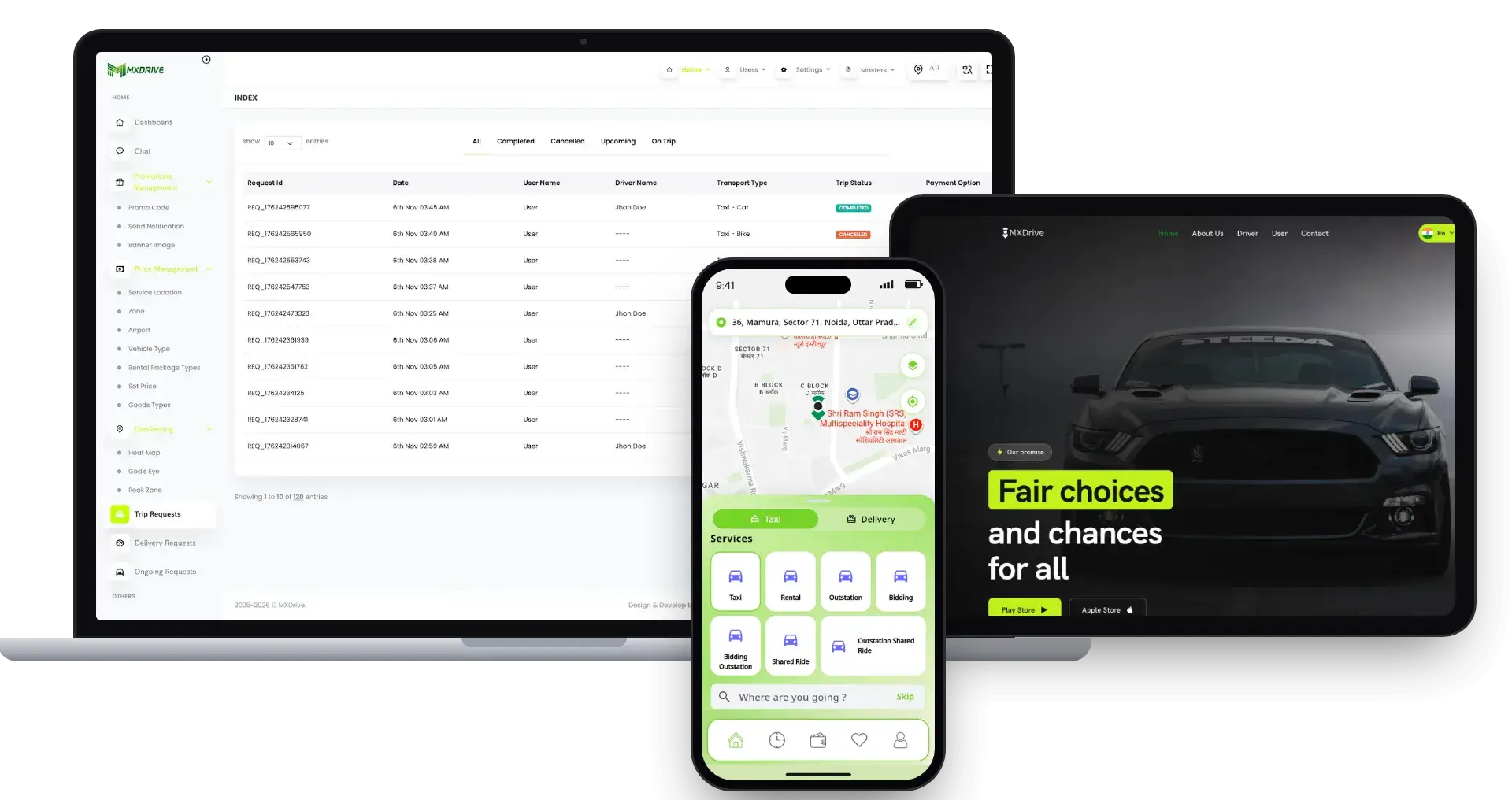
inDrive Clone platform shown across a laptop, tablet and phone: the MXDrive admin trip requests console, the public booking website and the rider app with taxi, rental, outstation and bidding services

Two Apps, a Console and a Website

A Flutter rider app, a Flutter driver app with fleet-owner mode built in, and a Laravel 12 admin and dispatch console that also serves the public website and web booking. Three surfaces on one database and one set of eleven roles.

Bidding as a Switch, Not a Fork

Bidding, Bidding Outstation and Delivery Bidding are three of eleven service modules, each turned on or off in the admin. With bidding off, drivers see fixed-fare offers only, so testing the model in one city never means maintaining a second codebase.

A New City Is Configuration

Service locations, polygon zones, zone types, fare cards, surge windows, peak zones and airport tariffs are all records in the console. Opening a second city is set-up work, not a software release.

Bidding and Fixed Fares, One Platform

Why the Switch Matters More Than the Screen

A fixed-fare platform asks the operator to be right about price in every zone at every hour. It also asks the operator to explain every surge to riders who notice. A bidding platform hands that negotiation to the two people in the trip. The rider says what the ride is worth to them, and the driver decides whether it is worth driving. The operator still sets the rules around it, from the commission taken on the agreed fare to the guardrails in the bid-ride settings. The operator can switch bidding off per service without touching code. What the operator gets is a second pricing model to test, not a second product to maintain.

MXDrive public website showing how a negotiated ride works in three steps: post your route and offer a fare, drivers respond, agree and go
  1. 01Rider-offered fares with driver bids
  2. 02Eleven service modules, each a toggle
  3. 0324+ payment gateways plus cash and wallet
  4. 04Fleet-owner mode inside the driver app
  5. 0528+ app languages, Arabic and Urdu right-to-left

The useful test for any vendor is not whether a bidding screen exists. Ask whether bidding and fixed fares run side by side on one fare engine and one console. Ask also whether you can turn either off per service without a developer. In the demo, the rider home screen shows the Bidding and Bidding Outstation tiles next to Taxi, Rental and Outstation.

Everything Included

inDrive Clone Features - Fare Bidding, Services, Dispatch & Payouts

Each feature below ships in the Miracuves inDrive clone base build and can be checked in the demo. The list starts with bidding because that is the decision this page is about. Then come the services and fares around it, then the people who keep a ride-hailing business running: dispatchers, fleet owners and drivers.

Feature 01 / 12

Fare Bidding You Can Switch On

The reason to choose this over a fixed-fare clone. The rider posts the trip with a fare offer, drivers nearby take it or propose their own price, and the rider picks the driver. The operator turns bidding on per service and sets guardrails for bid ranges in the bid-ride settings; with bidding off, drivers see fixed-fare offers only.

  • Bidding, Bidding Outstation and Delivery Bidding modules
  • Rider chooses from the drivers who respond
  • Guardrails for bid ranges in bid-ride settings
  • Fixed-fare offers only when bidding is off
Feature 02 / 12

Eleven Services, Each a Toggle

Taxi, Delivery, Rental, Delivery Rental, Outstation, Delivery Outstation, Bidding, Delivery Bidding, Bidding Outstation, Shared Ride and Outstation Shared Ride ship as seeded modules. Every one is switched on or off from the admin. Scheduled rides, multi-stop trips and booking for someone else sit on top.

  • 11 seeded service modules
  • Each module toggled from the admin
  • Ride now or schedule for later
  • Multi-stop and book-for-another-contact
Feature 03 / 12

A Full Fare Engine for the Fixed-Fare Side

Where bidding is off, fares come from cards per zone type. Each card holds a base price, base distance, price per distance and per minute, waiting charges with free minutes, and a cancellation fee, and each card is priced separately for ride-now and ride-later. Time-windowed surge, geofenced peak zones and flat airport fees sit on top, each one optional, and the demo website is set up as a no-surge service.

  • Zone-type fare cards for now and later
  • Time-windowed surge per zone
  • Peak zones and airport flat fees
  • Rental and package prices per zone type
Feature 04 / 12

Cities, Zones and the Map You Choose

Service locations, polygon zones and zone types define where the platform operates and what it charges. Currency and distance units are stored per trip, and the apps run on Google Maps or on OpenStreetMap with Nominatim and OSRM. That makes map cost a decision, not a dependency.

  • Service locations with polygon zones
  • Kilometres or miles per request
  • Google Maps or OpenStreetMap stack
  • A new city is configuration, not code
Feature 05 / 12

Dispatch, God's Eye and the Heat Map

Among the admin panel features, a dispatch monitor handles searching requests, manual assign, reassign and unassign, and booking on behalf of a caller. Beside it sit a live map of every driver, a demand heat map and a peak-zone view. Offers go to drivers one at a time or to all at once, as the operator sets it.

  • Assign, reassign and unassign drivers
  • Live driver map and demand heat map
  • Offers one-by-one or to all drivers
  • Bookings created for phone callers
Feature 06 / 12

Fleet Owners and Corporate Accounts

Vehicle owners and fleet companies get their own records and documents with approval. They also get hired drivers, an owner wallet, owner booking and a fleet dashboard. The driver app switches into owner mode, so a fleet is run from the same install.

  • Owner and fleet records with documents
  • Owner wallet and owner booking
  • Fleet dashboard and fleet reports
  • Owner mode inside the driver app
Feature 07 / 12

24+ Gateways, Cash and Wallet

Twenty-four named payment gateways ship, Stripe, Razorpay, PayPal, Flutterwave, Paystack, Mercado Pago and Xendit among them, alongside cash, wallet and wallet-plus-cash. Card entry runs on gateway-hosted flows and saved cards are stored as tokens, so card numbers never enter the platform.

  • Card, cash, wallet and wallet-plus-cash
  • Card numbers kept on the gateway side
  • Wallets for riders, drivers and owners
  • Withdrawal requests with admin approval
Feature 08 / 12

Driver Levels, Incentives and Subscriptions

Drivers have levels, a leaderboard, incentives and rewards, and the operator can sell driver subscription plans. Rider and driver referral programs run on conditions such as ride count or earnings, so supply retention is a set of settings rather than a spreadsheet.

  • Levels, leaderboards and rewards
  • Incentives earned against targets
  • Paid driver subscription plans
  • Rider and driver referral conditions
Feature 09 / 12

SOS, Ratings, Chat and Disputes

Riders store SOS contacts, both sides rate each trip, and riders and drivers chat inside the ride. Disputes carry four priorities with response targets of 2, 8, 24 and 72 hours, and they flag themselves at risk two hours before the deadline. Support tickets and complaints sit beside them.

  • SOS contacts in the rider app
  • Mutual ratings after every trip
  • In-ride rider and driver chat
  • Dispute SLAs from 2 to 72 hours
Feature 10 / 12

Promotions, Segments and Notifications

Promo codes can be scoped by service location, user list or segment, and they expire on their own. Six retention segments, such as churned at 30 or 60 days, target the riders worth winning back. There are 42 seeded notification events, covering the trip from request to receipt.

  • Promo codes with automatic expiry
  • Six rider retention segments
  • Segment push sent in batches
  • 42 seeded notification events
Feature 11 / 12

Two Native Flutter Apps

The rider app has 40-plus screens and the driver app has 48. Both are Flutter builds for iOS and Android on the same API as the admin. The driver app keeps presence in the background and captures delivery proof with a signature. Both apps speak 28-plus languages, with Arabic and Urdu laid out right to left.

  • 40+ rider screens and 48 driver screens
  • Background presence for drivers
  • Delivery proof with signature capture
  • 28+ languages, Arabic and Urdu RTL
Feature 12 / 12

A Public Website With Web Booking

The landing site ships with the platform and is edited from the admin CMS, banners and onboarding screens included, and riders can book from the web as well as the app. Package-rename tooling rebrands both apps under your own store identity.

  • CMS-driven public website
  • Web booking flow for riders
  • Banners, onboarding and app theme in admin
  • App package rename for your brand
Buyer briefing:

the software itself arrives whole, but each deployment is fitted to the operator. During delivery we set up, together with you, your Firebase project, payment gateway accounts, SMS provider, map keys, fare cards and cities, the on/off state of bidding and the ceiling placed on it, plus the go-live hardening covered further down. Each one is configured for your market rather than shipped as a default.

Book a Free Strategy Call

How Marketplaces Earn

inDrive Clone Revenue Models - Commission, Subscriptions, Premiums & Channels

Miracuves built this inDrive clone so the operator earns on the price two people agreed rather than on a price the platform set. That changes where the revenue comes from. Commission on the agreed fare is the base, and subscriptions, premiums on the fixed-fare side, rentals, deliveries and partner channels add rails beside it.

You choose every rate shown below. Miracuves keeps no portion of any ride and bills no fee per driver or per trip, while your Firebase, map provider, SMS provider and payment gateways charge you separately for their services.

  1. 01

    Commission on the Agreed Fare

    The base of the model: a platform share of every completed ride, set as a fixed amount or a percentage and recorded per trip in the bill beside the driver’s share. On a bidding ride it is taken from the fare the rider and driver agreed, so the platform earns without setting the price.

  2. 02

    Driver Subscription Plans

    Paid plans drivers buy to work on the platform, with discounts and automatic expiry when a plan runs out. A plan is a fixed fee rather than a share of each fare, which suits drivers who would rather know their cost upfront.

  3. 03

    Surge, Peak-Zone and Airport Premiums

    On the fixed-fare side, time-windowed surge per zone, geofenced peak zones and a flat airport fee lift the fare where demand is highest, and the commission rises with it. Each is a setting per zone rather than a rule in the code.

  4. 04

    Rentals, Outstation and Delivery Pricing

    Hourly rental packages, intercity outstation trips and parcel delivery with its own goods types each carry their own prices, so one rider base buys more than one kind of trip and each kind earns on its own terms.

  5. 05

    Paid Preferences and Extra Charges

    Paid amenities priced per zone type, additional charges and service tax on top of the fare, all itemized in the fare breakdown the rider sees, so the extras read as choices rather than surprises.

  6. 06

    Fleet, Corporate and Partner Channels

    Corporate and fleet clients with their own wallet and owner booking, a web booking channel, and franchise licensees and booking agents, both included in the package, who each carry their own wallet, commission and withdrawals.

What a fare-bidding platform can charge on each ride line, set against published ride-hailing fees and the Indian aggregator rules that cap them.
Revenue streamHow it is chargedTake rateTypical rangeWhat sets the ceiling
Commission on the Agreed FareA cut of each completed trip's agreed fare, recorded beside the driver's share in the bill.inDrive: 10% in Botswana, 0.01% in a Nepal campaign. Uber Mobility revenue: about 30% of bookings.India's 2025 aggregator guidelines require at least 80% of the fare to reach a driver who owns the vehicle, capping the platform near 20%. Where the aggregator owns the car, the floor is 60%.
Driver Subscription PlansA flat daily or monthly fee for platform access, with no share taken from each fare.Namma Yatri: Rs 25 a day for autos, Rs 90 for cabs. Rapido: from Rs 9.A flat fee works only while it undercuts commission. Outlook Business puts typical aggregator commissions at 20% to 40%, and that is the number a daily fee has to beat for drivers.
Surge and Peak-Zone PremiumsA multiplier on the fixed fare for a zone or time window; commission rises with the fare.India: fares may range from 50% to 2 times the state-set base fare.The regulator owns the cap. The 2025 guidelines lifted peak pricing from 1.5 times to 2 times base fare, and states set the base fare, so premium revenue is bounded by figures you do not control.
Paid Preferences and Extra ChargesItemized add-ons shown in the fare breakdown, such as amenities, cancellation charges and tax.India: cancellation fee capped at Rs 100.Rules decide how much of this line survives. The same guidelines also require a state-set base fare that covers dead mileage over the first 3 km, so extras cannot be used to rebuild a lower fare.

How to read this. The inDrive figures are reported rates, not a rate card: TechCabal on its 10% Botswana fee and ShareSansar on the 0.01% Nepal campaign, both of which vary by market and date. The Uber ratio is computed from its FY2025 10-K: Mobility revenue of $29,670 million over summed quarterly bookings of about $97,497 million. Subscription prices are from Outlook Business and MediaNama. The Indian caps are reported by SCC Online and TeamLease RegTech. Use all of it as scenario input only; it predicts no driver or platform earnings.

Revenue Model

inDrive Clone Revenue Model, Stage by Stage

Each of the six lines is a console setting, so an inDrive clone operator can open with commission on accepted bids, then add driver plans, fixed-fare premiums and partner wallets as the driver pool grows.

Launch

In the first city, the platform share comes off each fare a rider and driver settle on, as a flat sum or a percent, while incentives and referrals tied to ride count or earnings keep drivers online.

Traction

Once supply holds, driver subscription plans give drivers a known flat cost, and surge, peak-zone and airport premiums lift the fixed-fare side where demand runs highest.

Scale

At scale, rentals, outstation trips and parcels earn on their own prices from the same riders, while fleet, corporate, franchise and agent channels add demand the app alone would not reach.

Every bill records the platform commission beside the driver's share, with no cut for Miracuves.

Operate It Without In-House Developers

Admin Panel for a Bidding Taxi App - Bid Settings, Zones, Dispatch & Payouts

A single Laravel console from Miracuves runs the whole fare-bidding platform, and each of the eleven roles sees only the menus its permissions allow. The screens you touch first are the service modules and the bid-ride settings, because they decide what kind of service you run. After that, the work settles into zones and fares, dispatch, drivers and payouts.

MXDrive operator console ride request queue with trip status, transport type and payment method, beside the price management, geofencing and promotions menus
MXDrive public website driver recruitment section inviting drivers to join and set their own terms

What Dispatchers Handle

  • 01

    Service Modules and Bid Settings

    Which of the eleven service modules run, whether bidding is on and how far it can go in the bid-ride settings, which payment methods are live and which languages the apps offer. This is the screen that decides what kind of ride-hailing business you are running.

  • 02

    Service Locations, Zones and Fares

    Cities as service locations, polygon zones and zone types, fare cards for ride-now and ride-later, surge windows, peak zones, airport polygons and rental package prices, all edited as records rather than released as code.

  • 03

    Dispatch Monitor and God's Eye

    Requests still searching for a driver, manual assign and reassign, bookings created for callers, a live map of every driver and a demand heat map, with the dispatcher role limited to exactly this surface.

  • 04

    Drivers, Vehicles and Documents

    Driver onboarding with document upload and approval, vehicle types and records, expiry tracking on documents, and the driver levels, incentives and subscriptions that keep supply on the platform.

  • 05

    Wallets, Withdrawals and Commission

    Rider, driver and owner wallets, withdrawal requests approved or declined by the admin, commission set as fixed or percentage, and the recovery of commission owed on cash trips.

  • 06

    Disputes, Tickets and SOS

    Disputes with priorities and SLA deadlines, support tickets and complaints, SOS contacts and the cancellation reasons recorded for every canceled trip, by rider, driver, dispatcher or the system.

  • 07

    Promotions, Referrals and Segments

    Promo codes scoped by location, user list or segment, rider and driver referral conditions, retention segments with push campaigns, and the 42 notification events the apps send.

  • 08

    Exports and Statements

    Seven report families covering users, drivers, driver duty, owners, finance, fleets and franchises, plus the trip-level ride report, pricing-audit export, event-log export and invoice PDF.

Fleet Owners and Corporate Clients

Owners and fleet companies are first-class accounts with their own documents, drivers and wallet. That lets corporate mobility and owner-operated fleets run on the same platform as individual drivers.

  • Owner and fleet records with approval
  • Hired drivers linked to an owner
  • Owner wallet and owner booking
  • Owner and fleet reports

Staff Roles and Access

There are eleven roles, from super admin to dispatcher, fleet owner and franchise owner, gated by 134 permission keys in the admin sidebar. Each person sees the part of the platform their job needs.

  • 11 roles seeded
  • 134 sidebar permission keys
  • Dispatch-only access for dispatchers
  • Virtual login to support a user

Several dispatchers? Roles become your operating model during delivery: who approves a driver’s documents, who may change a fare card, who releases a withdrawal and who sees the dispatch board are your decisions. They are mapped onto the permission keys rather than left at the defaults.

Book a Free Strategy Call

04Inclusions, plus what it costs

The Full Package

What's Included - inDrive Clone Source Code, App Builds & Hosting

One Miracuves price covers each inDrive clone component listed below. The software does not report back to us, no ride is metered, and once you are live there is no ongoing fee payable to Miracuves.

MXDrive public website hero with the headline fair choices and chances for all and app store download buttons
01

Whole codebase, yours

You get the Laravel admin and API, the website and both Flutter apps, handed over as a full repository rather than a bundle of builds. No encrypted modules sit anywhere in it.

  • Handover includes source code for each surface
  • Full repository history to your account
  • No per-ride or per-driver fee
  • No runtime license to renew
MXDrive operator console ride request queue with trip status, transport type and payment method, beside the price management, geofencing and promotions menus
02

The Admin and Dispatch Console

One Laravel 12 console with Inertia and Vue 3 serves the admin, the dispatcher and the fleet owner. The Dispatcher Pro, franchise and agent consoles are included, gated by eleven roles and 134 permission keys.

  • Service modules and bid settings
  • Zones, fares, surge and airports
  • Dispatch, God's Eye and heat map
  • Reports and exports
03

The Rider App

A Flutter app for iOS and Android with 40-plus screens: services, booking, fare offers, ride details, wallet, history, saved places, SOS and settings.

  • 40+ rider screens
  • Bidding and fixed-fare booking
  • Card, cash and wallet payments
  • 28+ languages with RTL
MXDrive rider app ride details with the route on a map, pickup and drop-off, a fare breakdown, an invoice download and an issue report option
04

The Driver App

A Flutter app with 48 screens: online status with background presence, requests, trip flow, earnings, wallet, incentives, documents and a fleet-owner mode.

  • 48 driver screens
  • Offer inbox and bidding screens
  • Earnings, wallet and withdrawals
  • Fleet-owner mode built in
MXDrive driver app weekly earnings with trip count, wallet, total earnings and a day-by-day earnings chart
05

Eleven Service Modules

Taxi, rental, outstation, delivery, bidding and shared-ride modules seeded and ready, each switched on or off from the admin.

  • Three bidding modules
  • Delivery with signature proof
  • Hourly rental packages
  • Scheduled and multi-stop rides
06

Database Layout

A MySQL-compatible schema built from 413 migrations, with spatial columns for zones and the quote, pricing-audit and bill records behind every fare.

  • 413 migrations, not a dump
  • Spatial zones and geohash
  • Quote and final fare records
  • Seeders for a working first run
07

Handover Paperwork

Ten documents: solution overview, PRD, ERD, schema reference, API collection, feature catalog, technical dossier, whitepaper, developer security handbook and the VAPT compliance review.

  • Security handbook and VAPT review
  • API collection for your engineers
  • Schema and ERD references
  • Deployment and setup notes
08

Hosting and Rebranding

You get your logo, colors and app theme, the CMS-driven website, translated app strings and renamed app packages. Everything deploys on your own server as a single-operator installation.

  • Branding and app theme
  • Website edited from the admin CMS
  • App package rename for your stores
  • Deployed on your own infrastructure

The candid note: what you receive from Miracuves, an app development company, is a complete platform and the document set an engineer or reviewer will ask for. What you do not receive is a running operation. The Firebase project, gateway merchant accounts, SMS provider, map keys and store accounts are yours to open. The go-live checklist in the security section is real work.

Book a Free Strategy Call

Pricing, Spelled Out

How Much Does It Cost to Build a Ride-Hailing App Like inDrive in 2026?

Miracuves quotes one fixed figure for the core inDrive clone platform: the rider app, the driver app with fleet-owner mode, the admin and dispatch console, the public website with web booking, the full source code and deployment on your own server. There is no runtime license and no per-ride fee to Miracuves. The Dispatcher Pro, Agent and Franchise modules are included as well. Your own provider accounts, from Firebase and payment gateways to SMS, maps and the app stores, are billed by those providers.

Chosen by most operators

Professional

Ride-Hailing Launch Kit
$3,099paid at once
Go-live: 6 days

Ideal operator: ride-hailing startups, taxi operators going digital & regional mobility brands

What ships mirrors the demo you tried, wearing your brand and running on servers you control.

Get Started

Enterprise

Custom, Multi-City & High-Scale
Customquote
Go-live: Based on final scope

Ideal operator: Fleet operators, franchise networks & multi-city mobility groups

Commission a custom build shaped by your situation and what your business requires.

Request a Quote
Development Cost

inDrive Clone Development Cost in 2026

For $3,099, paid once, you get the inDrive clone platform from the Miracuves demo: Flutter rider and driver apps, the Laravel admin and dispatch console, the website with web booking and the full repository. It is deployed under your brand in six working days, after which no ride is metered and no runtime license comes due.

$3,099 Paid once
6 working days Branded and on your server
0% Revenue share

What moves your total sits outside the software invoice

  • Your own Firebase project, which carries the live fare offers and push notifications
  • Merchant accounts with each payment gateway you switch on
  • SMS, map and app store accounts
  • Permits, driver licensing and trip insurance
  • Any scoped add-on, such as the go-live hardening pass

Custom work beyond the eleven seeded modules, a service type of your own for example, typically runs 2-8 weeks and is quoted in writing; fleet groups running several cities can take the Enterprise route.

Compare Your Options

Ready-Made inDrive Clone vs Custom Development vs SaaS

Operators chasing a fare-negotiation taxi booking app business usually weigh three paths, and Miracuves' ready-made build sits beside custom development and SaaS in the table below. Below, the inDrive clone, a bespoke project and a subscription ride app are lined up row by row.

CriteriaMiracuvesReady-Made inDrive CloneCustom DevelopmentSaaS
Launch time6 working days on your serverBespoke quote; 2-8 weeks per extensionSign-up is quick, bidding rules fixed
Upfront cost$3,099 one-timePer scope, in a written quoteSmall setup plus recurring fees
Source code ownershipFull repository with its historyPer contract termsNever handed over
CustomizationBid limits, zones and fare cards configurableWhatever you specifyVendor roadmap decides
Ongoing feesNo per-ride fee to MiracuvesSupport retainer if agreedPer-ride or monthly charges
Branding & app-store listingRider and driver apps under your brandYour brand once builtShared or vendor-branded apps
Best forBidding plus fixed fares from day oneRules no bidding base supportsShort trials without owning code

Fit by Region

Use Cases for an App Like inDrive - City, Intercity, Parcels & Fleets

BiddingCity ridesNegotiated City Rides

This is the main scenario the page covers. Riders submit a cross-town trip together with the fare they are willing to pay; drivers nearby take it or propose a price of their own, and the rider makes the choice. Commission is earned by the operator on the fare agreed, so no surge multiplier needs defending.

01
MXDrive rider app home screen with a live map, a Taxi and Delivery toggle and a services grid listing taxi, rental, outstation, bidding, bidding outstation and shared rides
Bidding OutstationIntercity and Outstation Trips

Longer trips where a fixed per-kilometre fare rarely fits both sides. The Bidding Outstation module lets the rider and driver settle a price for the whole journey before it starts, and the driver app has its own outstation request screens.

02
MXDrive driver app trip details with the route map, rider, vehicle, fare breakdown, invoice download and issue report
Delivery BiddingProofParcels With a Negotiated Price

A courier business where each job is different. Delivery Bidding runs the same offer-and-respond flow for goods, and the driver app captures proof of delivery with a signature at the drop-off.

03
MXDrive public website services section covering city rides, city to city trips, delivery and freight
TaxiRentalAirportFixed Fares Where Riders Expect Them

Some zones and some riders want a price on the screen and a car in minutes. Taxi and Rental run on zone-type fare cards with surge, peak zones and airport fees, beside the bidding modules on the same platform.

04
MXDrive operator console ride request queue with trip status, transport type and payment method, beside the price management, geofencing and promotions menus
OwnersFleetsFleet and Corporate Mobility

A fleet company or corporate client books and pays through an owner account with its own wallet and reports. Its drivers work in owner mode in the standard driver app.

05
MXDrive driver app wallet showing the balance, withdraw and transfer actions, and the platform commission deducted for each completed trip
RentalPackagesHourly Rentals and Packages

A car with a driver for a set number of hours or kilometers. It is priced from per-zone package fares with free distance and free minutes built in. You book it from the same rider app as a city ride.

06
MXDrive rider app ride history showing completed, upcoming and cancelled trips with pickup, drop-off, vehicle and total fare
Business Model

inDrive Clone Business Model: Three Ways to Run It

Bidding, fixed fares and delivery are toggles on one inDrive clone deployment, so it can be shaped into any of these three businesses without forking code.

Bidding-first city service

A single-city operator leads with negotiated rides, keeps a fixed-fare taxi beside them for riders in a hurry, and lets the reports show which model the city prefers.

Multi-service mobility brand

One rider and driver base buys more than rides, because hourly rentals, intercity outstation trips and parcel delivery with signature proof each run as a module at their own prices.

Fleet and partner network

A fleet company or regional group grows through owner accounts, corporate clients, franchise licensees and booking agents, each with its own wallet and commission, and opens cities as service locations rather than projects.

Commission, plan fees and partner rates are all yours to set in the admin, and none of a ride's fare goes to Miracuves.

On the Miracuves inDrive clone, operators unsure which pricing model their city wants can run both at once. Use bidding for the rides where riders like to negotiate, and fixed fares for airport runs and riders in a hurry. Compare the two in the reports before committing either way.

Because every service is a module, the same deployment can start with city rides alone. You can switch on rentals, intercity trips or parcels when the operations team is ready for them, without a second platform.

Book a Free Strategy Call

Market Timing

Why Launch a Fare-Bidding Ride-Hailing App in 2026?

Ride-hailing is a familiar product, which is exactly why the next platform in a city needs a reason to exist. Fare bidding is one, because it changes who sets the price. In doing so, it changes what the platform has to be right about. The operator stops guessing at the fare for every zone and hour, and starts setting the rules within which riders and drivers agree it.

01

Price Is the First Thing Riders Compare

A rider choosing between apps looks at the price before anything else. A platform where the rider names the fare and sees drivers respond makes price the product, rather than something the rider discovers after booking.

02

Drivers Choose Platforms Too

Supply is the scarce side of the ride-hailing industry. A model where drivers see the route and fare upfront and decide which rides to take is an argument for drivers to sign up and stay, alongside the levels, incentives and subscriptions the driver app carries.

03

One Build, Two Pricing Models

Bidding and fixed fares are modules on the same platform, so the pricing question can be answered with data from your own city instead of a bet made before launch. Switch either off per service when the answer comes in.

04

Smaller Cities Are a Settings Pass

The cities large platforms serve last are reachable when a new city is a service location, a set of zones and a fare card rather than a project. The platform is built for an operator who opens markets one at a time.

05

Owning the Platform Changes the Math

There is no per-ride fee to a platform vendor on top of your own commission. What you charge drivers is your decision, and what you keep is what the gateways and providers do not bill you for.

06

Disputes Need Records

Fare disagreements, cancellations and complaints are where ride-hailing operators lose riders and drivers. Cancellation reasons recorded per trip, pricing-audit records and dispute SLAs mean those conversations start from a record rather than a recollection.

Platform by the Figures

11

Service Modules

48

Driver App Screens

24+

Payment Gateways

134

Permission Keys

What bidding does not do is make operations easier. Drivers still need vetting, a city still needs zones, riders still need support when a trip goes wrong, and a negotiated fare still has to be paid, split and recorded. The platform carries those jobs; running them well is still the business.

Industries

Industries We Serve

Ride-hailing is the core, but the platform underneath serves anyone matching a person or a parcel with a driver and settling the price fairly. Eleven service modules mean the same deployment can run city rides, intercity trips, hourly rentals and deliveries. That is one system, not four.

The pattern repeats wherever a trip has to be priced, assigned, tracked and paid for. Your market differs in its cities, the services you switch on and whether riders bid or pay a fixed fare. That is configuration, not a different codebase.

  1. 01Ride-Hailing
  2. 02Taxi & Cab Operators
  3. 03Intercity Travel
  4. 04Parcel & Courier
  5. 05Car Rental & Hourly Hire
  6. 06Fleet Operators
  7. 07Corporate Mobility
  8. 08Airport Transfers
  9. 09Tourism Transfers
  10. 10Call-Center Dispatch
  11. 11Franchise Networks
  12. 12Booking Agents

06Under the hood

Request to Payout

How the inDrive Clone Works - Offer, Bid, Choose, Ride & Get Paid

Miracuves' inDrive clone moves a trip through six steps, from a rider naming a price to a driver being paid, with the operator's rules applied at every one.

How a Ride Works on an App Like inDrive

  1. MXDrive rider app home screen with a live map, a Taxi and Delivery toggle and a services grid listing taxi, rental, outstation, bidding, bidding outstation and shared rides
    1Post a Ride and Name Your Fare

    After setting pickup and drop-off, the rider picks a service such as Bidding or Bidding Outstation, checks the fare estimate the platform works out and posts the trip at the price they want to pay.

    • Pickup, drop-off and extra stops
    • Fare estimate before posting
    • Bidding and fixed-fare services side by side
    • Schedule for later or book for someone else
  2. MXDrive driver app home screen with an online toggle, a live map of nearby requests and today's earnings
    2Drivers Accept or Counter the Offer

    Drivers who are online nearby get the request either in turn or simultaneously, as the operator chooses. Each one sees the route and the offered price, then takes it or replies with a counter-fare.

    • Offers one-by-one or to all drivers
    • Route and fare shown upfront
    • Take the offer or propose a price
    • Operator guardrails for bid ranges
  3. MXDrive rider app ride details with the route on a map, pickup and drop-off, a fare breakdown, an invoice download and an issue report option
    3Choose Your Driver

    Comparing price, rating and vehicle, the rider selects one of the responding drivers and the trip is assigned at that agreed fare. When bidding is switched off, the same request travels as a fixed-fare offer.

    • Choose by price, rating and vehicle
    • Trip assigned at the agreed fare
    • Other offers cleared
    • Fixed-fare offers when bidding is off
  4. MXDrive driver app trip details with the route map, rider, vehicle, fare breakdown, invoice download and issue report
    4Start the Ride With an OTP

    Once the driver arrives and the trip code checks out, the ride begins and both apps track the route live. A delivery closes with a signature taken at the drop-off point.

    • Arrived, started and completed events
    • Trip start verified by a code
    • Live route on both apps
    • Signature proof for deliveries
  5. MXDrive rider app wallet with the balance, add money and transfer actions, saved cards and recent transactions
    5Pay, Get an Invoice & Rate

    Card, cash, wallet or wallet plus cash settles the trip, an itemized invoice follows and rider and driver rate each other. The bill keeps the platform commission and the driver’s share on separate lines.

    • Card, cash, wallet or a mix
    • Invoice with the fare breakdown
    • Mutual ratings after the trip
    • Commission recorded per ride
  6. MXDrive driver app weekly earnings with trip count, wallet, total earnings and a day-by-day earnings chart
    6Driver Withdraws the Earnings

    Trip earnings land in the driver’s wallet beside the commission line; a payout is requested in the app and approved from the admin side. On cash rides, the platform share owed is deducted from the driver’s wallet balance.

    • Weekly earnings view
    • Wallet with commission shown
    • Withdrawals approved by the admin
    • Commission recovered on cash trips
Fare Negotiation FlowchartRider Posts Trip & FareDrivers Respond or BidRider Picks a DriverPickup & Trip CodeLive TripPayment & RatingsDriver Payout

How It's Built

Ride-Bidding Platform Architecture - Fare Quotes, Offers & Dispatch

Book a Free Strategy Call
  1. Layer 01

    One Laravel Core, Three Surfaces

    The admin, the dispatch console, the website and the API for both apps are one Laravel application on one database, so a trip, a driver and a payment mean the same thing wherever they are read.

  2. Layer 02

    Every Fare Has a Quote and a Final

    A trip carries its quote, a pricing-audit record at the estimate and again at the final fare, and a bill that splits the charge into commission and the driver’s share, which is what a fare dispute is settled from.

  3. Layer 03

    Offers Go Out by Rule

    Requests are offered to drivers one by one or to all at once, with a cap on how many pending offers one driver can hold and a multi-offer inbox, all set in the admin rather than in code.

  4. Layer 04

    Live on Firebase, Recorded in MySQL

    Firebase carries the live parts of a trip, offers and driver presence, while MySQL keeps the record. Without Firebase configured, booking, the trip lifecycle and settlement still run over HTTP.

  5. Layer 05

    Permissions on 134 Keys

    Eleven roles map onto 134 permission keys, so the dispatcher sees dispatch, the fleet owner sees their fleet and the super admin sees everything, enforced by the same Laravel app.

  6. Layer 06

    Cron and a Queue Run Dispatch

    Driver assignment, stale-request cancellation, promo and subscription expiry and document reminders run as scheduled jobs on a supervised queue worker, which is why cron is part of every deployment.

Under the Hood

inDrive-Style App Tech Stack - Laravel, Vue, Flutter, MySQL & Firebase

This inDrive clone tech stack is deliberately conventional, and Miracuves chose it because a ride-hailing operator needs developers it can hire in its own city. Laravel and Vue run the console and website, Flutter runs both apps, MySQL holds the records and Firebase runs the live parts of a trip. These stacks have large local talent pools almost everywhere.

Admin, Dispatch & Website

Laravel 12 PHP 8.2+ Inertia Vue 3
  • One app for admin, dispatch and the website
  • Jetstream sessions for console users
  • Bootstrap and Vite front end
  • CMS pages and banners in the admin

Mobile API

/api/v1 Sanctum Tokens 9 Route Families
  • Auth, user, driver, request and payment routes
  • Sanctum tokens for both apps
  • Five rate-limit tiers
  • Fractal-shaped JSON responses

Storage Layer Design

MySQL / MariaDB 413 Migrations Spatial
  • 413 migrations with seeders
  • Spatial columns and geohash for zones
  • Database queue by default, Redis supported
  • Local disk by default, S3-compatible supported

Passenger and Driver Apps

Flutter BLoC Dio Drift
  • Rider and driver apps for iOS and Android
  • BLoC state, Dio networking, Drift storage
  • Background service for driver presence
  • Gateway flows in an in-app web view

Realtime & Push

Firebase Realtime Database FCM
  • Live offers and driver presence
  • Push notifications through FCM
  • Firebase phone authentication
  • HTTP trip flow still runs without it

Maps & Providers

Google Maps or OpenStreetMap 24+ Gateways 9 SMS
  • Google Maps, or OSM tiles via Mapbox, Thunderforest or Stadia
  • Nominatim geocoding and OSRM routing
  • Twilio, Infobip, Msg91 and six more SMS providers
  • Stripe, Razorpay, PayPal and 21 more gateways
Reason behind this stack:

the stack is deliberately ordinary. Laravel, Vue and Flutter developers are available to hire in each market the platform targets, most hosting teams already operate MySQL, and whether the map layer runs on Google Maps or OpenStreetMap tiles, the apps stay as they are.

Book a Free Strategy Call

Build to Scale

Built to Scale - Dispatch Jobs, Live Offers & Zone Data

The load profile of ride-hailing is peaky: commuting hours, weekend nights and bad weather arrive all at once. What has to keep up is driver assignment, live offers and the map, and those are what to provision for.

Driver assignment is the job that decides whether the platform feels fast. It runs on cron and a supervised queue worker, which is why the deployment checklist treats both as essentials: without cron, assignment stalls even while the admin looks healthy.

Live offers and driver presence run on Firebase, not on the application server. The moment-to-moment traffic of a busy hour lands on infrastructure built for it, while MySQL keeps the records.

The default installation is a single server with local storage and a database queue, which suits a launch. Running more than one application server means moving storage to S3-compatible object storage and the queue and cache to Redis. Both are supported, and both are planned as their own piece of work.

Large fleets make assignment heavier on the database. The documents advise capacity planning beyond about 500 vehicles, and sharding assignment is a customization rather than a default.

01

Driver Assignment Jobs

Matching runs as scheduled assignment jobs for regular rides, with stale unmatched requests canceled every minute. It is CPU and database work that grows with fleet size, which is what to provision for.

02

Live Offers and Presence

Offers, presence and live trip data move through the Firebase Realtime Database, keeping the busiest traffic off the application server.

03
RouteGeocodeMap tiles

Location and Map Quota

Every route, geocode and map tile is a provider call. A Google Maps quota becomes a cost line at volume; the OpenStreetMap stack moves that cost to tiles you choose.

04
Promo expiryDocument remindersStale requests

Scheduled Housekeeping

Promo expiry, subscription expiry, document reminders and request cleanup run as scheduled commands. That makes the scheduler part of the platform rather than an optional extra.

05

Spatial Queries and Zones

Zones, peak zones and airports are spatial geometry with geohash lookups, so finding the zone for a pickup is an indexed query, not a scan.

06

Documents and Media

Driver, vehicle and owner documents accumulate with every signup. Storage defaults to the local disk and moves to S3-compatible object storage, kept private, for anything beyond one server.

Map usage is the quiet cost at volume. Every route, geocode and live map view is a call to the map provider. That is one reason the platform can run on OpenStreetMap with Nominatim and OSRM instead of a metered map API.

Capacity check:

the sections above describe how the platform is built, and delivery includes load testing against the volumes you expect.

Book a Free Strategy Call

07Security and compliance

Built to Be Audited

Ride-Hailing App Security - Documented, Configured & Honest About the Gaps

Miracuves backs the security of its inDrive clone with documents, not assurances: a VAPT compliance review and a security handbook written for developers. They give your security team material to evaluate, not a codebase to pick apart. The review covers the source statically and catalogs controls, but it does not amount to penetration testing of a running deployment. The section below sets out the items it assigns to you.

  1. 01 · Documented

    Documented in Writing, Built In

    A ten-document technical set including a developer security handbook and a VAPT compliance review written as a control catalog. Your security team receives the documents to assess, and this page quotes what they list as open rather than summarizing them as passed.

    • Not Pen-Tested, Not Certified: The VAPT document reviews the source; it is not a test of your deployment, and no SOC 2, ISO 27001, PCI DSS or GDPR certification is claimed. An external penetration test before launch is recommended, and we support it.
  2. 02 · Sessions

    Sessions, Tokens and Rate Limits

    Console users sign in with Laravel Jetstream sessions, the apps use Sanctum tokens, riders and drivers verify by mobile or email OTP or social login, and the API is throttled in five rate-limit tiers.

    • Production Configuration Before Launch: Session cookies, debug output and CORS are switched to their production settings, with trusted proxies set correctly, before the first real user signs in.
  3. 03 · Payments

    Card Data Kept Off the Platform

    Card entry happens on gateway-hosted pages or in-app web views, and saved cards are stored as gateway tokens, so card numbers never enter MXDrive forms or its database.

    • Firebase Rules and Webhook Secrets: Firebase rules are locked and each gateway's signing secret is verified against your own accounts.
  4. 04 · Roles

    Eleven Roles, 134 Permission Keys

    Super admin, dispatcher, fleet owner, franchise owner, agent and six more roles, each limited to the menus its permission keys allow, with a virtual login for support that stays inside the same permission model.

    • Admin Exposure and Least Privilege: The admin console is put behind network controls, admin roles are cut to what each person needs, and multi-factor login is added as an option if your policy requires it.
  5. 05 · Records

    Records a Complaint Can Rely On

    Trip events from requested to completed, cancellation reasons by rider, driver, dispatcher or the system, pricing-audit records at quote and final fare, and disputes with SLA deadlines.

    • Encrypted, Restore-Tested Backups: Encryption, a tested restore and a retention policy that matches your erasure promises are set up as part of go-live.
  6. 06 · Go-Live

    What the Review Lists as Yours

    The review closes with a twenty-item residual-risk register. Eight items carry its High priority label and none is marked Critical, and every one of the eight is an operator configuration or operations task. They are the go-live work in these cards, not discoveries left for later.

    • KYC Documents and Demo Auto-Approval: Driver and owner documents move to private storage, and the demo jobs that auto-approve documents every five minutes are switched off, so document review is a human decision again.

The platform carries the controls a ride-hailing operator is asked about. These include separate session and token authentication for the console and apps, API rate limits, and card entry kept on gateway-hosted flows. They also include eleven roles over 134 permission keys, and trip, fare and dispute records that survive a complaint. The hardened production configuration arrives with the go-live hardening pass, and multi-factor login for the console is one of the add-ons listed below. No deployment should take a real ride until the go-live items are closed.

Discuss Security & Compliance With Us

Licensing Explained Plainly

Compliance for a Fare-Negotiation Taxi App - Software Scope, Transport Licensing and Your Obligations

Buying an inDrive clone means buying software, which carries no permit to run a ride-hailing business. Miracuves delivers the platform layer: the rider app, the driver app, an admin and dispatch console, fare and bid handling, driver and vehicle records with review of uploaded documents, payment through gateways you connect, and logs of trips, cancellations and disputes. Several activities fall under regulation: running a taxi, a courier operation, a private-hire fleet or a ride-hailing service, insuring journeys, licensing drivers and vehicles, and holding or paying out customer money. Those sit with your own company under the permits your city or country requires, or with licensed partners you engage. Miracuves plays neither role, and the software is not a transport operator or a payment institution.

Card data stays with your payment gateway, never on the platform.

Card entry runs on gateway-hosted pages and in-app web views, and saved cards are held as gateway tokens, which keeps card numbers out of the platform and narrows what a reviewer has to look at. Keeping card fields out of the apps preserves that reduction. Approvals are issued to whichever company operates the app, for its own setup and processes.

What the Code Handles

The package holds rider and driver apps, the admin and dispatch console, and eleven service modules with bidding and fixed fares. It adds zones and fare cards, driver and vehicle documents with approval, and 24+ gateway integrations for multiple payment options, with cash and wallet. Trip, fare, cancellation and dispute records are included. It is delivered as source code and deployed on your own server.

What Only a Permit Covers

Permission to operate a ride-hailing, taxi, private-hire or courier service; licenses for your drivers and vehicles; the insurance that covers a trip; and any fare rules your city sets. That authority sits with your company or a licensed partner. Software cannot substitute for it, and the platform provides the instruments rather than the compliance.

Drivers, Background Checks and Customer Money

The platform records driver documents and their approval; background checks are run by you or a screening provider you choose. Wallet balances are customer money: where your market treats stored value as a regulated activity, hold it through a licensed payment partner, or run on card and cash only.

Local Rules Set the Path

Rules vary by market. Transportation network companies in the US answer to individual states, with the CPUC as the regulator in California. TfL licenses private hire operators in London. In India, each state adopts the Motor Vehicle Aggregator Guidelines, and in Dubai ride-hailing is licensed by the RTA. Privacy legislation, for instance India’s DPDP Act or the GDPR, also applies. Check the right route with a licensed partner or transport counsel, since Miracuves gives no legal, licensing or regulatory advice.

08Grow the platform

Included as standardMXDrive
  • Rider and driver apps
  • Bidding and fixed fares
  • Eleven service modules
  • Admin and dispatch console

How add-ons work

  1. 1
    Stabilize and connect first

    Before real money changes hands, the first two items must be done.

  2. 2
    Priced per request

    Every item gets its own written scope and price.

  3. 3
    Dropped into your repo

    Like the core product, this arrives as source code that belongs to you.

Ask About Custom Modules

Go Further

Add-Ons for Your inDriver Clone - Hardening, Providers, Integrations & Assurance

The base inDrive clone package from Miracuves already contains all of the above. Items below are scoped with you: go-live work that any deployment carrying real rides should not skip, integrations with the providers and systems you already use, and assurance work that enterprise buyers request. The list leaves out Dispatcher Pro, Agent and Franchise because the package already includes them.

  • Needed prior to go-live

    The Go-Live Hardening Pass

    Production settings in place of the example defaults, the admin console behind network controls, Firebase rules locked, gateway webhooks verified, driver documents moved to private storage, demo auto-approval switched off and backups encrypted. This is the work that turns the base build into something that can take a real ride, and it is not optional.

    Security · Go-Live Checkpoint
  • Needed prior to go-live

    Real Provider Integration

    Your Firebase project for live offers and push, your payment gateways with their webhooks, an SMS provider for OTPs, SMTP for email, and Google Maps keys or the OpenStreetMap stack. Once each is connected to your own accounts, the platform runs as your live operation.

    Providers · Live Integration
  • Channels & operations

    Partner API Access

    Machine API keys and an OpenAPI export for partners who want to integrate with your platform. The base build authenticates the apps with user tokens and ships an API collection, so partner-grade access is a defined customization rather than a setting.

    Integration · Partner API
  • Assurance & enterprise

    Accounting and ERP Integration

    A direct feed from bills, payouts and withdrawals into your accounting system. The base build exports reports and invoices; posting them straight into your ledger software is customization, scoped against the system you actually use.

    Integration · Finance
  • Assurance & enterprise

    Monitoring, Alerting and Log Shipping

    External uptime monitoring, alerting and log shipping to a SIEM are available as an add-on. Wiring them to your operations team before you scale is a defined piece of work, and one most operators want before their first busy weekend.

    Operations · Monitoring
  • Channels & operations

    Store Release, Included

    Both Flutter apps build for Android and iOS from the source you receive and rename to your package identity, with signing, store listings and release management included. Background-location review then runs on Apple and Google timelines rather than ours.

    Mobile · App Store Submission
  • Assurance & enterprise

    Multi-Factor Login and Admin SSO

    Multi-factor login for the admin console, or bringing it under your identity provider, is a defined customization that institutional and corporate buyers usually ask for.

    Enterprise · Admin Access
  • Assurance & enterprise

    External Penetration Test Support

    The VAPT document reviews the source; it does not test your deployment. We accompany an external penetration test before launch, and fix what it finds, using the same handbook and review the platform already ships with.

    Assurance · Pen Test

More Ride-Hailing & Mobility Platforms

Entering Ride-Hailing? Four Mobility Platforms to Compare.

Fare bidding is one way to run a ride-hailing platform. If your market expects fixed fares, or rides are one service among many, these run on comparable foundations.

Commuter opening a car door at the kerb, the Uber Clone ride-hailing use case01
Pick it if: You want the platform to set the priceUber Clone

Ride-hailing with fixed upfront fares, automatic driver matching, live tracking and trip history. It suits markets where riders expect a price on the screen and a car in minutes.

Explore Solution
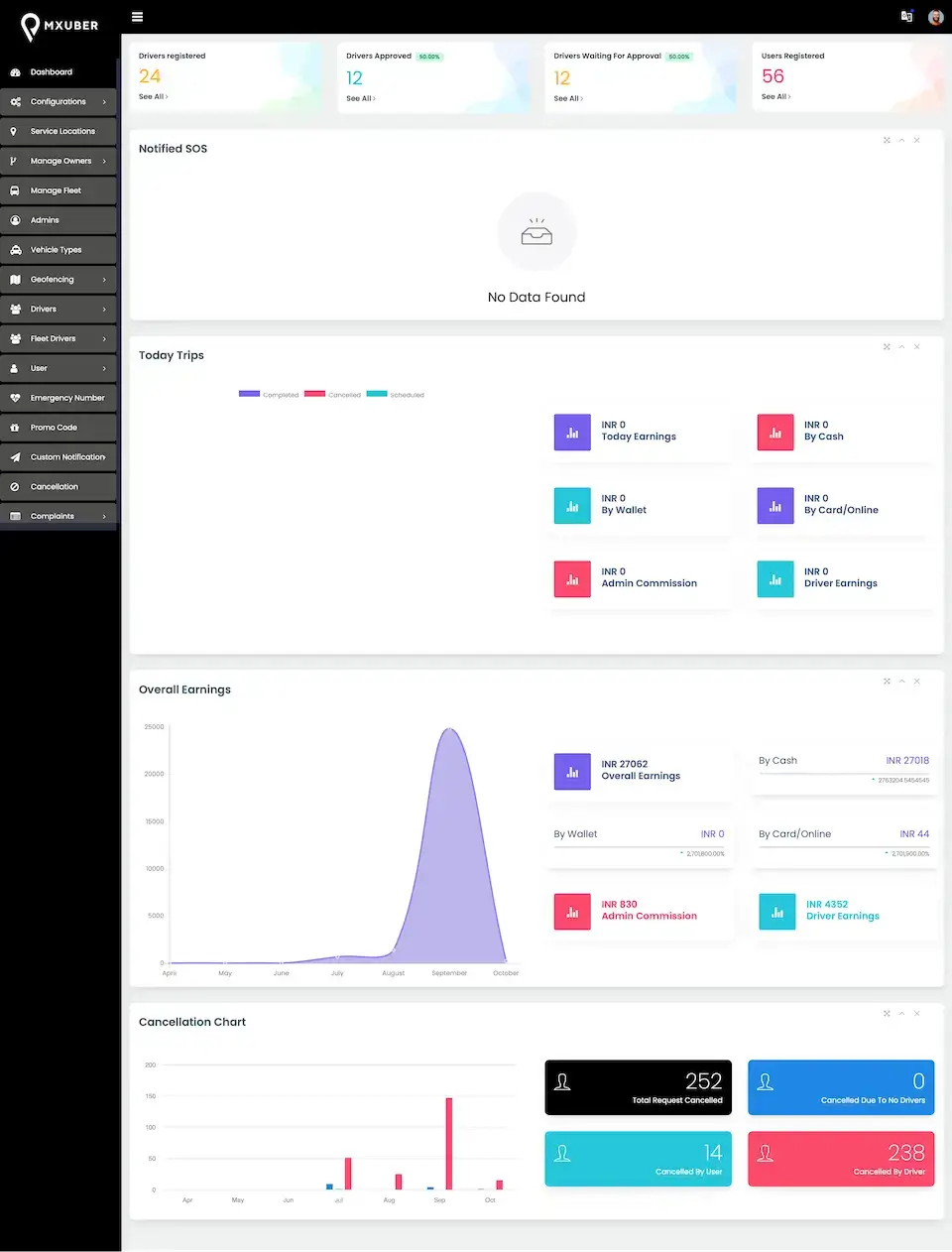
Bolt Clone admin dashboard with trip counts, earnings chart and cancellation figures02
Pick it if: You compete on speed and simple faresBolt Clone

Ride-hailing with driver matching, live GPS, fare calculation, payments and admin control, aimed at a fast launch in a competitive city.

Explore Solution
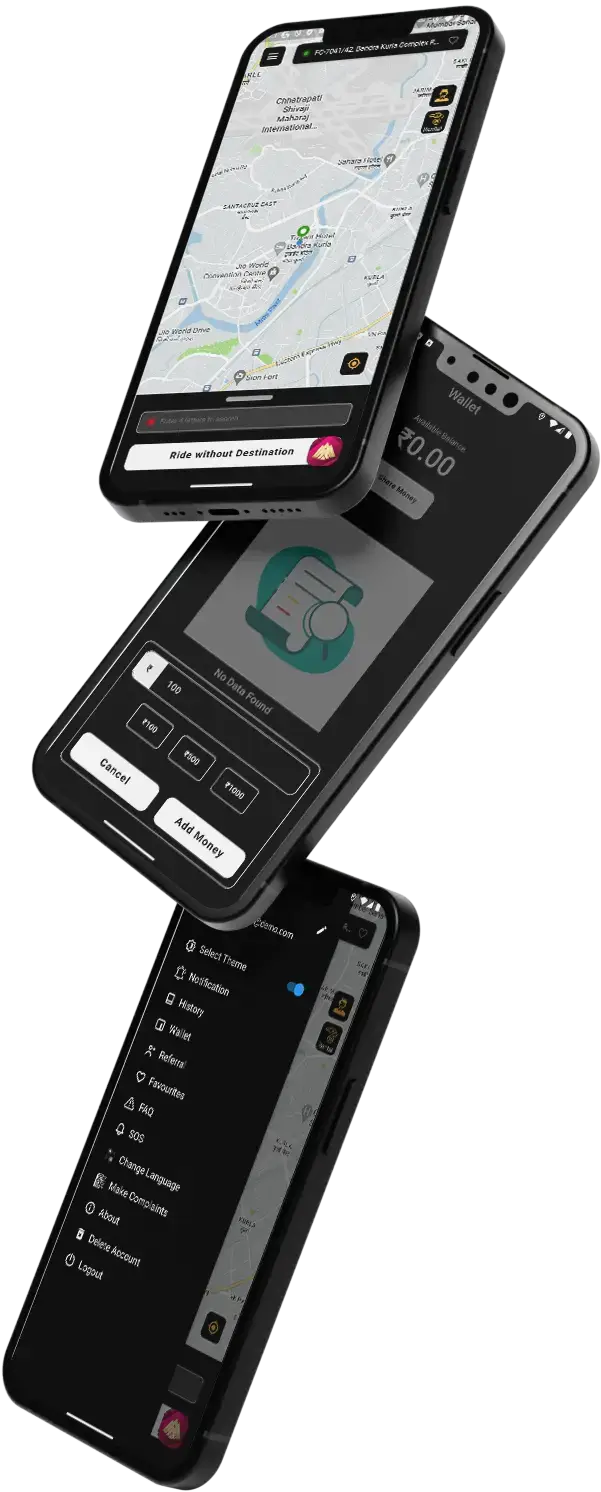
Lyft Clone rider and driver app screens on stacked phones03
Pick it if: Your riders expect fare estimates firstLyft Clone

Ride-hailing with driver matching, live tracking, fare estimates, payments and ratings, built around a familiar fixed-fare rider experience.

Explore Solution
Passenger using a phone in the back of a car, the Grab Clone super app use case04
Pick it if: Rides are one service among manyGrab Clone

A super app for ride booking, food delivery and more on one account, for operators whose plan runs wider than rides.

Explore Solution
CatalogAll 90+ solutions

09The business case

Market Benchmarks

Ride-Hailing Market Benchmarks - Independent 2025-2026 Data

The revenue models higher up are our own work, whereas the numbers below were produced by others: Statista, plus the 2025 annual reports of Uber and Lyft, which are filings with the US Securities and Exchange Commission. Read together, they show the share of each booking that fixed-fare incumbents keep, a yardstick for a fare-bidding operator judging its own commission.

Statista01

$188.6bn in Ride-Hailing Revenue in 2026

Statista Market Insights projects worldwide ride-hailing revenue of US$188.60 billion in 2026, growing at 5.08 percent a year to US$229.98 billion by 2030, with user penetration rising from 24.6 percent to 28.7 percent and 2.34 billion users by 2030.

Uber 10-K02

About 30% of Uber Mobility Bookings Becomes Revenue

Uber's 2025 annual report shows Mobility revenue of US$29.67 billion against US$97.5 billion of Mobility gross bookings across the four quarters, about 30 percent. Across all its segments Uber recorded 13.57 billion trips and 202 million monthly active platform consumers.

Lyft 10-K03

About 34% at Lyft, on 945.5 Million Rides

Lyft's 2025 annual report shows revenue of US$6.32 billion on US$18.51 billion of gross bookings, about 34 percent, from 945.5 million rides, with 29.2 million active riders in the fourth quarter.

Uber 10-K04

15% of Uber Mobility Bookings Touch an Airport

Uber reports that in 2025 it generated 15 percent of its Mobility gross bookings from trips that started or ended at an airport, which is why airport zones and airport fees are worth configuring from the first day in any city that has one.

Published sources, cited.

Statista Market Insights, Ride-hailing - Worldwide, market outlook, accessed October 2026 - statista.com

Uber Technologies, Inc., Annual Report on Form 10-K for the year ended 31 December 2025, filed 13 February 2026 - sec.gov

Lyft, Inc., Annual Report on Form 10-K for the year ended 31 December 2025, filed 11 February 2026 - sec.gov

Each number is the publisher’s own, shown as it was published. We worked out the 30 and 34 percent figures ourselves from the revenue and gross bookings every company reported, and neither is a commission rate, since reported revenue covers more than commission. What they depict is the market, not how any platform built by Miracuves performs, and none of it projects revenue for your business.

Why Operators Invest

Marketability, Revenue Potential & Outlook for Operators

The commercial question for a ride-hailing platform is rarely whether people need rides. It is whether the platform can hold enough drivers in a city to make wait times acceptable, at a commission riders and drivers both accept. Fare bidding changes that equation by letting the two of them settle the price, and the operator earns on whatever they settle.

  1. 01

    Commission on the Agreed Fare

    The platform share is taken from the price the rider and driver agreed, set as a fixed amount or a percentage and recorded on every bill. The operator earns without having to be right about the fare for every zone at every hour.

  2. 02

    Two Pricing Models, One Platform

    Bidding and fixed fares run side by side as modules, so a city can be tested on both and the reports show which one riders and drivers prefer before the operator commits.

  3. 03

    Supply You Can Keep

    Driver levels, leaderboards, incentives, referral rewards and subscription plans are retention tools the operator configures, aimed at the side of the market that is hardest to replace.

  4. 04

    Channels Beyond the App

    Fleet owners and corporate accounts, web booking, phone bookings through the dispatcher, franchise licensees and booking agents add demand the rider app alone would not reach.

Main Income Streams
  • Commission on the Agreed Fare
  • Driver Subscription Plans
  • Surge, Peak-Zone and Airport Premiums
  • Rentals, Outstation and Delivery Pricing
  • Paid Preferences and Extra Charges
  • Fleet, Corporate and Partner Channels
Upside Over the Years

The durable position is being the platform drivers choose to stay on.

  1. 01A first city with enough drivers at peak hours
  2. 02One-time purchase with the source transferred
  3. 03Trip, fare and dispute records an acquirer can diligence
  4. 04A driver base that has been paid correctly, week after week
Earnings Walkthroughs

The three configurations below are illustrative shapes, not promises or client figures. Each names the levers so you can put your own numbers in, and every rate in them is one you set.

One City, Bidding First1City Live

City rides with bidding, fixed-fare taxi beside it. An operator proving the model in one city: bidding for city rides, a fixed-fare taxi service for riders who want a set price, and the other modules switched off. Commission on the agreed fare carries the model while the work goes into drivers: onboarding, document approval and incentives that keep them online at peak hours.

Rides Plus Rentals and Parcels4Services Live

Four services against one rider and driver base. The same city, more ways to earn: hourly rentals, outstation trips and parcel delivery switched on beside city rides. Each earns on its own prices and commission, and none needs a new app, a new driver base or a new payment setup.

Multi-City With Fleets11Service Modules Available

Many cities, fleet owners and channel partners. This is the setup the platform was built around: service locations that each carry their own zones and fares, channels for franchises and agents, fleet owners who manage drivers in owner mode, and driver subscriptions alongside commission. Economics for each are decided in the console, not by a developer.

10Why Miracuves

Why Miracuves

Miracuves vs Other inDriver Clone Developers

What Draws Operators to Us · What Sets Us Apart

  • 01

    A Bid-and-Ride Platform Already Delivered

    Wave App launched a fare-bidding service on the Miracuves inDrive clone base: 6 working days of build, 18 of 23 platform blocks reused unchanged, and the source code transferred to the client's own account. The case study is published with its figures.

  • 02

    Bidding Beside Fixed Fares

    Most scripts pick one pricing model. Here bidding and fixed fares are modules on one fare engine and one console, switched per service, so the pricing question is answered by your city rather than by the vendor.

  • 03

    Counts You Can Check in an Afternoon

    413 migrations, 11 roles over 134 permission keys, 48 driver-app screens and 11 service modules are properties of the code you receive. Your engineers can confirm each one without taking our word for it.

  • 04

    We Put the Full Scope in Writing

    This page says the security review is not a penetration test, which add-ons extend the base build, and which go-live settings must change. A vendor who shows only a feature list is not being kinder to you.

  • 05

    Delivered Source Code

    The full repository, with its history, moves to your own account, and the platform runs on your own server. No per-ride meter, no encrypted modules and no runtime license to renew.

  • 06

    Built for Operators, Not Just Riders

    Dispatch, God's Eye, fleet owners, driver documents, withdrawals, disputes with SLAs and seven report families are in the base build, which is the half of ride-hailing an in-house build reaches last.

Development Company

How to Choose an inDrive Clone Development Company

Judge an inDrive clone vendor on whether the rider's offer, the driver's counter-fare and your bid guardrails all work in an open demo.

What to look for Miracuves

  • A bid-and-ride client on the same base Wave App went live on it after a 6-working-day build, with 18 of 23 blocks untouched
  • Bidding beside fixed fares Bidding tiles sit next to Taxi, Rental and Outstation in one rider app
  • The operator half of ride-hailing Dispatch, God's Eye, fleet owners and dispute SLAs in the base build
  • Source ownership Full repository with its history, no encrypted modules
  • Support after launch 60 days guidance, 6 months bug fixes, 12 months updates

Walk away from any vendor who

  • Demos a bidding screen but cannot run fixed fares beside it
  • Ships a thin driver app with no fleet-owner mode
  • Records no commission line a dispute can rely on
  • Hands over encrypted modules or meters every ride

Compare & See Why Clients Pick Us, the #1 Partner for Ready-Made Clone Solutions

CriteriaMiracuvesMiracuves inDrive CloneGeneric Clone ScriptCustom Dev Agency
Time to Launch6 days (branded deployment)Unknown / DIY6-9+ months
Source-Code OwnershipFull repository transferredOften limited / encryptedUsually yes
Fare ModelsBidding and fixed fares, per serviceUsually one or the otherWhatever you fund
Service Types11 modules, each a toggleTaxi onlyScoped and billed separately
DispatchMonitor, God's Eye, heat map, manual assignBasic trip listBuilt late, if at all
Payments24+ gateways, cash and walletOne or two gatewaysWhatever is specified
Languages28+, Arabic and Urdu right-to-leftEnglish onlyExtra per language
Driver App48 screens with fleet-owner modeA thin companion appA second project
Security PostureDocumented (handbook, VAPT review)UndisclosedVaries by engagement
What separates a bid-and-ride platform an operator can run from a booking app with a price field added.Book a Free Strategy Call

Changelog

Release Log of the Bidding Ride App - Version History & Updates

VersionDateWhat’s New
v2026.1Oct 2026Rebuilt on the current design. Fare bidding beside fixed fares across eleven service modules, Flutter rider and driver apps with fleet-owner mode, the Laravel 12 admin and dispatch console, 24+ payment gateways, 28+ languages with right-to-left layouts, and the ten-document technical set including the security handbook and VAPT review.

Let’s build together

Together we can carry your concept through to a live ride-hailing platform.

Tell us your first city, whether you want bidding, fixed fares or both, and which services you will launch with. We will map the rest.

  • Reply in 24 hrs
  • Free consultation
  • No lock-in contracts
  • Full source code ownership

11Learn more

Blog & Resources

inDrive Clone App - Latest Reading Shelf

Longer reads on the decisions behind a fare-bidding platform: how negotiated pricing affects retention, when a ready-made base beats a custom build, and what it takes to build one from the ground up.
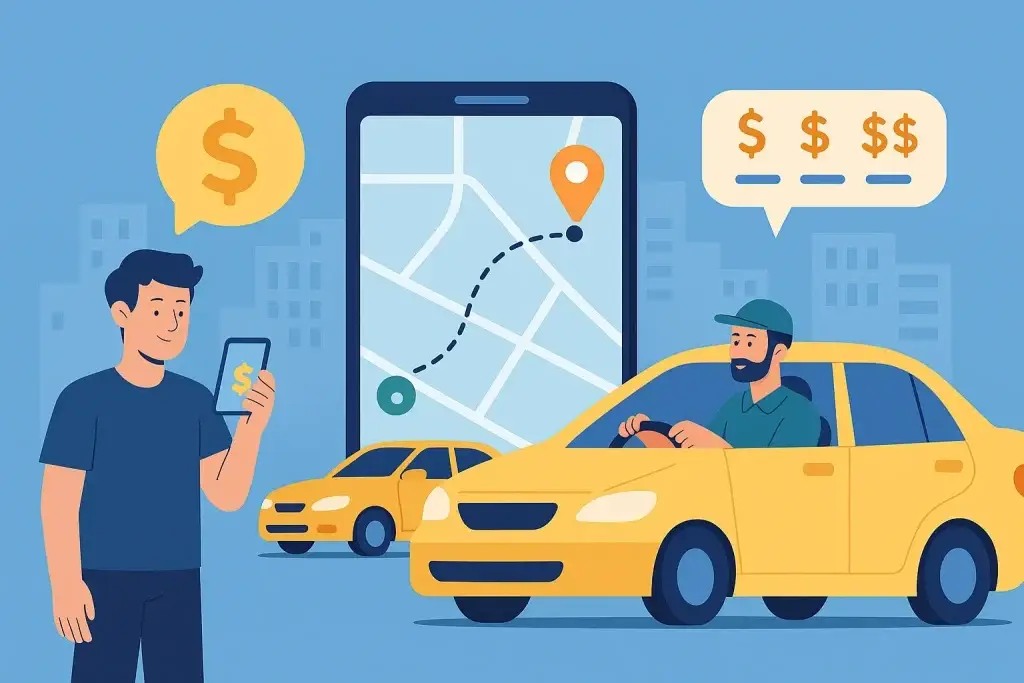
Bidding & fares4 questions

01How does fare bidding work in this inDrive clone?

The rider sets pickup and drop-off, chooses a bidding service and posts the trip with the fare they are willing to pay. Drivers online in that zone see the route and the offer and either take it or propose a fare of their own. The rider then chooses among the drivers who responded, by price, rating and vehicle, and the trip goes ahead at the agreed fare. The platform takes its commission from that fare.

02Can I run fixed fares and bidding on the same platform?

Yes. Bidding, Bidding Outstation and Delivery Bidding are three of eleven service modules, and each is switched on or off in the admin. Taxi and Rental run on zone-type fare cards with surge, peak zones and airport fees, so the same city can offer a negotiated ride and a fixed-fare ride side by side. With bidding switched off, drivers see fixed-fare offers only.

03Can I control how high or low a bid can go?

Bid behavior is governed by the bid-ride settings in the admin, where the operator sets guardrails for bid ranges. Drivers can update their per-kilometer rate only where the operator permits it. The documents do not prescribe fixed limits. The ranges for your market are set with you during delivery, alongside any fare rules your city imposes.

04Does bidding work for intercity trips and parcel delivery?

Yes, as separate modules. Bidding Outstation covers intercity trips, where a fixed per-kilometre fare rarely suits both sides, and Delivery Bidding covers parcels, with goods types and a signature captured at the drop-off. Each is switched on or off independently of city-ride bidding.

Apps & platform4 questions

05What apps and panels are included in the inDrive clone?

A Flutter rider app with 40-plus screens, a Flutter driver app with 48 screens and a built-in fleet-owner mode, and one Laravel 12 console that serves the admin, the dispatcher and the public website with web booking. Eleven roles are seeded, from super admin to dispatcher and fleet owner. The Dispatcher Pro, Agent and Franchise consoles are included as well.

06Which payment methods and gateways does it support?

Card, cash, wallet and wallet-plus-cash. Twenty-four payment gateways are named in the platform, including Stripe, Razorpay, PayPal, Flutterwave, Paystack, Mercado Pago, Xendit and Paymob. Card entry runs on gateway-hosted pages and saved cards are stored as gateway tokens, so card numbers never enter the platform. You open the merchant account with each gateway you use.

07Does it support several cities, languages and currencies?

Yes. Each city is a service location with its own polygon zones, zone types, fare cards and surge, so a new city is configuration rather than code. Currency and distance units are stored per trip, and the map layer runs on Google Maps or on OpenStreetMap. The apps ship in 28-plus languages, with Arabic and Urdu laid out right to left.

08Can fleet owners and corporate clients use the platform?

Yes. Owners and fleet companies have their own records, documents with approval, hired drivers, an owner wallet, owner booking, a fleet dashboard and fleet reports. Their drivers use the standard driver app, which switches into owner mode, so a fleet runs on the platform rather than beside it.

Licensing & launch readiness4 questions

09Do I need a license to run a ride-hailing service?

Almost always, and the software does not provide one. Ride-hailing, taxi, private-hire and courier services are licensed by cities, states or countries: transportation network company rules state by state in the US, TfL private hire licensing in London, the Motor Vehicle Aggregator Guidelines in India and the RTA in Dubai, for example. Drivers, vehicles and trip insurance carry their own requirements. Confirm your route with transport counsel before launch.

10Is the platform penetration-tested or security-certified?

The platform comes with a developer-facing security handbook, plus a VAPT review that reads the source and catalogs controls. An outside pen test against your live build is supported, with a slot reserved ahead of launch.

11What has to be set up before the first real ride?

You need your own Firebase project for live offers and push, plus merchant accounts with your payment gateways and their webhooks. You also need an SMS provider for OTPs, email, map keys or the OpenStreetMap stack, and Apple and Google developer accounts. On top of that comes the go-live hardening. It covers production settings, locked Firebase rules, private storage for driver documents, demo auto-approval switched off and encrypted backups.

12How are drivers verified on the platform?

Drivers upload their documents in the driver app and an admin approves or rejects them, with expiry tracked by a scheduled job. The demo auto-approves documents every five minutes, which must be switched off in production so approval is a human decision. Background checks are run by you or a screening provider you choose; the platform records the outcome rather than performing the check.

Code, rollout & Miracuves11 questions

13How much does the inDrive clone cost and how long does it take?

The ready-made platform is a one-time $3,099 and is deployed in 6 days on your own server, branded as yours. App store approval follows on Apple and Google timelines and is outside that window. Dispatcher Pro, Agent and Franchise are included in that price, and custom work beyond the base build is quoted in writing before it starts.

14Do I get the full source code?

Yes. The Laravel console and API, the website and both Flutter apps are handed over as a full repository with its history. The platform runs on your own server as a single-operator installation, with no runtime license, no encrypted module and no per-ride fee to Miracuves.

15Have you built a fare-bidding ride app for a real client?

Yes. Wave App, for Bmore On Demand Technologies, LLC, is a bid-and-ride platform built on this base in 6 working days, with 18 of 23 platform blocks reused unchanged and the source code transferred to the client. The engagement went into Wave App’s cities and zones, service types and bid rules. The full case study is in our portfolio.

16What does a realistic first year look like?

The launch is one city, a small set of zones, and a deliberate choice of which services to switch on. That usually means city rides with bidding, with fixed-fare taxi beside it for riders who want a price on the screen. The first year is a supply problem more than a demand one. The work goes into driver onboarding, document approval and keeping drivers busy enough to stay. Commission on the agreed fare carries the model while driver subscriptions and premiums are tested. Operators who chase rider downloads before they have drivers in every zone tend to learn the cost of long wait times in their reviews.

17When should a second city or service be added?

The time is right once the first city has enough drivers online at peak hours that riders get offers quickly, and the dispatch and support routine is settled. A second city is a new service location with its own zones and fares. A new service such as rentals, outstation trips or parcels is a module switched on in the admin. Neither is a software project, which is the point: the decision is about operations and supply, not code.

18Is a ready-made inDrive clone better than custom development?

For a fare-bidding taxi business it usually is. The inDrive clone already runs bidding beside fixed fares, eleven service modules, dispatch and driver payouts, and it carried the Wave App platform with 18 of 23 blocks reused unchanged. It is deployed in 6 working days at a price agreed up front. A custom ride-hailing build is scoped and priced per project; missing pieces become a written quote and normally take 2-8 weeks to build.

19What is the business model of an app like inDrive?

An app like inDrive earns on the fare two people agreed. The base is a commission on every completed ride, fixed or percentage, recorded on each bill beside the driver’s share. On top come driver subscription plans, surge, peak-zone and airport premiums on fixed-fare trips, rental, outstation and parcel pricing, paid preferences and extra charges, plus corporate, fleet, franchise and agent channels. Miracuves takes no cut of any ride.

20What is the step-by-step process to launch my inDrive clone?

Try posting a trip and bidding on it in the demo. Then fix your service set and first market, and send branding, server access, Firebase, map, SMS and gateway keys. Miracuves brands the rider and driver apps and the website, deploys to your server, configures zones, fares and roles and trains your team, which takes 6 working days. Apple and Google approval follows on their own timelines, outside that window.

21What features should an inDrive clone app include?

Fare bidding comes first: the rider posts a price and drivers accept it or counter. Around it sit fixed-fare Taxi and Rental modules with surge, peak zones and airport fees, plus Bidding Outstation for intercity trips and Delivery Bidding for parcels. Driver document approval, a fleet-owner mode, a wallet with twenty-four named gateways and an admin and dispatcher console complete the base.

22How does a new ride-hailing app attract both drivers and riders?

Start small and let supply lead. Launch one city with a few zones and city rides with bidding beside fixed-fare taxi, so riders get offers quickly once enough drivers are online at peak hours. Fleet owners can bring hired drivers through owner mode, and the admin approves each driver's documents. Add a second city only after that routine is settled.

23How do I choose the right taxi operator app for my business?

Check four things: which trip types it covers, whether you receive the full source code, what recurring fees apply and how soon you can launch. The inDrive clone covers bidding, taxi, rental, outstation and parcels, hands over a full repository on your own server, charges a one-time $3,099 with no runtime license or per-ride fee to Miracuves, and deploys in 6 days.

Disclaimer

Miracuves is an independent software development company. We are not affiliated with, connected to, sponsored by, or endorsed by inDrive.

Read our full Legal Notice & Disclaimer →
Reason behind this name

“inDrive Clone” is used descriptively. It is how the software industry refers to building a platform with functionality similar to inDrive, and how clients search for it.

Creator of this page

The entire design and codebase is built by our own team. The product contains no code, design, graphics, or content originating from the inDrive website or applications.

Trademarks

inDrive and all other third-party names and marks are the property of their respective owners, referenced here solely to describe the category of software offered.