Ride-Hailing App · Production Ready

Uber Clone App - White-Label Taxi Booking Platform

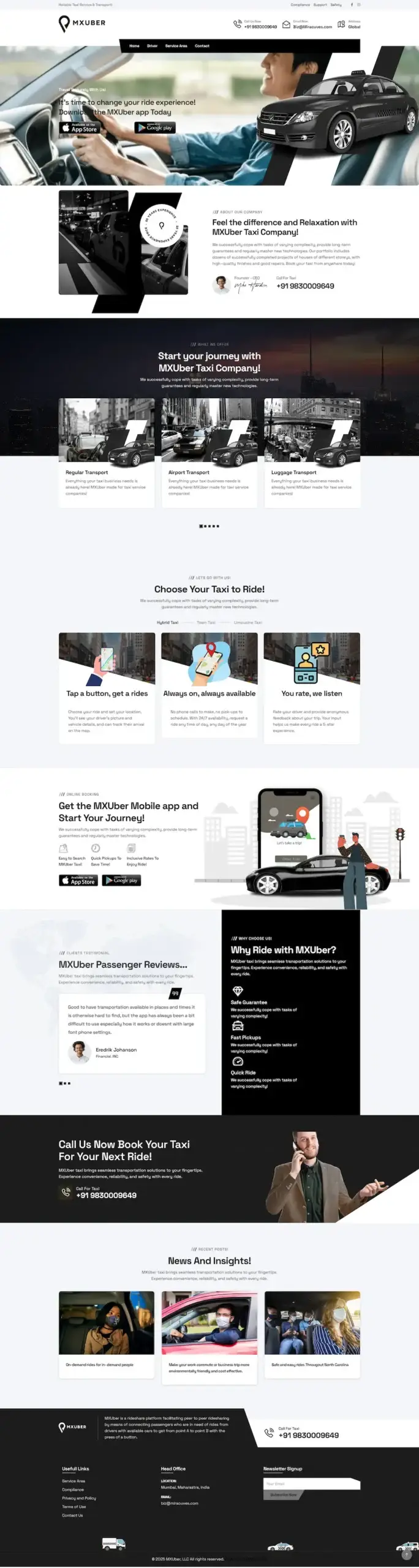
Built by Miracuves, this ready-made, white-label Uber clone puts five applications in your hands as owned source code: rider app, driver app with fleet manager role, rider web app, admin console and corporate portal, running as your taxi brand in six working days.

Riders book a cab, parcel, freight, ambulance, rental or hired-driver trip, now or at least 3 hours ahead; the engine offers each one to the nearest eligible driver and passes it on after a timeout. In-car entertainment, a virtual tour guide and voice commands are available add-ons. A new trip type or a city-specific fare rule is custom work: we scope it in writing, and it lands within 2-8 weeks.

Launch in 6 Days with

  • Source Code
  • Rider & Driver Apps
  • Rider Web App
  • Admin Console
  • Corporate Portal
  • Android + iOS

StackReact Native · Laravel 11 · MySQL · Redis · Reverb · OpenStreetMap

MXUber console · OperationsIllustrative
Rides today148
Dispatch queue6
Drivers online214

Operations activity

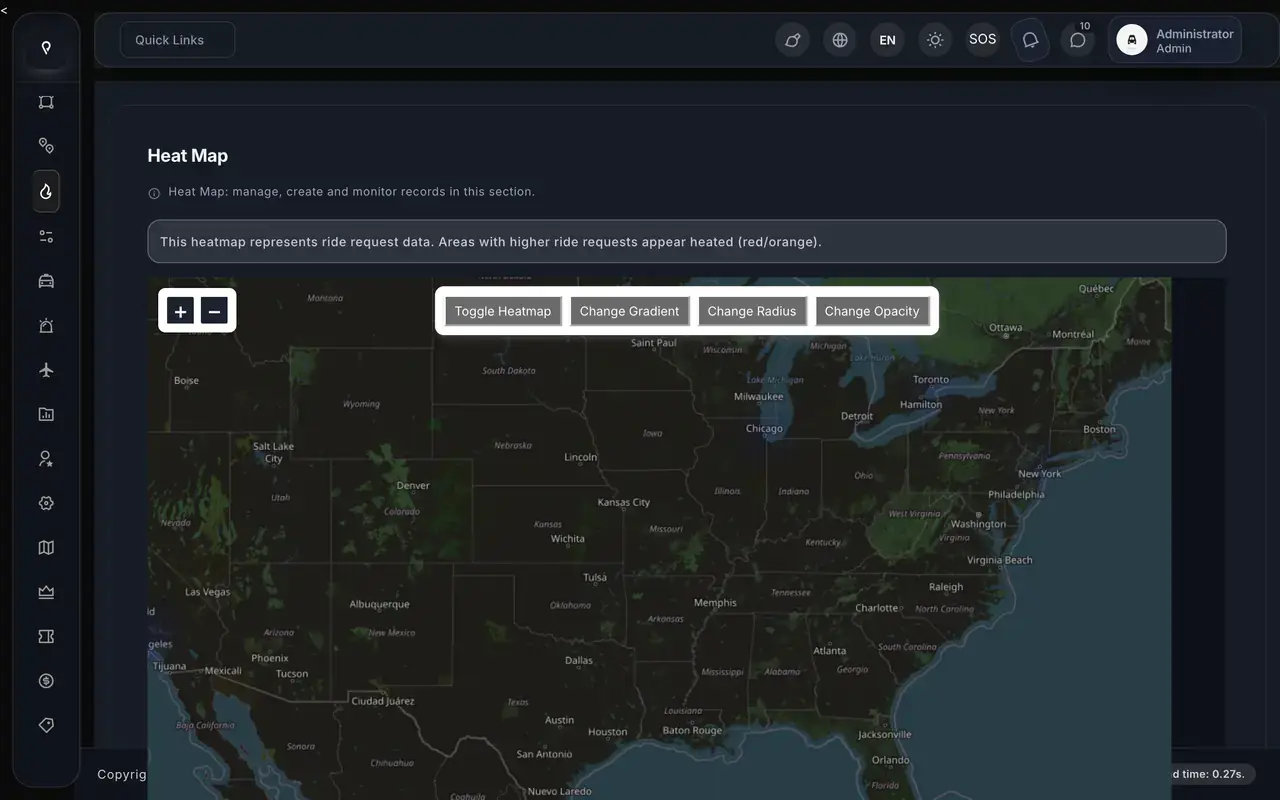
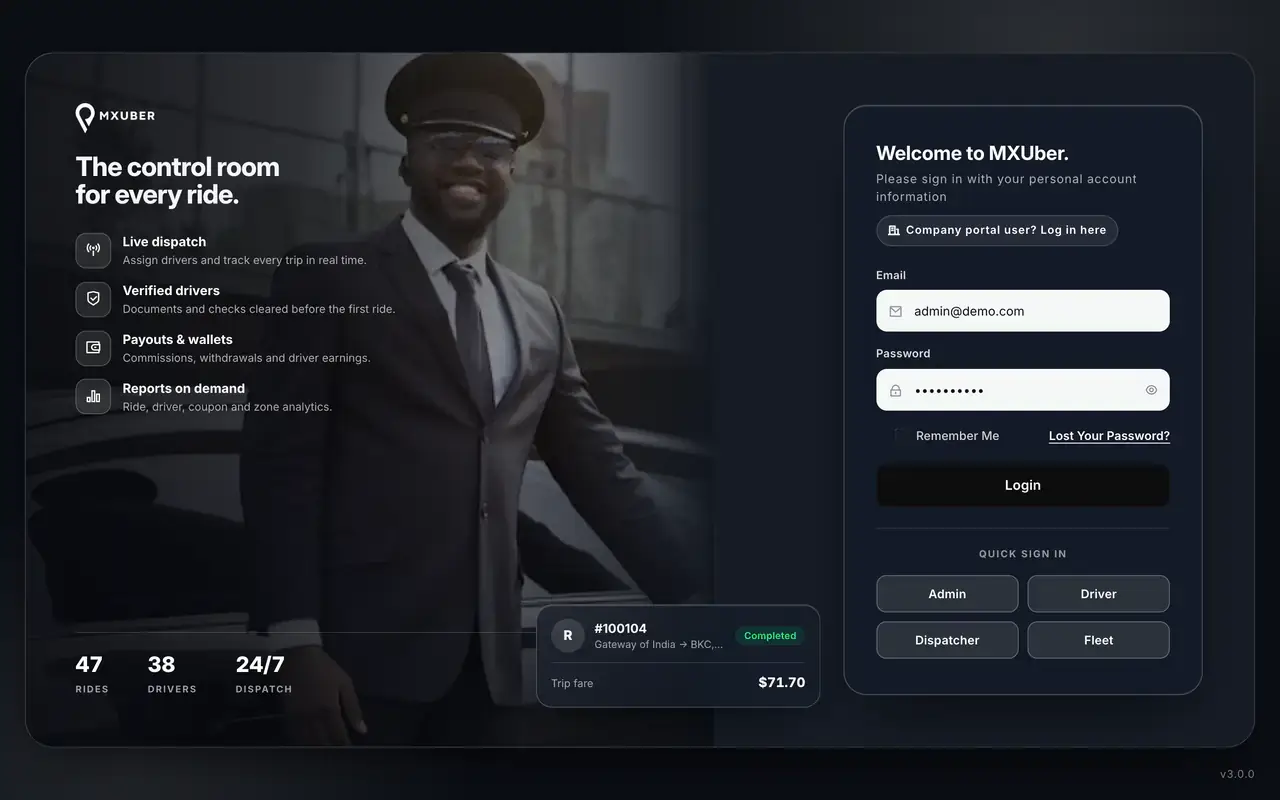
Admin · Heat MapReal screen
Uber Clone App - White-Label Taxi Booking Platform - real admin screen, Heat Map
App in action
Drivers hear about each requestin real time
  • 5Applicationstwo phone apps, a web booking app, the operator console and a company portal
  • 5Servicescab, parcel, freight, ambulance and hire-a-driver
  • 0%Revenue Share With Miracuvesno royalty on any fare or delivery, ever
  • 100%Source Codedelivered complete, with no encryption
  • 6Days to Launchand if the delay is ours, we keep going free
  • $3,099Paid Once, Not Rentedsource code yours, no per-seat fee, no monthly rental

Live in six working days, or we keep working free until you launch. Every build carries 60 days guidance, 6 months bug fixes and 12 months updates.Verify every figure

Dispatch That Passes It On

Each request goes to the nearest eligible driver on a timed offer, 30 seconds by default; a decline or timeout hands it to the next driver, and staff can assign one by hand.

Aone Launched on an Earlier Release

Aone runs a ride-hailing platform built on an earlier release of this product, with 20 of its 25 building blocks reused unchanged and the source code moved to its own account.

Cards Stay at the Gateway

Card data is held by the gateway you connect, such as Stripe, PayPal or Razorpay, and the platform never stores card numbers; drivers withdraw their earnings to a payout account.

Ready to put your own ride-hailing platform on the road?Talk to Product Expert

Chosen by 6,000+ clients across the globe

Miracuves is listed by Expertise.com as a managed IT service provider.Miracuves is an official member of the Forbes Business Council.Miracuves is a verified agency on DesignRush, listed among top design agencies in India.Miracuves is reviewed on Trustpilot as a software development company.Miracuves is listed by The Manifest among top managed software development companies.Miracuves is listed by DesignRush as a top software development company.Miracuves is recognized by GoodFirms as a top software development company.Miracuves is ranked among the top 1000 companies globally by Clutch.Miracuves is a top managed service provider in the United States on Clutch.

01See it live

Live in Action

Uber Clone Demo - Rider App, Driver App, Web App & Operator Panels

Try the Miracuves Uber Clone hands-on. Every login is listed on this page: rider, driver, dispatcher, fleet and admin. Book a ride in the app or the browser, accept it as a driver, then follow it through the admin console's live maps and ride lists.
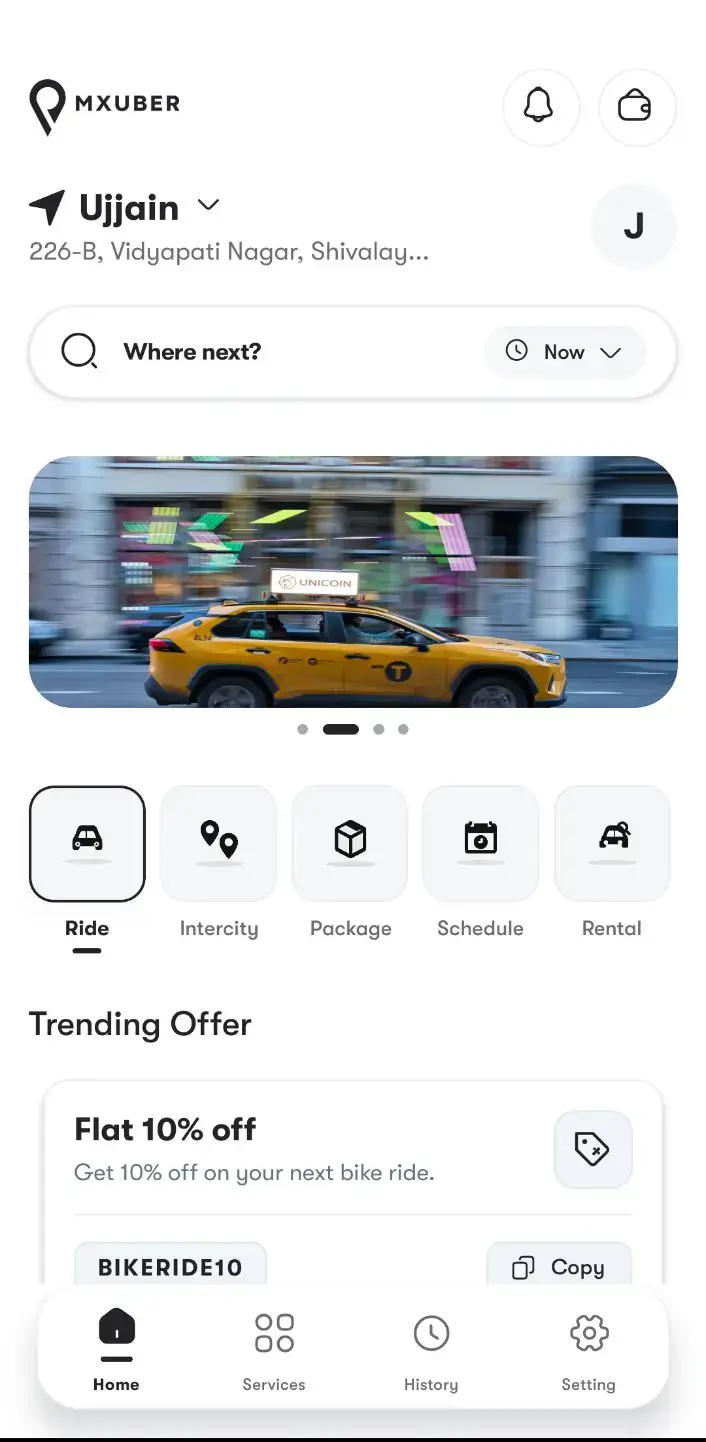
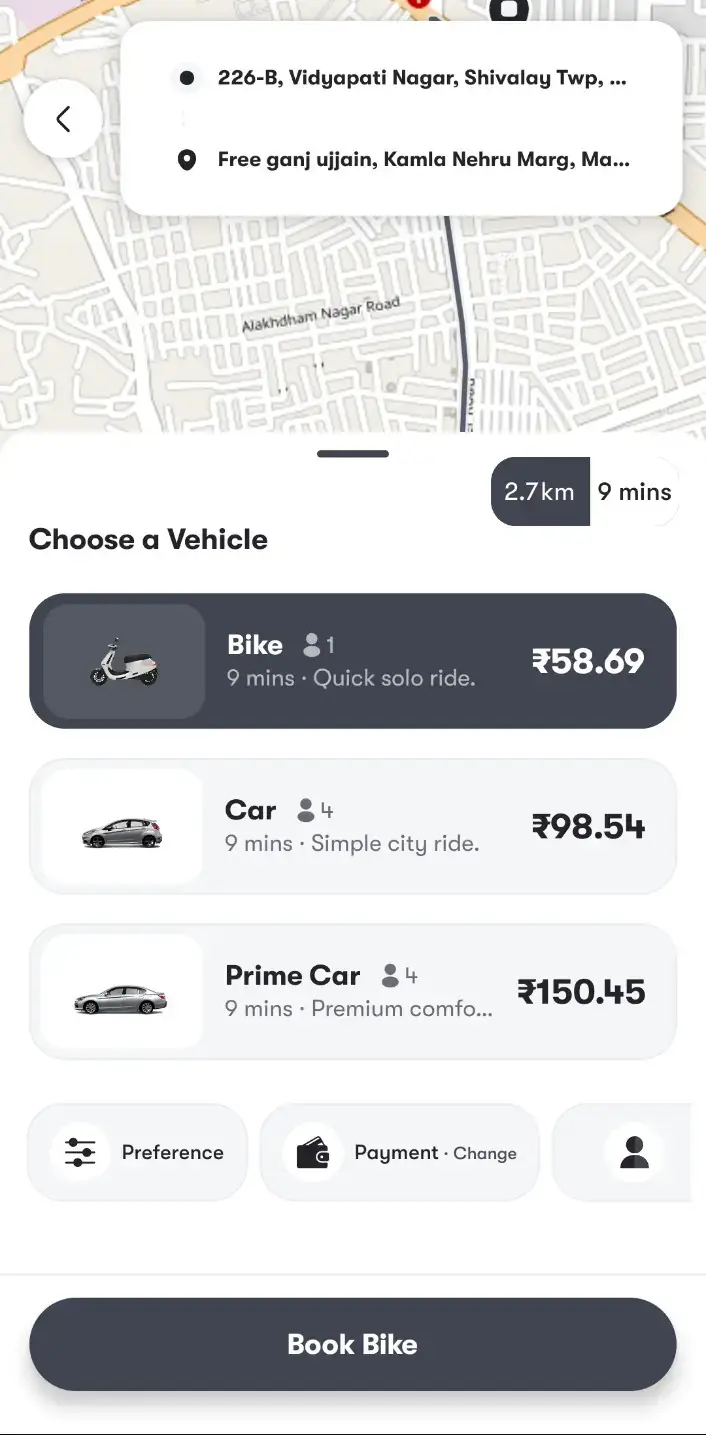
Uber Clone rider home with Where next search and Ride, Intercity, Package, Schedule and Rental tilesUber Clone rider choosing Bike, Car or Prime Car with fares and arrival times before booking
Rider app

Uber Clone - Rider App

On the rider's phone, a person signs in with an OTP, Google or Apple, or browses as a guest. From the Home tiles they pick Cab, Parcel, Freight, Ambulance or Find Driver, set pickup and drop-off, then choose a vehicle with its fare and ETA.

  1. 1Open the app portal and pick your phone
  2. 2Sign in with the demo login below
  3. 3Explore: Home tiles, Choose a vehicle, Rebook
Try:+91 9876543210 | User_321
  • Timed ride offers with accept or decline
  • Live surge zones on the map
  • Earnings chart, wallet, withdrawals
  • Driver subscription plans
Driver app

Driver App - Offers & Earnings

The driver side: a power-button online switch, timed ride offers that survive a dropped connection, and earnings, wallet and withdrawals. Fleet managers use this same app.

  1. 1Open the app portal and pick your phone
  2. 2Sign in with the driver login below
  3. 3Explore: Online switch, Ride offers, Earnings
Try:driver@demo.com | Driver_321
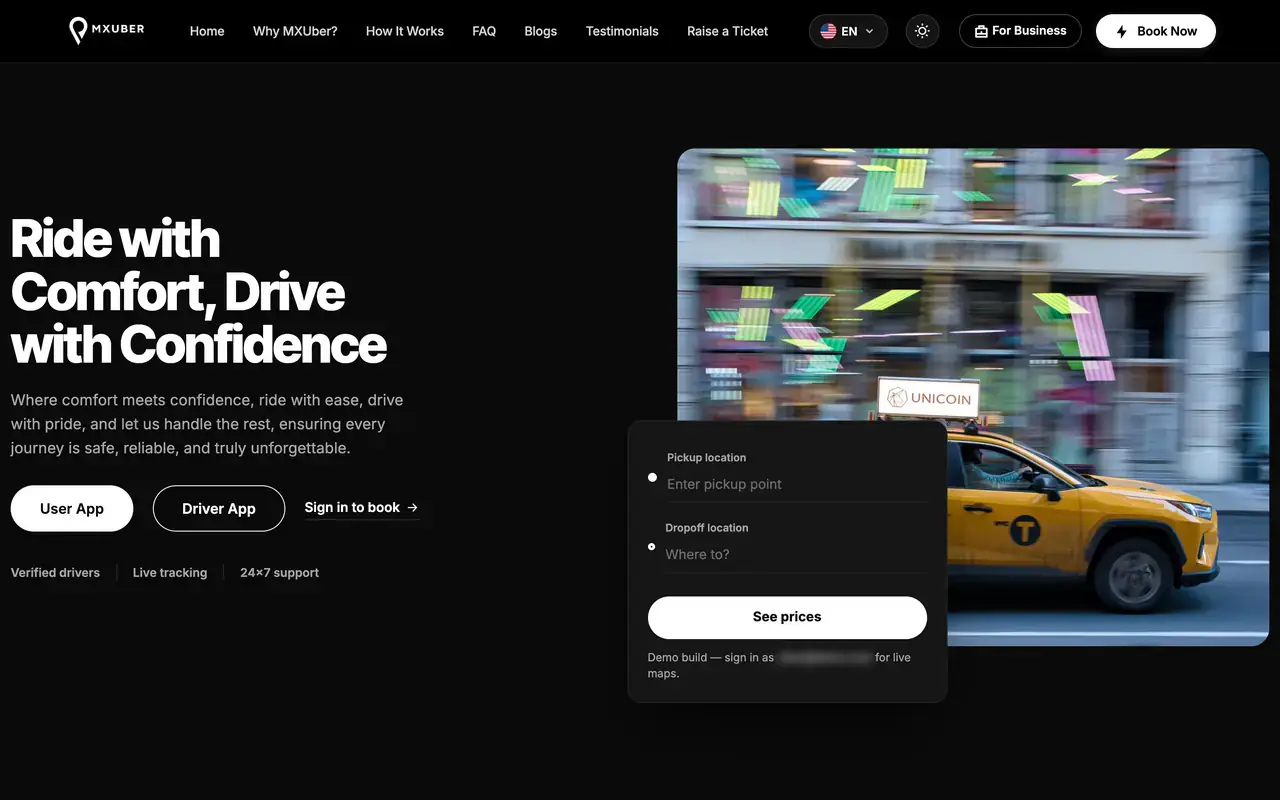
Uber Clone rider website hero with pickup and drop-off fields, See prices button and rider and driver app links
Web site

Rider Web App & Public Website

Book in a browser at /cab: map pickup and drop-off, vehicle choice, payment options, scheduling and real-time GPS geolocation tracking of the driver. The public site fronts the platform and has a For Business page.

  1. 1Open the demo site in a browser tab
  2. 2Sign in to the rider web app
  3. 3Explore: Book a ride, Ride history, Wallet
Rider web:+91 9876543210 | User_321
  • Dispatcher: bookings, manual assignment
  • Fleet: live map, drivers, earnings
  • Admin: zones, surge, live maps, reports
  • Public logins, listed below
Operator panels

Dispatcher, Fleet & Admin Panels

The operator side: the dispatcher creates phone bookings and assigns drivers by hand, the fleet login sees only its own drivers, and the admin console runs zones, surge, commissions and reports.

  1. 1Open the admin login page
  2. 2Sign in with the logins below
  3. 3Explore: Ride requests, Peak zones, Fleet map
Logins:Admin: admin@demo.com | Admin_$321Dispatcher: dispatcher@demo.com | Dispatcher_321Fleet: fleet@demo.com | Fleet_321
Uber Clone on three phones: the rider app menu with wallet, SOS and out-station, the scheduled-ride date picker and the suggested rides and fare listUber Clone rider choosing Bike, Car or Prime Car with fares and arrival times before bookingUber Clone rider home with Where next search and Ride, Intercity, Package, Schedule and Rental tiles

See It With Us

Video Walkthrough of the Uber-Like App: Rider, Driver, Dispatch, Fleet & Admin Panels

The demo logins on this page let you look around alone. A live call ties the five applications to your plan: in 30 minutes we open the rider app, driver app, rider web app, admin console and corporate portal against your cities, fares, commission rules and launch date.

Schedule a live walkthrough call.

Every Screen Mapped

Uber Clone App Flows - Rider, Driver, Admin & Website

Miracuves shows real screens of its Uber clone in the order a trip moves through the rider app, the driver app, the admin panel and the website, from the Home tiles to the admin console.

Uber Clone rider app splash screen with the logo over a night street
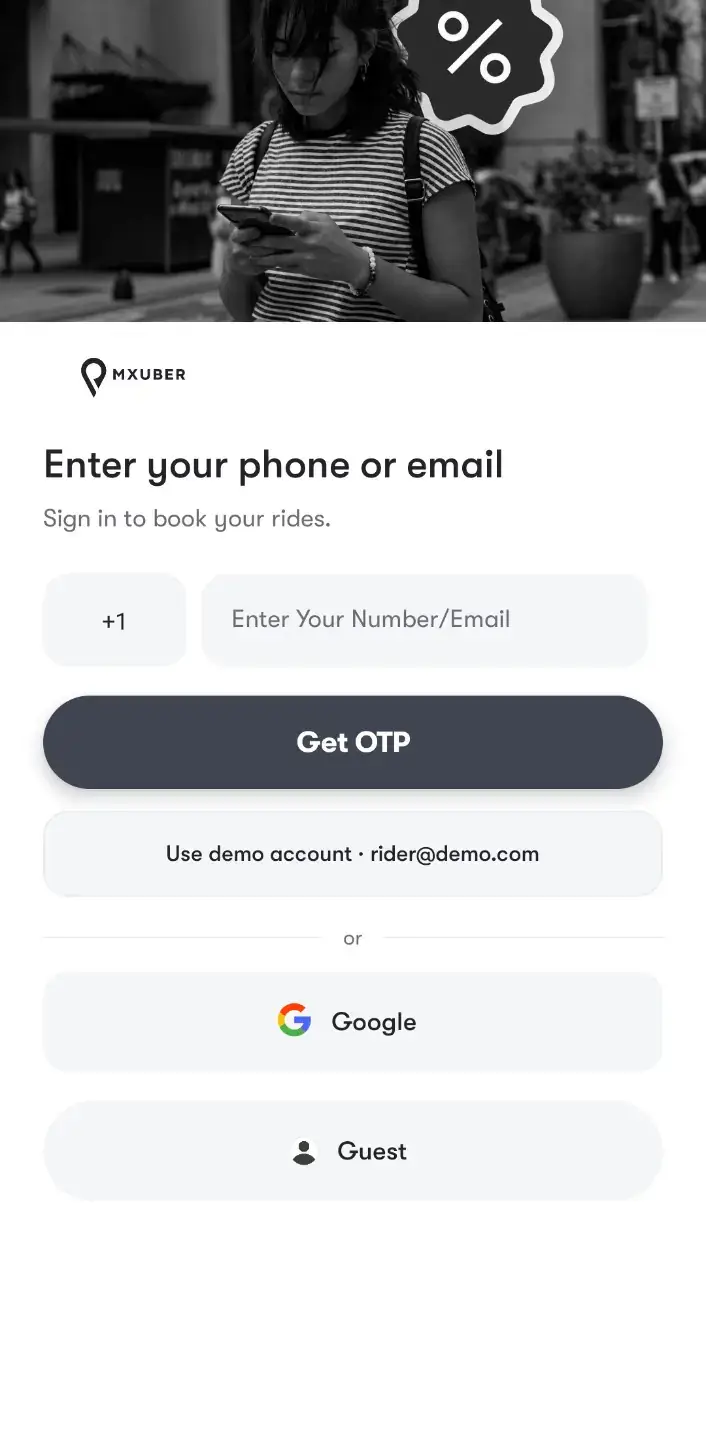
Uber Clone rider sign-in with phone or email OTP, Google sign-in and guest entry
Uber Clone rider home with Where next search and Ride, Intercity, Package, Schedule and Rental tiles
Uber Clone rider choosing Bike, Car or Prime Car with fares and arrival times before booking
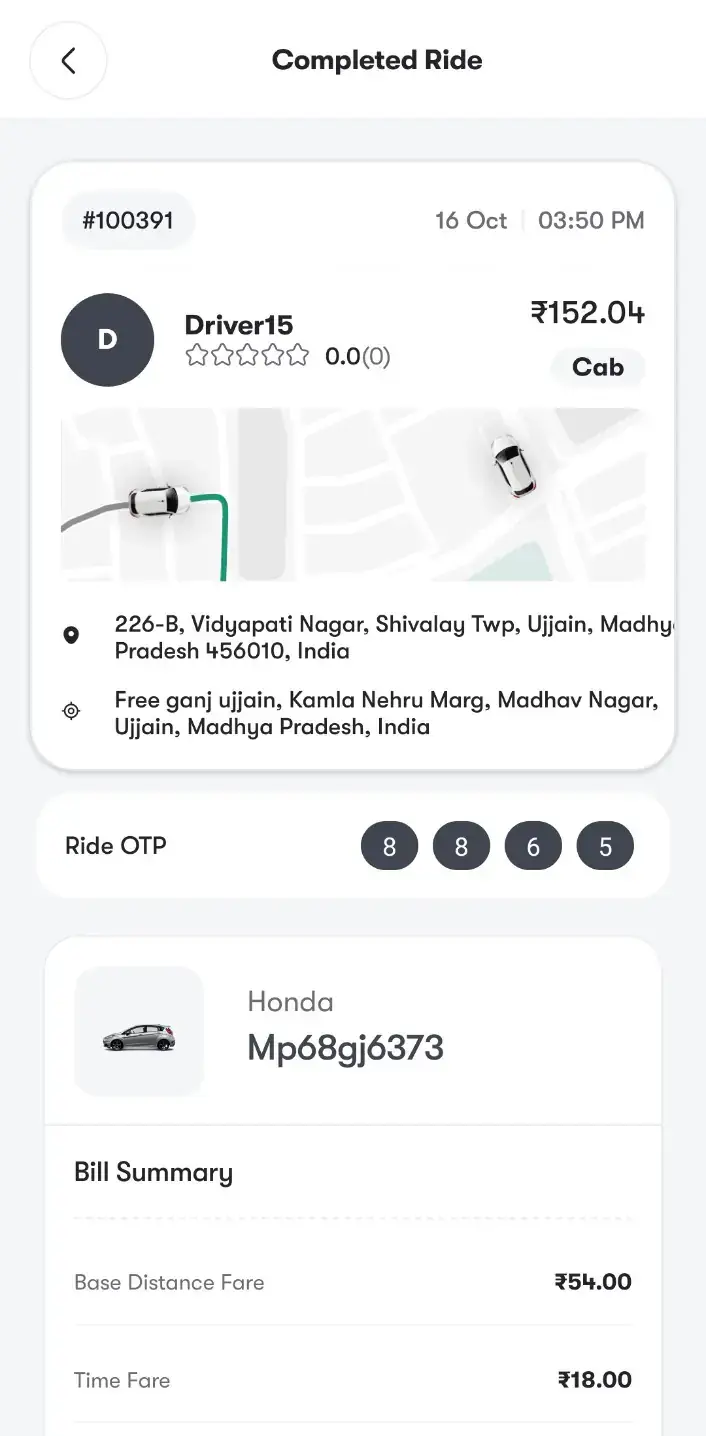
Uber Clone completed ride with route, ride OTP, vehicle and bill summary
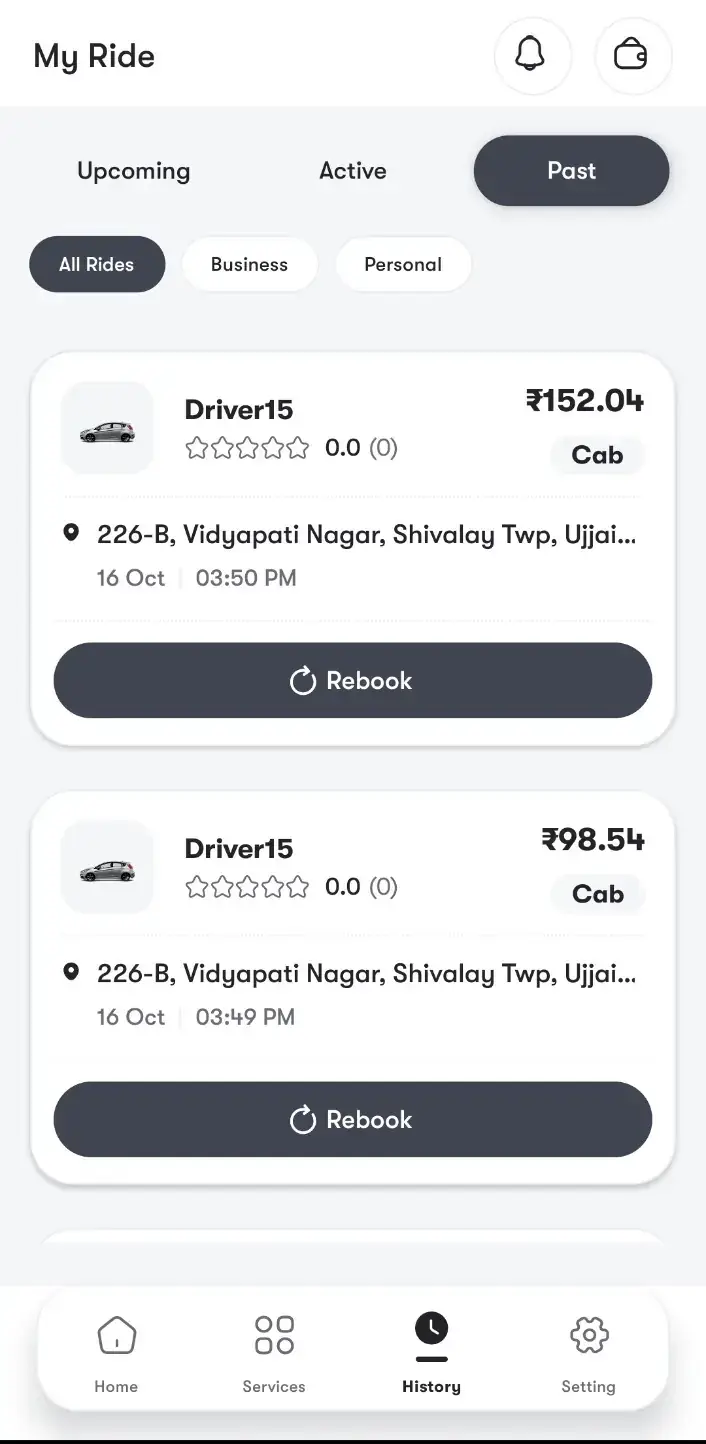
Uber Clone ride history with business and personal filters and one-tap Rebook
6 screens · scroll →
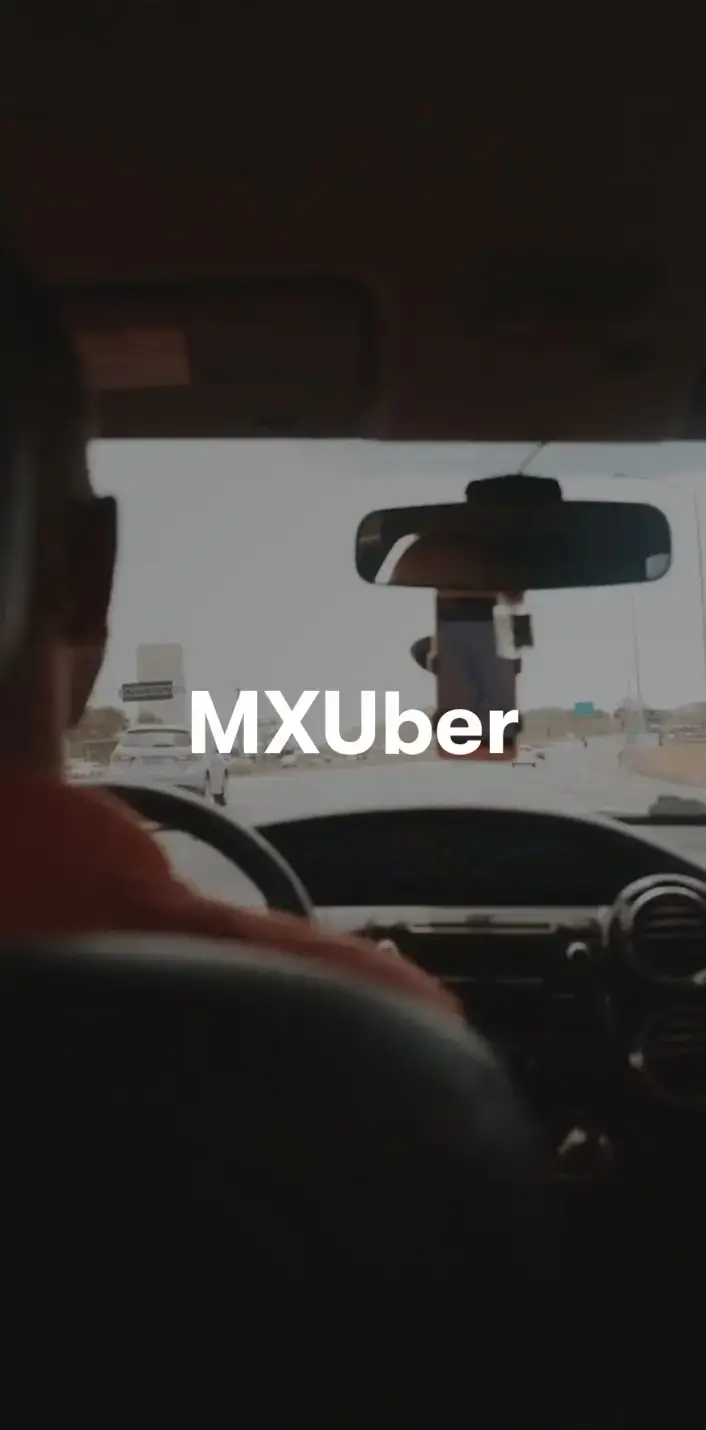
Uber Clone driver app splash screen
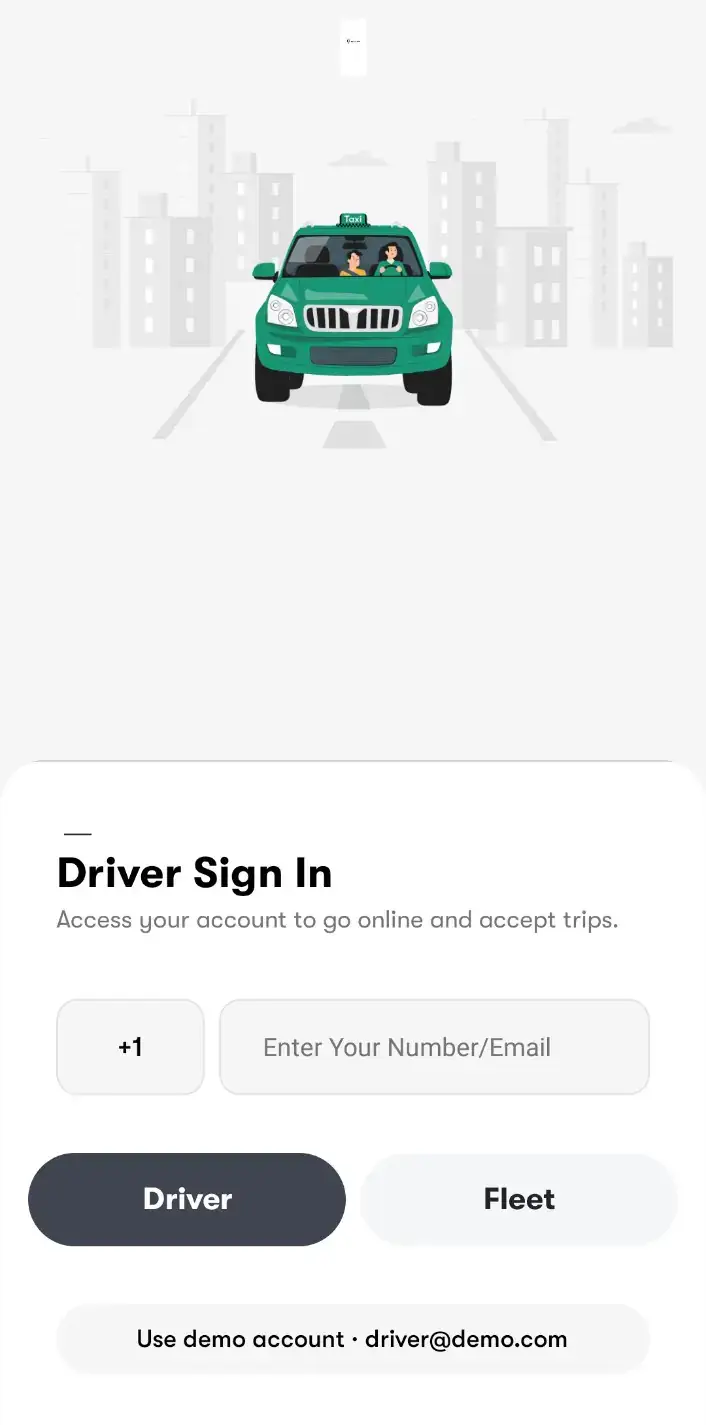
Uber Clone driver sign-in with Driver and Fleet options
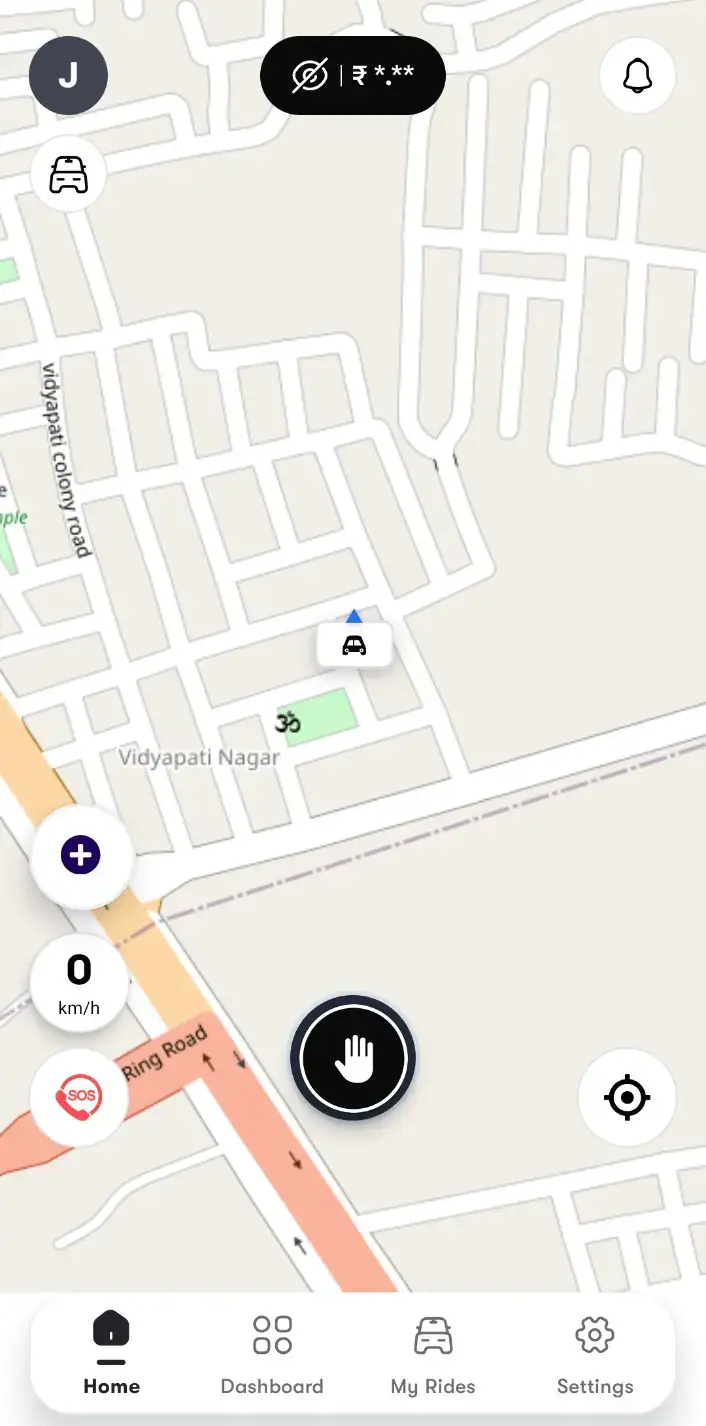
Uber Clone driver home map with the online power button and hidden earnings chip
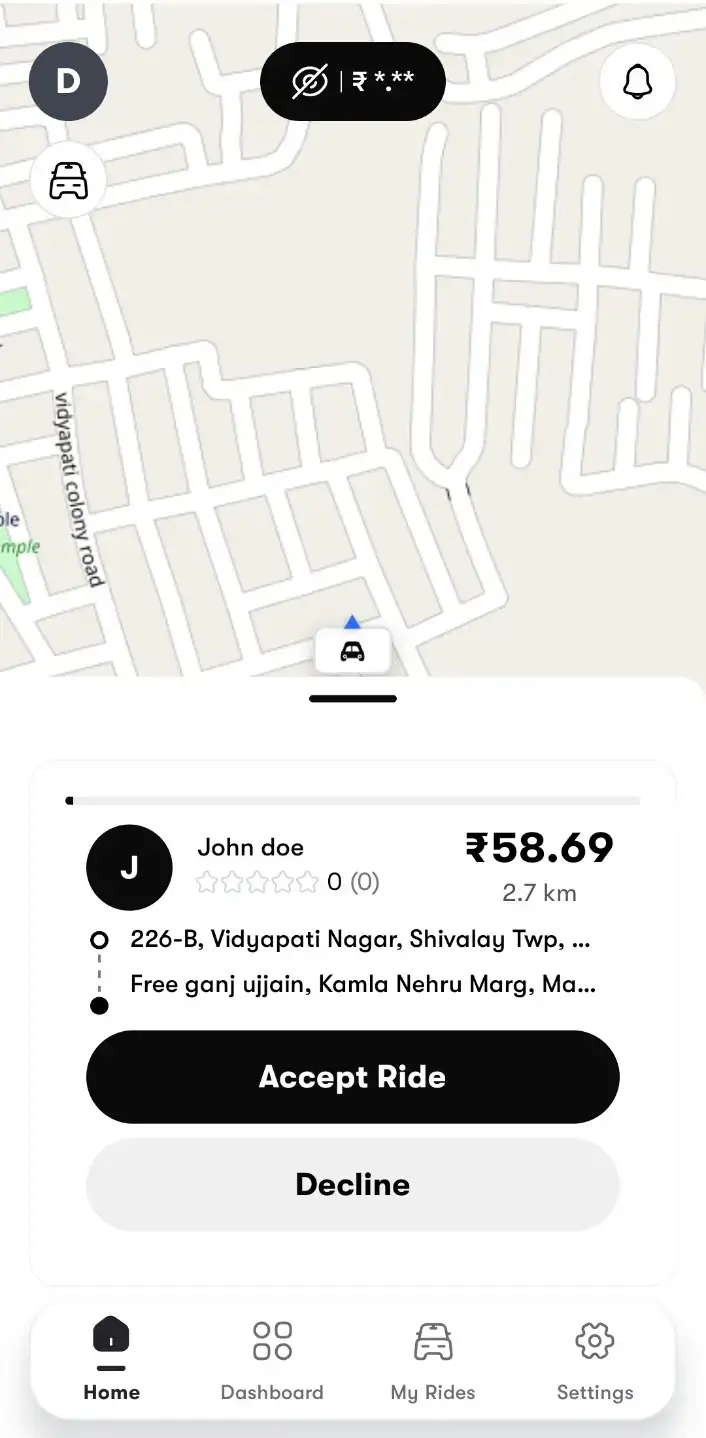
Uber Clone driver ride offer with rider, fare, distance, pickup and drop-off and Accept Ride or Decline
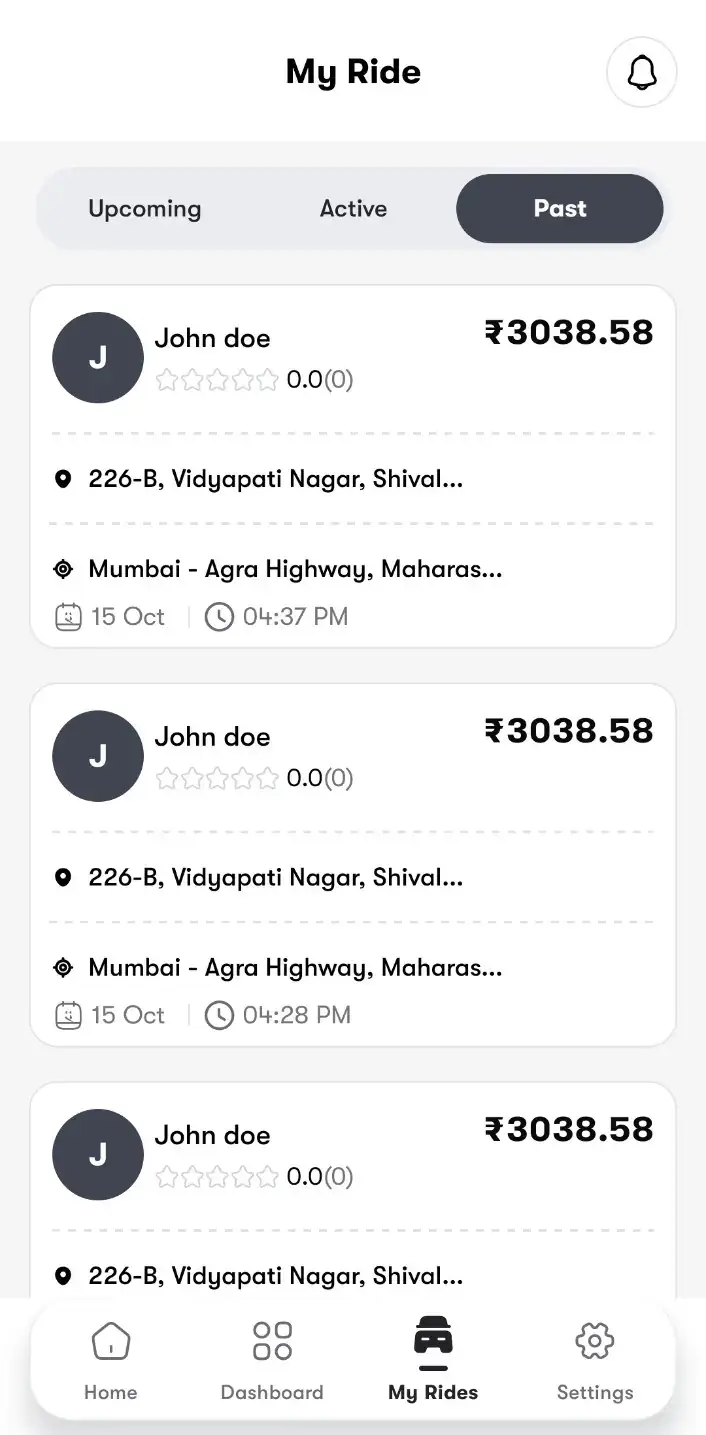
Uber Clone driver My Ride list with upcoming, active and past rides and fares
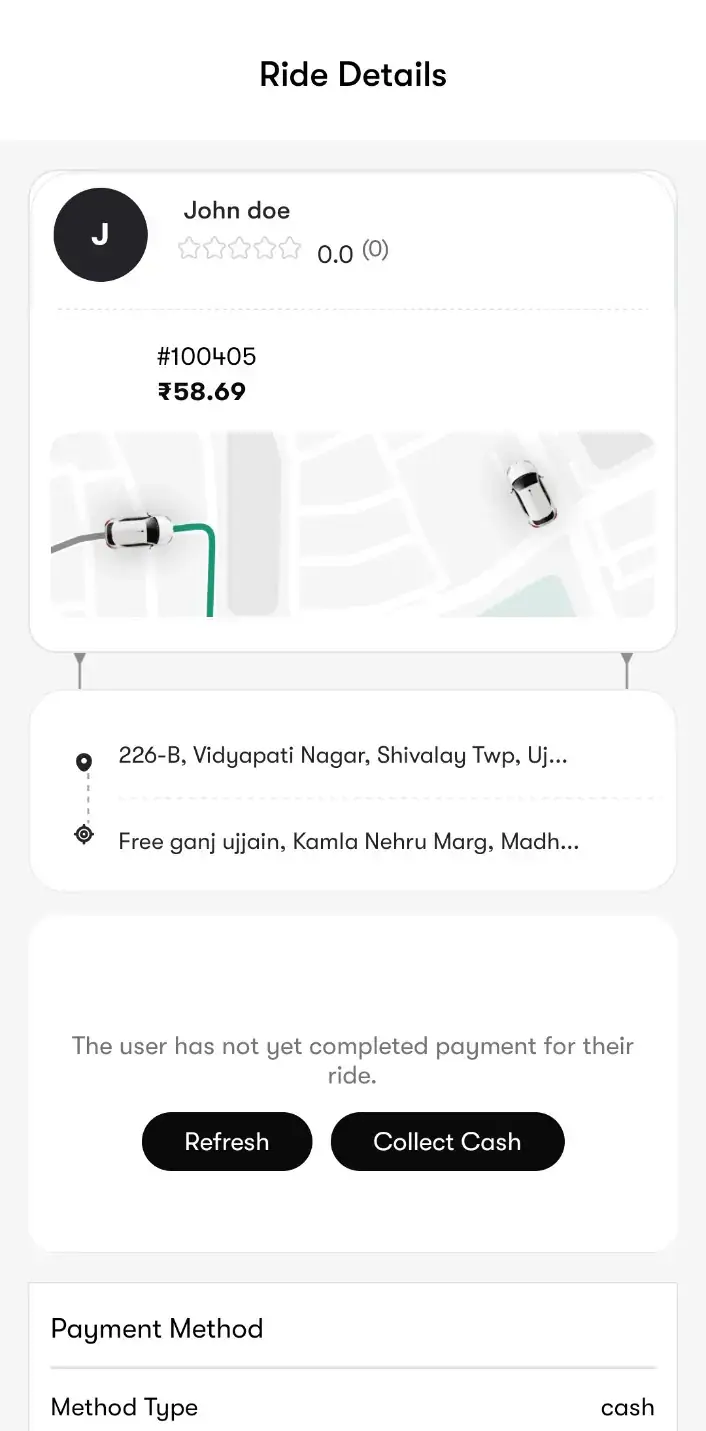
Uber Clone driver ride details with route and Collect Cash for an unpaid ride
6 screens · scroll →
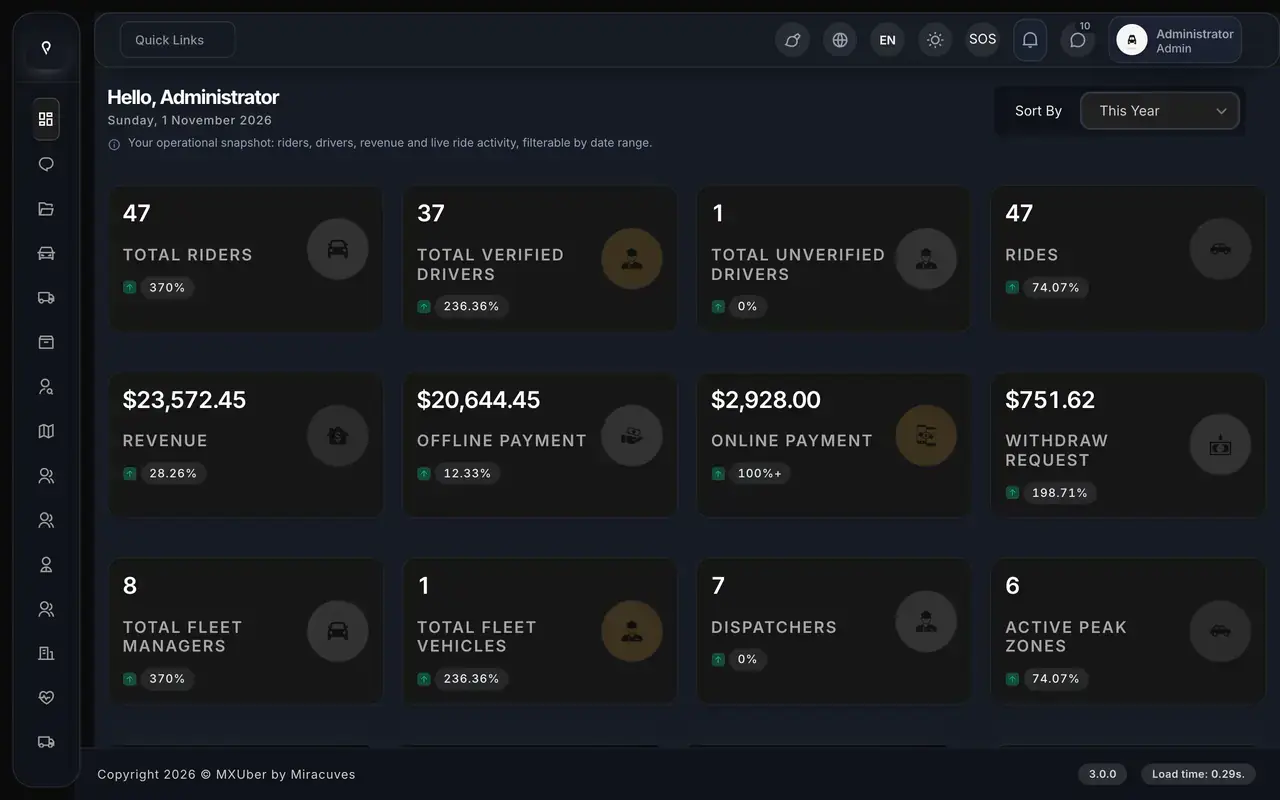
Uber Clone admin dashboard showing riders, verified drivers, rides, revenue, payments, withdrawals, fleet managers and peak zones
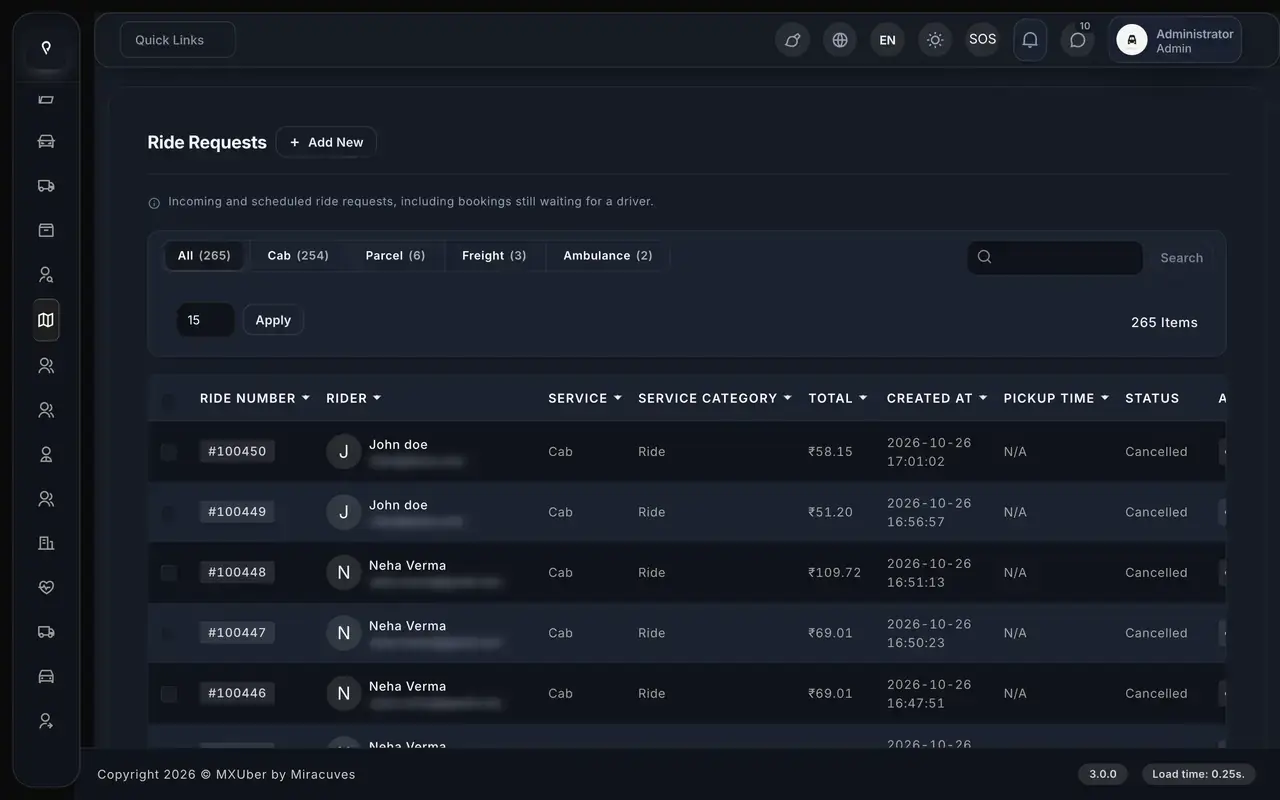
Uber Clone ride requests list filtered by cab, parcel, freight and ambulance with rider, service, fare and status
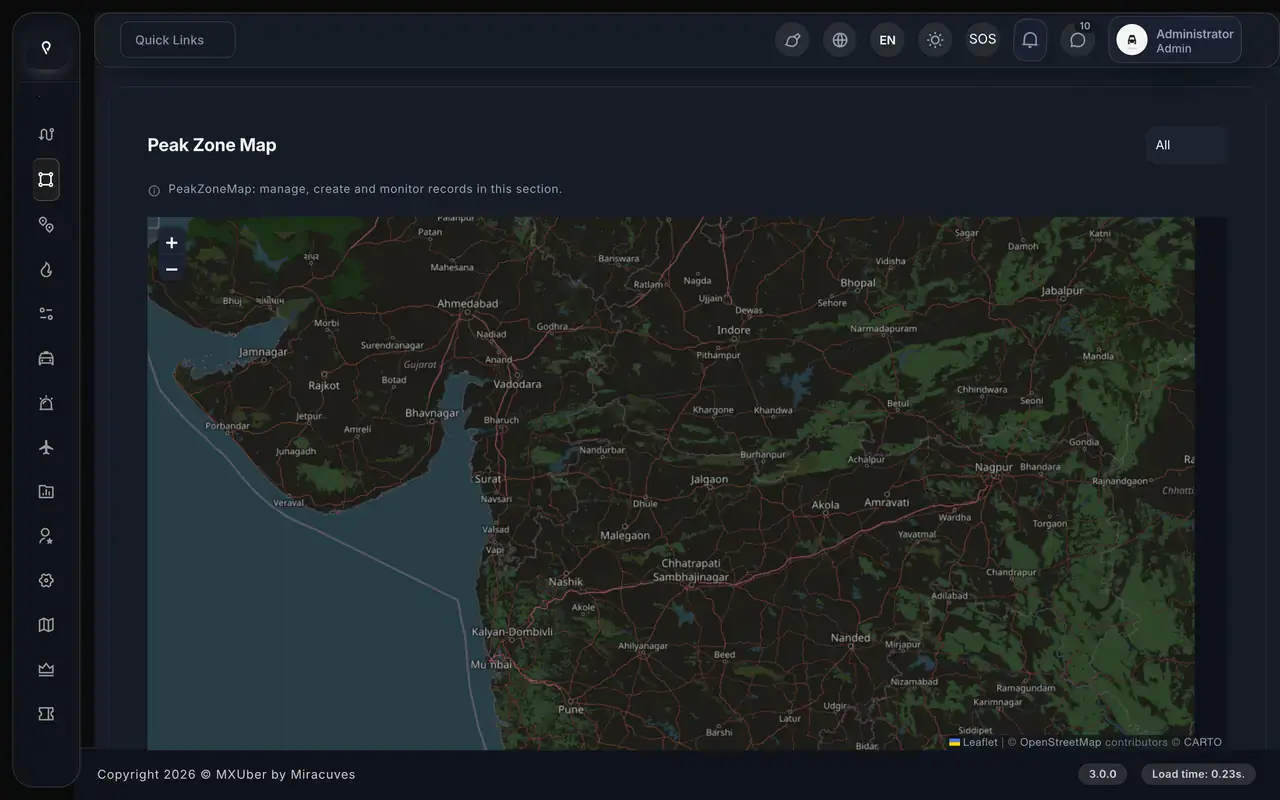
Uber Clone admin peak zone map on an OpenStreetMap base layer, where operators draw surge areas
Uber Clone admin heat map showing ride request density across the map
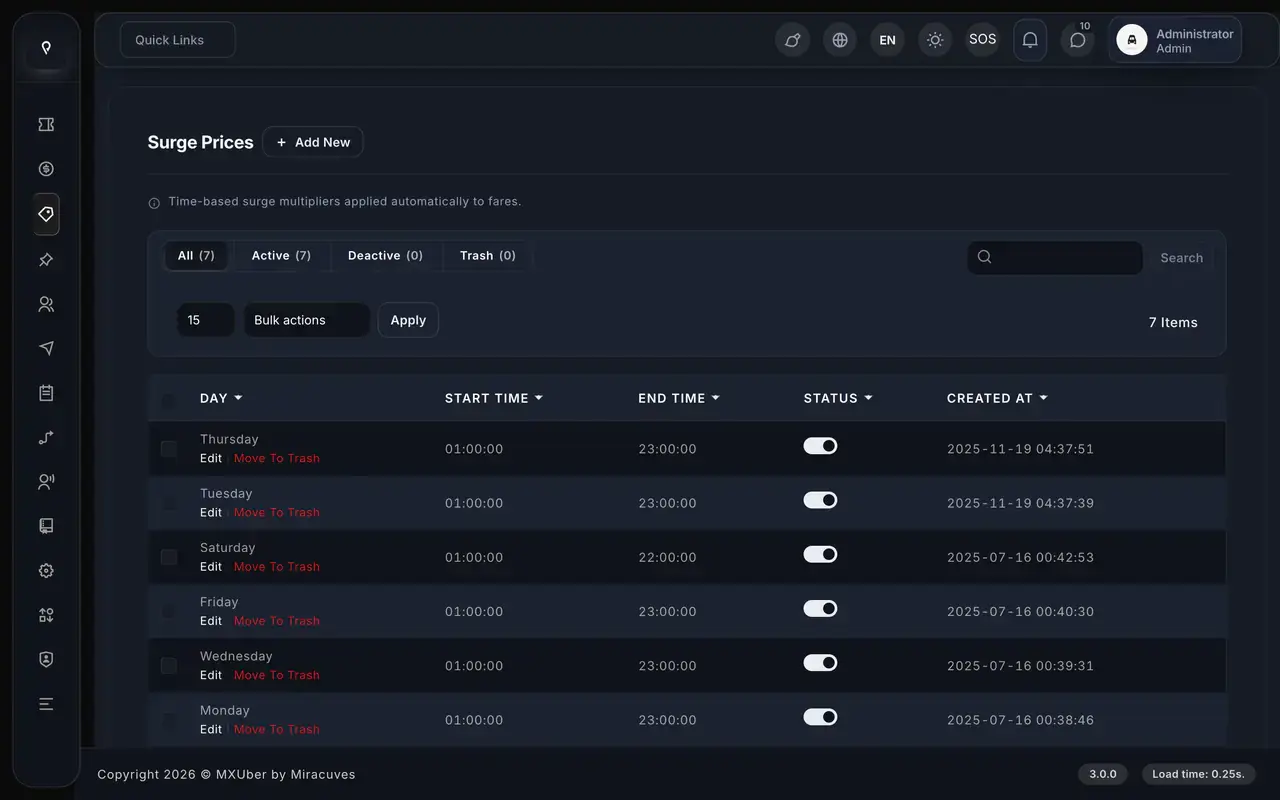
Uber Clone surge prices by day with start and end time
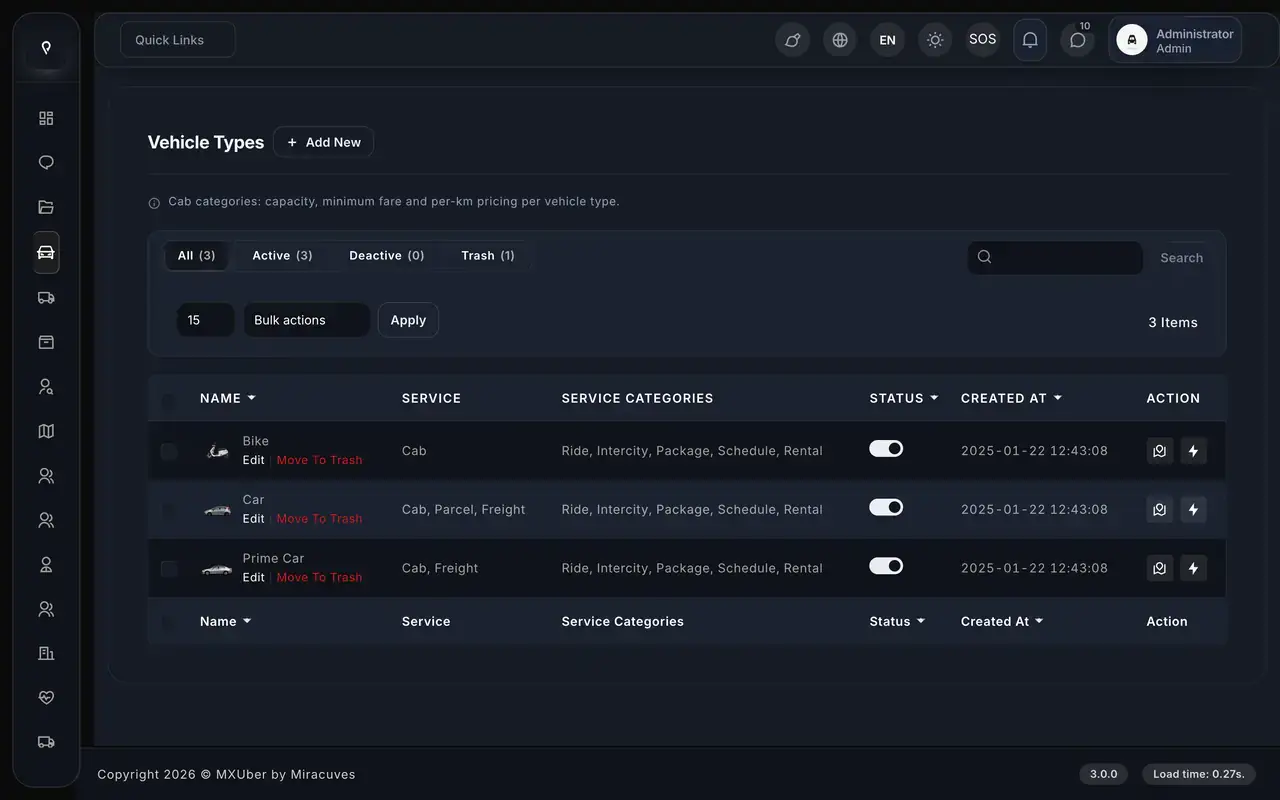
Uber Clone vehicle types bike, car and prime car mapped to cab, parcel and freight services and ride categories
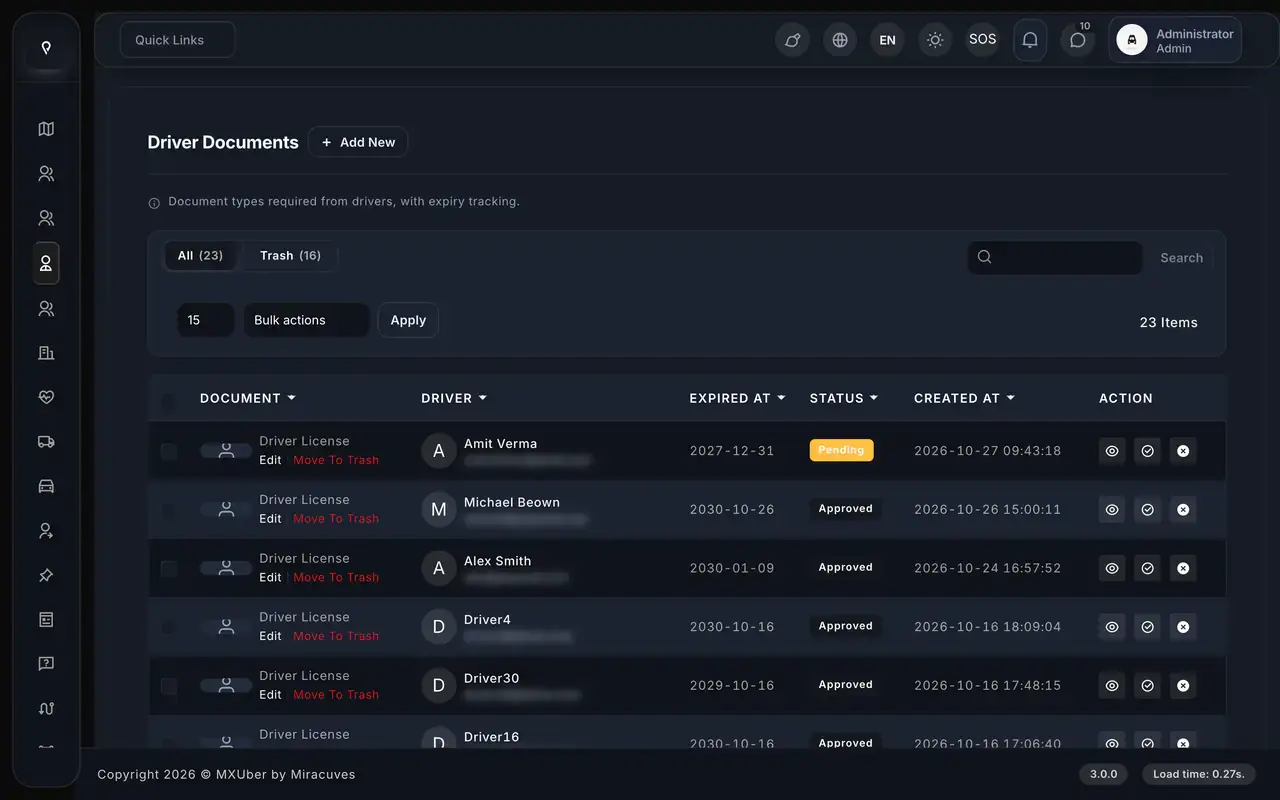
Uber Clone driver documents list with expiry dates and pending or approved status
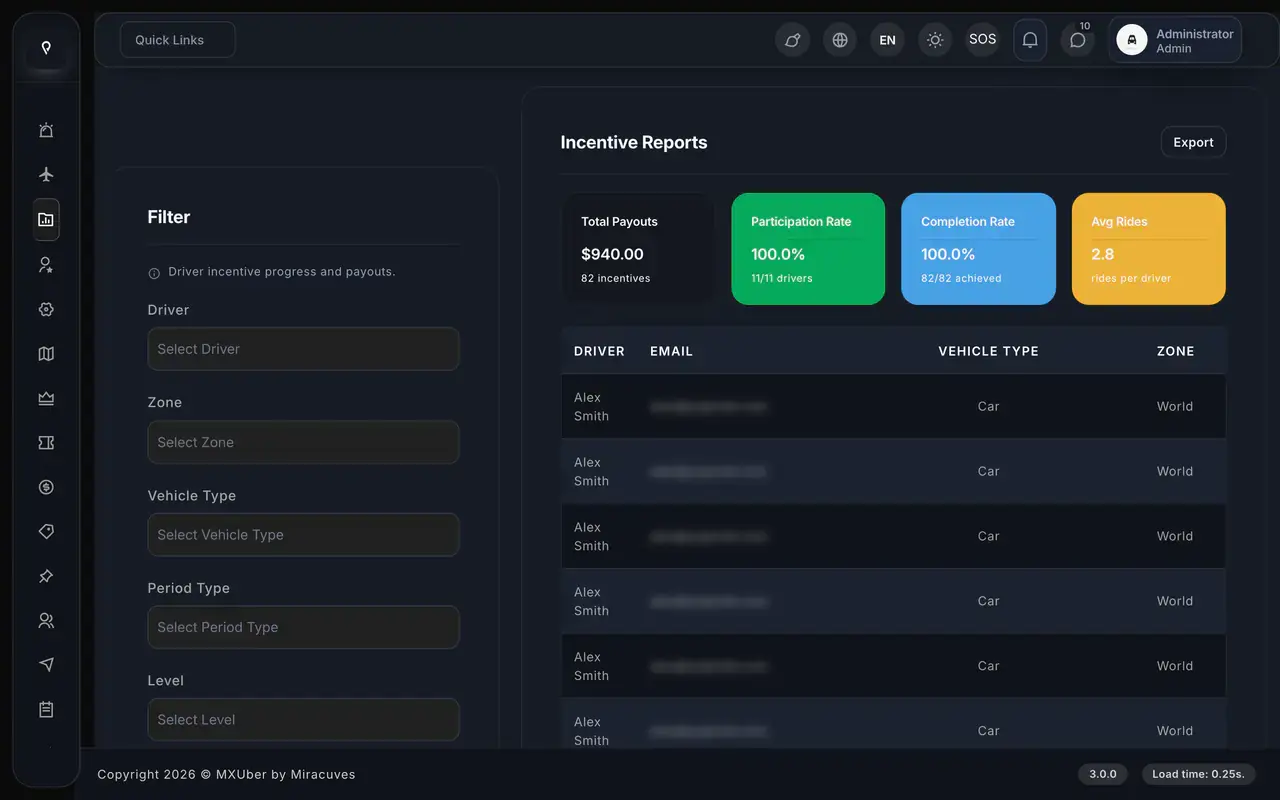
Uber Clone incentive report with total payouts, participation rate, completion rate and average rides per driver
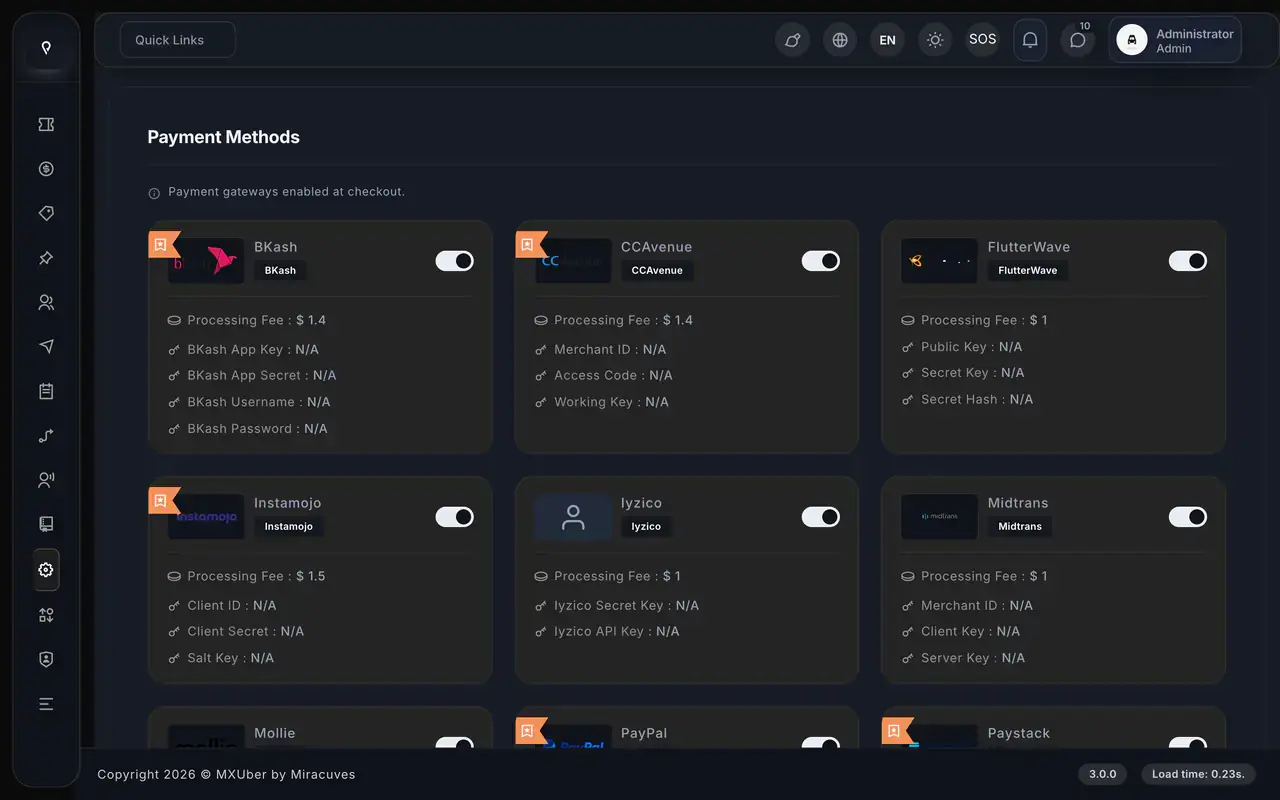
Uber Clone payment methods screen with bKash, CCAvenue, Flutterwave, Instamojo, Iyzico, Midtrans, Mollie, PayPal and Paystack toggles
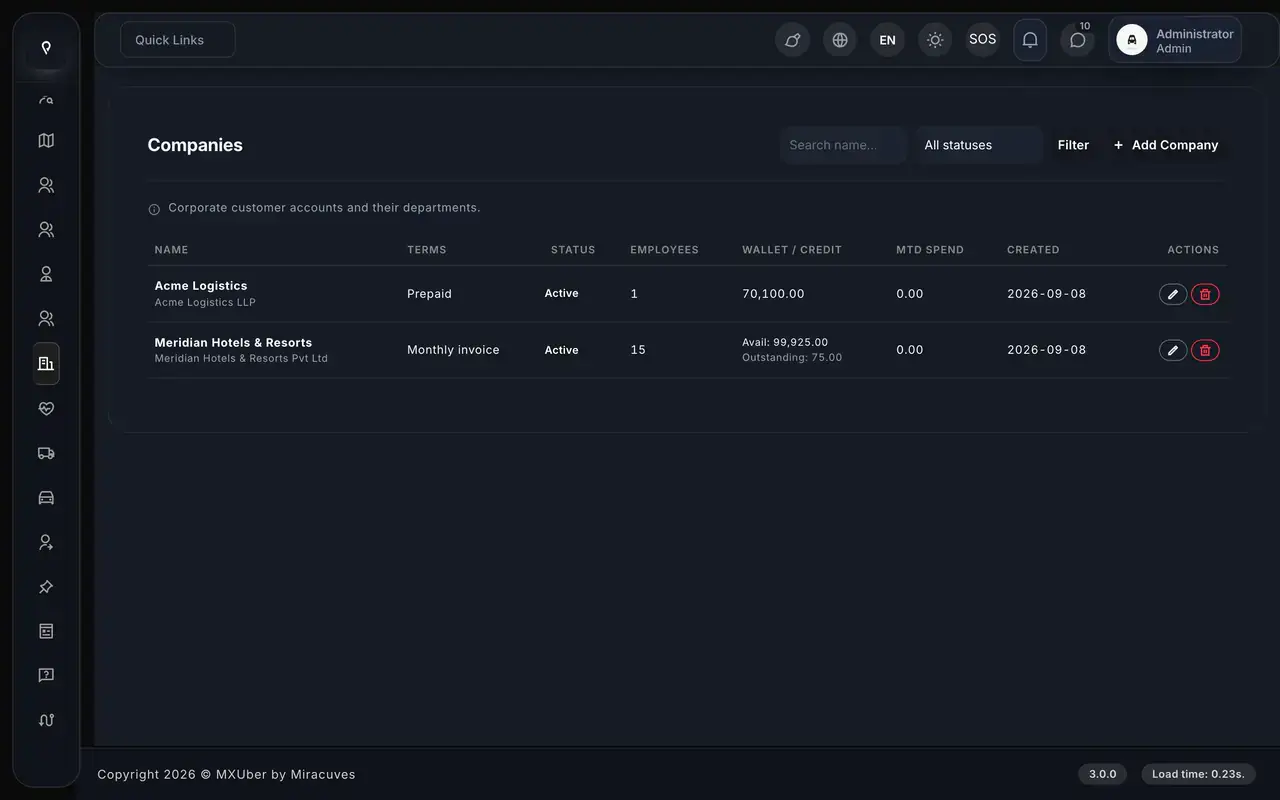
Uber Clone companies list with billing terms, employee counts, wallet credit and month-to-date spend
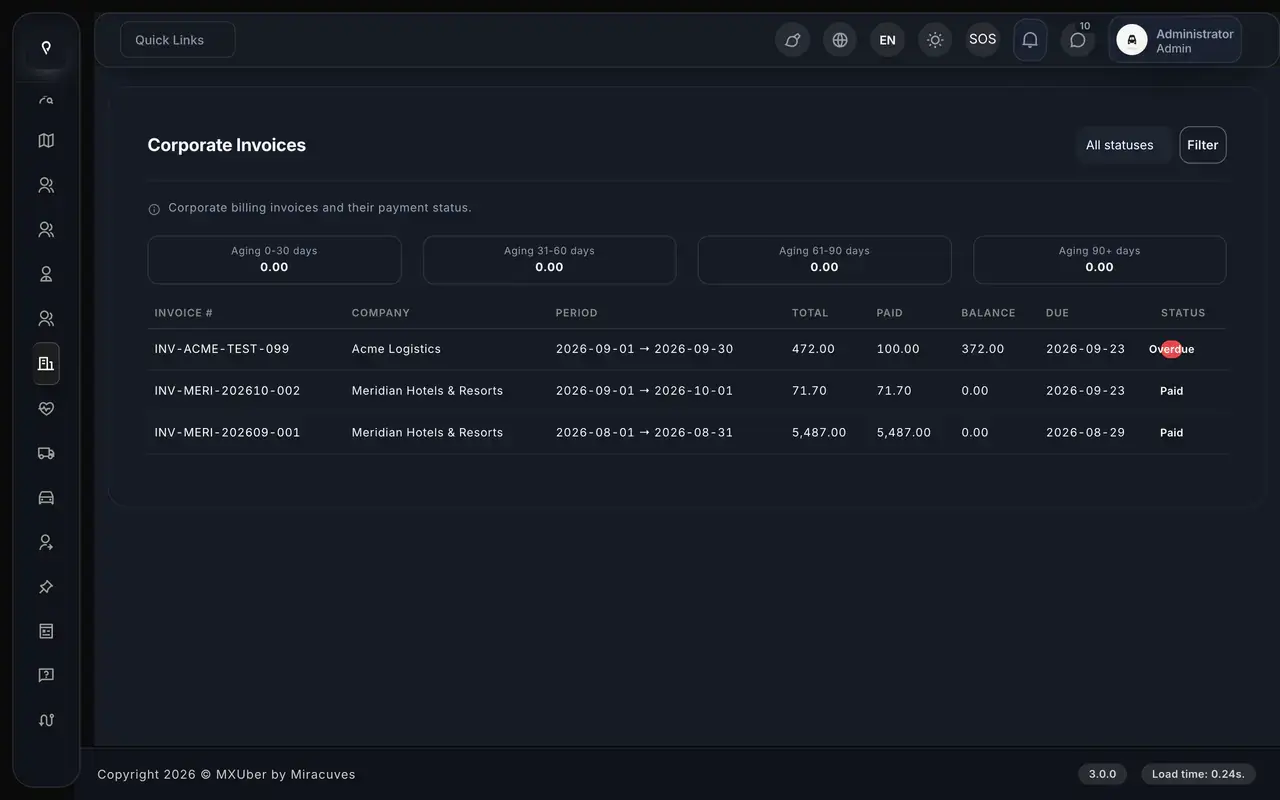
Uber Clone corporate invoices with aging buckets, billing periods, totals, balances and paid or overdue status
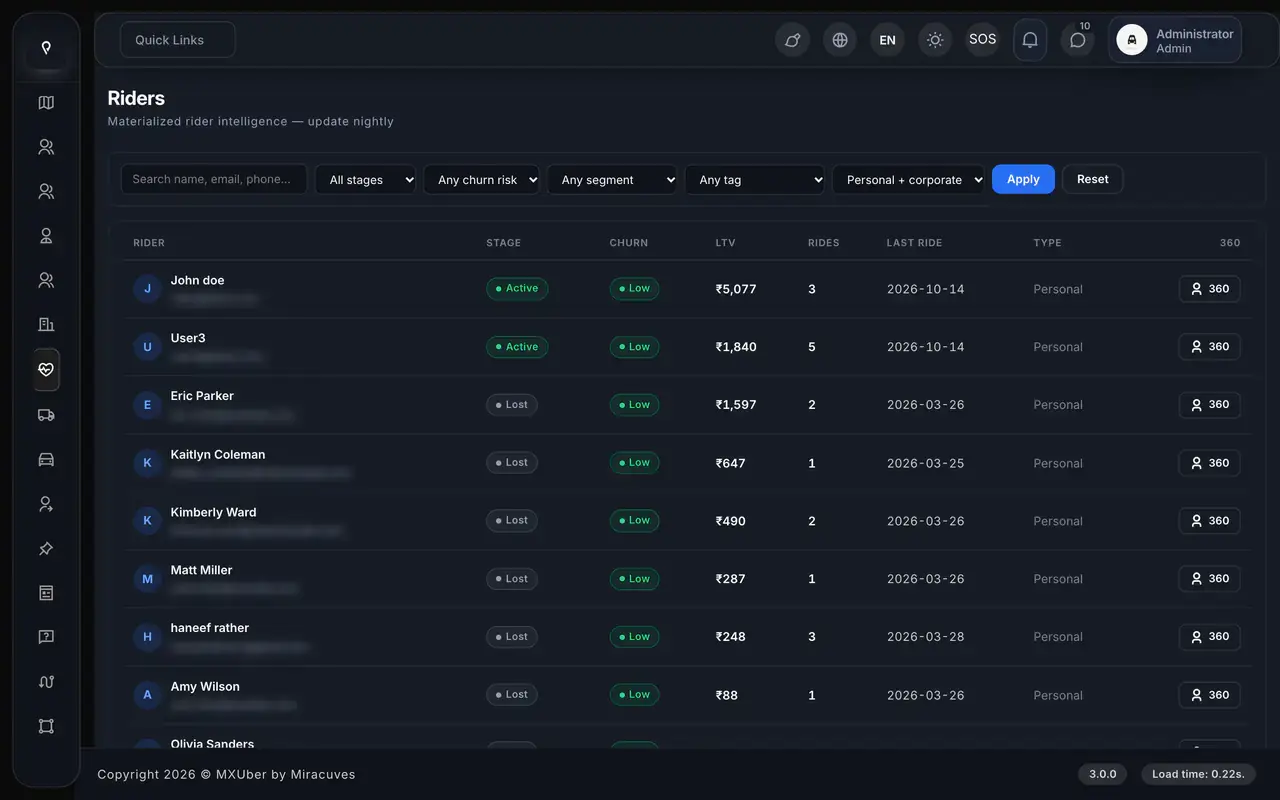
Uber Clone Riders 360 list with lifecycle stage, churn risk, lifetime value, rides and last ride date
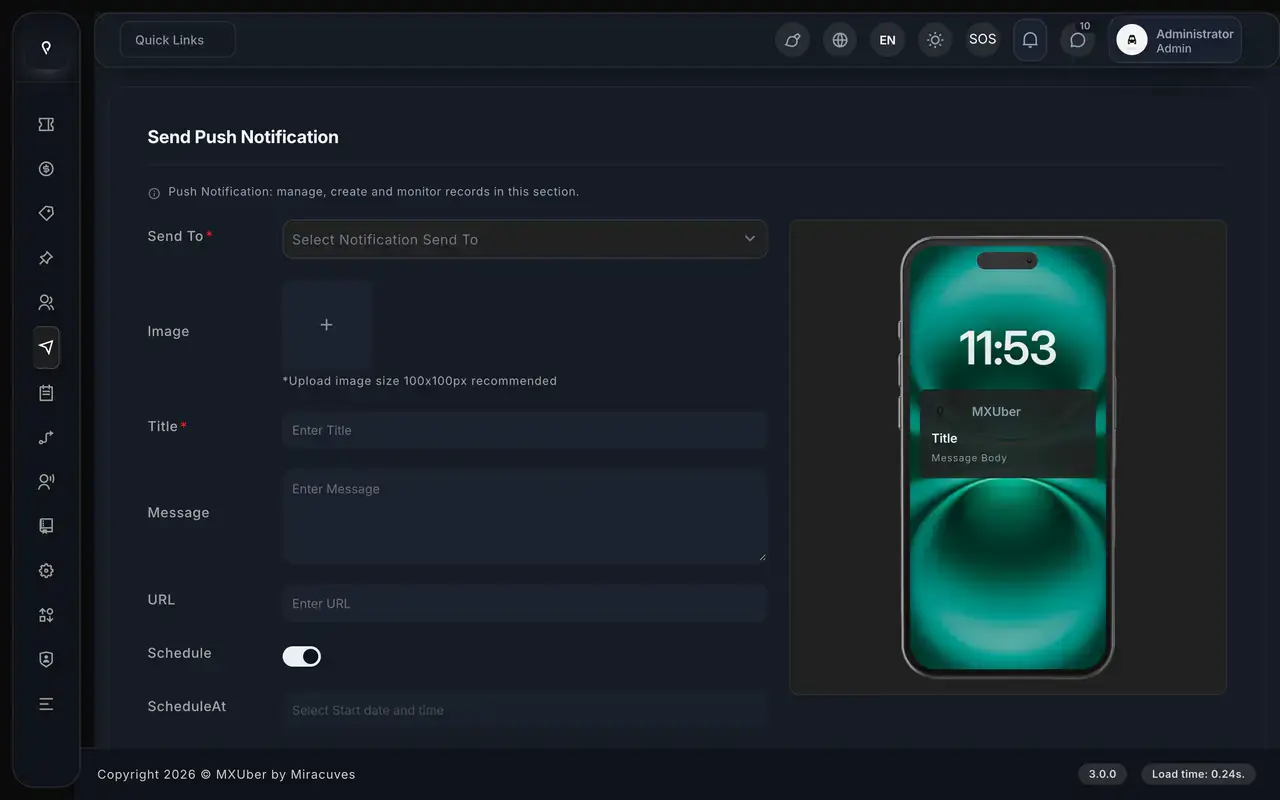
Uber Clone send push notification form with audience, image, title, message, URL and schedule options beside a phone preview
13 screens · scroll →
Uber Clone rider website hero with pickup and drop-off fields, See prices button and rider and driver app links
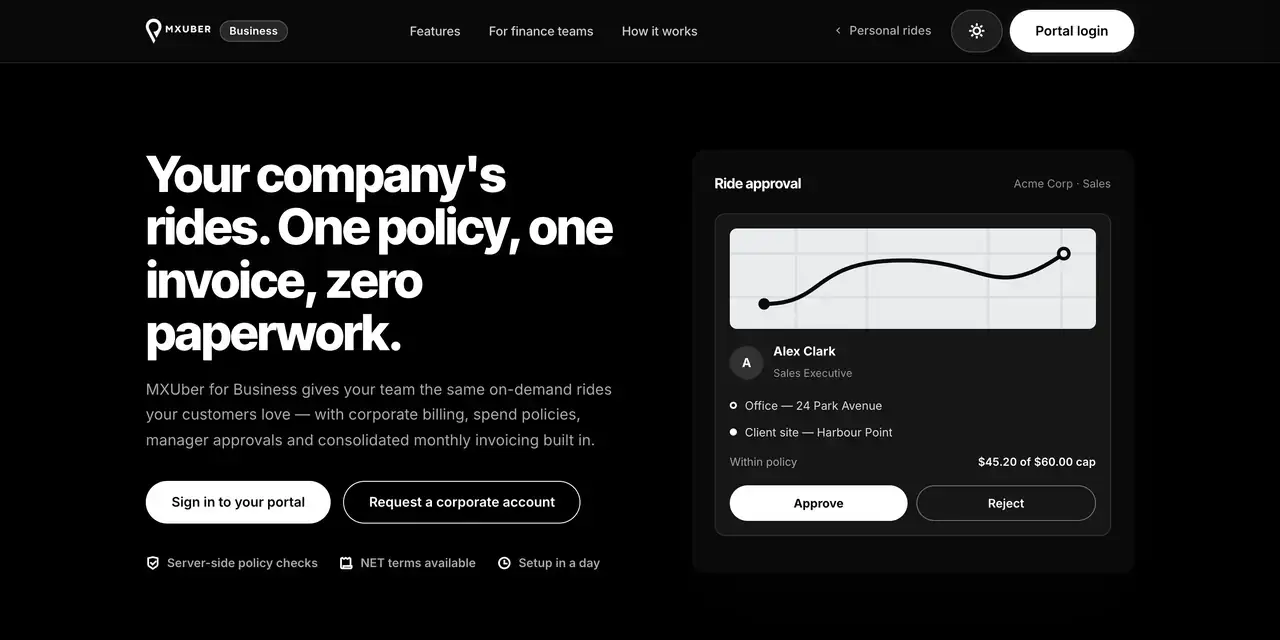
Uber Clone for Business page with corporate ride approval card, portal sign-in and corporate account buttons
Uber Clone admin sign-in page with demo role buttons for admin, driver, dispatcher and fleet
3 screens · scroll →

Start with a rider booking, from the Home tiles to Choose a vehicle. Then move to the driver app's offers and earnings, and open the admin console and the website. Each tab shows one surface, screen by screen.

Explore Our Solutions

02Proof

Client Voices

Uber Clone Client Reviews - Operators in Their Own Words

What clients say about building on Miracuves bases. Two describe ride-hailing and dispatch builds; the others come from other industries and are shown exactly as their authors gave them.

MMarsha WilliamsFounder, Bmore
“Live GPS tracking, bookings, driver and customer apps and the admin dashboard were all in place. We reshaped the workflows to our bid-and-ride model and wired in our own payments and notifications. Live inside a month on infrastructure that was already proven.”
TTariq ArbabDirector, Arbab Logistics FZ-LLC
“Our ops team was running last-mile on a whiteboard and a WhatsApp group. The rider app, dispatch console and live tracking came out of the box. They tuned dispatch for our COD-heavy model and added customer tracking. Where-is-my-order calls have all but stopped.”
MMarsha WilliamsFounder, Bmore On Demands LLC
“The team was running it on a dispatcher and a Google Sheet, and we needed a real platform quickly, because we were about to onboard a major retail client. Miracuves’s Delivery Genie base gave us the rider app, the dispatch console, and live tracking. We launched in 6 weeks and cleared 4x the previous order volume in the first month.”
BBrian LatailleVP Logistics Technology, IBC Tanks Canada
“We were juggling spreadsheets, a third-party GPS provider, and a phone. We needed a single operations console. Miracuves’s MXLogistics base covered the trip lifecycle, the driver app, and the customer tracking page. We’ve cut operations admin time by about 40%.”
AAndre GittensCEO, Ride Corporation
“Turo is the obvious reference, but the Caribbean specifics, from different insurance norms to different payment rails, meant we needed a real partner, not just a clone. Miracuves’s MXCar base covered the listing, the trip flow, and the host payouts. We launched in 6 working days and are live in three islands.”
TTiffany DandreaOperations Director, Best Cabo Yacht Rentals
“We were running it on phone calls and a paper calendar, and we were losing bookings to bigger OTAs. Miracuves’s GetmyBoat Clone base gave us the calendar, the booking flow, and the payment engine. Online bookings are up roughly 70% in the first six months, and the ops team finally has a live view of the fleet.”
DDr. Vivek RungtaFounder & Chief Dermatologist, Dermacian
“Every HMS I tried was built for general physicians, with no lesion mapping, no before/after tracking, and no procedure-based billing. Their MXHealth base gave us the patient app, doctor app, EMR and video consult out of the box. Front-desk time on scheduling and follow-ups is down ~70%, and we went fully digital in 9 months, where a fully custom job would have been 18.”
DDr. Carlos A. PalermoCo-founder & CEO, Doctta Health
“Building a compliant telehealth stack from scratch in three markets would have been a year-plus effort. Miracuves’s MXHealth base covered the patient and doctor apps, video consult, e-prescription and the pharmacy integrations. We launched in our first market in 9 weeks and rolled out to two more in the following six months.”
Read More Client TestimonialsOperators and founders in their own words

Proof in Production

Uber Clone Case Study - Aone Ride-Hailing Platform

How a ride-hailing business launched on the Miracuves Uber Clone base. Summarized from the published Aone case study, which sets out what was reused and what was built.

Case Study
Ride-Hailing Platform on the Uber Clone Base

Aone launched a ride-hailing platform on the Miracuves Uber Clone base. Twenty of the 25 building blocks were reused unchanged, five were built for Aone, and the source code was transferred to Aone's own account.

AoneClient
Ride-hailingIndustry
Uber CloneSolution family
6 daysBuild window
20 of 25Blocks reused
5Apps and consoles shipped
Uber Clone public taxi website with a hero banner, service cards and an app download section.
Challenges
  • Matching has to weigh distance, arrival time, driver acceptance and surge all at once
  • A fare has to reconcile after the trip, or it becomes a support cost forever
  • Commission, payouts and incentives decide whether drivers keep showing up
Goal
  • Stand up a ride-hailing platform without rebuilding the parts already proven on the base
  • Put the effort into the five decisions that were Aone's own
  • Hold the source code outright
Solution by Miracuves
  • Rider app, driver app, dispatcher, fleet-owner and admin console, each with its own permissions
  • Cities and zones, vehicle classes, fare and surge rules, payment gateways and brand theming set for Aone
  • Source, schema, deployment configuration and architecture notes handed over
  • Build window of 6 working days on the ready-made base

“Fares, the city and the payment partner were ours to bring. Everything underneath - matching, live tracking, driver payouts, the operations console - came ready. From kickoff to real trips was under a month, which is the only reason we made our window.”Aone Team · Founding team, Aone

Read the full case studySee which 20 of the 25 blocks were reused and which 5 were built.

03The product

The Basics

What the Uber Clone App Does for Riders, Drivers and Operators

An Uber clone is a ready-made ride-hailing platform, and Miracuves ships its version as five connected applications. Riders book a cab, parcel, freight, ambulance, rental or hired-driver trip from the app, the engine matches the nearest eligible driver, and the operator runs it all from one admin console.

More Than a Booking Screen

Dispatch, surge pricing, fleet management and driver wallets sit behind the rider app, so the business can be run and not just used.

Not a Locked Box

The full source code and database schema are handed over, so your team can change screens, fares and flows as the business grows.

Plain About What Is Extra

In-car entertainment, a virtual tour guide and voice commands are add-ons priced on their own. They are listed as add-ons and never counted as base features.

Web, Android & iOS

What Is an Uber Clone Script?

The hard part of ride-hailing is not the booking screen. It is what happens after: picking the nearest eligible driver, passing the offer on when it times out, pricing the fare by zone and time, taking a phone booking and paying drivers from a wallet. All of it ships working.

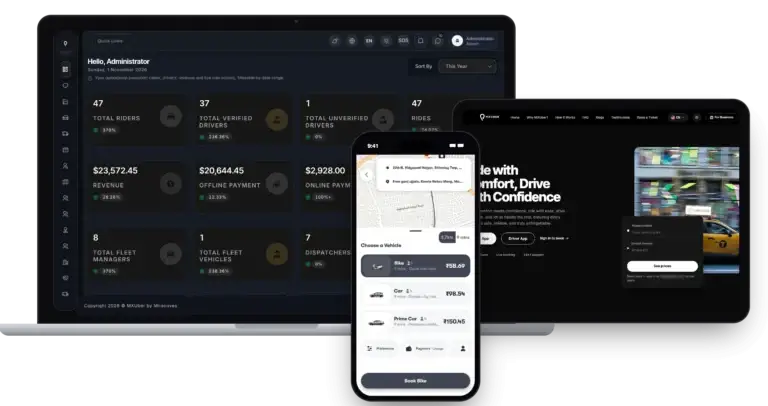
Uber Clone platform on a laptop, tablet and phone: the MXUber admin dashboard, the public rider website and the rider app choosing a vehicle with fares
  1. 01Rider app and web app for cab, parcel, freight and ambulance trips
  2. 02Scheduled rides, multi-stop trips and rentals
  3. 03Driver app with timed offers, wallet and withdrawals
  4. 04Dispatch desk for phone bookings, fleet manager role in the driver app
  5. 05Admin console with 52 sections: zones, surge, coupons and reports

You receive five applications: the rider app, the driver app with its fleet manager role, the rider web app, the admin console and the corporate portal, plus the public website, source code and database schema.

Everything Included

Uber Clone Features - Every Trip Type, Scheduled Rides, Dispatch, Fleet & Pricing Control

Everything below ships in MXUber 2.0, the current Miracuves Uber clone release, and can be tried in the demo apps and panels. Anything that needs an extra module is named as an add-on further down the page.

Feature 01 / 12

Every Trip Type Covered

The rider app lists the full service range: Cab, Parcel, Freight, Ambulance and Find Driver. Each service has its own booking modes, so one app handles city rides, deliveries and hired drivers.

  • Cab with Ride, Intercity, Package, Schedule and Rental
  • Parcel priced by weight, with delivery OTP
  • Freight with cargo photo and weight
  • Ambulance as its own service with live tracking
  • Find Driver to hire a driver for your own car
Feature 02 / 12

Fares Before Booking

With pickup and drop-off set, the app prices every vehicle before the rider books. Fare and arrival time sit side by side, with an itemized estimate behind each one.

  • Fare and ETA shown for each vehicle type
  • Itemized estimate before the rider confirms
  • Ride preferences like quiet ride or AC priced in
  • Promo codes applied at booking
  • Book for another person or rebook in one tap
Feature 03 / 12

Scheduled Rides

Riders can book a trip at least 3 hours ahead. The ride waits, then goes to dispatch 15 minutes before pickup. If no driver accepts it, the ride is canceled and the rider is notified, so nothing is lost silently.

  • Book at least 3 hours before pickup
  • Released to drivers 15 minutes before pickup
  • Missed rides canceled and rider notified
  • Parcel and freight can be scheduled
  • Every status change logged in append-only history
Feature 04 / 12

Stops & Changes

A single ride can carry several stops. Riders can change pickup location or drop-off during the trip, with the extra charge quoted before they agree, and free waiting minutes show before a per-minute charge starts.

  • Multi-stop booking on a single ride
  • Pickup or drop-off change with the charge quoted first
  • Free waiting minutes shown, then a per-minute charge
  • Every stop drawn on the route map
Feature 05 / 12

Dispatch & Live Tracking

Online drivers' positions sit in Redis. The engine offers each ride to the nearest eligible driver, passes it on after a timeout or decline, and stops after 3 minutes by default. The rider follows along over websockets.

  • Nearest driver in the right zone, service and vehicle type
  • Timed offer, 30 seconds by default, set in admin
  • Automatic hand-on to the next nearest driver
  • Search stops at 3 minutes and the rider is told
  • Live tracking over websockets with push alerts
Feature 06 / 12

Rentals, Intercity & Hire a Driver

Longer bookings have their own paths. Rentals and hourly packages sit under Cab, Intercity covers trips between cities, and Find Driver hires a driver for your own car by the day.

  • Rentals and hourly packages under Cab
  • Intercity for cab, parcel and freight
  • One Way, Round Trip, Outstation and Daily
  • Hired drivers priced per day by car and transmission
Feature 07 / 12

Rider Safety & Support

A ride OTP starts the trip. Riders can send an SOS with live location, share a tracking link, use in-app chat with the driver and file a dispute with photos.

  • Ride OTP checked before the trip starts
  • SOS with contacts and live location
  • Public live-tracking link to share a trip
  • In-app chat with the driver, up to 5 photos
  • Disputes with 5 evidence photos and a history view
Feature 08 / 12

Driver App & Earnings

Drivers go online with a power switch and get offers with ringtone and vibration. Offers are resent while open, so a dropped connection does not lose them. Earnings flow into a wallet with withdrawals, plans and incentives.

  • Power-button online switch with ringtone offers
  • Offers survive a dropped connection
  • Tolls and extra charges at trip end
  • Wallet, withdrawals and payout accounts
  • Subscription plans, incentives and daily goals
Feature 09 / 12

Dispatch Desk

Operators enter phone bookings from the Ride Requests page and assign a driver by hand. Offline drivers and drivers already on a trip are refused, and the other drivers who saw the offer are told it is gone.

  • Phone bookings created from Ride Requests
  • Manual assignment from the ride or request page
  • Offline and busy drivers refused
  • Other drivers told the offer is gone
Feature 10 / 12

Fleet Manager

Fleet managers use the driver app, with their own signup and a fleet login. They follow a live map of their drivers, manage vehicles and documents, and see earnings by day, week or month.

  • Add or remove drivers and vehicles
  • Driver and vehicle documents
  • Live map of the fleet's drivers
  • Fleet earnings by day, week or month
  • Fleet withdrawals, with each fleet seeing only its own drivers
Feature 11 / 12

Admin & Pricing Control

Zones, peak zones and surge are set in the admin console. Surge can differ by vehicle type, zone and time window, and switching a peak zone on redraws it live on driver maps.
  • Zones and peak zones drawn on a map
  • Surge by vehicle, zone and time
  • Peak zones redraw live on driver maps
  • Airports and hourly packages
  • Coupons, commissions and exportable reports
Feature 12 / 12

Business Accounts & Care

A corporate portal gives companies departments, approvers, policies and billing, while Rider-360 profiles, NPS surveys and complaints with SLAs support customer care.

  • Company accounts with employees, approvers and limits
  • Approvals in auto or strict mode
  • Company wallet and daily invoice cycle
  • Rider-360 profiles, segments and loyalty tiers
  • NPS surveys and SLA complaints

Before you buy, note this: Your platform ships rebranded as your own and is installed on hosting you control. From your side we need your domain, Apple and Google developer accounts, branding and business details, payment gateway accounts that are already approved, and any third-party keys. Store reviews follow Apple and Google timelines and are not part of our 6-day build time.

Talk to Our Team

How Operators Earn

Uber Clone Revenue Models - Commission, Surge, Driver Subscriptions, Fleet Share & Fees

An app like Uber earns on the trip, the driver, the fleet and the company account, and Miracuves makes each line its own setting, so changing one leaves the others as they were.

Commission on each fare and the way drivers pay for access, by share or by subscription, usually weigh most. Company invoices, driver-app ads and incentive programs are further levers.

  1. 01

    Ride Commission

    The operator keeps a share of every completed fare. The driver gets the rest, and the commission is a setting in the admin panel rather than a fixed rule.

  2. 02

    Surge & Fare Rules

    Admins set surge by time window, and by vehicle type, zone and time window together. Peak zones switch on from a map and redraw live on driver maps, so price follows how busy the city is.

  3. 03

    Driver Subscriptions

    Driver subscription plans ship in the admin console and give income that does not move with each trip. Expired subscriptions switch off automatically.

  4. 04

    Fleet Commission Share

    Fleet managers add drivers and vehicles in the driver app and track fleet earnings and withdrawals, so a company can earn on the cars it puts on the road.

  5. 05

    Cancellation Fees

    A rider who cancels sees the reason options and the fee before confirming, and the fee policy sits in your settings.

  6. 06

    Wallet Top-Ups & Card Costs

    Riders top up a wallet through any enabled gateway, and card payments carry a processing cost. How much of it you pass on is your pricing decision.

What published ride-hailing platforms keep from a trip, how a flat driver pass differs from a percentage, and what card processing costs, with each figure traced to a filing, a fee page or a rule.
Revenue streamHow it is chargedTake rateTypical take rateWhat sets the ceiling
Ride CommissionA percentage of each completed fare, kept before the driver is paid.Uber 3%-35% per trip (25% average, Helsinki); Lyft about 34% of bookings; Grab about 15%; Bolt 15%-30%.What drivers will accept in your market. Bolt's published range alone runs from 15% to 30%, so a commission is judged against the cheapest competitor a driver can switch to.
Surge & Fare RulesRates for distance and time, with a multiplier when demand is high.Uber defines its fee as the gap between what a rider pays and what a driver earns, and says it varies from trip to trip.Rules on driver pay. New York City sets a minimum of $1.283 per mile plus $0.681 per minute for app trips from 1 March 2026, which limits how much of a fare a platform can keep there.
Driver SubscriptionsA flat fee for a time window, instead of a share of each trip.Uber India's Drive Pass: a flat price per pass, no percentage stated. Passes run for periods such as 24 hours or until INR 500 is earned.The cost of the pass relative to a driver's earnings. Sold inside the app, store billing applies: Apple takes 30% in year one and 15% after, and Google Play lists 10% plus a 5% billing fee for auto-renewing subscriptions in the US, UK and EEA.
Wallet Top-Ups & Card CostsA processing fee on each card payment, passed on or absorbed.In its US example, Stripe's Connect help article puts a credit card payment at 2.9% + 30c.What your gateway charges in your country, given the cards your riders use. Cash trips skip that fee, though then there is no payment on the platform to deduct commission from.

How to read this. The Uber, Lyft and Grab figures come from their own filings: Uber's Helsinki fee notice, the Lyft annual report and the Grab results release, with the Lyft and Grab ratios being our own arithmetic. Bolt's commissions come from its support pages, the pay floor from the New York TLC, the flat pass from Uber India's Drive Pass terms, and card and store costs from Stripe, Apple and Google Play. Treat them as modeling inputs for your own settings in the admin panel: this table is neither a quote nor a forecast of what any platform will earn.

Revenue Model

Uber Clone Revenue Model, Stage by Stage

Commission, surge zones, driver plans, fleet share and cancellation fees all sit in the admin console from day one, so a new taxi brand can start on fare share alone and add the rest as car owners join.

Launch

In a single city, ride commission carries the platform: each completed fare pays its share, and a visible cancellation fee protects drivers from wasted pickups.

Traction

When fleet owners put cars on the road, their commission share and paid driver subscriptions bring income that does not swing with each trip, and surge begins to earn in busy zones.

Scale

Across several cities, surge windows, company invoicing through the corporate portal and ads in the driver app join commission, while admin reports point to the next city worth pushing.

Surge zones and driver plans are console settings, and no royalty ever comes off a ride or driver withdrawal.

Want a revenue model built around your own ride-hailing market?Design My Revenue Model

Operate It Day to Day

Admin Panel for a Taxi App Like Uber - 52 Sections for Dispatch, Fares, Fleets & Payouts

Miracuves gives Uber clone operators one console for the whole operation: live rides on a map, surge by vehicle type and zone, manual assignment, driver and fleet wallets, withdrawals and reports. Each login sees its own part of it.

  1. Rider appBook, schedule, track, pay
  2. Driver appAccept, drive, get paid
  3. Dispatcher loginBook and assign by hand
  4. Fleet loginDrivers, vehicles, earnings
  5. Admin consoleZones, fares, reports, payouts

Admin Panel Sections

  • 01

    Dashboard & Reports

    A live KPI dashboard and heat map, plus transaction, ride, driver, coupon, zone and incentive reports exported to CSV, Excel or PDF.

  • 02

    Users & Drivers

    Rider and driver accounts, driver documents with expiry dates, driver rules, reviews, SOS alerts and support tickets in one place.

  • 03

    Fare Settings & Surge

    Surge by time window, or by vehicle type, zone and time together. Peak zones redraw live on driver maps.

  • 04

    Fleets & Vehicles

    Fleet managers add and remove drivers and vehicles with documents. Each fleet sees only its own drivers, and the admin tracks fleet commissions and wallets.

  • 05

    Dispatch Oversight

    Live ride tracking and ride lists by status, with manual assignment from the ride page. Offline drivers and drivers on a trip are refused.

  • 06

    Promotions

    Coupons, banners and push notifications with images scheduled ahead, plus incentive levels for drivers by vehicle type and zone.

  • 07

    Earnings & Payouts

    Commissions, withdrawals, driver and fleet wallets and subscription plans.

  • 08

    White-Label Controls

    Your name, logo and theme across the apps and panels, plus about 70 settings switches.

Money Movement

The finance side of the console, from the first fare to the driver payout.

  • Surge by vehicle type, zone and time
  • Driver withdrawals and wallets
  • Commissions and fleet wallets
  • Reports to Excel or PDF

Control Room

What the operations team uses to keep trips moving.

  • Live ride tracking and heat map
  • Rider, driver and fleet accounts
  • Coupons and scheduled pushes
  • Staff roles, per-page permissions

Want more from the console? Anything extra - more reports, a changed payout schedule, further languages, a custom approval step - is scoped as separate work. Share what your operations team needs and a written quote follows.

Talk to Our Team

04Package and price

The Full Package

Package Contents: The Uber Clone Script, Five Applications & Deployment on Your Hosting

You receive a working ride-hailing system from Miracuves, not a kit of parts: two phone apps for riders and drivers, where fleet managers sign in through the driver app, the rider web app, an admin console where admin, dispatcher and fleet staff each sign in, the corporate portal and the public website, plus the source code and database schema behind them. Ownership passes to you completely: nothing is charged per seat or per trip, and no license is needed to keep it running.

01

Full Source Code

The complete Uber clone source code for the Laravel backend, the panels and the cross-platform React Native apps, with no encryption, so your team can change it to suit your business.

  • Laravel 11 and panel source, unencrypted
  • React Native source for Android and iOS
  • Yours to modify, extend and redeploy
  • Delivered to your own repository
02

Schema & Migrations

The MySQL schema of about 180 tables behind rides, fares, drivers, fleets, companies and payouts, delivered so it can be rebuilt from empty.

  • Database schema with migrations
  • MySQL and Redis tiers
  • Rides, fares, drivers, fleets, companies
  • Payments, payouts and settings
03

Handover & Support

Branding and deployment done for you, a handover pack, and the three support periods that run side by side from launch.

  • Rebranding with your logo, icons and colors
  • Deployment to your hosting
  • Deployment configuration and architecture notes
  • 60 days guidance, 6 months bug fixes, 12 months updates
04

Rider App

React Native for Android and iOS: sign-in by OTP, Google, Apple or as a guest, a home screen with trip tiles, fares before booking, scheduled rides, a wallet, trip history and customer support.

  • Cab, parcel, freight, ambulance, hire a driver
  • Fare and ETA per vehicle before booking
  • Scheduled, multi-stop, one-tap rebook
  • Publishing from your own developer accounts
Uber Clone rider choosing Bike, Car or Prime Car with fares and arrival times before booking
Uber Clone rider website hero with pickup and drop-off fields, See prices button and rider and driver app links
05

Public Website & Rider Web App

A public site with an app download section and a For Business page, plus a rider web app for booking in a browser.

  • App download section, For Business page
  • Browser booking, tracking and invoices
  • Multi-language support
  • Branded to your identity
06

Driver App

One app for drivers and fleet managers: signup with documents, an online switch, timed ride offers, earnings, wallet and subscription plans.

  • Timed offers, resent if dropped
  • Accept or decline
  • Earnings, wallet, withdrawals
  • Driver subscription plans
07

Dispatcher & Fleet Logins

Two logins on the admin console for operations staff: the dispatcher who books and assigns rides by hand and the fleet manager who runs cars and drivers.

  • Phone bookings and manual assignment
  • Fleet login with its own drivers and vehicles
  • Driver and vehicle registration
  • Fleet earnings and withdrawals
08

Admin Console

The operator console: 52 sections covering users, drivers, zones, surge, reports, promotions and payouts.

  • Corporate portal for companies
  • Surge by vehicle, zone and time
  • Live KPI dashboard and reports
  • Promotions and payouts

Want to see it before deciding? Sign in to the demo with the public rider, driver, admin, dispatcher and fleet logins. We can also walk you through a booking, a scheduled ride, a manual assignment and a fleet setup against your own plan.

Talk to Our Team

Transparent Pricing

How Much Does It Cost to Build a Ride-Hailing App Like Uber?

The launch-ready white-label Uber Clone is a fixed price of $3,099. Work beyond the base, such as add-ons, extra integrations or custom flows, is scoped and quoted separately in writing.

Most Popular

Professional

Ready-Made Launch Package
$3,099paid once
Ships in 6 days

Chosen by: Ride-hailing startups, taxi and fleet companies, call-center dispatch operators

The platform arrives as the demo shows it, rebranded to your logo, icons and colors, and deployed on your own hosting.

Get Started

Enterprise

Custom Builds for Larger Scope
Customquote
Go-live: based on final scope

Chosen by: Multi-city mobility groups, large fleet networks, operators with unusual dispatch rules

Need flows the base does not have? We build to your requirements and agree the scope and price before work starts.

Request a Quote
Development Cost

Uber Clone Development Cost in 2026

For $3,099, paid once, Miracuves delivers the Uber clone you tried in the demo: React Native rider and driver apps, browser booking, the 52-section operator console, the company billing portal and the Laravel source with its schema, live as your brand in six working days.

$3,099 Paid once
6 working days Rebranded and live
0% Revenue share

Costs that sit outside the software price

  • Hosting and server capacity as trip volume grows
  • Merchant accounts for the gateways you enable
  • Map, SMS and push provider keys
  • Apple and Google developer accounts
  • Any of the three ride-experience add-ons you choose

Extra work beyond the base, such as a new vehicle class, a changed payout schedule or a driver approval step, is priced in a written scope and ready within 2-8 weeks, while multi-city mobility groups and large fleet networks take the Enterprise route.

Compare Your Options

Ready-Made Uber Clone vs Custom Development vs SaaS

Buying Miracuves' Uber clone, building from scratch or renting a ride-hailing app: how the three routes differ on the questions taxi operators ask before anything else.

CriteriaMiracuvesReady-Made Uber CloneCustom DevelopmentSaaS
Launch timeLive in 6 working daysCustom work quoted in writing, 2-8 weeksSign-up is quick, on their platform
Upfront cost$3,099, paid oncePriced after scoping, in writingMonthly plan instead of a purchase
Source code ownershipFull unencrypted source, yours outrightYours if the contract says soNone, access is rented
CustomizationRebranded at launch, every flow editableAnything, built from your specLimited to the vendor settings
Ongoing feesNo per-seat or per-trip chargeMaintenance as agreedRecurring for as long as you run
Branding & app-store listingRider and driver apps on your own store accountsYours once deliveredOften shows the vendor name
Best forOperators who want riders booking fastUnusual dispatch rules, multi-city groupsTesting a city before you commit

Go Deeper

Four Guides to Ride-Hailing Apps Like Uber, Compared Side by Side

Four guides from the Miracuves blog: what the script includes and costs, how the business model is built, where the money comes from and how the app works. Each goes deeper than this overview.

Where It Fits

Uber-Like App Use Cases - Taxi Booking, Dispatch, Fleets, Delivery & Rentals

Whether it runs as a local taxi app clone or a city-wide ride-sharing app, each business uses the same product in its own way. A startup puts the rider app and surge rules first, a call center puts the dispatcher login first, a fleet company puts its drivers and vehicles first, and a business puts its company account first. You set the emphasis in configuration.

On-DemandTaxiOn-Demand Taxi Booking

Open a city taxi service where riders choose a vehicle, see the fare and ETA before booking and get matched to the nearest eligible driver, while you set commission and watch every trip live in the admin console.
01
Uber Clone rider choosing Bike, Car or Prime Car with fares and arrival times before booking
ScheduledRidesScheduled & Airport-Style Pickups

Riders book at least 3 hours ahead for a flight or an early shift. Dispatch starts 15 minutes before pickup, and a ride nobody accepts is canceled with the rider notified.

02
Uber Clone rider home with Where next search and Ride, Intercity, Package, Schedule and Rental tiles
DispatchDeskCall-Center Dispatch Desk

Run a phone line beside the app. Dispatchers create the booking from Ride Requests and assign a driver by hand, with offline drivers and drivers already on a trip refused.

03
Uber Clone rider choosing Bike, Car or Prime Car with fares and arrival times before booking
FleetOwnersFleet Operator Network

Fleet managers run their own drivers and vehicles from the driver app, watch them on a live map and track earnings by day, week or month. Each fleet sees only its own drivers.

04
Uber Clone ride history with business and personal filters and one-tap Rebook
RentalsIntercityRentals, Intercity & Hire a Driver

Sell hourly packages and rentals, intercity trips, and drivers for hire on a rider's own car (one way, round trip, outstation or daily), all from the same app.

05
Uber Clone rider home with Where next search and Ride, Intercity, Package, Schedule and Rental tiles
ParcelAmbulanceParcel, Freight & Ambulance

Parcel trips close only on the receiver's delivery OTP, freight carries a cargo photo and weight, and ambulance rides are tracked live, all on one driver network.

06
Uber Clone ride history with business and personal filters and one-tap Rebook
Business Model

Uber Clone Business Model: Three Ways to Run It

One install of this Uber clone carries per-fare commission, paid driver plans and dispatcher phone bookings, so it can back three very different taxi businesses.

Marketplace-led

A ride-hailing startup recruits independent drivers, earns commission on every fare and wins riders in a new city with upfront fares and surge rules.

Fleet-led

A taxi or fleet company puts its own cars on the road, runs fleet managers from the driver app and sells drivers a subscription plan instead of taking a percentage.

Dispatch-led

A call-center operator keeps its phone line, books and assigns rides by hand from the dispatcher login, and adds company accounts billed through the corporate portal.

Switching from independent drivers to fleet cars or phone bookings later takes admin console settings and logins, not a rebuild of the rider and driver apps.

One product, six ways to use it. All six cases share the apps, the consoles and one codebase, and company accounts run through the corporate portal on top. What differs is the cities you open, the fares you set, the commission you keep and how the platform is branded.

Talk to Our Team

Market Timing

Why Build a Ride-Hailing Platform in 2026?

Miracuves builds its Uber clone for a plain market fact: urban travel is local and busy, and in most cities a few large apps and a lot of unbranded taxis share the demand. A platform under your own name gives you the riders, the drivers and the commission that those apps currently keep.

01

Riders Expect Booking, Tracking and Payment in One App

A rider who can see the map, the fare and the car arriving has little reason to phone a dispatcher. The tools that make that possible are already built.

02

Fares That Show Up Front Build Trust

A suggested rides list with an estimate before the trip request is sent answers the first question a rider asks, which is what the trip will cost.

03

Drivers Choose Where the Terms Are Clear

Clear earnings, wallet withdrawals, commission settings and a subscription option are what keep drivers on your platform and not someone else's.

04

Phones and Cars Still Meet Through Dispatch

Many cities still take a large share of bookings by phone. A dispatcher panel lets one operator serve both the app and the call center from the same driver pool.

05

Your Own Brand Rather Than a Spot Inside a Third-Party App

When the platform carries your name, the rider relationship, the driver network and the data from every trip stay with you.

06

Buy Versus Build Is Quick to Settle

A ride-hailing company is matching, tracking, fares, payouts and five surfaces: two apps, rider web, admin and corporate portal. Our build takes 6 days, and a white-label copy is then live on your own hosting.

Platform by the Numbers

5

Surfaces, One Codebase

5

Services in One Rider App

3

Support Periods, Side by Side

6

Days of Build Time

The unglamorous middle of a ride-hailing company is matching, fares, cancellations, driver payouts and an operations console that reconciles it all. Here it is already built.

Industries

Industries We Serve

The Uber Clone suits any business that moves people or parcels by road, on demand or on a schedule. Taxi fleets take city bookings. Ride-hailing startups open a new market. Call-center operators dispatch by phone. Rental and intercity operators sell longer trips. Chauffeur services and companies book ahead through business accounts. Bike taxi services cover short hops. Courier teams run parcel and freight trips. Ambulance and hire-a-driver services get their own booking flows. Tourism transfers meet visitors at the station.

  1. 01Taxi Fleets
  2. 02Ride-Hailing Startups
  3. 03Car Rentals
  4. 04Out-Station Travel
  5. 05Instant Delivery
  6. 06Chauffeur Services
  7. 07Call-Center Dispatch
  8. 08Fleet Owners
  9. 09Corporate Travel
  10. 10Tourism Transfers
  11. 11Motorbike Taxis
  12. 12Auto-Rickshaw Services

Miracuves’ Uber Clone is a ride-hailing platform you can adapt to many mobility business models, with the apps, the dispatch tools and the admin panel carrying your name from the first screen.

06Under the hood

End to End

How an Uber Clone App Works - Sign In, Choose, Route, Compare, Confirm & Ride

This is how the Uber clone app Miracuves delivers works for a rider: a few taps on screen, and underneath a strict chain of request, match, track and settle. Follow it from sign-in to a finished trip and a one-tap rebook, then the architecture that carries it.

Rider Journey - From Sign-In to a Completed Ride

  1. Uber Clone rider sign-in with phone or email OTP, Google sign-in and guest entry
    1Sign In

    A rider can browse as a guest first, then sign in with an OTP sent to a phone or email, or with Google or Apple.

    • Guest browsing before sign-in
    • OTP by phone or email
    • Google and Apple sign-in
  2. Uber Clone rider home with Where next search and Ride, Intercity, Package, Schedule and Rental tiles
    2Choose Cab, Parcel or Another Service

    The home screen has a tile for each service in the demo: Cab, Parcel, Freight, Ambulance and Find Driver.

    • Cab, Parcel, Freight, Ambulance, Find Driver
    • Live map and current location
    • Home banners and today's offers
  3. Uber Clone rider choosing Bike, Car or Prime Car with fares and arrival times before booking
    3Set Pickup & Drop-Off Points

    The rider sets pickup and drop-off from saved places, recent searches or a map pin, adds stops if needed, then moves on to vehicles and fares.

    • Saved places and recent searches
    • Pin on the map
    • Multi-stop rides
  4. Uber Clone rider choosing Bike, Car or Prime Car with fares and arrival times before booking
    4See the Fare Before You Book

    Each vehicle shows its fare and ETA before booking, with an itemized estimate, ride preferences priced into the fare and promo codes.

    • Fare and ETA per vehicle
    • Itemized fare estimate
    • Preferences and promo codes
  5. Uber Clone rider home with Where next search and Ride, Intercity, Package, Schedule and Rental tiles
    5Book a Ride Now or Schedule It

    The rider chooses how to pay and confirms. A ride for later is booked at least 3 hours ahead, and dispatch starts 15 minutes before pickup.

    • Book 3 hours or more ahead
    • Cancel with fee shown
    • Released 15 minutes before
  6. Uber Clone ride history with business and personal filters and one-tap Rebook
    6Get Matched, Track the Car & Pay

    The nearest eligible driver gets a timed offer. The rider gives a ride OTP to start, follows the car live, pays, rates and can rebook the same route in one tap.

    • Timed offers to the nearest driver
    • Ride OTP and live tracking
    • Driver rating, tips and one-tap Rebook
Visual Flow DiagramSign inChooseRouteCompareConfirmRide

How It's Built

Architecture of the Uber-Like Platform & Trip Flow

Talk to Our Team
  1. Part 01

    Five Applications, Separate Permissions

    Rider app, driver app, rider web app, admin console and corporate portal are separate applications on one backend. Staff get roles with per-page permissions, and company data stays walled off per company.

  2. Part 02

    Matching & ETA

    Live driver positions sit in Redis (GEO). The engine picks the nearest eligible driver in the right zone, service and vehicle type, so the offer goes to a nearby car, not one across the city.

  3. Part 03

    Realtime Driver Channel

    Laravel Reverb websockets carry driver positions and trip status to the live map in real time, with FCM push notifications alongside. Open ride offers are resent every 5 seconds.

  4. Part 04

    Fare Calculation

    Distance, time and waiting are combined with surge by vehicle type, zone and time window, and extra charges such as tolls are added at the end, into one itemized fare.

  5. Part 05

    Payments & Settlement

    Cash, wallet, 13 gateways and corporate billing pay for trips. Drivers and fleets withdraw from their wallets, and ride history is append-only.

  6. Part 06

    Job Queues

    Notifications and dispatch jobs run on Redis queues in the background, so sending a message does not hold up dispatch.

Under the Hood

Tech Behind Your Ride-Hailing App - Laravel, MySQL, React Native & Maps

Miracuves puts dispatch, payments and live tracking on a stack your developers will already know. MXUber 2.0 runs on Laravel 11 with MySQL and Redis, uses React Native for both phone apps, and lets you switch between OpenStreetMap and Google Maps in the admin console.
WEB & ADMIN

Web and Admin

Laravel PHP
  • Admin console with 52 sections
  • Admin, dispatcher, fleet and support roles
  • Rider web app at /cab plus a public site
  • Corporate portal for companies
DATABASE

Data Stores

MySQL Redis
  • About 180 MySQL tables for trips and money
  • Redis for queues, cache and driver positions
  • Schema delivered with source
MOBILE

Mobile Apps

React Native 0.82 Android iOS
  • Rider app with 42 screen groups
  • Driver app with 13 screen groups
  • Fleet managers use the driver app too
  • Published from your own developer accounts
MAPS

Maps and Cache

OpenStreetMap Google Maps
  • Switch between the two maps in admin
  • Map cache serves tiles, addresses and routes
  • Dark map to match dark mode
  • Live surge zones drawn on driver maps
REALTIME

Realtime and Messaging

Reverb FCM SMS gateways
  • Reverb websockets for tracking
  • FCM push notifications to both apps
  • SMS via Twilio, Vonage, Msg91, Alphanet or 2Factor
  • Firebase phone sign-in available too
PAYMENTS

Payments and Handover

13 gateways Source Schema
  • Stripe, PayPal, Razorpay and 10 more gateways
  • Wallet, cash and corporate billing as well
  • Source code and database schema included
  • Deployment configuration written down
Tech buyer notes:

The web and admin side is Laravel 11 on PHP 8.2 or newer, with MySQL (about 180 tables) and Redis behind it. Both phone apps are React Native 0.82. Realtime runs on Reverb websockets, with Firebase Cloud Messaging for push. Map keys, SMS and payment gateway accounts, and app store listings are yours, set up with you at deployment. Everything named here is mainstream and easy to hire for.

Talk to Our Team

Build to Scale

Built to Scale - Separate Applications, Redis Dispatch & Growth Headroom

In the Uber clone Miracuves ships, five applications run side by side: rider app, driver app, rider web app, admin console and corporate portal. Adding cities, drivers and trips is a matter of capacity and configuration, not a rewrite.

Five Applications, Kept Apart. Changing the corporate portal or the admin console does not mean re-releasing the rider and driver apps.

Nearest Driver, Found in Redis. Live driver positions sit in Redis, so each request starts with a lookup of the nearest eligible driver, filtered by zone, service, vehicle type and wallet balance.

Dispatch Runs in Queues. Offers, timeouts and hand-ons to the next driver run as queued jobs, so the apps are not left waiting on them.

Realtime With a Fallback. Trips and driver positions travel over websockets, and the apps fall back to a 10-second check, so a dropped connection does not lose an offer.

01

Separate Applications

Rider app, driver app, rider web app, admin console and corporate portal are separate applications, each with its own screens and its own sign-in.

02
NearestOfferNext driver

Nearest Driver, Timed Offer

A timed offer (30 seconds by default) goes to the nearest eligible driver. A timeout or decline passes it on, and the search stops after 3 minutes by default.

  • Zone, service and vehicle match
  • Fare and ETA shown before booking
  • Driver accepts or declines the offer
  • Manual assignment from the ride page
03

Rate-Limited Sign-In

Apps use token sign-in and staff get per-page role permissions. Sign-in is limited to 5 a minute, and offer actions are rate-limited.

  • Token sign-in for the apps
  • 5 sign-in attempts per minute
  • Per-page permissions for staff
  • OTP, Google or Apple for riders
04
ReverbFCMFallback

Realtime With Fallback

Trips and driver positions move over Reverb websockets. If a connection drops, the apps check again after 10 seconds, and open offers are resent every 5 seconds.

  • Live driver positions on the map
  • Trip status changes
  • Offers resent every 5 seconds
  • FCM push for ride updates
05

Append-Only Ride History

Every status change is added to a history that is never edited: requested, scheduled, accepted, arrived, started, completed, canceled.

  • Every status change recorded
  • Cancellation reasons and fees
  • Commission and fleet wallets
  • Activity log in the console
06

Documented Hand-Over

Source code, database schema and documentation are handed over, so another team can run and extend the platform.

Room to Change and Grow. You get the source code, so a local payment mix, a new vehicle class or a zone rule is ordinary development on Laravel and React Native, done by your team or ours. Zones, surge, vehicle types and hourly packages are already set in the admin console without code.

If you are launching in one city: Start with the zones and vehicle types you can supply and add more in the admin console as you grow. More trips mean more hosting capacity, which is a configuration decision, and anything outside the base is scoped and quoted separately.

Talk to Our Team

07Security and trust

Built to Be Checked

Security in Your White-Label Uber App - Role Permissions, Gateway-Held Cards & Honest Limits

A ride-hailing platform holds identities, locations and payment references, so Miracuves focuses the Uber clone's controls on who can see what, where card data goes and what happens before go-live. This section states what the platform does and what remains your work.

  1. 01 · Roles
    Role Separation

    Staff logins for admin, dispatcher, fleet manager and support agent get per-page permissions in the admin console, so a rider or a driver cannot reach an operator page.

    • Fleet Visibility: A fleet manager sees only the drivers, vehicles and earnings of their own fleet, and the operator keeps the platform-wide view in the admin console.
    • Manual Assignment: A dispatcher can assign a driver by hand, and offline drivers or drivers already on a trip are refused. Who holds that role is a decision for you as the operator.
    • SOS & Complaints: SOS sends emergency contacts a live location and lands in the admin console as an alert. Who answers alerts, complaints and tickets, and how fast, is an operations process you set up.
  2. 02 · Audit
    Audit Trail

    Ride history is append-only (requested, accepted, arrived, started, completed, canceled) and the admin console keeps an activity log, so a fare or cancellation dispute is answered with a record.

    • Driver Documents: Admin approval comes before a driver can go online, and an expired document takes the driver off dispatch until approved again. Which documents you ask for is your decision.
  3. 03 · Sign-in
    Sign-in & Rate Limits

    The apps sign in with tokens, staff use sessions, and sign-in is rate limited to 5 attempts per minute, with limits on offer actions as well.

  4. 04 · Secrets
    Secrets Handling

    Payment, SMS and map keys belong to you and run on your own hosting. At go-live we confirm with you that keys are rotated and secrets sit outside the web root.

    • Named Launch Tasks: Demo mode off, key rotation, a restore drill, a penetration test of your deployment and a review of your gateway and SMS settings are on the go-live checklist, not assumed done.
  5. 05 · Cards
    Cards Stay at the Gateway

    Card data is held by the payment gateway you connect, and the platform never stores card numbers. Thirteen gateways are supported, alongside wallet and cash.

    • Payout Controls: Drivers withdraw to payout accounts, and commissions, driver wallets and withdrawals are managed in the admin console, so what a driver is paid after commission is a decision you control.
  6. 06 · Backups
    Backups & Restore

    The admin console includes backups, and we recommend a test restore ahead of launch, since a backup nobody has tested is only a hope.

The controls above are in the software and the activity log gives an audit trail. Turning demo mode off, key rotation and a restore test are go-live steps we run with you.

Discuss Security Before Launch

Marketplace Readiness

Operator Readiness for a Ride-Hailing App Like Uber - What Ships and What You Handle

A ride-hailing platform puts strangers in a car together. Miracuves builds the booking, dispatch, fare and payout tooling; deciding who may drive, which vehicles qualify, what insurance applies and what the law requires where you operate stays with you as the operator.

Built for a marketplace; signed off by no regulator.

Here, ready means software you can watch working in the demo or the admin console. It is not a statement that the platform or Miracuves has been licensed, approved or accredited by anyone, and nothing here is legal advice.

Built Into the Software

Rider and driver apps, a rider web app, scheduled and multi-stop rides, live tracking, surge by vehicle type, zone and time, a dispatcher login, a fleet manager role, driver wallets and withdrawals, SOS, support tickets, and an admin console with reports.

Left to the Operator

Your terms of service and privacy policy, which drivers and vehicles you accept, which documents you ask for, how complaints and cancellation disputes are settled, and the fare, commission and cancellation rules you publish.

Safety & Insurance

The platform gives you driver document upload with expiry dates and admin approval, ride OTP and SOS. Roadworthiness of vehicles, driver licensing and trip insurance sit with you and your drivers; paying a loss is outside what it does.

Where You Operate

Rules for taxi and private hire licensing, driver pay, fare regulation and passenger protection differ by country and often by city. Check them for each market you serve with qualified local advisers before you take your first booking.

08Grow the platform

Included coreMXUber
  • Rider & driver apps
  • Dispatcher & fleet panels
  • Scheduled & multi-stop rides
  • Admin panel & reports

Adding a module

  1. 1
    Choose a module

    Entertainment, tour information or voice control, at launch or later.

  2. 2
    Price agreed first

    Before any work on a module starts, you receive its scope and quote in writing.

  3. 3
    Handed over as code

    The module is added to the source you already hold.

Ask About Custom Modules

Go Further

Add-Ons for Your Uber-Like Platform - In-Car Entertainment, Virtual Tour Guide & Voice Commands

As Miracuves delivers it, the Uber clone works end to end and can be shown in the demo. The three modules below are separate products, and each is priced on its own because the scope depends on your market.

  • Ride experience

    In-Car Entertainment

    Connections to entertainment platforms, so riders can watch a film, listen to music or follow a podcast while the car is moving.

    In-Car · Media
  • Ride experience

    Virtual Tour Guide

    A module that gives riders live information about landmarks and attractions they pass during the ride, which suits tourism and airport transfer brands.

    Tour · Guide
  • Hands-free

    Voice Commands

    Voice control for navigation, calls and other app functions, so drivers and riders can use the app without touching the screen.

    Voice · Commands

The Mobility & On-Demand Suite

Building a Ride or On-Demand Product? We Have the Neighbors Covered.

The Uber Clone is one platform in a wider mobility and on-demand suite. If your plan reaches past taxi rides, these four connect naturally.
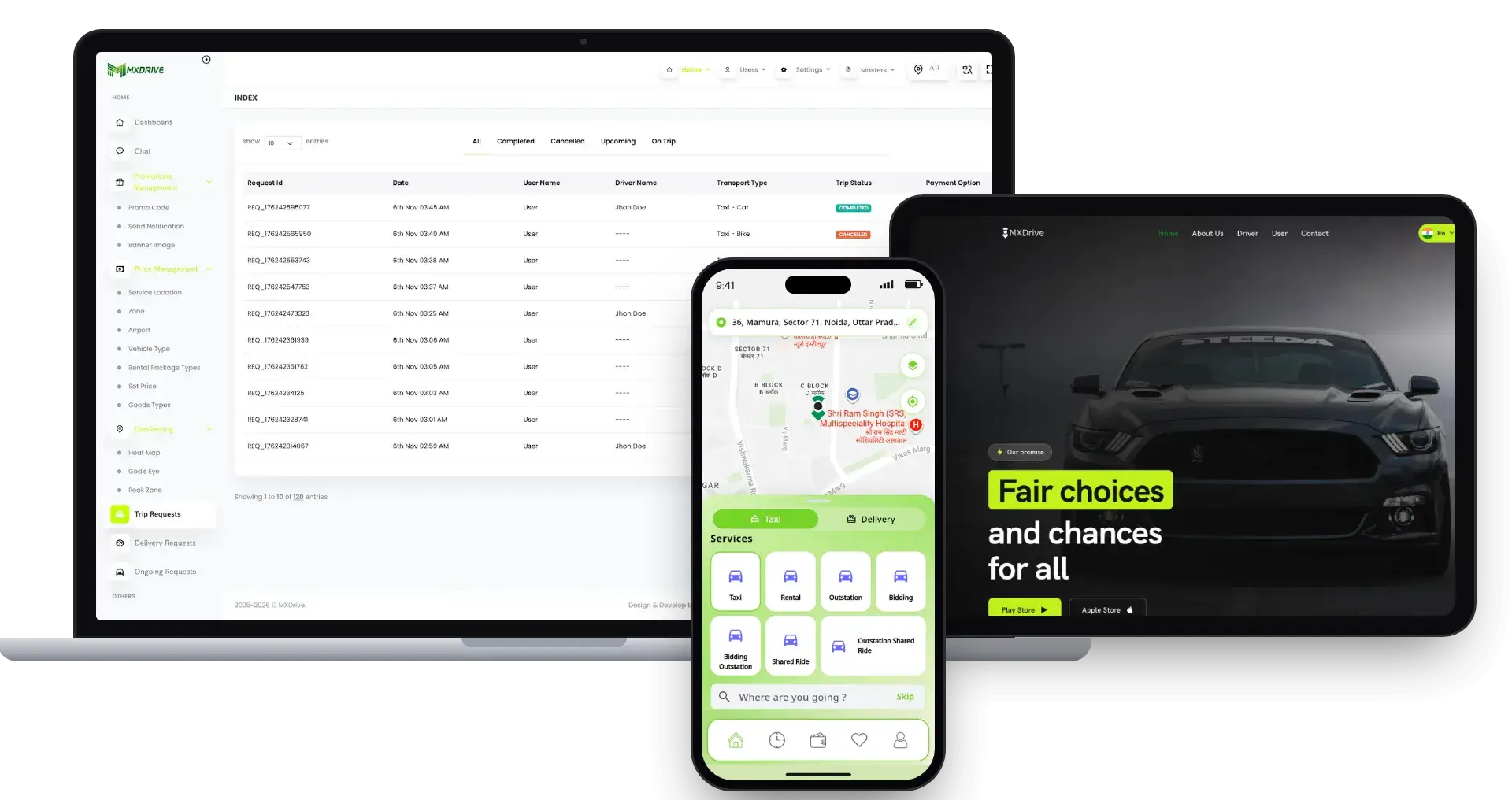
inDrive Clone cross-platform solution: the admin trip requests console, the booking website and the rider app.01
Pick it if: Riders should name their own fareinDrive Clone

A bidding-led ride-hailing platform with taxi, rental, outstation and bidding services, an admin trip-requests console, a booking website and a rider app.

Explore Solution
Gojek Clone super app screens on three tilted phones.02
Pick it if: You want rides plus other services in one appGojek Clone

A multi-service super app that puts rides, delivery and other on-demand services in one app for a single customer base.

Explore Solution
Turo Clone peer-to-peer car rental app screens.03
Pick it if: The cars are rented out by the dayTuro Clone

This is a car rental marketplace between private people, covering owner sign-up, trust workflows and trip management.

Explore Solution
UberEats Clone cross-platform solution with the admin orders console, the ordering website and the customer app.04
Pick it if: Your trips carry meals instead of ridersUberEats Clone

A food delivery marketplace with a restaurant console, an ordering website, a customer app and delivery dispatch.

Explore Solution
CatalogAll 90+ solutions

09The business case

Market Benchmarks

Ride-Hailing Market Benchmarks - Independent 2025-2026 Data

The revenue models above are ours. The figures below are not. They come from the Uber and Lyft annual reports on Form 10-K, Grab's full-year 2025 results and the UK Department for Transport, reproduced as published. They show what ride-hailing platforms keep from each trip in the US and Southeast Asia, and how large the licensed driver base is, so you can test your own business case.

Uber 10-K01

$29.7bn in Uber Mobility Revenue in 2025

Uber's annual report on Form 10-K shows Mobility segment revenue of $29.7 billion in 2025, up 18 percent from $25.1 billion in 2024. Across all its businesses Uber completed 13.6 billion trips, up 20 percent, and reported 202 million monthly active platform consumers in the fourth quarter, up 18 percent. Uber states that revenue comes from fees paid by drivers and merchants.

Lyft 10-K02

$18.5bn in Lyft Gross Bookings in 2025

Lyft's annual report on Form 10-K reports Gross Bookings of $18.5 billion in 2025, up 15 percent, on 945.5 million rides, up 14 percent. Revenue was $6.3 billion, up 9 percent. Revenue divided by Gross Bookings is about 34 percent (our arithmetic on reported figures), the share Lyft retains after driver earnings.

Grab03

15% of Grab Mobility GMV Kept as Revenue in 2025

Grab reports that full-year 2025 Mobility revenue grew 16 percent to $1,219 million, on Mobility gross merchandise value that grew 19 percent to $7,901 million, and that Mobility segment adjusted EBITDA was $690 million. Revenue divided by GMV is about 15 percent (our arithmetic on reported figures), a lower share than Lyft retains in the US.

UK DfT04

290,000 Licensed Private Hire Vehicles in England

The UK Department for Transport counted about 290,000 licensed private hire vehicles in England as at 1 April 2026, up 13 percent on 2024, alongside 417,300 taxi and private hire driver licenses, up 9 percent. The statistics were published on 13 August 2026 and include app-based operators, though they cannot separate app drivers.

Where each figure comes from.

Uber Technologies, Inc., Annual Report on Form 10-K for the year ended 31 December 2025, filed 13 February 2026 - sec.gov

Lyft, Inc., Annual Report on Form 10-K for the year ended 31 December 2025, filed 11 February 2026 - sec.gov

Grab Holdings Limited, Grab reports fourth quarter and 2025 results with first full year net profit, press release, 12 February 2026 - grab.com

Department for Transport, Taxi and private hire vehicle statistics, England: 2026, 13 August 2026 - gov.uk

All figures are the publishers’ own, reproduced as published from annual filings, a results release and official statistics. Two ratios (Lyft and Grab revenue divided by bookings or GMV) are our arithmetic on reported figures; each company defines its metrics differently. They describe the companies and country named, not any platform Miracuves builds, and nothing here is a revenue projection for your business.

The Commercial Case

Marketability, Revenue Potential & Business Prospects

A ride-hailing platform earns when drivers trust it enough to stay online and riders trust it enough to book, and Miracuves built this Uber clone around both decisions. Everything that follows is about making those two decisions easier, and about owning the relationship once they have been made.

  1. 01

    Commission on Every Fare

    The operator keeps a share of each completed trip, so revenue grows with the number of rides rather than with headcount.

  2. 02

    Several Lines, One Console

    Surge rules, subscriptions, company invoicing, driver-app ads and incentives sit beside commission as separate switches in one admin console.

  3. 03

    Owned Riders and Drivers

    Rider accounts, driver documents, trip history and CRM profiles sit in your database, so the platform's value accumulates with you and not with a third-party app.

  4. 04

    Exit Optionality

    You hold the complete source code and the schema, so a future change of host, team or direction needs no one's permission.

Main Revenue Levers
  • Ride Commission
  • Surge & Fare Rules
  • Driver Subscriptions
  • Fleet Commission Share
  • Cancellation Fees
  • Wallet Top-Ups & Card Costs
Long-Term Value

Defensibility comes from supply and trust rather than features.

  1. 01Drivers who joined with verified documents, a wallet and daily goals do not casually leave
  2. 02Riders with a trip history and saved addresses have a reason to return
  3. 03That accumulation starts at launch and stays in your database
  4. 04Fast matching and upfront fares are the second moat
Example Revenue Scenarios

These three cases differ only in how many drivers are online, and each names the lever that leads at that size. They are examples for planning conversations, not predictions of what any platform will earn.

Single-City Taxi Brand25Drivers Online

The ride commission carries early revenue.

A small taxi brand in one city, where a few dozen drivers cover the day and the commission on each completed fare pays for running the platform. Illustrative size, not a forecast.

Regional Operator With Fleets250Drivers Online

Commission plus fleet share and driver subscriptions.

A regional operator where fleet owners bring their own cars, so fleet commission and driver subscriptions start to matter beside the ride commission. Illustrative size, not a forecast.

Multi-City Mobility Platform2,500Drivers Online

Several cities, with surge rules and subscriptions both active.

A platform across many cities, where surge rules, driver subscriptions and promotions all earn, and the admin reports show which city to push next. Illustrative size, not a forecast.

10Why Miracuves

Why Miracuves

Miracuves Compared With Other Uber Clone Developers

There are several ways to get a ride-hailing platform: a generic taxi script, a freelancer, an Uber clone app development agency or a ready-made Uber clone from Miracuves, a team that has delivered it before.

Why Founders Choose Miracuves

  • 01

    Five Applications Included

    Rider app, driver app with its fleet manager role, rider web app, admin console and corporate portal arrive as separate applications that already talk to each other.

  • 02

    Dispatch and Fleet Built In

    A dispatcher login takes phone bookings and assigns drivers by hand, and fleet managers run their own drivers from the driver app. Generic taxi scripts often stop at rider and driver.

  • 03

    Scheduled and Multi-Stop Rides

    Riders can book rides at least 3 hours ahead and add stops to a trip. Scheduled rides go to drivers 15 minutes before pickup.

  • 04

    Full Source Code Ownership

    The whole codebase arrives unencrypted, with the schema and deployment notes, so nobody can reprice it or change the terms later.

  • 05

    A Proven Base

    An earlier release of this platform carried Aone, with 20 of 25 building blocks reused unchanged, and the published case study shows the ledger.

  • 06

    Scope Set Out Up Front

    Every base feature, every priced add-on and every account you connect, from gateways to hosting and store developer accounts, is named on this page before you buy.

Development Company

How to Choose an Uber Clone Development Company

Sign in to each Uber clone development company's demo as rider, driver, dispatcher and fleet manager before you sign.

What to look for Miracuves

  • Dispatch you can test Rider, driver, dispatcher, fleet and admin logins, all on this page
  • A client on the same base Aone's platform kept 20 of its 25 building blocks from an earlier release
  • Operator tooling Dispatcher login, fleet role and corporate portal in the base
  • Source ownership Unencrypted Laravel and React Native source plus schema
  • Time to launch Six working days, or work continues free
  • Support after launch Updates 12 months, bug fixes 6 months, guidance 60 days

Walk away from any vendor who

  • Offers no dispatch or fleet tools
  • Matches by city, not the nearest eligible driver
  • Stores card numbers on your servers
  • Charges a royalty on every trip
  • Hands over encrypted or partial source

How the Uber Clone Stacks Up Against Scripts and Agencies, Row by Row

CriteriaMiracuvesMiracuves Uber CloneGeneric Taxi ScriptCustom Dev Agency
Time to Launch6 days of our build timeUnknown or DIYScoped per project, usually months
Source-Code OwnershipComplete, unencryptedOften limited or lockedUsually yes
Ride-Hailing DepthCab, parcel, freight, ambulance and hire-a-driver tripsBasic taxi bookingWhatever the budget allows
Dispatch & Fleet ToolsDispatcher, fleet and corporate loginsRarely includedBuilt to order
Fares & PayoutsSurge by zone and time, driver wallets and withdrawalsVaries by scriptCustom integration
Admin & ReportsLive dashboard, exportable reports, couponsThin or absentBuilt to order, extra cost
SecurityRole logins, gateway-held card data, honest limitsMinimalVaries widely
Cost vs Speed vs QualityFixed price, fast, tested baseLow price, high riskExpensive and slow
Ongoing Support & Updates60 days guidance, 6 months bug fixes, 12 months updatesRarely offeredSet by the contract

Few routes to a ride-hailing platform survive the first busy month unchanged. This is where they part ways.

Talk to Our Team

Changelog

Release Log for This App Like Uber - Versions & Updates

The latest entry is 2.0: React Native apps, a Laravel 11 backend, the dispatch engine and the corporate suite. Older V1.x entries stay below as history.

VersionChanges
V2.0Rider and driver apps rebuilt in React Native 0.82
Backend moved to Laravel 11, with Redis and Reverb websockets
Dispatch engine with timed offers, automatic hand-on and manual assignment
Scheduled rides released to drivers 15 minutes before pickup
Parcel, freight, ambulance and hire-a-driver services
Corporate portal, ride approvals and company billing
Rider web app for booking in a browser
Admin console grown to 52 sections
V1.13Google Places API replaced by the new Places API
Directions API replaced by the Routes API
Pickup confirmation screen for rental rides refreshed
Dark theme problems resolved in the OpenStreetMap view
Small fixes across the mobile apps and the admin panel
V1.12PHP upgraded to 8.2
Flutter upgraded to 3.24.4
Dark theme issue fixed in the driver app
Minor fixes for the server and the mobile apps
V1.11Flutter upgraded to 3.22.3
Android 14 support added
Location update issues addressed in the driver app
SMS fixes for Twilio and a second gateway
End all stops action added
Gender edit option added
V1.10Geocoding and map API call improvements
Delivery instant ride feature added
Multiple stop completion feature added
Minor fixes
V1.9iOS location issue fixed
Live tracking improved with a route line in the rider and driver apps
Minor fixes
V1.8Gender field added to rider and driver sign-up
Interface improvements
Ride preference feature added
Minor fixes for the server and the mobile apps

Let's build together

Let's take your ride-hailing idea and make it a working platform.

Book a free consultation and leave with a clear timeline and honest answers to your questions. We would rather earn your trust than close a fast sale.

  • First reply in under 2 hours
  • Free consultation
  • No lock-in contracts
  • Full source code ownership

11Learn more

Blog & Resources

Newest Guides & Insights on Building an App Like Uber

Stay up to date with guides on what a ride-hailing app needs, how Uber-style platforms earn and how the stack fits together.

The product9 questions

01What is your Uber Clone solution?

The Miracuves Uber Clone is a ready-made ride-hailing platform for entrepreneurs who want to run their own on-demand cab and delivery business. It ships as five applications: a rider app, a driver app that also carries the fleet manager role, a rider web app, an admin console with admin, dispatcher and fleet logins, and a corporate portal, plus a public website, all under your brand.

02How long does it take to launch my taxi business with this solution?

The ready-made base takes 6 days of Miracuves build time: rebranding the apps, web app and admin console, deploying to your hosting and publishing the apps from your developer accounts. Store review and payment gateway onboarding are controlled by Apple, Google and your provider, so they sit outside that window. Custom changes are scoped and quoted separately.

03Is your Uber Clone solution scalable?

Yes, within the limits of the hosting you pick. The apps, admin console and corporate portal run as separate applications. Driver positions sit in Redis for nearest-driver lookup, dispatch runs as queued jobs, and live updates use websockets with a 10-second fallback check. Adding cities is mostly a hosting and configuration decision.

04Do you provide technical support and updates?

Yes, in three periods that run side by side from launch: 60 days of platform guidance, 6 months of priority bug fixes and 12 months of product updates. The first response is under 2 hours, Monday to Saturday, 10:00-19:00 IST.

05Can I customize the app branding?

Branding is part of delivery. We apply your name, logo, icons and color scheme to both apps, the rider web app and the admin console, then deploy them. Because the complete source code arrives unencrypted, your team or ours can change flows and screens afterward.

06Can I launch a taxi app like Uber legally?

Software with ride-hailing features is generally lawful to build and sell. The Miracuves Uber Clone follows ordinary marketplace patterns, uses no code, design or content from Uber, and launches under your own brand and rules. Do not use the Uber name or logo in your branding, and have local counsel confirm taxi and private hire licensing, driver pay and passenger rules in each market. Miracuves gives no legal advice.

07What do I need to supply before launch?

You provide: hosting plus a domain, a verified developer account for publishing, your branding and business details, a payment gateway that is already onboarded and past KYC, and third-party keys such as Google Maps (if you pick it over OpenStreetMap), an SMS gateway like Twilio and Firebase. Applying to gateways for you and drafting your privacy policy or terms are not things Miracuves does.

08Do I get the source code?

Yes. You receive the complete source code for the Laravel backend, admin console, corporate portal, rider web app and both React Native apps with no encryption, plus the database schema, deployment configuration and architecture notes, with no per-seat fee or per-trip license.

09Why choose Miracuves to build an Uber clone?

Because five surfaces arrive working, and an earlier release of this platform already carried a ride-hailing business for Aone, with 20 of 25 building blocks reused. Miracuves has been building software since 2010, with 9,000+ projects delivered for 6,000+ clients and 90+ ready-made solutions. The Uber Clone is a fixed $3,099, goes live in 6 working days, and comes with 60 days of guidance, 6 months of priority bug fixes and 12 months of product updates.

Riders7 questions

10How does a rider book a trip?

The rider signs in with OTP, Google or Apple, or browses as a guest first, then picks a tile such as Cab, Parcel, Freight, Ambulance or Find Driver. They set pickup and drop-off, choose a vehicle with its fare and ETA, and confirm. A driver is matched, a ride OTP starts the trip, and the rider tracks it live.

11Can riders schedule a ride for later?

Yes. A ride can be booked at least 3 hours ahead. It is released to drivers 15 minutes before pickup, and one that nobody accepts is canceled and the rider is notified.

12How can a rider follow a trip in progress?

The rider app shows the driver's live position over websockets, with push notifications and an arrival chime. The rider can share a public live-tracking link, and a live widget shows the ride in progress.

13Which payment methods are supported?

The platform supports 13 payment gateways, including Stripe, PayPal and Razorpay, plus wallet, cash and corporate billing. Riders top up the wallet through any enabled gateway. You bring your own onboarded gateway accounts with KYC complete, and the gateway holds card data: card numbers are never stored.

14Can a rider cancel a trip?

Yes. The rider picks a reason and sees any cancellation fee before confirming. The fee follows the policy you set.

15Does the platform support trips with more than one stop?

Yes. A ride can carry several stops, and the rider can change pickup or drop-off mid-trip with the extra charge quoted first. Free waiting minutes show, then a per-minute charge applies.

16How does the platform calculate a fare?

The fare is built from distance, time and a base fare, with a surge multiplier when a surge rule is active. Before booking, the rider sees an itemized estimate and ETA per vehicle, with ride preferences and promo codes priced in.

Drivers, dispatch & fleets7 questions

17How do drivers receive ride requests?

The engine offers the ride to the nearest eligible driver for 30 seconds by default, with ringtone and vibration. A decline or timeout moves it on to the next nearest driver.

18How and when are drivers paid?

Drivers see earnings in the app, keep them in a wallet and withdraw to a payout account. Subscription plans are available, where a recurring fee gives a driver access, and incentives and daily goals add to earnings.

19What does the dispatcher do?

The dispatcher creates phone bookings from the Ride Requests page and can assign a driver by hand. Offline drivers and drivers already on a trip are refused, and other drivers who saw the offer are told it is gone. One operator serves phone and app customers from the same driver pool.

20What happens if a driver cancels?

The dispatcher can reassign the ride to another driver, so the rider is still served.

21What can a dispatcher login access?

Staff roles carry per-page permissions, so you choose which sections the dispatcher login can open. Every status change on a ride is also written to an append-only history.

22What does a fleet manager get?

Fleet managers use the same driver app, with their own signup, plus a fleet login on the admin console. They get a live map of their drivers, add or remove drivers and vehicles, and track fleet earnings. Fleets see only their own drivers.

23Can fleet owners see earnings and withdraw them?

Yes. Fleet managers see earnings by day, week or month and make fleet withdrawals. Operators set commissions in admin, where driver and fleet wallets and withdrawals are managed.

Admin, money & revenue6 questions

24What can the admin panel control?

The 52-section admin console covers a live KPI dashboard, heat map, driver locations and live ride tracking, zones and surge, vehicle types and hourly packages, commissions, withdrawals, coupons, reports, a help desk, staff roles and about 70 settings switches.

25Can I set surge pricing?

Yes. Surge can be set by time window, and by vehicle type, zone and time window together. Peak zones are drawn on a map, and switching one on redraws it live on driver maps.

26Can I monitor rides in real time?

Yes. The admin console has live ride tracking, live driver locations, a heat map and ride lists by status. Staff can open any ride or ride request and assign a driver by hand.

27How do I manage earnings and payouts?

Admin handles driver and fleet wallets, withdrawals, commissions and subscription plans. Transaction, ride, driver, coupon, zone and incentive reports export to CSV, Excel or PDF.

28What is the realistic path to first revenue?

Most ride-hailing platforms start with the commission on each fare, because the first completed trip earns it. Surge pricing by vehicle type, zone and time adds to it. Driver subscription plans and fleet commission come next, once enough cars are on the road. Corporate accounts bill through a company wallet and daily invoices, Google native ads in the driver app are a revenue line you switch on in admin, and incentive programs are a lever you spend to keep drivers online. What each earns depends on your market.

29How defensible is a ride-hailing platform?

Defensibility comes from supply and trust rather than features. Drivers who have joined with their documents, their vehicle and their earnings history do not casually leave, and riders with a trip history and saved addresses have a reason to return. The platform lets that accumulation start at launch and keeps it in your database. Fast dispatch and clear fares are the second moat, because a service people can rely on is hard to copy. Corporate accounts and loyalty tiers deepen it: a company with employees, policies and invoices on your platform is slow to move.

Technology8 questions

30What technology does the Uber Clone use?

The backend is Laravel 11 on PHP 8.2+, with MySQL (about 180 tables) and Redis for queues, cache and driver positions. Both apps are React Native 0.82 for Android and iOS. Live updates use Laravel Reverb websockets and FCM push, and maps run on OpenStreetMap or Google Maps, switched in admin.

31Is the app available on both iOS and Android?

Yes. Rider and driver apps are both React Native 0.82 builds for Android and iOS, the rider web app books in a browser, and the public website works in any browser. We publish the apps from your own developer accounts, and store review sits outside our 6-day build time.

32How much does an Uber clone cost?

One payment of $3,099 buys the Miracuves Uber Clone. It covers rider and driver apps, a web booking app for riders, the admin console with admin, dispatcher and fleet logins, the corporate portal and the public website, plus full source code and schema, rebranded and deployed on your hosting. Nothing is charged per seat or per trip. Work past the base, whether add-ons or custom flows, is quoted on paper before it begins.

33Is a ready-made Uber clone better than custom development?

For most ride-hailing launches, yes. The ready-made base already handles every trip type, dispatch, fleets and payouts, with a fixed price and a 6-working-day launch. Custom development earns its cost when your dispatch rules or multi-city structure differ from what the demo shows, and that extra work is scoped and priced on paper, then built onto the same base.

34What is the business model of an app like Uber?

An app like Uber earns on the trip, the driver, the fleet and the company account. In this platform you set a commission on every completed fare, surge pricing per zone, vehicle type and time window, driver subscription plans, a fleet commission share, cancellation fees and how much of the card processing cost you pass on. Corporate accounts are billed through the corporate portal. Every line has its own switch, so adjusting surge never disturbs commission.

35What is the step-by-step process to launch my Uber clone?

Book a test ride in the live demo, then open the admin console. Next, send your brand assets, domain, hosting, developer accounts, an approved payment gateway and keys such as maps and SMS. Our team rebrands all five applications, installs them on your servers and readies the rider and driver builds for submission under your accounts, with the whole platform running 6 working days in. App review and gateway onboarding move at Apple, Google and provider pace, outside those days.

36Is an Uber clone a good way to launch a ride-hailing MVP?

Yes. The ready-made base already covers every trip type, dispatch, fleets and payouts, so you go live for a one-time $3,099 within 6 working days rather than sitting through a from-scratch build. Your commission starts with the first completed fare, and surge pricing, driver subscription plans and fleet commission can be switched on once trips are flowing.

37Which trip types can the Uber clone handle besides a standard cab ride?

Besides Cab, the rider home screen offers Parcel, Freight, Ambulance and Find Driver tiles. A ride can also carry several stops, and the admin console manages vehicle types and hourly packages. Rides can be booked at least 3 hours ahead, so scheduled trips run beside instant ones in the same app.

Disclaimer

Miracuves is an independent software development company. We are not affiliated with, connected to, sponsored by, or endorsed by Uber.

Read our full Legal Notice & Disclaimer →
Why this name

“Uber Clone” is used descriptively. It is how the software industry refers to building a platform with functionality similar to Uber, and how clients search for it.

Who built this

The entire design and codebase is built by our own team. The product contains no code, design, graphics, or content originating from the Uber website or applications.

Trademarks

Uber and all other third-party names and marks are the property of their respective owners, referenced here solely to describe the category of software offered.