Catalog Marketplace App · Production Ready

Instacart Clone App - White-Label Multi-Store Grocery Delivery Platform

Built by Miracuves, the Instacart clone unites a city's independent grocers in one ready-made, white-label marketplace: shopper, store and delivery man apps for Android and iOS, a storefront, three browser panels and unencrypted source you own, on your hosting within six working days.

Each store sets its own prices and offers, and you set one commission applied to every store order. Stores pack their own baskets for a delivery man, so there is no in-store picker role, and shopping lists, recipes, an assistant and a wishlist are add-ons available at extra cost. Need one order split across several addresses, or combo bundles? We quote that in writing up front, and it typically takes 2-8 weeks.

Launch in 6 Days with

  • Source Code
  • Shopper App
  • Store App
  • Delivery Man App
  • Storefront
  • 3 Browser Panels

StackFlutter · PHP · Bootstrap · MySQL · Google Maps · Twilio · Firebase

MXGroc console · MarketplaceIllustrative
Delivered today118
Stores open21
Wallet top-ups43

Order and handover activity

Instacart Clone customer app home screen: location bar, one search field for items and stores, a produce banner, category tiles and a Visit Again row.
Each store works in its own panelwhile you see every order
  • 6Revenue Linesstore commission, delivery fees, sponsored stores, flash sales, own-shop sales and wallet top-ups
  • 5Promotion Menusadmin menus for campaigns, banners, coupons, cashback and flash sales
  • 0%Revenue Share With Miracuvesno share of your commission, delivery fees or ad sales
  • 4Separate Role Loginsshopper, store, delivery and admin; a store owner never sees the operator console
  • 6Days to Launchand if the delay is ours, we keep going free
  • $2,499Paid Once, Not Rentedsource code yours, no per-seat fee, no monthly rental

Live in six working days, or we keep working free until you launch. Every build carries 60 days guidance, 6 months bug fixes and 12 months updates.Verify every figure

Stores Wait for Your Approval

Every store applies with its business details and stays hidden from shoppers until you accept it, while a New Stores queue and bulk import keep the roster tidy.

Zones Open New Neighborhoods

The admin draws service areas as zones and can filter the dashboard to one, so another part of town is a new zone plus the stores that serve it.

Payments Through Your Own Gateway

Cards and local wallets are handled by the gateways you connect on your own merchant account, and each order records whether it was paid by wallet, cash on delivery or gateway.

Planning a grocery marketplace of your own?Talk to Product Expert

Chosen by 6,000+ clients across the globe

Miracuves is listed by Expertise.com as a managed IT service provider.Miracuves is an official member of the Forbes Business Council.Miracuves is a verified agency on DesignRush, listed among top design agencies in India.Miracuves is reviewed on Trustpilot as a software development company.Miracuves is listed by The Manifest among top managed software development companies.Miracuves is listed by DesignRush as a top software development company.Miracuves is recognized by GoodFirms as a top software development company.Miracuves is ranked among the top 1000 companies globally by Clutch.Miracuves is a top managed service provider in the United States on Clutch.

01See it live

Live in Action

Try the Instacart Clone: Shopper, Store & Delivery Apps Plus Web Panels

Use the Miracuves Instacart Clone app the way a visitor would. Three app logins stand for three roles (shopper, store owner or delivery man), and the web demo adds the storefront and the panels. Choose a location, walk into a store, review an order and follow it across the map.
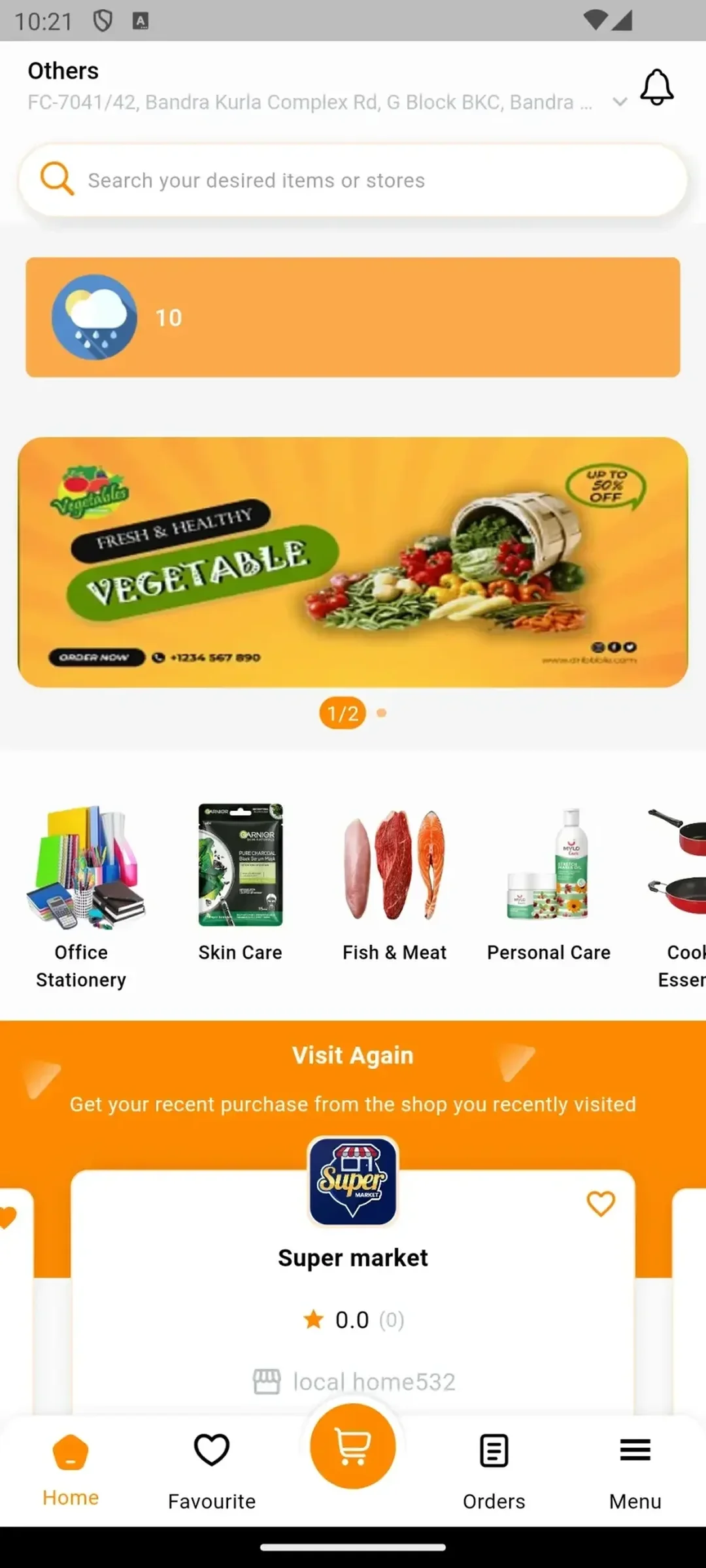
Instacart Clone customer app home screen: location bar, one search field for items and stores, a produce banner, category tiles and a Visit Again row.Instacart Clone store page in the customer app: store logo, rating, distance and delivery time, category chips and an All Products list with prices.
Shopper app

Instacart Clone - Shopper App

On a phone you can set a location, search for products or stores, scroll categories, open a store, check an order and watch it travel to the door on a map.

  1. 1Install the shopper app on your phone
  2. 2Sign in using the login details shown on this page
  3. 3Look around: Home, Store page, Orders, Menu
Shopper login:+91 9876543210 | User_321
Instacart Clone order details screen: order number, payment method, ordered items, the route from store to delivery address and a Track Order button.Instacart Clone live tracking screen: a map plus the five steps Order Placed, Order Confirmed, Preparing Item, Delivery on the Way and Delivered.
Role apps

Store and Delivery Man Apps

Stores and delivery men each have an app: the store owner logs in to work through orders and products and the delivery man logs in to collect and finish drops. The screens shown are the shopper-side order and tracking views that react to what they do.

  1. 1Install the store app or the delivery app
  2. 2Log in with the credentials for that role
  3. 3Look around: orders, products, deliveries
Store and delivery logins:grocery@demo.com | Store_321 · +91 9876543211 | Driver_321
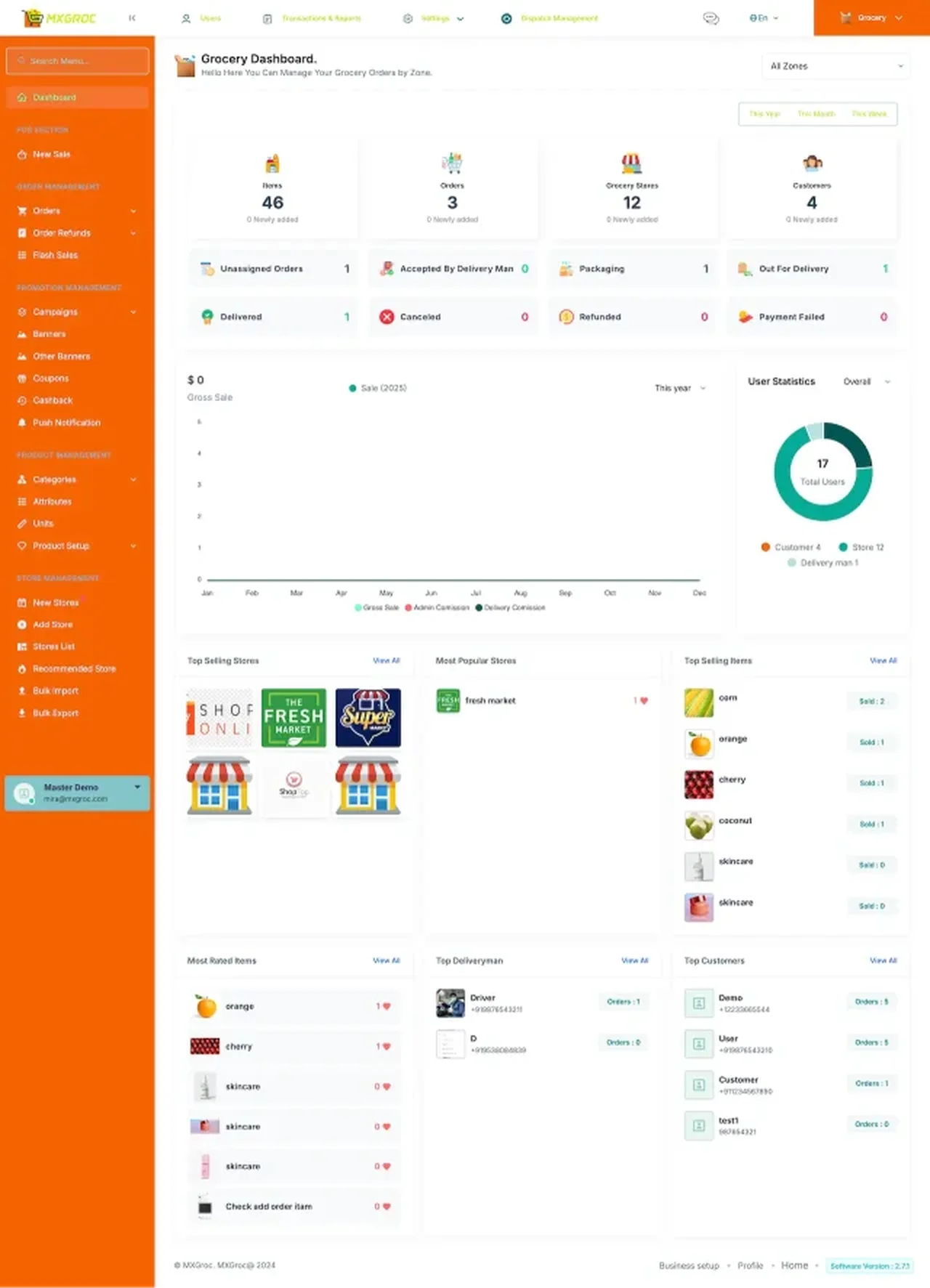
Instacart Clone admin dashboard: item, order, store and customer counts, order status tiles, a yearly sales chart, user statistics and top stores and items.
Browser panels

Storefront, Admin & Store Panels

The site shoppers browse, with location search, categories and stores, plus operator and store panels in the browser. Panel logins are handed out during a guided call.

  1. 1Open the demo website in a fresh tab
  2. 2Choose the storefront or a panel login page
  3. 3Look around: storefront, dashboard, stores
Panel access:shared on a guided call
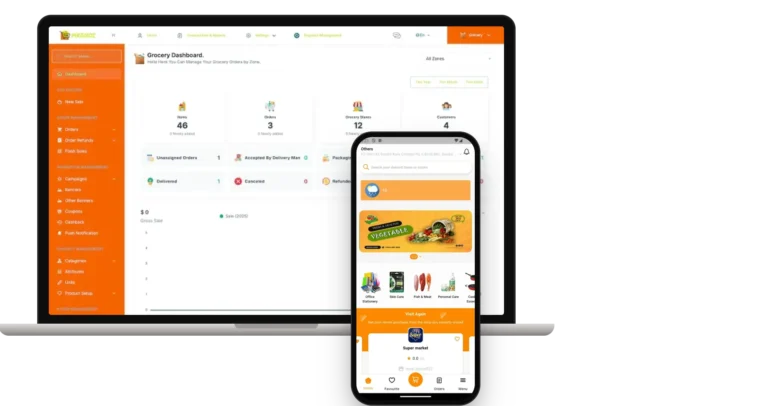
Instacart Clone shown across a laptop and phone: the admin grocery dashboard by zone and the grocery home with categories and offers

Walk It Through With Us

Instacart Clone Walkthrough: One Order From the Shelf to the Doorstep

Watching one order cross all three roles is the fastest way to judge the product. In a call of about thirty minutes we step through the shopper app first, then a store's own panel, then the admin console, and tie each one to your plan: the first stores you would sign, the commission you would charge and the zones you would open.

Book a live demo call

Screen by Screen

Screens From a Grocery Delivery App Like Instacart: Shopper App & Admin Dashboard

Miracuves shows genuine shopper screens from its Instacart clone in the sequence a customer meets them, set beside the dashboard that an operator opens first thing in the morning.

Instacart Clone customer app home screen: location bar, one search field for items and stores, a produce banner, category tiles and a Visit Again row.
Instacart Clone store page in the customer app: store logo, rating, distance and delivery time, category chips and an All Products list with prices.
Instacart Clone order details screen: order number, payment method, ordered items, the route from store to delivery address and a Track Order button.
Instacart Clone live tracking screen: a map plus the five steps Order Placed, Order Confirmed, Preparing Item, Delivery on the Way and Delivered.
Instacart Clone account menu: profile, my address, language, coupon, loyalty points, my wallet, refer and earn and join as a delivery man.
5 screens · scroll →
Instacart Clone admin dashboard: item, order, store and customer counts, order status tiles, a yearly sales chart, user statistics and top stores and items.
1 screen

One shopper, start to finish: the home screen, a store, an order, live tracking and the account menu, with the same activity tallied afterward on the admin dashboard.

Explore Our Solutions

02Proof

In Their Words

Instacart Clone Client Reviews - Founders Describing Their Own Launches

What operators say about launching on a Miracuves base. Two of these are grocery and delivery businesses; the rest come from other industries and appear exactly as their authors wrote them.

CCharles EveillardManaging Partner, Izi Technologies
“Talokitoko is grocery and food delivery for the African diaspora market in Europe. The rider app, dispatch and the merchant console were already built, so we spent the engagement on our own local payment mix, the vendor onboarding flow and the regions we actually operate in. The platform was live inside a month, which was months faster than our internal estimate.”
CClick2Deliver TeamFounding team, Click2Deliver
“Two order types, one courier fleet. The base handled multi-vertical ordering, so the work was our merchant mix and the grocery-specific substitution and weight rules. Live inside a month.”
DDr. Vivek RungtaFounder & Chief Dermatologist, Dermacian
“Every HMS I tried was built for general physicians, with no lesion mapping, no before/after tracking, and no procedure-based billing. Their MXHealth base gave us the patient app, doctor app, EMR and video consult out of the box. Front-desk time on scheduling and follow-ups is down ~70%, and we went fully digital in 9 months, where a fully custom job would have been 18.”
AAndre GittensCEO, Ride Corporation
“Turo is the obvious reference, but the Caribbean specifics, from different insurance norms to different payment rails, meant we needed a real partner, not just a clone. Miracuves’s MXCar base covered the listing, the trip flow, and the host payouts. We launched in 6 working days and are live in three islands.”
MMarsha WilliamsFounder, Bmore On Demands LLC
“The team was running it on a dispatcher and a Google Sheet, and we needed a real platform quickly, because we were about to onboard a major retail client. Miracuves’s Delivery Genie base gave us the rider app, the dispatch console, and live tracking. We launched in 6 weeks and cleared 4x the previous order volume in the first month.”
TTiffany DandreaOperations Director, Best Cabo Yacht Rentals
“We were running it on phone calls and a paper calendar, and we were losing bookings to bigger OTAs. Miracuves’s GetmyBoat Clone base gave us the calendar, the booking flow, and the payment engine. Online bookings are up roughly 70% in the first six months, and the ops team finally has a live view of the fleet.”
DDr. Carlos A. PalermoCo-founder & CEO, Doctta Health
“Building a compliant telehealth stack from scratch in three markets would have been a year-plus effort. Miracuves’s MXHealth base covered the patient and doctor apps, video consult, e-prescription and the pharmacy integrations. We launched in our first market in 9 weeks and rolled out to two more in the following six months.”
BBrian LatailleVP Logistics Technology, IBC Tanks Canada
“We were juggling spreadsheets, a third-party GPS provider, and a phone. We needed a single operations console. Miracuves’s MXLogistics base covered the trip lifecycle, the driver app, and the customer tracking page. We’ve cut operations admin time by about 40%.”
Read More Client TestimonialsFounders and operators, unedited

Verify Before You Buy

Instacart Clone Case Study - Where Proof Stands and How to Check It

An honest account of the proof that exists for this product today, and the routes you have to test it before committing.

Case Study
A named launch of this exact product has not been published

Nobody has released a case study on this build, so none is shown and none has been invented. What follows is a list of ways you can test the product yourself, and a clear statement of what we refuse to offer as proof.

UnpublishedClient named
Demo + callRoute to proof
MarketplaceModel
3Apps to try
4Web surfaces
6Build days
Instacart Clone admin dashboard: item, order, store and customer counts, order status tiles, a yearly sales chart, user statistics and top stores and items.
Challenges
  • Several stores must each keep a catalog, a panel and a stream of orders
  • Someone has to bring the basket, and the handover should be provable
  • Money moves through a wallet, gateways and commission, and it has to reconcile
Goal
  • Follow an order from a store to a delivery man and on to a shopper before you pay
  • Try the sign-up and approval of a store against the way you intend to recruit them
  • Read the source for anything a demo cannot show
Solution by Miracuves
  • Logins for the shopper, store and delivery apps
  • A storefront and browser panels you can open today
  • An admin dashboard walk-through on a call
  • Release notes covering v14.0 to v15.0
  • A fixed price stated up front and 6 days of build work

No imagined client, borrowed logo or untested result takes the place of proof here. When a real launch of this product is published, it gets its own case study and a link on this page.Miracuves · How we handle proof

See the published case studiesOur portfolio lists real delivery builds, grocery among them, created on neighboring Miracuves bases.

03The product

Product Overview

How an Instacart-Like App Serves Shoppers, Stores and Delivery Men

The Instacart clone Miracuves delivers is a ready-made on-demand grocery delivery marketplace organized around store catalogs. Shoppers choose a location, browse the stores nearby and order from whichever catalogue suits, a delivery man brings the basket, and an admin panel looks after approvals, orders and commission.

Instacart Clone shown across a laptop and phone: the admin grocery dashboard by zone and the grocery home with categories and offers

More Than a Shopfront

The value lies behind the window: store approval, a catalogue per seller, order routing, delivery men and an admin console that sees the whole chain.

Code You Can Open

The complete source arrives unencrypted, so your own developers can reshape flows and screens later without paying a licence fee for every seat.

Honest About Extras

Four modules are sold apart from the base and priced one by one: shopping lists, recipe import, an assistant and a wishlist. Each is labeled an add-on and none is counted as a base feature.

On Web and Mobile

What Is an Instacart Clone Script?

A marketplace like this is won or lost on its supply side: many stores, each needing a catalogue, prices and offers of its own, each needing to be vetted, kept busy and paid. That layer arrives working, along with the shopper and delivery flows around it.

Instacart Clone admin dashboard: item, order, store and customer counts, order status tiles, a yearly sales chart, user statistics and top stores and items.
  1. 01A catalogue, approval and sign-up flow for every store
  2. 02Search by location, store pages and item search
  3. 03Cart, wallet, checkout and live tracking
  4. 04Apps for shoppers, stores and delivery men
  5. 05An admin dashboard with orders, stores and reports

The box holds three mobile apps for shoppers, stores and delivery men, four web surfaces made up of a storefront and three role panels, and the full Flutter and web source.

What Ships in the Box

Instacart Clone Features - Stores, Cart, Verified Delivery, Wallet, Referral & Admin

Each item below ships ready in Miracuves' Instacart clone and is backed by a demo screen, a view of the admin dashboard or a release note. Where a capability needs a module outside the base, the page labels it as an optional extra further on.

Feature 01 / 09

Shop Near You

Shoppers fix a location by typing, GPS or a map pin and then see the stores around them. One search box on the home screen looks up products and stores alike.

  • Choose a delivery location by typing, using GPS or dropping a pin on the map
  • The home screen search box finds products and stores together
  • A Best Stores Nearby list shows distance and star rating
  • Tappable category tiles lead straight into a catalogue
  • A Visit Again strip brings back stores the shopper already uses
  • Admins carve the service area into zones
Feature 02 / 09

Many Stores, One Catalog Layer

Every store is a seller in its own right, with a store page, a catalogue and a panel. Stores apply through the vendor portal and appear only after the admin accepts them.

  • Stores apply through the vendor portal with their business details
  • Each store uploads and maintains its own catalogue
  • Nothing is visible to shoppers until the admin approves the store
  • Admins see pending applications in a New Stores queue, or add a store themselves
  • A Stores list carries a Recommended Store switch
  • Bulk import and export tools cover stores and items
  • Store pages open with logo, rating, location and delivery time
  • An All Products list is filtered by category chips, with price and unit on each item
  • Shared lists of categories, attributes and units keep catalogues uniform
  • The admin's own in-house shop can be shown first (v14.5)
Feature 03 / 09

Cart & Checkout

Items a shopper has not yet paid for stay in the cart. At checkout the shopper pays, adds delivery instructions and says what should happen if something is missing.

  • Pay for ticked products only and leave the rest in the cart
  • Buy now skips the cart without emptying it
  • Guest checkout with an option to create an account on the same page
  • One-tap reorder from past orders
  • A minimum order value that the admin and each store can set
  • Delivery becomes free once a basket passes a chosen value
  • Delivery instructions and a missing-item note travel with the order
  • A saved address book sits under My Address
  • Delivery and billing addresses can be edited (v14.0)
Feature 04 / 09

Verified Delivery & Live Tracking

Every order moves through five steps with real-time order tracking on a map, and the release notes list delivery verification by image and OTP for the moment a basket changes hands.

  • Image and OTP verification of order delivery, introduced in v14.0
  • A map screen with five status steps for every order
  • An order advances from Order Placed through Confirmed and Preparing Item to On the Way and Delivered
  • A notice stays on screen until a delivery man takes the order
  • Out-of-stock items can be requested back, with an alert when they return (v14.9)
  • Order details trace the route from the store to the address
Feature 05 / 09

Delivery Men & Dispatch

Delivery men sign up in the app, wait for approval and are then matched to orders by location, availability and rating, while the admin watches the whole fleet from one place.

  • Join as a Delivery Man is an entry in the account menu
  • Applicants send documents and are verified before approval
  • Orders are matched using location, availability and rating
  • A personal view of completed deliveries, earnings and bonuses
  • Admins open Dispatch Management from the top bar
  • A Top Delivery Men ranking on the admin dashboard
  • A delivery panel opens in the browser alongside the delivery app
Feature 06 / 09

Wallet, Referral & Loyalty

Shoppers can fund a wallet and pay from it, earn a reward for inviting friends and collect loyalty points, all reachable from the account menu.

  • Pay from the wallet at checkout
  • Top up on web or app, with an optional bonus on the funds added (v14.0)
  • Refer and Earn pays out once the invited friend's first order arrives (v14.0)
  • Loyalty Points and My Wallet sit in the account menu
  • Coupons can be entered from the same menu
Feature 07 / 09

Offers & Notifications

The admin panel has menus for campaigns, banners, coupons, cashback and flash sales, stores can set discounts of their own and push messages pull shoppers back in.

  • Menus for campaigns, banners and extra banner slots
  • Coupon and cashback menus
  • A Flash Sales menu
  • Flash and feature deals accept many products in one go (v14.7)
  • Tapping a push notification can open a chosen page (v14.8)
  • Stores can set their own discounts and offers
  • A stock clearance discount section (v15.0)
  • A call-to-action block on product details (v15.0)
Feature 08 / 09

Reviews, Chat & Refunds

Shoppers rate what they buy and sellers can answer, customers can message the admin team from the site and the app, and refunds have a page of their own.

  • Items and stores carry ratings and reviews
  • Sellers can answer reviews (v14.7)
  • Chat with the admin team from website and app (v14.4), smoother in the admin and store panels (v14.5)
  • An Order Refunds menu for the admin
  • A redesigned refund details page (v15.0)
Feature 09 / 09

Admin Dashboard & Settings

The admin home is a grocery dashboard that can be filtered by zone. Behind it are a point-of-sale screen, reports and the settings that govern sign-in, languages, gateways and tags.

  • A zone filter above counts of items, orders, stores and customers
  • Status tiles that run from unassigned through delivered, canceled and refunded
  • A gross sale chart with commission lines for admin and delivery
  • User statistics and rankings of top stores, items, delivery men and customers
  • A New Sale point-of-sale screen showing amount paid and change (v14.9)
  • Transactions and Reports menus
  • Manual, OTP and social sign-in are all controlled by the admin (v14.8)
  • Mobile OTP sign-in through Firebase (v14.8)
  • The admin can enable or disable cash on delivery (v15.0)
  • A language switcher and stronger translation tools (v14.7)
  • Support for Tag Manager, Analytics and ad pixels (v15.0)
  • Maintenance mode that works module by module (v14.8)
  • An Amazon S3 storage connection (v14.7)
  • Editable email templates for every message (v14.6)

What you bring: We hand over a rebranded platform on your hosting. In return we need a domain, your branding and legal details, verified Apple and Google developer accounts, a live payment gateway account with KYC completed and any third-party keys. App store review runs on its own clock, apart from our 6 days of build time.

Talk to Our Team

Where the Money Comes From

Instacart Clone Revenue Models - Order Commission, Delivery Fees, Sponsored Stores & Own-Shop Sales

An app like Instacart can bring in money on several lines, and Miracuves builds each one as a setting of its own, so a change to one never disturbs another.

Commission and delivery fees tend to carry the early months, while sponsored placement and in-house sales usually join once traffic builds. No rate comes preset: you pick each level per zone, and Miracuves takes no share of the order revenue.

  1. 01

    Commission on Store Orders

    The admin sets one commission and the platform applies it to every store order, so each store is paid net of your cut and your income grows with order volume.

  2. 02

    Delivery & Basket-Size Fees

    The minimum basket, the delivery charge and the point at which delivery turns free are all adjustable, so small orders can cover the drive and big ones can ride free.

  3. 03

    Sponsored Stores & Banners

    A Recommended Store flag and banner menus let stores pay for prime spots on the home screen, a line you can sell once shoppers are browsing.

  4. 04

    Flash Sales & Clearance Offers

    Flash sales, coupons, cashback and a stock clearance section give stores a way to move surplus quickly and give you a campaign tool for slow weeks.

  5. 05

    Own-Shop Sales

    The admin can open a shop of its own and list it first, so margin on goods you buy yourself sits beside commission earned from other stores.

  6. 06

    Wallet Top-Ups & Add-Fund Bonuses

    Shoppers can load a wallet and you can add a bonus, a small reward in exchange for money that stays on your platform until spent.

Public benchmarks for the money lines this platform can run, each taken from a fee page, an annual report or a card-processing tariff.
Revenue streamHow it is chargedTake rateTypical take rateWhat sets the ceiling
Commission on Store OrdersA percentage removed from what the store is owed when the order settles.Uber Eats lists 20%, 25% and 30% marketplace plans and DoorDash 15%, 25% and 30% delivery plans, while Instacart books roughly 7.2% of order value as transaction revenue.What stores will tolerate against the plan they could choose elsewhere. Pickup orders cost less on both pages (7% at Uber Eats, 6% at DoorDash), and each page warns that fees may differ by market.
Delivery & Basket-Size FeesA fee on each order that is waived above a chosen basket size or for loyal shoppers.No fixed fee is published. Instacart+ members pay $0 delivery on eligible orders of $10 or more per retailer.Where a waiver starts paying for itself. The same help page says non-member delivery fees depend on the retailer, the time window and the order total.
Sponsored Stores & BannersA paid placement or campaign sold to a store on top of its commission.Instacart books advertising and other revenue near 2.9% of order value, and near 10.1% once transaction revenue is added (our division).Reach per placement. Instacart describes its advertising investment rate as effectively flat from one year to the next, so revenue here tracks volume.
Own-Shop SalesMargin on stock the operator buys and sells through a shop of its own.About 80% of Eternal's quick-commerce order value ran on an own-inventory model in Q2 FY2026.You carry the stock and the waste. Revenue under that model counts the entire sale, so it cannot be set beside a commission percentage.
Wallet Top-Ups & Add-Fund BonusesThe processor charges a fee on every card top-up, which you pass on in pricing or absorb.Stripe prints 2.9% + $0.30 for each US card payment.Your gateway, your country and your card mix decide it. The add-fund bonus is a cost you choose, so no published rate governs it.

How to read this. Uber Eats and DoorDash publish the two commission ranges themselves, at Uber Eats pricing and DoorDash Marketplace, and the delivery-fee waiver is stated in an Instacart help article. The 7.2%, 2.9% and 10.1% ratios are our own division of numbers printed in Instacart's annual report on Form 10-K. Eternal states the own-inventory share in an results post, and Stripe prints its card price on a support page. Treat every figure as an input to your own model. None is an offer, none predicts what your own marketplace will earn, and the rates you really charge are set in the admin settings.

Revenue Model

Instacart Clone Revenue Model, Stage by Stage

Commission and delivery fees carry a new grocery marketplace's first months, and Miracuves wires all six lines into the Instacart clone so sponsored stores, the own shop and wallet bonuses switch on once shoppers browse daily.

Launch

Commission on every store order pays from the first paid basket, and a minimum basket with a delivery charge keeps small orders from losing money on the drive.

Traction

Once shoppers browse daily, flash sales, coupons and cashback fill slow weeks, and the free-delivery threshold nudges households toward bigger baskets.

Scale

With many stores competing for the home screen, the Recommended Store flag and banner slots become paid placements, while the admin's own shop earns retail margin and add-fund bonuses keep balances on the platform.

Commission, basket minimum, delivery charge and bonus levels are all admin settings, and none of the order revenue goes to Miracuves.

Want a revenue model drawn around your own grocery marketplace?Design My Revenue Model

Operate the Marketplace

White-Label Instacart App Admin Panel: Run Orders, Stores, Delivery Men and Reports

In the admin panel Miracuves ships, a single dashboard answers the operator's opening questions: which orders still lack a delivery man, which stores are open, how gross sales stand and who is waiting to be approved.

Instacart Clone admin dashboard: item, order, store and customer counts, order status tiles, a yearly sales chart, user statistics and top stores and items.

What the Admin Panel Holds

  • 01

    Zone-Filtered Dashboard

    The Grocery Dashboard can be limited to one zone. It counts items, orders, stores and customers, charts gross sales across the year and splits commission between the admin and the delivery side.

  • 02

    Order Status Tiles

    Tiles sort orders into unassigned, taken by a delivery man, being packaged, on the road, delivered, canceled, refunded and payment-failed.

  • 03

    Store Intake

    New Stores, Add Store, a complete Stores list, a Recommended Store switch and bulk import and export describe how sellers arrive and are managed.

  • 04

    Catalog Structure

    Categories, attributes and units sit beside product setup, while lists of top selling and most rated items reveal what actually moves.

  • 05

    Dispatch & Delivery Men

    Dispatch Management sits in the top bar, a ranking shows which delivery men perform best, and user statistics count customers, stores and the delivery side separately.

  • 06

    Offers & Push

    One menu column links to campaigns and banners, to coupons and cashback, to flash sales and to push messages.

  • 07

    Money Menus

    Order Refunds, Transactions and Reports live next to the commission numbers that show what the operator keeps.

  • 08

    Point of Sale & Settings

    The New Sale screen works as a point-of-sale counter, the Settings menu holds business setup and the header carries a language switcher.

Money Movement

The finance menus trace an order from the shopper's payment through to the store's payout.

  • Wallet payments and wallet funding
  • Order Refunds, with a new details page
  • Transactions and Reports menus
  • Commission computed per store order

Settings & Controls

The switches that govern the public site and daily operations.

  • Business setup and Settings menus
  • A cash on delivery toggle
  • A language switcher in the header
  • Maintenance mode controlled per module

Need the console to do more? Additional report types, a changed payout schedule, more languages or a custom approval stage are each scoped as their own job. Tell us how your operations team works and you get a written quote for it.

Talk to Our Team

04Package and price

The Full Package

What You Receive: Instacart Clone Script Source Code, Apps and Deployment

Miracuves hands over a working Instacart clone script rather than a bag of parts: three apps, a storefront, panels in the browser for operators, stores and delivery staff, and the source code beneath them all. Ownership of that code passes to you in full. After the one payment, the only recurring bills come from providers you pick: card processing on your merchant account, SMS and push for OTP sign-ins and order alerts, map usage for search and tracking, a server running MySQL, and Apple and Google developer accounts for the three apps.

01

Complete Source Code

The whole web platform and both mobile apps in readable, unencrypted source, so your developers can adapt anything the business later asks for.

  • Web platform code with no encryption
  • Flutter is the framework behind both the Android and iOS apps
  • You can modify, expand and redeploy it freely
  • Project codes handed over with the source
02

Customer Storefront

A responsive website on which shoppers set a location, browse categories and stores, keep favourites and fill a cart.

  • Pages for Home, Categories, Favourite and Stores
  • Controls to set a location or pick one on the map
  • Sign-in plus a language switcher
  • A Join Us entry in the header
03

Notifications & Chat

Push, SMS and email notices, with a chat line running among customers, sellers and the admin team.

  • Push messages that open a chosen page
  • An SMS gateway for text notifications
  • Email templates you can edit for every message
  • Chat available on the site, in the apps and in the panels
Instacart Clone admin dashboard: item, order, store and customer counts, order status tiles, a yearly sales chart, user statistics and top stores and items.
04

Three Browser Panels

Admin, store and delivery panels, each opened in a browser: one console for the operator, one per store and one for delivery staff.

  • An admin dashboard with orders, stores and reports
  • A store panel for catalogue, orders and offers
  • A delivery panel listing assigned drops
  • Every role signs in separately
05

Shopper, Store & Delivery Man Apps

Flutter powers all three apps, which run on Android and iOS and are installed from one app portal.

  • The shopper app covers home, stores, orders and menu
  • The store app handles one store's orders and products
  • The delivery app shows drops and earnings
  • Listings are created in your own developer accounts
Instacart Clone customer app home screen: location bar, one search field for items and stores, a produce banner, category tiles and a Visit Again row.
06

Payments & Wallet

Payment gateway connections for payment processing, a wallet that supports add-fund bonuses and a cash-on-delivery option the admin can turn off.

  • Gateway APIs wired to your own merchant account
  • A wallet that accepts top-ups and a bonus
  • Admins switch cash on delivery on or off
  • Refund handling with its own details page
07

Access & Verification Layer

Distinct roles and sign-in methods, vetting of stores and delivery men, user blocking, and the delivery verification named in the release notes.

  • One login per role: shopper, store, delivery, admin
  • Manual, OTP and social sign-in choices
  • Approve or deny people, with an email notice
  • An image and an OTP confirm that an order was delivered
08

Branding & Aftercare

Your identity applied across web and apps, deployment handled for you and three cover periods that overlap.

  • Every screen carries your own logo, icons and palette
  • Deployment onto your hosting
  • Source and project codes passed to you
  • Coverage: 60 days for guidance, 6 months for bug fixes, 12 months for updates

Would you rather test it first? Sign in to the demo in any of the three roles, or ask us to trace one order from shelf to doorstep with your own plan in mind.

Talk to Our Team

Transparent Pricing

What Does It Cost to Build a Grocery Marketplace Like Instacart?

A white-label Instacart Clone that is ready to launch has a fixed price of $2,499. Anything outside the base, such as add-ons, extra integrations or changed flows, receives a written scope and quote before work begins.

Most Popular

Professional

Ready-Made Launch Package
$2,499one-time payment
Live in 6 days

Best for: Grocery startups, regional store networks, supermarket chains going online and delivery businesses adding groceries

You receive the platform from the demo, wearing your logo, icons and colors and running on your own hosting.

Start Your Launch

Enterprise

Custom Work for Larger Plans
Customquote
Go-live depends on scope

Best for: Multi-country grocers, retailers with unusual flows, operators who want a picker role or multi-address orders

Where the base lacks a flow you need, we write it to your brief and fix the scope and price before starting.

Request a Quote
Development Cost

Instacart Clone Development Cost in 2026

The Instacart clone Miracuves sells costs $2,499, paid once, with no per-seat license or cut of order revenue. That buys the demo marketplace: three Flutter apps for shoppers, stores and delivery men, a storefront, admin, store and delivery panels and unencrypted source, rebranded and deployed to your server within six working days.

$2,499 Paid once
6 working days Rebranded and on your hosting
0% Revenue share

Provider bills you pay as baskets start moving

  • Card fees on your gateway's merchant account
  • Firebase OTP texts and order push alerts
  • Map calls behind location search and live tracking
  • MySQL hosting plus your domain
  • Store listings for all three apps under your Apple and Google accounts

Picker roles, split-address orders, combo bundles or add-ons such as recipes, shopping lists, a wishlist and an assistant get a written scope and quote first; custom work typically takes 2-8 weeks.

Compare Your Options

Ready-Made Instacart Clone vs Custom Development vs SaaS

Here are three ways to put an online grocery delivery app like Instacart in front of shoppers, Miracuves' ready-made clone among them, compared on what founders ask first: time, money, code and control.

CriteriaMiracuvesReady-Made Instacart CloneCustom DevelopmentSaaS
Launch timeStore-catalog marketplace running in 6 working daysCommonly 2-8 weeks, set out in a written quoteQuick sign-up on the vendor's grocery template
Upfront costFixed $2,499, paid oncePriced in a written quote per briefA small entry fee, then plan renewals
Source code ownershipFull unencrypted source for apps and web panelsTransferred only if the contract says soKept by the SaaS vendor
CustomizationYour developers or ours change any store flowBuilt from a blank page to your briefConfined to the vendor's settings
Ongoing feesNo per-seat license; hosting, maps and gateway billed by providersA maintenance contract with the builderA monthly plan that rises with order volume
Branding & app-store listingShopper, store and delivery apps under your nameYour brand, once development wrapsThe vendor's name often sits on the app
Best forFounders signing up city grocery stores fastA grocery model no existing base supportsTesting demand without owning a platform

Go Deeper

How to Build an App Like Instacart: Four Guides

Each guide below comes from the Miracuves blog and takes one question further than this page can: features, building, security and how food and grocery marketplaces differ.

Putting It to Work

Where an App Like Instacart Fits: City Grocery Marketplaces, Chain Delivery, Store Co-Ops & Referral Growth

Operators of different kinds start from different corners of the one Instacart clone Miracuves maintains. A city marketplace opens with store approval and commission, a chain with its branch pages, and a promotion-led shop with flash sales and coupons. What changes is the configuration, not the code.

CityMarketplaceCity Grocery Marketplace

Launch a marketplace in which stores register, publish their own catalogue and deliver through your delivery men, while you take commission and decide who is admitted.

01
Instacart Clone customer app home screen: location bar, one search field for items and stores, a produce banner, category tiles and a Visit Again row.
ChainBranchesChain Branch Ordering

Place each branch of a supermarket chain in a single app, with a page, a catalogue and a delivery time per branch, so shoppers pick whichever one is nearest.

02
Instacart Clone store page in the customer app: store logo, rating, distance and delivery time, category chips and an All Products list with prices.
Co-OpNetworkShared Store Co-Op

Give a group of small grocers one storefront and one fleet, with a panel for each member and a single admin view across all of their orders.

03
Instacart Clone admin dashboard: item, order, store and customer counts, order status tiles, a yearly sales chart, user statistics and top stores and items.
DeliveryFleetDelivery-First Operator

Add grocery catalogues to an existing delivery business and keep the tracking, dispatching and handover confirmation your team already works with.

04
Instacart Clone live tracking screen: a map plus the five steps Order Placed, Order Confirmed, Preparing Item, Delivery on the Way and Delivered.
WalletReferralWallet & Referral Growth

Bring households back with a wallet to top up, a bonus on added funds, Refer and Earn rewards and loyalty points collected from each order.

05
Instacart Clone account menu: profile, my address, language, coupon, loyalty points, my wallet, refer and earn and join as a delivery man.
OffersPushPromotion-Led Neighborhood Shop

Run flash sales, coupons and cashback from the admin menus, add a stock clearance section and send push messages that open a chosen page.

06
Instacart Clone order details screen: order number, payment method, ordered items, the route from store to delivery address and a Track Order button.
Business Model

Instacart Clone Business Model: Three Ways to Run It

Store approval, per-order commission and service zones are the three levers inside the Instacart clone, and Miracuves lets you set them to run one grocery marketplace in three quite different ways.

City marketplace

Independent grocers apply, publish their own catalogs and set their own prices, while you hold no stock and earn commission and delivery fees on every order.

Chain branch network

A supermarket chain lists each branch as a store with its own page, product catalog and delivery time, served by an owned or contracted fleet across its zones.

Delivery-first operator

A courier or food-delivery business adds grocery catalogs to the fleet it already runs, keeping dispatch, tracking and handover confirmation in one admin panel.

All three run on the same shopper, store and delivery man apps; only the approved stores, the commission rate and the zones you open differ.

One product, six ways to use it. Every one of them runs on the same three apps and the same admin panel. What varies is which stores you admit, what commission you set, which zones you open and how you brand it, so there is only one codebase to maintain.

Talk to Our Team

Market Timing

Why Launch a Store-Catalog Grocery Marketplace in 2026?

The opening Miracuves sees for an app like Instacart is plain: neighborhood stores are many and small, and most shoppers reach them one call or one trip at a time. Under your own brand, a marketplace gathers that supply, those shoppers and the commission in a single place.

01

Stores Want a Channel They Cannot Build Alone

A grocer with a till and a telephone can reach online shoppers through a catalogue, an order flow and delivery that already exist, so you gain supply without writing any of it.

02

Shoppers Browse Stores, Not Just Products

The home screen lists the best stores nearby with rating and distance, which lets a trusted store be picked the way people pick a favorite local shop.

03

Each Store Keeps Its Own Price List

Stores set their prices and units and may run discounts of their own, and that freedom is what holds good sellers on your marketplace.

04

A Wallet and a Referral Make Return Visits Likely

Money already loaded in a wallet, a bonus on added funds and a reward for bringing friends all give a shopper a reason to open your app again.

05

The Customer Relationship Stays With You

Once the marketplace carries your name, the shopper list, the reviews and the repeat orders are yours and not a listing site's.

06

Buying Beats Building Here

A marketplace is largely stores, catalogues, a cart, a wallet, delivery and an admin console, and 6 days of build work can place a white-label copy of all that on your hosting.

Four Numbers Worth Knowing

3

Mobile Apps

4

Web Surfaces

5

Tracking Steps

6

Build Days

Most of the work in a marketplace like this hides in the dull middle: signing up stores, tidying catalogues, assigning drops and reconciling commission. In this product that middle is already built.

Industries

Industries We Serve

This platform suits any business that wants to put the shelves of many sellers in front of household shoppers. Supermarkets and regional chains can take each branch online, neighborhood grocers can share one marketplace, specialty, organic and bakery sellers keep categories of their own, delivery operators can add groceries to the fleets they run, and household or personal-care retailers use the same catalogue structure.

  1. 01Supermarkets
  2. 02Regional Chains
  3. 03Neighborhood Grocers
  4. 04Convenience Stores
  5. 05Bakeries
  6. 06Organic Retail
  7. 07Specialty Foods
  8. 08Pantry & Household
  9. 09Personal Care
  10. 10Delivery Operators
  11. 11Distributors
  12. 12Platform Studios

With store onboarding, delivery and an admin panel carrying your name from the first screen, the Miracuves Instacart Clone adapts to a wide range of grocery and retail models.

06Under the hood

End to End

How the Instacart Clone App Works: From Home Screen to Doorstep

Behind a handful of taps in the Miracuves Instacart clone sits a sequence: location, store, cart, assignment, handover. Follow it below from the home screen to a tracked drop, and read afterward about the architecture underneath.

How a Shopper Orders Groceries Online in Five Steps

  1. Instacart Clone customer app home screen: location bar, one search field for items and stores, a produce banner, category tiles and a Visit Again row.
    1Set an Address, Search Groceries

    Ordering groceries online starts on the home screen: a location bar, one search box covering products and stores, and category tiles with promo banners beneath them.

    • A location bar fed by map or GPS
    • Search spanning items and stores
    • Tiles for categories and banners for offers
  2. Instacart Clone store page in the customer app: store logo, rating, distance and delivery time, category chips and an All Products list with prices.
    2Pick a Grocery Store Nearby

    A store page opens on its logo, rating, distance and delivery time, followed by every product with its price and unit, filtered by category chips.

    • Rating, distance and delivery time up top
    • Chips that filter by category, plus search
    • Every item shows its price and unit
  3. Instacart Clone order details screen: order number, payment method, ordered items, the route from store to delivery address and a Track Order button.
    3Review the Grocery Order

    The order screen lists its number, date and payment method, each item with quantity and price, plus courier notes and a note for out-of-stock items.

    • Order number, date and how it was paid
    • A line per item with quantity and price
    • Instructions for the courier and for missing items
  4. Instacart Clone live tracking screen: a map plus the five steps Order Placed, Order Confirmed, Preparing Item, Delivery on the Way and Delivered.
    4Track the Grocery Delivery

    Delivery tracking pins the drop on a map and moves the order through five status steps, and the release notes add handover verification by image and OTP.

    • A map marking where the drop is going
    • Five steps, Order Placed through Delivered
    • A note while a delivery man is still unassigned
  5. Instacart Clone account menu: profile, my address, language, coupon, loyalty points, my wallet, refer and earn and join as a delivery man.
    5Pay by Wallet, Earn Referrals

    The account menu lists the wallet, coupons, loyalty points and the referral program next to the profile, saved addresses and language settings.

    • Profile, saved addresses and language
    • Coupons, loyalty points and the wallet
    • Referral rewards and delivery-man sign-up
Visual Flow DiagramLocateShopOrderReceiveManage

Anatomy of the Platform

Instacart-Style Marketplace Architecture: The Path of One Order Through the Platform

Talk to Our Team
  1. Part 01

    One Surface per Role

    Admin, store and delivery work in panels and logins that are kept apart, so a store owner never lands on the operator console.

  2. Part 02

    The Order Status Pipeline

    An order is placed, confirmed, prepared, sent out and delivered, and the dashboard also counts the side branches: unassigned, canceled and refunded.

  3. Part 03

    A Catalog for Each Store

    Every item belongs to one store, while shared lists of categories, attributes and units keep each seller's catalogue consistent.

  4. Part 04

    Fees Applied at Checkout

    Prices, the minimum basket and the free-delivery threshold are settings, and the cart applies them at the moment the shopper pays.

  5. Part 05

    Money Logged per Order

    Each order records how it was paid, by wallet, cash on delivery or a gateway, and commission is worked out on every store order.

  6. Part 06

    A Check at the Handover

    Version 14.0 added order delivery verification by image and OTP, which gives the last step of an order something to confirm.

Under the Hood

PHP, MySQL, Flutter and Payment APIs: The Stack Behind an App Like Instacart

Miracuves builds the Instacart clone on a web tier, a database and Flutter apps, linked to outside services through accounts of your own, exactly as its product pages and release notes record it.

WEB & ADMIN

Web Tier

PHP Bootstrap
  • Storefront plus admin, store and delivery panels
  • Bootstrap powers the responsive layout
  • Caching at back end and front end (v14.9.1)
  • Editable email templates for every message
DATABASE

Database

MySQL
  • MySQL holds stores, items, orders and users
  • Queries tuned and cached (v14.9)
  • Exports of customers and subscribers can be filtered
  • Files can sit in Amazon S3 (v14.7)
MOBILE

Mobile Apps

Flutter Android iOS
  • Flutter apps on current dependencies
  • One app each for shoppers, stores and delivery men
  • Built against Flutter SDK 3.27.1 (v15.0)
  • Published under developer accounts you own
PAYMENTS

Payments

Payment APIs Wallet Cash on delivery
  • Gateway APIs attached to your merchant account
  • A wallet with top-ups and a top-up bonus
  • The admin panel toggles cash on delivery
  • You complete the gateway account and its KYC
INTEGRATIONS

Services You Connect

Google Maps Twilio Firebase
  • Google Maps drives location and map views
  • Firebase handles mobile OTP sign-in (v14.8)
  • Push messages travel over FCM HTTP v1 (v14.6)
  • Tag Manager, Analytics and ad pixels are supported
HANDOVER

Delivery Package

Source code Branding Deployment
  • Source and project codes, unencrypted
  • Your logo, icons and colors applied
  • Deployment onto your hosting
  • Support periods that overlap
For your engineers:

Bootstrap-based PHP carries the web and admin side, MySQL keeps the data and Flutter builds the apps. Maps, messaging, push, payment and translation services link up through accounts and keys you own, typed in during deployment. Nothing here is exotic, so developers are easy to hire.

Talk to Our Team

Grow Without a Rewrite

Built to Scale - Zones, Many Stores & Room to Grow

Miracuves gives every panel and app common building blocks across the marketplace, so adding stores, zones and orders comes down to capacity and settings rather than redevelopment.

Zones Lead. The admin defines service areas as zones, so opening another part of town means creating a zone and adding the stores that serve it.

Stores Add Sideways. Another store brings one more catalogue and one more panel, and never forces a change to the platform underneath.

Big Lists Stay Quick. Caching and tuned queries arrived in later versions to keep long lists of stores, items and orders loading as the catalogue swells.

Files Kept Elsewhere. An Amazon S3 link lets product images and other assets live in storage that you select.

01

Zones & Cities

The admin dashboard can be narrowed to one zone and the platform manages several cities, so a second area means configuring it rather than rebuilding.

02
ZonesStoresOrders

Many Stores, One Console

Stores join singly or in bulk and each keeps its own panel, catalogue and orders, while the admin sees them all in one console.

  • The New Stores queue
  • The Add Store form
  • Bulk import and export
  • The full Stores list
03

Caching & Tuned Queries

Versions 14.9 and 14.9.1 brought back-end and front-end caching and faster database queries.

  • Caching at both ends of the stack
  • Queries tuned and cached
  • Business settings and list APIs first
  • Vendor Excel exports redesigned
04
RolesLoginsOTP

Roles That Stay Apart

Shopper, store, delivery and admin work on separate surfaces, so load or change in one place does not spill into the others.

  • The admin panel
  • The store panel
  • The delivery panel
  • The storefront and the apps
05

Storage You Can Move

Through an S3 link (v14.7) images and files can be kept in storage you choose, far from the web tier.

  • An Amazon S3 storage link
  • Media held away from the web tier
  • Linked to your own account
  • Switched on from the admin side
06

Hand-Over You Can Document

Source and project codes are passed to you so that a different team can run and extend the platform.

Space to Adapt. Sooner or later every marketplace needs something specific to its city or its stores. With the full source and a mainstream stack in your hands, a new screen, rule or integration is ordinary development that your team or ours can carry out.

About to launch? Start with the stores and zones you can sign today, on the one deployment you already have. Once orders pick up, capacity turns into a matter of hosting and settings, and anything the base lacks is quoted on its own.

Talk to Our Team

07Security and trust

Open to Inspection

Grocery Marketplace Security: Role Separation, Verified Handover & Honest Limits

People hand a grocery marketplace their identity, their address, their order history and payment references, which is why Miracuves keeps every role on a surface of its own. Four questions follow from that: who may see what, how users sign in, how a delivery gets confirmed and what is done before launch. The list sets out what the platform gives you and what stays your job.

  1. 01 · Roles
    Role Separation

    Shoppers, stores, delivery men and admins each work on a surface of their own, which keeps a store owner away from the operator console.

    • Changeable Admin Address: The address used to sign in as admin can be set in the admin panel, so it does not have to stay at a default path (v14.0).
  2. 02 · Sign-in
    Sign-In & Maintenance

    The admin can switch manual, OTP and social login on or off, Firebase mobile OTP and Apple login are available, and maintenance mode can be pointed at selected modules.

    • Maintenance Switch: Maintenance can be aimed at selected modules only, and the admin can carry on browsing the live site while it is active.
  3. 03 · Approvals
    Approvals & Blocking

    The admin approves stores and delivery men, and can block, unblock, approve or deny users, with notices delivered by email.

    • Store Approval: Every new store sits in a queue until the admin accepts it, so unchecked sellers cannot flood the marketplace.
    • Delivery Partner Approval: A delivery man has to send documents, pass verification and win approval before any order is passed to him.
  4. 04 · Handover
    Delivery Verification

    Version 14.0 added order delivery verification by image and OTP, so the moment a basket changes hands has a step to confirm.

    • Handover Check: Since v14.0, order delivery can be verified by image and OTP, and a guided call walks through the exact flow.
  5. 05 · Payments
    Payments & Refunds

    Cards are charged through gateway accounts you connect yourself, the admin can switch cash on delivery off, and refunds get their own menu and details page.

    • Refund Handling: Order Refunds is an admin menu, and its details page was redesigned in v15.0.
  6. 06 · Launch
    Launch Security, Scheduled

    We plan an outside test, new keys and a restore trial with you before go-live, rather than taking any of them as done.

    • Named Launch Tasks: Pre-launch work covers an independent security test, a fresh set of keys, proof that backups restore and a check of gateway settings, and none of it is presumed finished.

Security teams will find the kinds of control they expect in the base, and behavior is written out so a reviewer can test it. Security testing, key rotation and a proven backup restore are booked into the deployment with you. Miracuves builds the grocery marketplace toward the requirements of ISO 27001, SOC 2 and GDPR as written. Your company rather than Miracuves receives the attestation, and independent audit partners handle the audit on your behalf and with you (our audit facts).

Talk Through Security Before Launch

Marketplace Readiness

What the Platform Provides and What Remains Yours as Operator

Food from many sellers ends up in strangers' homes through a marketplace like this. Miracuves builds the tooling for stores, orders, the wallet and delivery. Deciding which stores may sell, what they can say about their food and what the law asks wherever you trade is your job as operator.

A marketplace by design, with its controls built into the base.

We say ready only of features visible in the demo, the dashboard or the release notes. Your own entity carries the licensing, and this page is not legal advice.

Built Into the Software

Stores that register and wait for approval, catalogues organized by category, attribute and unit for each seller, orders with a visible status, delivery men who are vetted and assigned, a wallet and a referral reward, coupons, computed commission, a login per role and a reporting dashboard for the admin.

Left to the Operator

Your terms and privacy policy, the stores you admit and the proof you demand from them, the way disputes and refunds get settled once you go past the defaults, how payouts are made and how tax is reported.

No Separate Picker Role

Services in the Instacart style often send a person down the aisles to shop for the customer. In this product each store prepares its own orders in the store app or panel and a delivery man brings them, and a dedicated in-store picker app is available as scoped custom work. Delivery verification by image and OTP, added in v14.0, can be walked through on a guided call.

Where You Operate

Each country, and often each city, has its own rules on personal data, consumer protection, delivery, food handling and weights and measures. Go through the rules for every market you plan to serve, with qualified local advisers, before taking orders.

08Grow the platform

In the baseMXGroc
  • Store catalogues & carts
  • Wallet, referral & orders
  • Shopper, store & delivery apps
  • Admin panel & reports

The steps for adding a module

  1. 1
    Choose a module

    Pick one now or come back after launch, whichever suits your roadmap.

  2. 2
    Quote before work

    You get a written scope and a price for each module before anything is built.

  3. 3
    Merged into your code

    Once built, the module becomes part of the code you hold.

Request a Custom Module

Go Further

Optional Add-Ons for Your Instacart-Like App: Shopping Lists, Recipes, an Assistant and a Wishlist

Everything shown in the demo works without these. The four modules below sit outside the base price, are each quoted on their own and are worth adding only once your catalogue and shopper base call for them.

  • Planning

    Smart Shopping Lists

    Proposes an opening list drawn from earlier purchases, stated preferences and upcoming occasions, so a basket never starts empty.

    Lists · Suggestions
  • Planning

    Recipe Integration

    Connects to recipe sites or to recipes that users write, then adds every ingredient of the chosen dish to the cart together.

    Recipes · Cart
  • Engagement

    Virtual Assistant

    A conversational assistant that helps shoppers find products, answers their questions and offers suggestions in plain language.

    Assistant · NLP
  • Engagement

    Community Wishlist

    Shoppers post the products they wish the marketplace carried, so real requests steer which items and stores you recruit next.

    Wishlist · Community

The Delivery Suite

Delivering Something Besides Groceries? Look Next Door.

The Instacart clone is the store-catalog choice in the Miracuves delivery suite. Should your goods or your fleet differ, these four sit closest.

Courier delivering a box of fresh products to a doorstep, the page image of the Blinkit Clone.01
Pick it if: You want branch stores in place of many independent onesBlinkit Clone

A quick-commerce platform where every branch store prepares its own orders and riders deliver them from a neighborhood hub.

Explore Solution
Kitchen worker sending out food delivery orders, the page image of the Swiggy Clone.02
Pick it if: You want several delivery categories in one appSwiggy Clone

A multi-category delivery app that puts grocery, food and parcels behind one home screen in a single city.

Explore Solution
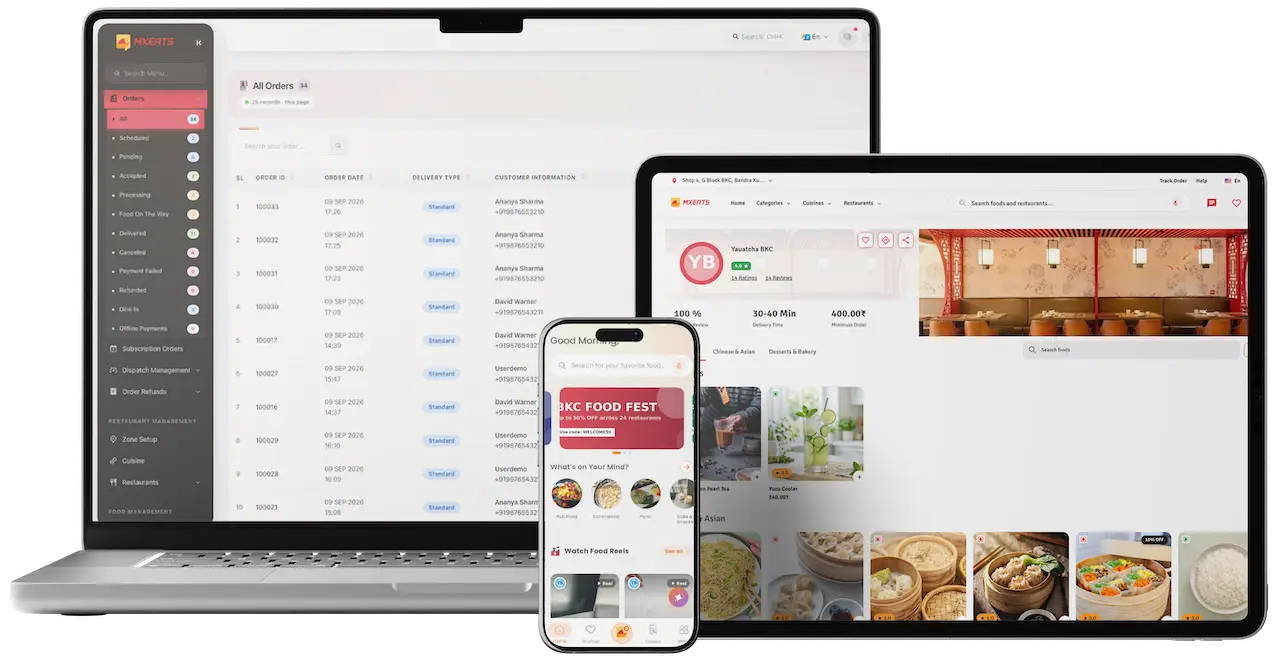
Ubereats Clone food delivery platform shown across a laptop, a tablet and a phone.03
Pick it if: Your shelves are restaurant menus, not groceriesUbereats Clone

A restaurant ordering and delivery platform with menus, kitchens and couriers in place of grocery catalogues.

Explore Solution
Courier carrying a parcel to a doorstep, the page image of the Uber Delivery Clone.04
Pick it if: You move parcels rather than groceriesUber Delivery Clone

A parcel delivery platform with a courier app, central dispatch and live job tracking.

Explore Solution
Full rangeBrowse all 90+ solutions

09The business case

Market Benchmarks

Grocery Delivery Market Benchmarks - Independent 2025-2026 Data

The revenue models above are ours. The figures below are not. They come from the Instacart (Maplebear) and Walmart annual reports on Form 10-K, Kroger's full-year 2025 results and Swiggy's Q4 FY2026 shareholder letter, reproduced as published. Together they show what grocery delivery looks like at scale in the US and India, so you can test a business case against numbers you can check.

Instacart 10-K01

$37.2bn in Instacart Order Value in 2025

Maplebear, the parent of Instacart, reports in its 2025 annual report on Form 10-K that gross transaction value (GTV) increased 11 percent to $37,224 million on 338.8 million orders, up 15 percent. Revenue was $3,742 million, made up of $2,677 million in transaction revenue and $1,065 million in advertising and other revenue. Transaction revenue is about 7.2 percent of GTV.

Kroger02

$16bn+ in Kroger eCommerce Sales in 2025

Kroger reports in its fourth quarter and full-year 2025 results, released 5 March 2026, that it delivered more than $16 billion in eCommerce sales in fiscal 2025, and that adjusted eCommerce sales increased 20 percent in the fourth quarter. Kroger also reports it completed an eCommerce strategic review expected to deliver $400 million of operating profit improvement in 2026.

Swiggy03

Instamart GOV Up 68.8% to INR 7,881 Crore

Swiggy's Q4 FY2026 shareholder letter reports that quick commerce gross order value (GOV) grew 68.8 percent year on year to INR 7,881 crore, with average order value up 33 percent to INR 700 and 1,143 dark stores across 129 cities. Contribution margin improved to negative 1.8 percent of GOV, and negative 1.1 percent for March 2026.

Walmart 10-K04

eCommerce Added 4.3% to Walmart U.S. Comp Sales

Walmart's annual report on Form 10-K for the fiscal year ended 31 January 2026 states that Walmart U.S. eCommerce sales positively contributed approximately 4.3 percent to comparable sales, against 2.9 percent in fiscal 2025. Walmart attributes the growth primarily to store-fulfilled pickup and delivery, alongside customer and Walmart+ member engagement with omnichannel offerings.

Where each figure comes from.

Maplebear Inc. (Instacart), Annual report on Form 10-K for the fiscal year ended December 31, 2025, filed February 2026 - sec.gov

The Kroger Co., Kroger Reports Fourth Quarter and Full-Year 2025 Results and Announces Guidance for 2026, 5 March 2026 - s202.q4cdn.com

Swiggy Limited, Q4 FY2026 Shareholder letter, May 2026 - swiggy.com

Walmart Inc., Annual report on Form 10-K for the fiscal year ended January 31, 2026, filed March 2026 - sec.gov

All figures are the publishers’ own reported results and statements, reproduced as published. The 7.2 percent transaction-revenue ratio is our arithmetic on reported figures ($2,677 million divided by $37,224 million). They describe the market, not the performance of any platform Miracuves builds, and nothing here is a revenue projection for your business.

The Commercial Case

Marketability, Revenue Potential & Business Prospects

Stores list where they trust a marketplace, and shoppers return where they trust it as well. What follows aims to make both decisions easier, and to leave the relationship with you once they have been made.

  1. 01

    Commission on Each Store Order

    The operator keeps a share of whatever each store sells, so income tracks how many stores and orders you have and never how large your team is.

  2. 02

    Several Levers, One Console

    Delivery fees, sponsored stores, flash sales and own-shop sales are separate switches inside one admin panel, so any of them can go live without a redesign.

  3. 03

    Stores and Shoppers You Own

    Every store account, review, wallet balance and order record lives in a database you own, so the marketplace's value grows for you instead of on a third party's listing site.

  4. 04

    A Way Out

    With the complete source code in hand, you can move host, swap teams or change direction later without asking anyone.

Main Revenue Levers
  • Commission on Store Orders
  • Delivery & Basket-Size Fees
  • Sponsored Stores & Banners
  • Flash Sales & Clearance Offers
  • Own-Shop Sales
  • Wallet Top-Ups & Add-Fund Bonuses
Long-Term Value

Staying power comes from stores that remain and shoppers who come back, more than from features.

  1. 01A store with a catalogue and reviews will not casually leave
  2. 02Favorites, history and a funded wallet pull shoppers back
  3. 03The platform starts that build-up on day one and stores it in your own database
  4. 04Vetting new stores closely adds a second layer of protection
Example Revenue Scenarios

Only the number of listed stores changes between these three cases, and each one names the lever that leads at that size. They are examples for planning conversations and not predictions of what any marketplace will earn.

Neighborhood Pilot15Stores Listed

Store commission pays for the early running costs.

A small pilot in one district where a few dozen shoppers order from fifteen stores, and the commission on paid orders covers hosting and support. Illustrative size, not a forecast.

City Launch150Stores Listed

Commission plus delivery fees and flash sales.

A city marketplace in which stores compete for the same households, so delivery fees and flash sales start to count beside commission. Illustrative size, not a forecast.

Multi-City Network1,200Stores Listed

Several zones with sponsored placement and wallet top-ups active.

A network across many zones where sponsored stores, an in-house shop and wallet top-ups add to commission, and the dashboard shows where to put effort. Illustrative size, not a forecast.

10Why Miracuves

Why Miracuves

How Miracuves Stacks Up Against Other Instacart Clone Developers

Founders usually weigh four routes: a shelf-bought multi-vendor script, a freelancer's custom job, an agency contract, or this ready-made grocery base, built by people with earlier launches behind them. Before choosing any of them, place a test order in every role, ask which features are paid extras, and confirm your own developers can open the code. The Instacart Clone answers all three in the demo, the add-on list and the unencrypted source.

Why Founders Pick Miracuves

  • 01

    Stores Get Real Tools

    Each store receives an app and a panel for its catalogue, prices and offers, a layer that many grocery scripts skip in favor of a shopper site.

  • 02

    Money Flow Already Wired

    Wallet payments and per-order commission work from the start, which lets you follow the money from the very first sale.

  • 03

    Three Apps on One Codebase

    Shopper, store and delivery apps and four web surfaces arrive already connected, not as separate projects waiting for someone to join them.

  • 04

    You Own the Full Source

    The complete codebase and its project codes reach you unencrypted, so nobody else can reprice the product or shift the terms later.

  • 05

    A Changelog You Can Read

    Each version lists what it added, so you can inspect what is really in the product and need not trust a feature brochure.

  • 06

    Plain Readiness Language

    Three lists stay separate on this page: what the base contains, what is optional and what you must bring yourself, namely a gateway, hosting and developer accounts.

Development Company

How to Choose an Instacart Clone Development Company

Before paying any Instacart clone vendor, sign in as a store owner and check that each store gets its own app, panel and approval queue, the layer many scripts skip.

What to look for Miracuves

  • Proof in the product Logins for the shopper, store and delivery man apps
  • Real seller tooling An app and a panel per store for catalog, prices and offers
  • A readable changelog Release notes from v14.0 to v15.0
  • Source ownership Full source and project codes, unencrypted
  • Support after launch Updates run 12 months, bug fixes 6 and guidance 60 days

Walk away from any vendor who

  • Stops at a shopper site with no store app
  • Lets stores go live without an approval queue
  • Cannot apply commission per store order
  • Will not say which features are paid extras
  • Hands over encrypted code on a yearly license

How the Instacart Clone Stacks Up Against Generic Scripts and Agencies

What to compareMiracuvesMiracuves Instacart CloneOff-the-Shelf Multi-Vendor ScriptAgency Build
Launch Speed6 working days of build timeHard to predictMonths, scoped job by job
Who Owns the CodeYou, in full and unencryptedOften limited or lockedUsually you
Grocery FeaturesStores, catalogs, cart, wallet, live tracking and chatMostly product listsWhatever the budget stretches to
Seller ToolingStore app, store panel and vettingSeldom part of the scriptCommissioned separately
Money HandlingA wallet, cash on delivery and gateway APIs, all built inDiffers by scriptCustom integration
Operator ReportingA zone dashboard with refunds and reportsThin or missingBuilt to order at extra cost
Security & ComplianceRole logins, approvals and honest limitsMinimalVaries widely
Cost vs Speed vs QualityFixed price, quick, tested baseCheap but riskyCostly and slow
Ongoing Support & Updates60 days guidance, 6 months bug fixes, 12 months updatesSeldom offeredWhatever the contract says

The gaps usually surface in the first busy month, well after the sales conversation is over.

Talk to Our Team

Changelog

Product Changelog: Each Release and What It Brought

The web platform and the apps, latest release first. No dates are recorded, and notes about modules that are not part of this build have been omitted.

ReleaseScopeDetails
V15.07 additions, 2 repairsNew and changed
A clearance-offer area that shows discounted surplus stock on store pages and the home page
A call-to-action area on the product page
Hooks for Pinterest, Snapchat, TikTok, LinkedIn, Meta and X pixels, plus Tag Manager and Analytics
A setting that lets the admin enable or disable cash on delivery
A refund details page with a fresh design
A login page that feels smoother
Flutter SDK brought to 3.27.1
Repaired
Totals in the point-of-sale screen
A handful of performance and reliability problems
V14.9.15 additions, 1 repairNew and changed
Caching on the back end and front end, starting with business settings and list APIs
Smaller asset files that load quicker
Clearer text in system messages and labels
Refinements to the interface and usability
Flutter SDK now at version 3.24.5
Repaired
Several stability problems resolved
V14.97 additions, 1 repairNew and changed
Shoppers can ask for an out-of-stock item to return and get an alert when it does
A profile list of the items a shopper asked for
Customer and subscriber exports that accept filters, in the admin panel
Point of sale reworked across the admin panel, store panel and store app, now showing the amount paid and the change
Admin login pages given a new look
Database queries tuned and cached
Flutter SDK brought to 3.24.4
Repaired
A set of stability problems
V14.86 additions, 1 repairNew and changed
A tap on a push notification lands on a chosen page
A single login hub for manual, OTP and social sign-in, with each method switched by the admin
Mobile-number OTP sign-in through Firebase
A maintenance mode that can target individual modules
A shipping policy page
Flutter SDK brought to 3.24.3
Repaired
Some issues and slow queries
V14.78 additions, 1 repairNew and changed
Storage connection to Amazon S3
Control over the SEO section
Better translation tooling for multi-language use
Sellers can reply to customer reviews
Chat that runs more smoothly
Flash and feature deals take several products per setup
Printable invoices that can be emailed
Flutter brought to 3.22.2
Repaired
Open problems affecting the admin and vendor panels, the website and the vendor app
V14.69 additions, 1 repairNew and changed
Sorting options for every admin list
Email templates the admin can edit
Warnings that pop up when stock runs low, for admin and vendor users
Checkout of ticked products while the others wait in the cart
A separate buy now checkout that leaves the cart untouched
A create-account checkbox for guests on the checkout page
A seller registration page with more guidance
Push delivery moved onto FCM HTTP v1
Flutter SDK brought to 3.19.6
Repaired
Assorted small defects across the web panels and apps
V14.59 additions, 1 repairNew and changed
During maintenance mode the admin can keep browsing the site
Better chat inside the admin and seller panels
A setting to display or hide Google Map
Users can be approved, denied, blocked or unblocked by admins, who can also email them notices
Invoices have a fresh design and can be translated
Empty states are now covered throughout the system
New look and feel for the admin, the store panel, the apps and the website
The in-house shop is now listed first among vendors
Flutter SDK moves up to 3.19.4
Repaired
Various minor defects in the panels and the app corrected
V14.48 additions, 1 repairNew and changed
Interface rework for the default theme, the apps and the admin and store panels
App code restructured
SMS gateway support
A better order review section
Customers can message the admin from the user site and app
New email and push notifications
Numerous database queries improved
Flutter SDK brought to 3.16.9
Repaired
Assorted small defects in the panels, the site and the apps
V14.012 additions, 1 repairNew and changed
The customer app, redesigned
Wallet funding from the user website and app, plus a bonus when funds are added
Guest checkout
Editable delivery and billing addresses
A minimum order amount that the admin and the seller can each set
Free delivery after an order reaches a set amount
Reordering from previous orders
Refer and earn, paid once a referred customer has received a first order
An admin login address the admin can set
Verification of delivered orders with an image and an OTP
Apple login for the customer app
Flutter SDK brought to 3.13.6
Repaired
Translation errors and a few minor ones

Start the conversation

Your grocery marketplace idea can become an app that shoppers open every week.

Book a free consultation and leave with a clear timeline and direct answers to what you asked. Trust earned in that first call counts for more with us than a quick sale.

  • First reply in under 2 hours
  • Free consultation
  • No lock-in contracts
  • Full source code ownership

11Learn more

Blog & Resources

Guides for Founders Building an Instacart-Style Marketplace

Read how an Instacart-style business earns, how food and grocery marketplaces differ and what to weigh in a clone script before you commit.

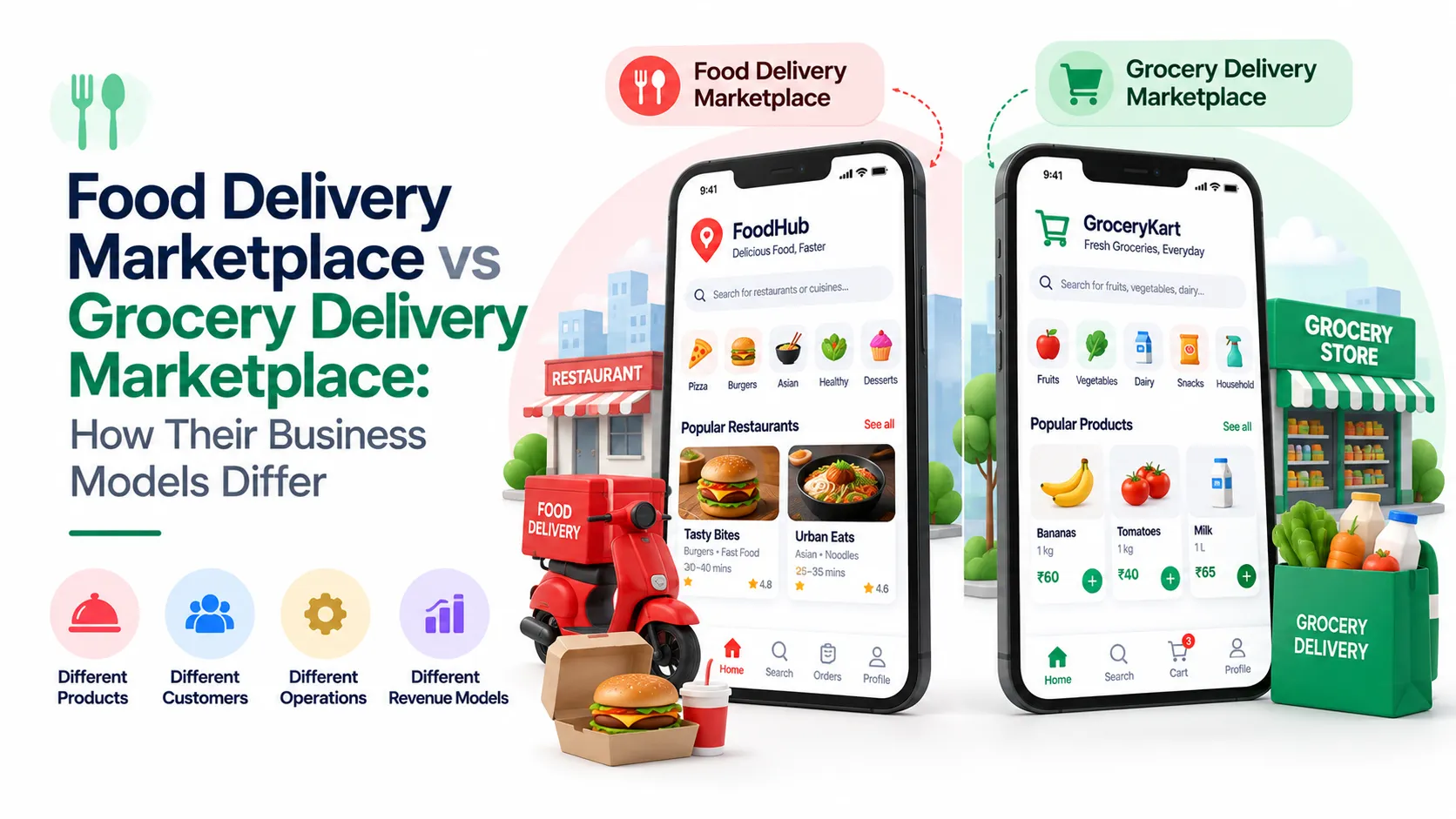
The product5 questions

01What is an Instacart Clone?

Think of an Instacart-style grocery marketplace that arrives built, white-label and from Miracuves. Independent stores publish catalogues, shoppers order from the ones near them and a delivery man brings the basket. Three mobile apps, a storefront and web panels make it work, and it sits in the same category as Instacart without any affiliation to it.

02Can I make the Instacart Clone carry my own brand?

Yes. Your logo, icons and colors are applied across web and apps as part of the package, and because the source code is yours, screens, flows and integrations can be altered afterwards. Anything beyond the base is scoped and priced in writing before work starts.

03Can the Instacart Clone grow with a large operation?

Its structure is zones, many stores and one panel per role, so adding stores or neighborhoods is mostly a settings job. Releases 14.9 and 14.9.1 brought caching and tuned queries, and files can be kept in Amazon S3. Very large volumes may call for bigger hosting, which we size with you at deployment.

04Which technologies is the Instacart Clone built with?

The Android and iOS apps use Flutter. On the web and admin side Bootstrap-based PHP runs, data lives in MySQL, and Google Maps, Twilio, Firebase, payment gateways and a translation service attach through your own accounts and keys.

05What support follows deployment?

Launch day starts three overlapping clocks. Guidance lasts 60 days, bug fixes get priority for 6 months and product updates continue for 12 months.

Shopping & delivery6 questions

06How does a shopper place an order in the app?

After choosing a location, the shopper searches for items or stores, or taps a category, opens a store, fills the cart and pays. On the order details screen you will find the items, how the order was paid and the route from store to address, beside a Track Order button.

07Can shoppers follow their delivery live?

Yes. A map screen marks the drop and an order passes through five labeled stages, from Placed to Delivered. If no delivery man has taken the order yet, the screen says that too.

08How does the platform confirm that a delivery was made?

The version 14.0 release notes list order delivery verification by image and OTP. We walk through the exact flow on a guided call, so you can see how a handover is confirmed before launch.

09What payment methods are supported?

Shoppers can pay from the in-app wallet, and the admin can turn cash on delivery on or off. Cards and local wallets are handled by the gateways you connect on your own account, so the gateway you choose sets what you accept.

10What can a shopper do when an order goes wrong?

Customers can message the admin team from the chat on the website and in the app, and orders that need money back follow a refund route with its own details page.

11Does it support orders to several addresses or combo bundles?

Both are available as custom work: should your plan depend on combo bundles, or on one order that splits across several addresses, we scope it and send a written quote before building.

Stores & delivery partners8 questions

12How can grocery stores register on the platform?

A store applies through the vendor portal, supplies its business details, uploads a catalogue and waits for approval. Admins can also create a store directly or bring stores and items in through bulk import.

13How do vendors manage their inventory and orders?

Vendors work from their own store panel or store app, where they maintain products, change prices, handle orders and follow sales, while the admin watches every store from one console.

14Can vendors offer discounts or promotions?

Yes. Any store can set up discounts and offers of its own, and the admin can run campaigns, banners, coupons, cashback and flash sales for the whole marketplace.

15What commission do vendors pay per order?

You configure the commission in the admin panel and the platform calculates it on each store order. Most operators use a percentage of the order and adjust it to fit their business model.

16How are payments processed for vendors?

Payments for orders are logged on the platform, and the admin settles with each vendor on a schedule of the admin's choosing.

17How do I become a delivery partner on the platform?

Applications start in the app, under the account menu: the delivery man uploads documents, goes through verification and is approved by the admin before orders reach him.

18How are delivery assignments managed?

The platform hands out orders by location, availability and measures such as rating and delivery time. Admins also have Dispatch Management and a ranking of top delivery men.

19Can delivery partners track their earnings?

Yes. Each delivery man can open a view of finished deliveries, earnings and bonuses.

Admin, money & growth8 questions

20What features are included in the admin panel?

It covers a zone-filtered grocery dashboard, order status tiles, store and item management, dispatch for delivery men, campaigns, coupons, refunds, money reports, the point-of-sale screen and general settings including languages.

21Can I run operations in several regions?

Yes. The dashboard splits the service area into zones, and the platform copes with several regions and cities.

22How do I approve vendors and delivery partners?

Applications from new stores and from delivery men land in separate approval lists, where the admin accepts or rejects each one. The admin can also block or unblock any user and tell them by email.

23Can I integrate custom payment gateways?

Each gateway is attached through its API to your own merchant account. Several work out of the box and others can be added as scoped work.

24Does the admin panel provide performance analytics?

The dashboard shows counts, a yearly sales chart with commission, user statistics and rankings of top stores, items, delivery men and customers. Money is covered by the Transactions and Reports menus.

25How do the wallet and referral program work?

A shopper can add funds to a wallet from web or app, and you can set a bonus on top. Refer and Earn pays its reward once the referred customer's first order has been delivered. Version 14.0 introduced both, and they appear in the account menu.

26Where does the first revenue come from?

Commission on store orders usually pays first in a catalog marketplace, since there is nothing extra to sell and the very first paid order generates it. Delivery fees follow when enough shoppers are active in a zone for basket size to count, and sponsored placement appears once stores start competing for the top of the home screen. The base supports an in-house shop. Wallet bonuses are a cost you choose, and partnership income depends on deals you negotiate yourself.

27What protects a grocery marketplace from copycats?

Staying power comes from stores that remain and shoppers who come back, more than from features. A store that has built a catalogue, gathered reviews and learned its panel rarely leaves, and a shopper with favorites, an order history and money in the wallet has reasons to return. The platform begins that build-up on day one and keeps it in your own database. Careful approval of new stores adds a second layer, since a vetted marketplace is hard to imitate.

Launch & Miracuves11 questions

28When does the platform go live?

On your hosting after 6 days of our build time. Apple and Google review apps on their own timetables, and anything custom beyond the base gets a written scope and date.

29Does the source code end up in my hands?

Yes. The unencrypted source for the website, the mobile apps and the project is yours.

30What must I provide before launch?

You bring a domain, hosting, branding and legal details, verified developer accounts for the app stores, a payment gateway account that is live with KYC complete, and any third-party keys. From there we rebrand, deploy and publish through your accounts. Applying to gateways, drafting legal pages and running hosting are outside our scope.

31What makes Miracuves a good partner for an Instacart clone?

Stores get their own tools, and the wallet and admin dashboard come already working, on a base whose release notes you can read. Our record is 9,000+ projects for 6,000+ clients, plus a catalogue of 90+ ready-made solutions to start from. Priced at a fixed $2,499 and live after 6 working days of build work, the Instacart Clone comes with 60 days of guidance, 6 months of priority bug fixes and 12 months of product updates. First responses arrive in under 2 hours, Monday to Saturday, 10:00-19:00 IST.

32How much does an Instacart clone cost?

A ready-made Instacart Clone has one fixed price, $2,499, with no recurring license fee. It includes the apps for shoppers, stores and delivery men, four web surfaces, your branding, deployment on your hosting and the unencrypted source code. Anything outside the base, such as an extra gateway, a new report or a changed checkout flow, gets its own written quote up front, so the price you agree is the price you pay.

33Is a ready-made Instacart clone better than custom development?

For most grocery founders it is. Store approval, per-store catalogs, order routing, delivery assignment, the wallet and commission already work, so the marketplace is live on your own server within 6 working days instead of waiting on a build from zero. Custom development makes sense when your model needs something the base leaves out, such as combo bundles or multi-address orders; that work gets a written quote, usually landing in 2-8 weeks.

34How long until my Instacart clone is live on the App Store and Google Play?

The web platform and panels go live on your hosting after 6 working days of build time. In the same window we prepare the shopper, store and delivery apps and submit them from the Apple and Google developer accounts you have verified. Store review then runs on Apple and Google timetables, so each listing appears as soon as its review clears.

35What is the business model of an app like Instacart?

An app like Instacart sits between local stores and the households that buy from them, and earns on the flow of orders. The core is a commission on each store order; delivery fees, basket minimums, sponsored store slots, promotions, an in-house shop and wallet top-ups stack on top, each switched on and priced from the admin panel when your zone is ready for it.

36What is the step-by-step process to launch my Instacart clone?

Step one, try the demo in the shopper, store and delivery roles. Step two, send your brief: launch zone, first stores, branding and payment gateway. Step three, we rebrand and deploy the platform on your hosting within 6 working days. Step four, the three apps go to Apple and Google from your developer accounts. Step five, you open for orders; store review sits outside the 6 days.

37Can an Instacart clone compete with big grocery delivery players?

It can win locally. Independent stores publish their own catalogues, shoppers order from the ones near them, and zones let you open one neighborhood at a time. Staying power comes from stores that remain and shoppers who return, and the platform starts building that in your own database from day one. Careful approval of new stores adds a second layer of defense.

38Does the Instacart clone include a website as well as mobile apps?

Yes. Alongside the shopper, store and delivery apps, the package includes four web surfaces: the storefront plus web panels for operators, stores and delivery staff. Shoppers can message the admin team from the chat on the website and in the app, so support works from either place.

Disclaimer

Miracuves is an independent software development company. We are not affiliated with, connected to, sponsored by, or endorsed by Instacart.

Read our full Legal Notice & Disclaimer →
Why this name

“Instacart Clone” is used descriptively. It is how the software industry refers to building a platform with functionality similar to Instacart, and how clients search for it.

Who built this

The entire design and codebase is built by our own team. The product contains no code, design, graphics, or content originating from the Instacart website or applications.

Trademarks

Instacart and all other third-party names and marks are the property of their respective owners, referenced here solely to describe the category of software offered.