Scheduled Visit App · Production Ready

UrbanClap Clone App - White-Label Home Services Marketplace

Built by Miracuves, the ready-made, white-label UrbanClap clone, named for the brand now trading as Urban Company, hands you owned source code for three Flutter apps and four web panels that run home visits, under your name and live in six working days.

A customer names the day and time for a visit, or asks for it at once, the provider accepts the slot and hands the job to one of its own servicemen, who works from a separate app. An in-app shop, service bundles, virtual consultations and a skill-sharing space are extras, each with its own price. A new booking rule, say a minimum notice before a slot, is scoped first, then quoted in writing; plan on 2-8 weeks.

Launch in 6 Days with

  • Source Code
  • 3 Flutter Apps
  • 4 Web Panels
  • Serviceman App
  • Admin Console
  • Android + iOS

StackFlutter 3.27 · TypeScript · Bootstrap · PHP 8.2 · MySQL

MXServe console · Booking deskIllustrative
Slots booked today31
Awaiting a provider5
Servicemen on shift18

Booking desk activity

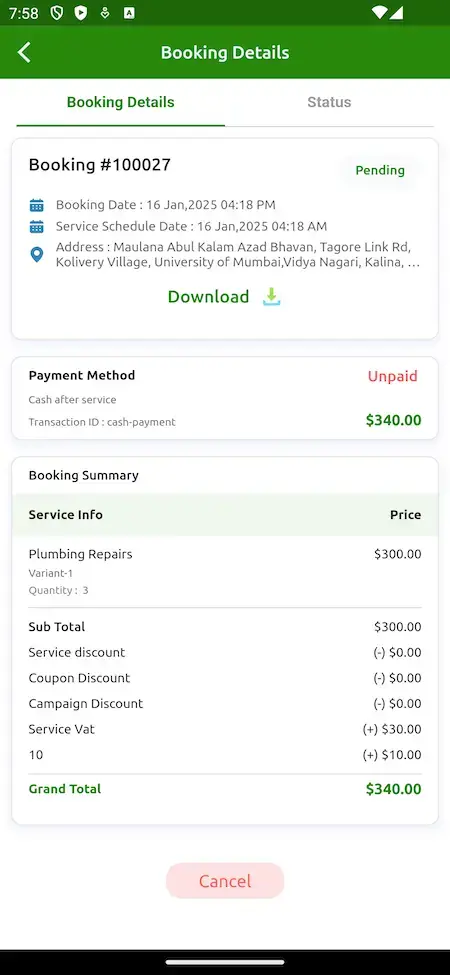
UrbanClap Clone booking details screen with a booking number, a Pending status, the schedule date, the address, the payment method and a booking summary with totals.
Each visit confirmed by OTPat the start and the end
  • 5Built-In Revenue Linesbooking commission, service fees, featured placement, ad slots and wallet balances
  • MilesProvider Radiusset by you, with service zones drawn in the admin panel
  • 0%Revenue Share With Miracuvesno slice of any visit booked on your platform
  • 2Ways to Settlea wallet balance and cash once the job is done
  • 6Days to Launchand if the delay is ours, we keep going free
  • $2,799Paid Once, Not Rentedsource code yours, no per-seat fee, no monthly rental

Live in six working days, or we keep working free until you launch. Every build carries 60 days guidance, 6 months bug fixes and 12 months updates.Verify every figure

Servica, Built on This Base

Miracuves gave Servica several service types on one platform, built from this base in 2024, with 20 of 25 modules reused, five written for it, and the code held in its own account.

A Code for Every Visit

Each booking carries a one-time code the customer sees on the web, sent by Twilio SMS, and start and completion photos or videos record the visit.

Your Gateway Takes the Card

Payments run through the gateway accounts you connect, several at once, Flutterwave and Paystack included, and your own gateway agreement and KYC cover the card step.

Want a home services brand of your own?Talk to Product Expert

Trusted by 6,000+ clients worldwide

Miracuves is listed by Expertise.com as a managed IT service provider.Miracuves is an official member of the Forbes Business Council.Miracuves is a verified agency on DesignRush, listed among top design agencies in India.Miracuves is reviewed on Trustpilot as a software development company.Miracuves is listed by The Manifest among top managed software development companies.Miracuves is listed by DesignRush as a top software development company.Miracuves is recognized by GoodFirms as a top software development company.Miracuves is ranked among the top 1000 companies globally by Clutch.Miracuves is a top managed service provider in the United States on Clutch.

01Demo and screens

Try It Yourself

Try the UrbanClap Clone Demo: Three Role Apps Plus Web and Admin Panels

Miracuves opens its UrbanClap clone demo to every role, one after another, with a login each for the customer, provider and serviceman apps. A separate login opens each of the three apps, and the web panels start from the last card. Choose a service, set the time, read the booking summary and look at the wallet.
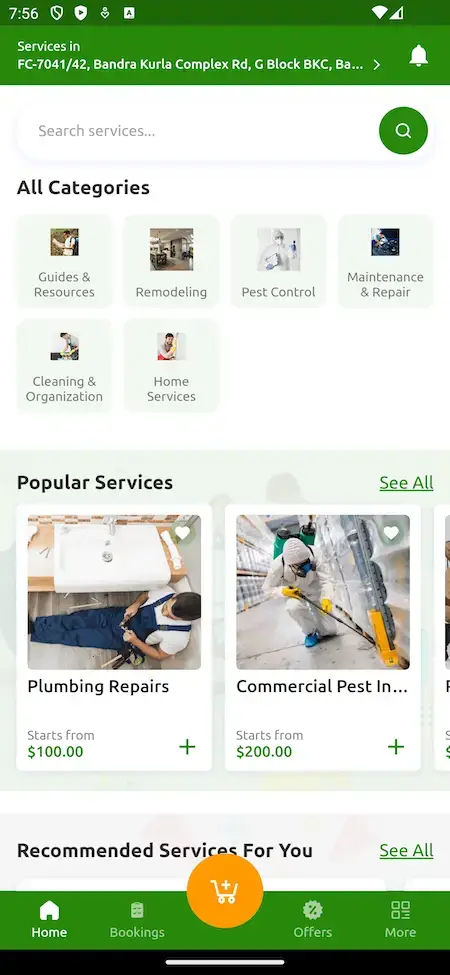
UrbanClap Clone app home screen with a service search bar, an All Categories grid and a Popular Services row with starting prices.UrbanClap Clone booking details screen with a booking number, a Pending status, the schedule date, the address, the payment method and a booking summary with totals.
For customers

UrbanClap Clone - Customer App for Booking

Where bookings begin: browse the categories, open a service, give a time and an address, confirm, pay and watch the status change.

  1. 1Start at the app portal and select your device
  2. 2Enter the customer login given on this card
  3. 3Look at: Categories, Booking, Wallet, Offers
Login:user@demo.com | User_321
Provider side
For providers

Provider App - Tools for the Business Owner

Where the business runs: register, wait for approval, list services, accept bookings, message customers and follow what comes in.

  1. 1Go to the app portal and choose a device
  2. 2Use the provider login listed on this card
  3. 3Look at: Bookings, Services, Chat, Earnings
Login:provider@demo.com | Provider_321
Serviceman side
For servicemen

Serviceman App - Tools for Field Staff

Where the work gets done: flag yourself as free, open the jobs given to you, read what the customer wrote and watch your earnings and tips.

  1. 1Visit the app portal and pick a device
  2. 2Use the serviceman login listed on this card
  3. 3Look at: Jobs, Schedule, Availability, Earnings
Login:serviceman@demo.com | Serviceman_321
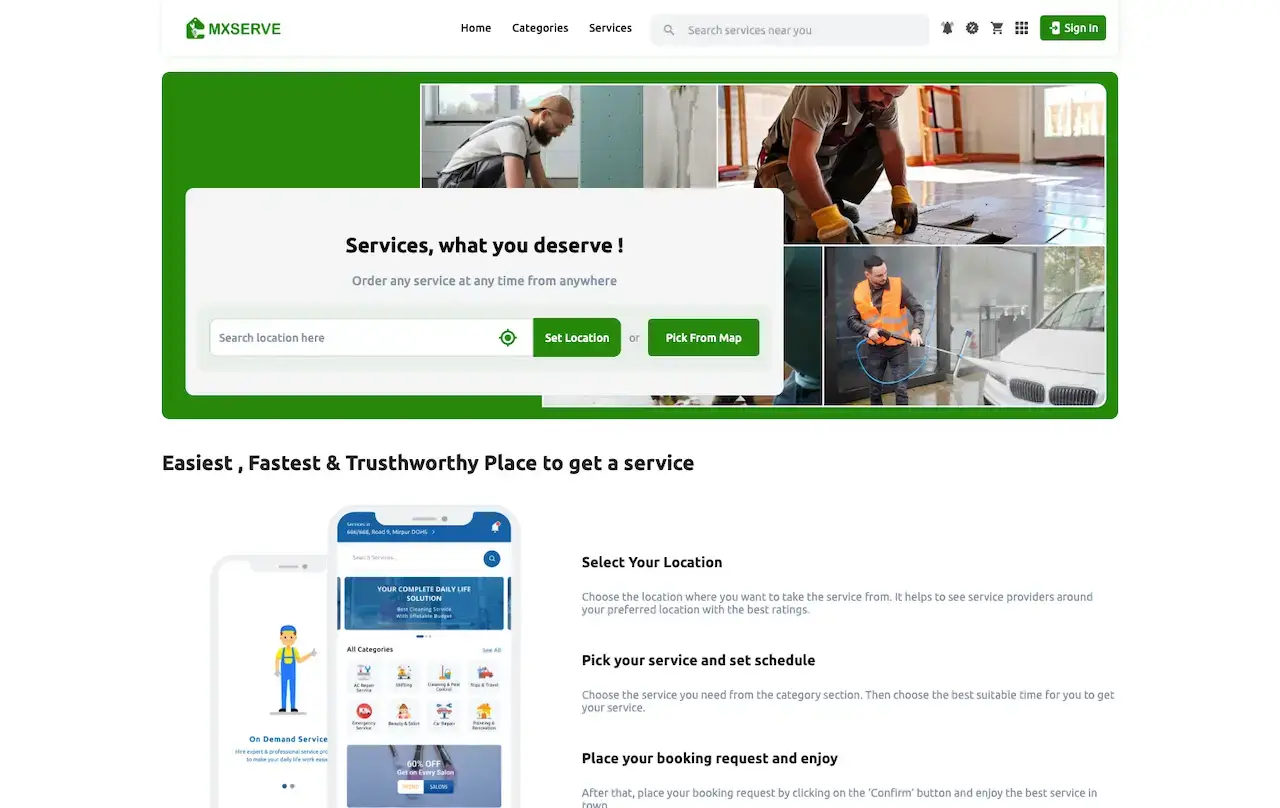
UrbanClap Clone customer website home page with a location search, service categories and a three-step booking explainer.
Website & console

Customer Website & Admin Panel

A responsive customer site with location search and service categories, next to the operator console that handles earnings, bookings, providers, offers and zones.

  1. 1Start by launching the demo website in a separate browser tab
  2. 2Scroll the customer site, then visit the admin login
  3. 3Look at: Earnings, Providers, Offers, Zones
Admin access:given during a guided call

See It Move

A Video Tour of a Home Services App Like UrbanClap: Booking, Provider Work and the Admin Console

Press play for a short run through the marketplace, then book a call and we will replay the same screens against your plan: your service list, your zones, your commission rate and your launch date.

Reserve a guided walkthrough.

Screens in Order

Screens of an App Like Urban Company - From the Welcome Screen to the Admin Dashboard & Website

Real screens in the order a person meets them: the customer app from first launch to the wallet, the admin dashboard where the operator watches earnings and bookings, and the customer website.
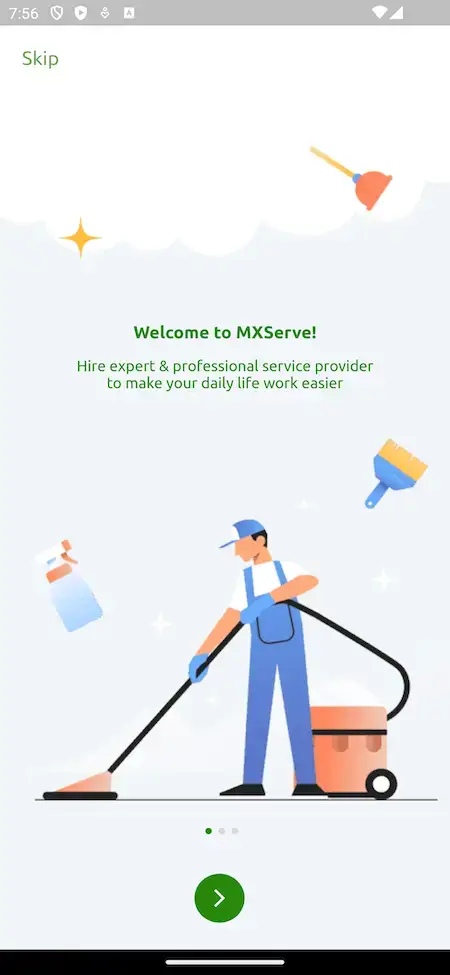
UrbanClap Clone app welcome screen with a cleaner illustration and the line that invites people to hire a professional service provider.
UrbanClap Clone app home screen with a service search bar, an All Categories grid and a Popular Services row with starting prices.
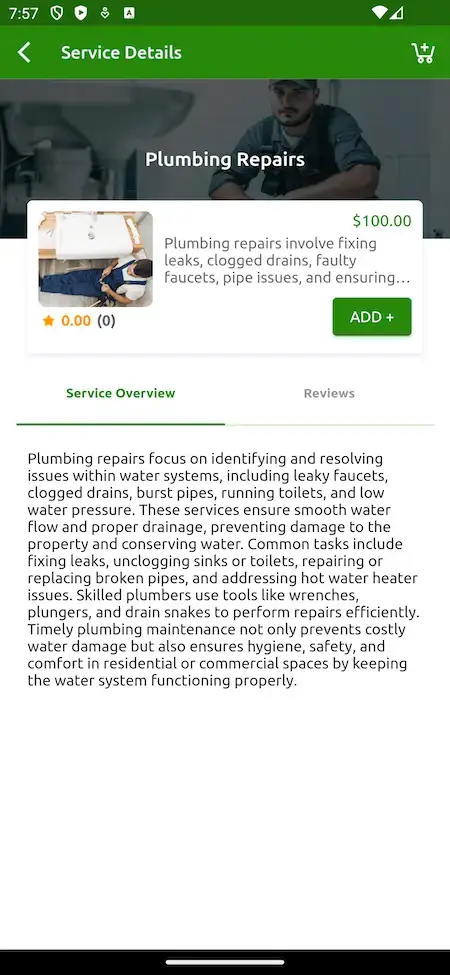
UrbanClap Clone service details screen for plumbing repairs with a price, an ADD button and Service Overview and Reviews tabs.
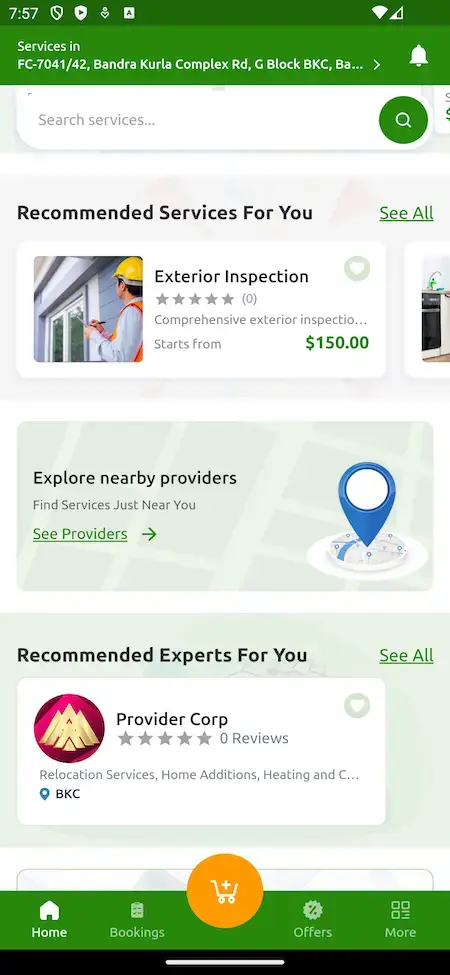
UrbanClap Clone home screen with recommended services, a nearby providers card and a Post for Customized Service card.
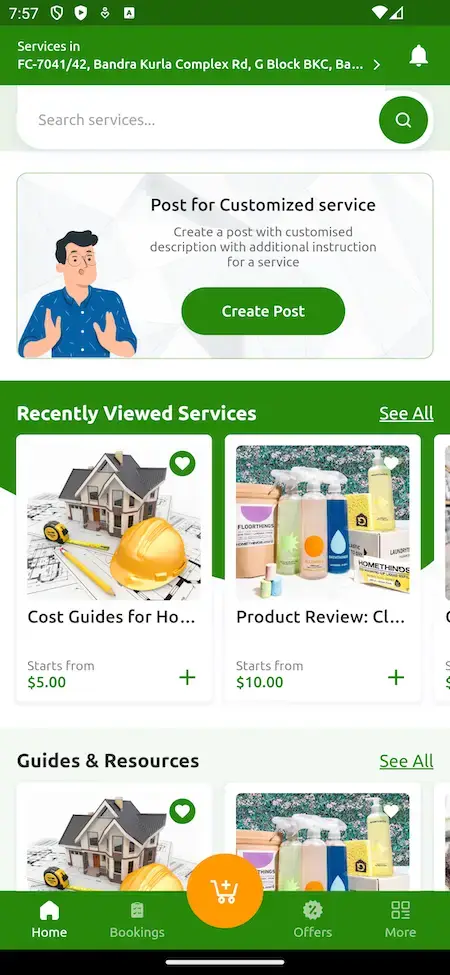
UrbanClap Clone home screen with a Post for Customized Service card, a Recently Viewed Services row and a Guides and Resources row.
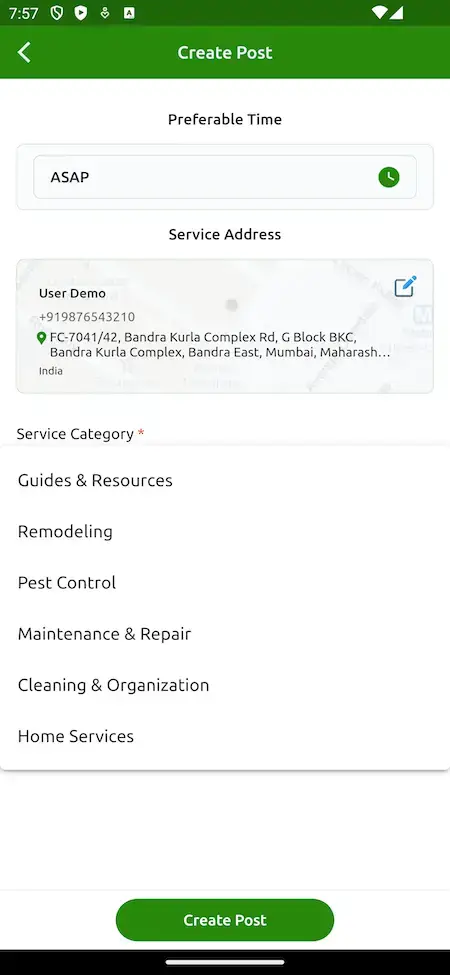
UrbanClap Clone Create Post screen with a preferable time field, the service address and a service category list.
UrbanClap Clone booking details screen with a booking number, a Pending status, the schedule date, the address, the payment method and a booking summary with totals.
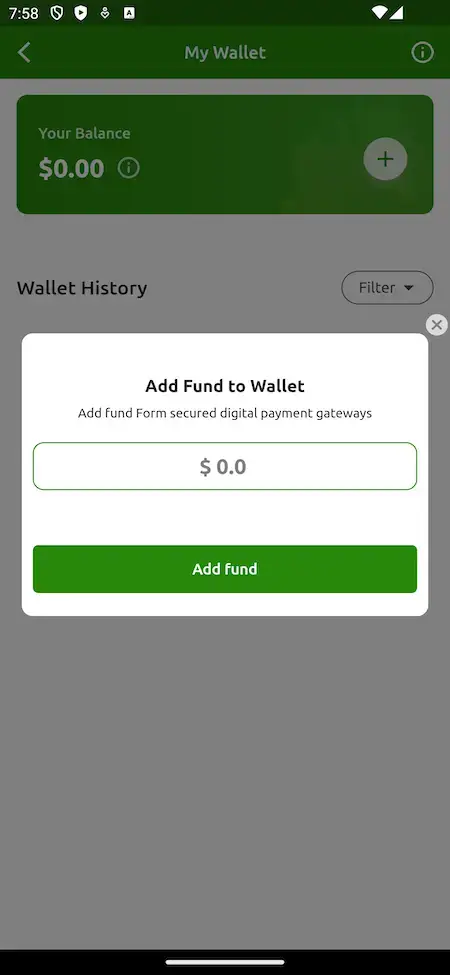
UrbanClap Clone wallet screen with a balance, a wallet history filter and an Add Fund to Wallet form.
8 screens · scroll →
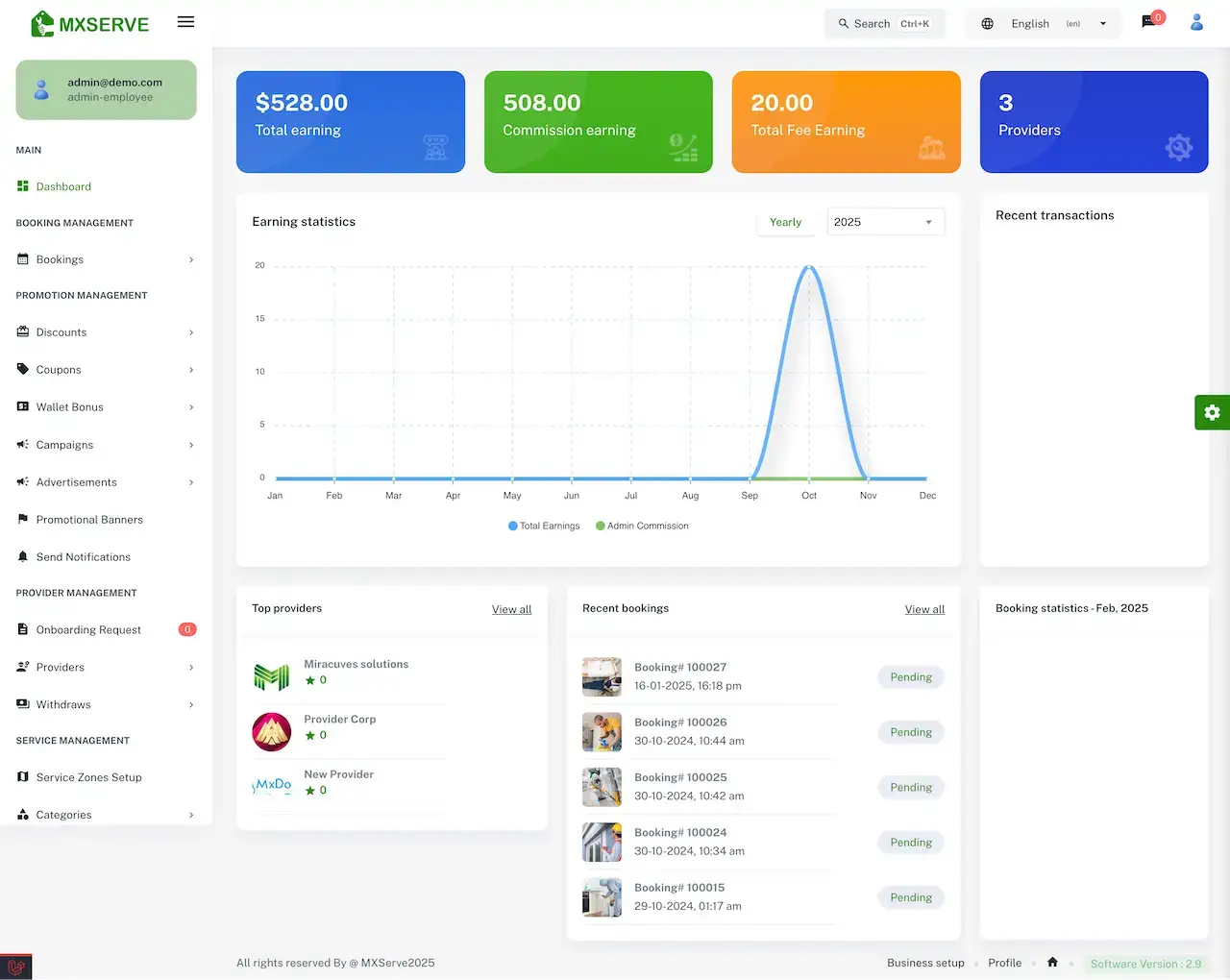
UrbanClap Clone admin dashboard with total earning, commission earning, fee earning and provider tiles, an earning statistics chart, top providers and recent bookings.
1 screen
UrbanClap Clone customer website home page with a location search, service categories and a three-step booking explainer.
1 screen

Follow one customer from the welcome screen through the category grid and a service page to a booking summary and a wallet balance, then switch tabs to the admin dashboard where the operator sees the same activity.

Explore Our Solutions

02Proof

Client Voices

UrbanClap Clone Client Reviews - Founders in Their Own Words

Saas Home Services had both sides of its marketplace live inside a month, adding its own service categories and vetting rules. Three more operators follow: Servica, Appforany and Z-gig, each describing dispatch or multi-service work already in place.

SServica TeamFounding team, Servica
“We run several service types off one platform. The dispatch and booking core already supported that, so the work was our service definitions and pricing. Delivered under a month.”
SSaas Home Services TeamFounding team, Saas Home Services
“Provider onboarding, quoting, booking and payments came off the shelf. We added our service categories and our vetting rules. Both sides of the marketplace were live inside a month.”
AAppforany TeamFounding team, Appforany
“Several on-demand services under one brand was the requirement, not several apps. The multi-service base supported that natively, so we configured verticals instead of building them. Delivered inside a month.”
ZZ-gig TeamFounding team, Z-gig
“Several gig verticals in one product. Because multi-service dispatch was already solved, we spent the time defining categories and provider onboarding rather than infrastructure. Delivered under a month.”
Read More Client TestimonialsOperators and founders in their own words

Built on This Base

UrbanClap Clone Case Study - Servica Multi-Service Platform

A multi-service platform Miracuves delivered in 2024 on the base behind its UrbanClap Clone, summed up from its published case study. That page sets out architecture and contract terms and gives no client outcome numbers.

Case Study
On-Demand Services Platform

Servica wanted one platform that could host several kinds of service. Miracuves started from the MXServe base behind this page, kept everything that already worked and spent its time on the five parts that made the product Servica's own.

ServicaClient
MXServe basePlatform
On-demand servicesIndustry
20 of 25Modules reused
4Apps and consoles
6 working daysBase build
UrbanClap Clone admin dashboard with total earning, commission earning, fee earning and provider tiles, an earning statistics chart, top providers and recent bookings.
Challenges
  • Several kinds of service had to live on one platform, with no separate build for each
  • A stranger visits a private home, so the platform had to lean on vetting, ratings and evidence that the job was done
  • Every visit needs a named person with a route and a checklist, which makes dispatch as important as booking
Goal
  • Open a multi-service marketplace on a base already delivered to other clients
  • Spend the effort on the parts that make the product theirs: services, providers and pricing
  • Hold the source code in their own account
Solution by Miracuves
  • Four applications and consoles, each with its own permissions and release path
  • Five parts written for the client: the catalog, the provider network, the pricing model, the gateways and the branding
  • 20 of the 25 platform modules reused without change
  • The client receives the full code inside an account they own
  • MXServe base underneath, a 6-working-day setup

“We run several service types off one platform. The dispatch and booking core already supported that, so the work was our service definitions and pricing. Delivered under a month.”Servica Team · Founding team, Servica

Open the full case studyCheck which of the 25 modules were reused as they were, and which five were written for Servica.

03The product

The Basics

What an UrbanClap-Style Marketplace Offers Customers, Professionals and the Operator

An UrbanClap clone from Miracuves is an on-demand home services app and doorstep services marketplace you can launch as it stands. Customers pick a service and a time, providers accept the booking, staff make the visit, and the operator follows earnings, commission and withdrawals in one admin panel.
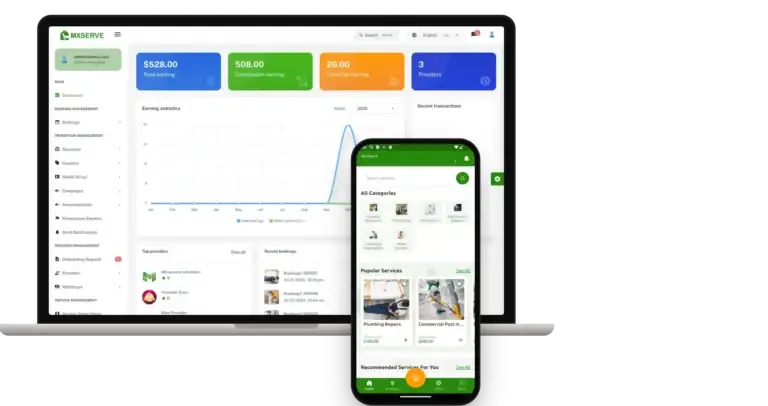
UrbanClap Clone shown across a laptop and phone: the admin dashboard with earnings and bookings and the home with categories and popular services

Beyond a Booking Form

What matters sits around the booking: approval of providers, service zones, a wallet, chat before and after a booking, offers and an admin console that accounts for every payout.

Code You Can Open

The complete source arrives unencrypted, which lets your own developers reshape any flow or screen as the business grows, without paying per seat.

Extras Are Labeled

An in-app shop, service bundles, virtual consultations and a skill-sharing space are add-ons with a price each. Wherever they appear they carry that label, and none is presented as part of the base.

Web, Android & iOS

What Is an UrbanClap Clone Script?

A home services business succeeds or fails at the booking: does the time suit the customer, does the right person arrive, does the payment land where it belongs. Those mechanics already work in the box, and you supply the category list and the prices.

UrbanClap Clone admin dashboard with total earning, commission earning, fee earning and provider tiles, an earning statistics chart, top providers and recent bookings.
  1. 01Browse by category, search and popular picks
  2. 02A chosen time and address for every booking
  3. 03Pick a provider by rating, review and who is free
  4. 04A wallet, coupons and more than one gateway
  5. 05Admin console with provider approval and service zones

In the box: three mobile apps for Android and iOS and four web panels, which are the customer, provider and serviceman apps, the customer site, and the admin, provider and serviceman panels. The apps use Flutter, and all of the source code is handed over.

Everything Included

UrbanClap Clone Features - Slot Booking, OTP Confirmation, Service Zones, Teams, Wallet & Admin

From slot booking to OTP job confirmation, every UrbanClap clone feature that Miracuves ships is checkable in the demo apps, the admin panel or the version history. Anything that calls for an extra module is listed further down under add-ons.

Feature 01 / 12

Categories & Service Search

The customer home screen begins with a search bar, then a grid of every category, then rows of popular and recommended services that each show a starting price.

  • The category grid sits at the top of the home screen
  • Search covers both services and providers
  • Popular services come with a starting price
  • Rows for recommended and recently viewed services
  • Guides and resources appear between the service rows
Feature 02 / 12

Service Pages & Who Does the Job

A page per service shows the price and an ADD button, with tabs for an overview and for reviews. Customers pick a provider by rating, or return to one they already trust.

  • Overview and Reviews tabs on every service
  • A price and an ADD button on each service
  • Pick a provider by rating, review or availability
  • Stay with a preferred provider
  • Ratings appear on provider listings
  • Sub-categories sit under each category
  • Reviews from past customers shown to the next one
Feature 03 / 12

Slot Booking & Scheduling

A customer gives the day and time for the visit, or asks for it at once, and the provider accepts to match. The booking page holds its number, its status and the schedule date.

  • A preferable-time field, with ASAP as one choice
  • Schedule date and address on the booking page
  • Book right away or ahead of the visit
  • The booking stays Pending until a provider accepts
  • Upcoming and past bookings in the account
  • Running bookings on the home page of the website
  • Booking history kept per customer
Feature 04 / 12

OTP Job Confirmation

Every booking has a one-time code which the customer can read on the web. The job is checked against that code so the start and the finish of a visit are on record.

  • The booking OTP is visible to the customer on the web
  • OTP messages travel by Twilio SMS
  • Start and completion images or videos shown on the web
  • Introduced in version 2.7.0
  • Booking and review texts use the same SMS gateway
Feature 05 / 12

Service Zones & Provider Radius

The operator sets up service zones in the admin panel and decides how many miles a provider may travel, so every professional works within an allowed area.

  • Service Zones Setup in the admin menu
  • A provider radius counted in miles
  • A Nearby Providers option for featured rows
  • The saved location sits at the top of the app
  • GPS locates customers and providers alike
  • Banners can be placed inside featured sections
  • Zones can be widened without a rebuild
Feature 06 / 12

Team Assignment & Serviceman App

A provider business takes the booking and its own staff make the visit. Each serviceman uses a separate app with assigned jobs, an availability toggle and the customer notes.

  • Toggle between available and off duty
  • Assigned jobs and scheduled tasks in one list
  • Customer notes shown beside the job details
  • Phone calls from the app to clear up details
  • History of finished, running and canceled jobs
  • Earnings, tips and the commission deducted
  • A serviceman panel on the web as well
Feature 07 / 12

Provider Onboarding & Vetting

A professional signs up in the service provider app or panel with their documents, and the admin approves them before any service goes live.

  • Sign-up with ID and supporting documents
  • An onboarding queue with a pending count
  • Accounts the admin can suspend later
  • Providers loaded from a CSV file
  • Services loaded from a CSV file
  • Copy an existing service, provider or promo code
  • A provider panel for each business
Feature 08 / 12

Pay by Wallet, Refunds & Gateways

An in-app wallet keeps each customer's balance and history, and an Add Fund form tops it up. Paying after the service is finished is also possible.

  • A wallet balance with a filterable history
  • Top up the wallet through an Add Fund form
  • A wallet that can also hold refunds and rewards
  • Cash after service as a payment choice
  • More than one gateway switched on together
  • Flutterwave and Paystack payment options
  • Wallet bonuses set by the admin
Feature 09 / 12

Booking Summary & Billing

The booking summary breaks every charge down to a grand total, and when a job takes longer than planned the provider adds extra charges as the booking ends.

  • Sub total with service and coupon discounts
  • Campaign discount and service VAT shown as separate lines
  • A grand total with a paid or unpaid label
  • A Download control on booking details
  • Extra charges added as a booking ends
  • Shipped in version 3.0.0
  • The payment method shown on the booking
Feature 10 / 12

Chat & Notifications

A customer can message a provider before booking and carry on afterwards, while the admin decides which SMS, push and email messages are sent.

  • Questions to a provider before booking
  • Separate switches for chat before and after booking
  • Web chat with providers and with the admin
  • Phone calls from the app for job details
  • Controls for SMS, push and email messages
  • Predefined email templates that can be edited
  • Chat settings managed in one admin page
Feature 11 / 12

Commission & Payouts

The operator sets the commission and the dashboard totals it on a line of its own, while providers watch their earnings and request withdrawals that the admin approves.

  • A commission earning tile on the dashboard
  • A fee earning tile beside it
  • Commission rates set in the admin panel
  • Withdrawal requests raised by providers
  • Best providers and the latest transactions
  • A yearly earning statistics chart
  • Payout methods you configure
Feature 12 / 12

Offers & Campaigns

The admin panel runs discounts, coupons, wallet bonuses, promotions and campaigns, and adds advertisements and promotional banners, with email templates to reach customers.

  • Menus for discounts and coupons
  • Campaigns and a wallet bonus
  • Advertisements and promotional banners
  • Send a notification to users
  • An email marketing option
  • Customers can sign in with Google or Apple
  • Banners that carry a link

Before you buy, please note: We deliver the platform finished and rebranded. You in turn arrange hosting and a domain, one verified developer account per app store, your brand assets and company details, a payment gateway whose KYC is complete, and keys for each outside service. Apple and Google run their own review, which our 6-day build does not cover.

Talk to Our Team

Where the Money Comes From

How an UrbanClap Clone Marketplace Earns: Commission, Fees, Featured Placement and Provider Plans

On a home services app like UrbanClap, money comes in at several points around a booking, and Miracuves keeps each line separate in the admin panel, so turning one on or changing it does not disturb the rest.

Commission on finished bookings usually carries the most weight, and paid visibility for providers comes next.

  1. 01

    Commission on Every Booking

    The operator keeps a share of each finished booking. The admin dashboard adds up commission earning in a tile of its own, and the rates are set in the admin panel.

  2. 02

    Service Fees

    Fee earning is tracked next to commission on the same dashboard, so any fee attached to a booking is visible apart from the share taken from the provider.

  3. 03

    Featured Placement

    Featured sections on the home screen hold banners and a Nearby Providers option, which lets you sell a provider visibility close to the customer for a set period.

  4. 04

    Ads & Banners

    Advertisements and Promotional Banners menus in the admin panel mean a slot can be sold to a business that is not one of your providers.

  5. 05

    Wallet Balances

    Customers load an in-app wallet, and the balance remains with the platform until it is used. Budget for the gateway fee charged on every top-up.

  6. 06

    Provider Membership

    A paid plan with priority listing and similar perks can be added for providers. We scope it with you, and it ships as custom work on a written quote.

Published figures from home services platforms and card networks for the four monetization lines this marketplace can run: booking commission, wallet top-ups, paid placement and provider membership.
StreamBilling methodTake rateTypical take rateWhat caps it
Commission on Every BookingA percentage of each finished booking, taken before the provider is paid, at a rate you set in the admin panel.Taskrabbit puts its client-side Trust & Support fee at a usual 5%-15% of the task price. Urban Company's India consumer services revenue came to roughly 35% of net transaction value in Q2 FY27 (our arithmetic).What providers will accept compared with other ways of finding work. The Urban Company ratio includes product sales, so read it as an upper marker and not as a pure commission.
Wallet BalancesA card processing charge on every top-up, which you either pass on to the customer or absorb.Stripe lists 2.9% + 30c for US domestic cards, and 2% domestic or 3% international on its India price list.Your country, the quote from your gateway and the mix of cards. The demo can run several gateways together, so a cheaper route can be chosen per market.
Ads & BannersA slot sold for a set period and billed in advance, monthly or yearly.Angi booked $214.9 million from advertising in 2025, near 24% of its $904.1 million U.S. revenue (our arithmetic), and publishes no price per slot.How many local businesses will pay to be seen. Angi says its advertising contracts ran about a year on average.
Provider MembershipA repeating fee in return for perks such as priority listing.Angi took $29.4 million in membership subscriptions in 2025, close to 3% of its $904.1 million U.S. revenue (our arithmetic).Whether the perks beat paying for leads. Angi pros can choose between full-priced leads, discounted packages and pre-priced offerings.

How to read this. Taskrabbit's range comes from its pricing blog. The Urban Company ratio is our arithmetic on its Q2 FY27 shareholders' letter, and the two Angi shares are our arithmetic on the U.S. revenue split in its annual report on Form 10-K for 2025. Card pricing is Stripe's: the US rate sits on its support page and the India rates come from its India price list. Taskrabbit gives a range rather than one rate, and none of these marketplaces publishes a per-booking fee that could be quoted as a single figure. Use every number as a modeling input, not as a quote and not as a forecast of what your platform will earn.

Revenue Model

UrbanClap Clone Revenue Model, Stage by Stage

A home-visit brand can open one neighborhood on booking commission alone, then add visit fees, paid spots near the customer, banner ads and wallet top-ups as cleaning, beauty and repair professionals fill the calendar.

Launch

In the first zone, commission on each finished booking covers running costs, and the service fee line on the same dashboard tracks any charge you attach to a visit.

Traction

As more professionals cover a zone, featured placement near the customer and seasonal coupons or campaigns lift bookings, and providers start paying for visibility close to the customer.

Scale

Across many cities and franchise zones, ad slots sold to outside businesses, wallet balances and a provider membership, scoped with you as custom work, sit beside commission as steady lines.

Commission rates and visit fees are yours to change at any time, and Miracuves takes 0% of what your bookings earn.

Want a revenue plan fitted to your own home services brand?Design My Revenue Model

Daily Operations

UrbanClap Clone Admin Panel - Bookings, Providers, Offers & Service Zones

The UrbanClap clone admin panel Miracuves ships shows the operator the whole day: bookings still waiting, professionals applying, the price of each coupon, the state of the money and the content on the public site.

UrbanClap Clone admin dashboard with total earning, commission earning, fee earning and provider tiles, an earning statistics chart, top providers and recent bookings.
UrbanClap Clone customer website home page with a location search, service categories and a three-step booking explainer.

What the Console Covers

  • 01

    Earnings Dashboard

    Four headline tiles show total earning, commission, fees and the provider count, with a yearly chart, a ranking of the best providers, fresh bookings and recent transactions beneath.

  • 02

    Bookings Overview

    A single list of bookings, each with a number, a date and a status such as Pending, so you can see at a glance which ones still need a provider.

  • 03

    Offers & Promotions

    Discounts, coupons, wallet bonus and campaigns, with advertisements and promotional banners in the same menu group.

  • 04

    Provider Management

    The onboarding queue shows how many requests are pending, beside the provider list and the withdrawal requests, and documents get checked before anyone goes live.

  • 05

    Zones & Catalog Setup

    Build the service zones, the categories and the services, then speed up the catalogue with CSV import and a copy option.

  • 06

    Accounts & Disputes

    Create, remove or suspend customer and provider accounts, change commission rates and take over a dispute when a visit has gone badly.

  • 07

    Messages & Notifications

    Settings for chat and for SMS, push and email delivery, ready-made email templates and an option to send marketing email.

  • 08

    System & Settings

    Business setup, a media library, menu search, database backups, Amazon S3 storage and right-to-left panels.

Cash Flow

How money enters and leaves the platform, whether a customer is adding funds or a provider is cashing out.

  • Dashboard totals for commission and fee earning
  • Withdrawal requests raised by providers
  • Control over what wallet bonuses and coupons cost
  • Several payment gateways side by side

Setup & Utilities

Controls that sit behind the public site and keep the marketplace running day to day.

  • Business profile and setup
  • Menu search in both panels
  • Backups on demand
  • Panels in right-to-left languages

Should the console handle more? Extra reports, another payout schedule, further languages or a sign-off step specific to your business are each quoted on their own. Describe what your operations team needs and a written quote comes back to you.

Talk to Our Team

04Price and package

In the Box

UrbanClap Clone Script Handover: Source Code, Apps and Deployment

What Miracuves hands over is a working home services marketplace: three apps, four web panels, and the code and database schema beneath them, owned by you outright with no seat fee or license renewal. Requests that push a home services price up, such as fixed appointment windows, a live map of the worker, crew rules beyond one worker per job or franchise coverage, are scoped and quoted separately.

01

Full Source Code

All the code behind the website, the panels and the apps, with nothing encrypted, so your own people can alter whatever the business requires.

  • Web platform source, unencrypted
  • Flutter code for both mobile stores
  • Yours to modify, extend and redeploy
  • Handed over into your own repository
02

Schema & Documentation

The structure of the database behind services, bookings, providers, wallets and content, together with the notes another team needs to operate it.

  • A schema that rebuilds the database from scratch
  • MySQL as the data tier
  • Deployment settings written out
  • Architecture notes passed on
03

Messaging & Alerts

Customer and provider can chat, Twilio carries the SMS, Firebase carries push, and email templates you can edit cover everything else.

  • Chat before and after a booking
  • OTPs, booking and review texts through Twilio
  • Push alerts to the apps
  • Email templates with predefined text
UrbanClap Clone customer website home page with a location search, service categories and a three-step booking explainer.
04

Web Panels

One responsive customer site and three panels, for admin, providers and servicemen, each behind its own login and permissions.

  • A customer site that searches by location
  • Operator admin panel
  • Provider panel for service companies
  • Serviceman panel for staff in the field
05

The Three Mobile Apps

Flutter apps that cover browsing, booking, the wallet, availability and earnings, released under developer accounts you own.

  • Customer: categories, booking, wallet
  • Provider: services, bookings, earnings
  • Serviceman: jobs, schedule, availability
  • Help publishing under your developer accounts
UrbanClap Clone booking details screen with a booking number, a Pending status, the schedule date, the address, the payment method and a booking summary with totals.
UrbanClap Clone admin dashboard with total earning, commission earning, fee earning and provider tiles, an earning statistics chart, top providers and recent bookings.
06

Admin Panel

Console for the operator: earning tiles, bookings, offers, provider onboarding, withdrawals, zone setup and system options.

  • Earnings tiles and a provider ranking
  • Coupons, campaigns, banners and ads
  • Onboarding and withdrawals for providers
  • Zones, categories and backups
07

Access & Security Layer

Each role gets its own login and permission set, and payments run through the gateway accounts you connect.

  • Roles kept apart, each with its own permissions
  • A separate login for each of the four roles
  • Payments handled by your own gateway account
  • API keys never stored in the repository
08

Handover & Support

We rebrand and deploy for you, hand over a pack of documents, and the three support periods run side by side from launch.

  • Branding applied everywhere: your logo, icons and brand colors
  • Deployment to your hosting
  • Optional Amazon S3 storage for media files
  • Support in parallel: 60 days of guidance, half a year of fixes, a year of updates

Prefer to look first? Log in to the demo as customer, provider or serviceman, or request a guided tour in which we open a category, a booking summary and the wallet and relate each to your own plan.

Talk to Our Team

Fixed Pricing

What Does a Home Services App Like UrbanClap Cost to Launch?

Our launch-ready, white-label UrbanClap Clone is sold at one fixed price of $2,799. Anything beyond the base, from add-ons to further integrations or altered flows, is scoped first and then priced in a written quote.

Most Popular

Professional

Ready-Made Launch Edition
$2,799one payment
Live in 6 days

Chosen by: Home services startups, beauty and wellness at-home brands, appliance and repair companies

You receive the platform as the demo presents it, branded with your logo, icons and colors and installed on hosting you control.

Get Started

Enterprise

Custom Work for Larger Requirements
Customquote
Go-live: depends on final scope

Chosen by: Multi-city franchise networks, national service brands, businesses with their own dispatch rules

Is a flow missing from the base? We build it from your brief, and scope and price are settled before work begins.

Request a Quote
Development Cost

UrbanClap Clone Development Cost in 2026

$2,799 is one payment to Miracuves for the UrbanClap clone: Flutter apps for customers, providers and servicemen, four web panels led by the customer site, and unencrypted code and schema, rebranded and set up on servers you rent in six working days.

$2,799 Paid once
6 working days Rebranded and live
0% Revenue share

What moves your total sits outside the software invoice

  • Hosting and a domain under your control
  • One verified developer account per app store
  • Gateway fees on wallet top-ups, under your own KYC-complete gateway agreement
  • Twilio texts for booking OTPs, plus keys for maps and push
  • Any add-on: in-app shop, service bundles, virtual consultations or skill sharing

Set hourly slot grids, map tracking of the professional en route and more than one worker per job are scoped in writing as custom work, typically 2-8 weeks, while multi-city franchise coverage takes the Enterprise route.

Compare Your Options

Ready-Made UrbanClap Clone vs Custom Development vs SaaS

A home-visit marketplace like UrbanClap, now Urban Company, depends on booked slots, a code at the door and zones you draw, and the ready-made UrbanClap clone, or Urban Company clone, from Miracuves ships with each of them. See how a ready base, a bespoke build and a rented booking tool compare.

CriteriaMiracuvesReady-Made UrbanClap CloneCustom DevelopmentSaaS
Launch time6 working days to launchWritten estimate, often 2-8 weeksQuick start on shared software
Upfront cost$2,799 for the finished platformGrows with every requirementSubscription for as long as it runs
Source code ownershipFull source and schema, unencryptedWhatever the contract statesProvider keeps the code
CustomizationSlots, zones, teams editable in codeAnything you pay to specifyLimited to built-in options
Ongoing feesNothing per visit to MiracuvesSupport retainer extraPer-booking or seat pricing
Branding & app-store listingThree role apps in your nameBespoke brand and designListing may show the vendor
Best forCleaning, beauty and repair marketplacesWorkflows unlike any baseA cheap test in one zone

Ways to Use It

Use Cases for a Home Visit App Like UrbanClap: Cleaning, Beauty at Home, Repair Crews and City Zones

Each operator stresses a different area of the same UrbanClap clone app that Miracuves delivers. Cleaning brands lead with the booking slot, beauty brands with the provider profile, and repair firms with the serviceman app. Configuration settings decide which area gets the stress.

CleaningSlotsScheduled Home Cleaning

Sell cleaning and organizing with a booking that fixes the day and the hour, so the customer knows when to expect the visit and the provider knows what was agreed.

01
UrbanClap Clone app home screen with a service search bar, an All Categories grid and a Popular Services row with starting prices.
BeautyHomeBeauty & Grooming at the Door

List grooming and wellness personal services that people book at home, with ratings and reviews on show when they choose and a code on the booking that confirms the visit.

02
UrbanClap Clone service details screen for plumbing repairs with a price, an ADD button and Service Overview and Reviews tabs.
RepairCrewsRepair Crews With Their Own Staff

A repair company gets the booking in its provider panel and passes the job to a technician, who opens it in the serviceman app with the address and the customer notes.

03
UrbanClap Clone home screen with a Post for Customized Service card, a Recently Viewed Services row and a Guides and Resources row.
ZonesRadiusZone-by-Zone City Launch

Launch in a single neighborhood using service zones and a provider radius counted in miles, and enlarge the map once the next area has enough professionals.

04
UrbanClap Clone admin dashboard with total earning, commission earning, fee earning and provider tiles, an earning statistics chart, top providers and recent bookings.
SeasonalOffersSeasonal Service Pushes

Run a campaign or a coupon ahead of a busy season, such as air-conditioner servicing before summer or plumbing checks in the rainy months, and watch the bookings arrive in the console.

05
UrbanClap Clone booking details screen with a booking number, a Pending status, the schedule date, the address, the payment method and a booking summary with totals.
FranchiseZonesFranchise Zones Under One Brand

Let local teams run their own zones under your name, each with its own providers and servicemen, while the admin console shows the whole business in one place.

06
UrbanClap Clone customer website home page with a location search, service categories and a three-step booking explainer.
Business Model

UrbanClap Clone Business Model: Three Ways to Run It

Each model below runs the same visit: a customer picks a service and a time, a provider accepts, the booking OTP opens and closes the job, and the operator's commission lands on its own dashboard tile.

Multi-service brand

One brand lists cleaning, beauty and repair, approves independent professionals and earns commission plus featured placement on each finished visit, the way Servica set up several service types on one platform.

Crew-owned operator

A cleaning or appliance company books visits for its own technicians, who work from the serviceman app while the booking OTP marks each start and finish.

Franchise zones

A city franchise network hands local teams a zone each under one name, keeps every provider to its area and reads the whole business from one admin console.

Whichever model you pick, the service list, zones and commission remain your settings and the code stays in an account you own.

One product, six ways to run it. Every case above rests on the same apps and the same admin panel. Only your service list, your zones, your commission and your branding change, which leaves one codebase to maintain.

Talk to Our Team

Market Timing

Why Launch a Home Services Marketplace in 2026?

Demand in the home services market, meaning work done at home, is split between many small trades and a few big platforms, which is the opening Miracuves designed this UrbanClap clone to fill. A marketplace under your own name brings in the professionals, the customers and the commission those platforms keep today.

01

People Book Visits, Not Listings

A customer wants an hour that works and a professional who turns up. One booking page that shows the time, the provider and the status answers both worries.

02

Trust Settles the Choice

Someone is about to enter a home, so ratings, reviews and a clear provider profile decide who gets the job. The app shows all three at the moment of choosing.

03

Skilled Supply Is Already Nearby

Every city has cleaners, technicians and stylists who mostly win work by referral. Your own marketplace, with a provider app they can use, turns that into a steady flow of bookings.

04

Crews Need More Than a Phone Call

A repair business with several technicians wants assigned jobs, availability and notes in a single app. The serviceman app gives staff that without a separate dispatch tool.

05

Your Zones, Your Rules

The operator draws the service zones and sets the provider radius, so a launch can begin in one neighborhood and grow at the pace your supply of professionals allows.

06

Buying Beats Building Here

A wallet, an admin console, three apps, categories and bookings make up most of an on-demand home services marketplace. At the end of our 6-day build, your branded copy is live on your own hosting.

Counted Up

3

Mobile apps

4

Web panels

6

Versions in the log

6

Days to launch

What makes a home services marketplace hard is the stretch in the middle: the agreed time, the person who shows up, the bill and the payout. That stretch is done for you.

Industries

Industries We Serve

Any business that sends a professional to a customer can run on Miracuves' UrbanClap clone. Home cleaning brands sell scheduled visits. Beauty and grooming brands bring stylists to the door. Appliance, air-conditioning and plumbing companies dispatch technicians. Electrical and pest control firms take bookings by area. Office sanitization and facility teams sell recurring care. City franchise networks give local teams their own zones under one name.

  1. 01Home Cleaning
  2. 02Beauty & Grooming
  3. 03Spa & Wellness
  4. 04Appliance Repair
  5. 05AC Servicing
  6. 06Plumbing
  7. 07Electrical Work
  8. 08Pest Control
  9. 09Office Sanitization
  10. 10Facility Services
  11. 11Handyman Work
  12. 12City Franchises

Shape the Miracuves UrbanClap Clone to whichever local trade you serve: provider approval, service zones, a booking OTP, a wallet and an admin panel are all there, and your own name leads every screen.

06Under the hood

Step by Step

How a Booking Moves Through the UrbanClap Clone: Sign Up, Browse, Book, Confirm, Pay and Rate

Booking a home professional through an app like UrbanClap from Miracuves takes the customer only a few taps. Behind those taps a strict chain of request, acceptance, visit and payment does the work. Below you can follow it from the first screen to a rated visit, with the architecture underneath it after that.

What the Customer Sees, Welcome Screen to Rating

  1. UrbanClap Clone app welcome screen with a cleaner illustration and the line that invites people to hire a professional service provider.
    1Download the App and Register

    Signing up needs a name, a password and either a phone number or an email, or simply a Google or Apple login, and the next screen lists services for the saved address.

    • Register by email or phone
    • Sign in with Google or Apple
    • Services listed for the address on file
  2. UrbanClap Clone app home screen with a service search bar, an All Categories grid and a Popular Services row with starting prices.
    2Find a Home Service by Category

    A category grid leads the home screen, with popular and recommended rows below, so a broad need narrows to the exact service after a tap or two.

    • Home screen led by the category grid
    • Popular services with starting prices
    • Recommended and recently viewed rows
  3. UrbanClap Clone service details screen for plumbing repairs with a price, an ADD button and Service Overview and Reviews tabs.
    3Pick the Service You Need

    Each service page gives a price, a short overview and a reviews tab, and the ADD button puts it in the booking.

    • Price shown up front
    • Tabs for the overview and the reviews
    • ADD puts it in the booking
  4. UrbanClap Clone Create Post screen with a preferable time field, the service address and a service category list.
    4Book a Time Slot and Address

    Next comes timing, ASAP or a set hour, and the visit address, which lets a provider take the slot.

    • A preferable-time field
    • Editable service address
    • Category chosen from a list
  5. UrbanClap Clone booking details screen with a booking number, a Pending status, the schedule date, the address, the payment method and a booking summary with totals.
    5Confirm the Booking With a Code

    The booking page carries its number, status, schedule date, address and a charges breakdown, plus the code the visit is checked against later.

    • Booking number, Pending status
    • Date of the visit and its address
    • Discounts, VAT and the grand total
  6. UrbanClap Clone wallet screen with a balance, a wallet history filter and an Add Fund to Wallet form.
    6Pay, Get the Visit Done and Rate It

    The wallet can pay up front, or the customer pays after the work; the booking code opens and closes the visit, and a rating wraps up the job.

    • Wallet balance, Add Fund
    • Cash once the job is done
    • Rating and review at the end
Visual Flow DiagramSign upBrowseChooseBookConfirmPay

How It's Built

How an Urban Company Clone Is Put Together

Talk to Our Team
  1. Part 01

    Booking Engine

    One record carries a booking from the chosen time to its completion, which is how the booking page can display a status such as Pending at any moment.

  2. Part 02

    Zones & Provider Matching

    Service zones and the provider radius decide who may take a booking, and the nearby rows put the closest providers in front of the customer first.

  3. Part 03

    Dispatch to Staff

    The provider business receives the booking and its servicemen see assigned jobs, availability and customer notes in an app of their own.

  4. Part 04

    Visit Confirmation

    A booking OTP together with the start and completion images or videos on the web leaves a record of when each visit began and ended.

  5. Part 05

    Wallet & Payouts

    Each balance, commission cut and withdrawal becomes a stored transaction, which lets you trace any dashboard total back to the wallet.

  6. Part 06

    Reviews & Disputes

    Ratings and complaints are held by the admin, and the booking record sits behind every case that needs a ruling.

Under the Hood

What Runs Behind a Home Services Platform Like UrbanClap: PHP, MySQL, Flutter & Gateways

Miracuves builds its UrbanClap clone on a sturdy web tier, a consistent database and mobile apps that feel native, since bookings only hold up at scale on all three. What follows is the stack the platform uses, taken from its product page and release log.

FRONT & PANELS

Web & Admin Layer

PHP 8.2 Bootstrap TypeScript
  • A customer website alongside the admin, provider and serviceman panels
  • A responsive Bootstrap interface
  • TypeScript in the customer web code
  • Panels can switch to right-to-left layouts
DATA

Database Layer

MySQL database
  • MySQL stores services, bookings, providers and wallets
  • The product page lists MySQL
  • The admin panel can back up the database
  • The source ships together with its schema
APPS

Mobile App Layer

Flutter 3.27 iOS Android
  • Complete Flutter apps built on up-to-date dependencies
  • One codebase serves all three apps
  • Deep links handled by Flutter
  • Published from your own developer accounts
MONEY & TEXTS

Payments & SMS Layer

Flutterwave, Paystack, Twilio SMS
  • Several gateways can be active together
  • Flutterwave and Paystack are supported
  • Twilio carries OTPs, booking and review texts
  • Your own payment gateway account, with KYC completed
CONNECTORS

Outside Services Layer

Amazon S3 Firebase Google Maps
  • Google Maps drives location and zone setup
  • Firebase handles push and app services
  • Amazon S3 stores uploaded files
  • APIs for translation and for payment gateways
HAND-OVER

What You Take Over

Source repo, schema and config
  • The application source sits in your repository
  • Mobile projects with signing documented
  • Deployment settings written out
  • Architecture notes passed on
Notes for technical buyers:

Web and admin are described on the product page as PHP with Bootstrap, backed by MySQL. Version notes add PHP 8.2 on the panels, TypeScript in the customer web code and Flutter 3.27 in the apps. Translation, payment gateways, Twilio, Firebase and Google Maps are outside services that run on your own accounts and keys, added at deployment. Nothing is exotic here, and developers who know it are easy to hire.

Talk to Our Team

Room to Grow

Growth Without a Rewrite: Independent Apps, Zone Control and Spare Headroom

Separate applications share a set of building blocks, so adding professionals, services and bookings means more capacity and more configuration, and the code underneath stays as it is.

Roles Ship on Their Own. Customer, provider, serviceman and admin hold separate permissions, which means a change for one role can be released while the others stay untouched.

One Booking, One Record. A request, its visit and its completion share a lifecycle, so support and finance read the same status whenever someone asks how far a booking has got.

Uploads Live Elsewhere. Amazon S3 can hold service images and other uploads, leaving the web tier light while the catalogue and the number of providers grow.

Transactions You Can Trace. Every top-up, commission cut and withdrawal is stored as a transaction, so a number on the dashboard can be checked against the wallet behind it.

01

Independent Apps

The customer, provider, serviceman and admin applications keep their own permissions and release path, so one of them can change while the rest stay put.

02
RequestVisitStatus

Booking Lifecycle

A single record follows a booking from the chosen time to completion, with its status visible at each step.

  • Request, visit and completion share one record
  • Every booking carries a status
  • Running and recent bookings on the home page
  • Past bookings kept as history
03

Zones That Widen

Service zones and the provider radius are admin settings, so reaching a new area means configuring it, not rebuilding anything.

  • Service Zones Setup in the admin menu
  • A provider radius in miles
  • Nearby Providers rows
  • Banners inside featured sections
04
ZonesRadiusRoles

Files Off the Web Tier

Your own Amazon S3 account can hold images and files in place of the web server.

  • Your bucket in your region
  • Media library in the admin panel
  • Media library in the provider panel
  • Separate slider images for app and web
05

Traceable Payments

Top-ups, commission and withdrawals are stored as transactions, and every disputed booking has a record behind it.

  • Wallet history with a filter
  • Dashboard lines for commission and fee earning
  • Withdrawals requested by providers
  • Several gateways running together
06

A Handover Pack

Source, schema, deployment settings and architecture notes are passed to you, so a different team could run the platform without us.

Space to Adapt. Every city and trade eventually asks for something of its own. With the full source in hand and a conventional stack, a new screen, rule or integration is routine development that your people or ours can handle.

Close to launch? Begin in the zones where recruiting professionals is easiest and grow on the one deployment you own. Capacity later turns into a hosting and configuration question, and work outside the base is scoped and quoted as a separate job.

Talk to Our Team

07Security and trust

Open to Inspection

Security in an UrbanClap-Like Platform - Separate Roles, Provider Vetting, Visit Records & Honest Limits

People's names, home addresses and payment references pass through an UrbanClap-like platform, so Miracuves builds it around three controls: who sees what, who is allowed to turn up at a door, and which tasks remain before launch. Below is what the platform covers and what remains yours to do.

  1. 01 · Roles
    Separate Roles

    Customer, provider, serviceman and admin each sign in to their own app or panel, so a provider never reaches the operator console and a serviceman never sees the owner's earnings screen.

  2. 02 · Vetting
    Provider Vetting

    Professionals send documents and wait for the admin to approve them before they can take work, and the onboarding queue shows how many are still pending.

    • Suspension Control: Beyond approving providers at the start, the admin can suspend a customer or provider account once the platform is live.
  3. 03 · Visits
    Visit Records

    A booking OTP and the start and completion images or videos on the web give every visit a record that support can open when a customer disputes it.

    • Dispute Handling: When a customer and a provider disagree, or a payment does not add up, the case reaches the admin panel with the booking record attached.
  4. 04 · Payments
    Payments Through Your Gateway

    Payments run through the gateway accounts you connect, several at once if you wish, and your own gateway agreement and KYC cover the card step.

    • Payout Controls: The admin owns the commission and withdrawal settings, so you choose when payouts are released and what a provider keeps after your share.
  5. 05 · Data
    Data & Notifications

    The admin picks which SMS, push and email messages leave the platform, and the panel can create a database backup whenever you ask for one.

    • Notification Control: The admin owns the SMS, push and email settings, so you choose which messages customers and providers actually receive.
    • Backup in the Panel: A database backup can be taken from the admin panel, so a restore drill has a real file to work from.
  6. 06 · Launch
    Launch Checklist

    Before go-live we agree a short list with you: penetration testing, rotating every key, a restore drill and a review of the gateway settings. None of it is assumed to be done.

    • Named Launch Tasks: We list a penetration test, key rotation, a restore drill and a check of your gateway settings as pre-launch work, and none is taken as already done.

The base keeps visit records that support can open on any dispute. Penetration testing, key rotation and a restore check go on the launch-week calendar with you. Visit records and the rest of the build are put to GDPR, ISO 27001 and SOC 2 controls. Independent audit partners carry your audit forward at your side, and the attestation lists your company as its holder (home visit audit record).

Plan Security With Us

Marketplace Readiness

What Ships With an App Like UrbanClap and What Stays With the Operator

People go into private homes through a marketplace like this. The tooling for booking, payment, chat and reviews is ours to build. Deciding whom to accept, knowing which licence each trade needs and following the law in your market remain yours as operator.

Made for marketplaces, certified under no regime.

Where this section says ready, it covers software running in the demo or visible in the admin panel. Your own business holds the licenses and approvals, and legal advice comes from counsel.

What Comes in Your Package

Categories and service pages, bookings with a date and a status, a booking OTP, provider onboarding that the admin approves, service zones, a provider radius, a serviceman app, a wallet, chat, ratings, coupons, a login per role and an admin panel for disputes and payouts.

What You Decide as Operator

Terms of service and a privacy policy, the services and professionals you accept, the documents you demand from them, any cancellation or refund rule beyond the configured defaults, and the way disputes get settled.

Trade Licenses & Cover

Many places require a licence for electrical, plumbing, pest control and some beauty or wellness work. Insurance and liability fall on the provider and on you. Documents can be collected for the admin to read, yet the platform cannot tell whether a licence is valid or pay out a loss, and a background check means connecting a separate service.

Local Rules

Countries, and often states, set their own rules on worker status, consumer protection, tax at checkout and data protection. Check each one for every market you enter, with qualified local advisers, before accepting bookings.

08Grow the platform

Base platformMXServe
  • Categories, services and bookings
  • Wallet, chat and ratings
  • Apps for providers and staff
  • Admin console with zones

How a module is added

  1. 1
    Pick a module

    Selling more, bundling, advising or teaching, now or after launch.

  2. 2
    Quote before work

    Every module gets a written scope and price first.

  3. 3
    Delivered as source

    It is added to the codebase you already own.

Ask About Custom Modules

Extend It

Add-Ons for an UrbanClap-Style App - In-App Shop, Service Bundles, Virtual Consultations & Skill Sharing

Shown in the demo, Miracuves' UrbanClap clone already works from end to end. The four modules below are optional and sit outside the base build, so every one gets a separate scope and quote that reflects how your marketplace runs.

  • Order value

    In-App Marketplace

    A shop built into the customer app, which lets someone who has just booked a visit add related products or extra services in the same place.

    Shop · In-App
  • Order value

    Customizable Service Packages

    A provider can join several services into one package with a price of its own, which suits customers who would rather buy a bundle than a single visit.

    Packages · Bundles
  • Know-how

    Virtual Consultations

    An online step for services that start with advice, where customer and provider speak remotely before anybody is booked to visit.

    Remote · Advice
  • Know-how

    Skill Sharing Platform

    Gives providers somewhere to run online workshops or brief tutorials, so customers can learn from the professionals they already hire.

    Skills · Workshops

The Services & Appointments Suite

Selling Services Online? Four Neighboring Products Deserve a Look.

This product is made for visits to a home. Should your idea lean toward pet care, paid advice, clinics or remote freelancing, one of these four could suit it better or stand beside it.

Rover Clone pet-care marketplace: a person petting a dog.01
Pick it if: The customers you serve own petsRover Clone

Owners find sitters and walkers for their pets, and booking, messages and payment all happen in one place.

Explore Solution

Astrotalk Clone astrology consultation platform with a zodiac wheel over a night sky.02
Pick it if: You sell a session instead of a visitAstrotalk Clone

People book a session with a verified expert and speak on audio, video or text.

Explore Solution

Practo Clone online doctor appointment booking: a doctor on a video consultation.03
Pick it if: You are booking doctors or clinicsPracto Clone

Patients choose a doctor from a profile, pick a bookable slot and can consult online.

Explore Solution

Upwork Clone freelance marketplace: a developer working at a computer.04
Pick it if: Delivery happens online, not at a doorUpwork Clone

Clients post projects and remote professionals bid to win the work.

Explore Solution
CatalogBrowse all 90+ solutions

09The business case

Market Benchmarks

Home Services Marketplace Market Benchmarks - Independent 2025-2026 Data

The revenue models above are ours. The figures below are not. They come from the Angi and ServiceTitan annual reports on Form 10-K, Urban Company's Q2 FY27 shareholders' letter and the US Bureau of Labor Statistics, reproduced as published. Together they show how many jobs a home services marketplace routes, what the trades volume behind it looks like, and how deep the supply of skilled workers runs.

Angi 10-K01

20.2 Million Leads Sent to Pros by Angi in 2025

Angi's annual report on Form 10-K shows 15.5 million Service Requests and 20.2 million Leads in 2025, with about 111,000 Average Monthly Active Pros in the fourth quarter. Total revenue was $1,030.5 million, down 13 percent, of which U.S. Lead revenue was $587.1 million, advertising $214.9 million, services $72.4 million and membership subscriptions $29.4 million.

Urban Company02

INR 1,432 Cr Quarterly NTV at Urban Company

Urban Company's letter for the quarter ended 30 September 2026 reports Net Transaction Value up 39 percent to INR 1,432 crore and revenue from operations up 41 percent to INR 537 crore, with 10.0 million annual transacting users and 94,845 monthly active service partners. In India consumer services excluding InstaHelp, revenue of INR 336 crore on NTV of INR 963 crore is about 35 percent (our arithmetic on reported figures).

ServiceTitan 10-K03

$82.1bn of Trades Work Processed on ServiceTitan

ServiceTitan's annual report on Form 10-K for the fiscal year ended 31 January 2026 states it processed $82.1 billion of gross transaction volume, up from $68.5 billion a year earlier, defined as total dollars invoiced by its customers through the platform. Revenue was $961.0 million, up 24 percent, about 1.2 percent of that volume (our arithmetic on reported figures).

US BLS04

821,000 US Electricians, Jobs Up 9% by 2035

The US Bureau of Labor Statistics reports that electricians held about 821,000 jobs in 2025 and projects employment to grow 9 percent from 2025 to 2035. The median annual wage for electricians was $63,190 in May 2025, against $59,540 for the construction and extraction group, which gives a sense of the skilled labor a home services marketplace recruits from.

Where each figure comes from.

Angi Inc., Annual Report on Form 10-K for the year ended 31 December 2025, dated 20 February 2026 - sec.gov

Urban Company Limited, Shareholders' Letter and Report, Q2 FY27, results dated 16 October 2026 - investorrelations.urbancompany.com

ServiceTitan, Inc., Annual Report on Form 10-K for the fiscal year ended 31 January 2026, signed 25 March 2026 - sec.gov

US Bureau of Labor Statistics, Occupational Outlook Handbook: Electricians, last modified 27 August 2026 - bls.gov

All figures are the publishers’ own, reproduced as published from annual filings, a results letter and a government statistics page. Metric definitions differ by company and are as each publisher states them. The Urban Company and ServiceTitan ratios are our arithmetic on reported figures. They describe the companies and occupations named, not any platform Miracuves builds, and nothing here is a revenue projection for your business.

Why It Pays

Marketability, Revenue Potential & Business Prospects

Income arrives when professionals rely on the platform for their bookings and customers are willing to pay inside it. The points below make both decisions simpler and leave the relationship with you.

  1. 01

    Commission on Every Booking

    The operator keeps a share of each finished booking, so revenue rises with the number of professionals and bookings, not with your headcount.

  2. 02

    Several Lines, One Console

    Commission, fees, featured placement, banners and advertisements are individual levers in a single admin panel, so any one can be activated without reworking the rest.

  3. 03

    Professionals and Customers You Own

    Provider accounts, ratings and booking history stay in your database, which means the value you build belongs to you and not to a lead platform.

  4. 04

    Freedom to Move

    The complete source code and the schema are yours, so a later change of host, team or direction needs nobody's permission.

Main Revenue Levers
  • Commission on Every Booking
  • Service Fees
  • Featured Placement
  • Ads & Banners
  • Wallet Balances
  • Provider Membership
Long-Term Value

Defensibility comes from the professional network and the repeat customer, not from the feature list.

  1. 01Approved professionals rarely leave
  2. 02A booking history and wallet bring customers back
  3. 03The build-up starts on day one in your database
  4. 04Vetting and fair disputes are the second barrier
Example Revenue Scenarios

Only the number of onboarded providers changes between these cases, and each one names the lever that leads at that scale. Treat them as material for planning conversations, never as a prediction of earnings.

Single-City Brand25Providers Onboarded

Commission carries the early revenue.

A small city brand where a few dozen professionals take bookings and the commission on each finished one pays the running costs. These sizes are illustrations, not forecasts.

Regional Service Network250Providers Onboarded

Commission plus featured placement and banners.

A regional network in which professionals compete for shared customers, so paid visibility begins to rival commission. These sizes are illustrations, not forecasts.

Multi-City Franchise Platform2,500Providers Onboarded

Many zones, every line switched on.

A platform that spans many cities and franchise zones, where advertisements, placement and provider plans add to commission and the admin reports show where to focus. These sizes are illustrations, not forecasts.

10Why Miracuves

Why Miracuves

How Miracuves Stacks Up Against Other UrbanClap Clone Developers

An UrbanClap-style app usually comes from a stock booking script, a freelancer, an agency or an experienced UrbanClap clone development team with a ready-made base, which is where Miracuves sits. Test any of them on their own demo: ask which services platform they delivered, book a visit for tomorrow at ten, have them show how the visit is proven at the door and how a provider is stopped from working.

What Sets Miracuves Apart

  • 01

    Booking Built Around the Time

    The customer sets a day and an hour, the provider accepts it, and the booking page carries a status. Directory scripts usually stop at a listing.

  • 02

    Three Field-Side Roles

    Customer, provider and serviceman each have an app of their own, so both the business owner and the person at the door have something to work in.

  • 03

    Zones and Radius

    The operator draws service zones and sets how far a provider may travel, instead of showing the same professionals to everybody.

  • 04

    A Code for Every Visit

    A booking OTP and start and completion media on the web give support something to check whenever a visit is questioned.

  • 05

    Full Source Code Ownership

    You receive all the code unencrypted, with the schema and deployment notes, which leaves nobody able to reprice it or rewrite the terms later.

  • 06

    A Base Already Proven

    The same MXServe base carried Servica's multi-service platform with 20 of 25 modules reused, and that case study is published.

Development Company

How to Choose an UrbanClap Clone Development Company

Ask any home services vendor to book a visit for tomorrow at ten in their demo and prove it at the door.

What to look for Miracuves

  • Proof in the product Logins to all three role apps before you pay
  • Visits proven at the door A booking OTP plus start and completion media
  • Control over coverage Zones you draw, plus a miles cap per provider
  • A client on this base Servica's platform, with 20 of 25 modules reused
  • Code you hold All of it unencrypted, with schema and deployment notes
  • Support after launch 60 days of guidance, 6 months of fixes, 12 months of updates

Walk away from any vendor who

  • Takes a booking with no time, status or schedule date
  • Cannot show how a visit is confirmed at the door
  • Leaves the serviceman without an app of their own
  • Shows every professional to every customer
  • Keeps the code encrypted or rents it on a renewal

Comparing the UrbanClap Clone Against Scripts and Agencies, Side by Side

CriteriaMiracuvesMiracuves UrbanClap CloneGeneric Booking ScriptCustom Dev Agency
How Fast You LaunchOur build takes 6 daysNo promise madeOften several months
Who Holds the CodeYou do, whole and unencryptedFrequently restrictedUsually you
Handling of Time SlotsA chosen time, a status and a schedule dateA plain listing pageAs far as budget goes
Field-Side AppsApps and panels for providers and servicemenSeldom includedMade to order
Money FeaturesWallet, pay-after-service and multiple gatewaysDepends on the scriptIntegrated case by case
Admin & OffersDashboard, coupons, campaigns and bannersThin or missingBuilt to order, at additional cost
Safety & ComplianceRole logins, a vetting queue and stated limitsBare minimumDiffers from vendor to vendor
Price, Speed and QualityOne fixed price, quick delivery, tested baseCheap and riskyDear and slow
Support After Launch60 days guidance, 6 months bug fixes, 12 months updatesRarely on offerWhatever the contract says

Your first month of live provider sign-ups pushes every path harder than a demo can. The rows above show where the options diverge.

Talk to Our Team

Changelog

Release History of the UrbanClap-Style Base: What Each Version Added

These notes cover the web platform, latest release first. No dates appear, and no vendor or framework is named.

VersionChangesWhat changed
V3.1.04 updates, 1 fixAdded or updated
External file storage on Amazon S3, configured in the admin panel
PHP 8.2 compatibility on the panels
Flutter 3.27 support in the apps
Support for the newest Android Studio
Fixed
Assorted fixes and polish for apps, web and panels
V3.0.03 updatesAdded or updated
A custom job request option for customers, and extra charges that providers add as a booking ends
A right-to-left layout arrives on the customer web
Flutter 3.24 support in the apps
V2.9.07 updates, 2 fixesAdded or updated
Banners can be placed in the featured section from the admin panel
A global setting governs chat before and after a booking
Running and recent bookings show on the web home page
Sliders accept a URL across web, apps and panels
App and web sliders take separate images
Landing page content can be turned on or off
Flutter 3.24 compatibility
Fixed
Assorted fixes for the apps
Assorted fixes and polish for web and panels
V2.8.08 updates, 3 fixesAdded or updated
Extra sections for the web landing page
Customers chat with providers and the admin from the web
Flutterwave arrives, and several gateways can run together
The admin and provider panels offer a right-to-left layout
Nearby Providers can feed the featured sections
The provider radius can be set in miles
Twilio texts for OTPs, bookings and reviews
Notification settings cover SMS, push and email
Fixed
A tidier interface in the customer and provider apps
Paystack extended to offer more payment options
Assorted bug fixes
V2.7.08 updates, 1 fixAdded or updated
The admin panel can back up the database
Providers can be managed through a CSV file
Services can be managed through a CSV file
Admin and provider panels get a media library
Both panels gain menu search
The web gains service and provider search
The web shows the booking OTP and the start and completion media
The web code moves to TypeScript for type safety
Fixed
Fixes and small improvements
V2.6.08 updates, 1 fixAdded or updated
Services, providers and promo codes can be copied
Predefined email templates become editable, and email marketing arrives
Customers can question a provider before booking
AdMob ads in the customer and provider apps
Customers can sign in with Google or Apple
The admin panel gains chat settings
Switches for pre- and post-booking enquiries in the provider app and panel
Flutter deep links replace Firebase dynamic links
Fixed
Fixes and small improvements

Let's build together

Let's turn your home services idea into a platform people can book.

Book a no-cost consultation and you will leave with a firm timeline and direct answers. We would rather earn your trust than close a sale fast.

  • First reply in under 2 hours
  • Free consultation
  • No lock-in contracts
  • Full source code ownership

11Learn more

Blog & Resources

Reading List on Building Apps Like UrbanClap

Guides on why founders choose a ready-made service marketplace over a custom build, how an app like this is assembled and what the scripts on the market provide.
About the product7 questions

01What does an UrbanClap Clone actually include?

It is a ready-made marketplace for booking professionals who work at the customer's home. Customers use an app to pick a service and a time, providers use an app to accept bookings, their staff use a serviceman app to carry out visits, and the operator runs everything from an admin panel that covers bookings, commission and withdrawals. The package is three mobile apps and four web panels under your brand, and you choose the services, from cleaning and repairs to beauty at home.

02How much of it can be tailored to my business?

A lot. We put your logo, icons and colors on every app and panel, and you set the categories, services, prices, commission and service zones yourself. Bigger changes, such as a new flow or an extra integration, are scoped and priced in writing, and because you hold the full source code your own developers can carry on extending it.

03What is the technology behind it, and does it scale?

Flutter powers the mobile apps. The product page lists the web side as PHP with Bootstrap, using MySQL for data, and the version notes add PHP 8.2 for the panels. Each of the four roles is its own application and uploads can go to Amazon S3, which means growth calls for more capacity and more zones rather than a rewrite.

04Can I lawfully launch an app like UrbanClap?

Nothing unlawful lies in building or selling software with these features. The Miracuves UrbanClap Clone follows everyday marketplace patterns, takes nothing from UrbanClap in code, design or content, and goes live under the brand, terms and commercial rules you pick. Keep the UrbanClap name and logo away from your own branding, and ask local counsel about licences, worker status and consumer law for each trade and market. Miracuves offers no legal advice.

05Will it work on iPhone and on Android?

Yes. All three apps are written in Flutter for iOS and Android, and the customer website adapts to any browser. We publish them from your own developer accounts, while Apple and Google carry out their own review, which sits outside our 6-day build.

06Why does the page say UrbanClap when the company is now Urban Company?

The company now trades as Urban Company, yet people still search for the earlier name, so this page uses it descriptively. The product is an independent Miracuves build with no connection to either name, and you launch it under your own brand.

07Which parts are add-ons rather than base features?

Four modules are add-ons and not part of the base: a skill-sharing platform, virtual consultations, customizable service packages and an in-app marketplace. Each is scoped and priced separately. Everything else described on this page can be seen in the demo screens, the admin panel or the version notes.

Customers & bookings5 questions

08How does someone register and make a booking?

Registration takes a name, a phone number or an email and a password, or a Google or Apple sign-in. From there the customer browses the categories or searches, chooses a service and a provider, sets a time and an address and confirms. The booking page then shows its number, status and charges together.

09Can a customer decide when the visit takes place?

Yes. The booking flow includes a preferable-time field, such as ASAP, and the booking page keeps the schedule date and the address. Customers can book immediately or ahead, and the provider accepts to match. A fixed slot grid, such as set hourly windows, is available as scoped custom work, and a guided call walks through the current build against your plan.

10What does the booking OTP do?

Each booking has a one-time code that the customer can see on the web, and the job is confirmed against it so the start and end of a visit are on record. The release log also lists start and completion images or videos on the web, and OTP texts sent through Twilio SMS.

11How do customers pay, and where does payment data go?

They can pay from an in-app wallet funded through an Add Fund form, or pay once the service is done. You can enable several gateways together, including Flutterwave and Paystack. Card details are handled through the gateway accounts you connect, so your gateway agreement and KYC apply.

12Can a customer see how a booking is progressing?

The booking details screen lists the booking number, a status such as Pending, the schedule date, the address, the payment method and a summary of charges, and the account holds past and upcoming bookings. Miracuves can build a map that follows the provider to the customer's door as custom work, priced on a written quote sized to your launch.

Providers & staff6 questions

13What does a professional do to become a provider?

A professional registers in the provider app or panel and uploads documents such as an ID and any certificates. After the admin reviews and approves the request, services can be listed and bookings accepted. The admin can also suspend the account later.

14How are providers paid, and how is commission handled?

Earnings are recorded as bookings finish and credited to the provider's wallet. The commission you set is deducted, and the admin dashboard totals it on its own line. A provider then asks for a withdrawal, which the admin approves, to a bank account or another payout method you have set up.

15Can a service business send its own staff?

Yes. The provider accepts the booking and its servicemen use a separate app that lists their assigned jobs, lets them mark themselves free or off duty, and shows the customer's notes. This is how a repair or cleaning company runs visits with its own crew.

16How does a serviceman control availability and see work?

In the serviceman app a worker turns availability on or off, sees assigned jobs and scheduled tasks as they update, and can look back at completed, ongoing and canceled jobs.

17Where do access instructions and special requests show up?

Whatever the customer adds, such as how to enter the building, appears on the job detail screen. A serviceman can chat or call from the app to settle a question before starting.

18What can a provider do when a job or payment goes wrong?

They can message support in the app or call a helpline you provide, and report technical trouble, a conflict with a customer or a payment difference. The admin panel receives the escalation and resolves it from the booking record.

Admin & launch12 questions

19What can the admin do with users, providers and zones?

The admin panel lets you create, remove or suspend customer and provider accounts, approve onboarding requests, set commission rates, build service zones, categories and services, and take over disputes. Providers and services can also be loaded in bulk from CSV files.

20Is the full source code included?

Yes. All of the code behind the website, the panels and the apps is yours, unencrypted, together with the database schema, the deployment settings and the architecture notes. There is no charge per seat or per run, and no renewal is needed to keep things running.

21What do I have to bring before launch?

Bring hosting and a domain, verified Apple and Google developer accounts for publishing, your branding and company details, a payment gateway that has finished KYC, and keys for outside services such as maps, SMS or push. Apple and Google carry out store review themselves, which our 6-day build does not include.

22What does the UrbanClap Clone cost, and how soon can it be live?

A single fixed price covers it: $2,799, paid one time, with a 6-day build. Extras and custom work come with a separate written quote. The development cost page covers what moves the price and how ready-made compares with custom builds.

23What sets Miracuves apart for an UrbanClap clone build?

Booking, the provider and serviceman apps, service zones and the admin panel are ready on day one, on the same base that carried Servica's multi-service platform with 20 of 25 modules reused. Behind it stand 9,000+ projects for over six thousand clients and more than ninety ready-made products. Guidance lasts 60 days, priority fixes half a year and product updates a full year, all running together, and any message gets an answer inside 2 hours during IST office hours, six days a week.

24How does a home services marketplace reach its first revenue?

Most operators start with commission on completed bookings, since there is nothing extra to sell and the first paid visit generates it. Featured placement and banners come later, once enough professionals compete for the same customers and want to be seen. A provider membership or an in-app shop can follow as scoped work or an add-on, on terms you set with us.

25What makes a home services marketplace hard to copy?

Defensibility comes from the professional network and the repeat customer, not from the feature list. Providers who got approved, collected ratings and filled their calendars rarely leave, and customers with a booking history and a wallet balance have good reason to come back. The platform starts that build-up from day one and stores it in your database. Careful vetting of providers and fair handling of disputes form the second barrier, since a trusted marketplace is hard to imitate.

26Ready-made UrbanClap clone or a custom home services app: which should I pick?

Pick the ready base unless your workflow is truly unusual. Slot booking, the booking OTP at the door, service zones, teams with a serviceman app and the wallet already run, Servica was built on this base, and yours can be live within 6 working days of kick-off at $2,799. A custom home services app is estimated from scope and takes much longer. Anything extra is quoted on paper and typically ships in 2-8 weeks.

27What is the business model of an app like UrbanClap?

A home-visit marketplace like UrbanClap earns on each finished visit rather than on listings. Here the core line is commission on completed bookings, set by the admin, with a service fee line and extra charges added when a provider closes the job. Featured placement near the customer and banner advertising join once enough professionals compete in the same zone.

28What is the step-by-step process to launch my UrbanClap clone?

Book a visit in the demo, then sign in as the provider and the serviceman who carries it out. Decide your categories, zones and commission with us. Your logo and colors go onto the three apps and four web panels, we install it on your hosting and file the apps through developer accounts in your name. The build wraps up after 6 working days, while store review keeps its own calendar.

29What types of home services can I run on the UrbanClap clone?

Any business that sends a professional to a customer's door can run on it. That covers home cleaning, beauty and grooming at home, appliance, air-conditioning and plumbing technicians, electrical and pest control firms, and office sanitization teams. City franchise networks can also give local teams their own zones under one brand, with categories and prices set by you.

30How do I choose a company to build an UrbanClap-style app?

Test each candidate on its own demo. Ask which services platform they have delivered, book a visit for tomorrow at ten, and have them show how the visit is proven at the door and how a provider is stopped from working. Miracuves invites exactly these checks, because booking, the booking OTP, zones and provider approval already run in its UrbanClap clone.

Disclaimer

Miracuves is an independent software development company. We are not affiliated with, connected to, sponsored by, or endorsed by UrbanClap.

Read our full Legal Notice & Disclaimer →
Why this name

“UrbanClap Clone” is used descriptively. It is how the software industry refers to building a platform with functionality similar to UrbanClap, and how clients search for it.

Who built this

The entire design and codebase is built by our own team. The product contains no code, design, graphics, or content originating from the UrbanClap website or applications.

Trademarks

UrbanClap and all other third-party names and marks are the property of their respective owners, referenced here solely to describe the category of software offered.