Pet Care App · Production Ready

Dog Walk Clone App - White-Label Dog Walking Booking Platform

Built by Miracuves, this ready-made, white-label Dog Walk clone equips walking businesses with Flutter apps for pet owners and providers on Android and iOS, a web site plus provider and admin panels, and source code you own, branded as yours in six working days.

Owners save each pet with a photo, name and breed, book a walk or a stay with a chosen provider and follow it from pending to confirmed. There are no background or identity checks and no insurance in the software, so vetting walkers is your process; live GPS tracking of a walk is a priced add-on. A different payout rhythm or another gateway is custom work, quoted in writing, and usually delivered in 2-8 weeks.

Launch in 6 Days with

  • Source Code
  • Owner App
  • Provider App
  • Walker Panel
  • Admin Panel
  • Android + iOS

StackFlutter · PHP · Laravel · MySQL · Twilio · Google Maps

Dog Walk console · BookingsIllustrative
Walks today23
Awaiting confirmation4
Providers active17

Booking activity

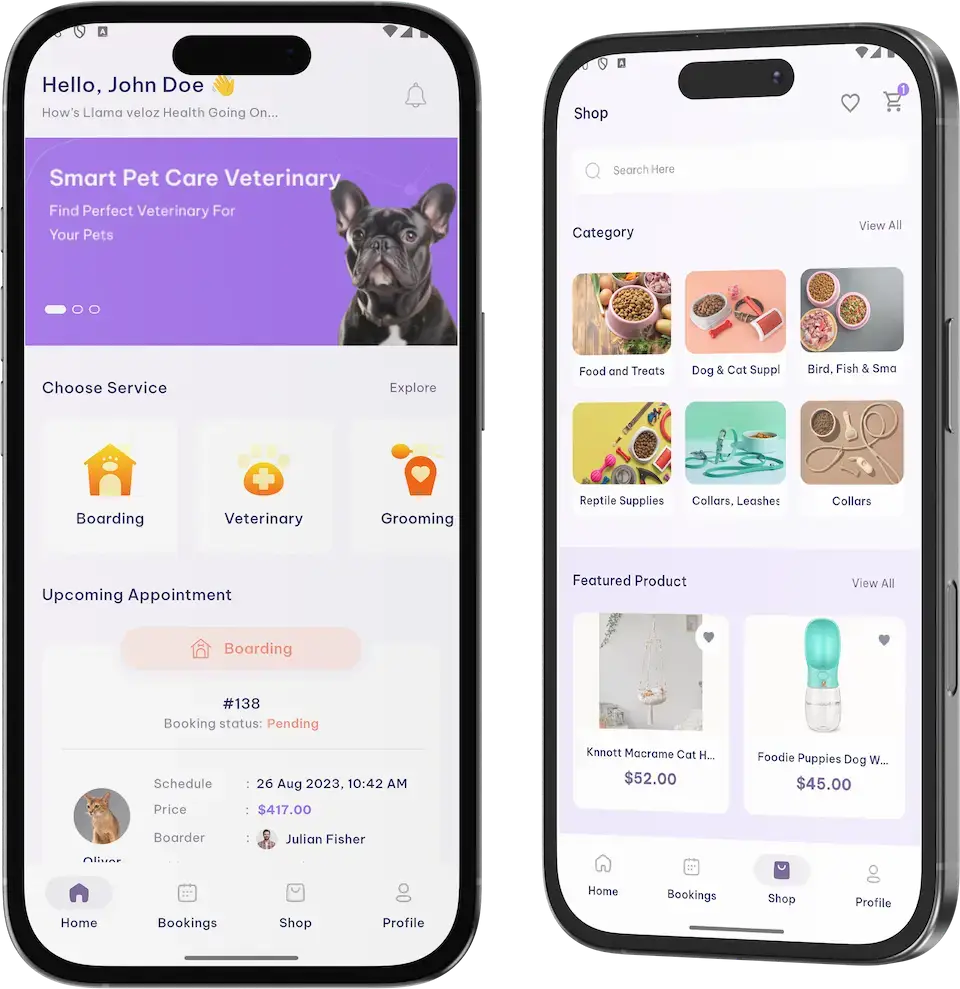
Dog Walk Clone app home screen with Boarding, Veterinary and Grooming service tiles and an upcoming appointment card.
Every pet has a profilepicked at booking
  • 2Mobile Appsa pet owner app and an employee app for providers
  • 5Base Revenue Linesbooking commission, per-service rates, booking extras, payment cost recovery and pet shop sales
  • 0%Revenue Share With Miracuvesno share of any walk, stay or shop sale
  • 5Gateways in the Release LogStripe, Razorpay, Paystack, Cinet and Sadad
  • 6Days to Launchand if the delay is ours, we keep going free
  • $2,499Paid Once, Not Rentedsource code yours, no per-seat fee, no monthly rental

Live in six working days, or we keep working free until you launch. Every build carries 60 days guidance, 6 months bug fixes and 12 months updates.Verify every figure

Extras on Top of a Stay

The booking form adds facilities such as feeding and watering or round-the-clock supervision above a stay's base price, so one booking can carry more than the walk.

Seven Real Screens, No Invented Client

No named client build of this dog walking base is published, so the evidence is a working demo, seven real app screens and a release log from 2.1.0 to 2.2.6.

Payments Clear at Your Gateway

Card payments run through the gateway you connect once your KYC clears; tax is set as a percentage or a fixed amount, and totals reach the owner with tax included.

Ready to open your own dog walking platform?Talk to Product Expert

Chosen by 6,000+ clients across the globe

Miracuves is listed by Expertise.com as a managed IT service provider.Miracuves is an official member of the Forbes Business Council.Miracuves is a verified agency on DesignRush, listed among top design agencies in India.Miracuves is reviewed on Trustpilot as a software development company.Miracuves is listed by The Manifest among top managed software development companies.Miracuves is listed by DesignRush as a top software development company.Miracuves is recognized by GoodFirms as a top software development company.Miracuves is ranked among the top 1000 companies globally by Clutch.Miracuves is a top managed service provider in the United States on Clutch.

01See it live

Try It Yourself

Dog Walk Clone Demo - Pet Owner App, Employee App, Provider Panels & Admin

Use the Miracuves Dog Walk Clone the way your customers and providers will. A shared login opens the pet owner app and another opens the employee app, the web site is open to anyone, and the walker, boarder, trainer and admin panels sit behind the demo login page.
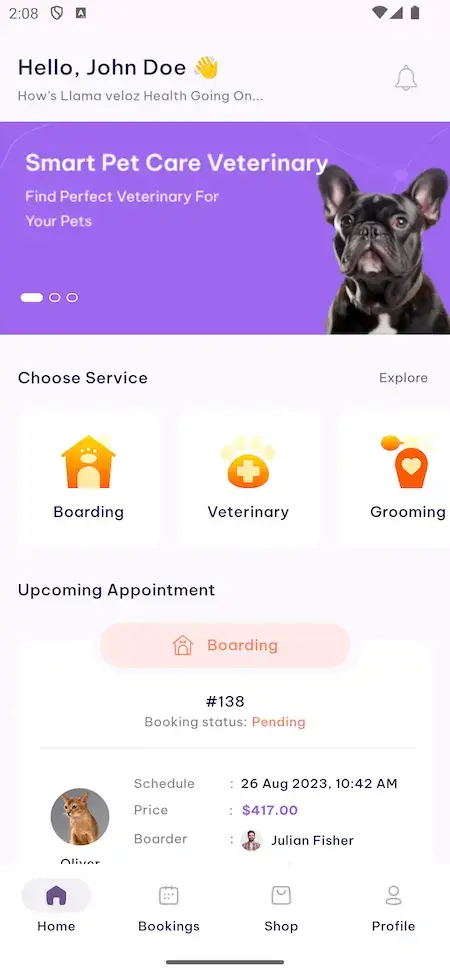
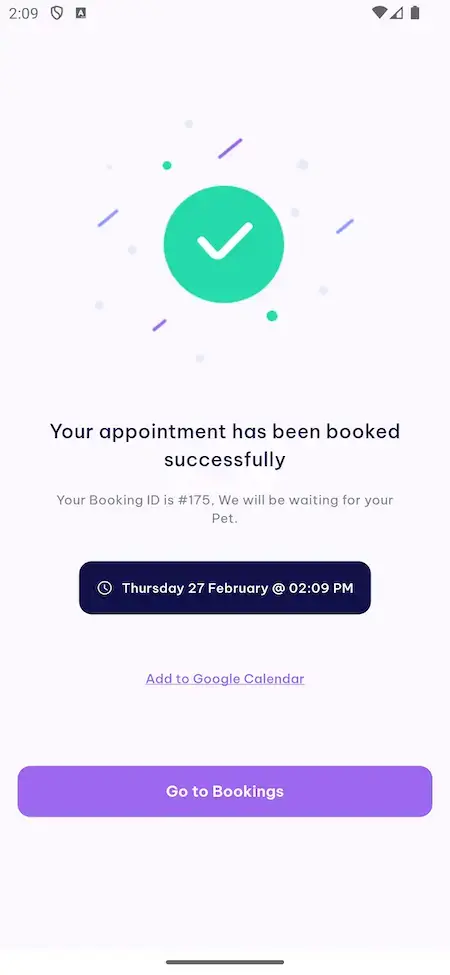
Dog Walk Clone app home screen with Boarding, Veterinary and Grooming service tiles and an upcoming appointment card.Dog Walk Clone app confirmation screen with a booking ID and an Add to Google Calendar link.
Pet owner app

Dog Walk Clone - Pet Owner App

The owner side on a phone: pick a service from the home screen, choose a pet, set dates and a provider, add extras and book, then follow the booking in the list.

  1. 1Open the app portal and pick your phone
  2. 2Sign in with the demo login below
  3. 3Explore: Home, Book Boarding, Bookings, Shop, My Pets
Try:user@demo.com | User_321
Employee app

Employee App - Provider Side

The provider side on a phone: a walker, boarder or trainer signs in to their own app, works through the bookings that arrive and filters them down to the ones that matter.

  1. 1Open the app portal and pick your phone
  2. 2Log in with the employee details below
  3. 3Explore: Bookings and the booking filter
Try:trainer@demo.com | 12345678
Web & provider panels

Web Site and Provider Panels

The responsive web site for owners, and the boarder, trainer and walker panels where providers manage their services, pricing and bookings from a desktop.

  1. 1Open the demo site in a browser tab
  2. 2Use the owner login for the owner side
  3. 3Open the provider login page for the panels
Owner side:user@demo.com | User_321
Admin panel

Admin Panel - Users, Bookings, Payments & Commissions

The operator console: users, bookings, payments, commission percentages, taxes, the shop catalog and platform settings, with a dispute and support desk behind it.

  1. 1Open the admin login page on the demo host
  2. 2Ask the team for the admin login
  3. 3Explore: Bookings, Commissions, Shop, Settings
Admin login:shared on a guided call
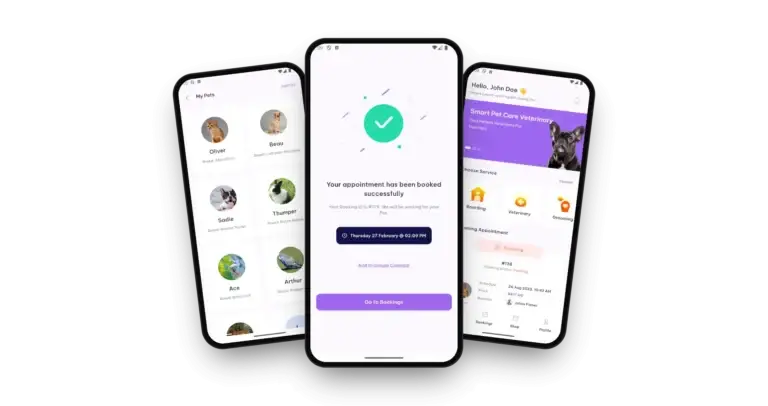
Dog Walk Clone on three phones: the booking confirmation screen, the my pets profiles and the pet owner home with services and upcoming booking

See It With Us

Dog Walking App Walkthrough: Bookings, Pet Profiles, Provider Panels & Admin

A live call is the fastest route to seeing every surface. Over about 30 minutes we walk through the owner app, the employee app, the provider panels and the admin panel, connecting each to your plan: the services you offer, the commission you take, the tax you collect and your target launch day.

Schedule a live walkthrough call.

Every Screen Mapped

On-Demand Dog Walking App Flows - Booking Journey, Pets & Shop

These are real screens from the owner app of Miracuves' dog walking app, in the order a booking moves: onboarding, the service tiles, the booking form, the confirmation and the bookings list, then the pet profiles and the shop.
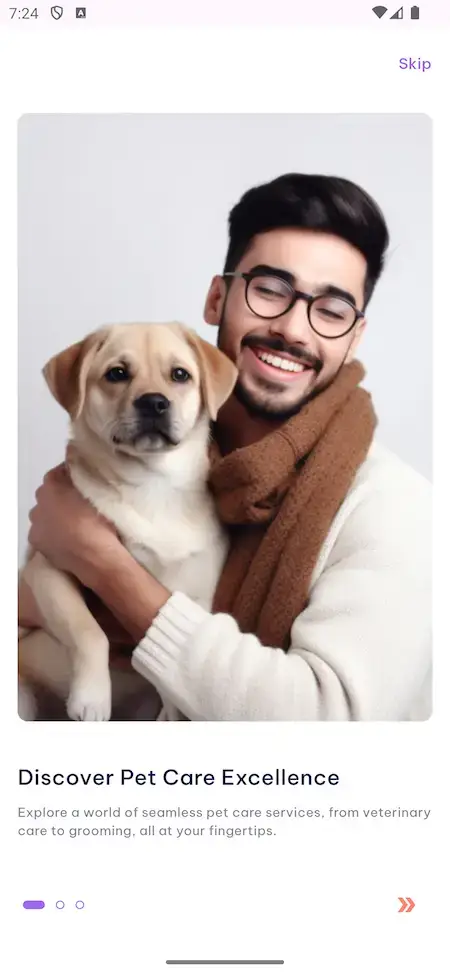
Dog Walk Clone app onboarding screen with a smiling owner holding a puppy and the line Discover Pet Care Excellence.
Dog Walk Clone app home screen with Boarding, Veterinary and Grooming service tiles and an upcoming appointment card.
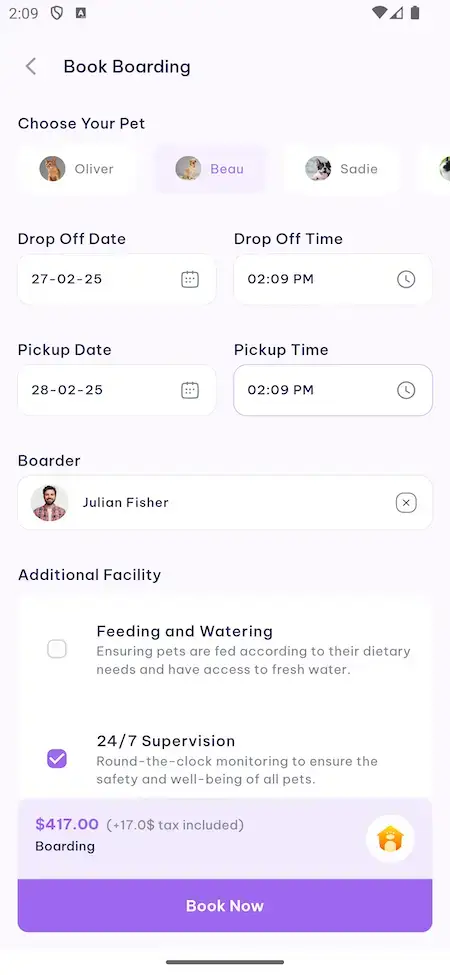
Dog Walk Clone app Book Boarding screen with pet picker, drop-off and pickup times, provider and additional facilities.
Dog Walk Clone app confirmation screen with a booking ID and an Add to Google Calendar link.
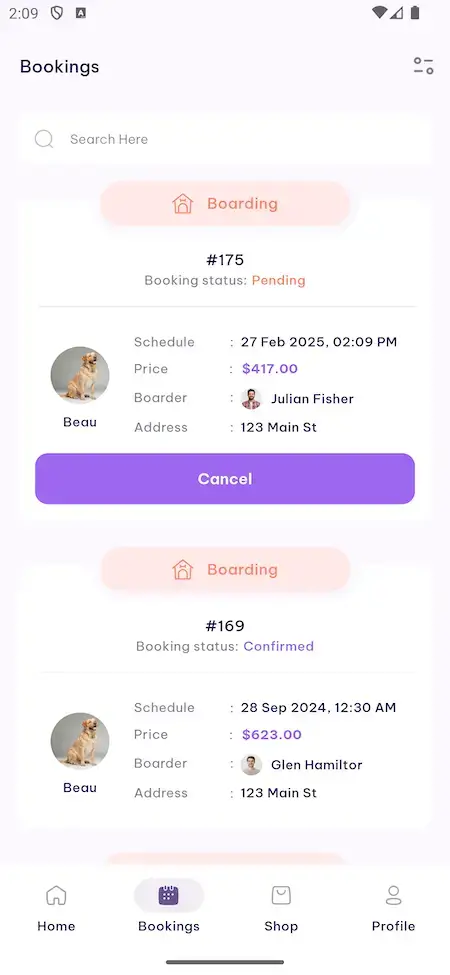
Dog Walk Clone app bookings list with status, schedule, price, provider, address and a Cancel button.
5 screens · scroll →
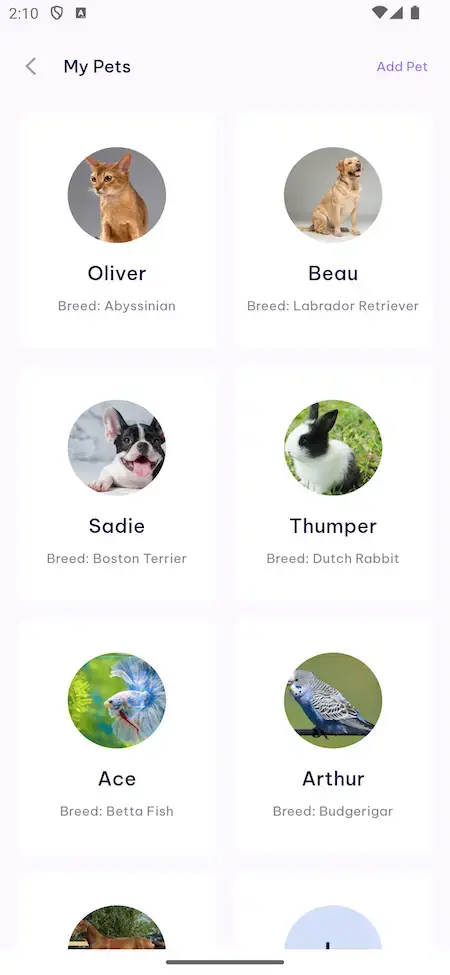
Dog Walk Clone app My Pets screen listing pets with their names and breeds and an Add Pet button.
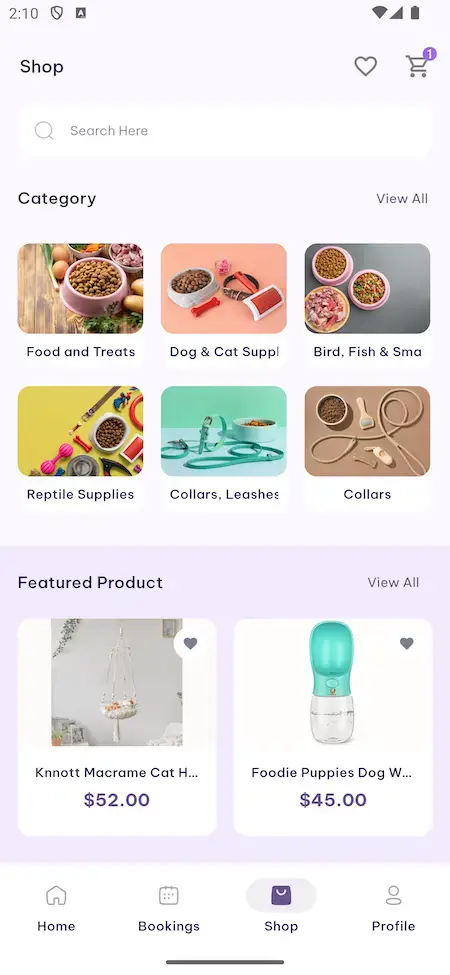
Dog Walk Clone app shop screen with product categories and featured products with prices.
2 screens · scroll →

Follow an owner from the first onboarding screen to a confirmed booking and its place in the bookings list, then open the pet list and the shop that sit beside it.

Explore Our Solutions

02Proof

Client Voices

Dog Walk Clone Client Reviews - Operators in Their Own Words

Dog walking is not among the businesses quoted here. The closest are service-booking operators: Servica and Saas Home Services, whose dispatch, booking and payments were ready, plus Appforany and Z-gig, which each combined several services in a single offering.

SServica TeamFounding team, Servica
“We run several service types off one platform. The dispatch and booking core already supported that, so the work was our service definitions and pricing. Delivered under a month.”
SSaas Home Services TeamFounding team, Saas Home Services
“Provider onboarding, quoting, booking and payments came off the shelf. We added our service categories and our vetting rules. Both sides of the marketplace were live inside a month.”
AAppforany TeamFounding team, Appforany
“Several on-demand services under one brand was the requirement, not several apps. The multi-service base supported that natively, so we configured verticals instead of building them. Delivered inside a month.”
ZZ-gig TeamFounding team, Z-gig
“Several gig verticals in one product. Because multi-service dispatch was already solved, we spent the time defining categories and provider onboarding rather than infrastructure. Delivered under a month.”
Read More Client TestimonialsOperators and founders in their own words

What You Can Verify

Dog Walk Clone Case Study - What Is Published and What You Can Check Yourself

No named client deployment of this dog walking base is published on Miracuves, so there is no case study to summarize. The demo, the app screens and the release log are the evidence we can show, and this section says how to use them.

Case Study
No Client Deployment Is Published for This Model

Miracuves has not published a named client build of this dog walking base, and it will not present one that does not exist. What it can show is a working demo, seven real app screens and a release log you can read entry by entry.
Owner, employee, panels, adminSurfaces to open
Versions 2.1.0 to 2.2.6Release log span
Walking, boarding, grooming, trainingWhat the demo covers
4Surfaces in the demo
6Versions in the log
6 daysBuild time
Dog Walk Clone app on two phones: the home screen with service tiles and the pet shop.
What You Can Verify
  • Sign in to the owner app with the demo login and open the pet list
  • Walk through Book Boarding: pet, dates, provider, extras and the tax-included total
  • Find the booking in the bookings list with its status and Cancel button
  • Read the release log, one version at a time
What We Will Not Do
  • Cite any client who has not given consent to be named
  • Present a quote or a figure from another product as this one
  • Count an add-on, such as GPS tracking, as part of the base build
How a Build Runs
  • Rebrand the apps and the web platform with your logo, icons and colors
  • Configure your services, commission percentages and tax settings
  • Deploy to your hosting and hand over the complete source code
  • Build time on the base: 6 working days

A named deployment will appear here only after a client agrees to be named and its case study is published.Miracuves · Our position on case studies

See the case studies we have publishedThe portfolio lists named client builds on other products.

03The product

The Basics

What a White-Label Dog Walking App Does for Owners and Walkers

A Dog Walk clone is a ready-made booking platform for dog walking and the pet care around it, and Miracuves builds every booking around the pet itself. Owners keep a profile for each pet and book a service on a date with a provider, providers work from panels of their own, and the operator sits in between with an admin panel for users, bookings, payments and commission.

Dog Walk Clone on three phones: the booking confirmation screen, the my pets profiles and the pet owner home with services and upcoming booking

A Pet at the Center

Every booking starts from a pet: its profile with a photo, a name and a breed, so a provider is never walking a stranger.

Not a Locked Box

The complete source code arrives with no encryption, so your team can change screens and flows as the business grows, with no per-seat fee to pay.

Plain About What Is Extra

GPS tracking, subscription plans, pickup and drop and boarding live video are add-ons, quoted on their own and never counted as base features.

Web, Android & iOS

What Is a Dog Walk Clone Script?

The hard part of a walking business is not the booking form. It is knowing which pet is being walked and what it needs, letting each walker keep their own prices and diary, and settling payments, tax and commission afterwards. Those parts ship working.

Dog Walk Clone app My Pets screen listing pets with their names and breeds and an Add Pet button.
  1. 01Owner app with service tiles, pet list and booking form
  2. 02Employee app for walkers, boarders and trainers
  3. 03Web site with walker, boarder and trainer panels
  4. 04Pet shop with categories and featured products
  5. 05Admin panel with commissions, tax and disputes

You receive an owner mobile app and an employee mobile app built with Flutter, a web site with the walker, boarder and trainer panels, an admin panel and the complete source code.

Everything Included

Dog Walk Clone Features - Bookings, Pet Profiles, Provider Panels, Payments & Admin

Every Dog Walk clone feature Miracuves lists below can be seen in the owner-app screens, the demo panels, the FAQ or the release log. Anything that needs an extra module is named as an add-on further down the page.

Feature 01 / 12

Six Pet Services

A single pet care booking platform covers walking, day care, dog boarding, pet grooming, training and veterinary visits, shown as service tiles on the app home screen.

  • Pet walking, boarding, day care, grooming, training and veterinary service types
  • Boarding, Veterinary and Grooming tiles under Choose Service on the home screen
  • An Explore link to browse the full service list
  • Home banners that the admin panel can switch on and off
Feature 02 / 12

Booking Form & Schedule

The booking form asks for the pet, the dates and times and the provider, then lists any extra facilities and shows a total with tax included before the owner taps Book Now.

  • Pet picker at the top of the booking form
  • Drop-off date and time, pickup date and time
  • Provider selected on the same screen
  • Additional facilities such as Feeding and Watering and 24/7 Supervision, each with a description
  • Total shown with tax included, and an additional information section on the booking
Feature 03 / 12

Pet Profiles & Records

The My Pets screen keeps a profile for each pet with its photo, name and breed, and the owner picks the right pet from that list whenever a booking is made.

  • My Pets list with photo, name and breed
  • An Add Pet button on the same screen
  • Richer pet records, such as health notes, are custom work scoped on request
  • Dogs, rabbits, fish and birds shown side by side in the demo list
  • The right pet chosen from the list whenever a booking is made
Feature 04 / 12

Provider Panels & Diary

Walkers, boarders, groomers and trainers each work from a panel of their own, where they publish services and prices, and owners book the availability they offer.

  • Walker, boarder and trainer panels in the demo, plus a groomer role in the FAQ
  • Providers manage their own services and pricing
  • Boarders set capacity limits and manage several bookings at once
  • Groomers choose at-home service, in-store service or both
  • Trainers list programs such as obedience and puppy training and set session length
Feature 05 / 12

Bookings List & Status

Owners follow every booking from a list that shows its status, schedule, price, provider and address, and can cancel from the same card.

  • Booking ID, service label and status such as Pending or Confirmed
  • Schedule, price, provider and address on every card
  • Cancel button beneath each booking
  • Search across the bookings list
  • A confirmation screen with the booking ID and an Add to Google Calendar link
Feature 06 / 12

Messaging & Alerts

Owners and providers talk through in-app messaging, and push notifications carry updates, with notification templates the admin can set for each user role.

  • In-app messaging between owners and providers
  • Chat, video call or updates, as the FAQ describes it
  • Push notifications through Firebase
  • Notification templates set per user role in the admin panel
Feature 07 / 12

Payments, Tax & Gateways

Bookings are paid in the app through the payment gateway you connect, with tax added as a percentage or a fixed amount and shown in the total.

  • Stripe, Razorpay, Paystack, Cinet and Sadad appear in the release log
  • Tax as a percentage or a fixed amount
  • Total shown with tax included on the booking form
  • Payments passed on to the provider after the booking completes
Feature 08 / 12

Reviews & Ratings

Owners can rate and review the dog walkers and pet sitters who look after their pets, and the ratings and reviews appear on provider profiles.

  • Rating and review after a completed booking
  • Ratings and reviews on provider profiles
  • A way to keep an eye on service quality
Feature 09 / 12

Pet Shop

A shop tab sits beside Bookings in the app, with product categories, featured products with prices, a cart, favorites and search.

  • Categories such as Food and Treats, Dog and Cat Supplies, and Collars and Leashes
  • Featured products with prices
  • Cart and favorites icons on the shop screen
  • Order food and accessories for delivery to the door
  • Admin catalog with categories, brands, tags, units and variations
Feature 10 / 12

Earnings & Commission

The admin panel sets a commission percentage for each service, and earnings are worked out for providers, walker staff and the admin, with totals by date.

  • Commission percentages set per service
  • Earnings calculated for walker staff and admins
  • Date-wise totals in the admin panel
  • Multi-vendor setup where boarders, walkers and trainers manage their own pricing
Feature 11 / 12

Admin Console

One console runs the platform: users and customers, bookings, payments, commissions, taxes, the catalog, roles and settings, with a dispute and support desk.

  • Users, bookings, payments, commissions and platform settings
  • Complaints, refunds and support tickets in a dispute desk
  • Roles and permissions for admin users
  • Create Customer pop-up, search by booking ID and filters
  • Setup wizard for the first launch
Feature 12 / 12

Accounts & Onboarding

Owners sign up with a name and an email address, pick a country and can use Google login, after an onboarding flow introduces the services.

  • Sign-up with basic details such as name and email
  • Country picker on the sign-up screen
  • Google login
  • An onboarding guide screen introducing the service types
  • Countries managed in the admin panel

Before you buy, note this: The platform is delivered complete and rebranded to your identity. On your side you supply hosting and a domain, a developer account for each store that you own and have verified, your branding and business details, an onboarded payment gateway with KYC done, and any third-party keys. Store review is handled by Apple and Google and sits outside our 6-day build time.

Talk to Our Team

How Operators Earn

Dog Walk Clone Revenue Models - Commission, Extras, Plans & Pet Shop Sales

A dog walking platform earns in several places, and Miracuves separates each line in the admin panel so that one change never disturbs another.

The booking commission carries most platforms at first. Plans and the shop are the lines that add recurring income and a second product beside it.

  1. 01

    Booking Commission

    The operator keeps a percentage of every booking and the provider receives the rest. The percentage is a setting in the admin panel, so it can change without a rebuild.

  2. 02

    Commission by Service

    Commission percentages can differ between services, so a walk, a grooming slot and a training session can each carry the rate that suits it.

  3. 03

    Booking Extras

    The booking form lists additional facilities, such as feeding and watering or round-the-clock supervision, that sit on top of the base price of a stay.

  4. 04

    Payment Cost Recovery

    Gateways deduct their own fee from each payment. The release log shows five of them, and how that cost is recovered through commission or extras is your pricing decision.

  5. 05

    Subscription Plans

    With the Subscription System add-on, owners can sign up for regular walks or other care on a plan, with customizable terms and automatic billing.

  6. 06

    Pet Shop Sales

    The shop tab sells food, supplies and accessories with category pages and featured products, adding a product line beside the services.

What published pet-care businesses charge or earn on the lines this platform can run: provider commission, subscription perks, product margin and card processing, each traced to a fee page or a filing.
Revenue streamHow it is chargedTake rateTypical take rateWhat sets the ceiling
Booking CommissionA percentage of each booking, set in the admin panel, with the rest paid to the provider.Rover publishes a 20% provider fee in the US and Canada, so providers keep 80%; UK sitters and walkers keep 85%.What providers will accept. Rover also charges owners 11% at US checkout, and 15% capped at GBP 49 in the UK, so the combined take is higher than either side sees.
Subscription PlansA recurring plan price instead of rebooking each visit, billed automatically with the add-on.Wag! Premium gives 10% off every service booked and waives booking fees.The perk is paid for out of fees you would otherwise earn. Wag! reports services revenue of $21.6m of $70.5m in 2024, so plan fees sit beside caregiver fees.
Pet Shop SalesThe margin between the product price and its cost, on items sold through the shop tab.Chewy reports a 29.8% gross margin for fiscal 2025, which it ties to growth in sponsored ads.Product margin is thinner than a booking fee and needs volume: Chewy's Autoship customers bought $10.5bn of its $12.6bn net sales.
Payment Cost RecoveryThe gateway keeps its fee from each payment, and you decide what absorbs it.Stripe US lists 2.9% plus 30 cents per domestic card payment.The gateway's price for your country and card mix. Stripe adds 1.5% for international cards and 1% when currency conversion is needed.

How to read this. The commission figures come from Rover's help pages for the US, Canada and UK. The Wag! plan perk and its services revenue come from its 2024 Form 10-K, the Chewy margin and Autoship sales from its fiscal 2025 Form 10-K, and the card rate from Stripe's US pricing. They are published fees and reported results of other businesses, so treat them as inputs for your own pricing, not as a quote or a forecast of what any platform will earn.

Revenue Model

Dog Walk Clone Revenue Model, Stage by Stage

Miracuves builds five base earning lines into the Dog Walk clone, with subscription plans as an add-on, and a walking business usually brings them in as its provider list and its regular clients grow.

Launch

A booking commission set in the admin panel carries the first walks, with a different percentage per service so grooming and training can earn more than a walk.

Traction

Once owners come back, paid facilities ticked on the booking form, from a feeding add-on to 24/7 Supervision, raise the value of each boarding stay, and the shop tab begins selling food, supplies and accessories to those same households.

Scale

With the Subscription System add-on, weekly walks become plans with automatic billing, and recovering gateway fees becomes a pricing choice across five gateways.

Every walk commission, boarding extra and shop sale stays in your pet-care business, with no Miracuves percentage taken from a single booking.

Want a revenue model built around your own dog walking business?Design My Revenue Model

Operate It Day to Day

Admin Panel for a Dog Walking Business - Bookings, Providers, Commissions & Disputes

Miracuves gives a dog walking operator one console for the day: what is booked, what providers have earned, which services carry which commission, what is in the shop and which complaints are open.

Dog Walk Clone app bookings list with status, schedule, price, provider, address and a Cancel button.
Dog Walk Clone app shop screen with product categories and featured products with prices.

Admin Panel Sections

  • 01

    Dashboard & Totals

    Earnings worked out for providers, walker staff and the admin, with totals by date and lists that are paged and searchable.

  • 02

    Bookings

    Every booking with its address, additional information, tax and status, searchable by booking ID and filterable.

  • 03

    Providers & Staff

    Boarders, walkers, groomers and trainers manage their own services and pricing, with roles and permissions deciding who can do what.

  • 04

    Customers

    Create and manage owner accounts from the console, with a Create Customer pop-up for adding one by hand.

  • 05

    Commission & Tax

    A commission percentage for each service, and tax as a percentage or a fixed amount, applied to what owners pay.

  • 06

    Payments & Gateways

    Payments and payouts in one place, with Stripe, Razorpay, Paystack, Cinet and Sadad as the gateways the log names.

  • 07

    Disputes & Support

    Complaints, refunds and support tickets handled from the dispute desk, with the booking record behind each case.

  • 08

    Shop, Content & Setup

    The product catalog with categories, brands, tags, units and variations, plus app banners, events, countries, notification templates and the setup wizard.

Money Movement

The finance side of the console, from the booking total to the provider payout.

  • Payments and commissions in one place
  • Earnings for providers, walker staff and admins
  • Tax as a percentage or a fixed amount
  • Totals by date

Roles & Setup

The controls behind who sees what and how a new platform gets started.

  • Roles and permissions for admin users
  • Setup wizard for first-time configuration
  • Notification templates per role
  • Countries and app banners

Need the console to do more? A different payout rhythm, extra reports, another gateway or a custom approval step is scoped on its own. Tell us what your operations team needs and we will quote it in writing.

Talk to Our Team

04Package and price

The Full Package

Dog Walk Clone Script Package - Pet Owner App, Employee App, Panels & Source Code

From Miracuves you receive a working platform rather than a kit of parts: the owner app, the employee app, the web site with its provider panels, the admin panel and the source code behind them. You own all of it: nothing is charged per seat, and no license is needed to keep it running.

01

Full Source Code

Source for the site, provider panels and both phone apps arrives unencrypted, letting your developers reshape how walks are sold and run.

  • Web platform source, unencrypted
  • Flutter source for the Android and iOS apps
  • Yours to modify, extend and redeploy
  • Delivered into your own repository
02

Pet, Booking & Catalog Data

The records the platform keeps: pets, bookings, providers with their services and prices, shop products, payments and tax settings.

  • Pets with a photo, a name and a breed
  • Bookings with status, address and additional information
  • Providers with services and pricing
  • Products, categories, brands, tags and units
03

Messaging & Notifications

In-app messaging between owners and providers, push notifications through Firebase, and notification templates the admin sets for each role.

  • In-app messaging
  • Push notifications through Firebase
  • Notification templates per user role
  • Google Calendar link on the booking confirmation
04

Pet Owner App

A Flutter app for Android and iOS: onboarding, service tiles, the booking form, bookings, the shop and the pet list.

  • Home with Choose Service tiles
  • Book Boarding form with pets, dates and extras
  • Bookings, Shop and Profile tabs
  • Published from your own developer accounts
Dog Walk Clone app home screen with Boarding, Veterinary and Grooming service tiles and an upcoming appointment card.
05

Pet Shop & Catalog

The shop tab and the admin catalog behind it, so products can be listed, categorized and sold beside the services.

  • Shop categories and featured products
  • Cart and favorites in the app
  • Catalog with categories, brands, tags, units and variations
  • Search across the shop
Dog Walk Clone app shop screen with product categories and featured products with prices.
06

Employee App & Provider Panels

A second Flutter app for providers and the web panels for walkers, boarders and trainers, so each provider has a place of their own to work.

  • Employee app for bookings on the go
  • Booking filter with a Clear Filter button
  • Walker, boarder and trainer web panels
  • Providers set their own services and pricing
07

Admin Panel & Roles

The operator console with users, bookings, payments, commissions, taxes, disputes and settings, behind roles and permissions.

  • Users, bookings, payments and commissions
  • Dispute desk with refunds and tickets
  • Roles and permissions
  • Setup wizard and platform settings
08

Handover & Support

Branding and deployment done for you, a handover of the code, and the three support periods that run side by side from launch. That scope sells at a single price rather than a floor that climbs. Your hosting company, payment gateway, Firebase messaging, Google services and the two store programs charge you separately, and your legal pages are organized on your side.

  • Rebranding with your logo, icons and colors
  • Deployment to your hosting
  • Complete source code handed over
  • 60 days guidance, 6 months bug fixes, 12 months updates

Want to see it before deciding? Sign in to the demo as an owner, or ask for a guided tour. We can walk you through the pet list, the booking form, the bookings list and the admin panel, each shown against your own service plan.

Talk to Our Team

Transparent Pricing

How Much Does It Cost to Build a Dog Walking App Like Dog Walk?

The launch-ready white-label Dog Walk Clone is a fixed price of $2,499. Anything beyond the base, such as an add-on, an extra integration or a custom flow, is scoped and quoted separately in writing.

Most Popular

Professional

Ready-Made Launch Package
$2,499paid once
Ships in 6 days

Chosen by: Dog walking app startups, local pet-care networks, day care and boarding operators

The platform arrives as the demo shows it, rebranded to your logo, icons and colors, and deployed on your own hosting.

Get Started

Enterprise

Custom Builds for Larger Scope
Customquote
Go-live: based on final scope

Chosen by: Multi-city pet brands, franchise groups, veterinary networks

Need flows the base does not have? We build to your requirements and agree the scope and price before work starts.

Request a Quote
Development Cost

Dog Walk Clone Development Cost in 2026

At $2,499, paid once, Miracuves' Dog Walk clone gives you the owner and employee apps in Flutter, the web site plus panels for walkers, boarders and trainers, an admin console and unencrypted source code, rebranded and deployed on your hosting in six working days.

$2,499 Paid once
6 working days Rebranded and live
0% Revenue share

What moves your total sits outside the software invoice

  • Hosting for the web site and panels
  • A payment gateway account, such as Stripe or Razorpay, with KYC
  • Firebase messaging and Google services
  • The Apple and Google store programs
  • Add-ons such as GPS tracking, subscriptions, pickup and drop or boarding live video

If your walkers need a different payout rhythm or owners need another gateway, Miracuves scopes that work in writing with a typical 2-8 week delivery, while multi-city pet brands, franchise groups and veterinary networks move to the Enterprise build.

Compare Your Options

Ready-Made Dog Walk Clone vs Custom Development vs SaaS

Starting a dog walking business online means choosing between a ready-made Dog Walk clone such as the one Miracuves ships, an app built to order and subscription walking software. Compare speed to market, budget, code rights and branding below.

CriteriaMiracuvesReady-Made Dog Walk CloneCustom DevelopmentSaaS
Launch timeWalks bookable after 6 working days2-8 weeks typical, quoted in writingInstant account, generic workflow
Upfront cost$2,499 for the full platformSet after scoping your briefLow first payment, recurring plan
Source code ownershipUnencrypted code is handed overNegotiated in the contractRemains with the software company
CustomizationWalk services, extras and commissions configurableAny walking feature you specifyWhatever the vendor exposes
Ongoing feesNo runtime license for the codeUpkeep billed by agreementFee per walker or booking
Branding & app-store listingOwner and walker apps under your nameBranded at the end of the buildWalkers see the vendor brand
Best forLocal walking companies scaling to groomersWalking concepts with unique rulesSolo walkers who want a calendar

Where It Fits

Dog Walking App Development Use Cases - Walking, Day Care, Boarding, Grooming & Shop

Each operator works from its own slice of the Dog Walk clone Miracuves delivers. A walker starts from the booking form and the pet list, a boarding facility starts from drop-off times and extras, and a shop starts from the catalog. You set the emphasis in configuration.

WalkingDogsIndependent Dog Walking Business

Take bookings for walks by date and provider, keep a profile for each dog with its photo, name and breed, and watch bookings move from pending to confirmed in the bookings list.

01
Dog Walk Clone app home screen with Boarding, Veterinary and Grooming service tiles and an upcoming appointment card.
NetworkWalkersWalker Network Under One Brand

Give each walker a panel of their own for services and prices while owners see one brand, and set the commission the network keeps.

02
Dog Walk Clone app bookings list with status, schedule, price, provider, address and a Cancel button.
BoardingDay careDay Care & Boarding Facility

Let owners choose a pet, drop-off and pickup times and extras such as feeding and watering, with capacity limits managed from the dashboard.

03
Dog Walk Clone app Book Boarding screen with pet picker, drop-off and pickup times, provider and additional facilities.
GroomingTrainingMobile Groomers & Trainers

List grooming slots and training programs, say whether you work at home, in store or both, and let owners book from your availability.

04
Dog Walk Clone app confirmation screen with a booking ID and an Add to Google Calendar link.
ShopServicesPet Shop With Services

Add walking or grooming bookings to a shop that already sells food, supplies and collars, with the catalog managed in the admin panel.

05
Dog Walk Clone app shop screen with product categories and featured products with prices.
VetWellnessVeterinary & Wellness Booking

Use the veterinary service type to book appointments for check-ups beside walks and grooming, with the booking record and address behind each visit.

06
Dog Walk Clone app My Pets screen listing pets with their names and breeds and an Add Pet button.
Business Model

Dog Walk Clone Business Model: Three Ways to Run It

The Dog Walk clone business model from Miracuves starts from the pet, the provider and the booking, and one deployment can be shaped three ways.

Independent walking business

A solo founder runs the diary alone: owners choose a date and a provider, each dog keeps its own profile, and every booking pays the founder's commission.

Walker network

An operator brings independent walkers, boarders, groomers and trainers under one brand, each pricing services in their own panel while the network keeps a per-service commission.

Shop with services

A pet retailer adds walking, grooming or day care bookings beside the food and supplies it already sells, earning a product margin and a booking commission in one app.

Each model runs on the same owner app, employee app and admin panel.

One product, six ways to use it. All six cases share the owner app, the employee app, the web panels and the admin panel. What differs is the services you list, the commission you set, the providers you invite and how it is branded, so there is a single codebase to look after.

Talk to Our Team

Market Timing

Why Build a Dog Walking Platform in 2026?

Pet care is local and relationship-driven, and most owners still find a walker through a handful of large directories or through word of mouth. A platform under your own brand gives you the providers, the owners and the commission that those channels currently keep.

01

Owners Want Care Booked From a Phone

People already book rides, meals and appointments from an app. A walk that is booked with a pet, a date and a provider in a few taps fits the same habit.

02

Walkers Need a Diary of Their Own

Independent walkers value setting their own services and prices. A panel where they do that is what keeps good providers on your platform instead of someone else's.

03

A Pet Profile Builds Trust

When the booking names the pet and shows its breed and photo, the owner is handing over a dog to someone informed, which lowers the cost of a first booking.

04

Regular Walks Suit a Plan

Walks repeat. A subscription add-on turns weekly walks into a recurring plan with automatic billing, which is steadier than rebooking each visit.

05

A Shop Sits Beside the Services

Food, supplies and collars are bought by the same owners who book the walks. A shop tab adds a product line to a service business without a second app.

06

Buy Versus Build Is Quick to Settle

Booking, pet profiles, provider panels, payments and an admin console are the heavy lifting in any pet-care platform. Six days of our build time put a version carrying your brand on hosting you control.

Platform by the Numbers

6

Service Types

4

Provider Roles

4

App Tabs

6

Days of Build Time

Most of the work in a pet-care platform is the unglamorous middle: pet profiles, provider diaries, tax and commission settings, and a console that reconciles it all. Here it is already built.

Industries

Industries We Serve

Miracuves built the Dog Walk clone for any business that books care for other people's pets. Dog walking services and pet sitting services take visits by date. Boarding and day care operators take stays with drop-off and pickup times. Grooming salons and mobile groomers sell slots. Dog trainers list programs and session lengths. Veterinary clinics add an appointment type. Pet shops add services beside products. Pet transport and pickup services add collection to the booking. Regional networks and franchise brands run all of it under one name.

  1. 01Dog Walking
  2. 02Pet Sitting
  3. 03Pet Boarding
  4. 04Day Care
  5. 05Grooming Salons
  6. 06Dog Training
  7. 07Veterinary Clinics
  8. 08Pet Retail
  9. 09Pet Hotels
  10. 10Pet Transport
  11. 11Pet Franchises
  12. 12Regional Networks

Miracuves’ Dog Walk Clone is a booking platform you can adapt to any pet-care business model, with the pet profiles, provider panels and admin panel carrying your name from the first screen.

06Under the hood

End to End

How the Dog Walk Clone Works - Sign Up, Browse, Add Pets, Book, Confirm & Track

To an owner using the Miracuves dog walking app, a walk is a few taps. Underneath it is a chain of profile, schedule, provider and payment. Below is that chain from sign-up to a tracked booking, followed by the architecture that carries it.

How to Book a Dog Walker in the App, Step by Step

  1. Dog Walk Clone app onboarding screen with a smiling owner holding a puppy and the line Discover Pet Care Excellence.
    1Join the App as a Pet Owner

    A brief onboarding guide opens the app, and the owner signs up with a name and email or continues with a Google account.

    • Onboarding screen introducing the services
    • Sign-up with basic details
    • Country picker and Google login
  2. Dog Walk Clone app home screen with Boarding, Veterinary and Grooming service tiles and an upcoming appointment card.
    2See Walks and Other Services

    Home greets the owner by name above a banner and the Choose Service tiles, with the upcoming appointment pinned in view.

    • Choose Service tiles with an Explore link
    • Upcoming Appointment card on the home screen
    • Home, Bookings, Shop and Profile tabs
  3. Dog Walk Clone app My Pets screen listing pets with their names and breeds and an Add Pet button.
    3Create a Profile for Each Dog

    A dog gets its own profile holding a photo, its name and its breed, so the correct animal is picked each time a walk is booked.

    • My Pets list with an Add Pet button
    • Breed shown under each name
    • Photo and name on every profile
  4. Dog Walk Clone app Book Boarding screen with pet picker, drop-off and pickup times, provider and additional facilities.
    4Schedule the Walk & Choose a Walker

    On the form the owner sets the pet, drop-off and pickup times and the provider, adds any extra facilities and sees a tax-inclusive total.

    • Choose Your Pet row at the top
    • Provider and additional facilities
    • Total with tax included and a Book Now button
  5. Dog Walk Clone app confirmation screen with a booking ID and an Add to Google Calendar link.
    5Walk Booked: ID and Calendar Link

    Once sent, the request comes back confirmed with a booking ID and time, and a single link copies the walk into Google Calendar.

    • Booking ID on the confirmation screen
    • Scheduled date and time
    • Add to Google Calendar and Go to Bookings
  6. Dog Walk Clone app bookings list with status, schedule, price, provider, address and a Cancel button.
    6Chat, Pay & Rate the Walker

    From the bookings list, with status, price and provider on every row, owners message the walker, settle the payment in the app and rate the visit afterward.

    • Status such as Pending or Confirmed
    • Schedule, price, provider and address
    • Cancel button, messaging, payment and rating
Visual Flow DiagramSign upBrowseAdd petsBookConfirmTrack

How It's Built

Architecture Behind a Dog Walking Platform & Booking Flow

Talk to Our Team
  1. Part 01

    Separate Apps and Panels

    The owner app, the employee app, the web panels and the admin panel each serve one role, with permissions that decide what each can see and change.

  2. Part 02

    Booking Record

    A booking carries its pet, schedule, provider, address, additional information and status, which is why the list can show Pending or Confirmed at a glance.

  3. Part 03

    Multi-Vendor Providers

    Boarders, walkers and trainers manage their own services and pricing, so the platform holds many providers beside one operator.

  4. Part 04

    Payments & Tax

    Payments run through the gateway you connect, with tax added as a percentage or a fixed amount and earnings worked out afterwards.

  5. Part 05

    Notifications

    Push messages travel over Firebase on its current API, and the admin sets notification templates for each user role.

  6. Part 06

    Shop Catalog

    Products sit in categories with brands, tags, units and variations, and the catalog protects any entry that is still in use.

Under the Hood

Tech Stack for Dog Walking Application Development - PHP, Laravel, MySQL, Flutter & Payment Gateways

Miracuves runs this pet-care platform on a solid web tier, a database that keeps every booking consistent and mobile apps that feel native. Here is what this one is built with, stated as the product page lists it.

WEB & ADMIN

Web Platform

PHP Laravel
  • Web site, provider panels and admin panel
  • Walker, boarder and trainer panels on the web
  • Setup wizard for first-time configuration
  • Roles and permissions across the panels
DATABASE

Data Tier

MySQL
  • MySQL named for the data tier
  • Pets, bookings, providers and products
  • Tax, commission and country settings
  • Handed over with the source
MOBILE

Owner & Employee Apps

Flutter Android iOS
  • Flutter apps with current dependencies
  • A pet owner app and an employee app
  • Home, Bookings, Shop and Profile tabs
  • Published from your own developer accounts
PAYMENTS

Gateways & Tax

Stripe Razorpay Paystack Cinet Sadad
  • Five gateways named in the release log
  • Tax as a percentage or a fixed amount
  • Totals shown with tax included
  • Your own gateway account and KYC required
INTEGRATIONS

Third-Party Services

Google Maps Twilio Firebase
  • Google Maps listed among the integrations
  • Twilio listed among the integrations
  • Firebase push notifications on the current HTTP v1 API
  • Google login and translation
HANDOVER

Source & Guidance

Repository Config Notes
  • Application source with no encryption
  • Mobile projects for Android and iOS
  • Deployment configuration written down
  • 60 days of platform guidance from launch
Tech buyer notes:

The web and admin side is listed as PHP with the Laravel framework, with MySQL named for the data tier. Both apps are Flutter, and the release log shows them kept current with the Flutter 3.27 line. Third-party services such as Google Maps, Twilio, Firebase, payment gateways and translation need your own accounts and keys, which you supply at deployment. Everything named here is mainstream and easy to hire for.

Talk to Our Team

Build to Scale

Built to Grow - Separate Apps, Lean Configuration & Room to Change

Miracuves builds the platform as separate apps and panels around one set of records, so adding walkers, pets and bookings is a matter of capacity and configuration rather than a rewrite. Capacity grows with the hosting you choose.

Apps and Panels by Role. Owners, employees, walkers, boarders, trainers and admins each get a surface of their own, so a change for one does not have to ship with the rest.

Lean App Configuration. A release trimmed the configuration calls the apps make so that they no longer fire without need, which keeps the apps light as usage grows.

Lists That Stay Usable. Admin lists are paged and searchable, and filters work by booking ID, tag and date, which keeps the console quick when records pile up.

Checked Uploads and Entries. Image uploads reject corrupted files, duplicate country names are refused and catalog entries that are in use cannot be deleted.

01

Separate Apps and Panels

Owner app, employee app, web panels and admin panel each serve one role, with permissions that decide what each can see and change.

02
SlotsCapacityStatus

Lean App Configuration

The apps request their configuration only when needed, after a release removed calls that were firing without purpose.

  • Fewer calls on app start
  • Flutter kept current
  • Firebase push on its current API
  • Notification templates per role
03

Paged Admin Lists

Lists in the admin panel are paged and searchable, so a large booking history stays workable.

  • Pagination across the panel
  • Search by booking ID
  • Filters by tag and date
  • Date-wise totals
04
RolesLoginsUploads

Checked Uploads

Image uploads are validated before they are saved, so a broken file does not end up in a profile or a product.

  • Corrupted files rejected
  • Edited records keep their image
  • Cancelled uploads leave the icon alone
  • Product and pet images
05

Protected Catalog Entries

Categories, brands, tags and units that are in use cannot be deleted, and duplicate country names are refused.

  • No deleting what is in use
  • Variations managed in the catalog
  • Countries kept unique
  • Shop search
06

Source You Can Extend

The code is delivered whole, and twelve months of product updates run alongside it, so growth does not start with a rewrite.

Room to Change and Grow. Every pet business ends up needing something particular to its neighborhood or its providers. With the complete source code and a conventional stack, adding a screen, a rule or an integration is ordinary development work that your team or ours can carry out.

When you are starting a platform: Start with the providers and neighborhoods you can recruit and expand on the single deployment you already have. As bookings climb, extra capacity is a hosting and configuration call, and further features are priced on paper first.

Talk to Our Team

07Security and trust

Built to Be Checked

Security for a Pet Walking Marketplace - Roles, Gateway Payments, Checked Uploads & Honest Limits

A pet-care platform holds owner identities, home addresses, bookings, payment references and pet profiles, so Miracuves concentrates on who can see what, where payments go and what happens before launch. Below, the platform's safeguards are listed apart from the jobs left to you.

  1. 01 · Roles
    Roles & Panels

    Owners, employees and admins use different apps and panels, and role permissions decide what each can see, so a walker does not open the operator console.

    • Walker Verification: Vetting who may join as a walker, boarder, groomer or trainer runs on your own process, and you decide what documents to ask for.
  2. 02 · Sign-in
    Sign-In & Accounts

    Owners register with basic details or use Google login, and the admin panel controls which users exist and which roles they hold.

    • Pet & Owner Data: Pet profiles, addresses and booking history are personal data of the owner. Your privacy policy, how long you keep them and who may read them are yours to define before launch, and any richer records you add, such as health notes, need the same review.
  3. 03 · Payments
    Payments at the Gateway

    Payments run through the gateway you connect, such as Stripe or Razorpay, and which gateway you use and its KYC are part of your onboarding.

    • Payout Controls: Commission percentages, tax and the earnings calculations for providers and admins are settings you control, so what a provider is paid is a decision you can inspect.
  4. 04 · Uploads
    Checked Uploads

    Image uploads are validated before they are saved, and a corrupted file is rejected, so a broken file does not end up in a pet profile or on a product.

    • Catalog Protection: Categories, brands, tags and units that are in use cannot be deleted, and duplicate country names are refused, so a catalog edit cannot quietly break live bookings or products.
  5. 05 · Records
    Records & Settlement

    Bookings, earnings and tax are calculated and kept as records, so a payout or a dispute can be checked against the booking behind it.

    • Dispute Handling: The admin panel holds the dispute desk with complaints, refunds and support tickets, and the booking record with its status sits behind each case.
  6. 06 · Launch
    Before Launch

    Before bookings open, penetration testing, rotated keys and a restore test are booked with you, so the backup you rely on has been proven.

    • Named Launch Tasks: Penetration testing, key rotation, a restore drill and a review of your gateway settings are listed as pre-launch work, not assumed to be done.

Controls in the base match what security teams expect, with an evidence trail open to reviewers. Go-live planning with you covers key handling, penetration testing, a restore test and a privacy pass over pet and owner data. Controls from SOC 2, GDPR and ISO 27001 go into what Miracuves builds, and independent audit partners lead the audit on your side. Your own company receives the attestation, not Miracuves (pet-care audit scope).

Discuss Security Before Launch

Marketplace Readiness

Launch Readiness for a Dog Walking Service - Handled by the Software, Handled by You

A pet-care marketplace puts strangers into homes and gardens with other people's animals. Miracuves builds the booking, payment and profile tooling; deciding who may offer care, what checks they pass, what insurance applies and what the law requires where you operate stays with you as the operator.

Built for a marketplace; certified under no regime.

On this page, ready describes software you can see working in the demo or the release log. It is not a statement that the platform or Miracuves has been licensed, certified or approved by anyone, and nothing here is legal advice.

Built Into the Software

Pet profiles, bookings with a status, tax and commission settings, provider panels with their own services and pricing, payments through connected gateways, messaging, reviews, a pet shop and an admin panel with a dispute desk.

Left to the Operator

Your terms of service and privacy policy, which providers you accept, what documents you ask them for, how complaints are settled and your cancellation and refund rules beyond the defaults you configure.

Vetting, Safety & Insurance

Background checks, identity checks and insurance sit with you as the operator, and live walk tracking is available as a priced add-on. How you vet providers and what cover applies to a walk or a stay are arrangements you make.

Where You Operate

Rules for boarding, day care, grooming, training and veterinary services differ by country and often by state or city, and veterinary care needs licensed professionals. Check them for each market with qualified local advisers before you open bookings.

08Grow the platform

Included coreDog Walk
  • Bookings & pet profiles
  • Walker, boarder, groomer and trainer panels
  • Shop & payments
  • Admin panel & roles

Adding a module

  1. 1
    Choose a module

    Tracking, plans, pickup or live video, at launch or later.

  2. 2
    Agree the quote

    Each module gets a written scope and price before work begins.

  3. 3
    Receive it as code

    The module is added to the source you already own.

Ask About an Add-On

Go Further

Add-Ons for Your Dog Walking App - GPS Tracking, Subscriptions, Pickup & Drop and Live Video

The base platform works end to end and can be tried in the demo. The four modules below are listed as extras on the product page, and each is quoted separately because the scope depends on your service area and your walkers.

  • Walks

    GPS Tracking

    Real-time location for a pet during a walk or while it is being transported, so owners can follow along. It joins the build as a module quoted on its own.

    GPS · Walk tracking
  • Walks

    Subscription System

    Plans that let owners schedule regular walks or other pet care, with customizable plan terms and automatic billing, instead of rebooking each visit.

    Plans · Billing
  • Stays

    Pickup & Drop

    Owners schedule and follow a pickup and a drop-off for their pet, which suits walkers and day care providers who collect from the door.

    Pickup · Drop-off
  • Stays

    Boarding Live Video

    A live video feed that lets owners check in on a pet remotely while it is boarded, for peace of mind during a longer stay.

    Live · Video

The Services Suite

Booking-Led Service Businesses? These Neighbors Share the Idea.

The Dog Walk Clone is one of several appointment and service marketplaces in the catalog. If your plan reaches past walking, these four are the nearest.

Rover Clone pet care marketplace: two dogs and their owners at a pet service.01
Pick it if: You want to open with the whole pet-care marketplaceRover Clone

The pet-care marketplace on the same base as this page: walkers, boarders, groomers and trainers, each with a panel, plus a pet shop.

Explore Solution
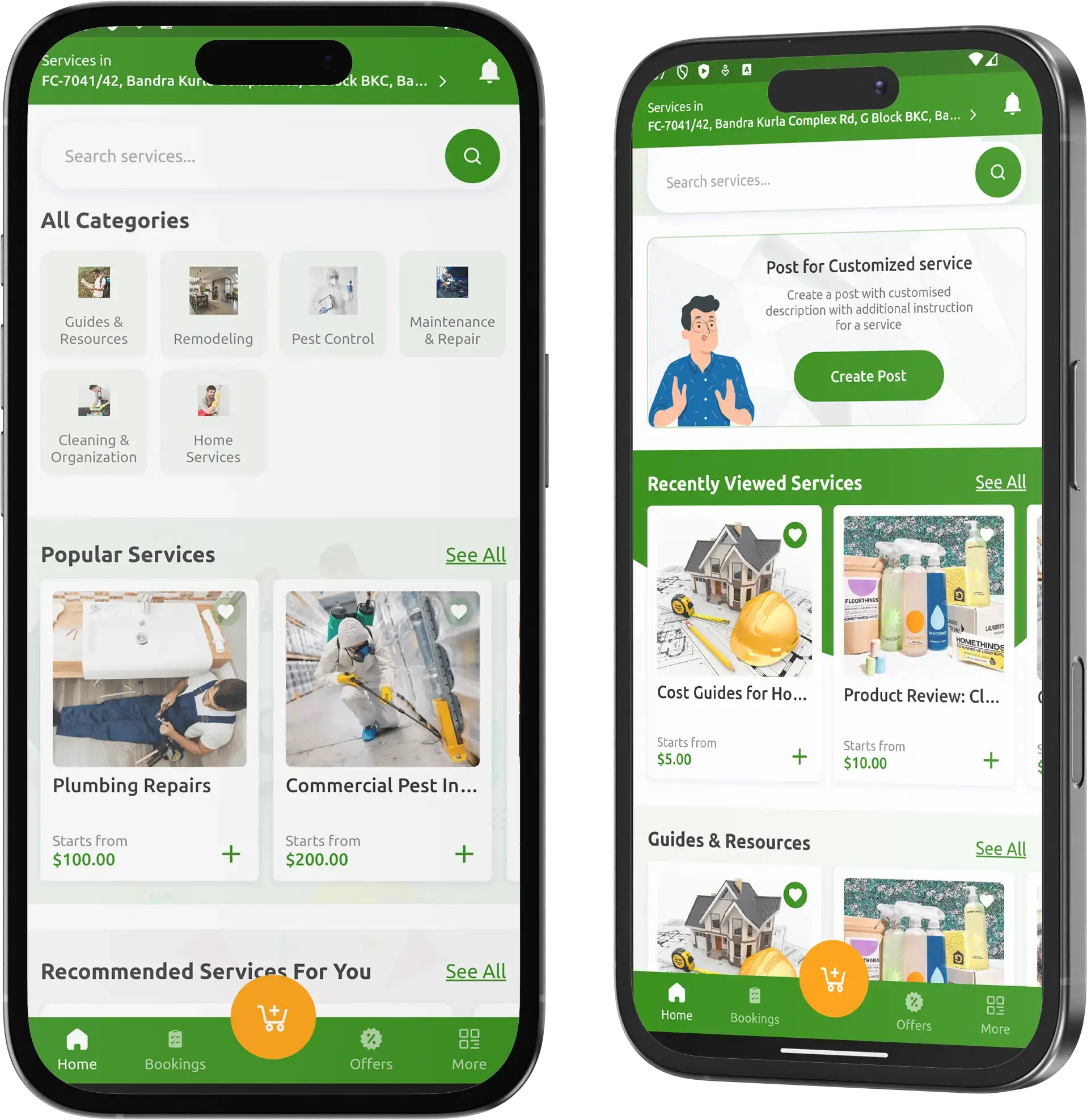
UrbanClap Clone home services app on two phones with categories, popular services and recently viewed services.02
Pick it if: You book professionals into a home, not a dog parkUrbanClap Clone

A home-services booking marketplace with service categories, provider profiles and an operator console.

Explore Solution
Thumbtack Clone local services marketplace: two skilled tradespeople talking in a workshop.03
Pick it if: You want quotes rather than fixed-price slotsThumbtack Clone

A local-services marketplace where customers post a job and nearby professionals respond with quotes.

Explore Solution

Uber for Massage on-demand wellness booking: a rolled towel, candles and stones on a wooden table.04
Pick it if: Your services are appointments for peopleUber for Massage

An on-demand wellness booking app for treatments at home or in a studio.

Explore Solution
CatalogAll 90+ solutions

09The business case

Market Benchmarks

Pet Care Market Benchmarks - Independent 2025-2026 Data

The revenue models above are ours. The figures below are not. They come from the American Pet Products Association and from the annual reports on Form 10-K of Rover, Wag! and Chewy, reproduced as published. Together they show how much US households spend on pets and what listed pet-care marketplaces and retailers actually earn from it.

APPA01

$158bn in US Pet Industry Spending in 2025

The American Pet Products Association reports that US pet industry expenditures reached $158 billion in 2025, up 3.7 percent, and are projected to reach $165 billion in 2026. It also reports that 95 million US households owned at least one pet in 2025, and that ownership remained stable. The release is dated 26 March 2026.

Rover 10-K02

$174.0m in Rover Revenue in 2022, Up 58%

Rover's annual report on Form 10-K for 2022, its latest annual filing, reports revenue of $174.0 million, up 58 percent from $109.8 million. Average booking value was $144, up 15 percent, and repeat bookings rose 36 percent to 4.6 million. Rover says it collects service fees from both pet parents and pet care providers.

Wag! 10-K03

$70.5m in Wag! Revenue in 2024, Down 16%

Wag!'s annual report on Form 10-K for 2024 reports revenue down 16.0 percent to $70.5 million from $83.9 million, citing a 25.8 percent fall in platform participants. About 445,000 participants transacted in the fourth quarter. Services revenue, mostly fees charged to pet caregivers, was $21.6 million, against $24.4 million in 2023.

Chewy 10-K04

$10.5bn in Chewy Autoship Sales in Fiscal 2025

Chewy's annual report on Form 10-K for fiscal 2025 reports net sales up 6.2 percent to $12.6 billion. Autoship customer sales rose 11.8 percent to $10.5 billion, net sales per active customer rose to $591, and active customers grew 4.0 percent to 21.3 million. Chewy also names sponsored ads as a driver of gross margin.

Where each figure comes from.

American Pet Products Association, U.S. Pet Industry Reaches $158 Billion in 2025, Poised for Continued Growth in 2026, 26 March 2026 - americanpetproducts.org

Rover Group, Inc., Annual Report on Form 10-K for the year ended 31 December 2022, filed 9 March 2023 - sec.gov

Wag! Group Co., Annual Report on Form 10-K for the year ended 31 December 2024, filed 24 March 2025 - sec.gov

Chewy, Inc., Annual Report on Form 10-K for the fiscal year ended 1 February 2026, filed 25 March 2026 - sec.gov

All figures are the publishers’ own, reproduced as published. Rover's figures are for fiscal 2022 because that is the most recent annual report it has filed, and Wag!'s are for fiscal 2024. Metric definitions differ by company and are as each publisher states them. They describe the companies and markets named, not any platform Miracuves builds, and nothing here is a revenue projection for your business.

The Commercial Case

Marketability, Revenue Potential & Business Prospects

A dog walking platform from Miracuves earns when owners trust it enough to book a stranger with their pet and walkers trust it enough to build their diary on it. Everything that follows is about making those two decisions easier, and about owning the relationship once they have been made.

  1. 01

    Commission on Every Booking

    The operator keeps a share of each booking, so revenue grows with the number of walks and stays rather than with headcount.

  2. 02

    Several Lines, One Console

    Commission by service, plans and shop sales are separate levers in the same admin panel, so you can switch one on without redesigning the rest.

  3. 03

    Owned Owners and Providers

    Owner accounts, pet profiles and booking history sit in your database, so the value of the platform accumulates with you and not with a directory.

  4. 04

    Exit Optionality

    You hold the complete source code, so a future change of host, team or direction needs no one's permission.

Main Revenue Levers
  • Booking Commission
  • Commission by Service
  • Booking Extras
  • Payment Cost Recovery
  • Subscription Plans
  • Pet Shop Sales
Long-Term Value

Defensibility comes from supply and trust rather than features.

  1. 01Walkers with their own prices and clients do not casually move
  2. 02Owners with pet profiles and a history have a reason to return
  3. 03That history builds from day one and is stored in your own database
  4. 04Careful vetting of who joins is the second moat
Example Revenue Scenarios

These three cases differ only in how many providers are listed, and each names the lever that leads at that size. They are examples for planning conversations, not predictions of what any platform will earn.

Neighborhood Walking Service10Walkers Listed

The booking commission carries early revenue.

A small local service where a handful of walkers take bookings and the commission on each paid walk covers running costs. Illustrative size, not a forecast.

City Pet-Care Network100Providers Listed

Commission plus extras, plans and the shop.

A city-wide network of walkers, boarders and groomers where services, extras and the shop all add to commission. Illustrative size, not a forecast.

Multi-City Brand1,000Providers Listed

Several cities, with every line active.

A multi-city brand where commission by service, plans and shop sales add up and the admin totals guide where to focus. Illustrative size, not a forecast.

10Why Miracuves

Why Miracuves

Miracuves Compared With Other Dog Walk Clone Developers

Owners of a walking business usually compare four sources: an off-the-shelf booking script, a lone freelancer, an agency, or a proven base whose builders have already shipped it.

Why Founders Choose Miracuves

  • 01

    Pet Profiles Built In

    Pets have their own profiles with a photo, a name and a breed, and every booking starts from one. Generic booking scripts often only know the customer.

  • 02

    Provider Panels Included

    Walkers, boarders, groomers and trainers get panels with their own services and pricing, so the supply side is not an afterthought.

  • 03

    Tax, Commission and Gateways

    Tax, per-service commission and five payment gateways appear in the release log, so the money story is visible from the first booking.

  • 04

    Full Source Code Ownership

    The whole codebase arrives unencrypted, so nobody can reprice it or change the terms later.

  • 05

    Four Surfaces, One Codebase

    Owner app, employee app, web panels and admin panel come together already talking to each other, instead of four projects to join.

  • 06

    Plain Readiness Language

    This page separates base features, priced add-ons such as GPS walk tracking and the accounts you supply yourself, so the scope is agreed before work starts. Two more checks for any pet-care app vendor: can each provider set their own price, and what must you supply before launch? Here providers price their services inside their own panels, and the launch checklist is printed in the FAQ.

Development Company

How to Choose a Dog Walk Clone Development Company

A dog walking app development company should show a product that knows the pet and the provider.

What to look for Miracuves

  • Proof in the product Demo logins for the owner and employee apps today
  • Pet profiles The booking form opens on the owner's saved pets, so each walk or stay is tied to one dog
  • Provider tools Provider panels where each walker sets their own prices
  • Money settings Per-service commission, flexible tax and five named gateways
  • Source ownership Unencrypted source code under your brand
  • Launch and support Owner and employee apps carry your brand in six working days; from launch you get 60 days of guidance, with bug fixes covered for 6 months and updates for 12

Walk away from any vendor who

  • Books a customer but keeps no record of the pet
  • Gives providers no panel of their own
  • Applies one commission to every service
  • Encrypts the owner app and panel code, or rents it under a license

How the Dog Walk Clone Stacks Up Against Scripts and Agencies, Row by Row

CriteriaMiracuvesMiracuves Dog Walk CloneGeneric Booking ScriptCustom Dev Agency
Time to Launch6 days of our build timeUnknown or DIYScoped per project, usually months
Source-Code OwnershipComplete, unencryptedOften limited or lockedUsually yes
Pet-Care DepthPet profiles, booking form, status list and shopPlain appointment pagesWhatever the budget allows
Provider ToolsEmployee app and walker, boarder and trainer panelsRarely includedBuilt to order
Payments & TaxFive gateways named in the log, tax percentage or fixedVaries by scriptCustom integration
Admin & DisputesCommissions, dispute desk, roles and setup wizardThin or absentBuilt to order, extra cost
Security & ComplianceRole permissions, checked uploads, honest limitsMinimalVaries widely
Cost vs Speed vs QualityFixed price, fast, tested baseLow price, high riskExpensive and slow
Ongoing Support & Updates60 days guidance, 6 months bug fixes, 12 months updatesRarely offeredSet by the contract

Few routes to a pet-care platform make it through the first busy season unchanged. This is where they part ways.

Talk to Our Team

Changelog

Release Log of the Dog Walking Platform - Versions & Updates

Release notes for the owner app, the employee app and the admin panel, newest first. The notes carry no dates.

VersionChanges
V2.2.6Added or updated
Support for the Flutter 3.27 line
Fixed a gray screen in the owner app when every banner was switched off and the app refreshed
Added spacing on the employee app sign-up screen
Fixed the Clear Filter button in the employee booking filter
Fixed
Fixed a cut-off image in the Create Customer pop-up
Stopped categories, brands, tags and units that are in use from being deleted
Fixed the layout when adding values to a type in Create Variations
Fixed pagination across the panel
Added a check that rejects corrupted files on image upload
Fixed saving an edited record with a new image, and canceling an upload in edit mode
Stopped duplicate country names being added
Fixed an unwanted notification pop-up on Events
V2.2.5Fixed
Fixed role permissions
Fixed tax calculation
Fixed date-wise total amounts
Fixed search filters
Tidied layout and design
Fixed how the booking address is shown
Fixed search by ID
Fixed earnings calculations so walker staff and admins are paid correctly
Fixed duplicate country names
Fixed tag search
Fixed shop search
V2.2.4Added or updated
Added an additional information section to the booking
Added support for JDK 21
Improved the interface
Fixed the booking filter, the tax percentage and fixed amount, and the Paystack dark mode colors
Fixed Stripe and Razorpay issues
Added a Setup Wizard for first-time onboarding in the admin panel
V2.2.3Added or updated
Added customizable notification templates in the admin panel, set per user role
Added a country picker to the sign-up screen
Fixed a payment amount mismatch, an address mismatch and the Google login
Improved app performance
V2.2.0Added or updated
Trimmed the app configuration calls that fired without need
Moved Firebase push notifications from the legacy FCM APIs to HTTP v1
V2.1.0Added or updated
Added multi-vendor support, so boarders, walkers and trainers manage their own services and pricing
Added the Cinet and Sadad payment gateways

Let's build together

Let's take your dog walking idea and make it a working platform.

Book a free consultation and leave with a clear timeline and honest answers to your questions. We would rather earn your trust than close a fast sale.

  • First response under 2 hours
  • Free consultation
  • No lock-in contracts
  • Full source code ownership

11Learn more

Blog & Resources

Dog Walk Clone App: Newest Guides & Insights

Stay up to date with guides on how a dog walking business is built, how its revenue model works and how the platform is structured.

The product5 questions

01What is the Dog Walk Clone platform?

The Dog Walk Clone is a ready-made, white-label booking platform for dog walking and the pet care around it, built by Miracuves. Owners keep a profile for each pet and book walks, boarding, day care, grooming, training or veterinary visits, providers work from panels of their own, and the operator runs the business from an admin panel. It launches rebranded in 6 days, with the complete source code.

02Is the platform customizable to fit my business needs?

Yes. Your branding, services, commission percentages and tax settings are configured for you at launch, and because you receive the complete source code, screens, flows and features can be changed afterwards by your team or ours. Work beyond the base, such as an add-on or a custom flow, is scoped and quoted in writing before it starts.

03Is the platform available globally?

It can be deployed wherever you hold hosting and a payment gateway account. The sign-up screen has a country picker, the admin panel manages countries, and the release log names five gateways: Stripe, Razorpay, Paystack, Cinet and Sadad. Rules for pet care differ by country and by state or city, so check them for each market you serve.

04Does the Dog Walk Clone include GPS tracking of walks?

It is available as an add-on. GPS Tracking gives owners real-time location of a pet during a walk or while it is being transported. It is scoped and priced separately.

05Is the app available on both iOS and Android?

Yes. Both the owner app and the employee app are built with Flutter for Android and iOS, and we publish them from developer accounts that you own. Store review is handled by Apple and Google and sits outside our 6-day build time.

Booking & pets3 questions

06How does the owner booking process work?

An owner signs up, opens the service tiles on the home screen, chooses a pet, sets the drop-off and pickup times, picks a provider and ticks any extra facilities. The form shows the total with tax included, and Book Now sends the booking. A confirmation shows the booking ID and offers an Add to Google Calendar link, and the booking then appears in the bookings list with its status and a Cancel button.

07What is stored in a pet profile?

The My Pets screen lists each pet with a photo, a name and a breed, and has an Add Pet button. The owner picks the pet from the list whenever a booking is made. The demo list mixes dogs, rabbits, fish and birds. Richer pet records, such as health notes, are not part of the base build and can be scoped as custom work.

08Can I manage multiple pets at once?

Yes. A boarder sets a capacity limit and manages several bookings from the dashboard, and an owner can keep as many pets on a profile as they need.

Boarders, groomers & trainers8 questions

09How do I list my pet boarding services?

Once you register as a boarder, you create a profile, list your services, set your prices and say when you are available.

10How do I get paid for boarding services?

When a booking is completed, the payment is processed through the platform and passed on to the bank account linked to your profile.

11How can I register as a pet groomer?

Sign up as a groomer, fill in your profile, upload your certifications and start offering grooming services.

12Do I need to visit the pet owner’s location?

That is up to you. You can offer at-home grooming, in-store service or both, and say which on your profile.

13How are grooming appointments scheduled?

Owners see your availability in the app and book an open slot.

14Can I offer different types of training programs?

Yes. List every program you run, such as obedience training, behavioral correction or puppy training.

15How do I communicate with pet owners?

Through in-app messaging: you can chat, start a video call or send updates.

16Can I set my own pricing for training sessions?

Yes. Trainers control their own prices and the length of each session.

Admin, money & payments6 questions

17What are the main revenue models supported?

The base platform earns through a commission on bookings, with the percentage set per service, through extras on the booking form and through product sales in the shop. Subscription plans come with the Subscription System add-on. Other income, such as partner offers, depends on arrangements of your own.

18What controls does the admin panel offer?

The admin panel manages users, bookings, payments, commissions, taxes and platform settings. It also holds the shop catalog, roles and permissions, notification templates, countries and app banners, and a setup wizard for the first launch.

19Can I set commission rates for service providers?

Yes. You set a commission percentage for each service, so a walk, a grooming slot and a training session can carry different rates.

20How do I handle disputes or complaints?

Open the dispute desk in the admin panel to handle complaints, refunds and support tickets, with the booking record and its status behind each case.

21What is a believable road to first revenue?

Most dog walking platforms start with the booking commission, because it needs nothing extra to sell: the first paid walk earns it. Commission by service and booking extras come next, as more services are listed. Plans need the Subscription System add-on, and the shop adds product margin once owners are using the app regularly. Referral and partner income depend on arrangements of your own and are agreed rather than built in.

22How defensible is a dog walking marketplace?

Defensibility comes from supply and trust rather than features. Walkers who have built their services, prices and regular clients on your platform do not casually move, and owners with pet profiles, a booking history and reviews have a reason to return. The platform lets that accumulation start at launch and keeps it in your database. Careful vetting of who joins is the second moat, because a platform people trust with their pets is hard to copy.

Launch & Miracuves12 questions

23Do you provide technical support and updates?

Yes. Every ready-made solution carries three cover periods that run side by side from launch: 60 days of dedicated platform guidance, 6 months of priority bug resolution and 12 months of continuous product evolution, at no extra cost.

24What is the timeline for deploying the solution?

Our build time is 6 working days: we rebrand the apps and the web platform with your details, deploy to your hosting and publish from your developer accounts. Store review by Apple and Google is separate and outside our control, so it is not promised inside the 6 days.

25Am I handed the source code on purchase?

Yes. The complete source code arrives with no encryption, so your team can change it, extend it and redeploy it. Nothing is charged per seat, and no license is needed to keep running it.

26What do I need to supply before launch?

Hosting with a domain, store developer accounts that you own and have verified, your branding and business details, a payment gateway already onboarded with KYC completed, and any third-party keys. Miracuves does not submit gateway applications on your behalf, and it does not write your privacy policy or terms.

27What are the reasons to pick Miracuves for a Dog Walk clone build?

With 9,000+ projects delivered for 6,000+ clients, and 90+ ready-made solutions in the catalog, Miracuves ships a Dog Walk Clone in 6 days with the complete source code and three support periods that run side by side. This page also says plainly what is base, what is an add-on and what you supply yourself.

28How much does a dog walk clone cost?

Our dog walk clone costs $2,499 once. For that you get the pet owner app, the employee app, provider panels for walkers, boarders, groomers and trainers, the admin console with commissions and disputes, the pet shop and the full unencrypted codebase, all carrying your brand on your own hosting. Add-on modules such as GPS walk tracking or subscriptions, and custom flows, are priced in writing before anyone starts.

29Is a ready-made dog walking app better than custom development?

For most walking businesses it is the quicker and cheaper start. Pet profiles, timed bookings, provider pricing, payments and a shop are already built for you to try in the demo, with go-live 6 working days after kickoff. Commissioning the same dog walking app from nothing costs more and takes longer. Features unique to your service, such as a custom walker approval step, are added on a written quote, typically over 2-8 weeks.

30Does the dog walking app check walkers before they take bookings?

No automated background or identity check and no insurance come inside the software, so screening walkers stays part of your own onboarding process, as it does for most marketplace operators. Providers register and run their profiles from their panels, and you decide who works on the platform. If your process needs a dedicated approval step in the console, Miracuves can scope and quote it in writing.

31What is the step-by-step process to launch my dog walk clone?

Book a walk in the demo, then sign in as a provider. Next, agree your services and money rules and send hosting, a domain, store accounts, a gateway with KYC done and Google and Firebase keys. Miracuves rebrands the apps and web platform, puts them on your server, configures them through the setup wizard and hands over the code. Six working days later walks can be booked, while store review follows separately.

32What pet care businesses can run on the Dog Walk clone?

Dog walking and pet sitting services take visits by date, while boarding and day care operators take stays with drop-off and pickup times. Grooming salons and mobile groomers sell slots, trainers list programs and session lengths, and veterinary clinics add an appointment type. Pet shops, transport services and franchise networks can run under one brand.

33Can I sell pet products in the Dog Walk clone app?

Yes. The platform includes a pet shop, and the admin panel holds the shop catalog. Product sales are one revenue line beside booking commission, and the shop adds product margin once owners use the app regularly. The shop is part of the $2,499 price, not a separate purchase.

34Does the Dog Walk clone handle tax on bookings?

Yes. Tax settings are configured for you at launch, and the admin panel manages taxes alongside commissions and payments. Owners see the total with tax included on the booking form before they press Book Now. Check local tax requirements for each market you serve.

Disclaimer

Miracuves is an independent software development company. This platform is our own product and is not affiliated with, connected to, sponsored by, or endorsed by any third-party service.

Read our full Legal Notice & Disclaimer →
Why this name

“Dog Walk Clone” is used descriptively. It is how the software industry refers to building a platform of this category, and how clients search for it.

Who built this

The entire design and codebase is built by our own team. The product contains no code, design, graphics, or content originating from any third-party website or application.

Trademarks

All third-party names and marks that may appear on this page are the property of their respective owners, referenced solely to describe the category of software offered.