















Thumbtack Clone App - White-Label Local Services Marketplace
Service Marketplace Clone Script with Provider Ratings, Wallet Payments and Serviceman Apps
A launch-ready marketplace for local professionals. Customers browse service categories or post a custom job request with a description, an address and a preferred time, choose a provider by rating and review, and pay from a wallet, while the operator sets how far a provider may travel and which nearby pros appear in the featured rows.
One codebase gives you three apps and four panels. Customers get an app and a website, providers get an app and a panel, the serviceman app is for the people who carry out the jobs, and the admin panel tracks earnings, commission, withdrawals and service zones. It ships white-label, source code included.
Launch in 6 Days with
- 60 Days Platform Guidance
- Complete Source Code
- Complete Rebranding
- Complete White-Labeling
- App Publishing Support
- 6 Months Bug Fixes + 12 Months Updates
Service desk activity
- Custom job request postedRequests
- Extra charges added at job endBilling
- Provider onboarding request inProviders
- Booking pending a providerBookings
- Provider withdrawal approvedPayouts
- Coupon applied at checkoutCoupons
- Rating left after a finished jobReviews
- Banner added to a featured rowFeatured
- Custom job request postedRequests
- Extra charges added at job endBilling
- Provider onboarding request inProviders
- Booking pending a providerBookings
- Provider withdrawal approvedPayouts
- Coupon applied at checkoutCoupons
- Rating left after a finished jobReviews
- Banner added to a featured rowFeatured

Platform at a Glance
our build time, store review is separate
customer, provider and serviceman
customer site, admin, provider, serviceman
delivered complete, with no encryption
Jobs That Do Not Fit a Catalog
A customer who cannot find the right listing posts a custom job from the home screen: category, address, preferred time and a written description.
Bills That Match the Work
A provider can add extra charges while ending a booking, so the final amount follows what the job turned out to need.
01See it live
Live in Action
Thumbtack Clone Demo - Customer, Provider & Serviceman Apps and Web Panels
Open the Miracuves Thumbtack Clone demo and play each role in turn. Three app logins cover the customer, the provider and the serviceman, and the web panels open from the links on the web card. Browse a category, open a service, post a custom job and look at the wallet.

Thumbtack Clone - Customer App
On the customer's phone a person can browse categories and popular services, open a service page, post a custom job request, then book, pay and follow the booking through to the end.
- 1Open the app portal and pick your phone
- 2Sign in with the demo login below
- 3Explore: Categories, Post, Bookings, Wallet
user@demo.com | User_321Provider App - Business Owner Tools
The professional side on a phone: sign up, wait for approval, list services, take bookings, chat with customers and watch earnings.
- 1Open the app portal and pick your phone
- 2Log in with the provider details below
- 3Explore: Bookings, Services, Chat, Earnings
provider@demo.com | Provider_321Serviceman App - Field Staff Tools
On the worker's phone, availability is set, assigned jobs and upcoming bookings show up, customer instructions can be read, and earnings and tips are tracked.
- 1Open the app portal and pick your phone
- 2Log in with the serviceman details below
- 3Explore: Jobs, Schedule, Availability, Earnings
serviceman@demo.com | Serviceman_321
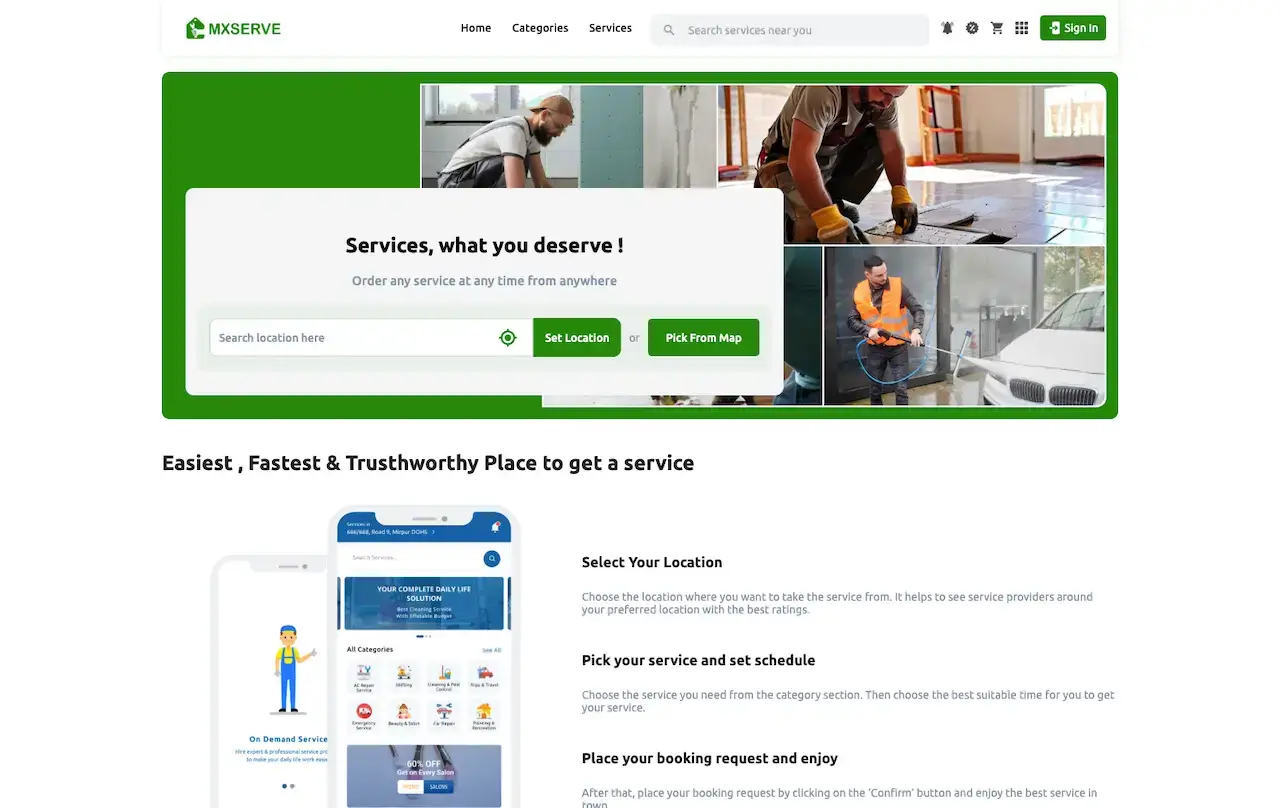
Customer Website & Admin Panel
The responsive customer site with a location search and categories, plus the operator console for earnings, bookings, providers, promotions and service zones.
- 1Open the demo site in a browser tab
- 2Look around the customer site, then the admin login page
- 3Explore: Dashboard, Providers, Coupons, Zones
shared on a guided callWatch It Run
Thumbtack Clone Video Walkthrough: Categories, Custom Jobs, Bookings & Admin
Press play for a tour of the local services marketplace in action, then book a live call to see the same screens set against your own plan: your categories, your service area, your commission and your launch date.
Schedule a live walkthrough call.Every Screen Mapped
Thumbtack Clone Screens and Journeys - Customer App, Admin Dashboard & Customer Website
From the category grid to the wallet: the real screens a customer sees in the app, the admin dashboard where the operator follows the business, and the customer website, in the order a job actually moves.
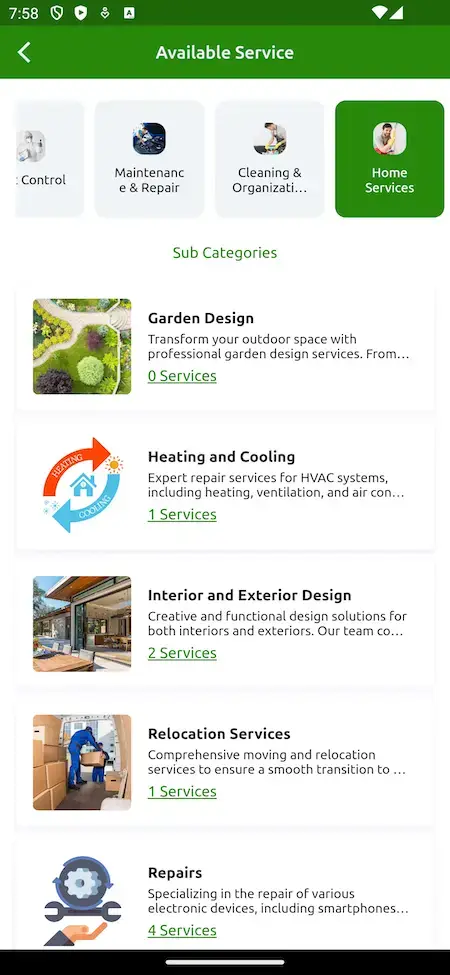
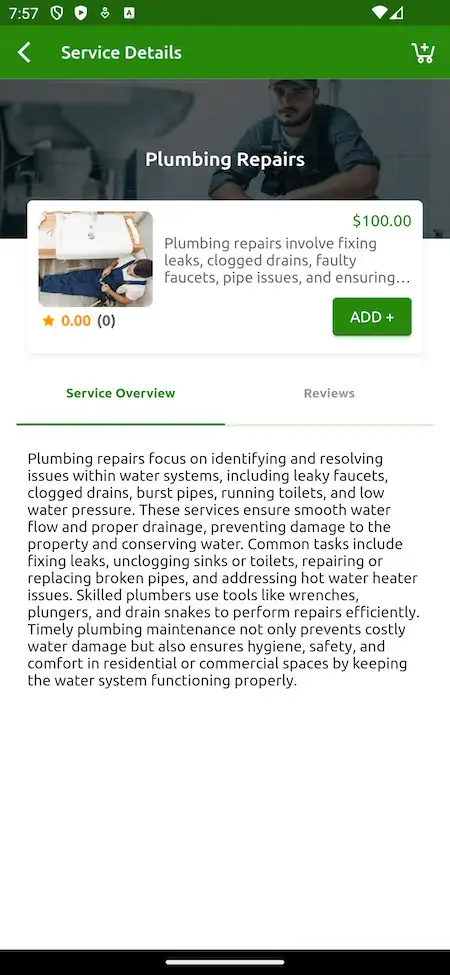
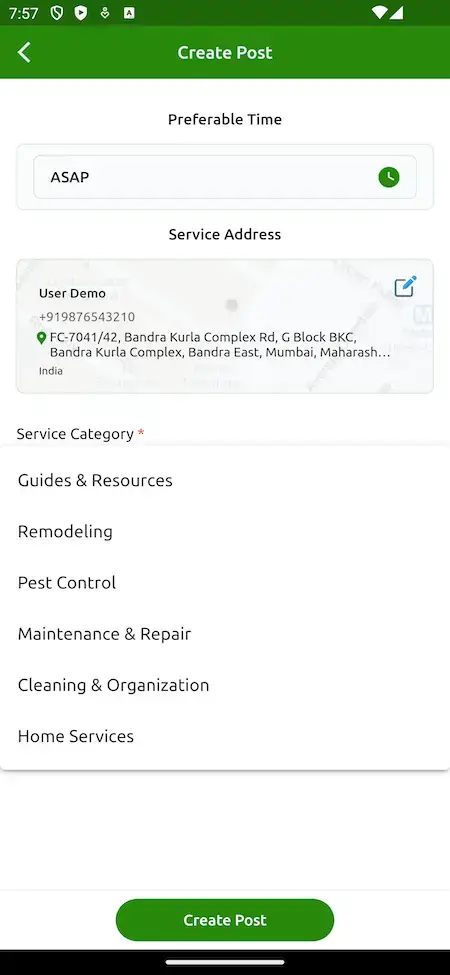
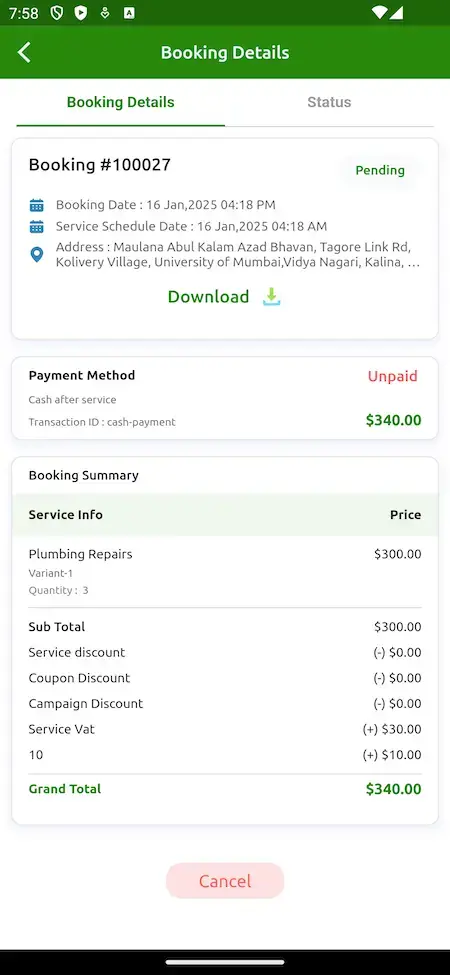
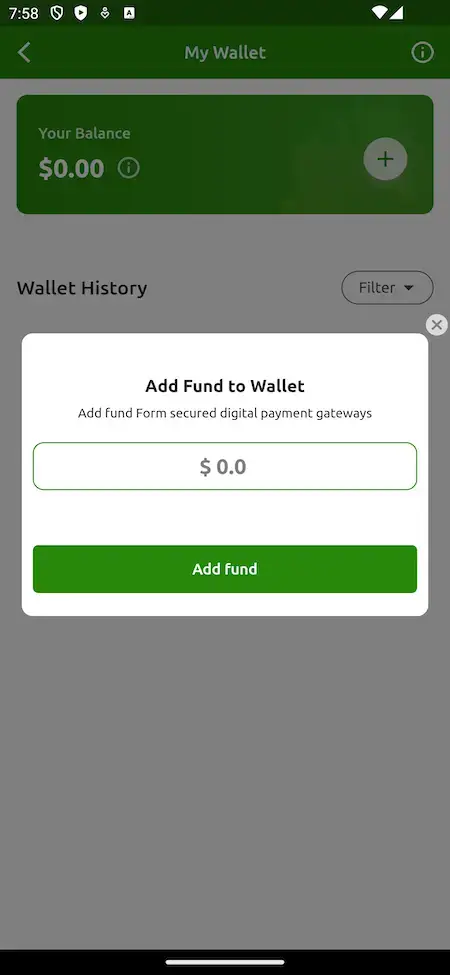
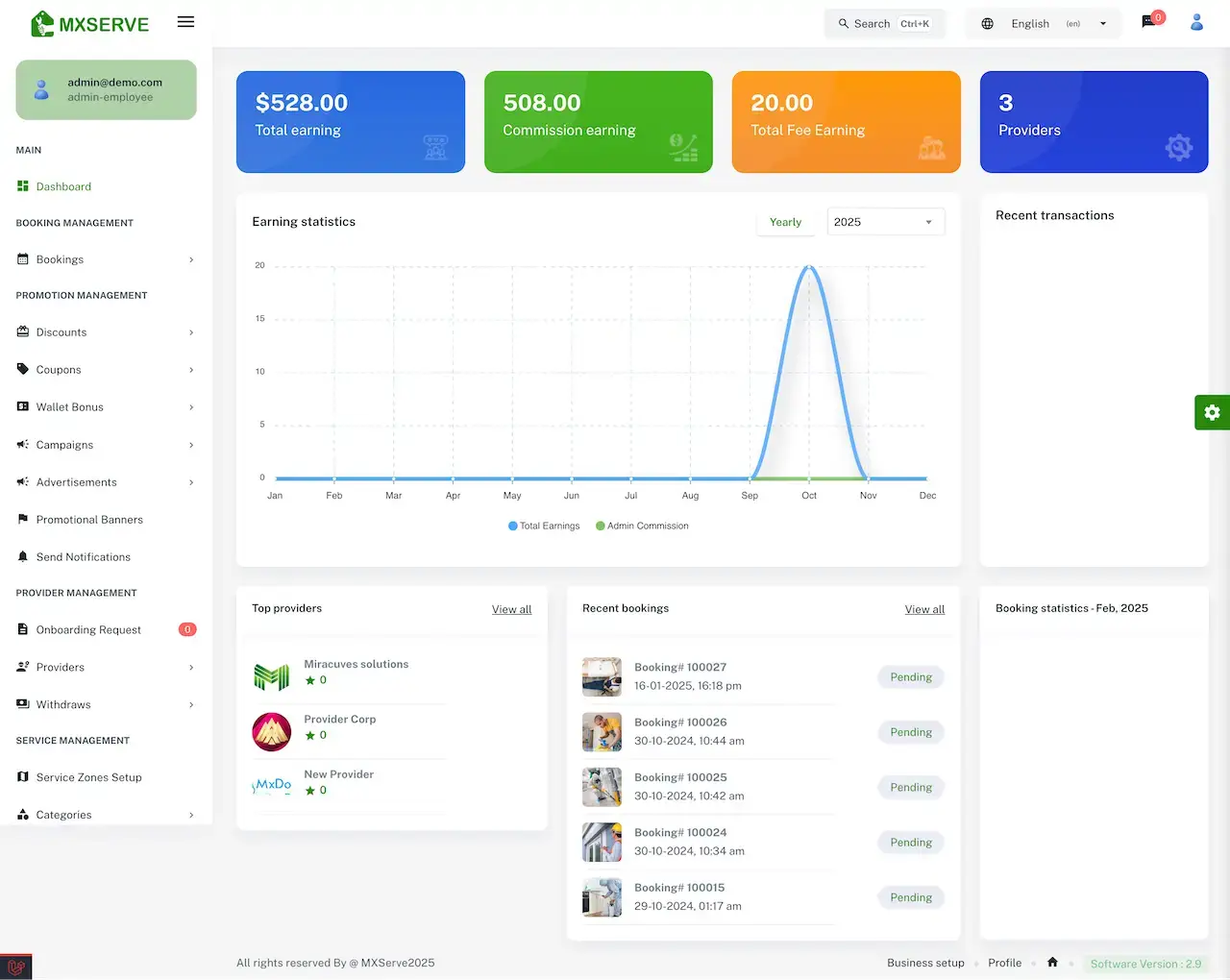


Follow a customer from the category grid through a service page or a custom job post to a booking and a wallet balance, then see where the operator watches the same activity on the admin dashboard.
02Proof
Client Voices
Thumbtack Clone Client Reviews - Operators in Their Own Words
What clients say about building on Miracuves bases. The first two come from services marketplaces built on this product family; the rest come from other industries and are shown exactly as their authors gave them.
“Provider onboarding, quoting, booking and payments came off the shelf. We added our service categories and our vetting rules. Both sides of the marketplace were live inside a month.”
“We run several service types off one platform. The dispatch and booking core already supported that, so the work was our service definitions and pricing. Delivered under a month.”
“Every HMS I tried was built for general physicians, with no lesion mapping, no before/after tracking, and no procedure-based billing. Their MXHealth base gave us the patient app, doctor app, EMR and video consult out of the box. Front-desk time on scheduling and follow-ups is down ~70%, and we went fully digital in 9 months, where a fully custom job would have been 18.”
“Turo is the obvious reference, but the Caribbean specifics, from different insurance norms to different payment rails, meant we needed a real partner, not just a clone. Miracuves’s MXCar base covered the listing, the trip flow, and the host payouts. We launched in 6 working days and are live in three islands.”
“The team was running it on a dispatcher and a Google Sheet, and we needed a real platform quickly, because we were about to onboard a major retail client. Miracuves’s Delivery Genie base gave us the rider app, the dispatch console, and live tracking. We launched in 6 weeks and cleared 4x the previous order volume in the first month.”
“We were running it on phone calls and a paper calendar, and we were losing bookings to bigger OTAs. Miracuves’s GetmyBoat Clone base gave us the calendar, the booking flow, and the payment engine. Online bookings are up roughly 70% in the first six months, and the ops team finally has a live view of the fleet.”
“Building a compliant telehealth stack from scratch in three markets would have been a year-plus effort. Miracuves’s MXHealth base covered the patient and doctor apps, video consult, e-prescription and the pharmacy integrations. We launched in our first market in 9 weeks and rolled out to two more in the following six months.”
“We were juggling spreadsheets, a third-party GPS provider, and a phone. We needed a single operations console. Miracuves’s MXLogistics base covered the trip lifecycle, the driver app, and the customer tracking page. We’ve cut operations admin time by about 40%.”
Proof in Production
Thumbtack Clone Case Study - Saas Home Services Marketplace
How a home services marketplace launched on the Miracuves Thumbtack Clone base. Summarized from the published case study, which states architectural and contractual facts and carries no client outcome figures.
Saas Home Services needed both sides of a home services marketplace. Miracuves started from the Thumbtack Clone base, reused what was already proven and spent the effort on the five decisions that were the client's own.

- The price is not known when a job is requested, so a job has to stay open while providers respond
- Customers let a stranger into their home, so vetting, reviews and proof of completion carry the deal
- A person with a route and a checklist has to reach the job, which is operations and not only booking
- Stand up both sides of a services marketplace without rebuilding mechanics that were already proven
- Put the effort into the five decisions that belonged to the client
- Hold the source code, schema and deployment configuration outright
- Customer, provider, serviceman and admin applications, each with its own permissions
- Service catalogue, provider network, pricing model, payment gateways and brand theming built for the client
- 20 of 25 platform blocks reused unchanged
- Source, schema, deployment configuration and architecture notes handed over
- Build window of 6 working days on the ready-made base
“Provider onboarding, quoting, booking and payments came off the shelf. We added our service categories and our vetting rules. Both sides of the marketplace were live inside a month.”Saas Home Services Team · Founding team, Saas Home Services
03The product
The Basics
What the Thumbtack Clone App Does for Customers and Local Pros
A Thumbtack Clone is a ready-made marketplace for local professionals. Customers look through service categories or post a custom job, providers take the work, servicemen carry it out, and the operator sits in the middle with an admin panel that follows earnings, commission and withdrawals.
More Than a Directory
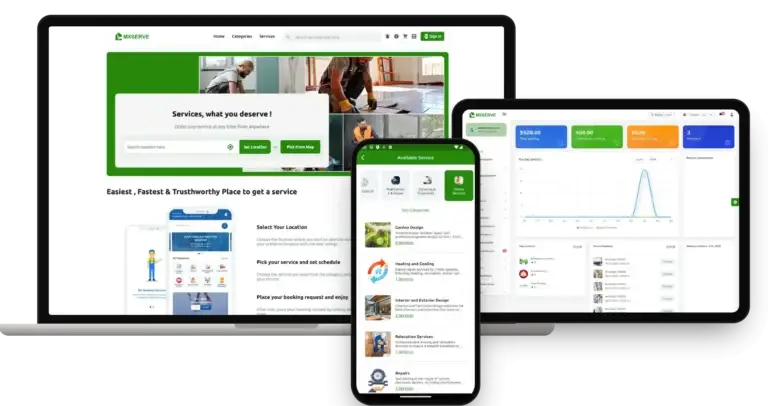
The value sits around the listing: custom job posts, provider approval, a wallet, chat before and after booking, promotions and an admin console that tracks earnings.
Not a Locked Box
You get the complete source code with no encryption, so your team can reshape flows and screens as the marketplace grows, with no per-seat fee on top.
Plain About What Is Extra
An in-app shop, service packages, virtual consultations and a skill-sharing area are add-ons priced on their own. They are listed as add-ons and never counted as base features.
Web, Android & iOS
What Is a Thumbtack Clone Script?
The hard part of a services marketplace is rarely the catalog. It is what happens around a job: how a request is described, who is allowed to take it, how the bill changes when the work changes and how money moves back to the people who did it. Those parts ship working.

- 01Service categories, search and popular services
- 02Custom job requests with address, time and description
- 03Provider choice by rating, review and availability
- 04Wallet, coupons and several payment gateways
- 05Admin panel with provider approval and service zones
The package holds three mobile apps and four web panels. The apps are for customers, providers and servicemen; the panels are the customer site plus admin, provider and serviceman panels. Flutter powers the apps, and the full source code is included.
Everything Included
Thumbtack Clone Features - Categories, Custom Jobs, Nearby Pros, Booking, Wallet & Admin
Each item below is visible in the app screens, the admin panel or the release log. If something requires an additional module, it is called out as an add-on later on this page.
Browse Categories & Search Services
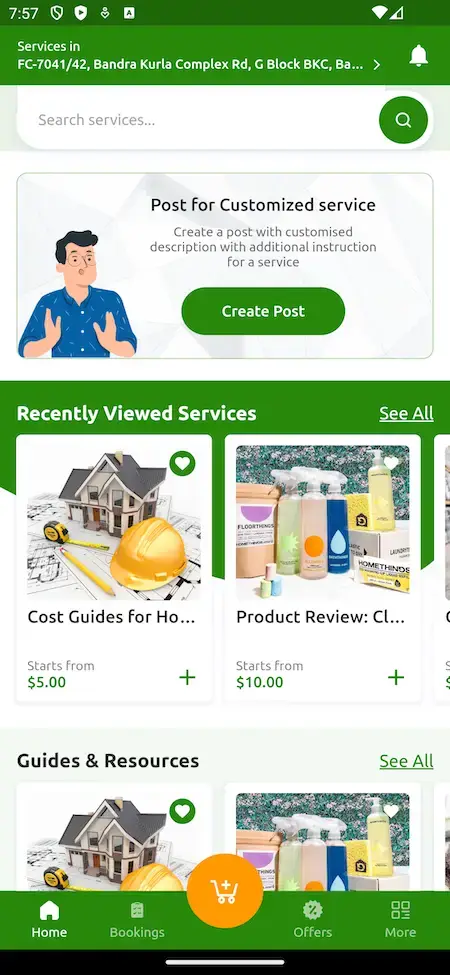
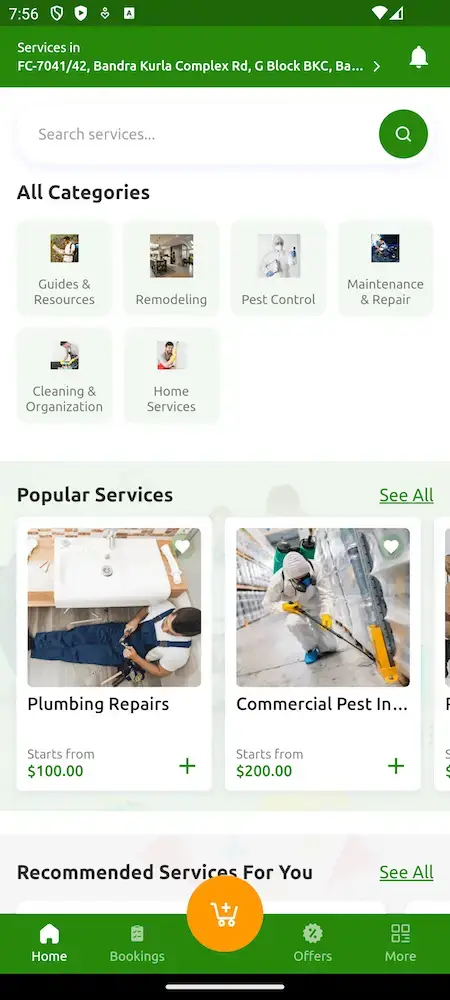
The customer home screen opens on a service search bar, an All Categories grid and rows for popular and recommended services, each with a starting price.
- Search bar for services and providers
- All Categories grid on the home screen
- Popular services with a starting price
- Recommended and recently viewed rows
- Guides and resources next to services
- Services shown for the saved address
Custom Job Requests
When no listing fits, a customer posts a custom job from the home screen. The base also holds a quoting step in which providers respond, as the published Saas Home Services case study describes it.
- Post for Customized Service card on the home screen
- Create Post with preferable time, such as ASAP
- Service address with an edit control
- Service category picked from a list
- Free-text description with extra instructions
- Added in release 3.0.0
Service Pages & Provider Choice
Each service has its own page with a price, an Add button, an overview and reviews. Customers pick a provider by rating, review and availability, or stay with one they know.
- Service overview and Reviews tabs
- Price and Add to booking on every service
- Choose a provider by rating, reviews or availability
- Keep a preferred provider
- Search services and providers on the web
- Sub-categories under each category
Nearby Provider Matching
The admin decides how far a provider may serve, in miles, and can build featured rows from the providers closest to the customer.
- Provider radius set in miles
- Nearby Providers option for featured sections
- Service zones set up in the admin panel
- Banners inside featured sections
- Location shown at the top of the app
- GPS used to place customers and providers
Booking & Scheduling
A booking carries a number, a status, a schedule date and an address, and customers can book at once or ahead of time.
- Booking number, status and schedule date
- Instant booking and advance scheduling
- Booking history in the account
- Recent and ongoing bookings on the web home page
- Cancel control on the booking page
- Download option on booking details
Extra Charges at Job End
When a job takes more than planned, the provider adds extra charges while ending the booking, and the totals on the booking summary follow.
- Provider adds extra charges when ending a booking
- Sub total, service discount and coupon discount lines
- Campaign discount and service VAT lines
- Grand total on the booking summary
- Payment method and paid or unpaid status
- Added in release 3.0.0
Chat Before & After Booking
Customers can ask a provider a question before they book, and keep talking once the job is booked. The admin controls both chats from one settings page.
- Presale enquiry chat with a provider
- Pre-booking and post-booking chat switches
- Chat with providers and the admin on the web
- Calling from the app for job details
- Chat settings managed globally by the admin
- Customer instructions shown on the job screen
Wallet, Payments & Gateways
Customers hold a balance in an in-app wallet with a history and an Add Fund form, and the operator can switch on several payment gateways together.
- Wallet balance and wallet history with a filter
- Add Fund form for top-ups
- Cash after service shown as a payment method
- Several gateways enabled at once
- Flutterwave gateway support
- Paystack payment options widened
Ratings & Reviews
After a job the customer rates the provider and can write a review, and the rating shows up on service pages so the next customer can use it.
- Rate a provider right after completion
- Reviews tab on every service page
- Ratings on provider listings
- Review prompts by SMS through Twilio
- Ratings count toward provider choice
- Admin oversight of providers and disputes
Provider App & Panel
Professionals register through the provider app or panel, send their documents, wait for approval and then list and manage their own services.
- Registration with documents and ID
- Onboarding request approved by the admin
- Services managed through a CSV import
- Duplicate a service or promo code
- Media gallery in the provider panel
- Earnings tracked in the wallet
Serviceman App
The person doing the job gets their own app: set availability, see assigned jobs and upcoming bookings, read the customer notes and keep a record of earnings.
- Availability switch for ready or off duty
- Assigned jobs and scheduled tasks
- Customer notes on the job detail screen
- Chat or call to clarify a request
- Completed, ongoing and canceled job history
- Earnings, tips and commission deducted
Promotions & Marketing
The admin panel runs discounts, coupons, campaigns, wallet bonuses, banners and advertisements, plus email marketing with editable templates.
- Discounts and coupons menus
- Campaigns and wallet bonus
- Advertisements and promotional banners
- Send notification to users
- Email marketing and predefined templates
- Google and Apple sign-in for customers
Before you buy, note this: Your identity is applied across the finished platform before it reaches you. You bring hosting and a domain, a verified developer account for the stores, your branding and business details, a payment gateway that is already onboarded with KYC finished, and any third-party keys. Apple and Google control store review, so it falls outside our 6-day build time.
Operate It Day to Day
Thumbtack Clone Admin Panel - Providers, Bookings, Promotions & Service Zones
One console covers the operator's day: which bookings are waiting, which providers are applying, what each coupon costs, where the money sits and what the public site says.


Admin Panel Sections
- 01
Dashboard & Earnings
Tiles for total earning, commission earning, fee earning and providers, a yearly earning chart, top providers, recent bookings and recent transactions.
- 02
Booking Management
Every booking in one list with its number, date and status, such as Pending, so the operator sees what is waiting on a provider.
- 03
Promotions
Discounts, coupons, wallet bonus and campaigns, plus advertisements and promotional banners, all from one menu group.
- 04
Provider Management
Onboarding requests with a pending count, the provider list and withdrawal requests, with document checks before a provider goes live.
- 05
Service Setup
Service zones, categories and the services themselves, with CSV import and duplicate options to build the catalogue quickly.
- 06
Users & Disputes
Add, remove or suspend customer and provider accounts, set commission rates and step into disputes when a job goes wrong.
- 07
Messages & Notifications
Chat settings, notification controls for SMS, push and email, predefined email templates and an email marketing option.
- 08
System & Settings
Business setup, a media and gallery area, menu search, database backup, Amazon S3 storage and right-to-left layout for the panels.
Money Movement
The finance side of the console, from a customer top-up to a provider withdrawal.
- Commission and fee earning on the dashboard
- Withdrawal requests from providers
- Wallet bonus and coupon cost control
- Several payment gateways at once
Settings & Tools
The controls behind the public site and the daily operation.
- Business setup and profile
- Search across the admin menus
- Database backup
- Panel layout in right-to-left languages
Need the console to do more? Extra reports, another payout rhythm, more languages or a custom approval step are scoped on their own. Tell us what your operations team needs and we will quote it in writing.
04Package and price
The Full Package
Package Contents: Source Code, Apps & Deployment for Your Thumbtack Clone
What arrives is a finished marketplace, not a bundle of loose components: three apps, four web panels, the source code and the schema underneath. You own it outright. There is no per-seat or per-run charge, and keeping it running needs no license.
$ git clone your-marketplace Full Source Code
The complete source for the web platform and the mobile apps, with no encryption, so your team can change it to suit your business.
- Web platform source, unencrypted
- Flutter source for the Android and iOS apps
- Yours to modify, extend and redeploy
- Delivered into your own repository
Schema & Documentation
The database structure behind services, bookings, providers, wallets and content, delivered with the notes another team needs to run it.
- Database schema you can rebuild from empty
- MySQL data tier
- Deployment configuration written down
- Architecture notes transferred
Messaging & Notifications
Chat between customer and provider, SMS through Twilio, push through Firebase and editable email templates for the rest.
- Presale and post-booking chat
- Twilio SMS for OTPs, bookings and reviews
- Push notifications and alerts
- Predefined email templates

Web Panels
The responsive customer site plus the admin, provider and serviceman panels, each a separate login with its own permissions.
- Customer site with location search
- Admin panel for the operator
- Provider panel for businesses
- Serviceman panel for field staff
Customer, Provider & Serviceman Apps
Three Flutter apps covering browsing, custom jobs, bookings, wallet, availability and earnings, published from your own developer accounts.
- Customer app: categories, custom job, booking
- Provider app: services, bookings, earnings
- Serviceman app: jobs, schedule, availability
- Help publishing the apps from your own developer accounts


Admin Panel
The operator console with earning tiles, bookings, promotions, provider onboarding, withdrawals, service zones and system settings.
- Dashboard with earnings and top providers
- Coupons, campaigns, banners and advertisements
- Provider onboarding and withdrawals
- Service zones, categories and backup
Access & Security Layer
Separate logins and permissions for every role, with payment details held by the gateway you connect.
- Separate roles with their own permissions
- Customer, provider, serviceman and admin logins
- Card numbers are held by the gateway
- Keys kept out of the repository
Handover & Support
Rebranding and deployment done for you, a handover pack and the three support periods that run side by side from launch.
- Rebranding with your logo, icons and colors
- Deployment to your hosting
- Amazon S3 storage option for media
- 60 days guidance, 6 months bug fixes, 12 months updates
Want to see it before deciding? Log in to the demo as a customer, a provider or a serviceman, or ask for a guided tour. We can walk through a category, a custom job post, a booking and the wallet, each set against your own marketplace plan.
Transparent Pricing
How Much Does It Cost to Build a Local Services Marketplace Like Thumbtack?
The launch-ready white-label Thumbtack Clone is a fixed price of $2,799. Work beyond the base, such as add-ons, extra integrations or custom flows, is scoped and quoted separately in writing.
Professional
Ready-Made Launch PackageChosen by: Local-pro marketplace startups, regional service directories, repair and maintenance businesses
The platform arrives as the demo shows it, rebranded to your logo, icons and colors, and deployed on your own hosting.
Get StartedEnterprise
Custom Builds for Larger ScopeChosen by: Franchise networks, multi-country operators, businesses with their own dispatch rules
Need flows the base does not have? We build to your requirements and agree the scope and price before work starts.
Request a Quote05Who it is for
Know Your Buyer
Who Is This Thumbtack Clone App For?
It suits anyone connecting people who need a job done with local professionals who can do it, and who would rather run that marketplace under their own name than send both sides to someone else’s platform.
Founders building a marketplace where independent professionals list services and customers hire them, with the operator earning commission on every completed job.
Operators covering one city or country who want local categories, local payment gateways and a provider radius set in miles, all under one brand.
Businesses with their own field staff who need customers to book online and workers to see assigned jobs in an app instead of on a whiteboard.
Networks that onboard many independent businesses, check their documents once and then give each its own panel, services and earnings.
Founders going deep on one vertical such as cleaning, pest control, remodeling or tutoring, with the categories and prices configured for it.
Agencies and platform builders who need a proven services vertical to put in front of clients without writing it from scratch.
If your business depends on matching jobs with the right local professionals, a branded marketplace puts the request, the bill and the relationship on your side of the table, with the source code to prove it.
Talk to Our TeamWhere It Fits
Thumbtack Clone Use Cases - Home Repair, Custom Jobs, Field Teams & Niche Directories
Different operators use different parts of the same product. A repair marketplace puts categories and booking first, a custom-job platform puts the post and the response first, and a field-team business puts provider and serviceman tools first. You set the emphasis in configuration.
Swipe · 6
Launch with the kind of categories the demo ships with, such as remodeling, pest control, maintenance and repair, and cleaning, then add your own as providers join.

Let customers describe work that no listing covers, with a preferred time, an address and a category, so unusual requests become bookings instead of dead ends.

Give each provider business a panel and a serviceman app, so the owner takes the booking and the person on site sees the job, the notes and the schedule.

Open one city at a time with service zones and a provider radius in miles, then widen the circle once supply is deep enough to cover the next area.

Focus on a single trade or interest, from garden design to heating and cooling, and let the category tree, prices and featured rows reflect it.

Put a ready services marketplace in front of your own clients, rebranded for each one, with the same admin tooling behind every launch.

One product, six ways to use it. All six cases share the customer app, the provider and serviceman apps and the admin panel. What differs is which categories you list, which providers you invite, what commission you set and how it is branded, so there is one codebase to look after.
Talk to Our TeamIndustries
Industries We Serve
The Thumbtack Clone suits any business that connects customers with people who do jobs for them. Home repair and plumbing marketplaces list trades by category. Cleaning and pest control operators take bookings and send field staff. Remodeling and interior design businesses collect custom requests. Relocation and garden services fill their calendars. Electronics repair shops dispatch technicians. Facility maintenance firms assign work to crews. Tutoring and coaching directories match learners with teachers. Regional marketplaces serve one city or country under their own name.
one codebaseMXServe
- 01HrHome Repair
- 02PhPlumbing & HVAC
- 03ClCleaning
- 04PcPest Control
- 05ReRemodeling
- 06IdInterior Design
- 07GsGarden Services
- 08MrMoving & Relocation
- 09ErElectronics Repair
- 10FmFacility Maintenance
- 11TcTutoring & Coaching
- 12RdRegional Directories
Miracuves’ Thumbtack Clone is a services marketplace you can adapt to any local trade, with provider approval, custom jobs, a wallet and an admin panel carrying your name from the first screen.
06Under the hood
End to End
How the Thumbtack Clone Works - Browse, Post, Choose, Book, Pay & Rate
To a customer, hiring a local pro is a few taps. Underneath it is a strict chain of request, matching, booking and payment. Below is that chain from the home screen to a rated job, followed by the architecture that carries it.
Customer Journey - From the Home Screen to a Rated Job
Swipe · 6
- 1Sign Up & Set Your Address
A customer creates an account with a name, phone or email and a password, and the app shows the services available around the saved address.
- Email or phone sign-up
- Google and Apple sign-in
- Services shown for the saved address
- 2Browse Categories
The catalog is a category grid with sub-categories underneath, so a customer narrows from a broad trade to the exact service in two taps.
- All Categories on the home screen
- Sub-categories with service counts
- Popular and recommended rows
- 3Open a Service
A service page carries the price, a written overview and a reviews tab, with an Add button that puts it into the booking.
- Price and starting rate
- Overview and Reviews tabs
- Add to booking
- 4Or Post a Custom Job
When nothing fits, the customer creates a post: when, where, which category and what exactly needs doing.
- Preferable time such as ASAP
- Service address with edit
- Category and written description
- 5Confirm the Booking
The booking page holds the number, status and schedule date, the address and a summary of charges before anything is paid.
- Booking number and status
- Schedule date and address
- Sub total, discounts, VAT and total
- 6Pay, Finish & Rate
Payment can come from the wallet or after the service, the provider can add extra charges at the end, and the customer leaves a rating.
- Wallet balance and Add Fund
- Extra charges at job end
- Rating and review afterwards
How It's Built
Thumbtack Clone Platform Architecture & Job Flow
- 01Layer 01
Four Roles, Separate Permissions
Customer, provider, serviceman and admin are separate applications, each with its own permissions and release path, so a provider never opens the operator console.
- 02Layer 02
Job Lifecycle
A job moves from request to completion through one record, which is why the booking page can show a status such as Pending at any point.
- 03Layer 03
Realtime Alerts
Job and booking updates reach the screen as they happen, with quote alerts described in the published case study as part of the base.
- 04Layer 04
Provider Profiles & Coverage
Providers carry their trades, their coverage and their credentials, which is what lets the radius and the nearby rows work.
- 05Layer 05
Wallet & Payouts
Balances, commission and withdrawals are recorded as transactions, so what the dashboard shows can be checked against the wallet.
- 06Layer 06
Ratings & Disputes
Ratings, complaints and their resolution sit with the admin, with the booking record behind each case.
Under the Hood
The Thumbtack Clone Technology - PHP, MySQL, Flutter & Payment Gateways
A services marketplace needs a dependable web tier, a database that keeps bookings consistent and mobile apps that feel native. Here is what the platform is built with, stated as the product pages and its release log list it.
Web Platform
PHP 8.2 · Bootstrap · TypeScript- Customer site, admin, provider and serviceman panels
- Bootstrap-based responsive interface
- TypeScript on the customer web for type safety
- Right-to-left layouts for the panels
Data Tier
MySQL- MySQL for services, bookings, providers and wallets
- MySQL listed as the database
- Database backup from the admin panel
- Schema delivered with the source
Customer, Provider & Serviceman Apps
Flutter 3.27 · Android · iOS- Flutter full-component apps with current dependencies
- Three apps from one codebase
- Deep links through Flutter
- Published from your own developer accounts
Gateways & Messaging
Flutterwave · Paystack · Twilio- Several gateways enabled at once
- Flutterwave and Paystack support
- Twilio SMS for OTPs, bookings and reviews
- Your own gateway account and KYC required
Third-Party Services
Google Maps · Firebase · Amazon S3- Google Maps for location and service zones
- Firebase for push and app services
- Amazon S3 for external file storage
- Translation and payment gateway APIs
Source & Documentation
Repository · Schema · Config- Application source with full history
- Mobile projects with signing documented
- Deployment configuration written down
- Architecture notes transferred
The product page lists PHP with Bootstrap and MySQL for the web and admin side, and the release log names PHP 8.2 for the panels, TypeScript on the customer web and Flutter 3.27 for the apps. Third-party services such as Google Maps, Twilio, Firebase, payment gateways and translation need your own accounts and keys, supplied at deployment. Everything named here is mainstream and easy to hire for.
Build to Scale
Scaling Plan - Independent Applications, Gateway Ceilings & Room to Grow
The marketplace is built as separate applications around shared building blocks, so adding providers, services and bookings is a matter of capacity and configuration rather than a rewrite.
Four Roles, Four Release Paths. Customer, provider, serviceman and admin each carry their own permissions, so a change to one does not have to ship with the others.
One Job Record End to End. A request, its booking and its completion live in a single lifecycle, which gives support and finance one answer to where a job stands.
Files Stored Apart From the App. Service images and uploads can sit in Amazon S3 storage, which keeps the web tier light as the catalog grows.
Money Records That Reconcile. Top-ups, commission and withdrawals are recorded as transactions, so what the dashboard reports can be checked against the wallet.
Separate Applications
Customer, provider, serviceman and admin applications have their own permissions and release path, so each can change without touching the others.
Job Lifecycle
One record follows a job from request to completion, with a status the booking page shows at every step.
- Request, booking and completion in one record
- Status on every booking
- Recent and ongoing bookings on the home page
- History of past jobs
Gateway at the Edge
Requests pass an API gateway that handles authentication and rate limits before they reach the job logic.
- Authentication at the gateway
- Rate limits on public traffic
- Separate logins per role
- Quote and job alerts in realtime
Storage Kept Apart
Images and files can be stored in Amazon S3 in your own bucket instead of inside the web tier.
- Your bucket, your region
- Media gallery in the admin panel
- Media gallery in the provider panel
- Separate image slots for app and web sliders
Recorded Transactions
Top-ups, commission and withdrawals are recorded as transactions, with a record behind every disputed job.
- Wallet history with a filter
- Commission and fee earning on the dashboard
- Withdrawal requests from providers
- Several gateways side by side
Documented Hand-Over
Source, schema, deployment configuration and architecture notes are handed over so another team can run the platform unaided.
Room to Change and Grow. Every services marketplace ends up needing something particular to its city or its trades. With the complete source code and a conventional stack, adding a screen, a rule or an integration is ordinary development work that your team or ours can carry out.
If you are launching a marketplace: Begin with the categories and providers you can bring in and grow on the one deployment you already have. As traffic rises, capacity is a hosting and configuration decision, and anything beyond the base is scoped and quoted on its own.
07Security and trust
Built to Be Checked
Thumbtack Clone Safeguards - Separate Roles, Gateway-Handled Payments & Plain Limits
A services marketplace holds identities, addresses and payment references, so the controls that matter most are who can see what, where card data goes and what happens before launch. This section says what the platform does and what remains your work.
- 01 · RolesRole Separation
Each surface sees only what its role permits, enforced on the server and not just hidden in the interface, so a provider cannot open the operator console.
- Provider Verification: Providers submit documents and are approved by the admin before they can take work, and the admin can suspend an account later.
- 02 · AuditAudit Trail
The base keeps a record of who changed what and when, so a dispute over a job can be answered from a record and not from memory.
- Dispute Handling: Customer conflicts and payment discrepancies escalate to the admin panel, with the booking record and its status behind each case.
- 03 · TransportTransport & Storage
Traffic runs over TLS, credentials are stored hashed, and sensitive values at rest are encrypted rather than merely obscured.
- Notification Control: SMS, push and email settings sit with the admin, so what customers and providers are sent is a decision you control.
- 04 · SecretsSecrets Handling
Secrets are kept in environment configuration on your own servers. None are stored in the repository you receive.
- Named Launch Tasks: Penetration testing, key rotation, a restore drill and a review of your own gateway settings are listed as pre-launch work, not assumed to be done.
- 05 · CardsCards Stay at the Gateway
Card details go straight to the payment gateway you connect, and the platform keeps a payment reference instead of a card number.
- Payout Controls: Commission and withdrawals are admin settings, so how long money is held and what a provider is paid after commission is yours to decide.
- 06 · BackupsBackups & Restore
Part of every deployment is a backup schedule, and a trial restore comes before launch, since a backup that was never restored is only a hope.
- Backup in the Panel: The admin panel has a database backup option, which gives a restore drill something to restore from.
The platform is not certified under any security framework, and Miracuves does not claim ISO 27001: the base is built to the controls those frameworks expect, and the evidence trail is there for anyone who audits it. Penetration testing, secret rotation and a restore test are launch tasks we plan with you.
Discuss Security Before LaunchMarketplace Readiness
Thumbtack Clone Operator Readiness - What the Software Gives You and What Stays With You
A local services marketplace sends strangers into homes and workplaces. Miracuves builds the booking, payment, chat and review tooling; deciding who may offer services, what a provider must be licensed for and what the law requires where you operate stays with you as the operator.
On this page, ready describes software you can see working in the demo or the admin panel. It is not a statement that the platform or Miracuves has been licensed, certified or approved by anyone, and nothing here is legal advice.
Built Into the Software
Service categories and pages, custom job requests, bookings with a status, provider onboarding with admin approval, an in-app wallet, chat, ratings and reviews, coupons, separate customer, provider, serviceman and admin logins, and an admin panel with dispute handling.
Left to the Operator
Your terms of service and privacy policy, which trades and providers you accept, what documents you ask them to show, how disputes are settled and your cancellation and refund rules beyond the defaults you configure.
Licensing & Insurance
Many trades, such as electrical, plumbing and pest control work, need a licence in some places, and insurance and liability sit with the provider and with you. The platform can collect documents for an admin to review; it does not verify a licence or cover a loss, and background checks need a service you connect.
Where You Operate
Contractor classification, consumer protection, taxes displayed at checkout and data protection rules vary by country and frequently by state. Before you open bookings, have qualified local advisers review each market you serve.
08Grow the platform
- Categories, services & custom jobs
- Bookings, wallet & chat
- Provider & serviceman apps
- Admin panel & promotions
Adding a module
- 1Choose a module
Selling, bundling, advice or teaching, now or once you have customers.
- 2Price agreed first
Each module gets its own written scope and quote before work starts.
- 3Handed over as code
The module is added to the source you already hold.
Go Further
Thumbtack Clone Add-Ons - Shop, Service Packages, Consultations & Skill Sharing
As delivered, the platform works end to end and can be shown in the demo. The four modules below are optional extensions that sit outside the base, and each one is scoped and priced on its own because the work depends on how your marketplace runs.
Drag to explore · hover to pause
- 01Basket size
In-App Marketplace
A shop inside the app where customers can buy related products or services directly, such as supplies for the job they just booked, next to the service itself.
Shop · In-App - 02Basket size
Customizable Service Packages
A builder that lets a provider bundle several services into one personalized package with its own price, instead of only listing single services.
Packages · Bundles
- 03Expertise
Virtual Consultations
A remote option for services that start with advice: customer and provider talk before any visit is booked, and the consultation becomes its own booked item.
Remote · Advice - 04Expertise
Skill Sharing Platform
A place for providers to run workshops or tutorials online, so customers can learn from the same professionals they hire for jobs.
Skills · Workshops
The Services & Appointments Suite
Building a Services Marketplace? Four Neighbors Sit Right Beside It.
The Thumbtack Clone covers local, in-person jobs. If your plan reaches into pet care, expert sessions, clinics or remote freelancing, these four connect naturally.

01A pet-care marketplace that matches owners with sitters and walkers, with booking, chat and payments around each job.
Explore Solution

02A consultation platform where users book sessions with verified experts and meet over chat, audio or video.
Explore Solution

03A doctor-booking platform with practitioner profiles, appointment slots and consultations for patients.
Explore Solution

04A freelance marketplace where clients post projects and remote professionals respond and get hired.
Explore Solution09The business case
How Operators Earn
Thumbtack Clone Revenue Models - Commission, Extra Charges, Featured Rows & Provider Plans
A local services marketplace earns at several points along a job, and the platform keeps each line apart so that changing one leaves the others as they were.
Two lines usually carry the most weight: the commission on completed jobs and the visibility you sell to providers.
- 01
Job Commission
The operator keeps a commission from each completed job. The admin dashboard shows commission earning as a tile of its own, and commission rates are a setting in the admin panel.
- 02
Extra Charges at Job End
A provider can add extra charges while ending a booking, so the final bill reflects what the work took rather than the first estimate, and the totals on the booking summary follow.
- 03
Featured Provider Rows
Featured sections on the home screen carry banners and a Nearby Providers option, which turns visibility near the customer into something a provider can be offered for a period.
- 04
Advertisements & Banners
The admin panel has Advertisements and Promotional Banners menus, so placement can also be sold to businesses that are not providers on your platform.
- 05
Wallet Top-Ups
Customers add funds to an in-app wallet. What sits there stays with the platform until it is spent, and the gateway fee on each top-up is a cost to plan for.
- 06
Provider Subscription
A subscription for providers, with priority listing and other perks for a regular fee, can be introduced on the base. It is scoped with us and is not a switch in the demo.
| Revenue stream | How it is charged | Take rateTypical take rate | What sets the ceiling |
|---|---|---|---|
| Job Commission | A percentage of each completed job's value, deducted before the provider is paid, with the rate set in the admin panel. | Urban Company: about 35% revenue to net transaction value, India consumer services, Q2 FY27 (our arithmetic). Taskrabbit: client Trust & Support fee usually 5%-15%. | What providers will accept beside a lead-fee alternative. Thumbtack says preset jobs carry a percentage of the customer's payment but states no number, and Urban Company's ratio includes product sales, so it is not a pure commission. |
| Advertisements & Banners | Placement sold for a period, billed in advance, monthly or annually. | Angi: $214.9 million of advertising revenue in 2025, about 21% of its $1,030.5 million total (our arithmetic). No per-slot price is published. | How many businesses will pay to be seen. Angi reports that advertising contracts averaged about one year. |
| Provider Subscription | A recurring fee for membership perks such as priority listing. | Angi: $29.4 million of membership subscription revenue in 2025, about 3% of total revenue (our arithmetic). | Whether the perks are worth a fee next to pay-per-lead pricing. Thumbtack pros set their own lead price under a weekly budget cap, which competes with a flat plan. |
| Wallet Top-Ups | A card processing fee on each top-up, passed on to the customer or absorbed. | Stripe US's published price for a domestic card payment is 2.9% + 30c. | It comes down to what the gateway charges in your country for your mix of cards. Stripe's India page quotes 2% on domestic cards and 3% on international ones, and the demo is able to run several gateways side by side. |
How to read this. The Angi shares are our arithmetic on its annual report on Form 10-K for 2025. The Urban Company ratio comes from its Q2 FY27 shareholders' letter, the Taskrabbit range from its pricing blog, the Thumbtack lead-price and preset-job wording from its pro guide, and the card example from Stripe US pricing, with its India page for contrast. Thumbtack and Taskrabbit publish no per-lead dollar price or service-fee percentage, so none is quoted. Treat every figure as a modeling input: this is not a quote, and not a forecast of what your marketplace will earn.
Market Benchmarks
Home Services Marketplace Market Benchmarks - Independent 2025-2026 Data
The revenue models above are ours. The figures below are not. They come from the Angi and ServiceTitan annual reports on Form 10-K, Urban Company's Q2 FY27 shareholders' letter and the US Bureau of Labor Statistics, reproduced as published. Together they show how many jobs a home services marketplace routes, what the trades volume behind it looks like, and how deep the supply of skilled workers runs.
20.2 Million Leads Sent to Pros by Angi in 2025
Angi's annual report on Form 10-K shows 15.5 million Service Requests and 20.2 million Leads in 2025, with about 111,000 Average Monthly Active Pros in the fourth quarter. Total revenue was $1,030.5 million, down 13 percent, of which U.S. Lead revenue was $587.1 million, advertising $214.9 million, services $72.4 million and membership subscriptions $29.4 million.
INR 1,432 Cr Quarterly NTV at Urban Company
Urban Company's letter for the quarter ended 30 September 2026 reports Net Transaction Value up 39 percent to INR 1,432 crore and revenue from operations up 41 percent to INR 537 crore, with 10.0 million annual transacting users and 94,845 monthly active service partners. In India consumer services excluding InstaHelp, revenue of INR 336 crore on NTV of INR 963 crore is about 35 percent (our arithmetic on reported figures).
$82.1bn of Trades Work Processed on ServiceTitan
ServiceTitan's annual report on Form 10-K for the fiscal year ended 31 January 2026 states it processed $82.1 billion of gross transaction volume, up from $68.5 billion a year earlier, defined as total dollars invoiced by its customers through the platform. Revenue was $961.0 million, up 24 percent, about 1.2 percent of that volume (our arithmetic on reported figures).
821,000 US Electricians, Jobs Up 9% by 2035
The US Bureau of Labor Statistics reports that electricians held about 821,000 jobs in 2025 and projects employment to grow 9 percent from 2025 to 2035. The median annual wage for electricians was $63,190 in May 2025, against $59,540 for the construction and extraction group, which gives a sense of the skilled labor a home services marketplace recruits from.
Angi Inc., Annual Report on Form 10-K for the year ended 31 December 2025, dated 20 February 2026 - sec.gov
Urban Company Limited, Shareholders' Letter and Report, Q2 FY27, results dated 16 October 2026 - investorrelations.urbancompany.com
ServiceTitan, Inc., Annual Report on Form 10-K for the fiscal year ended 31 January 2026, signed 25 March 2026 - sec.gov
US Bureau of Labor Statistics, Occupational Outlook Handbook: Electricians, last modified 27 August 2026 - bls.gov
All figures are the publishers’ own, reproduced as published from annual filings, a results letter and a government statistics page. Metric definitions differ by company and are as each publisher states them. The Urban Company and ServiceTitan ratios are our arithmetic on reported figures. They describe the companies and occupations named, not any platform Miracuves builds, and nothing here is a revenue projection for your business.
Market Timing
Why Build a Local Services Marketplace in 2026?
Demand for local work is spread across thousands of small trades and a handful of large lead platforms. A marketplace under your own brand gives you the providers, the customers and the commission those platforms currently keep.
01Many Jobs Do Not Fit a Menu
A leaking tap fits a category, but a garden redesign or an odd repair does not. A marketplace that lets the customer describe the work captures the requests a fixed catalog turns away.
02Customers Pick People, Not Pages
Someone is about to enter a home or a workplace, so ratings, reviews and a visible provider profile decide the hire. The platform puts those in front of the customer at the moment of choice.
03Local Supply Is Already There
Plumbers, cleaners and repair crews exist in every city and mostly find work by word of mouth. A branded marketplace with its own provider app gives them a reason to sign up and stay.
04The Bill Should Follow the Work
Jobs change once a professional is on site. Letting the provider add extra charges when ending the booking keeps the platform in the transaction instead of pushing the settlement off it.
05Your Brand, Not a Listing on Another Site
When the marketplace carries your name, the customer relationship, the reviews and the repeat bookings stay with you, and your providers learn where the work comes from.
06Buy Versus Build Is Quick to Settle
Categories, custom jobs, three apps, a wallet and an admin console are most of a services marketplace. After 6 days of our build time, a white-label copy is running on your own hosting.
Platform by the Numbers
Mobile Apps
Web Panels
Logged Releases
Days of Build Time
Most of the work in a services marketplace is the unglamorous middle: how a job is described, who may take it, how the bill moves and where the money ends up. Here it is already built.
The Commercial Case
Marketability, Revenue Potential & Business Prospects
A services marketplace earns when providers trust it enough to take work through it and customers trust it enough to pay inside it. Everything that follows is about making those two decisions easier, and about owning the relationship once they have been made.
- 01
Commission on Every Job
The operator keeps a share of each completed job, so revenue grows with the number of providers and bookings rather than with headcount.
- 02
Several Lines, One Console
Commission, featured rows, banners and advertisements are separate levers in the same admin panel, so you can switch one on without redesigning the rest.
- 03
Owned Providers and Customers
Provider accounts, ratings and booking history sit in your database, so the marketplace's value accumulates with you and not with a lead platform.
- 04
Exit Optionality
You hold the complete source code and the schema, so a future change of host, team or direction needs no one's permission.
- Job Commission
- Extra Charges at Job End
- Featured Provider Rows
- Advertisements & Banners
- Wallet Top-Ups
- Provider Subscription
Defensibility comes from the provider network and the repeat customer rather than from the feature list.
- 01Approved providers do not casually move
- 02Customers with a wallet balance have reason to return
- 03It starts at launch and stays in your database
- 04Approval and fair disputes are the second moat
These three cases differ only in how many providers are onboarded, and each names the lever that leads at that size. They are examples for planning conversations, not predictions of what any marketplace will earn.
The job commission carries early revenue.
A small city marketplace where a few dozen providers take jobs and the commission on each completed one covers running costs. Illustrative size, not a forecast.
Commission plus featured rows and banners.
A regional marketplace where many providers compete for the same customers, so paid visibility starts to matter alongside commission. Illustrative size, not a forecast.
Multiple cities operate side by side, every service line live.
A platform spanning many cities, where advertisements, featured placement and provider plans add up beside commission, and the admin reports guide where to focus. Illustrative size, not a forecast.
10Why Miracuves
Why Miracuves
Miracuves Compared With Other Thumbtack Clone Developers
There are several ways to get a local services marketplace: a generic directory script, a freelancer, an agency or a ready-made base from a team that has delivered it before.
Why Founders Choose Miracuves
- 01
Custom Jobs Built In
A customer can post a job with a time, an address, a category and a description, so requests that no listing covers still reach your providers.
- 02
Three Field-Side Roles
Provider, serviceman and customer each get their own app, which is more than directory scripts that stop at a listing page.
- 03
Radius and Zones
The operator sets provider radius in miles and service zones, and can feature nearby providers, instead of showing the same list to everyone.
- 04
Full Source Code Ownership
The whole codebase arrives unencrypted, with the schema and deployment notes, so nobody can reprice it or change the terms later.
- 05
A Proven Base
The same base carried Saas Home Services and Servica, with 20 of 25 building blocks reused as they were, and both case studies are published.
- 06
Plain Readiness Language
This page says what is a base feature, what is an add-on and what you supply yourself, including gateway accounts, hosting and store developer accounts.
How the Thumbtack Clone Stacks Up Against Scripts and Agencies, Row by Row
| Criteria | MiracuvesMiracuves Thumbtack Clone | Generic Directory Script | Custom Dev Agency |
|---|---|---|---|
| Time to Launch | 6 days of our build time | Unknown or DIY | Scoped per project, usually months |
| Source-Code Ownership | Complete, unencrypted | Often limited or locked | Usually yes |
| Custom Job Requests | Post with time, address and category | Plain listing pages | Whatever the budget allows |
| Provider & Field Tools | Provider and serviceman apps and panels | Rarely included | Built to order |
| Payments & Wallet | Wallet, cash after service and several gateways | Varies by script | Custom integration |
| Admin & Promotions | Dashboard, coupons, campaigns and banners | Thin or absent | Built to order, extra cost |
| Security & Compliance | Role logins, gateway-held card data, honest limits | Minimal | Varies widely |
| Cost vs Speed vs Quality | Fixed price, fast, tested base | Low price, high risk | Expensive and slow |
| Ongoing Support & Updates | 60 days guidance, 6 months bug fixes, 12 months updates | Rarely offered | Set by the contract |
Few routes to a marketplace make it through the first real month of provider sign-ups unchanged. This is where they part ways.
Talk to Our TeamChangelog
Release Log for the Thumbtack Clone - Versions & Updates
Release notes for the web platform, newest first. The notes carry no dates, and vendor and framework names are left out.
| Version | Changes | What changed |
|---|---|---|
| V3.1.0 | 3 updates, 1 fix | Added or updated Amazon S3 added for external storage in the admin panel PHP 8.2 support for the panels Flutter 3.27 and the latest Android Studio supported in the apps Fixed General improvements and bug fixes across apps, web and panels |
| V3.0.0 | 4 updates | Added or updated Customers can send a custom job request Providers can add extra charges while ending a booking Right-to-left layout on the customer web Flutter 3.24 supported in the apps |
| V2.9.0 | 6 updates, 1 fix | Added or updated Banner options in the featured section of the admin panel A global switch for chat before and after booking Recent and ongoing bookings on the web home page Link option for sliders across web, apps and panels Separate app and web images for sliders Landing page data can be switched on or off Fixed General improvements and bug fixes across apps, web and panels |
| V2.8.0 | 9 updates, 3 fixes | Added or updated More landing page sections on the web Chat with providers and the admin on the web Flutterwave payment gateway Right-to-left layout for the admin and provider panels Several payment gateways at once Nearby Providers option for featured sections Provider radius in miles Twilio SMS for OTPs, bookings and reviews Notification settings for SMS, push and email Fixed UI and UX polish in the customer and provider apps Paystack improvements for more payment options General bug fixes |
| V2.7.0 | 7 updates, 1 fix | Added or updated Database backup in the admin panel Provider and service management through CSV files Media gallery in the admin and provider panels Search across panel menus Service and provider search on the web Booking OTP and start and completion media shown on the web TypeScript added to the web for type safety Fixed Improvements and bug fixes |
| V2.6.0 | 7 updates, 1 fix | Added or updated Duplicate a service, provider or promo code Editable email templates and an email marketing option Presale enquiry chat with a provider Google AdMob in the customer and provider apps Google and Apple sign-in for customers Chat settings in the admin panel and pre- and post-booking enquiry controls for providers Firebase dynamic links moved to Flutter deep links Fixed Improvements and bug fixes |
Let's build together
Let's take your local services idea and make it a working marketplace.
Book a free consultation and leave with a clear timeline and honest answers to your questions. We would rather earn your trust than close a fast sale.
- Reply in 24 hrs
- Free consultation
- No lock-in contracts
- Full source code ownership
11Learn more
Blog & Resources
Thumbtack Clone App: Newest Guides & Insights
Stay up to date with guides on the features a service booking app needs, how to try a Thumbtack Clone before you commit and how the app is built.



The product5 questions
01What does the Thumbtack Clone product consist of?
A Thumbtack clone is a ready-made marketplace that connects customers with local professionals. The Miracuves Thumbtack Clone lets customers browse service categories or post a custom job request, lets providers list services and take bookings, gives field staff their own serviceman app, and gives the operator an admin panel for bookings, commission and withdrawals. It ships as three mobile apps and four web panels, white-labeled to your brand, and the niche is yours to choose, from home repair to tutoring.
02How customizable is your clone solution?
Branding is part of delivery: we rebrand the web panels and the apps with your logo, icons and color scheme and deploy them. Because you receive the complete source code with no encryption, your team or ours can change the design, the categories, the payment gateways and the third-party tools to suit your market. Changes beyond the base are scoped and quoted in writing before work starts.
03What technologies do you use, and is the solution scalable?
Flutter builds the mobile apps for both Android and iOS. On the web and admin side the listed stack is PHP with Bootstrap running on MySQL, and the release log gives PHP 8.2 for the panels. Customer, provider, serviceman and admin each run as their own application, which lets you take on more providers, services and cities by tuning capacity and configuration. Work past the base product is quoted on its own.
04Can I launch an app like Thumbtack legally?
Software with these features is generally lawful to build and sell. The Miracuves Thumbtack Clone follows ordinary marketplace patterns, uses no code, design or content from Thumbtack, and launches under your own brand, terms and commercial rules. Do not use the Thumbtack name or logo in your own branding, and have local counsel confirm licensing, contractor and consumer rules for the trades you list in every market you serve. Miracuves gives no legal advice.
05Is the app available on both iOS and Android?
Yes. The customer, provider and serviceman apps are built with Flutter for Android and iOS, and the customer website is responsive in a browser. We publish the apps from your own developer accounts. Store review is handled by Apple and Google and sits outside our 6-day build time.
Customers & jobs4 questions
06How do I sign up and request a service?
A customer creates an account with basic details such as name, phone or email and a password, or signs in with Google or Apple. From the home screen they browse the category grid, open a service and add it to a booking. When nothing fits, they use the Post for Customized Service card, set a preferable time, confirm the address, pick a category and describe the job.
07Can I run a quote-and-compare flow like Thumbtack?
The demo shows the customer side of it: a custom job post with a time, an address, a category and a description. The published Saas Home Services and Servica case studies describe the base as carrying a quoting step in which providers respond to an open job and the customer compares. Ask for a guided call so we can show exactly what the current build does and scope any change you want to how responses are collected.
08What payment methods are supported, and is my data secure?
Customers can pay from an in-app wallet, which has a balance, a history and an Add Fund form, or choose cash after service. The platform supports several payment gateways at once, including Flutterwave and Paystack, and card details go to the gateway you connect, with the platform keeping a payment reference. The platform is not certified under any security framework; the security section lists what is built in and what remains pre-launch work.
09How can I track my service provider and manage my bookings?
Each booking shows its number, status, schedule date and address, and the account keeps past and upcoming bookings. The web home page also lists recent and ongoing bookings. The published case study describes the base as carrying live tracking of the assigned serviceman, from en route to on site to done.
Providers & servicemen6 questions
10How do I register as a provider and what are the basic requirements?
Providers sign up through the provider app or the provider panel and submit their details and documents, such as ID and any certifications you require. The admin reviews the onboarding request and approves the account, after which the provider can list services and accept bookings. Which documents you ask for is your decision as the operator.
11How do I get paid, and what is the commission model?
Earnings are tracked in the provider wallet. When a job is completed, the amount is credited after the commission set in the admin panel is deducted, and the provider can ask for a withdrawal that the admin handles. A provider can also add extra charges while ending a booking, so the final amount follows the work. How and when withdrawals are paid out depends on your gateway setup.
12What if I need support or encounter an issue while providing services?
Providers can message customer support from the app and can report technical issues, customer conflicts or payment discrepancies. The admin panel is where escalations and disputes are handled, with the booking record and its status behind each case.
13How do I manage my availability and work schedule?
Servicemen set their availability in the serviceman app to show when they are ready for work and when they are off duty. They see assigned jobs, scheduled tasks and upcoming bookings in one place.
14How do I handle customer instructions or special requests?
Notes a customer adds to a booking appear on the job detail screen. The serviceman can chat or call to clarify a request before starting, and the admin can switch chat before and after booking on or off for the whole platform.
15Can I view my earnings and job history?
Yes. The app keeps a record of completed, ongoing and canceled jobs, with total earnings, tips where they apply and the commission deducted, so servicemen and providers can follow their own finances.
Admin, launch & business7 questions
16How do I manage users and service providers through the admin panel?
The admin panel can add, remove or suspend customer and provider accounts, show detailed profiles, review onboarding requests, set commission rates and step into any customer and provider interaction that needs it. It also covers withdrawals, service zones, categories, promotions and notification settings.
17Do I get the full source code of the Thumbtack Clone?
Yes. The package contains the complete, unencrypted source code for the web platform and the mobile apps, along with the database schema, the deployment configuration and architecture notes. There is no per-seat or per-run charge, and keeping it running does not need a license.
18What do I have to provide before launching?
You supply hosting and a domain, a verified Apple and Google developer account for publishing, your branding and business details, an onboarded payment gateway with KYC done, and keys for any third-party services such as maps, SMS or push. The 6 working days of our build time start once those are ready, and store review is outside them.
19How much does the Thumbtack Clone cost and how fast can I launch?
The Thumbtack Clone is a fixed $2,799 and goes live in 6 working days of our build time. Add-ons such as an in-app shop, service packages, virtual consultations and a skill-sharing area, and any custom work, are scoped and quoted separately. The development cost page compares this with a custom build.
20What makes Miracuves a good choice for a Thumbtack clone?
Because the provider side, the serviceman app, custom job requests and the admin panel arrive working, on a base that has carried the Saas Home Services marketplace with 20 of 25 building blocks reused and a second services platform for Servica. Miracuves has been building software since 2010, with 9,000+ projects delivered for 6,000+ clients and 90+ ready-made solutions. You get 60 days of guidance, 6 months of priority bug fixes and 12 months of product updates, with a first response in under 2 hours Monday to Saturday, 10:00-19:00 IST.
21How do I realistically get to first revenue?
Most local services marketplaces start with the commission on completed jobs, because it needs no extra product to sell: the first paid job earns it. Featured rows and banners come next, once enough providers compete for the same customers to want visibility. Other lines named for this kind of platform, such as a provider subscription or an in-app shop, depend on your own commercial arrangements and are agreed with us rather than built in.
22How defensible is a local services marketplace?
Defensibility comes from the provider network and the repeat customer rather than from the feature list. Providers who have been approved, built up ratings and filled their own calendars do not casually move, and customers with an order history and a wallet balance have a reason to return. The platform lets that accumulation start at launch and keeps it in your database. Careful approval of providers and fair handling of disputes are the second moat, because a marketplace people trust is hard to copy.
Go deeper on this platform
The service page, two real builds on this base, the guides behind it and where it sits among related platforms.
On-demand app development
See the service→Case studySaas Home Services
A home services marketplace launched on this base in 6 working days, with 20 of 25 platform blocks reused and the five client decisions listed.
Read the case study→Business model
How a local-pro marketplace is structured and where its revenue comes from.
Read the guide→Case studyServica
Several service types running off one platform, built on the same base with its own service definitions and pricing.
Read the case study→Disclaimer
Miracuves is an independent software development company. We are not affiliated with, connected to, sponsored by, or endorsed by Thumbtack.
Read our full Legal Notice & Disclaimer →“Thumbtack Clone” is used descriptively. It is how the software industry refers to building a platform with functionality similar to Thumbtack, and how clients search for it.
The entire design and codebase is built by our own team. The product contains no code, design, graphics, or content originating from the Thumbtack website or applications.
Thumbtack and all other third-party names and marks are the property of their respective owners, referenced here solely to describe the category of software offered.