Best HeyGen Clone Script 2026 : Build Your Own AI Avatar Video Platform
Last Updated on May 8, 2026 by Anusha Neerukattu Key Takeaways What You’ll Learn A…


Mira AI
AI you own, from day one. Ready-made AI platforms live in 6 working days, or custom AI built by our engineers.
Explore Mira AINot sure where AI fits? Talk it through with an engineer, free.
Talk to an AI engineerFrom a first assistant to agents that run whole workflows. Full source code on every build.
Machine learning, computer vision and language models, on data pipelines built to last.
Production-ready AI products with apps, admin and full source code, branded as yours.
Where AI earns its keep in your market, with the platforms we have already built there.
Bring in AI engineers by the month, or hand us the whole build.
What we have learned shipping AI products, from our blog.
Prompt-to-app generation, credits and an admin console, with the full source code.
Explore the Bolt.new clone
8 ready-made AI platforms24 AI and data services100% source code ownership6 working days to launch
One app, many services
Rides, food, delivery and payments in a single super app, with one wallet and one operations console.
All 6 in Super App →Move people, profitably
Driver and rider apps, dispatch, fare rules and payouts, tuned for city-scale operations.
All 5 in Ride Sharing →Everything to the door
Food, grocery, pharmacy, parcel and alcohol, with dispatch, live tracking and courier payouts.
All 35 in Delivery →The platform underneathWhite Label Food Delivery AppWhite Label Load Board Software
Book a professional in minutes
Home services, healthcare and freelance work, with scheduling, quotes and escrow.
All 13 in On Demand Services →The platform underneathWhite Label AI Astrology Platform
Supply, demand, and the listing in between
Rentals, ecommerce, travel and jobs, with search, inventory and governed payouts.
All 31 in Listings →The platform underneathWhite Label Marketplace SoftwareWhite Label Vacation Rental SoftwareWhite Label Yacht MarketplaceWhite Label Travel Portal
Where audiences gather
Social feeds, messaging, file sharing, AI assistants and website builders.
All 29 in Networks →The platform underneathWhite Label Live Streaming AppWhite Label Messaging AppWhite Label AI Video GeneratorWhite Label AI App Builder
Attention, monetized
Video on demand, short form, creator subscriptions and betting.
All 16 in Entertainment →The platform underneathWhite Label Video Streaming PlatformWhite Label Micro Drama AppWhite Label Short Video AppWhite Label Creator Monetization PlatformWhite Label Sports Betting Software
Money that moves
Neobanking, brokerage, investment and cross-border remittance, built for compliance.
All 11 in Finance Investment →The platform underneathWhite Label Trading PlatformWhite Label Real Estate Crowdfunding PlatformWhite Label Fractional Real Estate PlatformWhite Label Remittance Software
Exchanges, tokens and NFTs
Spot and P2P trading, launchpads and NFT marketplaces with custody and KYC.
All 13 in Blockchain →The platforms underneath
White Label Food Delivery AppWhite Label Load Board SoftwareWhite Label AI Astrology PlatformWhite Label Marketplace SoftwareWhite Label Vacation Rental SoftwareWhite Label Yacht MarketplaceWhite Label Travel PortalWhite Label Live Streaming AppWhite Label Messaging AppWhite Label AI Video GeneratorWhite Label AI App BuilderWhite Label Video Streaming PlatformWhite Label Micro Drama AppWhite Label Short Video AppWhite Label Creator Monetization PlatformWhite Label Sports Betting SoftwareWhite Label Trading PlatformWhite Label Real Estate Crowdfunding PlatformWhite Label Fractional Real Estate PlatformWhite Label Remittance Software161 launch-ready platforms across 10 categories, each shipping in 6 days with full source code.
Twenty-five sectors, each with its own page naming what we have already shipped into it and what we would build from zero.
Buy once, own the source: a script becomes an avatar video, a localized version and an export, with workspaces, roles, plans and an audit trail around every job.
Most white label AI video software is rented: seats or credits on the vendor’s servers, your logo on their dashboard. This is the platform underneath our AI video clones, bought for $3,699, deployed in 6 days, with no per-video or per-seat fee to us.
Deployed in 6 Days with Avatar VideoAI LocalizationClient WorkspacesMetered APIAdmin ControlYour Source Code
⚡ What You Get at a Glance
Revenue Streams
plans per workspace, usage metering, seats and API access
Languages
switch at runtime, 156 keys in every locale
Revenue Share
full source ownership and no per-seat fee to us
Workspace-Scoped
projects, assets and templates kept apart for each tenant
Writing, voice, avatar, rendering and export run as stages of one job, so your customers finish every project inside your product.
Translation is a separate pipeline step with its own entitlement, so you can meter and price it rather than hand it out for free.
🚀 Ready to own your white label AI video generator?






Try It Yourself
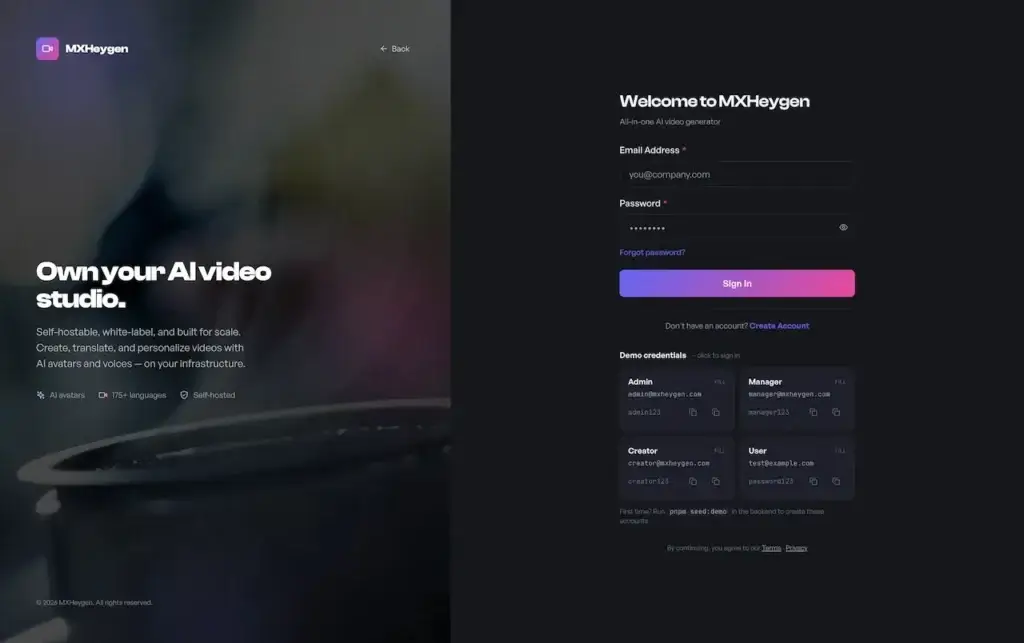
Judge it on the real thing. Four live logins match the four roles the platform defines: someone who views, someone who produces, someone who governs a workspace and someone who runs the entire deployment. Sign in as each one and the interface narrows to what that role is permitted to do.
USER ACCESS
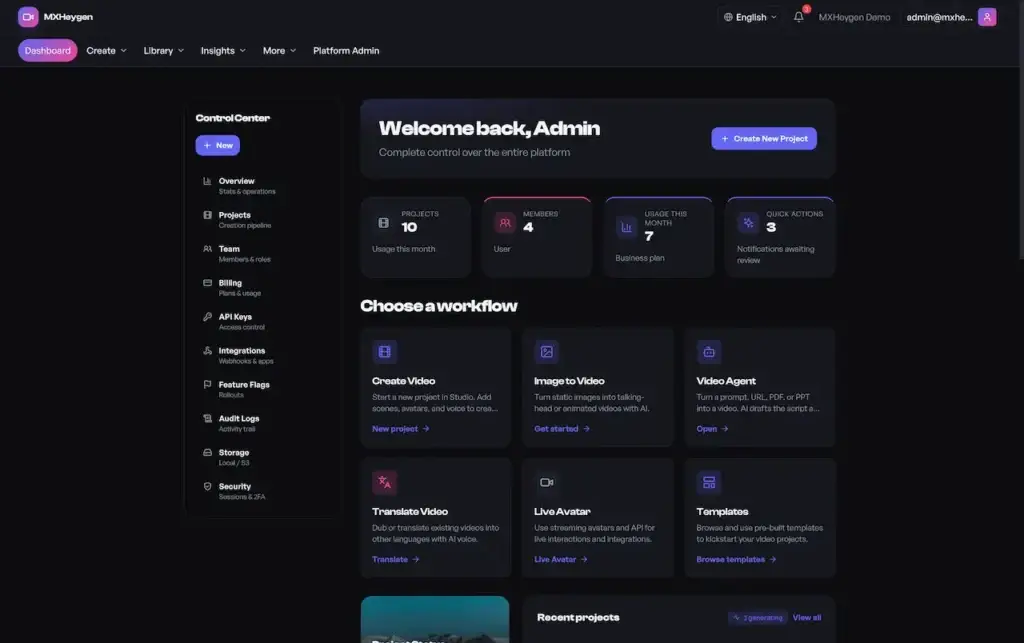
A read-focused view of workspaces, finished videos, shared projects and notifications, with none of the controls a viewer should not touch.
CREATOR WORKSPACE
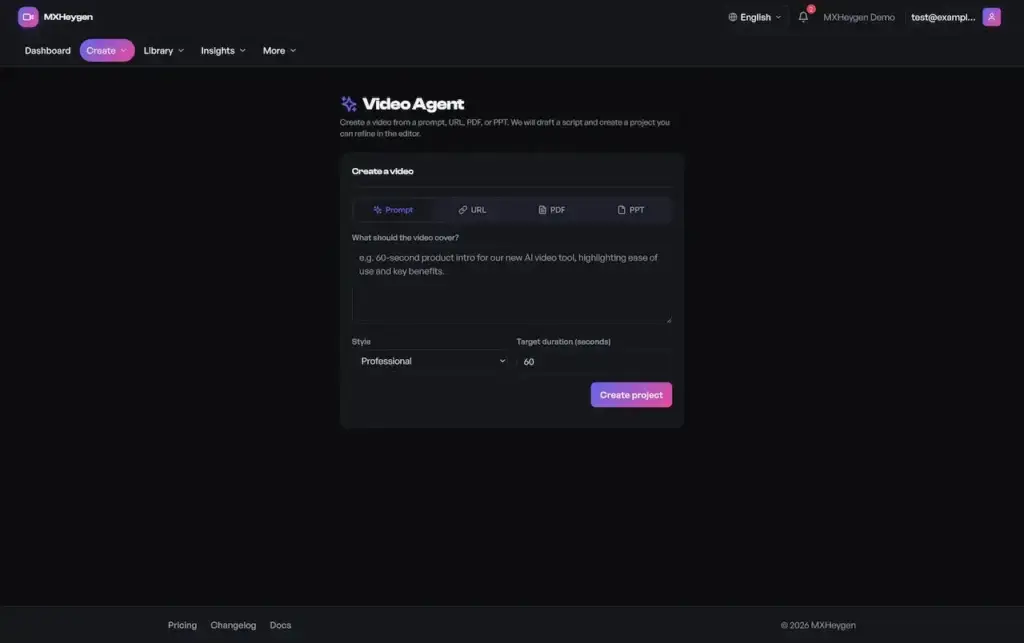
Where daily production happens: write a script with version history, choose an avatar and a voice, apply a template, generate, and follow the job from pending to processing to completed.
MANAGER CONSOLE
Where a workspace is governed: invite people and assign roles, check plan and usage, issue metered API keys, set up webhooks with delivery history and review the workspace audit log.
ADMIN COMMAND CENTER
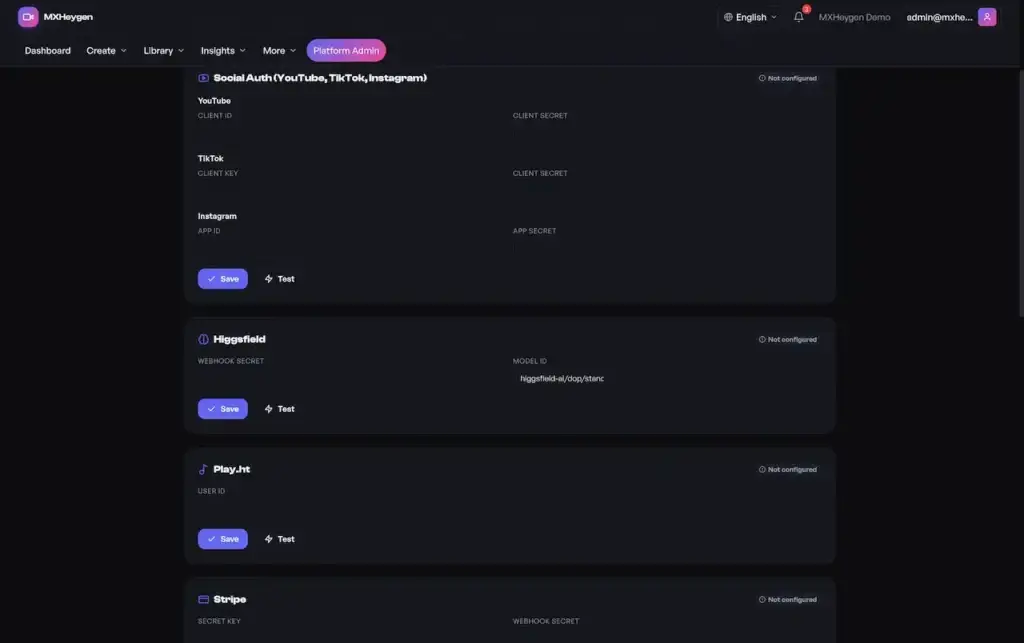
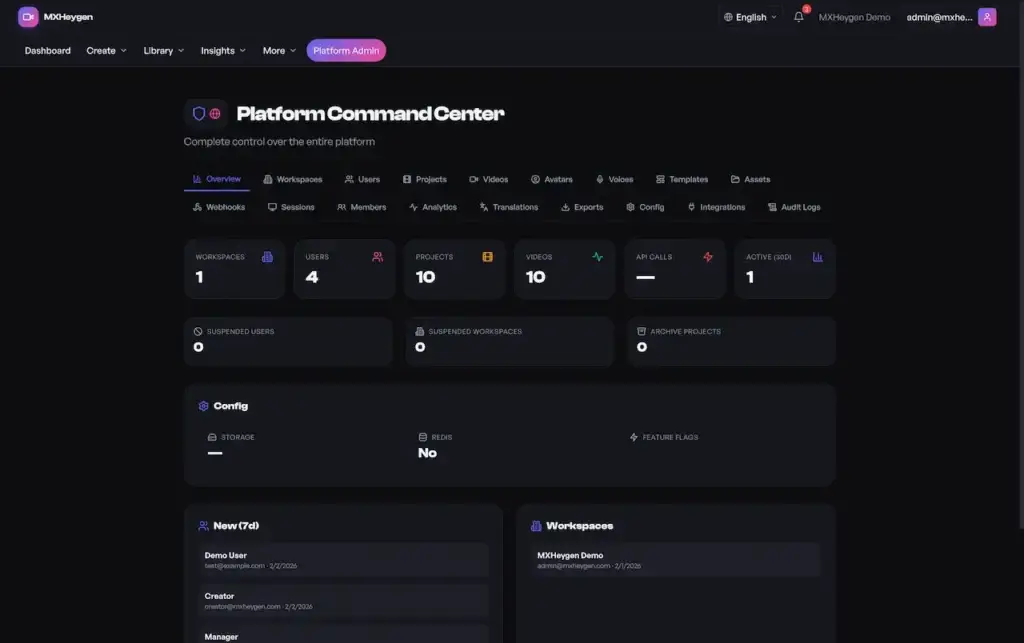
Where the operator works: every workspace, user, project and video on the deployment, plus asset CRUD, session revocation, integration settings with Save and Test buttons and platform-wide audit logs.
See It Running
Prefer a guided tour? Book a 30-minute call to plan avatars and voices, language coverage, plan structure, AI provider choice and your go-live order.
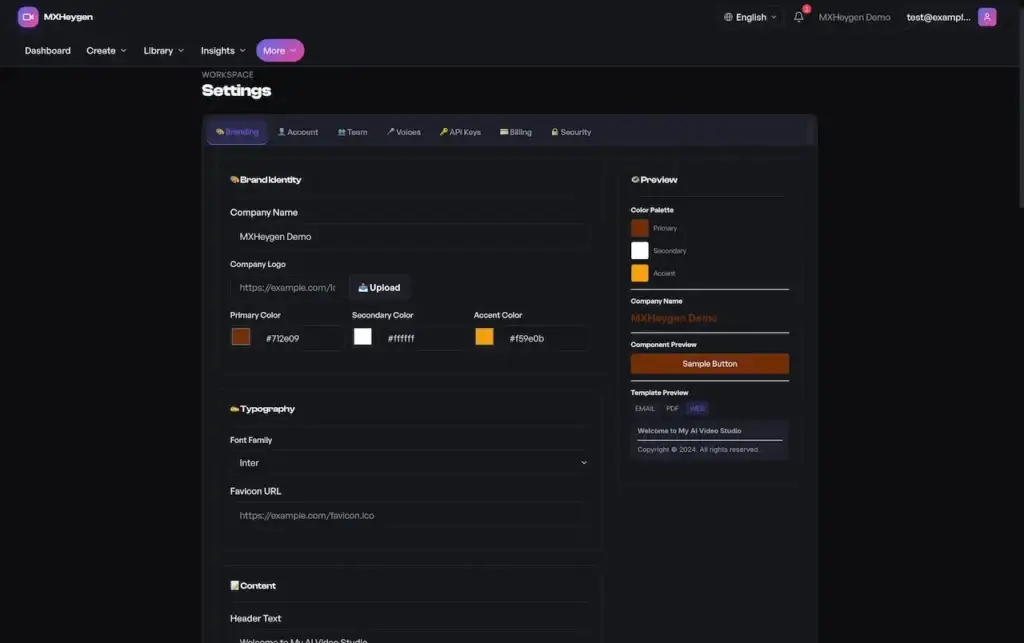
Every Screen Shown
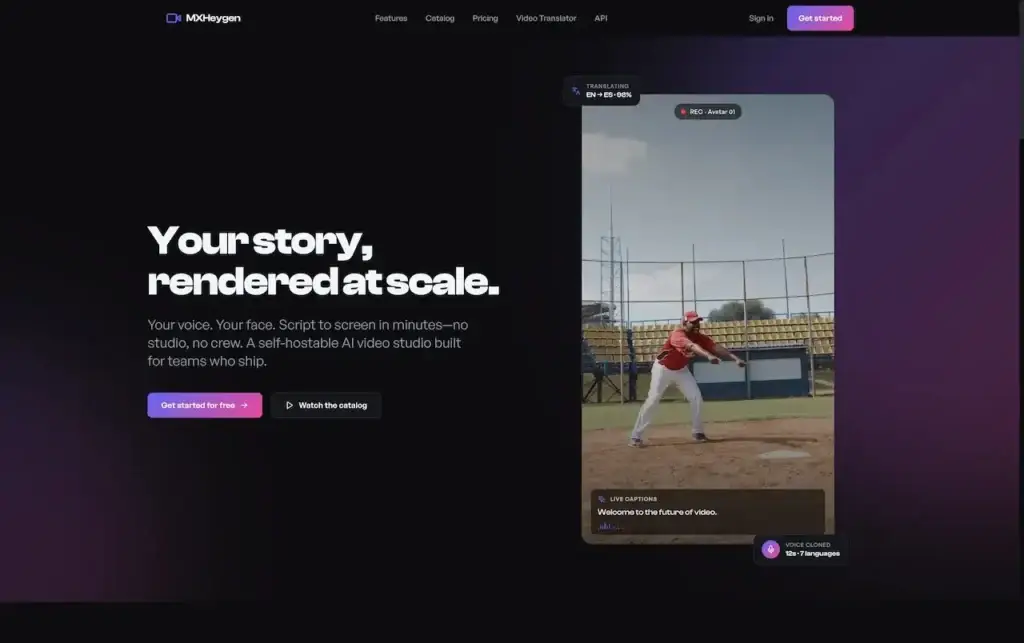
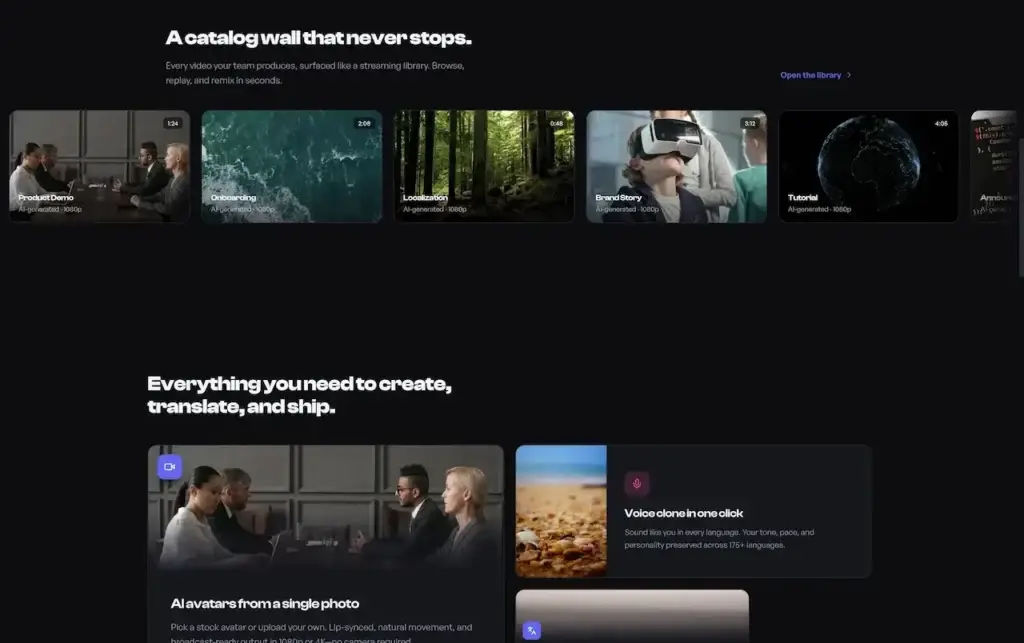
Each of the four roles has a different job. Viewers watch. Creators write and generate. Managers handle the team, the plan, API keys and webhooks. Platform admins run the deployment as a whole. Walk through each before you buy.
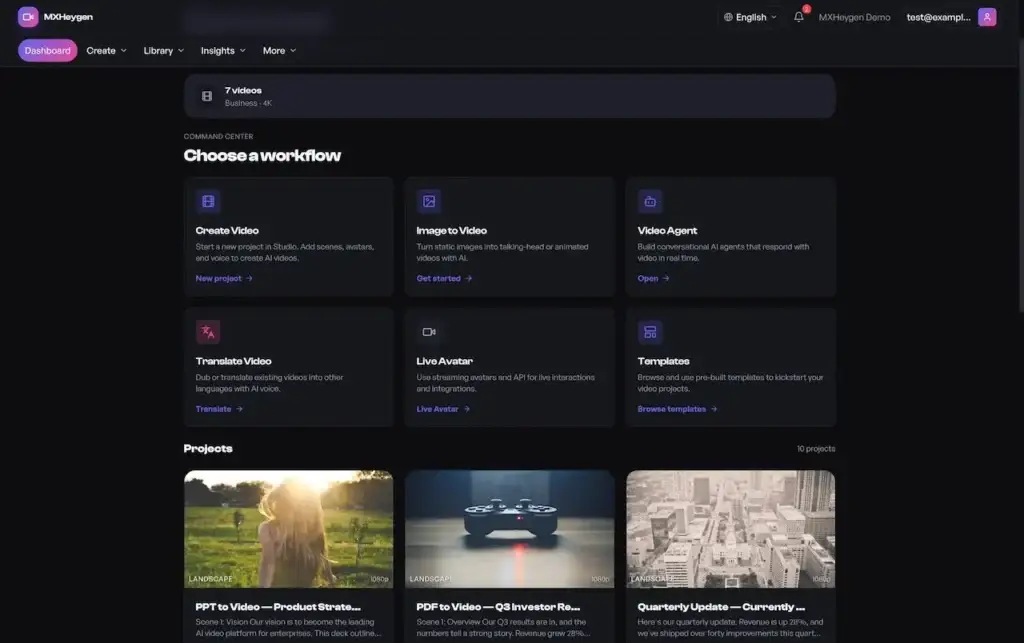
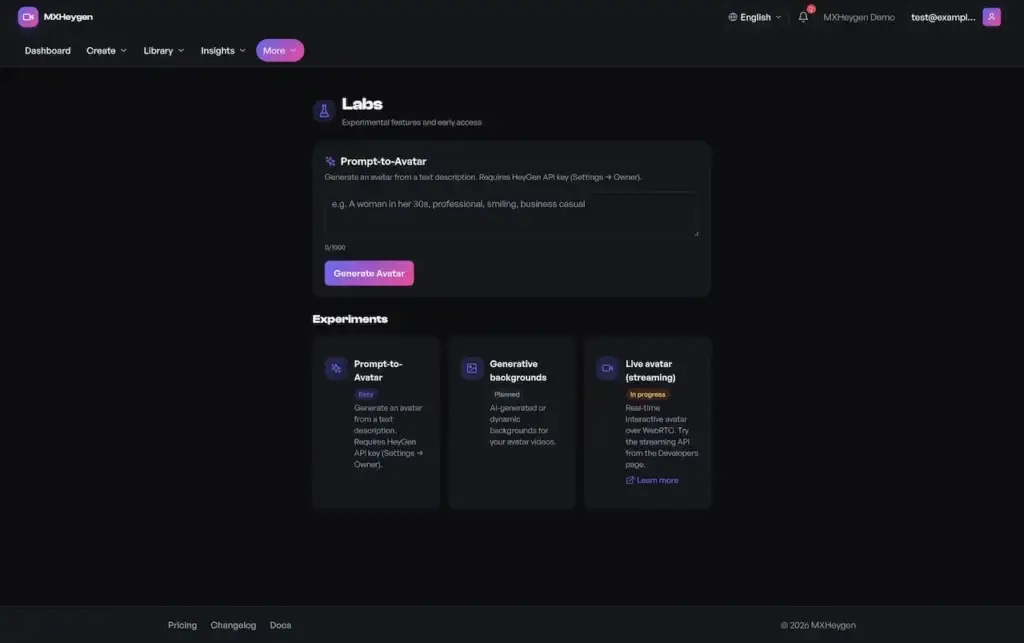
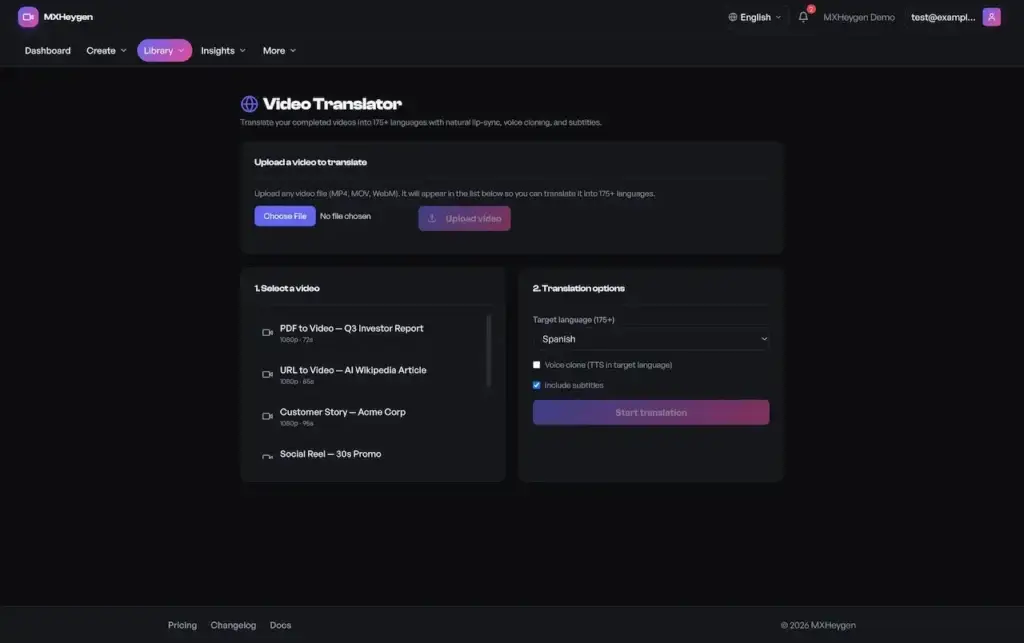
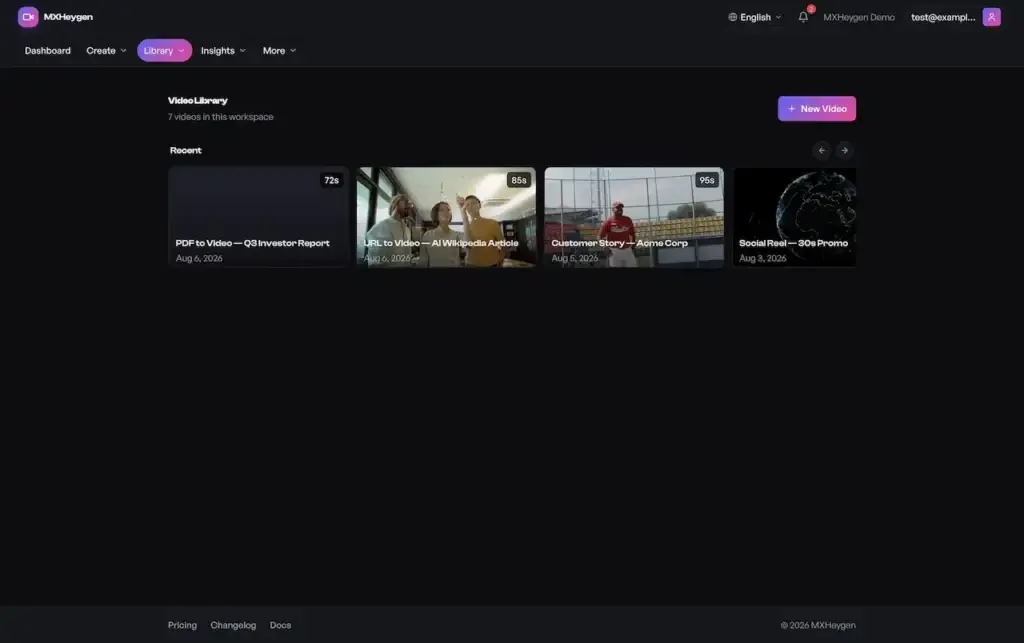
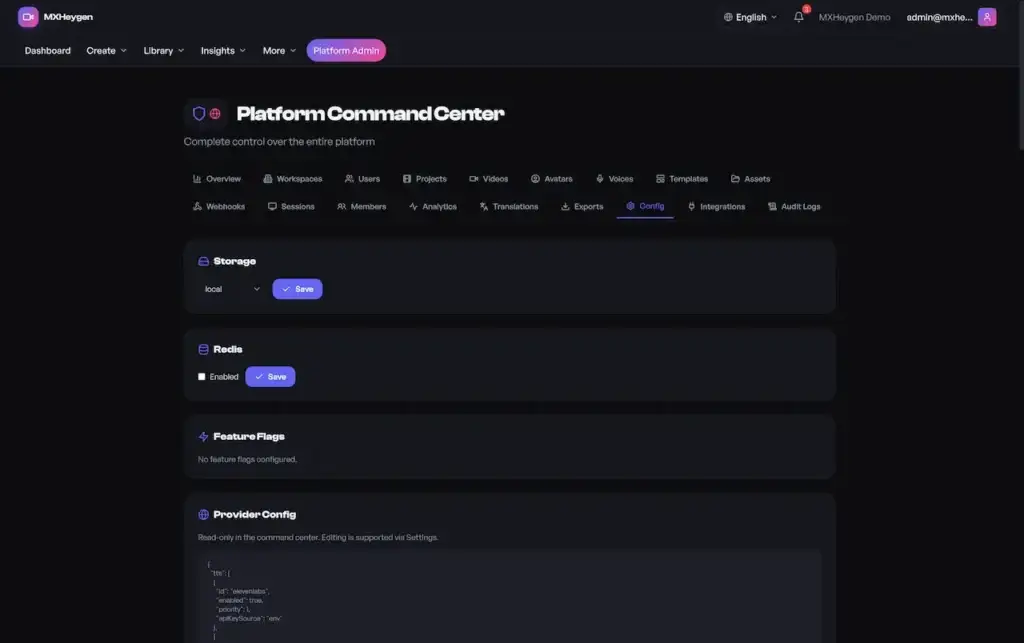
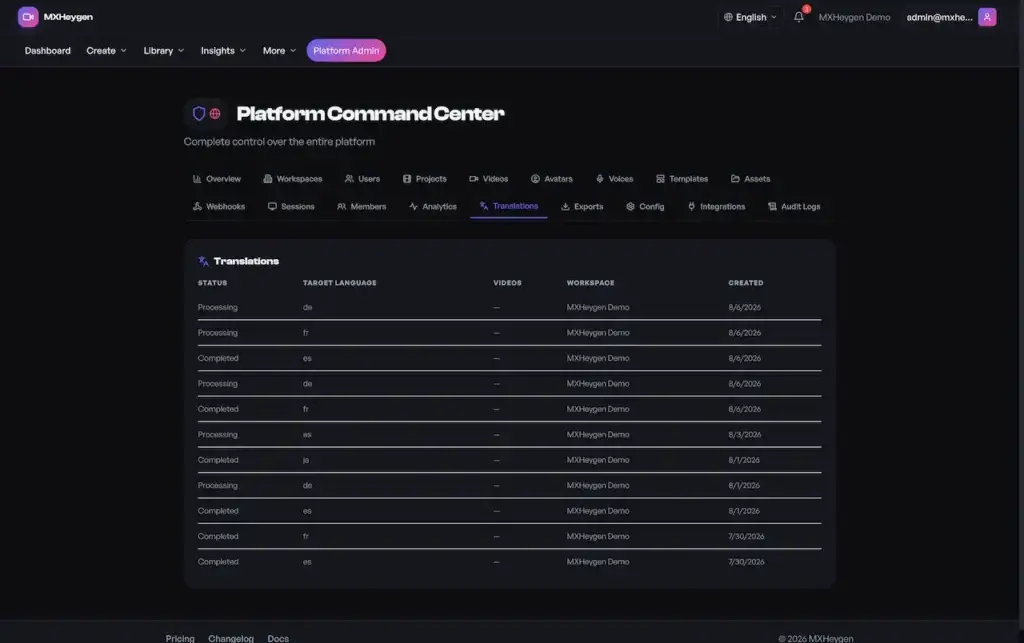
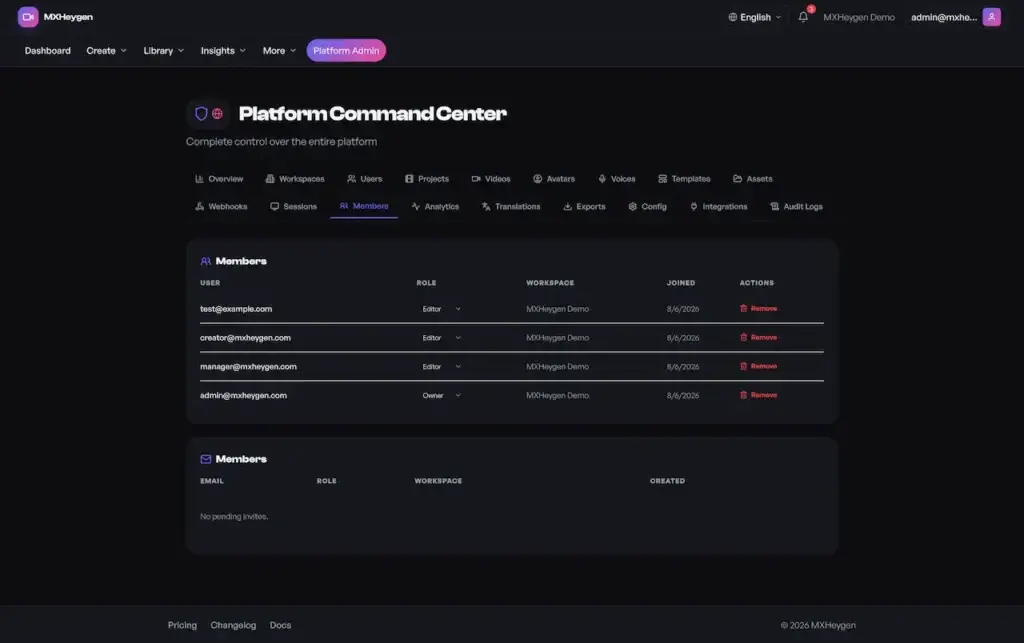
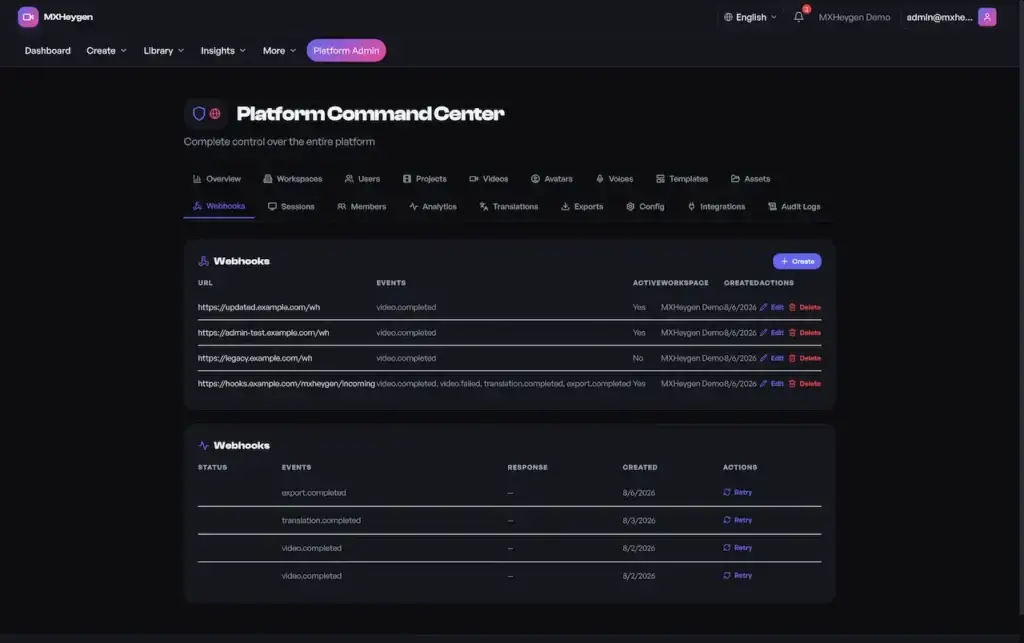
Want a guided tour of one particular flow?
From Our Clients
What operators who run video platforms commercially say about working with us, from marketing teams to agencies and training groups. Where requested, client identities are withheld under NDA.
Deployed and Running
How an enterprise marketing organization moved scattered video tools onto one Miracuves AI video platform. The client’s identity is withheld under NDA.
the client - Regional
Short Video Platform
Multilingual campaign video for a distributed marketing organization, produced on a white label AI video platform from Miracuves.
"The admin command center is what got this through procurement. Eighteen tabs of control and a real audit trail."
Start Here
A white label AI video generator is a complete AI video platform you run as your own product. Someone writes a script, picks an avatar and a synthetic voice, and the system renders a presenter-style video. Around that sits what a business needs to operate it: separate workspaces for teams and clients, script version history, reusable templates and media libraries, AI video localization, export presets, analytics, subscription billing and an admin console for the operator.

A React web app, a versioned REST API with GraphQL beside it, and webhooks that drive event-based automation.
Brand identity, colors, fonts, copy, legal links, player styling and custom CSS, plus controls to switch white-label on.
Workspace roles, owner-only settings, an 18-tab platform admin console and audit logging ship with the product.
Web App, API & Automation
The code is yours. Host it on your own infrastructure and decide your plans, limits and commercial terms.

Put simply: it is the quickest way to run an AI video business on a platform you own, with production workflow, billing model and governance already in place.
What Ships With It
Everything from an empty script to a distributed, measured video is covered, along with the commercial and operational layer around it. Each capability carries the same readiness label the technical documentation uses: Included, Supported, or Configuration required.
Draft, edit and roll back. Each version is saved as an immutable snapshot, never overwritten.
Video jobs run on workers with explicit states, so a long render never blocks a request or disappears unnoticed.
Translation is its own workflow stage with its own status, rather than a re-render of the original job.
Presets for format and resolution, an export queue with history and entitlements set by plan.
Searchable avatar and voice catalogs, plus validated voice-cloning uploads.
Public and workspace templates you can reuse, composed scene by scene.
Workspace media organized in folders and tags, with bulk actions and checked uploads.
KPIs per workspace, detail per video, geography and device breakdowns, with CSV and JSON export.
Invite members, assign owner, editor or viewer scope, and manage every invite.
Metered API access and event-driven automation, with delivery logs and retries.
Subscriptions per workspace, with generation and export limits enforced on the server.
Eight locales with 156 keys each, switched at runtime with no reload.
Note for buyers: All of the above is white-label and set by the operator through feature flags and provider settings. Generation runs through AI provider accounts you open and pay for, under their terms, so output quality depends on those providers; Miracuves has no model of its own. The documentation marks them Integration required, and so do we.
How You Earn
Monetization lives in the data model, not on top of it. Subscriptions sit at workspace level, plan limits are checked on the server when a video is generated or exported, and API calls are metered per endpoint per day, which turns a developer tier into something you can actually sell.
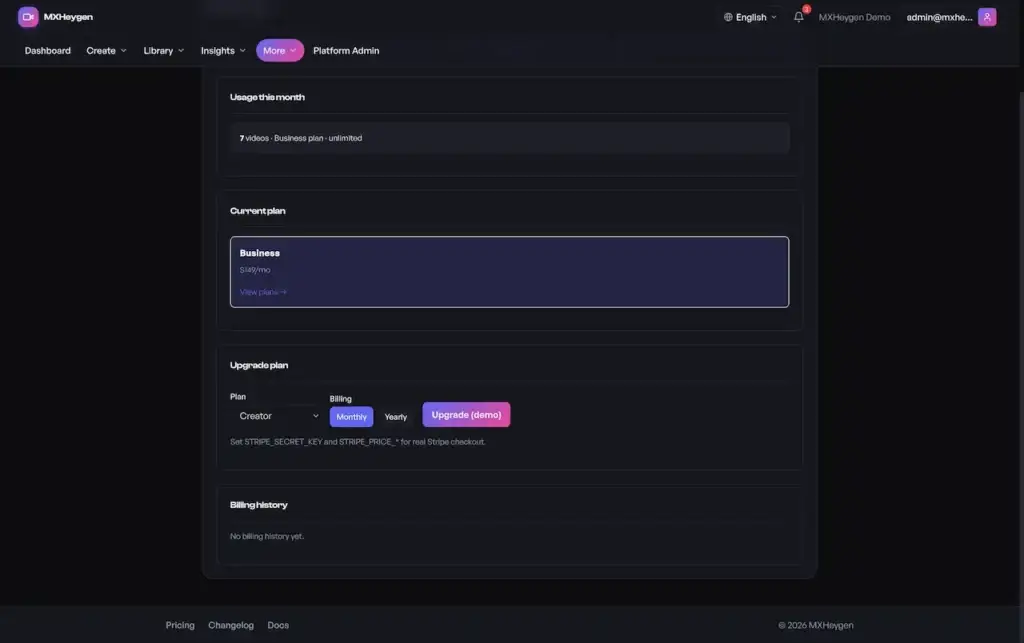
Each workspace holds one active subscription, with plan, status and billing cycle stored as the record of truth.
Limits are checked before a video job enters the queue, so overage is blocked up front instead of billed afterwards.
Which resolutions and formats a customer can export depends on the plan, enforced in the export service, not just hidden in the UI.
API keys belong to a workspace and usage is logged per endpoint per day, so you can sell a metered developer tier.
Invitations and role assignment make pricing per seat or per workspace simple to run.
Branding controls and white-label switches let agencies and resellers offer the platform to their own clients.
Important: Plans, entitlements and usage are modeled, and a Stripe-compatible flow is integrated. Moving real money still requires your own Stripe account and webhook setup. The documentation says so plainly, and so do we.
Operate It Without Developers
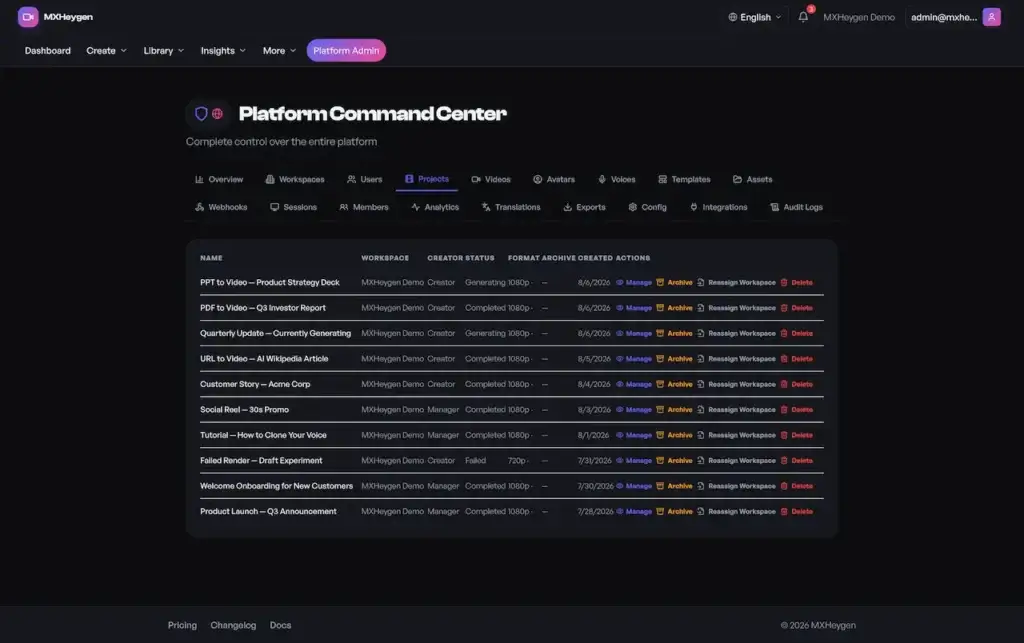
This is what makes it a platform and not a generation demo. A separate platform-admin route, protected by its own middleware, gives the operator control of every workspace, user, project and video in the deployment, spread across 18 tabs.
Suspend, reassign the owner, switch plans or delete any workspace, and see usage and billing for each account.
Suspend, delete, make admin, reset passwords, or impersonate a user to help with support.
Archive, restore, delete or move projects between workspaces with no direct database work.
Manage avatars, voices, templates, assets and webhooks across the platform, and preview templates scene by scene.
See active sessions for any user in the deployment and revoke one or all of them.
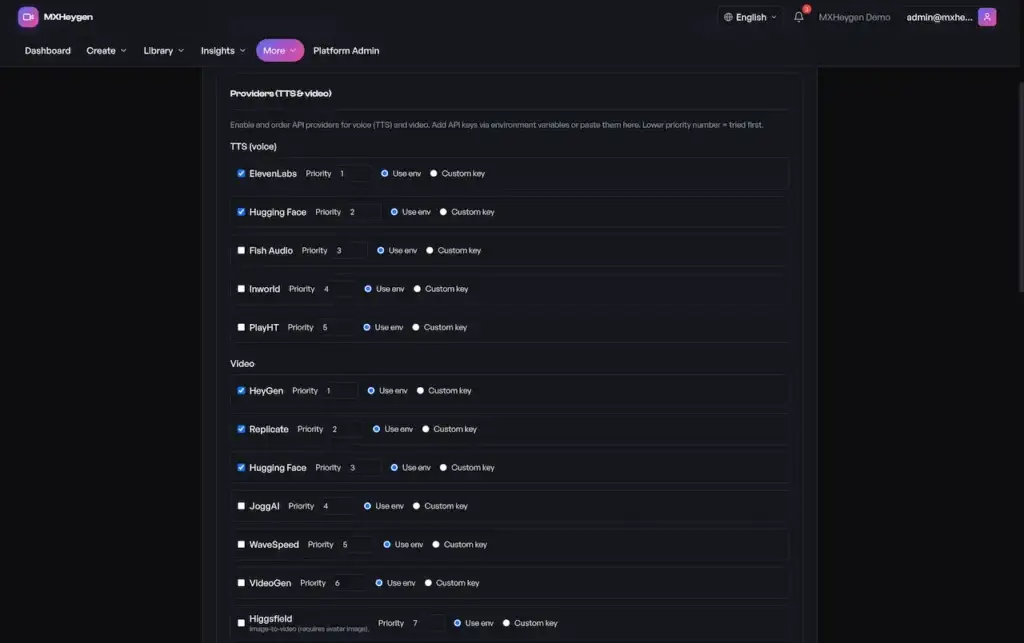
Nine configuration sections editable at runtime, each with Save and Test buttons, so switching a provider needs no redeploy.
Storage mode, Redis on or off, feature flags, provider settings, email, LLM model and billing plans.
Push one notification to every user on the platform from a single screen.
Analytics across all workspaces with a period picker, plus oversight of translations and exports.
A platform-wide record of security-sensitive actions, logging who acted, what they did and on which resource.
Access control: Each command center route sits behind dedicated platform-admin middleware that checks the super-admin flag and answers 403 if it is missing. Suspension is enforced in the auth layer, so a suspended user, or anyone in a suspended workspace, is locked out of every authenticated endpoint.
Clear, One-Time Pricing
A white label AI video generator from Miracuves starts at $3,699, paid once, with the source code included. The final figure moves with the AI providers you connect, the languages you localize into, rendering and export scope, the number of integrations, how deep the branding goes and how complex your hosting is.
Which option fits
your plan?
Tell us your goals, timeline and budget. We will point you to the option that fits, with straight answers and no upselling.
Everything Handed Over
The full platform and its documentation are handed over, rather than a trimmed demo build.
The full React and TypeScript workspace your users work in, deployed on a domain you control.
An Express service exposing versioned REST, GraphQL and a Swagger documentation surface.
PostgreSQL through Drizzle, with its full migration history and workspace tenancy in the business tables.
Generation, translation, export and webhook jobs run in four queue domains, Redis-backed or inline.
An 18-tab console for platform admins, guarded by its own authorization middleware.
Your name, colors, fonts, copy, legal links and player styling, applied across the product.
Docker builds, CI/CD pipelines, cloud setup and health checks to confirm the deploy.
60 days of guidance, 6 months of priority fixes and 1 year of free updates.
Scope note: No native mobile app is included. This is a responsive web platform, and four separate technical documents say so. If your roadmap needs native mobile, we can build it as custom work. Better you hear that from us now than find out later.
Four guides to owning an AI video generator outright: what the platform does, what it costs once, how to choose a provider, and how plans and meters earn.
Script to localized export in one tracked job: versioned scripts, queued rendering, translation as its own stage, client workspaces, a metered API and an 18-tab admin center.
See the full breakdown →$3,699 once with the source handed over, deployed in 6 days, no per-video or per-seat fee to us, and your own render and provider costs laid out before you sign.
See exact pricing →Rented seats, freelancers, custom agencies and Miracuves compared, plus the questions to ask any provider about source, AI accounts, consent and what ships before production.
Compare options →Six revenue levers on one platform: workspace plans, generation limits, export tiers, a metered API, seats and reseller accounts, and the order to switch them on.
See the playbook →Who Buys It
It fits teams that produce video continuously rather than now and then, and that need control over who made each video, in which language, for which brand and at what cost.
Run video production for every client on one deployment you own, with each brand kept in its own workspace.
Add AI avatar video to an existing product without renting a vendor dashboard and passing its markup on to your users.
Give marketing teams recurring campaign video, with templates, brand-locked assets and analytics in one place.
Produce training and enablement video once, then localize it for other languages.
Turn scripted content into avatar-presented video for several titles or regions from one platform.
Start an AI video generation business on source code you own, instead of building the whole stack from zero.
Once your output is counted in campaigns per month rather than projects per year, workflow and governance are what separate a tool from a real operation.
Where It Works
One codebase, several kinds of operator, depending on which layer matters most. Marketing teams lean on templates and analytics, agencies on separate workspaces and branding, platform teams on API keys and webhooks. Each case is a configuration, not a fork.
Campaign Video at Volume
Turn out recurring campaign video at scale using reusable templates, brand-locked assets and analytics that link each video to its results.
Multi-Client Agency Work
Keep every client in its own workspace on a single deployment, each with its own branding, plan, usage and billing view.
Corporate Training & L&D
Ship training and enablement video in several languages, with the translation pipeline standing in for an outside localization vendor and audit logs recording who changed what.
Product Explainers & Onboarding
Keep explainers and onboarding video current. Script version history means an update is an edit, not a new shoot.
Video Generation Through the API
Build video generation into another product with API keys, metered usage and webhook callbacks that handle the asynchronous steps.
Reselling to Your Own Customers
Offer the platform to your own customers as your product, with feature flags and provider settings deciding what each deployment can do.
One codebase, many setups. All six use cases share one schema and one role model. Plan structure, provider mix, language coverage and branding are what change, never a separate fork you would have to maintain.
Why Now
Generating AI video is no longer the hard part, as models keep getting cheaper and more alike. What remains unsolved is everything around generation: who may produce what, in which languages, for which brand, within which budget and with what audit trail. That layer is the lasting product, and most tools in this category still do not have it.
Rented AI video tools charge per seat, so cost grows with headcount. Self-hosting turns that spend into infrastructure you run and can resell.
A single script can serve eight markets. Translation is a pipeline stage of its own rather than a fresh render, so reaching more languages is a routine operation, not manual work.
Once the demo lands, procurement asks about workspaces, roles, suspension, audit logs and admin controls. This platform has answers for each.
AI model quality and pricing shift all the time. Providers are set at runtime, so switching is a settings change rather than a migration.
Metered API keys let other products build on top of your platform, which is a very different business from selling seats.
One build works as a commercial product with plan gating, or as an in-house platform with a separate workspace for each team.
That is also why teams move. They rarely drop a video tool because its output got worse; they drop it because it never grew workspaces, roles or reporting.
The Engineering
One monorepo, four packages: frontend, backend, shared types and utilities, so the web app and the API agree on their contracts. The stack is plain on purpose, because your team will own it and familiarity beats novelty.
React · TypeScript · Vite
Node.js · Express · TypeScript · Zod
PostgreSQL · Drizzle ORM
Bull · Redis · inline fallback
JWT · TOTP 2FA · Helmet · rate limiting
Docker · CI/CD · health checks
Note for tech buyers: The stack is ordinary on purpose: React, Express, PostgreSQL, Redis. A new provider, language or route family follows a documented pattern, and the security handbook lists the steps. Your engineers can take ownership without first learning some proprietary framework.
The Workflow
From outside it looks like a single button. Inside, each script passes through generation, localization, export and measurement as distinct stages with their own state, and that is what makes retries, progress tracking and diagnosing failures possible.

Someone signs up, a workspace is created and they own it. Every later step sits inside that tenancy boundary.

Projects carry the creative intent and scripts carry the words. Each revision is kept as a snapshot instead of overwriting the last one, so editorial history is preserved.

Generation runs in a queue instead of inside the request, since rendering outlasts any reasonable timeout.

Translations are separate entities with a worker of their own, so each localized version keeps its own status and leaves the source untouched.

Packaging the output is governed too: what you may export depends on your plan.

Analytics complete the loop, and that is what turns a production tool into something a marketing lead can defend at budget time.
How a Video Moves
Script -> Generate -> Translate -> Export -> Distribute -> Measure
Architecture
Almost every business table references a workspace. That one choice is what lets you serve many clients and brands without separate installs.
Videos, generations, translations and exports are distinct entities, not status flags on a single row, so a failed translation never hides a good render.
Four queue domains, spread through Redis or run inline, keep heavy media work off the request path.
Integration settings are stored in a database table, with environment variables as fallback, so providers can change with no redeploy.
Audit entries note who acted, what changed and where; each webhook delivery keeps its status, retry count and response code.
The service layer checks every generation and export limit, so a tampered client cannot get around them.
Scaling Approach
For an AI video platform, scale is not about concurrent page views. It means render minutes, queue depth, media storage, and how calmly the system copes when a provider slows down in the middle of a campaign.
Generation, translation and export each run far longer than a request should. On dedicated workers, a slow provider means a longer queue instead of a flood of timeouts, and a failed job can be retried instead of lost.
In Redis-backed mode those workers spread across instances. Inline mode keeps a small deployment running, which suits staging and small installs, but it is not how production should be configured.
Tenancy runs through the schema, so every unit of work belongs to an account. Usage metrics, API counters and analytics are all scoped to the workspace, which means capacity planning and commercial reporting draw on one partition.
Media assets live in their own table, and the operator picks local or S3-style storage. Outputs from generation and export are recorded as durable metadata, not loose files, which keeps retention and cleanup manageable later on.
New route families follow a documented recipe: schema and validation contract, auth mode, service logic, audit hooks, and an optional hand-off to a queue for heavy work. Feature flags allow gradual rollouts.
This matters because providers, languages and plan structure, the things most likely to change, are settings rather than code.
Dedicated workers take the heavy media jobs, keeping them off the request path.
In Redis-backed mode, generation, translation and export spread over several instances.
If Redis is unavailable, inline queue mode keeps a small deployment working.
Usage, API counters and analytics each map back to a single account.
Pick local or S3-style storage at runtime from the admin settings.
Liveness and readiness endpoints, with dependency checks, to verify each deploy.
Standard with the build: health and readiness endpoints with dependency checks, structured request and error logs, and optional exception telemetry. That covers verifying a deploy and diagnosing a failure.
Before high volume, the documentation advises adding queue-lag monitoring plus alerts on three signals: authentication anomalies, webhook delivery failures and worker error rates. Those three warn you of trouble before a customer notices.
Honest scaling note: The docs treat Redis-backed queue mode as a production requirement, not an option. Monitoring and alerting must be connected before a high-scale launch, and database indexes should match your highest-cardinality filters. None of this arrives tuned to your workload, and we prefer you know that now.
Security, Documented
Two security documents ship with the platform: a VAPT and compliance posture document, and a separate line-by-line audit run against a checklist derived from OWASP. They do not always agree, which is useful in itself. Where they agree: JWT verification limited to HS256, TOTP two-factor, persisted sessions that can be revoked singly or all at once, global plus auth-specific rate limits, Zod validation across route families, parameterized Drizzle queries, webhook URL checks that refuse localhost and private ranges, signature checks on Stripe webhooks, upload checks on extension and MIME type with sanitized filenames and path-traversal protection, Helmet security headers, and audit logs naming the actor, the action and the resource.
Locked-Down API and Admin Access
An AI video platform holds scripts, avatars, voice settings, provider credentials and customer workspaces. Every authenticated request passes JWT verification pinned to HS256, workspace roles decide what each member can touch, and the 18-tab admin console sits behind authorization middleware of its own.
Privacy Built for GDPR Obligations
Customer workspaces hold scripts, media, analytics and audit records, and the privacy duties attached to that data stay with you as the operator. The platform gives you a structure for meeting GDPR obligations, with data scoped by workspace and media tracked as metadata, plus documented gaps to close before launch.
Sessions, Tokens and Two-Factor
Sign-in, API access and session handling are built on signed JWTs, persisted sessions and optional TOTP two-factor. A production deploy will not start with a JWT secret shorter than 32 characters.
Roles, Suspension and Access Control
Access is decided at two levels: workspace roles for members, and a separate platform-admin layer for your own staff. Suspension is checked at authentication, so a suspended user, or anyone in a suspended workspace, is stopped at every authenticated endpoint.
Rate Limits and Input Checks
Abuse usually shows up as floods of login attempts, oversized uploads or crafted input. Global and auth-specific rate limiters slow the floods, Zod schemas validate input at the route boundary, and Drizzle keeps every query parameterized.
Webhooks, Audit Trails and Operator Duties
Outbound webhooks can be aimed at internal systems, so each webhook URL is screened so it cannot point at localhost, a private network range or a cloud metadata address. Moderating what your customers generate, getting consent for custom avatars and voices, and labeling synthetic media where markets require it remain your responsibility.
Only HS256 is accepted at verification, and a production deploy rejects any JWT secret below 32 characters.
Users can turn TOTP on, verify it and turn it off, and end any single session or all of them.
Suspend a user, or a whole workspace, and every authenticated endpoint turns them away.
Zod checks input at each route boundary, and Drizzle parameterizes every query.
Before anything is fetched, webhook targets are screened for localhost, private IP ranges and cloud metadata addresses.
Whitelisted extensions, MIME verification, sanitized filenames, a path-traversal check on resolution and size caps per file type.
Configuration required before production: Strict CORS and CSP rules, an ENCRYPTION_KEY so provider secrets are encrypted at rest, a managed secret store, Redis-backed queues, and monitoring with alerts. Three more items are documented as recommendations, not shipped: API keys are stored raw instead of hashed, frontend tokens live in browser storage instead of secure cookies, and resource-level authorization is uneven across route families, with centralized policy middleware named as the remedy. Two documents claim magic-byte upload validation; the audit marks it “not implemented”, and we side with the audit.
Extend It
As delivered, the platform is complete and ready to demo. The modules below are the ones operators add most often, typically when they enter a stricter market, integrate more deeply, or face a security review that asks for more than the baseline.
No mobile app ships today; the product is responsive web. Native iOS and Android apps can be built as custom development.
Social sign-in connectors come included and can be set at runtime. SAML or OIDC for corporate identity providers is extra work.
An origin allowlist, a tighter content security policy, and tokens moved out of browser storage into secure cookies.
Setting up the encryption key and hashing API keys at rest, with plaintext shown just once when a key is created.
A log sink, queue-lag monitoring, and alerts for auth anomalies, failed webhooks and worker errors.
Central middleware guarding workspace resources, with regression tests that attempt cross-tenant access.
Retention windows, scheduled purges and PII classification across analytics, audit and event data.
Scaling Redis queues out, tuning indexes to your highest-cardinality filters and instrumenting capacity.
This AI video generator is one part of a wider AI and video suite. If your plans reach beyond avatar-presented video, these platforms sit naturally alongside it.

Conversational AI with threaded chats, model routing, prompt libraries and billing based on usage.

A marketplace for personalized video, where fans pay creators and talent for custom shoutouts.

Online course platform with video lessons, instructor tools, quizzes and enrollment management.

Video sharing with channels, uploads, streaming, discovery and monetization built in.
Business Model
Running your own AI video platform keeps the economics simple to read. What each video costs you is the render time billed by the AI providers you connect; what you earn comes from plans and metered API access. Your margin sits between the two, and server-side plan limits keep it intact. Nothing below is a forecast.
Render minutes are the variable cost. Generation limits set per plan stop that spend from running without a ceiling.
Recurring plans build a steady base, while metered API keys let your income grow inside other teams’ software.
Workspaces, member roles, audit logs and the admin command center are what larger buyers ask to see before they sign.
Turning one script into output for eight markets is the most concrete payoff you can show a buyer.
Run well, an AI video platform you own can turn into:
Illustrative Scenarios, Not a Forecast
Illustrative scenarios, not a forecast. Results turn on what your providers charge, how you shape plans, which languages you cover and how you sell. The platform supplies the controls to run whichever shape fits you.
Scenario A: Focused Vertical Product
Plans with generation limits
An operator serving one industry sells workspace plans to teams, with API access added later. Render cost from the providers is the main variable, which is why each plan carries its own generation limit.
This shape fits a narrow niche: a single industry, a set language list and one clear workflow, where depth matters more than breadth.
Scenario B: Multi-Market Platform
Plans, API tier and export entitlements
A larger operator mixes self-serve plans with a metered API tier, and higher plans unlock better export formats and resolutions.
Here the hard part shifts from finding customers to managing render throughput and provider spend.
Scenario C: Enterprise & White-Label
Negotiated accounts and resale
An operator sells to large organizations or resells the platform under partner brands. Governance, language coverage and control over deployment set the deal size, more than any feature list.
At this level the admin command center and the audit trail are no longer extras. They are often why a buyer says yes.
Why Miracuves
You can rent white-label AI video software, wrap a generation API yourself, pay an agency to build one, or buy a documented platform outright.
Workspaces, member roles, script version history, plan limits, API metering and the 18-tab admin console. Wrap an API yourself and you build all of it.
Each translation has its own entity, worker and status instead of being a second render. That is how eight markets get real support, not a claim.
Suspend workspaces, impersonate users for support, revoke sessions, edit integration config at runtime and read audit logs across the platform.
You receive the full React, Express, PostgreSQL and worker code to change and host as you like. No per-seat fee, and no vendor can raise your price.
A PRD, feature catalog, ERD, schema notes, API collection, technical dossier, security handbook, VAPT posture and a separate line-by-line security audit.
Each capability is marked Included, Supported or Configuration required, and the gaps are named: API keys stored unhashed, tokens in browser storage, no native mobile app. You know it all before you pay.
| Criteria | Miracuves (You Own It) | Rented White-Label Software | Custom Dev Agency |
|---|---|---|---|
| Time to Go Live | 6 days to deploy | Quick, on the vendor's servers | 6-9+ months |
| Who Owns the Code | ✔ You, in full | The vendor; you rent access | You, if the contract says so |
| Product Depth | Avatars, voices, translation & exports | Whatever the vendor exposes | Set by your budget |
| Security Posture | 2FA, audit logs, documented VAPT posture | Vendor policy, not yours to audit | Differs by team |
| Scaling Approach | Queued workers across four domains | Capped by your plan tier | Rests on their design choices |
| How You Charge | Plans, metered API, export tiers | Resale margin on their pricing | Built to order (extra time & cost) |
| Admin & Reporting | 18-tab admin command center | Reseller panel, limited controls | Billed as extra scope |
| Cost Model | $3,699 once, no per-video fee | Recurring seat or credit fees | Large budget, long timeline |
| Support After Launch | Defined support plans | Ticket queue, shared with all | Per the retainer you sign |
A thin wrapper around a generation API can produce a demo quickly. It will not give you workspaces, member roles, billing, translation as a pipeline stage or anything a procurement team signs off on. Rented software gives you those, but never the code. That is the gap we fill.
Industries
This platform fits any business that makes video again and again under a brand. Marketing teams produce campaigns from templates and link output to results through analytics. Agencies give each client a separate workspace with its own plan and billing view. Corporate learning teams ship training in several languages, letting the translation pipeline stand in for an outside localization vendor while the audit trail records who did what. Product teams update explainers and onboarding through script version history instead of reshooting. Media and publishing groups grow presenter-led output without booking a studio. Software companies add generation to their own products through metered API keys and webhook callbacks. Consulting and services firms send client updates at volume. White-label resellers offer the entire platform to their own customers under their own brands.
As the platform underneath our AI video clones, it is built with governance first and shapes itself to how you produce, charge and brand.
Changelog
| Version | Date | What's New |
|---|---|---|
| v2026.1 | Aug 2026 | First release: AI video platform with avatar rendering, a translation pipeline, exports, analytics and the 18-tab admin console. |
Blog & Resources
Practical reading on running an AI video business: choosing avatars and voices, localization workflows, picking providers, designing plans and building a white-label platform.
Best HeyGen Clone Script 2026 : Build Your Own AI Avatar Video Platform
Last Updated on May 8, 2026 by Anusha Neerukattu Key Takeaways What You’ll Learn A…
HeyGen Revenue Model: How HeyGen Makes Money in 2026
Last Updated on May 5, 2026 by Rutuja Gaikwad HeyGen, a leading AI video generation…

What Is HeyGen and How Does It Work?
Last Updated on August 7, 2026 by Ashish Khan Key Takeaways What You’ll Learn HeyGen…

FAQ
Straight answers on cost, providers, rights and what you set up before launch.
It is a complete AI video platform you run as your own product. Someone writes a script, picks an avatar and a synthetic voice, and the system renders a presenter-style video that can then be translated, exported and measured. Workspaces, roles, template and asset libraries, subscription billing, API metering and an 18-tab admin console surround it. You buy it once and receive the full source code.
Yes. You operate it under your own brand, terms and content policy, and generation runs through AI provider accounts you open, under their terms. The care point is likeness: a face or voice belongs to the person it depicts, so offer provider-licensed stock avatars or get explicit consent for custom ones. Labeling synthetic media where markets require it and moderating what customers make are also yours. The platform logs actions for audit; the consent process is your responsibility.
$3,699, paid once, for the white-label build with source code. Scope can shift it: which providers, how many languages, rendering and export depth, the number of integrations, branding work and your hosting setup.
Our side takes six days, because the platform already exists and the work is rebranding and deployment. Your calendar depends on what you send us: brand assets, hosting access, AI provider accounts and, if you charge from day one, a Stripe account. Provider approval tends to take longest, so apply early.
Providers are set at runtime in the admin console instead of being written into the code, across nine integration sections that cover generation, voice and model services. You open the accounts and hold the keys; we connect them. We built it that way on purpose, since pricing and quality in AI video shift faster than any release schedule. Miracuves has no model of its own.
No. It is a responsive web platform, and four separate technical documents confirm there is no native mobile package. Native iOS and Android can be scoped as custom development if you need them. We would rather say so plainly now than have you discover it after purchase.
Each translation is its own pipeline entity with a dedicated worker and status, rather than a fresh render of the original. You choose the target language, voice and subtitle settings, the job enters the queue, and its status moves from pending to processing to completed apart from the source video. Because of that split, one script can yield eight market versions and none holds up another.
On the server, inside the service layer, before any job is accepted. Generation limits are checked ahead of queueing, and export entitlements decide which resolutions and formats a plan can use. Since the checks live beneath the API and not in the browser, a user tampering with the client cannot get around them.
Its eighteen tabs cover platform stats; workspaces (suspend, change owner or plan, delete); users (suspend, delete, promote to admin, reset password, impersonate); projects (archive, reassign); create, edit and delete for videos, avatars, voices, templates, assets and webhooks; session revocation; member roles; analytics, translations and exports; runtime config; nine integration sections, each with Save and Test; and audit logs across the whole platform.
The interface comes in eight languages: English, Spanish, French, German, Hindi, Arabic, Chinese and Portuguese, each with 156 translation keys, and users can switch language without reloading. That covers the UI only. Which languages your videos speak depends on the voice and translation providers you connect, which you configure separately.
A strong JWT secret, an ENCRYPTION_KEY for encrypting provider secrets, a strict CORS origin allowlist and a tighter CSP, queue mode backed by Redis, your AI provider accounts, and monitoring with alerts. To bill customers, add a Stripe account with its webhooks connected. The documentation lists each of these as configuration required before production, not something already done for you.
It comes with a VAPT and compliance posture document and a separate line-by-line security audit checked against an OWASP-based list. On the plus side: JWT verification pinned to HS256, TOTP two-factor login, session revocation, rate limiting, Zod validation, parameterized queries through Drizzle, SSRF checks on webhook URLs, Stripe signature verification and audit logging. Documented just as clearly: API keys are stored unhashed, the frontend keeps tokens in browser storage instead of secure cookies, and authorization at the resource level is uneven between route families, with central policy middleware named as the fix. Reviewers get both sides.
Launch an AI video product
that is yours to keep.
Ask us about providers, plans and the 6-day deployment. You get a plain scope and straight answers, never a hard sell.
Most white label AI video software is rented: a seat or credit plan on the vendor's servers, with your logo on their dashboard. Here is where the line falls on this platform instead.
Your platform name, logo, colors, typography, domain and player styling, the eight interface languages, and every email, invoice and legal link a customer sees. Plans, generation limits, export entitlements and the provider line-up are settings in the admin command center, so changing them does not mean a new release.
The full source code of the React web app, the Express API with REST and GraphQL, the PostgreSQL schema and the queue workers, plus the complete documentation set. There is no license fee, no revenue share and no charge per video or per seat from us, and nothing stops you from changing, extending or redeploying it.
It is not a model of our own and not a license to anyone's face or voice. Generation runs through AI provider accounts you open and pay for, under those providers' terms. Consent for any custom avatar or cloned voice, labeling of synthetic media where your markets require it, and moderation of what customers produce are yours to put in place. There is no native mobile app, and the platform is hardened around your deployment before launch. One installation runs one operator brand.
Miracuves is an independent software development company. We are not affiliated with, connected to, sponsored by, or endorsed by HeyGen or any other AI video, avatar or synthetic media service.
“White label AI video generator” describes a category of product, not any one company. Brand names appear elsewhere on this site only to describe the kind of platform being built and the terms buyers search for.
We supply software, not rights to any likeness or any AI model. Opening and paying for AI provider accounts and staying within their terms, obtaining written consent from every person whose face or voice is used for a custom avatar or voice, labeling AI-generated media where the law requires it, privacy notices, and moderating the content your customers create are your responsibility. We do not advise on any of it.
The entire design and codebase is built by our own team. The product contains no code, design, graphics, or content originating from any third-party AI video website or application. All third-party names and marks belong to their respective owners.
Build Your Branded App - Clone or Custom

Envision. Decide. Deploy.
With Perfection in Just 6 Days
90+ readymade clone apps deployed in 6 days. Schedule a Live Walkthrough Now.
Custom development from 15 days. Free consultation
Optional. Paying in full works too.
Included with every ready-made solution order, at the published price. We submit to your own Google Play and Apple developer accounts and fix any technical rejection until the apps are approved. Rejections over store listing details (descriptions, screenshots, policy links and other metadata) are yours to update; review times are set by Apple and Google. The 6 working days start once your branding, hosting and accounts are ready. We reply in under 2 hours, Mon-Sat.