
Banking Solution - White-Label Online Banking Platform
Miracuves' ready-made, white-label banking solution hands lenders and savings institutions a customer website, Android and iOS apps in Flutter, a staff desk panel, a head-office admin console and the full source code to own, rebranded and deployed in six working days.
Customers open FDR deposits, join DPS schemes or apply for loans from plan cards, staff and admins clear the resulting queues, and fees and currency rates are console settings rather than code. Budgeting and credit-score add-ons are priced separately; the lending license or partner bank is yours. A further lending report or an added approval step is scoped separately and quoted in writing before work starts, typically landing within 2-8 weeks.
Launch in 6 Days with
- Source Code
- Customer Website
- Flutter App
- Staff Desk Panel
- Admin Console
- Database Schema
StackFlutter · Android · iOS · PHP · Laravel · Bootstrap · MySQL
Lending activity
- KYC data waiting for reviewKYC
- Loan request acceptedLoans
- New account registeredAccounts
- FDR profit sent to the saverFDR
- DPS installment receivedDPS
- Withdrawal request queuedWithdrawals
- Currency rate edited in settingsSettings
- Statement issued at the deskStatements
- KYC data waiting for reviewKYC
- Loan request acceptedLoans
- New account registeredAccounts
- FDR profit sent to the saverFDR
- DPS installment receivedDPS
- Withdrawal request queuedWithdrawals
- Currency rate edited in settingsSettings
- Statement issued at the deskStatements

- 3Plan FamiliesFDR fixed deposits, DPS pension savings and loans
- 6Pending Counterssupport tickets, KYC checks, transfers, deposits, withdrawals and loan applications
- 0%Revenue Share With Miracuvesno share of the margin or fees your institution earns
- 3Account Checksemail, mobile and KYC states on every account
- 6Days to Launchand if the delay is ours, we keep going free
- $3,699Paid Once, Not Rentedsource code yours, no per-seat fee, no monthly rental
Live in six working days, or we keep working free until you launch. Every build carries 60 days guidance, 6 months bug fixes and 12 months updates.Verify every figure
KYC Data Before Money Moves
Staff can open an account's KYC data straight from the Accounts list, and a withdrawal will not complete until the account holder is verified.
Loan Terms Sit on the Card
Each loan plan spells out how much a customer may borrow, what each installment costs, how far apart installments fall and how many there are.
A Manual Gateway Beside the Rest
Deposits arrive through the payment gateways you connect, plus a manual one for offline funding, and each request waits in an admin queue; a funding fee can cover gateway cost.
01See it live
Live in Action
Online Banking Solution Demo - App, Website, Staff Panel & Admin Console
Open the Miracuves banking solution demo and head straight for the money products. One customer login works on the website and in the app: sign in, tap the FDR and loan cards, look at the transfer limit field and scroll the transaction list. The staff and admin logins are handed over on a guided call.

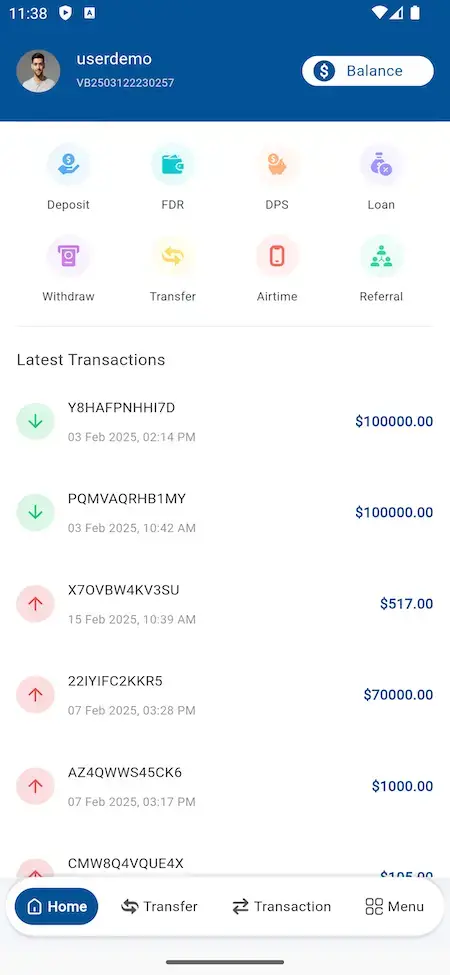
Customer App for Savers and Borrowers
The saver and the borrower on a phone: a balance button, shortcuts for deposit, FDR, DPS, loan, withdraw and transfer, and plan pages that set out rates, limits and installments.
- 1Pick your handset on the app portal
- 2Log in with the demo credentials below
- 3Open the FDR, Loan and Transfer screens
user@demo.com | User_321
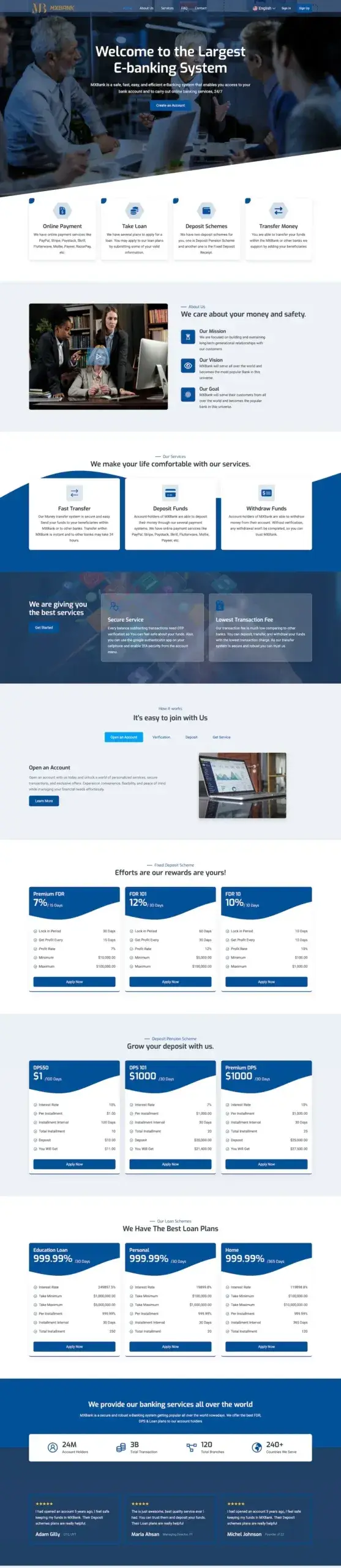
Bank Website & Account Dashboard
The public bank site lays out its deposit schemes and loan plans as cards with an Apply Now button, and the signed-in dashboard adds the balance, pending requests, running schemes and a referral link.
- 1Visit the demo website in a browser tab
- 2Log in with the same customer credentials
- 3Scroll to the Fixed Deposit, DPS and Loan sections
user@demo.com | User_321
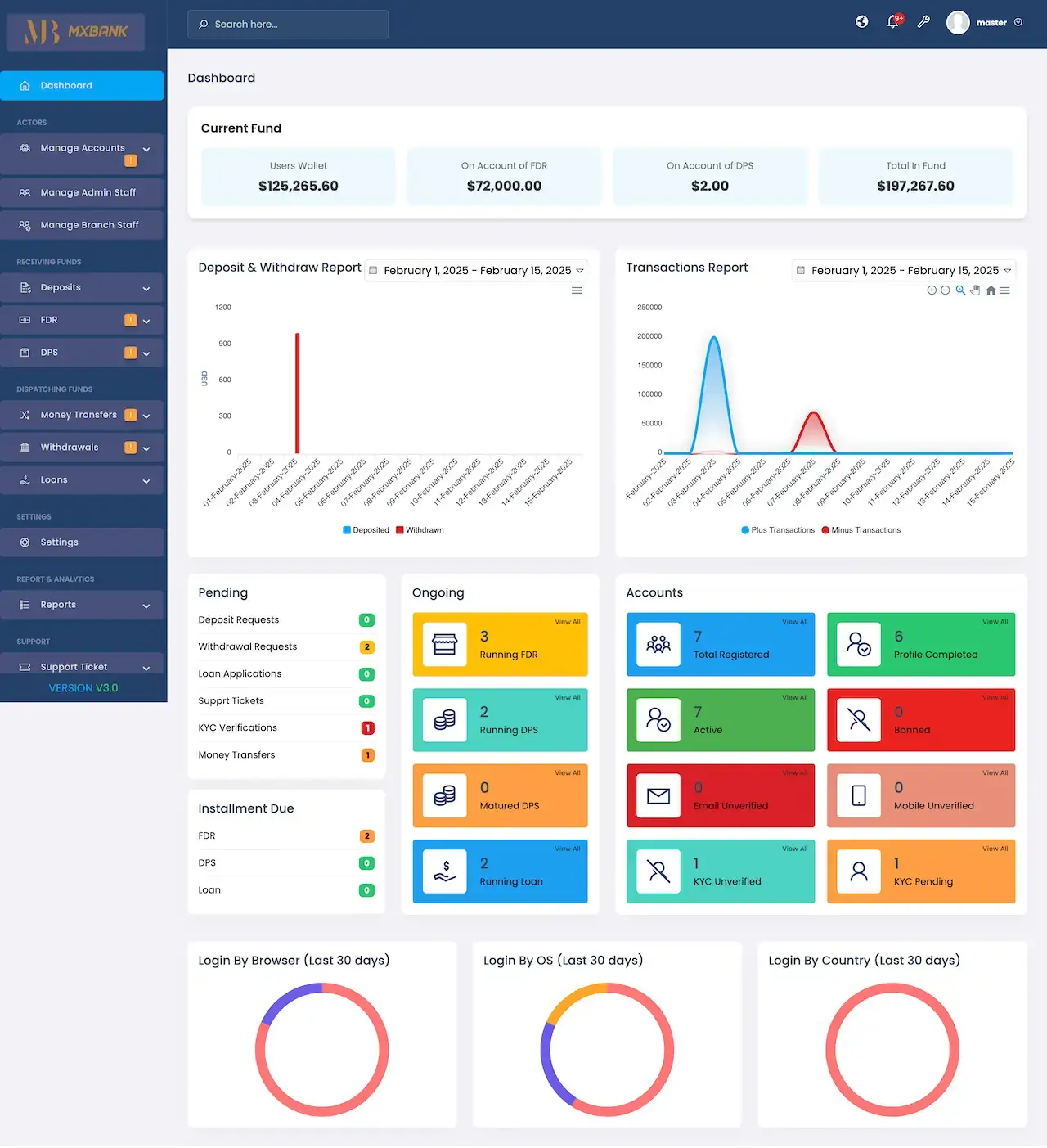
Staff Desk & Admin Console
The lender's side: staff handle accounts, statements and loan requests, and the admin console holds the queues, KYC data, fee and currency settings, plan lists and reports.
- 1Go to the staff or admin sign-in on the demo host
- 2Request the credentials on a call
- 3Look at Accounts, KYC, Settings and Reports
given out on a guided call
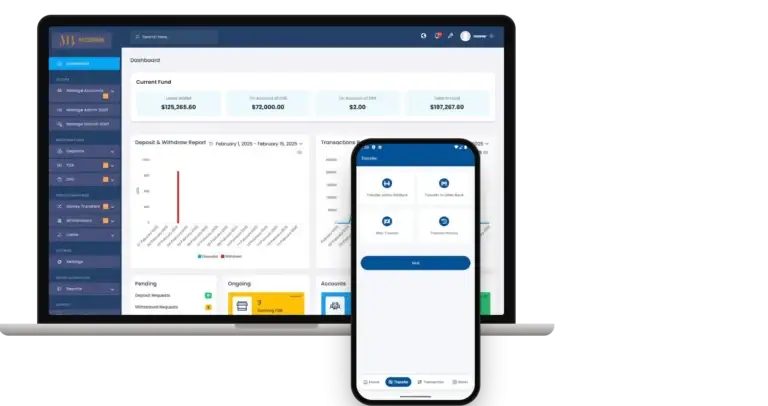
Watch It Run
Lending Software Walkthrough: Loan Plans, FDR Schemes, KYC Review & Fee Settings
A plan page only convinces once you have watched a request travel through the console. In a half-hour call we open the app, the staff panel and the admin panel, take one FDR and one loan application from the customer screen to the admin queue, and change a fee and a currency setting on the way, using your own product list.
Book a live product tourScreen by Screen
Savings and Loan App Flows - Home Balance, FDR Plans, Loan Plans & the Admin Console
Real screens in three tabs: the customer app in the order a saver or borrower meets them, the admin dashboard that counts every queue, and the website pages a prospect reads first.

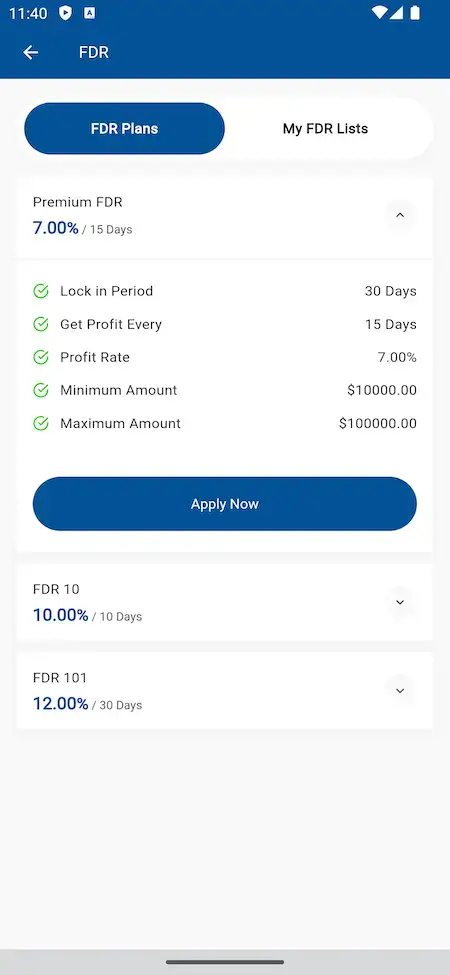
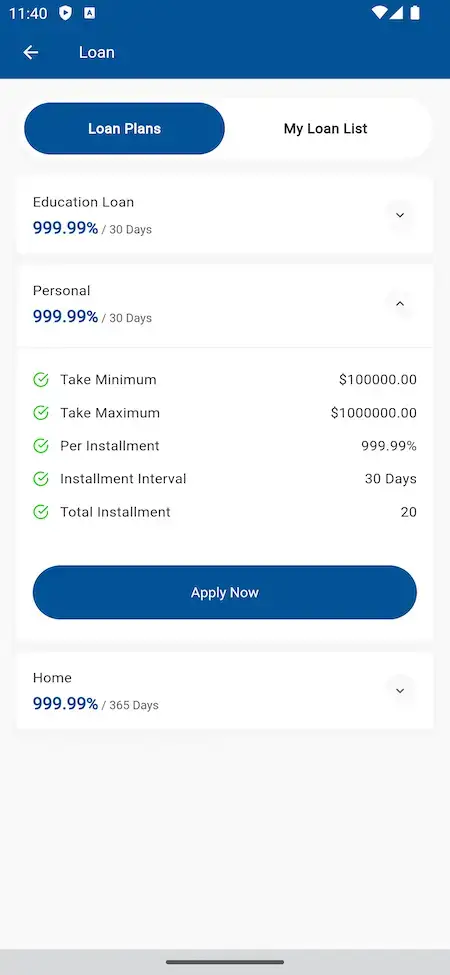
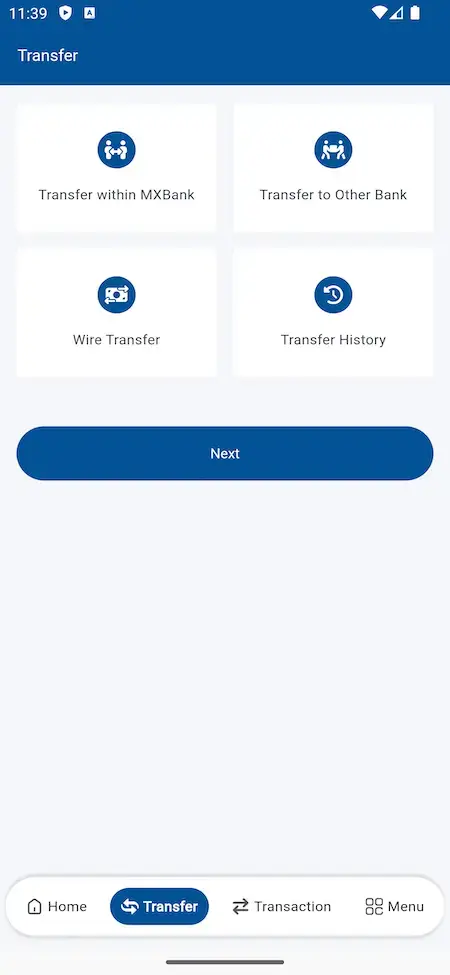
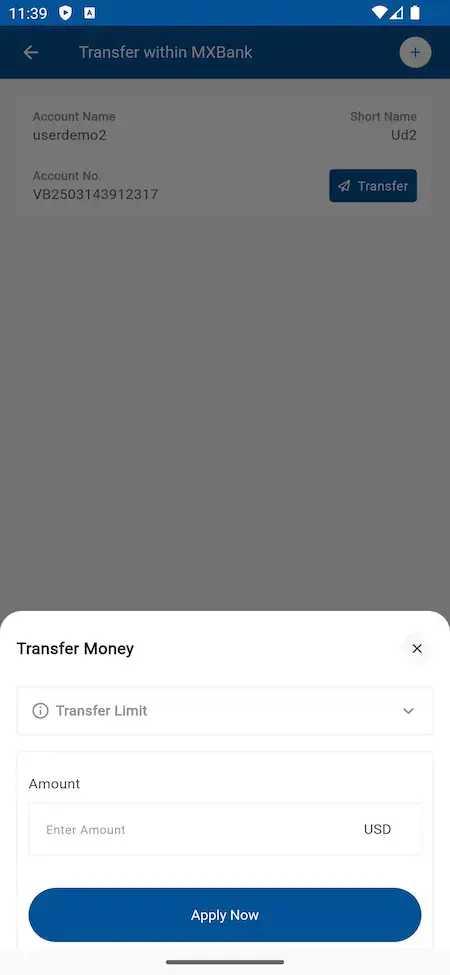
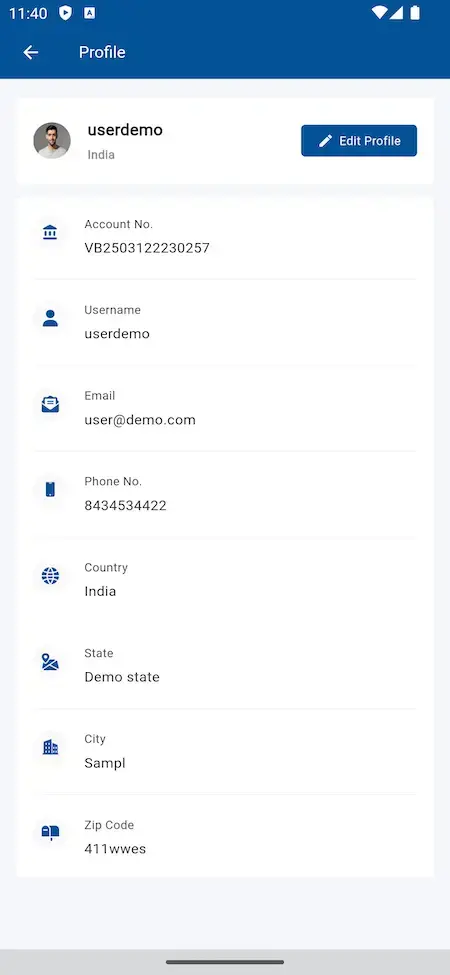
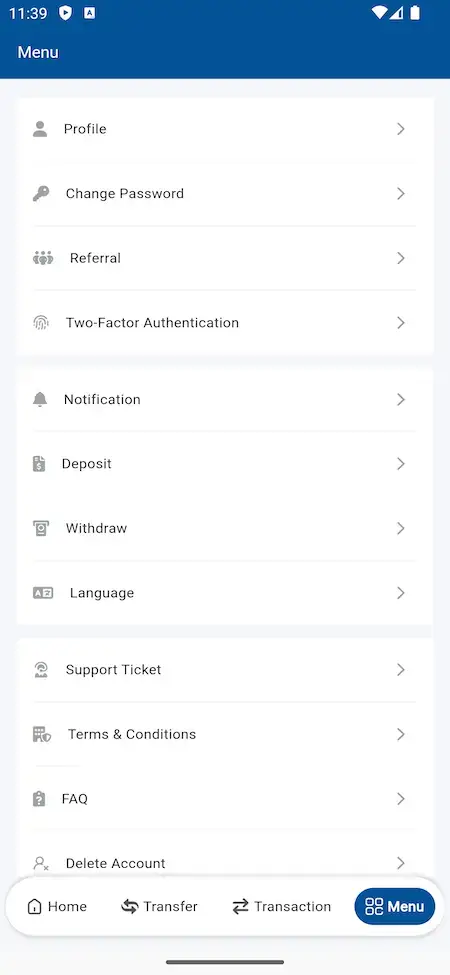



Start on the home screen, move through the transfer options and the transaction list, then set the FDR plan card beside the loan plan card, and finish on the admin dashboard where the matching queues are counted.
02Proof
Client Voices
Banking Solution Reviews - What Operators Say After Building on Miracuves
These six reviews come from other industries, not from a lender, and each is printed exactly as its author wrote it. They speak to how Miracuves delivers a ready-made base and stands behind it.
“Every HMS I tried was built for general physicians, with no lesion mapping, no before/after tracking, and no procedure-based billing. Their MXHealth base gave us the patient app, doctor app, EMR and video consult out of the box. Front-desk time on scheduling and follow-ups is down ~70%, and we went fully digital in 9 months, where a fully custom job would have been 18.”
“Turo is the obvious reference, but the Caribbean specifics, from different insurance norms to different payment rails, meant we needed a real partner, not just a clone. Miracuves’s MXCar base covered the listing, the trip flow, and the host payouts. We launched in 6 working days and are live in three islands.”
“The team was running it on a dispatcher and a Google Sheet, and we needed a real platform quickly, because we were about to onboard a major retail client. Miracuves’s Delivery Genie base gave us the rider app, the dispatch console, and live tracking. We launched in 6 weeks and cleared 4x the previous order volume in the first month.”
“We were running it on phone calls and a paper calendar, and we were losing bookings to bigger OTAs. Miracuves’s GetmyBoat Clone base gave us the calendar, the booking flow, and the payment engine. Online bookings are up roughly 70% in the first six months, and the ops team finally has a live view of the fleet.”
“Building a compliant telehealth stack from scratch in three markets would have been a year-plus effort. Miracuves’s MXHealth base covered the patient and doctor apps, video consult, e-prescription and the pharmacy integrations. We launched in our first market in 9 weeks and rolled out to two more in the following six months.”
“We were juggling spreadsheets, a third-party GPS provider, and a phone. We needed a single operations console. Miracuves’s MXLogistics base covered the trip lifecycle, the driver app, and the customer tracking page. We’ve cut operations admin time by about 40%.”
The Proof Position
Banking Solution Case Study - What Is Published and What You Can Test Yourself
What evidence exists for this product today, and the ways you can test it yourself before committing.
No client deployment of this product has been named in public, and we will not borrow one from another page. Below you will find how to test the platform yourself and what we will not use as a stand-in.

- Taking deposits and making loans is licensed activity in most countries, and the rules differ by market
- Rates, terms and limits have to read clearly on every plan a customer is offered
- Each applicant needs identity data that a reviewer can open before money moves
- Judge the FDR and loan flows before paying anything
- Confirm that fees, currencies and plan terms are settings you can change
- Read what shipped, release by release
- A public demo with one shared customer login
- Staff and admin panels shown in a live session
- Changelog entries from version 2.1 to 3.1
- All of the source code at a single fixed price
- Six working days from kickoff to deployment
We will not publish a client that does not exist, a quote nobody wrote or a result nobody measured. When a named lender or savings institution goes live on this base and agrees to be named, its story will get a case study here.Miracuves · Where we stand on proof
03The product
In Short
What the Banking Solution Gives a Lender or Savings Institution
Miracuves' banking solution is a ready-made online banking platform with the money products at its center. Customers open an account, put money into fixed deposit and pension schemes or apply for a loan, staff review what comes in, and the admin console sets the plans, fees and currencies behind it all.

Plans Are the Product
FDR, DPS and loan plans are screens in their own right, each with its rate, term and limits, rather than a footnote under the transfer menu.
Source Code, Not a Rental
The code arrives complete and unencrypted, so your team may reshape plans, fees and screens. Nothing is billed per seat or per account.
Extras Stay Extras
Budgeting, investment tracking, credit-score views and education content are add-ons with a price of their own, and are never counted as part of the base.
Website, Android & iOS
What Is This Banking Solution, Exactly?
The sign-up page is the easy part of an online lender. The work lies in the product shelf and the review desk: how a plan states its rate and term, how an application reaches the right person, which identity data that person can open, and how every movement of money is written down. Those parts already work in the demo.

- 01Customer website and Flutter app with FDR, DPS, loan and transfer screens
- 02Staff panel for desk work, statements and loan requests
- 03Admin panel with request queues, KYC data and settings
- 04Gateway-powered deposits and withdrawals
- 05Fee, currency and banking-product settings, edited in the console
Delivered: customer, staff and admin web panels, Flutter apps for customers and the whole codebase.
What Ships
Banking Solution Features - Loan Plans, FDR & DPS Schemes, KYC, Fees & Currency
Each capability below ships in the Miracuves banking solution and can be seen in the demo, on an app screen or in a release note. Anything that needs an extra module is listed as an add-on further down this page.
Loan Plans
Loans are offered as plan cards - education, personal and home in the demo. A card spells out how much a customer may borrow, what each installment costs, how far apart installments fall and how many there are, and Apply Now opens the request. Staff and admins find it waiting in a queue.
- Plan cards, with education, personal and home loans in the demo
- Lowest and highest amount a customer can borrow
- Installment size, spacing and count shown on each plan
- Customer types the amount after tapping Apply Now
- A queue of applications for staff and admins to review
- Customers get a notice on approval and a My Loan list
Fixed Deposit (FDR) Plans
The institution publishes fixed deposit receipts as plans. Each card gives the profit rate, the lock-in period, how often profit is paid out and the smallest and largest sum accepted. Customers open a deposit from the card and follow it afterwards.
- Profit rate and lock-in period on every plan
- How often profit is paid, stated on the card
- Smallest and largest sum accepted per plan
- A My FDR tab sits beside the plan list in the app
- A Closed On column on the FDR list table
- Admin dashboard counts running FDRs and those falling due
Pension Savings (DPS) Schemes
A deposit pension scheme asks the saver for a fixed installment at fixed intervals. The card lists the interest rate, the installment, the interval, how many installments there are, the total paid in and the amount the saver gets back.
- Interest rate and installment size per plan
- Interval between installments and how many there are
- Total paid in and the payout, both visible on the card
- The saver applies straight from the card
- Admin sees counts of running and matured schemes
- Installments falling due are listed for the team
KYC & Account Verification
Sign-up asks for a name, an email and a phone number, followed by a verification code. The admin side files each account under a state - email or mobile unverified, KYC pending or unverified, active, banned - and staff can open the KYC data behind it.
- Registration with name, email and phone, then a code
- Account states for email, mobile and KYC checks
- Open an account's KYC data from the Accounts list
- A list showing only KYC-verified users
- KYC verifications appear among the pending counters
- A countdown before a verification code can be resent
Fee & Currency Settings
Fees and currencies live as admin settings, never as code. Transaction charges, monthly fees, conversion rates and every banking product are kept in the console, and a single general setting fixes how amounts and their currency symbol display.
- Transaction fees and monthly charges kept in the console
- Currency conversion rates held as settings
- A transfer charge that copes with fractions of a cent
- A fee on statements downloaded at the staff desk
- One format for amounts shown with their currency
- New banking products created from the admin panel
Transfers & Beneficiaries
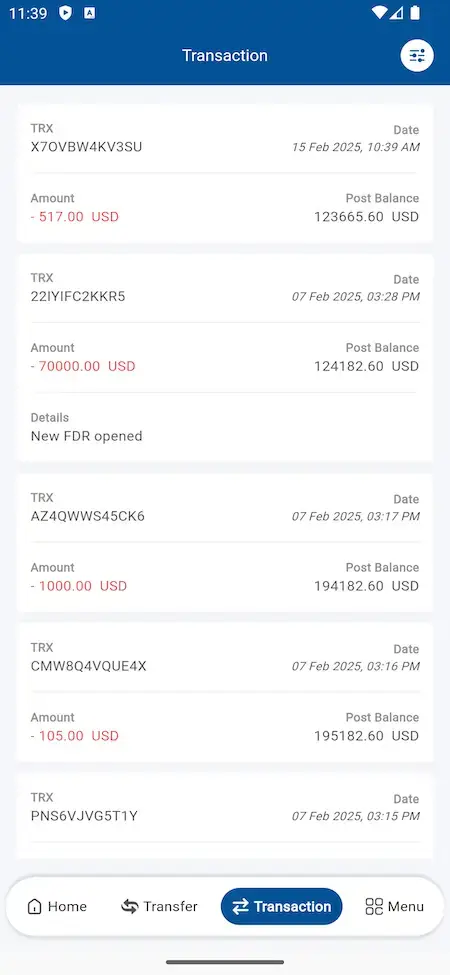
The transfer screen lets a customer choose an in-bank move, a transfer to another bank or a wire, enter a limit and an amount and confirm with a one-time password. Saved beneficiaries and a history list make repeat payments quick.
- In-bank, interbank and wire options
- Beneficiaries saved for next time and editable by the customer
- Limit and amount fields, with the balance visible
- A one-time password before any debit
- A history of past transfers for each customer
- The final amount displayed for interbank transfers
Deposits & Withdrawals
Customers fund an account through the payment gateways the institution connects, a manual one included, and ask to cash out. Both kinds of request sit in an admin queue, and a withdrawal will not complete until the account holder is verified.
- Funding through the connected payment gateways
- A manual gateway alongside the automatic ones
- Queues for deposit and withdrawal requests in the admin panel
- Each payment and withdrawal method shows its logo
- Cash-out waits until the holder is verified
- Deposit and withdraw pages of their own
Transactions & Statements
Every posting becomes a row carrying its id, its date, its amount and the balance that remained. Customers filter by date and download statements and PDF reports; staff can hand over a statement at the desk.
- Id, date, amount and remaining balance on each row
- A details line, for example New FDR opened
- Filter the list by date range
- Customers download their own statements
- Customers download PDF reports
- Staff download a statement from their panel
Staff Desk & Roles
Branch employees log in to a back office panel built for them. They look up a customer and their history, open accounts, work on loan requests and issue statements, while a role permission module limits each person to the screens their job needs.
- Branch employees log in separately
- Customer details and history on one screen
- Accounts opened and loan requests handled at the desk
- A searchable table of roles
- Admin staff accounts managed apart from branch staff
- Branch list: phone, fax, routing number, SWIFT code, address
Customer Website
The public site presents the bank through services, FDR and DPS schemes, loan plans, an FAQ, contact details and a branch directory. After login a customer reaches an account management dashboard of account number, balance, pending items and running schemes.
- Home, About, Services, FAQ and Contact pages
- A language switcher and the policy pages
- Cards for fixed deposits, DPS and loans, each with Apply Now
- Dashboard opens on the account number and the balance
- Waiting deposits and withdrawals, plus schemes in progress
- A public Our Branches page
Customer Phone App
Flutter powers the app: a balance button sits over a grid of shortcut tiles, and four tabs run along the bottom - Home, Transfer, Transaction and Menu. The menu adds profile, password, referral, security, notification, deposit, withdraw, language and support entries.
- Shortcut tiles: deposit, FDR, DPS, loan, withdraw, transfer
- Four tabs along the bottom edge
- Support tickets and the FAQ live in the menu
- A referral link and push notifications
- A switch for authenticator-app 2FA in the menu
- Terms and account deletion also sit in the menu
Dashboard & Downloads
The admin home pairs fund tiles with two charts - deposits against withdrawals, and transactions - plus counters for pending requests, running schemes, account states and installments due. Most tables export to CSV, Excel or PDF.
- Wallet, FDR and DPS balances plus the overall total
- Pending counters: deposits, withdrawals, loans, tickets, KYC, transfers
- Counters for FDRs, DPS schemes and loans in progress
- Login statistics split by browser, OS and country
- Filters, sorting and chosen columns on nearly every table
- Group notices, message templates and ticket handling in one console
Before you buy: We deliver the platform whole and rebranded. What you bring: hosting and a domain, developer accounts for the app stores, branding and business details, payment gateway accounts whose own KYC is done, outside-service keys, and whichever licence or partner bank your lending and deposit activity calls for. Apple and Google review the apps on their own clock, outside our 6-day build.
Where the Money Comes From
Banking Solution Revenue Models - Loan Margin, Deposit Funding, Account Charges, Transfer Fees & Gateway Costs
A lender earns in several places, so Miracuves keeps the lines apart in the banking solution and one can change without moving the rest.
Plan rates carry the most weight; the smaller charges on transfers and statements add steady income around them.
- 01
Loan Interest Margin
A loan plan carries its own rate, interval and installment count, so the gap between what the institution charges and what its money costs is settled plan by plan.
- 02
Deposit Plan Funding
FDR and DPS plans gather money at a stated profit rate and term, and the dashboard counts what is running, which keeps the cost of that funding in view beside the loans.
- 03
Monthly Account Charges
Monthly charges are set in the admin panel beside the banking products, letting a standing line run next to the per-use ones.
- 04
Transfer & Statement Fees
Transfers carry a configurable charge, and a download fee applies to statements issued at the staff desk, so everyday activity can be priced apart from the plans.
- 05
Currency Conversion Margin
Conversion rates are kept in the admin settings, so the institution chooses the rate it applies and any margin built into it.
- 06
Gateway Cost Recovery
Money arrives and leaves through payment gateways, so a fee on the deposit or the withdrawal can cover what the gateway itself charges.
| Revenue stream | How it is charged | Take rateTypical take rate | What sets the ceiling |
|---|---|---|---|
| Loan Interest Margin | The gap between the rate a loan plan charges and what the institution pays for its funds. | FDIC data put the second-quarter 2026 net interest margin of insured US banks at 3.32 percent. | The mix of loan sizes and terms on offer, and how much of the book your own deposits can carry (next row). |
| Deposit-Funded Lending | FDR and DPS plans pay a stated profit rate, and what sits in them is the money lending can draw on. | Nu Holdings ended 2025 with an interest-earning portfolio of US$18.5 billion alongside US$41.9 billion of deposits. | Deposits ran about 2.3 times the portfolio there (our arithmetic on reported figures); a new institution depends on how many savers it attracts. |
| Monthly Account Charges | A recurring charge configured in the console beside the banking products. | Chime publishes a zero monthly fee, while N26 lists four tiers costing EUR 0, then 4.90, 9.90 and 16.90 per month. | The free accounts customers already know. N26 attaches more free ATM withdrawals to its dearer tiers, which gives a paid step something to justify it. |
| Transfer & Statement Fees | A transfer charge set in the admin settings and applied each time a customer sends money. | Chase prices an online domestic wire at $25 and a banker-assisted one at $35, with international wires at $40 online and $50 assisted. | What customers accept for speed and for help at a desk; incoming wires on the same page cost $15 or nothing. |
| Gateway Cost Recovery | A fee on funding or cashing out, set to cover the gateway price. | Stripe prices domestic US card payments at 2.9 percent plus 30 cents each. | Your own gateways and card mix: the demo site names eight gateways, and their prices differ by method and country. |
How to read this. The deposit ratio is drawn from the Nu Holdings annual report and the margin from an FDIC release dated 25 August 2026. Account tiers are read off Chime's fees page and N26 pricing, wire prices off the Chase Total Checking fee page, and the card example off Stripe US pricing. Note that the margin averages all US insured banks, while the remaining figures are prices other companies charge. Use them as spreadsheet inputs, not as a quote or a forecast; you set your own rates in the admin panel, and your market decides what holds.
Banking Solution Revenue Model, Stage by Stage
In the banking solution Miracuves delivers, loan margin, deposit funding and every charge are separate settings, so a lender can sequence them as its book grows.
Launch
Before balances exist, small charges do the work: a transfer fee, a fee on statements issued at the staff desk and a funding fee that recovers gateway cost.
Traction
Once savers fill FDR and DPS plans, those deposits fund the first loan plans, and the gap between the profit rate paid and the loan rate charged becomes the main line.
Scale
With a full book, the loan interest margin leads, monthly account charges and a currency conversion margin add standing income, and the reports point to the plans worth growing.
Rates live on each plan card, and none of the margin or fees goes to Miracuves.
Run It From One Console
Lender Admin Panel - Queues, Plans, KYC Data, Fees & Reports
With the Miracuves banking solution, head office runs its day from one console: what the fund holds, which requests are waiting, which accounts still need a KYC look, how each plan is doing and what the reports show.


Admin Panel Sections
- 01
Request Queues
Counters for waiting support tickets, KYC verifications, money transfers, deposits, withdrawals and loan applications show the desk which pile to open first.
- 02
Accounts & KYC Data
Accounts are filed by state - registered, profile completed, active, banned, or unverified by email, mobile or KYC - with actions to open KYC data, sign in as the user and read the login history.
- 03
FDR, DPS & Loan Plans
The plans on offer, the FDR, DPS and loans currently running, installments falling due and each FDR's closing date, all reachable from the same menu.
- 04
Fees & Currency
Transaction fees, monthly charges, conversion rates and the display format of amounts sit in settings, so pricing changes are a form to fill rather than a release to ship.
- 05
Fund & Dashboard
Four fund tiles (wallet money, money placed in FDR, money placed in DPS, grand total) sit above two charts, deposits against withdrawals and transactions, each filterable by date.
- 06
Money In & Out
Deposit and withdrawal requests with the method behind each, the automatic and manual gateways, and a logo for every method customers see.
- 07
Branch Network
Routing number, SWIFT code and contact details for every branch, two separate people lists - one for branch staff, one for the head-office admins - and a role permission module governing both.
- 08
Exports & Settings
Tables download as CSV, Excel or PDF with the columns you pick; general settings, policy pages, notification templates, language flags and a form generator sit beside them.
Plans & Money
The finance side of the console, from a plan card to a closed FDR.
- FDR, DPS and loan plan lists
- Deposit and withdrawal queues
- Loan applications and installments due
- Fee and currency settings in one place
Access & Settings
Which person may do what, and how the platform itself behaves.
- Staff accounts held to their roles
- Cron configurable by the super admin only
- Central settings instead of code edits
- Blocked admin staff meet a banned page
Want more from the console? A further report, another approval step or an extra language is scoped separately. Tell us what your lending and savings teams require and we will quote in writing.
04Package and price
The Full Package
What a Lending and Savings Institution Receives: Code, Apps & Go-Live
Miracuves delivers the banking solution as one working lender: website, apps, staff panel, admin panel, the code and its database schema, all owned outright with no seat or account billing and nothing to license. The one-time buys that full lending and savings platform; work outside it is priced in writing, and the lending license itself comes through your own institution.
$ git clone your-lender Complete Source Code
Web and mobile banking app source is delivered unencrypted in full, letting your developers shape it around the loans and deposits you sell.
- Web platform source, unencrypted
- Flutter source for Android and iOS
- Yours to modify and redeploy
- Handed over in your own repository
Schema & Migrations
The database design behind accounts, postings, plans, branches and staff, shipped so that it can be rebuilt from nothing.
- Schema with migrations
- MySQL data tier
- Accounts, postings and plans
- Branches, staff and roles
Notices & Support Tools
Push notices, editable templates, mail to groups and support tickets with attachments: the means to contact customers and to answer them.
- Push messages to the app
- Editable message templates
- Mail to a group or a filtered set of users
- Tickets that accept attachments

Website & Staff Panel
A public bank site carrying plan cards and a branch page, the dashboard a customer sees after login and the panel in which branch employees work.
- Services, FDR, DPS and loan cards
- A public Our Branches page
- Dashboard showing the balance and running schemes
- Desk panel for issuing statements and serving customers
Customer App
A single Flutter app for account holders that covers balance, transfers, postings, FDR, DPS, loans, profile and support.
- Four tabs along the bottom edge
- Shortcut tiles for everyday tasks
- Referral and support ticket entries in the menu
- Published from your own store accounts


Admin Panel
The institution console: fund tiles, charts, request queues, accounts, KYC data, branches, staff, plans, loans, reports and settings.
- Fund tiles with charts for a chosen period
- Accounts, KYC data and queues
- Branch records, with branch staff and admin staff listed apart
- Plans, loans, reports and settings
Sign-In & Access Controls
Customers, staff and admins sign in separately under their own permissions, and customers add one-time passwords and 2FA through an authenticator app.
- Roles limiting what staff may open
- OTP before a debit
- Idle logout and login history
- 2FA through an authenticator app
Handover & Support
Rebranding and deployment are done for you, with a handover pack and three support periods that run side by side from launch.
- Your logo, icons and colors applied
- Deployment to your hosting
- Configuration and architecture notes
- 60 days guidance, 6 months bug fixes, 12 months updates
Prefer to look first? Try the demo with the customer credentials, or book a guided tour in which we walk an FDR plan, a loan request, a KYC record and the admin dashboard against your own product list.
Transparent Pricing
What Does It Cost to Launch the Banking Solution?
The launch-ready white-label Banking Solution has a fixed price of $3,699. Add-ons, extra integrations and custom flows are quoted separately, in writing, before any work begins.
Professional
Ready-Made Launch PackageChosen by: Lenders and savings institutions moving online, microfinance teams, fintech founders who need loan and deposit plans from day one
You receive the platform as the demo shows it, in your logo, icons and colors, running on your own hosting.
Get StartedEnterprise
Custom Builds for Larger ScopeChosen by: Multi-country groups, lenders with their own approval chain, teams with unusual products
Need a flow the base lacks? We scope it, quote it and agree the price before building starts.
Request a QuoteBanking Solution Development Cost in 2026
One payment of $3,699 buys every piece the demo walks through: savers' FDR and DPS plan cards, the borrower loan queue, the staff desk, the head-office console, the Android and iOS apps and their unencrypted Flutter and Laravel source, deployed under your brand. Miracuves bills nothing per borrower or account.
Costs that sit outside the software invoice
- The lending or banking authorization, or a licensed partner holding customer funds
- Identity, sanctions and AML screening providers for your KYC program
- Gateway accounts and what each gateway charges per payment
- Hosting that grows with the number of borrowers and savers
- Add-on modules such as credit score monitoring or portfolio tracking
Want an added approval step on loan requests or another lending report? Miracuves prices it in writing before any build begins, and delivery usually lands in 2-8 weeks.
Compare Your Options
Ready-Made Banking Solution vs Custom Development vs SaaS
Lenders and savings institutions can launch on Miracuves' ready-made white-label banking software solution, commission bespoke lending software or rent a hosted product, and ownership of customer records and fee control differ most.
| Criteria | MiracuvesReady-Made Banking Solution | Custom Development | SaaS |
|---|---|---|---|
| Launch time | 6 working days of our build | Written quote, about 2-8 weeks | Quick, on hosted terms |
| Upfront cost | $3,699, single payment | Estimated per institution | Monthly plans after setup |
| Source code ownership | Code and schema, unencrypted | Contract-dependent | Stays with the host |
| Customization | Plans, fees and currency editable | Designed to your rules | Preset loan products |
| Ongoing fees | No per-account billing | Developer upkeep | Charges per borrower or account |
| Branding & app-store listing | Your institution's name everywhere | Entirely yours | Shared or co-branded |
| Best for | Microlenders and savings societies | Unique credit workflows | Testing one loan product |
Same product, other editions: Banking Script · Browse all Banking solutions
Where It Applies
Use Cases for Digital Lending Software - Small Loans, Fixed Deposits, Pension Savings, KYC Onboarding & Fee Tuning
Miracuves ships one banking solution with three emphases: microlenders lead with loan plans and installments, savings societies with FDR and DPS, and branch banks with the staff desk. Configuration decides which comes first for you.
Swipe · 6
Publish loan plans with amounts, installments and intervals, take applications from the app or the website, and let staff and admins approve from a queue, with a notice sent on approval.

Offer FDR plans with a profit rate, a lock-in period and a payout interval, then follow what is running and what is due from the admin dashboard.

Run DPS plans where a saver pays a set installment on a set interval and sees the total deposit and the payout on the card.

Register customers by email and phone for digital onboarding, hold each account in a verification state and let staff open the KYC data before a withdrawal or a loan moves forward.

Adjust a transfer charge, a monthly charge or a conversion rate in settings and see it applied across the platform with no code change.

Staff open accounts, work on loan requests and issue statements from their own panel, with the customer's record and history open in front of them.

Banking Solution Business Model: Three Ways to Run It
Miracuves built the banking solution so one institution can act as both the saver's bank and the borrower's lender on a single record, and three operating models follow from that.
Deposit-funded lender
A savings society or credit union gathers money through FDR and DPS plans and lends it back through loan plans, earning the margin between the two rates.
Installment microlender
A microfinance house publishes many small education, personal or home loans with fixed installments and earns on the loan rate plus transfer and statement fees.
Partner-bank fintech
A fintech founder runs the app and console under its own brand while a licensed partner bank holds the funds, earning on account charges and everyday fees.
In each model, FDR and DPS profit rates, loan rates, fees and currencies stay head-office console settings.
One product, six ways to run it. All six cases share a website, an app and an admin panel. What varies is the plans you publish, the fees and currencies you set, the branches you list and the branding, so a single codebase is all you maintain.
Talk to Our TeamMarket Timing
Why Launch an Online Lending and Savings Platform in 2026?
Customers judge quickly whether a lender feels current, and Miracuves' banking solution moves online the loans and savings that many institutions still run through paper forms and counters. Your own branded platform gives desk and app a single shared record rather than a second system to reconcile.
01Borrowers Start on a Phone
People look at a loan plan, compare an installment and send an application from the couch. A plan card with its limits and an Apply Now button meets them there.
02Savers Compare Plans Before They Commit
A fixed deposit states its profit rate, lock-in and payout interval, and a pension scheme states its installment and payout. Clear cards make each product easy to weigh against the next.
03Branches Still Close the Deal for Many
Plenty of customers want a person to open the account or explain a loan. Staff who work from the customer's own record keep the desk and the app in step.
04Identity Checks Come First
A lender needs to see who it is dealing with before money moves. Verification states and KYC data on screen put that step in front of the reviewer.
05Your Name on the Product
When the platform carries your brand, the customer relationship, the records and the repeat business stay with you.
06Buying Is Quicker Than Building
Plans, applications, verification, transfers, a desk panel and an admin console make up most of an online lender. After 6 days of our build time a white-label copy of the online banking software runs on your hosting.
Platform by the Numbers
Plan Families
Pending Queues
Releases in the Log
Days to Launch
The plain middle of an online lender is plan definitions, application queues, verification, the posting record and the console that binds them. All of that already exists here.
Industries
Institutions That Run on a Lending and Savings Platform
Any organization that lends money or keeps people's savings can build on the Miracuves banking solution. Microfinance houses and consumer lenders run loan plans and installments, credit unions and savings cooperatives pay profit on deposit schemes, community and regional banks add an online layer of digital channels next to their branches, and fintech founders begin with products that already work. Every operator holds the licence or partner its market demands, and your name sits on the platform from the first screen.
one codebaseMXBank
- 01MlMicrofinance Lenders
- 02CuCredit Unions
- 03ScSavings Cooperatives
- 04DlDigital Lenders
- 05CbCommunity Banks
- 06FfFintech Founders
- 07PsPension Savings
- 08FdFixed Deposit Schemes
- 09EfEmployee Funds
- 10RcRural Credit
- 11RbRegional Banks
- 12ClConsumer Lenders
Miracuves’ Banking Solution is an online lending and savings platform that can be shaped to many kinds of institution, with plans, KYC data and fee settings under your own brand.
06Under the hood
Journey and Mechanics
How the Online Banking Solution Works - Register, Verify, Choose a Plan, Apply, Transfer & Review
To a saver or borrower, the banking solution Miracuves builds is a few taps. Behind them runs a strict chain: sign-up, verification, plan choice, application, transfer, posting. Here is that chain from the first screen to a reviewed transaction, then the architecture beneath it.
How the Online Banking Solution Works for Savers and Borrowers
Swipe · 6
- 1Join Online or at the Desk
Savers and borrowers sign up on the site or app, or staff enroll them at the desk, and a code by email or SMS confirms who they are.
- Name, email and phone on the form
- Code by email or SMS
- Profile with address details
- 2Compare Fixed Deposit Plans
Fixed deposit plans list a profit rate, how long the money is locked, how often profit pays out and the allowed amounts; the customer's own deposits sit on a second tab.
- Profit rate and lock-in on each plan
- Minimum and maximum amount
- My FDR list
- 3Apply for a Personal, Home or Education Loan
Loan plans for education, personal and home needs list the amount range, installment size, interval and number of installments; Apply Now sends the request to staff.
- Plans with amount range
- Installment and interval
- Apply Now with an amount
- 4Transfer Money
Customers move money within the institution, to another bank or by wire, with earlier transfers kept in a list below.
- In-bank or interbank
- Wire option
- List of earlier transfers
- 5Authorize With a One-Time Code
Amount and transfer limit go into a sheet, and nothing that lowers a balance completes until the one-time password is entered.
- Limit and amount fields
- OTP before the balance drops
- Current balance on the form
- 6See the Posting & the Admin Totals
Postings land in the customer's transaction list with the remaining balance, while admins watch queue counts and money-flow charts on the dashboard.
- Transaction id, date and balance after
- Statement download
- Queue counters and charts in the console
The Build Behind It
Banking Software Architecture - How a Request Moves Through the Platform
- 01Part 01
Separate Logins per Audience
Each audience has its own sign-in, and roles decide which screens a staff member or an admin can open.
- 02Part 02
One API for the App
An API built for the bank mobile app, added in release 2.1, lets the Flutter app work on the very same records the website uses.
- 03Part 03
A Single Posting Record
Each posting stores an id, a date, an amount and what remained afterward, so what the app shows, what the website shows and what the staff see always agree.
- 04Part 04
Recurring Tasks
Recurring work runs as cron commands governed by a dynamic cron setting, which only the super admin is allowed to configure.
- 05Part 05
One Notification Pipeline
Push notices, templates, group mail and filtered messages go out through one sending process, which the 3.0 release reworked.
- 06Part 06
Configuration, Not Code
Fees, currencies, the amount format and page rules live in one central settings system, so most changes need no redeploy.
Technology Behind It
Banking Software Solution Tech - Laravel Web Tier, Flutter Apps, MySQL & Gateway APIs
A lender needs a web layer that holds up, a database that keeps each posting consistent and apps that feel native, and Miracuves answers with Laravel on PHP, MySQL and Flutter. Here is what the platform is built on, as the product pages and the release log record it.
Web Tier
- Runs the website, the staff panel and the admin panel
- A Bootstrap interface that resizes to the screen
- Laravel 11 on PHP 8.3 is in the changelog
- Release 3.1 is the latest entry
Storage Layer
- MySQL holds accounts, postings and plans
- MySQL is listed as the database
- Schema and migrations come with the source
- Can be rebuilt from an empty database
Handset Apps
- Flutter apps on current dependencies
- A single app serves both stores
- Four tabs: Home, Transfer, Transaction, Menu
- Submitted via developer accounts in your name
Payment Gateways
- The demo site names eight gateways
- Your own gateway accounts, with KYC done, are required
- A manual gateway sits beside the automatic ones
- Each method shows a logo
Outside Services
- Firebase is listed among the integrations
- Twilio is listed among the integrations
- Google Maps is listed among the integrations
- A third-party API powers mobile top-up
Code & Notes
- Application source with its history
- Mobile projects with signing explained
- Deployment settings written down
- Architecture notes handed over
Outside services such as Google Maps, Twilio, Firebase, payment gateways and translation need your own accounts and keys, supplied at deployment. All of it is mainstream and easy to hire for.
Room to Grow
Room for More Accounts - Panels Apart, Lists That Cope With Volume & Settings Over Code
In the Miracuves banking solution, separate customer, staff and admin panels share a single set of records, so growth in plans, branches, staff and accounts becomes configuration and capacity work, never a rewrite.
One Panel per Audience. Customers, staff and admins sign in separately, so work on one panel need not ship with the others.
Lists That Stay Usable. Filters, sorting, column choice, page size and downloads keep even a long roll of borrowers or savers manageable.
One Message, Many Customers. The institution can notify a filtered group or send grouped mail, rather than writing to customers one at a time.
Figures You Can Reconcile. A posting stores its transaction id and the balance that followed, which lets a dashboard total be matched with the customer's own list.
A Panel for Each Audience
Customers, staff and admins each sign in to their own panel, so work on one leaves the others alone.
Lists Built for Volume
Most admin lists can be filtered by column, sorted, cut down to chosen columns, paged and exported.
- Filter on the columns that matter
- Sort and pick visible columns
- Rows per page in general settings
- Download as CSV, Excel or PDF
Notices Without Custom Code
Templates and a sending process let the institution contact many customers from the admin panel.
- Message a filtered group of users
- Notification templates you can edit
- Mail to a whole group at once
- Push notices on the phone
Staff Role Limits
Roles plus several staff accounts keep every employee inside the screens their work calls for.
- Roles listed in a searchable table
- More than one staff account
- Branch staff kept apart from admin staff
- Blocked admin staff see a banned page
Pricing in Settings
Charges, currencies and the amount format are stored as settings, so changing a price needs no release.
- Transfer charges that handle fractions
- A fee on statement downloads
- How amounts are written, set in one place
- Currencies managed from the console
A Documented Handover
Source, schema, deployment settings and architecture notes pass to you, so that another team can run the platform unaided.
Space to Change. Sooner or later each lender needs something specific to its market or products. The full source code and a conventional stack make a new screen, rule or integration ordinary development, for your team or for ours.
Launching an institution? Open with whichever plans and branches are ready on day one and expand on the same deployment. As accounts multiply, capacity becomes a hosting and configuration decision; work beyond the base is scoped and quoted on its own.
07Security and trust
Controls You Can Verify
Securing a Digital Lender - Sign-In Controls, Roles, Records & What Stays on Your List
Identities, balances and repayment records live on the banking solution Miracuves delivers, so three questions matter: who may open which record, what has to be confirmed before money moves, and which work you complete before launch. Below you will find what the demo and the release log evidence, and what remains on your side.
- 01 · RolesAccess by Role
Roles and multiple staff accounts decide what each person may open, so a branch employee never reaches the admin console.
- Staff Access Limits: A branch employee sees what the task requires, since access follows the role rather than being open to all by default.
- 02 · RecordsLogin & Posting History
Admins can read any user's login history, while the transaction list keeps an id, a date, an amount and the remaining balance for each posting.
- Banned Accounts: The dashboard keeps a tally of banned accounts, and a blocked admin member is shown a banned page instead of the console.
- 03 · OTPOne-Time Passwords
Any debit asks for an OTP first, and a countdown slows down how quickly a replacement code can be requested.
- Withdrawal Verification: Per the demo site, a withdrawal cannot complete unless the holder is verified, so cashing out waits for confirmation.
- Account Recovery: Forgot Password emails or texts a code or link, and verification pages pace re-sends with a countdown.
- 04 · IdleIdle Logout
A customer who stays idle for a set time is signed out automatically, a control that release 2.4 added to the log.
- Admin Sign-In Hardening: Release 3.0 took remember-me off the admin login, and cron can be configured by the super admin alone.
- 05 · 2FAAuthenticator-App 2FA
In the account menu a customer can turn on two-factor authentication, using an authenticator app installed on the phone.
- 06 · LaunchBefore You Launch
Your team books security testing, secret handling and a restore drill as part of its own go-live plan.
- Named Launch Tasks: An outside penetration test, a review of how secrets and servers are set up and a restore drill belong on your go-live checklist, carried out by firms you select.
Staff roles, login history, a one-time password before debits and a posting trail with balances are all visible in the demo and release log. Independent testing, secret handling and a restore drill sit on the go-live calendar we keep with you. Lending records and repayment postings are written to ISO 27001, SOC 2, PCI DSS, AML/KYC and GDPR controls. Audit or clearance runs with independent audit partners, and your lending company is named on the attestation. See the published capability record.
Talk Through Security Before Go-LiveFintech Readiness
Lending License, Deposits & Readiness - The Software's Part and the Institution's Part
Lending and deposit-taking are regulated activities. What Miracuves delivers is software: interfaces, records and staff tooling. Whoever runs the platform answers for the licence, the regulator relationship, the partner bank and every obligation that attaches to customer funds.
In this section, ready covers what the demo shows and the release log records. The lending license and the regulator relationship belong to the institution that runs the platform, and counsel should confirm the rest.
Built Into the Software
Website and app for customers, a desk panel for staff, an admin console, accounts with verification states, FDR, DPS and loan plans that take applications, transfers, deposits and withdrawals through your gateways, balances on every posting, role limits, OTP and 2FA.
License, Deposits & Lending Law
Permission to take deposits or make loans rests on a banking or lending authorization, or on an arrangement with a licensed bank or partner who keeps the money for you. Arranging deposit insurance, reserve rules, interest caps and loan disclosures is also your job.
KYC, AML & Reporting
Staff see verification states and KYC data in the platform. Deciding which identity checks, sanctions and AML screening to use, at what thresholds and with which regulator reports, is the operator's own programme with providers you choose.
Data, Cards & Your Markets
Data-protection law, your own privacy terms and whichever card-data standard applies are yours to meet; payment gateways deal with the cards they process. Rules shift from country to country and often state to state, so take advice market by market.
08Extend the platform
- FDR, DPS & loan plans
- KYC data & accounts
- Fee & currency settings
- Website, app, staff & admin
How a module is added
- 1Choose a module
Budgeting, investing, credit awareness or learning content, at launch or afterwards.
- 2Agree the price first
Every module gets its own written scope and quote before work starts.
- 3Built into your source
It slots into the codebase that is already yours.
Add More
Add-Ons for Your White-Label Banking Platform: Budgeting, Portfolio Tracking, Credit Score Views & Learning Content
As delivered, the platform runs end to end and the demo proves it. Miracuves lists four extras for the banking solution, each with its own price because the scope hangs on your institution.
Drag to explore · hover to pause
- 01Plan & save
Personal Finance Management
Spending tracking, savings goals and budgets inside the banking app, so customers can plan their money and not only move it.
Budgeting · Goals - 02Plan & save
Investment Portfolio Management
A section in which customers follow their holdings, watch asset performance and read market news, without leaving the institution's platform.
Investing · Portfolio
- 03Understand
Credit Score Monitoring
Credit score view with alerts when it moves and tips for lifting it, which builds awareness around the loan products.
Credit · Score - 04Understand
Financial Education Resources
Articles, videos and webinars within the platform that explain saving, borrowing and day-to-day money decisions.
Education · Learning
The Fintech Suite
Lending Is One Part of Fintech. Here Are the Neighbors.
Fintech reaches well past loans and savings. If your plans do too, these four platforms sit closest to this one.
01A digital bank built around the app with no branch network, for a product delivered entirely through the app.
Explore Solution
02Multi-currency accounts, transfers and cards inside a digital banking product, aimed at a wider consumer finance offer.
Explore Solution
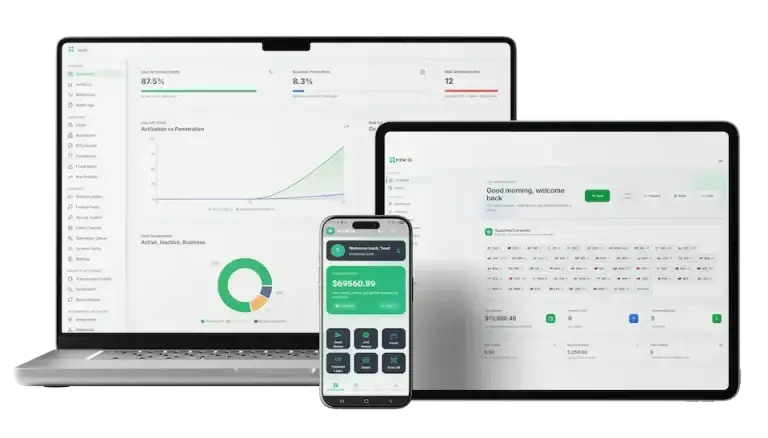
03International payments and currency wallets in one cross-border transfer product.
Explore Solution
04Investing for your customers and a console that lets operators manage trades and holdings.
Explore Solution09The business case
Market Benchmarks
Digital Banking Market Benchmarks - Independent 2025-2026 Data
The revenue models above are ours. The figures below are not. They come from the annual reports of Nu Holdings and Chime, the Federal Reserve Board and the World Bank, reproduced as published. Together they show how large digital banks have grown, how much of that revenue is debit interchange, and how many adults a new bank can still reach.
131 Million Customers at Nubank by End of 2025
Nu Holdings reports in its 2025 annual report on Form 20-F that it reached 131 million customers, including 113 million in Brazil, where it serves 62 percent of the population. Revenues grew 37 percent year on year to US$15.8 billion, net income grew 45 percent to US$2.9 billion, and total deposits reached US$41.9 billion on an FX-neutral basis.
Chime: $2.19bn Revenue and 9.5m Active Members
Chime's annual report on Form 10-K shows 9.5 million Active Members at 31 December 2025 and total revenue up 31 percent to $2.19 billion. Payments revenue, which includes debit interchange, was $1.50 billion, about 69 percent of the total (our arithmetic on reported figures), and average revenue per active member was $257 for the year.
$34.12bn of US Debit Interchange in 2023
The Federal Reserve Board's December 2025 report on Regulation II finds that interchange fees on debit and general-use prepaid card transactions totaled US$34.12 billion in 2023. The average fee was US$0.52 per transaction for issuers exempt from the cap, against US$0.24 for covered single-message and US$0.22 for covered dual-message transactions.
79% of Adults Worldwide Now Have an Account
The World Bank's Global Findex 2025, described as the world's only demand-side survey on financial inclusion, reports that 79 percent of adults globally now have an account. It also finds that 40 percent of adults in developing economies saved in a financial account in 2024, a 16-percentage-point increase since 2021.
Nu Holdings Ltd., Annual Report on Form 20-F for the year ended 31 December 2025, filed 8 April 2026 - sec.gov
Chime Financial, Inc., Annual Report on Form 10-K for the year ended 31 December 2025, filed 6 March 2026 - sec.gov
Board of Governors of the Federal Reserve System, 2023 Interchange Fee Revenue, Covered Issuer Costs, and Covered Issuer and Merchant Fraud Losses Related to Debit Card Transactions, December 2025 - federalreserve.gov
World Bank, The Global Findex Database 2025 - worldbank.org
All figures are the publishers’ own, reproduced as published from annual filings, a central bank report and a multilateral survey. Metric definitions differ by company, and the Chime payments share is our arithmetic on reported figures. They describe the companies and markets named, not any platform Miracuves builds, and nothing here is a revenue projection for your business.
The Commercial Case
Lending and Savings Business: Marketability, Revenue Potential & Outlook
Savers deposit and borrowers apply once the platform earns their trust, and staff adopt it once it beats their paper routine; the points below work on both. Each line is a setting: loan margin funded by deposits, account and statement charges, transfer fees and a conversion margin, with gateway costs set against them. Miracuves takes no share.
- 01
Margin Between Loans and Deposits
Every FDR, DPS and loan plan has its own rate and term, which makes the gap between saver earnings and borrower cost a product decision that stays with you.
- 02
Fees on Everyday Activity
Each of transfers, statements and monthly charges has its own setting, so income can follow usage and not just the size of the loan book.
- 03
Customers and Records You Own
Accounts, KYC data and posting history sit in your own database, so the value of each relationship accumulates with you.
- 04
Freedom to Move
You hold the full source code and the schema, so a later change of host, team or direction needs nobody's permission.
- Loan Interest Margin
- Deposit Plan Funding
- Monthly Account Charges
- Transfer & Statement Fees
- Currency Conversion Margin
- Gateway Cost Recovery
Lasting value comes from relationships and records more than from screens.
- 01A repayment history or a running deposit gives a reason to stay
- 02A lender that knows customers face to face is hard to imitate
- 03Desk and online work share one record
- 04Strict identity checks add a second moat
These three examples vary only by the number of live branches, and each names the lever that leads at that size. Treat them as material for planning talks rather than a promise of any institution's income.
Small charges cover the early running costs.
One branch opens its first online customers, and the fees on transfers and statements pay for the basics. A size chosen to illustrate the idea, not a forecast.
Fees plus loan and savings plans.
Ten branches hold enough FDR, DPS and loan balances for the margin between them to count beside the everyday fees. A size chosen to illustrate the idea, not a forecast.
Many lines running, steered by the admin reports.
A hundred branches where fees, monthly charges and the lending margin all add up, and the reports show which locations and plans deserve attention. A size chosen to illustrate the idea, not a forecast.
10Why Miracuves
Why Miracuves
How Miracuves Compares for Building a Lending and Savings Platform
Some online lenders begin on a generic script, others with a freelancer or an agency, and others on a base Miracuves has already shipped. Ask each supplier to open the staff desk and loan queue live, to list what transfers to you at handover, and to admit that no vendor supplies your lending license.
Why Founders Choose Miracuves
- 01
Loan and Deposit Plans Built In
FDR, DPS and loan plans come with their own screens, queues and counters, so you can judge the products in the very first demo.
- 02
KYC Data on Screen
Verification states, a KYC queue and a view of the KYC data are part of the admin side, not an afterthought bolted on later.
- 03
Fees and Currencies in Settings
Charges, conversion rates and the amount format are changed in the console, so a pricing decision does not become a release.
- 04
Full Source Code Ownership
The whole codebase arrives unencrypted with its schema and deployment notes, so nobody can reprice it or change the terms later.
- 05
Controls Visible, Not Just Promised
A one-time password before debits, authenticator-app 2FA and automatic idle logout can be seen in the demo and are named in the release log.
- 06
Clear Readiness Wording
Base features, priced add-ons and the items you bring, the license or partner bank behind your lending among them, are each labeled here.
How to Choose a Banking Solution Development Company
A lending and savings software vendor should show the loan management queue and the KYC record live before asking for payment.
What to look for Miracuves
- Proof in the product A public demo login, plus the staff desk and admin console on a guided call
- Plans that already work Fixed deposit, pension savings and loan plans with their own cards and queues
- KYC before money moves KYC data staff open from the Accounts list
- Pricing in settings Fees and conversion rates edited in the console
- Source ownership Unencrypted Laravel and Flutter source, plus the MySQL schema and deployment notes
- Support after launch 60 days of guidance, 6 months of priority bug fixes, 12 months of updates
Walk away from any vendor who
- Keeps loan terms in code instead of editable plan cards
- Cannot show the KYC data a reviewer sees before a withdrawal
- Names the handover contents only after payment
- Claims the software comes licensed to lend
- Bills per borrower once you are live
Where the Banking Solution Differs From Generic Scripts and Agencies
| What You Compare | MiracuvesMiracuves Banking Solution | Off-the-Shelf Script | Bespoke Agency Build |
|---|---|---|---|
| Time to Launch | 6 days of our build time | Unknown or do-it-yourself | Scoped per project, usually months |
| Source-Code Ownership | Complete, unencrypted | Often limited or locked | Usually yes |
| Loan & Deposit Plans | FDR, DPS and loan plans ship in the base | Depends on the script | Built on request |
| KYC & Account States | Verification states and KYC data view | Thin or absent | Built to order |
| Fees & Currency Settings | Edited in the admin panel | Often hardcoded | Custom work |
| Staff Panel | Included, signs in on its own | Rarely included | Built to order, billed extra |
| Security & Licensing | OTP, 2FA and roles; license is yours | Minimal | Differs from firm to firm |
| Cost, Speed and Quality | Fixed price, quick, tested base | Cheap but risky | Dear and slow |
| Support & Updates | 60 days guidance, 6 months bug fixes, 12 months updates | Rarely offered | Set by the contract |
Few routes to a lending platform survive a first real quarter unchanged. Here is where they part ways.
Talk to Our TeamChangelog
Release Notes for the Online Banking Software - Versions & Updates
Entries for the web platform, newest first. No entry is dated, and the names of third-party brands and templates are omitted.
| Version | Changes | What changed |
|---|---|---|
| V3.1 | 3 additions, 4 corrections | New or improved Statements can be saved from the customer panel Statements can also be saved from the staff panel Statements saved at the staff desk can carry a fee Corrected Approved loans now trigger their notice correctly Policy pages showing correctly A fault on the withdrawals page in the admin panel Customers saw one currency twice on the manual payment gateway |
| V3.0 | 31 additions, 4 corrections | New or improved Upgrade to Laravel 11 and PHP 8.3 Lists can be downloaded as CSV, Excel or PDF Nearly every table gained column filters, sorting, a choice of columns and a rows-per-page option Four actions on the Accounts list: open KYC data, sign in as that user, read their login history, send them a notice Notices to a filtered group of users The current balance appears on transfer forms A date range on the transactions filter Dashboard charts for deposits, withdrawals and transactions take date filters Dashboard insights regrouped, with the current fund on display FDR list gained a closing-date column The branch list gained contact fields: phone, fax, routing number, SWIFT code, address Branch staff list shows the date each member joined The accounts list adds state, city, zip and registration date, and can be searched by full name Searchable roles table and a tidier roles form Additional payment gateways Payment and withdrawal methods display logos Sign-in with Google, Facebook or LinkedIn In-app purchase in the mobile app Settings for the XML sitemap and robots.txt Policy pages gained slugs and SEO text Language flags can be uploaded An image for the maintenance page Support tickets list the account number and the opening date Form generator with extra input types, widths, hints and ordering One form holds all referral settings A countdown before verification codes can be resent A banned page for blocked admin staff Remember-me dropped from the admin login Cron can be configured by the super admin alone The Airtime menu item is now Mobile Top Up Automatic system updates Corrected The FDR count on the user details page The page title for users whose KYC is pending An OTP page that appeared when the sender balance was too low to withdraw Page titles inside the staff panel |
| V2.5 | 2 additions, 3 corrections | New or improved Mobile top-up via an outside API Current system and security patches Corrected Running cron commands Adding languages A problem with deposits |
| V2.4 | 1 addition, 8 corrections | New or improved Idle customers are signed out automatically Corrected A wrong figure in the transaction log Faulty notification text in both panels A language fault in the admin panel A due-installment problem on FDR Changing a password in the customer panel The mobile code field when registering Saving SEO content An error in dynamic form data |
| V2.3 | 11 additions, 2 corrections | New or improved New website template and a fresh customer panel interface PDF reports in the customer panel Customers can update a beneficiary PDF and CSV reports in the admin panel A list of KYC-verified users Multiple staff accounts and role permissions A dynamic cron setting Group mail and a notification system An uploader for system updates Two further payment gateways Newest Laravel and PHP Corrected The demo login no longer shows on the staff login page A 404 on transfer history once the transfer module was switched off |
| V2.1 | 2 additions, 3 corrections | New or improved Push notifications An API serving the bank mobile app Corrected Tiny fractions in the transfer charge were rounded to whole numbers The final amount now shows for interbank transfers A heading in the branch panel transaction table |
Start the conversation
Ready to put your loan and savings plans on a working platform?
Book a free consultation and leave with a clear timeline and honest answers. We would sooner earn your trust than close a quick sale.
- Reply in under 2 hours
- Free first consultation
- No lock-in contract
- The source code is yours
11Learn more
Blog & Resources
Latest Reading on the Banking Solution
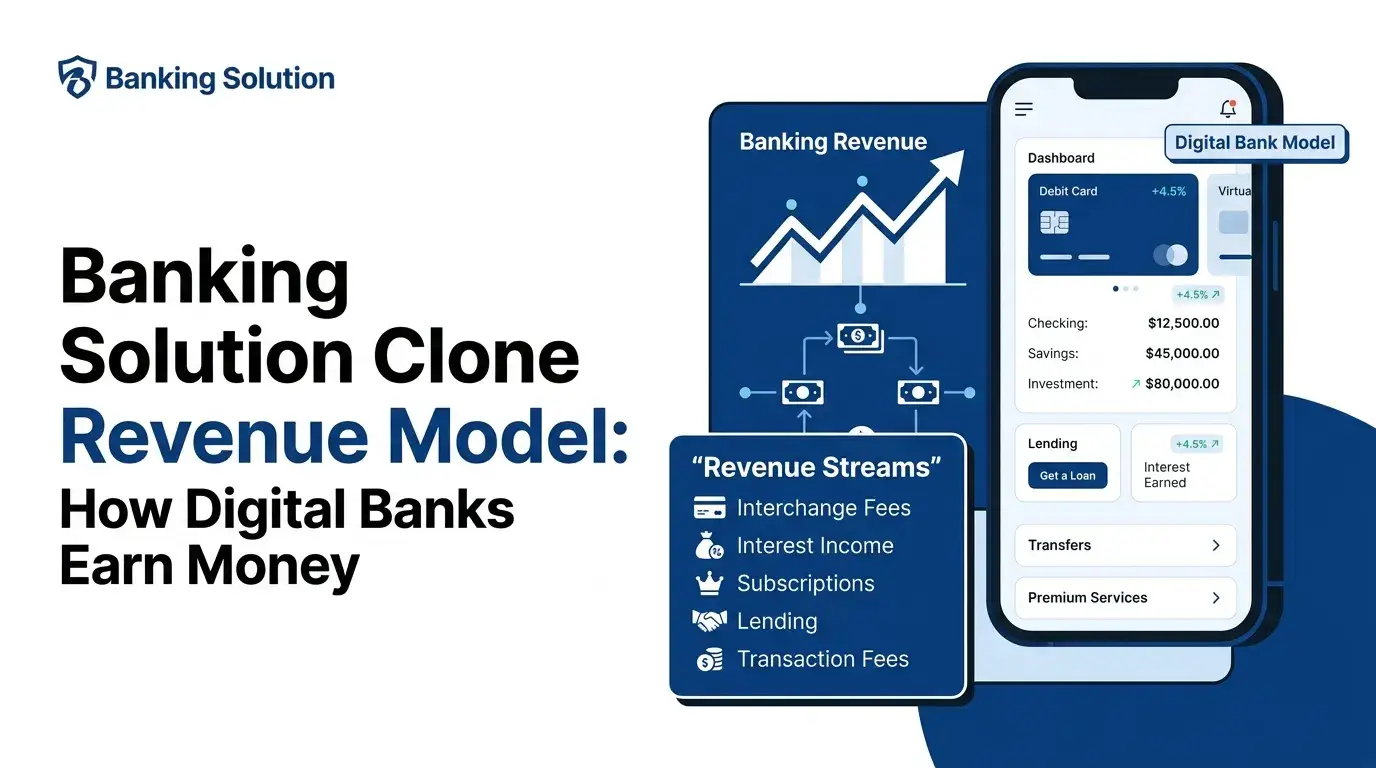
Fresh reading on building a banking solution, what it earns and how clone scripts compare on features and price.

The product4 questions
01What is an online banking solution script, and what do I gain by buying one?
A banking solution script is a finished platform made of a customer website and app, a desk panel for staff and a console for administrators. The Miracuves Banking Solution layers FDR, DPS and loan plans, KYC data on every account, fee and currency settings, transfers, and money in and out through your payment gateways on top. Buying it replaces months of groundwork with 6 days of our build time, and the complete source code is yours.
02Do I need a banking or lending licence to run it?
Most likely, yes - or you need a licensed partner. Nothing in the software is licensed, and Miracuves is neither a bank nor a lender. In many countries, taking deposits, making loans and moving money are licensed activities, which can call for your own banking or lending authorization or an arrangement with a licensed bank or partner. Miracuves does not provide legal advice, so take it up with qualified local advisers, market by market.
03Is mobile check deposit or budgeting part of the package?
Mobile check deposit is offered as custom work outside the base package. Budgeting is sold as the Personal Finance Management add-on at its own price. Anyone who needs check deposit can ask us for custom work, which we scope and quote in writing.
04Does the customer app work on both iOS and Android?
Yes, it runs on both. The customer app is written in Flutter, and we submit it to each store from developer accounts that belong to you. Apple and Google review it independently of our 6-day build.
Plans, KYC & settings6 questions
05How do I define FDR and DPS plans, and what do customers see?
You publish fixed deposit and pension savings plans as cards. An FDR card lists the profit rate, the lock-in period, how often profit is paid and the smallest and largest sum accepted. A DPS card lists the interest rate, the installment, the interval, the number of installments, the total paid in and the payout. A customer applies right from the card, while the admin dashboard tallies what is running and what falls due.
06How do loan plans and loan applications work?
Loan plans - education, personal and home in the demo - appear as cards giving the amount range, the installment, the interval and the number of installments. The customer taps Apply Now and types an amount; the application then waits in a queue for staff and admins. On approval the customer gets a notice and can follow the loan in a My Loan list. Credit scoring and automated approval rules can be added to your lending desk as custom work, with a written quote first.
07What KYC data can staff open, and who decides which checks are required?
Every account holds a verification state for email, mobile and KYC. The admin side lists KYC-verified users, includes KYC verifications among its pending counters and lets staff open an account's KYC data from the Accounts list. The identity checks you demand, and any sanctions or AML screening, are your decision and your programme.
08Which fees and currency values can I change in the admin panel?
The admin panel stores transaction fees, monthly charges, currency conversion rates and the banking products, and one general setting controls how amounts and their currency are written. Saved changes take effect across the platform with no code deployment, and statements downloaded at the staff desk can carry their own fee.
09Which revenue line should a new lender switch on first?
Begin with lines that need no new product: a charge on transfers, a fee on statements issued at the desk and, where your market allows, a monthly charge. The loan and deposit margin comes later, after balances build up on both sides of the book. Partnerships and referral deals rest on agreements you make yourself, and the referral link built into the app and website supports the second.
10What makes an online lending and savings platform hard to copy?
Lasting value comes from relationships and records more than from screens. A borrower with a repayment history, or a saver with a running deposit, has a reason to stay, and a lender that knows its customers face to face is hard for a pure app to imitate. The platform helps by holding desk and online activity in a single record inside your own database. Strict identity checks and tight staff permissions form the second moat, since trust in a lender is slow to earn and quick to lose.
Staff, accounts & security7 questions
11What can branch staff do from their own panel?
Branch employees log in to a panel made for them. They find a customer and the transaction history, open accounts, work on loan requests and issue statements, always against the record the customer also sees in the app.
12How are staff kept from seeing more customer data than they need?
Roles set the limits. Separate staff and admin accounts, together with a role permission module, determine which screens each person may open, and the admin panel can show an account's login history. Writing a privacy policy and meeting data-protection law in your market is your job as operator.
13How does a customer sign up and get verified?
The sign-up form lives on the website and in the app and asks for a name, email and phone number, followed by a code sent by email or SMS; staff can open accounts at the desk as well. Verification states, KYC pending and unverified among them, are tallied on the admin dashboard.
14Can customers send money to accounts at other banks?
Yes. The transfer screen offers in-bank, interbank and wire choices, plus saved beneficiaries and a history list. The demo site calls in-bank transfers instant and interbank ones a matter of up to 24 hours; actual timing on your platform depends on the banking partner you use.
15What happens when a customer forgets a password?
Tapping Forgot Password emails or texts the customer a one-time code or link, after which a new password can be chosen. A countdown paces any resend on verification pages.
16How is the platform protected?
Seen in the demo and the release log: a one-time password before any debit, authenticator-app two-factor authentication, automatic sign-out of idle customers, role limits for staff, login history and the patches in the log. Independent testing is scheduled into your launch plan.
17What reports and exports does the admin panel give me?
Charts on the dashboard cover deposits, withdrawals and transactions for a chosen period, next to counters for pending requests, running schemes and account states. Most tables filter, sort, show only the columns you pick and download as CSV, Excel or PDF; customers can pull PDF reports from their own panel.
Launch & Miracuves12 questions
18How long does it take to get the Banking Solution live?
Getting a ready-made Banking Solution deployed takes 6 working days of our time. We rebrand it, put it on your hosting and publish the apps from your developer accounts; Apple and Google review on a schedule we cannot control. Custom work beyond the base is scoped with its own timeline.
19Will I own the source code?
Yes. Full unencrypted source arrives for the web platform and the Flutter apps, with the schema and deployment notes. Seats, accounts and runs are never billed, and keeping the platform running requires no license.
20What do I have to arrange before launch?
Prepare hosting and a domain, a verified developer account per store, payment gateway accounts with KYC completed, branding and business details, keys for outside services such as maps, messaging or push, and the licence or partner bank behind your lending and deposits. Miracuves neither applies for gateways on your behalf nor drafts your privacy policy or terms.
21What support comes after the purchase?
Support comes in three periods that begin at launch and overlap: 60 days of platform guidance, 6 months of priority bug fixes and 12 months of updates. Expect a reply within 2 hours, Monday to Saturday, between 10:00 and 19:00 IST.
22Why choose Miracuves to build a banking solution for lending and savings?
Client software has been our work since 2010: 9,000+ projects delivered across more than 90 ready-made solutions. You get FDR, DPS and loan plans, KYC data and an admin console that already work in the demo, the complete source code and a price that stays fixed at $3,699, and this page spells out which items are base features, which are add-ons and which stay your responsibility.
23How much does a banking solution cost?
The white-label Banking Solution costs $3,699, paid once, covering the customer website and apps, the staff panel, the admin console, FDR, DPS and loan plans, deployment and the unencrypted code. There is no fee per account and no share of interest or charges. Budgeting, portfolio tracking, credit score views and learning content are add-ons with their own price.
24Is a ready-made banking solution better than custom development?
For lenders and savings institutions, usually. The ready-made Banking Solution already handles loan plans, FDR and DPS schemes, KYC review and fee settings, and it is running after our 6-working-day build for one fixed fee. A bespoke lending system is estimated in writing and usually spans 2-8 weeks, worth it only for credit workflows the demo lacks.
25What is the business model of a lending and savings platform?
A lending and savings platform makes money on the gap between what it pays savers and what it charges borrowers, then adds fees around the edges. Fixed deposits and pension savings fund the loan book, installments repay it, and account and transfer charges cover running costs. Because deposits and loans sit on one record, every customer can be both saver and borrower.
26What is the step-by-step process to launch my banking solution?
Test the app, website, staff panel and admin console in the demo, then define your FDR, DPS and loan plans and fee settings. Hand over hosting, a domain, branding, gateway accounts and the license or partner details your lending needs. Within 6 working days we rebrand and install everything and file the apps under your developer accounts, after which store approval follows its own timing.
27Who can launch a business on the Miracuves banking solution?
Any organization that lends money or keeps people's savings. Microfinance houses and consumer lenders run loan plans and installments, credit unions and savings cooperatives pay profit on deposit schemes, and community and regional banks add an online layer beside their branches. Fintech founders can begin with products that already work, holding the licence or partner their market demands.
28Does the banking software include both a mobile app and a web banking site?
Yes. You receive a customer website and a Flutter customer app for Android and iOS, a panel for branch staff and a console for administrators. All of them are rebranded with your name, so customers, desk staff and admins each work from the same account records.
29What is the difference between white-label banking software and banking as a service?
White-label banking software is a finished platform you own, host and brand, which is what Miracuves delivers: the apps, staff panel and admin console, along with the full source code. It is not a bank or a lender, so you still hold the licence or licensed partner your market requires.
Go Deeper on Online Banking Solutions for Lenders
Pick a guide, a service or a neighboring platform and see how each connects to the Banking Solution.
NeoBank Clone
A digital bank that lives entirely on the phone, with no branches.
See the platform→Scripts compared
Banking clone scripts on features, compliance tools and price.
Read the guide→ServicePayment gateway development
See the service→ServiceFintech app development
See the service→Disclaimer
Miracuves is an independent software development company. We are not affiliated with, connected to, sponsored by, or endorsed by any of the brands or platforms named on this page.
Read our full Legal Notice & Disclaimer →Names of the form “Brand Clone” are used descriptively. It is how the software industry refers to building a platform with functionality comparable to a known service, and how clients search for it.
The entire design and codebase of our products is built by our own team. Our products contain no code, design, graphics, or content originating from any third-party website or application.
All third-party names and marks listed on this page are the property of their respective owners, referenced solely to describe the category of software offered.
















