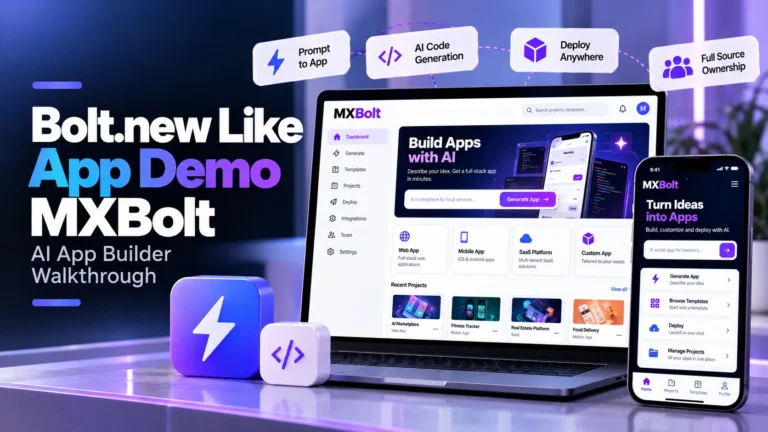
Watch this Bolt.new Like App Demo to explore how MXBolt turns natural-language prompts into runnable applications with AI code generation, multi-file editing, browser-based execution, live preview, model selection, deployment and operator-controlled usage.
What Does This Bolt.new Like App Demo Show?
This Bolt.new Like App Demo provides a practical look at the workflow behind an AI app builder where users describe software in natural language and receive a generated multi-file project.
The platform brings the main development workflow into one browser-based workspace. A user can begin with a prompt, generate application files, inspect and edit the code, run commands through the integrated terminal, preview the application and continue refining the project through additional AI instructions.
The MXBolt Demo Video is useful for AI startups, developer-tool companies, agencies and enterprise teams evaluating how prompt-to-app generation works before reviewing deeper commercial requirements such as model governance, credit pricing, provider keys and deployment controls.
MXBolt Demo Video: Key AI Builder Areas to Explore
While watching the walkthrough, focus on how these areas connect across the complete prompt-to-application workflow.
Prompt-to-App Generation
See how a natural-language description becomes a structured multi-file software project.
Code Workspace
Review generated files, edit source code and inspect AI changes within the integrated development workspace.
Browser Runtime
Understand how the generated project can install dependencies and run inside the user’s browser.
Live Preview
See application changes reflected in a live preview as the project is generated and edited.
AI Model Selection
Explore how different AI providers and models can be made available through one builder interface.
Operator Console
Understand how administrators manage providers, plans, credits, users and feature access.
Inside the MXBolt AI App Builder Workflow
MXBolt demonstrates the development experience behind a Bolt.new Like App Demo, while the broader Miracuves platform adds the governance and commercial controls required to operate an AI coding product under your own brand.
1. Natural Language to Multi-File Application
The main workflow starts with a plain-language description of the software the user wants to build.
- Natural-Language Prompting: Describe the application instead of creating every file manually.
- Multi-File Generation: Generate application code, configuration and project structure together.
- Project Context: Allow follow-up instructions to work across the existing codebase.
- Iterative Generation: Continue refining the project through additional prompts.
2. Editor, Terminal and Live Preview
Generating source code is only one part of the workflow. Users also need to inspect, run and modify what the AI produces.
- Code Editor: Review and manually modify generated project files.
- Terminal: Run project and dependency commands within the workspace.
- Diff Review: Inspect AI-generated changes before accepting them.
- Live Preview: See the running application alongside the source code.
3. Browser-Based Code Execution
One of the platform’s defining architectural choices is running the generated development environment in the browser rather than requiring a separate server-side sandbox for each project.
- Browser Runtime: Execute the project within the user’s browser environment.
- Package Installation: Run package and dependency commands within the workspace.
- Local Project Runtime: Keep project execution close to the user’s development session.
- Preview Updates: Reflect code changes directly in the running application.
4. Multi-Model AI Provider Layer
A commercial AI builder does not need to be tied permanently to one model provider.
- Multiple Providers: Offer different AI model providers through one interface.
- Model Selection: Let eligible users choose models based on plan access.
- Shared Provider Keys: Allow operator-managed keys to be injected without exposing them to users.
- BYOK Support: Support user-supplied provider credentials where configured.
5. Credits, Plans and AI Usage Metering
AI usage has a direct infrastructure cost, so a commercial builder needs a way to connect model consumption with plans and pricing.
- Credit Metering: Track AI usage against available balances.
- Per-Model Rates: Configure different credit costs for different models.
- Plan Permissions: Control which models and features each tier can use.
- Usage Ledger: Maintain records of credit consumption and resulting balances.
6. Deployment, Export and Operator Governance
Once an application is ready, users need a path from generated code to a deployed or exportable project.
- Deployment Targets: Connect supported hosting and repository destinations.
- Project Export: Download or push generated project source code.
- Provider Administration: Manage AI providers and credentials centrally.
- Feature Controls: Configure plan access and platform capabilities from the operator console.
How the AI App Builder Workflow Connects
An AI app builder connects natural-language generation, source-code editing, browser execution, model usage and deployment within one development workflow.
| Platform Area | Primary User | Purpose |
|---|---|---|
| Project Prompt | Builder | Describe the desired application in natural language and begin the generation workflow. |
| AI Generation | Builder | Generate the multi-file project using the selected AI model and existing project context. |
| Code Editing | Builder | Review, modify and refine generated files inside the integrated workspace. |
| Runtime & Preview | Builder | Run the application in-browser and inspect changes through a live preview. |
| AI Usage Metering | User & Platform | Track model consumption against credits, plan limits and configured rates. |
| Deployment | Builder | Export or deploy the generated project through configured destinations. |
| Provider Governance | Platform Admin | Manage model providers, keys, pricing, plans and access policies. |
| Platform Operations | Platform Admin | Oversee users, credits, feature flags and other operational settings. |
Why Browser-Based Execution Is an Important Difference
AI code generation is only one part of building an application. The generated project also needs an environment where dependencies can install, commands can run and the application can be previewed.
MXBolt uses a browser-based development runtime so generated projects can execute within the user’s development session instead of requiring an individual remote sandbox for every project.
That allows the workflow to remain connected: prompt → generate → edit → run → preview → iterate → deploy.
Why Watch a Bolt.new Like App Demo Before Choosing an AI App Builder?
A feature list can tell you that an AI platform generates code, but it does not necessarily show how the generated application is edited, executed, corrected and eventually deployed.
A Bolt.new Like App Demo helps founders and development teams evaluate the full working loop rather than focusing only on the initial AI response.
It also helps commercial operators evaluate a second layer that ordinary coding demos often ignore: model selection, credit metering, plan access, provider credentials and administrative governance.
From AI Coding Demo to Commercial AI Builder
A prompt-to-code interface can demonstrate AI generation, but operating an AI development platform as a business requires additional systems.
Operators need to decide which AI models each plan can access, how model usage consumes credits, how provider credentials are protected and how users move from free access into paid tiers.
This commercial layer is what turns an AI coding experience into a platform that can be offered under a separate brand with its own plans, margins and access policies.
Where Miracuves Fits Into the MXBolt Demo
MXBolt represents the demo product for a browser-based AI app builder capable of generating, editing, previewing and deploying software from natural-language instructions.
Miracuves extends that product foundation with multi-provider model support, credit metering, plan controls, provider-key governance, deployment integrations and an operator console for running the platform.
If you want to evaluate the complete commercial solution rather than only watch the product walkthrough, visit the Miracuves AI app builder platform for detailed information about generation, providers, credits, deployment, customization, ownership and platform governance.
Frequently Asked Questions
What is shown in the MXBolt demo video?
The MXBolt demo focuses on the AI app-building workflow, including natural-language generation, project code, editing, browser-based execution, preview and related development workflows.
What is a Bolt.new-like app?
It is an AI development platform where users describe software in natural language and the system generates a runnable project that can be edited, previewed and refined through additional AI instructions.
Does MXBolt generate complete multi-file projects?
The broader Miracuves platform is designed to generate complete multi-file projects and maintain project context across follow-up generation and editing workflows.
Where does generated code run?
The platform uses a browser-based runtime so project installation, commands and preview execution can happen within the user’s browser development environment.
Can the platform support multiple AI models?
Yes. The broader Miracuves AI builder includes multiple model providers behind a unified selection layer, with access controlled according to platform and plan configuration.
How does AI usage billing work?
The platform supports credit-based usage metering, allowing operators to configure model-specific consumption rates and control access according to subscription plans.
Is MXBolt a mobile application?
No. The product is designed as a browser-first AI development workspace. The broader platform also supports packaged desktop builds, while native mobile applications are not part of the standard product.
Where can I review the complete Miracuves AI app builder?
The Miracuves AI app builder page provides broader information about generation, model providers, browser execution, credit metering, deployment, administration, customization and source-code ownership.
Explore the AI App Builder Platform
Use the MXBolt demo to understand the prompt-to-app workflow, then explore the Miracuves platform when you are ready to evaluate model providers, credit pricing, plan controls, deployment integrations, governance and platform ownership.
Explore Related AI App Builder Resources
Miracuves is an independent software development company and is not affiliated with, sponsored by or endorsed by Bolt.new. Third-party names are referenced only to describe the software category and comparable product workflow.