Tiered Allocation App · Production Ready

BSCPad Clone App - White-Label IDO Launchpad

Built by Miracuves, the BSCPad clone script is ready-made and white-label: a Laravel token-sale site whose buyer panel works in desktop and phone browsers and whose admin console runs rounds, KYC and transactions, handed over as complete source you own within six working days.

Allocation tiers are built from settings, not staking: each round carries its own price, dates and status, and buyers see it as live, completed or expired. Analytics, oracle data, DEX links and community funding are available as paid add-ons. No smart-contract audit, liquidity lock or vesting is claimed, and permission to sell tokens rests with you as issuer. A staking-based tier is the usual custom request, scoped and priced in writing first and built in 2-8 weeks.

Launch in 6 Days with

  • Full Source Code
  • Buyer Panel
  • Admin Console
  • Phone View
  • Release Notes
  • Deployment Setup

StackLaravel 11 · PHP 8.1+ · Bootstrap · ExRateAPI · PayPal · MySQL

MXIco console · AllocationIllustrative
Buyers today23
KYC waiting7
Rounds live2

Round activity

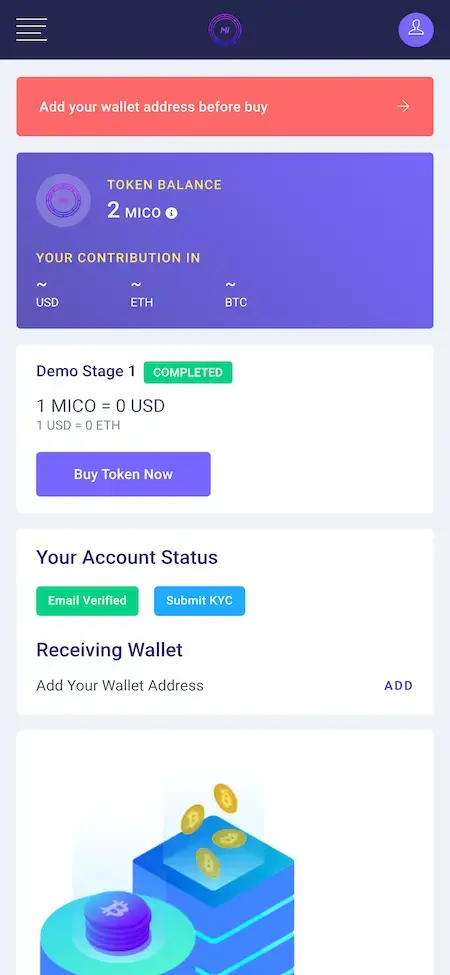
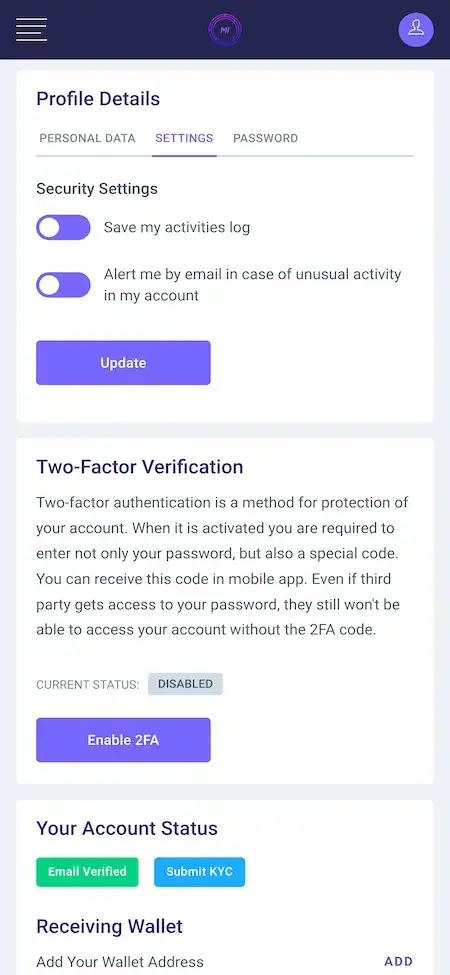
BSCPad Clone buyer dashboard on a phone: a token balance card, a Completed Demo Stage 1, account status chips and a wallet address row.
Held payments wait for a humanmanual approval step
  • 3Gates Before BuyingKYC approval, a saved payout wallet and an invite code
  • 2Purchase Limitsa smallest and a largest token amount per transaction
  • 0%Revenue Share With Miracuvesno royalty on any round contribution, ever
  • 4Mail DriversMailgun, Postmark, Amazon SES and Sendgrid
  • 6Days to Launchand if the delay is ours, we keep going free
  • $2,799Paid Once, Not Rentedsource code yours, no per-seat fee, no monthly rental

Live in six working days, or we keep working free until you launch. Every build carries 60 days guidance, 6 months bug fixes and 12 months updates.Verify every figure

No Borrowed Case Study

Miracuves has released no named deployment of this product. You check it instead: one shared buyer login opens the demo, and six logged versions show what shipped and what changed.

One Token per Installation

The settings describe a single token, so a sale for a second project needs its own deployment or a custom scope.

Funds Land in Accounts You Hold

A buyer sends a wallet transfer on the network they choose or pays by PayPal; the receiving wallets and payment accounts are yours, and tokens go out from wallets you control.

Planning a token sale with tiered allocation?Speak to a Product Expert

Trusted by 6,000+ clients worldwide

Miracuves is listed by Expertise.com as a managed IT service provider.Miracuves is an official member of the Forbes Business Council.Miracuves is a verified agency on DesignRush, listed among top design agencies in India.Miracuves is reviewed on Trustpilot as a software development company.Miracuves is listed by The Manifest among top managed software development companies.Miracuves is listed by DesignRush as a top software development company.Miracuves is recognized by GoodFirms as a top software development company.Miracuves is ranked among the top 1000 companies globally by Clutch.Miracuves is a top managed service provider in the United States on Clutch.

01Try it yourself

Hands-On Demo

BSCPad Clone Demo - Buyer Panel, Phone View & Admin Console

Use the Miracuves BSCPad Clone the way a buyer would. One shared login opens the buyer side, where you can read a round card, check a token balance, browse the profile security settings and scroll the sign-in log. We share the admin login on request.
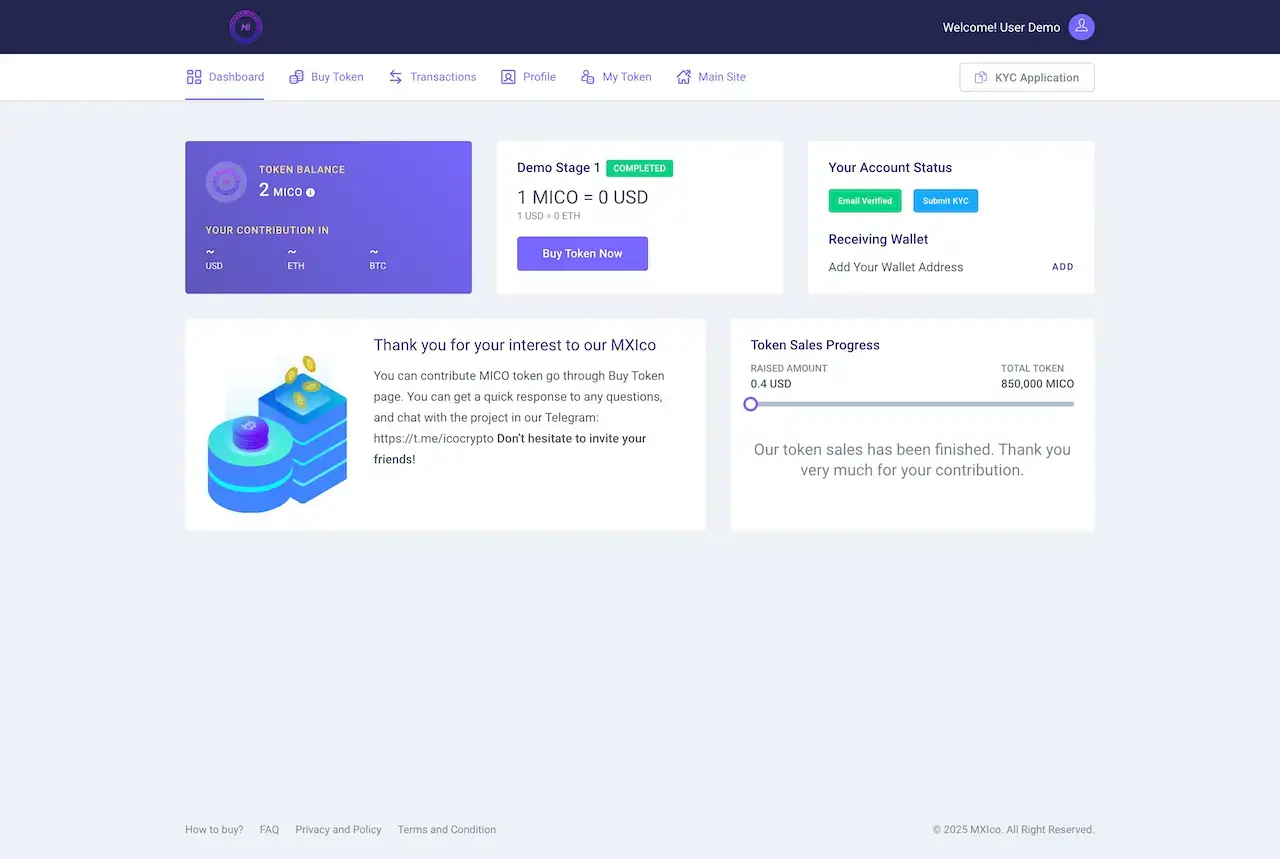
BSCPad Clone buyer dashboard on a desktop browser: token balance, a Completed Demo Stage 1, account status and a sale progress bar.
Buyer panel

BSCPad Clone - Buyer Panel

The contributor screen on a desktop: a token balance, the round currently offered with a Buy Token Now button, Email Verified and Submit KYC chips, the wallet row and a bar that fills as the sale is taken up.

  1. 1Open the demo in a new tab
  2. 2Use the buyer login shown below
  3. 3Browse: Profile, the dashboard and the Buy Token page
Try:user@demo.com | User_321
BSCPad Clone buyer dashboard on a phone: a token balance card, a Completed Demo Stage 1, account status chips and a wallet address row.BSCPad Clone My Token page on a phone: balance, a Buy More Token button, purchased, referral and bonus tokens and a stage overview.
Phone view

Buyer Panel in a Phone Browser

The same panel on a handset: the account menu, a balance card, round cards, the profile with its two-factor settings, My Token and the sign-in log.

  1. 1Load the demo in your handset browser
  2. 2Log in with the shared buyer login
  3. 3Browse: the profile, round cards and sign-in history
Try:user@demo.com | User_321
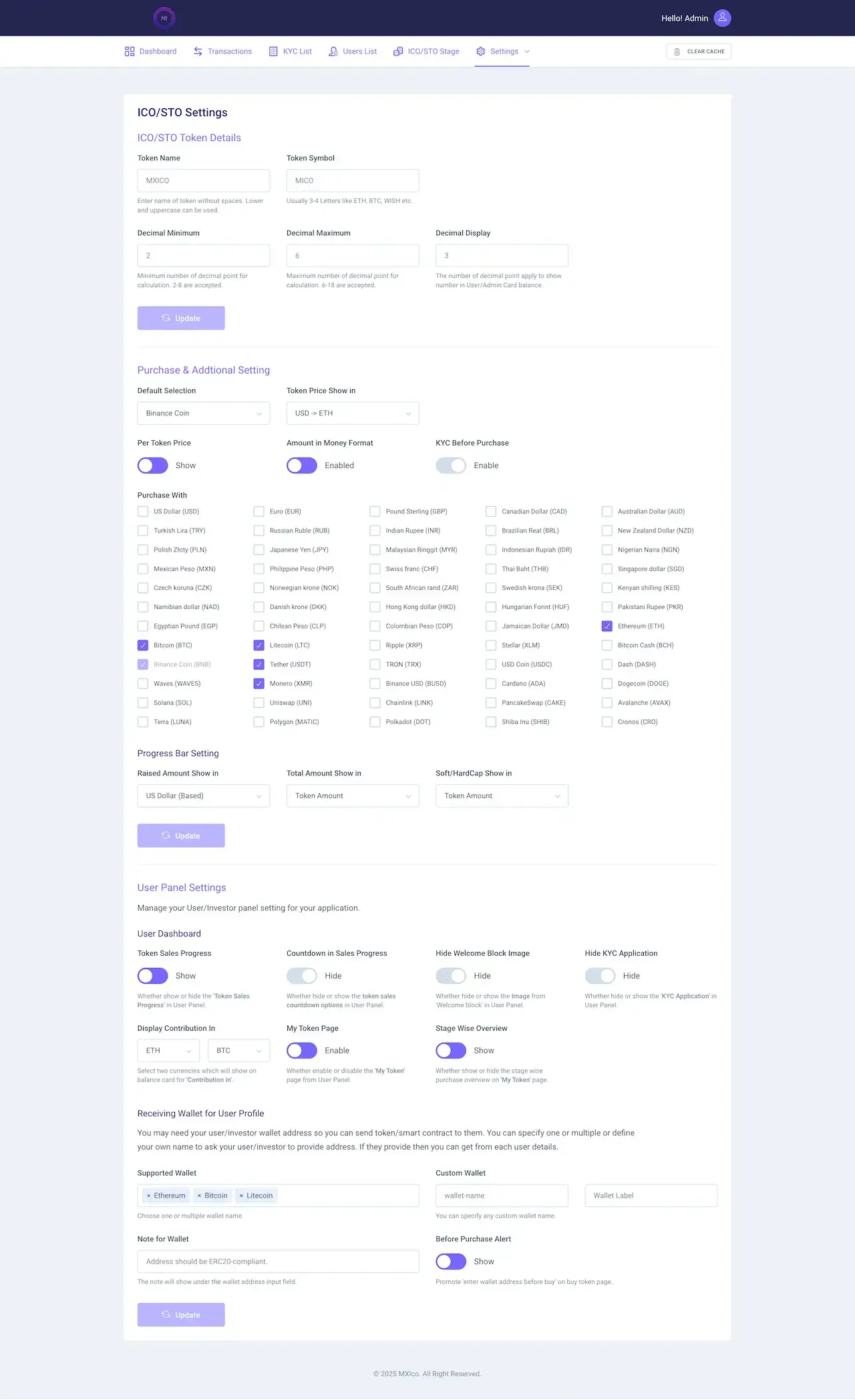
BSCPad Clone admin ICO/STO settings page covering token details, purchase currencies, progress bar options, buyer panel switches and wallet settings.
Operator console

Operator Console - Rounds, KYC, Users & Settings

The operator console: a dashboard, a transactions list, a KYC list, a users list, the ICO/STO stage menu and a settings page for the token, the currencies and what buyers get to see.

  1. 1Request the admin login from our team
  2. 2Open the demo host and log in
  3. 3Browse: ICO/STO Stage, KYC List, Transactions and Settings
Admin login:available on request
BSCPad Clone profile page on a phone with Personal Data, Settings and Password tabs, security switches and a Two-Factor Verification option.BSCPad Clone account activity list on a phone showing the date, device, browser and IP of each sign-in, with a Clear All button; the IP addresses are blurred.
Sign-in safety

Safety Screens - Two-Factor Verification & Sign-In Log

Account protection from the buyer's side: turn on two-factor verification, decide whether logins are recorded and review which device, browser and IP address each sign-in used.

  1. 1Log in to the demo
  2. 2Open Profile and choose Settings
  3. 3Browse: security toggles and two-factor verification
Try:user@demo.com | User_321
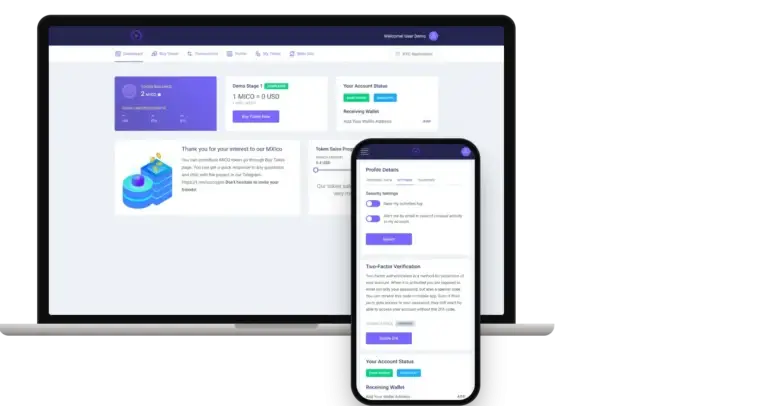
BSCPad Clone shown across a laptop and phone: the web investor dashboard and the profile security and two-factor settings

Walk Through It Live

Walkthrough of a Launchpad Like BSCPad: Rounds, Entry Gates, Payout Wallets & Admin Settings

A live call is the fastest way to see this product whole. In about half an hour we open the buyer panel and the admin settings together, then set them against your plan: how many rounds, who gets an invite, which currencies you accept and the date you want to open.

Book a live walkthrough.

Screens, One by One

Token Sale Platform Flows - Phone View, Web Dashboard & Admin Settings

Miracuves captured these BSCPad clone screens from the demo itself and arranged them in the order a contribution follows: the phone view, the web dashboard and the admin settings behind both.
BSCPad Clone buyer dashboard on a desktop browser: token balance, a Completed Demo Stage 1, account status and a sale progress bar.
1 screen
BSCPad Clone buyer dashboard on a phone: a token balance card, a Completed Demo Stage 1, account status chips and a wallet address row.
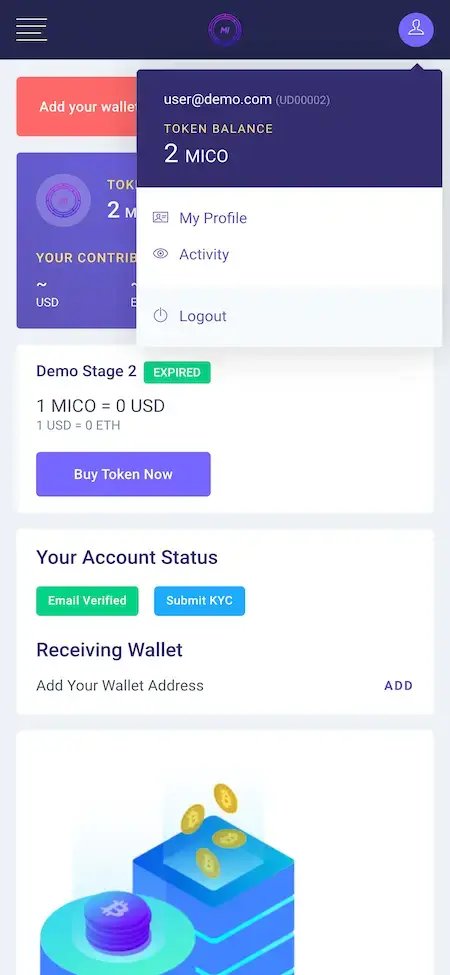
BSCPad Clone account menu on a phone listing the buyer id, balance, My Profile, Activity and Logout above an Expired Demo Stage 2 card.
BSCPad Clone profile page on a phone with Personal Data, Settings and Password tabs, security switches and a Two-Factor Verification option.
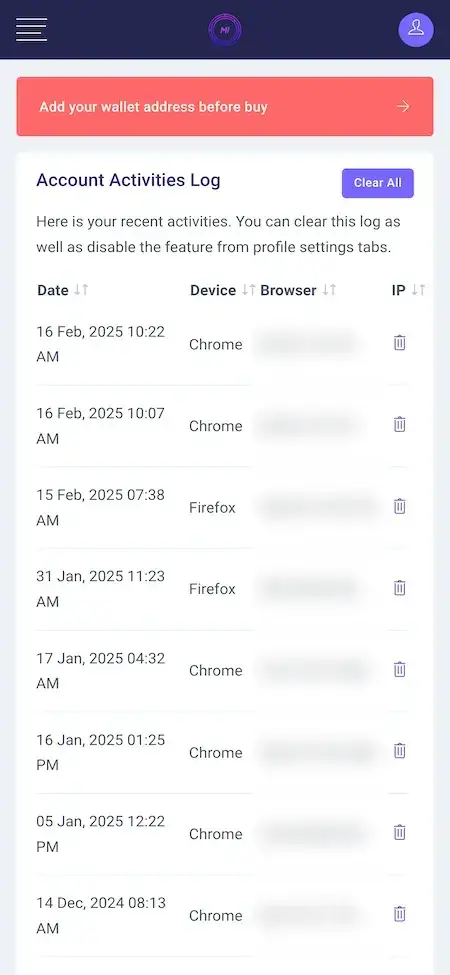
BSCPad Clone account activity list on a phone showing the date, device, browser and IP of each sign-in, with a Clear All button; the IP addresses are blurred.
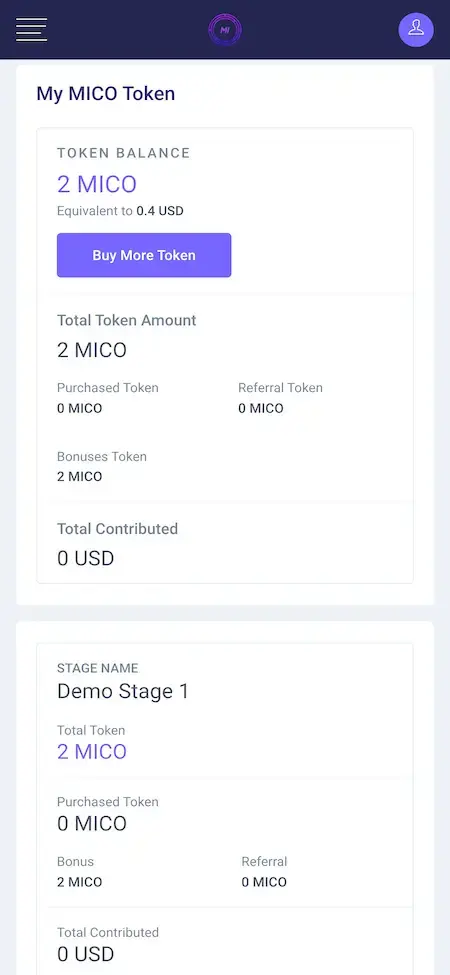
BSCPad Clone My Token page on a phone: balance, a Buy More Token button, purchased, referral and bonus tokens and a stage overview.
5 screens · scroll →
BSCPad Clone admin ICO/STO settings page covering token details, purchase currencies, progress bar options, buyer panel switches and wallet settings.
1 screen

Start at the account menu with one buyer, move on to the dashboard and round card, then My Token and the sign-in log, and end in the admin settings, which control what every one of these screens displays.

Explore Our Solutions

02Proof

In Their Words

BSCPad Clone Client Reviews - Operators on Working With Miracuves

No quote in this set of four is about running a launchpad. Ryke and Co ran seven Web3 products from one core, Whizzxbook was trading within weeks, and Blue Silent Capital opened an OTC desk, while Florida Growth Ventures timed its exchange to a token launch.

CChadi El BoustaniManaging Partner, Florida Growth Ventures LLC
“We needed a centralized exchange with KYC, wallets, and mobile apps before our token launch — every US quote came back at six figures and 9 months. Miracuves had a battle-tested exchange base that already covered matching, settlement and the trading UI. We reused that and layered our own branding, a custom USD on-ramp, and the ORCA reward token. Staging was up in 6 weeks, live users by week 14. Building from scratch would have burned 8–10 engineering months and roughly $400k in salaries alone. Six months in, we've processed three figures of millions in volume with zero settlement incidents.”
MMackenzie LoreeChief Product Officer, Ryke and Co
“We needed seven Web3 products off one spine rather than five engineering teams. Shared auth, KYC and wallet came from their suite. Each product landed in weeks rather than quarters, and our ops cost per product is a fraction of a stand-alone build.”
WWhizzxbook TeamFounding team, Whizzxbook
“Order book, wallets and settlement existed. Our work was onboarding, our pairs and the compliance checks we are held to. Trading in weeks rather than quarters.”
EErick BrennanCo-founder, Blue Silent Capital
“RFQ, matching and post-trade reporting was our long pole. Their OTC module covered it, and we layered on our compliance checks and multi-leg settlement. First counterparties were trading within weeks and we saved a third of the engineering budget.”
Read More Client TestimonialsFounders and operators, unedited

Proof, Honestly Stated

BSCPad Clone Case Study - Published Proof and What You Can Test

An honest account of the proof that exists for this product, and how you can try it out before committing.

Case Study
No named client launch of the BSCPad Clone is published

Miracuves has not released a named client deployment of this product, so this page does not borrow one from elsewhere. It lists what the demo and the release log let you verify, and what we refuse to put in the gap.

Not publishedNamed client
Demo plus release logVerification route
Token salesModel
2Panels to try
6Versions in the log
6 daysOur build time
BSCPad Clone buyer dashboard on a desktop browser: token balance, a Completed Demo Stage 1, account status and a sale progress bar.
Challenges
  • Offering tokens touches securities, consumer and anti-money-laundering law, and it differs by country
  • Buyers need to see which round is open, the price and what they already hold
  • Each payment has to be linkable to one person, one wallet and one KYC status
Goal
  • See the whole buyer journey before paying anything
  • Look at how rounds, KYC and wallet rules are set in the admin screens
  • Go through the release log for what shipped and what changed later
Solution by Miracuves
  • Hands-on demo access through one shared buyer login
  • Admin settings screens walked through live
  • The version history from 1.3.2 up to 1.8.0
  • One fixed price covers the entire source code
  • Built and delivered in 6 working days

We will not publish a client that does not exist, a quote nobody said or a raise nobody counted for this product. If a named token-sale deployment is released one day, it will appear here as its own case study.Miracuves · Our position on proof

Browse the case studies that we have publishedOur portfolio lists real crypto and Web3 projects delivered on other Miracuves bases.

03The product

Start Here

What the BSCPad Clone Does for Issuers and Buyers

Miracuves' BSCPad clone arrives as a finished token launchpad and token-sale site, rounds and KYC included, that you launch under your own name. The issuer sets the token, the rounds and the currencies on offer. Buyers sign up, clear the checks you require, save a wallet and contribute. An admin console logs every transaction, KYC file and user.

BSCPad Clone shown across a laptop and phone: the web investor dashboard and the profile security and two-factor settings

Rules, Not Just a Button

Around the purchase sit rounds, an invite code, a KYC queue, payout wallets, referral tokens and a sign-in log, with an admin who can follow each transaction.

Code You Hold

The source arrives unencrypted so your developers can change a flow or a screen as the sale develops, with no license to renew to keep it running.

Extras Are Labeled Extras

An analytics dashboard, a decentralized oracle, DEX links and community funding are paid modules. We never pass them off as part of the base.

Buyer Panel & Admin Console

What Is a BSCPad Clone Script?

Tiered allocation comes down to rules: which round is open, who was invited, what must be cleared first and how much one person may take. This script keeps those rules in settings you control, on a Laravel codebase that becomes yours.

BSCPad Clone buyer dashboard on a desktop browser: token balance, a Completed Demo Stage 1, account status and a sale progress bar.
  1. 01Rounds, each with a price, dates and a status
  2. 02Buyer panel with balance, round card and My Token page
  3. 03KYC form, KYC list and a review queue
  4. 04Payout wallets, referral rewards and invite codes
  5. 05Admin side for transactions, users and settings

You get the buyer panel (it also runs in a phone browser), six admin menus and every line of source, all rebranded for you.

What You Get

BSCPad Clone Features - Rounds, Invites, KYC, Wallets, Referrals & Admin Controls

Every BSCPad clone feature below traces to the demo Miracuves runs, the admin settings or the release notes, and anything that needs an extra module is shown later as an add-on.

Feature 01 / 12

Allocation by Round

Split a sale into rounds. Every round holds its own price and dates, and a buyer can tell straight away whether it is open, finished or lapsed, with a clock ticking while it runs.

  • New ICO rounds are created from the admin panel
  • Release 1.7.0 introduced adding a round from the panel
  • A finished round can be archived or removed
  • Closed rounds carry a Completed or Expired card
  • A countdown runs to the opening and closing time
  • Per-token price accepts up to 8 decimal places
Feature 02 / 12

Invite-Only Access

Reserve a round for people you picked. Give them an invite code, or set sign-up to invitation only in the settings.

  • A private-sale invitation system built on codes
  • Admin switch that restricts sign-up to invitations
  • Invited buyers use their code to join the round
  • The invitation system arrived in release 1.8.0
Feature 03 / 12

KYC Gate

Buyers send a KYC application from their own dashboard, and your staff clear the queue from the admin console. One setting turns approval into a condition for buying, and the form can be hidden for a sale with no use for it.

  • Submit KYC link beside the account status chips
  • KYC List menu in the admin panel for your team
  • Setting called KYC Before Purchase
  • Applicants receive email notices about their KYC
Feature 04 / 12

Buyer Dashboard

A contributor lands on one screen that combines their balance, the round currently offered, their account status and how far the sale has got.

  • Balance card that shows the contribution in two currencies
  • Round card with a Buy Token Now button
  • Email Verified and Submit KYC chips on the account
  • Progress bar showing amount raised against total tokens
  • A welcome message you can hide
  • The same screen opens in a phone browser with an account menu on top
Feature 05 / 12

Checkout & Payments

A buyer chooses a currency from the ones you enabled and pays by manual wallet transfer or by PayPal, within the minimum and maximum you set per transaction.

  • Wallet transfer with a network choice, or PayPal
  • Purchase currencies switched on one at a time
  • Smallest and largest token amount for each transaction
  • Live exchange rates supplied by ExRateAPI
Feature 06 / 12

Payout Wallets

Each buyer records the address that should receive their tokens, and you choose whether a purchase can go ahead without it.

  • Wallet address row on the buyer dashboard
  • Prompt telling buyers to save a wallet first
  • Option to make the wallet address compulsory
  • Wallet types to choose from, a custom label and a wallet name field
Feature 07 / 12

Bonuses & Referrals

New sign-ups can be rewarded with a bonus, and referrals appear as a separate token line, which makes growth through existing buyers simple to trace.

  • A bonus paid out after sign-up
  • Referral ID can be demanded at registration
  • My Token page lists referral tokens on their own line
  • In the admin, a user page shows their referrals
  • Referral sign-up also works with social registration
Feature 08 / 12

My Token Ledger

One page shows what a buyer holds and how they came by it, with a round-by-round view under the balance and a Buy More Token shortcut.

  • Balance shown alongside its USD value
  • Three token types, bought, referral and bonus, on separate lines
  • Total contributed, expressed in USD
  • Round-by-round view that can be turned on or off
Feature 09 / 12

Account Safety

Buyers can protect their own accounts, and operators can see how people log in.

  • Two-factor verification inside the profile settings
  • Two-factor starts switched off until a buyer enables it
  • Log listing date, device, browser and IP for each login
  • Toggle that starts or stops recording logins
  • Email alert if activity looks unusual
  • Remove one log entry, or clear everything
Feature 10 / 12

People & Payments

Operators manage buyers and money from two lists, one of users and one of transactions, each with controls to approve, verify and tidy up.

  • Quick token action on each row of the users list
  • Transactions can require manual approval
  • Unverified users with no activity can be removed
  • Admins can confirm a buyer's email by hand, or change it and verify it again
Feature 11 / 12

Token & Currency Setup

The ICO/STO settings page defines the token and how it is displayed: its name, symbol, decimals and prices, plus a wide range of fiat and crypto currencies.

  • Name, ticker and decimal places for the token
  • Token price shown against a currency pair you choose
  • Pick purchase currencies from a wide selection
  • Release 1.6.0 brought in AVAX, LUNA, MATIC, DOT and SHIB
  • Choose whether soft and hard caps are displayed
  • Switches to show or hide the progress bar, the countdown and the round overview
Feature 12 / 12

Email, Languages & Look

The operator-facing basics: how mail is sent, which languages appear and how the site is styled.

  • Choose among Mailgun, Postmark, Amazon SES and Sendgrid
  • Send yourself a test email from the mail page
  • A language manager and a website timezone setting
  • Your logo, icons and colors across the site

Before you buy: Miracuves rebrands the platform and deploys it to hosting you arrange. On your side are hosting and a domain, brand assets and company details, the wallets and payment accounts that collect contributions, and keys for any outside service. Legal permission to sell to buyers in any particular country is something your own counsel must confirm. Miracuves does not give legal advice.

Talk to Our Team

Where the Money Comes From

Revenue Models for the BSCPad Clone - Round Proceeds, Tiered Pricing, Invite-Only Allocation & Referral Rewards

On a BSCPad clone from Miracuves, money questions mostly come down to who is allowed in, at what price and in which round, since each contribution reaches the issuer through those choices.

The two levers that move results most are how every round is priced and how far your referral rewards travel.

  1. 01

    Round Proceeds

    Whatever buyers contribute in a round goes to the issuer. Price, accepted currencies and the smallest and largest purchase are all settings, so each round can be set on its own terms.

  2. 02

    Round Pricing & Caps

    An early round can sell at one price and a later round at another. The settings also let you display a soft cap and a hard cap, and the token price takes up to eight decimals.

  3. 03

    Invite-Only Allocation

    An invite code or invite-only sign-up reserves a round for people you picked before anyone else can buy. Any fee attached to that access is your own commercial choice.

  4. 04

    Referral Rewards

    A sign-up bonus and referral tokens put existing buyers to work as a channel. The reward is a budgeted cost, and in the admin each user page lists the people that user referred.

  5. 05

    Hosted Sales for Others

    An operator that runs sales for other projects may charge them a listing or success fee. Each install covers a single token, so fee billing inside the platform is scoped as custom work.

  6. 06

    Follow-On Rounds

    When a round ends it can be archived and the next one created. Listing the token on a decentralized exchange afterwards needs a separate add-on and a legal check first.

Token sales rarely publish a platform percentage, so each stream below is set beside the public rule, limit or disclosure that bounds it, with the publisher named in the note.
Revenue streamHow the money is collectedTake rateTypical rate takenWhat caps it
Round ProceedsThe issuer takes what buyers send in each round. A cut kept by an operator is whatever the two sides agree.No platform percentage in the demo. Coinbase says sellers pay it fees but gives no figure.The legal limit on what you may raise. SEC proposals dated 18 August 2026 would set one exemption at $75 million per 12 months and another at $5 million across four years. Neither is final.
Round Pricing & CapsEach presale round has a per-token price and a smallest and largest purchase per transaction, with soft and hard caps shown to buyers.No fee shown. PinkSale's BNB Chain presale guide requires a soft cap of at least 25% of the hard cap.The total across all rounds in 12 months. Under MiCA Article 4 an offer that stays within EUR 1,000,000 over 12 months needs no white paper, so add your rounds together first.
Invite-Only AllocationAn invite code, or invite-only sign-up, decides who may enter. The demo attaches no fee to it.No fee shown. MiCA Article 4 exempts offers to fewer than 150 persons per Member State.How many people you may invite. Article 4 also requires them to be acting on their own account, so check the count country by country.
Hosted Sales for OthersA listing or success fee would be a contract between you and each project. The software has no screen for it.Not published. Coinbase says it receives fees from sellers and names no percentage.What your market bears and what your advisers allow. Coinbase fills oversubscribed sales from the bottom and returns unused funds, a rule you would need to write for yourself.
Follow-On RoundsThe next round is created in the admin console. Connecting a DEX is a separate module, should you want one.No fee shown. In its answer of 21 May 2026, ESMA states that a decentralized exchange listing inside the Union can itself count as a public offer.Whether a listing counts as a fresh offer in the places your buyers live. Get advice before you connect any exchange.

How to read this. The US figures are the SEC's, from press release 2026-76, and they are proposals, not final rules. The EU figures are the wording of MiCA Article 4, and for the exchange-listing point the source is ESMA Q&A 2671. PinkSale's own presale guide is the source for the cap rule, and Coinbase's token sales page for the seller-fee and allocation statements. None of those pages gives a percentage fee, so we quote none. Store commissions are omitted since the demo accepts contributions on the web rather than through an app store. Treat all of it as planning context, not legal advice, a quotation or a prediction of any raise.

Revenue Model

BSCPad Clone Revenue Model, Stage by Stage

On the BSCPad clone, allocation tiers come from round settings, so revenue grows as you add rounds, gates and limits rather than new code.

Invite-only round

Release 1.8.0 lets you hand private-sale codes to chosen buyers or restrict registration to invited wallets, while each transaction's minimum and maximum token amount caps every share.

Tiered price rounds

Later rounds each carry their own price and dates, so early buyers pay less, and referral rewards pull in new wallets as a cost you budget.

Open and follow-on rounds

A public round opens to KYC-cleared buyers, then archives so the next round runs on the same site, with a DEX listing available as an add-on after legal advice.

Contributions reach the receiving wallets and payment accounts you hold, with no royalty to Miracuves on any round.

Need a revenue plan shaped around your own rounds?Design My Revenue Model

The Operator's Console

IDO Launchpad Admin Panel - Rounds, KYC, Transactions & Settings

Miracuves gives the IDO launchpad operator one console showing which round is live, who has cleared KYC, what has arrived, which currencies are open and what buyers can see.

BSCPad Clone admin ICO/STO settings page covering token details, purchase currencies, progress bar options, buyer panel switches and wallet settings.
BSCPad Clone buyer dashboard on a desktop browser: token balance, a Completed Demo Stage 1, account status and a sale progress bar.

What the Console Holds

  • 01

    Dashboard

    Landing page of the console, with the sale summed up. Fixes to the way very large amounts display on it are noted in the release log.

  • 02

    ICO/STO Stages

    Create, edit, remove or archive rounds, each with its own price and dates, and follow each one from open through to completed or lapsed.

  • 03

    Transactions

    All contributions are listed together. Payments that deserve a closer look can be held for manual approval, and limits cap how small or large a single purchase may be.

  • 04

    KYC List

    Every KYC application waiting for review, with notices emailed to applicants, plus a switch that makes an approved KYC a condition of buying.

  • 05

    Users List

    Find a buyer, open their page to see referrals, use the token shortcut, remove idle unverified accounts and change an email, which is then verified.

  • 06

    Token & Currency Settings

    Set the token name, symbol and decimals, choose the currencies buyers pay in and decide how prices are shown, from an extensive menu of fiat and crypto currencies.

  • 07

    Buyer Panel Controls

    Show or hide the progress bar, the countdown, the welcome block, the KYC form and the round-by-round overview, and pick the two currencies on the contribution card.

  • 08

    Mail, Languages & Wallets

    Choose how email is delivered, try it with a test message, add languages and decide which wallet types buyers may keep. One Clear Cache button covers the whole panel.

Money & Wallets

All the money handling in one place, starting with an incoming payment and ending at the wallet the buyer registered.

  • Each contribution recorded under Transactions
  • Payments held for manual approval
  • Currencies opened for each sale
  • A buyer's payout wallet shown on their user page

Controls & Tools

The toggles behind registration and the everyday running of the sale.

  • Settings menu plus a Clear Cache button
  • Toggle for invitation-only sign-up
  • Email verification can be turned off
  • Admins can mark an email verified themselves

Looking for more from the console? More reporting, a different approval rule, extra languages or a bespoke screen is scoped on its own. Describe what your team needs, and the price is put in writing before we begin building.

Talk to Our Team

04Package and pricing

What Comes in the Box

BSCPad Clone Script Package - Laravel Source, Both Panels & Deployment

What Miracuves hands over is a live token-sale site, buyer panel and admin console included, with their unencrypted source and the database design beneath both, owned outright and needing no license to run. Issuer-side costs never pass through Miracuves: hosting sized for round openings, receiving wallets and a PayPal account, a mail service, KYC reviewers, a contract audit and pre-launch pen test, and securities counsel for each market.

01

Full Source Code

The entire Laravel source for the buyer panel and the admin console, with nothing encrypted, so your developers can shape it around your sale.

  • Unencrypted Laravel application source
  • Code for both the buyer panel and the admin console
  • Adapt it, grow it and redeploy it as you see fit
  • Handed over for your own repository
02

Schema & Migrations

The database design behind users, rounds, transactions, KYC files and wallets, plus the migrations that each release calls for.

  • Database schema and migrations
  • Tables for users, rounds and transactions
  • KYC files and wallet addresses
  • A migration note with each major release
03

Mail & Notifications

How a sale talks to people: sign-up and KYC emails, a template for wallet change requests and a button to test your mail settings.

  • Email templates for KYC and for wallet changes
  • Drivers for Mailgun, Postmark, Amazon SES and Sendgrid
  • A test email option on the mail settings page
  • An email warning when activity looks unusual
BSCPad Clone buyer dashboard on a desktop browser: token balance, a Completed Demo Stage 1, account status and a sale progress bar.
04

Buyer Web Panel

The contributor site, built to resize for any screen. It holds five pages and shows each round on a card with a progress bar.

  • Pages for the dashboard, buying, payments, the profile and the token ledger
  • Round cards with status labels
  • Sale progress bar and countdown
  • Translations managed from a language screen
05

Handset Layout

The same panel arranged for a handset browser: account menu, balance card, round cards, security settings and the sign-in log.

  • Adapts to the width of a phone browser
  • Account menu offering balance and profile shortcuts
  • Security settings on a handset
  • Native store apps scoped as custom work
BSCPad Clone My Token page on a phone: balance, a Buy More Token button, purchased, referral and bonus tokens and a stage overview.
BSCPad Clone admin ICO/STO settings page covering token details, purchase currencies, progress bar options, buyer panel switches and wallet settings.
06

Admin Panel

Six menus run the console: ICO/STO Stage, Transactions, KYC List, Users List, Settings and a Dashboard to start from.

  • A Dashboard and a Transactions list
  • A KYC List and a Users List
  • ICO/STO Stage management and Settings
  • A Clear Cache control that resets the panel
07

Access & Security Layer

Buyers and admins sign in separately, and the buyer panel carries its own account protections.

  • Different logins for buyers and admins
  • Two-factor verification for buyers
  • A record of device, browser and IP for each login
  • An email warning when activity looks unusual
08

Handover & Support

We rebrand and deploy for you, write release notes for each version and run the three customer support periods side by side from launch.

  • Deployment onto hosting you provide
  • Release notes for each version
  • Support running side by side: 60 days of guidance, 6 months of bug fixes and 12 months of updates
  • Replies in under two hours, working hours IST 10:00-19:00 (Mon-Sat)

Prefer to try before you decide? The demo accepts a buyer login, and we are happy to give a live tour instead. In it we can cover the admin settings, the round card, the KYC form and the My Token ledger, and show where each fits in your sale.

Talk to Our Team

Plain Pricing

What Does It Cost to Launch a Tiered Token Sale Platform Like BSCPad?

Pricing for the ready-made, white-label BSCPad Clone is one flat $2,799. Add-on modules, further integrations and bespoke flows each receive their own written scope and price.

Most Popular

Professional

Ready-Made Package for Launch
$2,799one-time payment
Live in 6 days

Bought by: Web3 startups, token issuers and communities, and studios that resell a branded sale site

Expect the platform to look and work as the demo does, carrying your logo, icons and colors and ready to run on your own server.

Get Started

Enterprise

Tailored Builds for Bigger Scope
Customquote
Go-live set by final scope

Bought by: Operators handling many projects, exchanges adding a sale desk

When the base falls short of what you need, a staking-based tier for example, we scope it against your requirements and fix the price before work begins.

Request a Quote
Development Cost

BSCPad Clone Development Cost in 2026

One $2,799 payment to Miracuves buys everything you tried in the demo: the buyer panel for desktop and phone browsers, the six-menu admin console, the Laravel source and MySQL schema with nothing encrypted, plus rebranding and deployment on hosting you arrange, live in six working days.

$2,799 Paid once
6 working days Rebranded and live
0% Revenue share

Launch costs that sit with you, not on the Miracuves invoice

  • Hosting sized for round openings, and a domain
  • A PayPal account, receiving wallets and an email service
  • People to review KYC files
  • Securities counsel per market, plus a contract review and a penetration test scheduled into the launch plan
  • Any of the four optional modules you switch on

Staking-weighted allocation or a reserved share per named buyer is priced in writing before coding starts, and launchpad extensions of this kind usually land in 2-8 weeks.

Compare Your Options

Ready-Made BSCPad Clone vs Custom Development vs SaaS

Tiered rounds, KYC gates and payout wallets can be rented, coded to order or owned outright through Miracuves' ready-made BSCPad clone. Here is how the routes compare for an IDO launchpad platform like BSCPad.

CriteriaMiracuvesReady-Made BSCPad CloneCustom DevelopmentSaaS
Launch timeDeployed in 6 working days on your hostingQuoted in writing, 2-8 weeksHosted account, vendor queue
Upfront cost$2,799 paid onceWritten scope and quoteListing or monthly fees
Source code ownershipUnencrypted Laravel source and MySQL schemaPer the contractNot provided
CustomizationRounds, tiers, KYC and currencies configurableBuilt to spec, extra costVendor templates
Ongoing feesNo license, no cut of raised fundsMaintenance retainerShare of each raise
Branding & app-store listingBuyer panel and console in your brand; store apps scopedYour brand, long buildVendor brand on every sale
Best forIssuers running tiered, KYC-gated roundsNovel token mechanicsOne-off community raises

Putting It to Work

Crypto Launchpad Use Cases - Invite-Only Rounds, Early-Price Rounds, Open Sales & Referral Pushes

Invite-only hosts, early-price sellers and referral campaigns each draw on their own corner of the Miracuves launchpad. An invite-only round relies on codes, an open sale on the round card and progress bar, and a referral push on bonus tokens. You choose the emphasis in configuration.

InviteOnlyInvite-Only First Round

Restrict sign-up to invitations, let the people you chose buy first and keep the public out until you open a wider round.

01
BSCPad Clone buyer dashboard on a phone: a token balance card, a Completed Demo Stage 1, account status chips and a wallet address row.
EarlyPriceEarly-Price Round

Open a pre-launch round with its own price, its own dates and a smallest and largest purchase for each transaction.

02
BSCPad Clone account menu on a phone listing the buyer id, balance, My Profile, Activity and Logout above an Expired Demo Stage 2 card.
OpenRoundOpen Public Round

Offer the closing round to verified buyers; each dashboard displays a card for it, a bar showing take-up and a running countdown.

03
BSCPad Clone buyer dashboard on a desktop browser: token balance, a Completed Demo Stage 1, account status and a sale progress bar.
KYCGateVerified-Buyers-Only Sale

Make KYC a condition of buying, work through submissions in the KYC list and notify applicants by email.

04
BSCPad Clone admin ICO/STO settings page covering token details, purchase currencies, progress bar options, buyer panel switches and wallet settings.
ReferralPushReferral Push

Reward each new sign-up with a bonus, follow referral tokens for every buyer and, if you like, demand a referral ID at registration.

05
BSCPad Clone My Token page on a phone: balance, a Buy More Token button, purchased, referral and bonus tokens and a stage overview.
SecondRoundSecond Round

Archive a round that has ended and create the next, so a project carries on with the same site and the same buyer list.

06
BSCPad Clone profile page on a phone with Personal Data, Settings and Password tabs, security switches and a Two-Factor Verification option.
Business Model

BSCPad Clone Business Model: Three Ways to Run It

Every BSCPad clone sale pays out round by round, so the real choice is who sells the token, and Miracuves supports three setups.

Issuer-run IDO

A Web3 team sells its own token in tiered rounds and collects every contribution in the currencies it enabled.

Hosted launchpad

An operator hosts sales for other projects on a deployment per token, charging listing or success fees as terms it sets.

Exchange sale desk

A trading venue opens allocation rounds for new tokens on its own sale site, so buyers who clear KYC there can later trade those tokens on the venue's markets.

In each setup, referral tokens and the new-registration bonus come out of your token supply, while every contribution raised stays with you rather than Miracuves.

One product, six ways to run it. The same buyer panel and admin console serve all six. Only the number of rounds, the guest list, the active checks and the branding change, leaving a single codebase to maintain.

Talk to Our Team

Market Timing

Why Launch a Tiered Token Sale Platform in 2026?

Token sales are brief, intense events under shifting rules, which is why Miracuves hands you the whole platform to own. When you own the platform you can adjust rounds and checks as the rules move, without queuing behind someone else's schedule.

01

Rule-Makers Are Moving

In August 2026 the SEC floated new offering exemptions, while the EU has applied MiCA thresholds for some time. Whatever route you take, you need a site that can show rounds, KYC files and a transaction trail.

02

A Contract Alone Is Not a Sale

Buyers look for a dashboard, a check and a clear round card before they send anything. Those are the screens this base provides.

03

Rounds Let You Test Demand

Selling in separate rounds, each priced independently, reveals who responds to which offer before the public round opens.

04

Referral Rewards Make Buyers a Channel

Early buyers get a reason to invite friends from a sign-up bonus and a referral token line of their own, and the admin can follow who brought whom.

05

Your Name, Your Buyer List

With your brand on the site, the accounts, KYC files and wallet addresses stay in your own database for the next round.

06

Buy-or-Build Settles Fast

Most of a token-sale site is rounds, KYC, wallets, referrals and an admin console, all of which exist here. Six days of our build time later, a rebranded copy is running on your hosting.

Platform by the Numbers

6

Admin Menus

2

Panels

6

Logged Versions

6

Days to Launch

The plain middle of a token sale is round rules, KYC review, wallet records and reconciliation. In this product that part is finished.

Industries

Industries We Serve

Anyone who sells tokens to invited buyers or to the public can run the BSCPad clone Miracuves builds. Web3 startups raise for a protocol or app, DeFi teams open early rounds, DAOs and communities share utility or governance tokens, and GameFi and NFT projects pay for a launch. Exchanges put a sale page next to trading, token studios and web3 agencies set up a branded copy per client, capital advisers prepare sales for the people they serve, and local teams cover one market under their own banner.

  1. 01Token Launches
  2. 02Web3 Startups
  3. 03DeFi Teams
  4. 04DAOs & Communities
  5. 05GameFi Projects
  6. 06NFT Projects
  7. 07Exchanges
  8. 08Capital Advisers
  9. 09Token Studios
  10. 10Web3 Agencies
  11. 11Fintech Startups
  12. 12Regional Platforms

Whatever the Web3 model, the Miracuves BSCPad Clone puts your name on the first screen, the rounds, the KYC step and the admin console.

06Under the hood

Start to Finish

How the BSCPad Clone Works - Sign Up, Clear KYC, Save a Wallet, Buy & Track

On the BSCPad clone script Miracuves delivers, a buyer sees only a few screens. Behind them runs a strict order of access, round, payment and allocation, which is laid out below from the first sign-up to the token balance, followed by the architecture that carries it.

The Buyer's Path, Sign-Up Through to a Token Balance

  1. BSCPad Clone profile page on a phone with Personal Data, Settings and Password tabs, security switches and a Two-Factor Verification option.
    1Sign Up & Turn On 2FA

    New buyers register by email or social account, confirm the inbox link, then protect the account with two-factor codes from the profile page.

    • Sign-up, asking for a referral ID if you want one
    • Email confirmed now, or afterwards if you permit it
    • Two-factor option on the Profile page
  2. BSCPad Clone buyer dashboard on a phone: a token balance card, a Completed Demo Stage 1, account status chips and a wallet address row.
    2Clear KYC & Add a Payout Wallet

    From the dashboard the buyer files KYC documents and saves a receiving wallet; your settings can require both before any token purchase.

    • Chips marking the email as verified and offering Submit KYC
    • A dedicated wallet address row
    • A banner that asks for a wallet before buying
  3. BSCPad Clone account menu on a phone listing the buyer id, balance, My Profile, Activity and Logout above an Expired Demo Stage 2 card.
    3Pick the Live IDO Round

    Round cards show name, token price and status such as Completed or Expired, and only the round now accepting funds carries Buy Token Now.

    • A name, price and status for every round
    • Prices displayed in USD and ETH
    • Buy Token Now appears on the open round
  4. BSCPad Clone My Token page on a phone: balance, a Buy More Token button, purchased, referral and bonus tokens and a stage overview.
    4Contribute & See Your Token Balance

    Payment in any enabled currency becomes a logged transaction, and My Token shows the balance with a USD value, splitting purchased, referral and bonus tokens.

    • Currency chosen from the enabled ones
    • Balance beside its USD equivalent
    • Three token types shown separately
  5. BSCPad Clone account activity list on a phone showing the date, device, browser and IP of each sign-in, with a Clear All button; the IP addresses are blurred.
    5Review Sign-In Activity

    Each login lands in the sign-in log with date, device, browser and IP, and buyers can delete single entries or clear the list.

    • Date, device, browser and IP for each entry
    • Remove a single entry, or Clear All
    • Alert emails when activity looks unusual
Visual Flow DiagramInviteKYCWalletRoundTrack

Under the Surface

Architecture of a BSCPad-Style Launchpad: Panels, Rounds & Payments

Talk to Our Team
  1. Part 01

    Separate Panels and Logins

    Buyers and operators work in different areas, each with its own sign-in, which keeps buyers out of operator menus.

  2. Part 02

    The Life of a Round

    A round is created, opens, then closes as completed or expired, after which the admin may archive or delete it. That cycle is why the dashboard can label each round instantly.

  3. Part 03

    Pricing & Exchange Rates

    A token price of up to eight decimals is set per round, and current exchange rates translate a contribution into the currency on the buyer's screen.

  4. Part 04

    Payment Records & Approval

    Payments are saved as transactions bounded by a minimum and a maximum per purchase, and the admin can hold any of them for manual approval.

  5. Part 05

    Entry Requirements

    Each of KYC, a stored payout wallet and an invite code can be turned on as a requirement before a buyer may purchase.

  6. Part 06

    Messages & Timers

    Sign-up, KYC and wallet-change messages leave through whichever mail driver you picked, while a countdown tracks when each round starts and ends.

The Technology

Launchpad Software Stack - Laravel 11, PHP 8.1+, MySQL & Four Mail Drivers

Because buyers tend to arrive in bursts, Miracuves engineered the BSCPad clone for consistent behavior and a traceable record of every contribution. Below is the technology underneath, taken from the release log and the product pages.

APP

Application

Laravel 11 PHP Bootstrap
  • Buyer panel and admin console inside one application
  • Release 1.8.0 moved Laravel from 10.x to 11.x
  • PHP 8.1 or newer is required from release 1.6.0 on
  • Layout adapts to phone browsers
DATA

Database

MySQL
  • Tables for users, rounds, payments, KYC records and wallets
  • Migrations accompany each major release
  • The schema is included with the source
  • Token price stored with 8 decimals
PAY

Payments & Rates

PayPal Wallet Transfers ExRateAPI
  • Manual wallet transfers with a choice of network
  • PayPal payments, plus a release 1.5.0 fix for currencies without decimals
  • Exchange rates fetched live from ExRateAPI since 1.4.0
  • Five newer currencies (AVAX, LUNA, MATIC, DOT, SHIB) arrived with 1.6.0
MAIL

Outgoing Mail

Mailgun Postmark Amazon SES Sendgrid
  • Four mail drivers came with release 1.6.0
  • A test email option on the mail settings page
  • Templates for KYC and wallet-change messages
  • A warning email when activity looks unusual
IDENTITY

Identity & Login

KYC Form Social Login Two-Factor
  • A KYC form feeding an admin KYC list
  • Email verification can be optional, or completed by an admin
  • Social login offered at registration
  • Two-factor verification inside the profile settings
HANDOVER

Handover Kit

Source Schema Config
  • Complete source, nothing encrypted
  • Deployment configuration for your own hosting
  • Database migrations
  • Release notes for every version
Notes for technical buyers:

Laravel and PHP are common choices, so developers are easy to hire. Any outside service you want wired in needs an account and keys of your own.

Talk to Our Team

Build to Scale

Room to Grow - One Codebase, Round Rules & Headroom

Miracuves builds the sale as one Laravel application with two panels over a shared database, so growing to more buyers, rounds and transactions calls for server capacity and settings changes, not a rewrite.

One Application, Two Panels. Both panels run from a single codebase and database, so a rule you edit applies to buyers and operators at once.

Round Rules That Hold. With a price, dates, a status and a countdown on every round, buyers and staff always read the same answer about which round is open.

A Framework Kept Up to Date. Across the logged releases the application climbs from Laravel 5.7 to 8, then 9, then 10 and finally 11, with its PHP packages refreshed along the way.

Transaction Records That Reconcile. A saved network, amount and status accompany every contribution, so dashboard totals can be tallied against the transaction list.

01

One App, Two Panels

Buyers and operators use one Laravel application over a single database, each side behind its own sign-in.

02
RoundsPricesStatus

Round Rules That Hold

Every round has a price, dates, a status and a countdown, so nobody has to guess which one is open.

  • Create, edit, delete or archive any round
  • Countdown toward a round's opening and close
  • A floor and a ceiling for each purchase
  • A status label on every round
03

Framework Kept Current

Each logged release raises the framework another notch, 5.7 then 8, 9, 10 and 11, with packages refreshed on the way.

  • Release 1.5.0 brought Laravel 8
  • Release 1.6.0 brought 9 and 1.7.0 brought 10
  • Release 1.8.0 brought Laravel 11
  • Packages refreshed at every upgrade
04
AdminsBuyersCodes

Access Controls

Distinct logins, two-factor verification, invitation-only sign-up and optional manual email checks keep every person in the right panel.

  • Buyers and admins log in separately
  • Two-factor verification
  • Invitation-only sign-up toggle
  • Idle unverified users can be deleted
05

Recorded Transactions

Contributions are stored with a network, an amount and a status, and amounts and decimals are checked before saving.

  • A network choice for manual wallet payments
  • A floor and a ceiling for each purchase
  • Token price carried to 8 decimals
  • Release 1.4.0 fixed how large numbers display
06

Handover With Documents

Code, database design, release notes and deployment setup are supplied together, so a different team can take over without help.

Room to Change and Grow. Each sale ends up needing a tweak specific to its token or its crowd. With the full source and a mainstream stack, extending the platform by a new screen, rule or integration is routine development that your people or ours can carry out.

Planning a sale soon? Begin with the rounds and the buyers you can actually bring, on the single deployment you already have. Should traffic rise, extra capacity is a hosting and settings matter, and work beyond the base is scoped and priced separately.

Talk to Our Team

07Security and trust

Checkable by Design

Token Sale Security - Sign-In Controls, KYC Checkpoints & Honest Limits

Every BSCPad clone database Miracuves deploys holds names, wallet addresses and a ledger of who paid what. The controls that matter are therefore who can log in, which checks guard a purchase and what remains for you to finish before launch. This section sets out what the platform demonstrates and what it leaves out.

  1. 01 · Access
    Role Separation

    Buyers and admins log in to different areas, so a buyer has no way into the operator menus.

  2. 02 · Login
    Account Protection

    A buyer can enable two-factor verification, keep a record of each sign-in and get an email whenever activity seems unusual.

    • Two-Factor Is a Buyer Choice: Two-factor verification lives in each buyer's profile settings and begins switched off. Deciding how hard to push buyers toward it is up to you.
  3. 03 · KYC
    Identity & KYC Gates

    The KYC form, the staff-side KYC list and one KYC Before Purchase switch put a checkpoint ahead of every contribution.

    • KYC Review Is Done by People: What the demo has is a form for buyers and a KYC list for staff. The documents you accept and the person who reads them are policy choices that belong to you.
  4. 04 · Wallet
    Wallet & Registration Controls

    Require a wallet address before purchase, ask for a referral ID, restrict sign-up to invitations and confirm emails manually if you wish.

  5. 05 · Approval
    Transaction Review

    Payments are saved together with their network and amount, and staff can hold one for manual approval before it counts.

    • No Fund-Custody Tools Shown: A balance in the buyer panel merely records what a person purchased. Where funds are kept and how tokens travel to a wallet remain your decisions.
  6. 06 · Updates
    Maintained Dependencies

    According to the release log, PHP packages were refreshed alongside each Laravel upgrade, and one package update in release 1.4.0 was made for security.

    • No Smart-Contract Audit Shown: Because the release log records no smart-contract audit, we claim none. A sale that relies on a deployed contract should get an independent audit that you commission.
    • No Liquidity Lock Shown: Neither the demo nor the log shows liquidity being locked or tokens vesting, so this page offers no such assurance to buyers or to you.
    • Tasks to Finish Before Launch: Before go-live, plan a penetration test, rotate your secrets, rehearse a restore and have your payment settings checked. Each item sits on the pre-launch checklist for go-live.

Two-factor verification, separate buyer and admin logins and a sign-in log sit in the base, with a KYC gate ahead of every contribution. Pen testing, an outside check of any contract you deploy and a test restore get dated slots when we plan go-live with you. Every contribution passes a KYC gate, and the build around it takes controls from ISO 27001, SOC 2, AML/KYC and GDPR. Your sale is audited with independent audit partners, and the attestation names whoever runs it. See our token sale audit facts.

Talk Security Before You Launch

Regulatory Clarification

Running a White-Label BSCPad Platform - Software Scope, Securities Rules & Your Own Compliance Program

What you buy is a software product, and a software product is not a license, a regulatory approval or an audit. Miracuves builds the sale tooling and hands it over: rounds, a buyer panel, a KYC form with a review list, payout wallets, referral tools and an admin console. In most countries offering tokens to the public is regulated, and the authority to do so sits with you as issuer, together with the advisers, KYC vendors and payment partners you appoint.

On this page, ready means built-in controls you can inspect, while legal advice and licensing come from your own counsel.

The base ships with a transaction trail, KYC and wallet gates, two-factor verification, separate logins and a sign-in log, so your own compliance work begins with tools that run, not an empty page. Smart-contract review, liquidity locks and buyer-protection schemes join as scoped additions when your sale design calls for them. A registration or an exemption is issued to the operating entity and checked against its own records.

What the Code Delivers

Rounds with prices and status, private-sale invitations, a buyer dashboard with a My Token page, a KYC form and an admin KYC list, payout wallets, referral rewards, manual transaction approval and a transactions list, all supplied as source code you own.

Where Permission Comes From

Being allowed to sell tokens publicly in any given country, to describe them in your own words and to take buyers' money there comes from your exemptions, registrations or legal opinions. Software cannot provide it, and neither can Miracuves.

Your Policies, Your Providers

Your KYC and anti-money-laundering policy, your sanctions screening, your refusals, your white paper and terms and the accounts that receive funds are yours to select and to answer for. Miracuves connects what you pick and does not make applications for you.

The Route Depends on Where You Sell

In the US it is still an open question when a token counts as a security, and the offering exemptions the SEC proposed in August 2026 are not final. The EU applies MiCA, whose white paper duty can be avoided by small offers, judged on the sum raised or the number of people approached. Elsewhere the rules differ again. Settle your route with specialist counsel, as Miracuves offers no legal, licensing or investment advice.

08Extend the platform

Included coreMXIco
  • Rounds & prices
  • KYC, wallets & referrals
  • Buyer panel
  • Admin console

How to add one

  1. 1
    Decide on a module

    Weigh the four against your sale plan, for launch day or for later.

  2. 2
    Price first

    A written scope and a written price come before any building.

  3. 3
    Merged into your code

    The finished module becomes part of the source you already hold.

Ask About a Custom Module

Extensions

Add-On Modules for a Token Launchpad - Analytics, Oracle Data, DEX Access & Community Funding

The BSCPad clone you receive from Miracuves already runs a whole sale, as the demo proves. These four modules are extras, each priced on its own, since what each involves depends on your sale.

  • Data

    Analytics Dashboard

    Charts and figures showing how tokens sold through your site are doing: price direction, volume, liquidity and buyer mood, readable before anyone acts.

    Metrics · Charts
  • Blockchain

    Decentralized Oracle

    Brings trusted outside data to projects whose terms depend on something happening in the real world, through inputs that cannot be quietly altered.

    Oracle · Inputs
  • Blockchain

    Cross-Platform DEXs

    Lets a token appear on decentralized exchanges as soon as its sale ends, so buyers need not wait for a centralized listing.

    DEX · Markets
  • Crowd

    Community Funding

    Tools for crowdfunding drives, votes by token holders on project features and a common space where developers, buyers and fans can talk to the team.

    Crowd · Votes

More Web3 Products

Thinking Beyond One Token Sale? These Four Sit Beside It.

Among the crypto and fintech platforms Miracuves builds, the BSCPad Clone is one. If your plans stretch past a sale, these four fit alongside it.
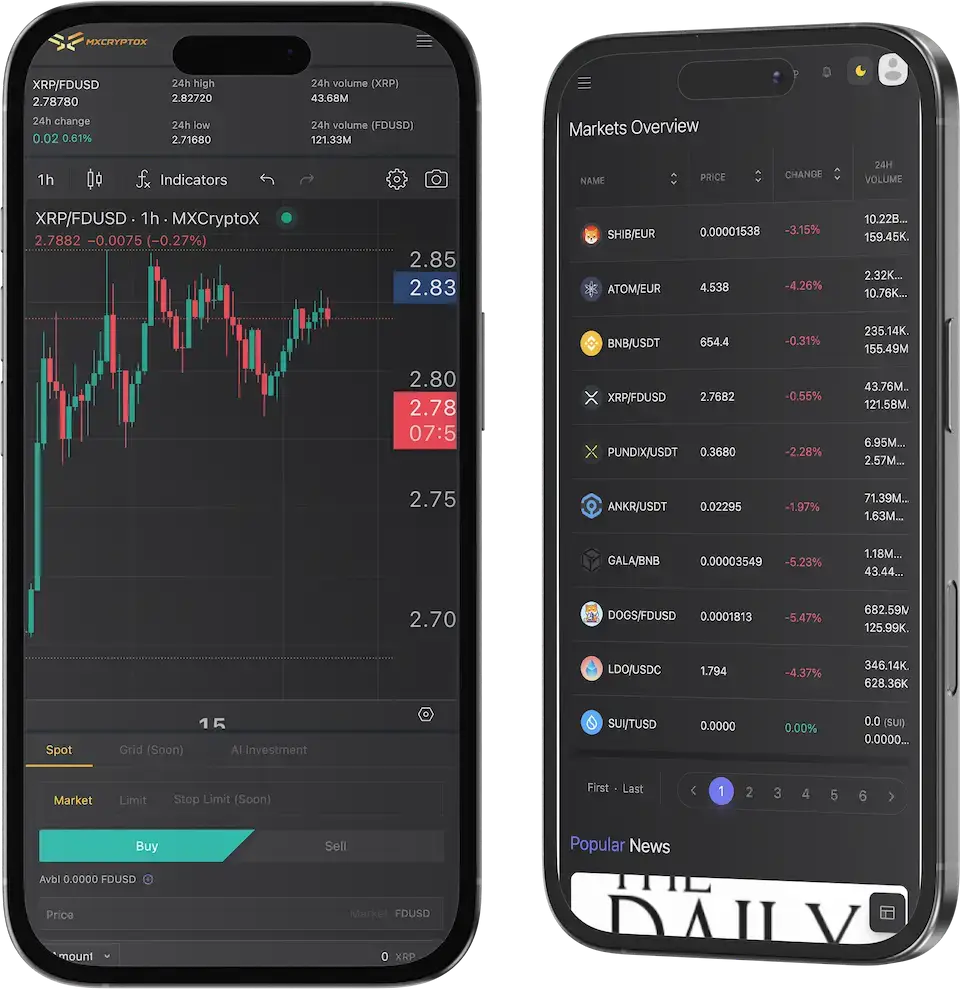
Binance Clone shown on two phones: a trading chart with a buy and sell panel, and the mobile markets overview.01
Pick it if: Tokens from this sale will need a market of their ownBinance Clone

Exchange software run centrally, covering wallets, KYC checks and an operator console, made for the market where tokens change hands after a sale ends.

Explore Solution
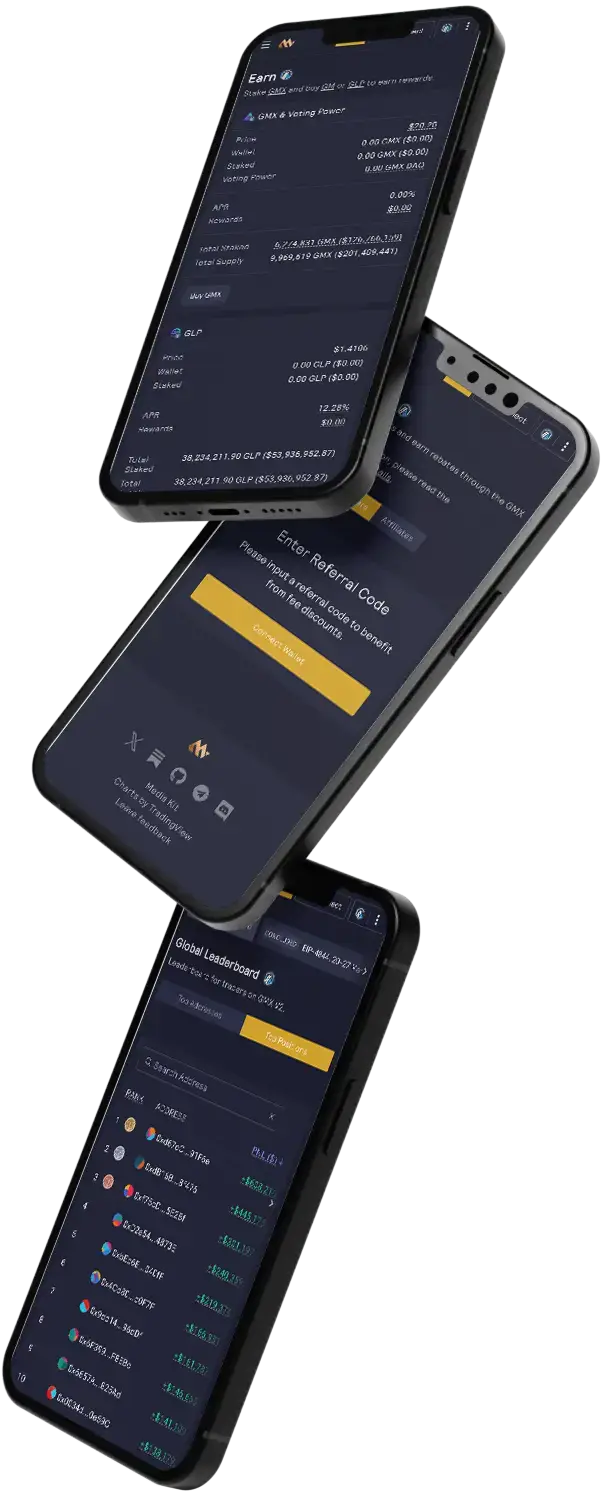
GMX Clone app screens on tilted phones covering earn, referral and the leaderboard.02
Pick it if: Holders of your token may move on to on-chain tradingGMX Clone

Perpetuals trading driven by connected wallets, plus pages for earning, referrals and a leaderboard.

Explore Solution
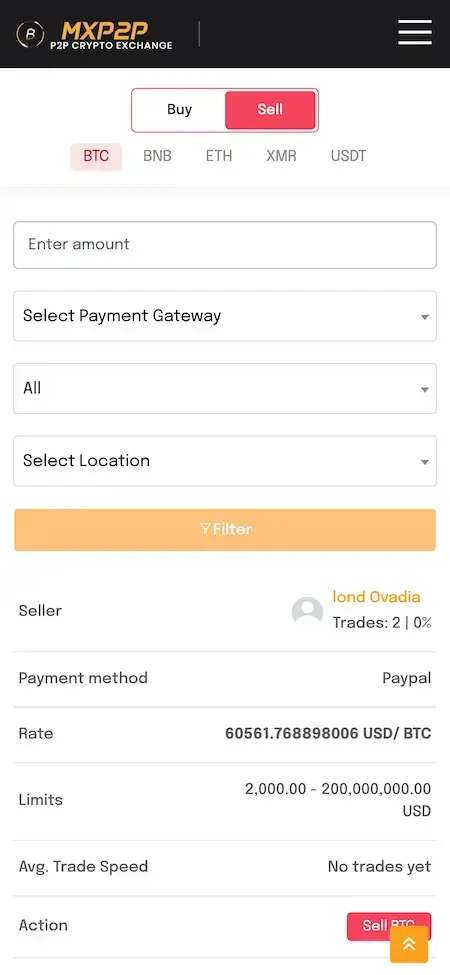
P2P Exchange Script mobile page with Buy and Sell tabs, coin filters and one seller offer.03
Pick it if: Your users should be able to deal with one another directlyP2P Exchange Script

Members list buy and sell offers on a peer-to-peer crypto marketplace and settle trades with each other.

Explore Solution
Revolut Clone digital banking platform shown across the customer app, the web and the admin console.04
Pick it if: Your plan includes fiat accounts alongside crypto productsRevolut Clone

A digital bank for customers with accounts, cards and transfers, plus a console for the operator.

Explore Solution
Full range90+ ready-made solutions

09The business case

Market Benchmarks

Token Launchpad Market Benchmarks - Independent 2025-2026 Data

The revenue models above are ours. The figures below are not. They come from the US Securities and Exchange Commission, the European Securities and Markets Authority and Coinbase, reproduced as published. For a launchpad operator the regulatory ceilings on how much can be raised, and where a white paper is required, matter as much as sale volumes, so these figures start there.

SEC01

Up to $75m a Year Under a Proposed SEC Exemption

On 18 August 2026 the US Securities and Exchange Commission proposed Regulation Crypto Assets with two registration exemptions. The first would permit offerings of up to $5 million during a four-year period. The second would permit offerings of up to $75 million during each 12-month period. This is a proposal, not a final rule.

ESMA / MiCA02

EUR 1m Cap Before a MiCA White Paper Applies

Article 4 of the EU Markets in Crypto-Assets Regulation exempts an offer from the white paper duty if it goes to fewer than 150 persons per Member State, or if total consideration stays within EUR 1,000,000 over 12 months. ESMA's Q&A of 21 May 2026 adds that listing crypto-assets on decentralized exchanges in the Union could amount to an offer to the public.

Coinbase03

$269m Committed in Coinbase's First Token Sale

Coinbase lists its Monad token sale of 17 November 2025 as drawing 85.8 thousand participants from 70 countries and $269 million committed. Coinbase says it uses a "filling up from the bottom" allocation algorithm and that unused funds are returned. Coinbase says token sales are again widely available to US users for the first time since 2018.

SEC04

Five Token Categories in SEC's 2026 Taxonomy

In press release 2026-30 of 17 March 2026 the SEC set out a token taxonomy covering digital commodities, digital collectibles, digital tools, stablecoins and digital securities, and stated that most crypto assets are not themselves securities. Only digital securities are labeled as securities on the release page, which makes classification the first question for any launchpad listing.

Where each figure comes from.

US Securities and Exchange Commission, SEC Proposes New Regulation Crypto Assets, press release 2026-76, 18 August 2026 - sec.gov

European Securities and Markets Authority, MiCA interactive single rulebook, Article 4, accessed October 2026; and ESMA Q&A 2671, answer dated 21 May 2026 - esma.europa.eu

Coinbase, Token sales, Previous sales listing, sale dated 17 November 2025, accessed October 2026 - coinbase.com

US Securities and Exchange Commission, SEC Clarifies the Application of Federal Securities Laws to Crypto Assets, press release 2026-30, 17 March 2026 - sec.gov

All figures are the publishers’ own, reproduced as published. The SEC offering exemptions are a proposal and may change; the MiCA thresholds are regulation text, not an opinion on any token. The Coinbase figure is the company's own listing on its sale page. They describe regulators and one exchange, not any platform Miracuves builds, and nothing here is a revenue projection for your business.

Commercial Outlook

How a Launchpad Like BSCPad Earns - Revenue Potential & Prospects

Money comes in once buyers trust a sale enough to verify themselves and pay, and once the issuer can account for every contribution. The points below aim to make both steps easier while the buyer relationship stays with you. None of this is investment advice.

  1. 01

    Round-by-Round Revenue

    With a price and dates for every round, a sale can begin with an invited group, move to an early-price round and end in the open, each stage earning under its own terms. Contributions are the first money in; referral tokens are a cost you budget, and any fee for hosting other projects' sales is a commercial term you set. Miracuves takes no share of raised funds.

  2. 02

    Referral Momentum

    Sign-up bonuses and referral tokens turn today's buyers into recruiters, and the admin can trace who brought whom.

  3. 03

    A Buyer List You Own

    Accounts, KYC files and payout wallets sit in your own database, which makes the audience you gather yours again for the next round.

  4. 04

    Freedom to Move

    The full source and schema are in your hands, so a later change of host, team or direction asks nobody's permission.

Main Revenue Levers
  • Round Proceeds
  • Round Pricing & Caps
  • Invite-Only Allocation
  • Referral Rewards
  • Hosted Sales for Others
  • Follow-On Rounds
Long-Term Value

Defensibility comes from the buyer list, the trust earned over rounds and the care of your checks, not from features a rival can copy.

  1. 01The buyer list belongs to you
  2. 02Trust is earned across rounds
  3. 03KYC files and wallets stay in your database
  4. 04An open, well-run sale is hard to imitate
Example Revenue Scenarios

These cases vary only by how many buyers take part, and each points to the lever that matters most at that scale. Use them to start a planning conversation, not as a forecast of any raise.

Single Invite-Only Round50Invited Buyers

The invited round brings in the first proceeds.

A modest sale in which a few dozen invited buyers enter with a code and contribute during one round. Treat the size as an example only.

Three-Round Sale500Verified Buyers

Early-price and open rounds build on the invited one.

A sale made of an invited round, an early-price round and an open round, where KYC, referrals and round pricing each play a part. Treat the size as an example only.

Serial Launches5,000Registered Buyers

Later rounds and referrals build on each other.

An operator holding several rounds over time on a single buyer list, with referral reach recruiting many of the buyers. Treat the size as an example only.

10Why Miracuves

Why Miracuves

How Miracuves Stacks Up Against Other BSCPad Clone Script Vendors

Token-sale founders tend to choose between a bare buy-page script, a freelancer, a crypto launchpad development agency, or a base that has already shipped. Before you pay anyone, run a test purchase through their KYC gate, ask what is excluded in writing and confirm the Laravel source is unencrypted; the comparison below covers each point here.

Why Founders Choose Miracuves

  • 01

    Rounds Ready to Configure

    Prices, dates and status labels for each round arrive set up and visible in the demo, so no developer has to design them from scratch.

  • 02

    KYC and Wallet Gates

    The base already holds a KYC form, an admin KYC list and settings that make KYC and a wallet mandatory before purchase.

  • 03

    Referral and Invite Tools

    Referral IDs, private-sale invite codes and sign-up rewards are shipped features in the release log, not roadmap items.

  • 04

    Full Source Code Ownership

    Every file comes unencrypted along with the schema and deployment notes, which leaves no room for a later price change or new terms.

  • 05

    A Real Release Log

    The history from 1.3.2 up to 1.8.0 is listed here, so you can read what changed and see when the framework moved up.

  • 06

    Plain Readiness Language

    Base features, paid add-ons and your own responsibilities sit in separate lists, so the written scope matches what you receive.

Development Company

How to Choose a BSCPad Clone Development Company

Before paying any IDO launchpad developer, run a test purchase through its KYC gate.

What to look for Miracuves

  • Proof in the product One shared buyer login opens the demo
  • Tier logic you can configure Rounds, invites, gates and purchase limits set in the admin
  • A traceable release log Each release names its framework upgrade, newest first
  • Source ownership Unencrypted Laravel source and MySQL schema, owned outright
  • Time to launch Six working days, or we keep working free
  • Support after launch A year of updates, bug fixes for half of it

Walk away from any vendor who

  • Calls a single buy page a tiered launchpad
  • Claims staking tiers it cannot demo
  • Ships encrypted Laravel files or bills an annual license
  • Asks for a share of every round you raise
  • Cannot say in writing what the base excludes

Ready-Made Base Against Scripts and Agency Builds, Line by Line

CriteriaMiracuvesMiracuves BSCPad CloneGeneric Buy-Page ScriptCustom Agency Build
Launch Time6 days of build time on our sideUnclear, mostly DIYQuoted per project, often months
Who Owns the CodeYou, in full and unencryptedFrequently restricted or lockedNormally you
Sale FeaturesRounds, KYC, wallets, referrals and invites togetherOne purchase pageAs much as the budget buys
Buyer ExperienceDashboard, My Token page and a sign-in logSeldom providedDesigned on request
Payment OptionsManual wallet transfer and PayPal across a wide currency listDepends on the scriptIntegrated to your brief
Operator ToolsTransactions, KYC list, users list and a round menuSparse or missingCustom work at extra cost
Safety ControlsTwo-factor verification, sign-in log and honest limitsBare minimumDiffers from firm to firm
Price, Speed, QualityA fixed price, quick delivery and a tested baseCheap but riskyCostly and slow
After-Launch Support60 days of guidance, 6 months of bug fixes, 12 months of updatesHardly ever offeredWhatever the contract says

The gap between these routes widens most once real buyers arrive.

Talk to Our Team

Changelog

Token Sale Platform Release History - Versions & Updates

Version history of the web platform, newest at the top. No dates are given, and every major release also names the framework version it moved to.

VersionChangesWhat changed
V1.8.014 new or improved, 6 correctedNew or improved
Laravel upgraded from 10.x to 11.x
Invitation system for private sales, using invite codes
Reward credited when someone signs up
Email checks can be switched off, with the user confirming later
New switch limiting registration to invitations
Setting to require a wallet address before any purchase
Setting to require a referral ID when registering
Rounds can be archived
Rounds can be deleted
Idle unverified accounts with no transactions can be removed
Admins can change a user's email and have it verified
The user detail page lists that person's referrals
Translations and PHP packages brought up to date
A database migration is needed
Corrected
Manual approval of transactions misbehaved
The social login button on the registration page
Changing an email from the buyer's own profile
A problem with KYC notification emails
A round expiring in the middle of a purchase
Small faults found while reviewing the error log
V1.7.03 new or improved, 5 correctedNew or improved
Laravel upgraded from 9.x to 10.x
Admins can add a round from the panel
Translations and PHP packages brought up to date
Corrected
Saving a wallet after KYC had already been filed
How money was formatted on the purchase page
Exchange rates not refreshing after a base currency change
Choosing a base currency for AVAX, MATIC and SHIB
Small faults found while reviewing the error log
V1.6.07 new or improved, 5 correctedNew or improved
Laravel upgraded from 8.83 to 9.x
Mail can go out through Mailgun, Postmark, Amazon SES or Sendgrid
Currency list extended with AVAX, LUNA, MATIC, DOT and SHIB
A template for wallet change requests
A token shortcut in the users list
PHP 8.1 became the minimum version
Font library and stylesheet updated to show the new currencies
Corrected
Login handling for inactive or suspended users
Referral sign-up combined with social registration
Showing user data inside KYC details
Reading a date of birth in user details
Small faults found while reviewing the error log
V1.5.05 new or improved, 7 correctedNew or improved
Laravel upgraded from 5.7 to 8
Admins can mark an email as verified by hand
Test email button in the mail settings
Missing translation strings filled in on the buyer panel
Compatible with PHP 8.1 onward
Corrected
PayPal amounts in currencies with no decimals
Countdown timer maths at the start and the end
Timezone setting ignored after an update
Rules for validating email addresses
Email verification when logging in through social accounts
Alert emails triggered by unusual activity
A database query that failed to save
V1.4.04 new or improved, 7 correctedNew or improved
Network choice for manual wallet payments
A wallet name field in the buyer's receiving wallet
Exchange rates now come live from ExRateAPI instead of CryptoCompareAPI
PHP packages refreshed to tighten security
Corrected
Validation when canceling a transaction
Validation of very small amounts for a payment method
Saving the smallest and largest token purchase per transaction
Saving the referral setting in the admin panel
Large numbers on the admin dashboard
Rounding of small decimals
Numbers in the transaction tooltips
V1.3.22 new or improvedNew or improved
Token price capped at 8 decimals
Tidier number formatting in the admin screens

Let's build together

Your tiered token sale plan deserves a site that is ready to run.

A free consultation gives you a realistic timeline and straight answers to whatever you ask. Earning your trust matters more to us than closing a quick deal.

  • Reply within 2 hours
  • A free consultation
  • No lock-in contracts
  • You own the source code

11Learn more

Blog & Resources

Latest BSCPad Clone Guides & Insights

Articles on how launchpads earn, how a clone compares with a custom build and which mistakes founders make first.
About the Product5 questions

01What does a BSCPad Clone Script mean?

It is a packaged program for running a token sale in rounds. With the Miracuves BSCPad Clone an issuer gets a buyer panel and an admin console, tools for creating rounds, a KYC form with a review queue, payout wallet records and referral features. None of that has to be coded from nothing, and everything arrives white-label with the full source.

02Does the BSCPad Clone include staking-based allocation tiers?

Staking is offered as scoped custom work rather than a base module. Tiers in the base are built from settings: each round has a separate price and dates, a private round can be limited with an invite code, KYC and a saved wallet can be required, and every transaction has a smallest and a largest amount. A staking-based tier would be custom development, scoped and priced in writing before it starts.

03Why should I choose a clone script instead of building my own platform from scratch?

Round rules, KYC handling, wallet records and an operator console take a long time to write and are easy to get slightly wrong. This base has them already, and its version history, running from 1.3.2 to 1.8.0, shows the upkeep they have had. You pay a fixed price, we need 6 days to build, and the code is yours, so your developers can alter whatever they like later.

04How do I participate in an ICO on this launchpad?

A buyer signs up, confirms an email address, files KYC when the sale demands it and saves a payout wallet. Then they pick whichever round is open and pay in a currency the operator has enabled. Tokens land on the My Token page, divided into purchased, referral and bonus tokens.

05How can I track my purchased tokens and their performance?

On the buyer dashboard a balance sits beside the round on offer. My Token adds a USD value, separate lines for bought, referral and bonus tokens, the total contributed and a view by round, and payments have a menu of their own. Once a sale closes, the optional Data Analytics Dashboard module charts a token's market price.

Rounds, Access & Payments5 questions

06How can I control who gets into a round and how much each buyer can take?

Entry is governed by an invite code or invitation-only sign-up, with optional KYC and wallet requirements on top. Size is governed by the smallest and largest token amount per transaction and by each round's own price. Reserving an exact amount for each named buyer is available as scoped custom work.

07How do I manage and configure multiple ICOs or token sales?

Rounds are created, edited, archived or deleted from the ICO/STO Stage menu in the admin panel, and the Settings page is where you enter the token's name, symbol and decimals, how prices are shown and which currencies buyers may use. Each installation is set up for one token, and a sale for another project gets its own deployment or a custom scope.

08Is KYC mandatory for buying tokens on the platform?

You decide. A setting named KYC Before Purchase makes it a condition of buying, and a sale with no use for KYC can hide the form altogether. When KYC is on, buyers file their application on their own dashboard, and the KYC List in the admin panel is where staff review them. Choosing which documents to accept, and knowing what the law demands, falls to you and your advisers.

09What payment methods and blockchain networks are supported?

Buyers can pay by manual wallet transfer, choosing a network, or by PayPal. Currency settings cover a wide range of fiat and crypto, including BNB, USDT, LTC, ETH and BTC, with AVAX, LUNA, MATIC, DOT and SHIB joining in release 1.6.0. Tokens go out from wallets you control, and the demo shows no on-chain contract.

10Does the platform support private sales and referral rewards?

Yes. Release 1.8.0 brought invitations to private sales that buyers redeem with a code, a switch for invitation-only sign-up, a bonus for new registrations and the option to make a referral ID compulsory. Referral tokens are listed on each buyer's My Token page, and a user page in the admin shows the people that user referred.

Safety, Law & Revenue5 questions

11Is the BSCPad Clone Script secure and compliant with regulations?

Buyers and admins use separate logins, and you can also turn on KYC and wallet gates. The platform adds two-factor verification, a sign-in log and warning emails about unusual activity. A smart-contract review and a liquidity lock are available as scoped additions. Whether you satisfy securities and AML rules is decided by your legal route, something software cannot provide.

12How do I ensure the platform remains secure for both admins and users?

Start by separating admin and buyer access, encourage buyers to enable two-factor verification, read the sign-in log and the payments list, and hold any odd-looking payment for manual approval. Before launch, schedule a penetration test, have any contract you deploy independently reviewed, rotate secrets and rehearse a restore. Miracuves can help you plan those jobs before go-live.

13Is running a token sale legal where my buyers live?

That depends on the token and on each country your buyers come from. In August 2026 the SEC put new offering exemptions on the table, none of them final, and the EU applies MiCA, under which small offers can skip a white paper depending on their value or on how many people they reach. Pick your route with specialist counsel, because Miracuves supplies software only and gives no legal advice.

14What does the first revenue from a token sale look like?

The first money in a token sale is the contribution itself. When a round is open and verified buyers can purchase, funds come in through the currencies you switched on. Referral rewards are a cost to plan for rather than income, and any fee you charge other projects to host their sales is a commercial arrangement made outside the software.

15How defensible is a tiered token-sale platform?

Defensibility comes from the buyer list, the trust earned over rounds and the care of your checks, not from features a rival can copy. Because the KYC files, wallets and referral history stay in your own database, that value starts accumulating with the first round, and a sale that is open and well run is hard to imitate.

Launching with Miracuves10 questions

16How long does deployment take?

Miracuves needs 6 days to deliver the ready-made BSCPad Clone, a period that covers rebranding and deployment onto the hosting you provide. Onboarding with a payment provider or wallet service, and any listing or approval handled by outsiders, follow their own schedules. Customizations are scoped separately.

17Do I get the source code?

Yes, all of it. You receive the Laravel source without encryption, plus schema and migrations for the database, setup files for deployment and release notes, and there is no per-user charge for keeping the site running.

18Is there a mobile app?

Buyers can use the panel on a phone, and the demo shows it in a mobile browser, with the account menu, round cards, security settings and sign-in log. Native Android and iOS store apps can be scoped as custom work whenever you want them.

19What do I have to provide before launch?

Bring hosting and a domain, brand material and company details, plus the wallets and accounts that will take contributions and keys for any outside service you want connected. We do not file payment-account applications for you, and drafting your privacy policy, terms or white paper is also outside our scope.

20What would make Miracuves the right partner for a BSCPad clone?

Rounds, KYC, wallets and the admin console come working, and you can read the release log before buying. The BSCPad Clone has a fixed price of $2,799 and goes live in 6 working days. It comes with 60 days of guidance, 6 months of priority bug fixes and 12 months of product updates, and we reply within 2 hours from Monday to Saturday, between 10:00 and 19:00 IST. Behind it stand 9,000+ projects shipped to 6,000+ clients, and 90+ ready-made solutions.

21How much does a BSCPad clone cost?

One $2,799 payment, with no renewal, buys the buyer panel, the admin console, the unencrypted Laravel source and MySQL schema, rebranding and deployment. Analytics, oracle data, DEX access and community funding are optional modules with their own price, and anything else gets a written estimate before work begins.

22How long until my BSCPad clone is live on the App Store and Google Play?

The BSCPad Clone is a web platform, so it is live within 6 working days of the brief, on your hosting and under your brand, and buyers use it in any mobile browser. Native store apps for Android and iOS are available as a separate custom project with its own written quote.

23What is the business model of an app like BSCPad?

A launchpad like BSCPad earns when projects raise funds through it. The issuer collects contributions in the enabled currencies across invite-only, early-price and open rounds, and a platform operator can charge listing or success fees to the projects it hosts, as commercial terms you set. Referral and sign-up bonuses are a growth cost, paid in tokens.

24What is the step-by-step process to launch my BSCPad clone?

Begin with a test purchase in the demo as a buyer, then look through the admin settings. Next, send your brand, round plan, currencies, wallets and mail provider. Miracuves rebrands and deploys the buyer panel and admin console on your hosting and configures the rounds. Delivery takes 6 working days; your legal review and contract audit run on their own timeline.

25Which types of businesses use a BSCPad clone?

Anyone who sells tokens to invited buyers or to the public. Web3 startups raise for a protocol or app, DeFi teams open early rounds, DAOs and communities share utility or governance tokens, and GameFi and NFT projects fund a launch. Exchanges, token studios, web3 agencies, capital advisers and local teams serving one market can also run a branded copy.

Disclaimer

Miracuves is an independent software development company. This platform is our own product and is not affiliated with, connected to, sponsored by, or endorsed by any third-party service.

Read our full Legal Notice & Disclaimer →
Why this name

“BSCPad Clone” is used descriptively. It is how the software industry refers to building a platform of this category, and how clients search for it.

Who built this

The entire design and codebase is built by our own team. The product contains no code, design, graphics, or content originating from any third-party website or application.

Trademarks

All third-party names and marks that may appear on this page are the property of their respective owners, referenced solely to describe the category of software offered.