Turo Clone App - White-Label Peer-to-Peer Car Sharing Marketplace
Built by Miracuves, this Turo clone puts ready-made, white-label peer-to-peer car sharing in your hands: a renter app and an owner app for Android and iOS, a renter website with owner panel and an operator admin panel, delivered as source code in six working days.
Owners set an hourly, daily or monthly rate, renters book by place and dates, and every request waits for the owner to approve or decline before the trip is confirmed. You choose the commission per trip; OBD lock control, rental extensions, extra drivers and Damage Protection are available as priced add-ons. A custom insurance integration or a verification provider is built to your brief, agreed in writing first and delivered in 2-8 weeks.
Launch in 6 Days with
- Source Code
- Renter App
- Owner App
- Renter Website
- Admin Panel
- Android + iOS
StackFlutter · Laravel 11 · PHP · Bootstrap · MySQL · Google Maps
Marketplace activity
- Trip request from a renterRequests
- Owner approved a bookingApprovals
- New car sent for reviewListings
- Pickup time set for 09:00Pickup
- Booking marked In ProgressStatuses
- Coupon applied at checkoutCoupons
- Review left on a car pageReviews
- Booking marked CompletedStatuses
- Trip request from a renterRequests
- Owner approved a bookingApprovals
- New car sent for reviewListings
- Pickup time set for 09:00Pickup
- Booking marked In ProgressStatuses
- Coupon applied at checkoutCoupons
- Review left on a car pageReviews
- Booking marked CompletedStatuses

- 4Booking StatusesPending, Confirmed, In Progress and Completed
- 3Role Loginsone each for renter, owner and admin
- 0%Revenue Share With Miracuvesno cut of any trip, delivery fee or protection plan
- 100%Source Codeunencrypted, with the schema, migrations and deployment notes
- 6Days to Launchand if the delay is ours, we keep going free
- $3,399Paid Once, Not Rentedsource code yours, no per-seat fee, no monthly rental
Live in six working days, or we keep working free until you launch. Every build carries 60 days guidance, 6 months bug fixes and 12 months updates.Verify every figure
FloRide Launched on This Base
FloRide's peer-to-peer vehicle rental platform was built on this base in 2023 within a 6-day window, reusing 16 of 20 blocks and building four for the client.
License and Cover Stay Yours
The renter journey has a verification step and in-app signing of the rental agreement, but it never checks a license or pays a claim; insurance is for you and your partners to decide.
Card, Stripe or Cash at Pickup
Renters pay by card, through Stripe or in cash at pickup; card numbers go straight to your own KYC-cleared gateway, and only a payment reference is stored.
01See it live
Live in Action
Turo Clone Demo - Renter App, Owner App, Web Panels & Admin
Log in as a renter and as a car owner to try the Miracuves Turo clone yourself. The renter and the car owner each have an app login, the web panels open from the buttons below, and the admin login comes with a guided call. Pick a car, read its specifications, fill in the booking form and follow the booking status.


Turo Clone - Renter App
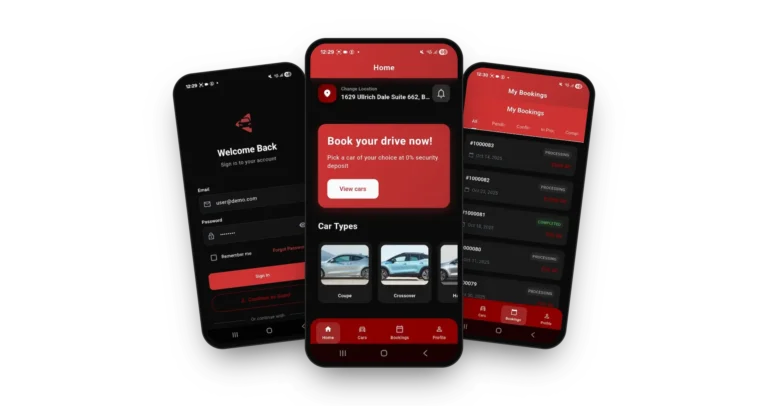
The renting side on a phone: browse featured and popular cars, filter the catalog, open a car page, book a rental period and follow the booking in the Bookings tab.
- 1Select the Android or iOS build in the app portal
- 2Sign in using the demo credentials
- 3Explore: Cars, car page, booking form, Bookings
user@demo.com | User_321

Car Owner App - Listings & Requests
The car owner's view on a phone: see who wants to rent, accept or reject the request, and watch each booking move through its statuses.
- 1Select the Android or iOS build in the app portal
- 2Use the owner credentials shown here
- 3Explore: Bookings, statuses, profile
dealer@demo.com | Dealer_321

Renter Website & Owner Panel
The responsive renter site with a pickup and return search, brands, most viewed vehicles and browse-by-type, plus the owner panel for people who list cars from a desktop.
- 1Load the demo site in your browser
- 2Search by place, dates and vehicle type
- 3Explore: Car pages, owner panel login
shared on a guided call
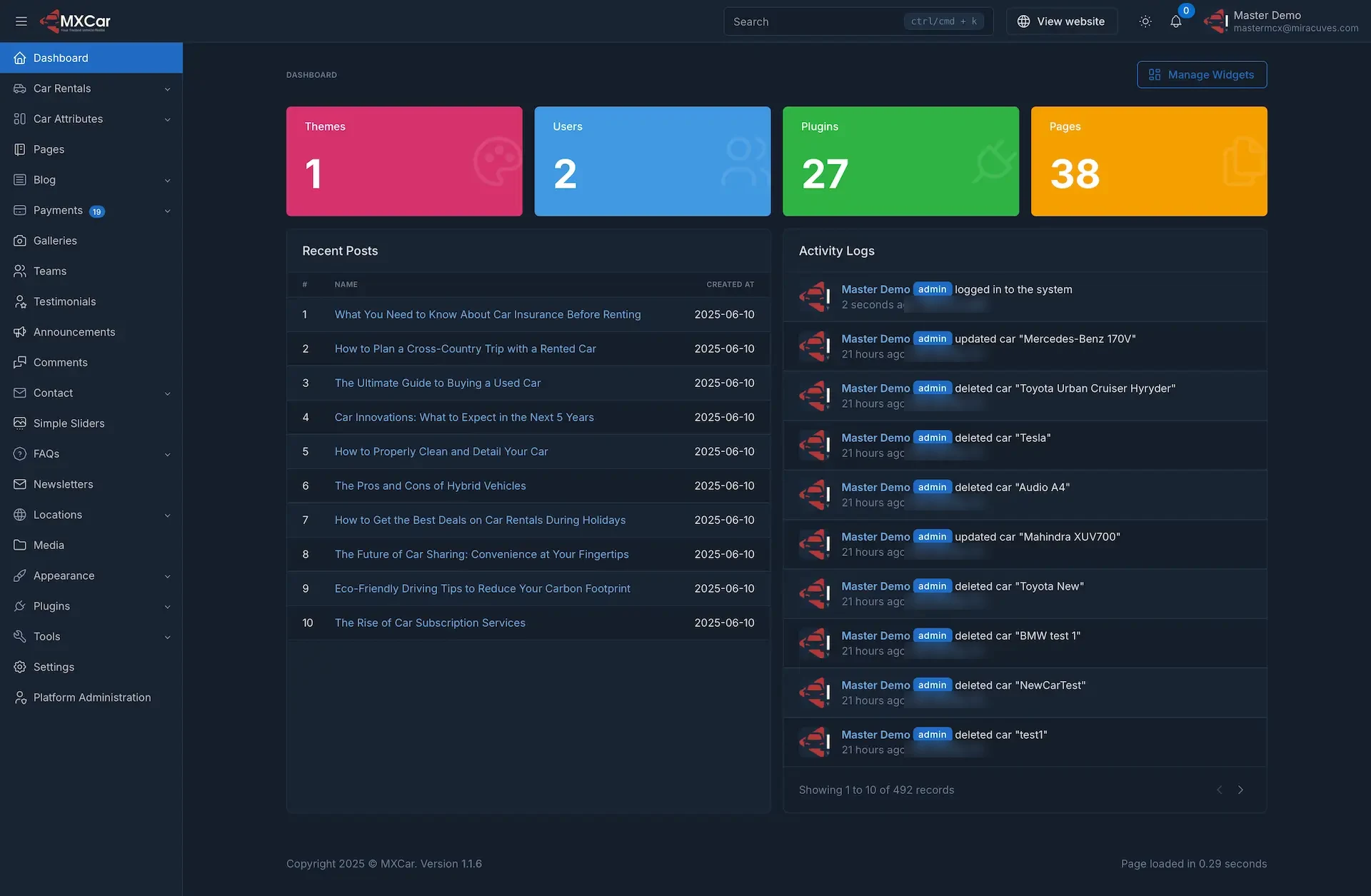
Admin Panel - Cars, Bookings, Payments & Content
The operator console: dashboard tiles, the Car Rentals and Car Attributes menus, locations, payments, pages and an activity log of who changed what.
- 1Go to the admin login on the demo host
- 2Request the admin login from the team
- 3Explore: Car Rentals, Payments, Activity Logs
shared on a guided call
See It With Us
Car Sharing App Like Turo, Walkthrough: Search, Booking, Owner Approval & Admin Panel
A marketplace is easiest to judge while it runs against your own plan. In a 30-minute call we go through the renter app, the owner side and the admin panel with you and connect every screen to your city, your fleet rules and your launch date.
Schedule a live walkthrough call.Every Screen Mapped
App Flows of a White-Label Car Rental App - Renter App, Admin Dashboard & Renter Website
From the splash screen to the profile page: the real screens of the renter app in the order a rental moves, then the admin dashboard and the renter website.


Follow a renter from the splash screen through sign-in, a catalog search, a car page and a booking form to a booking with a status, and an owner from a new request to a confirmed trip.
02Proof
Client Voices
Turo Clone Client Reviews - Operators in Their Own Words
What clients say about building on Miracuves bases. The first two describe a peer-to-peer car rental platform in the Caribbean; the rest come from other industries and are shown exactly as their authors gave them.
“Turo is the obvious reference, but the Caribbean specifics, from different insurance norms to different payment rails, meant we needed a real partner, not just a clone. Miracuves’s MXCar base covered the listing, the trip flow, and the host payouts. We launched in 6 working days and are live in three islands.”
“CarrSync is a peer-to-peer car rental platform in the Caribbean — hosts list their cars, renters book, the platform handles verification, payments, and the in-trip support. Turo is the obvious reference, but the Caribbean specifics — different insurance norms, different payment rails — meant we needed a real partner, not just a clone. Miracuves's MXCar base covered the listing, the trip flow, and the host payouts. We added the local insurance integration, our region-specific ID verification, and a custom host-protection policy module. We launched in 6 working days and are live in three islands. We were paying for the car-share architecture we'd have struggled to build in under a year.”
“Every HMS I tried was built for general physicians, with no lesion mapping, no before/after tracking, and no procedure-based billing. Their MXHealth base gave us the patient app, doctor app, EMR and video consult out of the box. Front-desk time on scheduling and follow-ups is down ~70%, and we went fully digital in 9 months, where a fully custom job would have been 18.”
“The team was running it on a dispatcher and a Google Sheet, and we needed a real platform quickly, because we were about to onboard a major retail client. Miracuves’s Delivery Genie base gave us the rider app, the dispatch console, and live tracking. We launched in 6 weeks and cleared 4x the previous order volume in the first month.”
“We were running it on phone calls and a paper calendar, and we were losing bookings to bigger OTAs. Miracuves’s GetmyBoat Clone base gave us the calendar, the booking flow, and the payment engine. Online bookings are up roughly 70% in the first six months, and the ops team finally has a live view of the fleet.”
“Building a compliant telehealth stack from scratch in three markets would have been a year-plus effort. Miracuves’s MXHealth base covered the patient and doctor apps, video consult, e-prescription and the pharmacy integrations. We launched in our first market in 9 weeks and rolled out to two more in the following six months.”
“We were juggling spreadsheets, a third-party GPS provider, and a phone. We needed a single operations console. Miracuves’s MXLogistics base covered the trip lifecycle, the driver app, and the customer tracking page. We’ve cut operations admin time by about 40%.”
Proof in Production
Turo Clone Case Study - FloRide Vehicle Rental Platform
How a vehicle rental business launched on the Miracuves Turo Clone base. Condensed from the published case study, which records what was delivered in 2023.
FloRide needed a peer-to-peer vehicle rental platform. Miracuves built it on the Turo Clone base, reusing the mechanics that were already proven and spending the effort on the choices only the client could make.

- An idle vehicle earns nothing, so fleet, locations and availability rules are the economics
- Condition, documents, fuel and damage decide the final charge and are where disputes happen
- Vehicles ending up in the wrong city is a logistics problem the software has to model
- Launch without rewriting fleet, availability, booking and settlement from scratch
- Put the effort into fleet and classes, locations, and pricing and deposits
- Own the source code outright
- A renter application and a dealer and admin console, each with its own permissions
- Four decisions built for the client: fleet and classes, locations, pricing and deposits, brand and theming
- Sixteen of twenty platform blocks reused unchanged from the base
- Development, staging and production environments
- Code, schema, deployment setup and architecture notes transferred
“None of us wanted to write fleet, availability, booking and settlement from scratch when it was already working on other platforms. We used that time on our fleet, locations and pricing.”Andre Gittens · CEO, Ride Corporation
03The product
The Basics
Where a White-Label Turo App Helps Owners and Renters
A Turo Clone is a packaged peer-to-peer car sharing marketplace. Owners put a spare car on the platform, renters look up a place and dates, then book and pay in the app, and the operator watches over everything from an admin panel covering cars, bookings and payments.

More Than a Catalog
The substance lies beyond the search box: owner approval, booking statuses, payment choices, ratings and an admin console that keeps an activity log.
Not a Locked Box
You get the full source code with nothing encrypted, so your team can reshape flows and screens as the business grows and never pays a per-seat fee.
Extras on Demand
Remote OBD locking, rental extensions, extra drivers and the Damage Protection module are available as priced add-ons. Each is quoted in writing first and delivered as code into the codebase you own, at launch or later.
Web, Android & iOS
What Is a Turo Clone Script?
A listing page is the easy part of car sharing. The hard part is everything around the trip: who may drive, who approves the request, what state the booking is in and what happens at return. Those parts ship working.

- 01Search by place, dates and vehicle type
- 02Car pages with specifications, amenities and a rating
- 03Booking form with locations, coupon and payment method
- 04Owner app and owner panel for listings and approvals
- 05Admin panel with cars, locations, payments and an activity log
What you receive is a renter app and an owner app, a responsive website with an owner panel, and an admin panel. The Flutter apps and the full source code are part of the handover.
Everything Included
Turo Clone Features - Search, Car Pages, Booking, Owner Approval, Payments & Admin
Every feature listed below, from place search to owner approval, is traceable to a Turo clone demo screen, an admin panel section or a release log entry. Extra modules, such as OBD lock control, are available as add-ons further down the page.
Search by Place, Dates & Type
Renters start from a pickup and return search on the website or the Cars tab in the app, then narrow the list by body type, price and the other filters.
- Pickup and return location with dates in the website search
- Browse by type: SUV, hatchback, sedan, crossover, minivan, coupe, sports and pickup truck
- Search button and a grid or list toggle on the app catalog
- Horsepower filter and wider filter options added in release 1.1.6
- Car Types row on the app home screen
Car Pages That Sell
Every vehicle has its own page with a photo gallery, a star rating, the price per day, specification tiles, a description and an amenities list.
- Gallery plus the rating and number of reviews
- Seats, doors, transmission, fuel, mileage and horsepower tiles
- Amenities such as USB ports, navigation, sunroof and driver assistance
- Price per day beside a Book Now button
- Featured and Popular tags on catalog cards
Availability & Booking Form
The booking screen takes the rental period with pickup and return dates and times, the two locations, special requests and a coupon code, on top of live car availability.
- Pickup and return date and time pickers
- Separate pickup and return locations
- Special requests field and a coupon code box
- Car availability added in release 1.1.6
- External booking URL so a customer can book from another site
Hourly, Daily & Monthly Rates
Owners set their own rates, and the app shows them per hour, per day or per month on the catalog cards, with delivery offered as an optional fee.
- Per hour, per day and per month prices on catalog cards
- Rates and availability set by each owner
- Coupon code field on the booking screen
- Vendor coupon manager from release 1.1.0
- Delivery for a fee, or pickup at a set location
Owner Approval Flow
Each request reaches the owner, who approves or declines it against their own availability before the trip is confirmed.
- Owners notified of new bookings, cancellations and messages
- Approve or decline a request from the owner app
- Pending, Confirmed, In Progress and Completed statuses
- Cancellation cut-off before a booking starts
Checkout & Payment Methods
The booking screen offers credit or debit card, cash on pickup and Stripe, and the booking details page shows a subtotal, a total, a payment status and the method used.
- Credit or debit card, cash on pickup and Stripe options
- Subtotal, total amount and payment status per booking
- Printable invoice and a print booking option from release 1.1.6
- Needs your own gateway account with KYC completed
- Payments, refunds and deposits tracked in the admin panel
Booking Status & History
The Bookings tab lists every rental with a number, a date, a total and a status, and a tab bar filters the list from All to Completed.
- Status tabs: All, Pending, Confirmed, In Progress, Completed
- Booking number, date and total on each row
- Booking details with rental and payment sections
- Past and upcoming bookings in one place
- Booking reports page improved in release 1.1.6
Owner App & Owner Panel
People who own cars register as owners, list vehicles with photos and details, and run their listings from the owner app or the owner panel on the web.
- Register as a car owner or vendor to post cars for rent
- Listings with photos, pricing and attributes
- Owner panel on the web beside the owner app
- Dashboard with listings, bookings and revenue
- Own availability and cancellation choices
Reviews & Ratings
Renters and owners rate each other after a trip, stars and review counts show on listings, and the admin panel moderates what gets published.
- Stars shown on each listing card
- Written reviews on the car page
- Ratings from renters and from owners
- Admin moderation of reviews and ratings
Messages & Notifications
A messages box sits on the car detail page, and the platform sends booking, payment and status notifications to both sides.
- Messages box on the car detail page, release 1.0.1
- Direct messages between owner and renter
- Push notifications for confirmations and updates
- Email notifications for registration and booking events
- Alert bell with a running count in the admin header
Verification & Rental Terms
The website guide places a Verification step between choosing a car and starting the trip, and the rental agreement is accepted digitally in the app.
- Verification step in the renter journey
- Digital signing of the rental agreement in the app
- Social login with Facebook, Google, LinkedIn or GitHub
- reCAPTCHA and math captcha on login and register forms
- Cookie consent bar on the website
Admin Console & Content
One admin panel runs cars, car attributes, locations, payments and the public site content, and an activity log records who changed what.
- Car Rentals, Car Attributes and Locations menus
- Booking creation from the admin panel, release 1.1.6
- Activity log of admin actions on cars
- Pages, blog, FAQs, galleries, newsletters and testimonials
- Multi-language support with RTL-ready emails, themes and menus
Before you buy, note this: Your platform is delivered rebranded as your own. In turn we need hosting and a domain, a developer account to publish the apps from, branding and business details, a payment gateway that has passed KYC, and any third-party keys. App store review by Apple and Google takes however long they take, separate from our 6-day build time.
How Operators Earn
Turo Clone Revenue Models - Commission, Delivery Fees, Protection Plans & Featured Cars
Operators of a car sharing app like Turo can earn in several places, and Miracuves keeps each revenue line apart in the build, so adjusting one leaves the others alone.
The two lines that usually move the numbers most are the commission on each trip and what you charge around the trip: delivery, protection and placement.
- 01
Booking Commission
The operator keeps a share of every paid trip price and the owner receives the rest. The share is an admin setting, so one marketplace can start lean and another can charge more for a managed service.
- 02
Delivery & Pickup Fees
Owners can offer to bring the car to the renter for a fee, and the booking form already carries separate pickup and return locations. The platform can take a cut of what the owner charges.
- 03
Cleaning, Late & Damage Charges
Late returns, a dirty car or minor damage turn into charges the owner is owed. Whether the operator passes them through or keeps part of them is a policy choice.
- 04
Protection Plan Markup
Renters can pick cover on the booking, and the Damage Protection add-on gives that choice a home. A markup or a fee on the cover is a third income line next to commission.
- 05
Featured Cars & Owner Plans
The demo app tags Featured and Popular cars. Selling that placement for a period, or bundling it into an owner plan, rewards the owners who want the most visibility.
- 06
Payment Cost Recovery
Card and gateway costs can be passed on through a booking fee rather than swallowed by the operator. The booking screen already offers card, Stripe and cash on pickup as methods.
| Revenue stream | How it is charged | Take rateTypical take rate | What sets the ceiling |
|---|---|---|---|
| Booking Commission | A share of the trip price kept by the platform, with the owner paid the rest after the trip. | Turo's US plans pay hosts 70%, 80% or 90% of the trip price. Its UK plans pay 60%, 70% or 80%. | How much damage risk the owner carries. Turo ties the share to the plan: the 70% US plan carries $250 per incident of physical damage, the 90% plan $2,750. |
| Delivery & Pickup Fees | A fee the owner sets for delivering the car, with the platform taking its share of it. | On Turo, hosts in the US, Canada and France receive their plan's host share of the delivery price. UK and Australia hosts receive 90%. | Whether renters value the convenience over a set pickup point. The share is a platform policy, so it can differ from your commission rate. |
| Cleaning, Late & Damage Charges | A fee billed to the renter for the specific problem, then paid to the owner in whole or in part. | Turo pays approved cleaning and smoking fees to hosts at 100%. Zipcar bills $50+ for a dirty car and $30 for returning it below a quarter tank. | Whether you treat the charge as a pass-through or as revenue. Turo's 100% payout means the platform keeps none of these fees. |
| Protection Plan Markup | The cost of cover folded into the commission, or billed on top of the trip price. | Turo says its fees cover running the platform and the cost of the earnings plan. It does not publish a separate protection percentage. | Your insurance partner's premium. This platform does not underwrite risk, and the Damage Protection add-on is a cover option, not an insurance license. |
| Payment Cost Recovery | A processing fee on each charge, absorbed in the commission or passed on to the renter. | Stripe US standard pricing is 2.9% + 30 cents per successful domestic card transaction. | Your gateway contract and the cards your renters use. Apple's rules call for a service consumed outside the app, a car rental for example, to be paid by something other than in-app purchase, which means store commissions do not hit the rental. |
How to read this. The commission, protection and delivery figures come from the earnings pages in the Turo Help Center: the US plans, the UK plans and the host share explainer. Zipcar's cleaning and fuel charges are on its how it works page, the card example is Stripe US pricing, and the app-store point is Apple's review guidelines. Turo and Zipcar publish these as their own rules for their own businesses. Treat every figure as a modeling input rather than a quote, and set the real percentages in your own admin settings.
Turo Clone Revenue Model, Stage by Stage
How many cars and owners your marketplace holds usually decides which of the six Turo clone revenue lines above earns first, starting with trip commission and adding featured cars once several cities are live.
Launch
With the first owners in one area, the booking commission carries the business: an admin setting that needs nothing extra to sell. A booking fee can pass card costs on to renters.
Traction
Once many owners compete for the same pickup areas, delivery and pickup fees and a margin on cover through the Damage Protection add-on start to count beside commission.
Scale
Across several cities, featured placement and owner plans reward the owners who want visibility, and the booking reports show which lever to push in each market.
Miracuves takes no share of booking commission, delivery fees or the Damage Protection margin, so a fuller fleet raises only your own takings.
Operate It Day to Day
Turo Clone Admin Panel - Cars, Bookings, Payments & Activity Logs
Turo clone operators run the whole day from one Miracuves console: listed cars, open bookings, payments received, a log of who changed what, and the text on the public site.


Admin Panel Sections
- 01
Dashboard & Tiles
Summary tiles for themes, users, plugins and pages, a list of recent posts and a running count in the notifications bell, all on the first screen after login.
- 02
Car Rentals & Attributes
Add, edit and review car listings, and keep the attributes renters filter by, such as type, fuel, transmission and horsepower, in one tidy menu.
- 03
Locations
A Locations menu to organize the cities and pickup points a car can be rented from, which feeds the pickup and return search on the website.
- 04
Payments & Invoices
A Payments menu with a running count, a booking reports page, and invoices that can be printed along with the booking itself.
- 05
Users, Teams & Admin Roles
Manage renter and owner accounts, the team behind the platform and platform administration, with a separate login for each role.
- 06
Testimonials, Comments & FAQs
Menus for testimonials, comments, announcements and FAQs, so social proof and answers on the public site stay in your own hands.
- 07
Pages, Blog & Newsletters
Edit site pages, the blog, galleries, simple sliders and newsletters from the same console that runs the cars, in more than one language.
- 08
Activity Log
A log that names the admin, the action and the time, such as a car updated or deleted, so a change can be traced to the person who made it.
Money Movement
The finance side of the console, from a booking to the payment record behind it.
- Payments menu with its own count
- Booking reports with more detail
- Printable invoices and bookings
- Coupon manager for owners
Settings & Tools
What shapes the public site and the everyday running of the platform.
- Settings, appearance and tools menus
- Theme and color customizer
- Cookie consent and captcha settings
- Multi-language content with RTL-ready email
Want the console to do more? Additional reports, one more approval step, extra languages or a bespoke pricing rule are each scoped separately. Tell us what your operations team is after and a written quote comes back to you.
04Package and price
The Full Package
Source Code, Apps & Deployment: What the Turo Clone Script Includes
Miracuves hands over a car sharing marketplace that already runs, not a pile of components: renter and owner apps, the website, the owner panel, the admin panel, plus the source code and schema behind them. Ownership passes to you in full, with no charge per seat or per ride. Insurance, any rental license and the store listings are yours to arrange, and hosting, gateway and map keys are billed by your providers.
$ git clone your-marketplace Full Source Code
Unencrypted source code for the web platform and both mobile apps, ready for your team to adapt to the business.
- Web platform source, unencrypted
- Android and iOS app projects in Flutter
- Yours to modify, extend and redeploy
- Delivered into your own repository
Schema & Migrations
The data model for cars, attributes, locations, bookings, users and payments, delivered in a form that can recreate the database from nothing.
- Database schema with migrations
- MySQL data tier
- Cars, attributes, locations and bookings
- Users, payments, reviews and content tables
Messages & Booking Alerts
The messages box on every car page, and the notifications owners and renters receive when a booking is made, confirmed or changed.
- Messages box on the car detail page
- Alerts for new bookings and cancellations
- Owners accept or reject requests in their own app
- Alert bell with a running count in the admin header

Renter Website & Owner Panel
The responsive public site with the pickup and return search, brands, most viewed vehicles and browse-by-type, plus the owner panel for desktop users.
- Search, brands and featured listings
- Car pages with specifications and amenities
- Owner panel for listings and coupons
- Blog, FAQs and multi-language pages
Renter & Owner Apps
Two Flutter apps, one for renters and one for owners, covering the catalog, car pages, the booking form, bookings and the profile.
- Renter app: Home, Cars, Bookings, Profile
- Owner app: requests and booking statuses
- Sign-in with email or as a guest
- Store submission from your own accounts


Admin Panel
The operator console with dashboard tiles, Car Rentals, Car Attributes, Locations, Payments, content menus and an activity log.
- Dashboard tiles and recent posts
- Car Rentals, Car Attributes and Locations
- Payments, pages, blog, FAQs and newsletters
- Settings, appearance and tools
Access & Security Layer
A login and a set of rights for each of renter, owner and admin, plus the safeguards built into the web platform.
- One role per user type, each with its own rights
- reCAPTCHA and math captcha on forms
- No keys or passwords inside the delivered repository
- The gateway holds the card details
Handover & Support
We handle the branding and the deployment, hand over a documentation pack and start three support periods together on launch day.
- Your logo, icons and colors applied throughout
- Deployment to your hosting
- Deployment configuration and architecture notes
- 60 days guidance, 6 months bug fixes, 12 months updates
Prefer to try it first? Log in to the demo as a renter or an owner, or request a guided tour in which we run a car search, a car page, the booking form and the owner approval against your own plan.
Transparent Pricing
How Much Does It Cost to Build a Car Sharing Marketplace Like Turo?
The launch-ready white-label Turo Clone is a fixed price of $3,399. Anything beyond the base build, whether an add-on, an extra integration or a custom flow, gets its own written scope and price.
Professional
Ready-Made Launch PackageChosen by: Car sharing startups, regional rental marketplaces, fleet owners and dealers going online
You receive the platform as the demo presents it, wearing your logo, icons and colors and running on your own hosting.
Get StartedEnterprise
Bespoke Builds for Bigger PlansChosen by: Rental groups, fleet aggregators, multi-country marketplaces
Need flows the base does not have, such as a custom insurance integration or a verification provider? We build to your brief and settle scope and price before the work begins.
Request a QuoteTuro Clone Development Cost in 2026
For $3,399, paid once, an operator gets everything shown in the Turo clone demo: Flutter renter and owner apps, the renter website and owner panel, the admin panel, and unencrypted source code with schema. Every owner, car and trip your marketplace adds afterwards costs you nothing more, and Miracuves has it rebranded on your hosting within six working days.
What else your total covers, outside the software invoice
- Insurance cover arranged with your own partners
- Hosting, a domain and Google Maps keys billed by your providers
- A KYC-cleared payment gateway and its card fees
- Store listings for the renter and owner apps, published from your own developer accounts
- Any add-on, from OBD lock control to Damage Protection
A driver-verification service or an insurer's system can be linked in, scoped and priced in writing first, typically in 2-8 weeks; rental groups running in several countries get an Enterprise quote.
Compare Your Options
Ready-Made Turo Clone vs Custom Development vs SaaS
Peer-to-peer car sharing can launch on the Turo clone Miracuves has ready, on software an agency writes for you, or on a hosted rental service. Here are the trade-offs an operator weighs.
| Criteria | MiracuvesReady-Made Turo Clone | Custom Development | SaaS |
|---|---|---|---|
| Launch time | Owners listing cars after 6 working days | Often months of scoping and coding | Opens quickly on the service template |
| Upfront cost | $3,399, a single purchase | Priced in writing per scope | Low setup, recurring monthly bill |
| Source code ownership | Web and both app codebases plus schema, yours in full | Assigned by contract, usually | Kept by the service provider |
| Customization | Adapt anything; an insurance or verification integration is quoted, delivered in 2-8 weeks | Built to order at matching cost | Settings the provider exposes |
| Ongoing fees | No charge per seat or per ride; hosting and gateway go to your providers | Maintenance per the contract | Subscription, sometimes plus per-trip fees |
| Branding & app-store listing | Renter and owner apps under your name, published from your accounts | Your name; store work billed extra | Shared or provider-branded apps are common |
| Best for | Operators matching private car owners with renters by hour, day or month | Fleets with rules no product covers | Testing one city before owning software |
Where It Fits
Turo Alternative Use Cases - Car Sharing, City Rentals, Fleets, Dealers & Monthly Plans
A car sharing startup, a fleet aggregator and a dealer each lean on a different slice of Miracuves' Turo clone. A car sharing startup puts owner approval and commission first, a fleet aggregator puts locations and moderation first, and a dealer puts its own login and booking statuses first.
Swipe · 6
Open a marketplace where private owners list cars and set their own hourly, daily or monthly rates, while you earn a share of each trip and run the admin panel.

Organize listings by pickup location so a renter starts from where they land, with a pickup and return search, brands and vehicle types to narrow the list.

Bring several small fleets and private owners into one catalog, each with their own login, while you keep the pricing rules, locations and moderation in the console.

Give a dealership an online rental channel for its stock, using the dealer-side login, car attributes and booking statuses it needs.

Add car rental to a travel brand, with pickup and return locations tied to where visitors arrive and coupons or announcements to promote offers beside your other products.

Offer cars by the month as well as by the hour or day, using the per-month price already shown on the catalog cards and extended rental as an add-on.

Turo Clone Business Model: Three Ways to Run It
Every version matches renters with cars under your brand; what changes is who owns the cars, and one codebase covers all three, from private owners to a dealer's own stock.
Peer-to-peer marketplace
Private owners list spare cars on their own hourly, daily or monthly rates and approve each request, while you keep a commission on every trip without buying a vehicle.
Fleet aggregator
Several small fleets and private owners list side by side under your brand, every fleet managing its cars from a separate login, while the admin panel moderates listings and fixes pickup locations and pricing rules.
Own-stock rental arm
A dealer rents out stock it already holds, or a tourism brand adds cars beside its trips, using the dealer-side login and pickup points tied to where customers arrive.
Whichever shape you pick, you set the commission, coupons and rental rules, and Miracuves takes no cut of any trip.
One platform, six business shapes. All six cases share the renter and owner apps, the website and the admin panel. What changes is which cars you list, what share you keep, which owners you invite and how the brand looks, all configured from one source tree.
Plan My Use CaseMarket Timing
Why Build a Car Sharing Marketplace in 2026?
Car ownership leaves most vehicles parked most of the time, and renters usually find them through a few large rental sites. A marketplace under your own brand lets you capture the supply, the renter and the commission between them.
01Idle Cars Are Supply You Can Invite
A car parked in a driveway for most of the week is an asset its owner would happily put to work. A marketplace that makes listing easy, on the owner's own rates, converts that wish into supply.
02Renters Expect a Phone-First Booking
People pick a car the way they pick a restaurant: a catalog, a rating, a price and a button. A clean car page and a short booking form meet them where they already look.
03Owners Stay Where They Hold the Decision
Being able to accept or refuse a request, set the rate and pick the meeting point is what keeps good cars on your marketplace and off a competitor's.
04A Status Builds Confidence on Both Sides
When a booking shows Pending, Confirmed, In Progress or Completed, nobody has to ask where things stand, and that lowers the effort of trusting a stranger.
05Your Brand, Not a Listing on a Bigger Site
When the marketplace carries your name, the renter relationship, the reviews and the repeat trips stay with you, not with the platform that sent the traffic.
06Buying Is Quicker Than Building
A car sharing business is largely search, car pages, booking, owner approval and an admin console. After six days of our build time, a white-label copy is running on your hosting.
Platform by the Numbers
App Tabs: Home, Cars, Bookings, Profile
Booking Status Tabs
Real Demo Screens
Days of Build Time
Most of the work in a car sharing marketplace is the unglamorous middle: availability, approvals, statuses, payments and an admin console that records each change. Here it is already built.
Industries
Industries We Serve
The Turo Clone fits any business that puts vehicle owners in touch with people who need to drive. Car sharing platforms list private cars. Rental companies and aggregators pool fleets into one catalog. Dealers add a rental arm to the stock they already hold. Tourism and mobility brands put cars next to their trips, and monthly plans serve people who need a car for longer than a weekend.
one codebaseMXCar
- 01CsCar Sharing
- 02CrCar Rental
- 03FoFleet Operators
- 04CdCar Dealers
- 05LeLuxury & Exotic
- 06EhEV & Hybrid
- 07MrMonthly Rentals
- 08ToTourism
- 09CmCorporate Mobility
- 10TaTravel Agencies
- 11CoCity Operators
- 12PmPeer Marketplaces
Our Turo Clone is a peer-to-peer rental platform that bends to any vehicle sharing model, and its owner tools, booking statuses and admin panel carry your name from the first screen.
06Under the hood
End to End
Turo Clone App, Trip by Trip - Sign In, Browse, Open, Book, Pay & Track
A renter books a car on the Miracuves Turo clone in a few taps. Behind those taps runs a fixed sequence of search, availability, approval, payment and return. The steps below follow it from sign-in to a tracked booking, and the architecture that supports it comes after.
Renter Journey - From Sign-In to a Tracked Booking
Swipe · 6
1Sign In or Rent as a GuestAfter the splash screen a renter logs in by email or browses without an account, and the app asks where to search.
- Email and password with forgot-password link
- Remember me and a Continue as Guest button
- Location shown on the home screen
2Find a Car to Rent NearbyHome shows a Book your drive now banner, a row of car types, featured and popular cars and the latest bookings underneath.
- Car Types row from coupe to crossover
- Featured and Popular rows with price per day
- Recent Bookings with a status
3Browse Cars by Hour, Day or MonthThe Cars tab shows what is available in a grid or a list, with search, ratings and hourly, daily or monthly prices.
- Grid and list toggle
- Per hour, per day and per month prices
- Rating on every card
4Open the Car ListingGallery, rating, daily price, seats, doors, transmission, fuel, mileage and horsepower come first, followed by a description and amenities.
- Photo gallery and review count
- Specification tiles
- Description and amenities list
5Book the Rental PeriodPickup and return dates and times, two locations, special requests, a coupon code and a payment method go into one booking form.
- Pickup and return date and time
- Separate pickup and return locations
- Coupon code and payment method
6Pay & Track the Car BookingWhen the owner replies, the trip lands in the Bookings tab with a number, a status and a payment section that opens for details.
- Status tabs from Pending to Completed
- Subtotal, total and payment status
- Booking details for each rental
How It's Built
Platform Architecture of a Car Sharing App Like Turo & Booking Lifecycle
- 01Block 01
Renter and Owner Surfaces, Separate Permissions
The renter side and the owner and admin side are different applications with their own rights and release schedule, which keeps a renter out of the operator console.
- 02Block 02
Booking Lifecycle
Each booking travels through a hold, a deposit and a confirmation, so the app is able to show Pending, Confirmed, In Progress or Completed whenever someone looks.
- 03Block 03
Calendar Holds per Vehicle
Each car keeps its own calendar of holds, so a day that is taken or blocked by the owner shows as unavailable before a renter picks it.
- 04Block 04
Pricing Rules
Rates follow rules for duration and extras, which is why a car can show a price per hour, per day and per month side by side.
- 05Block 05
Payments & Deposits
Deposits and refunds are recorded as transactions against the booking, so the payment section on the details screen has a record behind it.
- 06Block 06
Realtime Status & Async Events
Vehicle and booking status arrive on screen as they change, and reminders and similar background jobs run separately as queued events.
Under the Hood
Turo Software Stack: Laravel and PHP, MySQL, Flutter Apps & Payment Gateways
Bookings on a car sharing marketplace have to stay consistent while renters and owners act at once, so Miracuves pairs a Laravel and MySQL web tier with native-feeling Flutter renter and owner apps. The list below shows what the platform uses, taken from the product pages and the release log.
Web Platform
- Renter website, owner panel and admin panel
- Laravel 11 and PHP 8.3 since release 1.0.2
- PHP 8.4 compatibility in release 1.1.6
- Version 1.1.6 shown in the admin footer
Data Tier
- MySQL for cars, bookings, users and payments
- Cars and car attributes kept in their own tables
- Schema and migration files ship with the code
- Rebuildable from empty
Renter & Owner Apps
- The Flutter apps use current dependencies
- Renter app and owner app
- Home, Cars, Bookings and Profile tabs
- Published to the stores through your own accounts
Gateways & Methods
- Credit or debit card, cash on pickup and Stripe in the demo booking form
- Payment status shown on each booking
- Invoice and print booking tools
- Needs your own gateway account with KYC completed
Third-Party Services
- Google Maps for locations and routes
- Twilio, listed as an integration
- Pusher, listed as an integration
- Translation service for multi-language content
Source & Documentation
- Application source with full history
- Mobile projects with signing documented
- Deployment configuration written down
- Architecture notes transferred
Google Maps, Twilio, Pusher and translation services each run on your own account and keys.
Build to Scale
Built to Scale - Separate Applications, Vehicle Calendars & Growth Headroom
Miracuves assembles the Turo clone from separate applications that share building blocks, so taking on more owners, cars and bookings is a question of capacity and settings, not of rewriting code.
Two Sides, Two Release Schedules. Rights for the renter application and the dealer and admin console are kept apart, so an update to one never has to wait for the other.
A Calendar Per Vehicle. Holds and owner blocks live on each car, so renters and owners get one answer to whether a day is free.
Photos Kept Apart From the App. Listing and inspection photos live in object storage in your own bucket and region, so the web tier stays light however far the fleet grows.
Records That Reconcile. Deposits, refunds and charges are stored as transactions, which lets every dashboard figure be traced back to the booking that produced it.
Separate Applications
The renter application and the dealer and admin console keep their own rights and release schedule, and either can change while the other stays untouched.
Calendar Per Vehicle
Availability is a calendar kept on each car, with holds and owner blocks, and a booking status that follows each reservation.
- Holds and owner blocks
- Car availability since release 1.1.6
- Status on every booking
- Pickup and return dates and times
Gateway in Front
An API gateway sits in front of the booking logic and takes care of authentication and rate limits first.
- Authentication at the gateway
- Rate limits on public traffic
- Captcha on login and register forms
- Separate logins per role
Photo Storage Apart
Photos are held in object storage in your own bucket and region, not on the web server itself.
- Your bucket, your region
- Photos served separately
- Multiple photos on each car page
- A Media section in the admin console
Recorded Transactions
Deposits, refunds and charges are written as transactions against the booking, which is what the payment section reads from.
- Subtotal and total per booking
- Payment status on every booking
- Refund and deposit records
- Printable invoice per booking
Documented Hand-Over
A new team can run the platform from what we hand over: source, schema, deployment configuration and architecture notes.
Room to Change and Grow. Each marketplace eventually needs something specific to its city or its owners. Because you hold the whole source and the stack is conventional, a new screen, rule or integration is routine development that your team or ours can do.
Just launching? Begin with the owners and pickup points you can recruit and grow on the deployment you already run. When traffic climbs, more capacity is a hosting and configuration choice, and work beyond the base gets its own quote.
07Security and trust
Built to Be Checked
Security in a Peer-to-Peer Car Rental App - Role Separation, Activity Logs, Gateway Payments & Honest Limits
Any car sharing marketplace, including the Turo clone Miracuves delivers, stores identities, driving details, bookings and payment references. The controls that count are who sees what, what gets recorded, where card data goes and what is still left to do before launch, and this section separates what the platform does from what stays with you.
- 01 · RolesRole Separation
Renters, owners and admins see only what their role allows. The server enforces this instead of merely hiding menus, so a renter has no route into the operator console.
- Listing Review: Car listings can be approved, updated or removed in the admin panel, which keeps a marketplace from filling up with vehicles nobody has checked.
- Dispute Handling: Your admin team settles disagreements between owners and renters, working from the booking record and its status.
- 02 · AuditAudit Trail
The admin dashboard carries an activity log naming who updated or deleted a car and when, so a question about a change is answered with a record.
- Review Moderation: The admin side can moderate reviews and ratings, so a car's or an owner's reputation is not rewritten unnoticed.
- 03 · TransportTransport & Storage
Connections use TLS, passwords are stored as hashes, and sensitive data at rest is encrypted instead of just hidden.
- Form Protection: Login and register forms are guarded by reCAPTCHA and a math captcha, which blunts automated sign-ups and abuse.
- 04 · SecretsSecrets Handling
API keys sit in environment settings on your own servers and never inside the repository we hand you.
- Named Launch Tasks: Before go-live your deployment still needs a penetration test, key rotation, a restore drill and a check of your gateway settings; none of these is assumed done.
- 05 · CardsCards Stay at the Gateway
Card numbers never touch the platform: they go straight to the gateway you connect, and only a payment reference is stored.
- Payment Controls: The admin panel tracks payments, refunds and deposits, so how money moved on a booking can be checked after the fact.
- 06 · BackupsBackups & Restore
Backups run on a schedule as part of the deployment, and a restore gets rehearsed before launch, since a backup nobody has restored is only a hope.
A separate admin sign-in, an activity log, TLS in transit and hashed credentials leave a clear trail for any reviewer to inspect. Before launch the deployment also gets a pen test, a restore test and fresh secrets.
Discuss Security Before LaunchMarketplace Readiness
Marketplace Readiness of a Car Rental Clone - What the Software Covers Versus Operator Duties
Putting one stranger behind the wheel of another stranger's car raises questions no booking form can answer. Miracuves supplies the booking, payment and review tools, while the decisions on who may list, who may drive, which insurance applies and what the law demands where you operate stay with you.
Ready, on this page, is software you can open and try in the demo or admin panel. Rental licensing remains with you as operator.
Built Into the Software
Car listings with specifications and rates, a booking form with locations and a coupon code, owner approval, booking statuses, payment method choice, reviews and ratings, separate renter, owner and admin logins, and an admin panel with an activity log.
Left to the Operator
Your terms of service and privacy policy, the owners and cars you admit, the documents you ask owners to produce, how disagreements are resolved, and any cancellation, deposit and refund rules that go past the defaults you set.
Drivers & Insurance
Which licence and identity checks a renter must pass, which provider performs them and which insurance covers a trip are decisions for you and your partners. The platform carries a verification step and an optional Damage Protection add-on; it does not check a licence or pay a claim.
Where You Operate
Peer-to-peer car sharing law, rental licensing, insurance, tax and consumer protection vary by country and frequently by state or city. Take local advice for every market you plan to serve before bookings open.
08Grow the platform
- Search, car pages & booking
- Owner app & owner panel
- Booking statuses & payments
- Admin panel & reports
How an add-on works
- 1Choose the module
Remote access, longer rentals, extra drivers or cover, at launch or later.
- 2Quote before work
A module's scope and price are put in writing prior to any build work.
- 3Delivered as code
Once done, the module is added to the codebase that already belongs to you.
Go Further
Add-Ons for an App Like Turo - OBD Lock Control, Rental Extensions, Extra Drivers & Damage Protection
As the demo shows, the Miracuves Turo clone runs a rental from search and owner approval to payment and return. Below are the four extras car-sharing operators request most; each carries its own price, since scope varies with your market, fleet and insurance partners.
Drag to explore · hover to pause
- 01Vehicle access
OBD Lock & Unlock Control
On-board diagnostics integration so a renter can lock and unlock the car from the app, with the same controls available to the admin, instead of a handover of physical keys.
OBD · Remote Access - 02Rental terms
Extended Rental Period
Let a renter ask for more days from inside the app, with the extension subject to the owner's availability, so a longer trip does not mean a new booking.
Extend · Rental
- 03Rental terms
Multi-Driver Option
Add more than one driver to a single rental, which suits family trips and shared driving on long routes, with each extra driver listed on the booking.
Multi · Driver - 04Protection
Damage Protection
An optional cover a renter can pick for minor vehicle damage during the rental, giving the owner and the renter a defined answer if something is scratched.
Damage · Cover
The Rental & Mobility Suite
Cars Are One Rental Model. Here Are the Platforms Next Door.
The Turo Clone is one product in a wider rental, travel and mobility range. If your plan reaches past peer-to-peer car sharing, these four connect to it most naturally.
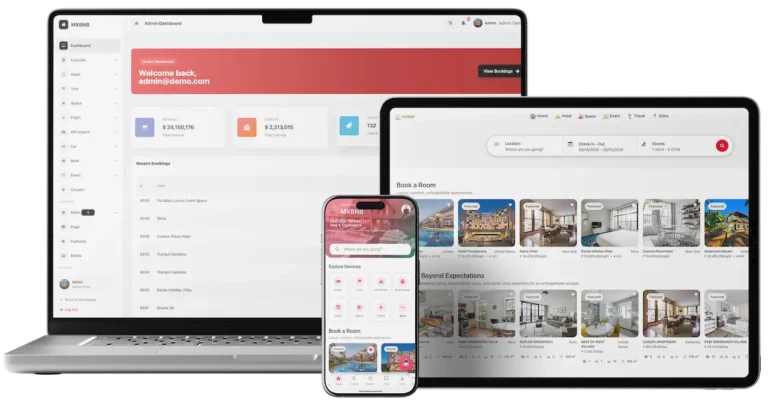
01A vacation rental marketplace with a host console and an operator admin, built around stays instead of vehicles.
Explore Solution
02A peer-to-peer boat rental marketplace with owner tools, deposits, a wallet and an admin panel.
Explore Solution

03A ride-hailing platform with rider and driver apps and an admin console, for trips with a driver included.
Explore Solution
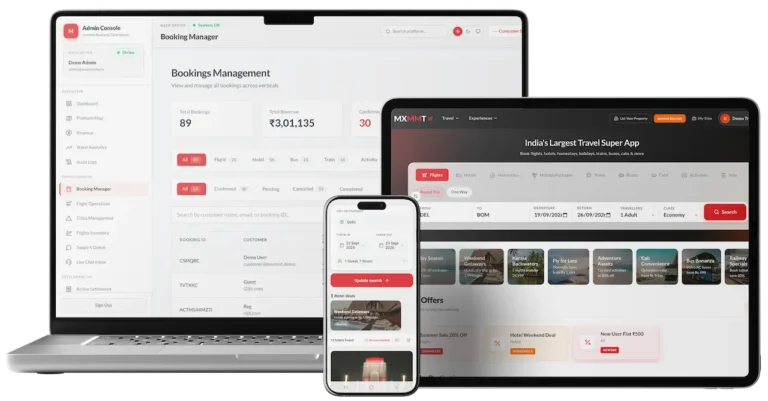
04A booking engine with a website, mobile apps and operator consoles for selling trips, stays and flights.
Explore Solution09The business case
Market Benchmarks
Car Sharing Market Benchmarks - Independent 2025-2026 Data
The revenue models above are ours. The figures below are not. They come from the Avis Budget Group and Hertz annual reports on Form 10-K and from CoMoUK's published UK car club statistics, reproduced as published. They show what rental fleets at scale earn per day, what each vehicle costs to hold, and how a car club fleet can shrink, so you can test your plan against numbers you can check.
$11.7bn Revenue at Avis Budget Group in 2025
Avis Budget Group, which owns the Zipcar car sharing network, reports 2025 revenues of approximately $11.7 billion in its annual report on Form 10-K, down $137 million or 1 percent from 2024. It ran an average rental fleet of approximately 684,000 vehicles and reported Adjusted EBITDA of $748 million for the year.
$56.49 Revenue Per Day at Hertz Americas in 2025
Hertz reports in its annual report on Form 10-K that Americas rental car revenue per day (Total RPD) was $56.49 in 2025, across 119,473 thousand transaction days. Consolidated total revenues were $8,504 million, down $544 million from $9,049 million in 2024, so a daily rental is a useful reference for what a shared vehicle day earns.
UK Car Club Fleet Fell to 2,969 in March 2026
CoMoUK, the UK shared transport body, reports a total car club fleet of 2,969 vehicles in March 2026, down from 5,310 in March 2025. Its page states the figures reflect the loss of the Zipcar fleet from London. It lists 558 vehicles in Scotland, 385 in London and 2,026 in the rest of England, Wales and Northern Ireland.
$310 Monthly Depreciation Per Vehicle at Hertz
Hertz reports Depreciation Per Unit Per Month of $310 for its Americas rental business in 2025, down from $587 in 2024, and $260 for International, down from $311. Depreciation is the largest holding cost of owning a fleet, which is the cost a peer-to-peer platform shifts onto vehicle owners.
Avis Budget Group, Inc., Annual Report on Form 10-K for the year ended 31 December 2025, filed 19 February 2026 - sec.gov
Hertz Global Holdings, Inc., Annual Report on Form 10-K for the year ended 31 December 2025, filed 26 February 2026 - sec.gov
CoMoUK, Shared cars: car club statistics, figures March 2026 - como.org.uk
All figures are the publishers’ own, reproduced as published from annual filings and published statistics. Metric definitions are each company's own. They describe the companies and the UK car club sector named, not any platform Miracuves builds, and nothing here is a revenue projection for your business.
The Commercial Case
Marketability, Revenue Potential & Business Prospects
Owners have to trust your Turo clone with a car, and renters with a payment, before the marketplace earns anything. The sections below look at making both decisions easier and at keeping the relationship with each side once it is formed.
- 01
Commission on Every Trip
The operator retains a share of every paid trip, which ties revenue to the number of cars and bookings instead of the size of the team. Each rental keeps its own money record, and no part of that revenue is paid to Miracuves.
- 02
Several Lines, One Console
Delivery fees, protection plans and featured placement are separate levers around the commission, so one can be switched on without redesigning the rest.
- 03
Owned Owners and Renters
Owner accounts, reviews and booking history live in your own database, so the value the marketplace builds stays with you instead of a listing site.
- 04
Exit Optionality
With the full source code and the schema in your hands, moving to a new host, team or direction needs nobody's permission.
- Booking Commission
- Delivery & Pickup Fees
- Cleaning, Late & Damage Charges
- Protection Plan Markup
- Featured Cars & Owner Plans
- Payment Cost Recovery
A car sharing marketplace is defended by its supply and its trust, not by its feature list.
- 01Owners who listed on their own rates do not casually move
- 02Renters with reviews and a booking history have a reason to return
- 03What builds up from day one stays in your own database
- 04Careful moderation of listings and reviews is the second moat
The three cases differ only in the number of cars listed, and each one names the lever that leads at that size. Treat them as planning aids rather than forecasts of what any marketplace will earn.
Commission alone funds the first months.
A compact local marketplace with a few owners, where commission on each paid trip pays the running costs. Illustrative size, not a forecast.
Commission plus delivery and protection fees.
A city marketplace with many owners competing for the same pickup areas, where delivery fees, protection plans and featured placement begin to count next to commission. Illustrative size, not a forecast.
Several cities, with every lever active.
A network across many cities, where featured cars, owner plans and protection fees accumulate beside commission and the admin reports show where to focus. Illustrative size, not a forecast.
10Why Miracuves
Why Miracuves
Miracuves Compared With Other Turo Clone Developers
Your car sharing marketplace could grow out of a generic rental script, freelance work, an agency build, or the Turo clone base Miracuves already shipped for FloRide. Hold each candidate to account: do owners get their own tools or only a listing form, who approves a booking and where its status lives, and which demo features are really in the price?
Why Founders Choose Miracuves
- 01
Owner Side Included
Owners get their own app and panel, with approval of each request and their own rates. Generic rental scripts often stop at the renter site.
- 02
Statuses From Day One
Every booking carries a status from Pending to Completed, so renters, owners and admins read the same state instead of chasing each other.
- 03
Renter, Owner and Admin Together
The renter app, owner app, website and admin console come as parts that already work together, not four separate projects to stitch up.
- 04
Full Source Code Ownership
Every line of code arrives unencrypted together with the schema and deployment notes, so no vendor can reprice it or rewrite the terms later.
- 05
A Proven Base
The FloRide platform ran on this same base with 16 of 20 building blocks reused unchanged, and the published case study draws the line between reused and built.
- 06
Clear Scope Up Front
Scope is set out before you buy: what the base includes, which add-ons are priced on their own, and what you connect yourself, from gateway accounts and hosting to store developer accounts and driver checks.
How to Choose a Turo Clone Development Company
Before signing with any car rental app developer, ask to approve a booking request yourself in the owner app demo.
What to look for Miracuves
- Owner tools in the demo Owner app and panel in the demo, with approve or decline per request
- A client launched on the base FloRide went live on it, with 16 of 20 building blocks reused
- Source ownership Unencrypted web and Flutter code with schema and migrations
- Time to launch Rebranded and live in six working days, with any delay on our side worked off at no charge
- Support after launch 60 days guidance, 6 months bug fixes, 12 months updates
Walk away from any vendor who
- Calls a listing form the owner side
- Tracks booking status in email, not on the booking
- Demos remote locking without saying if the price covers it
- Keeps no log of who changed a listing
- Keeps the Flutter code encrypted or takes a fee on every trip
Turo Clone Versus Generic Scripts and Custom Agencies
| Criteria | MiracuvesMiracuves Turo Clone | Generic Rental Script | Custom Dev Agency |
|---|---|---|---|
| Time to Launch | 6 days, our build time | Unknown or DIY | Scoped per project, usually months |
| Source-Code Ownership | Complete, unencrypted | Often limited or locked | Usually yes |
| Car-Rental Depth | Search, car pages, booking form, statuses and reviews | Plain listing pages | Whatever the budget allows |
| Owner Tools | Owner app, owner panel and approval | Rarely included | Built to order |
| Payments | Card, cash on pickup and Stripe in the demo booking form | Varies by script | Custom integration |
| Admin & Reports | Dashboard, payments, booking reports and an activity log | Thin or absent | Built to order, extra cost |
| Security & Compliance | Role logins, captcha, gateway-held card data, honest limits | Minimal | Varies widely |
| Cost vs Speed vs Quality | Fixed price, fast, tested base | Low price, high risk | Expensive and slow |
| Ongoing Support & Updates | 60 days guidance, 6 months bug fixes, 12 months updates | Rarely offered | Set by the contract |
The routes look alike on paper and diverge once real owners and renters arrive. The rows above show where.
Talk to Our TeamChangelog
Car Rental Software Changelog - Every Release in One Table
Notes for the web platform, latest release first. No dates are published, and entries that do not describe this build are left out.
| Version | Changes | What changed |
|---|---|---|
| V1.1.6 | 14 updates | Added or updated Add booking creation in the admin panel Add car availability Add an external booking URL so a customer can book a car from another website Add more information to the booking details when a booking is completed Add horsepower and a filter by horsepower Add cache for UI blocks and widgets so the site loads faster Add an option to import blog post translations from a CSV or Excel file Add an option to set a default avatar for customers Add settings for the maximum upload size and the number of images Improve the booking reports page with more information Improve the invoice and add an option to print a booking Improve the cars filter with more options Improve the cookie consent UI Make it compatible with PHP 8.4 |
| V1.1.2 | 7 updates, 2 fixes | Added or updated Copy the menu structure to the new language when a language is added Improve the sitemap with Google News and XML mobile Improve the email template and support RTL in email Improve the newsletter so the homepage loads faster Improve the social sharing buttons Improve the front theme and admin panel UI Improve cache for better performance Fixed Fix deprecation warning logs in PHP 8.3 Fix a warning when importing blog posts |
| V1.1.0 | 2 updates, 3 fixes | Added or updated Add the Mega menu style Add an option to let a vendor create coupons (coupon manager for vendors) Fixed Update re-captcha for the user plan checkout Fixed the location field in the search form Fixed the search form filter for related attributes and terms |
| V1.0.2 | 6 updates, 1 fix | Added or updated Upgrade to Laravel 11 Support PHP 8.3 for better performance and security Add multi-vendor features so people can register as a vendor or car owner and post cars for rent Add missing captcha to forms to prevent spam tools Improve invoices Improve cache for better performance Fixed Fix small issues in the theme UI |
| V1.0.1 | 4 updates, 1 fix | Added or updated Add social login: Facebook, Google, LinkedIn and GitHub Add reCAPTCHA and math captcha for the login and register forms Add a messages box to the car detail page Improve cache for better performance Fixed Fix small issues in the theme UI |
| V1.0.0 | 1 update | Added or updated First release |
Let's build together
Let's take your car sharing idea and make it a working marketplace.
Schedule a free consultation and you leave knowing the timeline and having had your questions answered plainly. Earning a client's trust counts for more with us than closing quickly.
- First response under 2 hours
- Free consultation
- No lock-in contracts
- Full source code ownership
11Learn more
Blog & Resources
How to Build an App Like Turo: Newest Guides & Insights
Keep up with guides on how car sharing marketplaces earn, how one gets built and why founders choose a ready-made base over custom development.

The product6 questions
01How does the Turo Clone work, and what exactly is it?
The Turo Clone is a packaged peer-to-peer car sharing marketplace. Owners list their cars with photos, specifications and rates, renters search by place, dates and vehicle type, send a booking request and pay, and the owner approves or declines it. Miracuves delivers it white-label with a renter app, an owner app, a website with an owner panel and an admin panel.
02Can I launch a car sharing app like Turo legally?
Building and selling software that has car rental features is generally lawful. Whether your business may operate depends on where: peer-to-peer car sharing, rental licences, insurance and taxes are regulated differently by country, state and city. Miracuves provides the platform and gives no legal advice, so take local advice before you open bookings.
03How customizable is the Turo Clone solution?
Branding is part of delivery: we rebrand the web platform and both apps with your logo, icons and colors. Because you receive the complete source code, your team or ours can change screens, rules and flows afterwards, and extras such as OBD lock control are scoped and quoted on their own.
04What are the key features of the Turo Clone?
Search by place, dates and vehicle type, car pages with specifications and amenities, a booking form with locations and a coupon code, owner approval, booking statuses, card, cash on pickup and Stripe payment options, reviews and ratings, messages on the car page, and an admin panel with an activity log. OBD lock control, extended rentals, extra drivers and damage protection are add-ons, not base features.
05Is it scalable to handle a large number of users?
The base is built as separate applications, with a calendar per vehicle and an API gateway in front, so scaling mostly comes down to hosting and configuration choices. Load testing and capacity planning join your go-live schedule, and anything further is quoted on its own.
06Can I get the app for iOS as well as Android?
Yes. Both the renter app and the owner app are Flutter builds for Android and iOS. They go to the stores from your own developer accounts, and Apple and Google carry out the review, which sits outside our 6-day build time.
Renting a car7 questions
07How do I book a car on the Turo Clone platform?
Search by place, dates and vehicle type, open a car page, and fill in the booking form with pickup and return dates, times and locations, any special requests, a coupon code and a payment method. The request goes to the owner, and the booking appears in the Bookings tab with a status.
08Can I rent a car for a short period, or is there a minimum rental duration?
Yes. The catalog shows rates per hour, per day and per month, so a short trip and a longer one both fit. What is offered on a given car depends on the rates its owner sets and on its availability.
09Does the platform support multiple payment methods?
The demo booking form offers credit or debit card, cash on pickup and Stripe. Card payments run through the gateway account you connect, and that account must have completed KYC with its provider before you go live.
10Is the car rental secure?
The platform lowers risk with separate renter, owner and admin logins, a verification step, captcha on forms, card details kept at the gateway, and ratings and reviews renters can read before booking. It does not check a driving licence or underwrite insurance by itself; those checks and covers come from the partners you choose.
11Can I request additional services like car cleaning or insurance?
Cover for minor damage is available as the Damage Protection add-on. Cleaning, roadside help and similar extras can be scoped as custom work for your marketplace.
12What happens if the car breaks down during the rental?
Renter and owner can message each other from the car page, and the booking record keeps the status and dates. Roadside assistance and repair terms are agreed by the operator with its partners and written into your rental terms; the platform does not run a roadside service itself.
13Can I extend my rental period once I’ve booked a car?
Extension from inside the app is the Extended Rental Period add-on: the renter asks for more days and the owner’s availability decides the answer. In the base build, renter and owner can agree an extension by message.
Listing a car6 questions
14How do I list my car on the Turo Clone platform?
Register as an owner, add the vehicle with photos, specifications and rates, and set its availability from the owner app or the owner panel on the web. The operator can review a listing in the admin panel before it goes public.
15Can I control the pricing for my car rental?
Yes. Owners set their own rates, and the catalog shows them per hour, per day or per month. Owners can also create coupons through the vendor coupon manager that arrived in release 1.1.0.
16Can I approve or deny bookings for my car?
Yes. Each request reaches the owner, who approves or declines it against their own availability before the trip is confirmed, and the booking status shows the outcome to both sides.
17What if my car gets damaged during a rental?
Damage Protection is an add-on that lets a renter choose cover for minor damage, giving owner and renter a defined answer. The rental agreement the renter accepts in the app sets out the damage terms, and the insurance you arrange decides the rest. The booking record keeps its status for any dispute.
18How do I get paid for the rental?
Confirmed bookings are paid through the gateway you connect, and owners receive their money under the payout terms you define as operator. The booking record shows the total, the payment status and the method used, so earnings can be followed from the dashboard.
19Do I need to deliver the car to the renter?
That is the owner’s choice: offer delivery for a fee, or ask renters to collect from a set location. The booking form already carries separate pickup and return locations.
Admin, money & scale8 questions
20What features are available in the admin panel?
The admin panel has a dashboard with summary tiles, Car Rentals and Car Attributes menus, Locations, Payments, pages, blog, FAQs, testimonials, newsletters, appearance, settings and tools, and an activity log that records who changed what. Booking creation from the admin panel arrived in release 1.1.6.
21Can I manage car listings and approve or reject them?
Yes. The Car Rentals and Car Attributes menus let admins add, edit, review or remove listings, so only vehicles that meet your standard stay on the marketplace.
22How do I monitor financial transactions?
The Payments menu carries its own running count, the booking reports page shows more detail per booking, and invoices can be printed with the booking itself. Together they show what was booked, paid and refunded.
23Can I handle disputes between car owners and renters?
Yes. Your admin team handles disputes with the booking record, its status, the messages and the reviews as evidence. The platform keeps the record; the resolution policy is yours to write.
24What security features are included in the admin panel?
Admin users sign in separately from renters and owners, and the activity log records who changed what. TLS in transit, hashed credentials and encryption of sensitive values at rest are part of the base, as described in the published FloRide case study. A penetration test and key rotation go on your deployment's launch schedule.
25How can I manage the platform’s scalability and performance?
The release log shows caching for UI blocks and widgets and continuing performance work, while the dashboard and booking reports show activity. Capacity itself is a hosting decision on your own infrastructure, and extra reports are scoped on their own.
26What does the route from launch to first revenue realistically look like?
Most car sharing marketplaces begin with the booking commission, since it requires nothing extra to sell: the first paid trip already earns it. Delivery fees, protection plans and featured cars come next, once enough owners compete for the same pickup area to want better placement.
27How defensible is a car sharing marketplace?
A car sharing marketplace is defended by its supply and its trust, not by its feature list. Owners who listed their cars on their own rates and availability do not casually move, and renters with reviews and a booking history have a reason to come back. What builds up from the first day stays in your own database, and careful moderation of listings and reviews is the second moat.
Launch & Miracuves10 questions
28How much time passes before the solution is deployed?
Our build time on a ready-made platform is 6 days. In that window we rebrand it, deploy it to your hosting and publish the apps from your developer accounts. Store review by Apple and Google, gateway onboarding and account verification run outside it.
29What does the Turo Clone cost?
The Turo Clone is a fixed $3,399 for the launch-ready white-label platform. Add-ons such as OBD lock control, extended rentals, extra drivers and damage protection, and any custom flows or integrations, are scoped and quoted separately in writing.
30Do I get the source code?
Yes. The web platform and the Flutter apps reach you as complete, unencrypted source code, with the schema, deployment configuration and architecture notes, inside your own repository.
31What technical support is provided with the solution?
Every ready-made solution carries three cover periods from launch: 60 days of dedicated platform guidance, 6 months of priority bug resolution and 12 months of continuous product evolution. They run side by side at no extra cost, with a first response in under 2 hours, Monday to Saturday, 10:00-19:00 IST.
32What do I need to supply before launch?
Hosting plus a domain, a verified developer account to publish from, branding and business details, a payment gateway through KYC, and any third-party API keys. Gateway onboarding and store review are controlled by the providers, so they sit outside our build window.
33Why choose Miracuves to build a Turo clone?
Because the owner side, the booking statuses and the admin panel arrive already working, on a base that has carried the FloRide platform with 16 of 20 blocks reused. Miracuves has delivered 9,000+ projects for 6,000+ clients and built a catalog of 90+ ready-made solutions. The Turo Clone is a fixed $3,399, goes live in 6 working days, and our clients describe the work themselves on the testimonials page.
34Is a ready-made Turo clone better than custom development?
For most car sharing startups, yes. A custom marketplace needs two apps, a calendar per car, owner approval, booking states and payment records before the first trip, which usually means months of work. This base ships all of it at one price in 6 working days, and since the source is yours, insurance or verification links can follow as quoted work.
35What is the business model of a car sharing app like Turo?
You earn on trips in cars you never bought. The base line is a commission on every paid trip, set by you. Around it sit delivery and pickup fees, cleaning, late and damage charges, a margin on protection plans, and featured placement or plans for owners. Coupons are a marketing cost, and card fees can be recovered in the price.
36What is the step-by-step process to launch my Turo clone?
Try the renter app, owner app and admin panel in the demo. Then open the accounts the platform needs and fix the scope. Your 6 working days cover branding the platform, configuring commission and rental rules, deployment and the submission of both apps. Handover ends with a walkthrough; Apple and Google review is outside those days.
37How are renters checked before they drive away?
Every request waits for the owner to approve or decline it, and the admin can block an account at any time, so no trip starts without a person saying yes. Automated license or identity checks come from a verification provider, which we connect to your brief as custom work, priced in writing up front, typically in 2-8 weeks.
Go Deeper on Sites Like Turo
Guides, the case study and the neighboring pages around the Turo Clone.
Marketplace development
See the service→Case studyFloRide
A peer-to-peer vehicle rental platform built on the Turo Clone base in 6 working days, with the list of blocks reused and the four decisions built for the client.
Read the case study→Developer guide
Architecture, stack and build steps for an app in this category.
Read the guide→GuideThe 45-Minute Liability Gap: Why Cheap Turo Clones Can Bankrupt You on the First Accident
Read the guide→Transportation and mobility
See the industry→GuideRevenue model
How a car sharing marketplace earns and what fees it can charge, line by line.
Read the guide→Talk to an expert →Features and pricing
What a ready-made car sharing script contains, how the features are organized and what you pay.
Read the guide→Related platformAirbnb Clone
A vacation rental marketplace with a host console and an operator admin, built around stays instead of vehicles.
See the platform→Disclaimer
Miracuves is an independent software development company. We are not affiliated with, connected to, sponsored by, or endorsed by Turo.
Read our full Legal Notice & Disclaimer →“Turo Clone” is used descriptively. It is how the software industry refers to building a platform with functionality similar to Turo, and how clients search for it.
The entire design and codebase is built by our own team. The product contains no code, design, graphics, or content originating from the Turo website or applications.
Turo and all other third-party names and marks are the property of their respective owners, referenced here solely to describe the category of software offered.