Zoom Clone App - White-Label Branded Video Meeting Software
Built by Miracuves, this ready-made, white-label Zoom clone delivers Flutter apps for Android and iOS, a web login, an admin panel, the database schema and full unencrypted source code you own, installed on servers you run in six working days.
A host opens a room with a generated meeting ID, guests come in by invite link or ID and wait in a lobby until admitted, and live audio and video run on the open-source Jitsi Meet SDK. Apple and Google review store listings on their own clock, outside those six days. Another language, an extra admin report or a custom approval step is quoted in writing up front, then built over 2-8 weeks.
Launch in 6 Days with
- Source Code
- Android + iOS
- Admin Panel
- Database Schema
- Rebranding
- App Publishing
StackFlutter · Jitsi Meet SDK · PHP · Bootstrap · OneSignal · MySQL
Meeting activity
- Meeting started by a hostMeetings
- Guest asked to join from the lobbyLobby
- Public room opened in the loungeLounge
- Reminder sent before a scheduled callReminders
- Recording saved after a sessionRecordings
- Language switched to ArabicLanguages
- User upgraded to a paid planPlans
- New account createdUsers
- Meeting started by a hostMeetings
- Guest asked to join from the lobbyLobby
- Public room opened in the loungeLounge
- Reminder sent before a scheduled callReminders
- Recording saved after a sessionRecordings
- Language switched to ArabicLanguages
- User upgraded to a paid planPlans
- New account createdUsers

- 4App Tabs, One CodebaseHistory, Meeting, Lounge and Profile
- 2Income Lines Built Inpaid plans from the admin panel and a free-tier banner ad slot
- 0%Revenue Share With Miracuvesno per-seat fee and no license charge on the plans you sell
- 4Add-Ons, Priced ApartVR spaces, crypto payments, a smart assistant and language learning modules
- 6Days to Launchand if the delay is ours, we keep going free
- $2,799Paid Once, Not Rentedsource code yours, no per-seat fee, no monthly rental
Live in six working days, or we keep working free until you launch. Every build carries 60 days guidance, 6 months bug fixes and 12 months updates.Verify every figure
Nelmeet Launched on This Base
Nelmeet, a video conferencing business, went live on this base in 2023: 17 of 21 building blocks were reused, the build took six working days and the source and schema were handed over.
Encrypted Meetings, on Request
A waiting-room lobby, an optional meeting password and hashed passwords ship with the base; end-to-end encrypted rooms can be scoped in as an option.
Plans Bill Through Your Gateway
Paid plans run through subscription management in the admin panel and are collected by a payment gateway you onboard with KYC done, so the merchant account stays in your name.
01See it live
Live in Action
Zoom Clone Demo - Mobile App, Web Page, Admin Panel & Guided Walkthrough
Get hands-on with the Zoom clone app Miracuves keeps live for buyers. One demo login opens the mobile app and the web page, the admin login is shared on a guided call, and a 30-minute walkthrough runs hosting, joining and the dashboard against your own plan.
Zoom Clone - Mobile App
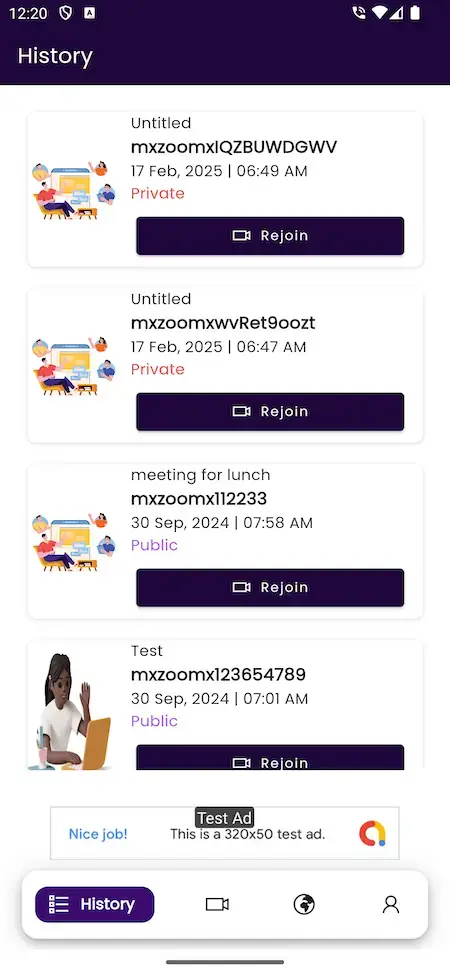
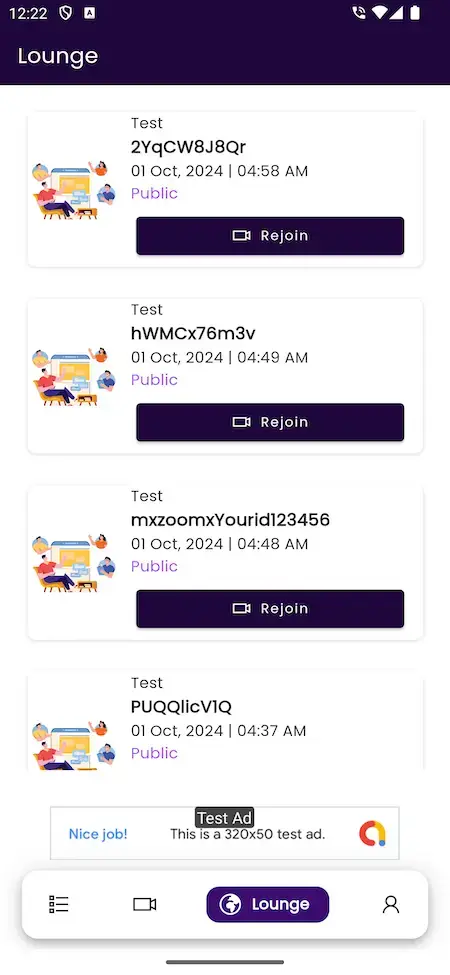
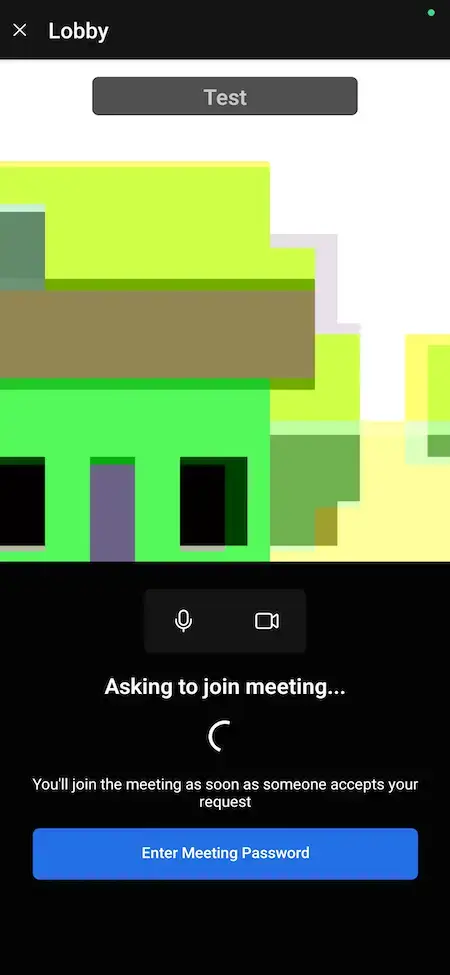
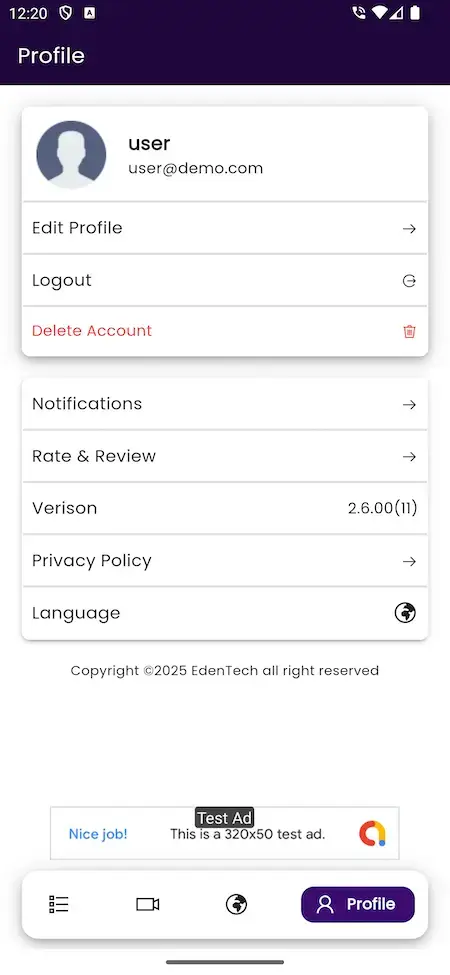
The Flutter app on a phone: sign in, host or join from the Meeting tab, wait in the lobby, then find earlier meetings in History and public rooms in the Lounge.
- 1Open the app portal and pick your phone
- 2Sign in with the demo login below
- 3Explore: Meeting, History, Lounge, Profile
user@demo.com | User_321
Zoom Clone - Web Page & User Login
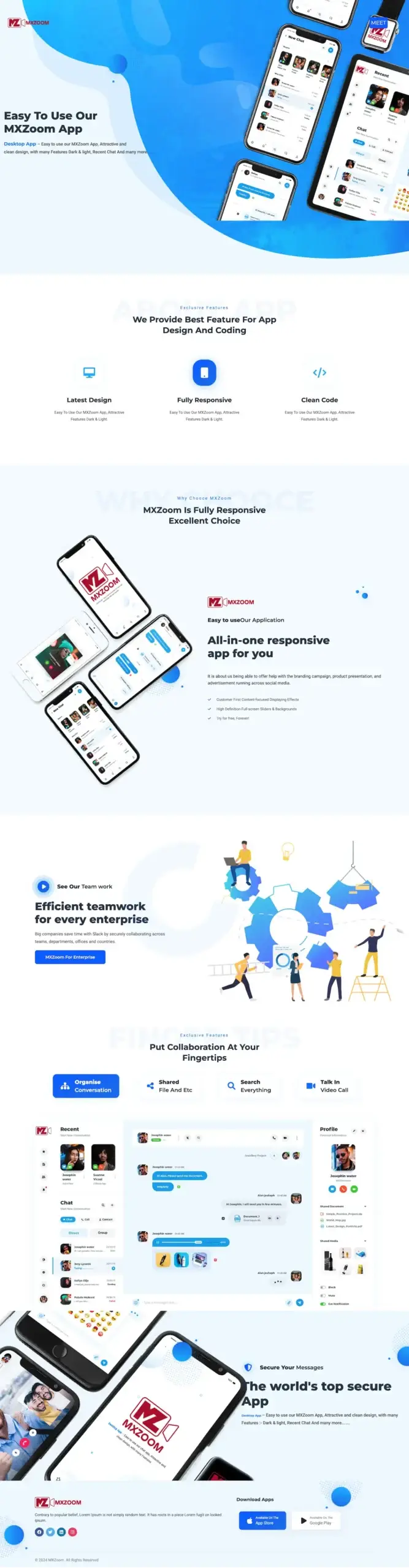
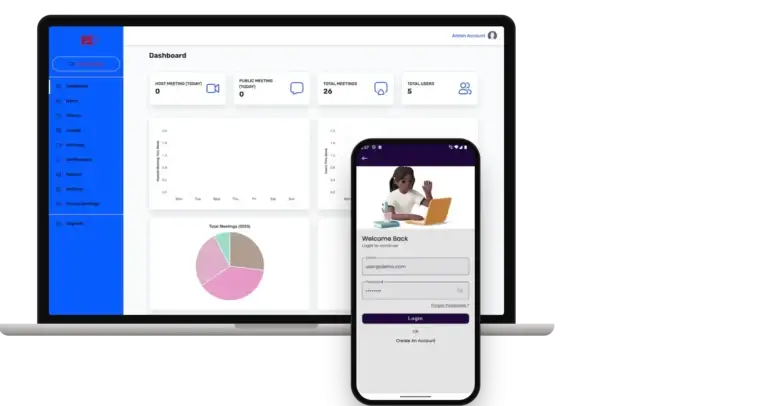
The responsive web side: a landing page that shows off the app and a login screen for the same user account.
- 1Open the demo site in a browser tab
- 2Go to the login page
- 3Sign in as the demo user
user@demo.com | User_321
Admin Panel - Users, Meetings, Plans & Settings
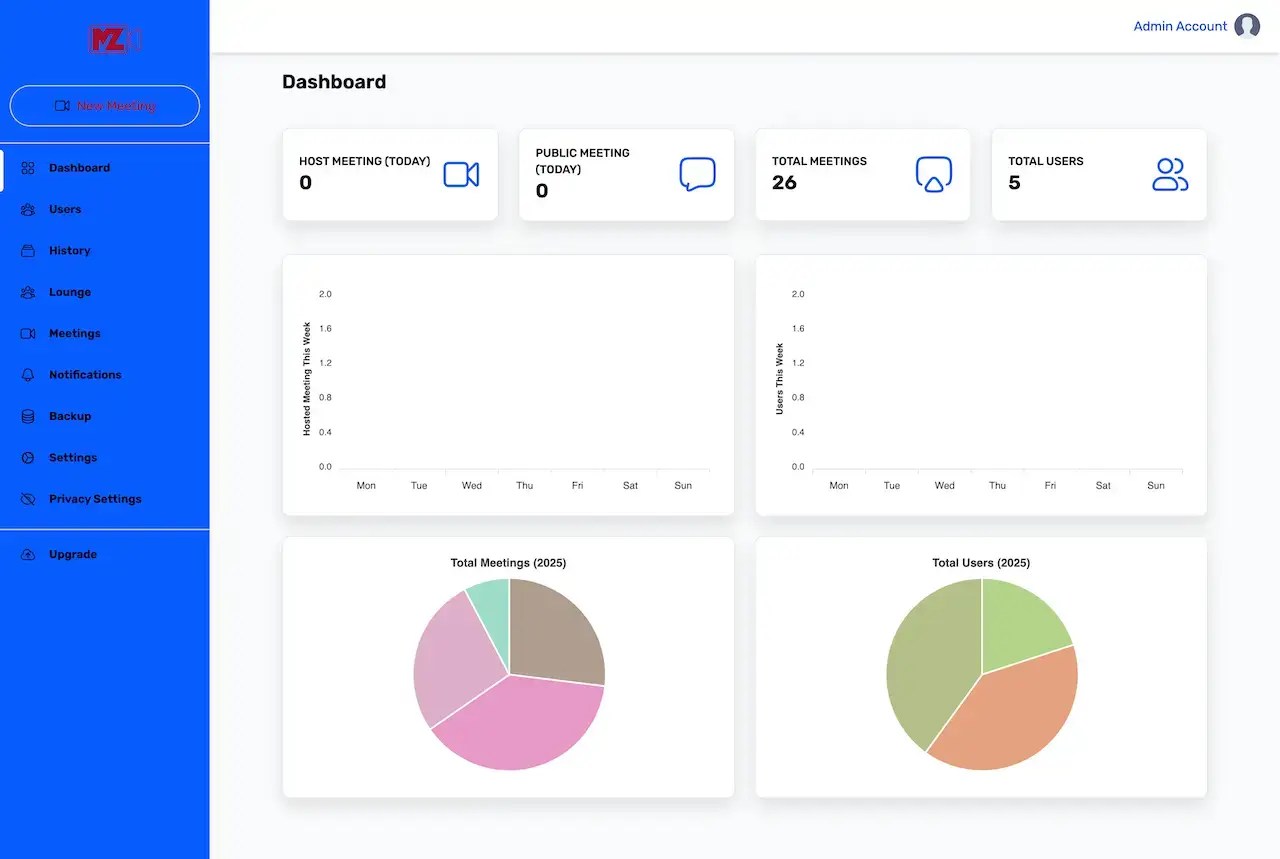
The operator console: dashboard tiles and charts, and menus for users, history, lounge, meetings, notifications, backup, settings and privacy.
- 1Book a guided call
- 2Ask the team for the admin login
- 3Explore: Dashboard, Users, Meetings, Settings
shared on a guided call
Host, Join & Rejoin - Live Walkthrough
A live call in which we host a meeting, join it from a second device and walk through the lobby, the history list and the admin dashboard.
- 1Pick a 30-minute slot
- 2Tell us your audience and plans
- 3Watch the flow run on a live demo
30 minutes, no commitment
See It With Us
Watch a Zoom-Style Meeting App in Action: Host, Join, Lobby, History & Admin Dashboard
A short live call is the fastest way to see every surface. We open the app, host a meeting, join it from a second device and then switch to the admin dashboard, tying each step to your own audience, plans and launch date.
Schedule a live walkthrough call.Every Screen Mapped
Zoom-Like Meeting App Flows - Mobile App, Host Screens & Admin Dashboard
From the sign-in screen to a rejoined meeting: the real screens of the mobile app, the host and lobby views and the admin dashboard.
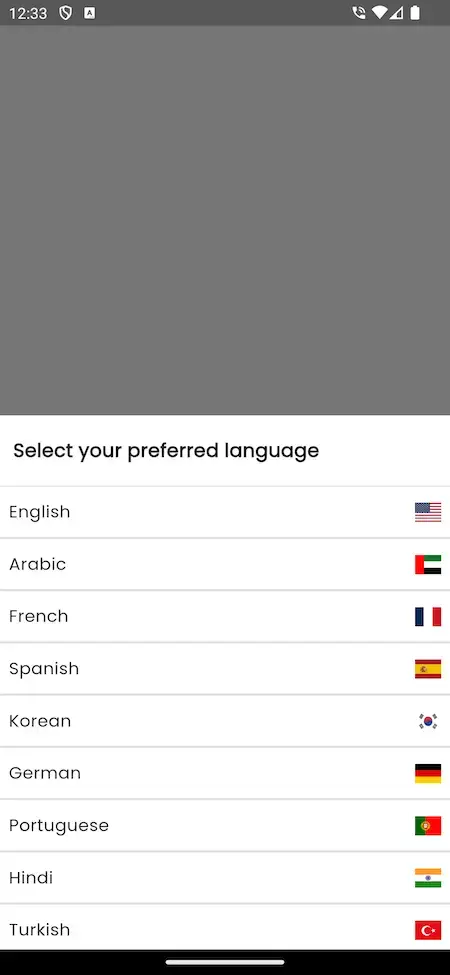
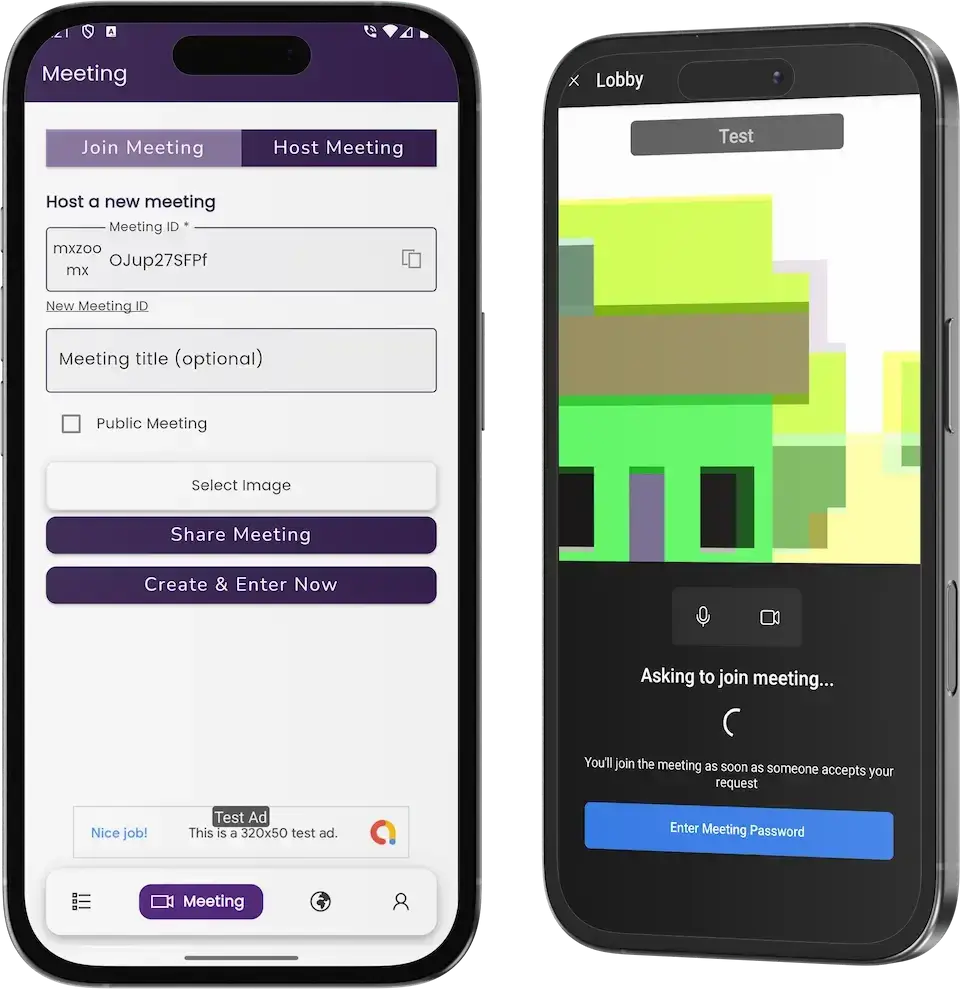


Follow a user from sign-in and a language choice through the lounge and the lobby to a meeting in History that can be rejoined, with the host form and the admin dashboard alongside.
02Proof
Client Voices
Zoom Clone Client Reviews - Founders in Their Own Words
What clients say about building on Miracuves bases. The first quote comes from a video conferencing client; the others come from other industries and are shown exactly as their authors gave them.
“We wanted our own conferencing product rather than reselling somebody else. Rooms, signalling and recording are the hard parts and they already existed. We added our branding, our access model and the integrations our users needed. Running inside a month, and we have never had to staff a real-time team to keep it up.”
“Every HMS I tried was built for general physicians, with no lesion mapping, no before/after tracking, and no procedure-based billing. Their MXHealth base gave us the patient app, doctor app, EMR and video consult out of the box. Front-desk time on scheduling and follow-ups is down ~70%, and we went fully digital in 9 months, where a fully custom job would have been 18.”
“Turo is the obvious reference, but the Caribbean specifics, from different insurance norms to different payment rails, meant we needed a real partner, not just a clone. Miracuves’s MXCar base covered the listing, the trip flow, and the host payouts. We launched in 6 working days and are live in three islands.”
“The team was running it on a dispatcher and a Google Sheet, and we needed a real platform quickly, because we were about to onboard a major retail client. Miracuves’s Delivery Genie base gave us the rider app, the dispatch console, and live tracking. We launched in 6 weeks and cleared 4x the previous order volume in the first month.”
“We were running it on phone calls and a paper calendar, and we were losing bookings to bigger OTAs. Miracuves’s GetmyBoat Clone base gave us the calendar, the booking flow, and the payment engine. Online bookings are up roughly 70% in the first six months, and the ops team finally has a live view of the fleet.”
“Building a compliant telehealth stack from scratch in three markets would have been a year-plus effort. Miracuves’s MXHealth base covered the patient and doctor apps, video consult, e-prescription and the pharmacy integrations. We launched in our first market in 9 weeks and rolled out to two more in the following six months.”
“We were juggling spreadsheets, a third-party GPS provider, and a phone. We needed a single operations console. Miracuves’s MXLogistics base covered the trip lifecycle, the driver app, and the customer tracking page. We’ve cut operations admin time by about 40%.”
Proof in Production
Zoom Clone Case Study - Nelmeet Video Conferencing Platform
The story of a video conferencing business that launched on the Miracuves Zoom Clone base. It is taken from the published case study, which covers what was delivered in 2023.
Nelmeet wanted a conferencing product of its own. Miracuves started from the Zoom Clone base, spent the effort on the four decisions that were the client's own, and transferred the source code at handover.

- Live audio and video degrade in plain sight, so the media path had to be dependable first
- Uninvited joins are a security event, so waiting rooms, passcodes and host controls had to be in place
- Recordings carry a data duty: where they sit and how long they stay is a policy choice
- Run a conferencing product of their own instead of reselling someone else's
- Put the effort into the four parts that belonged to the client
- Hold the source code, schema and deployment configuration outright
- Participant, host and admin applications, each with its own permissions
- Meeting policy, retention and capacity tiers configured for the client
- Brand and theming applied across every surface
- Source, schema, deployment configuration and architecture notes handed over
- Build window of 6 working days on the ready-made base
“We wanted our own conferencing product rather than reselling somebody else. Rooms, signalling and recording are the hard parts and they already existed. We added our branding, our access model and the integrations our users needed. Running inside a month, and we have never had to staff a real-time team to keep it up.”Gregnor Ratinik · Founder
03The product
The Basics
What a Zoom Clone App Gives a Video Meeting Business
Miracuves' Zoom clone gives you a ready-made platform for hosting live video meetings under your own brand, running on Android, iOS and the web. People sign in, host a room or join one by link or ID, and you run the business behind it from an admin panel that tracks users, meetings and plans.

More Than a Video Window
The value sits around the call: a lobby, a meeting history, a lounge of public rooms, push alerts, plans and an admin panel that shows usage.
Not a Locked Box
You hold the complete source code with no encryption, so your team can change screens and rules as the business grows, with no per-seat fee to us.
Plain About What Is Extra
VR spaces, crypto payments, a smart assistant and language learning modules are add-ons, priced on their own and never counted as part of the base.
Android, iOS & Web
What Is a Zoom Clone Script?
The hard part of a meeting product is everything around the video: who may enter, how people return to a call, which language the app speaks and how the operator sees usage. Those parts ship working, on top of an established meeting SDK.

- 01Hosting with a generated ID, an optional title and a public or private choice
- 02Joining by invite link or meeting ID, with a lobby and a password prompt
- 03History, lounge and rejoin for every meeting
- 04Push alerts, a language choice and right-to-left layouts
- 05Admin panel for users, meetings, notifications, plans and settings
You receive the mobile apps, the web pages and an admin panel with ten menu entries, plus the complete source code and a documented hand-over.
Everything Included
Zoom Clone Features - Hosting, Joining, Lobby, History, Languages & Admin Dashboard
Hosting, joining, the lobby, meeting history and language switching below can each be seen working in the Zoom clone's app screens, its admin dashboard or the release log. If something needs an extra module, it is labeled as an add-on later on this page.
Host a Meeting on One Screen
The Host Meeting tab creates a meeting ID, takes an optional title and a public or private choice, and lets the host share the room or enter it right away.
- Generated meeting ID with a copy control
- New Meeting ID button for a fresh room
- Optional meeting title
- Public Meeting checkbox for open rooms
- Select Image to give a meeting its own picture
- Share Meeting and Create & Enter Now buttons
Join by Link, ID or Schedule
Guests enter through an invite link, a typed meeting ID or a scheduled meeting in their account, using the Join Meeting tab that sits beside the host form.
- Join Meeting tab next to Host Meeting
- Invite link that opens the meeting
- Meeting ID typed in by hand
- Scheduled meetings picked from the account
- Meeting password prompt before entry
Lobby & Host Controls
Guests arrive in a lobby that says the host has been asked, and the host manages what participants are allowed to do once they are inside.
- Lobby with an Asking to join meeting message
- Guest enters when someone accepts the request
- Enter Meeting Password button
- Hosts manage participant permissions
- Private and Public labels on every meeting
Scheduling & Reminders
Meetings can be scheduled ahead and reminders set, from the web side or from the phone, with push alerts for what is coming up.
- Schedule meetings ahead of time
- Set reminders for upcoming calls
- Schedule from the mobile app
- Push alerts for meetings, messages and updates
- Notifications menu in the admin panel and the profile
Chat & File Sharing
Participants trade text messages during a meeting and share documents, images and media with each other without leaving the call.
- Text chat inside the meeting
- Documents shared with participants
- Images and media shared in the same flow
- Chat and document sharing on the phone
Screen Sharing & Recording
A participant can share a screen to present, and meetings, presentations and discussions can be recorded to keep what was said. Where recordings are stored and for how long is the operator's decision, since consent rules differ by country.
- Screen sharing during a call
- Presentations shown to the whole room
- Recording of meetings and discussions
- Playback of what was captured
History & Rejoin
The History tab lists every meeting with its title, ID, date and time and a Private or Public label, and a Rejoin button puts the user straight back in.
- History tab with title, meeting ID and time
- Private or Public label on every row
- Rejoin button on each meeting
- Untitled meetings show their ID
- History menu in the admin panel
The Lounge for Public Meetings
The Lounge tab lists the meetings that were opened as public, each with a Rejoin button, so open rooms get a front door of their own.
- Lounge tab in the bottom navigation
- Public meetings listed with title and ID
- Date and time on every entry
- Rejoin button on each public meeting
- Lounge menu in the admin panel
Languages & Right-to-Left
A language screen lets each user pick a preferred language, and release 1.0.8 added right-to-left layout support along with English, Arabic and Bangla.
- Select your preferred language screen
- List that opens with English, Arabic, French and Spanish
- Right-to-left layout support
- English, Arabic and Bangla added in release 1.0.8
- Language entry in the profile menu
Accounts & Sign-In
Users sign in with email and password, reset a forgotten password and create an account in the app, with Google and Facebook sign-in tracked in the release log. Live audio and video run on the Jitsi Meet SDK inside the Flutter app, which carries its own open-source license, while everything built on top of it is handed to you in full.
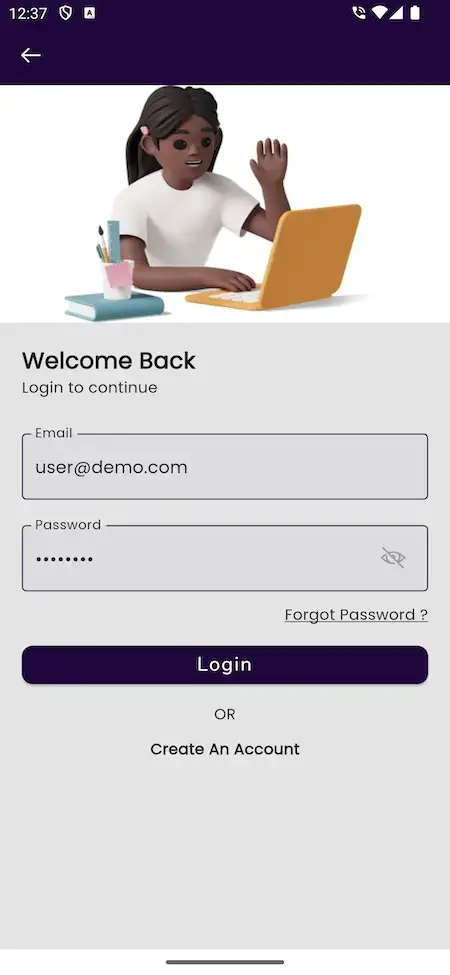
- Welcome Back screen with email and password
- Forgot Password and Create An Account links
- Google login updated in release 1.2.1
- Facebook sign-in fix in release 1.0.8
- Profile with edit profile, logout and delete account
Admin Dashboard & Users
The admin home shows host meetings today, public meetings today, total meetings and total users, with weekly charts and yearly pies, and its sidebar manages users and meetings.
- Host meeting and public meeting tiles for today
- Total meetings and total users tiles
- Hosted meetings and users charts for the week
- Total meetings and total users pies for the year
- Users, Meetings, History and Lounge menus
Plans, Ads & Branding
The admin panel carries an Upgrade entry for plans, the app shows a banner ad slot on its screens, and custom branding turns the whole product into yours.
- Upgrade entry for plans in the admin panel
- Subscription management and payment processing for plans
- Banner ad slot at the bottom of the app screens
- Custom branding across the platform
- Settings, Privacy Settings and Backup menus
Worth knowing before you buy: The platform comes fully built and rebranded to your identity. You provide hosting and a domain, a verified developer account for the stores, your branding and business details, a payment gateway that is onboarded with KYC done, and any third-party keys. Apple and Google run store review themselves, and it falls outside our 6-day build time.
How Operators Earn
Zoom Clone Revenue Models - Plans, Annual Billing, Free Tier, Organization Licenses & Ads
A video conferencing app like Zoom earns from plans, annual billing, a free-tier ad slot and organization licenses, and the Zoom clone admin panel holds each line apart, so a new plan price leaves the banner slot and license terms untouched.
Two lines usually carry the most weight: the paid plans and what you hold back for them in the free tier.
- 01
Paid Subscription Plans
The admin panel lists subscription management with payment processing and upgrade options, so paid tiers for hosts or organizations are settings rather than custom code.
- 02
Annual Billing
A yearly price beside the monthly one is a pricing choice you make in your plan setup, and it brings cash forward. Confirm the billing cycles you need on the guided call.
- 03
Free Tier That Upgrades
Public rooms in the Lounge and a free plan bring people in, while premium features and larger participant limits sit behind the paid plans.
- 04
Organization Licenses
A company, school or community pays for a block of seats on terms of its own, with user management and meeting history in the admin panel behind it. The agreement, invoicing and renewal terms for those seats are yours to set, or can be scoped as custom work.
- 05
Banner Ads in the App
The app already has a banner ad slot at the bottom of its screens, shown as a test ad in the demo, so a free tier can earn before anyone pays.
- 06
Plan Limits That Protect Margin
Meeting length and participant counts drive bandwidth cost. Tying them to plans keeps the cost of a free user predictable and gives the Upgrade entry something to sell. Each plan can carry its own ceiling on minutes per meeting and on people per room, so a free room has a predictable cost.
| Revenue stream | How it is charged | Take rateTypical take rate | What sets the ceiling |
|---|---|---|---|
| Paid Subscription Plans | A recurring fee per host or per organization, set in the plan settings of the admin panel. | Zoom lists Pro at $16.99 and Business at $21.99 per user per month, billed monthly. | Store billing: Apple keeps 30% in a subscriber's first year and 15% after; Google Play 10% plus 5% billing in the US, UK and EEA. Stripe web checkout is 2.9% + 30c per US card. |
| Annual Billing | A lower monthly price when twelve months are paid in one go. | Zoom Pro is $14.16 yearly against $16.99 monthly, about 17% lower (our arithmetic). | Yearly plans lock revenue in but rest on renewals. Zoom reports average monthly churn of 2.8% for its self-serve Online customers in fiscal 2026. |
| Free Tier That Upgrades | No fee. A free plan with caps on meeting length or size that paid plans lift. | Zoom Basic allows 100 participants and 40 minutes per meeting. | The cap must be tight enough to prompt an upgrade and loose enough to be useful. Every free minute also costs you bandwidth. |
| Organization Licenses | A negotiated agreement for a company, school or group, sold on its own terms. | Zoom reports 60.3% of fiscal 2026 revenue from Enterprise customers and 39.7% from Online. | Contract size and renewal. Zoom reports Enterprise net dollar expansion of 98%, so even the larger segment has to earn its renewals. |
| Plan Limits and Media Cost | Not a revenue line: the cost of carrying video, billed per participant minute by hosted providers. | Twilio lists $0.004 per participant minute. Agora starts at $0.59 per 1,000 minutes. | Participants multiply the bill: ten people for one hour is 600 participant minutes, about $2.40 at the Twilio rate (our arithmetic). Plan limits keep that cost predictable. |
How to read this. The plan prices, the yearly rates and the free-tier limits are from the Zoom pricing page; the revenue split and churn come from its fiscal 2026 Form 10-K. The per-minute costs are the published rates of Twilio Video and Agora, shown as a comparison for hosted video, because this platform runs its own meeting SDK on your hosting. Store fees come from Apple and Google Play, and card fees from Stripe. The yearly saving is our arithmetic on published prices. Treat all of it as modeling input, not a quote and not a promise of what your meetings will earn.
Zoom Clone Revenue Model, Stage by Stage
Paid plans, annual billing, the free-tier banner slot and organization licenses are built into the Zoom clone admin panel, so a meeting brand adds each as its rooms fill.
Launch
Open with a free tier capped on meeting length and room size, the banner ad slot earning on free screens, and one paid plan behind the Upgrade entry.
Traction
Once hosts return every week, add a yearly price beside the monthly one to bring cash forward, and tie larger participant limits to the higher tiers so upgrades have something to sell.
Scale
With a steady base, sell organization licenses to companies, schools and communities as seat blocks on your terms, tracking each group from the admin users and meetings entries.
Plan revenue lands in your own gateway, and Miracuves takes no per-seat fee and no share of it.
Operate It Day to Day
Admin Panel Behind a Video Conferencing App Like Zoom - Users, Meetings, Plans & Settings
Miracuves built a single Zoom clone console to cover the operator's day: who has signed up, which meetings ran, what is listed in the lounge, which plans are active and what the product looks like.


Admin Panel Sections
- 01
Dashboard & Charts
Tiles for host meetings today, public meetings today, total meetings and total users, a weekly chart for each of meetings and users, and yearly pies for both.
- 02
Users
Manage user accounts, their permissions and access levels from one list.
- 03
Meetings, History & Lounge
Three menus for the meeting records: every meeting, the history of past ones and the public rooms listed in the lounge.
- 04
Notifications
A notifications menu for the alerts that go out to users about meetings, messages and updates.
- 05
Plans & Upgrade
Subscription management with payment processing and upgrade options, so paid tiers are administered rather than coded.
- 06
Branding & Settings
Custom branding for the platform and a settings menu for how the product behaves.
- 07
Privacy Settings
A privacy settings menu beside the wider security settings, for the choices your own policies depend on.
- 08
Backup
A backup menu in the sidebar, so a copy of the platform data is something an operator can reach. Organization seat blocks are run from here too, with user accounts, permissions, access levels and meeting history for each customer.
Usage Insight
What the dashboard and reports tell the operator about the platform.
- User activity and meeting counts at a glance
- Meeting durations and attendance patterns
- Weekly and yearly charts
- Reports and insights as listed for the admin panel
Support Desk
Where the operator handles the people side of running meetings.
- User reports and complaints handled from the dashboard
- Disputes managed by the operator
- Support and troubleshooting for users
- Updates and new features rolled out through the panel
Need the console to do more? Extra reports, more roles, another language or a custom approval step are scoped on their own. Tell us what your operations team needs and we will quote it in writing.
04Package and price
The Full Package
Handed Over With Your White-Label Zoom App: Repository, Mobile Builds & Deployment
What arrives from Miracuves is a working Zoom clone app, not a kit of parts: Flutter builds for Android and iOS, the PHP web pages and console, the repository and the MySQL schema. You own all of it, with no per-seat charge and no license required to keep it running.
$ git clone your-meetings Full Source Code
The complete source for the web layer and the mobile apps, with no encryption, so your team can change it to suit your business.
- Web and admin source, unencrypted
- Flutter source for the Android and iOS apps
- Yours to modify, extend and redeploy
- Delivered into your own repository
Database & Documentation
The data structure behind users, meetings, plans and settings, with documentation that has been kept up to date through the release log.
- The database schema ships alongside the source
- MySQL data tier
- Users, meetings, plans and settings
- Documentation updated release by release
Alerts & In-Meeting Chat
Push alerts for upcoming meetings and updates, plus the text chat and file sharing that run inside a video call.
- Push alerts for meetings and messages
- Text chat in the meeting
- Documents, images and media shared in a call
- A notifications menu inside the admin panel

Web Pages & Login
The responsive web side with a landing page that shows off the app and a login screen for the same account.
- Landing page with app showcase
- Login with email and password
- Create an account link
- Responsive layout for desktop and phone
Android & iOS Apps
Flutter apps with four tabs, covering hosting and joining, history, the lounge and the profile, with a language screen on the way in.
- Meeting tab with Host and Join
- History, Lounge and Profile tabs
- Language choice and right-to-left layouts
- Published from your own developer accounts


Admin Panel
The operator console with dashboard tiles and charts and ten menu entries: dashboard, users, history, lounge, meetings, notifications, backup, settings, privacy settings and upgrade.
- Dashboard with weekly and yearly charts
- Users, meetings, history and lounge
- Notifications, backup and settings
- Privacy settings and the upgrade entry
Access & Security Layer
Separate logins and permissions for user and admin, with a lobby and a password prompt in front of every meeting.
- Separate roles with their own permissions
- Lobby that waits for the host
- Meeting password prompt
- Credentials kept out of the repository
Handover & Support
Branding and deployment done for you, a handover pack, and the three support periods that run side by side from launch.
- Rebranding with your logo, icons and colors
- Deployment to your hosting
- Deployment configuration and architecture notes
- 60 days guidance, 6 months bug fixes, 12 months updates
Want to see it before deciding? Log in to the demo as a user, or ask for a guided tour. We can host a meeting, join it from a second device and open the admin dashboard, each shown against your own plan. Before kickoff, have a domain and hosting in your name, Apple and Google developer accounts, brand files, a KYC-approved payment gateway and the keys for any push, social login, ads, maps or SMS service; each provider bills you directly.
Transparent Pricing
How Much Does It Cost to Build a Video Conferencing Platform Like Zoom?
The launch-ready white-label Zoom Clone is a fixed price of $2,799. Work beyond the base, such as add-ons, extra integrations or custom flows, is scoped and quoted separately in writing.
Professional
Ready-Made Launch PackageChosen by: Training providers, coaching businesses, community operators and regional meeting brands
The platform arrives as the demo shows it, rebranded to your logo, icons and colors, and deployed on your own hosting.
Get StartedEnterprise
Custom Builds for Larger ScopeChosen by: Large organizations, multi-region networks, businesses with strict access rules
Need flows the base does not have? We build to your requirements and agree the scope and price before work starts.
Request a QuoteZoom Clone Development Cost in 2026
For $2,799, paid once, Miracuves hands over a working Zoom clone with its lobby and Jitsi calls: Flutter apps for Android and iOS, the web login, a ten-entry admin console, a MySQL database you hold and code nobody encrypted, rebranded and installed on your servers in six working days, with no per-seat fee.
Billed by your providers, not by us
- Servers and bandwidth sized to your concurrent meetings
- A domain and hosting in your name
- Apple and Google developer accounts, plus store fees on in-app plans
- A KYC-approved payment gateway and its card fees
- Keys for push, social login, ads, maps or SMS, plus any add-on
Linking meetings to Google Calendar, Outlook or Slack is built after you approve a written quote, usually in 2-8 weeks; multi-region networks take the Enterprise route.
Compare Your Options
Ready-Made Zoom Clone vs Custom Development vs SaaS
Running your own video meetings brand means choosing between Miracuves' finished Zoom clone, a bespoke build and a rented conferencing plan, each with a different answer on seats, data and code.
| Criteria | MiracuvesReady-Made Zoom Clone | Custom Development | SaaS |
|---|---|---|---|
| Launch time | Live after 6 days of build time | Quoted in writing, typically 2-8 weeks | Sign up and start the same day |
| Upfront cost | $2,799 paid once | Quoted in writing for your scope | Low entry, then a recurring subscription |
| Source code ownership | Full source and schema, unencrypted | Yours if the contract assigns it | Stays with the SaaS vendor |
| Customization | Rework tabs, plans and branding | Unlimited, billed as extra build time | Settings, themes and plan limits only |
| Ongoing fees | No per-seat charge or revenue share | Maintenance billed by the agency | Monthly fees that rise with usage |
| Branding & app-store listing | Flutter apps and web under your name | Your brand, built from a blank screen | Vendor branding or a shared listing |
| Best for | Tutors, teams and regional meeting brands | Products no existing model can serve | Testing demand before you invest |
Same product, other editions: White Label Video Conferencing · Browse all Communication solutions
Where It Fits
Zoom Alternative Use Cases - Team Meetings, Live Classes, Coaching, Open Rooms & Regional Audiences
Which part of the Miracuves Zoom clone leads depends on who an operator serves. A tutor puts the lobby and recording first, a community host puts the lounge first, and a regional brand puts the language choice first. You set the emphasis in configuration.
Swipe · 6
Give a company or a group its own meeting app: members sign in, host a room with a generated ID, share the link and keep a history they can rejoin from.

Run lessons as meetings: a teacher hosts, students wait in the lobby, and the recording and shared files stay with the session.

Schedule sessions ahead, send reminders and keep each call private, with a password prompt in front of the room.

Mark a meeting public and it appears in the lounge, so community hosts can invite people who do not have a link yet.

Open the app in the user's own language, with right-to-left layouts for Arabic, from the sign-in screen onward.

Sell access through plans: a free tier with a banner ad slot, and paid tiers managed from the Upgrade entry in the admin panel.

Zoom Clone Business Model: Three Ways to Run It
One install of the Zoom clone, with its lobby, meeting IDs and paid plans, can run three quite different businesses, each turning meeting rooms into recurring plan revenue.
Branded meeting service
Sell host plans to tutors, coaches and small teams under your own name, with a free tier and banner ads bringing people in and the Upgrade entry converting them.
Organization licensing
License seat blocks to companies, schools and communities on terms you write, then manage each customer's users, permissions and past meetings from the operator console.
Product add-in
A software company folds a meeting capability into its own product, building on the full source code so calls sit beside the features its customers already use.
Whichever shape you choose, the Flutter apps, the MySQL user and meeting records and the source all stay in your hands.
One product, six ways to use it. All six cases share the apps, the web pages and the admin panel. What differs is who you invite, which plans you sell and how it is branded, so there is a single codebase to look after.
Talk to Our TeamMarket Timing
Why Build a Video Meeting Platform in 2026?
Video meetings are part of how teams, classrooms and communities already work, and most of that traffic runs through a handful of hosted tools. A platform under your own brand gives you the audience relationship and the plan revenue those tools keep for themselves.
01Hosted Tools Charge by the Seat Forever
Renting meeting seats from a large vendor means paying it every month for every host. Running your own platform turns that line into hosting you control.
02Your Audience May Not Speak the Vendor's Defaults
A language screen, right-to-left layouts and Arabic and Bangla in the release log suit audiences that general tools treat as an afterthought.
03Rooms With Rules Are Easier on Your Own Platform
A lobby, a meeting password and a private or public choice are product decisions. Owning the code means you decide how strict each one is.
04A Free Tier Needs a Place to Earn
A banner ad slot on the free side and an Upgrade entry for paid plans let one app serve both people who pay and people who do not.
05Your Brand in the Call, Not Theirs
When guests join through your app under your name, the relationship, the history and the next booking stay with you.
06Buy Versus Build Is Quick to Settle
Hosting, joining, a lobby, history and an admin panel are most of a meeting product. After 6 days of our build time, a white-label copy runs on your own hosting.
Platform by the Numbers
Admin Menu Entries
Surfaces, One Codebase
App Tabs
Days of Build Time
Most of the work in a meeting product is the unglamorous middle: getting people in safely, bringing them back, speaking their language and showing the operator what happened. Here it is already built.
Industries
Industries We Serve
The Zoom Clone suits any business whose work happens in a video room. Remote teams hold standing meetings. Tutors and training providers teach live classes. Language schools serve audiences who read right to left. Coaches and consultants meet clients by appointment. Communities open public rooms in the lounge. Recruiters interview candidates. Agencies host client reviews. Software companies add a meeting capability to their own product.
one codebaseMXZoom
- 01RtRemote Teams
- 02OtOnline Tutoring
- 03TpTraining Providers
- 04LsLanguage Schools
- 05CoCoaching
- 06CfConsulting Firms
- 07OcOpen Communities
- 08ReRecruitment
- 09AgAgencies
- 10ScSoftware Companies
- 11SdSupport Desks
- 12RnRegional Networks
Miracuves’ Zoom Clone is a meeting platform you can adapt to any room-based business model, with the lobby, history and admin panel carrying your name from the first screen.
06Under the hood
End to End
How the Zoom Clone Works - Sign In, Pick a Language, Find a Room, Wait in the Lobby, Meet & Rejoin
To a guest, a meeting on the Miracuves Zoom clone is a link and a few taps. Underneath it is a chain of sign-in, entry, live media and a record kept afterward. Below is that chain from sign-in to a rejoined meeting, followed by the architecture that carries it.
User Journey - From Sign-In to a Rejoined Meeting
Swipe · 6
1Sign Up or Log In to the Meeting AppThe Welcome Back screen lets a user log in with email and password, register a new account or reset a forgotten password.
- Email and password fields
- Forgot Password link
- Create An Account link
- 2Set the App Language
Next, a language screen sets how the app speaks, starting with English, Arabic, French and Spanish and continuing down a longer list.
- Select your preferred language
- Right-to-left support for Arabic
- Language entry stays in the profile menu
- 3Host a Meeting or Join by ID
The bottom tabs lead to the Lounge, where public meetings are listed, and to the Meeting tab, where a user hosts a room or enters one with its ID.
- Lounge tab for public meetings
- Meeting tab with Host and Join
- Invite link or meeting ID
- 4Wait for the Host to Admit You
Guests not yet admitted wait in a lobby that says the host has been notified, and a button lets them type the meeting password when one is set.
- Asking to join meeting message
- Entry once the host accepts
- Enter Meeting Password button
- 5Talk, Share Screens and Rejoin Later
During the call everyone can speak, message, swap files and present a screen, and later the meeting shows up in History, labeled, with a Rejoin button.
- Video, audio, chat and file sharing
- Screen sharing and recording
- History entry with Rejoin
- 6Manage Profile and Notifications
Profile is where users edit their details, check notifications, switch language, read the privacy policy, log out or delete the account.
- Edit Profile and Logout
- Delete Account in red
- Notifications and Privacy Policy
How It's Built
How a Zoom-Style Platform Is Built & Its Meeting Flow
- 01Part 01
Three Surfaces, Separate Permissions
The user apps, the web pages and the admin panel are separate parts of the platform, so a user never reaches the operator console.
- 02Part 02
A Meeting SDK Carries the Call
Live audio and video run on a meeting SDK inside the Flutter app, which is why the release log tracks SDK and Flutter versions closely.
- 03Part 03
Lobby Before the Room
Entry is gated by a lobby that waits for the host and an optional meeting password, so being invited and being admitted are separate steps.
- 04Part 04
Meeting Records
Each meeting is stored with its ID, title, date and a Private or Public flag, which is what History, the Lounge and the admin dashboard read from.
- 05Part 05
Push Alerts
Reminders and updates reach users as push notifications, sent through the notification service wired into the app.
- 06Part 06
Plans & Ads
Plans are managed from the admin panel, and the free side of the app carries a banner ad slot, so both income lines sit on the same platform.
Under the Hood
Video Conferencing Software Tech Stack - Flutter, Meeting SDK, PHP & MySQL
Each layer of the Zoom clone answers one need: PHP and Bootstrap give a dependable web tier, MySQL keeps users and meetings consistent, Flutter makes the Android and iOS apps feel native and the Jitsi Meet SDK runs the call itself. Here is what the platform is built with, stated as listed on the product pages and in its release log.
Web Layer
- Landing page and login for users
- Admin panel with dashboard, users and meetings
- Bootstrap-based responsive layout
- PHP 8.x supported since release 1.2.0
Data Tier
- MySQL for users, meetings and plans
- MySQL listed as the database
- Backup menu in the admin panel
- Documentation updated with each release
Android & iOS Apps
- Flutter apps with current dependencies
- Flutter 3.10.6 compatibility in release 1.2.1
- Android 33 support added in release 1.2.0
- Null-safe code since release 1.0.8
Meeting Layer
- Live audio and video from the meeting SDK
- SDK issues fixed in release 1.2.0
- Flutter, Xcode and Pod versions documented per the SDK
- Lobby and password prompt in front of each room
Alerts, Sign-In & Ads
- Push notifications with OneSignal
- Google and Facebook sign-in
- Banner ads through AdMob
- Google Maps, Twilio and Firebase listed as integrations
Source & Documentation
- Application source with full history
- Mobile projects with signing documented
- Deployment configuration written down
- Architecture notes transferred
The web and admin side is listed as PHP with Bootstrap, and the Nelmeet case study names PHP Laravel and MySQL. The apps are Flutter, and the live meeting layer is the Jitsi Meet SDK, which keeps its own open-source licence. Third-party services such as push, sign-in, maps and SMS need your own accounts and keys at deployment. Every part is mainstream and easy to hire for.
Build to Scale
Built to Grow - Separate Surfaces, Plan Limits & Capacity You Size
Miracuves builds the Zoom clone script as separate surfaces around one meeting layer, so growing from a handful of rooms to a busy network takes hosting, plan limits and configuration rather than a rewrite.
Capacity Follows Your Hosting. Concurrent meetings scale with the servers and bandwidth you provision, and we size them together with a load test built into your go-live schedule.
Plan Limits Keep Cost Predictable. Meeting length and participant counts can be tied to plans, which stops one free room from costing more than the plan earns.
Surfaces That Change Separately. The apps, the web pages and the admin panel are separate parts, so a change to one does not have to ship with the others.
Records You Can Restore. A backup menu sits in the admin panel and a restore is tried before launch, so the meeting records are not a single point of failure.
Separate Surfaces
Apps, web pages and admin panel are separate parts of the platform, each with its own permissions and its own release path.
Capacity You Size
Participants per room and simultaneous meetings track the hosting you choose, and a load test goes into the go-live schedule we build together.
- Hosting on your own account
- Capacity sized to your audience
- Load test in the launch plan
- Scale by changing hosting
Limits Per Plan
Meeting length and participant counts can be tied to plans, so the cost of a free user stays predictable.
- Free and paid tiers
- Upgrade entry in the admin panel
- Limits set in plans
- Predictable bandwidth use
Local Cache in the App
The app keeps a local database on the device for part of its own data.
Backups and Restore
The admin panel has a Backup menu, and a restore is tried before launch so a copy is known to work.
- Backup menu in the admin panel
- Restore test in the launch plan
- Your storage, your region
- Records kept apart from the apps
Documented Hand-Over
Source, schema, deployment configuration and architecture notes are handed over so another team can run the platform unaided.
Room to Change and Grow. Every meeting business ends up needing something particular to its audience. With the complete source code and a conventional stack, adding a screen, a rule or an integration is ordinary development work that your team or ours can carry out.
If you are launching a meeting platform: Begin with the rooms and members you can bring in and grow on the single deployment you already have. As usage rises, capacity is a hosting and configuration decision, and anything beyond the base is scoped and quoted on its own.
07Security and trust
Built to Be Checked
Keeping a Zoom-Like Meeting App Safe - Lobby, Role Separation & Honest Limits
A Zoom-like app puts strangers in the same room, so Miracuves concentrates its controls on who gets in, what each role can do and what is recorded. This section says what the platform does and what remains your work.
- 01 · RolesRole Separation
Each surface sees only what its role permits: users reach the apps and the web pages, and only an administrator reaches the operator console.
- Report Handling: User reports, complaints and disputes are handled from the admin dashboard, which is where a policy for misuse gets applied.
- 02 · LobbyLobby and Meeting Passwords
A guest waits in a lobby until the host accepts, and a meeting password can be required before anyone enters the room.
- Host Moderation: Hosts manage what participants may do and admit guests from the lobby, so the first line of moderation sits with the person running the room.
- 03 · PrivacyPrivacy Controls
The admin panel has Privacy Settings, users can delete their own account from the profile, and the privacy policy is linked from the app.
- Recording Policy: Recording exists, but where recordings are kept and for how long is your decision, and the rules on consent differ by country and state.
- 04 · SecretsSecrets Handling
Keys live in environment configuration on your own infrastructure, never inside the repository that is handed over.
- Named Launch Tasks: Penetration testing, key rotation, a restore drill and a load test are listed as pre-launch work and planned with you.
- 05 · TransportTransport and Storage
Web traffic runs over HTTPS and passwords are stored hashed rather than readable.
- Encryption Not Claimed: End-to-end encrypted meetings are an option for audiences that need them: tell us before launch and we scope and quote it on its own.
- 06 · AccountsAccounts and Backups
Sign-in is handled by the platform, and a Backup menu in the admin panel gives operators a copy of the data they can restore from.
- Sign-In Options: Email and password, Google and Facebook sign-in sit behind the app, with forgot-password and delete-account routes for users.
Separate user and admin roles, a lobby, an optional meeting password and hashed credentials come built in, and every action leaves a trail your reviewers can read. Pen testing, secret rotation, a dry-run restore and a load test are lined up as deployment tasks with your team.
Discuss Security Before LaunchPlatform Readiness
Operator Readiness for Video Meeting Software - Built In Versus Kept With You
A meeting platform hosts live conversations between people you may never meet. Miracuves builds the hosting, joining and admin tooling; the rules for what may be said, recorded and kept, and who may take part, stay with you as the operator.
On this page, ready describes software you can see working in the demo or the admin panel. It is not a statement that the platform or Miracuves has been licensed, certified or approved by anyone, and nothing here is legal advice.
Built Into the Software
Hosting and joining by ID or link, a lobby and a password prompt, public and private meetings, history, chat and file sharing, meeting recording, push alerts, language choice, separate user and admin logins, plans and an admin panel.
Left to the Operator
Your terms of service and privacy policy, your rules for conduct in a room, how misuse reports are decided, how long you keep recordings and what you tell users about them.
Recording & Data Protection
Rules on consent to record, on storing recordings and on handling personal data, such as GDPR in Europe, differ by country and sometimes by state. Check them for each market with a qualified adviser before you switch recording on.
Minors & Regulated Calls
Classes for children, health consultations and legal or financial conversations carry their own rules, so take local advice in each market before you open those uses to your users.
08Grow the platform
- Host, join & schedule flows
- Lobby, history & lounge
- Plans, ads & push alerts
- Admin dashboard & settings
Adding a module
- 1Choose a module
Pick one now or after launch, once the meetings are running.
- 2Written scope first
Every module gets its own scope and quote before any work begins.
- 3Added to your source
The completed module is added to the code you already own.
Go Further
Extra Modules for a Meeting App Like Zoom - VR Spaces, Crypto Payments, Smart Assistant & Language Learning
As the demo shows, the platform works from start to finish. Four modules can be added to the Miracuves Zoom clone, from immersive VR meeting rooms to cryptocurrency plan payments, each with its own written quote shaped by what you want it to do.
Drag to explore · hover to pause
- 01Meeting space
Virtual Reality Integration
Immersive meeting spaces where participants appear in a virtual room instead of a tile grid. It is custom work on top of the base, scoped on its own.
VR · Rooms - 02Payments
Crypto Payment Options
Cryptocurrency as an extra way to pay for plans, for operators whose audience prefers it. The payment provider and its onboarding stay with you.
Crypto · Payments
- 03Assistant
Smart Assistant Integration
A virtual assistant that helps with scheduling, starting a call and finding information during a conversation, written to your own requirements.
Smart · Assistant - 04Learning
Language Learning Modules
In-app courses and practice exercises next to the meeting rooms, for language schools and tutors who teach live and want lessons in the same app.
Language · Learning
The Communication Suite
Planning Around Meetings? These Neighbors Fit Next to It.
The Zoom Clone is one product in a wider communication family. If your plan reaches beyond scheduled video rooms, these four connect to it naturally.
01A white-label meeting platform that also runs live classes and podcasts, with a whiteboard, polls and paid membership plans.
Explore Solution
02A white-label messaging app with private and group chat, voice and video calls and stories, plus a console for the operator.
Explore Solution
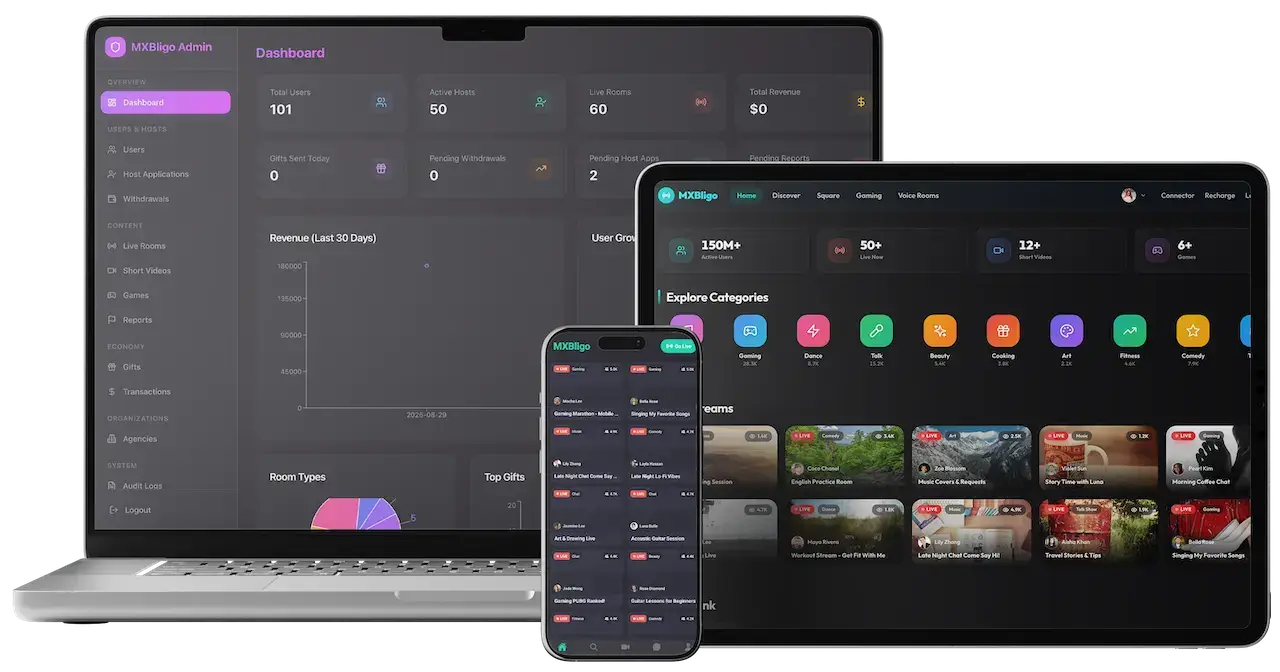
03A live-streaming platform with many room formats, a gift economy and an admin panel for the operator.
Explore Solution
04A course marketplace where instructors publish video courses, students buy and learn on web and mobile, and the operator keeps a share of each sale.
Explore Solution09The business case
Market Benchmarks
Video Conferencing Market Benchmarks - Independent 2025-2026 Data
The revenue models above are ours. The figures below are not. They are published numbers from Zoom's annual filing, Ofcom, Cisco's annual filing and Eurostat, reproduced as published. They show what the largest dedicated meetings vendor earns, how many people already make video calls, and how big collaboration is inside a networking incumbent, so you can check a business case against sources you can verify.
$4.87bn Zoom Revenue and 4,468 Large Accounts
Zoom's Form 10-K for the fiscal year ended 31 January 2026, filed 27 February 2026, reports revenue of US$4,868.8 million, up 4.4 percent, and 4,468 customers that each contributed more than US$100,000 of trailing 12 months revenue. Enterprise customers made up 60.3 percent of revenue and Online customers 39.7 percent, with Online monthly churn averaging 2.8 percent.
84% to 87% of UK Internet Users Make Video Calls
Ofcom's Adults' Media Use and Attitudes report, published 7 May 2025, says its Technology Tracker finds that among UK internet users 87 percent of women and 84 percent of men make or receive video calls over the internet. FaceTime use fell from 34 percent in 2022 to 27 percent in 2024, which Ofcom says may reflect a move to video calling in other apps.
$4.3bn Cisco Collaboration Revenue in Fiscal 2026
Cisco's fiscal 2026 Form 10-K, filed 2 September 2026, reports Collaboration product category revenue of US$4,300 million, up 4 percent from US$4,154 million, with growth across each of its offerings. The category covers the Webex Suite, collaboration devices, contact center and CPaaS, so it is a wider measure than meetings alone.
76% of EU Individuals Used Phone or Video Calls
Eurostat reports that telephone or video calls were used by 76 percent of individuals in the EU in 2025, alongside 67 percent who took part in social networks. The figure combines voice and video, so it is a ceiling for video calling rather than a measure of it. The page notes data extracted in December 2025.
Zoom Communications, Inc., Form 10-K for the fiscal year ended 31 January 2026, filed 27 February 2026 - sec.gov
Ofcom, Adults' Media Use and Attitudes Report 2025, 7 May 2025 - ofcom.org.uk
Cisco Systems, Inc., Form 10-K for the fiscal year ended 25 July 2026, filed 2 September 2026 - sec.gov
Eurostat, Digital economy and society statistics - households and individuals, Statistics Explained, data extracted December 2025 - ec.europa.eu
All figures are the publishers’ own filing figures and survey results, reproduced as published. They describe the market, not the performance of any platform Miracuves builds, and nothing here is a revenue projection for your business.
The Commercial Case
Marketability, Revenue Potential & Business Prospects
Revenue on the Miracuves Zoom clone follows two moments: a guest getting into a room by link or meeting ID without friction, and a host reaching a free-tier limit worth paying to lift. Everything that follows is about making those two things easier, and about owning the relationship once they happen.
- 01
Plans Without a Seat Fee to Us
Paid tiers are administered from the admin panel and you keep the plan revenue, with no per-seat charge from Miracuves on your own platform.
- 02
Several Lines, One Console
Plans, a free tier with banner ads and organization licences are separate levers, so you can switch one on without redesigning the rest.
- 03
Owned Members and Meeting History
User accounts, meeting records and the lounge sit in your database, so the value of the platform builds up with you. Renewals decide the outcome more than launch day does, so caps, tiers and yearly billing are tuned once hosts start returning.
- 04
Exit Optionality
You hold the complete source code and the schema, so a future change of host, team or direction needs no one's permission.
- Paid Subscription Plans
- Annual Billing
- Free Tier That Upgrades
- Organization Licences
- Banner Ads in the App
- Plan Limits That Protect Margin
Defensibility comes from the people and the habit rather than the features.
- 01Members with a history and a sign-in have a reason to return
- 02Organizations that run calls on your platform do not casually move
- 03That record starts at launch and stays in your database
- 04Clear moderation and a reliable lobby are the second moat
These three cases differ only in how many users are registered, and each names the lever that leads at that size. They are examples for planning conversations, not predictions of what any platform will earn.
A free tier with banner ads carries early revenue.
A small community where a few hosts run open rooms in the lounge and a handful of members take a paid plan. Illustrative size, not a forecast.
Paid plans lead, with ads on the free side.
A provider whose tutors host scheduled classes, so paid plans matter more than ads and history lists are used every week. Illustrative size, not a forecast.
Plans, ads and organization licences all active.
A regional brand serving several languages, where organizations buy seats beside individual plans and the admin charts guide where to focus. Illustrative size, not a forecast.
10Why Miracuves
Why Miracuves
Miracuves Compared With Other Zoom Clone Developers
Freelancers, agencies and generic meeting scripts all promise a video conferencing platform; the Miracuves Zoom clone is the base Nelmeet already launched on.
Why Founders Choose Miracuves
- 01
Host and Join Flows Included
The host form, the join tab, the lobby, history and the lounge are all in the base, so a user can do the whole round trip on day one.
- 02
Languages and Right-to-Left
A language screen and right-to-left layouts ship with the apps, which many generic meeting scripts leave for you to build.
- 03
Three Surfaces, One Codebase
Apps, web pages and admin panel arrive as parts of one platform that already talk to each other, instead of three projects to join.
- 04
Full Source Code Ownership
The whole codebase arrives unencrypted, with the schema and deployment notes, so nobody can reprice it or change the terms later.
- 05
A Proven Base
The same base carried Nelmeet in 2023, with 17 of 21 building blocks reused as they were, and the published case study shows the full ledger.
- 06
Plain Readiness Language
Base features, priced add-ons and the accounts you connect, such as hosting, a payment gateway and store developer accounts, are each named on this page, so scope is settled before work starts.
How to Choose a Zoom Clone Development Company
Test any Zoom clone vendor by hosting a demo meeting and admitting a guest from its lobby.
What to look for Miracuves
- A demo you can use App and web demo logins, plus a call from a second device
- A client live on the base Nelmeet went live on this base in 2023
- Source you fully own Unencrypted source, schema and deployment notes
- Entry controls that work Lobby, meeting passwords, separate admin logins
- Time to launch Six working days, free work if a delay is ours
- Support after launch 60 days guidance, 6 months bug fixes, 12 months updates
Walk away from any vendor who
- Cannot demo a lobby with host admission
- Will not name its audio and video engine
- Claims a security certification it cannot show
- Charges a per-seat fee on your plans
- Keeps the mobile source on its servers
How the Zoom Clone Stacks Up Against Scripts and Agencies, Row by Row
| Criteria | MiracuvesMiracuves Zoom Clone | Generic Meeting Script | Custom Dev Agency |
|---|---|---|---|
| Time to Launch | 6 days of our build time | Unknown or DIY | Scoped per project, usually months |
| Source-Code Ownership | Complete, unencrypted | Often limited or locked | Usually yes |
| Meeting Depth | Host, join, lobby, history, lounge, chat and recording | A basic video room | Whatever the budget allows |
| Languages | Language screen and right-to-left layouts | Often English only | Built to order |
| Plans and Ads | Upgrade entry and a banner ad slot | Varies by script | Custom integration |
| Admin and Reports | Dashboard, users, meetings and settings | Thin or absent | Built to order, extra cost |
| Security and Compliance | Role logins, lobby, honest limits | Minimal | Varies widely |
| Cost vs Speed vs Quality | Fixed price, fast, tested base | Low price, high risk | Expensive and slow |
| Ongoing Support and Updates | 60 days guidance, 6 months bug fixes, 12 months updates | Rarely offered | Set by the contract |
Few routes to a meeting platform survive a first real audience unchanged. This is where they part ways. Nelmeet, the published case study on this base, records four decisions built for that client: meeting policy, retention, capacity tiers, and brand and theming.
Talk to Our TeamChangelog
Release Log for the Zoom Clone Script - Versions & Updates
Newest entries come first in these release notes for the apps and the web layer. They carry no dates and leave out vendor and script names.
| Version | Changes | What changed |
|---|---|---|
| V1.2.1 | 2 updates | Added or updated Google login updated Compatible with Flutter 3.10.6 |
| V1.2.0 | 5 updates, 2 fixes | Added or updated Android 33 support added Flutter 3.7.0 supported Dependencies updated Unsupported dependencies removed PHP 8.x supported Fixed Meeting SDK issue fixed Some other bugs fixed |
| V1.1.0 | 1 update, 1 fix | Added or updated Required Flutter, Xcode and Pod versions set per the meeting SDK requirements (recommended Flutter SDK 2.2.3, Xcode 12.2, Pod 1.11.2) Fixed Build issue fixed |
| V1.0.9 | 1 fix | Fixed Sign-in and sign-up issue fixed |
| V1.0.8 | 5 updates, 4 fixes | Added or updated Latest SDK support (2.5.3) Migrated to null safety RTL support Multi-language support Languages added: English, Arabic, Bangla Fixed Ad issue solved Facebook auth issue solved Push notification issue solved Local database issue solved |
| V1.0.7 | 1 update, 1 fix | Added or updated Documentation updated Fixed Gradle build issue fixed for the latest Android Studio |
Let's build together
Let's take your video meeting idea and make it a working platform.
Book a free consultation and leave with a clear timeline and honest answers to your questions. We would rather earn your trust than close a fast sale.
- First reply under 2 hours
- Free consultation
- No lock-in contracts
- Full source code ownership
11Learn more
Blog & Resources
Latest Reading on Launching a Video Meeting Platform Like Zoom
Stay up to date with guides on how a Zoom-style platform is built, what the ready-made scripts include and how meeting businesses earn.


The product5 questions
01How does a Zoom Clone work, and what exactly is it?
A Zoom Clone is a ready-made, white-label video meeting platform. The Miracuves Zoom Clone gives a host a Meeting tab that creates a meeting ID, an optional title and a public or private choice, lets guests join by invite link or meeting ID, puts them in a lobby until the host accepts, and keeps every meeting in a history list. It comes as Flutter apps for Android and iOS, web pages and an admin panel.
02Is the Zoom Clone customizable?
Yes. Branding is part of delivery: the apps and web pages are rebranded with your logo, icons and colors, and an admin menu carries custom branding. You also receive the complete source code with no encryption, so your team can change screens, rules and flows. Larger changes beyond the base are scoped and quoted separately in writing.
03Do I need technical knowledge to launch my own video conferencing platform?
No. Miracuves handles the rebranding and the deployment to your hosting, and you supply hosting and a domain, a verified developer account for the stores, your branding and business details, an onboarded payment gateway with KYC done, and any third-party keys. A guided call walks you through the admin panel before launch.
04Is the platform built on open-source software?
The live meeting layer is built on an open-source meeting SDK, which is listed in the tech stack and stays under its own open-source licence, and the apps are written in Flutter. The code Miracuves wrote around it, in the apps, the web layer and the admin panel, is delivered to you as complete source code. Check the SDK licence terms with your own advisers if your plans depend on them.
05Is the Zoom Clone built for a business that wants to resell meetings or run its own?
Both are possible, because the platform is white-label. A training provider, a coaching business, a community or a software company can run it under its own name. For reselling seats to other companies, host plans and organization licenses live under subscription management in the Zoom clone admin panel, while the billing contract and commercial terms are yours to write.
Meetings & hosting6 questions
06How can I join a meeting?
A user can join through an invite link, by typing a meeting ID on the Join Meeting tab, or by signing in and choosing a scheduled meeting. A guest who is not yet admitted waits in a lobby that says the host has been asked, and a meeting password can be required before entry.
07Do I need to install an app, or can I use the web version?
Both exist. The Flutter apps run on Android and iOS, and there is a web side with a landing page and a login screen. The demo section lists the app portal and the web address, and you can try both with the demo login.
08What features are available in the user app?
The app has four tabs: History, Meeting, Lounge and Profile. Users host or join meetings, chat and share files during a call, share their screen, record meetings, rejoin earlier meetings, browse public meetings in the lounge, pick a language and manage their account. Push alerts remind them about what is coming up.
09Can I host unlimited meetings?
Meeting length and participant counts follow the plans you set and the hosting you provision, which is how you price video as minutes and attendance grow. We size capacity with you and run a load test as part of go-live planning.
10Does the platform support integrations with third-party apps?
The base is wired to the services listed in its stack: push notifications, Google and Facebook sign-in, banner ads, maps and SMS. Calendar, chat and workspace integrations such as Google Calendar, Outlook or Slack are built as custom work once you approve a written quote.
11Does it include AI noise cancellation, virtual backgrounds, breakout rooms or live transcription?
They are available as custom work on top of the base. If your audience needs one of them, tell us what it should do and we will scope and quote it separately.
Admin, money & plans9 questions
12How does the pricing work?
The Zoom Clone is a fixed one-time price of $2,799, with the complete source code, rebranding, deployment and publishing support included. Work beyond the base, such as add-ons, extra integrations or custom flows, is scoped and quoted separately in writing.
13Is the platform secure and scalable?
Roles are split between users and admins, each room sits behind a lobby and an optional meeting password, credentials are hashed and keys stay outside the repository. End-to-end encrypted rooms are an available add-on, and capacity grows with your hosting; key rotation, penetration testing and a rehearsed restore are built into the launch plan.
14What features are available in the admin panel?
The admin panel has a dashboard with tiles for host meetings today, public meetings today, total meetings and total users, weekly and yearly charts, and menus for users, history, lounge, meetings, notifications, backup, settings, privacy settings and upgrade. Custom branding and subscription management are listed for it as well.
15Can I control user access and permissions?
Yes. The admin panel manages user accounts, permissions and access levels, and hosts manage what participants may do inside a meeting. Separate logins keep users out of the operator console.
16How do I track platform usage and revenue?
The dashboard shows how many meetings were hosted and opened publicly today, total meetings and total users, with a weekly chart for each and yearly pies. Plans and payment processing are handled under subscription management, so revenue follows the plans you set up.
17Can I manage complaints and technical issues through the panel?
Yes. User reports, complaints and disputes are handled from the admin dashboard, and the same place is used to support users when something goes wrong in a meeting.
18How do I update or upgrade the platform?
Updates and new features can be rolled out through the admin panel, and the release log on this page shows what each version changed. Miracuves includes 12 months of product updates, and the source code is yours if your own team prefers to make the changes.
19How do I get to my first revenue?
Most meeting platforms start with a free tier and one paid plan, because a plan needs no extra product to sell: the first user who upgrades pays for it. Banner ads on the free side add a small line early on, and organization licences follow once a company, school or community wants seats of its own. Sponsored events or API access can be added later on your own commercial terms, with any build work scoped in writing.
20How defensible is a branded meeting platform?
Defensibility comes from the people and the habit rather than the features. Members who have their meeting history, their lounge rooms and their sign-in with you have a reason to return, and organizations that run their calls on your platform do not casually move. The platform helps by starting that record at launch and keeping it in your database. Clear moderation and a reliable lobby are the second moat, because a platform people trust is hard to copy.
Launch & Miracuves7 questions
21Roughly when can the solution go live after we begin?
Ready-made delivery takes 6 days of Miracuves build time, covering rebranding, deployment to your hosting and publishing from your developer accounts. Store review is handled by Apple and Google and sits outside those 6 days.
22Do I get the source code?
Yes. You receive the complete source code for the web layer and the Flutter apps with no encryption, along with the database schema, deployment configuration and architecture notes. It is yours to change and redeploy, with no per-seat fee.
23What do I need to supply before launch?
Plan to bring hosting and a domain, a verified developer account to publish the apps from, your branding and business details, a payment gateway already onboarded with KYC finished, plus any third-party API keys. As the meeting brand's operator, you apply for the payment gateway and draft your own privacy policy and terms.
24Why is Miracuves a fit for building a Zoom clone?
Because the host and join flows, the lobby, history and the admin panel arrive working, on a base that already carried the Nelmeet conferencing platform in 2023 with 17 of 21 building blocks reused. Miracuves has been building software since 2010, with 9,000+ projects delivered for 6,000+ clients and 90+ ready-made solutions. The Zoom Clone is a fixed $2,799, goes live in 6 working days, and comes with 60 days of guidance, 6 months of priority bug fixes and 12 months of product updates, with a first response in under 2 hours Monday to Saturday, 10:00-19:00 IST.
25Is a ready-made Zoom clone better than custom development?
For a branded meeting business it usually is. Hosting, joining by ID, the lobby with a password gate, History, the Lounge, recording, screen sharing and a ten-menu admin console already work, and the whole platform costs $2,799 paid once. A from-scratch build first has to keep live media in step across two app stores, and any custom work is quoted in writing. Launch on the base, then add what your hosts ask for.
26What is the step-by-step process to launch my Zoom clone?
Begin in the demo: host a meeting, join it from a second device and tour the admin dashboard on a guided call. Then hand over brand files, company details and the store developer accounts you hold. Miracuves rebrands the Flutter apps, web pages and console, deploys them on your hosting and helps with publishing, all inside 6 days of build time, after which both app stores run their own review before the apps go public.
27How is a Zoom clone different from paying for real Zoom?
With the Zoom Clone the platform is your own brand, not a rented plan. You pay a fixed one-time $2,799, receive the complete source code with no encryption, and charge your own users through plans you set, with no per-seat fee to Miracuves. Meeting history, accounts and the admin panel sit on your hosting, so you decide the rules, the pricing and the roadmap.
Go Deeper on Video Conferencing Software
Find the guides, the case study and the related pages, and how it all fits together.
SaaS development
See the service→Case studyNelmeet
A video conferencing platform delivered on this product in 6 working days, with the 21-block ledger and what the client supplied.
Read the case study→Business model
How a video meeting business is structured and where its revenue comes from.
Read the guide→Related platformSkype Clone
A white-label calling and messaging platform with voice and video calls, text chat, screen sharing and subscription tiers.
See the platform→Disclaimer
Miracuves is an independent software development company. We are not affiliated with, connected to, sponsored by, or endorsed by Zoom.
Read our full Legal Notice & Disclaimer →“Zoom Clone” is used descriptively. It is how the software industry refers to building a platform with functionality similar to Zoom, and how clients search for it.
The entire design and codebase is built by our own team. The product contains no code, design, graphics, or content originating from the Zoom website or applications.
Zoom and all other third-party names and marks are the property of their respective owners, referenced here solely to describe the category of software offered.