ActiveCampaign Clone App - White-Label Marketing Automation SaaS
Miracuves' ready-made, white-label ActiveCampaign clone becomes your own marketing automation SaaS: the complete source code is yours, along with the web panel, the operator side and Flutter customer apps for iOS and Android, rebranded and live within six working days.
Senders draft a campaign in three steps, then queue email and SMS on separate schedules or behind an autoresponder, and you run the plans, limits and gateways that bill them. The apps are published from your developer accounts, while store review by Apple and Google falls outside those days. Anything past the base, say an extra report or another gateway, is priced in writing first and usually ships in 2-8 weeks.
Launch in 6 Days with
- Complete Source
- Web Panel
- Flutter Apps
- Operator Panel
- Full Rebranding
- Store Publishing
StackFlutter · PHP · Bootstrap · SMTP · Twilio · MySQL
Campaign activity
- Autoresponder email queuedAutomation
- Campaign scheduled for 09:00Schedules
- Email opened by a contactReports
- Bounce flagged on a listBounces
- Link clicked in a campaignClicks
- SMS campaign sentSMS
- Plan payment receivedBilling
- Contact unsubscribedUnsubscribes
- Autoresponder email queuedAutomation
- Campaign scheduled for 09:00Schedules
- Email opened by a contactReports
- Bounce flagged on a listBounces
- Link clicked in a campaignClicks
- SMS campaign sentSMS
- Plan payment receivedBilling
- Contact unsubscribedUnsubscribes

- 7Campaign Report Linesrecipients, delivered, click, unique click, failed, open and bounce
- 3Login Rolesuser, agent and admin
- 0%Revenue Share With Miracuvesyou keep every plan fee, and no seat fee applies
- 2Extras, Quoted Aloneautomation workflows with branching and API connections
- 6Days to Launchand if the delay is ours, we keep going free
- $2,499Paid Once, Not Rentedsource code yours, no per-seat fee, no monthly rental
Live in six working days, or we keep working free until you launch. Every build carries 60 days guidance, 6 months bug fixes and 12 months updates.Verify every figure
Lists Move In and Out in Bulk
Contacts are kept by email address and by phone number, gathered into groups and moved in bulk through an export and import view; a group becomes the audience.
Inbox Placement Is Not Promised
Bounces get their own check and unsubscribes are handled in campaigns, but SPF, DKIM and DMARC records, consent and CAN-SPAM duties stay with you as operator.
Paid Through Your Gateways
Plans are bought through PayPal, Stripe or Paystack accounts you open and verify; payment is taken at the gateway, and a Purchase History keeps the record.
01See it live
Live in Action
Demo of a Marketing Automation App Like ActiveCampaign: User App, Agent Web Panel, User & Admin Panels
Miracuves lets you try its ActiveCampaign clone app hands-on before you commit to anything. One login opens the agent web panel on the live demo, a second covers the user app, and the user and admin panels are opened for you on a guided call. Read the dashboard, work through the campaign form and follow the sidebar into Campaigns.
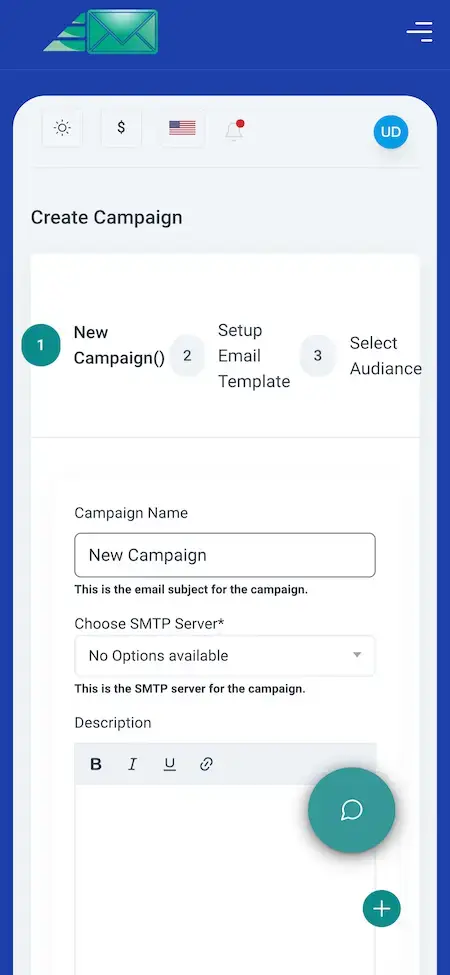
ActiveCampaign Clone - User App
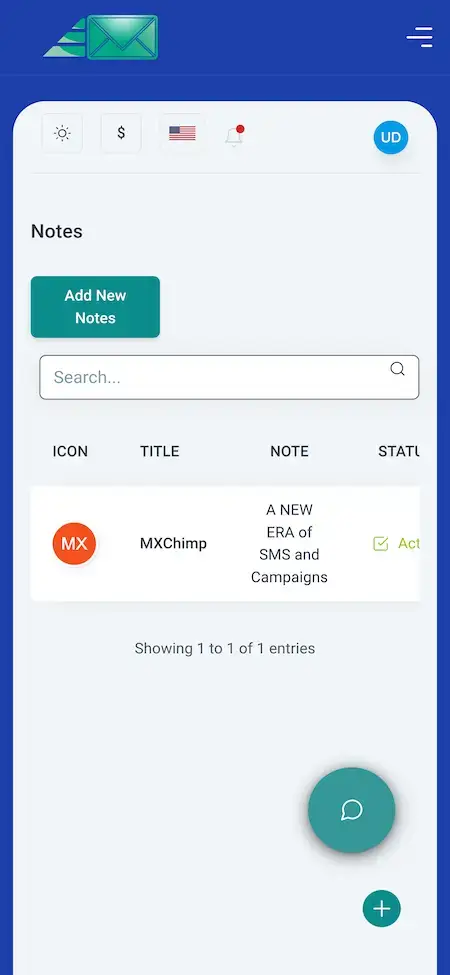
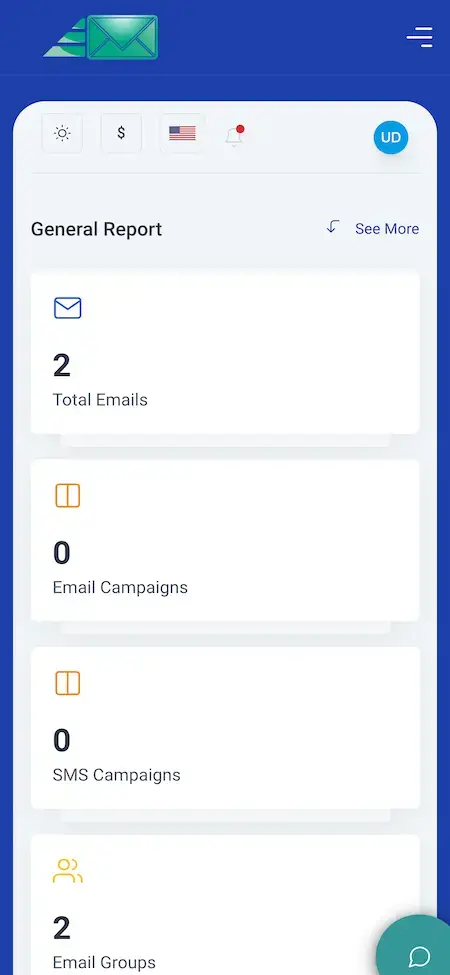
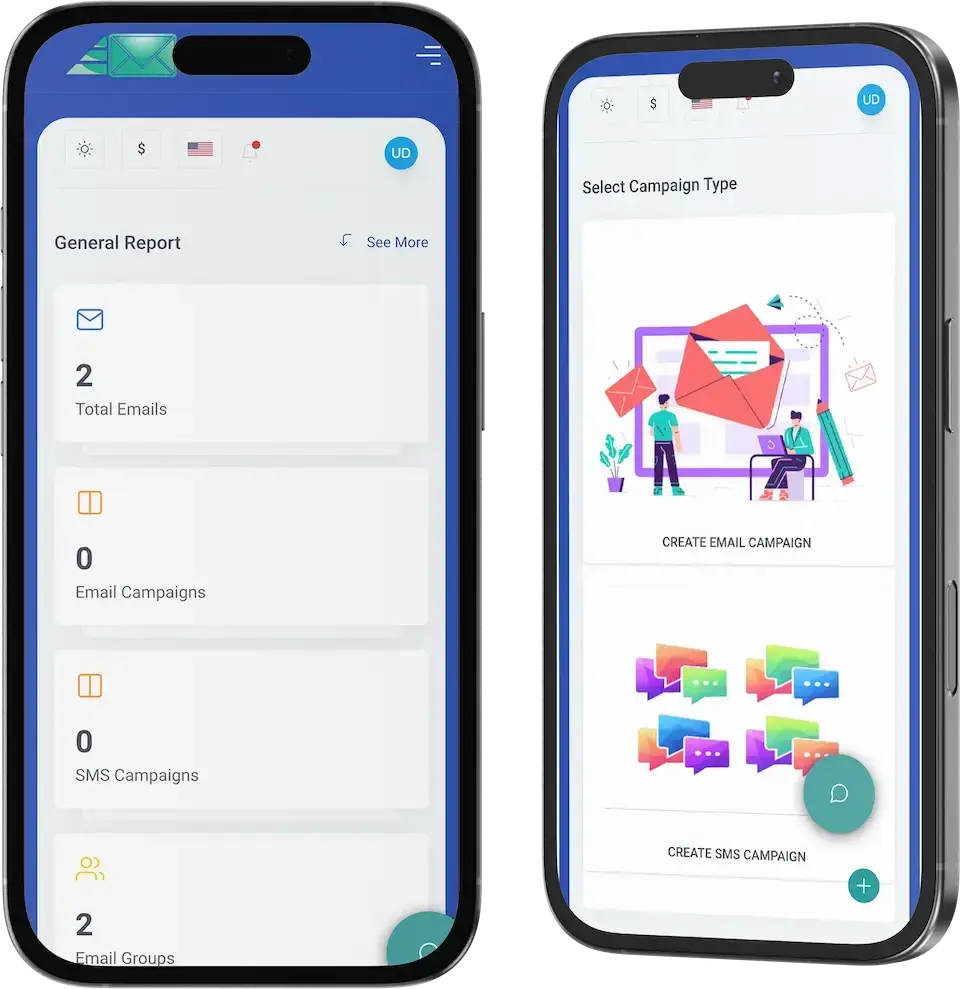
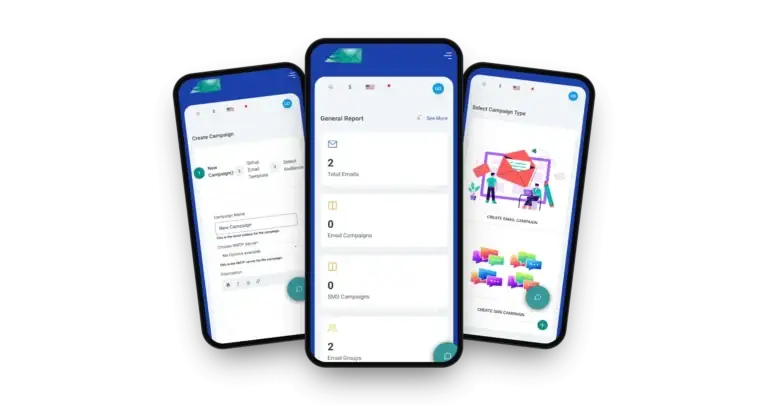
The customer side on a phone: a General Report with email, campaign and group counts, a Select Campaign Type screen for email or SMS, a three-step Create Campaign form and a Notes screen.
- 1Ask us for the app portal link
- 2Sign in with the demo login below
- 3Explore: General Report, Campaign Type, Create Campaign, Notes
user@demo.com | User_321
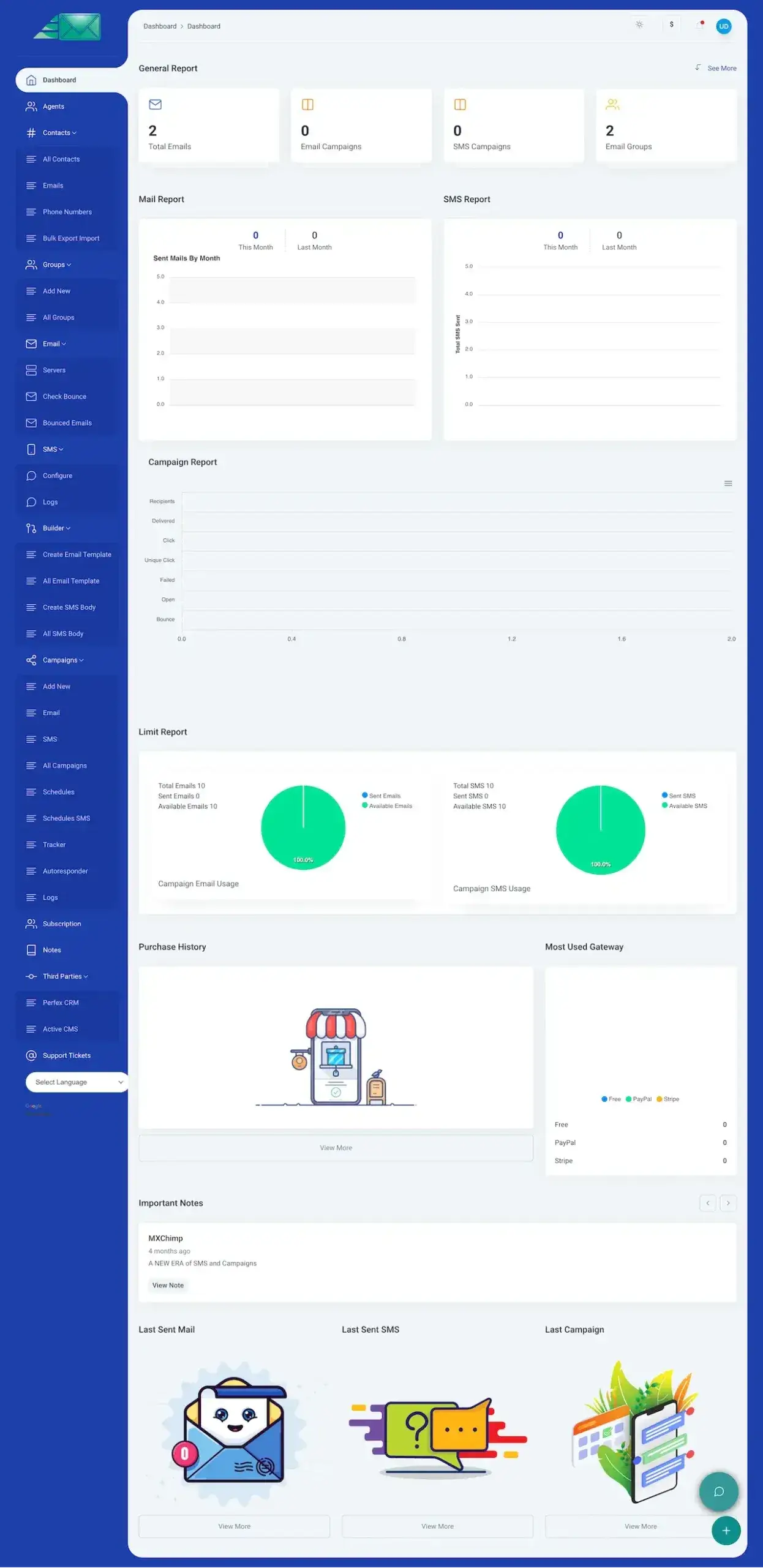
ActiveCampaign Clone - Agent Web Panel
The full panel in a browser: contacts, groups, email servers, templates, campaigns with an autoresponder, schedules and a tracker, plus mail, SMS, campaign and limit reports.
- 1Open the demo login in a browser tab
- 2Sign in with the agent details below
- 3Explore: Contacts, Campaigns, Autoresponder, Reports
agent@demo.com | Agent_321
ActiveCampaign Clone - User & Admin Panels
The customer view and the operator view of the web panel, where plans, gateways and users are handled. A public link is not offered for these two, so we open both for you.
- 1Book a guided call
- 2Tell us which plans and gateways you will sell
- 3Walk the operator side on a shared screen
shared on a guided call
See It With Us
Video Walkthrough of the Marketing Automation Platform: Campaigns, Autoresponder, Reports & Plans
The quickest way to see every surface is a live call. We open the panel, the app and the operator side together and tie each one to your plan: your plans and limits, your gateways, your sending setup and your launch date.
Schedule a live walkthrough call.Every Screen Mapped
ActiveCampaign Clone App Flows - Mobile App & Web Panel Dashboard
Real screens from the ActiveCampaign clone Miracuves ships, nothing staged: four phone screens of the customer app and the full web dashboard, in the order a campaign moves from report to channel to setup.
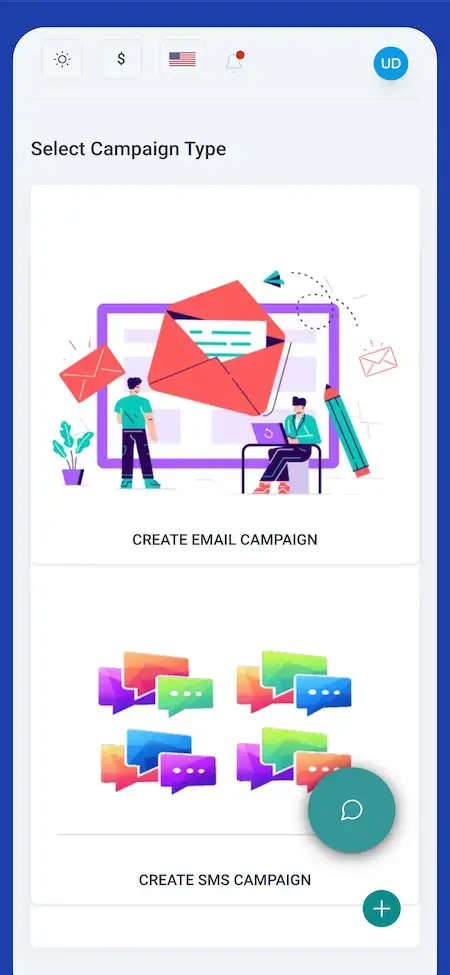


Follow a sender from the General Report through the choice of email or SMS and the three-step campaign form to the Notes screen, then open the web panel dashboard to see the reports and the Campaigns menu behind them.
02Proof
Client Voices
What Miracuves Clients Say About Building on a Ready-Made Base
Six clients describe launching on Miracuves bases in healthcare, car rental, delivery, yacht rental, telehealth and logistics. None of them runs an email platform, and no email-marketing client quote is published, so each is shown exactly as its author gave it, for what it says about how we work.
“Every HMS I tried was built for general physicians, with no lesion mapping, no before/after tracking, and no procedure-based billing. Their MXHealth base gave us the patient app, doctor app, EMR and video consult out of the box. Front-desk time on scheduling and follow-ups is down ~70%, and we went fully digital in 9 months, where a fully custom job would have been 18.”
“Turo is the obvious reference, but the Caribbean specifics, from different insurance norms to different payment rails, meant we needed a real partner, not just a clone. Miracuves’s MXCar base covered the listing, the trip flow, and the host payouts. We launched in 6 working days and are live in three islands.”
“The team was running it on a dispatcher and a Google Sheet, and we needed a real platform quickly, because we were about to onboard a major retail client. Miracuves’s Delivery Genie base gave us the rider app, the dispatch console, and live tracking. We launched in 6 weeks and cleared 4x the previous order volume in the first month.”
“We were running it on phone calls and a paper calendar, and we were losing bookings to bigger OTAs. Miracuves’s GetmyBoat Clone base gave us the calendar, the booking flow, and the payment engine. Online bookings are up roughly 70% in the first six months, and the ops team finally has a live view of the fleet.”
“Building a compliant telehealth stack from scratch in three markets would have been a year-plus effort. Miracuves’s MXHealth base covered the patient and doctor apps, video consult, e-prescription and the pharmacy integrations. We launched in our first market in 9 weeks and rolled out to two more in the following six months.”
“We were juggling spreadsheets, a third-party GPS provider, and a phone. We needed a single operations console. Miracuves’s MXLogistics base covered the trip lifecycle, the driver app, and the customer tracking page. We’ve cut operations admin time by about 40%.”
Proof, Honestly Stated
ActiveCampaign Clone Case Study - Published Proof and Checks You Can Run Yourself
Some products have a named client behind them and some do not yet. For this email and SMS marketing model the honest position is that none is published, so this section lists what you can verify today.
Miracuves has not published a named client deployment of this email and SMS marketing product, so this page does not invent one. What follows is what you can check for yourself, and what we will not do.

- The agent login on the live demo, with the General Report, Campaigns and Contacts menus
- Email and SMS campaigns made through the three-step form, on the web and in the app
- The Autoresponder, Schedules and Tracker entries under Campaigns
- A campaign report that splits recipients into delivered, opened, clicked, failed and bounced
- A release log from 6.10.7 to 6.11.2 that records what changed in each version
- Present another company's client as ours
- Invent a subscriber count, a send volume or a revenue figure
- Call a modeled scenario a case study
- Promise inbox placement or an open rate
- Try the agent login in the demo
- Walk the operator side with us on a guided call
- Read a published case study built on a different base
- Get the scope and the price in writing before you commit
When a named deployment of this product is published, it will appear here with its scope and what the client supplied. Until then, the demo and a guided call are the honest evidence.Miracuves product team · about this section
03The product
The Basics
What the ActiveCampaign Clone App Does for Senders and Operators
An ActiveCampaign clone is a ready-made marketing automation platform, and Miracuves delivers it with email and SMS working side by side. Senders build email and SMS campaigns, set an autoresponder or a schedule and read the results, and you, the operator, sell it on plans with limits and take payment through your own gateways.

More Than a Mailer
Beside the campaign form sit contacts, groups, templates, email servers, SMS, a tracker, reports, plans and payments, all inside one panel.
Not a Locked Box
You get the complete source code with no encryption, so your team can change screens and flows as the product grows, with no seat fee to pay.
Plain About What Is Extra
Conditional branching, event triggers and third-party API connections are add-ons priced on their own. They are listed as add-ons, never counted as base features.
Web, Android & iOS
What Is an ActiveCampaign Clone Script?
The send button is the easy part of a mailer. What makes it a product is everything beside it: audiences, servers, templates, timing, reports, plan limits and billing. Those parts ship working and you can see them in the demo.

- 01Email and SMS campaigns made in a three-step form
- 02Autoresponder, schedules and a tracker under Campaigns
- 03Contacts, groups and bulk export or import
- 04Plans, limits, gateways and purchase history
- 05Web panel plus Flutter apps for Android and iOS
You receive the web panel, the Flutter apps and the operator side, with the complete source code. A sidebar of twelve sections organizes what customers use every day.
Everything Included
ActiveCampaign Clone Features - Campaigns, Automation, Contacts, Reports, Plans & Payments
Each ActiveCampaign clone feature Miracuves lists below is visible on a demo screen or recorded in the release log. Anything that needs an extra module is named as an add-on further down the page.
Three-Step Campaign Form
A campaign starts on a Select Campaign Type screen with Create Email Campaign and Create SMS Campaign, then runs through New Campaign, Setup Email Template and Select Audience.
- Select Campaign Type screen with email and SMS cards
- Three steps: New Campaign, Setup Email Template, Select Audience
- Campaign name, an SMTP server choice and a description editor
- Phone screens that walk the form step by step
- Campaigns menu with Add New, Email, SMS and All Campaigns views
Autoresponder, Schedules & Tracker
The Campaigns menu holds the automation entries: an Autoresponder, separate Schedules for email and SMS, a Tracker and Logs, so timing is set where the campaign lives.
- Autoresponder entry under Campaigns
- Schedules for email and Schedules SMS for text
- Tracker that shows by user, as release 6.11.1 changed it
- Logs for campaign activity
- Advanced branching and event triggers are an add-on, not base
Email Templates & SMS Bodies
A Builder menu keeps what campaigns are made from: email templates and SMS bodies, each with a create view and an all-items list.
- Create Email Template and All Email Template
- Create SMS Body and All SMS Body
- Template step inside the campaign form
- Description editor with basic text formatting
Contacts & Groups
Contacts are kept by email address and by phone number, gathered into groups, and moved in bulk with an export and import view.
- All Contacts, Emails and Phone Numbers views
- Bulk Export Import for moving lists
- Groups with Add New and All Groups
- Email groups counted on the General Report
- Contact management improved in release 6.11.2
Email Servers & Domain Checks
Sending goes out through the SMTP servers listed under the Email menu, and a campaign picks one in its form. Domain verification was fixed in release 6.11.0.
- Servers menu under Email
- SMTP server chosen inside each campaign
- SMTP domain verification fix in release 6.11.0
- Your own SMTP provider account required
Bounces & Unsubscribes
Bounced addresses have their own check and list, campaign reports count failed and bounced mail, and release 6.10.9 fixed how campaigns handle unsubscribed users.
- Check Bounce and Bounced Emails under Email
- Failed and Bounce lines in the campaign report
- Campaign unsubscribe handling fixed in 6.10.9
- Consent rules and sending law stay with the operator
SMS Campaigns
Text messages are a channel of their own: an SMS menu to configure the gateway and read logs, SMS campaigns, SMS bodies and an SMS schedule. The release log names a Twilio SMS gateway.
- SMS menu with Configure and Logs
- Create SMS Campaign in the campaign form
- Twilio SMS gateway fix in release 6.10.8
- Separate SMS report and SMS limit
Reports & Analytics
The dashboard opens on a General Report, charts sent mail and SMS by month and breaks each campaign into recipients, delivered, click, unique click, failed, open and bounce.
- General Report: total emails, email and SMS campaigns, email groups
- Mail Report and SMS Report, this month against last month
- Campaign Report with seven measured lines
- Limit Report with usage pies for email and SMS
- General Report also shown on a phone screen
Plans, Limits & Subscription
Customers check their plan in the Subscription menu, see what is left of their email and SMS allowance on the Limit Report, and find every past purchase in Purchase History.
- Subscription menu in the sidebar
- Total, sent and available emails
- Total, sent and available SMS
- Purchase History view
- Most Used Gateway chart
Payment Gateways
Plans are paid through gateways the operator turns on or off. PayPal, Stripe and Paystack appear in the demo or the release log, and PayPal error handling was reworked.
- Gateways can be enabled and disabled (release 6.10.7)
- Paystack payment gateway added in 6.10.8
- PayPal mode switching fixed in 6.11.0
- PayPal error handling improved in 6.11.0
- Free, PayPal and Stripe in the gateway chart
Agents, Notes & Support
More than one person can work in an account through the Agents menu and the agent login, with a Notes screen for team notes and a Support Tickets menu for customer questions.
- Agents menu and a separate agent login
- Notes with Add New, search and a status column
- Support Tickets menu
- Notification bell in the header
Languages, ChatGPT & Third Parties
A language selector sits at the foot of the sidebar, a ChatGPT option is controlled from the application setup, and a Third Parties menu lists a CRM and a CMS connection.
- Select Language dropdown
- ChatGPT control inside the application setup (6.11.1)
- Third Parties menu with a CRM and a CMS entry
- Further API connections are an add-on
Before you buy, note this: The platform is delivered rebranded to your identity and deployed on your hosting. On your side you supply hosting and a domain, a verified developer account for the stores, your branding and business details, a payment gateway account with KYC done, an SMTP provider for sending, a Twilio account if you want SMS and any other third-party keys. Store review is handled by Apple and Google and sits outside our 6-day build time.
How Operators Earn
ActiveCampaign Clone Revenue Models - Plans, Free Tier, Send Volume, SMS Packs & Seats
An automation mailer from Miracuves earns through several separate lines, each kept apart in the product, so adjusting one leaves the rest as it was.
Two dials usually move the numbers most: the plan price and the send allowance that comes with it.
- 01
Subscription Plans
A recurring plan sets how many emails and SMS a customer can send, and the demo's Subscription menu and Limit Report show the plan beside the usage against it.
- 02
Free Entry Tier
A no-cost plan lets a prospect try the panel before paying. A Free entry shows beside PayPal and Stripe in the demo's gateway chart; whether to offer a free plan is your decision.
- 03
Tiered Send Volume
Higher plans raise the email and SMS totals. The Limit Report already splits total, sent and available for each channel, so the allowance is the dial you price.
- 04
SMS Credit Packs
SMS has its own limit, its own schedule and a Twilio gateway in the release log, so text messages can be sold as a separate allowance next to email.
- 05
Gateway-Billed Checkout
Plans are paid through the gateways you connect. PayPal, Stripe and Paystack all show up in the demo or the release log, and Purchase History keeps what was bought.
- 06
Team Seats
Agents have their own menu and login, so how many people can work inside one account is something a plan can set.
| Revenue stream | How it is charged | Take rateTypical take rate | What sets the ceiling |
|---|---|---|---|
| Subscription Plans | A recurring fee for a plan that caps emails and SMS, with usage shown against it. | Klaviyo tiers plans by profiles and messages sent; it states it does not price by seat. | The profile count and send volume each plan allows. Klaviyo reported $1,234.0 million of revenue in 2025 from plans priced this way. |
| Free Entry Tier | A no-cost plan under fixed limits that moves a prospect toward a paid one. | Klaviyo: free up to 250 profiles and 500 sends a month. Mailchimp: free up to 250 contacts. | What the free sends cost you. The cap you set decides how much of that cost you absorb before a customer pays. |
| Tiered Send Volume | Higher plans lift the monthly email total. | Mailchimp caps Standard at 6,000 emails a month and Premium at 150,000. | Your own sending cost. Amazon SES lists $0.10 per 1,000 emails; Mailgun lists $15 to $90 plans with overage from $1.80 down to $1.10 per 1,000. The gap to your plan price is your margin. |
| Gateway-Billed Checkout | A card or wallet payment taken through a gateway you connect. | Stripe US lists 2.9% + 30 cents per domestic card payment. | Where plans are bought. Apple's standard commission is 30% (15% for Small Business Program members and qualifying subscriptions); Google Play adds 10% plus a 5% billing fee on subscriptions in the US, UK and EEA. Both apply only inside the apps. |
| Team Seats | An added fee for more agents inside one account. | Klaviyo's filing says it does not price based on seats. | Whether buyers accept a seat charge at all. A listed leader prices on profiles and sends, so seats work better as a plan limit than as a line of their own. |
How to read this. The Klaviyo figures come from its 2025 annual report and pricing page, the Mailchimp send caps from its pricing page, the sending costs from Amazon SES and Mailgun, the card example from Stripe US pricing, and the store terms from Apple and Google Play. They are published prices and policies of other businesses, so treat them as modeling inputs only: this table is not a quote and not a forecast of what any platform will earn, and your own prices belong in your plan settings.
ActiveCampaign Clone Revenue Model, Stage by Stage
The six revenue lines above come built into the ActiveCampaign clone Miracuves delivers, and an automation platform tends to add them one stage at a time.
Launch
Start with subscription plans and a free entry tier, letting the autoresponder and schedules prove their value before a prospect pays.
Traction
As accounts settle in, tiered send volume and SMS credit packs lift spend, since the Limit Report counts email and text separately.
Scale
With agencies on board, plans that set how many agents work in one account add team seats, and gateway-billed checkout logs each sale.
Your customers pay through gateways you own, and no portion of it goes to Miracuves.
Operate It Day to Day
Admin Panel for an ActiveCampaign-Style Platform: Users, Plans, Payments, Servers & Reports
In Miracuves' ActiveCampaign clone, one admin panel covers the operator's working day: who is signed up, which plan they are on, what they paid, which servers send the mail and what the reports say.


Operator Controls
- 01
Dashboard & Reports
The panel opens on a General Report and charts sent mail and SMS by month, with a campaign report and a limit report beside them.
- 02
Users & Agents
Manage customer accounts and the agents who work inside them; the Agents menu and the separate agent login are part of the demo.
- 03
Plans & Subscriptions
Set the plans customers buy and follow usage against each plan's email and SMS limits in the Subscription menu and Limit Report.
- 04
Gateways & Purchases
Turn payment gateways on and off, handle PayPal mode switching and read the purchase history and the most-used gateway chart.
- 05
Templates & Content
Look after the email templates and SMS bodies customers build from, which live in the Builder menu.
- 06
Servers & Sending
Add the SMTP servers campaigns send through, verify a domain and check the addresses that bounced.
- 07
Support Tickets & Notes
Answer customers through the Support Tickets menu and keep team notes on the Notes screen.
- 08
Languages, ChatGPT & Third Parties
Choose languages from the selector, switch the ChatGPT option on from the application setup and use the Third Parties menu for a CRM and a CMS entry.
Money Movement
The billing side of the panel, from the plan a customer picks to the payment that arrives.
- Subscription menu with the plan and its usage
- Purchase History of what was bought
- Most Used Gateway chart: Free, PayPal, Stripe
- PayPal mode switching and error handling
Sending Controls
The controls behind the mail itself, kept apart from billing.
- Servers menu for SMTP
- Check Bounce and Bounced Emails
- SMTP domain verification
- Campaign unsubscribe handling
Need the console to do more? Extra reports, a different plan structure, more gateways or a custom approval step are scoped on their own. Tell us what your operations team needs and we will quote it in writing.
04Package and price
The Full Package
Your ActiveCampaign Clone Script Bundle: Code, Apps & Deployment
Miracuves ships the ActiveCampaign clone script as a running platform, not a bundle of parts: the web panel, the mobile apps, the operator side and the code that drives them. Once delivered it is yours outright, free of seat fees and renewals. Miracuves keeps no share of what your customers pay you, the two automation add-ons carry their own price outside the base, and your SMTP provider, Twilio, gateways and the app stores invoice you directly.
$ git clone your-marketing-platform Full Source Code
Each source file for the web panel and the Flutter apps arrives unencrypted, so your developers can adapt it however the business needs.
- Web platform source, unencrypted
- Flutter source for the Android and iOS apps
- Yours to modify, extend and redeploy
- Delivered into your own repository
Database & Installer
The MySQL data tier the product lists, plus the installer whose final step appears in the release log, set up on your hosting.
- MySQL data tier
- Installer with a final setup step
- Contacts, groups, campaigns and plans stored
- Deployed on your own hosting
Email & SMS Sending Setup
The SMTP server menu, domain verification and the Twilio SMS gateway, connected to the accounts you supply.
- SMTP servers added from the Email menu
- Domain verification for sending
- Twilio SMS gateway for text campaigns
- Bounce check and bounced-email list

Web Panel
The browser panel with its dashboard, contacts, groups, templates, campaigns, reports, subscription, notes and support tickets.
- Dashboard with mail, SMS, campaign and limit reports
- Contacts, groups and bulk export or import
- Builder for email templates and SMS bodies
- Campaigns: autoresponder, schedules, tracker, logs
Mobile Apps
The customer apps are built with Flutter for Android and iOS. The product's phone screens show the General Report, the choice of email or SMS, the Create Campaign form and a Notes screen.
- General Report with four count tiles
- Select Campaign Type: email or SMS
- Three-step Create Campaign form
- Notes with search and a status column

Plans & Payments
A Subscription menu and a Limit Report, a purchase history and the gateways the demo and release log name.
- Subscription menu with the plan and usage
- Email and SMS limit report
- PayPal, Stripe and Paystack named
- Purchase History and a gateway chart
Access Layer
Separate user, agent and admin logins, plan limits for each account and payments taken at the gateway you connect.
- User, agent and admin logins
- Login redirect and authentication fixes in the log
- Plan limits for each account
- Payments handled by the gateway
Handover & Support
Rebranding and deployment done for you, app publishing from your accounts and the three support periods that run side by side from launch.
- Rebranding with your logo, icons and colors
- Deployment to your hosting
- App publishing from your developer accounts
- 60 days guidance, 6 months bug fixes, 12 months updates
Want to see it before deciding? Log in to the demo as an agent, or ask for a guided tour. We can open the campaign form, the autoresponder entry, the reports and the plan screens, each shown against your own plan for the product.
Transparent Pricing
How Much Does It Cost to Build a Marketing Automation Platform Like ActiveCampaign?
The launch-ready white-label ActiveCampaign Clone is a fixed price of $2,499. Work beyond the base, such as the add-ons, extra integrations or custom flows, is scoped and quoted separately in writing.
Professional
Ready-Made Launch PackageChosen by: Email marketing startups, agencies that send for clients, SaaS founders adding a mailer
What you try in the demo is what you receive, rebadged with your own logo, icon set and palette and installed on your servers.
Get StartedEnterprise
Custom Builds for Larger ScopeChosen by: Agencies with many brands, regional email providers, multi-country SaaS operators
Need automations or integrations the base does not have? We build to your requirements and agree scope and price before work starts.
Request a QuoteActiveCampaign Clone Development Cost in 2026
Miracuves charges a single $2,499 for the ActiveCampaign clone, which covers the web panel, the operator side, Flutter customer apps for iOS and Android, the MySQL data tier with its installer and every source file, rebranded and live within six working days. Your plan revenue carries no seat charge or renewal.
What moves your total sits outside the software invoice
- Sending costs billed by your SMTP provider
- Per-message Twilio charges on SMS campaigns
- Card and wallet fees on your PayPal, Stripe or Paystack accounts, plus their KYC
- Hosting, the domain and both store developer accounts, with store commission on any in-app purchase
- Advanced Automation Workflows or API Integrations, each quoted on its own
Bespoke flows or extra gateways are scoped in writing before any build starts and usually ship in 2-8 weeks.
Compare Your Options
Ready-Made ActiveCampaign Clone vs Custom Development vs SaaS
Thinking of selling marketing automation like ActiveCampaign under your own name? Here is how the ready-made platform you own from Miracuves compares with a bespoke build and a rented white-label plan.
| Criteria | MiracuvesReady-Made ActiveCampaign Clone | Custom Development | SaaS |
|---|---|---|---|
| Launch time | Rebranded and deployed in six days | Months before customers can send | Days, under the reseller's rules |
| Upfront cost | $2,499 paid a single time | Agreed in a written estimate | Recurring reseller fees |
| Source code ownership | Readable source, nothing encrypted | Delivered when the contract ends | Never leaves the provider |
| Customization | Workflow and API add-ons on quote | Fully bespoke, billed hourly | Branding inside fixed templates |
| Ongoing fees | No cut of customer payments | Ongoing developer costs | Fees per contact or per seat |
| Branding & app-store listing | Your iOS and Android apps | Your listing after the build | Reseller marks may remain |
| Best for | Agencies selling automation plans | Firms needing bespoke workflows | Freelancers testing reselling |
Same product, other editions: Mailchimp Clone · Browse all Communication solutions
Where It Fits
Email Automation Software Like ActiveCampaign: Autoresponders, Schedules, SMS & Reselling
Operators running the automation product Miracuves delivers each put a different part of it first. A startup puts plans and limits first, an agency puts accounts and reports first, and a newsletter publisher puts templates and schedules first. You set the emphasis in configuration.
Swipe · 6
Put the autoresponder behind a signup form so each new contact receives a first message, then add scheduled sends that follow it up.

Draft a template once, pick the audience group and queue the send for the hour you want, with email and SMS schedules kept apart.

Chain a short run of timed messages after a campaign and watch each one in the tracker and the logs. Longer, branching sequences come with the automation add-on.

Run text campaigns through the Twilio gateway next to email ones, each channel with its own report, schedule and limit.

Give each client an account with agents, groups and reports of its own, then bill them on a plan from your Subscription settings.

Sell the whole product under your name: free entry, paid tiers with send limits, gateways for payment and a purchase history to read.

ActiveCampaign Clone Business Model: Three Ways to Run It
Plan tiers, separate email and SMS limits and per-account agent seats let one ActiveCampaign clone install from Miracuves back three different businesses.
Automation SaaS
Launch a branded email and SMS automation product on subscription, where the autoresponder and schedules justify each paid tier.
Agency mailers
Run campaigns for many clients from one platform, each client holding its own agents, groups and reports, billed on a plan of its own.
Text-and-email reseller
Add email beside an existing SMS business, or serve retail groups across several stores, using the Twilio gateway and a separate SMS limit.
Branching sequences can join any of the three later through the Advanced Automation Workflows add-on.
One product, six ways to use it. All six cases share the web panel, the apps and the operator side. What differs is which plans you sell, what limits you set, which customers you invite and how it is branded, so there is a single codebase to look after.
Talk to Our TeamMarket Timing
Why Build a Marketing Automation Platform in 2026?
Every business with an audience wants to write to it without doing the same work twice, which is the job Miracuves built this automation platform to take on. A platform under your own brand lets you sell that convenience to them, with the plan, the payment and the relationship on your side.
01Automation Removes Repeat Work
A first message, a follow-up and a scheduled send are the same steps for every contact. Putting them behind an autoresponder and a schedule takes that repetition away from your customers.
02Email and SMS Belong in One Account
Customers who write by both channels want one dashboard. The demo gives each channel its own report, schedule and limit inside the same panel.
03Plans Turn Usage Into Revenue
The Limit Report already splits total, sent and available for email and SMS, which makes a plan easy to price by how much a customer sends.
04Your Name on the Customer Relationship
When the platform carries your brand, the contact lists, the reports and the billing relationship stay with you instead of a third-party mailer.
05Sender Rules Keep Rising
Outlook now asks domains sending over 5,000 emails a day to pass SPF, DKIM and DMARC. Setting up your sending domain is the operator's job, and the platform gives you the server and domain checks to work with.
06Buying Beats Building Here
Campaigns, contacts, schedules, reports, plans and payments are most of a mailer. After 6 days of our build time a white-label copy runs on your own hosting.
Platform by the Numbers
Sidebar Sections
Send Channels
Payment Gateways Named
Versions in the Release Log
The hard work in a mailer is the unglamorous middle: contact lists, server settings, schedules, limits and a billing trail that all agree. Here it is already built.
Industries
Industries We Serve
Miracuves' ActiveCampaign clone serves any business that wants to run email and SMS campaigns under its own name, or sell that ability to others. Marketing agencies send for clients. E-commerce brands write to buyers. SaaS companies add a mailer to their range. Telecom resellers pair text with email. Media and publishing teams run newsletters. Education providers keep in touch with learners. Hospitality groups write to guests. Nonprofits reach donors and volunteers.
one codebaseMXChimp
- 01MaMarketing Agencies
- 02EcE-Commerce
- 03ScSaaS Companies
- 04TrTelecom Resellers
- 05MpMedia & Publishing
- 06EdEducation
- 07RcRetail Chains
- 08HoHospitality
- 09NoNonprofits
- 10ReReal Estate
- 11FsFinancial Services
- 12EvEvents
Miracuves’ ActiveCampaign Clone is a campaign platform you can adapt to any audience-facing business model, with the autoresponder, reports and plan limits carrying your name from the first screen.
06Under the hood
End to End
How an ActiveCampaign Clone App Works: Log On, Pick a Channel, Set Up, Schedule & Track
To a sender using the ActiveCampaign clone app from Miracuves, a campaign is a handful of taps. Underneath it is a chain of channel, audience, server, timing and measurement. Below is that chain from sign-in to a tracked send, followed by the architecture that carries it.
Sender Journey - From Sign-In to a Tracked Campaign
Swipe · 5
- 1Sign In and Review Your Sending Totals
The first screen after sign-in is a General Report totaling emails sent, email campaigns, SMS campaigns and email groups.
- Email and password sign-in
- Four count tiles on the first screen
- A See More link into the full reports
- 2Start an Email or a Text Campaign
Two big cards on Select Campaign Type let the sender begin either Create Email Campaign or Create SMS Campaign.
- Create Email Campaign card
- Create SMS Campaign card
- Email and SMS views under Campaigns on the web
- 3Set Up the Template and Target Contacts
Create Campaign walks through New Campaign, Setup Email Template and Select Audience, one step at a time.
- Campaign name and a description editor
- An SMTP server picked from your list
- The audience chosen in step three
- 4Automate Follow-Ups and Schedule Sends
The web panel's Campaigns menu holds the autoresponder, email and SMS schedules, a tracker and the logs.
- Schedules and Schedules SMS
- An Autoresponder entry
- Tracker and logs
5Measure Opens, Clicks and BouncesReports show recipients, deliveries, clicks, unique clicks, failures, opens and bounces per campaign, and teammates leave notes on the Notes screen.
- Seven measured lines per campaign
- Mail Report and SMS Report by month
- Notes with search and status
How It's Built
Architecture of an ActiveCampaign-Like Platform & Campaign Flow
- 01Part 01
Three Roles, Separate Logins
User, agent and admin each have their own login, so what a customer sees is set by role and not by a hidden menu.
- 02Part 02
Campaign Engine
Campaigns are made in a three-step form and then run through schedules, an autoresponder and a tracker, with logs kept alongside.
- 03Part 03
Sending Channels
Email leaves through the SMTP servers you add and SMS through a Twilio gateway, each with its own schedule and report.
- 04Part 04
Audience Store
Contacts, phone numbers and groups sit in the data tier, with bulk export and import for moving lists in and out.
- 05Part 05
Plans & Billing
A subscription decides the email and SMS limits, and payment arrives through PayPal, Stripe or Paystack with a purchase history behind it.
- 06Part 06
Phone Screens & Mobile Apps
The product shows the General Report, the campaign-type choice, the Create Campaign form and Notes on phone screens, and lists Flutter apps for Android and iOS.
Under the Hood
ActiveCampaign Clone Software Stack: PHP, MySQL & Flutter
A mailer needs a dependable web tier, a data store that keeps lists consistent and mobile apps for both stores. Miracuves built the ActiveCampaign clone with the stack below, stated as listed on the product page.
Web Platform
- Web panel and operator side in the browser
- Bootstrap-based responsive interface
- PHP runs the web and admin layer
- Version 6.11.2 is the latest in the release log
Data Tier
- Contacts, groups, campaigns and plans
- Installer with a final setup step
- Hosted wherever you choose
Customer Apps
- Flutter full-component apps with current dependencies
- General Report, Campaign Type, Create Campaign, Notes
- Android and iOS builds
- Published from your own developer accounts
Email & SMS Channels
- SMTP servers added from the Email menu
- Domain verification fix in release 6.11.0
- Twilio SMS gateway fix in release 6.10.8
- Your own SMTP and Twilio accounts required
Gateways & Plans
- Free, PayPal and Stripe in the gateway chart
- Paystack added in release 6.10.8
- PayPal mode switching fixed in 6.11.0
- Your own gateway accounts and KYC required
Third-Party Services
- Firebase listed among the integrations
- A translation service for languages
- ChatGPT control in the application setup (6.11.1)
- Third Parties menu with a CRM and a CMS entry
The web and operator side is listed as PHP with Bootstrap, with MySQL for data, and the apps are Flutter. Third-party services such as Twilio, Firebase, payment gateways, translation and ChatGPT need your own accounts and keys, which you supply at deployment. Everything named here is mainstream and easy to hire for.
Build to Scale
Built to Scale - Separate Roles, Sending Limits & Growth Headroom
How far a mailer goes is mostly decided by what you connect to it: how many SMTP servers you add, which SMS gateway you use and how much hosting you give the platform. The product keeps those pieces separate, so growing a list or a sender is a configuration step and no rewrite.
Servers Are Added, Not Hard-Coded. The Email menu lists Servers and a campaign picks one in its form, so sending capacity grows by adding a provider account.
Limits Are Visible. The Limit Report splits total, sent and available emails and SMS, so a plan boundary is clear before a customer crosses it.
Lists Move in Bulk. Contacts, emails and phone numbers each have a view of their own, with a bulk export and import for large lists.
Versions Are Logged. The release log records six numbered versions, which is how you see what changed before you update.
Separate Roles
User, agent and admin each log in on their own, so each role can be changed without touching the others.
Servers by Choice
SMTP servers are listed under the Email menu and chosen per campaign, so capacity follows the provider you add.
- Servers menu under Email
- SMTP picked per campaign
- Domain verification fix in 6.11.0
- Your provider, your capacity
Visible Limits
Each account's totals, sent and available counts are on the Limit Report, with a usage pie for each channel.
Recorded Payments
Plan purchases are kept in a Purchase History and the gateway used is charted, so what the dashboard reports can be checked against payments.
- Purchase History view
- Most Used Gateway chart
- PayPal, Stripe and Paystack named
- PayPal handling reworked in 6.11.0
Bulk List Handling
Contacts, email addresses and phone numbers each have a view, and a bulk export and import moves large lists.
- All Contacts, Emails, Phone Numbers
- Bulk Export Import
- Groups for audiences
- Contact management updated in 6.11.2
Documented Hand-Over
Source, setup steps and deployment notes are handed over so another team can run the platform unaided.
No Throughput Figure Is Promised. Sending volume depends on your SMTP provider, your hosting and your list quality, so we publish none. With the complete source code and a conventional stack, adding a server, a screen or an integration is ordinary development work for your team or ours.
If you are launching a mailer: start with the customers and plans you can sell, and grow on the deployment you already have. As volume rises, capacity is a hosting and provider decision, and anything beyond the base is scoped and quoted on its own.
07Security and trust
What You Can Verify
Security on an ActiveCampaign-Style Mailer: Role Logins, Plan Limits, Gateway Payments & Listed Gaps
A mailer holds contact lists, sending credentials and payment references, so the controls that matter are who can see what, where payments go and what happens before launch. This section sets out what Miracuves' ActiveCampaign clone shows today and which launch steps stay on your side.
- 01 · RolesRole Separation
The demo lists separate logins for users, agents and admins, so each role works in its own screens.
- 02 · LimitsPlan Limits
The Limit Report tracks total, sent and available emails and SMS for each account, so a plan boundary shows before a customer reaches it.
- 03 · ListsList Hygiene
Check Bounce and Bounced Emails sit under Email, campaign reports count failed and bounced mail, and release 6.10.9 fixed how campaigns treat unsubscribed users.
- Sender Authentication: SPF, DKIM and DMARC records belong to your own sending domains. The platform gives you a server list and a domain check, but it does not create your sending reputation.
- Consent & Opt-Out: Collecting consent and honoring opt-outs is the operator's duty. The product handles campaign unsubscribes, and the rules that apply to your senders stay yours to follow.
- 04 · PaymentsPayments at the Gateway
PayPal, Stripe and Paystack take the payment, with PayPal mode switching and error handling recorded in release 6.11.0.
- Gateway Settings Review: Your PayPal, Stripe or Paystack account settings, webhooks and test or live mode are checked with you before launch, since mode switching was a fixed issue in release 6.11.0.
- 05 · ReleasesRelease Trail
Six numbered versions from 6.10.7 to 6.11.2 list their fixes, including authentication changes and a login-redirect fix.
- 06 · LaunchBefore Launch
Penetration testing, key rotation, a restore test and your sending-domain records are launch tasks planned with you.
- Penetration Testing: A penetration test of your deployment is a launch task we plan with you, not something assumed to be done on the base.
- Secrets & Backups: Rotating the keys you supply and trying a restore from backup are listed as pre-launch work, because an untested backup is a guess.
Neither the platform nor Miracuves holds a security certification, and ISO 27001 is not claimed. Each statement on this page points to something you can see in the demo or the release log, and the rest is listed as launch work.
Discuss Security Before LaunchOperator Readiness
What a White-Label ActiveCampaign App Needs Before Launch: Delivered Software and Retained Duties
An email platform lets your customers write to other people's inboxes under your name. Miracuves builds the campaign, list, plan and payment tooling; which senders you accept, what they may send and what the law requires where you and they operate stays with you as the operator.
On this page, ready describes software you can see working in the demo or the release log. It is not a statement that the platform or Miracuves is licensed, certified or approved by anyone, and nothing here is legal advice.
Built Into the Software
Contacts and groups, email and SMS campaigns, an autoresponder, schedules, a tracker, bounce checks, campaign unsubscribe handling, plan limits, payment gateways and separate user, agent and admin logins.
Left to the Operator
Your terms of service, privacy policy and acceptable-use rules for the customers you sell to, how abuse reports and complaints are handled, and which senders you will not accept.
Sending Domains & Consent
Your sending domains, their SPF, DKIM and DMARC records and your SMTP provider are yours to set up. Gathering consent, honoring opt-outs and following CAN-SPAM, GDPR and similar rules are the operator's job, and Miracuves makes no promise about inbox placement.
Where You Operate
Rules on commercial email, text-message consent, data protection and consumer protection differ by country and often by state. Check them for each market with qualified local advisers before you open sign-ups.
08Grow the platform
- Campaigns, schedules & autoresponder
- Contacts, groups & templates
- Plans, limits & payments
- Reports, apps & panels
Adding a module
- 1Describe the sequence
Tell us the triggers, branches and tools you need, now or after launch.
- 2Quote comes first
A written scope and price are agreed before any build starts.
- 3Added to your source
The module is delivered as code inside the repository you already hold.
Go Further
Add-Ons for the ActiveCampaign-Like Mailer: Advanced Automation Workflows & API Integrations
As delivered, the platform runs end to end and can be shown in the demo. The two modules below are the extras the product page offers, and each is priced on its own because the scope depends on your automations and the systems you connect.
Drag to explore · hover to pause
- 01Automation
Advanced Automation Workflows
Conditional branching, event triggers and advanced scheduling for longer sequences, added on top of the autoresponder and schedules that already ship in the base.
Branching · Triggers - 02Integrations
API Integrations
Connections to third-party tools and platforms so data from other systems can feed campaigns and reports, scoped to the systems you name.
API · Integrations
Around the Mailer
Selling Software Beyond Email? Four Products Sit Close to This One.
The ActiveCampaign Clone is one product in a wider set of ready-made software platforms. If your plan reaches past campaigns, these four connect naturally.
01The same email marketing code offered under a second product name, with the same price and the same 6-day delivery.
Explore Solution
02A white-label chat app with private and group conversations, calls and stories, plus an operator console.
Explore Solution
03An AI writing and chat assistant with a user dashboard that counts the words, images and characters left on a plan.
Explore Solution
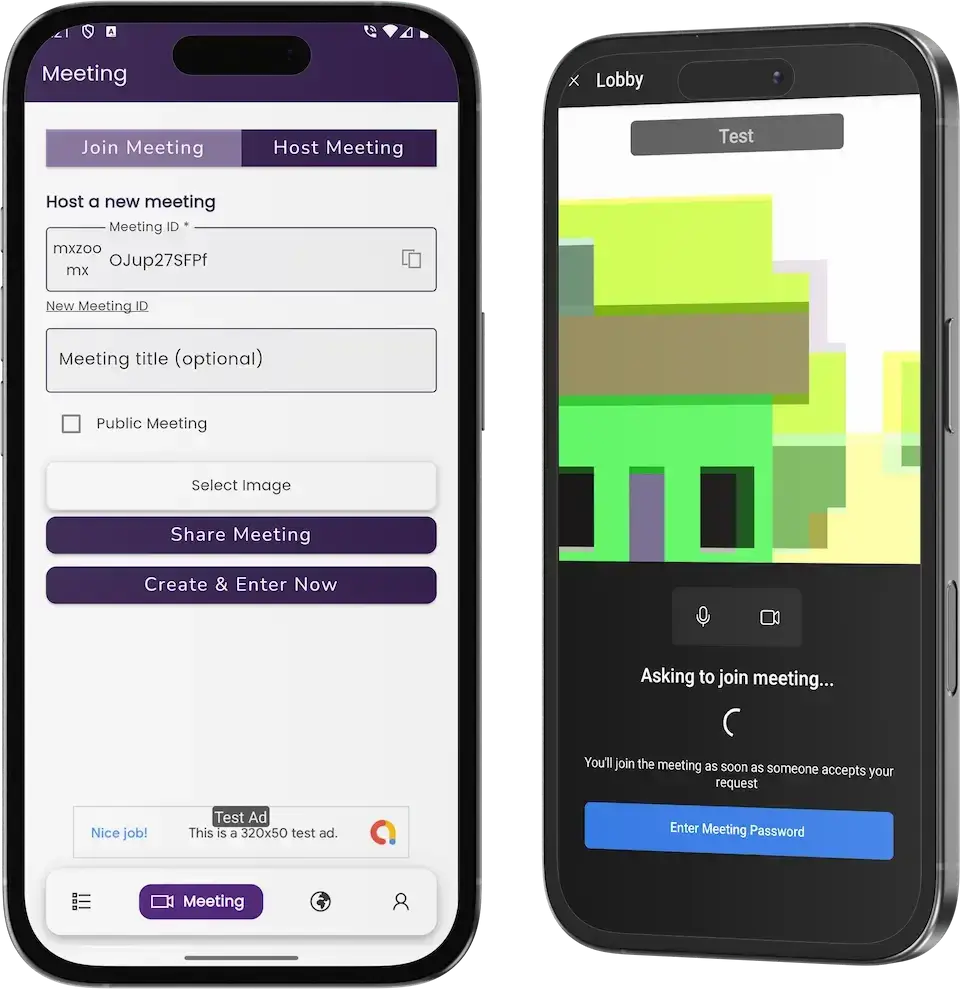
04A video meetings app with host and join screens, a lobby and mobile apps for live sessions.
Explore Solution09The business case
Market Benchmarks
Email Marketing Software Market Benchmarks - Independent 2025-2026 Data
The revenue models above are ours. The figures below are not. They come from the Klaviyo and Braze annual reports on Form 10-K and from Microsoft's published sender requirements for Outlook, reproduced as published. Together they show what listed email and messaging platforms earn, how well they keep customers, and the authentication bar a sender must clear to reach inboxes.
$1.23bn in Revenue at Klaviyo in 2025
Klaviyo reports in its 2025 annual report on Form 10-K that revenue was $1,234.0 million, up from $937.5 million in 2024, a growth rate of 31.6 percent. Subscription plans are tiered by the number of active consumer profiles stored and the emails, text messages and WhatsApp messages sent, and the filing says Klaviyo does not price by seat.
110% Net Revenue Retention at Klaviyo
Klaviyo's 10-K reports that it served over 193,000 customers on 31 December 2025, up from 167,000 a year earlier. Its Dollar-Based Net Revenue Retention rate was 110 percent, against 108 percent in 2024, which the company says was driven by expansion of existing customer plans and cross-selling additional offerings.
$738.2m in Braze Revenue, Fiscal 2026
Braze, a customer engagement platform that sends email alongside push, SMS and in-app messages, reports fiscal 2026 revenue of $738.2 million, up 24.4 percent from $593.4 million. Its 10-K says about 65.5 percent of the increase came from existing customers, and that fees are principally based on an upfront commitment for messaging volumes or monthly active users.
Outlook Sets a 5,000-a-Day Sender Threshold
Microsoft announced on 2 April 2025 that domains sending more than 5,000 emails per day to Outlook must comply with SPF, DKIM and DMARC. From 5 May 2025 non-compliant high-volume mail is routed to Junk, and Microsoft says it may later be rejected. A sender-side cost any email platform has to build in.
Klaviyo, Inc., Annual Report on Form 10-K for the year ended 31 December 2025, filed 10 February 2026 - sec.gov
Braze, Inc., Annual Report on Form 10-K for the year ended 31 January 2026, filed 25 March 2026 - sec.gov
Microsoft, Strengthening Email Ecosystem: Outlook's New Requirements for High-Volume Senders, Microsoft Defender for Office 365 blog, 2 April 2025 - techcommunity.microsoft.com
All figures are the publishers’ own, reproduced as published from annual filings and a sender-requirements announcement. Metric definitions differ by company and are as each publisher states them. They describe the companies and rules named, not any platform Miracuves builds, and nothing here is a revenue projection for your business.
The Commercial Case
Marketability, Revenue Potential & Business Prospects
A mailer earns when customers trust it enough to move their lists in and pay for a plan. Everything that follows is about making those two decisions easier, and about owning the relationship once they have been made.
- 01
Recurring Plans
A mailer sold by subscription earns every month a customer stays, and plan limits turn a customer who sends more into a customer who pays more. Text messages can carry their own price apart from email, and advanced automation can sit in a higher tier once the Advanced Automation Workflows add-on is installed.
- 02
Several Levers, One Panel
Free entry, higher send tiers, SMS packs and seats are separate dials that can be changed without redesigning the rest.
- 03
Owned Customers and Lists
Customer accounts, their contact lists and their reports sit in your database, so the value builds up with you and not with a third-party mailer.
- 04
Exit Optionality
You hold the complete source code, so a later change of host, team or direction needs no one's permission.
- Subscription Plans
- Free Entry Tier
- Tiered Send Volume
- SMS Credit Packs
- Gateway-Billed Checkout
- Team Seats
Defensibility comes from stored data and habit rather than features.
- 01Customers keep lists, templates and history with you
- 02Reports that span months give them a reason to stay
- 03That history starts at launch and stays in your database
- 04Clean lists and clear abuse handling are the second moat
These three cases differ only in how many customer accounts are signed up, and each names the lever that leads at that size. They are examples for planning conversations, not predictions of what any platform will earn.
Paid plans carry early revenue.
A small mailer where a handful of agencies each pay for a plan, so subscriptions cover the running costs. Illustrative size, not a forecast.
Plans plus SMS packs and seats.
A provider serving one country, where tiers, a separate SMS allowance and seats start to matter alongside the base plan. Illustrative size, not a forecast.
Several markets, with every lever active.
A platform selling in many markets, where free entry, send tiers, SMS packs and seats all contribute and the reports show where to focus. Illustrative size, not a forecast.
10Why Miracuves
Why Miracuves
How Miracuves Stacks Up Against Other Ways to Get an ActiveCampaign Clone
Marketing platforms usually start as a generic mailer script, a contractor's build, an agency project or a tested ready-made base such as the ActiveCampaign clone from Miracuves. Ask each whether your customers can pay you inside the product: here plans are bought through the connected gateways and recorded in Purchase History.
Why Founders Choose Miracuves
- 01
Automation Entries Included
The autoresponder, email and SMS schedules and a tracker are already in the Campaigns menu, so the automation story does not start from zero.
- 02
Plans and Limits Built In
A Subscription menu and a Limit Report mean the product can be sold from day one, not only used.
- 03
Email and SMS in One Panel
Each channel has its own schedule, report and limit, inside the same account.
- 04
Full Source Code Ownership
The whole codebase arrives unencrypted, so nobody can reprice it or change the terms later.
- 05
A Visible Release History
Six versions from 6.10.7 to 6.11.2 list what changed, so you can see how the product is maintained before you buy.
- 06
Scope Spelled Out in Advance
From day one the scope is spelled out: what ships in the base, what each quoted add-on brings and which accounts you connect, including sending domains, gateway accounts, hosting and store developer accounts.
How to Choose an ActiveCampaign Clone Development Company
A marketing automation development company should show the automation working, not just describe it.
What to look for Miracuves
- Automation you can open Autoresponder, schedules and tracker open in the demo's Campaigns menu
- Proof before payment Agent and user demo logins, plus a guided operator tour
- Full code ownership Web panel and Flutter source, handed over unencrypted
- Visible upkeep Six logged versions naming each fix, from the Twilio SMS gateway to Paystack
- Launch speed Live within six working days, the work running free if a delay is ours
- Support after launch Three overlapping terms from launch: platform guidance lasting 60 days, priority bug fixes lasting 6 months, updates lasting 12 months
Walk away from any vendor who
- Calls a lone scheduled send automation
- Promises you a deliverability or open-rate figure
- Prices by seat or skims your customers' payments
- Keeps the source locked behind a license key
- Cannot show you a release history
Choosing Between a Ready Base, a Script and an Agency
| Criteria | MiracuvesMiracuves ActiveCampaign Clone | Generic Mailer Script | Custom Dev Agency |
|---|---|---|---|
| Time to Launch | 6 days of our build time | Unknown or DIY | Scoped per project |
| Source-Code Ownership | Complete, unencrypted | Often limited or locked | Usually yes |
| Automation Depth | Autoresponder, schedules and tracker | A send button and a list | Whatever the budget allows |
| Channels | Email and SMS with separate reports | Email only in many scripts | Built to order |
| Plans & Payments | Subscription menu, limits, PayPal, Stripe, Paystack | Varies by script | Custom integration |
| Reports | Mail, SMS, campaign and limit reports | Thin or absent | Built to order, extra cost |
| Security & Compliance | Role logins, gateway-held payments, honest limits | Minimal | Varies widely |
| Cost vs Speed vs Quality | Fixed price, fast, a base with a release log | Low price, high risk | Expensive and slow |
| Ongoing Support & Updates | 60 days guidance, 6 months bug fixes, 12 months updates | Rarely offered | Set by the contract |
The routes look alike on a feature list and part ways on what is built, what is owned and what is promised.
Talk to Our TeamChangelog
Marketing Automation Release Log: Versions & Updates
Release notes for the web platform, newest first. The notes carry no dates, so the table lists versions and what each one changed.
| Version | Changes | What changed |
|---|---|---|
| V6.11.2 | 2 updates, 2 fixes | Added or updated Authentication changes Contact management changes Fixed Final step of the installation Minor interface issues |
| V6.11.1 | 1 update, 3 fixes | Added or updated The ChatGPT option is now controlled from the application setup Fixed A ChatGPT bug The campaign tracker now shows by user Minor bugs |
| V6.11.0 | 4 fixes | Fixed PayPal mode switching PayPal error handling SMTP domain verification Minor bugs |
| V6.10.9 | 2 fixes | Fixed Unsubscribed users in campaigns Minor bugs |
| V6.10.8 | 4 fixes | Fixed Paystack payment gateway Twilio SMS gateway issues Login redirect Minor bugs |
| V6.10.7 | 3 fixes | Fixed Checkout issues in one of the themes Enabling and disabling payment gateways Minor bugs |
Let's build together
Let's take your email platform idea and make it a working product.
Book a free consultation and leave with a clear timeline and honest answers to your questions. We would rather earn your trust than close a fast sale.
- First reply under 2 hours
- Free consultation
- No lock-in contracts
- Full source code ownership
11Learn more
Blog & Resources
Guides on Building and Earning From an ActiveCampaign-Style Platform
Three articles from the Miracuves blog on what a marketing automation clone includes, how its revenue works and how its business model compares.



The product6 questions
01What is this ActiveCampaign Clone?
The Miracuves ActiveCampaign Clone is a ready-made marketing automation platform for email and SMS. Customers build campaigns in a three-step form, queue them with schedules or an autoresponder and read the results in a dashboard, while the operator sells plans with email and SMS limits. It ships as a web panel, Flutter apps for Android and iOS and an operator side, white-labeled to your brand by Miracuves.
02Is this a white-label solution?
Yes. Miracuves rebrands the web panel and the apps with your logo, icons and colors and deploys them on your hosting, so customers see your name throughout. You also receive the complete source code with no encryption. The ActiveCampaign name is used here only to describe the category and never belongs in your branding.
03Do I need coding knowledge to run this platform?
No. Day-to-day work happens in the panel, where contacts, groups, templates, campaigns, plans and payment settings are menus and forms. Coding only comes in when you want to change the product itself, and then your team or Miracuves can work from the source code. Changes beyond the base are quoted in writing first.
04Can I launch a marketing automation platform like ActiveCampaign legally?
Software with campaign, list and plan features is generally lawful to build and sell. The Miracuves ActiveCampaign Clone uses no code, design or content from ActiveCampaign and launches under your own brand and terms. Keep the ActiveCampaign name and logo out of your own branding. Sending laws such as CAN-SPAM and GDPR apply to you and your senders and are not handled by the software, so have local counsel review each market. Miracuves gives no legal advice.
05How customizable is the clone? Can I add my branding and features?
Branding is part of delivery: Miracuves applies your logo, icons and color scheme to the web platform and the apps. Because you hold the complete source code, your team or ours can change screens, flows, gateways and features as the business needs. Anything beyond the base is scoped and quoted in writing before work begins.
06Is the app available on both iOS and Android?
Yes. The customer app is built with Flutter for Android and iOS, and the web panel runs in a browser. Miracuves publishes the apps from your own developer accounts. Store review is handled by Apple and Google and sits outside our 6-day build time.
Campaigns & automation7 questions
07How can I create and send an email campaign?
Open the Campaigns menu or the app, choose Create Email Campaign and work through three steps: New Campaign, Setup Email Template and Select Audience. You name the campaign, pick the SMTP server it sends through and add a description, then send it or queue it with a schedule. The same form exists for SMS campaigns.
08Can I import my existing contact list?
The Contacts menu has a Bulk Export Import view for moving lists in and out, beside views for all contacts, email addresses and phone numbers. A direct connection to another platform is available through the API Integrations add-on, built around the system you choose.
09Does it support email automation?
Yes. The Campaigns menu holds an Autoresponder, separate schedules for email and SMS, a tracker and logs. Longer sequences with conditional branching, event triggers and advanced scheduling come as the Advanced Automation Workflows add-on, which is priced on its own.
10What kind of analytics does the platform provide?
The dashboard gives a General Report with total emails, email and SMS campaigns and email groups, mail and SMS charts by month, and a campaign report with recipients, delivered, click, unique click, failed, open and bounce. A limit report shows email and SMS usage against each plan.
11Can I integrate third-party tools like CRM and eCommerce platforms?
A Third Parties menu in the sidebar lists a CRM and a CMS entry, and Firebase, Twilio, payment gateways, translation and ChatGPT are among the listed services. Connections to other tools, including e-commerce platforms, are the API Integrations add-on and are scoped to the systems you name.
12How does the platform handle email deliverability?
Mail leaves through the SMTP servers you add under the Email menu, and a campaign picks one in its form. The platform can verify a sending domain and has bounce checks, but where a message lands depends on your domain records, your SMTP provider and your list quality. Miracuves does not promise delivery or open rates.
13Does the platform comply with email marketing regulations (GDPR, CAN-SPAM, etc.)?
The software has campaign unsubscribe handling and bounce lists, which help an operator follow the rules, but compliance itself belongs to the operator. Consent collection, opt-out handling, privacy policies and the law in each market are yours and your senders' to manage. The software is not certified under any regime, and Miracuves gives no legal advice.
Plans, billing & operators7 questions
14Is this a one-time purchase or subscription-based?
It is one fixed price of $2,499, paid once, for the ready-made package with the complete source code. It is not a license you rent. Three support periods run from launch at no extra cost: 60 days of platform guidance, 6 months of priority bug resolution and 12 months of continuous product evolution. What you charge your own customers is set in your plans.
15How do I manage users on my platform?
Customer accounts and the agents inside them have their own logins, and the operator side looks after users and plans. In the demo the Agents menu and the separate agent login show how team members work inside one account. The operator panel itself is walked through on a guided call.
16Can I customize pricing plans for my customers?
Plans carry email and SMS limits, which the Subscription menu and the Limit Report show to the customer. You decide the tiers, the free entry and the prices, and the gateways customers pay through. The exact plan settings are shown on a guided call, because the operator screens are not public.
17Can I track revenue and earnings?
A Purchase History view records what customers bought, and a Most Used Gateway chart shows how they paid, with PayPal, Stripe and a free entry in the demo's chart. Deeper financial reporting is available as scoped custom work.
18Does the platform support multiple languages?
A Select Language dropdown sits at the foot of the sidebar, and a translation service is among the listed integrations. Which languages ship in your build is agreed at setup.
19What is the realistic path to first revenue?
Most email platforms start with a paid plan, because it needs nothing extra to sell: the first customer to outgrow the free tier pays. SMS packs and seats come next, once enough customers use both channels or work in teams. Other lines, such as reseller arrangements for the white-label deployment or fees added on top of sending, run on commercial agreements you negotiate yourself, next to the plan billing the platform already handles.
20How defensible is an email marketing platform?
Defensibility comes from stored data and habit rather than features. Customers who have built contact lists, templates and campaign history in your platform do not casually move them, and reports that span months give them a reason to stay. The platform lets that history start at launch and keeps it in your database. Clean lists and clear abuse handling are the second moat, because senders and recipients both trust a platform that keeps its lists tidy.
Delivery, price & support10 questions
21How much does the ActiveCampaign Clone cost?
The launch-ready white-label ActiveCampaign Clone is a fixed $2,499, paid once. The add-ons, extra integrations and custom flows are scoped and quoted separately in writing before any work starts.
22How long does it take to launch?
Miracuves delivers the ready-made platform in 6 days: white-labeling, deployment to your hosting and publishing of the apps from your developer accounts. Apple and Google review the apps after submission, and the store listing goes live as soon as they approve it.
23What do I need to provide?
Hosting and a domain, verified developer accounts for the stores, your branding and business details, a payment gateway account with KYC done, an SMTP provider for sending mail, a Twilio account if you want SMS and any other third-party keys. Miracuves does not apply for gateways or write your policies for you.
24What support do I get after launch?
Three periods run side by side from launch: 60 days of dedicated platform guidance, 6 months of priority bug resolution and 12 months of continuous product evolution. First response is under 2 hours, Monday to Saturday, 10:00-19:00 IST.
25Do I get the source code?
Yes. The full web platform and Flutter app source is handed over unencrypted, ready for your team to modify, extend and redeploy.
26Which parts are add-ons?
Two modules are offered as add-ons: Advanced Automation Workflows, with conditional branching, event triggers and advanced scheduling, and API Integrations. Each is scoped and priced on its own and delivered as code in your repository.
27Why choose Miracuves to build an ActiveCampaign clone?
Because the campaign form, autoresponder, schedules, reports, plan screens and payment screens all work on day one, and its release log tracks each update between 6.10.7 and 6.11.2. Miracuves has delivered 9,000+ projects for 6,000+ clients, and hands you the complete source code, a fixed price and a 6-day build.
28Is a ready-made ActiveCampaign clone better than custom development?
In most cases, yes. Email and SMS campaigns, the autoresponder, schedules, a tracker, contact groups, reports, plans with allowances and gateway payments all ship working in the ActiveCampaign Clone for $2,499, with a 6-day build. Building that from scratch would take months. Branching workflows and outside integrations come as two quoted add-ons on the code you own.
29What is the business model of an app like ActiveCampaign?
A marketing automation platform like ActiveCampaign sells access by plan. Customers pay for send volume on monthly or yearly plans, a free tier lets them try it, SMS packs add a second allowance, and seats suit agencies with several users. Larger senders can sign committed-volume deals. Each plan's price and allowance is set by you in the admin panel.
30What is the step-by-step process to launch my ActiveCampaign clone?
Log in to the demo and run a campaign from the user app and web panel. Next, open and share your hosting, domain, SMTP, Twilio, gateway and app store accounts, plus your logo, icons and colors. In under six days Miracuves applies your branding, installs everything on your server and sends both apps for review under your accounts. Listing approval belongs to Apple and Google.
Go Deeper on the ActiveCampaign-Style Platform
Find the guides, the case study and the related pages, and how it all fits together.
SaaS development
See the service→GuideHow it works
The sender journey, the core mechanics and what sits behind them, from a signup to a tracked campaign.
Read the guide→Business model
How a marketing automation platform is structured and where its revenue comes from.
Read the guide→Related platformMailchimp Clone
The same email marketing code offered under a second product name, with the same price and delivery.
See the platform→Disclaimer
Miracuves is an independent software development company. We are not affiliated with, connected to, sponsored by, or endorsed by ActiveCampaign.
Read our full Legal Notice & Disclaimer →“ActiveCampaign Clone” is used descriptively. It is how the software industry refers to building a platform with functionality similar to ActiveCampaign, and how clients search for it.
The entire design and codebase is built by our own team. The product contains no code, design, graphics, or content originating from the ActiveCampaign website or applications.
ActiveCampaign and all other third-party names and marks are the property of their respective owners, referenced here solely to describe the category of software offered.