Newsletter & SMS App · Production Ready

Mailchimp Clone App - White-Label Email Marketing SaaS You Resell

Miracuves' ready-made, white-label Mailchimp clone lets you resell email and SMS campaigns as your own: full source code you keep, a browser panel, the operator console and Flutter apps on Android and iOS, rebranded and deployed to servers you control within six working days.

Your customers keep templates and text bodies in the Builder, load contact groups in bulk and send email or SMS campaigns through a three-stage form, while you set plans, send limits and gateways. Mail leaves through SMTP servers you register; gathering consent and honoring opt-outs stay your duty. Another report or gateway is separate work, quoted in writing first, and most such builds run 2-8 weeks.

Launch in 6 Days with

  • Source Code
  • Browser Panel
  • Android + iOS Apps
  • Operator Console
  • Rebranding
  • Deployment

StackFlutter · PHP · Bootstrap · SMTP · Twilio · MySQL

MXChimp console · BillingIllustrative
Sent this month12,460
Plan limit used62%
Active customers38

Account activity

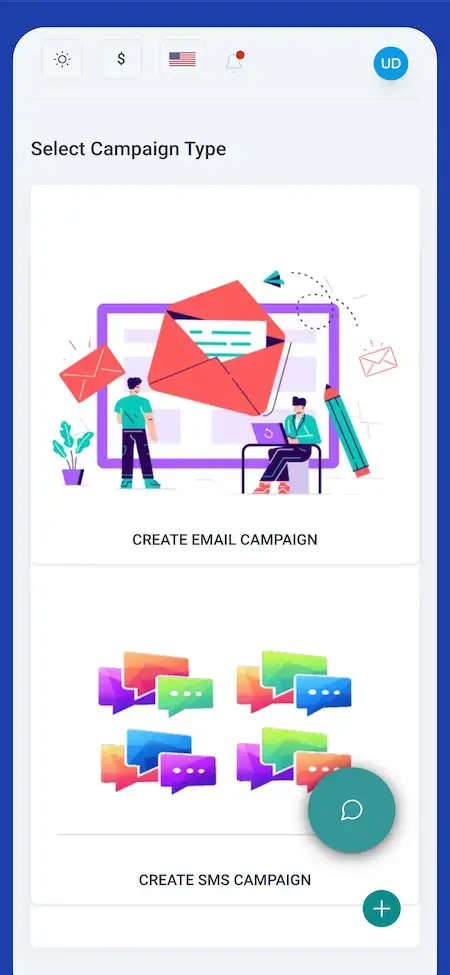
Mailchimp Clone phone screen titled Select Campaign Type, offering Create Email Campaign and Create SMS Campaign cards.
Plans meter what customers sendemail and SMS counted against each limit
  • 4Report Typesmail, SMS, campaign and limit
  • 2Message Channelsemail and SMS
  • 0%Revenue Share With Miracuvesno cut of your plan sales and no per-seat charge
  • 2Add-Ons, Priced Separatelyadvanced automation workflows and API integrations
  • 6Days to Launchand if the delay is ours, we keep going free
  • $2,499Paid Once, Not Rentedsource code yours, no per-seat fee, no monthly rental

Live in six working days, or we keep working free until you launch. Every build carries 60 days guidance, 6 months bug fixes and 12 months updates.Verify every figure

Billing Built Into the Panel

A Subscription menu and a Limit Report show each account its plan and how much email and SMS allowance is left, and a Purchase History lists earlier buys.

Seats for an Agency Team

Several people can work inside one customer account through the Agents menu and a separate agent login, with a Notes page and Support Tickets beside them.

Money Moves at the Gateway

PayPal, Stripe or Paystack collects each plan payment on gateway accounts and KYC that come from you, so card handling stays with the gateway, not the platform.

Planning an email platform of your own to resell?Talk to Product Expert

Chosen by 6,000+ clients across the globe

Miracuves is listed by Expertise.com as a managed IT service provider.Miracuves is an official member of the Forbes Business Council.Miracuves is a verified agency on DesignRush, listed among top design agencies in India.Miracuves is reviewed on Trustpilot as a software development company.Miracuves is listed by The Manifest among top managed software development companies.Miracuves is listed by DesignRush as a top software development company.Miracuves is recognized by GoodFirms as a top software development company.Miracuves is ranked among the top 1000 companies globally by Clutch.Miracuves is a top managed service provider in the United States on Clutch.

01Try it live

Hands-On Demo

Demo of an Email Marketing App Like Mailchimp: Phone App, Agent Web Panel and the Customer and Admin Views

Miracuves opens its Mailchimp clone demo to you directly, so you can test the email marketing software with your own hands. A shared agent login lets you into the browser panel of the running demo, another login belongs to the phone app, and the customer and operator views are shown to you in a booked session. Begin on the dashboard, click through the campaign form, then find the Subscription and Builder entries in the sidebar.
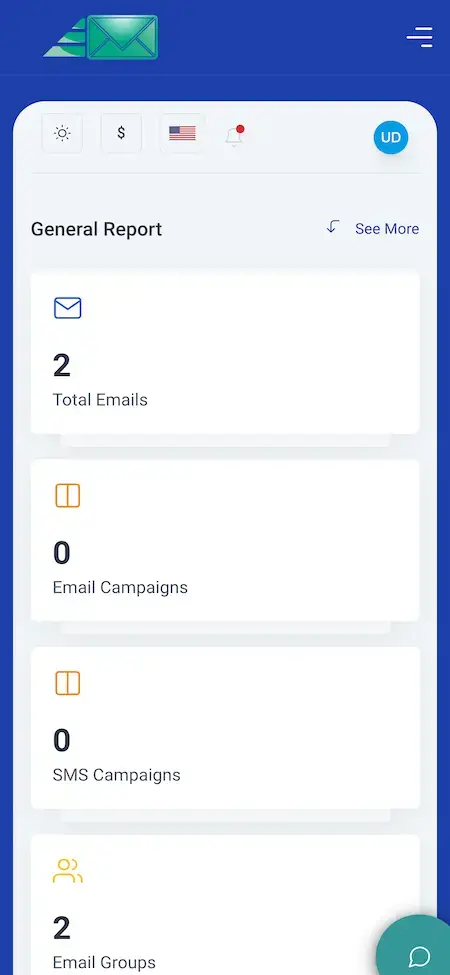
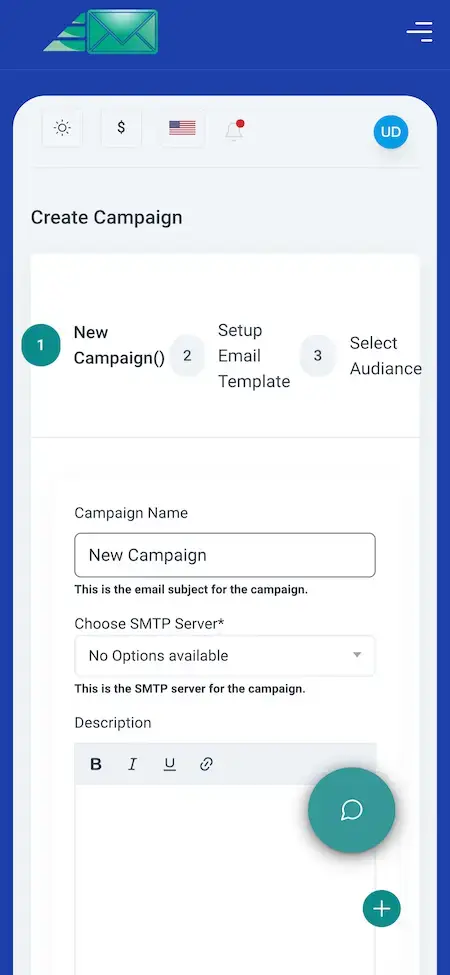
Mailchimp Clone phone screen titled General Report, with tiles for total emails, email campaigns, SMS campaigns and email groups.Mailchimp Clone phone screen for Create Campaign showing three steps, a campaign name box, an SMTP server drop-down and a description editor.
Phone app

Mailchimp Clone - Phone App

What your customer keeps in a pocket: tiles counting emails, campaigns and groups, a screen that asks whether the campaign is email or SMS, a form with three stages and a Notes page.

  1. 1Request the app link from us
  2. 2Log in with the demo details shown here
  3. 3Walk through the report, the type choice, the form and the notes
Demo login:user@demo.com | User_321
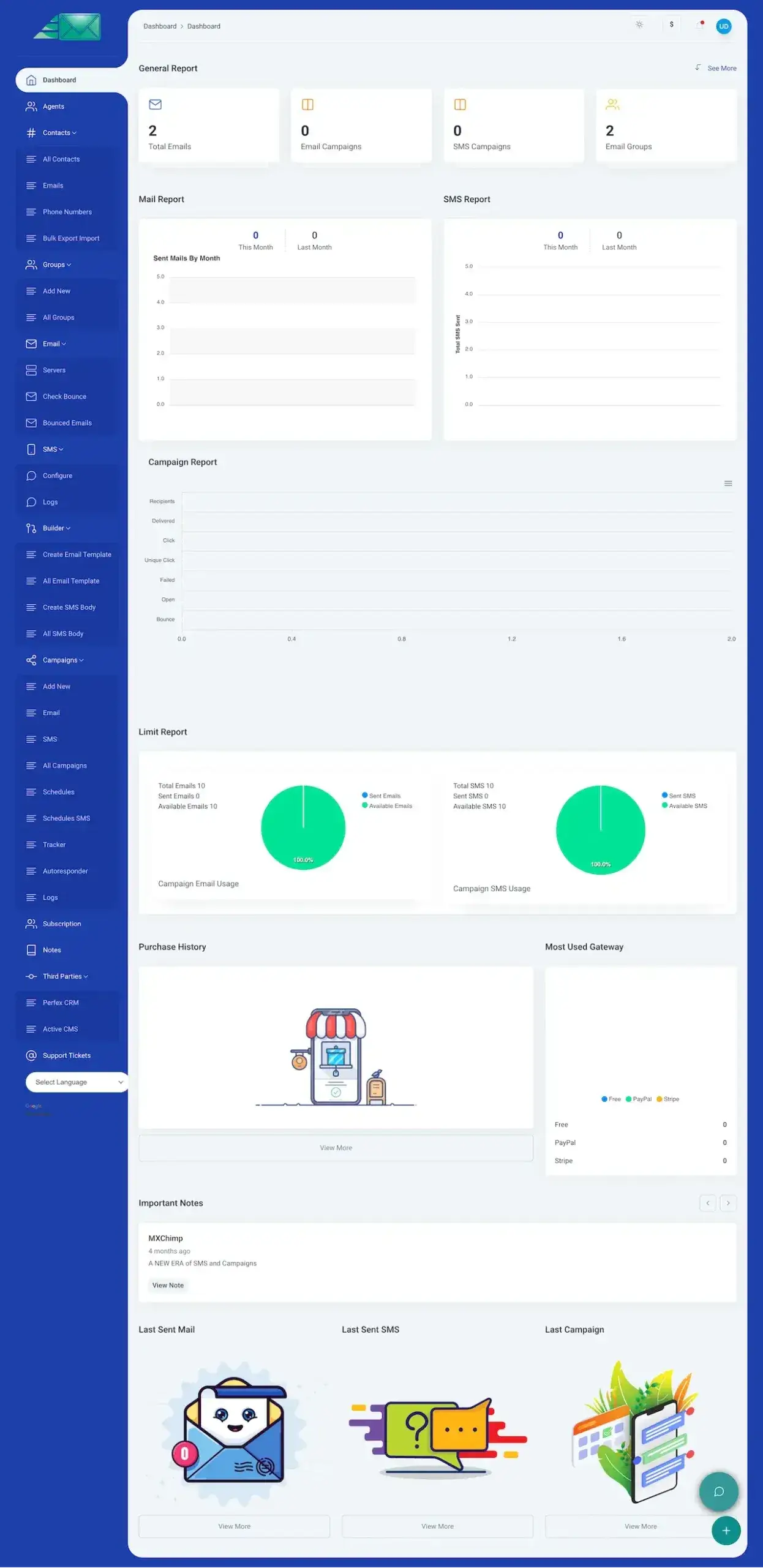
Mailchimp Clone web panel dashboard: General Report, mail and SMS charts, campaign report, limit report and a sidebar listing contacts, groups, email, SMS, builder and campaigns.
Browser panel

Mailchimp Clone - Browser Panel

The whole browser panel: contact lists and groups, email servers, a Builder for templates, a campaigns area with autoresponder, schedules and tracker, and four kinds of report covering mail, SMS, campaigns and limits.

  1. 1Open the demo address in a fresh tab
  2. 2Type in the agent details given here
  3. 3Visit Contacts, then the Builder, then Campaigns, then Reports
Demo login:agent@demo.com | Agent_321
Mailchimp Clone shown on two phones: a General Report with email, campaign and group tiles beside a Select Campaign Type screen.
Customer & admin views

Mailchimp Clone - Customer & Admin Views

How a paying customer sees the web panel and how you, the operator, manage plans, gateways and accounts behind it. No public login exists for these two views, so we open both for you during a session.

  1. 1Reserve a slot with us
  2. 2Mention the plans and gateways you plan to offer
  3. 3We tour the operator side with you on a shared screen
Admin login:given during a booked call
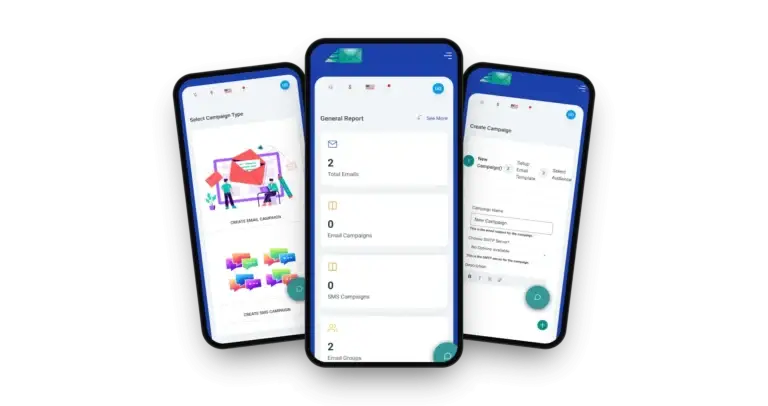
Mailchimp Clone on three phones: the general report dashboard, the campaign type chooser and the create-campaign form

Walk Through It Live

Video Walkthrough of the Email Marketing Platform: Templates, Audiences, Campaigns & Billing

A screen-share call shows more than a recording would. We open the customer panel, the phone app and the operator side one after another and map each to the business you plan to run: the plans you will sell, the gateways that collect payment, the sending accounts behind the mail and the date you want to go live.

Book a live walkthrough call.

One Screen at a Time

Mailchimp Clone App Flows - Phone Screens and the Web Panel Dashboard

What you see here are screens of the product itself: four from the customer phone app and the complete web dashboard, laid out in the order a sender moves from report to channel to campaign setup.
Mailchimp Clone phone screen titled General Report, with tiles for total emails, email campaigns, SMS campaigns and email groups.
Mailchimp Clone phone screen titled Select Campaign Type, offering Create Email Campaign and Create SMS Campaign cards.
Mailchimp Clone phone screen for Create Campaign showing three steps, a campaign name box, an SMTP server drop-down and a description editor.
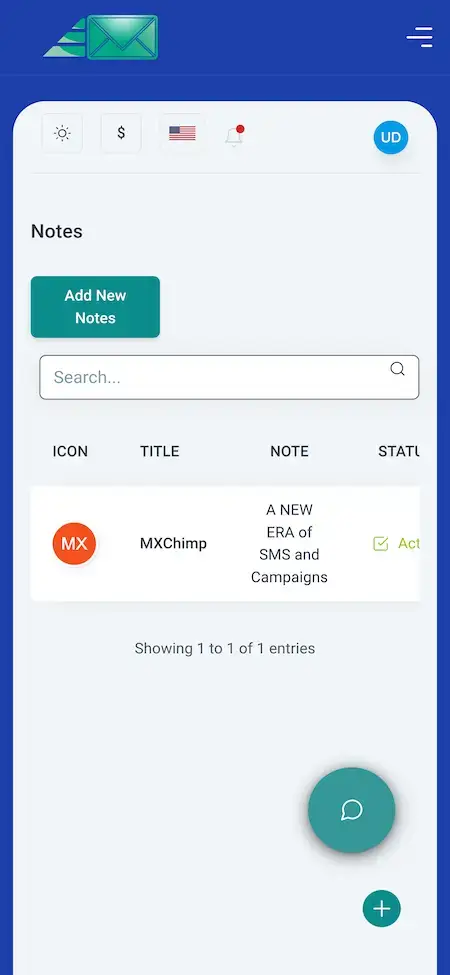
Mailchimp Clone phone Notes screen with an Add New Notes button, a search box and a table of notes.
4 screens · scroll →
Mailchimp Clone web panel dashboard: General Report, mail and SMS charts, campaign report, limit report and a sidebar listing contacts, groups, email, SMS, builder and campaigns.
1 screen

Begin on the report, choose email or SMS, fill the campaign form stage by stage and finish on the notes page. Then switch to the web dashboard, where the Builder, the Campaigns menu and the Subscription entry stand behind each of those phone screens.

Explore Our Solutions

02Proof

What Clients Say

In Their Own Words: Clients Who Launched on a Miracuves Base

The six quotes below come from founders and operators in healthcare, car rental, delivery, yacht rental, telehealth and logistics. None runs an email platform, and /client-testimonials/ carries no email-marketing client, so these are printed exactly as given and show how a Miracuves delivery goes.

DDr. Vivek RungtaFounder & Chief Dermatologist, Dermacian
“Every HMS I tried was built for general physicians, with no lesion mapping, no before/after tracking, and no procedure-based billing. Their MXHealth base gave us the patient app, doctor app, EMR and video consult out of the box. Front-desk time on scheduling and follow-ups is down ~70%, and we went fully digital in 9 months, where a fully custom job would have been 18.”
AAndre GittensCEO, Ride Corporation
“Turo is the obvious reference, but the Caribbean specifics, from different insurance norms to different payment rails, meant we needed a real partner, not just a clone. Miracuves’s MXCar base covered the listing, the trip flow, and the host payouts. We launched in 6 working days and are live in three islands.”
MMarsha WilliamsFounder, Bmore On Demands LLC
“The team was running it on a dispatcher and a Google Sheet, and we needed a real platform quickly, because we were about to onboard a major retail client. Miracuves’s Delivery Genie base gave us the rider app, the dispatch console, and live tracking. We launched in 6 weeks and cleared 4x the previous order volume in the first month.”
TTiffany DandreaOperations Director, Best Cabo Yacht Rentals
“We were running it on phone calls and a paper calendar, and we were losing bookings to bigger OTAs. Miracuves’s GetmyBoat Clone base gave us the calendar, the booking flow, and the payment engine. Online bookings are up roughly 70% in the first six months, and the ops team finally has a live view of the fleet.”
DDr. Carlos A. PalermoCo-founder & CEO, Doctta Health
“Building a compliant telehealth stack from scratch in three markets would have been a year-plus effort. Miracuves’s MXHealth base covered the patient and doctor apps, video consult, e-prescription and the pharmacy integrations. We launched in our first market in 9 weeks and rolled out to two more in the following six months.”
BBrian LatailleVP Logistics Technology, IBC Tanks Canada
“We were juggling spreadsheets, a third-party GPS provider, and a phone. We needed a single operations console. Miracuves’s MXLogistics base covered the trip lifecycle, the driver app, and the customer tracking page. We’ve cut operations admin time by about 40%.”
Read More Client TestimonialsOperators and founders in their own words

Proof Without Spin

Mailchimp Clone Case Study - The Published Record, and What You Can Verify on Your Own

Not every product on our list comes with a client we can name. This email and SMS model has none published as yet, so the section lays out the proof available now rather than making one up.

Status
Nothing to name yet, plenty to inspect

No client deployment of this email and SMS product has been published by Miracuves, so none is invented here. You will find what can be checked today, and what we refuse to do in its place.

MXChimp codebaseBase
Email and SMSChannels
Running demoProof
6 daysTo launch
3Login types
12Sidebar sections
Mailchimp Clone web panel dashboard: General Report, mail and SMS charts, campaign report, limit report and a sidebar listing contacts, groups, email, SMS, builder and campaigns.
Checks you can run
  • Sign in with the agent login, then open Contacts, the Builder and Campaigns
  • Start one email and one SMS campaign using the staged form, online or in the app
  • Locate the Subscription entry, the Limit Report and the Purchase History
  • Open a campaign report and see how its recipients split into outcomes
  • Compare the six release-log versions to see what each of them changed
What we refuse to do
  • Pass off another company's customer as our own
  • Make up a send volume, a subscriber count or a revenue figure
  • Dress a modeled scenario up as a case study
  • Guarantee inbox placement or open rates
Choosing next steps
  • Try the agent login yourself
  • Tour the operator side with us on a call
  • Study a published case study from another base
  • Get scope and price confirmed in writing first

Once a named client deployment of this product is published, it will be added to this page together with its scope and what the client supplied. Until then, the demo and a booked call are the only evidence we can offer in good conscience.Miracuves product team · about this section

Look through the published case studiesNot one is an email platform, yet each shows how we scope a delivery.

03The product

At a Glance

What You Get to Sell With the Mailchimp Clone App

Think of Miracuves' Mailchimp clone as an email marketing platform that lives on your own servers and that you rent out to others under your brand. Each customer stores templates and contact groups, writes email and SMS campaigns and reads the outcome, and you choose the plans, the limits and the gateways that charge them.

Mailchimp Clone on three phones: the general report dashboard, the campaign type chooser and the create-campaign form

A Business, Not a Send Button

Beside every campaign you will find templates, groups, mail servers, text messaging, a tracker, reports, plans and payments, gathered in one panel that carries your name.

Code You Can Open

All source files arrive complete and readable, so your developers can alter a screen or a flow later, with no per-seat charge standing in the way.

Add-Ons Labeled as Add-Ons

Branching logic, event triggers and links to outside tools are paid modules. We describe them as extras and never include them in the base feature count.

Web, Android & iOS

What Is a Mailchimp Clone Script?

Sending a message is the easy bit. A product worth reselling also needs accounts, saved templates, audiences, plan limits and a way to take payment, and here each of those parts already exists and can be inspected on the demo.

Mailchimp Clone web panel dashboard: General Report, mail and SMS charts, campaign report, limit report and a sidebar listing contacts, groups, email, SMS, builder and campaigns.
  1. 01Campaigns for email and SMS written through a staged form
  2. 02Saved templates and text bodies in the Builder
  3. 03Contact lists and groups you can bulk load or export
  4. 04Plans, limits, gateways and a record of purchases
  5. 05A browser panel and Flutter apps on both phone platforms

Delivery includes the browser panel, the Flutter apps, the operator side and the entire source. Twelve sidebar sections hold the tools your customers reach for daily.

Everything Included

Mailchimp Clone Features - Plans, Gateways, Templates, Audiences, Campaigns & Reports

Every feature Miracuves lists for this Mailchimp clone can be seen on a demo screen or read in the release log. A capability that needs an extra module is called an add-on and appears further down.

Feature 01 / 12

Plans, Limits & Subscription

The product is built to be sold. Within the customer panel a Subscription menu and a Limit Report reveal which plan an account is on and how much of its email and SMS allowance has gone, while a Purchase History lists earlier buys.

  • Subscription entry in the sidebar
  • Totals for emails sent and emails left
  • Totals for texts sent and texts left
  • Past buys listed in Purchase History
  • Dashboard chart of the most used gateway
Feature 02 / 12

Payment Gateways

Customers pay for plans through the gateways you turn on or off. The demo's chart lists Free, PayPal and Stripe, the release log adds Paystack, and PayPal handling was reworked in version 6.11.0.

  • Enable or disable each gateway from the panel (6.10.7)
  • Paystack joined in version 6.10.8
  • Switching PayPal between modes fixed in 6.11.0
  • PayPal errors handled better in 6.11.0
  • Gateway accounts and their KYC come from you
Feature 03 / 12

Saved Templates & Text Bodies

The Builder menu stores the raw material of every campaign: email templates and text bodies, each with its own create screen and a list of everything saved so far.

  • A create screen and a full list for email templates
  • A create screen and a full list for text bodies
  • A template stage inside the campaign form
  • A description box with simple text styling
Feature 04 / 12

Contacts, Groups & Audiences

Contacts are kept as subscribers' email addresses and phone numbers, gathered into groups and moved around in bulk by an export and import screen. In the final stage of a campaign the audience is chosen from those groups.

  • Separate views of contacts, emails and numbers
  • Export and import screen for entire lists
  • New groups added from their own screen
  • Group totals counted on the General Report
  • Release 6.11.2 touched how contacts are handled
Feature 05 / 12

Three-Step Campaign Form

The email campaign builder opens on a screen with an email card and an SMS card, then moves through three stages: naming it, setting up the email template and selecting the audience.

  • A first screen offering email or SMS
  • Three stages from naming to audience
  • Subject line, SMTP server and a description
  • The same form repeated on phone screens
  • Web Campaigns menu: Add New, Email, SMS, All Campaigns
Feature 06 / 12

Autoresponder, Schedules & Tracker

Timing tools sit in the Campaigns menu: an Autoresponder, a Schedules page for email and its twin for SMS, a Tracker and Logs, so when and in what order mail goes out is settled next to the campaign.

  • An Autoresponder page inside Campaigns
  • Email schedules and SMS schedules kept apart
  • Tracker grouped by user since 6.11.1
  • Logs recording campaign activity
  • Branching and event triggers need the add-on
Feature 07 / 12

Email Servers & Domain Checks

Outgoing mail travels through SMTP servers listed in the Email menu, and each campaign picks one. A correction to sending-domain verification arrived in release 6.11.0.

  • Servers page in the Email menu
  • A single SMTP server chosen for each campaign
  • Domain verification corrected in 6.11.0
  • Your own SMTP provider is required
Feature 08 / 12

Bounces & Unsubscribes

Addresses that fail get a checking page and a list of their own, campaign reports tally failed and bounced messages, and release 6.10.9 fixed what campaigns do about people who opted out.

  • Bounce checking and a bounced list in the Email menu
  • Failed and bounced tallies on every campaign report
  • Opt-outs in campaigns handled properly from 6.10.9
  • Consent rules are the operator's concern
Feature 09 / 12

SMS Campaigns

Text messaging runs as a channel in its own right: an SMS menu for setup and logs, plus bulk SMS campaigns, text bodies and a schedule. A Twilio SMS gateway is mentioned in the release log.

  • SMS menu for configuration and logs
  • SMS campaigns begin from the type screen
  • Twilio SMS gateway problems fixed in 6.10.8
  • Its own report and its own limit, apart from email
Feature 10 / 12

Reports & Analytics

A General Report greets the user, charts show mail and SMS sent each month, and every campaign gets seven measured lines covering recipients, delivered mail, clicks (plain and unique), failures, opens and bounces.

  • Counts for emails, campaigns and groups at the top
  • This month set beside last month for mail and SMS
  • Seven measured lines for each campaign
  • Limit Report with a usage pie per channel
  • The General Report also appears on a phone
Feature 11 / 12

Agent Seats, Notes & Tickets

Several people may work in one customer account through the Agents menu and a login for agents, with a Notes page for the team and Support Tickets for questions.

  • Agents menu and a login just for them
  • Notes page with search and a status column
  • Support Tickets in the sidebar
  • A notification bell beside the profile badge
Feature 12 / 12

Languages, ChatGPT Option & Third Parties

A language dropdown closes the sidebar, a ChatGPT switch lives in the application setup, and a Third Parties page lists a CRM link and a CMS link.

  • A dropdown for choosing the language
  • A ChatGPT switch in the application setup (version 6.11.1)
  • A Third Parties page that lists a CRM and a CMS
  • Connections to other tools belong to the add-on

Know this before you buy: The platform is delivered under your branding and deployed on your hosting. What you bring: a domain name and hosting space, developer accounts for the app stores, your branding and company details, a KYC-cleared payment gateway account, an SMTP provider, Twilio for SMS if you want it, plus keys for any other outside service. Review by Apple and Google is theirs to do and falls outside our 6-day build.

Talk to Our Team

How Resellers Earn

How a Mailchimp Clone Reseller Earns - Plan Fees, Free Entry, Send Allowances, Volume Contracts & Checkout

A reseller running the Mailchimp clone gets paid in several ways, and Miracuves keeps each one separate in the product so that changing one leaves the others untouched.

Two settings usually do most of the work: what a plan costs and how many sends it includes.

  1. 01

    Monthly Plan Fees

    A customer pays a repeating fee for a plan with a ceiling on email and SMS volume. In the demo, the Subscription menu and the Limit Report display the plan beside the usage counted against it.

  2. 02

    Free Entry Plan

    A plan without a fee lets newcomers try the panel before paying. The gateway chart in the demo shows a Free entry beside PayPal and Stripe, and whether you offer one is for you to decide.

  3. 03

    Send Allowance Ladder

    Each step up a plan raises the monthly email total. Because the Limit Report already separates total, sent and available per channel, the allowance is the number you price.

  4. 04

    Committed Volume Contracts

    A bigger customer can buy a fixed monthly allowance that is agreed beforehand. Plan limits make this workable, though the contract terms remain your own commercial matter.

  5. 05

    Text-Message Allowance

    Texts have a limit of their own, a schedule of their own and a Twilio gateway named in the release log, which lets SMS be sold as a second allowance beside email.

  6. 06

    Checkout Through Your Gateways

    Plans are settled through whichever gateways you connect. Three are named across the demo and the release log (PayPal, Stripe, Paystack), and each purchase leaves a line in the Purchase History.

Numbers taken from the filings, price pages and store terms of email platforms and billing providers, laid against the six ways a reseller of this product can earn: monthly plans, a free entry, send allowances, committed volume, text allowances and gateway checkout.
Revenue streamHow it is chargedTake rateTypical take rateWhat sets the ceiling
Monthly Plan FeesA repeating subscription whose tier fixes the email and SMS volume.Klaviyo prices tiers by stored profiles and messages sent, and its filing states that seats carry no price.The profiles and sends each tier allows. Klaviyo took $1,234.0 million in 2025 from plans built on this pattern.
Free Entry PlanA plan at no cost, with firm caps, that nudges a user toward a paid tier.Klaviyo keeps an account free up to 250 profiles and 500 monthly sends; Mailchimp's free plan stops at 250 contacts.The cost of delivering those free sends. The cap you choose decides how much of that bill you absorb before anyone pays.
Send Allowance LadderPlan tiers, each lifting the monthly email limit a little higher.Mailchimp lets a Standard plan send up to 6,000 emails monthly and a Premium plan up to 150,000.What sending costs you. Amazon SES charges $0.10 per 1,000 emails, and Mailgun sells monthly plans from $15 to $90 with overage falling from $1.80 to $1.10 per 1,000. Your margin is whatever your plan price adds above that.
Committed Volume ContractsA set fee agreed in advance for a defined messaging volume or number of users.Braze says its fees are mostly an upfront commitment for message volumes or monthly active users.How ready a customer is to commit. Contracts of this kind produced $738.2 million of Braze revenue in the year to 31 January 2026.
Checkout Through Your GatewaysA card or wallet payment taken by whichever gateway you connect.Stripe's US page quotes 2.9% plus 30 cents on every domestic card charge.Where customers buy. Inside apps, Apple charges 30% by default, dropping to 15% for Small Business Program members and for qualifying subscriptions; on subscriptions in the US, UK and EEA, Google Play takes 10% and adds a 5% billing fee. Neither fee touches purchases made on the web.

Reading the table. Klaviyo's numbers are sourced from its 2025 annual report together with its pricing page, Braze's from its fiscal 2026 annual report, Mailchimp's send caps from its pricing page, the raw cost of sending from Amazon SES and Mailgun, the card charge from Stripe US pricing and in-app terms from Apple and Google Play. Everything here is published by other companies, so use it only to model your own prices: it is not a quote or a forecast of earnings, and the prices you charge are set in your plan settings.

Revenue Model

Mailchimp Clone Revenue Model, Stage by Stage

All six earning lines in the Mailchimp clone, from the free entry plan to committed volume contracts, are live in the base build, and resellers tend to price each one as their senders' monthly volume climbs.

Launch

Open with a free entry plan and one or two paid tiers, so a newcomer who outgrows the free cap has a paid tier to move up to.

Traction

Once customers send steadily, widen the send allowance ladder and price SMS as an allowance of its own, read straight off the Limit Report for each channel.

Scale

Larger senders move onto committed volume contracts, while checkout through PayPal, Stripe or Paystack keeps every purchase on record in Purchase History.

Every plan fee paid through PayPal, Stripe or Paystack settles in your own gateway account, with no Miracuves share taken.

Looking for a revenue plan shaped around your own mailer?Design My Revenue Model

Run the Business Daily

Admin Panel for a Mailchimp-Style Mailer: Accounts, Plans, Payments, Servers & Reports

Miracuves puts a reseller's normal working day into one Mailchimp clone admin panel: seeing who signed up, which plan they picked, what they paid, which servers deliver their mail and what the reports tell them.

Mailchimp Clone web panel dashboard: General Report, mail and SMS charts, campaign report, limit report and a sidebar listing contacts, groups, email, SMS, builder and campaigns.
Mailchimp Clone shown on two phones: a General Report with email, campaign and group tiles beside a Select Campaign Type screen.

Operator Controls

  • 01

    Plans & Subscriptions

    Create the plans your customers buy, then follow how much of each account's email and SMS allowance is used through the Subscription menu and the Limit Report.

  • 02

    Gateways & Purchases

    Turn payment gateways on or off, sort out PayPal mode switching and study the purchase history and the chart of which gateway is used most.

  • 03

    Accounts & Agents

    Oversee customer accounts and the agents inside them. The demo shows an Agents menu and a login reserved for agents.

  • 04

    Templates & Content

    Keep watch over the email templates and text bodies customers draw on, all of which are kept under the Builder menu.

  • 05

    Servers & Sending

    Register the SMTP servers campaigns go out through, verify a domain and inspect addresses that bounced.

  • 06

    Dashboard & Reports

    The first screen is a General Report, followed by monthly mail and SMS charts, a campaign report and a limit report.

  • 07

    Support Tickets & Notes

    Answer customer questions in Support Tickets and record team remarks on the Notes page.

  • 08

    Languages, ChatGPT Option & Third Parties

    Select a language from the dropdown, set the ChatGPT option in the application setup and open the Third Parties menu, which names a CRM and a CMS.

The Money Side

From the moment a customer chooses a plan until the payment lands.

  • Subscription page with plan and usage
  • Purchase History of past buys
  • Gateway chart naming Free, PayPal and Stripe
  • Mode switching and error handling for PayPal

The Mail Side

Controls over the messages themselves, kept separate from billing.

  • SMTP servers page
  • Bounce checking and a bounced list
  • Verification of sending domains
  • Opt-out handling inside campaigns

Should the console do more? A different plan layout, additional reports, more gateways or a bespoke approval step can each be added as separate work. Tell us what your team does every day and we will quote it in writing.

Talk to Our Team

04Package and price

The Full Package

Your Mailchimp Clone Script Package: Source Code, Phone Apps and an Installed Platform

What arrives from Miracuves is a running Mailchimp clone script rather than loose components: the web panel, the phone apps, the operator side and the code under them. From handover it is yours, free of seat fees and of any license renewal. Miracuves takes no commission or revenue share from the plans you sell. Your SMTP provider, Twilio, payment gateways and the app stores bill you for their own services, and inbox placement, email-law consent and any security certification stay with you and those providers.

01

Full Source Code

Every line for the web platform and the Flutter apps, delivered unencrypted so your developers can shape it around your business.

  • Unencrypted web platform source
  • Flutter source behind both phone apps
  • Free for you to modify and redeploy
  • Handed over inside a repo that belongs to you
02

Database & Installer

The MySQL storage the product page names, together with the installer (its closing step is mentioned in the release log), put in place on your servers.

  • MySQL storage layer
  • An installer that ends with a last step
  • Keeps contacts, groups, campaigns and plans
  • Runs on hosting you control
03

Mail & Text Delivery Setup

The SMTP server page, the domain check and the Twilio SMS gateway, connected to accounts that you supply.

  • SMTP servers registered under Email
  • Sending-domain verification
  • Twilio gateway behind text campaigns
  • Bounce checking with a bounced list
Mailchimp Clone web panel dashboard: General Report, mail and SMS charts, campaign report, limit report and a sidebar listing contacts, groups, email, SMS, builder and campaigns.
04

Browser Panel

All of the browser panel: dashboard, contacts, groups, the Builder, campaigns, reports, subscription, notes and tickets.

  • Four report types: mail, SMS, campaign, limit
  • Lists and groups you can load in bulk
  • A Builder holding templates and text bodies
  • A Campaigns area: autoresponder, schedules, tracker, logs
05

Mobile Apps

Customer apps written in Flutter for Android and iOS. The phone screens shown on the product page cover the General Report, the email-or-SMS choice, the Create Campaign form and Notes.

  • A General Report of four tiles
  • A choice between email and SMS
  • The Create Campaign form in three stages
  • A Notes page with search and status
Mailchimp Clone phone screen for Create Campaign showing three steps, a campaign name box, an SMTP server drop-down and a description editor.
06

Plans & Payments

Subscription and limit screens, a record of purchases and the payment gateways named in the demo and the release log.

  • A Subscription page showing plan and usage
  • A Limit Report for email and SMS
  • PayPal, Stripe and Paystack by name
  • A purchase record and a gateway chart
07

Access Layer

Distinct sign-ins for admin, agent and user, limits attached to each account and payments collected by the gateway you connect.

  • Three kinds of login
  • Authentication and login-redirect fixes noted in the log
  • Limits per account
  • Money taken by the gateway
08

Handover & Support

We rebrand and deploy for you, you publish the apps from your accounts, and three support periods start together on launch day.

  • Your logo, icons and colors applied
  • Deployment onto your hosting
  • Apps released via your developer accounts
  • 60 days guidance, 6 months bug fixes, 12 months updates

Rather look before you leap? Use the shared agent login on the demo, or book a tour. We will open the campaign form, the Builder, the reports and the Subscription screens and tie each of them to the plans you intend to sell.

Talk to Our Team

Transparent Pricing

How Much Does It Cost to Build an Email Marketing Platform Like Mailchimp?

The ready-made white-label Mailchimp Clone costs a fixed $2,499. Anything past the base, whether an add-on, an extra integration or a custom flow, is scoped and quoted separately in writing.

Most Popular

Professional

Ready-Made Launch Package
$2,499one payment
Live in 6 days

Chosen by: Founders of email SaaS products, agencies selling mail to clients, software firms adding a mailer

The platform arrives looking like the demo, rebranded with your logo, icons and colors and deployed on hosting you own.

Get Started

Enterprise

Custom Builds for Larger Scope
Customquote
Go-live: based on final scope

Chosen by: Multi-brand agencies, regional mail providers, operators running several countries

If you need flows or integrations the base lacks, we build to your brief and agree scope and price before work begins.

Request a Quote
Development Cost

Mailchimp Clone Development Cost in 2026

Miracuves sells the ready-made Mailchimp clone for $2,499, paid once, covering the browser panel, the operator console, Flutter apps for Android and iOS, the MySQL installer and the full unencrypted source, rebranded and installed on your own servers within six working days. No seat fee, license renewal or cut of your plan sales follows.

$2,499 Paid once
6 working days Rebranded and live
0% Revenue share

What moves your total sits outside the software invoice

  • Your SMTP provider's sending charges as volume climbs
  • Twilio fees for every SMS your customers send
  • Gateway processing fees and the KYC on your PayPal, Stripe or Paystack accounts
  • Hosting, a domain and the Apple and Google developer accounts
  • The Advanced Automation Workflows or API Integrations add-on, if you want either

Custom work, from a new report to an extra gateway, gets a written quote before it starts and typically takes 2-8 weeks.

Compare Your Options

Ready-Made Mailchimp Clone vs Custom Development vs SaaS

Want to resell email marketing like Mailchimp under your own brand? Compare the ready-made mailer Miracuves hands over for you to own with a custom build and a white-label SaaS reseller plan.

CriteriaMiracuvesReady-Made Mailchimp CloneCustom DevelopmentSaaS
Launch timeSix days to a white-labeled platformMonths before the first campaignSame week, inside reseller limits
Upfront cost$2,499 fixed, paid oncePriced through a written scopeReseller subscription every month
Source code ownershipAll code, delivered unencryptedHanded over after final paymentKept by the email provider
CustomizationAutomation and API add-ons, quotedAny feature, at hourly ratesTemplates and colors only
Ongoing feesNo commission or per-customer chargeDeveloper time for upkeepPer-contact or per-send pricing
Branding & app-store listingYour apps on Android and iOSYour brand once it shipsProvider name in footers or domains
Best forAgencies reselling email and SMSSenders with unusual compliance rulesTesting a reseller idea

Where It Fits

Email Marketing Software Like Mailchimp: Reselling, Templates, Newsletters, Agency Accounts & SMS

Operators of Miracuves' Mailchimp clone each lean on a different part of one product. A reseller puts plans and gateways first, an agency puts client accounts first and a publisher puts templates and schedules first. That emphasis is configuration and needs no separate build.

ResellerPlansResell Mail Under Your Brand

Put the entire product out under your name: a free entry plan, paid tiers with send limits, gateways to collect payment and a purchase record you can read.

01
Mailchimp Clone web panel dashboard: General Report, mail and SMS charts, campaign report, limit report and a sidebar listing contacts, groups, email, SMS, builder and campaigns.
TemplatesBuilderA Branded Template Library

Save email templates and text bodies once in the Builder, then let each customer draw on them for campaigns and choose a group as the audience in the final stage.

02
Mailchimp Clone phone screen for Create Campaign showing three steps, a campaign name box, an SMTP server drop-down and a description editor.
NewsletterScheduleNewsletters on a Timetable

Write the issue, choose the group and line the send up for whichever hour suits, with email schedules and SMS schedules kept on separate lists.

03
Mailchimp Clone phone screen titled Select Campaign Type, offering Create Email Campaign and Create SMS Campaign cards.
AgencyClientsAccounts for Agency Clients

Open an account per client with its own agents, groups and reports, then bill each client through a plan configured under Subscription.

04
Mailchimp Clone web panel dashboard: General Report, mail and SMS charts, campaign report, limit report and a sidebar listing contacts, groups, email, SMS, builder and campaigns.
AutoresponderSignupA First Message After Signup

Hook the autoresponder to a signup so every new contact receives a welcome, then follow with scheduled sends. Branching sequences need the automation add-on.

05
Mailchimp Clone phone screen titled General Report, with tiles for total emails, email campaigns, SMS campaigns and email groups.
SMSEmailTexts Beside Email

Send SMS campaigns through the Twilio gateway alongside email ones, giving each channel a report, a schedule and a limit.

06
Mailchimp Clone phone Notes screen with an Add New Notes button, a search box and a table of notes.
Business Model

Mailchimp Clone Business Model: Three Ways to Run It

Plans in the Mailchimp clone meter how many emails and texts each customer may send, and that send-allowance meter is what lets one install carry a reseller brand, an agency desk or a newsletter and SMS host.

Branded reseller

Sell email marketing under your own name to any business, with a free entry plan pulling sign-ups toward paid tiers and their send limits.

Agency platform

Give every client an account with its own agents, contact groups and reports, and bill each one through a plan set under Subscription.

Newsletter and SMS host

Serve publishers who mail on a timetable, or text resellers adding email, with separate schedules, a Twilio gateway and SMS counted apart.

In all three, you decide the plan pricing, tiers, the email and SMS limits on each and the gateways customers pay through, working from source held in your own repository.

Six starting points, one product. All six run on the same web panel, apps and operator side. The differences are the plans you sell, the limits you set, the customers you invite and the branding, which keeps you on one codebase.

Talk to Our Team

Market Timing

Why Launch an Email Marketing Platform in 2026?

People who own an audience want to write to it without repeating the same chores each time. A platform under your brand lets you sell that relief and keeps the plan, the payment and the relationship in your hands.

01

Every Business Wants to Reach Its List

Shops, clubs, publishers and agencies each have an audience to write to. A mailer sold in your own name places you in front of a need that will not fade.

02

Billing Turns Usage Into Income

Because the Limit Report keeps total, sent and available mail apart for each channel, plans are simple to price around how much a customer sends.

03

Email and Text Under One Login

People who write over two channels like a single dashboard, and in the demo email and SMS each get a schedule, a report and a limit inside one account.

04

You Keep the Customer Relationship

When the platform wears your name, contact lists, reports and the payment relationship stay with you and do not drift to somebody else's mailer.

05

Sender Rules Keep Tightening

Domains sending more than 5,000 emails a day to Outlook must now pass SPF, DKIM and DMARC. Readying those domains is the operator's task, and the platform offers the server list and domain check to help.

06

Starting From Zero Costs More

Most of a mailer is accounts, templates, audiences, schedules, reports, plans and payments. A white-label copy is running on your hosting once our 6-day build ends.

Platform by the Numbers

12

Menu Sections

2

Channels to Send On

3

Gateways Named

6

Numbered Releases

The hard part of a resellable mailer is its dull middle: accounts, limits, server settings, schedules and a payment trail that all have to agree. Here that middle is already built.

Industries

Industries We Serve

Miracuves built this Mailchimp clone app for any business that wants to send email and SMS campaigns in its own name or sell that ability on. Agencies mail for clients, online shops write to buyers, software houses add a mailer to their line-up, telecom resellers pair text with email, publishers run newsletters, schools keep in touch with learners, venues write to guests and charities reach donors.

  1. 01Newsletter Publishers
  2. 02Agencies
  3. 03Online Shops
  4. 04Software Houses
  5. 05Telecom Resellers
  6. 06Training Providers
  7. 07Venues & Hotels
  8. 08Charities
  9. 09Property Firms
  10. 10Fintech Teams
  11. 11Event Organizers
  12. 12Retail Groups

Miracuves’ Mailchimp Clone is an email platform that bends to any audience-facing business model, with your plans, reports and branding on show from the first screen.

06Under the hood

End to End

How a Mailchimp Clone App Works: Log In, Choose a Channel, Build, Schedule & Track

In the Miracuves Mailchimp clone app, senders experience a campaign as a few taps, while underneath sits a chain from channel and template through audience and server to timing and measurement. What follows traces that chain from login to a tracked send and then shows the architecture supporting it.

One Sender's Path - From Login to a Tracked Send

  1. Mailchimp Clone phone screen titled General Report, with tiles for total emails, email campaigns, SMS campaigns and email groups.
    1Log In to the Email Marketing Dashboard

    Signing in opens a General Report with four counters: emails, email campaigns, SMS campaigns and contact groups.

    • Email address and password
    • Four tiles of counts at the top
    • A See More link to full reports
  2. Mailchimp Clone phone screen titled Select Campaign Type, offering Create Email Campaign and Create SMS Campaign cards.
    2Pick an Email or SMS Campaign

    On the Select Campaign Type screen, one large card starts an email campaign and the other an SMS campaign.

    • The email card
    • The SMS card
    • Matching Email and SMS lists in the web Campaigns menu
  3. Mailchimp Clone phone screen for Create Campaign showing three steps, a campaign name box, an SMTP server drop-down and a description editor.
    3Design the Email and Choose the Audience

    A three-step form names the campaign, sets up its email template and selects who receives it.

    • A name box and a description editor
    • A pick-list of your SMTP servers
    • The audience is chosen last
  4. Mailchimp Clone web panel dashboard: General Report, mail and SMS charts, campaign report, limit report and a sidebar listing contacts, groups, email, SMS, builder and campaigns.
    4Schedule Sends and Set Autoresponders

    Under Campaigns in the web panel sit separate email and SMS schedules, an autoresponder, a tracker and send logs.

    • Two schedule pages, one per channel
    • An autoresponder page
    • A tracker and activity logs
  5. Mailchimp Clone phone Notes screen with an Add New Notes button, a search box and a table of notes.
    5Track Opens, Clicks and Bounces

    Each campaign report breaks a send into delivered, opened and clicked mail plus failures and bounces, while a Notes page holds the team's remarks.

    • Seven measured lines for each campaign
    • Monthly mail and SMS charts
    • A searchable Notes page with status
Visual Flow DiagramLog inPick channelBuildScheduleTrack

How It's Built

The Platform Behind Each Campaign: Architecture of the Mailchimp-Like Mailer

Talk to Our Team
  1. Part 01

    Roles With Their Own Logins

    Admin, agent and user each sign in separately, so what a customer sees is decided by role and not by a menu hidden from view.

  2. Part 02

    Campaign Workflow

    Campaigns are drafted in a staged form and then driven by timetables, an autoresponder and a tracker, with a log beside them.

  3. Part 03

    Outbound Channels

    Email goes out via the SMTP servers you add and SMS via a Twilio gateway, and each owns a schedule and a report.

  4. Part 04

    List Storage

    People are stored as contacts, phone numbers and groups in the database, and bulk export and import carry whole lists in and out.

  5. Part 05

    Subscriptions & Payments

    A subscription sets the email and SMS limits, and payments arrive through PayPal, Stripe or Paystack, leaving a purchase history behind.

  6. Part 06

    Phone Apps

    On phone screens the product shows the report, the type choice, the campaign form and notes, and its apps are Flutter builds for both Android and iOS.

Under the Hood

Mailchimp Clone Software Stack: PHP, MySQL & Flutter

An email product you resell leans on a steady web tier, a database that keeps lists and plans in step and phone apps for the two stores. Here, taken from the product page, is what Miracuves made this Mailchimp clone software from.

FRONT & BACK OFFICE

Web Layer

PHP Bootstrap
  • Customer panel and operator console run in a browser
  • Responsive layout built on Bootstrap
  • PHP is named as the web layer
  • Release log reaches version 6.11.2
STORAGE

Database

MySQL
  • Holds contacts, groups, campaigns and plans
  • Installer ends with one last step
  • Lives on the host you pick
APPS

Phone Apps

Flutter Android iOS
  • Apps in Flutter, kept on current dependencies
  • Screens: report, campaign type, create form, notes
  • One build for Android, one for iOS
  • Store listings placed under developer accounts you hold
DELIVERY

Mail & Text Delivery

SMTP Twilio
  • SMTP servers registered under Email
  • Domain verification corrected in 6.11.0
  • Twilio gateway issues fixed in 6.10.8
  • You bring your SMTP and Twilio accounts
BILLING

Payments & Plans

PayPal Stripe Paystack
  • The gateway chart lists Free, PayPal and Stripe
  • Paystack was added in 6.10.8
  • Switching PayPal between modes was repaired in 6.11.0
  • Opening gateway accounts and passing KYC is yours
CONNECTIONS

Outside Services

Firebase Translation API ChatGPT option
  • Firebase is named among the integrations
  • A translation service behind the languages
  • The ChatGPT switch in application setup (6.11.1)
  • A Third Parties page showing a CRM and a CMS
For your tech lead:

The web and operator side is described as PHP with Bootstrap, storage is MySQL, and the apps are Flutter. Outside services including Twilio, Firebase, gateways, translation and ChatGPT use accounts and keys of your own, entered when we deploy. Every item is common and easy to hire for.

Talk to Our Team

Room to Grow

Built to Scale - Separate Roles, Visible Limits & Room to Grow

The distance a resold Mailchimp clone from Miracuves can travel depends on what you attach: the number of SMTP servers, the SMS gateway and the hosting you give it. Each is a separate part of the product, so a larger list or a busier sender calls for a changed setting and no rewrite.

Servers Are Chosen, Not Fixed. Each campaign selects one of the servers listed in the Email menu, so sending capacity grows once you register another provider account.

Limits Are In View. Customers read their total, used and remaining mail and texts on the Limit Report, so a plan boundary appears before they cross it.

Big Lists Travel Easily. Contacts, email addresses and phone numbers are shown in separate views, and bulk export and import handle large uploads.

Releases Carry Numbers. The release log records six versions, which tells you what changed before you update.

01

Independent Roles

Admin, agent and user sign in independently, so one role can change without touching the others.

02
Mail serversTimingQuotas

Pick Your Servers

Mail servers are listed in the Email menu and chosen campaign by campaign, so capacity follows whichever provider you add.

  • A servers page in the Email menu
  • One SMTP choice per campaign
  • Domain checks repaired in 6.11.0
  • Your provider sets the ceiling
03

Limits in Plain View

The Limit Report shows each account's sent and remaining mail, a pie of usage drawn for each channel.

04
ReceiptsCheckoutTiers

Payments on Record

The Purchase History records every plan bought and a chart shows which gateway took the money, so dashboard numbers can be checked against payments.

  • A list of past purchases
  • A chart of the busiest gateway
  • Three gateways named: PayPal, Stripe, Paystack
  • Release 6.11.0 reworked PayPal handling
05

Large Lists

Contacts, addresses and numbers each get a view of their own, while a bulk export and import shifts large lists.

  • Three separate lists: contacts, emails, numbers
  • An export and import page
  • Groups serve as audiences
  • Contact handling revised in 6.11.2
06

Documented Handover

Source code, setup steps and deployment notes are passed on so another team can run the platform alone.

No Throughput Number Is Promised. Volume rests on your SMTP provider, your hosting and the quality of your lists, so we publish no figure. Given the complete source and a common stack, a new server, screen or integration is ordinary development for your team or ours.

Just starting as a reseller? Begin with the customers and plans you can win and grow on the deployment you already run. Later, capacity turns into a hosting and provider decision, and anything past the base is scoped and quoted separately.

Talk to Our Team

07Safety and readiness

What the Demo Shows

Keeping a Mailchimp-Style Mailer Secure: Role Logins, Plan Limits, Gateway Payments & Documented Gaps

Contact lists, sending credentials and payment references all live inside an email platform, so the controls worth studying are access, money flow and launch planning. Below, Miracuves lays out what the Mailchimp clone demonstrates today and the go-live steps planned with you.

  1. 01 · Access
    Separate Sign-Ins

    The demo shows distinct logins for admin, agent and user, so each role works in screens of its own.

  2. 02 · Quotas
    Visible Quotas

    The Limit Report follows total, sent and available emails and SMS per account, making a plan boundary visible before a customer hits it.

  3. 03 · Contacts
    Clean Lists

    A bounce check and a bounced list live in the Email menu, campaign reports count failures and bounces, and release 6.10.9 corrected the treatment of unsubscribed people in campaigns.

    • Domain Authentication: SPF, DKIM and DMARC records belong on your own sending domains. You get a server list and a domain check from the platform, but nothing in it can build a sending IP reputation for you.
    • Consent & Unsubscribes: Winning consent and respecting unsubscribes is the operator's responsibility. The product processes campaign unsubscribes, while the rules that bind your customers stay yours to enforce.
  4. 04 · Money
    Money Handled by Gateways

    PayPal, Stripe and Paystack take the money, and release 6.11.0 reworked PayPal mode switching and error handling.

    • Gateway Review: Before launch we review your PayPal, Stripe or Paystack settings, webhooks and test-or-live mode together, because mode switching was a repaired issue in release 6.11.0.
  5. 05 · Versions
    Numbered Releases

    The release log numbers six versions, 6.10.7 up to 6.11.2, and records fixes such as authentication changes and a corrected login redirect.

  6. 06 · Go-Live
    Go-Live Security Plan

    Penetration testing, key rotation, a restore rehearsal and sending-domain records are scheduled into the rollout alongside your team.

    • Pen-Testing Your Deployment: A penetration test of your own deployment is a launch task we plan together and is never presumed complete on the base product.
    • Keys & Restore Tests: Changing the keys you supply and rehearsing a restore from backup are jobs for the days before launch, since a backup nobody has restored is just a hope.

Each claim in this section traces to the demo or the release log: separate admin, agent and user sign-ins, visible quotas, bounce handling and gateway payments are all there to watch working. Bounce handling, quotas and gateway payments are developed against the controls ISO 27001, SOC 2 and GDPR describe. Audit partners that are independent of Miracuves run the audit, and the attestation names your business. Reference: the FACT-010 entry.

Talk Security Through Before Launch

Operator Readiness

Operator Readiness for a White-Label Mailchimp App: Software Provided, Duties That Stay With You

As a reseller you give your customers a way to write to other people's inboxes in your name. Miracuves supplies the campaign, list, plan and payment tooling. The customers you accept, what they are allowed to send and the legal duties where you and they operate stay with you as operator.

Made for senders; certified under no scheme.

Ready on this page means features shown in the demo and written up in the release log. Licenses and legal duties where your senders operate remain yours, and this text is product information rather than legal advice.

Built Into the Software

Contact lists and groups for list management; campaigns for email and for SMS; an autoresponder; timetables; a tracker; bounce checking; unsubscribe handling inside campaigns; plan limits; payment gateways; three separate kinds of login.

Left to the Operator

Terms of service, a privacy policy and acceptable-use rules for your customers, how complaints and abuse reports are dealt with and which senders you refuse.

Sending Domains & Consent

Choosing sending domains, publishing their SPF, DKIM and DMARC records and signing up an SMTP provider are yours to do. Gathering consent, honoring opt-outs and obeying CAN-SPAM, GDPR and comparable laws fall to the operator, and Miracuves pledges nothing about inbox placement.

Where You Operate

Laws on marketing email, consent for texts, privacy and consumer protection change from country to country and often from state to state. Ask qualified local advisers to check every market before you accept your first customer.

08Extend the platform

Included coreMXChimp
  • Templates, lists & campaigns
  • Timing & autoresponder
  • Plans, quotas & gateways
  • Reports, apps & consoles

Walk-through for adding a module

  1. 1
    Describe your sequence

    List the branches, triggers and tools you want, at launch or later.

  2. 2
    Price before work

    We write down scope and cost, and you agree to them before building starts.

  3. 3
    Arrives as code

    The module lands in the repository that already belongs to you.

Ask About Custom Modules

Go Further

Optional Extras for the Mailchimp-Like Platform: Advanced Automation Workflows & API Integrations

Delivered as it is, the platform works from start to finish, as the demo shows. The two modules here are the extras named on the product page, each priced alone since the work varies with your automations and the systems you link.

  • Sequences

    Advanced Automation Workflows

    Longer sequences that branch on conditions, fire on events and follow advanced timetables, layered over the autoresponder and schedules the base already has.

    Conditions · Events
  • Connectors

    API Integrations

    Connections to outside tools so that data held elsewhere reaches your campaigns and reports; the scope follows the systems you list.

    APIs · Connectors

Next to the Mailer

Planning More Than Email? Four Neighbors Worth a Look.

This product is one of many ready-made software platforms from Miracuves. When your plans reach beyond campaigns, these four sit comfortably beside it.
ActiveCampaign Clone: hands holding a tablet that displays an email marketing icon.01
Pick it if: You would like to be found under the other nameActiveCampaign Clone

Identical email marketing code listed under a second product name, priced and delivered in the same way.

Explore Solution
WhatsApp Clone cross-platform solution with admin panel, tablet and phone chat screens.02
Pick it if: Your audience prefers chatting to reading mailWhatsApp Clone

A white-label messenger covering one-to-one and group chats, calls and stories, with an operator console on top.

Explore Solution
ChatGPT Clone app on two phones with a writing assistant menu and a voice studio.03
Pick it if: A writing assistant beside your mailer appeals to youChatGPT Clone

An AI chat and writing assistant whose dashboard shows how many words, images and characters are still available.

Explore Solution
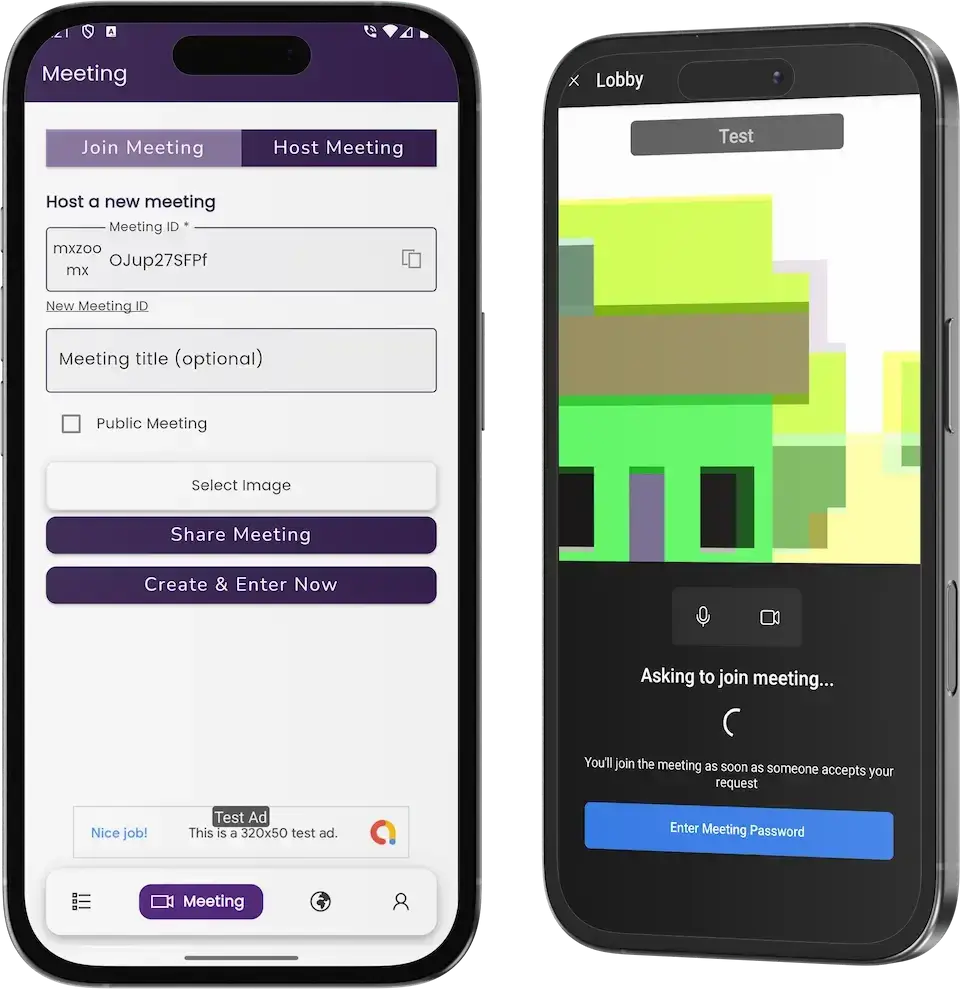
Zoom Clone meeting app with a host or join screen and a lobby on two phones.04
Pick it if: Live calls matter to your customersZoom Clone

A video-meeting app with screens for hosting and joining, a waiting lobby and phone apps built for live calls.

Explore Solution
CatalogAll 90+ solutions

09The business case

Market Benchmarks

Email Marketing Software Market Benchmarks - Independent 2025-2026 Data

The revenue models above are ours. The figures below are not. They come from the Klaviyo and Braze annual reports on Form 10-K and from Microsoft's published sender requirements for Outlook, reproduced as published. Together they show what listed email and messaging platforms earn, how well they keep customers, and the authentication bar a sender must clear to reach inboxes.

Klaviyo 10-K01

$1.23bn in Revenue at Klaviyo in 2025

Klaviyo reports in its 2025 annual report on Form 10-K that revenue was $1,234.0 million, up from $937.5 million in 2024, a growth rate of 31.6 percent. Subscription plans are tiered by the number of active consumer profiles stored and the emails, text messages and WhatsApp messages sent, and the filing says Klaviyo does not price by seat.

Klaviyo 10-K02

110% Net Revenue Retention at Klaviyo

Klaviyo's 10-K reports that it served over 193,000 customers on 31 December 2025, up from 167,000 a year earlier. Its Dollar-Based Net Revenue Retention rate was 110 percent, against 108 percent in 2024, which the company says was driven by expansion of existing customer plans and cross-selling additional offerings.

Braze 10-K03

$738.2m in Braze Revenue, Fiscal 2026

Braze, a customer engagement platform that sends email alongside push, SMS and in-app messages, reports fiscal 2026 revenue of $738.2 million, up 24.4 percent from $593.4 million. Its 10-K says about 65.5 percent of the increase came from existing customers, and that fees are principally based on an upfront commitment for messaging volumes or monthly active users.

Microsoft04

Outlook Sets a 5,000-a-Day Sender Threshold

Microsoft announced on 2 April 2025 that domains sending more than 5,000 emails per day to Outlook must comply with SPF, DKIM and DMARC. From 5 May 2025 non-compliant high-volume mail is routed to Junk, and Microsoft says it may later be rejected. A sender-side cost any email platform has to build in.

Where each figure comes from.

Klaviyo, Inc., Annual Report on Form 10-K for the year ended 31 December 2025, filed 10 February 2026 - sec.gov

Braze, Inc., Annual Report on Form 10-K for the year ended 31 January 2026, filed 25 March 2026 - sec.gov

Microsoft, Strengthening Email Ecosystem: Outlook's New Requirements for High-Volume Senders, Microsoft Defender for Office 365 blog, 2 April 2025 - techcommunity.microsoft.com

All figures are the publishers’ own, reproduced as published from annual filings and a sender-requirements announcement. Metric definitions differ by company and are as each publisher states them. They describe the companies and rules named, not any platform Miracuves builds, and nothing here is a revenue projection for your business.

The Commercial Case

Marketability, Revenue Potential & Business Prospects

A Mailchimp clone resold on Miracuves' build starts to earn when a customer trusts it with their lists and agrees to pay for a plan. What follows concerns easing those two decisions and holding on to the relationship afterwards.

  1. 01

    Recurring Plan Revenue

    Selling a mailer by subscription pays you for each month a customer remains, and plan limits mean a customer who sends more also pays more. SMS can be priced as its own line, since it carries a separate allowance on the Limit Report, its own schedule and report and a Twilio gateway, so it fits either as a second allowance inside a plan or as an add-on tier.

  2. 02

    Several Dials, One Panel

    A free entry, higher send tiers, committed volume and text allowances are individual dials, and turning one needs no redesign of the rest.

  3. 03

    Customers and Lists You Own

    Customer accounts, contact groups and reports are held in your database, so value gathers with you and not at somebody else's mailer.

  4. 04

    Freedom to Move

    The full source code is in your hands, which means a later move to another host, developer or direction needs no one's consent.

Main Revenue Levers
  • Monthly Plan Fees
  • Free Entry Plan
  • Send Allowance Ladder
  • Committed Volume Contracts
  • Text-Message Allowance
  • Checkout Through Your Gateways
Long-Term Value

Stored data and routine rather than features.

  1. 01Customers build groups, templates and history on your platform
  2. 02Reports that run across months give them one more reason to stay
  3. 03That record begins on launch day and remains in your database
  4. 04Tidy lists and firm abuse handling form a second safeguard
Example Revenue Scenarios

The only thing that changes between these three cases is the number of customer accounts, and each names the dial that matters most at that size. Use them to start planning conversations; they do not predict what any platform will earn.

Niche Newsletter Host10Customer Accounts

Paid plans cover early costs.

A compact mailer on which a few publishers each hold a paid plan, enough for subscriptions to meet the running costs. A sample size for illustration, no forecast.

Regional Mail Provider100Customer Accounts

Plans plus text allowances.

A provider serving a single country, where tiers and an SMS allowance counted apart start to count beside the base plan. A sample size for illustration, no forecast.

Multi-Brand Reseller1,000Customer Accounts

Several markets and every dial in use.

A reseller working many markets, where free entry, send tiers, committed volume and text allowances all add income and the reports reveal where to concentrate. A sample size for illustration, no forecast.

10Why Miracuves

Why Miracuves

Miracuves Set Against Other Routes to a Mailchimp Clone

An email platform of your own can come from a boxed mailer script, a solo contractor, an agency team, or a ready-made Mailchimp clone base from Miracuves. Ask each one to show a plan being bought and then counted against: here the Subscription page shows the plan, the Limit Report breaks down each channel's allowance and Purchase History records every purchase.

Why Founders Pick Miracuves

  • 01

    Billing Comes Built In

    A Subscription page and a Limit Report make the product sellable on day one, not just usable.

  • 02

    A Builder for Templates

    Email templates and text bodies have a menu of their own, so campaigns start from saved material.

  • 03

    Email and SMS Side by Side

    Both channels carry their own schedule, report and limit in the same account.

  • 04

    The Whole Codebase Is Yours

    Source arrives unencrypted, which leaves nobody able to reprice it or change the terms on you later.

  • 05

    A Release History You Can Read

    Six numbered versions, 6.10.7 to 6.11.2, say what changed, so you can judge upkeep before you buy.

  • 06

    Every Part Named Up Front

    The two priced add-ons sit apart from the base features, and the sending domains, gateway accounts, hosting space and store developer accounts you connect are listed on their own, so scope is agreed in writing before the build starts.

Development Company

How to Choose a Mailchimp Clone Development Company

Ask any Mailchimp clone vendor to show a plan purchase, then every email and SMS counted against it.

What to look for Miracuves

  • Proof in the product A shared agent login opens the running browser panel
  • Billing that already works Subscription page, Limit Report and Purchase History ship in the base
  • Source ownership Complete, unencrypted source in your own repository
  • A maintenance record Release log, 6.10.7 to 6.11.2, lists PayPal, Paystack, Twilio and SMTP domain fixes
  • Time to launch Six working days to launch, and our own overruns are worked free until you go live
  • Support after launch Three periods from launch day, all concurrent: guidance to day 60, bug fixes to month 6, updates to month 12

Walk away from any vendor who

  • Promises inbox placement or open rates
  • Shows no plans, limits or purchase record
  • Bills per seat or skims a cut of your plan sales
  • Hands over encrypted or partial source

Weighing a Ready Base Against Mailer Scripts and Agencies

CriteriaMiracuvesMiracuves Mailchimp CloneOff-the-Shelf Mailer ScriptAgency-Built Product
Time to Launch6 days of our build timeUnknown, or do it yourselfScoped for each project
Code OwnershipComplete and unencryptedOften limited or lockedUsually yes
Billing & PlansSubscription page, limits, PayPal, Stripe, PaystackDiffers by scriptCustom integration
TemplatesA Builder for email templates and text bodiesA basic editor at bestBuilt to order
ChannelsEmail and SMS, each reported on its ownEmail alone in many scriptsBuilt to order
ReportsFour report types: mail, SMS, campaign, limitThin or missingBuilt to order, at extra cost
Security & ComplianceSeparate logins, payments held at the gateway, plain limitsThe bare minimumDepends on the vendor
Cost vs Speed vs QualityFixed price, quick, a base with a release logCheap but riskyCostly and slow
Ongoing Support & Updates60 days guidance, 6 months bug fixes, 12 months updatesRarely offeredSet by the contract

On a feature list the options look alike. They part ways on what already exists, who owns the code and what you are promised.

Talk to Our Team

Changelog

Email Platform Release History: Versions and What Changed

Release notes for the web platform, newest at the top. They carry no dates, so the table pairs each version with its changes.

VersionChangesDetails
V6.11.2updated: 2 | fixed: 2New or changed
Changes to authentication
Changes to contact handling
Repaired
Last step of the installer
Small interface glitches
V6.11.1updated: 1 | fixed: 3New or changed
The ChatGPT option can now be set from the application setup
Repaired
A ChatGPT defect
The campaign tracker lists by user
Small defects
V6.11.0fixed: 4Repaired
PayPal switching between modes
PayPal error handling
Verification of SMTP domains
Small defects
V6.10.9fixed: 2Repaired
Handling of unsubscribed people in campaigns
Small defects
V6.10.8fixed: 4Repaired
The Paystack payment gateway
Problems with the Twilio SMS gateway
Redirect after login
Small defects
V6.10.7fixed: 3Repaired
Checkout problems in one of the themes
Turning payment gateways on and off
Small defects

Let's build together

Let's turn your email platform plan into a product you can sell.

Arrange a free consultation and you depart with a defined timeline plus honest answers. To us, your trust is worth more than a hurried sale.

  • First reply under 2 hours
  • Free consultation
  • No lock-in contracts
  • Full source code ownership

11Learn more

Blog & Resources

Reading List for Building and Earning From a Mailchimp-Style Platform

Three Miracuves blog posts covering what a Mailchimp-style clone contains, how it makes money and how its model stacks up against another.


The product6 questions

01What exactly is the Mailchimp Clone?

It is an email marketing platform you host yourself and resell to your own customers. They store templates, keep contacts in groups, write email and SMS campaigns through a staged form and watch the outcome on a dashboard. You sell the plans, set the send limits and collect payment through gateways of your choice. Miracuves delivers it white-labeled, with a browser panel, an operator side and Flutter apps covering Android and iOS.

02Can I resell it as my own white-label product?

Yes. We apply your logo, icons and colors to the web panel and the apps and install them on your hosting, so customers meet your brand throughout. The complete source code comes with the package, unencrypted. Mailchimp is named here only to describe a category and should never appear in your own branding.

03Does running this platform require any coding knowledge?

No. A normal day is spent in menus and forms covering contacts, groups, templates, campaigns, plans and gateway settings. Code matters only when the product itself needs altering, and then your developers or ours can work from the source. Work beyond the base is priced in writing before it begins.

04Can I legally launch an email marketing platform like Mailchimp?

Writing and selling software for campaigns, lists and plans is normally lawful. The Miracuves Mailchimp Clone takes nothing from Mailchimp, neither code nor design nor content, and goes live under your brand and your terms, so keep that name and logo away from your own branding. Laws on sending, among them CAN-SPAM and GDPR, bind you and your customers; the software does not enforce them, so ask local counsel to review each market. Legal advice is outside what Miracuves provides.

05How far can I customize the clone and add my own branding?

Branding is part of what we deliver: your logo, icons and color scheme go onto the web platform and both apps. Since the whole source is yours, your team or ours can alter screens, flows, gateways and features later. Anything outside the base gets a written scope and price first.

06Are there apps for both Android and iOS?

There are. The customer app is written in Flutter for both platforms and the web panel works in any browser. We publish the apps from your own developer accounts, but approval by Apple and Google is their decision and sits outside our 6-day build, so no store listing date is ever promised.

Templates, audiences & campaigns7 questions

07How does a customer create and send an email campaign?

The customer opens Campaigns (or the app), chooses the email option and works through a form of three stages: naming the campaign, setting up the email template and selecting the audience. Along the way they pick the SMTP server and add a description. Then they send at once or queue the campaign on a schedule. SMS campaigns follow the same pattern.

08Can I import an existing contact list?

Yes. The Contacts menu has a bulk export and import page for moving lists, next to separate views of contacts, email addresses and phone numbers. For a live sync with another platform, the API Integrations add-on connects the outside system you name.

09Is email automation part of the product?

Yes. Inside Campaigns you will find an Autoresponder, one schedule page for email and another for SMS, a tracker and logs. Longer sequences that branch on conditions, react to events and use advanced scheduling belong to a paid module named Advanced Automation Workflows.

10Which reports and analytics does the platform offer?

The first screen is a General Report counting emails, campaigns of both kinds and groups. Below it, charts show mail and SMS sent per month, and each campaign has a report with seven measured lines. A Limit Report compares email and SMS use with what each plan allows.

11Can it connect to a CRM or an online store?

The sidebar has a Third Parties page naming a CRM link and a CMS link, and the product page mentions Firebase, Twilio, gateways, translation and ChatGPT. Hooking up other tools, online stores included, is the API Integrations add-on, scoped to the systems you name.

12What does the platform do about email deliverability?

Outgoing mail passes through the SMTP servers you register under the Email menu, one chosen per campaign. Domain verification and bounce checks are included, yet where a message lands is decided by your domain records, SMTP provider and list quality. Miracuves makes no promise about delivery or open rates.

13Is the platform compliant with GDPR, CAN-SPAM and similar email laws?

The software processes campaign unsubscribes and keeps a bounced list, both useful to an operator following the rules. Consent, opt-outs, privacy policies and each market's law are for you and your customers to handle, and legal advice is not something Miracuves gives.

Plans, billing & reselling7 questions

14Is the Mailchimp Clone a one-time purchase or a subscription?

You pay a single fixed $2,499 for the ready-made package and its complete source code, so there is no licence to rent. Three support periods start together on launch day at no extra charge: 60 days of platform guidance, 6 months of priority bug fixes and 12 months of continuing updates. What your own customers pay is decided by the plans you create.

15How do I manage the customers who sign up on my platform?

Each customer account, and the agents working inside it, signs in on its own, while the operator side handles accounts and plans. The demo's Agents menu and agent login show how team members share one account. We walk through the operator panel on a booked call.

16Can I set my own pricing plans for customers?

Yes. Plans carry email and SMS limits that the customer sees under Subscription and in the Limit Report, and you choose the tiers, any free entry, the prices and the gateways used. The operator screens are not public, so the detailed plan settings are shown during a call.

17Can I see revenue and earnings in the panel?

Yes. A Purchase History lists past buys, and a chart of the most used gateway shows how customers paid; the demo's chart includes PayPal, Stripe and a free entry. Fuller financial reporting can be added as scoped custom work.

18Is the platform available in more than one language?

The bottom of the sidebar holds a language dropdown, and a translation service is one of the named integrations. We settle which languages your build includes during setup.

19Where does a reseller's first revenue usually come from?

From a paid plan, because nothing more is needed to sell one: whoever outgrows the free tier becomes the first payer. Text allowances and larger committed volumes come later, as customers adopt both channels or expand. Other income, for example a reseller deal on your own white-label deployment or charges added on top of sending, comes from commercial terms you agree with partners, beside the plan income the product already bills.

20What keeps customers on a self-hosted email platform?

Stored data and routine rather than features. Once customers have built contact groups, templates and a campaign history on your platform they seldom move it, and reports spanning months give them one more reason to stay. That history begins the day you launch and sits in your own database. Tidy lists and firm abuse handling are the second safeguard, since senders and recipients both trust a platform whose lists stay clean.

Launch, price & support13 questions

21What is the price of the Mailchimp Clone?

One fixed payment of $2,499 buys the ready-made white-label Mailchimp Clone. Add-ons, further integrations and tailor-made flows get their own written scope and quote before work starts.

22How soon can my platform go live?

Six days. In that window we white-label the platform, deploy it on your hosting and publish the apps from your developer accounts. Apple and Google then review the apps on their own timetable, so the listing date follows their approval rather than the 6-day build.

23What must I supply myself?

A domain and hosting, verified developer accounts for the app stores, your branding and company details, a payment gateway account with KYC completed, an SMTP provider, keys for any other outside service, and a Twilio account should you want SMS. Miracuves does not open gateway accounts or write your policies.

24What support follows the launch?

Launch day starts three overlapping periods: 60 days of dedicated platform guidance, 6 months of priority bug resolution and 12 months of continuing product updates. Our first reply comes within 2 hours on Monday to Saturday, between 10:00 and 19:00 IST.

25Is the full source code included?

Yes, all of it: the web platform and the Flutter apps, with no encryption, so your developers can modify, extend and redeploy it as they see fit.

26Which features cost extra as add-ons?

Two modules cost extra. One, Advanced Automation Workflows, brings branching conditions, event triggers and advanced scheduling; the other, API Integrations, links outside tools. Each has its own scope and price and is added to the repository you own.

27What sets Miracuves apart for a Mailchimp clone build?

Because the campaign form, the Builder, the timing tools, the reports and the subscription and payment screens come ready to use, inside a product with a numbered release history that starts at 6.10.7 and ends at 6.11.2. Miracuves has completed 9,000+ projects for 6,000+ clients and offers the entire source, one fixed price and a 6-day build.

28Is a ready-made Mailchimp clone better than custom development?

For a reseller or agency, usually yes. Plans with send allowances, gateway checkout, templates, contact groups, email and SMS campaigns, reports and the phone apps already work in the Mailchimp Clone, for one fixed $2,499 and a 6-day launch. A custom mailer would take months to reach the same point. Advanced automation and outside integrations are scoped and quoted in writing on top.

29What is the business model of an app like Mailchimp?

A Mailchimp-style platform sells plans. Customers pay a monthly or yearly fee for a send allowance, a free entry plan brings them in, and those who send more move up a tier. A paid plan usually earns first, since it needs only a plan, a gateway and a customer, while SMS allowances and committed-volume contracts follow once customers use both channels or send at scale.

30What is the step-by-step process to launch my Mailchimp clone?

Explore the phone app, web panel and admin views in the demo. Then supply your hosting, domain, brand assets, SMTP servers, Twilio and gateway accounts, and your app store developer accounts. Within six days Miracuves puts your brand on the mailer, installs it and submits both apps through your store accounts; store approval then follows at Apple's and Google's pace.

31Are there open-source Mailchimp alternatives, and how does this one compare?

The Mailchimp clone is not a public open-source project. You buy it once for $2,499 and receive the complete source code with no encryption, covering the web platform and the Flutter apps. Your developers can modify, extend and redeploy it on your own hosting, with no licence to rent.

32Can the Mailchimp clone send SMS campaigns as well as email?

Yes. Customers write email and SMS campaigns through the same staged form, with a separate schedule page for each channel. Plans carry email and SMS limits, and the Limit Report compares what each customer has used. You supply your own Twilio account for text messages.

33How is a ready-made Mailchimp clone different from a white-label SaaS reseller plan?

With the clone you own the product. It runs on your hosting under your brand, the complete source code is yours and the single fixed payment means no license to rent. A reseller plan keeps the software on someone else's platform, so who holds customer records and who sets fees are where the two differ most.

Disclaimer

Miracuves is an independent software development company. We are not affiliated with, connected to, sponsored by, or endorsed by Mailchimp.

Read our full Legal Notice & Disclaimer →
Why this name

“Mailchimp Clone” is used descriptively. It is how the software industry refers to building a platform with functionality similar to Mailchimp, and how clients search for it.

Who built this

The entire design and codebase is built by our own team. The product contains no code, design, graphics, or content originating from the Mailchimp website or applications.

Trademarks

Mailchimp and all other third-party names and marks are the property of their respective owners, referenced here solely to describe the category of software offered.