Written by the Miracuves Editorial Team. Reviewed by Ashish Khan, SEO Analyst, Miracuves.
Key Takeaways
- Split each corporate booking into an order series and one fulfillment order per delivery day, so changes, status and billing stay at day level.
- A confirmed future order should reserve kitchen and courier capacity, with cut-offs per type of change and a frozen menu version.
- Store allergens and dietary counts as structured fields, shown before ordering and again on delivery.
- Corporate billing needs an invoice queue, payment terms and a vendor-payout ledger kept separate from what customers owe.
- Dispatch to the delivery window and kitchen readiness, not the nearest courier, and generate courier jobs from fulfillment orders.
You already run food delivery or a catering kitchen, and companies keep asking for things a consumer app cannot do: a purchase-order number on the invoice, one booking that covers a three-day offsite, a manager who must approve anything above a set amount, and lunch that lands by 12:45, not “in about 25 minutes”.
This guide is for the founder or operator deciding how to build a marketplace that handles that work. By the end you should know which records your database needs, what a confirmed future order really reserves, how corporate invoicing differs from a checkout receipt, and how to plan couriers around a fixed service window.
The short version: corporate catering changes the transaction itself. The person choosing the food may not hold the budget, the approver may never see the menu, and finance may pay weeks after the meal. Four parts have to be designed together from the start: advance ordering, purchasing controls, kitchen production and delivery.
Why one corporate booking breaks a consumer order table
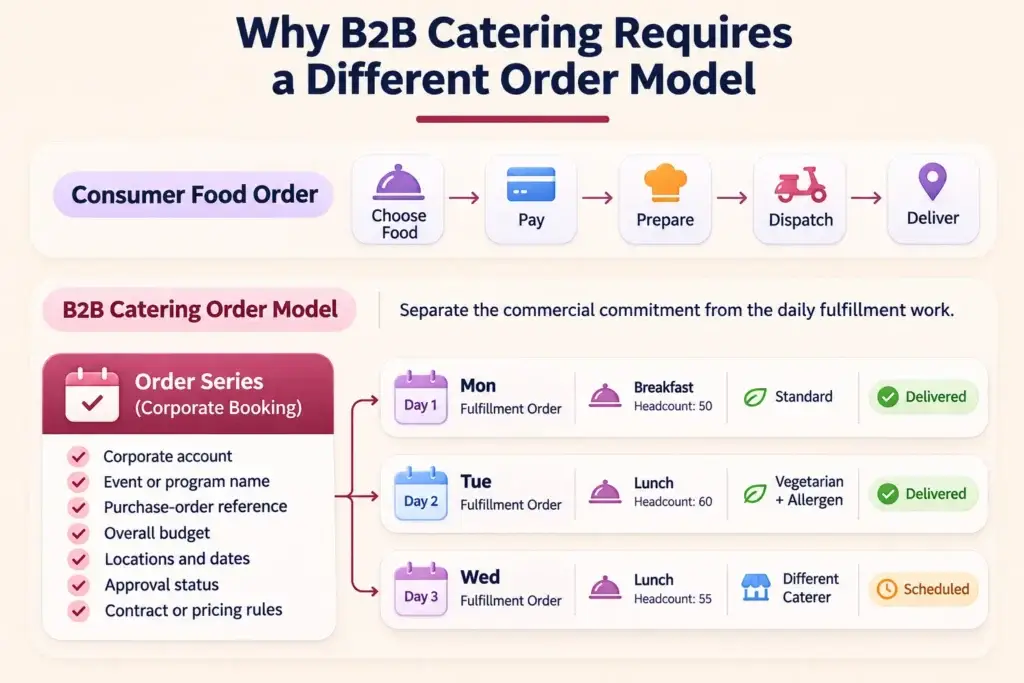
A consumer food order has a short life: choose food, pay, prepare, dispatch, deliver. One row in the orders table can carry all of it.
Now take a company arranging breakfast and lunch for a three-day training program. Procurement approves the total budget in advance. An office administrator picks the menus. Each day has a different headcount. Tuesday’s lunch needs vegetarian and allergen-separated meals. Wednesday uses another caterer entirely. Finance still wants one invoice that quotes the same purchase order.
Store that as one ordinary order and the problems arrive fast. Changing Wednesday’s headcount can rewrite the total for Monday and Tuesday, which were already delivered. One late courier makes the whole booking look late. The caterer cannot tell tomorrow’s production list from food that left the kitchen yesterday.
The fix is to separate the commercial commitment from the daily fulfillment work. The diagram above shows the three-day case: one order series, then a fulfillment order per day with its own meal, headcount, dietary mix, caterer and status.
The records to define before any screen
- Corporate account: the paying organization, with its offices, cost centers, users and billing rules.
- Order series (the parent): account, event or program name, purchase-order reference, overall budget, billing contact, locations, start and end dates, approval status, and contract or pricing rules.
- Fulfillment order (the child): one per delivery date and site, with the delivery window, caterer, frozen menu version, headcount, dietary counts, preparation deadline, pickup window, fulfillment mode, status, delivered quantity and day-level adjustments.
- Delivery job: the courier work generated from a fulfillment order. One fulfillment order can need two vehicles, or a separate return trip for equipment.
- Billable item: a line that becomes chargeable when a fulfillment order completes, including fees, credits and adjustments.
- Invoice and vendor settlement: two separate records, covered below.
This gives the kitchen and the couriers a clean unit to prepare and deliver, while finance invoices at whatever level the corporate customer agreed.
What a confirmed future order really reserves
A calendar picker is the easy part of advance ordering. The real question comes after the buyer picks a date: what exactly is being reserved when they confirm?
A future catering order uses more than menu stock. It takes kitchen time, packaging, preparation staff, loading time, courier capacity and a delivery slot.
Reserve caterer capacity, not menu items
A restaurant may have the ingredients for 200 sandwiches and still be unable to make all 200 between 11:30 AM and noon. Capacity rules should follow real kitchen limits. The values below are examples a caterer would set for itself:
| Capacity Rule | Example Decision |
|---|---|
| Maximum orders per slot | Caterer accepts no more than four large orders between 11:00 and 12:00 |
| Maximum portions per slot | Lunch production capped at 250 portions |
| Minimum lead time | Orders above a defined size require 48 hours’ notice |
| Menu-specific capacity | Hot buffet has lower capacity than boxed meals |
| Blackout periods | Caterer blocks holidays, events, or fully booked days |
| Location capacity | One kitchen can serve a delivery zone while another cannot |
These limits should drive availability at checkout, so the marketplace never sells a slot first and discovers the conflict later.
Set cut-offs per action
Corporate buyers change catering orders as attendance moves. That flexibility is worth offering, but unlimited edits create kitchen waste and delivery confusion. Store a cut-off on each fulfillment order for each kind of change: adding headcount, reducing it, swapping menu items, changing the address and canceling. Express them as offsets from the delivery window, so a 48-hour rule moves with the order.
- Before the cut-off: buyer edits apply automatically within the permitted rules.
- After the cut-off: an edit becomes a request that the caterer or your operations team accepts or declines.
That stops a buyer from doubling an order from 40 to 80 portions the morning of production without anyone checking whether the kitchen can do it.
Freeze the menu version at confirmation
Menus change. Prices move, items are dropped, modifiers are edited and tax treatment can shift. A confirmed order should keep a snapshot of the items, prices and modifiers the buyer accepted, instead of being rebuilt from the caterer’s current menu. If an item later becomes unavailable, open a substitution request rather than silently changing what the company bought.
Treat allergen data as structured fields
A free-text “dietary notes” box is where catering mistakes start. Store dietary counts on each fulfillment order, and store allergens on each menu item as fields the caterer must complete before the item can be published.
The rules give you a starting set. In the UK, the Food Standards Agency names 14 allergens that food businesses must tell consumers about. For food sold at a distance, its best-practice guidance says written allergen information should be available before the order is placed, ideally no more than one click from the menu, and again on delivery, for example as stickers on containers. In the US, the FDA lists nine major food allergens, with sesame added from January 1, 2023 under the FASTER Act. Those labeling rules target packaged food, but the list is a sensible minimum set of flags for a US menu.
In product terms: show allergens on the menu and at checkout, print them on the packing slip and tray labels, and let the buyer attach named meals for individual attendees with specific needs. This article covers building the software; the caterer remains responsible for what goes in the food and on the label.
Corporate accounts and approvals
A consumer account answers one question: who is ordering? A corporate account also has to say which organization pays, which office and department own the cost, who may approve and up to what amount, which purchase order goes on the invoice, who receives it, and whether employees may see prices at all.
That needs a hierarchy: company, then offices, then departments or cost centers, then users. Users then get roles such as requester, office manager, approver, finance user or account administrator. The person arranging lunch should not be able to change the company’s payment terms, download every invoice or spend another office’s budget.
Approval rules usually take one of these forms:
- Automatic approval: orders below a company-set threshold go straight through.
- Single approver: a manager signs off before the caterer gets final confirmation.
- Sequential approval: a department head approves, then procurement or finance.
- Budget check: the platform compares the order with the remaining cost-center budget before it goes for approval.
- Exception approval: routine recurring orders pass automatically, while unusual amounts, locations or menus trigger review.
Do not model this as an approved = yes/no field. Keep who approved, when, which version of the order they saw and what changed afterward. Add a rule that sends an edited order back for approval if the new total exceeds the approved amount. When finance later asks why an invoice differs from what was approved, that history is the answer. The same thinking covers access: keep audit logs for sensitive admin actions, and limit invoice downloads by role.
Corporate invoicing is a ledger, not a PDF button
The PDF is only the visible end of corporate billing. Underneath, the platform has to tie together the account, completed fulfillment orders, adjustments, taxes, delivery fees, commissions, credits, purchase orders and payment status.
Decide how invoices are grouped
Corporate customers may want an invoice per delivery, per event, weekly, monthly, by office, by department, by purchase order, or one statement across several caterers. That choice shapes the data model. If consolidated monthly billing is part of the offer, do not lock each order to its own invoice at delivery. Instead, let completed billable items wait in an invoice queue and group them by the customer’s billing agreement at the end of the cycle.
Store the fields corporate finance asks for
| Field | Why it matters |
|---|---|
| Legal company name | Identifies the billed entity |
| Billing address | Needed for accounting and tax records |
| Purchase-order number | Lets the buyer’s procurement match the invoice |
| Cost center | Allocates the spend internally |
| Office or location | Separates spend for multi-site companies |
| Event and order references | Shows what was bought and delivered |
| Tax information | Supports the tax treatment that applies |
| Payment terms | Sets the due date, for example net 30 |
| Credits and adjustments | Keeps the reconciliation trail intact |
| Invoice status | Draft, issued, partly paid, paid, overdue, void |
Invoice rules vary by country and by customer, so agree the final structure with an accountant rather than assuming one format works everywhere. Inside the EU, the VAT in the Digital Age package adopted on 11 March 2025 brings digital reporting for cross-border B2B transactions from 1 July 2030 and lets member states introduce mandatory domestic e-invoicing under specific conditions. Keeping invoice data as structured fields, not only a rendered PDF, makes those formats far easier to add later.
Support both card checkout and payment terms
Some accounts will pay by card at checkout. Others expect an invoice and a payment window. Payment providers model both. In Stripe, for example, an invoice’s collection method is either charge_automatically, which charges the saved payment method, or send_invoice, which issues the invoice for manual payment with a due date, and Stripe notes that some methods such as bank transfers only support send_invoice. Store the chosen terms on the corporate account, and use the gateway’s tokenized cards so your servers never hold raw card data.
Keep receivables and vendor payouts apart
The company and the caterer rarely run on the same schedule. A company might pay a monthly invoice on net 30, while caterers expect weekly payouts. The platform needs two linked ledgers:
- Accounts receivable: what corporate customers owe the platform.
- Vendor settlement: what the platform owes caterers and, where relevant, delivery partners.
Payment platforms support this split. Stripe Connect’s separate charges and transfers lets the platform collect a charge and transfer funds to several connected accounts. Decide early who carries the gap: if you pay caterers weekly and customers pay monthly, the marketplace is funding that working capital.
Couriers work to catering windows, not consumer ETAs
For a consumer order, the ETA updates as the courier moves. For a corporate event, the requirement is a window: food must arrive after the venue can receive it and before service starts.
Say lunch begins at 1:00 PM. The office accepts deliveries from 12:15 PM, wants everything set out by 12:45 PM and closes the loading bay at 12:50 PM. That gives dispatch a chain of times to reason across: food ready, courier pickup window, travel time, building access window, required completion time.
Hot food adds a clock of its own. The US FDA Food Code, a model code that states adopt, allows food to be held under time as a public health control for up to four hours out of temperature control before it must be eaten or discarded, with a written procedure and a way of marking the time. Where a caterer works that way, record the pack-out time on the fulfillment order and print a “use by” time on the labels, so a late delivery is flagged before the food is served, not after.
Plan delivery capacity for known demand
Most B2B catering orders are known days ahead. Use that. Instead of finding out at noon that twelve large jobs need couriers, compare confirmed jobs by time window, pickup points, delivery zones, vehicle needs, load size, setup work and expected courier supply a day or more in advance. The aim is not to name a driver three days early. It is to know there is enough capacity before the window opens.
Choose a fulfillment model per caterer or zone
| Fulfillment Model | Works Well When | Main Operational Challenge |
|---|---|---|
| Marketplace courier fleet | Platform wants end-to-end delivery control | Recruiting, scheduling, dispatch and driver economics |
| Caterer-delivered | Vendors already operate reliable delivery teams | Inconsistent tracking and service standards |
| Third-party logistics | Demand varies and fleet ownership is undesirable | API integration, service visibility and exception handling |
| Hybrid fulfillment | Different vendors or zones need different models | Dispatch rules must identify responsibility clearly |
Hybrid is often the practical answer: one caterer delivers its own orders, another uses your fleet and a third needs an outside carrier. Record the fulfillment mode on each fulfillment order so everyone knows who owns the delivery, the tracking and the exceptions.
Generate courier jobs from fulfillment orders
Dispatch should work on delivery jobs, not on the commercial booking. A five-day program creates five fulfillment orders, and each can create one or more jobs. That handles two vehicles for one large order, separate pickup and equipment-return trips, one courier collecting compatible orders, caterer self-delivery, a third-party carrier and reassignment after a courier cancels. A logistics change then never rewrites the buyer’s commercial order.
Dispatch on readiness, not proximity
Sending the nearest courier is not automatically right. If they arrive twenty minutes before the trays are packed, you pay for waiting while that courier is lost to the network. Ask caterers to update simple production states, confirmed, in production, packing, ready for pickup, collected, and let dispatch compare predicted readiness with travel time before sending anyone.
Make proof of delivery match the order’s value
A catering handoff needs more than a “delivered” tap. Depending on the account, capture a named recipient, a one-time code, the time, location, photos, a signature, confirmed quantities, setup confirmation and exception notes. Those records settle disputes about missing trays, late arrival, short counts or delivery to the wrong entrance.
One state model from booking to settlement
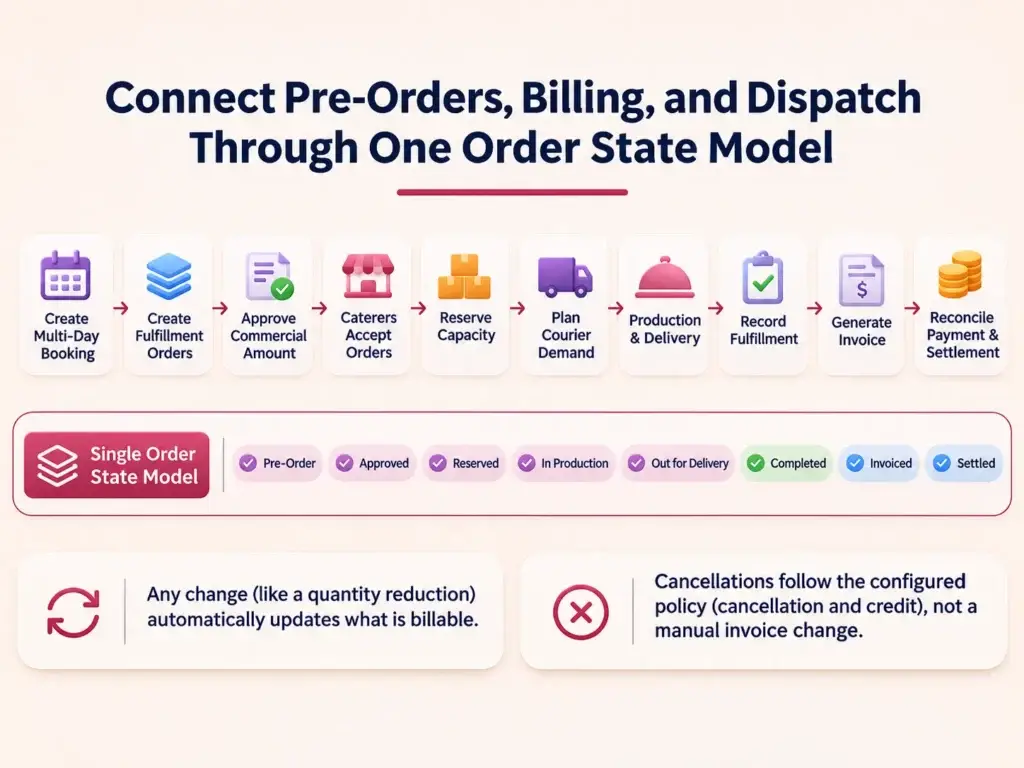
The parts above only work if they share one order state model. The diagram traces the ten steps:
- The company creates a multi-day booking.
- The platform creates one fulfillment order per day.
- An approver signs off the commercial amount.
- Caterers accept their days.
- Kitchen capacity is reserved.
- Courier demand enters the planning queue.
- Each daily order moves through production and delivery.
- Actual fulfillment, including delivered quantities, is recorded.
- Completed billable items are invoiced on the account’s billing cycle.
- Customer payment and vendor settlement are reconciled separately.
Each fulfillment order moves through states such as pre-order, approved, reserved, in production, out for delivery, completed, invoiced and settled. Two rules follow. If a quantity is reduced, the billable amount updates on its own. If a delivery is canceled before fulfillment, the configured cancellation and credit policy applies, rather than someone editing an invoice by hand later.
The operations view and the numbers to watch
B2B catering produces exceptions that need a person. The admin dashboard should rank upcoming risk, not list past orders. Useful views:
- Tomorrow’s schedule, grouped by production and delivery window.
- Orders a caterer has not yet accepted.
- Caterers or windows close to their capacity limits.
- Orders held for approval.
- Future jobs compared with expected courier supply.
- Completed orders that cannot be invoiced because a field such as the purchase-order number is missing.
- Live incidents: late pickups, failed handoffs, missing items, reassignments.
The aim is to spot an at-risk lunch before the customer calls. Total orders will not tell you whether the marketplace is getting more reliable. Watch on-time-in-full rate, orders changed after cut-off, caterer acceptance rate, how accurate readiness estimates are, courier waiting time, reassigned jobs, invoice exception rate, days to payment, credits per completed order and reorder rate per corporate account.
What to build first
Building every enterprise feature at once is the slow route. A safer order:
- Define the commercial order model. Decide how companies, offices, users, order series, fulfillment orders, caterers, delivery jobs and invoices relate. Changing this later costs far more than changing a screen.
- Make advance ordering reliable. Future availability, lead times, caterer capacity, cut-offs, menu snapshots, allergen fields and change requests.
- Add purchasing controls. Roles, approval limits, purchase-order references, cost centers and account-level billing preferences.
- Connect fulfillment. Generate production tasks and courier jobs from confirmed fulfillment orders, with clear states and exception handling.
- Add consolidated billing and integrations as accounts demand them. Invoice grouping, accounting or ERP exports, POS and kitchen-system feeds that keep scheduled dates and modifiers intact, and building details such as loading docks, reception contacts and security procedures.
Revenue follows the same logic. Commissions on catering orders, a corporate service fee, delivery fees and paid account tiers are all common, but each fee should match work the platform visibly does for the buyer or the caterer.
Founder Decision Signals
Order Complexity
If one corporate booking can span several dates, locations, caterers, or approval steps, design parent and fulfillment-level orders from the beginning.
Billing Complexity
If customers ask for purchase orders, consolidated invoices, credit terms, or cost-center reporting, treat billing as a ledger workflow rather than a checkout receipt.
Fulfillment Risk
If catering orders are large or time-sensitive, reserve vendor and courier capacity ahead of the service window instead of relying entirely on real-time dispatch.
Platform Foundation
If standard buyer, restaurant, courier, payment, and admin flows already fit the model, extending a proven delivery foundation may be more practical than rebuilding every core module.
Where Miracuves fits
Most of the stack a catering marketplace needs, customer ordering, restaurant and caterer panels, a courier app, tracking, payments, notifications and the admin panel, is the same as in food delivery. Miracuves offers that base as a white-label food delivery app, and our food delivery app development team extends it.
For a B2B catering business, the custom work then goes where the business is different: the account hierarchy, order series and fulfillment orders, approval chains, invoice grouping and payment terms, capacity rules and corporate reporting. A Miracuves ready-made base launches in six working days; the B2B layer is scoped and quoted separately in writing, because it depends on how your accounts buy and pay.
Frequently Asked Questions
What is a B2B catering marketplace?
It is a platform that connects companies with caterers and handles the way businesses buy food: advance and multi-day ordering, corporate accounts with roles and approvals, purchase-order references, invoices on payment terms and scheduled delivery to a set window. Unlike consumer ordering, the person who chooses the food, the person who approves it, the payer and the recipient are often different people.
How should a catering platform handle multi-day orders?
Create one parent record, an order series, for the commercial commitment, and a separate fulfillment order for each delivery date and site. The parent holds the account, purchase order, budget and approval. Each child holds its own menu, headcount, dietary counts, caterer, courier jobs and status, so a change to Wednesday never rewrites what was delivered on Monday.
Do corporate customers pay for catering at checkout?
Not always. Smaller accounts may pay by card when they order, while approved corporate accounts usually receive an invoice with payment terms such as net 30. The platform should store the terms on the account and support both, for example through a payment provider’s automatic charge and send-invoice options, rather than forcing every order through consumer checkout.
How far in advance should corporate catering be ordered?
There is no single rule. Lead time depends on order size, menu, caterer capacity and delivery needs. Let each caterer set minimum lead times and cut-offs by menu, order size or time slot, for example 48 hours for large hot buffets, and have checkout show only dates the kitchen can actually fulfill.
How do you schedule couriers for large catering orders?
Plan from the delivery window backward: food ready time, pickup window, travel time and building access. Because most catering is booked days ahead, compare confirmed jobs with expected courier supply a day or more before service, then dispatch when the caterer marks the order nearly ready rather than sending the nearest courier early.
Can a food delivery app be adapted for B2B catering?
Often, yes. Ordering, caterer panels, courier apps, tracking, payments and admin tools carry over from food delivery. What usually needs custom work is the B2B layer: account hierarchies, order series with daily fulfillment orders, approval chains, invoice grouping and payment terms, capacity rules and corporate reporting. Scope that layer separately from the base platform.
Miracuves is an independent software development company. We are not affiliated with, connected to, sponsored by, or endorsed by any company or product named in this article.
Terms such as “X Clone” are used descriptively. It is how the software industry refers to building a platform with functionality comparable to a known service, and how clients search for it.
The entire design and codebase of our products is built by our own team. Our products contain no code, design, graphics, or content originating from any third-party website or applications.
All third-party names and marks referenced in this article are the property of their respective owners, referenced solely to identify the services discussed.