


One-to-one chat is where most messaging platforms begin. It feels familiar, simple, and easy to validate because users immediately understand the value: open a conversation, send a message, share media, and get a response.
But private chat alone rarely creates a scalable platform business.
The moment a messaging product starts serving communities, teams, campuses, creators, associations, local groups, or membership networks, the product challenge changes. The platform is no longer just moving messages between two people. It is managing participation, permissions, safety, visibility, discovery, reporting, and group-level behavior at scale.
That is where group and community controls become important. They turn a basic chat app into a platform that can support real communities, structured conversations, and operator-managed growth.
Key Takeaways
- Group controls in messaging platforms help founders move beyond private chat into scalable community-led engagement.
- Community features create stronger retention because users return for group activity, announcements, shared interests, and peer interaction.
- Admin controls, moderation workflows, and report queues are essential once conversations become public, semi-public, or community-based.
- Public and private group settings help platform operators support different use cases without creating separate products.
- Miracuves helps founders launch ready-made and white-label messaging platforms with group chat, moderation, admin control, and source-code ownership.
Why One-to-One Chat Is Not Enough for a Scalable Messaging Platform

Private messaging is valuable, but it is usually relationship-driven. Two users talk because they already know each other or have a reason to connect. That makes one-to-one chat useful, but it does not automatically create network effects.
Communities work differently. A group can create activity even when one user does not have a specific person to message. Members return because something is happening: a question is being discussed, an announcement is posted, a poll is running, a media update is shared, or a new member joins the conversation.
For founders, this matters because platform growth depends on repeat behavior. A messaging app that only supports private chat must depend heavily on personal relationships. A messaging app with structured groups can build topic-based, location-based, organization-based, or interest-based engagement loops.
That is the difference between a chat utility and a communication ecosystem.
What Are Group and Community Controls in a Messaging Platform?
Group and community controls are the settings, permissions, moderation tools, and admin workflows that decide how people gather, communicate, join, participate, report issues, and stay safe inside a messaging platform.
These controls usually include member roles, group visibility, invite rules, admin permissions, reporting flows, message moderation, public group discovery, content limits, media permissions, blocked users, group size settings, and analytics.
From the user’s side, these may look like simple buttons: join, leave, mute, report, react, vote, or invite. From the operator’s side, they decide whether the platform can grow without becoming chaotic.
The practical question for founders
The real question is not whether your messaging app should have groups. The stronger question is: who controls those groups, what rules apply, what happens when something goes wrong, and how much of that can be managed without developer involvement?
How Group Controls Create Network Effects Beyond Private Messaging
A one-to-one conversation has a narrow engagement surface. It depends on two people choosing to talk. A group creates a wider engagement surface because one message can trigger many responses, reactions, replies, votes, shares, or follow-up conversations.
This is where community messaging becomes powerful. A single active group can create daily reasons to return. A platform with many well-managed groups can create multiple loops of discovery, participation, and retention.
How Group Controls Convert Chat Activity Into Platform Growth
| Control Layer | Business Value | Founder Impact |
|---|---|---|
| Public and private groups | Supports both open discovery and restricted communities. | Lets one platform serve creators, campuses, teams, clubs, and member networks. |
| Group admin roles | Distributes management responsibility beyond the platform operator. | Reduces support pressure as communities grow. |
| Member permissions | Controls who can post, invite, remove, pin, or manage conversations. | Prevents uncontrolled group behavior from damaging trust. |
| Reporting workflows | Creates a clear path for users to flag abuse, spam, or unsafe behavior. | Protects community health and supports responsible operations. |
| Group analytics | Shows which communities are active, growing, or declining. | Helps founders identify retention signals before scaling acquisition. |
The Core Group Controls Every Community Messaging App Should Plan
Group controls are not just feature checkboxes. They are operating rules. A founder should think about them early because changing permission logic later can affect the database, APIs, admin dashboard, notifications, moderation flows, and user experience.
1. Group creation rules
Not every platform should allow every user to create unlimited groups. A campus platform may allow teachers to create class groups. A membership app may allow verified organizers to create local chapters. A creator community may allow only approved creators to open broadcast-style groups.
Creation rules help the operator prevent spam, duplicate communities, empty groups, and uncontrolled growth.
2. Public, private, and invite-only visibility
Visibility decides how users discover communities. Public groups help new users find activity quickly. Private groups protect internal communication. Invite-only groups give operators and community admins more control over who enters.
A scalable messaging platform should support more than one visibility model because different communities need different levels of openness.
3. Admin and moderator roles
As groups grow, the platform operator cannot manually manage every conversation. Group admins and moderators become the first layer of community management.
Clear role design helps define who can add members, remove members, update group details, pin messages, review reports, restrict posting, or escalate issues to the platform team.
4. Member permissions
Member permissions control daily group behavior. Can all members post? Can all members share media? Can members invite others? Can users mention everyone? Can new members see older messages?
These decisions may look small, but they shape the entire community experience. Too much freedom can create noise. Too many restrictions can reduce participation. The best platform design gives operators enough control to adapt permissions by use case.
5. Group size limits
Group size affects product performance, moderation complexity, notification volume, and conversation quality. A group for ten coworkers behaves differently from a public community with thousands of members.
Founders should treat group size as a business and infrastructure decision, not just a number in settings. Smaller groups may support deeper relationships, while larger communities need stronger moderation, announcement controls, and analytics.
6. Reporting and blocking workflows
Once group communication scales, abuse reporting becomes essential. Users need a clear way to report spam, harassment, impersonation, harmful media, misleading content, or rule violations.
For the platform operator, reports should not disappear into a generic inbox. They should move into a moderation queue with user details, group details, report reasons, timestamps, review states, and action options.
7. Announcement, pinning, and poll controls
Community groups are not only for conversation. They are also useful for coordination. Pinned messages, announcements, and polls help operators turn chat activity into structured communication.
For example, a school group may pin a schedule. A membership group may run a poll. A local community may announce an event. A creator group may share subscriber updates. These controls keep important information visible instead of buried inside fast-moving conversations.
Why Community Controls Matter for Retention
Retention is not only about notifications. It is about giving users a reason to return.
A user may open a private chat only when they need to speak to someone. But a user may open a community group to check what they missed, respond to a poll, read announcements, react to media, join a discussion, or see what other members are doing.
That creates a stronger habit loop:
- User joins a relevant group.
- The group creates recurring activity.
- Notifications bring the user back.
- Participation creates familiarity.
- Familiarity increases platform dependency.
- Platform dependency improves retention.
This is why founders should not treat group chat as a secondary feature. In many messaging products, communities become the reason users keep the app installed.
Founder Decision Signals
Speed
If your launch depends on community engagement, group creation, public discovery, reporting, and admin permissions should not be delayed until after launch.
Control
If users can create large conversations, the platform needs clear rules for who can join, post, moderate, report, and remove members.
Scalability
If your roadmap includes campuses, teams, creators, regional communities, or membership groups, permissions and moderation should be designed as a system.
Market Fit
If your users already communicate in unmanaged external groups, a branded messaging platform can give them familiarity while giving your business ownership and visibility.
How Group Governance Reduces Operational Risk
Fast-growing communication platforms face a predictable challenge: the same features that create engagement can also create operational risk.
Open groups can invite spam. Large communities can create moderation pressure. Public discovery can expose low-quality groups. Media sharing can create safety concerns. Admin power can be misused if permissions are too broad.
Strong group governance reduces this risk by giving operators practical control before problems scale.
Healthy community governance usually includes:
- Clear group visibility settings
- Admin and moderator roles
- Group-level report reasons
- User blocking and group blocking
- Content and media restrictions
- Activity logs for sensitive actions
- Admin dashboards for user and group review
- Escalation paths for repeated abuse
This does not mean every community needs heavy moderation from day one. It means the product foundation should allow the operator to respond when the platform grows.
The Admin Console Is Where Community Scale Becomes Manageable
A messaging platform may look simple on the front end, but real scale is managed from the back end. The admin console is where the operator reviews users, monitors groups, manages report reasons, controls branding, adjusts languages, tracks activity, and decides how the platform should behave.
Without a strong admin console, every operational change becomes a developer request. That slows down moderation, branding, policy updates, user support, and market testing.
For founders, this is one of the most important product decisions. A platform that requires developers for every small group-policy change is harder to operate. A platform with configuration-ready controls gives non-technical teams more independence after launch.
How Group Controls Support Different Messaging Platform Use Cases
The value of group controls becomes clearer when you look at different use cases. The same core messaging foundation can serve very different markets when group settings, admin roles, and visibility rules are flexible.
Messaging Platform Use Cases That Depend on Group Controls
| Use Case | Group Control Need | Why It Matters |
|---|---|---|
| Membership communities | Private groups, approved admins, member removal, announcements | Keeps member communication inside a controlled branded environment. |
| Education and campus networks | Class groups, staff groups, role-based posting, report workflows | Separates learning communication from unmanaged personal chat spaces. |
| Enterprise communication | Department groups, controlled access, account removal, admin visibility | Helps organizations manage internal communication with stronger ownership. |
| Creator communities | Public communities, subscriber groups, pinned updates, moderation | Turns audience attention into recurring group engagement. |
| Regional messaging platforms | Language controls, local groups, discovery settings, community moderation | Allows local operators to shape communication around culture and region. |
Technical Layers Behind Scalable Group Messaging
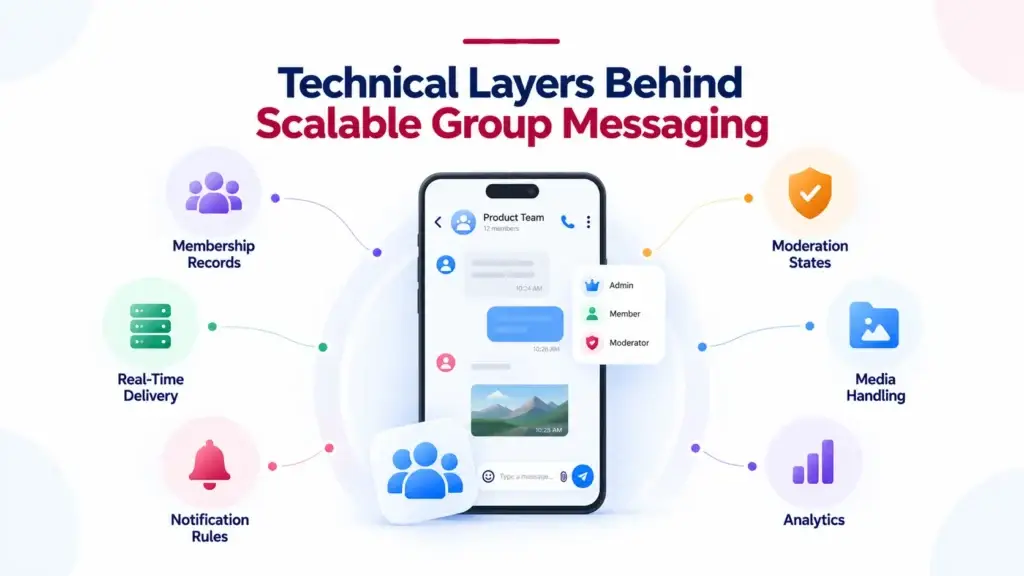
Group controls are not only interface features. They depend on technical decisions underneath the platform.
When a message is sent inside a group, the system must know who belongs to the group, who has permission to receive the message, which devices are connected, which users have muted the group, which users are blocked, who has read the message, and which notifications should be triggered.
As activity grows, this affects real-time event delivery, database design, notification handling, media storage, and moderation workflows.
Important technical considerations include:
- Membership records: The platform should know each user’s role, join state, permissions, and group status.
- Real-time delivery: Messages, typing indicators, reactions, and read receipts need event-based delivery rather than slow polling.
- Notification rules: Group notifications should respect mute settings, mentions, role permissions, and user preferences.
- Moderation states: Reports, blocked users, restricted groups, and review decisions should be stored clearly.
- Media handling: Images, videos, documents, and voice notes should be organized for performance, storage control, and future retention policies.
- Analytics: Operators need visibility into active groups, new groups, reported groups, message volume, and engagement signals.
This is why group messaging should be planned as an architecture layer, not added as a surface-level feature after launch.
Community Controls Also Shape Monetization Options
Messaging platforms do not monetize in the same way marketplaces do. A conversation itself does not automatically create a transaction. But groups can create structured value that supports monetization in several ways.
A founder may use community controls to support paid access groups, branded membership spaces, premium communities, creator-led groups, internal enterprise deployments, education cohorts, or white-label client rollouts.
The monetization logic depends on the business model, but the control layer is what makes it manageable. Paid groups need access rules. Creator communities need permission settings. Enterprise groups need user lifecycle controls. Membership groups need admin roles and removal workflows.
Without these controls, monetization becomes harder because the operator cannot confidently define who gets access, what they can do, and how the experience is governed.
Where Miracuves Fits for Founders Planning a Community Messaging Platform
For founders, the challenge is not only building chat. The bigger challenge is launching a communication platform that users can trust, communities can use daily, and operators can manage without depending on developers for every routine change.
Miracuves helps founders build ready-made, white-label messaging app solutions with branded design, source-code ownership, admin control, group workflows, moderation features, and a faster path to deployment. If you are evaluating a launch-ready foundation, you can explore this branded messaging app platform to understand how chat, calls, groups, stories, moderation, and operator control can come together in one product structure.
The advantage is speed with control. Instead of spending months defining every baseline module from zero, founders can start from a ready-made communication foundation and customize the experience around their audience, market, brand, and operating model.
For ready-made messaging solutions, Miracuves’ 6-day delivery timeline can help founders move from planning to market validation faster, while still keeping important ownership layers such as source code, admin console access, branding control, and deployment flexibility.
Common Mistakes Founders Should Avoid With Group Messaging
Mistakes Founders Should Avoid
Treating groups as basic chat rooms
Groups need roles, rules, report flows, size limits, visibility settings, and admin controls. Without them, the platform can become difficult to manage once activity grows.
Launching without moderation workflows
Moderation should not be added only after the first abuse issue. Reporting, blocking, review queues, and admin decisions should be part of the operating foundation.
Hardcoding community rules
Group limits, report reasons, visibility rules, and branding needs can change after launch. Hardcoding them creates unnecessary development dependency.
Ignoring analytics until growth starts
Founders need to know which groups are active, which users return, which communities are growing, and where moderation pressure is increasing.
Final Thoughts: Community Controls Turn Messaging Into a Platform
The strongest messaging platforms are not built only around private chat. They are built around repeatable communication spaces where people can gather, participate, discover, organize, and return.
Group and community controls make that possible. They give users flexible ways to communicate while giving platform operators the ability to manage growth, safety, visibility, and trust.
For founders, the lesson is simple: do not think of groups as an extra feature. Think of them as the bridge between a chat app and a scalable communication business.
Miracuves helps founders turn that bridge into a launch-ready product foundation with white-label branding, source-code ownership, admin control, moderation workflows, and faster deployment.
FAQs
Why are group controls important in a messaging platform?
Group controls help a messaging platform manage participation, permissions, visibility, reporting, and moderation. They allow the app to support larger communities without becoming difficult for operators to control.
How do communities help a messaging app scale beyond private chat?
Communities create recurring engagement. Users return not only to message one person, but to follow group discussions, announcements, polls, shared media, and member activity. This increases retention and platform dependency.
What group management features should founders plan first?
Founders should plan group creation rules, public and private visibility, admin roles, member permissions, group size limits, reporting workflows, blocking, pinned messages, and analytics before scaling acquisition.
Do messaging platforms need moderation tools from day one?
Yes, at least the foundation should exist from day one. Reporting, blocking, review queues, and admin action controls help operators respond quickly when spam, abuse, or unsafe behavior appears.
How do public and private groups affect user experience?
Public groups help users discover active communities, while private groups protect controlled conversations. Supporting both models allows one messaging platform to serve teams, campuses, creators, local groups, and membership communities.
Can group controls support monetization?
Yes. Group controls can support paid communities, premium access groups, creator communities, enterprise deployments, and membership spaces. The key is having clear access rules, permissions, and admin visibility.
What role does the admin dashboard play in community messaging?
The admin dashboard helps operators manage users, groups, reports, moderation decisions, branding, languages, settings, and analytics. Without it, routine community management becomes dependent on developers.
Miracuves is an independent software development company. We are not affiliated with, connected to, sponsored by, or endorsed by any company or product named in this article.
Terms such as “X Clone” are used descriptively. It is how the software industry refers to building a platform with functionality comparable to a known service, and how clients search for it.
The entire design and codebase of our products is built by our own team. Our products contain no code, design, graphics, or content originating from any third-party website or applications.
All third-party names and marks referenced in this article are the property of their respective owners, referenced solely to identify the services discussed.