Key Takeaways
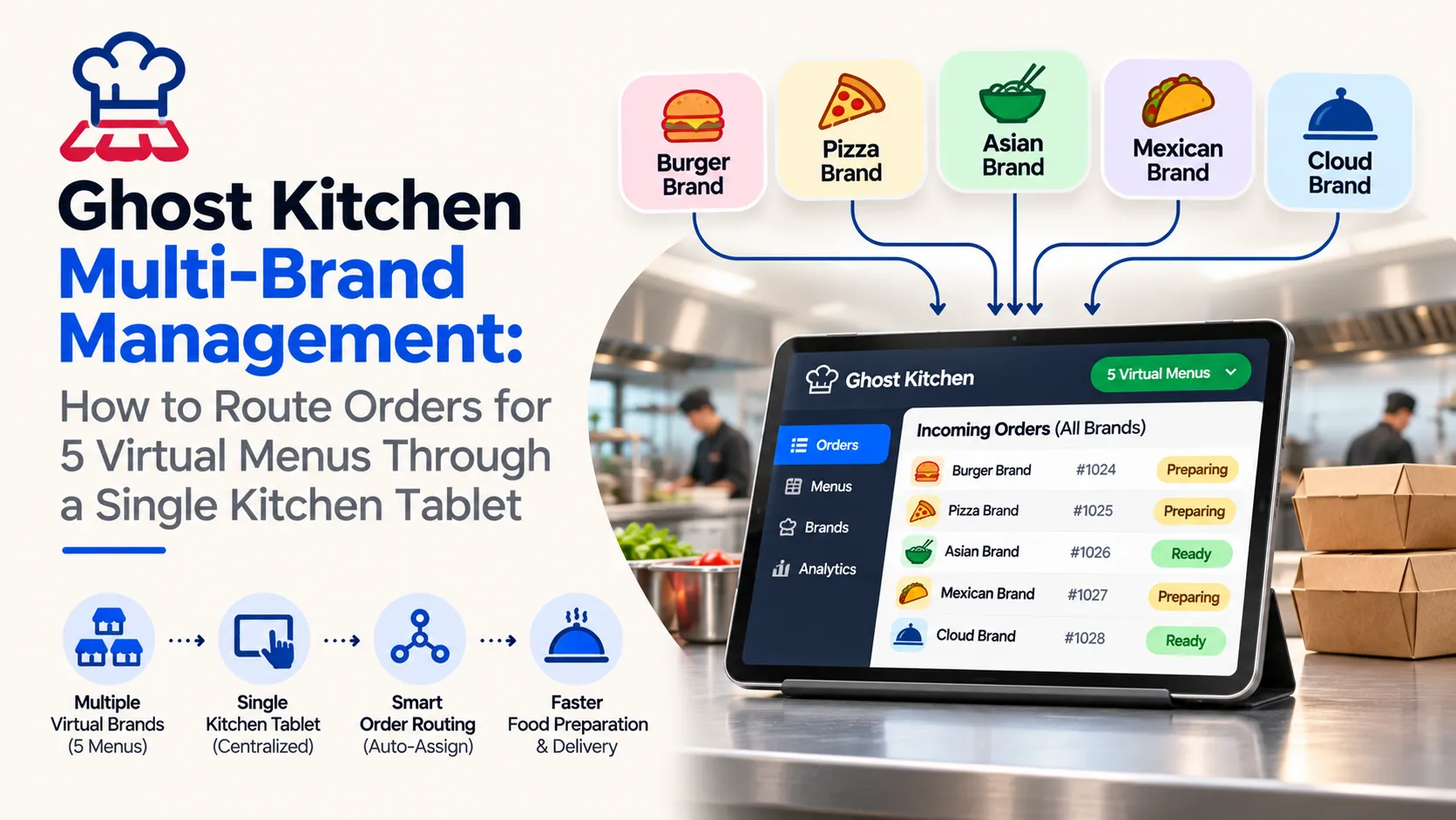
- Ghost kitchen multi-brand management allows a single commercial kitchen to operate five virtual restaurant menus while coordinating orders, preparation and delivery from one location.
- A centralized kitchen tablet can collect incoming orders from multiple virtual brands and delivery channels, reducing the need to monitor separate devices for each restaurant concept.
- Effective order routing should identify the correct virtual brand, menu items, preparation requirements and kitchen workstation before sending instructions to staff.
- Successful multi-brand kitchen operations depend on synchronized menus, accurate inventory, clear order prioritization and reliable communication between kitchen teams and delivery partners.
How to Route Five Virtual Menus Through One Kitchen Tablet
- Connect each virtual restaurant menu to a centralized order management system using supported delivery platform integrations, POS connections or authorized ordering APIs.
- Configure unique brand identifiers, menu mappings, item modifiers and preparation instructions so orders from all five virtual menus remain clearly separated.
- Display incoming orders on one kitchen tablet with brand names, order numbers, preparation times, item details and fulfillment status to help staff manage simultaneous requests.
- Route accepted orders to the appropriate kitchen stations, update preparation progress and synchronize pickup readiness with connected delivery channels to reduce fulfillment confusion.
Inventory Control, Kitchen Efficiency and Multi-Brand Growth
- Shared inventory management should connect ingredients used across multiple virtual menus and update item availability when stock levels change or ingredients become unavailable.
- Kitchen teams should prioritize orders using preparation requirements, promised pickup times, workstation capacity and delivery deadlines rather than relying only on order arrival time.
- Centralized reporting should track order volume, preparation delays, cancellations, ingredient usage and individual brand performance to identify operational bottlenecks.
- A scalable ghost kitchen management system should support additional virtual brands, consistent food quality, accurate order fulfillment and reliable integrations without unnecessarily increasing operational complexity.
Running five virtual restaurant brands from one kitchen can look efficient on paper. The same cooking equipment, preparation staff, storage space and delivery pickup area can support several customer-facing menus without opening five separate restaurants. Yet the operating complexity changes quickly when orders from different brands begin arriving at the same time. For founders planning a connected ordering ecosystem, a ready-made food ordering and delivery platform can provide a foundation for customer ordering and restaurant operations, while shared kitchen order routing may require additional integration.
The challenge is not simply managing five menus. It is coordinating every incoming order through the same preparation stations, employees, ingredients, and delivery handoff process without losing the identity of the restaurant brand that received the order.
Multi-brand ghost kitchen order routing addresses this challenge by bringing orders into one operational queue, identifying where each item must be prepared, and displaying the right instructions on a central kitchen tablet. With the right configuration, a single kitchen can manage several virtual storefronts without treating every brand as a separate physical restaurant.
This guide explains how to route orders from five virtual menus through one tablet, structure preparation workflows, synchronize shared ingredients, prevent common routing mistakes, and evaluate the technology required for a more reliable ghost kitchen operation.
Why Managing Five Virtual Menus Creates a Different Kitchen Challenge
A traditional restaurant generally has one customer-facing menu connected to its kitchen operations. A multi-brand ghost kitchen operates differently because several digital restaurant identities may sell food prepared by the same employees, using the same equipment and storage areas.
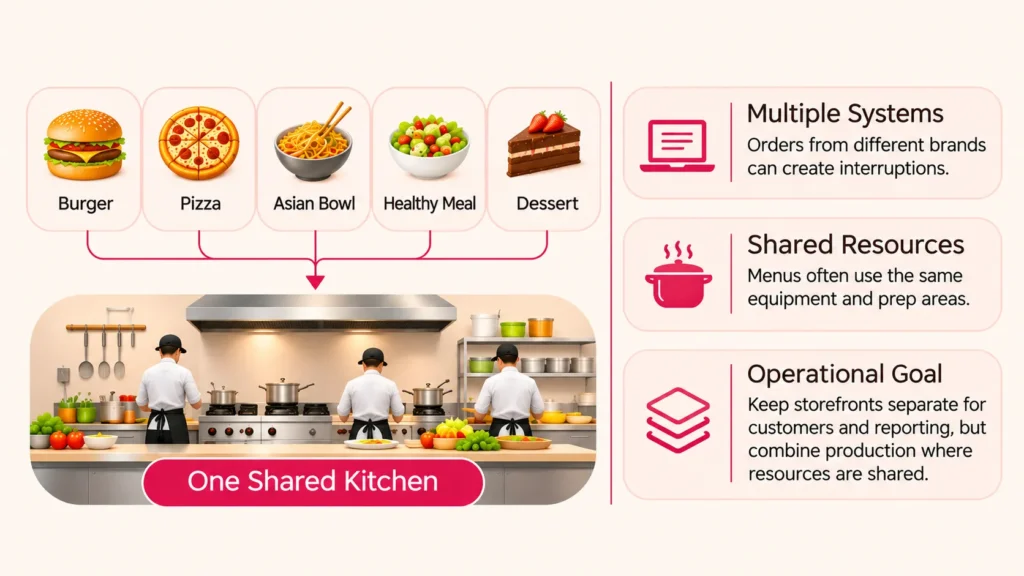
Consider a facility operating a burger concept, a pizza concept, an Asian bowl menu, a healthy meal menu, and a dessert brand. Each storefront has its own dishes, descriptions, promotions, and customers, but the actual cooking takes place inside one shared kitchen.
When these orders arrive through disconnected systems, employees must continuously check multiple interfaces. That creates unnecessary interruptions, inconsistent preparation priorities, and the possibility that an order will remain unacknowledged while staff are occupied elsewhere.
The Hidden Complexity Behind Five Digital Storefronts
Five virtual brands do not necessarily mean five independent production lines. A burger and a rice bowl may both require the grill, while a dessert and a salad may depend on the same cold preparation station.
This means the kitchen must coordinate work according to actual preparation needs rather than the brand that sold the food. Otherwise, each menu competes for equipment and staff attention without providing the team with a complete picture of the workload.
The operational objective is straightforward: keep storefronts separate for customers and reporting, but combine production wherever the kitchen shares resources.
What Is a Single-Tablet Order Routing System for a Ghost Kitchen?
A single-tablet order routing system brings incoming orders from multiple connected virtual restaurant storefronts into one kitchen-facing interface. Instead of monitoring a separate device for every brand or ordering channel, employees work from a unified order queue.
The central system identifies the order source, virtual brand, purchased items, preparation requirements, customer instructions, expected completion time, and current status. It can then assign items to the appropriate preparation station or show the relevant instructions to the team operating the shared tablet.
The tablet is the visible part of the workflow, but the actual routing depends on the software behind it. A reliable setup needs an order management layer, configured menu mappings, and supported connections to the channels sending the orders.
How One Tablet Can Replace Multiple Order Screens
When an order reaches the central system, the software converts incoming order information into a consistent kitchen ticket. The ticket appears on the tablet with the correct brand label and preparation instructions, regardless of which connected storefront generated it.
Kitchen staff can acknowledge the ticket, begin preparation, update progress, and mark the order ready for pickup from the same interface. Where integrations support it, these status updates can be communicated back to the originating order channel automatically.
A single tablet does not automatically integrate every delivery channel or replace every existing device. That outcome depends on available APIs, integration permissions, account configuration, and the routing software selected for the kitchen.
How to Organize Five Virtual Restaurant Menus Before Routing Orders
Before configuring software, the kitchen operator should map all five virtual brands to their actual preparation requirements. This prevents the team from creating five separate digital workflows for work that can be handled through shared kitchen stations.
For illustration, imagine the following five fictional menus operating inside one facility. Their names and assignments are examples rather than actual businesses or client implementations.
| Virtual Menu | Typical Items | Primary Station | Shared Resources |
|---|---|---|---|
| Urban Burger Kitchen | Burgers, fries, grilled sandwiches | Grill and fryer | Grill, fryer, packing counter |
| Stone Oven Pizza | Pizza, garlic bread, baked sides | Oven | Preparation bench, oven, packing counter |
| Wok & Bowl | Rice bowls, noodles, stir-fried dishes | Wok and hot line | Cold preparation, hot line, packing |
| Fresh Plate Studio | Salads, wraps, protein bowls | Cold preparation | Cold preparation, grill, packing |
| Sweet Corner | Brownies, desserts, chilled treats | Dessert station | Cold storage, dessert finishing, packing |
This mapping reveals that all five brands depend on the packing counter, while several share the grill or cold preparation area. These shared dependencies matter more for order sequencing than the number of virtual menus displayed to customers.
Separate Brand Identity From Kitchen Production Logic
Every virtual brand should retain its own storefront name, menu, item pricing, packaging rules, and reporting information. Those details help maintain consistency between the customer experience and the food delivered.
Production instructions should be managed separately. For example, grilled chicken used in two menus can follow a shared preparation procedure while still appearing as different customer-facing dishes under the appropriate virtual brands.
This distinction allows operators to simplify kitchen work without mixing up customer orders or incorrectly combining brand-level sales records.
Step-by-Step: Route Orders From Five Virtual Menus Through One Kitchen Tablet
Successful multi-brand routing depends on a sequence of well-defined processes rather than merely connecting five restaurant accounts to one screen. Each step should preserve important order data while reducing unnecessary actions for kitchen employees.
Step 1: Connect Every Supported Ordering Channel to a Central Order Manager
The first step is connecting each virtual restaurant storefront to a compatible central order management system. Depending on the business, orders may originate from delivery marketplaces, a branded ordering website, a mobile application, or a restaurant-operated ordering system.
The system should capture the originating brand, channel order reference, purchased items, modifiers, requested fulfillment time, and delivery instructions. It should also record the channel’s acknowledgment requirements so accepted orders do not silently remain pending.
Before relying on automated routing, verify that each ordering channel offers the necessary integration access. If a particular channel cannot exchange order data automatically, the kitchen needs a documented manual process rather than assuming all orders will appear on the tablet.
Step 2: Create a Unique Internal Order Record
Orders from different storefronts may use similar reference numbers. For example, two unrelated channels could both issue an order numbered 1045, even though the customers, items, and delivery arrangements are different.
A central order manager should assign its own unique internal identifier while preserving the original channel reference. Combining the channel identifier and source order ID also helps detect duplicate messages if an integration retries delivery after a network interruption.
Every order record should retain a stable connection to its virtual brand. This is essential when printing packaging labels, resolving customer complaints, reviewing sales reports, or reconciling payments later.
Step 3: Convert Different Menu Items Into Standard Kitchen Instructions
Each virtual brand may use different names for ingredients or similar dishes. One storefront might sell a grilled chicken wrap, while another offers a protein wrap using many of the same ingredients and preparation steps.
Menu normalization links each customer-facing item to a kitchen SKU, preparation recipe, station assignment, and expected preparation duration. It must also preserve modifiers such as extra toppings, excluded ingredients, dietary instructions, and packaging requirements.
The goal is not to erase differences between brands. It is to translate each purchased item into instructions that kitchen employees can execute consistently.
Step 4: Route Items to the Correct Preparation Station
Once an order is normalized, the system determines where each item should be prepared. Burger patties go to the grill, pizzas go to the oven, salads go to the cold station, and desserts move to their designated preparation area.
When one order contains items requiring different stations, the system can create linked preparation tasks while retaining one parent order. The packing team should see whether all required items have been completed before the order is released.
In a single-tablet configuration, station tasks can be displayed through clearly labeled views or filters. Larger kitchens may eventually add station-specific displays, but that should be a capacity-driven decision rather than an automatic requirement for launching additional virtual brands.
Step 5: Prioritize Tickets According to Preparation and Handoff Deadlines
Kitchen orders should not always be prepared in the exact sequence they arrive. A salad that takes only a few minutes may need to be started later than a pizza requiring a longer oven cycle, even when both have similar delivery handoff deadlines.
A practical routing policy considers promised pickup time, estimated preparation duration, station workload, order age, and available delivery timing. It can then recommend when preparation should begin for each order.
Estimated readiness should be treated as a planning signal, not a guaranteed result. Kitchen employees must be able to flag delays, revise estimates, and intervene when equipment problems or unexpected order volumes make the original plan unrealistic.
Step 6: Display Every Active Order in One Unified Queue
The central tablet should display incoming, acknowledged, preparing, delayed, and ready orders in a way employees can understand immediately. Each ticket needs a visible brand label, order number, item summary, relevant modifiers, and timing information.
Brand colors can help employees identify the originating virtual menu, but color should never be the only distinction. Text labels and clear status indicators reduce confusion for staff members working in crowded or visually demanding kitchen environments.
A useful interface also separates active preparation tickets from completed orders. Otherwise, a long list of historical orders can make urgent tickets difficult to find during peak demand.
Step 7: Confirm Preparation, Packing, and Delivery Handoff
When cooking is complete, the order should move to a packing or quality-check stage rather than automatically becoming ready for pickup. Staff must confirm that the required items, modifiers, sides, drinks, and packaging match the ticket.
The final handoff should use the correct brand label and channel order reference so delivery personnel collect the intended package. A recorded ready status and pickup confirmation also make it easier to investigate delays or missing orders.
Where delivery integrations allow status synchronization, the order manager can relay suitable updates to the originating channel. If an external channel does not support a particular status, staff should have a clear fallback procedure.
Example: Five Virtual Menus Receive Orders During the Same Lunch Rush
To understand how this works in practice, consider a hypothetical kitchen that receives five orders from five different virtual menus within a short period. All five orders must pass through one shared preparation facility and one central packing counter.
The timings below are illustrative planning inputs, not industry benchmarks or measured performance results. Actual cooking times depend on recipes, staffing, equipment, and the kitchen’s operating conditions.
| Order | Brand | Received | Estimated Prep | Planned Handoff | Station |
|---|---|---|---|---|---|
| #A101 | Urban Burger Kitchen | 12:00 | 12 min | 12:20 | Grill |
| #B102 | Stone Oven Pizza | 12:01 | 18 min | 12:25 | Oven |
| #C103 | Wok & Bowl | 12:02 | 10 min | 12:18 | Wok |
| #D104 | Fresh Plate Studio | 12:03 | 6 min | 12:17 | Cold preparation |
| #E105 | Sweet Corner | 12:04 | 5 min | 12:23 | Dessert |
How the Unified Queue Handles These Five Orders
The pizza has the longest estimated preparation duration, so the oven team may need to begin work early. The wok order also has a relatively tight handoff target and should be acknowledged promptly rather than waiting behind unrelated burger tickets.
The salad can begin closer to its handoff deadline because its estimated preparation duration is shorter. The dessert may also be prepared later, depending on refrigeration needs, packaging time, and available staff.
The central tablet presents the entire workload while allowing employees to review station-specific tasks. Instead of treating the five orders as separate restaurant operations, the kitchen coordinates their preparation against a shared production schedule.
A Simple Routing Priority Formula
One useful starting point is calculating a planned preparation start time by subtracting estimated preparation and packing durations from the target handoff time.
For example, a 12:20 handoff target, 12-minute preparation estimate, and 3-minute packing buffer produces a planned start time of 12:05.
This formula is a scheduling aid rather than a complete optimization algorithm. Actual routing should also consider station availability, orders already in progress, equipment constraints, ingredient shortages, and any changes to the pickup deadline.
A kitchen may use earliest-deadline-first sequencing as a starting rule and then apply capacity checks. The important decision is to prioritize the next executable task, not simply the oldest visible ticket.
How to Design the Kitchen Tablet Interface for Faster Order Handling
A central tablet should reduce decisions, not force cooks to read lengthy order records. Employees need to know which orders require attention, what ingredients or modifiers are involved, and what action to take next.
The screen should emphasize operational information and keep administrative controls outside the main preparation workflow. This makes the interface easier to use when staff are handling several orders simultaneously.
Five Essential Areas of a Unified Kitchen Display
| Display Area | Information Shown | Operational Purpose |
|---|---|---|
| Incoming orders | New tickets, brand name, order reference | Prevent missed acknowledgments |
| Active preparation | Items being cooked, station, preparation timer | Coordinate current workload |
| Attention required | Delayed orders, stock issues, failed updates | Highlight exceptions |
| Ready for packing | Completed items, packaging requirements | Check order completeness |
| Pickup and completion | Ready orders, collection reference, final status | Support accurate delivery handoff |
Make Order Status Changes Deliberate and Visible
Each ticket should follow a defined status sequence such as new, acknowledged, preparing, ready for packing, ready for pickup, and completed. A clear state model makes it easier to detect abandoned orders and prevents staff from skipping essential checks.
When an employee updates a status, the interface should acknowledge the action visibly. This avoids repeated taps and makes it clear whether the change was saved locally, accepted by the central system, or still waiting for network confirmation.
Critical actions such as cancellation, rejection, and overriding a completed order should require appropriate permissions. These actions affect customer expectations, financial records, and the kitchen’s ability to explain what happened later.
Managing Shared Ingredients Across Five Virtual Restaurant Brands
A unified order queue solves only part of the problem. Five menus may draw from the same ingredients, and a kitchen can oversell products if each virtual storefront tracks availability independently.
For example, grilled chicken may appear in a burger menu, a protein bowl, and a wrap. If the kitchen has limited prepared chicken available, accepting new orders from all three brands without a shared inventory check could create shortages before employees notice the problem.
Create a Shared Ingredient Inventory Rather Than Five Separate Stock Pools
The inventory system should connect customer-facing dishes to shared ingredient records. Each recipe defines the expected ingredient consumption, allowing stock requirements to be calculated across all five virtual menus.
When an order is accepted, the system can reserve the required ingredients according to configured rules. If the order is canceled before preparation, an appropriate release or adjustment workflow should restore eligible inventory rather than permanently deducting the stock.
Actual ingredient consumption may differ from recipe estimates because of spoilage, substitutions, or portion variation. Periodic stock counts and waste adjustments remain necessary even when orders are tracked automatically.
Synchronize Item Availability Across Every Relevant Storefront
If a shared ingredient becomes unavailable, every menu item dependent on that ingredient should be reviewed. Where supported, the ordering system can temporarily disable affected dishes across connected channels.
Availability updates should be confirmed by each integration instead of assuming every channel received them successfully. If an update fails, the kitchen needs an alert and a manual method to prevent additional orders for unavailable dishes.
Operators should also distinguish between ingredient shortages and temporary station capacity limits. A pizza may remain fully stocked while the oven is overloaded, requiring a longer preparation estimate rather than a permanent menu suspension.
Kitchen Station Routing: Assign Work by Preparation Requirements, Not Brand Names
Multi-brand operations become inefficient when every incoming order is assigned according to the restaurant name alone. A better approach routes individual preparation tasks to the station responsible for completing them.
This allows a shared grill to prepare suitable items across several brands while the oven, wok, cold station, and dessert team handle their respective work. The packing counter then combines completed items according to the original order reference.
Split Multi-Station Orders Without Losing the Parent Ticket
Imagine a customer ordering a grilled wrap, fries, and a chilled dessert from one storefront. Preparation may involve the grill, fryer, and dessert station, even though the customer sees a single order in the ordering application.
The routing system can create linked tasks for these stations while maintaining one parent ticket. The parent order should only become ready after all required items are complete, appropriate substitutions are recorded, and the packing team confirms the contents.
This parent-child relationship prevents a common operational error: releasing a delivery package because one station finished its portion while another item is still being prepared.
Set Practical Capacity Limits for Each Station
Every kitchen station has a realistic production limit. An oven has finite space, a fryer has limited basket capacity, and a preparation bench can only support a certain amount of simultaneous work safely.
Routing software should account for these limits when estimating preparation starts and order readiness. When capacity is constrained, the operator may need to extend preparation estimates, pause selected items, or temporarily reduce available order slots.
A useful capacity policy also leaves room for operational variability. Scheduling every station at theoretical maximum throughput provides little protection against delays, remakes, or equipment problems.
How to Avoid Duplicate Orders, Missed Tickets, and Status Synchronization Errors
Centralizing orders makes operations easier to manage, but it also creates a dependency on the accuracy of the integration layer. Incoming messages may be delayed, repeated, incomplete, or temporarily unavailable because of connectivity problems.
A reliable multi-brand kitchen workflow must detect these situations and give employees a practical way to recover without accidentally preparing the same order twice.
Use Duplicate Detection for Retried Order Messages
When an ordering channel sends the same order again after a timeout, the central system should recognize the existing record rather than creating another production ticket. This normally requires a durable external order identifier, channel identifier, and idempotent processing rules.
It is also important to distinguish a duplicate message from a genuine order modification. If an accepted order changes, the kitchen should receive a controlled update showing what changed and whether preparation has already started.
Separate Message Receipt From Kitchen Acknowledgment
An order arriving at the server does not always mean kitchen staff have seen it. Systems should track technical receipt separately from operational acknowledgment so an unattended tablet or frozen screen does not create the false impression that the kitchen accepted an order.
Unacknowledged tickets should trigger an appropriate alert or escalation. The time threshold depends on the kitchen’s operating model and each ordering channel’s acceptance requirements.
Create a Recovery Procedure for Connectivity Failures
If the central tablet loses network connectivity, employees need to know which tickets remain valid and which status changes have not synchronized. Locally cached tickets may help maintain visibility, but offline preparation should be supported only where the system has an established reconciliation process.
During an outage, staff may need to use original ordering-channel interfaces or printed backups. When connectivity returns, the order manager should reconcile records carefully, confirm missing updates, and avoid replaying completed orders as new tickets.
For a broader understanding of API protection, access permissions, and sensitive order data, founders can explore this food delivery platform security guide. It covers security considerations that extend beyond the kitchen tablet, including third-party integrations and platform-level data protection.
How to Prevent Kitchen Bottlenecks During Peak Ordering Hours
A unified screen does not automatically increase the number of meals a kitchen can prepare. It improves visibility and coordination, but physical station capacity, staffing, ingredient availability, and packing space still determine actual throughput.
Operators should therefore combine order routing with capacity planning. This is particularly important when promotions or predictable meal periods cause several virtual brands to receive orders at once.
Use Dynamic Preparation Estimates When Workload Changes
Fixed preparation estimates may work when the kitchen is quiet, but they become less reliable during a rush. A station already processing several orders may need additional time before another task can begin.
A practical system can adjust estimated preparation times using active queue size, station capacity, item complexity, and current delays. These estimates should inform customer promises and delivery scheduling where the connected channels support updates.
Use Controlled Menu Pauses Instead of Accepting Unlimited Orders
When an essential station becomes overloaded, temporarily reducing demand may protect service quality. The operator might pause specific dishes, extend preparation time, or disable a menu briefly while the team clears its backlog.
The decision should be targeted whenever possible. If the oven is overloaded, the kitchen may still be able to process salads and chilled desserts without interruption.
Balance Cooking Completion With Delivery Pickup Timing
Preparing every order as early as possible can create another problem: meals may wait too long before collection. This affects food temperature, texture, packaging condition, and the customer’s eventual experience.
Preparation planning should consider pickup targets when reliable timing information is available. However, courier arrival estimates may change, so staff need a practical way to adapt rather than relying on a rigid automated schedule.
Packaging and Dispatch Rules for Five Different Virtual Brands
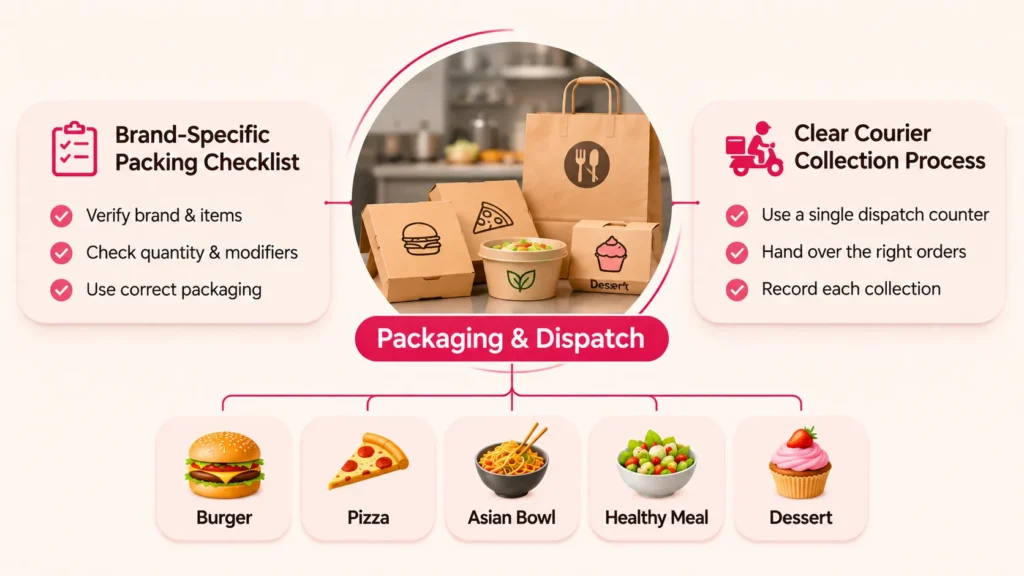
Although food preparation may be shared, packaging is still part of each virtual brand’s customer experience. A dessert brand may use different containers and labels from a burger concept, even when both orders leave through the same dispatch counter.
The packing workflow should preserve brand identity while preventing the wrong items from being placed into a delivery bag. This is especially important when several orders have similar products or nearly identical pickup times.
Use Brand-Specific Packing Checklists
Each completed order should display the relevant brand, items, quantities, modifiers, and required packaging. The packer should verify that hot and chilled items are handled appropriately and that packaging supports safe transportation.
Where the system supports labels, a printed or scannable reference can connect the finished package to the central order record. This reduces the risk of relying only on handwritten brand names or verbal confirmation.
Maintain a Clear Courier Collection Process
All five menus may use one dispatch counter, but the handoff team must still distinguish the original order channels and collection references. Drivers should receive only the packages associated with their assigned orders.
A separate ready-for-pickup view can help staff identify outstanding collections without mixing them into active cooking tickets. Recording the collection event also helps operators investigate delays after the meal leaves the kitchen.
Measure Kitchen Performance Without Mixing Up Brand-Level Results
One shared kitchen should not mean one undifferentiated performance report. Operators need to understand whether delays are caused by a particular menu, preparation station, ordering channel, or overall demand level.
Operational reporting should therefore support both kitchen-wide metrics and individual brand analysis. This makes it easier to improve efficiency without losing visibility into the performance of each virtual restaurant concept.
| Metric | What It Measures | Why It Matters |
|---|---|---|
| Order acknowledgment time | Time between receipt and acknowledgment | Identifies unattended tickets |
| Actual preparation time | Time spent preparing an order | Supports realistic planning |
| On-time readiness rate | Share of orders ready by their planned deadlines | Highlights reliability issues |
| Station queue time | Waiting time before station work begins | Reveals bottlenecks |
| Order correction rate | Orders requiring corrections or remakes | Indicates workflow accuracy |
| Stock-related cancellations | Orders affected by unavailable ingredients | Tests inventory synchronization |
| Brand contribution margin | Revenue remaining after attributable variable costs | Supports brand-level decisions |
Separate Operational Efficiency From Brand Profitability
A virtual restaurant can generate many orders while contributing relatively little margin because of ingredient expenses, packaging, promotional discounts, or marketplace charges. High demand alone does not establish that a brand is financially attractive.
Operators should attribute direct costs to the appropriate brand and use a consistent method for assigning shared overhead. Station utilization and kitchen preparation efficiency should be reviewed alongside revenue and margin, not used as substitutes for financial reporting.
For example, a menu that repeatedly overloads the kitchen’s only oven may create delays for other brands. That operational impact belongs in management decisions even when the menu performs well in total sales.
Single Kitchen Tablet vs. Multiple Brand Tablets: Which Workflow Makes Sense?
Not every kitchen requires the same display arrangement. A compact facility with a manageable volume of orders may operate effectively through one central tablet, while a larger kitchen with independent stations may benefit from additional screens.
The important distinction is between centralizing order management and limiting the operation to one physical device. The software should ideally preserve one authoritative order record even if additional kitchen displays are introduced later.
| Consideration | Separate Brand Tablets | Unified Kitchen Tablet |
|---|---|---|
| Order visibility | Fragmented across devices | Centralized queue |
| Brand identification | Linked to the individual device | Explicit brand labels on tickets |
| Staff interaction | Frequent device switching | One main preparation interface |
| Station coordination | Often requires manual communication | Can use configured station routing |
| Inventory visibility | May remain disconnected | Can connect to shared inventory |
| Failure exposure | Individual devices may fail independently | Central display needs a recovery plan |
| Best operational fit | Disconnected channels or separate teams | Shared kitchen with integrated order workflows |
Centralization is generally more useful when multiple brands share employees and equipment. However, a single physical tablet should not become an unprotected point of failure, and managers should plan how kitchen operations continue if the display stops working.
What Technology Does a Multi-Brand Ghost Kitchen Need Behind the Tablet?
A tablet alone cannot manage five digital storefronts reliably. The underlying technology must translate external orders into kitchen instructions, track their progress, and preserve accurate records across operational and financial workflows. For founders extending these operations into customer ordering, delivery coordination, and real-time status updates, on-demand application development services can provide a broader perspective on connecting customer-facing applications with backend operational systems.
Kitchen operators evaluating software should understand the main components without needing to design every technical detail themselves.
Central Order Management Layer
This component receives order information from connected storefronts and creates a consistent internal record. It manages order identifiers, brand associations, status history, cancellation rules, and preparation requirements.
Ordering Channel and POS Integrations
Integration services connect external ordering sources and restaurant systems to the central workflow. They should handle supported order events, menu updates, acknowledgment responses, and errors according to the capabilities of each connected channel.
Kitchen Display System
The kitchen display system presents active orders, station assignments, preparation timers, and status actions to employees. A well-designed display should work clearly in a busy environment and provide useful feedback when synchronization is delayed.
Inventory and Menu Availability Service
This service connects shared ingredient stock with the menu items offered by the five virtual brands. It helps coordinate stock reservations, availability changes, and exceptions when ingredients run low.
Reporting, Permissions, and Audit History
Managers need reports covering orders, delays, station workload, cancellations, and brand-level performance. Role-based permissions should limit sensitive functions, while audit records help explain who changed an order and when.
Businesses planning additional integrations or custom operational workflows can explore the technical considerations in this food delivery platform developer guide. It explains backend architecture, API integrations, database design, and order-status workflows that can help founders evaluate how a connected ordering system supports restaurant operations.
Founder Decision Signals: When Is a Unified Kitchen Workflow Worth Introducing?
A multi-brand operation should adopt centralized routing because it solves measurable coordination problems, not simply because it has several virtual storefronts. The business case becomes stronger when disconnected devices, missed acknowledgments, or repeated preparation conflicts are affecting service.
Order Visibility
Staff regularly switch devices or struggle to identify which orders remain unacknowledged.
Shared Capacity
Multiple brands depend on the same equipment and compete for preparation time.
Inventory Accuracy
The same ingredients are sold through several menus without coordinated stock updates.
Growth Readiness
The kitchen wants to add more brands without multiplying manual administrative tasks.
If these conditions are present, a unified kitchen workflow deserves investigation. However, the operator should first confirm integration availability, process readiness, and whether existing order volumes justify the operational change.
Common Mistakes to Avoid When Centralizing Five Virtual Menus
Mistake 1: Treating One Tablet as a Complete Integration Strategy
Placing a tablet in the kitchen does not automatically consolidate incoming orders. Every relevant ordering source must be connected, and failures must be visible to the team.
Operators should test order receipt, modifications, cancellations, acknowledgment, and status updates for each supported channel before relying on the unified screen during live service.
Mistake 2: Routing Entire Brands Instead of Individual Preparation Tasks
Sending every item from one virtual menu to the same station can create unnecessary bottlenecks when dishes require different equipment. Routing rules should follow item-level preparation requirements.
Shared station management allows staff to work according to actual cooking responsibilities while maintaining separate order and brand records.
Mistake 3: Ignoring Shared Ingredient Availability
Five separate storefront inventories can produce conflicting availability information when they depend on the same physical stock. This increases the risk of accepted orders that cannot be fulfilled.
Operators should map shared ingredients, confirm recipe usage rules, and establish clear procedures for pausing affected items across connected channels.
Mistake 4: Optimizing Only for Faster Order Acceptance
Accepting more orders quickly is not useful if the kitchen cannot prepare them within realistic deadlines. Routing decisions must account for workload, staffing, preparation duration, and delivery handoff.
Kitchen operators should track both acknowledgment speed and fulfillment reliability. Improving one metric while damaging the other is not a sustainable operational improvement.
Mistake 5: Launching Without an Outage and Manual Recovery Procedure
A central order screen introduces a concentrated operational dependency. If it fails during a busy period, employees need reliable access to existing order records and a safe process for continuing work.
Test connectivity failures, duplicate deliveries, delayed updates, and device replacement before full deployment. A brief written recovery procedure is more useful than expecting employees to improvise during a service interruption.
A Practical Implementation Checklist for a Five-Brand Ghost Kitchen
Before switching a live kitchen to centralized order routing, operators should test the complete flow with realistic examples from each of the five menus. The objective is to identify gaps while staff can still correct the process without affecting real customers.
- Map brands and channels: Document every virtual menu, ordering source, and integration requirement.
- Define kitchen stations: Assign each item to the correct preparation area and identify shared equipment.
- Normalize menu records: Connect customer-facing dishes with kitchen SKUs, recipes, and modifiers.
- Verify order identification: Confirm that original channel references and internal IDs remain distinct.
- Configure the queue: Set acknowledgment, preparation, packing, and completion states.
- Test workload priorities: Simulate simultaneous orders with different preparation and pickup deadlines.
- Connect shared inventory: Verify stock deductions, cancellations, and availability changes.
- Validate packaging: Check brand labels, complete orders, and handoff references.
- Test failure recovery: Simulate duplicate order messages, network interruptions, and delayed acknowledgments.
- Review operating reports: Confirm that kitchen-wide and brand-level results remain accessible.
The test should include normal orders and exceptions. A kitchen that handles five perfect sample orders may still struggle when one customer requests a change, an ingredient runs out, or a delivery collection is delayed.
Introduce the new workflow gradually where practical, monitor employee feedback, and refine routing rules based on observed bottlenecks. The goal is an operational system that staff can trust during actual service, not merely a successful demonstration.
How Miracuves Can Support a More Connected Food Ordering Operation
Managing five virtual menus through one kitchen tablet highlights an important distinction between customer-facing food ordering and the internal systems required to fulfill orders reliably. A business needs both a suitable digital ordering foundation and an operational workflow matched to the kitchen’s real capabilities. Founders evaluating these connected processes can explore Miracuves’ food and beverage platform expertise for a broader perspective on restaurant integrations, order management, and delivery operations.
Miracuves provides ready-made, white-label food ordering infrastructure with restaurant-side workflows, administrative control, and source-code ownership. Its standard ready-made solution has a stated six-working-day deployment process, subject to the defined scope and external dependencies.
For a five-brand ghost kitchen, requirements such as third-party order aggregation, shared inventory, station-specific routing, and a unified kitchen display should be assessed individually. These capabilities should not be assumed to be included in the standard offering, and additional integrations or custom workflows may require separate scoping.
Founders evaluating a connected ordering ecosystem can explore Miracuves’ ready-made food delivery solutions to compare different marketplace and restaurant ordering models. For a five-brand ghost kitchen, the next step is to confirm which integrations, shared inventory workflows, and kitchen display capabilities would require additional configuration or development.
Final Thoughts: Five Virtual Menus Need One Coordinated Kitchen Workflow
Operating five virtual restaurant menus from one kitchen can create opportunities to share equipment, ingredients, employees, and preparation capacity. However, these advantages become difficult to realize when every storefront introduces a disconnected order management process.
A unified kitchen tablet can provide a clearer view of incoming orders, preparation responsibilities, delays, and pickup readiness. The real value comes from the order management and routing logic supporting that screen, not from reducing the number of devices alone.
For ghost kitchen operators, the strongest approach is to preserve individual brand identities while coordinating shared production, inventory, and fulfillment. Start with accurate menu mappings, reliable order records, realistic station capacity, and clear recovery procedures before introducing more complex automation.
When those foundations are in place, adding another virtual menu becomes a manageable operational decision rather than another layer of kitchen confusion.
Frequently Asked Questions
Can one kitchen tablet manage orders from five virtual restaurants?
Yes. A compatible central order management system can display orders from five connected virtual restaurants on one kitchen tablet. Each ticket should retain its brand identity, order reference, preparation instructions, and status. Actual integration depends on the supported ordering channels.
How does multi-brand ghost kitchen order routing work?
Orders enter a central management system, receive unique internal records, and are mapped to preparation tasks. The system assigns items to kitchen stations, displays active tickets, tracks progress, and supports packaging and delivery handoff while preserving each virtual brand’s identity.
Do five virtual restaurant menus need five separate POS systems?
Not necessarily. Several virtual menus can use a shared order management and kitchen workflow when the software supports multiple brands and the required integrations. Separate systems may still be necessary when certain ordering channels cannot connect to the central platform.
How can a ghost kitchen avoid duplicate orders on one tablet?
The order manager should preserve external channel references and use unique internal order identifiers. Duplicate detection and idempotent processing help prevent repeated incoming messages from creating additional preparation tickets. Staff also need a clear exception review process.
How is shared ingredient inventory managed across virtual brands?
Shared ingredient records connect recipes from different virtual menus to the same physical stock. Order reservations, stock adjustments, and supported menu availability updates help operators avoid selling ingredients that are no longer available.
What happens if the central ghost kitchen tablet loses internet connectivity?
The kitchen should follow a documented fallback process using available channel interfaces, backup devices, or printed tickets. Once connectivity returns, the system should reconcile order records and status updates without creating duplicate production tasks.
Is one tablet enough for a busy multi-brand cloud kitchen?
One tablet may be sufficient for a compact operation with manageable order volume and a coordinated team. Larger kitchens with separate preparation stations may need additional displays while retaining a central order management system.
What should operators check before choosing multi-brand kitchen management software?
Operators should verify ordering-channel compatibility, brand-specific ticket identification, kitchen station routing, shared inventory support, preparation timing, order-status synchronization, reporting, access controls, and outage recovery. Required integrations should be confirmed before purchase or deployment.
Miracuves is an independent software development company. We are not affiliated with, connected to, sponsored by, or endorsed by any company or product named in this article.
Terms such as “X Clone” are used descriptively. It is how the software industry refers to building a platform with functionality comparable to a known service, and how clients search for it.
The entire design and codebase of our products is built by our own team. Our products contain no code, design, graphics, or content originating from any third-party website or applications.
All third-party names and marks referenced in this article are the property of their respective owners, referenced solely to identify the services discussed.