Key Takeaways
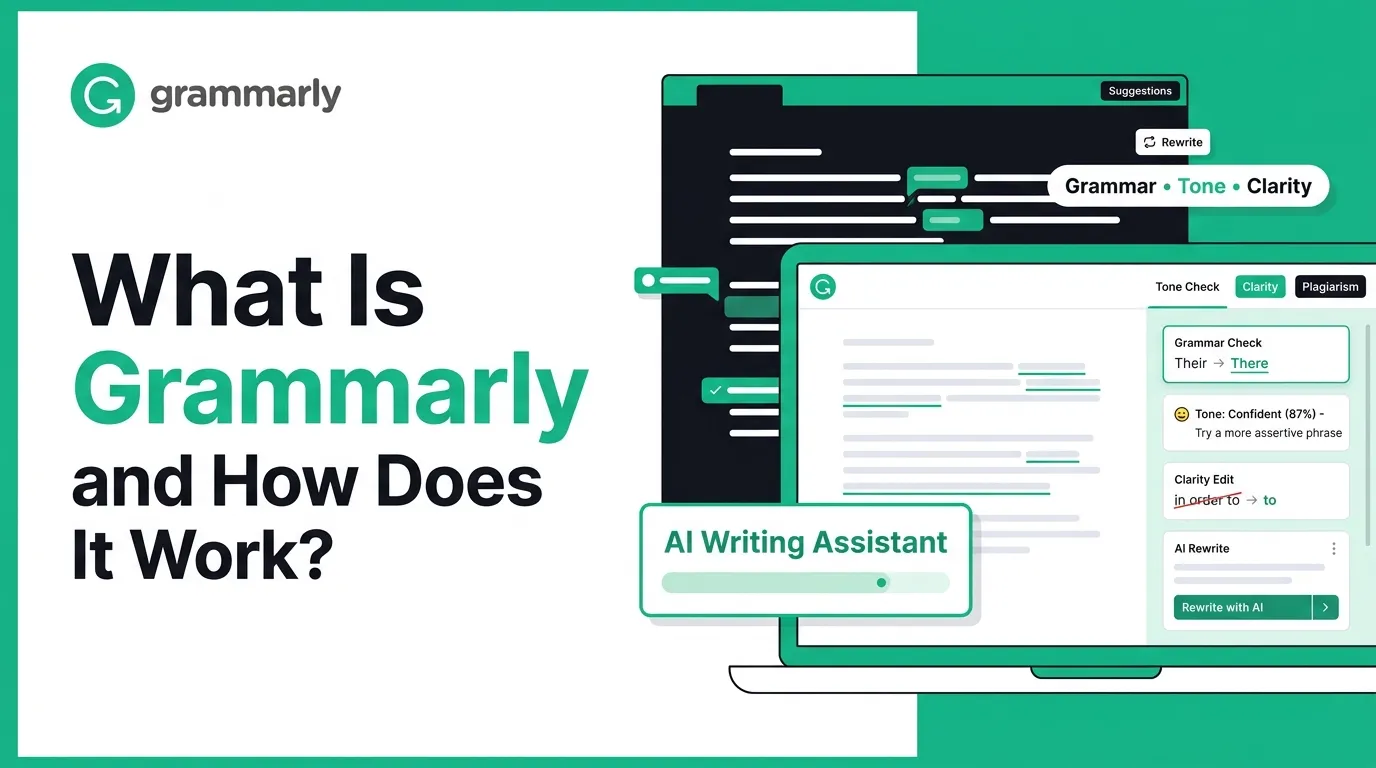
- Grammarly is an AI writing assistant that helps users improve grammar, clarity, tone, and communication quality.
- Writers, students, professionals, teams, and admins need smooth workflows for writing and editing.
- Grammar checks, spelling correction, tone suggestions, rewriting, plagiarism checks, and AI prompts are core features.
- Its success depends on accurate suggestions, easy integrations, data privacy, and user-friendly writing support.
- A Grammarly-like app can help startups build an AI-powered writing and productivity platform.
Feature Signals
- Users need grammar correction, spelling checks, tone detection, clarity suggestions, rewriting, and document support.
- Teams need style guides, brand tone control, shared writing rules, collaboration tools, and usage insights.
- Admins need control over users, subscriptions, permissions, data access, reports, and AI settings.
- Browser extensions, editor plugins, and app integrations help users write better across platforms.
- Real-time suggestions help users improve emails, blogs, messages, documents, and professional communication faster.
Real Insights
- Grammarly works because it improves writing inside the tools users already use every day.
- Weak language models can create poor suggestions, reduce trust, and affect user adoption.
- Clear explanations, tone guidance, and rewrite options help users learn while they edit.
- Privacy controls, secure integrations, and admin settings are important for business and team usage.
- Miracuves builds Grammarly-like AI writing apps with grammar checks, rewriting tools, integrations, and admin control.
You’re about to send an important email—maybe to a client, a hiring manager, or your boss. You read it twice, and it still feels… slightly off. Too harsh? Too casual? A couple of grammar slips? That tiny doubt is exactly where Grammarly steps in: it checks your writing in real time and suggests improvements so your message lands the way you intended.
Grammarly started in 2009, founded by Max Lytvyn, Alex Shevchenko, and Dmytro Lider, and it has grown into a writing companion that works across many apps and websites people use every day.
Its impact is huge: Grammarly says it’s trusted by over 40 million people and 50,000 organizations, showing how mainstream “AI-assisted writing” has become for students, professionals, and teams.
By the end of this guide, you’ll understand what Grammarly is, how it works step by step, the features that matter most, how it makes money, and what it takes to build a similar writing assistant. At Miracuves, this type of AI writing platform is seen as a strong example of how language technology can improve everyday communication, productivity, and workflow efficiency.
What Is Grammarly? The Simple Explanation
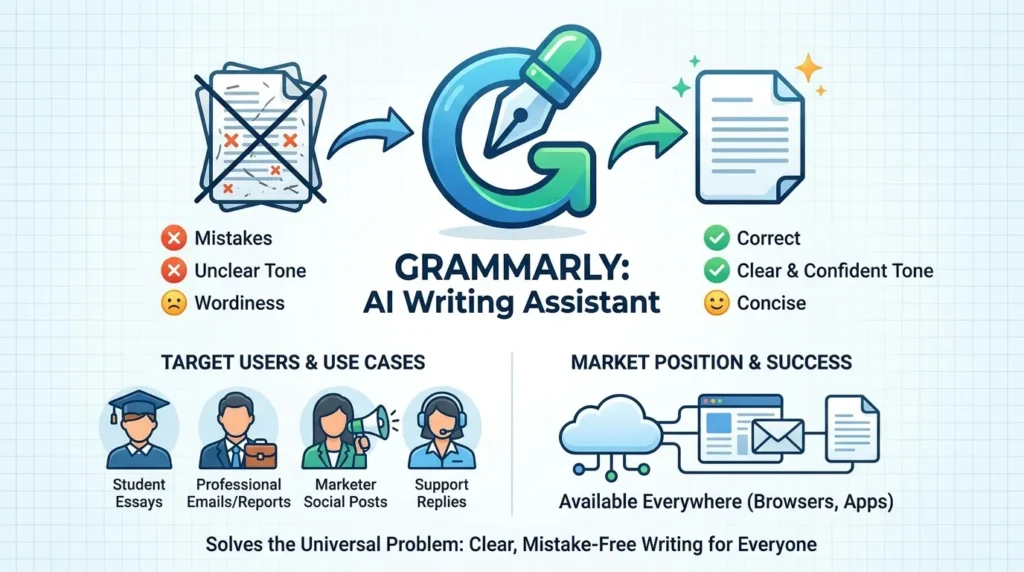
Grammarly is an AI-powered writing assistant that helps you write more clearly and correctly. It checks grammar, spelling, punctuation, tone, and clarity in real time, and suggests improvements while you type—whether you’re writing an email, a document, a message, or a social post.
The Core Problem Grammarly Solves
Most people know what they want to say, but writing can fail because of:
- Grammar and spelling mistakes
- Awkward or unclear sentences
- The wrong tone (too rude, too casual, too formal)
- Wordiness that makes messages hard to read
Grammarly fixes this by acting like a smart editor that catches mistakes and improves style instantly, so your writing sounds more professional and easier to understand.
Target Users and Use Cases
Grammarly is commonly used by:
• Students writing assignments and essays
• Professionals writing emails and reports
• Marketers writing posts and copy
• Customer support teams writing replies
• Remote teams collaborating on documents
Typical use cases include email writing, academic writing, business communication, resumes, social posts, and internal documentation.
Current Market Position
Grammarly is positioned as one of the most widely used writing productivity tools, especially because it works directly inside browsers, apps, and workplace tools—making writing help available everywhere.
Why It Became Successful
Grammarly became successful because it solved a universal problem: everyone writes, and everyone wants their writing to feel clear, confident, and mistake-free, without needing a human editor.
How Grammarly Works — Step-by-Step Breakdown
For users (students, professionals, teams)
1) Create an account and choose where you’ll use it
Most people start with the browser extension or desktop app, so Grammarly can work directly inside places you already write—email, docs, social posts, support replies, and more.
2) Grammarly reads your text in real time
As you type, Grammarly analyzes your writing and flags issues like:
- grammar and spelling mistakes
- punctuation problems
- clarity and readability issues
- tone mismatches (too harsh, too informal, etc.)
3) You get suggestions you can accept or ignore
You’ll see inline suggestions. You can click once to apply a fix, or skip it if it doesn’t match your intent. The main idea is “helpful guidance, but you stay in control.”
4) Set goals and tone (so suggestions fit the situation)
When you choose goals like audience/formality, Grammarly tailors recommendations. Its tone detection looks at things like word choice and punctuation to help you match how you want to sound.
5) Use AI to rewrite or draft faster (when you want more than corrections)
Grammarly also offers generative AI help: you can ask it to draft, rewrite, shorten, expand, or change tone—right where you’re writing.
6) Optional: plagiarism and AI-text detection (mainly for advanced plans)
Higher plans can include plagiarism checks and AI-generated text detection as part of the writing review workflow.
Technical overview (simple, no jargon)
Grammarly works like a loop:
- It scans what you write
- It predicts what might be wrong or unclear
- It suggests a better version
- You approve changes with one click
- It learns your preferences over time through settings and usage patterns
Read More :- How to Develop an AI Chatbot Platform
Grammarly’s Business Model Explained
How Grammarly makes money
Grammarly makes money mainly through subscriptions. It offers a free tier to attract a large user base, then upsells to paid plans that unlock advanced writing features, plagiarism checks, AI detection, and generative AI prompts.
It also earns from business and enterprise customers by selling team plans with admin controls, security, and deployment support for organizations.
Pricing structure with current rates
Grammarly’s individual paid plan is marketed around a Pro plan, shown at about $12 USD per month (commonly presented as a monthly-equivalent price on annual billing) and includes advanced rewrites, tone adjustments, plagiarism + AI detection, and a set number of generative AI prompts.
For teams, Grammarly offers Business and Enterprise options with organization features and security controls, with pricing generally depending on number of seats and deployment needs.
Commission/fee breakdown (how billing works in practice)
There is no “commission” model here (unlike marketplaces). Grammarly is SaaS, so fees are usually:
- recurring subscription for individuals (monthly or annual)
- per-seat pricing for teams/business
- custom contracts for enterprise deployments
Market size and growth signals
Grammarly positions itself as a large-scale AI communication product, stating it is trusted by over 40 million people and 50,000 organizations (including a large share of Fortune 500 companies).
Profitability and margin insights
Subscription software typically improves margins through:
- expanding free users into paid plans
- increasing retention (people keep it because they write daily)
- moving accounts from single-user to team deployments
Revenue model breakdown
| Revenue stream | What it includes | Who pays | Why it’s valuable |
|---|---|---|---|
| Free plan | Basic writing corrections | Individuals | Drives massive adoption and product habit |
| Pro subscriptions | Advanced rewrites, tone help, plagiarism + AI detection, AI prompts | Individuals | Recurring revenue from power users |
| Business plans | Team features, privacy/security, admin controls | Companies | Seat-based expansion and standardization |
| Enterprise deals | SSO, provisioning, governance controls, custom deployment | Large orgs | Higher contract value + long retention |
Key Features That Make Grammarly Successful
1) Real-time grammar and spelling correction
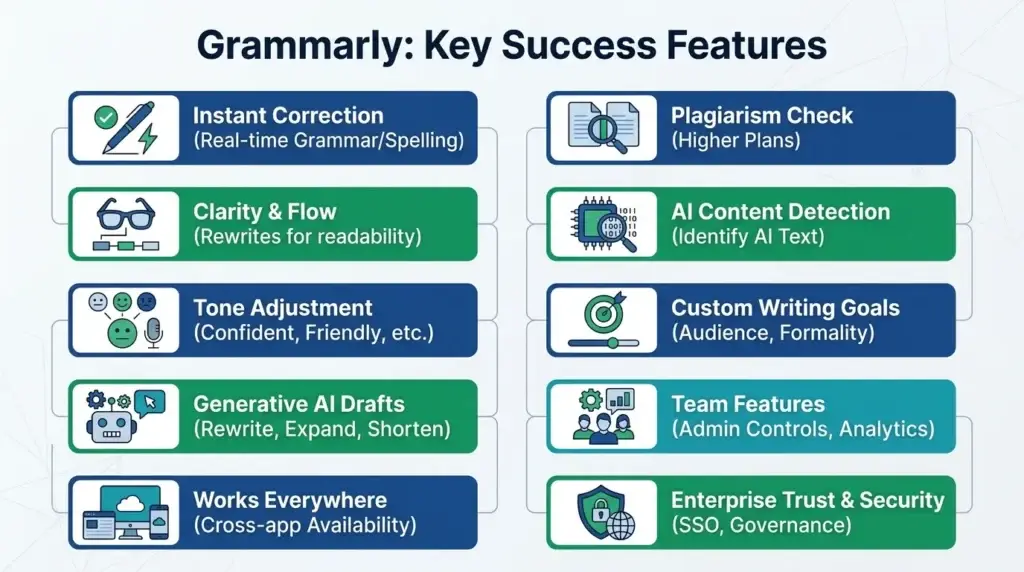
Grammarly catches grammar, spelling, punctuation, and basic writing mistakes instantly while you type, so users don’t have to “proofread later.”
2) Clarity improvements (make writing easier to read)
It flags wordy sentences and awkward phrasing and suggests clearer alternatives, which is especially helpful for business writing and emails.
3) Tone detection and tone rewrites
Grammarly can tell if your message sounds confident, friendly, or too harsh, and recommends changes to match the tone you want.
4) Generative AI assistance (draft, rewrite, expand, shorten)
Users can ask Grammarly to rewrite sentences, draft replies, shorten messages, or create fresh versions without leaving the page they’re writing in.
5) Cross-app availability (works where people already write)
Grammarly’s biggest advantage is that it works across many writing environments—browser, desktop apps, and workplace tools—so it becomes a daily habit rather than a “once-in-a-while editor.”
6) Plagiarism checking
Grammarly offers plagiarism detection in higher plans, which is valuable for students, content teams, and compliance-heavy industries.
7) AI text detection (for checking AI-written content)
Some plans include AI detection to help users identify whether content may be AI-generated.
8) Writing goals and customization
Users can set intent and audience goals (like formal vs casual), and Grammarly tailors recommendations accordingly.
9) Team features for businesses
Grammarly Business includes admin controls, analytics, and company-wide settings, making it useful for standardizing communication at scale.
10) Trust and security for enterprise
Grammarly promotes enterprise-grade controls like SSO and governance features, which helps adoption in large organizations.
The Technology Behind Grammarly
Tech stack overview (simplified)
Grammarly works like a smart “writing layer” that sits on top of wherever you type—your browser, desktop apps, or mobile keyboard—and improves text in real time. Grammarly supports multiple ways to use it, including browser extensions, desktop apps, and mobile experiences.
Behind the scenes, Grammarly combines:
- Language understanding (to detect what you’re trying to say)
- Error detection (grammar, spelling, punctuation)
- Style and clarity scoring (to make writing easier to read)
- Tone analysis (to predict how your message may feel to others)
Real-time features explained (how it gives suggestions instantly)
When you type a sentence, Grammarly quickly:
- Analyzes the text
- Spots issues (grammar, clarity, tone)
- Suggests a fix
- Lets you apply it with one click
This real-time loop is why it feels like a “coach” inside your writing—not a separate app you open later.
Generative AI layer (rewrites, drafts, and smart edits)
Beyond corrections, Grammarly includes generative AI that can:
- Rewrite full sentences
- Adjust tone
- Help draft or transform text (depending on plan)
Grammarly’s plan pages and feature descriptions show that paid tiers include generative AI prompts plus advanced rewrites and tone adjustments.
Data handling, privacy, and security (why teams trust it)
Because Grammarly touches sensitive writing (emails, docs, internal notes), business adoption depends heavily on security. Grammarly highlights encryption practices (data in transit and at rest) and compliance standards like SOC 2 and ISO 27001 on its security and compliance pages.
Scalability approach (how it works for millions of users)
Grammarly has to handle an enormous volume of small writing requests—constantly, across devices. The product is designed to deliver suggestions quickly and reliably across many environments (browser, desktop, mobile), which requires strong cloud infrastructure and efficient models.
Mobile app vs web platform
Grammarly extends beyond a web editor through mobile experiences like its keyboard, enabling tone checks and rewrites while typing on a phone.
API integrations (where Grammarly “lives”)
Grammarly’s biggest advantage isn’t a single website—it’s distribution. It works inside common writing environments through supported browsers and apps, so users don’t have to change habits to get value.
Why this tech matters for business
For individuals, Grammarly reduces mistakes and improves tone. For companies, it standardizes communication quality at scale—while still keeping control through business-grade privacy and security expectations.
Grammarly’s Impact & Market Opportunity
Industry disruption Grammarly caused
Grammarly turned “editing” from a final step into a real-time habit. Instead of writing first and fixing later, people now expect instant help with grammar, clarity, and tone while they type. This has reshaped everyday communication in workplaces, schools, and customer-facing teams—because writing is now treated like a skill you can continuously improve with a digital coach.
Market demand and growth drivers
Demand for Grammarly-style tools is growing because:
- Remote and hybrid work increased written communication
- Businesses want consistent, professional messaging
- Support and sales teams rely on fast, high-quality replies
- Students and professionals use AI to write more effectively
- Generative AI raised expectations for drafting and rewriting speed
User demographics and behavior
Grammarly appeals to:
- Students improving academic writing
- Professionals writing emails, reports, proposals
- Marketing and social teams polishing brand messaging
- Customer support teams handling large volumes
- Enterprises standardizing internal communication
A typical behavior pattern is daily usage: Grammarly becomes an “always-on” layer because it lives where people already write (email, docs, browsers).
Geographic reach
Grammarly is used globally and markets itself as being trusted by over 40 million people and 50,000 organizations, which signals broad adoption across both individuals and business users.
Future direction
Grammarly-style platforms are likely to expand into:
- More advanced tone and intent detection
- Role-based writing assistance (sales, HR, legal, support)
- Multilingual improvement and localization
- Deeper integrations across workplace suites
- Stronger enterprise governance and compliance tooling
Opportunities for entrepreneurs
This massive success is why many entrepreneurs want to build similar platforms—especially for:
- Industry-specific writing assistants (legal, healthcare, finance)
- Regional language writing improvement tools
- Support-team response copilots
- Internal documentation and SOP writing assistants
- Brand voice and compliance communication platforms
This massive success is why many entrepreneurs want to create similar platforms: writing happens everywhere, and any improvement in clarity and tone has huge business value.
Building Your Own Grammarly-Like Platform
Why businesses want Grammarly-style writing assistants
Grammarly shows that writing quality directly affects results—fewer misunderstandings, faster decisions, better customer replies, and more professional brand communication. Businesses want similar tools because:
- Teams write constantly (email, chat, docs, tickets)
- Communication mistakes cost time and trust
- Tone matters in sales, support, and leadership messaging
- AI can standardize quality without slowing people down
- Subscription tools fit ongoing productivity budgets
Key considerations before development
If you want to build a Grammarly-like platform, focus on:
- Real-time writing suggestions (fast and accurate)
- Grammar, spelling, punctuation, clarity, and tone checks
- Rewrite tools (shorten, expand, improve tone)
- Multi-platform availability (browser, desktop, mobile keyboard)
- Team controls (roles, permissions, style rules)
- Privacy, encryption, and compliance readiness
- Usage analytics for businesses
Read Also :- How to Market an AI Chatbot Platform Successfully After Launch
Miracuves Grammarly-Like Platform Solution Cost and Tech Stack
Miracuves Pricing for a Grammarly-Like AI Writing Assistant Platform developed using JavaScript architecture starts at $3,999. Final pricing depends on AI writing modules, grammar-checking workflows, editor features, browser extension requirements, enterprise integrations, scalability needs, and deployment scope. Estimated delivery timeline: 15-30 days, extending to 45-60 days for larger scope.
Get a fully developed, custom AI writing assistant platform modeled around Grammarly-style grammar correction, writing improvement, and productivity assistance. Built on a modern JavaScript foundation, this solution can be customized for SaaS founders, edtech startups, content platforms, enterprise writing tools, productivity apps, AI writing businesses, and communication-focused products.
- Core Workflows: User onboarding, text input, grammar checking, spelling correction, tone suggestions, clarity improvement, plagiarism detection, document editing, writing score, saved documents, and user notifications.
- Built-in Revenue Logic: Subscription plans, freemium access, premium writing suggestions, team plans, enterprise licensing, AI credit usage, browser extension monetization, API access, and white-label SaaS revenue.
- Management Hub: Centralized admin dashboard, user management, subscription control, writing usage tracking, document activity logs, AI request monitoring, billing records, content moderation, team workspace controls, and analytics.
- AI Writing-Ready Architecture: Prepared for AI model/API integration, real-time text analysis, grammar processing, browser extension support, secure document handling, team collaboration, scalable AI requests, and long-term SaaS growth.
Why Does a Grammarly-Like Platform Require JavaScript Architecture?
A Grammarly-like platform needs more than a simple spell checker. It handles real-time text analysis, grammar suggestions, tone detection, document editing, user workspaces, browser extension workflows, subscriptions, billing logic, and AI-powered writing assistance. A modern JavaScript architecture helps manage these interactive writing workflows smoothly across users, admins, teams, and connected apps.
We recommend JavaScript architecture for this type of platform because:
- Built for Real-Time Writing Assistance: JavaScript-based backend systems can manage AI requests, grammar suggestions, text analysis, document updates, writing scores, and high-volume user activity.
- Advanced Frontend Experience: React.js or other JavaScript frameworks can power smooth writing editors, suggestion panels, tone indicators, document dashboards, browser extension interfaces, and admin controls.
- Scalable AI Logic: JavaScript architecture supports user permissions, subscription limits, AI usage tracking, team workspaces, request queues, writing history, billing systems, and enterprise-level productivity operations.
- Flexible Integration Layer: The platform can connect with LLM APIs, grammar engines, plagiarism tools, browser extensions, cloud storage, payment gateways, CRM systems, analytics tools, and enterprise authentication systems.
You get a scalable Grammarly-like AI writing assistant platform designed for better writing experiences, recurring revenue, team productivity, and long-term SaaS growth.
Note: Final pricing depends on selected AI writing modules, grammar-checking logic, editor features, extension requirements, enterprise integrations, security layers, deployment infrastructure, and custom feature development.
Essential features to include
A strong Grammarly-style MVP should include:
- Grammar + spelling + punctuation suggestions
- Clarity and conciseness improvements
- Tone detection and tone rewrite
- One-click apply suggestions
- Browser extension support
- Basic web editor dashboard
- Subscription and usage tracking
High-impact extensions later:
- Plagiarism checking
- AI text detection
- Brand voice and style guide rules for teams
- Mobile keyboard integration
- Admin console for companies
- API integrations and workflow automation
Read More :- AI Chat Assistant Development Costs: What Startups Need to Know
Conclusion
Grammarly became a daily habit for millions because it solves a simple, universal need: people want to communicate clearly without second-guessing every sentence. By blending real-time corrections with tone and rewrite support, it turns writing improvement into an effortless background process.
For founders and product teams, the lesson is clear: the most successful productivity tools don’t change how users work—they quietly make the work better right where it already happens. That’s exactly the blueprint behind Grammarly’s long-term impact. Let’s build together.
FAQs :-
How does Grammarly make money?
Grammarly makes money through subscriptions (free → paid upgrades) and business/enterprise plans with per-seat pricing and organization controls.
Is Grammarly free to use?
Yes. Grammarly offers a free plan for basic grammar, spelling, and punctuation corrections, with paid plans for advanced rewrites and premium features.
How much does Grammarly cost?
Pricing varies by plan and billing cycle. Grammarly markets Pro pricing around $12/month when billed annually (monthly-equivalent), and offers business pricing for teams.
Does Grammarly work in my country?
Yes. Grammarly is available globally as a cloud-based app and browser extension, so it works in most countries where you can install the extension/app and access the service.
Does Grammarly check tone?
Yes. Grammarly includes tone detection and suggests edits to help you sound more friendly, confident, or professional.
Does Grammarly ensure safety and privacy?
Grammarly provides security and compliance information for business users and highlights protections like encryption and compliance certifications on its security pages.
Can I build something similar to Grammarly?
Yes. A Grammarly-like tool can be built using grammar correction models, tone analysis, rewrite tools, and browser/mobile integrations, plus fast infrastructure for real-time suggestions.
What makes Grammarly different from competitors?
Grammarly stands out because it works where you already write (browser/apps), and combines grammar + clarity + tone + rewrites in one workflow.
How many users does Grammarly have?
Grammarly states it is trusted by over 40 million people and 50,000 organizations.
What technology does Grammarly use?
Grammarly uses AI and NLP models for grammar checking, clarity improvements, tone analysis, and generative AI rewrites, delivered through browser and app integrations.
How can I create an app like Grammarly?
You’d typically build: a real-time editor engine, NLP correction models, rewrite/AI features, browser and mobile integrations, admin/billing systems, and privacy/security controls. Miracuves can help you launch a Grammarly-like platform quickly with a proven foundation and customization options.
Related Articles :-
Miracuves is an independent software development company. We are not affiliated with, connected to, sponsored by, or endorsed by any company or product named in this article.
Terms such as “X Clone” are used descriptively. It is how the software industry refers to building a platform with functionality comparable to a known service, and how clients search for it.
The entire design and codebase of our products is built by our own team. Our products contain no code, design, graphics, or content originating from any third-party website or applications.
All third-party names and marks referenced in this article are the property of their respective owners, referenced solely to identify the services discussed.