An enterprise customer can like your product, approve the use case, and still stop the rollout. It is one of the most common reasons enterprise clients reject early-stage SaaS apps: your demo proves employees can get work done, but not that the customer can control who gets access, what they can do, and how quickly that access ends when someone leaves. A polished sign-in screen and an Admin dropdown are not enough to answer those questions.
Before a security review, run three tests. Sign in through the buyer’s identity provider and try to bypass the required sign-in path. Use a valid account to request something it should not be allowed to see or change. Remove that account while it still has an open session and see what stops working. If your team cannot predict the results or show the evidence, you have found the work to do before promising a rollout.
This enterprise SaaS access control checklist explains how to run those tests, how to translate buyer requirements into engineering work, and how to distinguish a gap that blocks production from one a buyer might accept in a limited pilot. If you’re planning a subscription software build, use these tests to define access requirements before you finalize the scope.
Key Takeaways
- SSO controls how users sign in, while RBAC controls what they can access and do.
- Provisioning and offboarding determine when user access begins, changes, and ends.
- Permissions must be enforced on the server – not only through hidden buttons.
- Enterprise buyers expect test evidence, audit records, and clear access-removal timelines.
Enterprise Access Checks
- Define user roles, sensitive actions, workspace boundaries, and approved sign-in routes.
- Test protected APIs, exports, downloads, and cross-workspace requests.
- Verify that role changes and account removal affect sessions already open.
- Record expected results, actual outcomes, timestamps, and audit events for buyer review.
Real Insights
- Blocking a new login does not automatically revoke an existing session.
- SSO cannot repair weak workspace or resource-level authorization.
- Manual offboarding may support a pilot but is not automated lifecycle management.
- Buyers also ask for MFA, SCIM provisioning, and exportable audit logs alongside SSO and RBAC.
Why a working product can still fail an access review
The person who champions your product is usually trying to solve a workflow problem. The people who approve it for use have different questions. IT wants to know whether employees can use their managed identities. Security wants to see whether someone can cross an access boundary. Operations wants to know who handles changes when an employee moves teams or leaves. Procurement wants to know which capabilities are available now and which are still commitments.
Consider a hypothetical SaaS product for approving supplier invoices. The finance lead likes how fast a reviewer can approve an invoice. During the review, the buyer asks whether someone who submits an invoice can also approve it. The answer is “yes, if an administrator gives them both roles.” The next question is whether the product can prevent self-approval even when the same person holds both roles. That is a different requirement: it depends on who created the specific invoice, not just on the name of the user’s role.
The demo did not fail because the product lacked an Admin screen. It failed to demonstrate a rule the buyer needed for its workflow. Before adding more roles, establish what the buyer is trying to prevent and what observable result will satisfy the review. You might need one resource-level rule rather than a redesign of the entire permission model.
Ask the buyer what approval actually depends on
Ask which requirements block a pilot, which block production, and who can approve an exception. Confirm the identity provider, the population in scope, whether contractors are included, and whether a second business unit will join later. Then ask what the reviewer needs to see: a configuration walkthrough, a test in a sandbox, a written answer, or a repeatable test they can run with their own identities.
Put the answer into an acceptance statement. For example: “When the customer removes a user from the approved directory group, the user must lose access to protected workspace actions within the agreed window, including from a browser that is already signed in.” Now the engineer knows to test more than the next login, and the buyer knows what the product is committing to.
Read More: The Pre-Launch Compliance Checklist: Meeting Enterprise Security Standards
Separate identity, permissions, and account lifecycle
SSO is a sign-in experience that can be implemented through identity federation. The application relies on a trusted identity provider to authenticate the person and validates the resulting assertion or identity token before establishing its own session. RBAC is an authorization model: permissions are assigned to roles and users receive roles. Provisioning is the process of creating, updating, or disabling application accounts or memberships. These are related controls, but a success in one does not demonstrate success in the others. (csrc.nist.gov)
A buyer’s employee can authenticate successfully and still have no membership in the relevant workspace. A workspace member can be allowed to read a record but not export it. An account can be disabled in the directory while the product still has an active session to invalidate. Treat each step as a separate decision with its own test and evidence. Otherwise, your team may fix whichever issue is easiest to reproduce while leaving the buyer’s actual risk unresolved.
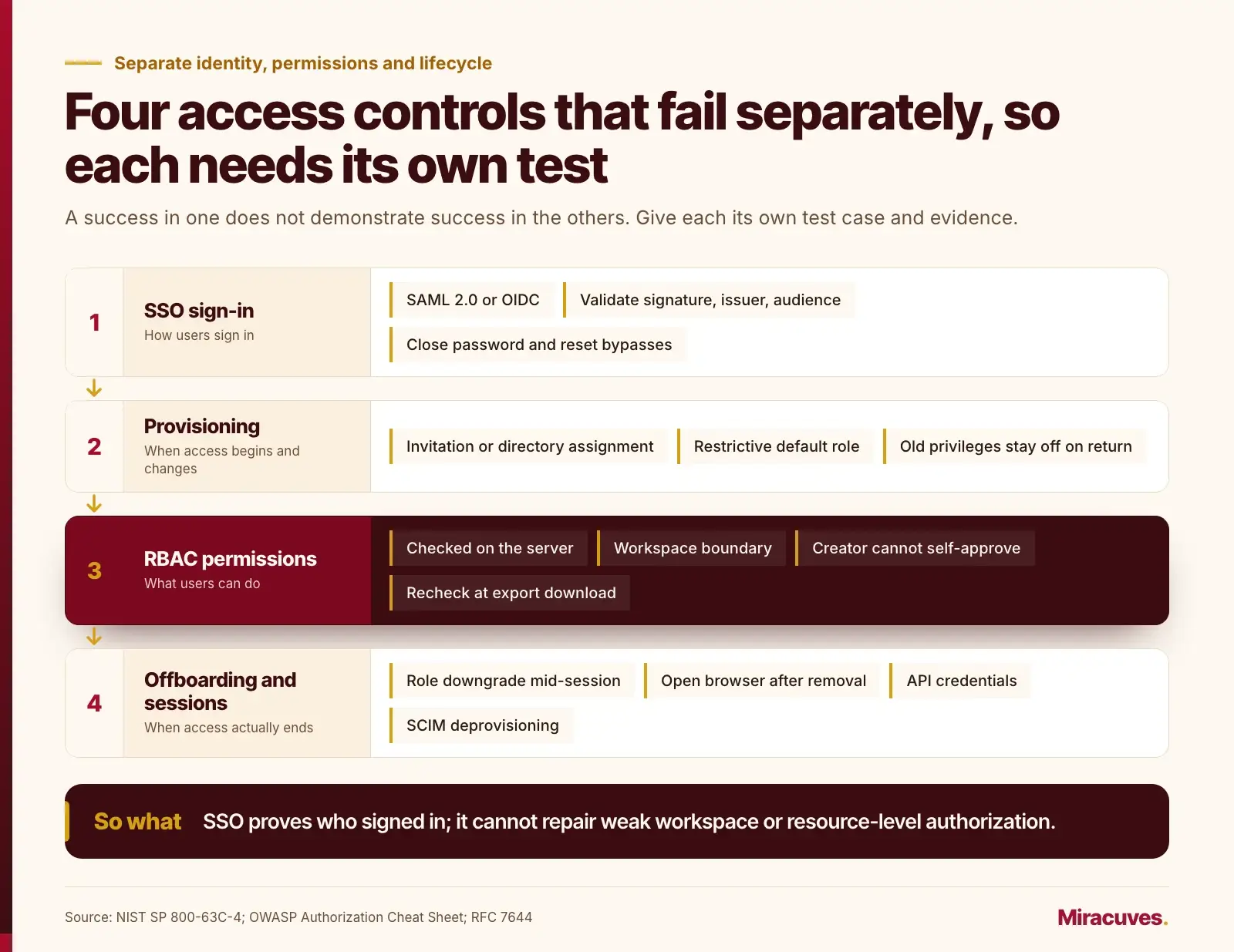
Four controls to test before a customer pilot
Use accounts with different permissions and keep an authenticated browser open during the offboarding test. Record the expected result and what actually happened.
| Control | Test to run | Evidence to retain |
|---|---|---|
| Sign-in enforcement | Sign in with an approved identity, then attempt a local password or recovery route for the same managed account. | The approved flow succeeds; the alternate flow cannot create an unauthorized session. |
| Permissions | Use a read-only account to call a write or export endpoint directly, not just through the visible interface. | The server denies the request and no write or export occurs. |
| Workspace boundary | Use a valid account from Workspace A to request a resource belonging only to Workspace B. | The response does not disclose the protected resource or return its contents. |
| Offboarding | Disable a test account and retry protected actions from an existing browser session and other in-scope clients. | A time-stamped record shows when removal began and when protected access stopped. |
The RBAC checklist: Prove what users cannot do
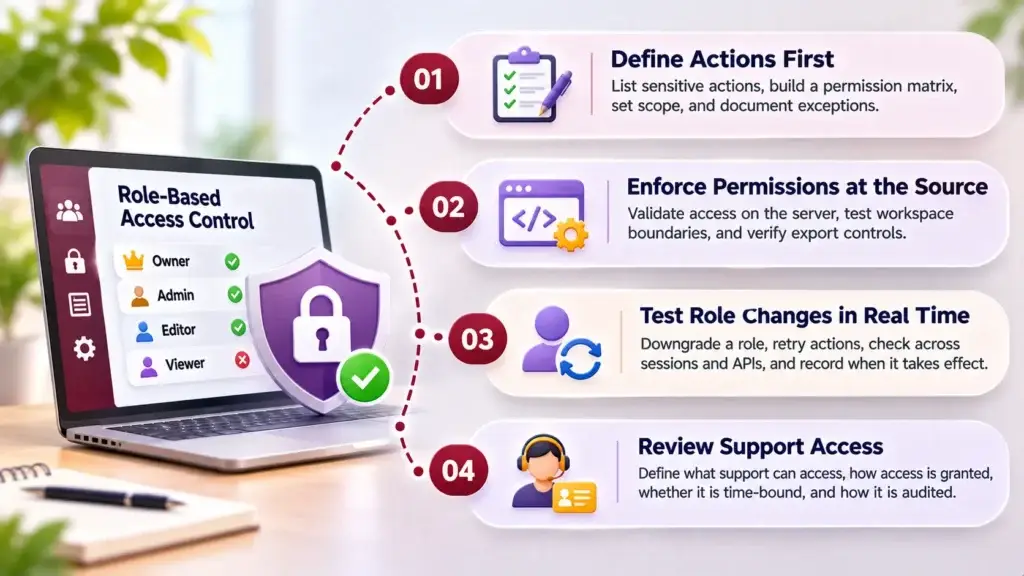
A role label tells a buyer what a user is supposed to be able to do. A good access test shows what happens when that user tries to go beyond it. Work through these four checks before your next enterprise review.
01 – Define the actions before you name the roles
Start with actions that could expose data, change a workflow, or affect another user. Viewing a record, approving it, exporting it, updating billing details, inviting a member, and granting administrator access are separate permissions. A generic Edit permission might be fine for changing a description, but it is too broad if it also lets someone approve payments or change access policy.
Build a permission matrix. Give each sensitive action a row and each role a column. Add a Scope column to show whether the rule applies to a workspace, a project, or an individual record. Document deliberate exceptions rather than assuming every permission follows the same hierarchy. For example, if a workspace administrator can invite members but only the owner can appoint another administrator, record both rules and test them separately.
| Action | Owner | Admin | Member | Viewer | Scope |
|---|---|---|---|---|---|
| View invoices | Yes | Yes | Yes | Yes | Workspace |
| Approve an invoice | Yes | Yes | Yes, except invoices they submitted | No | Record: creator cannot approve |
| Export invoices | Yes | Yes | No | No | Workspace; recheck when the file is downloaded |
| Invite members | Yes | Yes | No | No | Workspace |
| Assign the admin role | Yes | No | No | No | Workspace |
| Configure SSO and SCIM | Yes | No | No | No | Organization |
Notice that two rows are not pure role checks. Self-approval depends on who created the record, and export depends on scope at download time. Those are the rows enterprise reviewers probe first, so give each its own test case.
Start with the smallest set of roles that reflects how the customer works. Add a custom role only when you can name the policy a fixed role cannot express and identify who will maintain the configuration. A buyer asking for a “contractor role” might simply need access to one project, with exports disabled. Expressing those limits directly can be easier to maintain than creating a named role for every department.
02 – Enforce permissions where the action happens
A hidden button is not an access control. It keeps the interface clear, but a browser, integration, or older client can still send the request. Check permissions on the server for every request and deny access when the rule is not satisfied. Where a decision depends on the specific record or workspace, the user’s role is one input – not the whole decision. See the OWASP Authorization Cheat Sheet for the underlying principles.
Test the workspace boundary. Use one account that is an editor in Workspace A and a viewer in Workspace B. Verify that it cannot edit in Workspace B. Then send a request using a valid record identifier from the wrong workspace. Test more than the record page: search results, bulk actions, exports, downloads, and integration APIs may expose the same data through different routes.
Test exports separately. A user who can view ten records individually does not necessarily have permission to export them. If an export runs in the background, decide whether to recheck permissions when the job runs, when the file is retrieved, or at both points. Test what happens when the requester loses access after starting the job but before collecting the file. Blocking the original screen does not prove that a download link already issued has stopped working.
03 – Test what happens when a role changes mid-session
Leave the browser open. Start with a user who can perform a sensitive action, such as approving an invoice. Then run the following checks:
- Downgrade the user’s role without signing them out.
- Retry the sensitive action immediately and again after the expected propagation window.
- Repeat the test from another open session and any API client in scope.
- Record when the change takes effect: on the next protected request, at session refresh, or at another documented point.
If the app caches memberships or embeds role claims in tokens, document how it prevents outdated permissions from being used – or how long those permissions can remain effective. A shorter token lifetime may reduce the delay, but it does not make revocation immediate. Decide whether sensitive actions need a fresh membership check, and report what the test actually showed. If an old session can still approve invoices until its token expires, treat that as a finding to address, not a detail to leave out of the review.
04 – Show what your support team can access
Customer administrators are only one group with elevated access. Your own support or operations staff may be able to see account data, change settings, or troubleshoot incidents. Document what they can do, how they obtain access, and whether each action can be traced to an individual. A permissions matrix that covers customer roles but omits vendor support access leaves the buyer with an unanswered question.
Demonstrate the difference between customer and support privileges. For example, a support operator might be able to inspect diagnostic metadata but need approval to read a document. If your product has an elevated support workflow, show who authorizes it, whether access expires, and what the audit trail records. If staff instead have standing access, state that plainly and discuss the intended limits with the buyer.
The SSO checklist: Make the approved route enforceable
Confirm the protocol and configuration the buyer will use
SAML 2.0 and OpenID Connect (OIDC) are common choices for federated sign-in. The buyer’s supported configuration matters more than the protocol that looked easiest in a proof of concept. Confirm whether the customer initiates login from your product or from an identity portal, which attributes it can provide, and who is responsible for the configuration on each side. Agree on how the product will associate the incoming identity with the correct organization. (csrc.nist.gov)
Engineering should validate the identity response against the expected trust configuration for the selected protocol. That includes checking its signature, issuer, audience, validity, and applicable protections against reuse or mismatched requests. Test a response from an unapproved identity connection as well as the normal one. If signing keys or certificates rotate, know who owns the change, how it will be verified, and how to recover from a configuration mistake. A successful first login says nothing about whether the connection can survive a routine rotation. (pages.nist.gov)
Decide how accounts are matched and created
Do not assume that a matching email string is sufficient to link an existing account to a new enterprise identity. Plan how account linking will work, which stable identity information the application will retain, and what happens if an employee’s email changes. Test a returning user, a renamed user, and a person whose email already belongs to a legacy account. If accounts can belong to more than one organization, test that linking one membership does not grant another.
Then decide who can obtain a membership. If the product creates a membership at first successful sign-in, specify whether an invitation, directory assignment, or another approved condition is required. Set a restrictive default role. When an expected group is missing or does not map to an approved role, the product should not silently assign broad access just to complete the login. Surface a usable error and give the customer’s administrator enough information to resolve it.
Look for alternate routes around enforcement
“SSO available” and “SSO required” are different promises. If the customer requires managed sign-in, test password login, password reset, social sign-in, old invitation links, and any separate mobile or desktop flow that the product exposes. Check what happens to existing sessions when enforcement is enabled. If users can switch between a personal workspace and a managed one, verify that the managed workspace still applies its policy.
Plan for outages and lockouts before enforcing the change. Some buyers may approve a tightly controlled emergency administrator account; others may require a different recovery process. Do not treat an ordinary password bypass as a recovery design. Document who can invoke the exception, how the event is logged, and how normal access is restored afterward. Run that drill with test accounts before putting the customer’s administrators at risk of losing access.
Read More: Cloud Markup vs. Bare Metal: The Infrastructure Choice for SaaS Startups
Offboarding: Test the session that was already open
Imagine the buyer’s IT team disables a departing employee’s directory account. A fresh sign-in fails. But in a browser tab the employee already had open, can they still approve an invoice, open a protected record, or download a file?
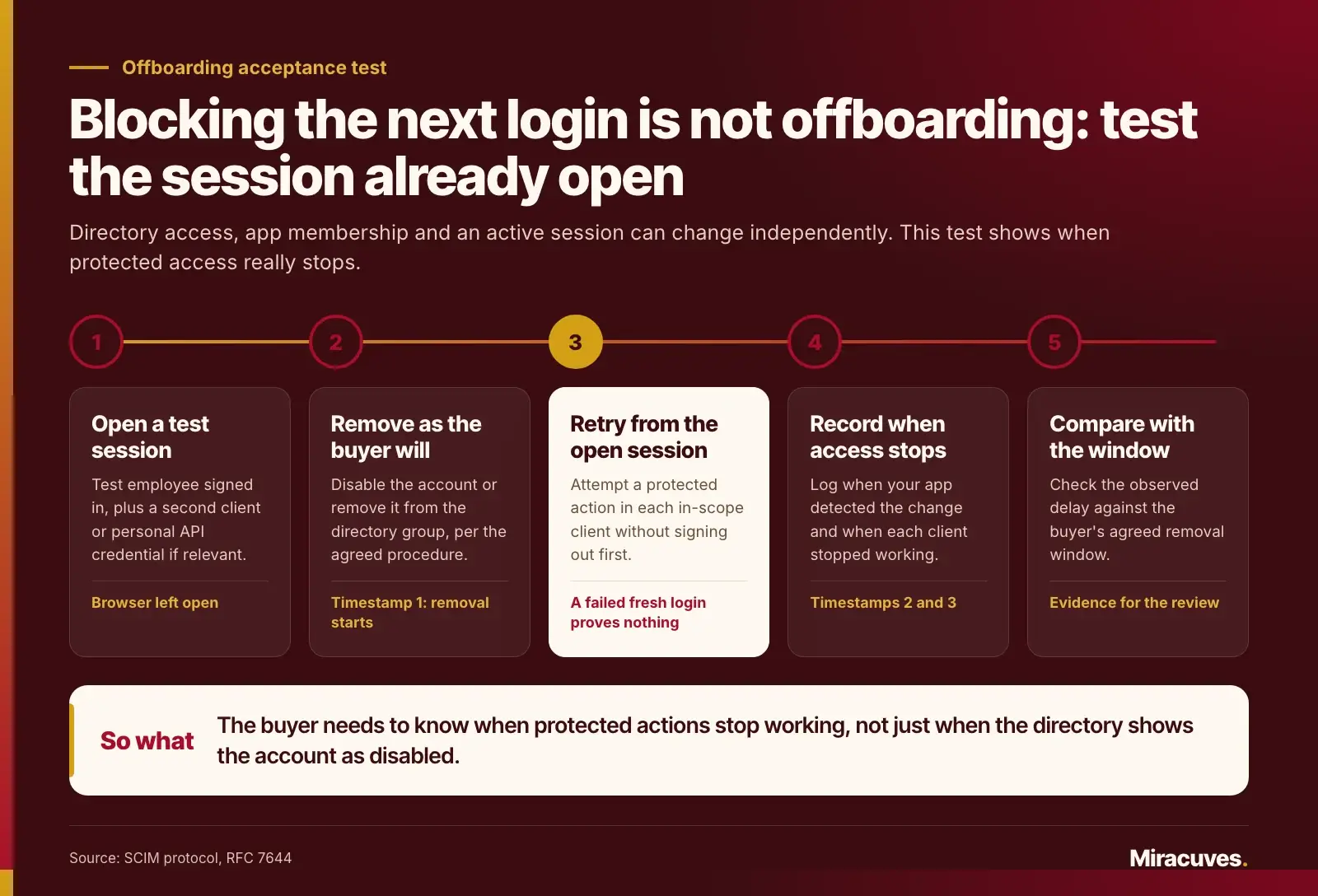
That’s the test that matters. Blocking the next login is not the same as ending access. Directory access, application membership, and an active session can change independently. Disabling the directory account may stop a new sign-in through the identity provider without immediately ending the session your app already established. The buyer needs to know when protected actions stop working, not just when the directory shows the account as disabled.
Test what happens after the directory change
SCIM, the System for Cross-domain Identity Management, is a protocol for managing identity resources such as users and groups. It can support automated provisioning and deprovisioning, but a working SCIM endpoint doesn’t prove that your app revokes active sessions – or that the buyer’s configuration sends the operation you expect. Test what the buyer’s setup actually sends, then verify what your app does with it. See the SCIM protocol specification.
Run the test with a session already open:
- Set up a test employee. Leave their browser session open. Include a second client if relevant and a personal API credential if your product issues one.
- Trigger removal the way the buyer will. Remove the employee from the applicable directory group or disable the account using the agreed procedure.
- Retry a protected action through each in-scope client or credential. Use the existing browser session rather than signing out first. A failed fresh login doesn’t tell you whether the original session still works.
- Capture three timestamps. Record when removal started, when your app received or detected the change, and when each client or credential stopped allowing protected access. Compare the observed delay with the buyer’s agreed removal window.
Treat shared credentials separately. If a credential belongs to a team or service rather than the departing employee, define who owns it and when it should be rotated. Disabling one person’s account shouldn’t be assumed to revoke every integration they helped configure.
Test the return path: Old privileges shouldn’t come back by default
Suppose a contractor returns for a new project after previously holding export rights on a different one. Reactivating the account should grant only the newly approved membership and permissions, unless restoring the old privileges is an explicit, approved policy.
Don’t stop at checking the new role on the profile. Use the reactivated account to attempt an export from the old project. The denial is the evidence that the previous privilege did not come back.
When manual removal can work for a pilot
For a small pilot, the buyer may accept manual offboarding if you document what data the pilot can use, how quickly access must be removed, and what happens if the named administrator is unavailable. Show that the administrator can complete the removal without a developer, name a backup, and agree on how the buyer requests removal, how completion is confirmed, and which sessions and credentials are in scope.
Manual removal is not a substitute when the buyer requires automation before production or when the app cannot meet the agreed removal window even with an operator available. Give the exception an exit condition. For example, before expanding the rollout, require the automated removal flow to pass the same open-session test. A pilot workaround should not become the production process by default.
Beyond SSO and RBAC: The Rest of the Enterprise Readiness Checklist
SSO and RBAC are where most early-stage SaaS products fail an access review, but they are rarely the whole list. A typical SaaS enterprise readiness checklist adds the items below. Ask the buyer which ones gate the pilot and which gate production, because the answer changes what you build first.
| Requirement | What the buyer usually asks | Pilot or production? |
|---|---|---|
| MFA enforcement | Can we require MFA for every user, including anyone who signs in with a local password instead of SSO? | Usually expected from the pilot whenever local passwords exist |
| SCIM provisioning | Can our directory create, update, and deactivate accounts and group memberships automatically? | Manual changes are often accepted for a small pilot; automation is commonly required before company-wide rollout |
| Audit log export | Can we stream or export identity, permission, and data-access events to our SIEM, and how long are logs kept? | In-product viewing may do for a pilot; export or an API is a common production requirement |
| Data residency | Where is our data stored and processed, and can we choose a region? | Settle before any real customer data enters the pilot |
| Security assurance | Do you have a SOC 2 report, or will you complete our security questionnaire? | Often a production gate; some buyers accept a completed questionnaire for a pilot |
For SCIM, test against the SCIM protocol (RFC 7644) using the buyer’s own directory configuration, not only your test client, and run the open-session offboarding test described above. For audit logs, decide the event list before the buyer asks: sign-ins, failed sign-ins, role and membership changes, SSO configuration changes, exports, and administrator actions on another user’s behalf.
Should SSO be on every plan, or only enterprise?
Many SaaS companies reserve SSO for their most expensive tier, and buyers notice. The US Cybersecurity and Infrastructure Security Agency (CISA) addresses this in its voluntary Secure by Design pledge. Signers commit to measurably increase MFA use and to help customers gather evidence of intrusions, and the example approaches CISA lists include supporting standards-based SSO in the baseline version of the product and providing logs of configuration changes, identity events, and data access. You can still price enterprise plans on SCIM, advanced roles, or longer log retention, but buyers can point to the pledge when they push back on basic SSO sold only in the top tier.
SOC 2 reports and security questionnaires
A SOC 2 report is one of the AICPA’s System and Organization Controls (SOC) services: an independent examination by a CPA firm against the trust services criteria of security, availability, processing integrity, confidentiality, and privacy. A Type I report covers how controls are designed at a point in time; a Type II report also tests how they operated over a review period. If you do not have one yet, expect a long questionnaire instead. Some buyers use their own; others accept a standard one such as the Cloud Security Alliance’s CAIQ, which providers can publish in the CSA STAR registry to avoid answering the same questions repeatedly. Either way, your access-control answers should point to the test evidence in the next section rather than to claims.
What evidence to send before the security review
A security questionnaire usually leaves little room for nuance. Send it with a small evidence pack that distinguishes what is available, what depends on customer configuration, and what is not implemented. Where the answer depends on a pilot configuration, identify that configuration. “Supported” should not mean “an engineer could build it after signature.”
For an authorization test, show the test account’s role and workspace, the attempted action, the expected result, and the observed outcome. For offboarding, show the initiating event and the time the protected request stopped succeeding. A screenshot of a toggle is useful context, but it is not the same as evidence that the control was exercised. Attach the environment, test date, and application version so a future reviewer can reproduce the result.
What to put in the buyer’s evidence pack
Use a sandbox or redacted artifacts. Do not include credentials, complete identity assertions, or unrelated customer data.
- Identity configuration: Name the supported connection, who owns setup, the approved sign-in route, and any recovery exception the buyer has accepted.
- Permission matrix: Show actions and scope, including who can export records, assign roles, or act on behalf of another user.
- Acceptance test record: Pair an allowed action with a denied one. Include a cross-workspace check and a downgrade test with a session still open.
- Offboarding evidence: Record the directory or admin action, the application response, and the time it took for in-scope sessions or credentials to stop working.
- Open issues: Label each gap as a pilot exception, production blocker, or later enhancement. Add an owner, the next decision, and the condition that closes it.
Audit events should answer who acted, what changed, which account or resource was affected, when it happened, and whether the action succeeded. For a role change, capture the before-and-after values where appropriate. For automated changes, record the integration or system identity that initiated the change. Do not put raw tokens, secrets, or unnecessary personal data into logs simply to make the evidence look complete.
Decide which logs the customer can see, which are restricted to your security team, and which can be exported. A workspace administrator may need to see membership and role changes for their organization without gaining access to another customer’s activity or to sensitive internal diagnostics. Agree on access and retention before promising them. Audit evidence helps the buyer evaluate a specific control; it does not replace a broader assurance review or imply certification.
Decide what to fix before the pilot and what can wait
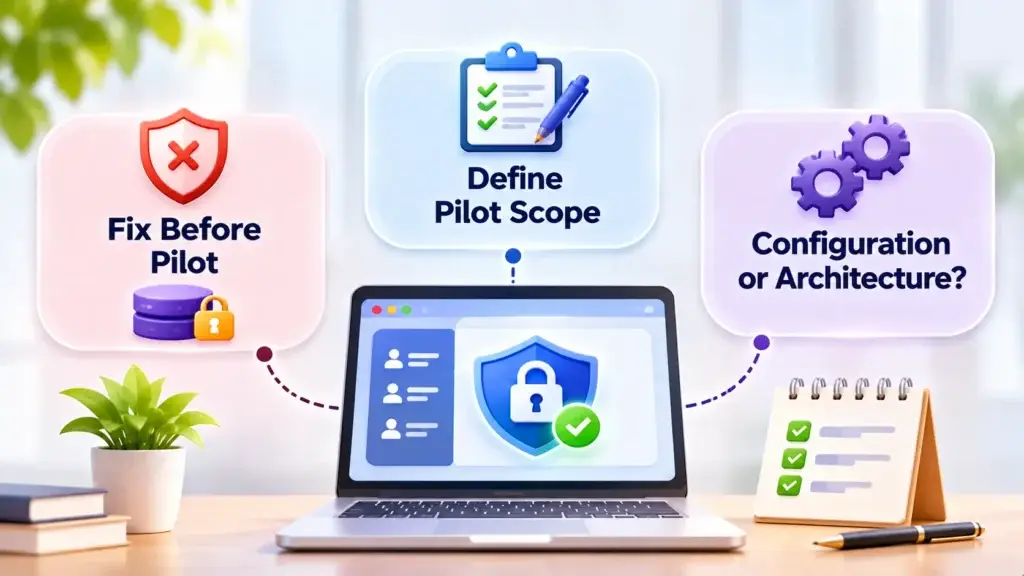
Not every missing enterprise feature should delay a pilot. The deciding question is whether the gap breaks an access promise you’ve already made or limits what the buyer can safely test. A missing custom role might be manageable for one department. A user who can read another customer’s records is a different matter.
Fix broken access controls before the pilot
Treat these as blockers, not backlog items:
- A user can read another customer’s data. Restrict access and retest the workspace boundary before using the pilot environment.
- A user can call a protected API without permission. Fix the server-side check and verify that a direct request is denied.
- A user can regain access through a disallowed sign-in route. Close the bypass and test both the approved sign-in flow and the alternate route.
Keep production requirements separate. If the buyer requires automated offboarding before production, a documented manual procedure may be acceptable for the pilot, but it does not meet the production requirement.
Agree on what the pilot can leave out
A buyer might accept one identity connection and standard roles for a single department using non-sensitive data. Custom roles, a different audit export, or more complex group mapping may only become necessary when more business units join.
Before the pilot starts, document who can participate, what data and features they can use, who owns any manual work, and what must pass before the rollout expands. Get the buyer’s agreement rather than treating a positive demo as approval for an exception.
Work out whether the fix is configuration or architecture
If permissions are already scoped to each workspace and every relevant API enforces that boundary, the next step may be configuring the identity integration and testing what happens when people join, change roles, or leave.
If the app stores one global role per user and treats an administrator as an administrator everywhere, adding SSO won’t fix the authorization model. Before estimating the work, map who belongs to each workspace, which resources belong there, where permissions are checked, and what happens to active sessions when access changes. That gives you a concrete scope to discuss with the buyer instead of a blanket claim that the product is “enterprise-ready.”
For a closer look at the trade-offs, see how B2B SaaS architecture choices affect enterprise IT reviews.
Conclusion: Show that access changes when it should
The strongest access review demonstration is a sequence the buyer can reproduce: an approved user signs in, performs an allowed action, is denied a restricted action, and then loses protected access when the customer removes the account. Show the timestamps and explain where the controls are enforced. If any part of that sequence is not yet reliable, you have a specific engineering task and a clear condition for closing it.
If your tests show that identity or permissions need to be scoped into a rebuild or a new product, bring the failed cases and the buyer’s requirements to a discussion about planning a subscription software build with Miracuves. Ask which controls are included in the proposed scope, which require separate implementation, and what acceptance evidence will be delivered.
Frequently Asked Questions
What does enterprise-ready mean for a SaaS app?
It means a customer’s IT and security teams can control and verify access without your help. In practice that is SSO through their identity provider, server-enforced roles scoped to workspaces, MFA, automated provisioning and offboarding through SCIM, exportable audit logs, a clear answer on where data is stored, and security evidence such as a SOC 2 report or a completed questionnaire.
Do enterprise buyers always need SSO and RBAC before a pilot?
No. Some buyers accept a small pilot with named users and standard roles. Others require company-managed sign-in from day one. Ask the buyer what is required for the pilot and what must be in place before production, and write both lists down so the pilot does not quietly become the production setup.
Do we need SCIM before an enterprise pilot?
Often not. For a small pilot, many buyers accept documented manual provisioning and offboarding, as long as you agree on the removal window, who performs it, and how completion is confirmed. SCIM is commonly required before a company-wide rollout. Agree on that exit condition in writing and test it with an open session.
Should SSO be available on every pricing plan?
Many buyers expect it. CISA’s voluntary Secure by Design pledge lists standards-based SSO in the baseline version of the product as one example of how software makers can meet its goals. Many SaaS companies still keep SCIM, custom roles, and longer audit-log retention for enterprise plans, which is easier to defend than charging extra for basic SSO.
Is signing in with a work email the same as using enterprise SSO?
No. A work email identifies the user, but it does not prove they signed in through their company’s approved identity provider. If a workspace requires SSO, test that users cannot bypass it through a password, password reset, social sign-in, or an old invitation link.
Can we start with SAML or OIDC instead of supporting both?
Yes. Start with the protocol the buyer’s IT team supports and add the other when a customer needs it. Before the pilot, test sign-in, account linking for existing users, certificate or key rotation, and what happens when the identity connection fails.
Does every enterprise customer need custom roles?
No. Standard roles are enough if they let people do their jobs without extra permissions. Add custom roles when the standard options cannot meet a specific requirement, such as a contractor limited to one project, and decide who in the customer’s organization can change those roles.
Does just-in-time provisioning remove access when someone leaves?
No. Just-in-time provisioning creates or updates access when someone signs in. You need a separate offboarding process, manual or through SCIM, to remove access. Test it with a session that is already open, not just by trying to sign in again after the account is disabled.
Can one person have different roles in different workspaces?
Yes. A person can be an admin in one workspace and a viewer in another. Check permissions in the workspace where the action takes place, and test that removing one membership does not affect the other or leave cached permissions behind.
How can we show buyers how quickly offboarding works?
Record when removal starts, when the app detects the change, and when existing sessions or API credentials stop working. Compare that delay with the buyer’s requirement instead of calling it immediate, and include the environment, test date, and application version so the result can be reproduced.
Miracuves is an independent software development company. We are not affiliated with, connected to, sponsored by, or endorsed by any company or product named in this article.
Terms such as “X Clone” are used descriptively. It is how the software industry refers to building a platform with functionality comparable to a known service, and how clients search for it.
The entire design and codebase of our products is built by our own team. Our products contain no code, design, graphics, or content originating from any third-party website or applications.
All third-party names and marks referenced in this article are the property of their respective owners, referenced solely to identify the services discussed.