Grab Clone App - White-Label Ride-Hailing and Delivery App
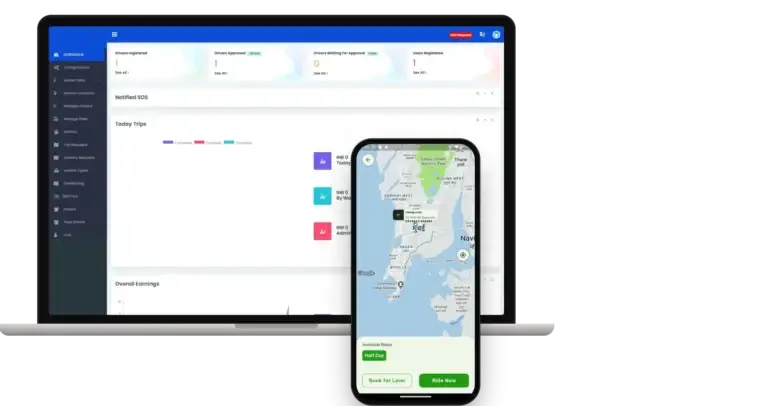
Built by Miracuves, this ready-made, white-label Grab clone for ride-hailing and delivery gives you Flutter apps for riders and drivers on Android and iOS, six web panels and unencrypted source code you own, rebranded as yours within six working days.
Riders book a car now or for later, take a half-day rental or send goods with a pickup contact and a goods type, and each driver opens the trip with a one-time code. Apple and Google run store review on their own clock, outside our build time. Restaurant menus or store catalogs sit outside the base; we agree scope and price for each in writing, and most land in 2-8 weeks.
Launch in 6 Days with
- Source Code
- Flutter Rider App
- Flutter Driver App
- 2 Dispatch Desks
- Admin Panel
- Database Schema
StackFlutter 3.24.4 · PHP · Bootstrap · MySQL · Google Maps · Firebase
Dispatch activity
- Ride requested from the rider appRequests
- Driver accepted, start code shownTrips
- Goods run sent to delivery dispatchDelivery
- SOS alert shown in the admin panelSafety
- Trip closed, fare breakdown savedFares
- Rental ride pickup confirmedRentals
- Admin commission recordedEarnings
- New driver waiting for approvalDrivers
- Ride requested from the rider appRequests
- Driver accepted, start code shownTrips
- Goods run sent to delivery dispatchDelivery
- SOS alert shown in the admin panelSafety
- Trip closed, fare breakdown savedFares
- Rental ride pickup confirmedRentals
- Admin commission recordedEarnings
- New driver waiting for approvalDrivers

- 6Web Panelsrider site, driver site, taxi desk, delivery desk, fleet owner panel and admin
- 3Trip Types in One Apppassenger rides, half-day rentals and goods runs
- 0%Revenue Share With Miracuvesno royalty on a fare, a rental or a goods run
- 4Add-Ons Priced Apartshopping lists, surge alerts, a concierge and a community hub
- 6Days to Launchand if the delay is ours, we keep going free
- $3,399Paid Once, Not Rentedsource code yours, no per-seat fee, no monthly rental
Live in six working days, or we keep working free until you launch. Every build carries 60 days guidance, 6 months bug fixes and 12 months updates.Verify every figure
Commission on Its Own Tile
The admin dashboard splits earnings by cash, wallet and card, and records your commission separately from what drivers take home.
SOS Reaches the Operator
Riders get SOS and Share Ride buttons during a trip, and every SOS alert shows up in a notified-SOS panel on the admin side.
Card Numbers Stay With Your Gateway
Card payments run through the gateway you connect, so the platform never needs to hold a card number. The demo pays in cash; which methods you switch on is your call.
01See it live
Live in Action
Grab Clone App Demo - Rider & Driver Apps, Six Web Panels
Test-drive the Miracuves Grab Clone on your own. Book a ride as the rider and accept it as the driver with the two phone logins in the Miracuves Grab clone demo, while the six web panels, from the taxi desk to the admin console, load in a browser tab. Panel logins are given out on a guided call. Start by booking a ride, then follow it from the other side.

Rider App & Driver App
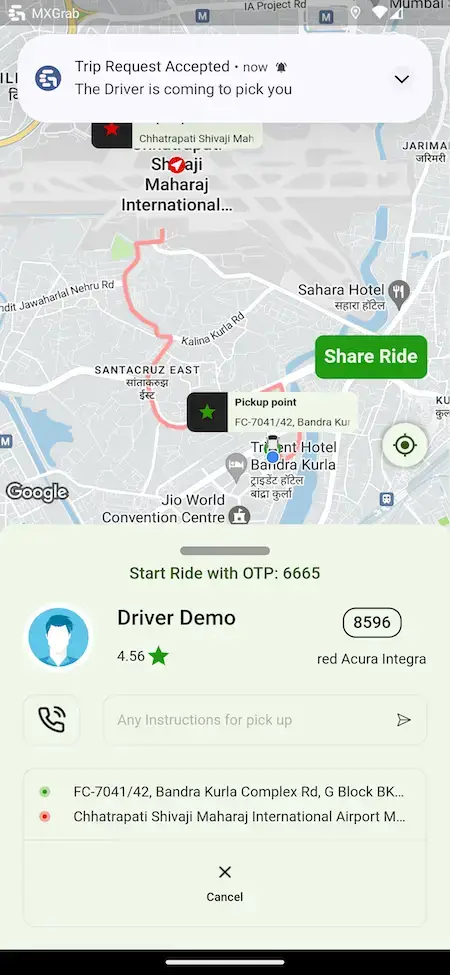
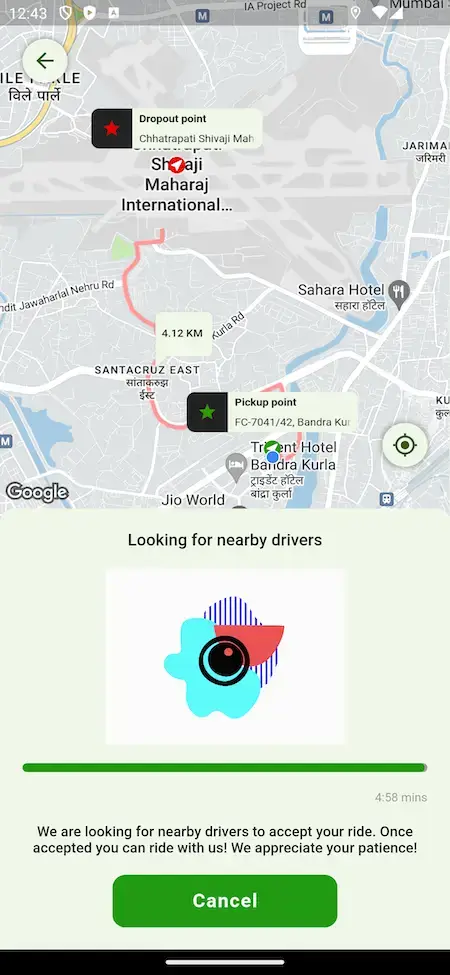
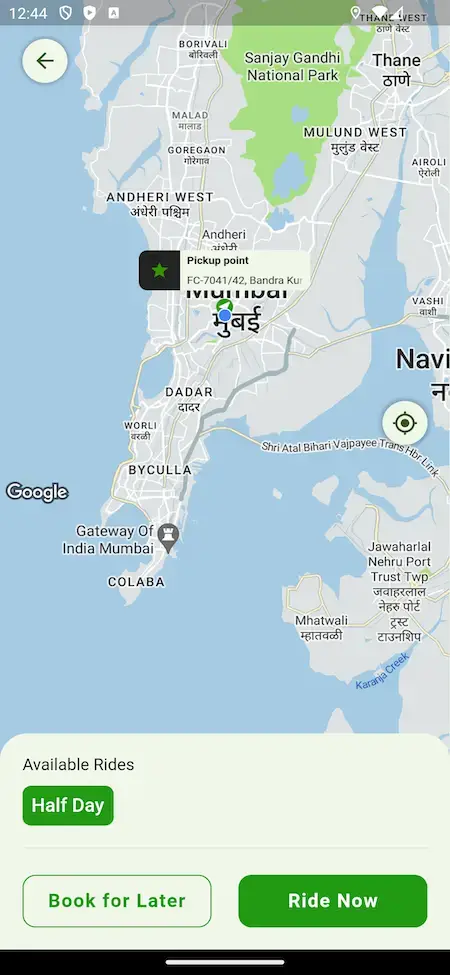
Both halves of a ride on two phones: the rider books, tracks and pays, while the driver accepts the request, starts the trip and closes it.
- 1Choose your phone from the app portal
- 2Log in with the demo accounts below
- 3Explore: Booking, Goods run, Tracking, Fare
Rider +91 9876543210 | User_321 and driver +91 9876543211 | Driver_321
Taxi & Delivery Dispatch Panels
Two desks for the operator, one for taxi rides and one for deliveries, where a ride can be assigned by hand and ongoing rides are followed on a timeline.
- 1Open a dispatch sign-in page in a browser tab
- 2Ask the team for the panel login
- 3Explore: Rides, Manual assignment, Rental rides
shared on a guided call
Rider Site & Driver Site
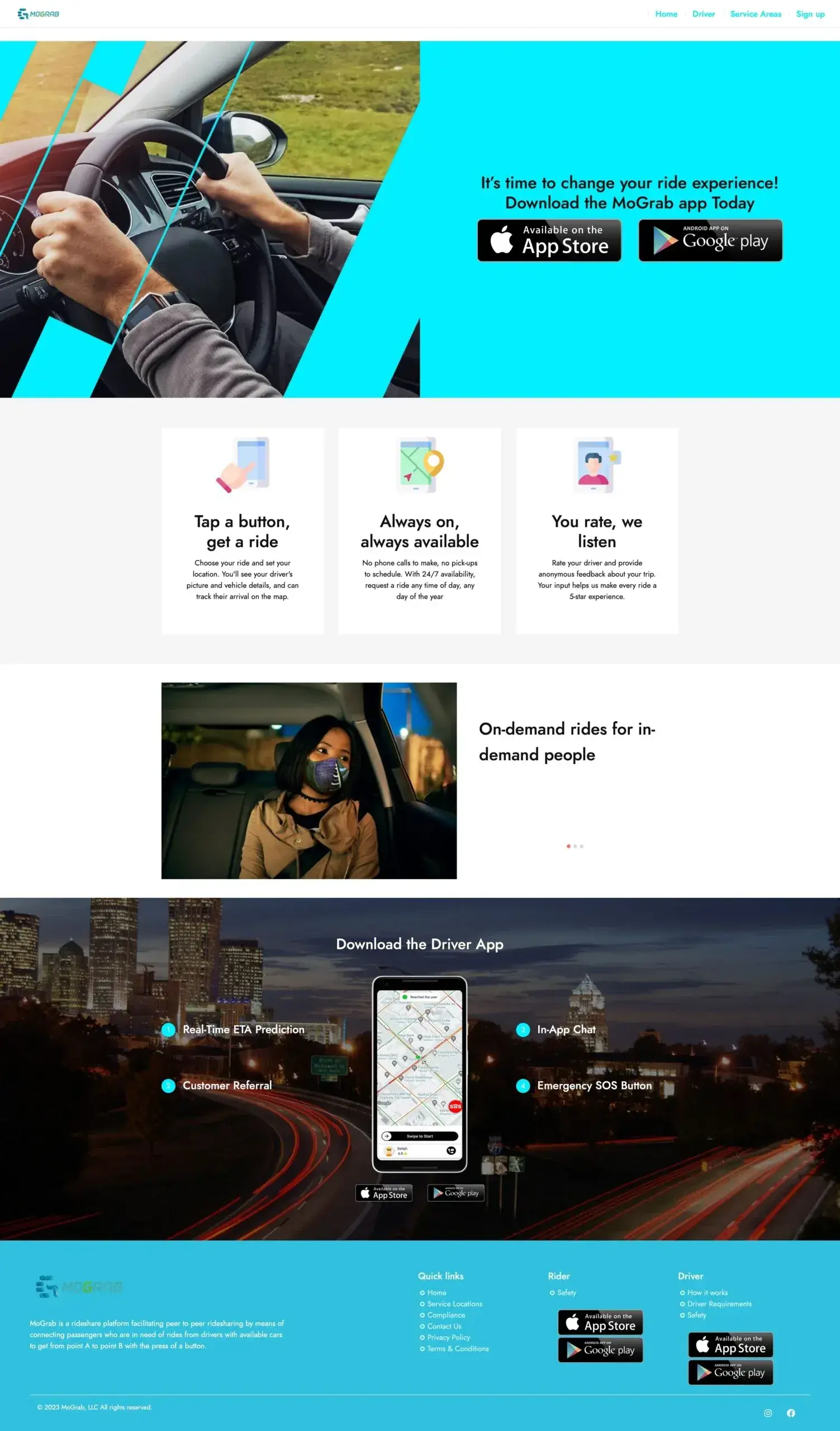
The public rider website with its app download buttons, and the driver site where people read the requirements, check service areas and apply to drive.
- 1Load the demo site in a new browser tab
- 2Look through the rider and driver pages
- 3Explore: How it works, Safety, Service areas
mxgrab.mimeld.com
Fleet Owner Panel & Admin Panel
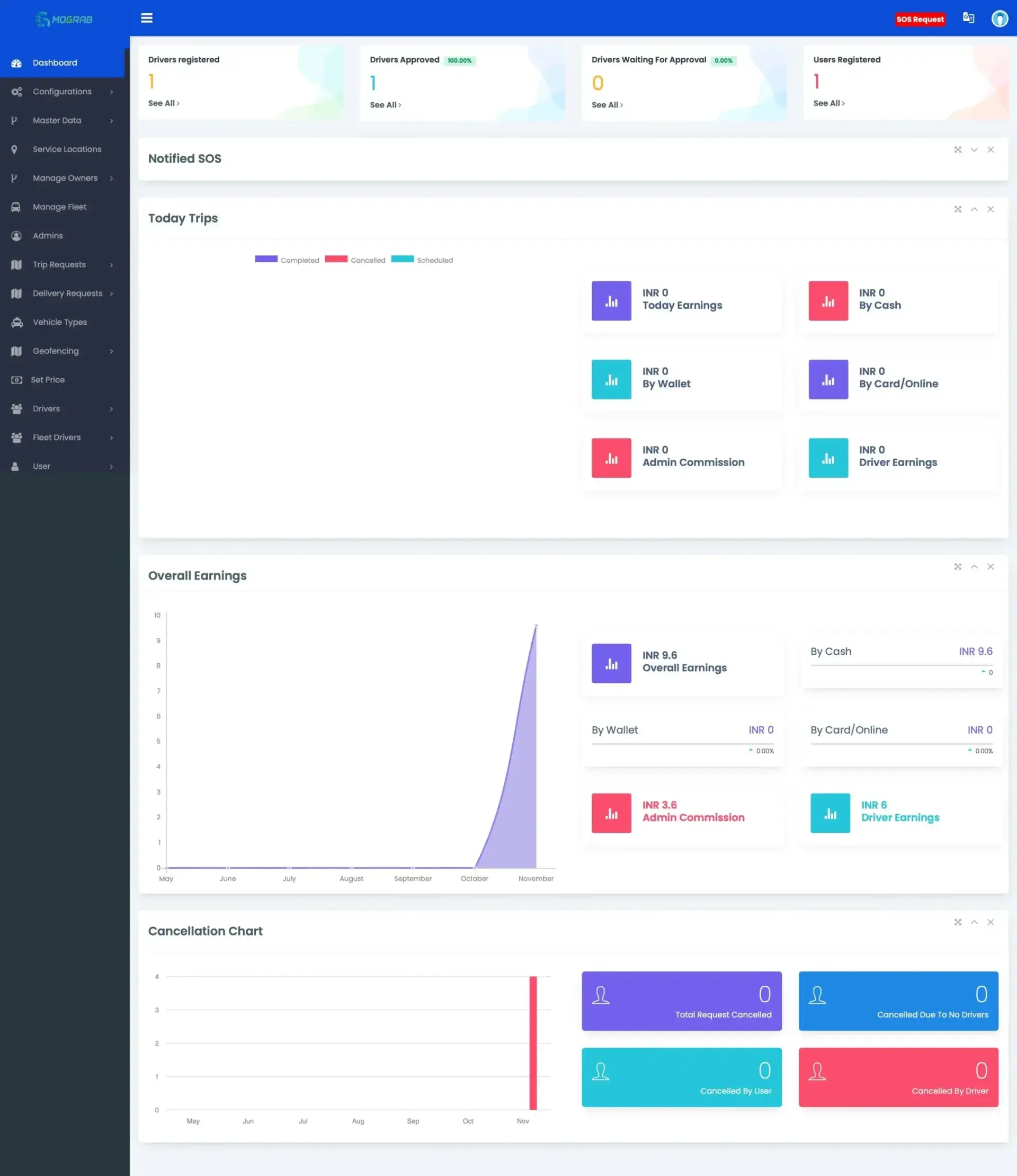
The owner panel for fleet operators and the admin console behind the whole platform: drivers, trip and delivery requests, prices, geofencing, fleets and earnings.
- 1Open a sign-in page in a browser tab
- 2Ask the team for the panel login
- 3Explore: Dashboard, Trip requests, Set prices, Fleet
shared on a guided call
See It With Us
Grab Taxi Clone Walkthrough: Booking, Dispatch, Fleets & Admin Panel
A live call is the quickest way to see the whole platform at once. In 30 minutes we book a ride and a goods run in the rider app, follow both through the two dispatch desks, the fleet panel and the admin panel, and tie each step to your own city, fares and launch date.
Schedule a live walkthrough call.Every Screen Mapped
Screens of an App Like Grab - Rider Journey, Admin Dashboard & Website
These are real screens from the Grab clone app Miracuves ships: the rider app, the admin dashboard and the rider and driver website, in the order a trip or a goods run moves from a menu tap to a fare summary.
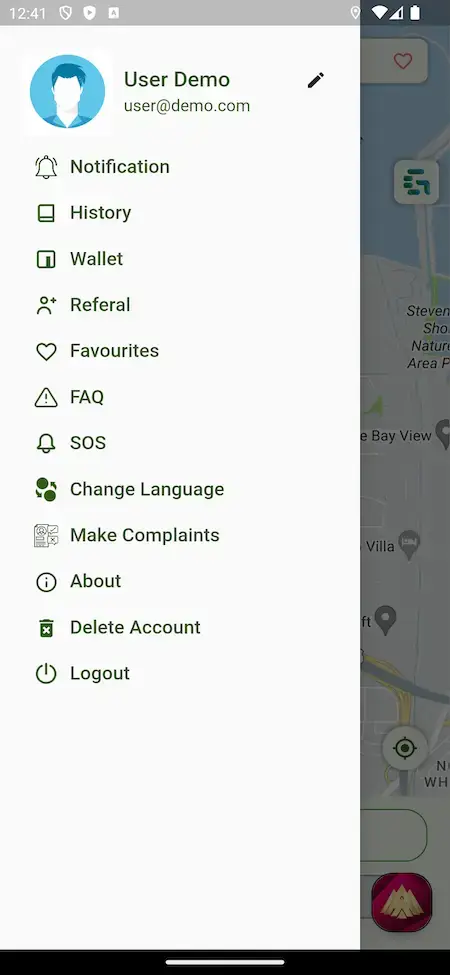
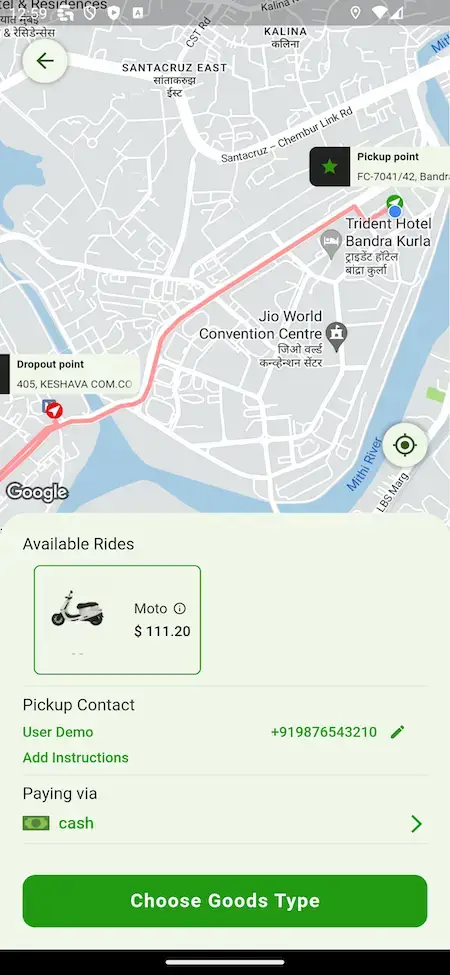
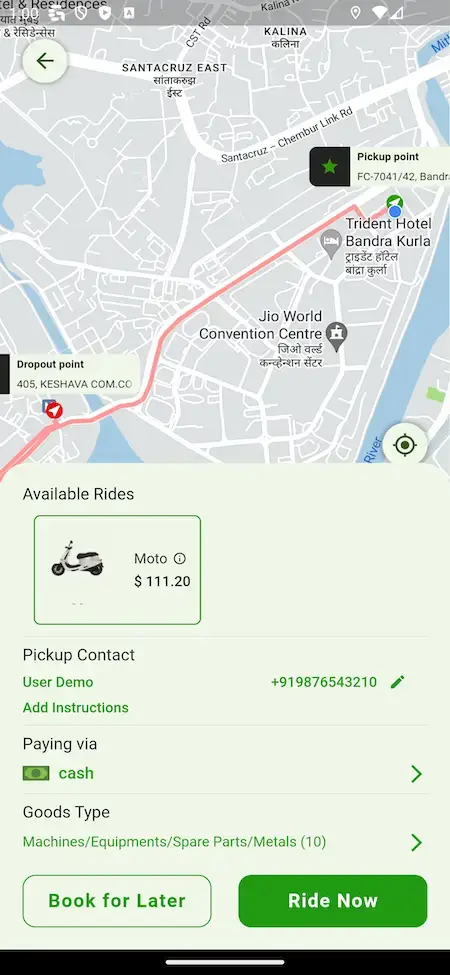
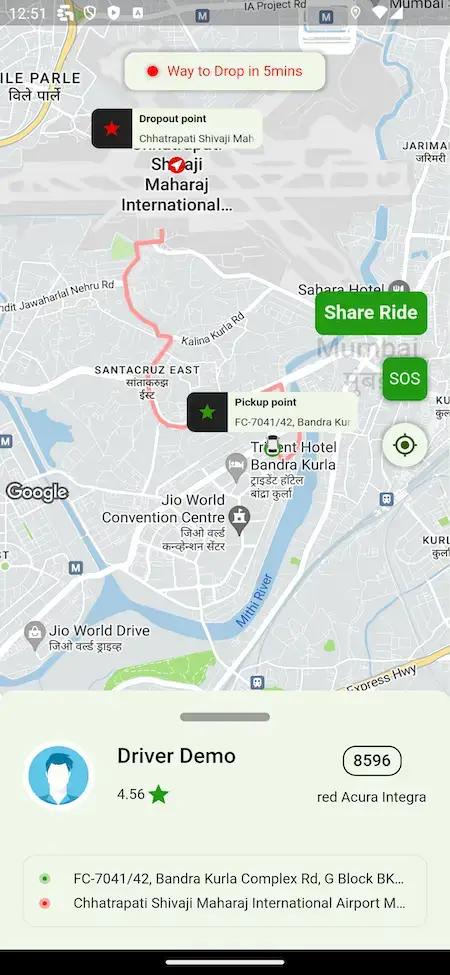
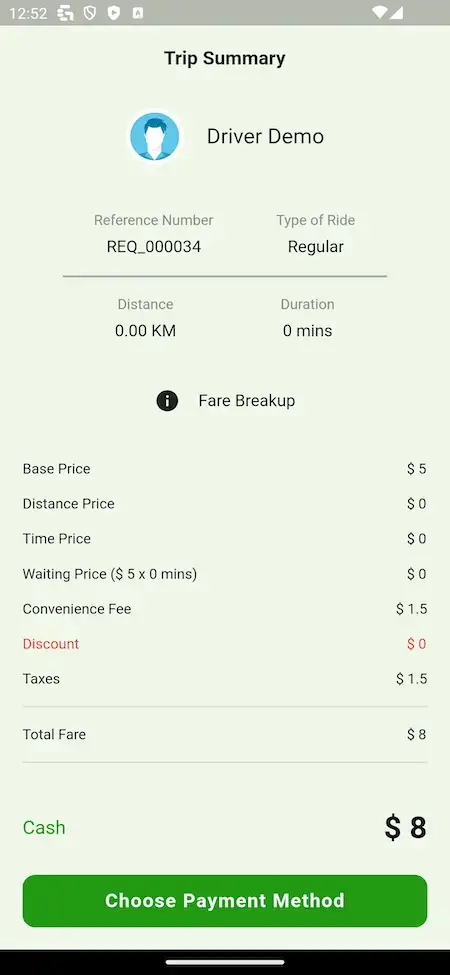


Follow a rider from the side menu through a vehicle choice, a rental option and a goods booking to the driver search, an accepted trip with its start code, a ride in progress and the fare summary at the end.
02Proof
Client Voices
Grab Clone Client Reviews - Operators in Their Own Words
What clients say about building on Miracuves bases. Most of these describe ride, delivery, rental or logistics businesses; two come from healthcare and are shown exactly as their authors gave them.
“The base gave us matching, tracking and payouts. We reshaped dispatch around our existing driver network and their working patterns rather than forcing them onto a generic model. Live in under a month.”
“We run several service types off one platform. The dispatch and booking core already supported that, so the work was our service definitions and pricing. Delivered under a month.”
“The team was running it on a dispatcher and a Google Sheet, and we needed a real platform quickly, because we were about to onboard a major retail client. Miracuves’s Delivery Genie base gave us the rider app, the dispatch console, and live tracking. We launched in 6 weeks and cleared 4x the previous order volume in the first month.”
“Floaters is a hyperlocal on-demand delivery service in Baltimore — same-day parcels, small-business drops, and a courier network. The team was running it on a dispatcher and a Google Sheet, and we needed a real platform — fast, because we were about to onboard a major retail client. Miracuves's Delivery Genie base gave us the rider app, the dispatch console, and live tracking. We added a multi-tenant layer for our B2B clients, our branded customer tracking page, and a custom COD/settlement module. We launched in 6 weeks. The retail client came on board, and we cleared 4x the previous order volume in the first month.”
“We were juggling spreadsheets, a third-party GPS provider, and a phone. We needed a single operations console. Miracuves’s MXLogistics base covered the trip lifecycle, the driver app, and the customer tracking page. We’ve cut operations admin time by about 40%.”
“Turo is the obvious reference, but the Caribbean specifics, from different insurance norms to different payment rails, meant we needed a real partner, not just a clone. Miracuves’s MXCar base covered the listing, the trip flow, and the host payouts. We launched in 6 working days and are live in three islands.”
“We were running it on phone calls and a paper calendar, and we were losing bookings to bigger OTAs. Miracuves’s GetmyBoat Clone base gave us the calendar, the booking flow, and the payment engine. Online bookings are up roughly 70% in the first six months, and the ops team finally has a live view of the fleet.”
“Every HMS I tried was built for general physicians, with no lesion mapping, no before/after tracking, and no procedure-based billing. Their MXHealth base gave us the patient app, doctor app, EMR and video consult out of the box. Front-desk time on scheduling and follow-ups is down ~70%, and we went fully digital in 9 months, where a fully custom job would have been 18.”
“Building a compliant telehealth stack from scratch in three markets would have been a year-plus effort. Miracuves’s MXHealth base covered the patient and doctor apps, video consult, e-prescription and the pharmacy integrations. We launched in our first market in 9 weeks and rolled out to two more in the following six months.”
What You Can Verify
Grab Clone Case Study - What We Have Published and What You Can Verify Yourself
Miracuves has published no named client deployment of this ride and delivery base, which means there is no case study to summarize. What we can offer as evidence is the demo and the release log, and this section explains how to use them.
Miracuves has not published a named client build on this ride and delivery base, and it will not present one that does not exist. What it can show instead is a working demo with two apps and six web panels, and a release log you can read version by version.

- Book a ride in the rider app with the demo login
- Follow a ride from the dispatch side on a guided call
- Open the driver app to see the other half of a trip
- Read the release log version by version
- Put a client name here without that client's agreement
- Borrow a quote or a figure from another product and pass it off as this one
- Count a paid add-on inside the base build
- Rebrand the apps and the web panels with your logo, icons and colors
- Set service locations, vehicle types and prices for your city
- Install on your hosting and give you the whole source code
- Build time on the base: 6 working days
A named deployment goes here once a client agrees to be named and its case study is live on the portfolio.Miracuves · Our position on case studies
03The product
The Basics
What a Ride and Delivery App Like Grab Gives Riders, Drivers and Operators
A Grab clone is a ready-made ride-hailing and delivery platform. Riders book a vehicle through the taxi booking app now or for later as scheduled rides, take a half-day rental or send goods, drivers accept and run the trip, and the operator sits behind it with two dispatch desks, a fleet owner panel and an admin panel.

More Than a Booking Screen
The value sits around the ride: a driver search, a start code, route tracking with real-time GPS updates, a fare breakdown, an SOS button and an admin console with approval counters and earnings.
Not a Locked Box
You hold the full, unencrypted source code, which lets your developers rework screens and flows as demand grows, with no per-seat charge.
Extras Priced in the Open
Shopping lists, surge alerts, a concierge and a community hub are add-ons priced on their own, and restaurant or grocery catalogs are custom scope. None is counted as a base feature.
Android, iOS & Six Web Panels
What Is a Grab Clone Script?
Miracuves treats the booking screen as the easy part of a Grab-style ride app. The work is in the loop around it: finding a driver, starting the trip with a code, watching it move, pricing it, and leaving an operator a place to step in when automation falls short. All of that ships working.

- 01Ride booking now or later, with vehicle choices
- 02Rental and goods bookings from the same app
- 03Driver app with requests and a start code
- 04Taxi and delivery dispatch desks and a fleet panel
- 05Admin panel with approvals, prices, geofencing and earnings
You receive two cross-platform Flutter apps, six web panels and the complete source code. Rides, rentals and goods runs are in the base; restaurant and grocery catalogs are not, and are scoped separately.
Everything Included
Grab Clone App Features - Ride Booking, Goods Runs, Dispatch Desks, Fleets & Admin
Every feature Miracuves lists for its Grab clone can be checked in the release log, the admin panel or the app screens. Anything that needs an extra module is tagged further down as an add-on, and restaurant or grocery catalogs are tagged as custom scope.
Ride Booking, Now or Later
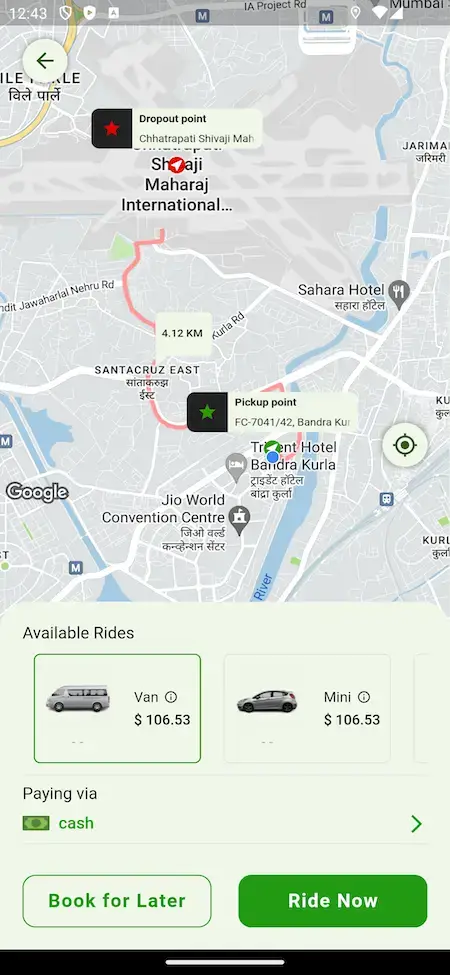
Riders place pins for pickup and drop-off, see the vehicle options with a price on each, and either ride now or book for later, with the payment method shown on the card.
- Pickup and drop-off pins on a map
- Vehicle cards with a price on each, Van and Mini in the demo
- Ride Now and Book for Later buttons
- Payment method on the booking card, cash in the demo
- Searching-for-drivers screen with a Cancel button
- Push notifications for bidding rides (release 1.12)
Live Trip Tracking
Once a driver accepts, the rider gets a trip-accepted notice, the driver card with rating and vehicle number, and the route drawn on the map as the trip moves.
- Trip request accepted notice
- Driver card with name, rating and vehicle number
- Route line on the map in rider and driver apps (release 1.10)
- Pickup instructions field for the driver
- Places and Routes services upgraded (release 1.13)
- Geocoding optimized in the rider app (release 1.13)
Start Code, SOS & Share Ride
Safety tools sit inside the trip: a one-time start code the driver asks for, an SOS button and a Share Ride button, with SOS alerts surfaced to the admin.
- Trip starts with a one-time code
- SOS button on the ride screen
- Share Ride button on the ride screen
- Notified SOS panel and an SOS request button in the admin header
- SOS entry in the rider side menu
Goods & Parcel Runs
The same app books a goods run: the rider adds a pickup contact and instructions, picks a goods type from the list and sends it, with the delivery desk behind it.
- Choose Goods Type step in the booking flow
- Pickup contact name and phone on the request
- Add instructions for the driver
- Delivery Instant Ride added in release 1.11
- Delivery Requests menu in the admin panel
Rentals & Multi-Stop Trips
Rental rides, ride preferences and multiple stops live inside the trip flow, and the release log follows each refinement.
- Half Day rental option on the booking map
- Rental ride pickup confirmation screen (release 1.13)
- Multiple Stop Complete feature (release 1.11)
- End all stops feature (release 1.12)
- Ride Preference feature (release 1.8)
Taxi Dispatch Desk
A separate taxi dispatch panel lets an operator watch rides and step in: assign a ride to a driver by hand, handle rental rides and follow ongoing rides on a real-time timeline.
- Own sign-in page named Taxi Dispatch Panel
- Manual ride assignment
- Rental rides handled from the panel
- Ongoing rides on a real-time ride timeline
- Dispatcher interface updates (release 1.7)
Delivery Dispatch Desk
Deliveries have their own desk with a separate sign-in, so goods runs can be assigned and followed apart from passenger rides.
- Own sign-in page named Delivery Dispatch Panel
- Delivery Requests listed beside Trip Requests in the admin menu
- Instant delivery rides (release 1.11)
- Multiple stops on a delivery run (release 1.11)
Fleet Owners & Drivers
Fleet owners get a panel of their own, and the admin side keeps owners, fleets, fleet drivers and driver approvals in one place.
- Owner Panel sign-in page for the fleet side
- Manage Owners, Manage Fleet and Fleet Drivers in the admin menu
- Drivers registered, approved and waiting-for-approval counters
- Driver site with requirements, safety and service-area pages
- Driver documents uploaded from the driver app
Fares, Vehicle Types & Geofencing
The operator sets the money and the map: service locations, geofencing, vehicle types and prices, with a fare breakdown on every trip summary.
- Set Prices, Vehicle Types and Geofencing menus
- Service Locations menu
- Fare breakdown: base, distance, time, waiting, convenience fee, discount and taxes
- Day-wise surge price (release 1.7)
- Download invoice in the admin panel (release 1.7)
Wallet, Payments & Earnings
Money moves through a wallet and a payment step on the rider side, and the admin dashboard splits earnings by cash, wallet and card or online, with commission and driver earnings shown apart.
- Wallet entry in the rider menu
- Choose Payment Method step on the trip summary
- Earnings tiles by cash, wallet and card or online
- Admin commission and driver earnings tiles
- Cash shown as the paying method on the booking card
Rider Account & Support Tools
The rider side menu gathers the everyday tools: notifications, history, wallet, referral, favourites, SOS, FAQ, language, complaints and account deletion.
- Notification and History entries
- Referral and Favourites entries
- FAQ and Make Complaints entries
- Change Language entry
- Delete Account and Logout entries
- Login with password (release 1.7)
- Gender field on rider and driver sign-up (release 1.8)
Admin Dashboard & Roles
The admin dashboard counts drivers and users, shows today's trips, earnings and a cancellation chart, and release 1.13 added multiple roles with their own permissions.
- Drivers registered, approved and waiting counters
- Users registered counter
- Today Trips and Overall Earnings charts
- Cancellation chart by user and by driver
- Multiple roles and permissions (release 1.13)
Before you buy, note this: Delivery covers rebranding, deployment and publishing. You bring hosting, a domain and, for each store, a verified developer account, along with your branding, your business details, a gateway account past KYC, and your third-party keys. Apple and Google run their own store review, and that wait is not part of our 6-day build time.
How Operators Earn
Grab Clone Revenue Models - Commission, Goods Runs, Surge, Fees & Wallet
Every income line in Miracuves' Grab clone sits on its own, so an operator can retune the commission or a fee without disturbing the other ways a ride and delivery app earns.
Two lines are the natural place to start: the commission on each fare and the surge pricing you set for busy days.
- 01
Ride Commission
Every fare carries a cut for the operator, and the driver is paid once it is taken off. The admin dashboard lists that commission on its own tile, apart from driver earnings.
- 02
Goods Run Fees
Goods sent through the same app earn a fee or commission on each run, and the Delivery Requests menu gives the operator one place to follow them.
- 03
Day-Wise Surge Pricing
The release log adds a day-wise surge price, so a busier day can carry a higher fare without anyone editing a price by hand.
- 04
Convenience Fee
The fare breakdown on the trip summary has its own convenience-fee line, kept apart from the distance and time charges.
- 05
Rental Rides
Rental bookings, such as the half-day option on the booking map, add a time-based product beside point-to-point trips.
- 06
Wallet Balances
Riders hold a wallet in the app, so prepaid money stays with the platform from top-up until it is spent, and the dashboard splits earnings by cash, wallet and card.
| Revenue stream | How it is charged | Take rateTypical take rate | What sets the ceiling |
|---|---|---|---|
| Ride Commission | A cut of every fare, withheld before the driver payout. | Indonesia caps it at 15% plus up to 5% for driver welfare. Grab's Malaysia terms say up to 20%. | Regulators and how many drivers you can attract. Grab reported $1,219 million of mobility revenue on about $7.9 billion of GMV in 2025, near 15% once incentives are netted off (our arithmetic on reported figures). |
| Goods Run Fees | A share of the delivery fare or the order value, plus any fixed fee you set per run. | Grab reports deliveries revenue at 13% of deliveries GMV in both 2025 and 2024. | Read 13% as a blended yield, since it folds in grocery sales. The regional food-delivery projection works out near 10% (e-Conomy SEA, our arithmetic). |
| Surge & Convenience Fees | Extra lines on the fare, set inside your pricing rules rather than sold as a separate product. | No rate is published for the fee itself. The nearest public yardstick is the 17% transport revenue-to-GMV ratio e-Conomy SEA projects for 2025 (our arithmetic). | Rider tolerance and local rules. The ratio already blends fees, surge and incentives, so a heavier price line can cost you trips. |
| Wallet Top-Ups & Card Payments | The gateway charges on each top-up or card fare, and the platform can pass the cost on or absorb it. | On Stripe US, a domestic card payment is listed at 2.9% + 30c. From 1 October 2026, Bank Indonesia sets QRIS at 0.7% for amounts above Rp100,000. | The gateway and the country, and whether riders pay by card, QR or cash. QR fees are a fraction of card fees, which favors QR-first top-ups. |
How to read this. The commission cap and both revenue-to-GMV ratios come from Grab's annual report on Form 20-F, the Malaysia ceiling from its transport and delivery terms, the regional ratios from the e-Conomy SEA 2025 release, the QR rates from Bank Indonesia and the card example from Stripe US pricing. The caps and company figures are published rules and reported results; the regional ratios are research projections. Use all of it as modeling input only: this table is not a quote and not a forecast of what any platform will earn, and your own pricing rules belong in your own settings.
Grab Clone Revenue Model, Stage by Stage
Commission, half-day rentals, goods-run fees, day-wise surge, the convenience fee and the wallet all ship inside this Grab clone, so a first city can open on commission-based earning alone and add the rest as riders come back.
Launch
In the first city, the commission on each completed fare does the work, since nothing extra has to be sold and the dashboard shows it on its own tile.
Traction
Once riders return, half-day rentals and fees on goods runs add a second and third line through the same drivers and the delivery desk.
Scale
With volume and fleet owners on board, day-wise surge pricing and the convenience fee lift each fare, while in-app wallet balances keep prepaid money on the platform.
Commission is recorded apart from driver earnings, and Miracuves takes no share of any fare, rental or goods run.
Operate It Day to Day
Ride-Hailing Admin Panel - Drivers, Trips, Prices & Earnings
One console from Miracuves holds the Grab clone operator's whole day: which drivers are approved, which rides and deliveries are open, what the fares are, where the service runs and what the platform has earned.


Admin Panel Sections
- 01
Dashboard & Earnings
Driver and user counters, today's trips, earnings by cash, wallet and card, admin commission and driver earnings, with an overall earnings chart.
- 02
Drivers & Approvals
Drivers registered, approved and waiting for approval at a glance, with the Drivers and Fleet Drivers sections behind the counters.
- 03
Trip & Delivery Requests
Trip Requests and Delivery Requests have their own menu sections, so passenger rides and goods runs are followed apart.
- 04
Prices, Vehicles & Geofencing
Set Prices, Vehicle Types, Geofencing and Service Locations shape where the service runs and what each trip costs.
- 05
Owners & Fleets
Manage Owners, Manage Fleet and Fleet Drivers bring fleet operators into the same console.
- 06
SOS & Cancellations
A notified-SOS panel and an SOS request button in the header, plus a cancellation chart that counts cancels by user and by driver.
- 07
Master Data & Configurations
Master Data and Configurations menus hold the reference data and the settings behind the apps.
- 08
Admins & Roles
An Admins menu manages operator accounts, and release 1.13 added multiple roles with their own permissions.
Money Movement
The finance side of the console, from the fare breakdown to the earnings split.
- Earnings by cash, wallet and card or online
- Admin commission and driver earnings tiles
- Fare breakdown on every trip summary
- Download invoice (release 1.7)
Safety & Control
The controls that keep the operation in the operator's hands.
- Notified SOS panel
- SOS request button in the header
- Cancellation chart by user and driver
- Geofencing and service locations
Looking for different console behavior? Added reports, another approval flow or a custom permission set each have their own scope. Explain what your operations team needs and we will return a written quote.
04Package and price
The Full Package
Grab Clone Script Package - Rider and Driver Apps, Six Panels & Unencrypted Code
Miracuves delivers the Grab clone script as a finished, working platform, not a box of loose components: two apps, six web panels, the source code and the database structure underneath. You can run and change the code yourself; none of it is encrypted.
$ git clone your-superapp Full Source Code
Everything for the web platform and both phone apps, unencrypted, so your team can reshape it to fit the business.
- Web platform source, unencrypted
- Flutter projects for the Android and iOS apps
- Yours to modify, extend and redeploy
- Delivered into your own repository
Database & Schema
The schema for trips, deliveries, drivers, owners, prices and earnings, handed over so a blank database can be recreated from it.
- The database schema comes bundled with the source
- The data tier is listed as MySQL
- Trips, delivery requests and drivers
- Owners, prices, earnings and users
Alerts & Messaging
The trip-accepted notices, push notifications for bidding rides and the SMS gateways that carry codes and messages.
- Trip request accepted notice on the rider app
- Push notifications for bidding rides
- Twilio and a second SMS gateway
- Start code on every trip

Six Web Panels
The rider site, the driver site, the taxi and delivery dispatch desks, the fleet owner panel and the admin panel, each with its own sign-in.
- Rider site and driver site
- Taxi Dispatch Panel and Delivery Dispatch Panel
- Owner Panel for fleet operators
- Admin Panel with an Admins menu
Rider & Driver Apps
Two Flutter apps, one for riders and one for drivers, covering booking, tracking, the start code, SOS and the fare summary.
- Rider app: booking, goods run, tracking
- Driver app: requests, trip start, trip close
- Dark theme in the driver app
- Release through your own developer accounts


Admin Panel
The operator console with driver counters, trip and delivery requests, prices, vehicle types, geofencing, owners, fleets and earnings.
- Dashboard with earnings and cancellation charts
- Trip Requests and Delivery Requests
- Set Prices, Vehicle Types and Geofencing
- Manage Owners, Manage Fleet and Fleet Drivers
Access & Safety Layer
Separate sign-ins for every surface, with roles and permissions, a start code on each trip and SOS tools for rider and operator.
- Separate sign-ins for each surface
- Multiple roles and permissions (release 1.13)
- SOS and Share Ride in the rider app
- Notified SOS panel in the admin panel
Handover & Support
We rebrand and deploy for you, hand over a pack of notes, and run the three support periods side by side from launch day. One fixed figure pays for the whole package, with no starting-at small print. Hosting, the payment gateway, SMS and push, Google Maps and the two store accounts are invoiced by those providers to you, while permits, insurance and counsel for carrying passengers remain your side of the launch.
- Your logo, icons and colors applied throughout
- Deployment to your hosting
- Configuration and notes for deployment are handed to you
- 60 days guidance, 6 months bug fixes, 12 months updates
Would you like a look before you decide? Log in to the demo as a rider or a driver, or request a guided tour. We can book a ride, send a goods run, follow both through the dispatch desks and relate each screen to your own city and fares.
Transparent Pricing
What Does a Ride and Delivery App Like Grab Cost to Launch?
Your launch-ready, white-label Grab Clone costs one fixed price, $3,399. Anything past the base, such as add-ons, extra integrations or custom flows, is scoped and quoted on its own in writing.
Professional
Ready-Made Launch PackageChosen by: Ride-hailing startups, regional taxi and delivery operators, fleet businesses going digital
You get the platform as the demo shows it, in your logo, icons and colors, deployed on your own hosting.
Get StartedEnterprise
Custom Builds Past the BaseChosen by: Multi-country mobility groups, delivery networks, platforms with their own dispatch rules
Want flows outside the base, such as restaurant menus or store catalogs? We build to your brief, with scope and price agreed in writing before any work begins.
Request a QuoteGrab Clone Development Cost in 2026
One $3,399 payment covers the whole Grab clone you tried in the demo: the rider app with rentals and goods runs, the driver app with its start code, the taxi desk, the delivery desk, the fleet owner panel and the admin console, plus every line of code and the data structure behind them, rebranded by Miracuves and set up on your hosting.
What moves your total sits outside the software invoice
- Hosting and your domain as cities and trips grow
- Google Maps, Twilio and Firebase usage billed on your own keys
- Gateway fees on card fares and wallet top-ups
- Store developer accounts under your company name
- Permits, insurance and counsel for carrying passengers
Restaurant menus, store catalogs and other custom flows are priced on paper before work begins and typically land in 2-8 weeks; multi-country groups take the Enterprise route.
Compare Your Options
Ready-Made Grab Clone vs Custom Development vs SaaS
Rides and goods runs can launch on Miracuves' ready-made Grab clone, a from-scratch build, meaning taxi booking app development, or a rented SaaS dispatch tool. Here is how the three compare on time to market, money, code ownership and room to change.
| Criteria | MiracuvesReady-Made Grab Clone | Custom Development | SaaS |
|---|---|---|---|
| Launch time | Live in 6 working days | Quoted in writing, 2-8 weeks or more | Quick to start, slow to adapt |
| Upfront cost | $3,399 one-time | Set by a written scope | Small setup, then subscription |
| Source code ownership | Unencrypted source for apps and panels | Depends on the contract | No access to the code |
| Customization | Fares, zones and desks changeable | Built exactly to your brief | Limited to vendor settings |
| Ongoing fees | Nothing per seat or per trip | Maintenance billed as agreed | Monthly or per-ride charges |
| Branding & app-store listing | Rider and driver apps in your name | Your name, after the build | Vendor branding often remains |
| Best for | Taxi plus goods runs in one city | Business rules no base supports | Pilots without code ownership |
Where It Fits
White-Label Grab App Use Cases - Ride Hailing, Goods Runs, Dispatch, Rentals & Fleets
Operators lean on different parts of the white-label Grab app Miracuves delivers. A startup begins with booking, vehicle classes and prices; a taxi operator leads with the dispatch desk; a delivery business leads with the goods-type step. You decide the emphasis in configuration.
Swipe · 6
Open a city with vehicle classes, prices and geofenced areas, let riders book now or later, and let drivers apply through the driver site and the app.

Send goods with the same drivers: the rider picks a goods type, adds a pickup contact and instructions, and the delivery desk follows the run.

Keep people in the loop: assign rides by hand from the taxi desk, follow ongoing rides on a timeline and handle rental bookings as they arrive.

Offer rental rides such as the half-day option, with a pickup confirmation step, next to ordinary point-to-point trips.

Bring fleet owners in through their own panel while the admin manages owners, fleets, fleet drivers and approvals centrally.

Lead with trust: a start code, SOS, Share Ride and a notified-SOS panel for the operator make safety part of the brand.

Grab Clone Business Model: Three Ways to Run It
Every completed trip on this Grab clone leaves a commission with the operator, and since rides, rentals and goods runs share one driver pool and the same panels, one install runs three ways.
Ride-led city launch
A ride-led launch opens one city with vehicle classes, geofenced areas and set prices, and earns mainly from the commission withheld before each driver payout.
Dispatch and delivery
A dispatch-led operator staffs the taxi and delivery desks, assigns runs by hand when matching falls short and adds goods-run fees beside passenger fares.
Fleet network
A fleet network brings owners in through their own panel, takes on vehicles and drivers in bulk and lets surge pricing and the convenience fee build on regional volume.
Whichever route you take, fares, vehicle types and zones sit in the Set Prices menus, and the code stays yours.
Six uses, one product. All six cases share the two apps and the six panels. What differs is which cities you open, which vehicles and prices you set, which drivers and fleets you invite and how it is branded, so you maintain just one codebase.
Talk to Our TeamMarket Timing
Why Build a Ride and Delivery App in 2026?
Local mobility is won city by city, and Miracuves builds its Grab clone for operators who want their own share while most riders and drivers still meet through a handful of large apps. A platform under your own brand gives you the drivers, the riders and the commission that those apps keep today.
01One App Instead of Two
A rider app that also books rentals and goods runs gives people a single place to open for most trips, and gives you one customer base and one wallet to grow.
02Dispatch Keeps Service Human
When a ride needs a person to step in, a dispatch desk can assign it by hand and watch it run, which is how a young operation covers the gaps automation leaves.
03Fleets Widen Your Supply
Fleet owners bring vehicles and drivers in bulk. A panel of their own and approval counters for the operator make that supply easier to take on.
04Safety Sells
A start code, an SOS button and Share Ride are what a first-time rider notices. They are inside the trip rather than bolted on afterward.
05Local Pricing Rules
Geofencing, vehicle types and day-wise surge prices let you price a city the way that city behaves, instead of copying another market.
06Build or Buy: The Answer Is Already Clear
Rider and driver apps, dispatch desks and an admin console account for most of a mobility product. Give Miracuves 6 days of build time and your white-label edition runs on hosting you own.
Platform by the Numbers
Web Panels
Phone Apps
Logged Versions
Days of Build Time
Most of the work in a ride app sits in the middle: matching, dispatch, fares, safety and an admin console that ties them together, with AI-powered driver matching available as an add-on. Here that middle is already built.
Industries
Industries We Serve
Any business that moves people or goods between two points can use the Grab Clone. Ride-hailing startups book cars on demand. Taxi fleets bring dispatch online. Goods and courier operators run deliveries through a dedicated desk. Rental businesses sell half-day and hourly rides. Fleet owners put vehicles and drivers under one brand. Corporate and airport transfer services book trips ahead. Regional operators serve a city or a coast under their own name.
one codebaseMXGrab
- 01RhRide Hailing
- 02TfTaxi Fleets
- 03GdGoods Delivery
- 04CsCourier Services
- 05VrVehicle Rentals
- 06FoFleet Owners
- 07AtAirport Transfers
- 08CtCorporate Transport
- 09RmRegional Mobility
- 10LlLocal Logistics
- 11MhMoving & Hauling
- 12PbPlatform Builders
Miracuves’ Grab Clone is a ride and delivery platform you can adapt to any transport model, with the dispatch desks, fleet panel and admin console carrying your name from the first screen.
06Under the hood
End to End
How the Grab Clone App Works - Open, Pin, Book, Match, Ride & Pay
In the Miracuves Grab clone app, riders see a trip as a few taps. Underneath sits a strict chain of pins, pricing, matching and payment. The chain runs below from the first screen to the fare summary, with the architecture that carries it after that.
How to Book a Ride on a Grab-Like App, From the Side Menu to the Fare Summary
Swipe · 6
- 1Open the Rider App
The rider lands on a live map, and a side menu one tap away holds trip history, wallet, referrals, favorites, SOS and help.
- Map as the starting screen
- Side menu with Wallet, History and Referral
- SOS and FAQ entries in the menu
2Set Your Pickup & DestinationTwo pins fix where the trip begins and ends, and each vehicle card prices its option before the rider commits to a booking.
- Pickup and drop-off pins
- Van and Mini cards with prices
- Payment method on the card
- 3Book a Ride Now, Later or by the Hour
One booking card carries Ride Now and Book for Later, while the map also lists a half-day rental for longer jobs.
- Ride Now and Book for Later
- Half Day rental option
- Rental pickup confirmation screen
- 4Send a Parcel Instead
For a goods run the rider adds a pickup contact, delivery instructions and the goods type, and only then is the request sent.
- Pickup contact and instructions
- Choose Goods Type step
- Delivery desk follows the run
- 5Get Matched With a Driver
While the app searches for a driver a Cancel button stays visible, then an accepted notice shows the driver card and a one-time start code.
- Searching for nearby drivers
- Trip request accepted notice
- Start code, Share Ride and SOS
- 6See the Fare & Pay for the Ride
When the trip ends the rider reads a fare breakdown and picks a payment method, and the operator sees the trip land in earnings.
- Base, distance, time and waiting price
- Convenience fee, discount and taxes
- Choose Payment Method button
How It's Built
Grab-Style Platform Architecture & Trip Flow
- 01Stage 01
Two Apps, Six Panels
The phone apps and the six web panels each carry their own sign-in, so a driver never reaches the admin console.
- 02Stage 02
Trip Lifecycle
A trip passes through request, driver search, acceptance, start code, ride and fare summary, which is why every screen can show where the trip stands.
- 03Stage 03
Maps & Geocoding
Pickup and drop-off pins rely on geocoding and the Places and Routes services, with a drawn route in both apps.
- 04Stage 04
Pricing Rules
Prices follow vehicle types, geofenced areas and a day-wise surge price, which is why the booking card can show a price for each vehicle.
- 05Stage 05
Notifications
Trip-accepted notices and push notifications for bidding rides reach the phones as the trip changes.
- 06Stage 06
Roles & Permissions
Multiple roles with their own permissions let one operator team be split into desks with different reach.
Under the Hood
What This Grab-Like App Runs On - PHP, MySQL, Flutter & Google Maps
The Grab clone Miracuves ships rests on a dependable PHP web tier, a MySQL database that keeps trips consistent, Flutter phone apps and map services kept current. The platform's build is described below as the product pages and the release log list it.
Web & Admin Layer
- Rider site, driver site and four panels
- Bootstrap-based responsive interface
- Dark theme in the driver app
- Multiple roles and permissions (release 1.13)
Data Tier
- MySQL for trips, drivers, owners and prices
- Schema handed over with the source
- Can be rebuilt from empty
Phone Apps for Riders and Drivers
- Full Flutter component apps on current dependencies
- Flutter 3.24.4 in release 1.13
- Android 14 support in release 1.12
- Published from developer accounts that belong to you
Maps & Location
- Places and Routes services upgraded (release 1.13)
- OpenStreetMap dark theme fixed (release 1.13)
- Geocoding and map calls tuned (releases 1.11 and 1.13)
- Your own map API keys required
SMS & Push
- Twilio and a second SMS gateway fixed (release 1.12)
- Firebase listed among the integrations
- Push notifications for bidding rides (release 1.12)
- Your own gateway and Firebase accounts needed
Source & Documentation
- Application source with full history
- Mobile projects with signing documented
- Deployment configuration written down
- Architecture notes transferred
Services like Google Maps, Twilio and Firebase, your payment gateways and translation plug in with accounts and keys held in your name, which you pass over at deployment. Each piece is widely used technology, so finding developers for it is easy.
Build to Scale
Built to Scale - Separate Surfaces, Map Services & Growth Headroom
Separate surfaces that share common building blocks make up the Grab clone Miracuves delivers, so more cities, drivers and trips call for capacity and configuration, not a rewrite.
One Surface per Job. Riders, drivers, two dispatch desks, fleet owners and admins each work in their own app or panel, so a change for one group does not have to wait for the others.
Rides With a Fallback. When automatic matching is not the right answer, a dispatcher assigns the ride by hand and follows it on a timeline.
Maps Kept Current. The release log shows the Places and Routes services, geocoding and map themes being updated as the providers changed them.
Money Records That Reconcile. Earnings split by cash, wallet and card and commission shown apart from driver earnings let the dashboard be checked against payments.
Two Apps, Six Panels
Each surface has its own sign-in and its own screens, so a change to one need not ship with the others.
Trip Lifecycle
A trip passes through search, acceptance, start code, ride and summary, with a status the screens can follow.
- Driver search with Cancel
- One-time start code
- Ongoing-ride timeline
- Fare summary at the end
Dispatch Fallback
When automation is not enough, a person on a desk can assign a ride by hand and watch it run.
- Manual assignment
- Taxi and delivery desks
- Real-time ride timeline
- Rental rides
Map Services Upgraded
Places and Routes services and geocoding calls were upgraded and tuned across releases 1.11 and 1.13.
- Places service upgrade
- Routes service upgrade
- Geocoding optimization
- OpenStreetMap theme fix
Recorded Earnings
Earnings are split by cash, wallet and card, and commission is recorded apart from driver earnings.
- Earnings tiles by method
- Admin commission tile
- Driver earnings tile
- Invoice download
Documented Hand-Over
Source, schema, deployment configuration and architecture notes all change hands, so a different team could run the platform without help.
Room to Change and Grow. Every mobility market ends up needing something local: a fare rule, a vehicle class or a verification step. Since the full source code is yours and the stack is a conventional one, adding it is routine development that either your team or ours can handle.
If you are launching a ride app: Start with the city and the drivers you can bring on, and let the same deployment carry the growth. As trips climb, capacity becomes a hosting decision, and work outside the base gets a separate scope and quote.
07Security and trust
Built to Be Checked
Ride and Delivery App Security - Role Separation, Trip Safeguards & Honest Limits
Identities, phone numbers, locations and payment references all move through the ride and delivery platform Miracuves hands over. The controls that count decide who can view which record and how a rider stays protected mid-trip, and launch security work is planned with you. This section shows what the platform provides and what the operator decides.
- 01 · RolesRole Separation
Riders, drivers, dispatchers, fleet owners and admins each have their own sign-in, and release 1.13 added multiple roles with their own permissions.
- Permission Sets: Multiple roles and permissions let you give a dispatcher less reach than an admin. Defining those sets is part of your launch work.
- 02 · TripsTrip Safeguards
A one-time start code, an SOS button and a Share Ride button sit inside the trip, and the admin panel shows SOS alerts as they are raised.
- SOS Handling: The admin panel shows notified SOS alerts and an SOS request button in its header. Who responds, and how fast, is your operating procedure.
- Complaints & Support: The rider menu carries FAQ and Make Complaints entries. The people and the process behind them are yours to staff.
- 03 · DriversDriver Approval
Drivers upload their documents from the driver app and wait for approval, so an operator can hold a driver back until the paperwork is checked.
- Driver Verification: Documents uploaded from the driver app wait for an approval step, and the dashboard counts the drivers still waiting. Who checks them, and against which rules, is yours to decide.
- 04 · SecretsSecrets Handling
Map, SMS and push keys are yours and are set at deployment, so they sit in your own configuration rather than in the code handed over.
- 05 · CardsCards Stay at the Gateway
Card payments go to the gateway you connect, and the platform has no need to hold a card number. The demo shows cash and a payment-method step.
- Payout & Gateway Setup: Which payment methods you switch on and how drivers are paid are your commercial decisions, set up with your own gateway account.
- 06 · BackupsBackups & Restore
Scheduled backups and a test restore go on the launch plan we draw up with you, because a backup that was never restored proves nothing.
- Named Launch Tasks: These are listed as pre-launch work and never assumed done: a penetration test, rotating keys, rehearsing a restore and looking over your gateway settings.
The base follows the controls security reviewers look at, with an evidence trail anyone can follow, and a penetration test, key rotation and a test restore sit on the launch plan with you.
Discuss Security Before LaunchMarketplace Readiness
Operator Checklist for a Grab-Style Service - What Comes Built In and What Stays With You
A ride and delivery marketplace puts strangers in the same vehicle and parcels in strangers' hands. Miracuves builds the booking, dispatch and payment tooling. Who may drive, which vehicles qualify, which insurance applies and what the law asks of you where you operate remain decisions for you as the operator.
Ready, in this page's wording, means you can watch the feature run in the demo or inside the admin panel. Licensing for ride and delivery operation stays with you as operator.
Built Into the Software
Ride and goods booking, driver approval counters, a start code on each trip, SOS and Share Ride, two dispatch desks, a fleet owner panel, fare and geofence menus and an admin dashboard with earnings.
Left to the Operator
Your terms and privacy policy, the drivers and vehicles you let on, the papers you require, how complaints and disputes are decided, and your own cancellation and refund rules.
Safety & Insurance
Licensing a driver, judging a vehicle roadworthy and choosing the insurance that covers a trip are calls for you and your drivers. The platform collects driver documents and shows SOS alerts; it cannot verify a licence or pay for a loss.
Where You Operate
Rules on taxi licensing, passenger carrying, delivery and consumer protection vary between countries and frequently between cities. Put each market in front of qualified local advisers before bookings open.
08Grow the platform
- Rides, rentals & goods runs
- Two dispatch desks
- Fleet owner panel
- Admin panel & reports
Adding a module
- 1Pick what you need
Lists, alerts, concierge or community, now or after launch.
- 2Price agreed first
Each module gets its own written scope and quote before any work begins.
- 3Handed over as code
The finished module joins the source code you already hold.
Go Further
Add-Ons for Your Grab Taxi Clone - Shopping Lists, Surge Alerts, Concierge & Community Sharing
The platform runs end to end as delivered and can be shown in the demo. Miracuves offers the four modules below as separate scopes for Grab clone operators who want more help for the rider, each priced on its own because the work depends on your market.
Drag to explore · hover to pause
- 01Planning
Smart Shopping Lists
A list builder that suggests items from a rider's preferences and earlier orders, for operators who add grocery ordering on top of the base build.
Lists · Shopping - 02Planning
Surge Forecast Alerts
Historical demand data used to warn riders before a peak-hour price rise, so they can book earlier or wait. The base build already carries day-wise surge prices.
Surge · Alerts
- 03Rider service
Virtual Concierge
An assistant that helps riders with errands such as ticket booking, reservations or planning a day, widening the app beyond the ride itself.
Concierge · Errands - 04Rider service
Community Sharing Hub
A space inside the app where riders can offer carpools, share food or swap items, building a neighborhood layer around the core service.
Community · Sharing
Beyond the Ride
Your Plan Leans a Different Way? Four Neighbors Worth a Look.
The Grab Clone puts rides, rentals and goods runs in one app with six web panels. If your business leans harder on fare bidding, store catalogs or branch-based parcels, one of these four may fit it better.
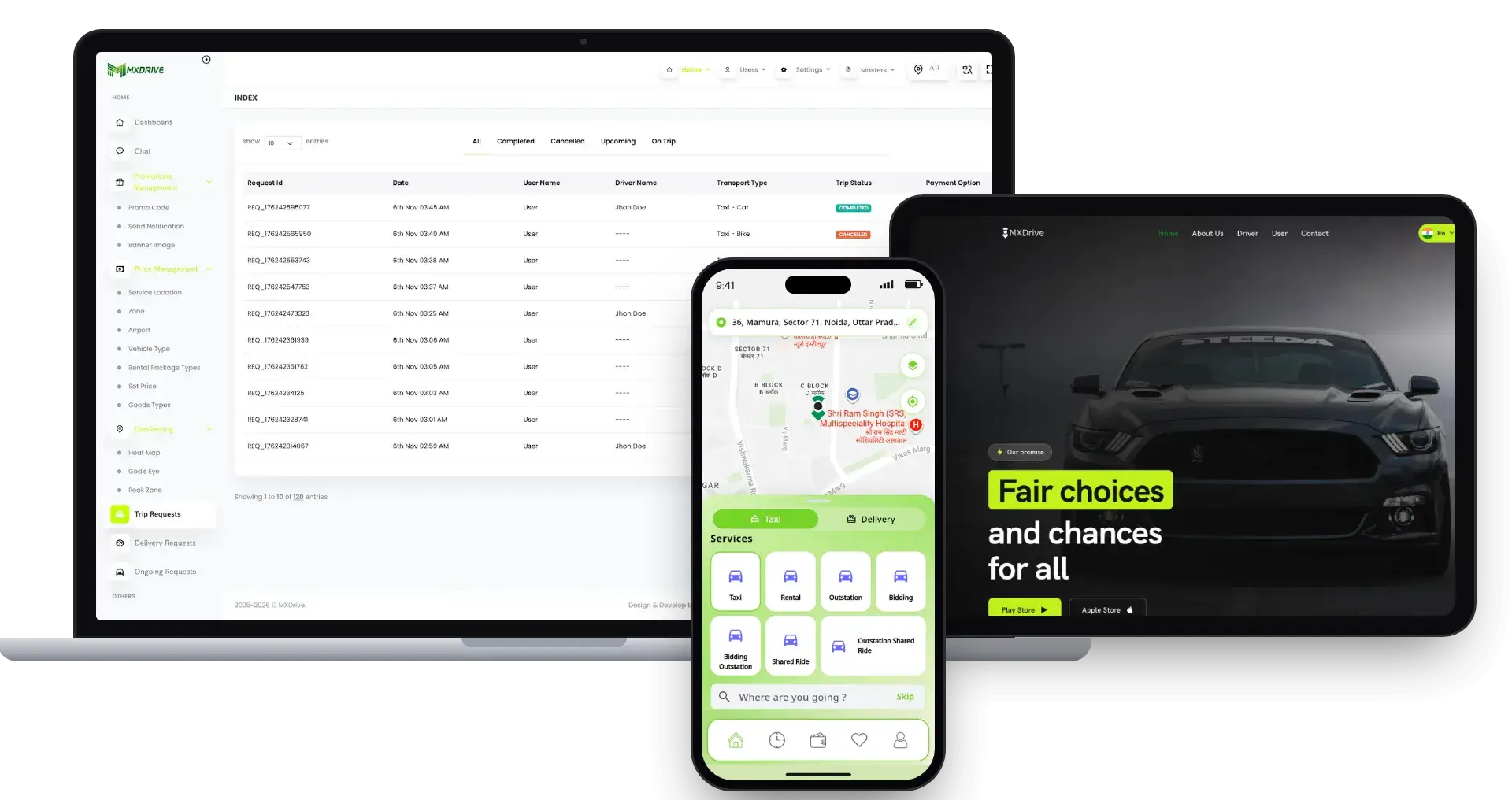
01Ride-hailing where the rider names the price and drivers answer, with rental and outstation trips and a trip-request console for the operator.
Explore Solution
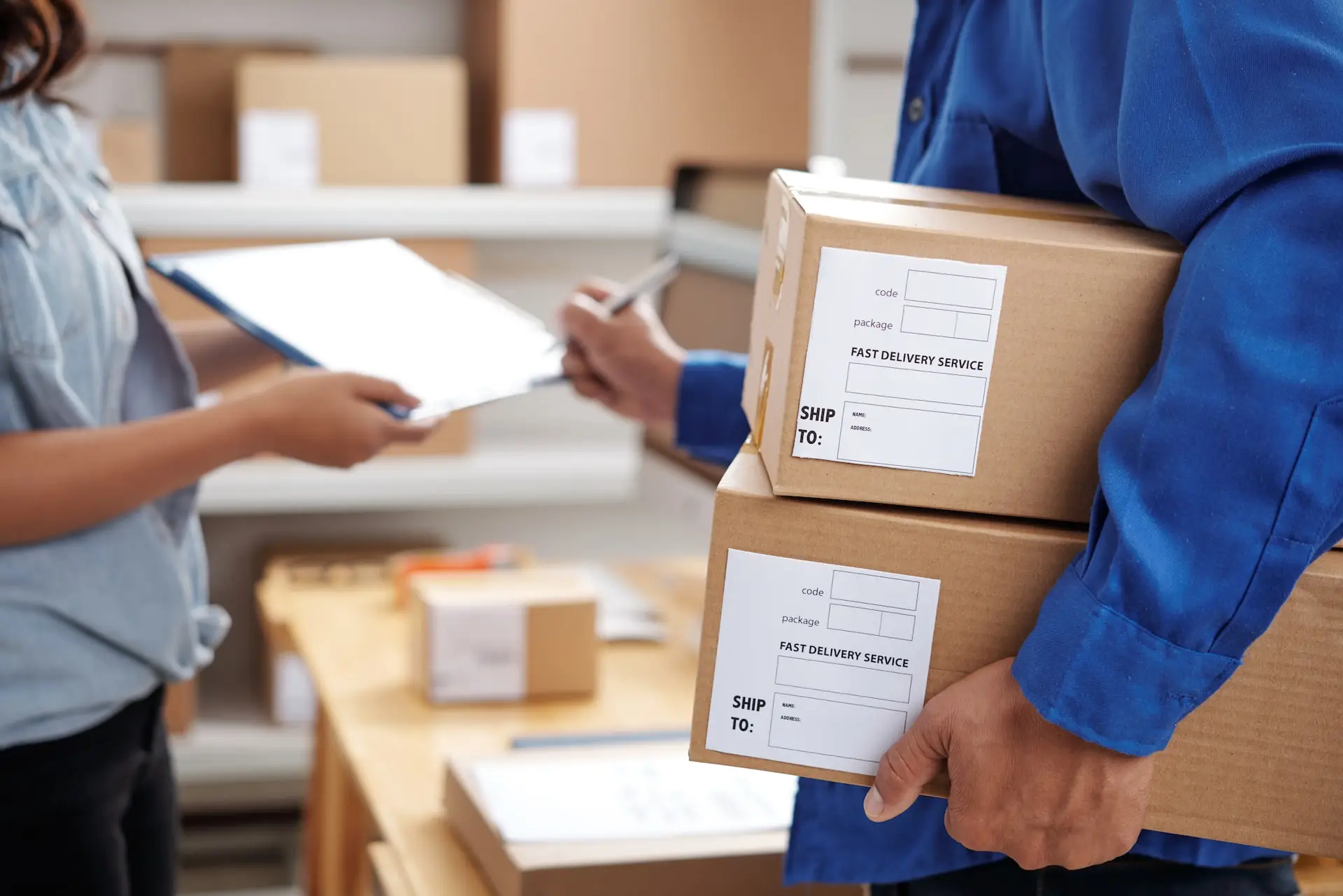
02A delivery-only platform in which couriers are sent to orders, with a rider app, live tracking and an operator console.
Explore Solution

03A super app built from service tiles, with vendor shopping, food and grocery ordering sitting beside taxi and parcel runs.
Explore Solution
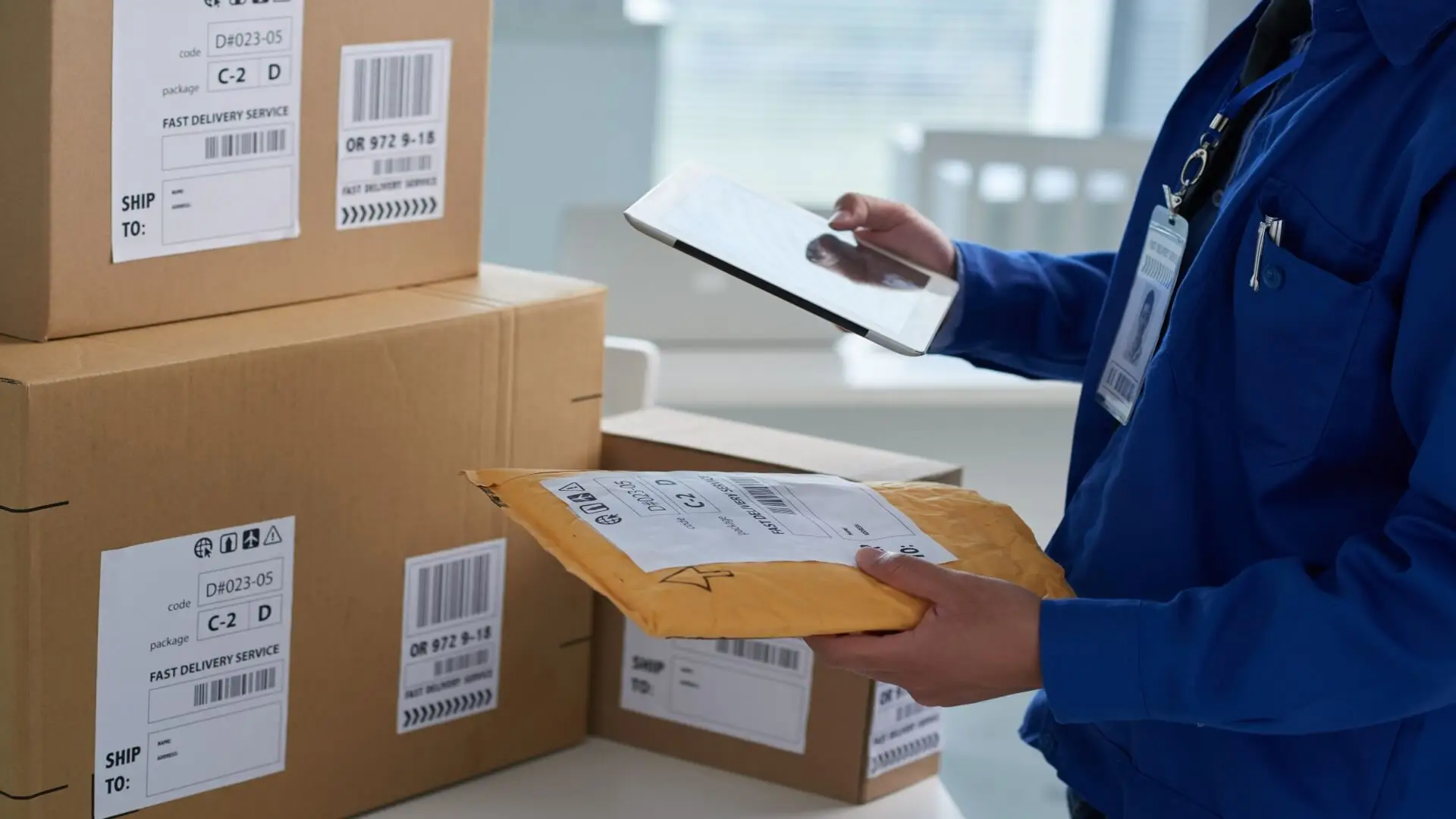
04A shipment platform with customer, branch and driver sides and an admin dashboard for parcels that pass through branches.
Explore Solution09The business case
Market Benchmarks
Super App Market Benchmarks - Independent 2025-2026 Data
The revenue models above are ours. The figures below are not. They come from Grab's annual report on Form 20-F, the e-Conomy SEA 2025 report from Google, Temasek and Bain, GoTo's 2025 results and Bank Indonesia, reproduced as published. They show what multi-service apps in Southeast Asia process and keep across rides, deliveries and payments, so you can test your own business case against numbers you can check.
$22.1bn On-Demand GMV at Grab in 2025
Grab's annual report on Form 20-F, filed 6 March 2026, shows on-demand GMV of $22.1 billion in 2025, up 21 percent, and revenue of $3,370 million. Grab states that deliveries revenue as a percentage of deliveries GMV stayed at 13 percent in 2025 and 2024, on deliveries GMV of $14.2 billion.
$23bn Food Delivery and $11.5bn Transport GMV
Google, Temasek and Bain & Company's e-Conomy SEA 2025 report, released 11 November 2025, says Southeast Asia's digital economy is on track to surpass $300 billion in GMV in 2025. Food delivery GMV is projected at $23 billion with revenue nearing $2.4 billion, and transport GMV at $11.5 billion with revenue of $1.9 billion.
Rp400tn Core GTV at GoTo in 2025
GoTo reports that group core gross transaction value rose 49 percent year on year to Rp400 trillion in 2025, with 66 million annual transacting users. Net revenue rose 24 percent to Rp18.3 trillion, and adjusted EBITDA reached Rp2 trillion for the full year, of which on-demand services contributed Rp1.4 trillion.
0.7% QRIS Fee for Larger Merchants in Indonesia
Bank Indonesia's QRIS merchant discount rate schedule sets 0 percent on micro-enterprise transactions up to Rp500,000 and 0.3 percent above that. Small, medium and large enterprises pay 0 percent up to Rp100,000 and 0.7 percent above it. The schedule takes effect on 1 October 2026, per a Bank Indonesia press release dated 17 August 2026.
Grab Holdings Limited, Annual Report on Form 20-F for the year ended 31 December 2025, filed 6 March 2026 - sec.gov
Google, Temasek and Bain & Company, e-Conomy SEA 2025, press release, 11 November 2025 - bain.com
PT GoTo Gojek Tokopedia Tbk, GoTo beats guidance, achieving record results as it reports 2025 fourth quarter and full year earnings, press release, 11 March 2026 - gotocompany.com
Bank Indonesia, MDR QRIS Bagi Merchant: Kategorisasi dan Simulasi, 13 October 2026 - bi.go.id
All figures are the publishers’ own reported results, projections and published rates, reproduced as published. They describe the market, not the performance of any platform Miracuves builds, and nothing here is a revenue projection for your business.
The Commercial Case
Marketability, Revenue Potential & Business Prospects
Revenue starts when drivers trust a ride and delivery platform enough to go online and riders trust it enough to book. What follows is about making both choices easier, and keeping the relationship once they are made.
- 01
Commission on Every Trip
The operator keeps a share of each fare, so income follows the number of completed trips, not the size of the team.
- 02
Several Lines, One Console
Surge pricing, a convenience fee, rentals and goods runs are separate levers in the same console, so one can change without redesigning the rest.
- 03
Riders and Drivers You Own
Accounts, driver records and trip history live in your database, so what the platform accumulates is yours and not another app's.
- 04
Exit Optionality
Since the source code and the schema are wholly yours, moving later to another host, team or direction needs nobody's sign-off.
- Ride Commission
- Goods Run Fees
- Day-Wise Surge Pricing
- Convenience Fee
- Rental Rides
- Wallet Balances
A ride platform is defended by its driver supply and its trust more than by its features.
- 01Approved drivers do not casually move
- 02Riders with a wallet and history return
- 03The record begins at launch and stays yours
- 04Safety and fast dispatch are the second moat
The three cases differ only in daily trip volume, and each shows which revenue lever leads at that size. Read them as openers for a planning call; none is an earnings forecast.
The trip commission carries early revenue.
A launch in one city where the commission on each trip covers running costs while drivers and riders build up. Sample size for planning, not a forecast.
Commission plus rentals and goods runs.
A city network where rentals and goods runs add income lines beside ordinary rides, and the dashboard shows which one to push. Sample size for planning, not a forecast.
Fleets, surge pricing and fees all active.
A regional operator with fleet owners on board, where surge pricing and the convenience fee add up beside commission. Sample size for planning, not a forecast.
10Why Miracuves
Why Miracuves
Miracuves Compared With Other Grab Clone Developers
A ride and delivery platform can be sourced as a generic ride script, from a freelancer or an agency, or as a ready-made base from a team with this kind of product already launched.
Why Founders Choose Miracuves
- 01
Two Dispatch Desks Included
Taxi and delivery each have a dispatch panel, so operators can assign and follow trips. Generic ride scripts often stop at the rider and driver apps.
- 02
Fleet Owner Panel Included
Fleet operators get a panel of their own, and the admin menu manages owners, fleets and fleet drivers.
- 03
Six Panels, Two Apps, One Codebase
The rider site, driver site, two desks, fleet panel and admin panel arrive already working with the apps, instead of six projects to join.
- 04
Full Source Code Ownership
The full codebase comes unencrypted with its schema and deployment notes, so no one can reprice it or change the terms afterward.
- 05
A Release Log Open for You to Read
Versions 1.7 to 1.13 are written down entry by entry, from dispatcher updates to Places and Routes upgrades.
- 06
Clear Scope From the Start
Miracuves keeps three lists apart before you buy: what the base contains, which items are priced add-ons and which accounts you hold yourself, such as the gateway, hosting and store developer accounts. Fair questions for any Grab clone vendor: can one rider app book a car, a rental and a parcel, where do staff step in when matching fails, and who approves a new driver? Here the answers are the booking card, the two dispatch desks and the approval counter on the admin dashboard.
How to Choose a Grab Clone Development Company
Ask a Grab clone vendor to follow one ride from the rider's booking through the taxi desk to the admin commission tile.
What to look for Miracuves
- Proof in the product Rider and driver logins, plus six web panels on a guided call
- Operator tooling in the base Taxi and goods desks with manual assignment, plus a fleet owners' panel
- A track record you can read A release log from version 1.7 to 1.13
- Source ownership Unencrypted source, schema and deployment notes
- Time to launch Six working days, or we keep working free
- Support after launch 60 days of guidance, six months of fixes, a year of updates
Walk away from any vendor who
- Ships no desk for staff to step in
- Cannot separate commission from driver earnings
- Sells parcel runs as a second product
- Lets drivers work before approval
- Withholds the Flutter source or charges a fee per run
Grab Clone Against Generic Scripts and Custom Agencies, Point by Point
| Criteria | MiracuvesMiracuves Grab Clone | Generic Ride Script | Custom Dev Agency |
|---|---|---|---|
| Time to Launch | 6 working days of build time | Unknown or DIY | Scoped per project, usually months |
| Source-Code Ownership | Complete, unencrypted | Often limited or locked | Usually yes |
| Ride & Delivery Depth | Booking, goods runs, rentals, SOS and dispatch | Plain taxi booking | Depends on the budget |
| Dispatch & Fleet Tools | Taxi desk, delivery desk and owner panel | Rarely included | Built to order |
| Payments & Wallet | Wallet, payment step and earnings by method | Varies by script | Custom integration |
| Admin & Reports | Dashboard, trip and delivery requests, earnings | Thin or absent | Built to order, extra cost |
| Security & Compliance | Role logins, start code, SOS, honest limits | Minimal | Varies widely |
| Cost vs Speed vs Quality | Fixed price, fast, tested base | Low price, high risk | Expensive and slow |
| Ongoing Support & Updates | 60 days guidance, 6 months bug fixes, 12 months updates | Rarely offered | Set by the contract |
Few routes to a mobility platform come through a first busy season unchanged. The rows above show where they diverge.
Talk to Our TeamChangelog
Release Log for the Grab-Like Super App - Versions and What Changed
Release notes for the apps and the web panels, newest first. The notes carry no dates, and the wording has been tidied; every entry still describes this product.
| Version | Changes | What changed |
|---|---|---|
| V1.13 | 9 changes | Maps Places service switched to the new Places API Directions service replaced by the Routes service OpenStreetMap dark theme issues fixed Geocoding API optimization for the rider app Apps Rental ride pickup confirmation screen updated Flutter moved up to 3.24.4 Dark theme issues fixed in the driver app Platform Multiple roles and their permissions feature updated Minor bug fixes in the mobile apps, the admin panel and the server |
| V1.12 | 7 changes | Apps Flutter 3.22.3 adopted Android 14 support added Driver app location updates repaired Push notifications for bidding rides End all stops feature added Gender edit option added Platform Twilio and a second SMS gateway fixed |
| V1.11 | 4 changes | Maps Map and geocoding calls streamlined Features Delivery Instant Ride feature added Multiple Stop Complete feature added Fixed Minor fixes across the server and both apps |
| V1.10 | 3 changes | Features Route line added to live tracking in the rider and driver apps Fixed iOS location issue Minor bug fixes |
| V1.9 | 2 changes | Features Booking UI improved in the rider app Fixed Fixes across the server and both apps |
| V1.8 | 4 changes | Features Gender parameter added to rider and driver sign-up Ride Preference feature added Some UI improvements Fixed Minor fixes across the server and both apps |
| V1.7 | 6 changes | Features Day-wise surge price Download invoice in the admin panel Login with password Dispatcher functionality updates: rental rides, manual assignments and an ongoing-rides real-time timeline Updates UI updates Dispatcher UI updates |
Let's build together
Let's turn your ride and delivery idea into a working platform.
A free consultation gets you a clear plan, a launch date and straight answers. Honest advice beats a fast close.
- First response under 2 hours
- Free consultation
- No lock-in contracts
- Full source code ownership
11Learn more
Blog & Resources
Grab Clone App: Newest Guides & Insights
Stay up to date with guides on how a ride and delivery super app is built, which features matter most and how the business behind it works.


The product6 questions
01What is a Grab Clone?
A Grab clone is a ready-made ride-hailing and delivery platform. The Miracuves Grab Clone lets riders book a vehicle now or for later, take a rental ride or send goods, lets drivers run the trip, and gives the operator two dispatch desks, a fleet owner panel and an admin panel. It ships as a rider app, a driver app and six web panels, white-labeled to your brand.
02How far can I customize the Grab Clone for my own business?
Branding is part of delivery: we rebrand the apps and the web panels with your logo, icons and color scheme and deploy them. Because you receive the complete source code with no encryption, your team or ours can change flows, screens, services and payment gateways as the business grows. Changes beyond the base are scoped and quoted in writing before work starts.
03Does the Grab Clone cover food and grocery delivery?
The demo apps, the admin menu and the release log show rides, rentals and goods runs. Restaurant menus, store catalogs and grocery baskets are not part of the demo, so they are custom scope that Miracuves quotes in writing. If vendor catalogs are central to your plan, the Gojek Clone is built around them.
04What services can I offer through the Grab Clone?
The base covers ride booking now or for later, rental rides such as the half-day option, and goods runs with a goods-type step. Taxi requests and delivery requests have their own dispatch desks. Anything beyond that, such as food ordering or errands, is an add-on or a custom scope.
05Does the Grab Clone come as apps for both iOS and Android?
Yes. Rider and driver apps are Flutter code for Android and iOS, and the rider and driver websites load in any browser. Publishing runs from your developer accounts. Apple and Google keep their own review timetable, apart from our 6-day build.
06Is a Grab clone legal to launch?
Ride-hailing and delivery software is, in general, lawful to build and to sell. The Miracuves Grab Clone borrows nothing from Grab and launches with your brand, terms and commercial rules. Keep Grab's name and logo off everything you brand, and ask local counsel to confirm taxi licensing, passenger transport and delivery rules market by market. Miracuves offers no legal advice.
Riders & drivers7 questions
07How does a rider book a ride or send goods in the app?
The rider sets pickup and drop-off pins, picks a vehicle card with its price and either rides now or books for later. For goods, the rider adds a pickup contact and instructions and chooses a goods type. The app then searches for nearby drivers, and a driver accepts the request.
08Can riders schedule a ride for a later time?
Yes for rides: the booking card has a Book for Later button beside Ride Now. Goods runs are booked as instant delivery rides (release 1.11), and timed delivery slots can be added as written scope.
09How can riders follow a ride or delivery in real time?
After a driver accepts, the rider sees a trip-accepted notice, the driver card with rating and vehicle number, and the route drawn on the map. Release 1.10 improved live tracking with a route line in both the rider and driver apps, and a Share Ride button sends the trip to someone else.
10What payment methods does the app support?
The demo shows cash on the booking card, a Choose Payment Method step on the trip summary and a wallet in the rider menu. The admin dashboard splits earnings by cash, wallet and card or online. Card gateways are connected with your own onboarded account, and Miracuves does not apply for a gateway on your behalf.
11What happens if a rider has a problem during a trip?
The ride screen carries an SOS button and a Share Ride button, SOS alerts surface in the admin panel, and the rider menu has FAQ and Make Complaints entries. How quickly your team responds is your operating procedure.
12How can someone register as a driver?
The driver site has pages for how it works, requirements, safety and service areas, and an apply button. Documents are uploaded from the driver app, and the admin dashboard counts drivers waiting for approval so an operator can review them.
13How does a driver get a ride request?
When a rider books, the app searches for nearby drivers and a driver accepts the request, after which the rider sees the trip-accepted notice and a start code. A dispatcher can also assign a ride by hand, and matching rules such as ranking by rating or distance can be added as scoped custom work.
Dispatch, fleets & delivery6 questions
14What is the role of a taxi dispatcher in the Grab Clone?
The taxi dispatch panel is a separate desk with its own sign-in. An operator uses it to assign rides to drivers by hand, handle rental rides and follow ongoing rides on a real-time ride timeline, as added in release 1.7.
15Can dispatchers assign rides to drivers by hand?
Yes. Release 1.7 lists manual assignments among the dispatcher functionality updates, alongside rental rides and the ongoing-rides timeline.
16Can dispatchers follow every ongoing ride in real time?
Release 1.7 added an ongoing-rides view with a real-time ride timeline to the dispatcher. The panel sits behind a login, so we walk through it on a guided call.
17How do deliveries work in the Grab Clone?
Deliveries have their own Delivery Dispatch Panel with a separate sign-in, a Delivery Requests menu in the admin panel and a goods-type step in the rider flow. Release 1.11 added instant delivery rides and the completion of multiple stops.
18What types of goods can be sent?
The rider flow has a Choose Goods Type step, and the demo shows entries such as machines, equipment and spare parts. Food and grocery ordering is available as custom scope; see the question on food and grocery delivery.
19How do fleet owners fit into the platform?
Fleet owners have an Owner Panel with its own sign-in, and the admin menu carries Manage Owners, Manage Fleet and Fleet Drivers sections beside the driver approval counters. We show the owner panel on a guided call.
Admin, money & payments6 questions
20What can the admin do from the admin panel?
The admin panel covers driver and user counters, trip requests and delivery requests, prices, vehicle types, geofencing, service locations, owners, fleets and fleet drivers, master data, configurations and an Admins menu. The dashboard shows today's trips, earnings and a cancellation chart.
21Can I manage rides and deliveries from the same panel?
Yes. Trip Requests and Delivery Requests sit in the same admin menu, while the taxi and delivery dispatch desks give day-to-day operators their own screens.
22How are fares, vehicle types and commission controlled?
Set Prices, Vehicle Types, Geofencing and Service Locations menus control what a trip costs and where it runs. The trip summary breaks the fare into base, distance, time, waiting, convenience fee, discount and taxes, release 1.7 added a day-wise surge price, and the dashboard shows admin commission apart from driver earnings.
23Is there a way to track trips, earnings and drivers?
Yes. The dashboard counts drivers registered, approved and waiting, shows users registered, today's trips, overall earnings by cash, wallet and card or online, and a cancellation chart. The admin panel can also download invoices, as added in release 1.7.
24What is the realistic path to first revenue?
The usual first revenue for a ride and delivery platform is the trip commission, since nothing extra has to be sold: the first completed fare earns it. Surge pricing and the convenience fee follow once there is volume, and rentals or goods runs widen the mix. Further lines, such as in-app advertising or paid API access for partners, can be added as scoped custom work once your commercial arrangements are in place.
25How defensible is a ride and delivery platform?
Supply and trust protect a ride platform more than features do. Drivers who are approved and earning on your app tend not to leave, and riders with a trip history, a wallet balance and saved favorites have a reason to come back. Launch is when that build-up begins, and the platform holds it in your database. Safety tools and quick dispatch add a second layer of defense, because a service people trust is hard to copy.
Launch & Miracuves12 questions
26What is the lead time from order to a deployed solution?
Our ready-made build takes 6 days: rebranding, a deployment on your hosting and app releases through your developer accounts. Apple and Google own store review and your payment provider owns gateway onboarding, so neither counts toward those 6 days. Custom changes are scoped apart.
27Does the source code come to me?
Yes. You get unencrypted source code for the web platform plus both Flutter apps, along with architecture notes, the schema and the deployment configuration, and no fee applies per seat or per run.
28What should I have ready before launch?
Bring hosting, your domain and a verified developer account the apps go out under, plus your branding and company details, keys for Google Maps, Twilio or Firebase, and a payment gateway with KYC already behind it. Gateway applications and your privacy policy or terms remain your tasks; Miracuves does neither.
29Do you offer technical support after the app launch?
Yes. Every ready-made solution carries 60 days of platform guidance, 6 months of priority bug fixes and 12 months of product updates, running side by side from launch, with a first response in under 2 hours Monday to Saturday, 10:00-19:00 IST.
30Can the platform grow from one city to several?
The Service Locations and Geofencing menus let the operator define where the service runs, and the apps and panels are separate surfaces, so growth is mainly a hosting decision. Peak-load sizing is planned with you before launch, so hosting is matched to the trip volume you expect.
31Why choose Miracuves to build a Grab clone?
The dispatch desks, the fleet panel and the admin console come working, with the demo and the release log open for you to check. Miracuves stands behind 9,000+ projects across more than 6,000 clients and a catalog holding over 90 ready-made solutions. At its fixed price of $3,399, the Grab Clone is running in 6 working days, with support starting at launch and running in parallel: guidance for 60 days, priority bug fixes over 6 months and updates over 12 months. Your first message is answered inside 2 hours whenever it lands between 10:00 and 19:00 IST on a Monday to Saturday.
32How much does a Grab clone cost?
A ready-made Grab clone costs $3,399, a one-time figure with no starting-at small print. It covers the rider and driver apps for Android and iOS, the six web panels including the dispatch desks and the fleet panel, unencrypted source code and the database schema, plus rebranding and deployment to your hosting. Extra modules and custom work are priced in writing first.
33Is a ready-made Grab clone better than building a ride app from scratch?
If rides and goods runs are the plan, usually yes. The Grab clone base already handles pins, vehicle classes, matching, dispatch desks and fleets, its launch takes 6 working days, and the price is settled before you commit. A from-scratch ride-hailing build is priced per scope and reaches its first fare much later. When your city needs a rule the base does not have, Miracuves prices that extension on paper first and generally ships it within 2-8 weeks.
34What is the business model of an app like Grab?
An app like Grab makes money from each ride commission, taken before the driver is paid, plus fees on goods runs, a day-wise surge price for busy days, a convenience fee on the fare breakdown and rental bookings such as the half-day option. The admin dashboard shows the operator commission apart from driver earnings, so each income line can be tuned without touching the others.
35What is the step-by-step process to launch my Grab clone?
First, book a ride and send a goods run in the demo, then watch both on the dispatch desks. Second, agree the services and the first city, and hand over your logo, hosting, gateway and map keys. Third, Miracuves rebrands the rider and driver apps and panels, sets up servers and keys, and publishes from your store accounts. The rider and driver apps reach a branded launch in 6 working days, and store approval follows on Apple and Google timetables.
36Do I need separate apps for riders and drivers in a Grab-style app?
Yes, and the Grab Clone ships with both. The rider app lets people book vehicles or goods runs, and the driver app lets drivers accept requests and run each trip. Both are written in Flutter and cover Android and iOS. Six web panels, including the dispatch desks, the fleet owner panel and the admin panel, handle the operator side.
37Can I launch a taxi app like Ola or Bolt with the Grab Clone?
Yes. The Grab Clone is a ride-hailing and delivery base, so any business that moves people or goods between two points can run it under its own name. Taxi fleets, ride-hailing startups, rental businesses and regional operators all fit. We rebrand the apps and panels with your logo and colors, and you set where the service runs in the Service Locations and Geofencing menus.
Go Deeper on the Grab Taxi Clone
The service behind it, industry context and helpful articles.
Super app development
See the service→GuideHow Safe is a White-Label Grab App? Security Guide 2026
Read the guide→Business model
How a ride and delivery super app is structured and where its money comes from.
Read the guide→GuideHow to Build an App Like Grab: Full Developer Guide for Founders
Read the guide→Disclaimer
Miracuves is an independent software development company. We are not affiliated with, connected to, sponsored by, or endorsed by Grab.
Read our full Legal Notice & Disclaimer →“Grab Clone” is used descriptively. It is how the software industry refers to building a platform with functionality similar to Grab, and how clients search for it.
The entire design and codebase is built by our own team. The product contains no code, design, graphics, or content originating from the Grab website or applications.
Grab and all other third-party names and marks are the property of their respective owners, referenced here solely to describe the category of software offered.