Multifamily App · Production Ready

Greystar Clone App - White-Label Rental Management Platform

Miracuves' ready-made, white-label Greystar clone lets property managers run a portfolio with a Flutter renter app and owner (Builder) app on Android and iOS, a website carrying the vendor panel, an admin console and the full code base, handed over within six working days.

Renters narrow units by area, rent level and amenities, choose dates and reserve, while owners publish units with their own terms and open dates. Lease signing, renewals and tenant screening are not in the demo, and the four optional modules carry separate prices. An owner expense-tracking screen is a common addition; its scope and price are fixed in writing, and the build takes 2-8 weeks.

Launch in 6 Days with

  • Source Code
  • Renter App
  • Owner App
  • Vendor Panel Site
  • Admin Console
  • Rebranding

StackFlutter · PHP · MySQL · MongoDB · Google Maps · Twilio · Firebase

MXProp console · PortfolioIllustrative
Reservations today14
Units awaiting approval6
Units live212

Portfolio activity

Greystar Clone discounted properties list with discount and lease badges, location, bedrooms, bathrooms, area, price and call and email buttons.
Payouts and duestracked in one console
  • 3Unit Statusesavailable, booked and under maintenance
  • 4Money on Every Orderbilled total, discount, paid sum and open balance
  • 0%Revenue Share With Miracuvesno share of any reservation, rent payment or owner plan
  • 5App LanguagesHindi, Spanish, Arabic, Bangla and English
  • 6Days to Launchand if the delay is ours, we keep going free
  • $4,299Paid Once, Not Rentedsource code yours, no per-seat fee, no monthly rental

Live in six working days, or we keep working free until you launch. Every build carries 60 days guidance, 6 months bug fixes and 12 months updates.Verify every figure

Owner Payouts Are on Record

The console records incoming rent, the commission the platform keeps and the payout owed to each owner, and every owner sees their own transactions.

Longer Stays by Request

A renter asks to extend through chat or the reservation feature; approval rests on availability and your policies, with no automatic renewal.

Money Moves Through Your Gateway

Renters pay through a gateway API tied to your own merchant account, opened with KYC done; the keys for maps, messaging and payments stay in your name.

Planning a rental platform for a big portfolio of homes?Talk to Product Expert

Chosen by 6,000+ clients across the globe

Miracuves is listed by Expertise.com as a managed IT service provider.Miracuves is an official member of the Forbes Business Council.Miracuves is a verified agency on DesignRush, listed among top design agencies in India.Miracuves is reviewed on Trustpilot as a software development company.Miracuves is listed by The Manifest among top managed software development companies.Miracuves is listed by DesignRush as a top software development company.Miracuves is recognized by GoodFirms as a top software development company.Miracuves is ranked among the top 1000 companies globally by Clutch.Miracuves is a top managed service provider in the United States on Clutch.

01See it live

Live in Action

Try the Greystar Clone - Renter App, Owner App, Vendor Panel & Admin Console

Miracuves invites you to open its Greystar clone and use it the way an operator would. Two logins unlock the renter app and the owner app through a single app portal. The website, the vendor panel and the admin console are opened for you on request: book a call and we let you in. Read the dashboard totals, open a unit, scan the due payment list and see how notices arrive.
Greystar Clone tenant dashboard with total orders, wishlist, purchase amount, coupons, cart and a purchase history of totals, paid and due amounts.Greystar Clone discounted properties list with discount and lease badges, location, bedrooms, bathrooms, area, price and call and email buttons.
Renter app

Greystar Clone - Renter App

What a renter holds on a phone: a dashboard with order counts and amounts, a unit list carrying discount and lease badges, unit pages ending in a Book Property button, a due payment screen, chat and a notification feed.

  1. 1Pick Android or iOS inside the app portal
  2. 2Log in with the renter credentials printed below
  3. 3Explore Dashboard, Properties, Due Payment and Chat
Try:user@demo.com | User_321
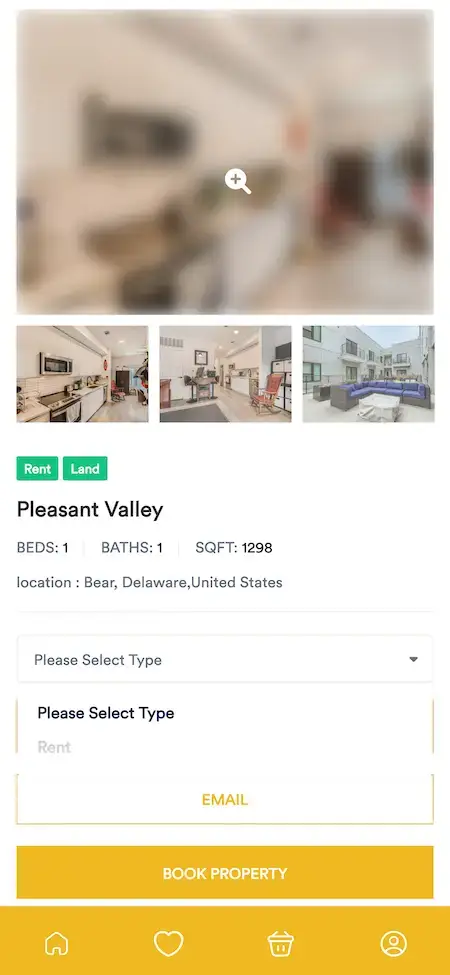
Greystar Clone unit details with a photo gallery, rent and land tags, beds, baths, area, location and a Book Property button.Greystar Clone due payment list showing paid and due amounts for each property.
Owner app

Owner App - Units, Terms & Reservations

The owner side on a phone, known as the Builder app in the demo: publish units with photos, then set terms, open dates and prices while following transactions, payouts and bookings as they arrive.

  1. 1Enter the same app portal
  2. 2Log in with the owner credentials printed below
  3. 3Explore Listings, Terms and Payments
Try:builder@demo.com | Builder_321
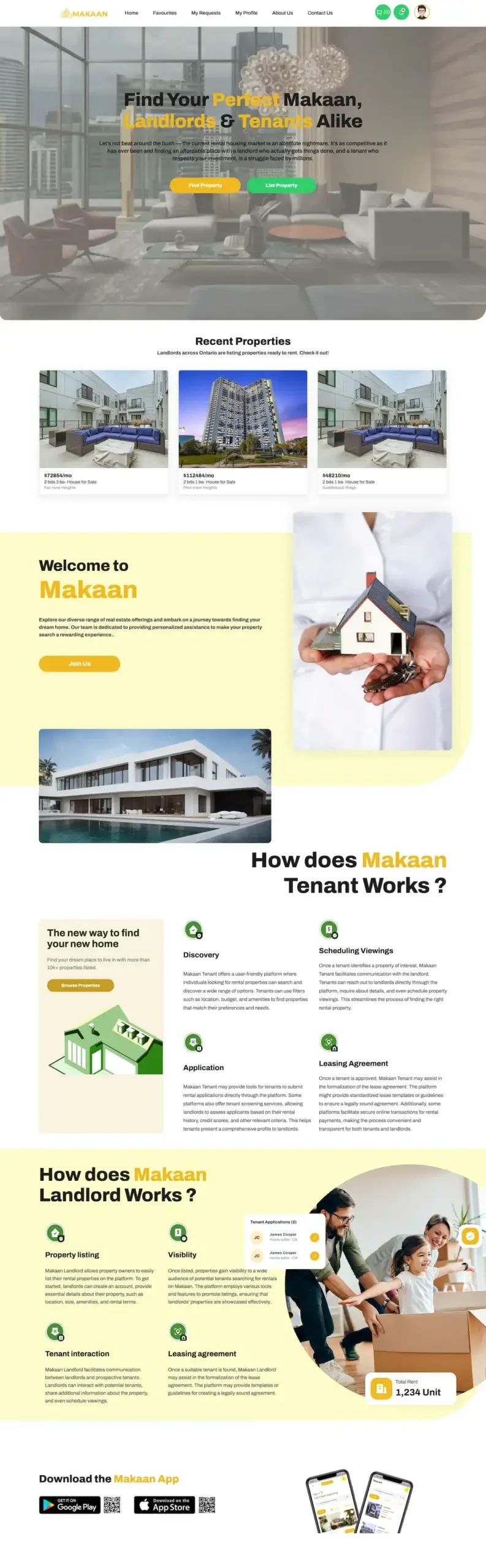
Greystar Clone web landing page with property search, recent properties, how it works for tenants and landlords, and app download links.
Vendor panel & site

Vendor Panel & Public Website

A browser workspace for owners and the staff who list on their behalf, opening on an Actions grid, beside the public website with its property search.

  1. 1Ask for web access during a call
  2. 2We log you into the vendor panel
  3. 3Open Search, a Property page and My Properties
Web demo:available on request
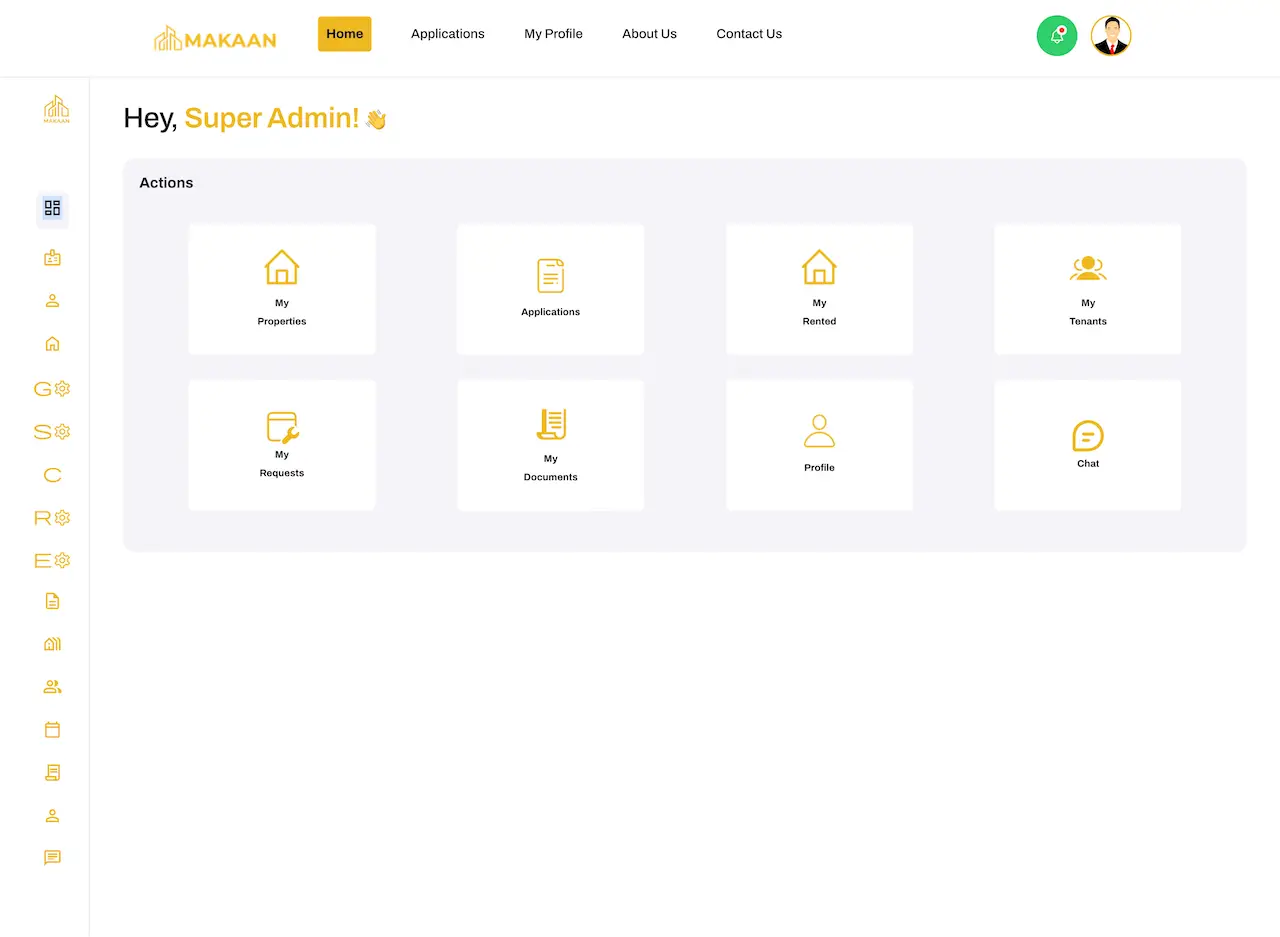
Greystar Clone web dashboard with an Actions grid: My Properties, Applications, My Rented, My Tenants, My Requests, My Documents, Profile and Chat.
Admin console

Admin Console - Properties, Users, Payments & Content

The operator console for the whole portfolio, covering properties, users, money in and out, content and analytics, plus a support desk for renter issues.

  1. 1Request admin access during a call
  2. 2We walk through the console with you
  3. 3Open Properties, Users, Transactions and Reports
Admin login:shared on a call
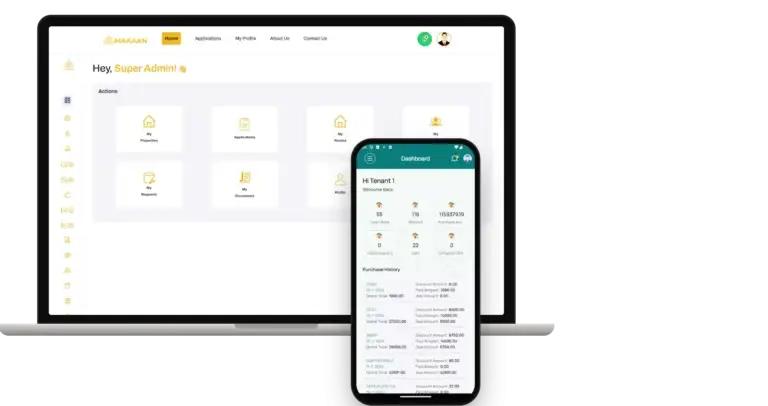
Greystar Clone shown across a laptop and phone: the web admin actions dashboard and the tenant dashboard with purchase history

Tour It With Us

Walkthrough of Property Management Software Like Greystar: Units, Reservations, Vendor Panel & Payments

Nothing shows the whole product faster than a live call. Over roughly half an hour we open the renter app, the owner app, the public site with the vendor panel behind it, and the admin console, one after another, and hold each against your portfolio: the number of buildings, who publishes the units, how rent gets to you and your target launch date.

Reserve a time for the live tour.

Screens in Order

Greystar-Like App Flows: Renter App, Web Dashboard & Landing Page

Genuine screens arranged in the order a reservation travels, from the renter dashboard through to the language chooser, followed by the web dashboard that operations staff use and the public landing page.
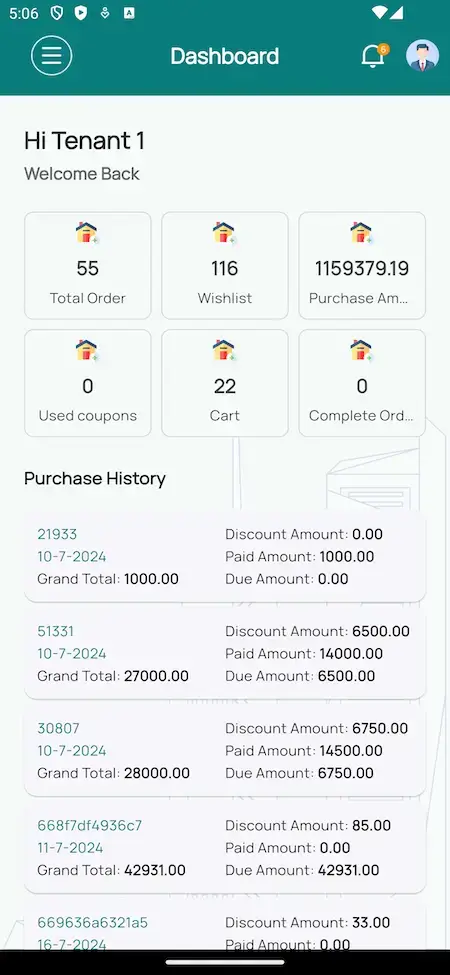
Greystar Clone tenant dashboard with total orders, wishlist, purchase amount, coupons, cart and a purchase history of totals, paid and due amounts.
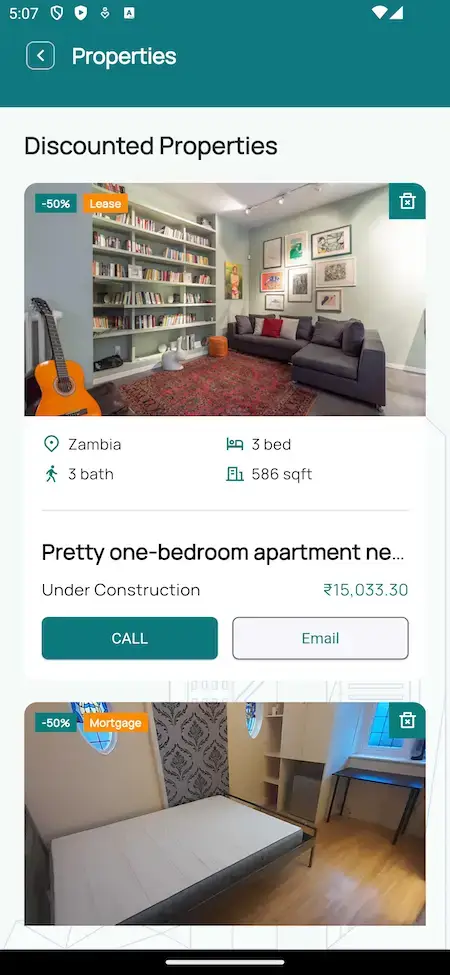
Greystar Clone discounted properties list with discount and lease badges, location, bedrooms, bathrooms, area, price and call and email buttons.
Greystar Clone unit details with a photo gallery, rent and land tags, beds, baths, area, location and a Book Property button.
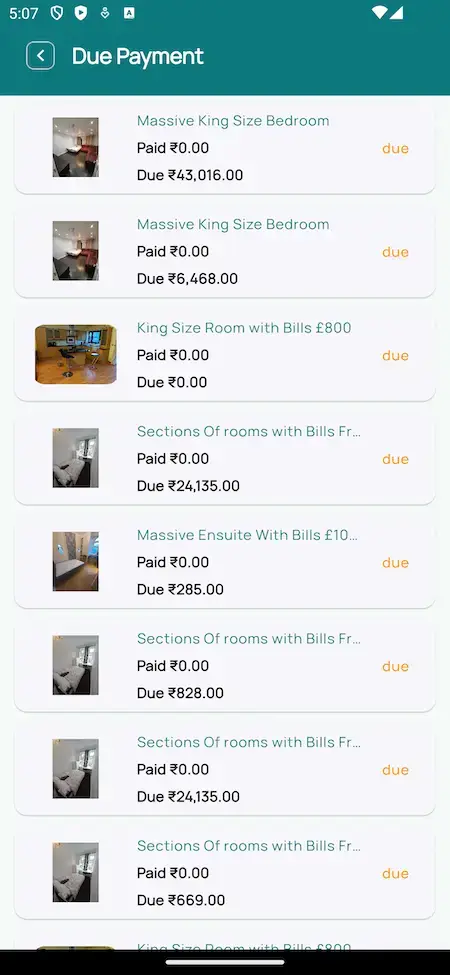
Greystar Clone due payment list showing paid and due amounts for each property.
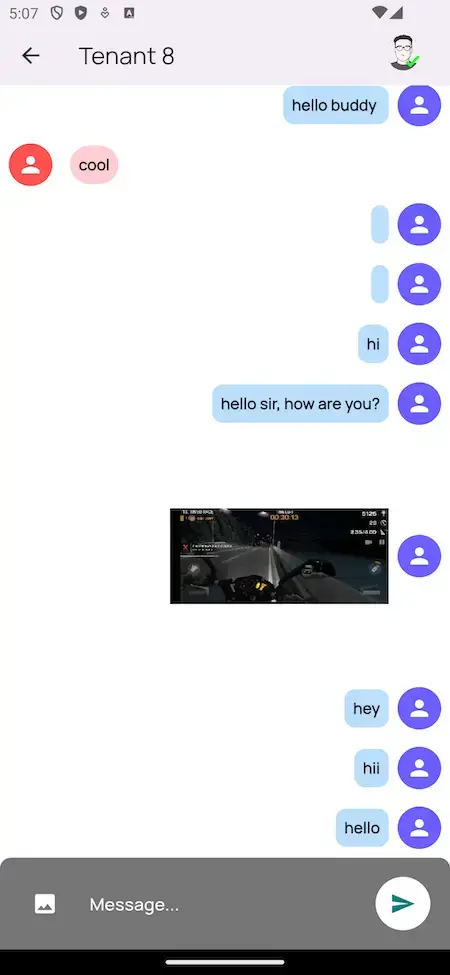
Greystar Clone in-app chat between a tenant and another user, with a message box and photo attachments.
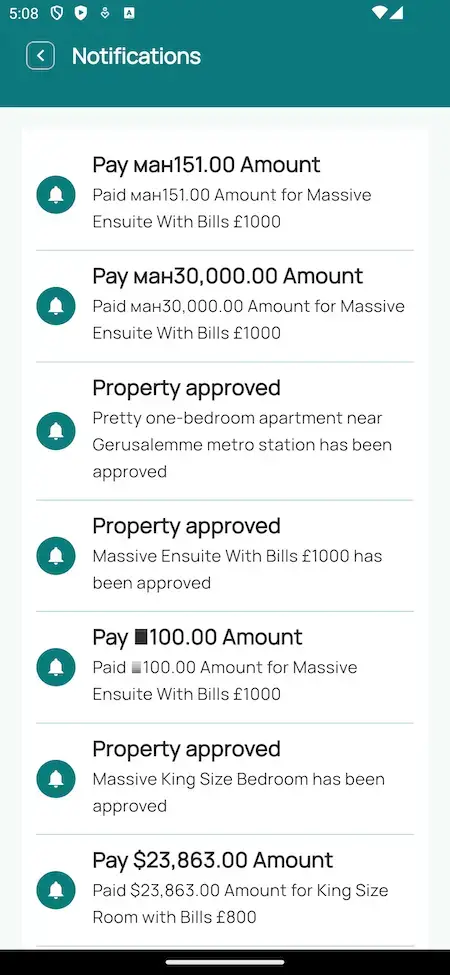
Greystar Clone notifications for approved properties and payment amounts.
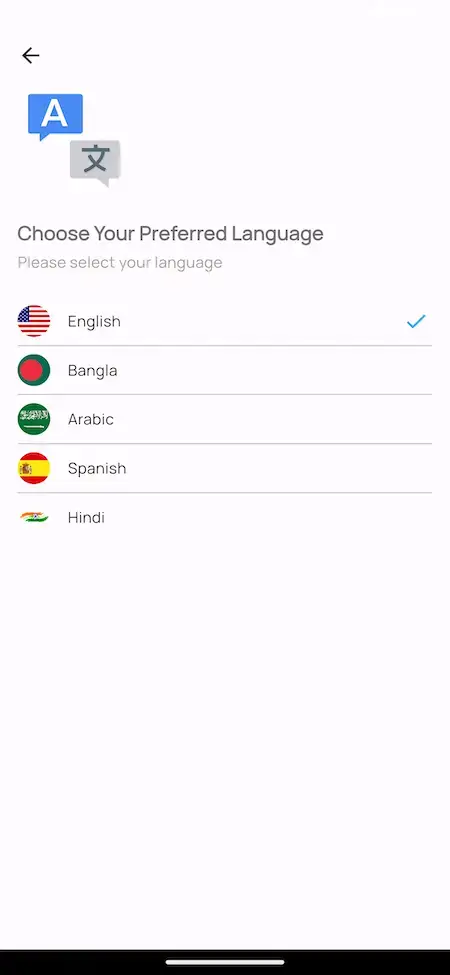
Greystar Clone language chooser with English, Bangla, Arabic, Spanish and Hindi.
7 screens · scroll →
Greystar Clone web dashboard with an Actions grid: My Properties, Applications, My Rented, My Tenants, My Requests, My Documents, Profile and Chat.
1 screen
Greystar Clone web landing page with property search, recent properties, how it works for tenants and landlords, and app download links.
1 screen

Trace one renter from the dashboard, across the unit list and a unit page, into the due payment screen, a chat thread and a notice, then see how the operator team views that same reservation from the web dashboard.

See All Products

02Proof

Founders Speak

Greystar Clone Client Reviews - Operators on Their Own Builds

For Renido, a property-listings platform for agents, Miracuves built local property types and map behavior; Ischia Booking replaced a static site, email and phone for a few dozen properties. GoToRawanda and BNBinGreece are short-stay hosts rather than landlords, so they sit one step away.

RRenido TeamFounding team, Renido
“Listings, search, media handling and enquiries were all ready. Our work was the local property types, the map behaviour and how agents actually get leads. Live inside a month.”
MMartin KFounder, Ischia Booking S.r.l
“We were running a few dozen properties off a static site, email and a phone. Calendar, booking flow and the property manager came off the shelf. They added a channel manager for our OTAs, a guest portal and a multilingual interface. The operations team no longer lives in the inbox.”
GGoToRawanda TeamFounding team, GoToRawanda
“Hosts, listings, calendars and payments were solved. Our work was the local payment methods, the languages our guests use and the property types we actually list. It replaced a phone-and-email process inside a month.”
BBNBinGreece TeamFounding team, BNBinGreece
“Listings, calendar, booking flow and payments came off the shelf. We added the property types and the seasonal pricing rules that matter here, plus a multilingual guest experience. Online bookings replaced the inbox inside a month.”
Read More Client TestimonialsClients in their own voice

Honest Status

Greystar Clone Case Study Status - What Is Published and What You Can Check

Nobody has agreed to be named for a deployment of this exact product, so there is no outcome to report. What follows is what you can examine yourself, instead of borrowing a different product's numbers.

Not Yet Published
No Client Deployment Is Named Yet

Our portfolio holds no entry for a multifamily rental build on this base, which leaves no client name, logo or figure to display. The proof on offer is an open demo plus a release log that lists every version.

Renter and owner appsLive demo
Multifamily rental operationsModel
Nobody named yetStatus
2Shared logins
4Logged releases
0Made-up results
Greystar Clone web dashboard with an Actions grid: My Properties, Applications, My Rented, My Tenants, My Requests, My Documents, Profile and Chat.
Try it in the demo
  • Log in as a renter and read the dashboard tiles
  • Open the unit list, then a single unit
  • Hold the due payment screen up against the notices
  • Log in as an owner and read the listing tools
  • Ask to see the web, vendor and admin panels on a call
Why none is named
  • A case study needs a real client launch behind it
  • Results from a different product say nothing about a rental platform
  • Client names, logos and numbers are never invented
  • Once a client allows its name, this becomes a genuine case study
Where we draw the line
  • No quote or figure without a client behind it
  • No demo screen dressed up as a client outcome
  • No promises on occupancy, reservations or revenue
  • No hiding the fact that demo logins are shared

03The product

The Basics

What a Greystar Clone Does for Operators With Many Homes

Think of Miracuves' Greystar clone as a rental platform you can switch on for a large stock of homes. Owners and vendors publish units under their own terms and availability, renters search, reserve and pay from an apartment rental app, and the operator watches properties, users and money from one admin console.

Greystar Clone shown across a laptop and phone: the web admin actions dashboard and the tenant dashboard with purchase history

Made for Volume

A single owner or vendor account can hold many units, and the admin console shows every property, user and payment together instead of building by building.

Open Source Code

Nothing is encrypted, so your engineers are free to rework a screen or a rule as the portfolio expands or shifts.

Candid About Limits

Lease signing, renewals and screening join as scoped custom work for any portfolio that needs them, and the four optional modules carry their own prices.

Web, Android & iOS

How Does a Greystar Clone Script Work?

Listing homes online is not where a big portfolio struggles. The strain comes afterward, in amounts due, messages, approvals, notices and the tools owners use daily. All of it arrives already working. What the demo shows is a general property-rental product, and it takes a multifamily shape from the units you list, the owners and vendors you let in and the amenities you display.

Greystar Clone web dashboard with an Actions grid: My Properties, Applications, My Rented, My Tenants, My Requests, My Documents, Profile and Chat.
  1. 01Area, rent and amenity search
  2. 02Unit pages with photos, beds, baths and size
  3. 03Reservations backed by dates, dues and a dashboard
  4. 04Owner app and vendor panel for terms and listings
  5. 05Admin console for people, payments and content

Four connected surfaces come together: the renter app, the owner app, a website carrying the vendor panel, and the admin console. Both apps run on Flutter, and the entire source code travels with them.

What You Get

Greystar Clone Features - Search, Reservations, Dashboard, Payments, Vendor Tools & Admin

Each item below traces to something Miracuves can show you in the Greystar clone: a demo screen, a product feature list or a release log entry. Optional modules appear lower down as add-ons, and anything the demo leaves out is labeled custom work.

Feature 01 / 12

Unit Search & Filters

Renters hunt through the catalog by area, rent level and amenities, and the phone app can read its own location to bring up homes nearby.

  • Narrow results by area, rent level and amenities
  • Sort by property type and by availability
  • Location search through phone GPS
  • Map links to nearby amenities and directions
  • Result cards carrying offer and lease-type markers
  • Call and Email shortcuts on every result
Feature 02 / 12

Unit Pages

Every unit gets a page with a photo gallery and the details a renter weighs up: type tags such as Rent or Land, bedrooms, bathrooms, size, place and price.

  • Image gallery with a thumbnail strip
  • Rent and Land type labels in the demo
  • Bedroom, bathroom and square-foot counts
  • Address shown on the page
  • An Under Construction status on result cards
  • A discount flag when the unit is on offer
Feature 03 / 12

Reservations

A renter checks unit availability, chooses dates and reserves from the unit page through the Book Property button, with payment handled by the platform gateway.

  • Calendar of availability and date selection
  • Book Property button on the unit page
  • A type selector beside that button
  • Payment as part of the reservation
  • Email or in-app confirmation
  • An Email option for putting a question to the owner beforehand
Feature 04 / 12

Renter Dashboard

The dashboard greets the renter by name, counts orders, wishlist items, purchase amount, coupons, cart and completed orders, and keeps a purchase history below.

  • Counters for Total Order, Wishlist and Purchase Amount
  • Counters for Used coupons, Cart and Complete Orders
  • An order log under Purchase History, with ids and dates
  • For each order: billed total, discount, amount paid and amount outstanding
  • Menu entries for My Profile, Purchase History and Properties
  • Contact information the renter keeps current
Feature 05 / 12

Payments & Dues

A Due Payment screen sets out, unit by unit, what has been settled and what remains, and the dashboard repeats the same numbers order by order.

  • Due Payment shortcut in the renter menu
  • Paid and outstanding amounts for every unit
  • A due tag next to unpaid lines
  • Payment notices in the notification feed
  • Reminder pushes for payments
  • Payment clears through the connected processor
Feature 06 / 12

Offers, Wishlist & Cart

Units can wear a discount badge, renters bookmark favorites in a wishlist and hold items in a cart, and the dashboard tallies the coupons already redeemed.

  • Discount badge on result cards
  • Heart icon for the wishlist in the bottom bar
  • Cart tile and basket icon
  • Redeemed coupons totaled on the dashboard
  • Savings printed beside each purchase
Feature 07 / 12

Messaging

Chat lives in the app menu so renters and owners can talk without leaving the platform, photos included, and a request for extra time reaches the owner there.

  • Chat link in the renter menu
  • Pictures inside a conversation
  • Text box with a send arrow
  • Extra-time requests by chat or reservation
  • Owner answers from within the app
  • Real-time chat on both web and phone
Feature 08 / 12

Alerts & Notifications

A notification feed announces approved properties and recorded payment amounts, while push messages cover matching new units, confirmations and reminders.

  • Notification feed screen
  • Notices when a property is approved
  • Notices for recorded payment amounts
  • Pushes for new units that fit preferences
  • Pushes for confirmations and payment reminders
  • Alert bell in the web dashboard header
Feature 09 / 12

Ratings & Reviews

People who rented or viewed a property can score it and write feedback, and the next renter reads those comments while choosing.

  • Scores and comments for each property
  • Input from renters and visitors
  • Reviews open to later renters
Feature 10 / 12

Owner App & Vendor Panel

Owners and vendors work inside the Builder app or the vendor panel, where they publish units, fix terms, open dates and price, and keep an eye on transactions, payouts and reservations.

  • Publish units and add photos
  • Set rental terms and open dates
  • Edit the price on the same screen
  • Many units kept under one account
  • Filter the list: available, booked, under maintenance
  • A dashboard tracking transactions, payouts and reservations
  • Reports your bookkeeper can use
Feature 11 / 12

Language & Profile Settings

A language picker offers Hindi, Spanish, Arabic, Bangla and English in the demo, and each renter keeps a profile page with personal details.

  • Language picker in the app menu
  • Five languages visible in the demo
  • A profile page for every renter
  • Logout sits at the foot of the menu
Feature 12 / 12

Operator Console

The operator side spans properties, users, transactions, content and analytics, with a help desk for renter questions and complaints.

  • Create, amend and withdraw property listings
  • Accept registrations and confirm identities
  • Suspend or ban accounts and resolve disputes
  • Follow payments, commissions and payouts
  • Edit static pages, articles, FAQ entries and banners
  • Analytics on engagement, popular units and revenue
  • A help area for complaints and questions

Good to know before buying: we apply your branding and deploy the platform, and a handful of things stay on your side: hosting plus a domain, a verified developer account per app store registered in your name, your logo and company details, a payment gateway whose KYC is done, and any third-party keys. Store review is run by Apple and Google on a clock of their own, outside the days we need to build and deploy.

Talk to Our Team

Where the Money Comes From

Greystar Clone Revenue Models - Reservation Commission, Renter Fees, Rent Roll & Payment Costs

Miracuves' Greystar clone gives a portfolio platform several lines of income. The admin console tracks commissions and payouts today, each further line is a pricing choice for you, and anything that calls for a new screen is scoped separately.

Two lines tend to lead: the commission on each reservation and the fee placed in front of the renter.

  1. 01

    Reservation Commission

    The operator retains a share of every paid reservation and hands the remainder to the owner. The admin console already follows incoming payments, the platform's commissions and the payouts waiting for property owners.

  2. 02

    Renter Service Fee

    An extra line on what the renter pays above the rent itself. Orders already separate the billed total, the discount, the paid amount and the open balance, so a fee would be itemized there. We configure it as a pricing rule with you.

  3. 03

    Rent on Units You Hold

    A company that owns or leases its units takes the rent itself. The platform carries the listing, the reservation and the record of paid and open amounts, while the rent roll stays your own affair.

  4. 04

    Payment Processing Fees

    Gateway charges can be recouped by adding a fee to the payment rather than swallowing them. The platform talks to a payment gateway API, and the merchant account behind it is yours to open.

  5. 05

    Owner & Vendor Plans

    Paid tiers for owners and vendors who need more units or extra tools, plus paid placement that lifts a home above others in its city. Both are delivered as scoped custom work, priced in writing before the plan and placement screens are built.

  6. 06

    Group & Employer Housing Deals

    Contracts with firms that house staff in your buildings for months at a stretch. You negotiate these commercially, and the platform keeps each reservation with its dues and messages in one place.

Fees and filings published by a big booking platform, an apartment owner and a card processor, placed alongside four lines of this model: reservation commission, renter fee, rent on owned units and what the card networks charge.
Revenue streamHow it is chargedTake rateTypical take rateWhat sets the ceiling
Reservation CommissionA share of each paid reservation, withheld before the owner receives a payout.In its split-fee model Airbnb publishes a 3% host fee, and in its host-only model 15.5% (14%-16%).What owners are willing to pay compared with their other channels. A host-only fee covers the entire service, so one commission has to hold its own against that.
Renter Service FeeA percentage of the reservation subtotal added on top of what the renter owes.Airbnb publishes a guest fee that runs between 14.1% and 16.5% of the booking subtotal.The extra a renter will accept beyond the rent. Guest fees on the largest platform sit in the mid-teens, so a lighter fee can work as a selling point.
Rent on Units You HoldMonthly rent from units the operator owns or leases, collected directly with no platform cut.No cut applies. Across 73,465 same-store apartment units in 2025, Equity Residential reports an average rental rate of $3,203 and 96.4% occupancy.Occupancy and market rent. That filing also says its apartment leases generally run twelve months or less, so turnover weighs as heavily as the rate.
Payment Processing FeesA gateway charge on every card payment, either passed to the renter or absorbed.On its US pricing page Stripe quotes 2.9% + 30c for each successful domestic card payment.Your gateway agreement and your mix of cards. Stripe's Connect help article cites 2.9% + 30c merely as an example, so verify the rate in your own country before fixing a fee.

How to read this. Airbnb's fee ranges come from its help article on host and guest service fees; the rent and occupancy numbers are from the Equity Residential annual report on Form 10-K for 2025; the card rate is from Stripe US pricing, backed by a Stripe Connect help article. Other businesses published these numbers, and they are offered as reference points for a multifamily rental model, not as rates of this product. Read each row as modeling input: nothing here is a quote or a forecast, and the percentages you apply are yours to settle with owners and renters.

Revenue Model

Greystar Clone Revenue Model, Stage by Stage

In the Greystar clone Miracuves delivers, income lines widen with the portfolio, so a single building and a national operator lead with different levers.

Single building

A pilot in a single building earns on the reservation commission, and the admin console already follows each commission against the owner payout.

Regional portfolio

As the portfolio spreads across a region and many owners chase the same renters, a renter service fee and recovered payment costs begin to count next to commission.

National operator

Across many markets, rent on units you hold, group and employer housing deals and owner plans, scoped as custom work, build up beside the commission.

No reservation, rent payment or owner plan carries a share for Miracuves.

Want a revenue model drawn around your own portfolio?Plan My Revenue Model

Run the Portfolio

Admin Console for a Multifamily Rental Platform: Properties, Users, Payments & Content

In the Greystar clone Miracuves delivers, a single console handles the operator's working day across a big portfolio: which units are live, who has registered, what has come in, what owners are owed and what the public site says.

Greystar Clone web dashboard with an Actions grid: My Properties, Applications, My Rented, My Tenants, My Requests, My Documents, Profile and Chat.
Greystar Clone web landing page with property search, recent properties, how it works for tenants and landlords, and app download links.

Console Sections

  • 01

    Properties

    Add fresh units, fix their details and pull the ones that are stale or gone, so the catalog reflects what is truly available to rent.

  • 02

    Owners, Vendors & Renters

    Accept sign-ups, confirm identities, suspend or ban accounts and settle disagreements between parties.

  • 03

    Transactions & Payouts

    Watch what renters pay, what the platform keeps as commission and what remains owed to property owners.

  • 04

    Content

    Update static pages, articles, FAQs and promo banners so the public site speaks for your brand.

  • 05

    Analytics & Reports

    See platform performance, engagement, the most viewed units and revenue gathered in one view.

  • 06

    Customer Support

    A help area for questions, complaints and technical trouble; ticket fixes are recorded in the version history.

  • 07

    Applications & Requests

    Applications and My Requests tiles open the web dashboard, and that is where inbound requests get handled.

  • 08

    Residents & Documents

    Three tiles, My Tenants, My Rented and My Documents, keep resident records, rented units and paperwork one click away.

Money Flow

The finance view of the console, running from a renter's payment to an owner's payout.

  • Money paid in by renters
  • Commission the platform earns
  • Payouts waiting for property owners
  • Open balances kept per unit

Content & Reach

Settings for the public site and for how the platform runs day to day.

  • Static pages, posts and FAQ entries
  • Promotional banner slots
  • App language picker
  • Notification bell in the web header bar

Should the console stretch further? Extra reports, another payout schedule, further languages or a bespoke approval step are each priced on their own. Describe what your operations staff need and you will receive a written quote.

Talk to Our Team

04Package and price

The Full Package

What Ships in the Box: Source, Apps & Deployment for Your Own Greystar-Style App

From Miracuves you receive a running platform and not a heap of parts: the renter and owner apps, the website, the vendor panel and the admin console, with the unencrypted source behind each, ready for your own team to extend. Your hosting, domain, store accounts and gateway fees are paid to those providers directly; leasing, renewals, screening and any other custom flow are quoted in writing first.

01

Complete Source Code

Source for the web platform and for the Flutter apps comes as plain, readable code that your developers can build on.

  • The web platform source, unencrypted
  • The Flutter source behind Android and iOS
  • Free to alter and redeploy
  • Project codes handed over too
02

Data & Integrations

The data stores that hold units, reservations, users and payments, plus the outside services the platform connects to.

  • MySQL and MongoDB listed for storage
  • Google Maps for places
  • Twilio and Firebase among the services
  • Gateway and translation APIs
03

Messaging & Notices

Conversations linking renters and owners, plus the notification layer that delivers approvals and recorded amounts.

  • Chat with picture messages
  • Alerts for approved properties
  • Alerts for recorded payments
  • Pushes for reservations and reminders
Greystar Clone web landing page with property search, recent properties, how it works for tenants and landlords, and app download links.
04

Website & Vendor Panel

A responsive public site with property search and a recent listings strip, together with the vendor panel where owners and vendors work on a desktop.

  • A front page with Find Property and List Property entries
  • A strip of recent properties and an explainer
  • Vendor panel for units and rental terms
  • Download links to both app stores
05

Renter & Owner Apps

Two Flutter apps, one for each side, handling search, reservations, dues, chat and notices.

  • Renter app with dashboard, properties and dues
  • Owner (Builder) app for units and terms
  • Menu holding chat, language and profile
  • Both apps go live under your developer accounts
Greystar Clone discounted properties list with discount and lease badges, location, bedrooms, bathrooms, area, price and call and email buttons.
Greystar Clone web dashboard with an Actions grid: My Properties, Applications, My Rented, My Tenants, My Requests, My Documents, Profile and Chat.
06

Admin Console

The operator console covering properties, users, transactions, content and analytics.

  • Management of properties and users
  • Monitoring of transactions and payouts
  • Editing of pages, posts, FAQs and banners
  • Analytics and reports
07

Roles & Logins

Separate logins for renters, owners, vendors and admins, each opening a different set of screens.

  • Renter login
  • Owner (Builder) login
  • Vendor and admin panel logins
  • Sign-ups accepted from the admin side
08

Hand-Over & Support

We apply your branding, deploy the platform, hand over the source and begin three support periods together at launch.

  • Your logo, icons and colors applied
  • Deployment onto your hosting
  • Publishing through your developer accounts
  • 60 days guidance, 6 months bug fixes, 12 months updates

Rather look before you buy? Log in to the demo as a renter or an owner, or ask us for a guided tour. We step through the dashboard, a unit page, the due payment screen and the admin console, each measured against your portfolio.

Talk to Our Team

Transparent Pricing

How Much Does It Cost to Build a Multifamily Rental Platform Like Greystar?

One fixed price of $4,299 buys the launch-ready white-label Greystar Clone. Beyond that base, every add-on, extra integration or custom flow receives a written scope and quote before development starts.

Most Popular

Professional

Ready-Made Launch Plan
$4,299one-time payment
Live in 6 days

Chosen by: Apartment-community operators, regional landlord groups, managed-housing startups

The platform reaches you as the demo presents it, dressed in your logo, icons and colors and running on hosting that you own.

Get Started

Enterprise

Tailored Builds at Larger Scale
Customquote
Go-live: based on final scope

Chosen by: Multi-building owners, national operators, property management companies

Does the portfolio call for extra flows, such as screening or lease paperwork? We build to your brief, settling scope and price before work starts.

Request a Quote
Development Cost

Greystar Clone Development Cost in 2026

One $4,299 payment buys the full demo build of the Greystar clone, from the renter app's due payment screen and the owner (Builder) app to the vendor panel and admin console. Miracuves rebrands it onto your servers in six working days, and adding units never raises the software bill.

$4,299 Paid once
6 working days Rebranded and live
0% Revenue share

Costs that sit outside the software invoice

  • Your hosting and domain
  • Store developer accounts for the renter and owner apps
  • A merchant account with your gateway, plus its card charges
  • Credentials for Maps, Twilio and Firebase
  • Lease signing, renewals, screening or any of the four optional modules

An owner expense-tracking screen or any other flow beyond the base is fixed in writing on scope and price, and the build typically takes 2-8 weeks.

Compare Your Options

Ready-Made Greystar Clone vs Custom Development vs SaaS

Running rentals across a large portfolio? Compare Miracuves' finished Greystar clone with commissioning your own system or paying for hosted property management software.

CriteriaMiracuvesReady-Made Greystar CloneCustom DevelopmentSaaS
Launch time6 working days to go liveBegins after written requirementsFast onboarding, vendor workflow
Upfront cost$4,299, fixed and paid onceEstimated per requirement listMonthly fees, often per unit
Source code ownershipWhole code base handed to youPer your development agreementNo source access at all
CustomizationLeasing extras scoped on your codeShaped entirely by youSettings within their product
Ongoing feesNothing charged per unitStaff or agency retainersGrows with your unit count
Branding & app-store listingRenter and owner apps in your nameYour apps after full developmentVendor-branded portal
Best forOperators with many homes and ownersEnterprises with unique leasing rulesSmall portfolios wanting quick software

Same product, other editions: Blueground Clone · Habyt Clone · Browse all Rentals solutions

Real Scenarios

A Rental Management App Like Greystar in Practice: Apartment Communities, Landlord Networks, Owner Portals & More

Apartment communities, landlord groups and student housing providers each lean on a different surface of Miracuves' Greystar clone. A community operator foregrounds the unit catalog and reservations, a landlord network foregrounds owner tools, and a finance team foregrounds dues and payouts. Where the stress lands is a matter of configuration.

CommunitiesUnitsApartment-Community Catalog

Put the units of several buildings into one catalog where renters filter by area, rent level and amenities, then reserve from a unit page.

01
Greystar Clone discounted properties list with discount and lease badges, location, bedrooms, bathrooms, area, price and call and email buttons.
LandlordsNetworkLandlord Network Portal

Admit independent landlords who each run their own units, terms and prices, while the console oversees every transaction and payout.

02
Greystar Clone web landing page with property search, recent properties, how it works for tenants and landlords, and app download links.
OwnersVendorsOwner & Vendor Workspace

Hand owners and the vendors who list for them a desktop panel and a phone app, with status filters that separate available, booked and under-maintenance units.

03
Greystar Clone web dashboard with an Actions grid: My Properties, Applications, My Rented, My Tenants, My Requests, My Documents, Profile and Chat.
ReservationsDuesReservation & Dues Tracker

Keep each reservation beside its paid and open amounts, so staff can tell at a glance who still owes and who has settled.

04
Greystar Clone due payment list showing paid and due amounts for each property.
RequestsStaysLonger-Stay Requests

A renter who wants extra time sends the request to the owner through chat or the reservation feature, and the reply follows your policies and availability.

05
Greystar Clone in-app chat between a tenant and another user, with a message box and photo attachments.
LanguagesReachMultilingual Rental Site

Reach renters in their own language through a picker listing Hindi, Spanish, Arabic, Bangla and English in the demo, backed by a translation integration.

06
Greystar Clone language chooser with English, Bangla, Arabic, Spanish and Hindi.
Business Model

Greystar Clone Business Model: Three Ways to Run It

Miracuves' Greystar clone pairs a renter app with an owner (Builder) app and vendor panel, so one build serves a building owner, a landlord network or a firm managing homes for others.

Owner-operator

A company that owns or leases its buildings lists every unit, takes the rent directly and runs reservations, dues and renter messages on the platform.

Landlord network

Independent landlords across a region manage their own units, terms and prices, and the operator earns a commission on each paid reservation.

Management firm

A property manager publishes homes for several owners, gives each owner or vendor a separate login for vendor management and tracks the payouts owed to every one of them.

Each model can also carry multi-month employer or student housing contracts, agreed commercially by you while unit statuses and owner payouts keep running in the same console.

Six uses, one product. All of them run on the renter app, the owner app, the website and the admin console. The differences lie in the units listed, the owners admitted, the commission set and the branding, which lets one code base cover every situation.

Talk to Our Team

Market Timing

Why Build a Multifamily Rental Platform in 2026?

A large portfolio soon outgrows phone calls and shared sheets. One platform holding listings, reservations, dues and chat lets staff, owners and renters work from a single record, and a branded one keeps the commission and the customer on your side.

01

One Catalog Beats Many Spreadsheets

When the units of several buildings share a single searchable catalog, availability and pricing stop drifting between files, and staff no longer reconcile them by hand.

02

Renters Search and Reserve on a Phone

An app offering a dashboard, a unit list and a Book Property button reaches renters in the place where they already look for homes.

03

Owners Expect Their Own Terms

Terms, availability and price chosen by the owner are what convince good units to remain with you instead of drifting to a competitor.

04

Visible Dues Calm Both Sides

Settled and open amounts for each unit, with alerts and chat beside them, show renters and owners precisely how much has moved.

05

A Brand of Your Own Keeps the Relationship

Under your name, the renter record, the reviews and the repeat reservations all remain yours and do not accrue to a third-party portal.

06

A Base Costs Less Than a Blank Page

Most of what a multifamily rental platform needs is already here: catalog, reservations, dues, chat and owner tools. Our 6-day build ends with a rebranded copy running on your hosting.

The Platform in Numbers

4

Linked Surfaces

5

Demo Languages

8

Dashboard Action Tiles

6

Build Days

Rental platforms run mostly on routine machinery: dues, approvals, messages and owner terms. In this product that machinery is already built.

Industries

Industries We Serve

Any company that places renters into many homes can use the Greystar Clone. Apartment-community operators list units across their buildings. Landlord groups run a regional catalog. Property management firms publish homes for owners. Build-to-rent developers let new stock. Employer and student housing providers place groups of people. Real estate agencies open a rental arm, and regional marketplaces serve a single city under their own name.

  1. 01Apartment Communities
  2. 02Landlord Groups
  3. 03Property Management
  4. 04Build-to-Rent
  5. 05Employer Housing
  6. 06Student Housing
  7. 07Managed Housing Startups
  8. 08Real Estate Agencies
  9. 09Regional Marketplaces
  10. 10Co-Living Operators
  11. 11Corporate Relocation
  12. 12Hospitality Groups

Any rental model built on many units can run on the Miracuves Greystar Clone, with owner tools, due payments and an admin console carrying your name from the opening screen.

06Under the hood

End to End

How a Greystar Clone App Works: Join, Search, Open, Reserve, Pay & Follow Up

With Miracuves' Greystar clone app, a renter reserves a home in a few taps. Beneath those taps runs a chain from search and dates through payment to dues and messages. The chain comes first, and the components that carry it come afterward.

Renter Path - From Registration to a Reservation That Is Paid and Tracked

  1. Greystar Clone tenant dashboard with total orders, wishlist, purchase amount, coupons, cart and a purchase history of totals, paid and due amounts.
    1Sign Up as a Renter

    A renter signs up with an email and a password, then arrives on a dashboard that tallies orders, wishlist items and amounts.

    • Registration by email and password
    • A dashboard that says hello by name
    • Counters for orders, wishlist and coupons
  2. Greystar Clone discounted properties list with discount and lease badges, location, bedrooms, bathrooms, area, price and call and email buttons.
    2Search Apartments for Rent

    The Properties screen lists every unit, showing offer and lease markers beside place, bedrooms, bathrooms, size and price.

    • Narrow by area, rent and amenities
    • Markers show offers and lease type
    • Every card has Call and Email
  3. Greystar Clone unit details with a photo gallery, rent and land tags, beds, baths, area, location and a Book Property button.
    3Check the Unit Details

    A unit page gathers the photos, the type labels, the room counts and the address, with the reservation controls alongside.

    • Photos with a thumbnail strip
    • Rent and Land type labels
    • Availability confirmed before reserving
  4. Greystar Clone due payment list showing paid and due amounts for each property.
    4Reserve a Unit & Pay Rent

    An email or an app notice confirms the reservation, and from then on the Due Payment screen lists, per unit, what has been settled and what is outstanding.

    • Dates chosen and payment made
    • Confirmation by email or notice
    • Settled and outstanding sums per unit
  5. Greystar Clone in-app chat between a tenant and another user, with a message box and photo attachments.
    5Message the Property Owner

    Chat is a tap away in the app menu, so a renter can ask a question, attach a picture or request extra time while staying inside the platform.

    • Chat reachable from the menu
    • Pictures in the thread
    • Extra-time requests sent to the owner
  6. Greystar Clone notifications for approved properties and payment amounts.
    6Follow Approvals & Payment Notices

    Alerts flag approved properties and recorded payments, and the renter can switch the app language from the menu.

    • A notification feed inside the app
    • Alerts for approvals and payments
    • A language picker in the menu
Visual Flow DiagramRegisterBrowseOpen a unitReserveSettleFollow up

Platform Design

Multifamily Platform Architecture & Reservation Flow

Talk to Our Team
  1. Link 01

    One Login per Surface

    Renter app, owner app, vendor panel and admin console each take their own login and open their own screens.

  2. Link 02

    Approval Before Going Live

    A Property approved notice appears in the renter app once a listing clears review, which suggests an approval step ahead of publication.

  3. Link 03

    Payments & Dues

    Each order stores what was billed, what was discounted, what was paid and what is still open, and the Due Payment screen pulls together every unsettled balance.

  4. Link 04

    Messaging

    A chat channel between renters and owners carries questions, pictures and extra-time requests.

  5. Link 05

    Alerts & Push

    The notification feed lists approvals and recorded amounts, while push messages announce new units, confirmations and due-date reminders.

  6. Link 06

    Maps & Language Support

    The picker switches the app language, and GPS together with Google Maps covers place search and route guidance.

Under the Hood

Technology Behind a Greystar-Style Platform: Laravel, VueJS, MySQL, MongoDB & Flutter

A portfolio platform leans on a dependable web tier, data stores that stay coherent as reservations accumulate and mobile apps with a native feel. Miracuves lists this build for the Greystar clone on its product pages.

FRONT END

Web Tier

PHP Laravel VueJS
  • Public website, vendor panel and admin console
  • Laravel framework running the server side
  • VueJS driving the panels in the browser
  • A web dashboard opening on an Actions grid
STORAGE

Data Stores

MySQL MongoDB
  • Both stores are named on the product page
  • Holds units, users and reservations
  • Holds payments and open balances
MOBILE

Renter & Owner Apps

Flutter Android iOS
  • Flutter on up-to-date dependencies
  • One app for renters, one for owners
  • Menus carrying profile, chat, dues and language
  • Store listings published under your developer accounts
MONEY

Payment Rails

Gateway APIs
  • Payment sits inside the reservation flow
  • A Due Payment screen in the renter app
  • Your own merchant account, KYC already complete
  • Payment alerts surface in the app
APIS

Connected Services

Firebase Twilio Google Maps
  • Maps for places and directions
  • Integrations on the list include Twilio
  • Integrations on the list include Firebase
  • A translation API for the languages
DELIVERY

Delivery Kit

Code Branding Hosting
  • Full source delivered without encryption
  • Your logo, icons and colors applied
  • Deployment onto the hosting you provide
  • Publishing through your developer accounts
Notes for your technical lead:

The product pages describe the web and admin side as PHP on Laravel with VueJS, MySQL and MongoDB for storage, and Flutter for the apps. Mapping, messaging, push, payment and translation services run through accounts and keys that you hold. Each part is mainstream technology, so staffing the work is easy.

Talk to Our Team

Room to Grow

Built for Larger Portfolios - Separate Surfaces, a Mainstream Stack & Space to Expand

Miracuves divides the Greystar clone into independent surfaces on a mainstream stack, so welcoming more owners, units and reservations is a question of hosting capacity and settings, never a rewrite.

Apps and Panels Ship Separately. Each Flutter app and each web panel is its own project, so a change to any one leaves the rest untouched.

Many Units, One Login. One owner or vendor account holds many listings and can filter them by status, so a larger portfolio does not call for extra accounts.

Familiar Data Stores. MySQL and MongoDB appear on the product page, and engineers everywhere know how to host and run both.

Numbers That Reconcile. Every order carries what was billed, what was discounted, what was paid and what is open, so dashboard totals can be tested against the due payment screen.

01

Apps and Panels Kept Apart

Each Flutter app and each web panel is a standalone project with its own login, so one can change while the rest stay put.

02
UnitsStatusTerms

Many Units, One Account

Owner and vendor accounts hold many listings that can be sorted by status: available, booked or under maintenance.

  • Many listings under one account
  • Statuses: available, booked, under maintenance
  • Terms and open dates for each unit
  • Price edited unit by unit
03

Place Search With Maps

GPS plus Google Maps power place search, nearby amenities and directions inside the app.

  • Find homes near the phone
  • Maps named in the stack
  • Route to a viewing
  • Address printed on every unit page
04
ChatPushNotices

Push and Chat Channels

Firebase and Twilio sit in the integration list, and the app ships with chat and a notification feed.

  • Firebase in the stack list
  • Twilio in the stack list
  • A notification feed screen
  • Chat that carries pictures
05

Figures That Add Up

Each order keeps its billed total, discount, paid sum and open balance, and the dashboard rolls the lot together.

  • Billed total for every order
  • Discount for every order
  • Paid and open sums for every order
  • Purchase amount rolled up on the dashboard
06

Documented Hand-Over

You receive the complete source along with the deployed configuration, so your own team can pick up development.

Space to Change. Every rental market ends up wanting something specific: a rule for stay lengths, a fee, a screen all its own. With the full source and a conventional stack, that is routine development for your own team or for us.

Begin modestly: start with the owners and buildings you can sign up and grow inside the one deployment you own. When traffic rises, capacity becomes a hosting decision, and work past the base is quoted on its own, in writing.

Talk to Our Team

07Security and trust

Open to Inspection

Security in Rental Software Like Greystar: Role-Based Logins, Gateway Payments & Stated Limits

A rental platform stores identities, reservations, messages and payment references, so the useful questions are who may see what, where the money goes and what is still open before launch. What follows describes the safeguards Miracuves built into the Greystar clone and the items that stay on your list.

  1. 01 · Access
    Role-Based Logins

    Renters, owners, vendors and admins each enter through a surface of their own, with screens designed for that role.

    • Form Protection: Sign-up and public forms get CAPTCHA, rate limits and spam rules during launch setup.
  2. 02 · Vetting
    Vetting & Verification

    Registrations are accepted and identities confirmed on the admin side, and the renter app announces properties once they clear review.

    • Listing Approval: Admins create, change and withdraw property listings, and the renter app displays a Property approved notice after a listing clears review.
    • Dispute Handling: Suspending or banning an account and working through a dispute are admin-side actions, and the reservation with its amounts stands behind each case.
    • Review Content: Scores and comments come from people who rented or visited; the rules about what stays on display are for you to decide.
  3. 03 · Money
    Payments Through a Gateway

    Money moves through a gateway API tied to your merchant account, and the app lays out paid and open amounts for each unit.

    • Payout Controls: The admin console follows commissions and payouts, and when payouts happen depends on the agreements you strike with owners.
  4. 04 · Keys
    Secrets & Keys

    The Maps, Twilio, Firebase and payment gateway credentials belong to you and are supplied at deployment; replacing them ahead of launch is on the task list.

  5. 05 · Recovery
    Backups & Recovery

    Hosting is yours, so backups and a restore that has really been tried are arranged with you before launch rather than taken on trust.

  6. 06 · Proof
    Proof Before Launch

    Miracuves runs tests on the build and the code prior to handover, and penetration testing against your live setup is one of the tasks we write up with you.

    • Launch Task List: A pen test, new keys, a restore rehearsal and a gateway settings review are each worked through with you before launch.

The work follows the controls security frameworks describe, and anyone can inspect it. Pen-testing, rotating keys and rehearsing a restore are booked with you before launch. Miracuves follows the requirements named in ISO 27001, SOC 2 and GDPR while writing the software. Any audit runs jointly with your staff and independent audit partners, and the attestation goes to your business, not to Miracuves (ledger entry for audits).

Talk Security With Us

Marketplace Readiness

Readiness for Multifamily Operators: Software Scope Versus Your Responsibilities

A rental marketplace puts people into homes that other people own. Miracuves builds the tools for listing, reservations, payment and messaging. Decisions on who may list, what a tenancy must state, how deposits are treated and what local law demands stay with you as operator.

Made for a rental marketplace, certified under no regime.

Ready, as used here, describes a feature you can watch work in the demo or the panels. Licensing stays with you as operator.

Inside the Software

Unit listings with photos and details, availability and reservations, paid and open amounts, a renter dashboard, chat, notices, reviews, separate renter, owner and admin logins, and an admin console covering properties, users, transactions and content.

Not in the Demo

Lease signing, renewals, tenant screening and background checks connect through the providers an operator prefers, with each connection quoted as custom work.

Tenancy & Deposits

Tenancy law governs what a lease or stay has to contain, how long a stay can last before renter protections apply and whether deposits are permitted. The platform stores reservations and amounts, and it cannot certify that a reservation satisfies local tenancy rules.

Where You Operate

Licensing, safety rules, tax collection, fair-housing duties and consumer protection vary between countries, cities and often buildings. Get local advice in each market ahead of your first reservation.

08Extend the platform

Included coreMXProp
  • Unit search & reserving
  • Payments & dues dashboard
  • Owner app & vendor panel
  • Admin console & reports

Adding a module

  1. 1
    Choose one

    Add experiences, exchange, a sustainable category or VR tours, whether now or after launch.

  2. 2
    Quote before work

    A written scope and a price arrive ahead of any development.

  3. 3
    Joins your source

    That module ships inside the source code already in your hands.

Ask About Custom Modules

Go Further

Optional Add-Ons for a Greystar-Like Platform: Experiences, Culture Exchange, Sustainable Stays & VR Tours

The core Greystar clone Miracuves ships is complete as the demo shows it. These four modules are optional, each one priced and scoped on its own since the work varies by market.

  • Offer

    Experience Marketplace

    Hosts offer curated local activities that a renter can book alongside a unit, so a long stay somewhere new includes things to do.

    Experiences · Local
  • Offer

    Language & Culture Exchange

    Programs pairing renters with native speakers and local customs, aimed at residents who stay long enough to care about that.

    Exchange · Culture
  • Listings

    Sustainable Stay Options

    A listing category gathering eco-minded properties in one place, for renters who weigh environmental practice when choosing.

    Sustainable · Listings
  • Listings

    VR Property Tours

    A virtual reality feature that lets a prospect walk a unit and its surroundings before deciding, a step nearer to a visit than still photos.

    VR · Tours

Neighboring Products

Also Running Property Search, Management or Stays? Look at These Next.

The Greystar Clone is aimed at rentals across a big portfolio. Should your plans also include property management, homes for sale, nightly stays or trips, these four products are the closest neighbors.
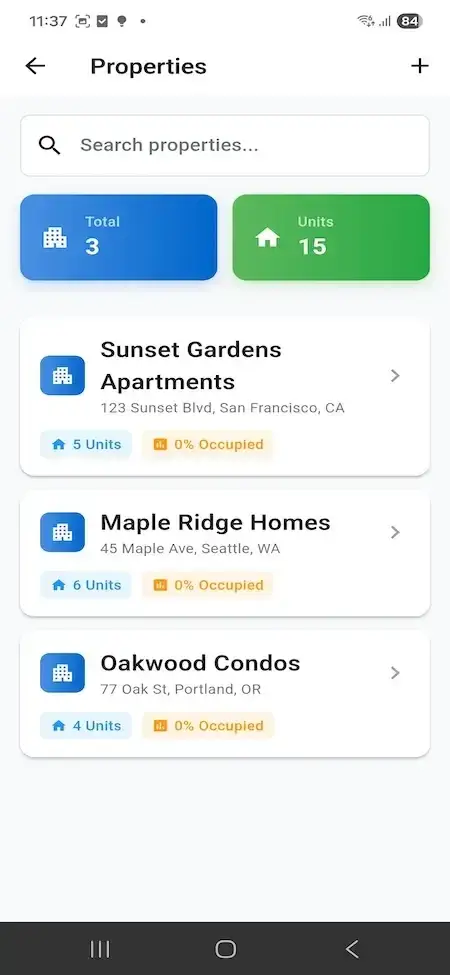
Buildium Clone property list screen with apartment buildings, unit counts and occupancy.01
Pick it if: You also run the buildings you letBuildium Clone

Property management software for owners and managers who run buildings that are already let, showing each property with its unit count and occupancy.

Explore Solution
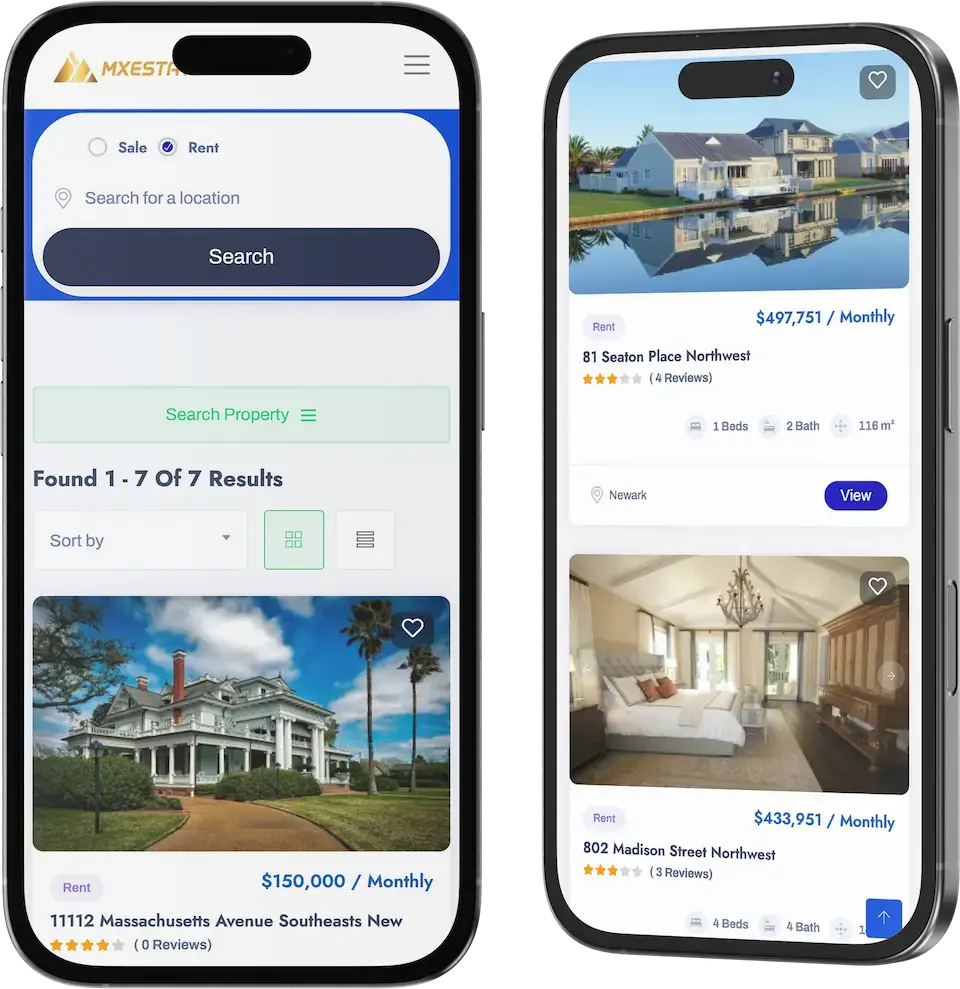
Zillow Clone property search app on two phones with rent and sale search and listing cards.02
Pick it if: You advertise homes for sale beside rentalsZillow Clone

Home search software that switches between renting and buying, with listing cards and an operator console behind them.

Explore Solution
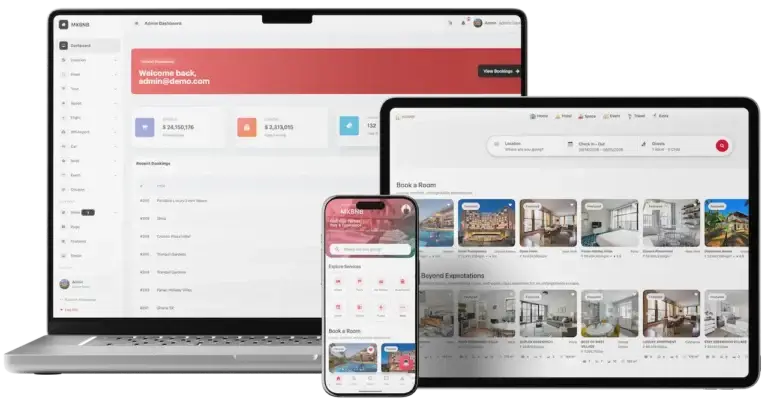
Airbnb Clone platform across guest, web and admin interfaces.03
Pick it if: Part of your stock lets by the nightAirbnb Clone

Hosts and guests meet in a stays marketplace that also gives hosts a console and the operator an admin area.

Explore Solution
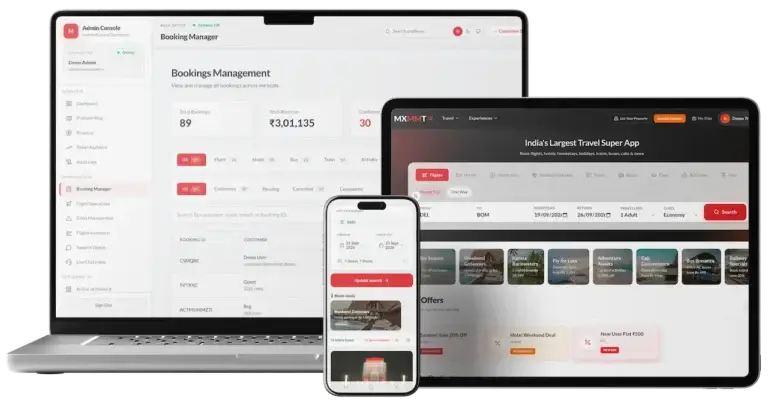
Travel Booking cross-platform solution with customer website, mobile app and admin.04
Pick it if: Trip bookings join your rentalsTravel Booking

Trip booking software comprising a customer site, a mobile app and an operator dashboard.

Explore Solution
CatalogAll 90+ solutions

09The business case

Market Benchmarks

Flexible & Furnished Rentals Market Benchmarks - Independent 2025-2026 Data

The revenue models above are ours. The figures below are not. They come from the US Census Bureau, Eurostat and the Equity Residential and Airbnb annual reports on Form 10-K, reproduced as published. Together they show how much of the market rents, how full rental buildings are, and what an apartment operator and a booking platform earn, so you can test your own rental business case against numbers you can check.

US Census Bureau01

7.3% US Rental Vacancy Rate in Q2 2026

The US Census Bureau reports that national vacancy rates in the second quarter of 2026 were 7.3 percent for rental housing and 1.2 percent for homeowner housing. The rental rate compares with 7.0 percent in the second quarter of 2025, and the homeownership rate was 65.0 percent. Vacancy is the first limit on how much any rental operator can earn.

Eurostat02

31.6% of People in the EU Live in Rented Homes

Eurostat reports that in 2024, 68.4 percent of people in the EU lived in owner-occupied dwellings, while 31.6 percent resided in rented accommodation. Of those, 21.1 percent paid market rent and 10.5 percent lived at a reduced price or rent-free, so about one in five EU residents is a market-rate tenant.

Equity Residential 10-K03

$3,203 Average Rental Rate, 96.4% Occupancy

Equity Residential's annual report on Form 10-K for 2025 shows same-store results across 73,465 apartment units, with an Average Rental Rate of $3,203, Physical Occupancy of 96.4 percent and turnover of 40.2 percent. Average rental rate rose 2.5 percent. The filing notes its apartment leases are generally for twelve months or less.

Airbnb 10-K04

$91.3bn in Airbnb Gross Booking Value in 2025

Airbnb's annual report on Form 10-K reports 2025 Gross Booking Value of $91,273 million, up 12 percent, on 533 million Nights and Seats Booked, up 8 percent. Revenue was $12,241 million, up 10 percent. Dividing revenue by Gross Booking Value gives about 13.4 percent.

Where each figure comes from.

US Census Bureau, Quarterly Residential Vacancies and Homeownership, Second Quarter 2026, 28 July 2026 - census.gov

Eurostat, Living conditions in Europe - housing, Statistics Explained, data extracted November 2025 - ec.europa.eu

Equity Residential, Annual Report on Form 10-K for the year ended 31 December 2025, filed 13 February 2026 - sec.gov

Airbnb, Inc., Annual Report on Form 10-K for the year ended 31 December 2025, filed 12 February 2026 - sec.gov

All figures are the publishers’ own, reproduced as published from a statistics office, a regulator’s statistical series and two annual filings. The Airbnb ratio of about 13.4 percent is our arithmetic on two reported figures, and metric definitions are as each publisher states them. They describe the markets and companies named, not any platform Miracuves builds, and nothing here is a revenue projection for your business.

The Commercial Case

Marketability, Revenue Potential & Business Prospects

A portfolio platform earns once owners trust it enough to list and renters trust it enough to reserve; the notes below remove friction on both sides and keep each relationship on your platform. Reservation commission and a renter service fee usually lead, with rent roll billing and recovered payment costs added later as pricing choices you control.

  1. 01

    Commission on Each Reservation

    The operator keeps a slice of every paid reservation, so income climbs with units and occupancy and not with the size of the team.

  2. 02

    Several Lines, One Console

    Commission, renter fees, owner plans and featured placement can be switched on as separate levers, each scoped with you, with no redesign of the remainder.

  3. 03

    Owners and Renters in Your Database

    Accounts, reviews and reservation history sit in a database you control, so the value accumulates with you and not with a listing portal.

  4. 04

    Freedom to Move

    The source code belongs to you outright, so changing host, team or direction never waits on anyone's approval.

Main Revenue Levers
  • Reservation Commission
  • Renter Service Fee
  • Rent on Units You Hold
  • Payment Processing Fees
  • Owner & Vendor Plans
  • Group & Employer Housing Deals
Long-Term Value

A rental platform is protected by its supply and the trust around it, more than by any single feature.

  1. 01Owners with their own terms rarely leave
  2. 02Tenants with a history have reason to return
  3. 03The build-up begins at launch, in your database
  4. 04Careful listing and review handling is the second line of defense
Example Revenue Scenarios

The three cases differ only in how many units are listed, and each names the lever that leads at that size. Treat them as prompts for planning, never as predictions of what any platform will earn.

Single Building40Units Listed

Early income comes from reservation commission.

A pilot inside one building, where a few owners publish units and the commission on each paid reservation pays for running the platform. An illustrative size and not a forecast.

Regional Portfolio400Units Listed

Commission joined by renter fees and owner plans.

A regional network in which many owners chase the same renters, so fees and plans start to count next to commission. An illustrative size and not a forecast.

National Operator4,000Units Listed

Many markets, with renter fees and placement switched on.

An operator spread over many markets, where renter fees, plans and featured placement build up beside commission and the reports point to where effort should go. An illustrative size and not a forecast.

10Why Miracuves

Why Miracuves

How Miracuves Stacks Up Against Other Greystar Clone Developers

Options range from an off-the-shelf booking script, through a freelancer or an agency, to a finished product such as the Greystar clone from Miracuves. Ask each vendor whether an owner can run dozens of units without phoning your office, whether the renter's balance matches the operator's figures, and who reviews a listing before renters see it.

Why Operators Choose Miracuves

  • 01

    Owner and Renter Sides Included

    Owners get an app and a vendor panel with listing tools, and renters get a dashboard plus a due payment screen. Off-the-shelf scripts tend to stop where the listing page ends.

  • 02

    Dues Visible From Reservation One

    Each order shows its billed total, discount, paid sum and open balance, so the financial picture is clear from the very first booking.

  • 03

    Four Surfaces, One Codebase

    The renter app, the owner app, the web panels and the admin console come as connected parts instead of four projects you must stitch together.

  • 04

    Full Source Code Ownership

    The code is delivered readable and belongs to you, so no vendor can reprice it or rewrite the terms afterward.

  • 05

    Features You Can Verify

    Every claim here traces to what the demos, the feature lists or the release log show, and optional extras carry an add-on label.

  • 06

    Plain Readiness Language

    We say what the base contains, which items cost extra and what you bring yourself, namely the gateway account, the hosting and the store developer accounts.

Development Company

Choosing a Greystar Clone Development Company

A large portfolio needs proof that owner logins, balances and listing review hold up at volume.

What to look for Miracuves

  • Owner self-service Many units under one owner or vendor login, sorted by status
  • Balances that reconcile Every renter order ties back to dashboard totals and the owner payout record
  • Listing review Admins approve each listing before renters see it
  • Code you hold The whole code base, readable and unencrypted
  • Go-live date Six working days to a branded launch on your hosting
  • After launch Updates for 12 months, bug fixes for 6 months, guidance for 60 days

Walk away from any vendor who

  • Charges monthly for every unit you add
  • Makes owners phone in to change a price
  • Cannot match renter balances to console figures
  • Lets listings go live with no admin review
  • Keeps the code on its own servers

Greystar Clone Beside Booking Scripts and Agencies, Row by Row

CriteriaMiracuvesMiracuves Greystar CloneOff-the-Shelf ScriptAgency Build
Launch Speed6 working days of build workHinges on the scriptQuoted per project, often months
Code OwnershipComplete and unencryptedOften restricted or lockedUsually yes
Rental DepthSearch, reservations, dues, chat and noticesBare listing pagesWhatever the budget stretches to
Owner ToolsOwner app and vendor panelSeldom includedBuilt to order
Payments & DuesGateway APIs plus a due payment screenDepends on the scriptIntegrated to order
Operator ToolingProperties, users, transactions, analyticsThin or missingBuilt to order at extra cost
Security & ComplianceSeparate logins and plain limitsMinimalVaries widely
Price, Pace, PolishFixed price, fast, tested baseLow price, high riskExpensive and slow
Ongoing Support & Updates60 days guidance, 6 months bug fixes, 12 months updatesRarely offeredWhatever the contract says

Very few paths to a rental platform come through a first busy season intact, and that is where they split.

Talk to Our Team

Changelog

Version History of the Rental Management Platform: Every Release So Far

The product's release notes, newest first. No dates are attached to the entries, so version numbers are the only timeline available.

VersionChanges
V1.4Cleared out code the project no longer used, which improves performance.
Closed out issues raised through support tickets.
V1.3Fixed a fault on the renter profile settings page.
Reworked the notification feed cards so they read more easily.
V1.2Redrew the brand card for a cleaner finish.
V1.1Brought every package up to its newest release.
Tuned account management for speed.
Corrected the category listing faults.

Let's build together

Let's turn your portfolio plan into a working platform.

Book a free consultation and walk away with a clear timeline and honest answers. Winning your trust ranks above closing a deal fast.

  • Answers within 2 hours
  • Consultation at no cost
  • No lock-in contracts
  • You own the full source

11Learn more

Blog & Resources

What to Read About Building an App Like Greystar and Its Market

Reading on the script itself, the business model behind large rental operators and how a managed portfolio stacks up against a listing portal.

The product5 questions

01What exactly is a Greystar clone?

The market uses that name for a ready-made, white-label rental platform meant for operators who look after many homes. Miracuves delivers it as four linked surfaces, namely a renter app, an owner app, a website that includes a vendor panel, plus an admin console, so a portfolio business can accept reservations without commissioning the software from zero.

02In what ways can the solution be customized?

Branding, colors, layout, property fields, the reservation and payment flow and the services you plug in can all change. Applying your logo, icons and colors is part of delivery. Whatever lies beyond the base gets a written scope and price before work starts, and because the source is unencrypted your own developers can push it further.

03Is the app mobile-friendly and available on both iOS and Android?

Yes. The renter app and the owner app are both Flutter builds, so each runs on Android and on iOS. Miracuves publishes them under your own developer accounts, and Apple and Google review them on their own timetable, which sits outside our 6-day build.

04Is it legal to launch a rental platform modeled on Greystar?

Miracuves writes the code, design and content itself, and none of it comes from Greystar, which is the reason this page has a disclaimer. Whether you can list homes, rent them out or hold deposits turns on housing, licensing and consumer rules in the places you operate, and that compliance is yours to handle. Miracuves offers no legal advice.

05How secure is the app for tenants' data?

Renters, owners, vendors and admins sign in separately, payments run through a gateway you connect, and the admin side accepts registrations and confirms identities. Pen-testing, new keys and a rehearsed restore are launch steps we schedule together, and your hosting arrangement settles much of the remainder.

Renters & reservations5 questions

06Can tenants manage their accounts and view payment history?

Yes. A renter keeps a profile of personal details, reads a purchase history that gives the billed total, discount, paid sum and open balance for every order, and opens the Due Payment screen for anything still unsettled. Paperwork lives in the My Documents tile of the web dashboard.

07How do renters find and reserve a unit?

They narrow the catalog by area, property type, rent level and amenities, open a unit page with its photos and facts, check availability, choose dates and press Book Property. The connected gateway takes the payment, and confirmation comes by email or as an app notice.

08Can a renter ask to stay longer?

The request goes to the owner through in-app chat or the reservation feature. Approval depends on availability and on the policies you set as platform owner, and the demo contains no automatic renewal.

09Can landlords screen tenants through the app?

Not as a built-in module. The demo displays approvals and identity checks on the admin side, yet it has no credit check, background check or screening workflow. A portfolio that needs screening can connect a provider it chooses, handled as custom work that is scoped and quoted in writing.

10What happens when a renter hits a problem?

The product offers chat inside the app, a help area in the admin console for questions and complaints, and ticket fixes that show up in the release log. How quickly your team replies is your own service level.

Owners & vendors3 questions

11Can property managers list multiple properties on the platform?

Yes. An owner or vendor account carries many units, each with photos, a description, terms, availability and a price, and the list can be narrowed by status: available, booked or under maintenance. The vendor panel offers the same control on a desktop.

12How can property managers track rent payments and expenses?

The owner side opens on a dashboard that tracks transactions, payouts and incoming reservations, and the renter side lists settled and open sums, which makes late rent easy to notice. Reports can be generated for accounting. No dedicated expense screen appears in the demo, and adding one would be scoped as custom work.

13Who works inside the vendor panel?

Owners, landlords and the staff who list units for them. They log in on the web, start from the Actions grid with My Properties, Applications, My Rented, My Tenants, My Requests and My Documents, and manage listings from a desktop. Vendor panel access is opened for you on request.

Admin, money & payments7 questions

14What level of control does the admin panel provide?

The operator manages users, landlords, property listings, reservations, payments and site content. You can accept registrations, confirm identities, suspend or ban accounts, resolve disputes, edit static pages, articles, FAQ entries and banners, and read analytics on engagement, popular units and revenue.

15Can I manage roles and permissions for different users?

The demo keeps four kinds of login apart, renter, owner, vendor and admin, and the admin side decides who may register. Finer permission levels, such as several staff roles with different rights inside the console, are not shown and would be scoped as custom work.

16Does the admin panel include reporting and analytics tools?

Yes. The console reports on platform performance, user engagement, unit popularity and revenue, and it tracks payments, commissions and payouts. More reports can be scoped separately.

17How are payments, commissions and payouts handled?

Renters pay through a payment gateway attached to your own merchant account. The console records incoming payments, the commission the platform keeps and the payouts owed to property owners, and each owner sees their own transactions and payouts on a personal dashboard. When payouts happen follows the agreements you reach with owners.

18Is it possible to integrate third-party services?

The stack already names Google Maps, Twilio, Firebase, payment gateway APIs and translation. More services, for example a screening provider, analytics or accounting software, can be added as scoped custom work.

19What is the realistic path to first revenue for a multifamily rental platform?

Most portfolio platforms begin with reservation commission, because nothing extra has to be sold: the first paid reservation earns it. A renter service fee and owner or vendor plans can follow once enough units and renters are on the platform, and each one is scoped with us. Contracts with employers who house staff, or handing the white-label product to a different operator under license, are deals you negotiate commercially and not product features.

20How defensible is a rental platform for larger portfolios?

A rental platform defends itself through supply and trust far more than through any one feature. Owners who list units under their own terms and prices seldom leave, and renters who hold a dashboard, a booking history and in-app messages have reasons to come back. That accumulation can start on launch day, and it sits in your own database. Careful handling of listings and reviews adds a second layer of defense, since a rival finds trust difficult to copy.

Launch & Miracuves9 questions

21How long does deployment take?

Miracuves applies your branding and deploys the ready-made Greystar Clone within 6 working days, counted from the point at which your branding, hosting and accounts are ready. App store review is separate and belongs to Apple and Google. Anything custom beyond the base receives a written scope and schedule.

22Do I get the source code?

Yes. You receive the complete source of the web platform and the Flutter apps, unencrypted, for your own engineers to build on.

23What is included in the purchase of the Greystar clone?

One fixed $4,299 pays for rebranding, deployment onto your hosting and publishing support through your developer accounts, plus the whole code base and all four surfaces: renter app, owner app, vendor-panel website and admin console. Support starts at launch and runs as three overlapping periods: 60 days of platform guidance, 6 months of priority bug fixes and 12 months of updates.

24Which items must I provide ahead of launch?

Hosting and a domain, verified Apple and Google developer accounts registered in your name, your branding and business details, a payment gateway that has completed KYC, and third-party keys for Maps, Twilio or Firebase. Applying for a gateway, drafting policies and managed hosting fall outside what Miracuves does.

25Do I need technical expertise to run the platform?

Running the platform day to day needs no coding, since the admin console is made for staff. The hosting and the domain are yours, so someone on your team needs to be comfortable maintaining the server.

26What makes Miracuves a good partner for a Greystar clone?

Miracuves has shipped 9,000+ projects for 6,000+ clients and keeps 90+ ready-made solutions on the shelf. In practice that means one price, the whole code base, a 6-day build and three support periods that run side by side, with every add-on and every item you supply named on this page.

27Is a ready-made Greystar clone better than custom development?

For a portfolio operator, it usually is. Unit listings, reservations, the Due Payment ledger per unit, owner and vendor panels, chat and an admin console that follows payments, commissions and payouts already work together. A custom build spends months reaching that baseline. Commission custom development only when your leasing process looks nothing like reserve and pay; leasing, renewals or screening on this base are scoped as custom work, quoted in writing, typically 2-8 weeks.

28What is the step-by-step process to launch my Greystar clone?

Try the renter app, owner app, vendor panel and admin console in the demo first. Gather hosting, a domain, store developer accounts registered to you, brand assets and a merchant account for your gateway. We rebrand every surface, deploy onto your hosting and help publish the apps through your accounts. That work fits in 6 working days; how long app review lasts is up to Apple and Google.

29Which businesses can run on a Greystar clone?

Any company that places renters into many homes can use it. Apartment-community operators list units across their buildings, landlord groups run a regional catalog, and property management firms publish homes for owners. Build-to-rent developers can run it too, and the platform carries your own name on every screen.

Disclaimer

Miracuves is an independent software development company. We are not affiliated with, connected to, sponsored by, or endorsed by Greystar.

Read our full Legal Notice & Disclaimer →
Why this name

“Greystar Clone” is used descriptively. It is how the software industry refers to building a platform with functionality similar to Greystar, and how clients search for it.

Who built this

The entire design and codebase is built by our own team. The product contains no code, design, graphics, or content originating from the Greystar website or applications.

Trademarks

Greystar and all other third-party names and marks are the property of their respective owners, referenced here solely to describe the category of software offered.