













v2026 - Production Ready

Habyt Clone App - White-Label Co-Living Room Rental Platform

Room Rental Clone Script with Area Filters, Tenant Chat and Vendor Posting App

Off-the-shelf software for anyone who lets out rooms. A resident filters by area, price and amenities, opens a room listing, books it, and afterwards sees which amounts are settled and which remain open on a single home screen. Operators, and the vendors posting for them, add rooms through their own app and web panel, while in-app chat keeps questions out of the inbox.

You get one codebase containing the resident app, the operator app, the admin console, a vendor-panel website and the entire source, all of it white-label.

Launch in 6 Days with

  • 60 Days Platform Guidance
  • Complete Source Code
  • Complete Rebranding
  • Complete White-Labeling
  • App Publishing Support
  • 6 Months Bug Fixes + 12 Months Updates
MXProp console · HousesLive
Bookings today9
Rooms awaiting approval5
Rooms live148

House activity

  • Booking request receivedBookings
  • Payment logged against a roomPayments
  • New room waiting for reviewListings
  • Reminder sent about a balanceDues
  • Room cleared for the siteListings
  • Host payout settledPayouts
  • Offer attached to a roomOffers
  • Resident question answeredChat
  • Booking request receivedBookings
  • Payment logged against a roomPayments
  • New room waiting for reviewListings
  • Reminder sent about a balanceDues
  • Room cleared for the siteListings
  • Host payout settledPayouts
  • Offer attached to a roomOffers
  • Resident question answeredChat
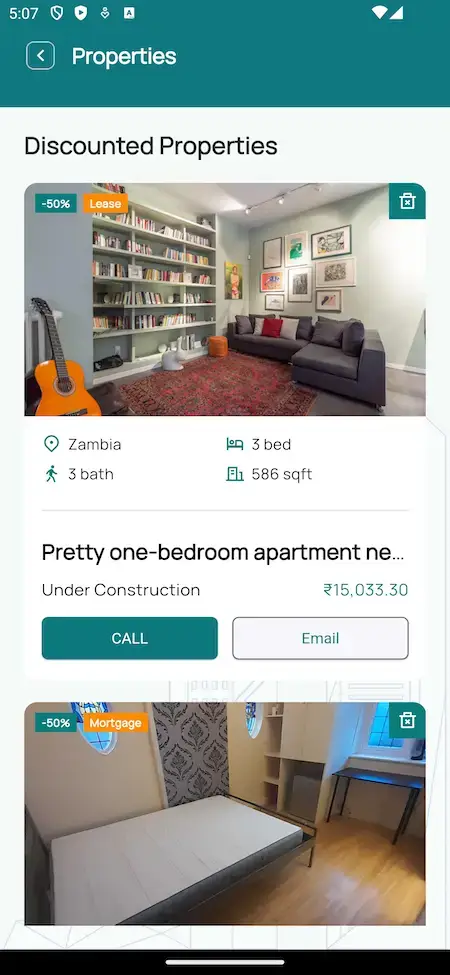
Habyt Clone discounted properties list with a discount badge, a lease tag, location, beds, baths, area, price and Call and Email buttons.
Dues and chathandled in one place

Platform at a Glance

6
Days to Go Live

build time on our side, before store review

4
Linked Surfaces

two apps, a vendor site and an admin console

5
App Languages

a five-language chooser in the demo

100%
Source Code

every line, unencrypted

Rooms Listed One by One

Sample listings in the demo are titled as rooms. Each has its own photos, price and details, and gets a Property approved line when it clears review.

Dues You Can Read

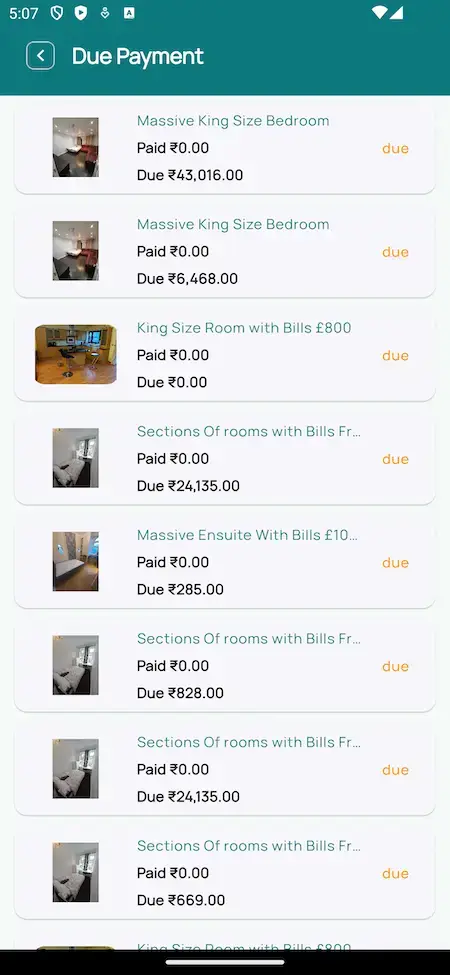
An order keeps its total, discount, paid sum and balance, and the Due Payment list gathers every room that still has something owing.

Starting a co-living brand and weighing the software?Talk to Product Expert

Chosen by 6,000+ clients across the globe

Miracuves is listed by Expertise.com as a managed IT service provider.Miracuves is an official member of the Forbes Business Council.Miracuves is a verified agency on DesignRush, listed among top design agencies in India.Miracuves is reviewed on Trustpilot as a software development company.Miracuves is listed by The Manifest among top managed software development companies.Miracuves is listed by DesignRush as a top software development company.Miracuves is recognized by GoodFirms as a top software development company.Miracuves is ranked among the top 1000 companies globally by Clutch.Miracuves is a top managed service provider in the United States on Clutch.

01See it live

Hands-On Demo

Habyt Clone Demo - Resident App, Operator App, Vendor Panel & Admin Console

Give the Miracuves Habyt Clone a hands-on test. One app portal provides two sample accounts: a resident and the operator, who is called builder in the demo. The vendor panel is on the website, and the admin console is available if you ask us for access on a call. Go through the dashboard tiles, open a room listing, scroll down the Due Payment list and see how notices arrive.
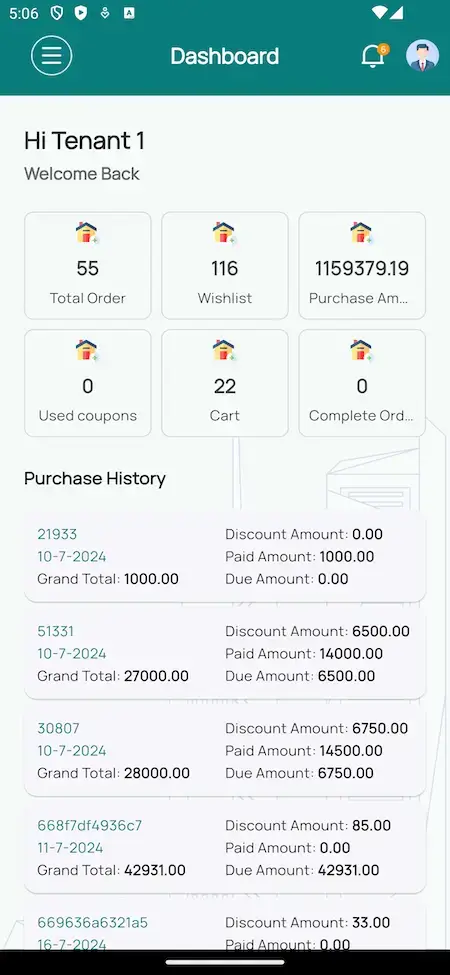
Habyt Clone renter dashboard with total orders, wishlist, purchase amount, coupons, cart and a purchase history showing discount, paid and due amounts.Habyt Clone discounted properties list with a discount badge, a lease tag, location, beds, baths, area, price and Call and Email buttons.
Demo build
RESIDENT APP

Habyt Clone - Resident App

What a resident carries in a pocket: tiles for orders and amounts, a list of rooms with discount badges, a listing page that ends with a Book Property button, a Due Payment list, a chat conversation and a notification feed.

  1. 1Select Android or iOS in the portal
  2. 2Enter the resident details printed below
  3. 3Browse Dashboard, Properties, Due Payment and Chat
Login:user@demo.com | User_321
Habyt Clone listing page with a photo gallery, Rent and Land tags, beds, baths, area, location, an Email button and a Book Property button.Habyt Clone Due Payment screen listing rooms such as a king size bedroom and an ensuite, each with the paid amount, the amount due and a due tag.
Demo build
OPERATOR APP

Operator App - Rooms, Photos & Prices

The side used by whoever runs the houses, shown as Builder in the demo. It posts rooms with descriptions, pictures and prices, and follows bookings and payments as they arrive.

  1. 1Go to the same portal
  2. 2Enter the builder details printed below
  3. 3Visit Listings and Payments
Login:builder@demo.com | Builder_321
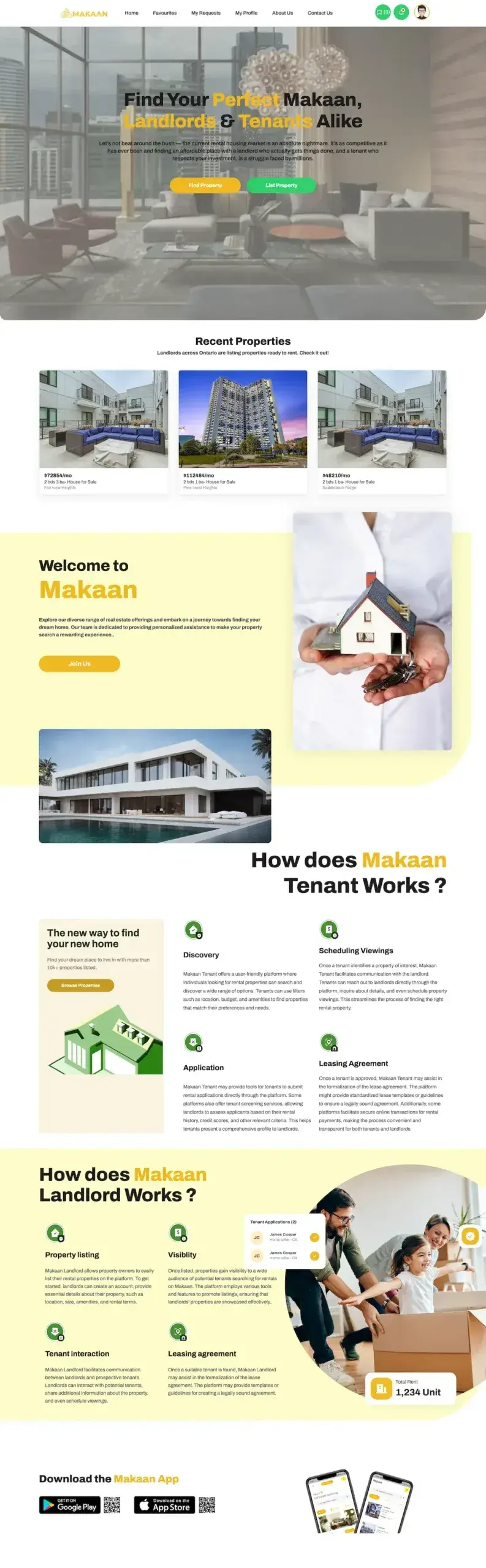
Landing site - on requestHabyt Clone web landing page with property search, recent properties, how it works for tenants and landlords, and app download links.
Demo build
WEB WORKSPACE

Web Workspace - Vendor Panel & Public Site

A desktop workspace for operators and for the staff who post rooms on their behalf, beginning with an Actions grid, plus the public site and its property search.

  1. 1Request browser access during a call
  2. 2You are signed in to the vendor panel
  3. 3Browse Search, one listing and My Properties
Web access:shown on request
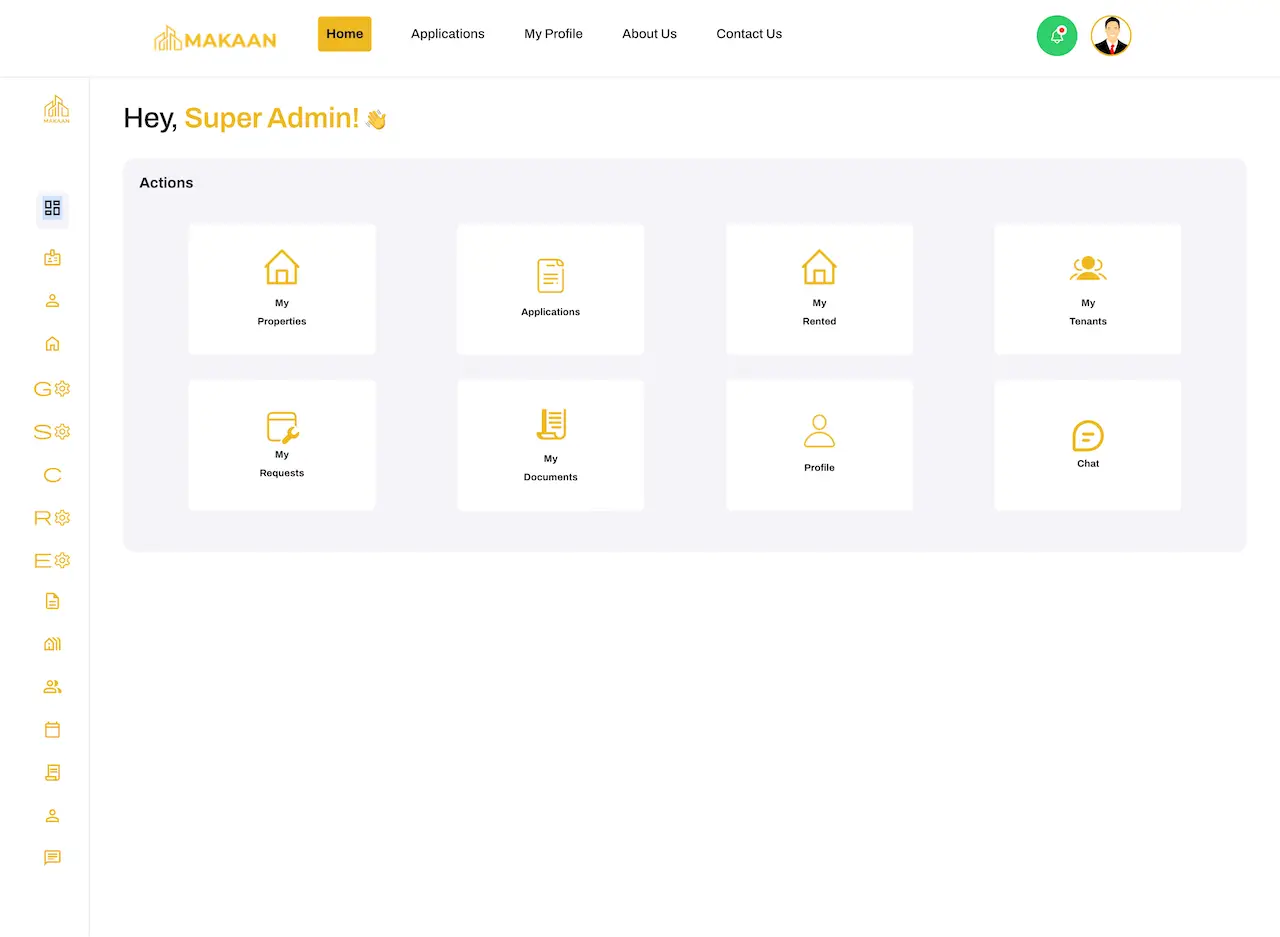
Web dashboard - on requestHabyt Clone web dashboard with an Actions grid: My Properties, Applications, My Rented, My Tenants, My Requests, My Documents, Profile and Chat.
Demo build
ADMIN CONSOLE

Admin Console - Rooms, People, Money & Content

The control room for the whole business: properties, users, money in and money out, site content and analytics, along with a support desk for resident issues.

  1. 1Request an admin session during a call
  2. 2We tour the console with you
  3. 3Go into Properties, Users, Transactions and Reports
Admin access:given during a call
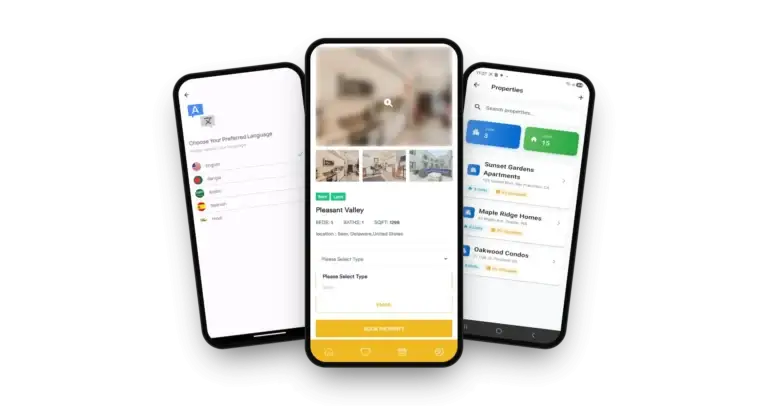
Habyt Clone on three phones: the property detail with photo gallery and booking button, the language picker and the property manager's property list

Walk Through It Together

Habyt Clone Walkthrough: Rooms, Dues, Resident Chat & Admin Console

A recorded clip cannot answer your questions, so we share a screen instead. In about thirty minutes we click through everything on this page, from the resident phone app to the back-office console, and check each part against your own plan: how many rooms you will list, who posts them, how residents pay and when you hope to open.

Book your screen share.

Screens in Order

Habyt Clone App Flows - Resident App, Web Dashboard & Landing Page

Genuine screens, lined up in the order a stay moves through the product: the resident dashboard first and the notification feed last, followed by the web dashboard the operations team uses and the public landing page.
Habyt Clone renter dashboard with total orders, wishlist, purchase amount, coupons, cart and a purchase history showing discount, paid and due amounts.
Habyt Clone discounted properties list with a discount badge, a lease tag, location, beds, baths, area, price and Call and Email buttons.
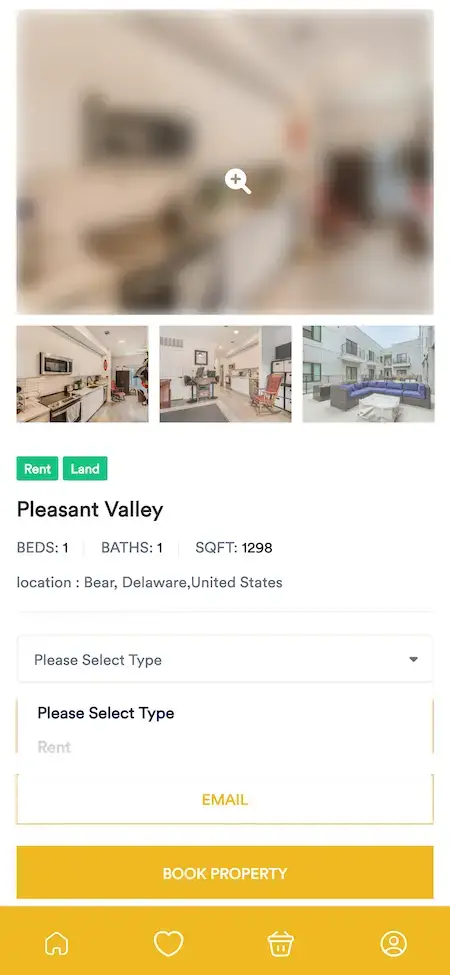
Habyt Clone listing page with a photo gallery, Rent and Land tags, beds, baths, area, location, an Email button and a Book Property button.
Habyt Clone Due Payment screen listing rooms such as a king size bedroom and an ensuite, each with the paid amount, the amount due and a due tag.
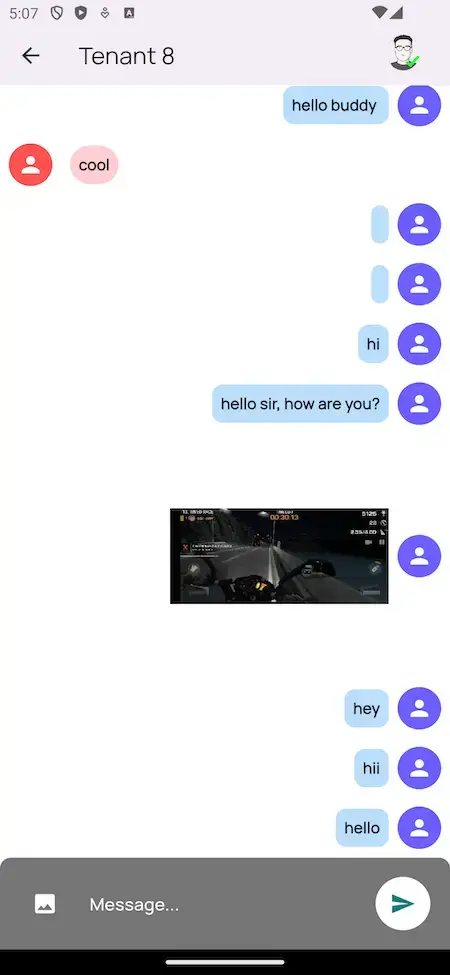
Habyt Clone in-app chat with a tenant: short messages, a shared photo and a message box with a send button.
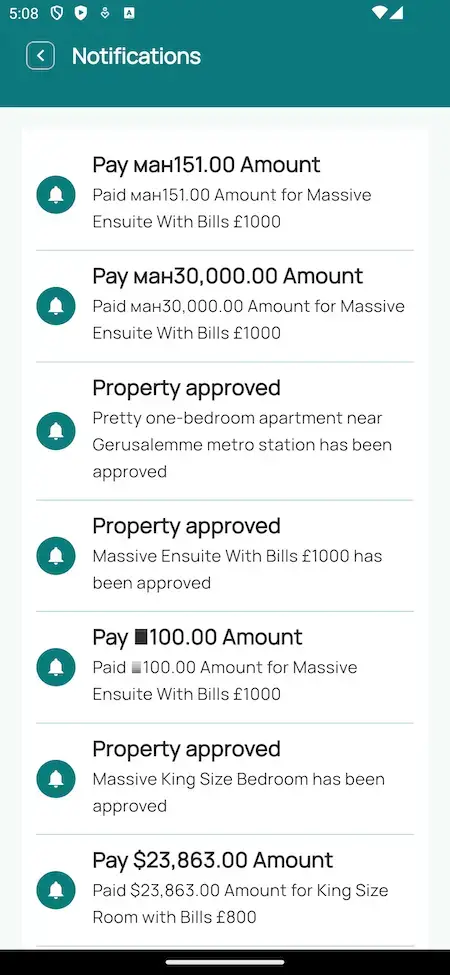
Habyt Clone notification feed with payment amounts and Property approved notices for named rooms.
6 screens · scroll →
Habyt Clone web dashboard with an Actions grid: My Properties, Applications, My Rented, My Tenants, My Requests, My Documents, Profile and Chat.
1 screen
Habyt Clone web landing page with property search, recent properties, how it works for tenants and landlords, and app download links.
1 screen

Pick one resident and trace the path: dashboard, room list, a single listing, the Due Payment list, a chat conversation, a notice. Then open the web dashboard to see how the operations team sees the same booking.

Browse All Products

02Proof

Founders Speak

Habyt Clone Client Reviews - Founders on Their Own Launches

Founders say, in their own words, what it was like to start from a Miracuves base. Two run short-stay and property businesses, while the rest built healthcare, car rental, courier, charter and logistics products. Every quote appears exactly as its author wrote it.

BBNBinGreece TeamFounding team, BNBinGreece
“Listings, calendar, booking flow and payments came off the shelf. We added the property types and the seasonal pricing rules that matter here, plus a multilingual guest experience. Online bookings replaced the inbox inside a month.”
RRenido TeamFounding team, Renido
“Listings, search, media handling and enquiries were all ready. Our work was the local property types, the map behaviour and how agents actually get leads. Live inside a month.”
AAndre GittensCEO, Ride Corporation
“Turo is the obvious reference, but the Caribbean specifics, from different insurance norms to different payment rails, meant we needed a real partner, not just a clone. Miracuves’s MXCar base covered the listing, the trip flow, and the host payouts. We launched in 6 working days and are live in three islands.”
TTiffany DandreaOperations Director, Best Cabo Yacht Rentals
“We were running it on phone calls and a paper calendar, and we were losing bookings to bigger OTAs. Miracuves’s GetmyBoat Clone base gave us the calendar, the booking flow, and the payment engine. Online bookings are up roughly 70% in the first six months, and the ops team finally has a live view of the fleet.”
MMarsha WilliamsFounder, Bmore On Demands LLC
“The team was running it on a dispatcher and a Google Sheet, and we needed a real platform quickly, because we were about to onboard a major retail client. Miracuves’s Delivery Genie base gave us the rider app, the dispatch console, and live tracking. We launched in 6 weeks and cleared 4x the previous order volume in the first month.”
DDr. Vivek RungtaFounder & Chief Dermatologist, Dermacian
“Every HMS I tried was built for general physicians, with no lesion mapping, no before/after tracking, and no procedure-based billing. Their MXHealth base gave us the patient app, doctor app, EMR and video consult out of the box. Front-desk time on scheduling and follow-ups is down ~70%, and we went fully digital in 9 months, where a fully custom job would have been 18.”
DDr. Carlos A. PalermoCo-founder & CEO, Doctta Health
“Building a compliant telehealth stack from scratch in three markets would have been a year-plus effort. Miracuves’s MXHealth base covered the patient and doctor apps, video consult, e-prescription and the pharmacy integrations. We launched in our first market in 9 weeks and rolled out to two more in the following six months.”
BBrian LatailleVP Logistics Technology, IBC Tanks Canada
“We were juggling spreadsheets, a third-party GPS provider, and a phone. We needed a single operations console. Miracuves’s MXLogistics base covered the trip lifecycle, the driver app, and the customer tracking page. We’ve cut operations admin time by about 40%.”
Read More Client TestimonialsClients in their own voice

Where We Stand

Habyt Clone Case Study - Why None Is Named Yet and How to Check the Product Yourself

We have no named launch of this exact product to point at, so we report no results. What we can offer is the product itself, open to your own testing, rather than numbers borrowed from some other build.

Not Published Yet
No Co-Living Launch Is Named Yet

The Miracuves portfolio holds no entry for a co-living build on this base. Without a client name, logo or figure, the evidence we can show is a working demo and a log listing every release.

Resident and operator appsLive demo
Co-living housesModel
Unnamed so farStatus
2Demo logins
4Versions logged
0Results invented
Habyt Clone web dashboard with an Actions grid: My Properties, Applications, My Rented, My Tenants, My Requests, My Documents, Profile and Chat.
Test it yourself
  • Log in as a resident and read the dashboard tiles
  • Walk the room list and open one listing
  • Set the Due Payment list beside the notices
  • Log in as the builder and look at the listing tools
  • Have us open the web, vendor and admin panels live
The missing name
  • A genuine case study rests on a real client launch
  • Another product's outcome tells you nothing about a co-living platform
  • No client name, logo or number is ever made up
  • If a client agrees to carry its name, this card turns into a real case study
Lines we hold
  • Quotes and figures only come with a client behind them
  • A demo screen is never dressed up as a client result
  • No promises about occupancy, bookings or revenue
  • We say openly that the demo logins are shared

03The product

In Short

How the Habyt Clone Serves a Co-Living Business

Think of a Habyt Clone as off-the-shelf software for letting rooms. Hosts post rooms one by one, residents search, book and pay from a phone, and the operator keeps an eye on properties, users and payments from one admin console.

Habyt Clone on three phones: the property detail with photo gallery and booking button, the language picker and the property manager's property list

Rooms as Listings

Listings in the demo carry room names, so a room can have its own photos, price, approval notice and due amount instead of sitting inside a single flat listing.

Open Source Code

Nothing in the package is encrypted. Your engineers can change a screen or a rule whenever the number of houses grows or the model moves.

Straight About Limits

Group channels, events, roommate matching and lease paperwork do not appear in the demo. A house that wants them gets a scoped quote. The four optional modules are priced one by one.

On the Web and Both Phones

How the Habyt Clone Script Works

Running a shared house comes down to small recurring questions: who paid for which room, who still owes, who needs an answer and what changed today. The product answers them out of the box. Strictly, the demo is general property-rental software, and it reads as co-living because of what gets listed: its screens show listings named as rooms, each with an amount paid and an amount due.

Habyt Clone web dashboard with an Actions grid: My Properties, Applications, My Rented, My Tenants, My Requests, My Documents, Profile and Chat.
  1. 01Search by area, price and amenities
  2. 02Room listings with photos and details
  3. 03Booking with paid and due amounts
  4. 04Chat and notices inside the app
  5. 05Back office for people, payments and content

Four surfaces work together: the resident app, the operator app, the website that holds the vendor panel, and the admin console. Flutter powers both apps, and all of the source code is yours.

What You Get

Habyt Clone Features - Room Listings, Booking, Due Payments, Resident Chat, Vendor Tools & Admin

You can check each line here against the demo screens, the product feature lists and the release log. Optional modules show up later as add-ons, and what the demo leaves out is marked as custom work.

Feature 01 / 12

Find a Room Fast

Residents narrow the list by area, price and amenities, and on a phone the app can read the current location to surface rooms nearby.

  • Area, price band and amenity filters
  • Results around the phone's GPS position
  • Map links for nearby amenities and routes
  • Cards flagged with discount and lease badges
  • Bed, bath and floor area on each card
  • Quick Call and Email links per listing
Feature 02 / 12

One Listing per Room

A room is posted as a listing in its own right, with a gallery, a name, type tags, bed and bath counts, floor area, location and price. Sample listings in the demo are named for the room, such as a king size bedroom or an ensuite.

  • Gallery with a strip of thumbnails
  • Listing title chosen by whoever posts the room
  • Rent and Land tags in the demo build
  • Number of beds and baths plus floor area
  • Address printed on the listing page
  • Under Construction label on cards
  • A discount badge on rooms that are on offer
Feature 03 / 12

Book a Room

From the listing page a resident chooses a type, picks dates from an availability calendar and presses Book Property.

  • Book Property button closing each listing page
  • Type picker sitting beside it
  • Availability calendar for choosing dates
  • Payment taken securely during booking
  • Email button for a question before booking
  • Notification once the booking is confirmed
Feature 04 / 12

Resident Home Screen

The first screen says hello by name and gives counts for orders, wishlist, spend, coupons, cart and finished orders, with the order history beneath.

  • A tile counting orders
  • Tiles for wishlist items and total spend
  • Tiles for coupons used, the cart and finished orders
  • Order history showing each id and date
  • Each order lists its total, discount, amount paid and balance due
  • A menu leading to profile, history and properties
  • Personal details the resident can edit
Feature 05 / 12

Tracking Dues Room by Room

The Due Payment list names every room and shows what has been paid, what is still due and a due tag on open lines. The home screen history carries the same figures order by order.

  • Due Payment entry in the resident menu
  • Room title, amount paid and balance on each row
  • Due tag beside rows that remain open
  • Order total, discount, paid sum and balance for every order
  • Amounts announced in the notification feed
  • Reminders for payments sent as pushes
  • Payment completed through the connected gateway
Feature 06 / 12

Price Cuts, Favorites & Cart

Rooms can carry a discount badge, residents bookmark favorites and keep picks in a cart, and the home screen counts coupons that were used.

  • Discount badge on the result cards
  • Wishlist heart on the bottom bar
  • Cart counter and basket icon
  • A running count of coupons used
  • Coupon savings noted at checkout
Feature 07 / 12

Resident Chat

Chat lives in the app menu. The demo shows a conversation between two tenant accounts with text and a shared photo, and the feature list adds messages to owners or agents.

  • Chat link in the resident menu
  • Conversation between tenant accounts in the demo
  • Photos sent inside the conversation
  • A text field with a send arrow
  • Messages to owners or agents, as the feature list describes
  • Chat tile on the web dashboard too
Feature 08 / 12

Notices & Notifications

The feed reports payment amounts and a Property approved line naming the room, while push messages cover listings that match preferences, confirmations and payment reminders.

  • Notification feed screen
  • Property approved line naming a room
  • Payment amounts reported as they are logged
  • Pushes when a new listing matches preferences
  • Confirmation and reminder pushes on payments
  • Bell with a dot in the web top bar
Feature 09 / 12

Resident Reviews

Residents and visitors can score a place and leave comments, which gives the next resident something to read before choosing.

  • A score and a comment for each property
  • Written by renters and visitors alike
  • Visible to residents who come later
Feature 10 / 12

Operator App & Vendor Panel

Operators, and the vendors who post on their behalf, use the Builder app on a phone or the vendor panel in a browser to add rooms, change prices and watch bookings and payments come in.

  • Rooms posted with text, pictures and prices
  • Many properties managed from one login
  • A dashboard for rent payments and overdue accounts
  • Web panel that opens on an Actions grid
  • Tiles for My Properties, My Rented and My Tenants
  • Tiles for My Requests and My Documents
  • In the demo, the builder login is the operator login
Feature 11 / 12

Interface Language & Accounts

The demo carries a five-language chooser covering Arabic, Bangla, English, Hindi and Spanish, and each resident has a profile page for personal details.

  • Chooser reached from the app menu
  • Five choices available in the sample build
  • A profile page per resident
  • Logout closes the menu list
Feature 12 / 12

Back-Office Console

Behind the scenes, staff handle listings, accounts, money, site content and analytics, plus a desk for resident questions and complaints.

  • Create, edit and retire property listings
  • Clear registrations and check identities
  • Block or suspend accounts and rule on disputes
  • Follow payments, commissions and payouts
  • Edit pages, posts, FAQs and banners
  • Read engagement, listing popularity and revenue
  • Handle complaints and questions in a support area

Before you buy, here is what you provide: hosting and a domain, one developer account per app store registered to you, plus your logo and company details, a KYC-cleared payment gateway and any third-party API keys. We handle the branding and the deployment. Apple and Google review apps on their own timeline, outside the days our build takes.

Talk to Our Team

Run the Houses

Habyt Clone Admin Console - Manage Rooms, People, Money & Site Content

The operator's working day sits in one place: rooms that are live, people who signed up, payments received, sums owed to owners and the words on the public website.

Habyt Clone web dashboard with an Actions grid: My Properties, Applications, My Rented, My Tenants, My Requests, My Documents, Profile and Chat.
Habyt Clone web landing page with property search, recent properties, how it works for tenants and landlords, and app download links.

Sections of the Console

  • 01

    Properties

    Put new rooms into the catalog, correct details, and pull listings that have gone stale, so what residents see is what can really be booked.

  • 02

    Residents, Hosts & Vendors

    Clear new registrations, check identities, block or suspend accounts and rule on disagreements between people on the platform.

  • 03

    Transactions & Payouts

    Follow the money residents pay, the commission the platform takes and the sums still owed to property owners.

  • 04

    Content

    Edit the static pages, articles, FAQs and promo banners that give the public website its voice.

  • 05

    Analytics & Reports

    Platform performance, engagement, the most viewed listings and revenue, drawn together on one screen.

  • 06

    Customer Support

    A desk for questions, complaints and technical trouble. Fixes that came from support tickets are noted in the release log.

  • 07

    Inbound Requests

    Applications and My Requests are tiles on the web dashboard, and that is where incoming requests get worked through.

  • 08

    People & Paperwork

    Resident records live behind My Tenants, rented rooms behind My Rented and files behind My Documents.

Money Flow

The finance side of the console, from a resident's payment to an owner's payout.

  • Residents' payments coming in
  • Commission retained by the platform
  • Payouts owed to property owners
  • Balances outstanding, by room

Content & Reach

Settings that shape the public website and the way the platform behaves day to day.

  • Pages, articles and FAQ entries
  • Slots for promotional banners
  • The app's language chooser
  • A notification bell in the web header

Want more from the console? If you need more reports, another payout rhythm, further languages or an approval step of your own, each is scoped alone. Describe what your operations team needs and you get a quote in writing.

Talk to Our Team

04Package and price

The Full Package

Everything in the Habyt Clone Package - Source Code, Apps & Deployment

The package is a platform that already runs, not a heap of components. It includes both phone apps, the admin console, a public website and the vendor panel; each part ships with readable source for your team to extend.

01

Source & Project Codes

The web platform and both Flutter apps are delivered as readable, unencrypted code that your developers can extend.

  • Web platform source, unencrypted
  • The Flutter code behind both mobile apps
  • Free to edit and redeploy
  • Project codes included
02

Data & Integrations

The databases behind listings, bookings, users and payments, with the outside services the platform talks to.

  • MySQL and MongoDB as the stores
  • Google Maps for places and routes
  • Twilio and Firebase in the service list
  • Payment gateway and translation APIs
03

Chat & Notices

Residents talk with the people they deal with here, and notices carry approvals and payment amounts.

  • Chat with photo messages
  • Notices for approved properties
  • Notices when payments are logged
  • Push messages for bookings and dues
Habyt Clone web landing page with property search, recent properties, how it works for tenants and landlords, and app download links.
04

Public Site & Vendor Panel

A responsive site for the public that offers property search and a strip of the newest listings, plus the vendor panel operators use on a desktop.

  • Front page offering Find Property and List Property
  • A recent properties strip and how-it-works explainer
  • Vendor panel for posting rooms
  • Download links for both app stores
05

Resident & Operator Apps

Two Flutter apps, one per side, covering search, booking, dues, chat and notices.

  • Resident app: dashboard, properties and dues
  • Operator (Builder) app for posting rooms
  • A menu that leads to chat, language and profile
  • Both apps released from your developer accounts
Habyt Clone Due Payment screen listing rooms such as a king size bedroom and an ensuite, each with the paid amount, the amount due and a due tag.
Habyt Clone web dashboard with an Actions grid: My Properties, Applications, My Rented, My Tenants, My Requests, My Documents, Profile and Chat.
06

Admin Console

The back office covering listings, accounts, money, site content and analytics.

  • Control of properties and users
  • Oversight of transactions and payouts
  • Pages, articles, FAQs and banners
  • Analytics and reporting
07

Roles & Logins

Separate sign-ins for residents, operators, vendors and admins, each leading to its own screens.

  • A login for residents
  • A login for operators (Builder)
  • Logins for the vendor and admin panels
  • Registrations cleared from the admin side
08

Launch & Support Hand-Off

We brand the platform, deploy it and hand over the source, and three support periods then begin together.

  • Your logo, icons and colors in place
  • Deployment onto your own hosting
  • Release through your developer accounts
  • 60 days guidance, 6 months bug fixes, 12 months updates

Want a look before committing? Log in to the demo as a resident or as the builder, or ask for a guided tour. We take you through the home screen, a room listing, the Due Payment list and the admin console, comparing each with your plan.

Talk to Our Team

Transparent Pricing

How Much Does It Cost to Build a Co-Living Platform Like Habyt?

A fixed $4,299 pays for the white-label Habyt Clone, ready to launch. Work past that base, such as an add-on, a further integration or a custom flow, gets a scope and a quote in writing first.

Most Popular

Professional

Launch-Ready Plan
$4,299/-paid once
Launch in 6 days

Built for: Co-living startups, house-share operators, serviced-room brands

The platform arrives as the demo shows it, carrying your logo, icons and colors and running on hosting you own.

Get Started

Enterprise

Tailored Builds for Bigger Operations
Customquote
Go-live: based on final scope

Built for: Multi-city operators, student and corporate housing providers, property management firms

Does your model need a monthly billing schedule, group chat channels or lease paperwork, none of which the base includes? We build to your brief and fix scope and price before work starts.

Request a Quote

Keep Reading

Four Guides to Read Next on the Habyt Clone

Four Miracuves articles that look deeper at the script's contents, the business model, the income lines and how the app behaves.

05Who it is for

Know Your Buyer

Who Should Run the Habyt Clone App?

Any company that fills rooms with residents and wants listings, bookings, dues and conversations under its own name, not inside someone else’s marketplace.

Audience 01 / 06Co-Living Startups

Founders opening a new co-living brand who need room search, booking, dues and an operator side from the first week.

Audience 02 / 06House-Share Operators

Operators of shared houses who list one room at a time and want to see what each room has paid and still owes.

Audience 03 / 06Serviced-Room Brands

Brands renting furnished rooms who prefer an app and a website of their own to a listing on someone else's portal.

Audience 04 / 06Property Managers With Rooms to Fill

Management firms that post rooms for several owners, with each owner or vendor signing in separately.

Audience 05 / 06Landlords Leaving Spreadsheets

Owners who still take bookings by phone and track payments in a sheet, and want one tidy record of paid, due and owed.

Audience 06 / 06Agencies & Marketplace Teams

Teams after a proven rental vertical to hand to clients instead of coding one from nothing.

If your income depends on rooms staying occupied, a branded platform keeps the booking, the dues and the conversation on your side, and the code is yours.

Talk to Our Team

In Use

Habyt Clone at Work - Room Catalogs, Dues Desks, Resident Chat, Operator Workspaces & More

Different operators put weight on different parts of one product. A house-share operator starts with the room catalog, a finance team keeps an eye on the Due Payment list, and a community manager focuses on chat. How you configure it decides which part is stressed.

RoomsListingsRoom-by-Room Catalog

Publish every room as its own listing with photos, a price and details, so residents can compare rooms across a house in place of reading one long advert.

01
Habyt Clone discounted properties list with a discount badge, a lease tag, location, beds, baths, area, price and Call and Email buttons.
DuesPaymentsDues Desk

Give finance staff a single list of rooms with the amount paid and the amount due next to each, so it is obvious who has settled and who has not.

02
Habyt Clone Due Payment screen listing rooms such as a king size bedroom and an ensuite, each with the paid amount, the amount due and a due tag.
ChatCommunityResident Chat

Residents message one another and the people running the house inside the app, photos included. Group channels and house boards are absent from the demo and would be quoted as custom work.

03
Habyt Clone in-app chat with a tenant: short messages, a shared photo and a message box with a send button.
OperatorsVendorsOperator & Vendor Workspace

Hand operators, and the vendors who post for them, a phone app and a web panel, so rooms, prices and bookings are handled without emailing head office.

04
Habyt Clone web dashboard with an Actions grid: My Properties, Applications, My Rented, My Tenants, My Requests, My Documents, Profile and Chat.
ApprovalsNoticesApproval Before Publishing

Admins create, edit and remove listings, and the resident app shows a Property approved line naming the room once it clears.

05
Habyt Clone notification feed with payment amounts and Property approved notices for named rooms.
LanguagesReachMultilingual House Site

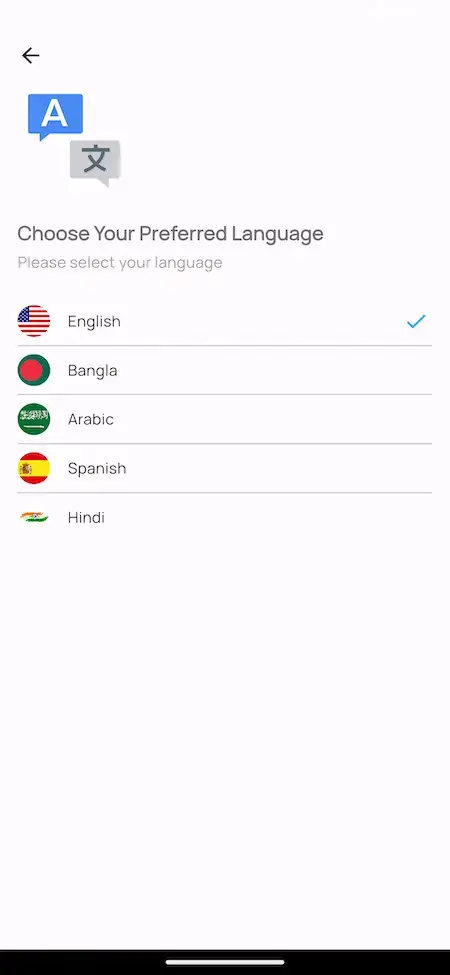
Reach residents in their own tongue with a chooser that covers Arabic, Bangla, English, Hindi and Spanish in the sample build, and a translation integration behind it.
06
Habyt Clone language chooser offering English, Bangla, Arabic, Spanish and Hindi.

One product, six uses. What differs from case to case is the rooms you list, who posts them, the commission you set and your branding. The software underneath stays the same: two apps, a website with a vendor panel and the console.

Talk to Our Team

Industries

Industries We Serve

Any business that places residents into rooms can use the Habyt Clone. Co-living brands list rooms house by house. Shared-house operators run a city-wide catalog. Serviced-room and furnished-room brands publish their own stock. Student and corporate housing providers place groups of people. Property managers post rooms for owners, estate agents add a rentals arm, and city marketplaces trade under their own names.

  1. 01Co-Living Brands
  2. 02Shared-House Operators
  3. 03Serviced Rooms
  4. 04Furnished Rentals
  5. 05Student Housing
  6. 06Corporate Housing
  7. 07Property Management
  8. 08Estate Agency Rentals
  9. 09City Marketplaces
  10. 10Hostel & Hospitality Groups
  11. 11Build-to-Rent Developers
  12. 12Relocation Services

A rental model built around rooms fits the Miracuves Habyt Clone, with operator tools, due payments and an admin console that carry your brand name on every screen.

06Under the hood

Resident Journey

The Habyt Clone, Step by Step - Register, Search, Open a Room, Book, Pay & Chat

A resident books a room in a handful of taps. Behind those taps sits a chain running from search and booking through payment to dues and chat. We describe the chain first and then the parts that carry it.

Resident Path - From Registration to a Room Booked, Paid and Followed Up

  1. Habyt Clone renter dashboard with total orders, wishlist, purchase amount, coupons, cart and a purchase history showing discount, paid and due amounts.
    1Sign Up

    A resident registers with an email and a password and arrives on a home screen full of tiles for orders, wishlist items and amounts.

    • Email and password registration
    • A greeting by name on the home screen
    • Order, wishlist and coupon counts
  2. Habyt Clone discounted properties list with a discount badge, a lease tag, location, beds, baths, area, price and Call and Email buttons.
    2Browse the Rooms

    The Properties screen lists rooms with discount and lease badges next to location, beds, baths, area and price.

    • Filter on location, price and amenities
    • Badges mark offers and lease type
    • Call and Email under each card
  3. Habyt Clone listing page with a photo gallery, Rent and Land tags, beds, baths, area, location, an Email button and a Book Property button.
    3Open a Room Listing

    A listing page pulls together the photos, tags, bed and bath counts and address, with the booking controls close by.

    • Photos along a thumbnail strip
    • Rent and Land tags
    • Booking controls on the same page
  4. Habyt Clone Due Payment screen listing rooms such as a king size bedroom and an ensuite, each with the paid amount, the amount due and a due tag.
    4Book & Pay

    Booking runs through the Book Property button, and after that the Due Payment list shows each room with its paid and unpaid sums.

    • Pick a type, then pay
    • A notification confirms it
    • Sums paid and owed for every room
  5. Habyt Clone in-app chat with a tenant: short messages, a shared photo and a message box with a send button.
    5Chat With Others

    Chat opens from the app menu, so a resident can pose a question or send a picture without leaving the platform.

    • The menu opens chat directly
    • Photos can be sent in the conversation
    • Conversations between tenant accounts in the demo
  6. Habyt Clone notification feed with payment amounts and Property approved notices for named rooms.
    6Follow the Notices

    Notices flag payment amounts and approved rooms, and the language can be changed from the menu.

    • A notification feed in the app
    • A Property approved line naming the room
    • Language chooser inside the menu
Visual Flow DiagramSign upFind roomsView a listingBookSettle duesMessage

Platform Design

Habyt Clone Architecture - How a Booking Becomes a Tracked Payment

Talk to Our Team
  1. Link 01

    Four Logins, Four Surfaces

    Residents, operators, vendors and admins each get a login of their own, and each login opens a different set of screens.

  2. Link 02

    Review Before Publishing

    The app shows a Property approved line naming a room once its listing clears review, which suggests that listings are reviewed before they go live.

  3. Link 03

    Amounts Kept Per Order

    Every order stores its grand total, its discount, the sum paid and the balance due, and the Due Payment list collects every room still open.

  4. Link 04

    One Chat Channel

    Questions and photos pass between the people using the platform through chat, and the web dashboard has a Chat tile too.

  5. Link 05

    Feed & Pushes

    The feed lists approvals and logged amounts, while push messages announce matching listings, confirmations and payment reminders.

  6. Link 06

    Maps & Languages

    GPS together with Google Maps handles place search and directions, and the chooser changes the language of the app.

Under the Hood

What Runs Under the Habyt Clone - Laravel, VueJS, MySQL, MongoDB & Flutter

Co-living software needs a dependable web layer, databases that stay consistent as bookings accumulate and apps that feel native on a phone. The product pages list what this build runs on.

FRONT END

Web & Admin Layer

Laravel · VueJS · PHP
  • Website, vendor panel and admin console
  • Laravel running the server side
  • VueJS powering the browser panels
  • A web dashboard that opens on an Actions grid
STORAGE

Databases

MongoDB · MySQL
  • Both are named on the product page
  • They hold listings, users and bookings
  • They hold payments and balances due
MOBILE

Resident & Operator Apps

Flutter · Android · iOS
  • Flutter with current dependencies
  • One app for residents and one for operators
  • Menus that carry profile, chat, dues and language
  • Store listings released from your developer accounts
MONEY

Money Movement

Payment APIs
  • Payment is a step in the booking flow
  • A Due Payment list in the resident app
  • Your own merchant account, KYC complete
  • Payment notices reach the app
APIS

Outside Services

Maps · Twilio · Firebase
  • Maps supply places and routes
  • Twilio is on the integration list
  • Firebase is on the integration list
  • A translation API serves the languages
DELIVERY

What Gets Handed Over

Code · Branding · Hosting
  • The full source, unencrypted
  • Your logo, icons and colors applied
  • Deployment to the hosting you provide
  • Release from your developer accounts
For your tech lead:

According to the product pages, the web and admin side runs on PHP with Laravel and VueJS, storage uses MySQL and MongoDB, and the apps are written in Flutter. Services for maps, messaging, push, payments and translation connect through accounts and keys that you own. Everything is mainstream technology, so hiring for it is straightforward.

Talk to Our Team

Room to Grow

Made for More Houses - Separate Surfaces, Standard Tech & Room to Expand

The product is cut into independent surfaces that sit on a conventional stack. Taking on more houses, rooms and residents should therefore come down to hosting capacity and configuration, not to rewriting anything.

Separate Projects. Every Flutter app and every web panel is built and shipped on its own, so touching one does not disturb the rest.

Many Rooms, One Login. One operator or vendor account can post many properties, so opening another house does not mean opening another account.

Common Databases. MySQL and MongoDB are both on the product page, and any competent engineer has hosted them before.

Totals You Can Test. Each order stores a grand total, a discount, a paid sum and a balance, so you can compare the home-screen totals with the Due Payment list.

01

Independent Apps and Panels

Every mobile app and every web panel is its own project with its own login, so any one of them can change while the others stay still.

02
RoomsPhotosPrices

Many Rooms, One Account

Operator and vendor accounts hold many property listings, each with a description, photos and a price.

  • Many listings under a single account
  • Text and photos per room
  • A price set listing by listing
  • Rent payments and overdue accounts on a dashboard
03

Place Search With Maps

GPS and Google Maps drive searching by place, nearby amenities and directions within the app.

  • Rooms found around the phone
  • Maps listed in the stack
  • A route to the address
  • The address on every listing page
04
ChatPushFeed

Chat and Push Channels

Chat and a notification feed come with the app, and Firebase and Twilio are on the integration list.

  • Firebase on the integration list
  • Twilio on the integration list
  • A feed of notifications
  • Chat that can carry photos
05

Totals That Reconcile

An order keeps its grand total, discount, paid sum and balance, and the home screen rolls them up.

  • Order total recorded
  • Discount recorded
  • Paid sum and balance recorded
  • Spend rolled up on the home screen
06

Documented Hand-Over

The full source arrives with the deployed configuration, so your own engineers can continue the work.

Space to Change. Sooner or later a co-living model asks for something of its own: a stay-length rule, a new fee, a screen nobody else has. With complete source on a standard stack, that is everyday development for your team or for ours.

Begin small: open with the houses and operators you can sign, and grow within the one deployment you own. If traffic climbs, capacity turns into a hosting choice, and anything past the base gets its own written quote.

Talk to Our Team

07Security and trust

Stated Openly

Habyt Clone Security - Role Logins, Payment Gateway & Honest Limits

A co-living platform stores identities, bookings, chat messages and payment references, so the worthwhile questions are who can see what, where the money travels and what remains open before launch. The cards below set out what the product shows and what stays on your own list.

  1. 01 · Roles
    Role Logins

    Residents, operators, vendors and admins enter through different surfaces, and each surface shows screens built for its role.

    • Form Hardening: You harden the sign-up and public forms: CAPTCHA, rate limits and spam rules sit on the launch checklist and are not assumed in the base.
  2. 02 · Checks
    Registration Checks

    The admin side clears registrations and verifies identities, and the resident app announces a property after it passes review.

    • Listing Approval: On the admin side listings are created, edited and removed, and once a room passes review the resident app shows a Property approved line with its name.
    • Dispute Handling: Suspending or blocking an account and settling a dispute happen on the admin side, with the booking and its amounts in view for each case.
    • Review Content: Comments and scores are written by residents and visitors, and what stays visible is your call.
  3. 03 · Gateway
    Payments Through a Gateway

    Payments travel through a gateway API connected to your merchant account, and the app shows paid and unpaid sums per room.

    • Payout Controls: The console follows commissions and payouts. The moment payouts are made depends on the terms you agree with property owners.
  4. 04 · Secrets
    Secrets & Keys

    You own the credentials for Maps, Twilio, Firebase and the gateway, and they go in at deployment. Replacing them before launch is on the task list.

  5. 05 · Restore
    Backups & Recovery

    Because you own the hosting, we set up backups, and a restore that has been tried for real, together with you ahead of launch.

  6. 06 · Testing
    Proof Before Launch

    The build and its code are tested by Miracuves ahead of hand-over, and a penetration test of your live setup is one of the jobs we agree in writing.

    • Launch Task List: Before launch we log a penetration test, new keys, a restore drill and a review of gateway settings as open items. None of them is treated as finished until it is.

No security certification is held by the platform, and ISO 27001 should not be assumed from anything on this page. We follow the controls those frameworks describe as closely as we can, and anyone can check the work. Penetration tests, key rotation and a practiced restore are jobs we schedule with you ahead of launch.

Talk Security With Us

Marketplace Readiness

Habyt Clone Readiness - What the Software Covers and What Stays With You

In a co-living marketplace, people move into rooms that belong to someone else. Miracuves supplies the tools for listing, booking, payment and chat. The rules about who may post, what a stay agreement says, how deposits are handled and what the law of your area requires remain with you as operator.

Made for room rental, certified under no regime.

Here, ready means you can see the feature work in the demo or in the panels. The platform holds no license, certificate or approval, and neither does Miracuves; none of this text is legal advice.

Inside the Software

Rooms with photos and details, bookings that show a paid and a due amount for each room, a resident home screen, chat, notices, reviews, four kinds of login (resident, operator, vendor, admin) and a console for listings, accounts, money and site content.

Left Out of the Demo

The demo has no lease signing, renewals, applicant screening or background checks, and no group chat channels, events or roommate matching. Operators who want one of these connect a provider they prefer or commission the feature, quoted as custom work.

Stays & Deposits

Tenancy rules settle what a stay agreement has to say, the point at which a long stay earns the renter extra protection and whether you may take a deposit. The platform stores bookings and amounts; it cannot tell you that a booking meets the rules of your area.

Where You Operate

Licensing, safety standards for shared houses, tax collection, fair-housing duties and consumer law change from country to country, from city to city and sometimes from building to building. Take local advice in each market before your first booking.

08Add-ons and neighbors

Included coreMXProp
  • Room search and booking
  • Payments and dues views
  • Operator app and vendor panel
  • Admin console and reports

Adding a module

  1. 1
    Choose a module

    Activities, language swaps, a green category or VR viewings can join at launch or later.

  2. 2
    Quote first

    You get a written scope and price before any development starts.

  3. 3
    Built into your code

    Afterward the module sits inside the source you already own.

Ask About Custom Modules

Go Further

Add-Ons for the Habyt Clone - Local Activities, Culture Swaps, Green Stays & VR Viewings

The base product is complete as the demo presents it. The four modules below are optional extras, and since the work varies by market, each gets its own scope and price.

  • Reach

    Experience Marketplace

    Local hosts list guided activities that a resident can book beside a room, so a longer stay in a new city includes something to do.

    Activities · Hosts
  • Reach

    Language & Culture Exchange

    Programs linking residents with native speakers and local customs, suited to people on long stays.

    Language · Swaps
  • Catalog

    Sustainable Stay Options

    A listing category collecting eco-minded properties in one spot, for residents who weigh environmental practice in their choice.

    Eco · Category
  • Catalog

    VR Property Tours

    Virtual reality that lets a prospect look around a room and its neighborhood before deciding, which gets closer to a visit than still photos can.

    Virtual · Viewing

Neighboring Products

Working on Property Search, Management or Stays Too? Check These Products.

The Habyt Clone is built for letting rooms. If you also plan to manage buildings, sell homes, offer nightly stays or book trips, these four products come closest.
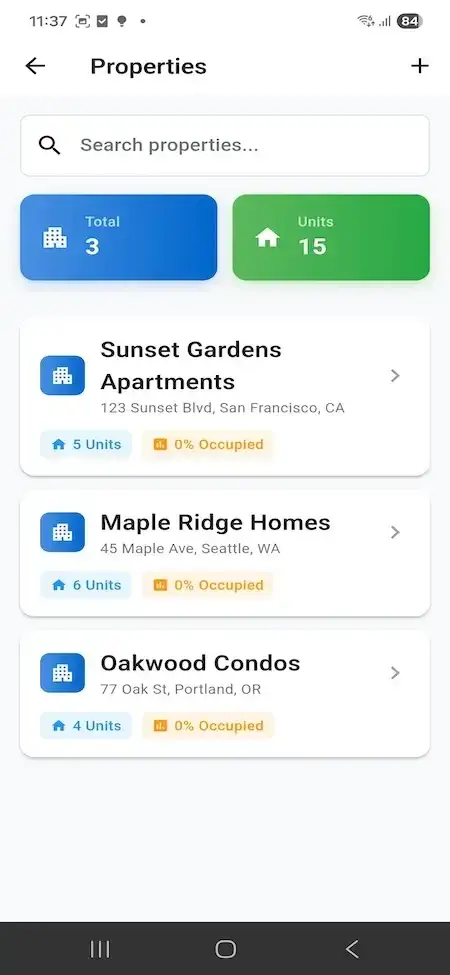
Buildium Clone property list screen with apartment buildings, unit counts and occupancy.01
Pick it if: Buildings you already let need managingBuildium Clone

A tool for the people who look after buildings that are already let, showing occupancy and the number of units for each building.

Explore Solution
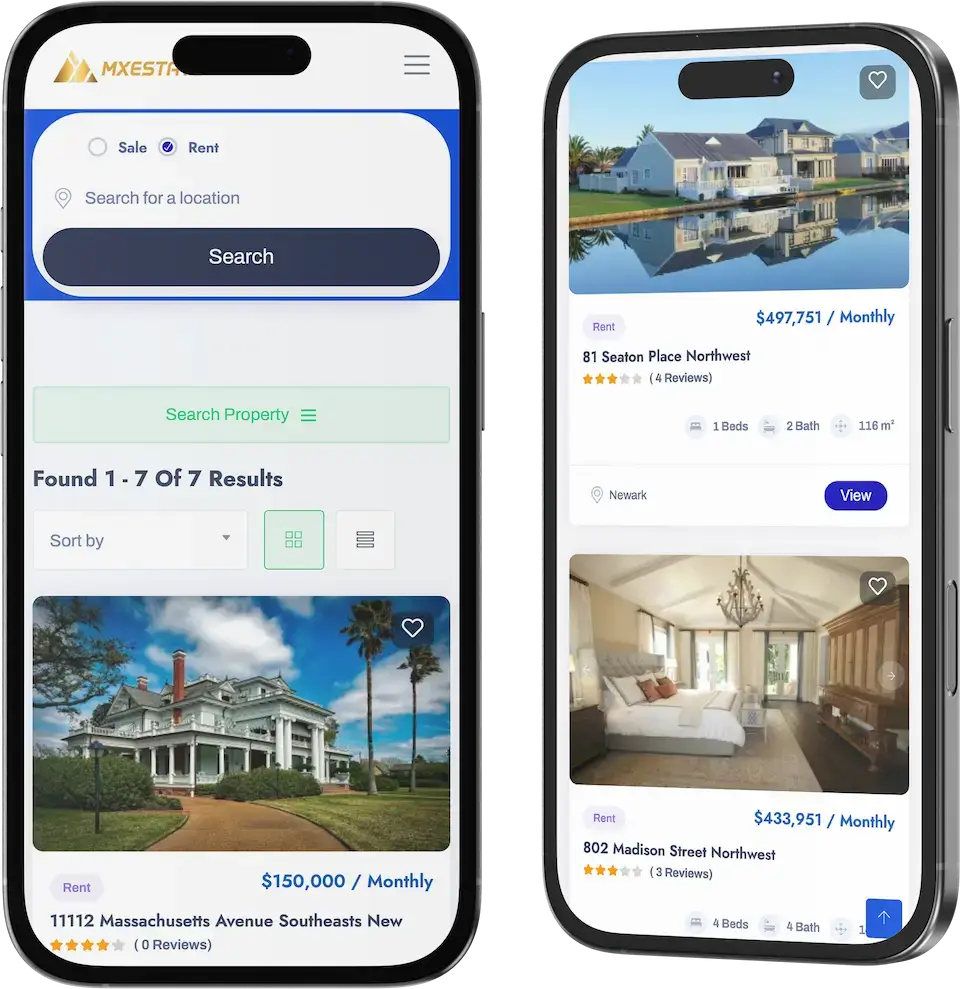
Zillow Clone property search app on two phones with rent and sale search and listing cards.02
Pick it if: Homes for sale join your roomsZillow Clone

A home search app with a toggle for renting or buying, listing cards and an operator console at the back.

Explore Solution
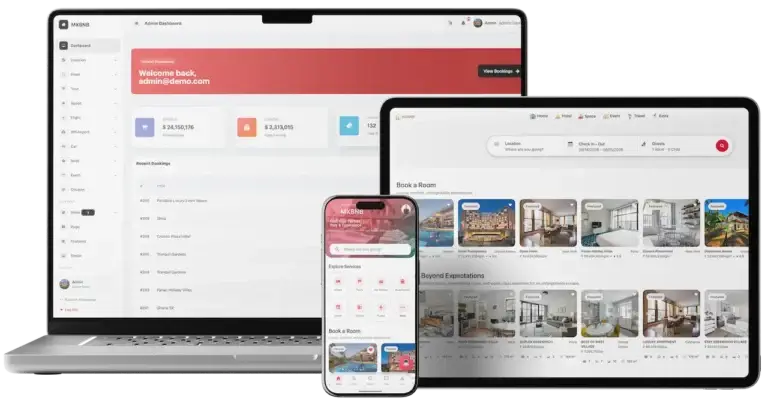
Airbnb Clone platform across guest, web and admin interfaces.03
Pick it if: Some rooms rent by the nightAirbnb Clone

A stays marketplace connecting hosts with guests: hosts get a console, while the operator uses an admin panel.

Explore Solution
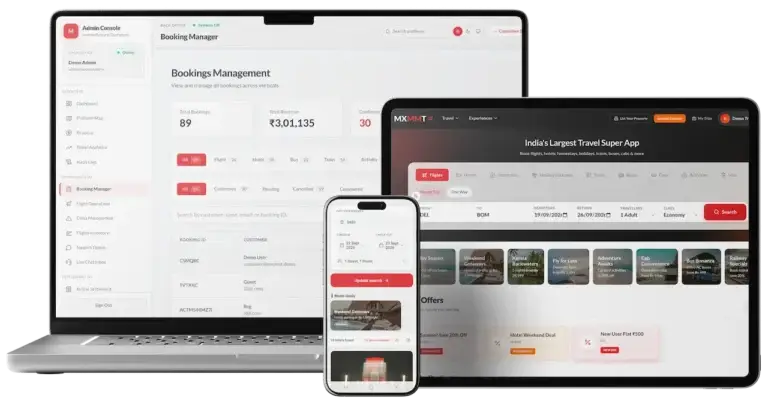
Travel Booking cross-platform solution with customer website, mobile app and admin.04
Pick it if: Trips sit beside your roomsTravel Booking

Booking software for trips: a site for customers, an app for phones and a dashboard for the operator.

Explore Solution
Full Range90+ ready-made solutions

09The business case

Income Lines

Habyt Clone Revenue Streams - Booking Commission, Resident Fees, Long-Stay Billing, Room Rent & Card Costs

A co-living platform has several ways to earn. The console tracks commissions and payouts today, every other line is a pricing decision for you, and whatever needs a new screen is quoted separately.

Two lines normally lead: the commission on each room booking and the fee shown to the resident.

  1. 01

    Room Booking Commission

    The operator retains a slice of every paid room booking and forwards the remainder to whoever posted the room. Incoming payments, the platform's own commissions and payouts due to property owners are already followed in the console.

  2. 02

    Resident Service Fee

    A separate line added above the room price. Orders already separate grand total, discount, amount paid and balance, so a fee could be itemized there. We would set it up with you as a pricing rule, since no demo screen shows it yet.

  3. 03

    Monthly Billing on Long Stays

    Stays at a co-living house often run for months, so many operators bill month by month and not everything up front. The Due Payment list tracks paid and due amounts per room today; a monthly schedule does not appear in the demo and would be scoped as custom work.

  4. 04

    Rent From Rooms You Run

    An operator that owns or leases its rooms keeps the rent itself. The platform contributes the listing, the booking and the paid-against-due record, while the rent roll stays in your own books.

  5. 05

    Payment Processing Fees

    Gateway charges can be won back by adding a fee to the payment, not by absorbing them. Payments go through a gateway API, and you open the merchant account behind it.

  6. 06

    Featured Room Placement

    A paid position that lifts a room above the others in its area. It is custom work needing a scope, since the demo shows no placement or plan screen.

Published figures from a short-stay platform, an apartment landlord, a statistics office and a card processor, lined up against five income lines of a co-living business.
Revenue streamHow it is chargedTake rateTypical take rateWhat sets the ceiling
Room Booking CommissionA share of each paid room booking, kept back before the poster of the room is paid.Airbnb lists a 3% host fee where the guest pays a fee too, or 15.5% (14%-16%) for a host who carries the full fee.What people posting rooms will accept versus their other channels. A host-only fee funds the whole service, which is the bar one commission must clear.
Resident Service FeeA slice of the booking subtotal, on top of the price the resident sees.Guests on Airbnb pay a service fee from 14.1% up to 16.5% of the subtotal.The extra a resident will tolerate beyond the room price. Residents will compare your fee with the mid-teens that a major booking platform charges, so a lower one can help your pitch.
Monthly Billing on Long StaysFees collected month by month across a long stay, not in one charge at booking.Airbnb bills its service fees monthly once a stay reaches 28 nights.Where you place the cut-off between short and long stays and how often money moves. The billing rhythm is your business rule; this product shows paid and due amounts, not a schedule.
Rent From Rooms You RunRent from rooms you own or lease, collected directly and without a platform cut.No cut applies. For context, US rental vacancy stood at 7.3% in Q2 2026, and one large apartment owner reported 96.4% occupancy for 2025.Occupancy and turnover. That owner's filing shows 40.2% turnover with leases of twelve months or less, so how quickly rooms empty and refill matters as much as the rent.
Payment Processing FeesA gateway fee on each card payment, which you either pass on to the resident or carry yourself.Stripe's US pricing is 2.9% + 30c per successful domestic card payment.What your gateway contract says and which cards residents use. Stripe's Connect help article presents 2.9% + 30c only as an illustration, so confirm your own rate locally.

How to read this. The commission, guest fee and monthly-billing figures come from Airbnb's fee help article and the 28-night rule from Airbnb's 2025 annual report on Form 10-K. Occupancy and turnover are from the Equity Residential 10-K for 2025, vacancy from the US Census Bureau, the card rate is taken from Stripe's US pricing page, with its Connect help article as a second source. Those companies and agencies published the numbers; they are reference points for a co-living model, not rates of this product. Treat each row as a modeling input: nothing here is an offer or an earnings forecast, and the percentages you charge are yours to set.

Want the revenue model sketched around your own houses?Sketch My Revenue Model

Market Benchmarks

Flexible & Furnished Rentals Market Benchmarks - Independent 2025-2026 Data

The revenue models above are ours. The figures below are not. They come from the US Census Bureau, Eurostat and the Equity Residential and Airbnb annual reports on Form 10-K, reproduced as published. Together they show how much of the market rents, how full rental buildings are, and what an apartment operator and a booking platform earn, so you can test your own rental business case against numbers you can check.

US Census Bureau01

7.3% US Rental Vacancy Rate in Q2 2026

The US Census Bureau reports that national vacancy rates in the second quarter of 2026 were 7.3 percent for rental housing and 1.2 percent for homeowner housing. The rental rate compares with 7.0 percent in the second quarter of 2025, and the homeownership rate was 65.0 percent. Vacancy is the first limit on how much any rental operator can earn.

Eurostat02

31.6% of People in the EU Live in Rented Homes

Eurostat reports that in 2024, 68.4 percent of people in the EU lived in owner-occupied dwellings, while 31.6 percent resided in rented accommodation. Of those, 21.1 percent paid market rent and 10.5 percent lived at a reduced price or rent-free, so about one in five EU residents is a market-rate tenant.

Equity Residential 10-K03

$3,203 Average Rental Rate, 96.4% Occupancy

Equity Residential's annual report on Form 10-K for 2025 shows same-store results across 73,465 apartment units, with an Average Rental Rate of $3,203, Physical Occupancy of 96.4 percent and turnover of 40.2 percent. Average rental rate rose 2.5 percent. The filing notes its apartment leases are generally for twelve months or less.

Airbnb 10-K04

$91.3bn in Airbnb Gross Booking Value in 2025

Airbnb's annual report on Form 10-K reports 2025 Gross Booking Value of $91,273 million, up 12 percent, on 533 million Nights and Seats Booked, up 8 percent. Revenue was $12,241 million, up 10 percent. Dividing revenue by Gross Booking Value gives about 13.4 percent.

Where each figure comes from.

US Census Bureau, Quarterly Residential Vacancies and Homeownership, Second Quarter 2026, 28 July 2026 - census.gov

Eurostat, Living conditions in Europe - housing, Statistics Explained, data extracted November 2025 - ec.europa.eu

Equity Residential, Annual Report on Form 10-K for the year ended 31 December 2025, filed 13 February 2026 - sec.gov

Airbnb, Inc., Annual Report on Form 10-K for the year ended 31 December 2025, filed 12 February 2026 - sec.gov

All figures are the publishers’ own, reproduced as published from a statistics office, a regulator’s statistical series and two annual filings. The Airbnb ratio of about 13.4 percent is our arithmetic on two reported figures, and metric definitions are as each publisher states them. They describe the markets and companies named, not any platform Miracuves builds, and nothing here is a revenue projection for your business.

Market Timing

Is 2026 the Right Year to Build a Co-Living Platform?

Co-living operations outgrow phone calls and shared sheets fast. A single platform holding rooms, bookings, dues and chat lets staff, hosts and residents work from one record, and a branded one leaves the commission and the customer with you.

01

One Catalog for Every Room

With all the rooms of all your houses in one searchable catalog, prices and availability stop drifting between files and nobody has to reconcile them manually.

02

Residents Live on Their Phones

An app with a home screen, a room list and a Book Property button reaches residents on the device they already use to look for a place.

03

Dues Stay in Plain Sight

An amount paid and an amount due for each room, with notices and chat alongside, tell residents and staff exactly where the money stands.

04

Conversations Stay Inside the Platform

Questions, photos and requests move through in-app chat and notices, not across personal messaging apps and scattered inboxes.

05

Your Own Brand Keeps the Relationship

Resident records, reviews and repeat bookings stay with you when they live under your name, instead of building up for a third-party portal.

06

Starting From a Base Beats Starting From Nothing

Most of what a room-rental platform needs already exists: catalog, booking, dues, chat and operator tools. A 6-day build hands you a rebranded copy on your own hosting.

Numbers at a Glance

4

Surfaces Working Together

5

Languages in the Demo

8

Web Action Tiles

6

Days to Build

Co-living runs on routine machinery: dues, approvals, messages and room details. Here, that machinery has already been built.

The Commercial Case

Marketability, Revenue Potential & Business Prospects

A co-living platform earns once the people who post rooms trust it enough to list and residents trust it enough to book. The points below aim to make both decisions easier and to leave the relationship with you.

  1. 01

    Commission on Each Booking

    Income grows with the number of rooms and how full they are, because the operator keeps a cut of every paid booking.

  2. 02

    Many Levers, One Console

    Commission, resident fees, long-stay billing and featured placement can each be switched on as a lever and scoped with you, without redrawing the rest of the product.

  3. 03

    Residents and Hosts Stay Yours

    Accounts, reviews and booking history are stored in your own database, so the value builds on your side rather than at a listing portal.

  4. 04

    Free to Move On

    The code belongs to you entirely, so a new host, a new team or a new direction never has to wait for permission.

Main Revenue Levers
  • Room Booking Commission
  • Resident Service Fee
  • Monthly Billing on Long Stays
  • Rent From Rooms You Run
  • Payment Processing Fees
  • Featured Room Placement
Long-Term Value

Supply and trust protect a co-living platform more than any single feature does.

  1. 01Hosts who posted rooms rarely leave
  2. 02Residents with a record tend to return
  3. 03All of it accrues in your own database
  4. 04Good listing and review care adds a second layer
Example Revenue Scenarios

The cases differ only by room count, and each one names the lever that leads at that size. Read them as prompts for your own planning and never as a prediction of what any platform will earn.

Single House30Rooms Listed

Early income comes from booking commission.

A pilot in one house, where a few hosts post rooms and the commission on each paid booking helps cover what the platform costs to run. A sample size only, not a forecast.

City Network300Rooms Listed

Commission joined by resident fees and long-stay billing.

A network across one city, with many hosts chasing the same residents, so fees and billing rules begin to count beside commission. A sample size only, not a forecast.

Multi-City Brand3,000Rooms Listed

Many cities, with fees and featured placement switched on.

A brand spread over several cities, where resident fees and paid placement add to commission and the reports show where effort belongs. A sample size only, not a forecast.

10Why Miracuves

Why Miracuves

How Miracuves Compares With Other Habyt Clone Developers

Your options are a packaged script, a freelancer, an agency, or a ready-made base from a vendor that sells this exact product.

Why Operators Choose Miracuves

  • 01

    Both Sides Included

    Operators get an app and a vendor panel for posting rooms, and residents get a home screen and a Due Payment list. Packaged scripts tend to stop at listings.

  • 02

    Dues Clear From the First Booking

    Each order shows its total, discount, paid sum and balance, so the money picture is clear from the first booking onward.

  • 03

    Four Surfaces, One Codebase

    Resident app, operator app, web panels and admin console arrive already linked, instead of four projects you need to join up.

  • 04

    You Own the Source

    The code is delivered readable and is yours to keep, so no vendor can reprice it or change terms later.

  • 05

    Features You Can Check

    Each claim here maps to a demo screen, a feature list or the release log, and extras that cost more say so as add-ons.

  • 06

    Straight Talk on Readiness

    We tell you what the base includes, what costs extra and what you supply: gateway account, hosting and store developer accounts.

Habyt Clone Compared With Generic Scripts and Agency Builds

What You CompareMiracuvesMiracuves Habyt ClonePackaged ScriptAgency Project
Time to LaunchSix working days of our build timeVaries with the scriptPriced per project and often takes months
Who Owns the CodeYou, delivered complete and unencryptedFrequently restricted or lockedNormally you
Room-Rental DepthSearch, booking, dues, chat and noticesListing pages and little elseWhatever the budget covers
Operator ToolsAn operator app and a vendor panelRarely part of the scriptCustom-built
Money HandlingPayment gateway APIs plus a Due Payment listDepends on the productWired in to order
Back OfficeProperties, users, transactions and analyticsSparse or absentCustom-built at extra cost
Safety PostureSeparate logins and stated limitsMinimalDiffers widely
Cost and QualityA single fixed price for a tested baseCheap but riskyCostly and slow
After Launch60 days guidance, 6 months bug fixes, 12 months updatesSeldom offeredAs the contract states

Most routes look alike until the first busy season, and then the differences show.

Talk to Our Team

Version Notes

Habyt Clone Release Notes - All Versions So Far

Release notes for this product, newest at the top. The entries have no dates, so the version number is the only timeline you get.

VersionChanges
V1.4Deleted code the project no longer needed, which makes it run faster.
Closed issues that came in through support tickets.
V1.3Repaired a fault in tenant profile settings.
Redesigned the cards in the notification list.
V1.2Gave the brand card a more polished design.
V1.1Moved every package to its latest version.
Improved account management.
Fixed faults in the category listing.

Let's talk it through

Let's make your co-living idea a live platform.

Schedule a free consultation and leave with a clear timeline and straight answers. Earning your trust matters more to us than closing quickly.

  • First reply inside 2 hours
  • Free first consultation
  • No contract lock-in
  • Source code stays with you

11Learn more

Blog & Resources

Reading List on the Habyt Clone App and Its Market

Three pieces to read next: the script itself, the revenue model of a co-living business, and how booking, calendar and payout logic fits together on rental platforms.

The product5 questions

01What is a Habyt clone, exactly?

It is ready-made, white-label software for letting out rooms, the kind of system a co-living operator runs. Miracuves delivers four linked parts: a resident app, an operator app, a website that holds a vendor panel, and an admin console. A new co-living brand can accept bookings without commissioning software from scratch.

02How far can the platform be customized?

Colors, layout, branding, listing fields, the booking and payment flow and the connected services are all open to change, and putting your logo, icons and colors in place is part of delivery. Work past the base is scoped and priced in writing before it starts. The source arrives unencrypted, so your developers can take it further whenever you like.

03Will the apps work on both iOS and Android phones?

Yes. Flutter builds both apps, giving each an Android version and an iOS version. They are published from your own developer accounts, and the review times of Apple and Google lie beyond our 6-day build window.

04Is it legal to run a co-living platform modeled on Habyt?

This page carries a disclaimer because Miracuves writes its own code, design and copy and uses nothing from Habyt. Housing, licensing and consumer rules in your market govern whether you can list rooms, let them or hold deposits, and compliance rests with you. Miracuves offers no legal advice.

05How safe is resident data in the app?

Four logins keep residents, operators, vendors and admins apart, a gateway you connect handles payments, and the admin side clears registrations and checks identities. The platform has no security certification and none is claimed. Penetration tests, fresh keys and a restore drill are launch tasks we plan together, and how you host decides much of the remainder.

Residents & rooms6 questions

06Can residents manage their profiles and see what they have paid?

Yes. Residents edit a profile with personal details, read an order history with the total, discount, amount paid and balance for each order, and open the Due Payment list for anything outstanding. Documents sit behind the My Documents tile on the web dashboard.

07How does a resident find and book a room?

They filter by location, price range and amenities, open a room listing with its photos and details, pick a type and press Book Property. The gateway you connect takes the money, and a notification confirms the booking.

08Are rooms listed one at a time, or only whole flats?

One at a time, as far as the demo shows: its Due Payment list and notifications carry listings titled as rooms, such as a king size bedroom or an ensuite, each with paid and due amounts and its own approval line. The titles are sample data typed by whoever posts. Bundling several rooms into one shared flat is not in the demo and would be scoped as custom work.

09How are dues tracked room by room?

The Due Payment list names each room and shows the amount paid, the amount due and a due tag wherever something is still open. The home screen history repeats the total, discount, paid sum and balance for every order. A schedule that bills month by month is not part of the demo and would be scoped as custom work.

10Can residents chat with each other?

A Chat entry sits in the resident menu, and the demo shows two tenant accounts exchanging text and a photo. The feature list also describes messages to owners or agents, and the web dashboard has a Chat tile. Group channels, house boards and event feeds are not in the demo and would be quoted as custom work.

11Can operators screen applicants before accepting them?

There is no built-in screening module. The admin side of the demo clears registrations and verifies identities, but no credit check, background check or screening flow exists. If you want screening, you can connect a provider you choose, and we scope and quote that custom work in writing.

Operators & hosts3 questions

12Can one operator post many rooms and properties?

Yes. A single operator or vendor account manages many properties, each with its own description, photos and price. The vendor panel offers the same reach from a desktop.

13How do operators follow rent payments and overdue accounts?

An operator dashboard follows rent payments and overdue accounts, while residents see paid and unpaid sums per room, so a late payment stands out. Reports can feed your bookkeeping. The demo has no expense-tracking screen, so such a screen would be custom work with its own scope.

14Who works inside the vendor panel?

Operators, landlords and the staff who post rooms for them sign in on the web and land on the Actions grid, with tiles for My Properties and Applications, then My Rented and My Tenants, then My Requests and My Documents. Listings are handled from a desktop, and we open the panel for you on request.

Admin & money7 questions

15How much control does the admin console give me?

From the console you run users, hosts, property listings, bookings, payments and site content. Registrations can be cleared, identities checked, accounts blocked or suspended and disputes settled, pages, posts, FAQs and banners edited, and analytics read for engagement, popular listings and revenue.

16Can I set different roles and permissions?

Four logins stay separate in the demo: resident, operator, vendor and admin, with the admin side deciding who may register. Finer levels, like several staff roles holding different rights within the console, are not part of the demo and would be a custom job with its own scope.

17Does the console include reports and analytics?

It covers platform performance, user engagement, listing popularity and revenue, and it follows payments, commissions and payouts. Extra reports can be scoped separately.

18How do payments, commissions and payouts work?

A gateway linked to your merchant account takes resident payments. In the console you see payments coming in, the commission the platform retains and the payouts owed to owners, and each owner has a personal dashboard of their own transactions. Payout timing follows whatever terms you set with owners.

19Can other services be connected?

Google Maps, Twilio, Firebase, payment gateway APIs and translation are already part of the stack. A screening provider, analytics or accounting software could join as scoped custom work.

20How soon can a co-living platform expect its first revenue?

Most operators start with commission on room bookings, since there is nothing extra to sell: the first paid booking earns it. A resident service fee, long-stay billing and featured placement can follow once enough rooms and residents are on the platform, and each is scoped with us. Corporate housing deals, or licensing the white-label product to another operator, are commercial agreements you negotiate and not product features.

21What makes a co-living platform hard for a competitor to copy?

Supply and trust protect a co-living platform more than any single feature does. Hosts who have posted rooms with their own prices rarely leave, and residents who hold a dashboard, a booking history and chat conversations in the app keep a reason to return. That build-up can begin on launch day and stays in your own database. Tending listings and reviews well adds a second layer of protection, because trust is slow for a rival to copy.

Launch & support6 questions

22How quickly can the platform go live?

Your branded Habyt Clone is deployed in 6 working days, counted once your branding, hosting and accounts are available. Apple and Google handle store review as a separate step, and custom work past the base arrives with a written scope and schedule.

23Do I receive the source code?

Yes. Your engineers receive the full source of the web platform and of the Flutter apps, unencrypted.

24What does the fixed price include?

The one price covers rebranding, deployment to your hosting and help publishing through your developer accounts, along with the full code base and all four surfaces: resident app, operator app, vendor-panel website and admin console. Three support periods start at launch and overlap: 60 days of platform guidance, 6 months of priority bug fixes and 12 months of updates.

25What must I supply before launch?

A domain and hosting, verified Apple and Google developer accounts in your name, a payment gateway whose KYC is complete, plus your branding and business details, and API keys for Google Maps, Twilio or Firebase. Miracuves does not open gateway accounts, write policies or provide managed hosting.

26Does running the platform need technical skills?

Staff can run it day to day with no coding, since the admin console is built for them. The hosting and domain belong to you, so at least one person on your side should be comfortable looking after the server.

27Why choose Miracuves for a Habyt clone?

Since 2010 Miracuves has delivered 9,000+ projects for 6,000+ clients, and 90+ ready-made solutions are on its shelf. What you receive is a single price, the entire code base, a build that takes 6 days and three overlapping support periods, and each add-on and each item you provide is spelled out above.

Disclaimer

Miracuves is an independent software development company. We are not affiliated with, connected to, sponsored by, or endorsed by Habyt.

Read our full Legal Notice & Disclaimer →
Why this name

“Habyt Clone” is used descriptively. It is how the software industry refers to building a platform with functionality similar to Habyt, and how clients search for it.

Who built this

The entire design and codebase is built by our own team. The product contains no code, design, graphics, or content originating from the Habyt website or applications.

Trademarks

Habyt and all other third-party names and marks are the property of their respective owners, referenced here solely to describe the category of software offered.