Home Search App · Production Ready

Zillow Clone App - White-Label Property Portal

Miracuves' ready-made Zillow clone puts buying, renting and selling homes on one white-label portal: buyers filter by city and price, agents answer inquiries from a lead inbox, and you own the web, mobile, admin and API source on your hosting within six working days.

Buyers and renters filter by city, price and property type and keep saved searches with alerts, agents work every inquiry from a lead inbox, and moderators clear each listing before it appears. VR tours and AI-assisted negotiation are add-ons priced on their own, and an MLS feed needs your own data license. A changed package structure or an added approval step gets its own scope and is priced in writing, with changes like these running 2-8 weeks.

Launch in 6 Days with

  • Source Code
  • Web Portal
  • Android + iOS App
  • Admin Panel
  • API + Schema
  • Your Branding

StackExpo · React Native · Next.js · NestJS · PostgreSQL · Prisma · Redis

MXMillow console · PortalIllustrative
New listings today38
Open inquiries21
Agents verified52

Portal activity

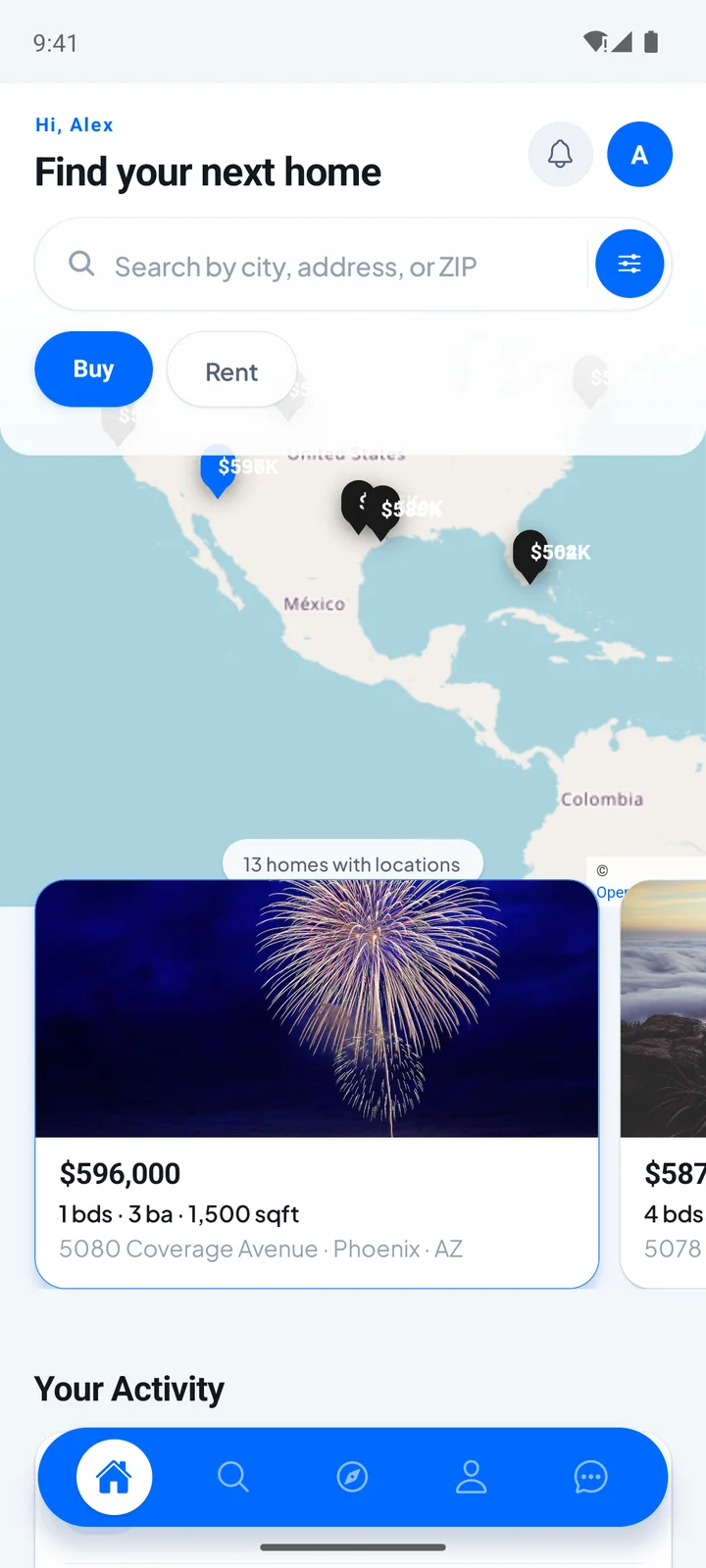
Zillow Clone app home screen with a city, address or ZIP search, a Buy or Rent switch, a map of price pins and listing cards.
Agents see each inquiryin their lead inbox
  • 6Ways the Portal Earnsagent packages, featured listings, lead fees, rental ads, banner slots and mortgage leads
  • 4Roles, One Codebasebuyer or renter, agent, moderator and admin
  • 0%Revenue Share With Miracuvesno royalty on any package or lead, and no per-seat fee
  • 6MLS Feed Routescustom feed, RESO, MLS Grid, Bridge, Trestle and SimplyRETS
  • 6Days to Launchand if the delay is ours, we keep going free
  • $4,299Paid Once, Not Rentedsource code yours, no per-seat fee, no monthly rental

Live in six working days, or we keep working free until you launch. Every build carries 60 days guidance, 6 months bug fixes and 12 months updates.Verify every figure

Renido Launched on This Base

Renido's property listings platform was built on the Zillow Clone base in a 6-day build window, with 18 of its 22 building blocks reused and the source code transferred at handover.

An Estimate, Not an Appraisal

The value estimate is a calculation and the calculator shows reference rates. Live lender rates and lender comparison come from lender partners you sign, and pre-qualification requests reach them as tagged leads.

Card Data Stays With Stripe and PayPal

Agents pay by Stripe checkout or PayPal, each callback is verified before an order is fulfilled, and the portal stores a payment reference, never the card. Admins can switch a gateway off mid-incident.

Ready to open your own property portal?Talk to Product Expert

Chosen by 6,000+ clients across the globe

Miracuves is listed by Expertise.com as a managed IT service provider.Miracuves is an official member of the Forbes Business Council.Miracuves is a verified agency on DesignRush, listed among top design agencies in India.Miracuves is reviewed on Trustpilot as a software development company.Miracuves is listed by The Manifest among top managed software development companies.Miracuves is listed by DesignRush as a top software development company.Miracuves is recognized by GoodFirms as a top software development company.Miracuves is ranked among the top 1000 companies globally by Clutch.Miracuves is a top managed service provider in the United States on Clutch.

01See it live

Live in Action

Try the Zillow Clone Demo: Buyer App, Agent App, Portal Website & Admin Panel

Five demo logins, from buyer and renter to agent, moderator and admin, let you test the Miracuves Zillow clone end to end. Separate demo logins cover the buyer, renter, agent, moderator and admin roles, and every one of them is listed below. Search a city, open a listing, run a payment through the mortgage calculator and ask for a value estimate.

The portal runs in any browser, the admin console has its own login page, and the Android app installs from the Miracuves app portal.
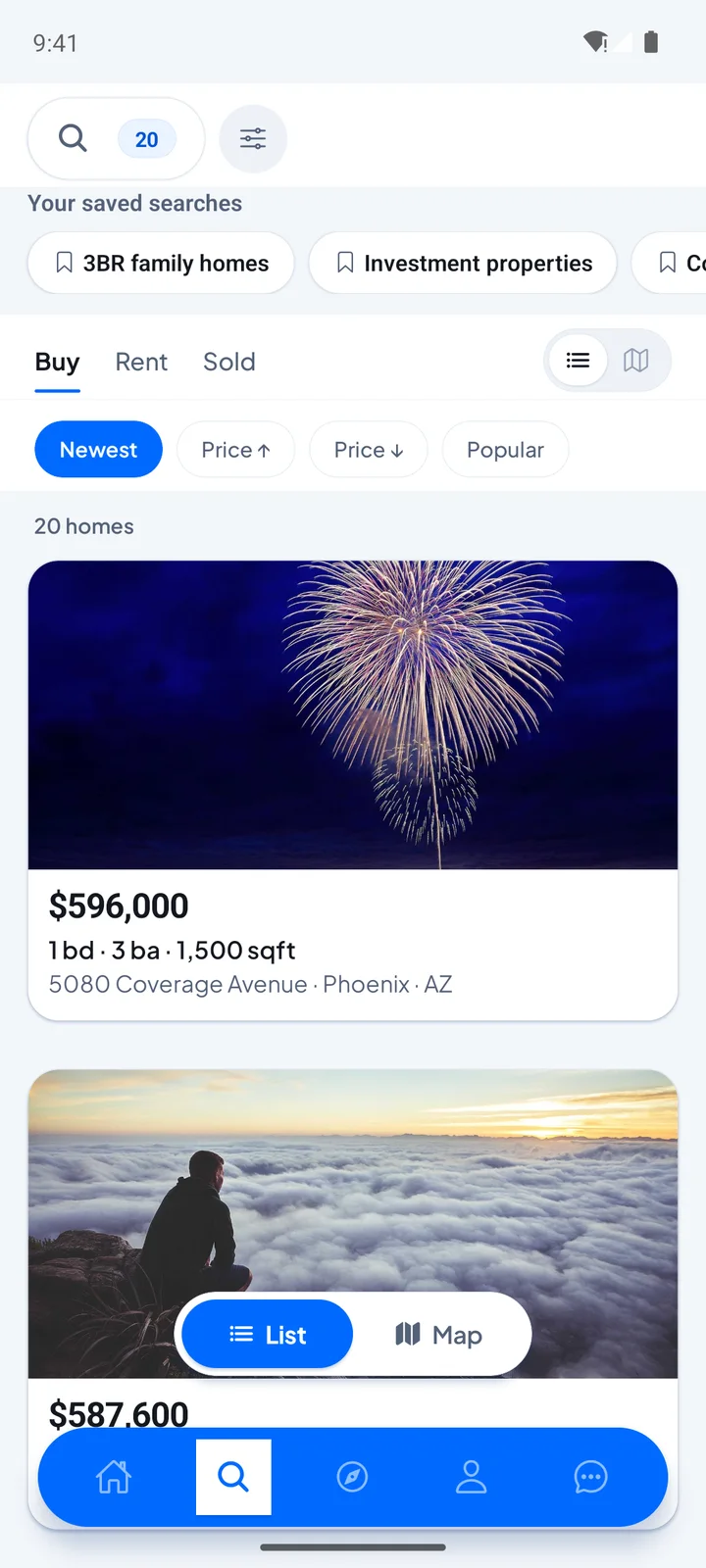
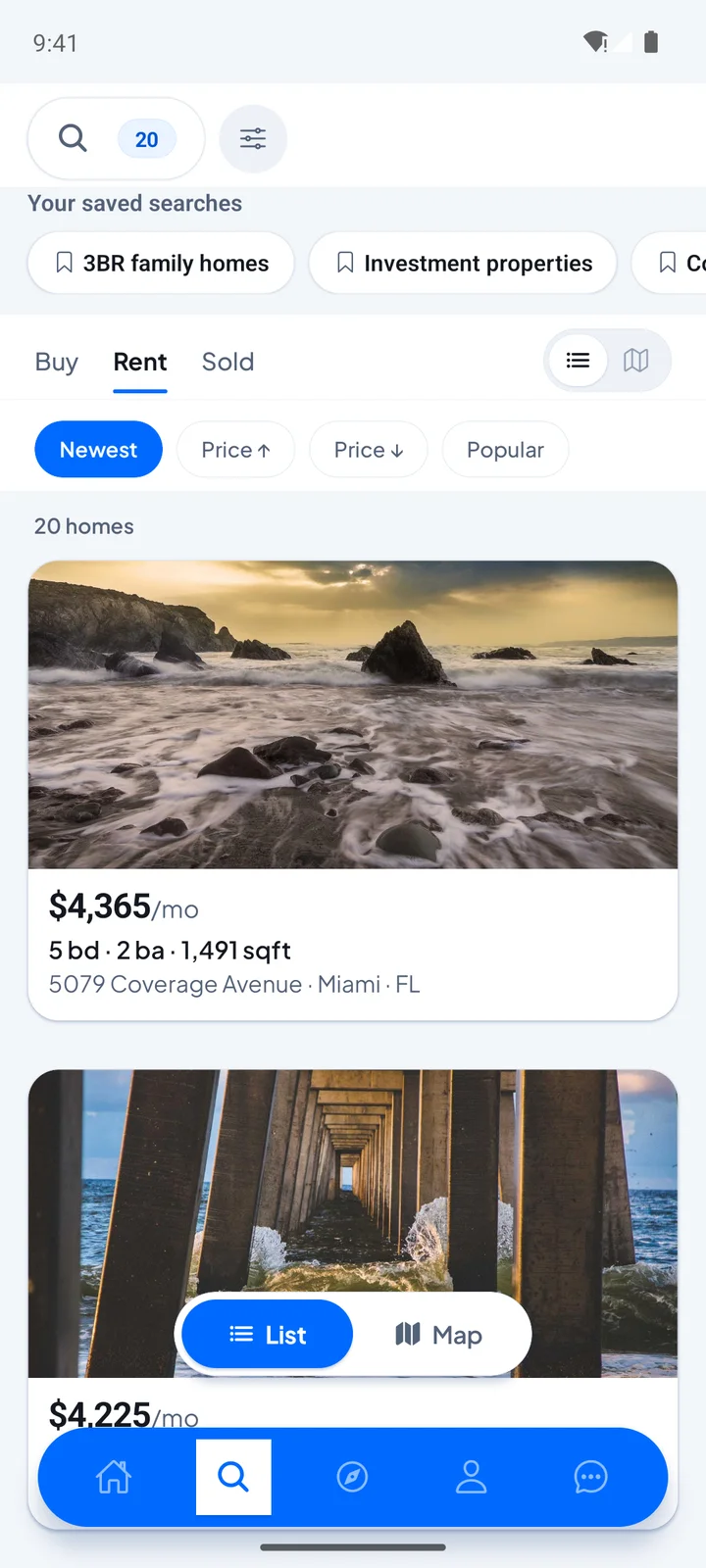
Zillow Clone app home screen with a city, address or ZIP search, a Buy or Rent switch, a map of price pins and listing cards.Zillow Clone app search results with Buy, Rent and Sold tabs, sort chips, saved searches and listing cards.
Buyer & renter app

Zillow Clone - Buyer and Renter App

The consumer side on a phone: switch between Buy and Rent, search by city, address or ZIP, open a listing with its map and gallery and keep your profile and menu close by.

  1. 1Visit the app portal and choose Android
  2. 2Log in with the buyer or renter account below
  3. 3Try: Search, Listings, Map, Profile
Try:buyer1@gmail.com | demo123456 or renter1@outlook.com | demo123456
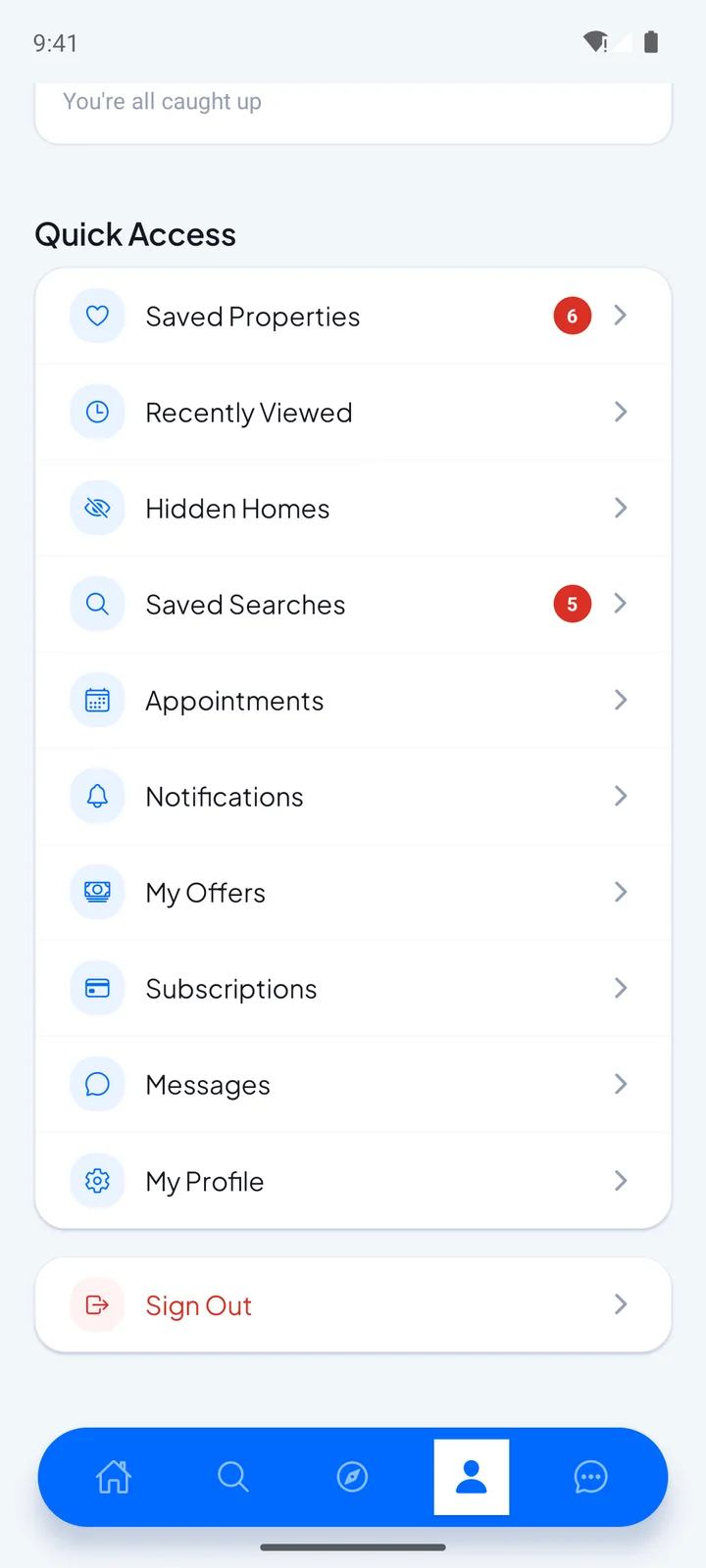
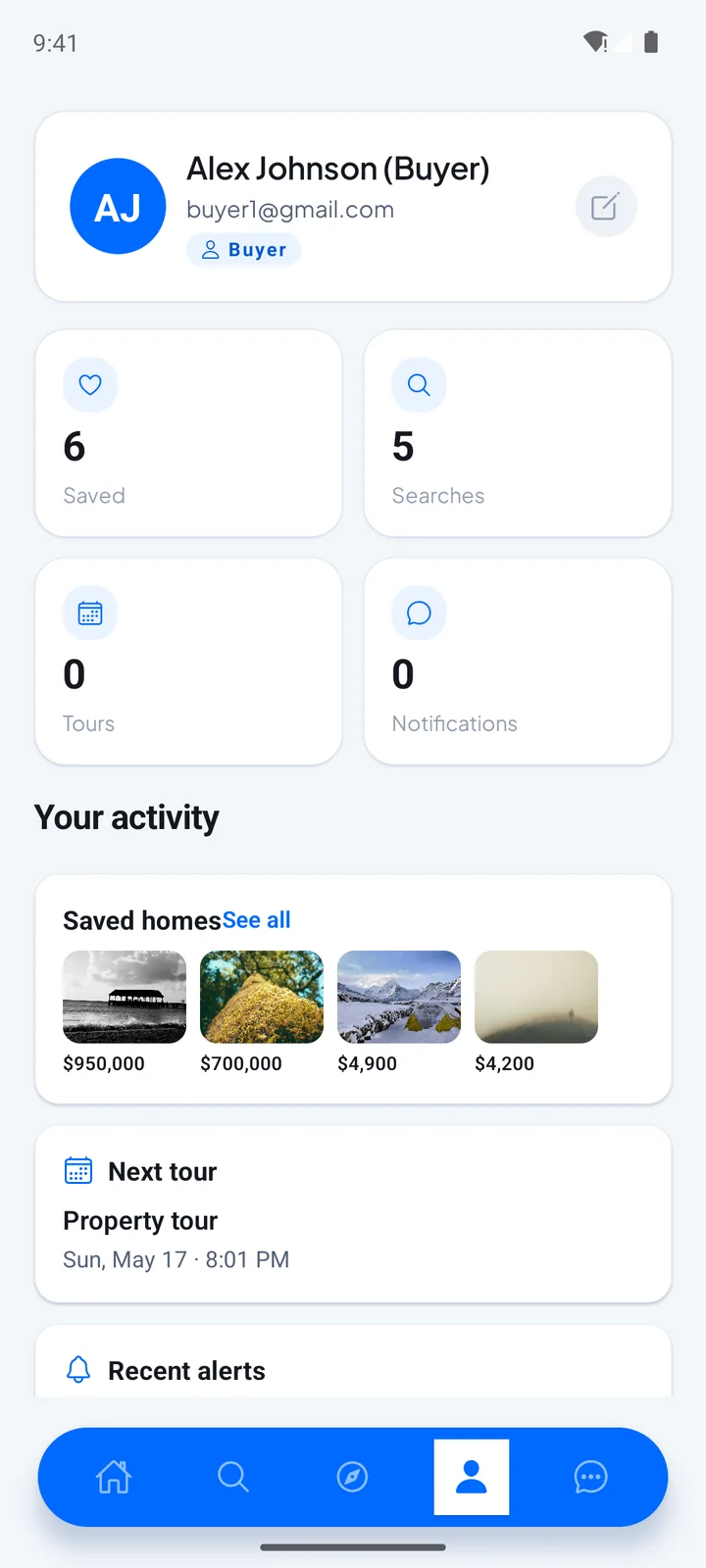
Zillow Clone app Quick Access menu with saved properties, recently viewed, hidden homes, saved searches, appointments, offers, subscriptions and messages.Zillow Clone app buyer profile with counts for saved homes, searches, tours and notifications, saved home thumbnails and the next tour.
Agent app

Agent App - Properties & Inquiries

The agent side on a phone: add and edit properties, answer buyers and keep track of the inquiries that arrive, from a login that belongs to agents.

  1. 1Visit the app portal and choose Android
  2. 2Use the agent login listed below
  3. 3Try: Properties, Inquiries, Profile
Try:agent.thompson@realty.com | demo123456
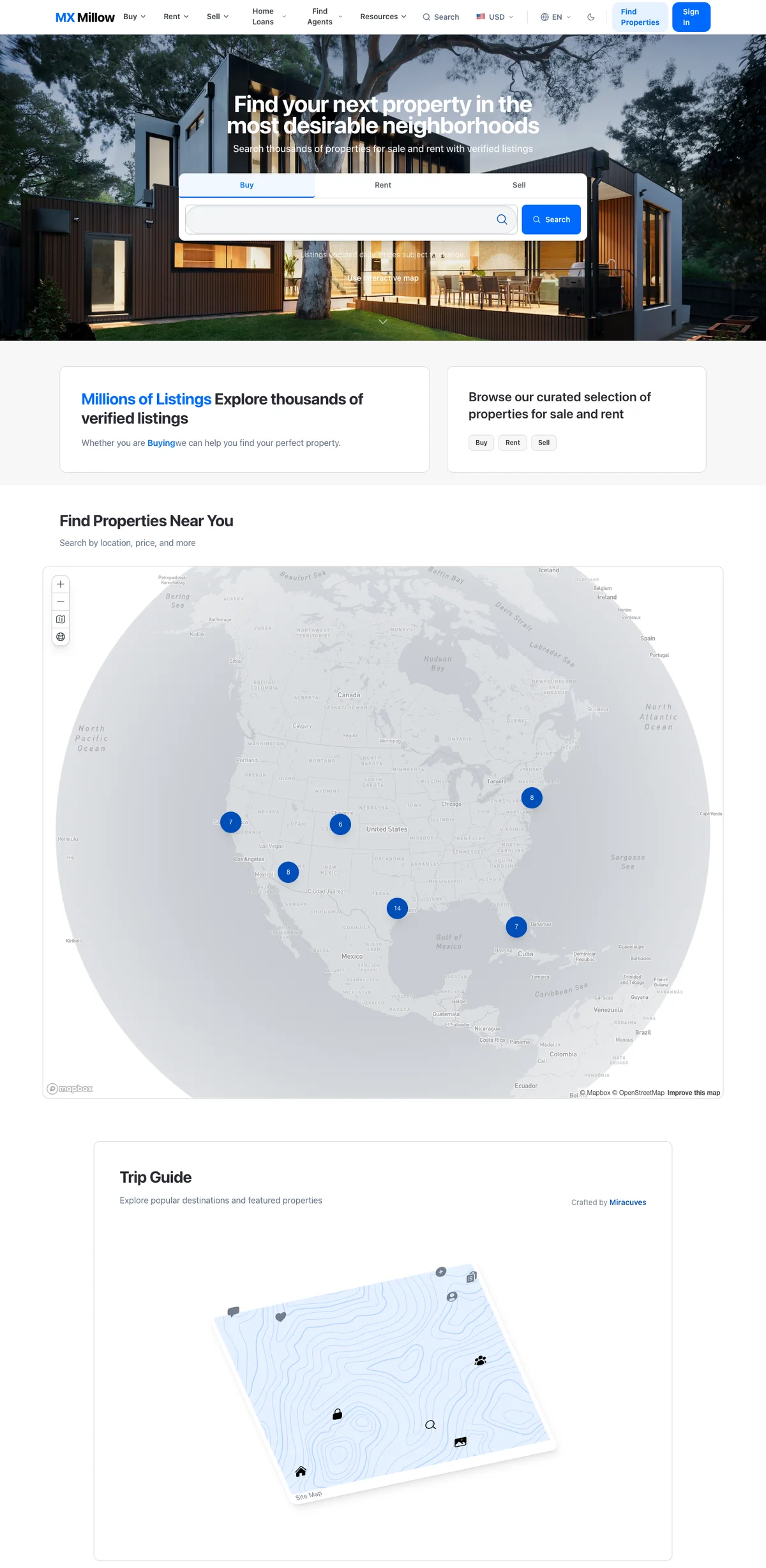
Zillow Clone web portal home with Buy, Rent and Sell search tabs, a map of properties near you and a trip guide section.
Portal website

Portal Website - Buy, Rent, Sell, Home Loans & Agents

The responsive portal in a browser: filtered buy and rent pages, the value estimate on the sell page, the mortgage calculator, a real estate directory of verified agents and the listing tools for owners and agents.

  1. 1Open the demo site from a browser window
  2. 2Sign in as a buyer or as an agent
  3. 3Try: Buy, Rent, Sell, Home Loans, Agents
Try:buyer1@gmail.com | demo123456 or agent.thompson@realty.com | demo123456
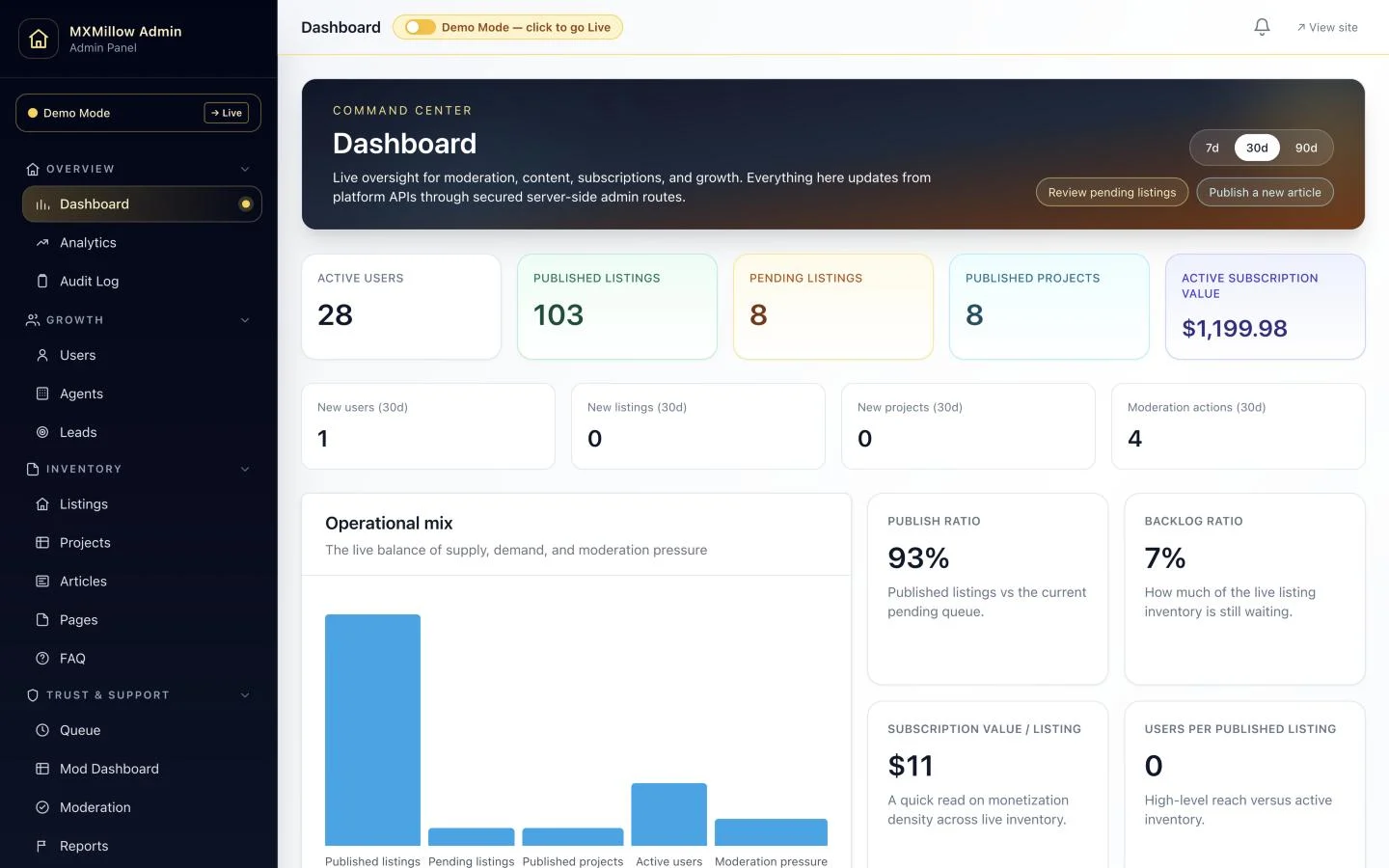
Zillow Clone admin dashboard with active users, published and pending listings, projects, subscription value, a 7, 30 or 90 day range and an operational chart.
Admin panel

Admin Panel - Listings, Agents, Moderation & Packages

The operator console: growth and analytics, listings and projects, agent and user lists, the moderation queue, reports, packages and gateways, and the settings behind the site.

  1. 1Open the admin login page
  2. 2Sign in as the admin or the moderator
  3. 3Try: Dashboard, Listings, Moderation, Packages
Admin:admin@mxmillow.com | demo123456
Moderator:mod1@mxmillow.com | demo123456

See It With Us

Walkthrough of a Real Estate App Like Zillow: Search, Value Estimates, Mortgage Tools, Agent Leads & Admin Panel

Watch the walkthrough first, then book a live session if you want it pointed at your own plan. In 30 minutes we open the buyer app, the agent tools and the admin panel and tie each one to your market, your agent pricing and your launch date.

Schedule a live walkthrough call.

Every Screen Mapped

App Flows of a Zillow-Style Property Portal - Mobile App, Admin Dashboard & Portal Website

From the Buy or Rent search to a listing page, the side menu and the account screen: the demo app, the admin dashboard and the portal website, in the order a property search moves.
Zillow Clone app home screen with a city, address or ZIP search, a Buy or Rent switch, a map of price pins and listing cards.
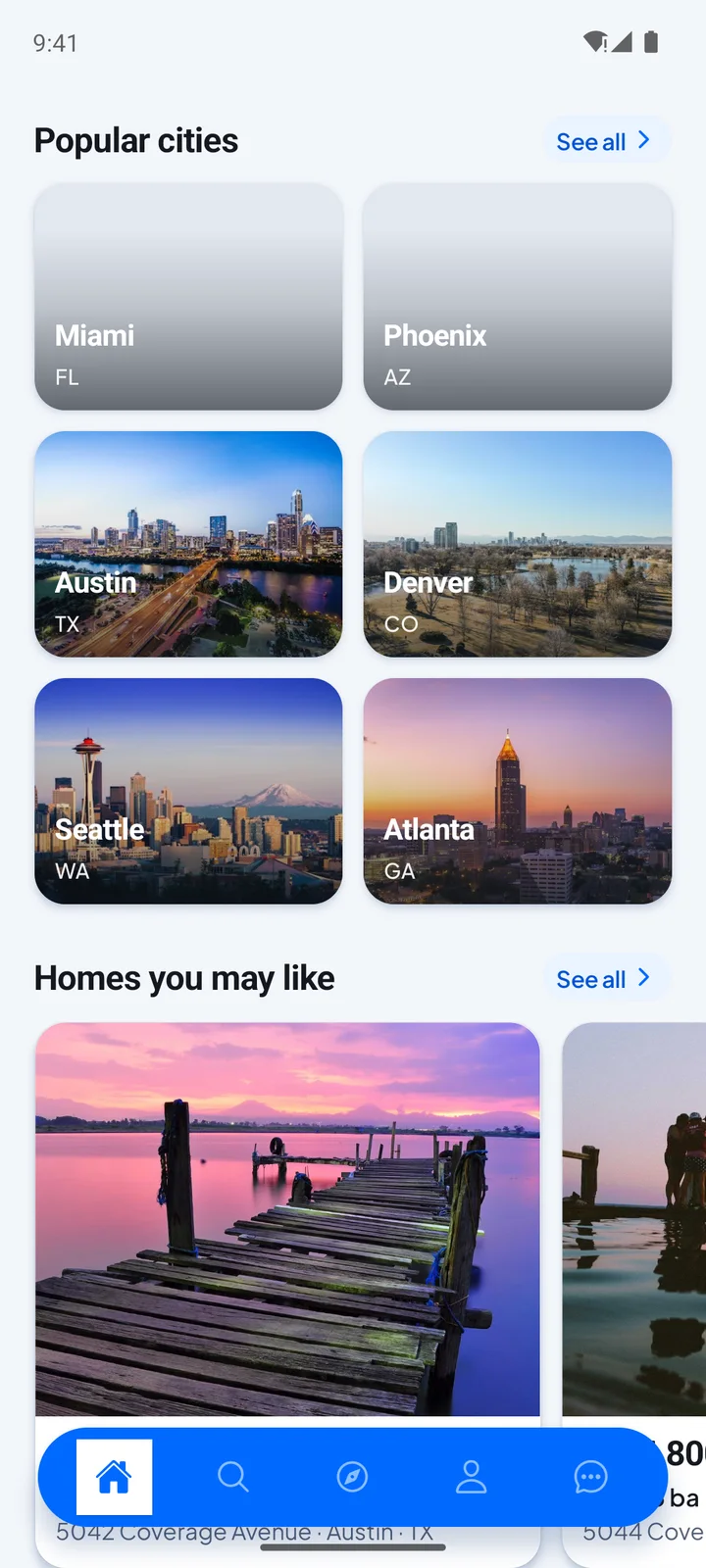
Zillow Clone app Popular cities section with photo cards for Miami, Phoenix, Austin, Denver, Seattle and Atlanta, above homes you may like.
Zillow Clone app search results with Buy, Rent and Sold tabs, sort chips, saved searches and listing cards.
Zillow Clone app Rent tab listing homes with a monthly price, beds, baths and square footage, under sort chips and saved searches.
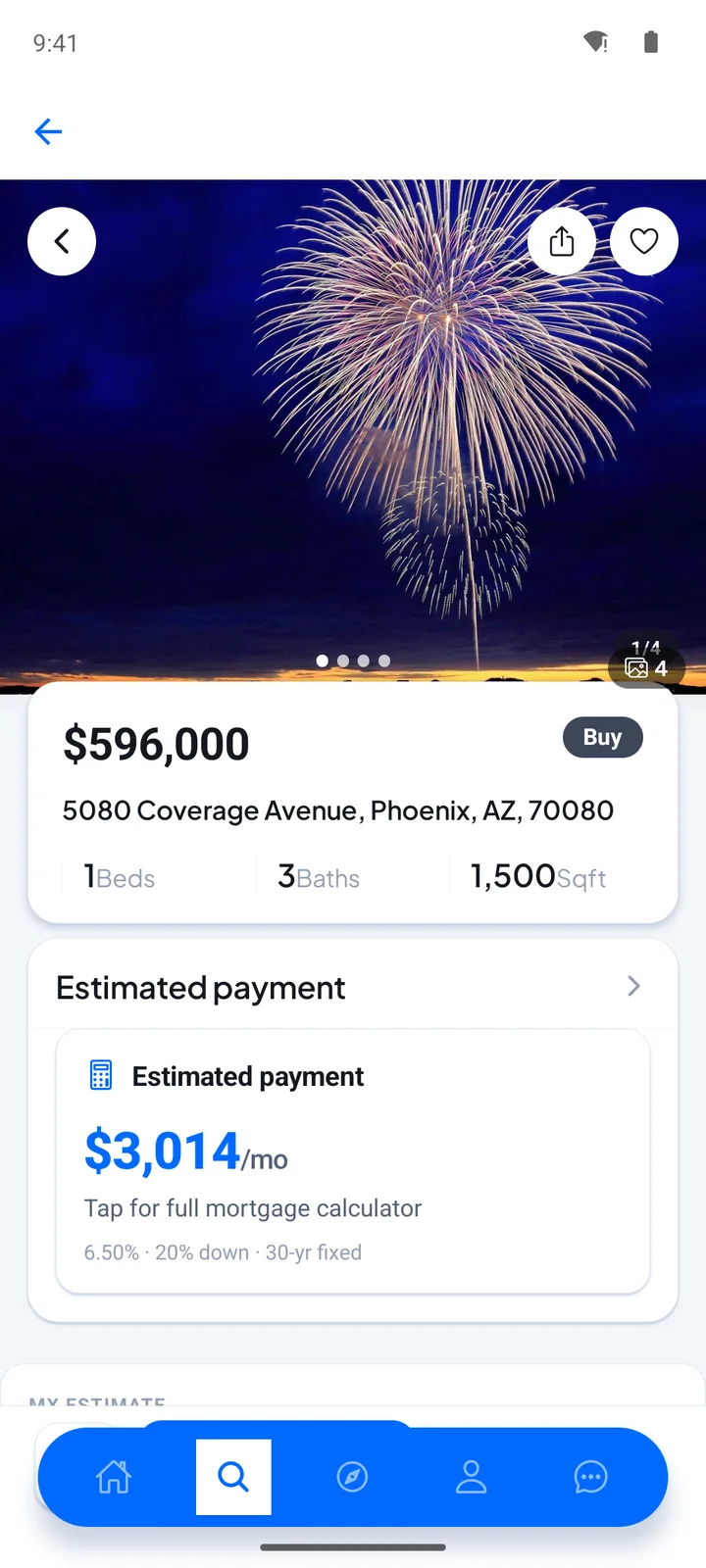
Zillow Clone app listing page with a photo gallery, price, address, beds, baths, square footage and an estimated monthly payment.
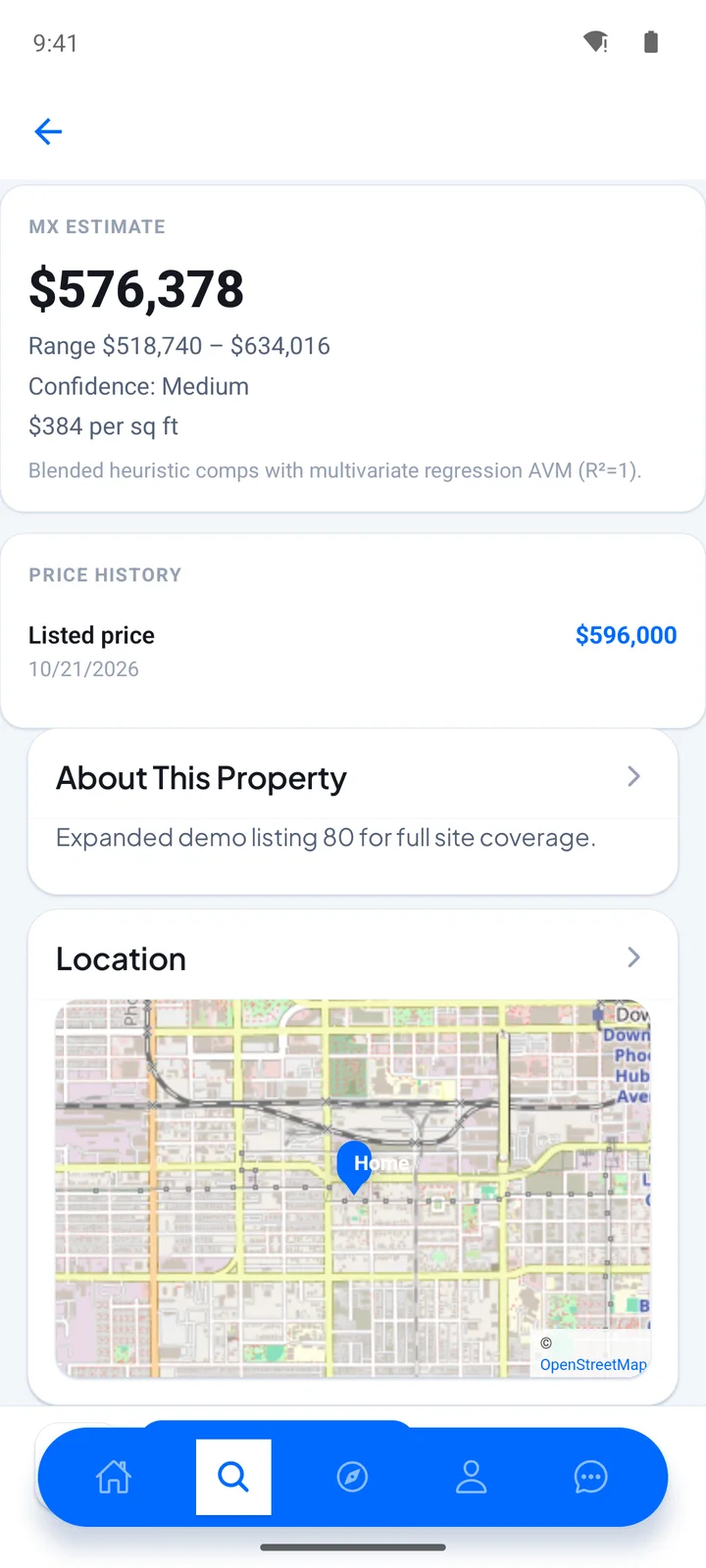
Zillow Clone app listing page with an estimated value and its range, the price history, a property description and a location map.
Zillow Clone app Quick Access menu with saved properties, recently viewed, hidden homes, saved searches, appointments, offers, subscriptions and messages.
Zillow Clone app buyer profile with counts for saved homes, searches, tours and notifications, saved home thumbnails and the next tour.
8 screens · scroll →
Zillow Clone admin dashboard with active users, published and pending listings, projects, subscription value, a 7, 30 or 90 day range and an operational chart.
1 screen
Zillow Clone web portal home with Buy, Rent and Sell search tabs, a map of properties near you and a trip guide section.
1 screen

Follow a renter from the home search through result cards and a listing page to the map, the gallery and the account menu, and follow an operator through an admin dashboard that counts properties, agents and activity.

Explore Our Solutions

02Proof

Client Voices

Zillow Clone Client Reviews - Founders in Their Own Words

What clients say about launching on Miracuves bases. Two of these describe property and rental platforms; the others come from other industries and are shown exactly as their authors gave them.

RRenido TeamFounding team, Renido
“Listings, search, media handling and enquiries were all ready. Our work was the local property types, the map behaviour and how agents actually get leads. Live inside a month.”
GGoToRawanda TeamFounding team, GoToRawanda
“Hosts, listings, calendars and payments were solved. Our work was the local payment methods, the languages our guests use and the property types we actually list. It replaced a phone-and-email process inside a month.”
DDr. Vivek RungtaFounder & Chief Dermatologist, Dermacian
“Every HMS I tried was built for general physicians, with no lesion mapping, no before/after tracking, and no procedure-based billing. Their MXHealth base gave us the patient app, doctor app, EMR and video consult out of the box. Front-desk time on scheduling and follow-ups is down ~70%, and we went fully digital in 9 months, where a fully custom job would have been 18.”
AAndre GittensCEO, Ride Corporation
“Turo is the obvious reference, but the Caribbean specifics, from different insurance norms to different payment rails, meant we needed a real partner, not just a clone. Miracuves’s MXCar base covered the listing, the trip flow, and the host payouts. We launched in 6 working days and are live in three islands.”
MMarsha WilliamsFounder, Bmore On Demands LLC
“The team was running it on a dispatcher and a Google Sheet, and we needed a real platform quickly, because we were about to onboard a major retail client. Miracuves’s Delivery Genie base gave us the rider app, the dispatch console, and live tracking. We launched in 6 weeks and cleared 4x the previous order volume in the first month.”
TTiffany DandreaOperations Director, Best Cabo Yacht Rentals
“We were running it on phone calls and a paper calendar, and we were losing bookings to bigger OTAs. Miracuves’s GetmyBoat Clone base gave us the calendar, the booking flow, and the payment engine. Online bookings are up roughly 70% in the first six months, and the ops team finally has a live view of the fleet.”
DDr. Carlos A. PalermoCo-founder & CEO, Doctta Health
“Building a compliant telehealth stack from scratch in three markets would have been a year-plus effort. Miracuves’s MXHealth base covered the patient and doctor apps, video consult, e-prescription and the pharmacy integrations. We launched in our first market in 9 weeks and rolled out to two more in the following six months.”
BBrian LatailleVP Logistics Technology, IBC Tanks Canada
“We were juggling spreadsheets, a third-party GPS provider, and a phone. We needed a single operations console. Miracuves’s MXLogistics base covered the trip lifecycle, the driver app, and the customer tracking page. We’ve cut operations admin time by about 40%.”
Read More Client TestimonialsOperators and founders in their own words

Proof in Production

Zillow Clone Case Study - Renido Property Listings Platform

How a property listings business launched on the Miracuves Zillow Clone base. Summarized from the published case study, which counts 18 of 22 building blocks reused and four built for the client.

Case Study
Property Listings Platform

Renido needed a property listings platform where search works. Miracuves built on the Zillow Clone base, put the effort into the four decisions that were the client's own, and transferred the source code at handover.

RenidoClient
MXMillowProduct
Property listingsIndustry
6 daysBuild time
18 of 22Blocks reused
4Applications shipped
Zillow Clone admin dashboard with active users, published and pending listings, projects, subscription value, a 7, 30 or 90 day range and an operational chart.
Challenges
  • Stale, duplicated or fraudulent listings damage trust faster than any feature can rebuild it
  • Search has to feel instant across a large catalog that keeps changing
  • An inquiry that reaches the wrong agent, or reaches one late, is a lost transaction
Goal
  • Launch the platform without rebuilding mechanics the base has already proven
  • Focus the work on choices the client made for itself
  • Hold the source code outright
Solution by Miracuves
  • Renter, agent, moderator and admin applications, each with its own permissions
  • Property types, territories and agent terms configured for the client
  • Brand and theming applied across every surface
  • Source, schema, deployment configuration and architecture notes handed over
  • Build window of 6 working days on the ready-made base

“Listings, search, media handling and enquiries were all ready. Our work was the local property types, the map behaviour and how agents actually get leads. Live inside a month.”Renido Team · Founding team, Renido

Read the full case studySee the 18 reused blocks and the 4 built for this client.

03The product

The Basics

The White-Label Zillow App for Buyers, Renters, Sellers and Agents

A Zillow clone is a ready-made real estate portal, and Miracuves delivers one where buying, renting and selling share a single site. Buyers and renters search sale and rental listings, sellers get a value estimate, agents pick up the inquiries, and the operator runs the whole thing from an admin panel that moderates listings and tracks packages.
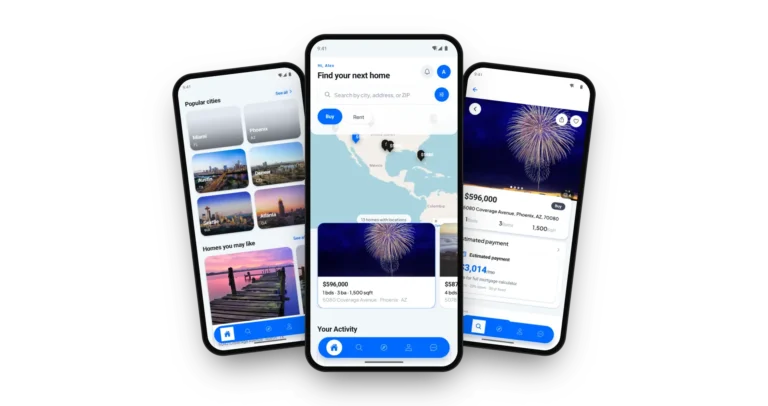
Zillow Clone on three phones: the home search with a Buy or Rent switch, priced map pins and listing cards, the popular cities as photo cards above suggested homes and the listing page with photos, price and an estimated monthly payment

More Than a Search Page

Most of the value surrounds the search itself: valuation, a mortgage calculator, offers, tours, messaging, an agent directory, and an admin panel that handles moderation and reporting.

Not a Locked Box

You get the complete source code with no encryption, so your team can change screens and rules as the market asks, with no per-seat fee to pay.

Plain About What Is Extra

VR tours, predictive insights, AI-assisted negotiation and automated document handling are add-ons priced on their own. They are listed as add-ons, never counted as base features.

Web, Android & iOS

What Is a Zillow Clone Script?

The hard part of a property portal is not the search box. It is the trust around it: listings that are checked before they appear, agents who are verified, an inquiry that reaches the right person and numbers the operator can stand behind. Those parts ship working.
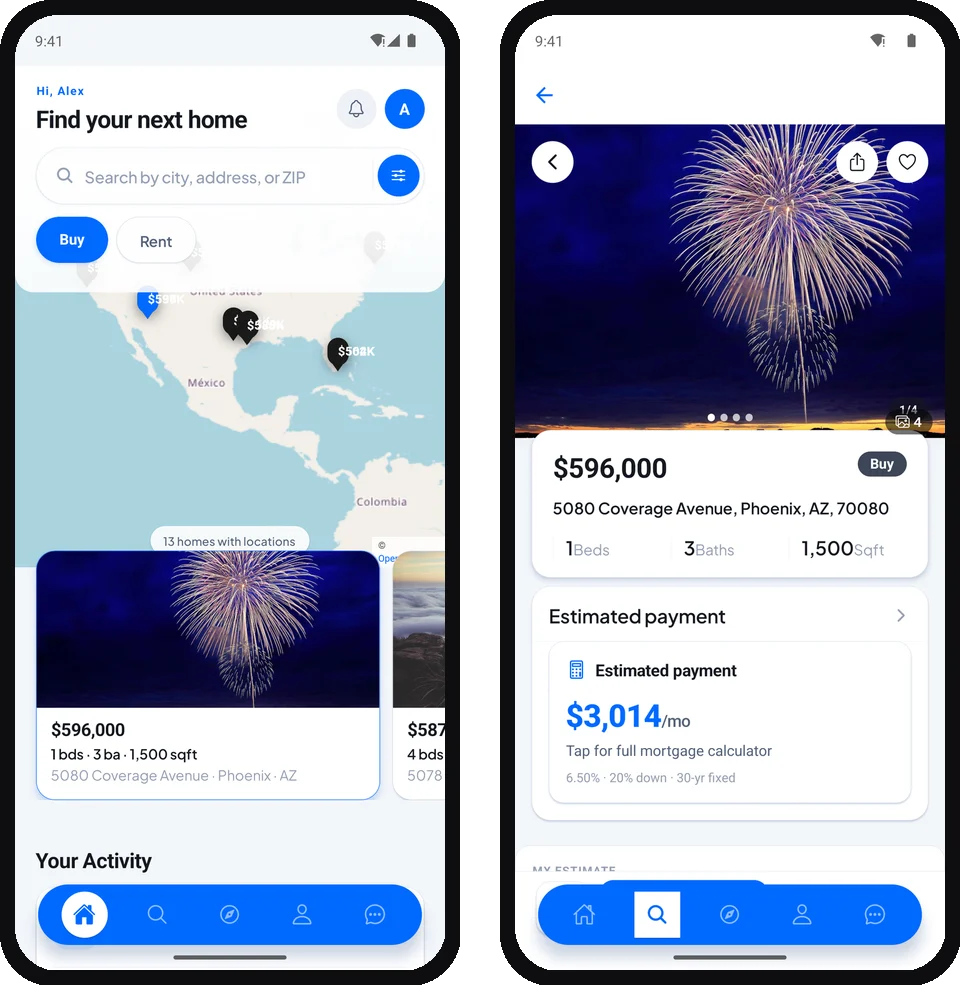
Zillow Clone app on two phones: the home search with map pins and a listing page with its estimated monthly payment.
  1. 01Buy and rent search with filters, a map and sorting
  2. 02Instant value estimate for sellers
  3. 03Mortgage and affordability calculators
  4. 04Agent profiles, lead inbox, tours and messaging
  5. 05Admin panel with moderation, packages and reports

You receive a web portal, a mobile app and an admin panel, plus the API and the database schema behind them, with the complete source code.

What You Get

Zillow Clone Features - Search, Valuation, Mortgage Tools, Offers, Leases, Agents & Alerts

You can find each Zillow clone feature Miracuves lists below on the demo pages, in the app screens or in the product documentation. Anything that needs an extra module is named as an add-on further down the page.

Feature 01 / 12

Buy & Rent Search

Visitors search the sale and rental catalogs with filters for city, price, bedrooms, bathrooms and property type, sort the results and read a short market snapshot above them.

  • City or area, price range, bedroom and bathroom filters
  • Property types: house, apartment, condo, townhouse and land
  • Sort by price, newest or most viewed
  • Market snapshot above the results with homes in search and average asking price
  • Buy and Rent switch at home, Sold tab in results
Feature 02 / 12

Map Search & Nearby Places

A map view with markers sits beside the list, and listing pages show their surroundings, so a buyer can judge a street before asking for a tour.

  • Map view with markers and drag-to-search
  • Photo cards for popular cities, with a See all link
  • Nearby properties from the phone location in the app
  • Address autocomplete while an agent writes a listing
  • Schools, transit and other nearby places on the listing page
Feature 03 / 12

Listing Pages That Convince

Each listing carries a photo gallery, a price, bedrooms, bathrooms and area, a detail and features list, a location map and reviews, with its price history kept alongside.

  • Photo gallery with video, floor plans and 360-degree photos
  • Detail and features list with amenities
  • Location map with a price pin
  • Price history log on every listing
  • Star ratings and written reviews
Feature 04 / 12

Instant Valuation Estimate

A seller enters an address, a city, a property type and an area and gets an estimated value on the sell page, with the logic set up per city by the operator.

  • Estimate from address, city, property type and area
  • Confidence level shown beside the number
  • Price per square foot and comparable sales for context
  • Rental estimate for owners who plan to let
  • Per-city calibration of the estimate
Feature 05 / 12

Mortgage & Affordability Calculators

The home loans page turns a property value, a down payment, a term and a rate into a monthly payment, and passes interested buyers to a pre-qualification request.

  • Monthly payment from value, down payment, term and interest rate
  • Result lines for principal and interest, PMI, property tax, insurance and HOA
  • Reference loan types for six country markets
  • Pre-qualification request from the calculator
  • Affordability calculator based on debt-to-income
Feature 06 / 12

Sell Routes for Owners

Owners choose how to sell: with an agent, with a commission range shown up front, or directly with a showing dashboard and contract templates.

  • Free value estimate as the first step
  • List with an agent, with the commission range displayed
  • Sell by owner with a showing dashboard and contract templates
  • Multi-step listing wizard: location, type, specs, media, pricing
  • Draft saving while a listing is being written
Feature 07 / 12

Rental Applications & Leases

Renters apply to a unit, owners review the application, draft the lease and both sides sign, so the paperwork lives next to the listing.

  • Rental application with move-in date and unit choice
  • Owner review: approve, reject or let the renter withdraw
  • Lease terms drafted by the owner
  • Digital signatures from both sides, each with a timestamp
  • Buildings with several units tracked one by one
Feature 08 / 12

Offers, Counter-Offers & Closing Stages

Buyers send an offer with an amount, a message and an expiry date, owners counter, and the closing moves through named stages until it is done.

  • Offer with amount, message and expiration date
  • Counter-offer from the owner and a limited re-counter
  • Accept, reject or withdraw an offer
  • Closing stages: under contract, inspection, financing, clear to close, closed
  • Expected close date and notes for every stage
Feature 09 / 12

Tours & In-App Messaging

Buyers book a tour and chat with the agent without leaving the platform, and agents confirm, reschedule and keep notes on every visit.

  • Tour at an exact time or in a morning, afternoon or evening slot
  • Agent-led and self-guided tours
  • Owner confirmation and reminders by push and email
  • Real-time chat with read receipts and typing indicators
  • Listing reference attached to a thread, with pin and archive
Feature 10 / 12

Agent Directory & Profiles

Visitors search verified agents by name and city and open a profile with its rating, years of experience and active listings.

  • Search agents by name and city or area
  • Verified badge granted after an admin check
  • Rating, years of experience and active listing count
  • Languages, service areas and specializations on the profile
  • Optional license number and a featured-agents slot
Feature 11 / 12

Lead Inbox & Agent Dashboard

Inquiries land in a lead inbox that records where each one came from, and the agent dashboard shows listings, inquiries and conversion at a glance.

  • Lead inbox with a status pipeline from new to won or lost
  • Lead source: contact form, listing inquiry, agent inquiry or mortgage form
  • Private notes and follow-up reminders on every lead
  • Dashboard with active listings, pending reviews and conversion
  • Per-listing views and inquiries, with CSV export
Feature 12 / 12

Wishlist, Saved Searches & Alerts

People save homes, keep their searches and hear about new matches by email or push, so the portal brings them back.

  • Saved homes counted on the user dashboard
  • Saved searches that keep every filter
  • Instant, daily or weekly email alerts
  • Push notifications on new listings and messages in the app
  • Side-by-side comparison and recently viewed homes

Before you buy, note this: The portal is handed over finished and carrying your brand. What you provide: a server and a domain, an Apple and Google developer account to publish from, your logo and company details, a payment gateway with KYC already done, and keys for the outside services you switch on. Lender partners, MLS data and app store review depend on other parties and fall outside our 6-day build time.

Talk to Our Team

How Operators Earn

Zillow Clone Revenue Models - Agent Packages, Featured Listings, Lead Fees, Rental Ads & Mortgage Leads

Miracuves built this Zillow clone so a property portal earns in several places. Packages, featured placement and ad slots are each configured on their own in the admin panel, while referral and lender fees are tracked from the lead records and invoiced under your own agreements.

Two lines usually move the numbers most: the packages agents subscribe to and the placement they pay for inside the search results.

  1. 01

    Agent Packages

    Agents buy a package with a price, a duration and a cap on active listings, and the admin panel marks which tier is recommended. It is a recurring line that does not depend on any single sale.

  2. 02

    Featured & Boosted Listings

    A listing can carry a featured or premium flag, and boost multipliers are set by the operator, so a better position in the results becomes something an agent can buy for a period.

  3. 03

    Lead Referral Fees

    Every inquiry is recorded with its source and a status from new to won, so a fee per lead or a fee when a deal closes can be tracked from the same inbox.

  4. 04

    Rental Advertising

    Property managers can pay to list rentals and to push them up, using the same packages and featured placement that sale listings use.

  5. 05

    Banner & Ad Slots

    The admin panel manages banners and ads by slot, with placement and scheduling, so local lenders, movers or developers can buy visibility beside the search.

  6. 06

    Mortgage Leads

    The calculator ends in a pre-qualification request that is stored as a lead with its own source tag, ready to hand to a lender partner under your agreement.

What listing portals report earning on the four lines this platform can run, with each figure traced to a filing, a statute or a published fee page.
Revenue streamHow it is chargedTake rateTypical take rateWhat sets the ceiling
Agent PackagesA subscription tier per agent, with a price per period and a cap on active listings.Zillow sells subscriptions with leads shared by share of voice; Homes.com sells agent memberships.Traffic: Zillow's residential line was $1.70bn in 2025, 66% of its revenue. Billed inside an iOS app, Apple takes 30% (15% for small developers and qualifying subscriptions); on the web, Stripe lists 2.9% + 30c.
Lead Referral FeesA fee only when an inquiry turns into a closed transaction, tracked from the lead inbox.Zillow Preferred: a fee at closing, percentage not disclosed. RE/MAX broker fee: generally 1%.Agent contracts set the real rate, and the filings give no percentage. For scale, Redfin charged most sellers a 1% to 1.5% listing commission against a more common 2.5%.
Rental AdvertisingProperty managers pay per lead, lease, listing or impression, or take a fixed package.Zillow Rentals revenue was $630m in 2025, sold per lead, lease, listing or impression.Renter demand in your cities. Screening fees are capped by state: New York limits a landlord's background and credit check charge to the actual cost or $20, whichever is less.
Mortgage LeadsA fee per pre-qualification request passed to a lender partner, or a share of a loan a licensed partner originates.Zillow Home Loans: $199m in 2025 from origination fees and gain on sale, up 37%.Origination needs a licensed lender, and the software holds no license. Your partner agreement sets what a lead or a loan pays; the demo shows reference rates only.

How to read this. The portal figures come from the annual reports on Form 10-K of Zillow Group, CoStar Group, RE/MAX and Redfin (fiscal 2024), the screening cap from the New York statute, and the payment costs from Apple and Stripe. Filings give revenue and billing methods, so only some lines carry a percentage. Treat every figure as a modeling input rather than a quote or a forecast of your own earnings.

Revenue Model

Zillow Clone Revenue Model, Stage by Stage

All six revenue lines already sit in Miracuves' Zillow clone, so a buy, rent and sell real estate portal adds them as supply and traffic build.

Packages first

With the first agencies on board, agent packages bring scheduled income, and the value estimate on the sell page draws in owners whose listings give agents a reason to subscribe.

Placement and ads

As agents compete for the same neighborhoods, boosted listings sell a better position for a set period, and banner slots with their own placement and schedule open to movers and developers.

Leads and lenders

At multi-market size, referral fees run from the lead inbox, rental advertising brings in property managers, and mortgage calculator requests reach a licensed lender partner as tagged leads.

Packages, boosts, banners, referral fees and lender leads are billed through your Stripe or PayPal account, with zero royalty to Miracuves.

Want a revenue model built around your own property portal?Design My Revenue Model

Operate It Day to Day

Zillow Clone Admin Panel - Listings, Agents, Moderation, Packages & Reports

In Miracuves' Zillow clone, one console covers the operator's day: which listings wait for review, which agents are verified, what the packages earn, where the leads come from and what the public site says.

Zillow Clone admin dashboard with active users, published and pending listings, projects, subscription value, a 7, 30 or 90 day range and an operational chart.
Zillow Clone web portal home with Buy, Rent and Sell search tabs, a map of properties near you and a trip guide section.

Admin Panel Sections

  • 01

    Dashboard & Growth

    A command center with a live view of moderation, content, subscriptions and growth, switchable between 7, 30 and 90 days, plus analytics and an audit log.

  • 02

    Listings & Projects

    One inventory area for listings, projects, articles, pages and FAQ, so the catalog and the content around it are edited in the same place.

  • 03

    Users & Agents

    User and agent lists, role assignment and a verification queue where an agent earns the verified badge shown on their profile.

  • 04

    Moderation & Reports

    A review queue for new listings, a moderator dashboard, appeals and a reports queue for listings and reviews that someone flagged.

  • 05

    Leads & Appointments

    Every lead and tour request in one place, assignable to an agent, with source analytics and bulk confirm or reschedule.

  • 06

    Packages & Gateways

    Agent packages, subscriptions, payment gateways, ads and banners, with refunds and a switch to turn a gateway off during an incident.

  • 07

    Automation & Feeds

    Settings for AI tools, MLS feed sync, the media pipeline and recommendations, with a manual sync button and a view of past runs.

  • 08

    Settings, Languages & Notifications

    Site name, logo, colors, languages with right-to-left support, currency display, feature switches and broadcast notifications to users or agents.

Money & Packages

The finance side of the console, from a package price to a refund.

  • Packages with price, duration and listing limits
  • Stripe, PayPal and offline payment requests
  • Manual approval of offline payments
  • Subscription history, expiry and refunds

Control & Audit

The controls behind the public site and the daily operation.

  • Audit log filtered by action, entity and date
  • Moderation queue with appeals
  • Demo and live mode switch
  • Fifty-plus runtime settings without code changes

Should the console go beyond this? Another report, an added approval step, extra languages or a changed package structure each get their own scope. Say what your operations team requires and a written price follows.

Talk to Our Team

04Package and price

The Full Package

Package Contents: Source Code, Apps & Deployment for Your Zillow Clone

From Miracuves you get a finished, running Zillow clone portal, not loose components: the website, the mobile app, the admin panel, the API, the source code and the underlying schema. You become the full owner, with no per-seat or per-run fees and no license to maintain. What is not paid to Miracuves: hosting, gateway accounts, store developer accounts and any MLS data license.

01

Full Source Code

Every line of the web portal, the API and the mobile app, left unencrypted, so your own developers can shape it around your business.

  • Next.js web portal source, unencrypted
  • NestJS API and background workers
  • Expo mobile app project for Android and iOS
  • Delivered into your own repository
02

Schema & Migrations

The tables behind listings, users, agents, leads, offers and payments, with the migrations that created them, so the database can be rebuilt from nothing.

  • PostgreSQL schema with versioned migrations
  • Listings, users, agents and leads
  • Offers, applications, packages and payments
  • Audit log and price history tables
03

Chat, Alerts & Notifications

Messaging between buyers and agents, and the alerts that bring people back to a listing or a saved search.

  • Real-time chat between buyer and agent
  • Saved-search alerts by email
  • Push notifications in the mobile app
  • Reminders for tours and follow-ups
Zillow Clone web portal home with Buy, Rent and Sell search tabs, a map of properties near you and a trip guide section.
04

Portal Website

The responsive public site with buy, rent, sell, home loans and agent pages, a listing wizard for owners and a place for articles and FAQ.

  • Buy and rent pages with filters and sorting
  • Sell page with the value estimate
  • Home loans page with the mortgage calculator
  • Agent finder and agent profiles
05

Mobile App

One app for buyers, renters and agents covering search, listings, messages, tours and notifications, published from your own developer accounts.

  • Search, map and listing screens
  • Chat, tours and offers on the phone
  • Push notifications and device location
  • Publishing from your own developer accounts
Zillow Clone app listing page with a photo gallery, price, address, beds, baths, square footage and an estimated monthly payment.
Zillow Clone admin dashboard with active users, published and pending listings, projects, subscription value, a 7, 30 or 90 day range and an operational chart.
06

Admin Panel

The operator console with analytics, listings, users, agents, leads, moderation, packages, gateways, content and settings.

  • Dashboard, analytics and audit log
  • Listings, projects, articles, pages and FAQ
  • Moderation queue, reports and appeals
  • Packages, subscriptions, gateways, ads and banners
07

Access & Security Layer

A role ladder from user to agent to moderator to admin, with the protections the web platform and the API ship with.

  • Roles enforced at the API, not just the screen
  • Abuse protection tuned for public and signed-in traffic
  • Passwords hashed and gateway webhooks verified
  • Production credentials kept out of the repository
08

Handover & Support

We rebrand and deploy for you, hand over the written pack, and start the three support periods that run side by side from launch.

  • Your logo, icons and colors applied everywhere
  • Deployment to your own hosting
  • Deployment setup and architecture notes
  • 60 days guidance, 6 months bug fixes, 12 months updates

Want to see it before deciding? Sign in to the demo as a buyer or as an agent, or ask for a guided tour. We can walk through a filtered search, a listing page, the value estimate and the mortgage calculator, each set against your own market plan.

Talk to Our Team

Transparent Pricing

How Much Does It Cost to Build a Property Portal Like Zillow?

The launch-ready white-label Zillow Clone is a fixed price of $4,299. Work beyond the base, such as add-ons, extra integrations or custom flows, is scoped and quoted separately in writing.

Most Popular

Professional

Ready-Made Launch Package
$4,299paid once
Ships in 6 days

Suited to: Property portal startups, brokerages and agent networks, rental marketplaces

The platform arrives as the demo shows it, rebranded to your logo, icons and colors, and deployed on your own hosting.

Get Started

Enterprise

Custom Builds for Larger Scope
Customquote
Go-live: based on final scope

Suited to: Multi-country portals, developer groups, brokerage chains

Need flows the base does not have? We build to your requirements and agree the scope and price before work starts.

Request a Quote
Development Cost

Zillow Clone Development Cost in 2026

One payment of $4,299 buys the complete Zillow clone from Miracuves: the Next.js portal, the Expo buyer and agent app, the admin console with listing moderation, the NestJS API, the schema and every line of source, deployed on your hosting in six working days.

$4,299 One-time payment
6 working days Rebranded and deployed
0% Revenue share

What lies beyond the fixed price

  • A server, a domain and an SMTP email account
  • Store developer accounts and app review by Apple and Google
  • Gateway fees on Stripe or PayPal, with KYC done
  • Lender partners for live rates and a data license for any MLS feed
  • Twilio SMS setup, plus add-ons such as VR tours or AI-assisted negotiation

A changed package structure, an added approval step or an MLS feed connector is quoted in writing and usually runs 2-8 weeks, while multi-country portals get an Enterprise quote.

Compare Your Options

Ready-Made Zillow Clone vs Custom Development vs SaaS

A property portal for buying, renting and selling can run on the Zillow clone script Miracuves ships ready-made, on code written for you by an agency, or on a hosted listings subscription. Compare them line by line.

CriteriaMiracuvesReady-Made Zillow CloneCustom DevelopmentSaaS
Launch timeA branded portal online in 6 working daysMonths of design and build are typicalUp quickly on shared infrastructure
Upfront cost$4,299, paid a single timeSet by a written quoteEntry fee plus monthly billing
Source code ownershipWeb portal, API, Expo app and schema, all yoursUsually assigned to youNo code changes hands
CustomizationA new package structure or approval step is priced in writing, running 2-8 weeksBuilt to your briefWhatever the admin screens allow
Ongoing feesNo per-seat or per-run fees; MLS data, hosting and gateways billed by othersMaintenance under contractPlan fees each billing period
Branding & app-store listingYour name on web and Android and iOS, published from your accountsYour name; store work extraVendor-branded listings are common
Best forPortals covering buy, rent and sell with agent packagesA property product with new mechanicsBrokers trying online listings first

Same product, other editions: Trulia Clone · Browse all Rentals solutions

Where It Fits

Use Cases for Real Estate Apps Like Zillow - Full Portals, Rentals, Agent Networks, Regions & New Builds

Different operators lean on different parts of the same Miracuves Zillow clone. A portal startup puts search, valuation and packages first, a brokerage puts agent profiles and the lead inbox first, and a rental marketplace puts applications and leases first. You set the emphasis in configuration.

BuyRentSellFull-Service Property Portal

Open one site where people buy, rent and sell, with the value estimate and the mortgage calculator giving visitors a reason to return before they ever contact an agent.

01
Zillow Clone app search results with Buy, Rent and Sold tabs, sort chips, saved searches and listing cards.
RentLeasesRental Marketplace

Focus on rentals: filtered results, listings with several units, applications that owners review and leases that both sides sign.

02
Zillow Clone app Rent tab listing homes with a monthly price, beds, baths and square footage, under sort chips and saved searches.
AgentsLeadsAgent Network & Brokerage Site

Give a brokerage its own portal where agents hold verified profiles, receive inquiries in a lead inbox and track conversion on their dashboard.

03
Zillow Clone admin dashboard with active users, published and pending listings, projects, subscription value, a 7, 30 or 90 day range and an operational chart.
RegionLocaleRegional Real Estate Portal

Serve one country or a group of cities with the languages you need, including right-to-left, and a currency picker for visitors from abroad.

04
Zillow Clone web portal home with Buy, Rent and Sell search tabs, a map of properties near you and a trip guide section.
OwnerDirectFor-Sale-By-Owner Platform

Let owners list directly, with the value estimate as the hook, a showing dashboard and contract templates, while agents can still be added for those who want them.

05
Zillow Clone app listing page with a photo gallery, price, address, beds, baths, square footage and an estimated monthly payment.
ProjectsDevelopersNew-Build & Project Showcase

Present developments as projects with their own pages and banners, and route inquiries to the sales team through the same lead inbox.

06
Zillow Clone app Popular cities section with photo cards for Miami, Phoenix, Austin, Denver, Seattle and Atlanta, above homes you may like.
Business Model

Zillow Clone Business Model: Three Ways to Run It

A portal like Zillow earns from agents and partners while home seekers search free, and the same Miracuves build runs three distinct businesses.

Full-service portal

Buying, renting and selling sit on one site, with the value estimate and mortgage calculator bringing visitors back until agent packages and featured placement turn that traffic into income.

Rental marketplace

A rentals-led portal runs on rental applications, unit-level inventory and leases both sides sign, while property managers pay to list and promote vacancies.

Owner-direct platform

A for-sale-by-owner model hooks sellers with the free value estimate, gives them a showing dashboard and contract templates, and still lets agents join for owners who want one.

A rentals-led city can lean on property manager listings while an owner-direct market leans on agent packages and featured placement, and Miracuves keeps no cut of either.

One codebase, six business shapes. All six share the portal website, the app and the admin panel. What differs is the cities you list, the agents you invite, the packages you sell and the branding, so you only maintain one product.

Talk to Our Team

Market Timing

Why Build a Property Portal in 2026?

Property search is local, trust-heavy and still dominated by a few large listing sites, so a branded portal on Miracuves' Zillow clone starts with room to win local share. A portal under your own brand gives you the supply, the audience and the agent revenue that those sites keep today.

01

Search Starts on a Screen

People look at neighborhoods, prices and photos long before they speak to anyone. A filtered search, a map and a clean listing page meet them at that first step.

02

Agents Pay for Attention

Agents want inquiries they can act on. Packages, featured placement and a lead inbox give them a reason to list on your portal rather than a rival one.

03

Sellers Want a Number First

An instant value estimate on the sell page gives an owner something useful in the first minute and gives you their address, their plans and a way to follow up.

04

Money Questions Come Early

Buyers ask what a home costs per month before they ask about the kitchen. A mortgage calculator inside the portal answers that question where they already are.

05

Your Name, Not Someone Else's

When the portal carries your brand, the audience, the agent relationships and the data stay with you instead of building another company's list.

06

Buying Is Quicker Than Building

Search, valuation, mortgage tools, agents, tours, offers and an admin console are most of a portal. After 6 days of our build time, a white-label copy runs on your own hosting.

Platform by the Numbers

4

Roles, One Codebase

6

Calculator Markets in the Demo

3

Languages, Including RTL

6

Days of Build Time

Most of the work in a property portal is the unglamorous middle: moderated listings, verified agents, lead routing, tours, offers and an admin console that ties it together. Here it is already built.

Industries

Industries We Serve

Miracuves designed its Zillow clone for any real estate business that puts properties in front of people who want to buy, rent or sell them. Residential portals list homes for sale. Rental marketplaces list apartments and houses to let. Brokerages and agent networks run their own search. New-build developers show projects. Property managers advertise vacancies. Vacation rental hosts promote stays. Commercial and land listings reach their own buyers. Lenders and moving services add a mortgage or a move to the same visit.

  1. 01Home Sales
  2. 02Rental Listings
  3. 03Brokerages
  4. 04Agent Networks
  5. 05New Developments
  6. 06Property Managers
  7. 07Vacation Rentals
  8. 08Commercial Property
  9. 09Land Listings
  10. 10Moving Services
  11. 11Mortgage Lenders
  12. 12Regional Portals

Miracuves’ Zillow Clone is a buy, rent and sell portal you can adapt to the property business you run, with the search, the agent tools and the admin panel carrying your name from the first screen.

06Under the hood

End to End

How Buyers Use the Zillow Clone App - Search, Compare, Open, Value, Tour & Offer

To a buyer using a Miracuves Zillow clone, a home search is a few taps. Underneath it is a chain of search, listing, estimate, tour and offer. Below is that chain from sign-up to an accepted offer, followed by the architecture that carries it.

Buyer Journey - From a Search to an Accepted Offer

  1. Zillow Clone app buyer profile with counts for saved homes, searches, tours and notifications, saved home thumbnails and the next tour.
    1Sign Up for the Home Search App

    A visitor registers by email and password or with Firebase, then keeps a profile with a photo, phone number and notification preferences.

    • Email sign-up with verification
    • Profile photo and phone with a one-time code
    • Notification choices per channel
  2. Zillow Clone app home screen with a city, address or ZIP search, a Buy or Rent switch, a map of price pins and listing cards.
    2Search Homes to Buy or Rent

    Home opens on a Buy or Rent switch and a search for city, address or ZIP, then filters for price, bedrooms, home type and occupancy.

    • Buy or Rent switch
    • Location search
    • Price, bedroom and type filters
  3. Zillow Clone app search results with Buy, Rent and Sold tabs, sort chips, saved searches and listing cards.
    3Compare Homes by Price & Size

    Each result card shows price, bedrooms, bathrooms and area; lists can be sorted, flipped to a map of price pins or saved to a wishlist.

    • Result count and sort menu
    • List and map views
    • Wishlist heart on every card
  4. Zillow Clone app listing page with a photo gallery, price, address, beds, baths, square footage and an estimated monthly payment.
    4Open the Home Listing

    Photos, the monthly or asking price, the details and features and the rating for one address come together on the listing page.

    • Photo, address and price
    • Beds, baths and area
    • Detail and features list
  5. Zillow Clone app listing page with an estimated value and its range, the price history, a property description and a location map.
    5Estimate Value & Monthly Payment

    Map, amenities and gallery show the place, the calculator converts price into a monthly payment and the value estimate adds context.

    • Location map with a price pin
    • Amenities and photo gallery
    • Mortgage calculator for the payment
  6. Zillow Clone app Quick Access menu with saved properties, recently viewed, hidden homes, saved searches, appointments, offers, subscriptions and messages.
    6Tour the Home & Make an Offer

    The buyer messages the agent, books a tour and sends an offer that both sides can counter until accepted, with closing stages tracked after.

    • Chat and tour booking
    • Offer, counter-offer and acceptance
    • Closing stages with notes
Visual Flow DiagramSign upSearchCompareOpenValueOffer

How It's Built

Architecture of a Property Portal Like Zillow & Transaction Flow

Talk to Our Team
  1. Layer 01

    Four Roles, Separate Permissions

    User, agent, moderator and admin form a ladder enforced at the API, so a renter can never open the operator console and an agent only reaches their own listings.

  2. Layer 02

    Two Lifecycles per Listing

    Every listing has a review status (draft, in review, published, rejected, appeal) and a market status (active, pending, contingent, sold), which is why the pages can show both.

  3. Layer 03

    Search Built on Indexes

    Filters run on database indexes, with spatial indexes available for map search, and list results are paged so a long catalog stays quick.

  4. Layer 04

    Append-Only Price History

    Each price change is saved as a new row in its own history table rather than overwriting the old figure, so a listing page can show its history and a dispute can be checked against a record.

  5. Layer 05

    Payments That Are Never Fulfilled Twice

    Checkout confirmations are matched to unique session and transaction ids, and failed fulfillments retry in the background instead of creating duplicates.

  6. Layer 06

    Real-Time Messages, Background Jobs

    Chat and notifications reach the screen as they happen, while email, saved-search matching and feed syncs run as scheduled background jobs.

Under the Hood

The Stack Under a Zillow-Style Portal: Next.js and NestJS, PostgreSQL, Expo & Payment Gateways

Any app like Zillow needs a fast web tier, a database that keeps listings and offers consistent and a mobile app that feels native, and Miracuves picked a mainstream tool for each. Here is what the platform is built with, as the demo and the product documentation describe it.

WEB

Web Portal

Next.js React Node.js
  • Buy, rent, sell, home loans and agent pages
  • Listing wizard and owner dashboard
  • English, Spanish and Arabic with right-to-left
  • Server-rendered pages for search engines
API

API & Workers

NestJS REST GraphQL
  • Modular API for listings, users, leads and offers
  • Role guards and request validation
  • Background workers for email, retries and expiry
  • Documented endpoints
DATABASE

Data Tier

PostgreSQL Prisma Redis
  • Listings, agents, leads, offers and payments
  • Versioned migrations delivered with the source
  • Redis cache with an in-memory fallback
  • Rebuildable from empty
MOBILE

Mobile App

Expo React Native Android iOS
  • Search, map, listing and chat screens
  • Push notifications and device location
  • Sign-in tokens held in secure device storage
  • Published from your own developer accounts
PAYMENTS

Gateways & Packages

Stripe PayPal Offline Payment
  • Stripe checkout for agent packages
  • PayPal orders with verified callbacks
  • Offline payment requests approved by an admin
  • Your own gateway account and KYC required
INTEGRATIONS

Third-Party Services

Google Maps Firebase Twilio MLS
  • Maps and address autocomplete
  • Firebase sign-in and push
  • Twilio for SMS, wired in as setup work we scope with you
  • MLS feeds: custom feed, RESO, MLS Grid, Bridge, Trestle, SimplyRETS
Tech buyer notes:

The web portal runs on Next.js and React, the API on NestJS with a PostgreSQL database, and the mobile app on Expo, which is React Native. The published Renido case study names the same web stack. Google Maps, Firebase, Stripe, PayPal and any MLS feed work from accounts and keys you own, entered at deployment. Twilio SMS joins as a scoped setup task agreed with you. Everything named here is mainstream and easy to hire for.

Talk to Our Team

Build to Scale

Built to Scale - Separate Layers, Cached Reads, Background Jobs & Growth Headroom

The portal is built as separate layers around a shared API, so adding cities, agents and listings is a matter of capacity and configuration rather than a rewrite.

Web, App and Admin Share One API. The three surfaces call the same API, so a rule changed once reaches every screen and a release of one surface does not hold up the others.

Reads Served From Cache. Market summaries are cached for a few minutes and Redis carries the load with an in-memory fallback.

Slow Work Leaves the Request. Email, retries, saved-search matching, subscription expiry and the hourly feed sync run in background workers, so a page never waits for them.

Money Records That Reconcile. Subscriptions and payments are recorded against unique ids, so what the dashboard reports can be checked against the gateway.

01

Separate Layers

Web, mobile and admin sit on one API, each with its own release path, so each can change without touching the others.

02
IndexFiltersMap

Indexed Search

Filters and sorting run on database indexes, with spatial indexes available for map queries and paging that caps a page at 100 results.

  • Filter and sort on indexes
  • Spatial indexes for map search
  • Paging with a 100-result cap
  • Filter state kept in the page address
03

Background Workers

Email, payment retries, saved-search matching, subscription expiry and the MLS sync run outside the request.

  • Email queue with retries
  • Payment retry with backoff
  • Hourly MLS sync worker
  • Manual triggers in the admin panel
04
LimitsCachePublic

Rate-Limited, Cached Reads

A throttler protects the API while public browse pages stay open, and hot reads come from a cache.

  • Default and signed-in rate tiers
  • Redis cache with in-memory fallback
  • Market summaries cached for minutes
05

Recorded Transactions

Payments and subscriptions are written against unique ids, with retry jobs for failed fulfillments and manual refunds in the admin panel.

  • Unique session and transaction ids
  • Verified gateway callbacks
  • Retry on failure
  • Refunds from the admin panel
06

Written Handover

The source, the schema, the deployment setup and the architecture notes are written down and passed on, so a different team could run the platform without us.

Ready for Your Own Changes. Each market asks for something its own. Because the stack is mainstream and the source is complete, a new screen, rule or data feed is routine development that your team or ours can do.

Launching a portal? Begin with one city and the agents you can sign, then grow on the deployment you already run. More traffic is a hosting and configuration choice, and work beyond the base is scoped and priced on its own.

Talk to Our Team

07Security and trust

Built to Be Checked

Security in a Real Estate Portal Like Zillow - Role Ladder, Verified Webhooks & Honest Limits

Identities, inquiries, offers and payment references all live in a Zillow clone, so Miracuves treats three controls as the ones that count most: who can see what, where card details are sent, and what is checked before launch. Below we explain what the platform handles and what remains your responsibility.

  1. 01 · Roles
    Role Separation

    User, agent, moderator and admin form a ladder checked at the API, so a screen being hidden is never the only thing standing between a user and another person's data.

    • Listing Moderation: New listings can wait in a review queue with an appeal path, so a portal does not fill with properties nobody has checked.
    • Demo Accounts: The demo ships with sample accounts for each role. Switch demo sign-in off and remove them before the portal goes live.
  2. 02 · Audit
    Audit Trail

    One audit log records consequential events such as moderation decisions, payments and role changes, so a dispute is settled from the record and not from memory.

    • Report Queue: Visitors can flag a listing or a review with a reason, and moderators work through the queue with notes, so a bad listing does not stay up by neglect.
  3. 03 · Transport
    Transport & Storage

    Traffic runs over HTTPS, passwords and one-time codes are hashed, and the credentials an admin stores for integrations are encrypted at rest.

    • Rate Limits: A throttler slows abuse on the API with a higher allowance for signed-in users, while public browsing stays open.
  4. 04 · Secrets
    Secrets Handling

    Server secrets live in environment settings on hosting you run, and keys typed into the admin panel for integrations are saved encrypted with AES-256-GCM. Apart from the demo accounts, which a setting turns off before launch, the code carries no logins.

    • Named Launch Tasks: Penetration testing, key rotation, a restore drill and a review of your own gateway settings are listed as pre-launch work, not assumed to be done.
  5. 05 · Payments
    Payments Stay at the Gateway

    Card details go to Stripe or PayPal, callbacks are verified before an order is fulfilled, and the platform stores a reference to the payment, never the card itself.

    • Gateway Toggle: An admin can switch a payment gateway off during an incident, and refunds are handled from the console rather than the database.
  6. 06 · Backups
    Backups & Restore

    Database backups and an off-site copy are deployment tasks that we plan with you, and a restore is tried before launch because an untested backup is a guess.

Card data stays at Stripe and PayPal, and an audit log records consequential events. Pen testing, secret changes and restore testing slot into the launch plan we agree with you.

Discuss Security Before Launch

Marketplace Readiness

Operator Readiness of a Zillow Alternative - Software Duties Versus Operator Duties

A property portal connects people who will spend a large share of their savings or move into a stranger's property. Miracuves builds the search, moderation, lead and payment tooling; which listings you accept, how agents are licensed and what the law requires where you operate stays with you as the operator.

Built for a marketplace; certified under no regime.

On this page, ready describes software you can see working in the demo or in the admin panel. It is not a statement that the platform or Miracuves has been licensed, certified or approved by anyone, and nothing here is legal advice.

Built Into the Software

Listings with a review queue, verified agent profiles, a lead inbox, tours, offers, rental applications with signatures, a value estimate, a mortgage calculator, reports, separate role logins, packages with gateway checkout and an admin panel with an audit log.

Left to the Operator

Your terms of service and privacy policy, which agents and listings you accept, what proof you ask for, how disputes and takedowns are decided and your fee and refund rules beyond the defaults you configure.

Estimates, Lenders & Data Feeds

The home value estimate is a calculation, not an appraisal, and the calculator shows reference rates. Live lender rates and a lender comparison need your own lender partners, and an MLS feed needs your own membership and data license.

Where You Operate

Rules for real estate agents, brokerage licensing, advertising, fair housing, tenant screening, mortgages and electronic signatures differ by country and often by state. Check them for each market with qualified local advisers before you open the portal.

08Grow the platform

Included coreMXZillow
  • Buy, rent & sell portal
  • Valuation & mortgage tools
  • Agent profiles & lead inbox
  • Moderation & admin panel

Adding a module

  1. 1
    Choose a module

    VR tours, insights, negotiation help or document handling, at launch or afterward.

  2. 2
    Quote before work

    Each module is scoped and priced in writing before anyone starts.

  3. 3
    Delivered as source

    The new code joins the codebase you already own.

Ask About Custom Modules

Go Further

Add-Ons for a Zillow-Like Portal - VR Tours, Property Insights, AI Negotiation & Documents

As delivered, the portal works end to end and can be shown in the demo. The four modules below are the extras buyers of a property portal ask for most, and each one is priced separately because its scope depends on your market.

  • Discovery

    Virtual Reality Tours

    Immersive VR walkthroughs so a buyer can explore a home from another city. The base already carries photos, video, floor plans, 360-degree photos and links to virtual tours.

    VR · Tours
  • Discovery

    Smart Property Insights

    Predictive analytics on top of the valuation tool: appreciation trends, rental income projections and market forecasts for buyers who invest.

    Insights · Analytics
  • Deal flow

    AI-Assisted Negotiation

    Suggestions that help buyers and sellers shape an offer using market movement and comparable properties. Offers and counter-offers themselves are in the base.

    Offers · AI
  • Deal flow

    Automated Document Handling

    A paperwork layer for agreements, contracts and legal documents that moves a deal along with less manual filing and chasing.

    Documents · Deals

The Property Suite

Property Reaches Past Listings. Here Is What Sits Beside This Portal.

The Zillow Clone covers buying, renting and selling. If your plan also takes in managing rentals, short stays or investing in buildings, these four products speak to that.

A real estate agent handing over a new house key, the image on the Buildium Clone page.01
Pick it if: You manage rentals as well as list themBuildium Clone

Property management for landlords and managers, with tenant applications, secure payment processing, vacancy tracking and compliance management.

Explore Solution
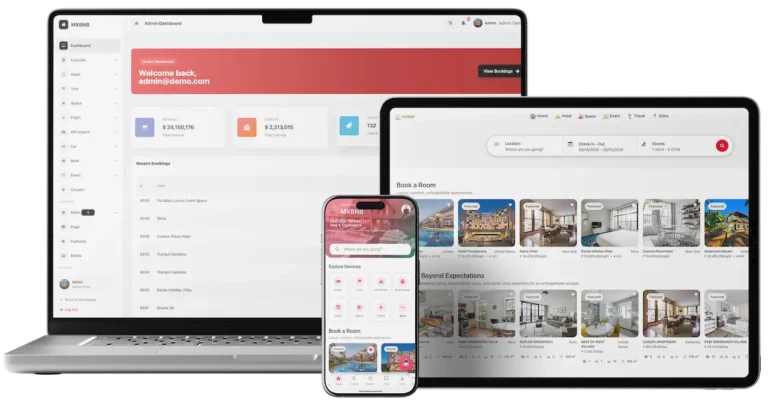
Airbnb Clone platform across guest, web and admin interfaces.02
Pick it if: Short stays matter more than salesAirbnb Clone

A rental and booking marketplace for guests and hosts that covers stays, spaces, cars, tours, boats, events and flights under a commission you control.

Explore Solution
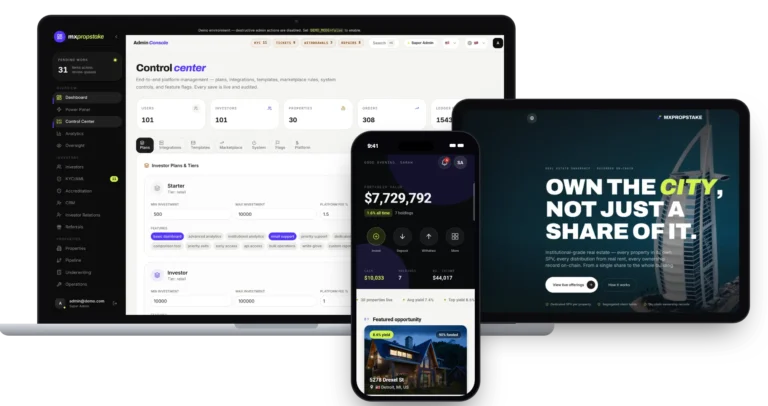
Prypco Clone fractional property platform on a laptop, tablet and phone.03
Pick it if: Fractional ownership is the productPrypco Clone

A property investment platform where investors buy a share of a specific building and collect their portion of the rent.

Explore Solution
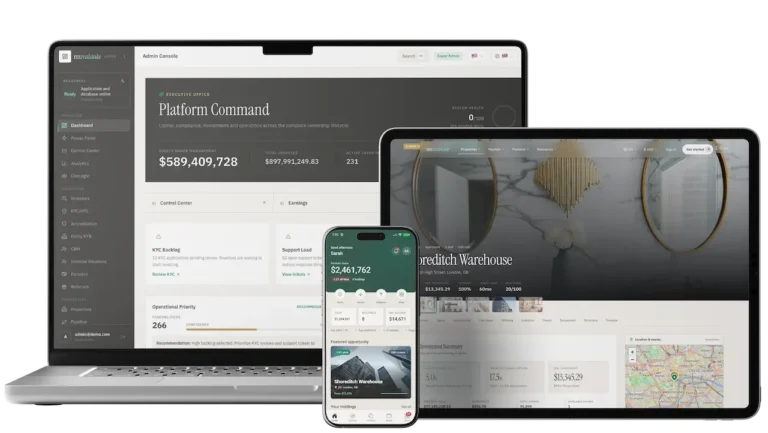
Fundrise Clone real estate investing platform on a laptop, tablet and phone.04
Pick it if: You raise money for property dealsFundrise Clone

A real estate crowdfunding platform built around property SPVs, rental distributions and a secondary market.

Explore Solution
CatalogAll 90+ solutions

09The business case

Market Benchmarks

Real Estate Portal Market Benchmarks - Independent 2025-2026 Data

The revenue models above are ours. The figures below are not. They come from the Zillow Group and CoStar Group annual reports on Form 10-K, the National Association of Realtors and the US Census Bureau, reproduced as published. They show what the largest listing portals earn, and the housing activity and vacancy that drive agent and landlord advertising demand.

Zillow 10-K01

$2.6bn Zillow Group Revenue in 2025, Up 16%

Zillow Group reports 2025 revenue of $2.6 billion, up 16 percent from $2.2 billion, in its annual report on Form 10-K. Residential revenue was 66 percent of the total and Rentals revenue grew 39 percent. Its sites drew approximately 9.6 billion visits in 2025, and it estimates 80 percent of US residential transactions involve agents who use at least one Zillow product.

CoStar 10-K02

$1.5bn Residential Marketplace Revenue at CoStar

CoStar Group's 2025 annual report on Form 10-K shows total revenue up 19 percent to $3.2 billion. Residential Real Estate revenue, from marketplaces that aggregate consumer demand for homes to rent or buy, rose $239 million, or 20 percent, to $1.5 billion, including $95 million from the Domain acquisition completed in August 2025.

NAR03

3.99m Existing-Home Sales Rate in September 2026

The National Association of Realtors reports existing-home sales at a seasonally adjusted annual rate of 3.99 million in September 2026, up 1.5 percent from August and down 2.2 percent from a year earlier. The median existing-home price was $417,500, up 1.3 percent, and unsold inventory reached 1.60 million units, equal to 4.8 months' supply.

US Census Bureau04

65.0% US Homeownership Rate in Q2 2026

The US Census Bureau reports a homeownership rate of 65.0 percent in the second quarter of 2026, virtually the same as a year earlier. The rental vacancy rate was 7.3 percent, against 7.0 percent in the second quarter of 2025, and the homeowner vacancy rate was 1.2 percent, in its quarterly residential vacancies and homeownership release.

Where each figure comes from.

Zillow Group, Inc., Annual Report on Form 10-K for the year ended 31 December 2025, filed 11 February 2026 - sec.gov

CoStar Group, Inc., Annual Report on Form 10-K for the year ended 31 December 2025, filed 26 February 2026 - sec.gov

National Association of REALTORS, Existing-Home Sales Increased 1.5% in September, 13 October 2026 - nar.realtor

U.S. Census Bureau, Quarterly Residential Vacancies and Homeownership, Second Quarter 2026, 28 July 2026 - census.gov

All figures are the publishers’ own, reproduced as published from annual filings, an industry association's monthly report and a federal statistics release. Metric definitions differ by publisher. They describe the companies and markets named, not any platform Miracuves builds, and nothing here is a revenue projection for your business.

The Commercial Case

Marketability, Revenue Potential & Business Prospects

A portal running on Miracuves' Zillow clone earns when agents trust it enough to pay for a package and when buyers and renters trust it enough to send an inquiry. Everything that follows is about making those two decisions easier, and about owning the relationship once they have been made.

  1. 01

    Packages Agents Renew

    Agents subscribe for a period, so revenue arrives on a schedule instead of waiting for a single sale to close. Miracuves takes no cut of any line, and the operator decides which to switch on first.

  2. 02

    Several Lines, One Console

    Packages, featured placement and ad slots are set up separately in one admin panel, and referral fees run from the inquiry records, so a line added later needs no redesign.

  3. 03

    Owned Audience and Agents

    Accounts, saved searches, inquiries and agent history sit in your database, so the portal's value accumulates with you and not with a listing site.

  4. 04

    Exit Optionality

    Because the complete source code and the schema are yours, changing host, team or direction later needs nobody's permission.

Main Revenue Levers
  • Agent Packages
  • Featured & Boosted Listings
  • Lead Referral Fees
  • Rental Advertising
  • Banner & Ad Slots
  • Mortgage Leads
Long-Term Value

Defensibility comes from supply and trust rather than features.

  1. 01Agents with verified profiles and lead history do not casually move
  2. 02Visitors with saved searches and a wishlist have a reason to return
  3. 03The history builds from the first day and sits in your own database
  4. 04Moderation of listings and reviews is the second moat
Example Revenue Scenarios

These three cases differ only in how many listings are live, and each names the lever that leads at that size. They are examples for planning conversations, not predictions of what any portal will earn.

Single-City Portal100Listings

Agent packages carry early revenue.

A portal for one city where a handful of agencies list their stock and the package fees cover the running costs. Illustrative size, not a forecast.

Regional Portal5,000Listings

Packages plus featured placement.

A portal for a region where many agents compete for the same neighborhoods, so featured placement and boosts start to matter beside the package fee. Illustrative size, not a forecast.

Multi-Country Portal50,000Listings

Packages, placement, ads and leads all active.

A portal across several markets, where ad slots, lead fees and mortgage partners add up beside the packages, and the analytics guide where to focus. Illustrative size, not a forecast.

10Why Miracuves

Why Miracuves

Miracuves Compared With Other Zillow Clone Script Providers

There are several ways to get a PropTech property portal: a generic listing script, a freelancer, an agency or a ready-made base from a team that has shipped it before, such as the Miracuves Zillow clone app. When hiring, ask what the code is written in and whether your own developers can maintain it, what transfers at handover and what must be done before real listings go live.

Why Founders Choose Miracuves

  • 01

    Valuation and Mortgage Tools Included

    The sell page estimates a value and the home loans page runs a payment, so the money questions are answered inside the portal. Generic listing scripts usually stop at the listing.

  • 02

    The Agent Side Is Built

    Verified profiles, a lead inbox with a status pipeline, tours and a dashboard per agent come in the base, together with packages that agents can buy.

  • 03

    Moderation Before Publication

    New listings can wait in a review queue with appeals and a reports queue, so quality is a setting you control instead of a project you commission.

  • 04

    Source Code You Own

    Everything arrives unencrypted, together with the schema and the deployment notes, so no vendor can reprice it or change the terms later.

  • 05

    A Base That Has Shipped

    The same base ran the Renido property listings platform, where 18 of 22 building blocks were reused as they were, and the published case study lists them.

  • 06

    A Clear Line Between Base and Extra

    We state which items are base features, which are add-ons and which you must bring, including lender partners, MLS access, gateway accounts, hosting and store developer accounts.

Development Company

How to Choose a Zillow Clone Development Company

Judge a property portal development company by what its buyer, agent and moderator demo logins actually prove.

What to look for Miracuves

  • A demo you can sign into Buyer, renter, agent, moderator and admin logins on the page
  • Money tools in the base A value estimate and mortgage calculators, built in
  • Proof on a real client Renido reused 18 of 22 building blocks from this base
  • Code your team can maintain Unencrypted Next.js, NestJS and Expo source plus schema
  • Time to launch 6 days of build time
  • Support after launch Guidance 60 days, priority fixes 6 months, updates 12 months

Walk away from any vendor who

  • Cannot say what the code is written in
  • Stops at listings, with no valuation tools
  • Publishes listings without moderation
  • Stores card data, not a gateway reference
  • Counts paid add-ons as base features

How the Zillow Clone Stacks Up Against Listing Scripts and Agencies, Row by Row

CriteriaMiracuvesMiracuves Zillow CloneGeneric Listing ScriptCustom Dev Agency
Time to Launch6 days of our build timeUnknown or DIYScoped per project, usually months
Source-Code OwnershipComplete, unencryptedOften limited or lockedUsually yes
Search & Map DepthFilters, sorting, map view, saved searchesBasic filtersWhatever the budget allows
Valuation & Mortgage ToolsEstimate on the sell page, calculators on the loans pageRarely includedBuilt to order
Agent ToolsVerified profiles, lead inbox, tours, dashboardA contact formBuilt to order, extra cost
Payments & PackagesStripe, PayPal and offline payment for agent packagesVaries by scriptCustom integration
Admin & ModerationReview queue, reports, audit log, analyticsThin or absentBuilt to order, extra cost
Cost vs Speed vs QualityFixed price, fast, tested baseLow price, high riskExpensive and slow
Ongoing Support & Updates60 days guidance, 6 months bug fixes, 12 months updatesRarely offeredSet by the contract

Few routes to a portal come through a first year unchanged. This is where they part ways.

Talk to Our Team

Let's build together

Let's take your property portal idea and make it a working platform.

Book a free consultation and leave with a clear timeline and honest answers to your questions. We would rather earn your trust than close a fast sale.

  • First reply in under 2 hours
  • Free consultation
  • No lock-in contracts
  • Full source code ownership

11Learn more

Blog & Resources

Real Estate App Development Like Zillow: Newest Guides & Insights

Stay current with guides on how property portals earn and how portal business models compare.

The product6 questions

01What is a Zillow Clone?

A Zillow clone is a ready-made real estate portal that follows the well-known listing site model. The Miracuves Zillow Clone lets visitors buy, rent and sell on one site, with filtered search, an instant value estimate, a mortgage calculator, an agent directory, tours, messaging and offers, and it comes with an admin panel. It is delivered white-label with the complete source code in 6 days of Miracuves build time.

02How does a Zillow Clone benefit real estate businesses?

It gives a brokerage, a portal startup or a media site its own place to list properties instead of renting visibility on someone else's site. Agents get verified profiles, a lead inbox and a dashboard, visitors get search, estimates and calculators, and the operator gets moderation, reports and packages to sell. The audience, the leads and the data stay in your database.

03What features can I expect in a Zillow Clone app?

Search for sale and rent with filters, a map and sorting; listing pages with photos, floor plans and price history; a value estimate; mortgage and affordability calculators; tours; in-app chat; offers with counter-offers and closing stages; rental applications with signatures; saved searches and alerts; agent profiles; and an admin panel with moderation and packages. VR tours, predictive insights, AI-assisted negotiation and automated document handling are optional add-ons.

04Can I launch a property portal like Zillow legally?

Software with listing, search and calculator features is generally lawful to build and sell. The Miracuves Zillow Clone follows ordinary marketplace patterns and uses no code, design or content from Zillow. Launching a portal is separate: rules for agent licensing, advertising, fair housing, tenant screening, mortgage marketing, data protection and electronic signatures depend on your country and state, and an MLS feed needs your own data license. Check them with a local adviser; Miracuves gives no legal advice.

05Can I customize the branding and design of the platform?

Branding is part of delivery: we rebrand the web portal and the apps with your logo, icons and color scheme and deploy them. The admin panel also lets you change the site name, logo, theme colors, languages and feature switches without code. Because you receive the complete source code, your team can go further and change layouts, rules and screens, or we can scope that work for you separately.

06Can I get the app on both iOS and Android devices?

Yes. The mobile app is built once for Android and iOS and the web portal is responsive in a browser. We publish the apps from your own developer accounts. Store review is handled by Apple and Google, so it sits outside our 6-day build time.

Search, tours & messaging5 questions

07How do I search for properties on the app?

Start with the Buy or Rent switch and a city, address or ZIP, then narrow the results by price range, minimum bedrooms, home type and occupancy. Results sit under Buy, Rent and Sold tabs, sort by newest, rising or falling price or popularity, and switch between a list and a map of price pins. A short market snapshot above the results shows how many homes match and their average asking price.

08Can I save and compare my favorite listings?

Yes. A signed-in user can save a home to a wishlist, keep a search with all its filters and choose instant, daily or weekly email alerts. The web portal also compares listings side by side and remembers recently viewed homes.

09How can I schedule a visit or request a tour?

On a listing page the buyer asks for a tour at an exact time or in a morning, afternoon or evening slot, and chooses an agent-led or a self-guided visit. The owner or agent confirms or reschedules, and both sides receive reminders by push and email.

10Can I communicate directly with sellers or real estate agents on the Zillow Clone?

Yes. The platform has in-app chat between buyers and agents or owners, with read receipts, typing indicators and an optional link to the listing being discussed. Users can pin or archive conversations and block someone, and the admin can read chats when moderation requires it.

11Is there a way to contact agents or property owners directly?

Yes. A visitor can message the listing agent from the listing page, send an inquiry through a form, or find an agent in the directory by name and city and open their profile. Which contact options you switch on, such as chat and tour booking, is a setting in the admin panel.

Agents, listings & admin7 questions

12How do I list a new property?

An agent or owner signs in, opens the listing wizard and walks through location, property type, specifications, media and pricing, with a draft saved along the way. Photos, video, floor plans and 360-degree images can be added. When moderation is on, the listing waits in a review queue and goes live once a moderator approves it.

13Can I track inquiries and leads in real time?

Yes. Each agent has a dashboard with active listings, pending reviews, inquiries and conversion, and a lead inbox where every inquiry is stored with its source and a status that runs from new to won or lost. Tour appointments and new chat messages arrive as push notifications, and each inquiry is in the lead inbox as soon as it is sent.

14Is there a way to manage my client relationships?

The lead inbox works as a light CRM: private notes on each lead, follow-up reminders, status changes, assignment by the admin and a CSV export.

15How do I manage users (buyers, renters, and agents)?

The admin panel lists users and agents with search and filters, lets you create or edit an account, assign a role, deactivate someone and export the list. Agents appear in a verification queue where an admin grants the verified badge shown on their profile.

16Is there a feature to approve or reject property listings?

Yes. The moderation switch sends new listings to a review queue where a moderator approves, rejects, archives or deletes them, singly or in bulk. Owners can appeal a rejection with a reason, and a reports queue handles listings or reviews that visitors flagged.

17What is the realistic path to first revenue?

Most property portals start with agent packages and featured placement, because both can be sold as soon as there are listings worth promoting. Lead fees follow once inquiries are flowing and you can show an agent what each one produced. Mortgage leads, ad slots and a share of closed deals depend on partner agreements and local rules, so they are agreed rather than built in.

18How defensible is a property portal?

Defensibility comes from supply and trust rather than features. Agents who have verified profiles, listings and a lead history on your portal do not casually move, and visitors who have saved searches and a wishlist have a reason to return. From launch the platform records that history, and it stays in your own database. Moderation is the second moat: a portal people trust is hard to copy.

Money, estimates & launch12 questions

19How do the value estimate and the mortgage calculator work?

On the sell page an owner enters an address, a city, a property type and an area and receives an estimated value with a confidence level, calculated from comparable sales and a per-city model that the operator calibrates. The home loans page turns a property value, down payment, term and interest rate into a monthly payment with insurance and fee estimates, and offers a pre-qualification request. Both are estimates, not appraisals or loan offers, and live lender rates need your own lender partners.

20How much does it cost to launch the Zillow Clone?

The launch-ready white-label Zillow Clone is a fixed price of $4,299. Add-ons, extra integrations and custom flows are scoped and quoted separately in writing, and hosting, domain, store developer accounts and gateway fees are yours.

21How many days does deployment take?

Ready-made delivery takes 6 days of Miracuves build time and covers the rebranding, the deployment to your hosting and the publishing of the apps from your developer accounts. App store review, payment gateway onboarding, lender agreements and MLS access depend on outside parties, so they are not counted in those 6 days.

22Do I get the source code?

Yes. You receive the complete, unencrypted source for the web portal, the API and the mobile app, together with the database schema, the deployment setup and the architecture notes. There is no per-seat fee and no run-time license, so your team or any developer can continue from there.

23What do I need to supply before launch?

A server and a domain, a developer account to publish the apps from, your logo and company details, a payment gateway that has already completed KYC, an SMTP email account, and keys for outside services such as Google Maps and Firebase. Text messages through Twilio take extra setup work that we scope with you. Live mortgage rates or MLS listing data also need your own lender partners and data license.

24What are the reasons to pick Miracuves for a Zillow clone?

Because the agent side, the valuation and mortgage tools and the admin panel arrive working, on a base that already carried the Renido property listings platform with 18 of 22 building blocks reused. Miracuves has delivered 9,000+ projects, quotes a fixed price, and backs every launch with 60 days of guidance, 6 months of priority bug fixes and 12 months of updates, which run at the same time and not one after another.

25Is a ready-made Zillow clone better than custom development?

For a buy, rent and sell portal it usually is. Search with saved alerts, value estimates, a mortgage calculator, offers, a lead inbox and listing moderation take months to write and test. This base delivers them at one fixed price in 6 working days, with the full NestJS and Expo source handed over for later changes.

26What is the business model of a real estate app like Zillow?

A portal earns from agents and partners rather than home seekers. Agent packages bring scheduled income, featured listings lift chosen homes, and lead fees follow once inquiries flow. Rental ads and mortgage leads can be added through partner agreements, so you can earn from mortgage interest without becoming a lender yourself.

27What is the step-by-step process to launch my Zillow clone?

Run through the buyer app, agent app, portal and admin in the demo. Then provide branding, hosting, gateway accounts and your launch cities. During the 6 working days the portal and app are rebranded, deployed to your hosting and configured with packages and moderation rules. Store publishing runs from the developer accounts you own; review by the two app stores sits outside the 6 days.

28Can a Zillow clone import listings from an MLS?

Yes, with an MLS data license of your own. The portal takes listings from agents and owners and checks each one before it appears. With a data license from your MLS, a feed connector can be built as custom work, quoted in writing once the feed format is known and typically ready within 2-8 weeks.

29Can I test the Zillow clone with demo logins before buying?

Yes. Five separate demo logins cover the buyer, renter, agent, moderator and admin roles, so you can test the Miracuves Zillow Clone end to end. Search a city, open a listing, run a payment through the mortgage calculator and ask for a value estimate. That shows each side of the portal working before you commit to anything.

30What technology stack does the Zillow clone use?

The Zillow Clone is delivered as NestJS and Expo source. The mobile app is built once for Android and iOS, and a responsive web portal serves browsers. You receive complete, unencrypted source for the portal, the API and the app, plus the database schema, deployment setup and architecture notes, so your own developers can maintain and extend it without a run-time license.

Disclaimer

Miracuves is an independent software development company. We are not affiliated with, connected to, sponsored by, or endorsed by Zillow.

Read our full Legal Notice & Disclaimer →
Why this name

“Zillow Clone” is used descriptively. It is how the software industry refers to building a platform with functionality similar to Zillow, and how clients search for it.

Who built this

The entire design and codebase is built by our own team. The product contains no code, design, graphics, or content originating from the Zillow website or applications.

Trademarks

Zillow and all other third-party names and marks are the property of their respective owners, referenced here solely to describe the category of software offered.