Bilingual Food App · Production Ready

HungerStation Clone App - White-Label Middle East Delivery App

Miracuves' HungerStation clone is ready-made and white-label, made for food and grocery delivery to Arabic and English readers, with source that is yours for the customer, store and delivery partner apps, web storefront, store panel and admin panel, under your brand within six working days.

Customers switch language from the account menu and pay by card, cash or wallet, while the admin times discount codes and seasonal offers ahead of Ramadan. The apps build for Android and iOS with store review beyond the six days, and a shopping assistant is sold as an add-on. A right-to-left layout is set up for Arabic storefronts. If your market needs that layout adjusted, we scope and quote the work in writing; it typically takes 2-8 weeks.

Launch in 6 Days with

  • Source Code
  • Customer App
  • Store App
  • Partner App
  • Store Panel
  • Admin Panel

StackFlutter · Dart · Bootstrap · PHP · Laravel · MySQL · Firebase · Google Maps

MXLovo console · DeliveryIllustrative
Orders today186
Open offers7
Stores live94

Delivery activity

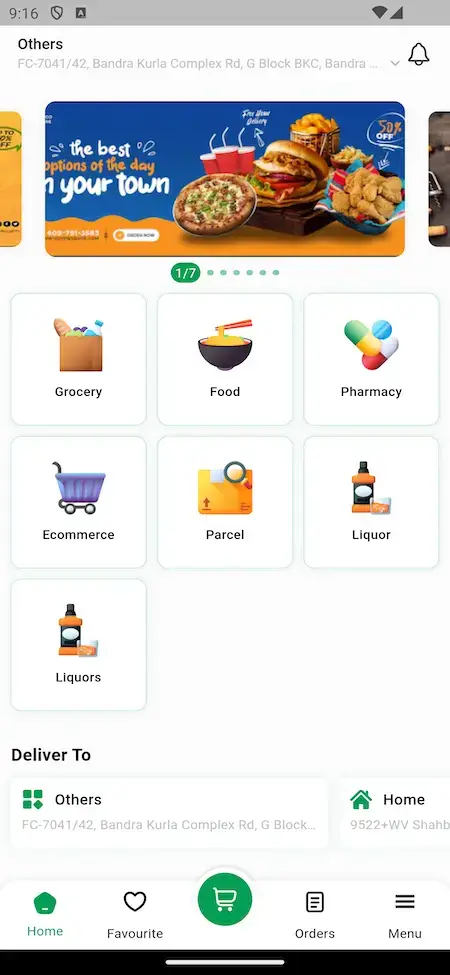
HungerStation Clone customer app home screen with food, grocery, pharmacy, parcel, e-commerce and liquor tiles above a deliver-to address.
Stores hear about every orderthe moment it is placed
  • 3Wallet Movements Keptrecharges, tips and refunds with a history behind each
  • 6Category Tiles on the Home ScreenFood, Grocery, Pharmacy, Parcel, E-commerce and Liquor
  • 0%Revenue Share With Miracuvesno part of store commission, delivery charges or wallet top-ups
  • 3Sign-In Methodsmanual, one-time code and social sign-in toggled by the admin
  • 6Days to Launchand if the delay is ours, we keep going free
  • $3,399Paid Once, Not Rentedsource code yours, no per-seat fee, no monthly rental

Live in six working days, or we keep working free until you launch. Every build carries 60 days guidance, 6 months bug fixes and 12 months updates.Verify every figure

Talokitoko, Delivered on This Base

Miracuves built Talokitoko, food and grocery delivery for Izi Technologies, on the Glovo Clone base (MXLovo) behind this product in 2024, reusing 19 of 24 platform blocks unchanged.

Partners Approved Before They Ride

Delivery partners register and upload documents, start only after approval, then accept or decline orders offered by proximity, with a cash record and an earnings screen.

Your Gateway Holds Card Details

Card details travel to the gateway you connect, while the platform stores wallet entries and payment references instead of card numbers.

Ready to open your own delivery app for your region?Speak With a Specialist

Trusted by 6,000+ clients worldwide

Miracuves is listed by Expertise.com as a managed IT service provider.Miracuves is an official member of the Forbes Business Council.Miracuves is a verified agency on DesignRush, listed among top design agencies in India.Miracuves is reviewed on Trustpilot as a software development company.Miracuves is listed by The Manifest among top managed software development companies.Miracuves is listed by DesignRush as a top software development company.Miracuves is recognized by GoodFirms as a top software development company.Miracuves is ranked among the top 1000 companies globally by Clutch.Miracuves is a top managed service provider in the United States on Clutch.

01Try it yourself

Hands-On Demo

HungerStation Clone Demo - Customer, Store & Delivery Apps, Web Panels

Take the Miracuves HungerStation Clone for a spin in the demo. Miracuves provides one demo login each for a HungerStation clone customer, store and delivery partner, plus a web demo with the storefront, a store panel and the admin panel. Change the language, pay from the wallet, then follow the order through.
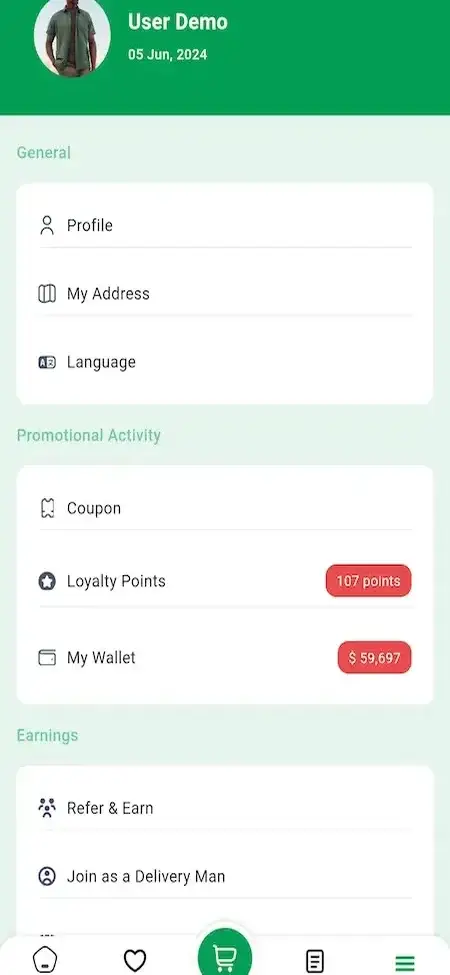
HungerStation Clone customer app home screen with food, grocery, pharmacy, parcel, e-commerce and liquor tiles above a deliver-to address.HungerStation Clone account menu with profile, address, language, coupon, loyalty points, wallet balance and refer and earn rows.
Customer app

Shopper App on Your Phone

What a shopper sees: category tiles, search, a store list, a basket, the wallet, coupons and loyalty points, and an order page that tracks the delivery.

  1. 1Pick your phone type on the app portal
  2. 2Sign in using the demo details below
  3. 3Try Home, Search, Wallet and Orders
Demo login:+911234567890 | User_321
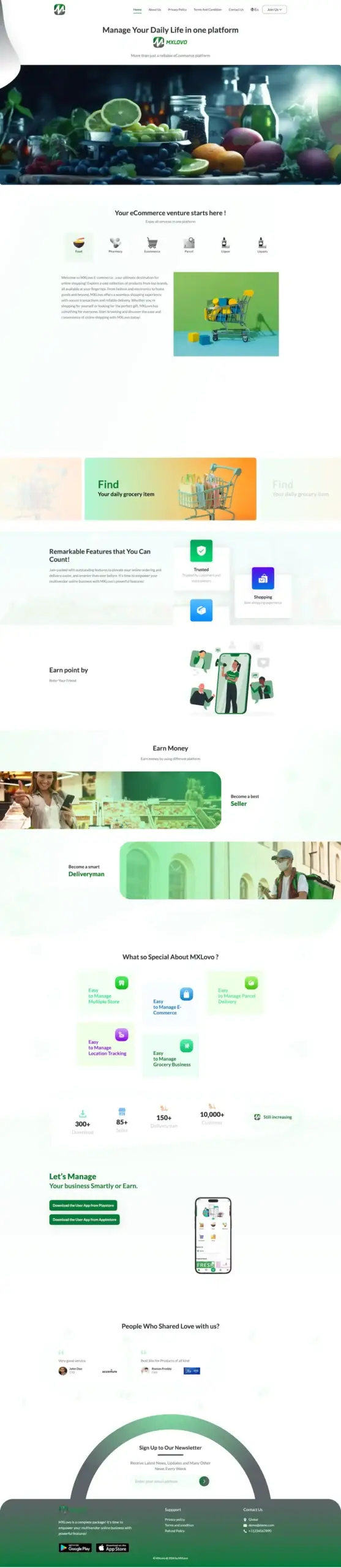
HungerStation Clone web storefront landing page with category tabs, seller and delivery partner sign-up sections, app download buttons and a newsletter footer.
Store app

Merchant Counter on a Phone

What a merchant sees: incoming orders, the product list with prices and stock, and the status of each order from placed to handed over.

  1. 1Pick your phone type on the app portal
  2. 2Enter the store credentials below
  3. 3Try Orders, Products and Stock
Demo login:food@demo.com | Store_321
HungerStation Clone web storefront landing page with category tabs, seller and delivery partner sign-up sections, app download buttons and a newsletter footer.
Delivery app

Partner App With Routes and Earnings

What a delivery partner sees: orders offered nearby, accept or decline, turn-by-turn navigation, cash collected and an earnings summary.

  1. 1Pick your phone type on the app portal
  2. 2Enter the partner credentials below
  3. 3Try Orders, Navigation and Earnings
Demo login:+919876543210 | Delivery_321
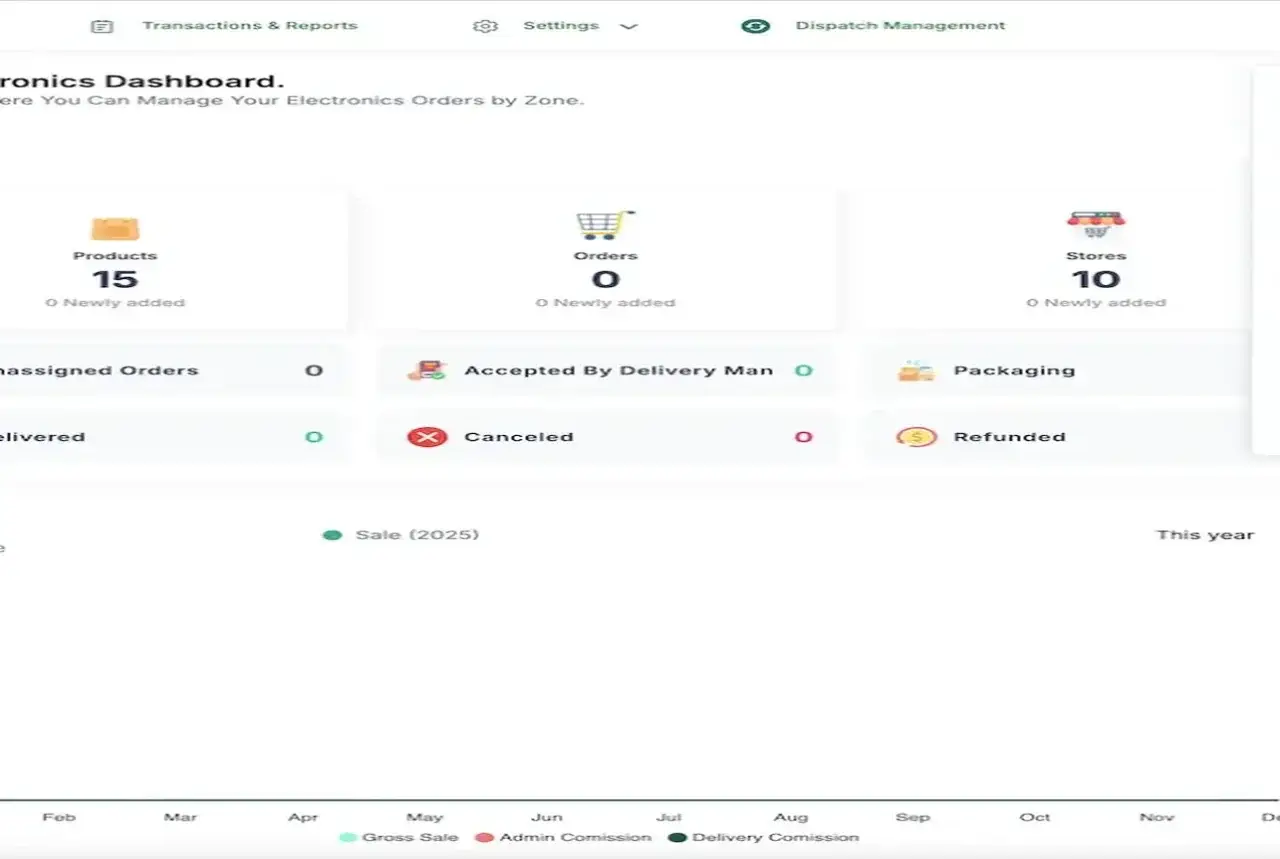
HungerStation Clone admin dashboard with product, order and store counts, order status tiles and a yearly sales chart.
Web & panels

Browser Demo: Storefront and Panels

The browser side: a storefront whose tabs follow the categories, with join sections for sellers and delivery partners, a panel for stores and the operator's admin panel.

  1. 1Open the web demo in your browser
  2. 2Pick the store panel or the admin one
  3. 3Try Storefront, Stores and Dashboard
Admin login:given during a guided tour
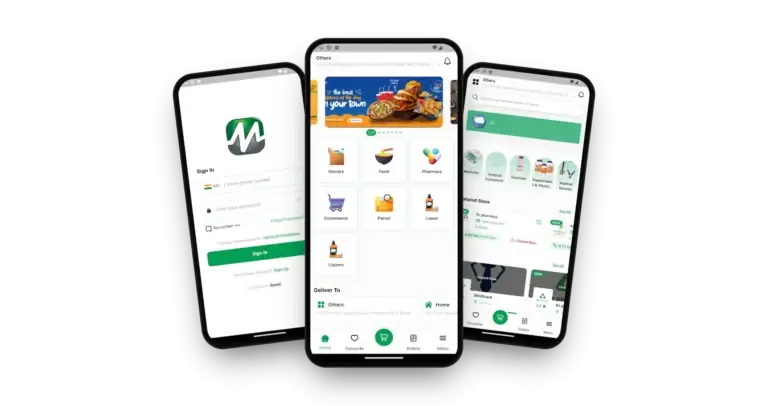
HungerStation Clone on three phones: the home with category tiles, the phone sign-in screen and the store discovery home with featured stores

Book a Live Look

A Bilingual Delivery App Like HungerStation, Walked Through: Languages, Wallet, Offers & Admin Panel

The fastest way to judge a delivery platform is to watch it run with your own plan on the table. In a 30-minute call we open the customer, store and delivery apps and the admin panel, then set up your language pair, your wallet rules and a sample seasonal offer while you watch.

Book a live demo call

Screens in Order

Food Delivery App Like HungerStation, Screen by Screen: Phones, Admin Dashboard & Storefront

These are real screens of the Miracuves HungerStation clone, in the order a delivery order moves: sign-in, the category home, search, pharmacy, parcel, an order page and the account menu, then the admin dashboard and the web storefront.
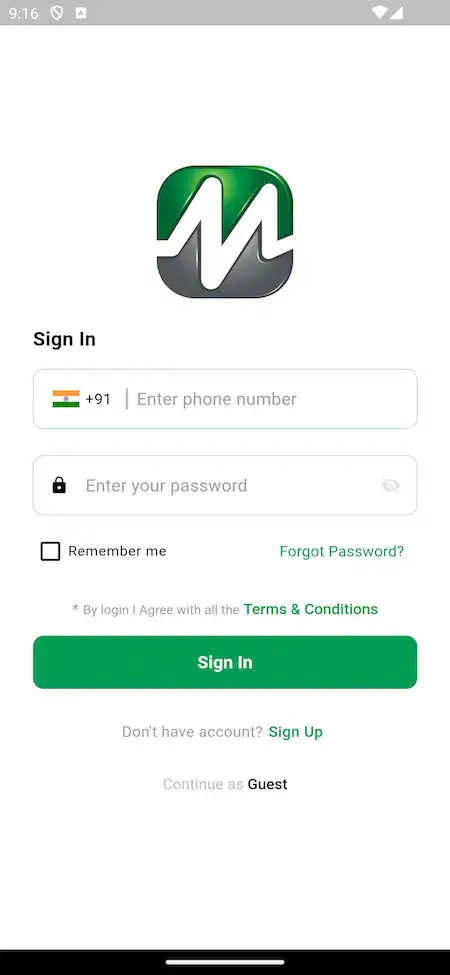
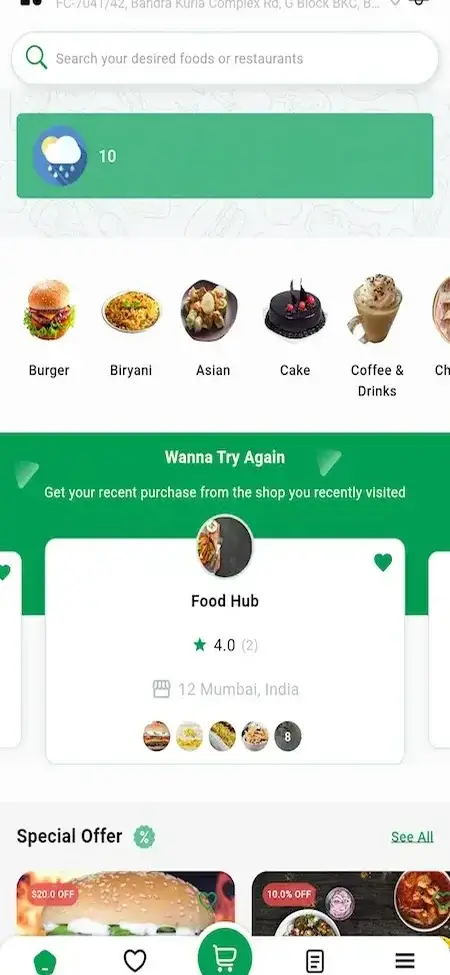
HungerStation Clone customer app sign-in screen with a phone number field, password, remember me and a guest option.
HungerStation Clone customer app home screen with food, grocery, pharmacy, parcel, e-commerce and liquor tiles above a deliver-to address.
HungerStation Clone app search screen with food category chips, a recent-purchase store card and a special offer row.
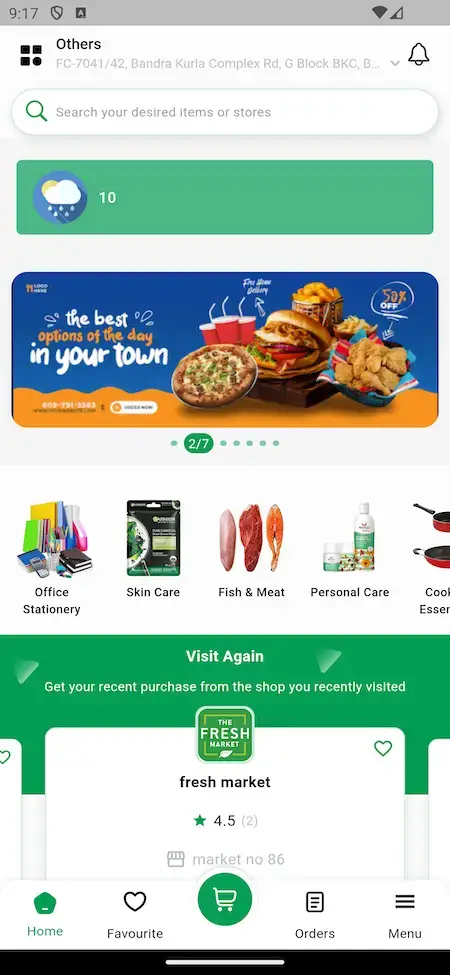
HungerStation Clone app home with an offers banner, a row of grocery categories and a visit-again store card.
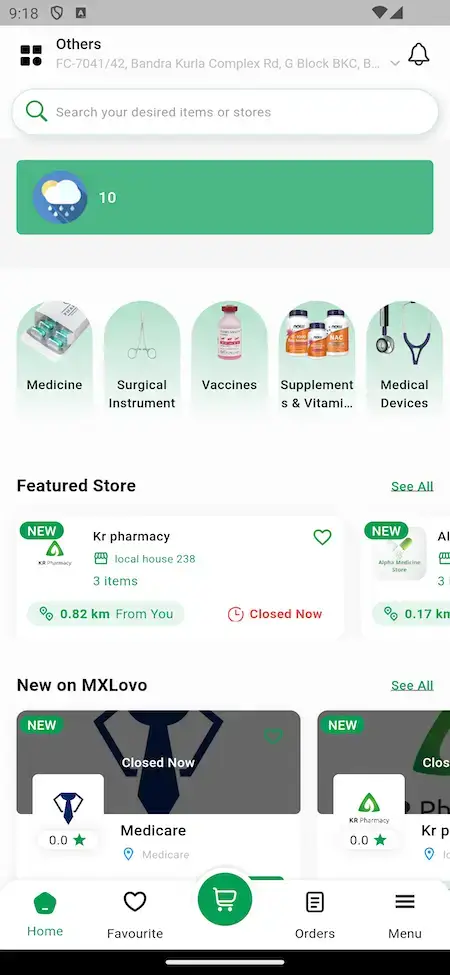
HungerStation Clone pharmacy category with medicine, surgical, vaccine and supplement tiles and a featured store list.
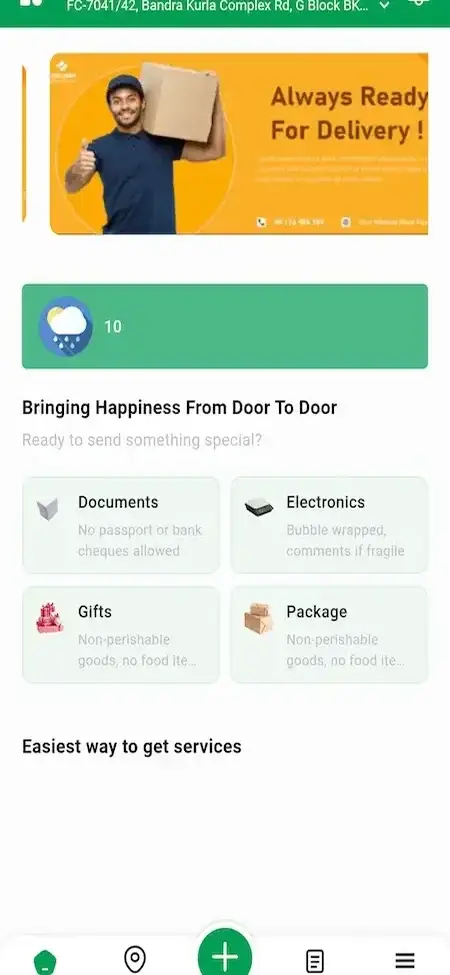
HungerStation Clone parcel screen with a courier photo and parcel types such as documents, electronics, gifts and packages.
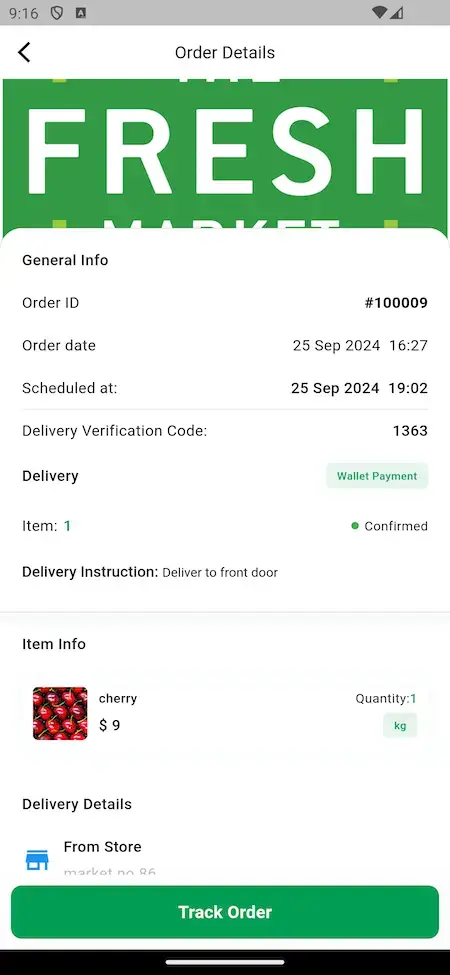
HungerStation Clone order details screen with order ID, schedule, verification code, wallet payment, item list and a Track Order button.
HungerStation Clone account menu with profile, address, language, coupon, loyalty points, wallet balance and refer and earn rows.
8 screens · scroll →
HungerStation Clone admin dashboard with product, order and store counts, order status tiles and a yearly sales chart.
1 screen
HungerStation Clone web storefront landing page with category tabs, seller and delivery partner sign-up sections, app download buttons and a newsletter footer.
1 screen

See a customer move from sign-in through the category home, a search and the pharmacy aisle to an order page and the wallet menu, then check the operator view on the admin dashboard.

Explore Our Solutions

02Proof

Client Voices

HungerStation Clone Client Reviews - Operators in Their Own Words

Nine operators here. Click2Deliver and Izi Technologies' Talokitoko serve groceries next to food, David Subervi bundles rides and courier with it, and Bharat Eat Mods, YOpido and Mega Chicken concentrate on food ordering.

MMega Chicken TeamFounding team, Mega Chicken
“Menus, order routing and dispatch were solved. Our work was the store-level menu control and the packaging and prep rules our brand needs. Live in weeks and the stores adopted it without a training programme.”
YYOpido TeamFounding team, YOpido
“Menus, ordering, dispatch and the merchant console came ready. Our work was the restaurant mix, the delivery zones and the payment methods our customers use. Live inside a month.”
BBharat Eat Mods TeamFounding team, Bharat Eat Mods
“Menus, order routing and courier dispatch were solved. Our work was the local ordering habits, the payment mix and the restaurant onboarding flow. Live in weeks and the kitchens picked it up without training.”
CCharles EveillardManaging Partner, Izi Technologies
“Talokitoko is grocery and food delivery for the African diaspora market in Europe. The rider app, dispatch and the merchant console were already built, so we spent the engagement on our own local payment mix, the vendor onboarding flow and the regions we actually operate in. The platform was live inside a month, which was months faster than our internal estimate.”
CClick2Deliver TeamFounding team, Click2Deliver
“Two order types, one courier fleet. The base handled multi-vertical ordering, so the work was our merchant mix and the grocery-specific substitution and weight rules. Live inside a month.”
MMarsha WilliamsFounder, Bmore On Demands LLC
“The team was running it on a dispatcher and a Google Sheet, and we needed a real platform quickly, because we were about to onboard a major retail client. Miracuves’s Delivery Genie base gave us the rider app, the dispatch console, and live tracking. We launched in 6 weeks and cleared 4x the previous order volume in the first month.”
MMustafa H.CTO, Speedyven Networks
“Speedyven is a hyperlocal courier network — packages, food, and same-day essentials across a few metros. The dispatch and rider app were the parts where we needed to move fastest, because riders have low tolerance for clunky tools. Miracuves's Delivery Genie base gave us the rider app, the dispatch console, and live tracking. We added our custom surge-pricing engine, our multi-merchant order router, and a custom rider-incentives module. We launched in 7 weeks. Rider activation is high and the platform's been stable through weekend peaks.”
DDavid SuberviFounder
“Rides, food and courier in one app, for a market nobody was building for properly. The rider and driver apps, dispatch and the merchant console came off a base that had already run at volume. We added local payments and the categories that matter here. Live inside a month.”
LLeeft TeamFounding team, Leeft
“We opened with three verticals rather than phasing them, which was only possible because dispatch and the merchant tooling already existed. Our work was the market and the payment partners. Delivered inside a month.”
Read More Client TestimonialsOperators and founders in their own words

Proof From Delivered Work

Talokitoko, a Food and Grocery Business Built on the HungerStation Clone Base

Talokitoko is a food and grocery delivery service Miracuves built for Izi Technologies on the base behind its HungerStation Clone. The facts below come from the published case study of that 2024 delivery.

Case Study
A Delivery Business Built on a Ready-Made Base

Izi Technologies wanted a food and grocery delivery business of its own. Miracuves rebranded the base behind this product, set up the parts that were specific to the client, and handed over the source code.

Izi TechnologiesClient
2024Delivered
Food and grocery deliveryIndustry
6Working days, base build
19 / 24Platform blocks reused as they were
4Applications handed over
HungerStation Clone admin dashboard with product, order and store counts, order status tiles and a yearly sales chart.
Challenges
  • One catalog that mixes meals, groceries and parcels, each handled differently
  • Stores, delivery zones and fees that follow the client's own commercial plan
  • A payment mix that matches the customers the client actually serves
Goal
  • Launch without rebuilding the proven order, dispatch and wallet mechanics
  • Put the effort into the five parts that belonged to the client
  • Hold the source code outright
Solution by Miracuves
  • Customer, store and driver applications plus an admin console
  • Five client decisions applied: stores, zones, fees, gateways and brand
  • 19 of 24 platform blocks reused unchanged
  • The client's own account receives the source code
  • The ready-made base, built in 6 working days, under the client settings

“Talokitoko is grocery and food delivery for the African diaspora market in Europe. The rider app, dispatch and the merchant console were already built, so we spent the engagement on our own local payment mix, the vendor onboarding flow and the regions we actually operate in. The platform was live inside a month, which was months faster than our internal estimate.”Charles Eveillard · Managing Partner, Izi Technologies

Open the Talokitoko case studyOpen the scope ledger to see which 19 of 24 blocks were reused.

03The product

In Plain Terms

How a HungerStation-Style App Serves Customers, Stores and Delivery Partners

Arabic and English shoppers order through one HungerStation clone, a ready-made Miracuves delivery marketplace for food, groceries, pharmacy items, e-commerce orders and parcels. Shoppers pick a language, browse stores by category and pay by card, cash or wallet. Stores run their own counter, delivery partners take the jobs and the operator watches everything from one admin panel.

HungerStation Clone on three phones: the home with category tiles, the phone sign-in screen and the store discovery home with featured stores

Speaks Your Customers' Language

A language row in the account menu and auto-translate in the admin mean the storefront can read in Arabic and English side by side.

Money With a Memory

The wallet holds recharges, tips and refunds with a history, so a customer and your customer support team can both see what happened.

Offers on Your Calendar

Discount codes, loyalty points, referral rewards and seasonal promotions are set by the admin ahead of Ramadan or a festival week.

Apps and Web

What Do You Get With the Script?

Most of the work in a food ordering and delivery business hides behind the order button: stores that need approval, prices and stock that change by the hour, a wallet that has to reconcile, and offers that must start and stop on time. Those parts arrive working, ready for your name and your language set.

HungerStation Clone admin dashboard with product, order and store counts, order status tiles and a yearly sales chart.
  1. 01Customer app with six store categories
  2. 02Store app and store panel for menus and stock
  3. 03Delivery app with navigation and earnings
  4. 04Wallet, coupons, loyalty points and referrals
  5. 05Admin panel with commission, reports and dispatch

Three apps come with the web storefront and two panels, one for stores and one for the operator, plus the Flutter source and every file of the web code.

Everything Included

HungerStation Clone Features - Languages, Wallet, Offers, Orders, Store & Delivery Apps

Every HungerStation clone feature below, from the language row to the wallet history, is visible in an app screen, in the admin panel or in the release notes. Anything that needs extra build work is listed as an add-on further down.

Feature 01 / 12

Language Switch & Auto-Translate

Customers change language from the account menu, and the admin can translate across the features automatically, so one build can serve Arabic and English readers.

  • Language row in the customer account menu
  • Auto-translate across features, added in release 2.9
  • Wording of system messages and labels tidied in release 2.12
  • Customers pick a language during a session
Feature 02 / 12

Wallet, Tips & Refunds

The account menu carries My Wallet with a balance, orders can be paid from it, and the wallet takes recharges, tips and refunds with a history behind each movement.

  • My Wallet with a balance in the account menu
  • Wallet payment shown on the order page
  • Recharges, tips and refunds with a full history
  • Cards and cash on delivery beside the wallet
Feature 03 / 12

Coupons, Loyalty & Referrals

Three promotion rows sit in the account menu: Coupon, Loyalty Points and Refer and Earn. Admins create the codes and programs that feed them.

  • Coupon row in the account menu
  • Loyalty Points with a visible balance
  • Refer and Earn for friend invitations
  • Subscription plans for reduced delivery fees
  • Admins create the codes and referral programs behind them
Feature 04 / 12

Seasonal Offers & Promotions

Offers reach customers through a home-screen banner, a special-offer row and a Top Offers Near Me list, with AI-powered menu recommendations available as an add-on, all driven by what the admin switches on for a season.

  • Offers banner on the customer home screen
  • Special-offer row beside store lists
  • Top Offers Near Me for store-wide discounts
  • Seasonal promotions created from the admin panel
Feature 05 / 12

Six-Category Home Screen

The home screen opens on tiles for Food, Grocery, Pharmacy, Parcel, E-commerce and Liquor, with the delivery address one tap away and search above.

  • Six category tiles open the home screen
  • Deliver-to address with home and other places
  • Search across items and stores
  • Medicine group names and filters for pharmacy
  • Nutrition and allergy details on food and grocery items
Feature 06 / 12

Order Flow & Live Tracking

A basket becomes an order with a schedule, a payment and a delivery verification code, and the Track Order button follows the courier to the door.

  • Immediate or scheduled delivery
  • Delivery verification code on the order page
  • GPS tracking from pickup to drop-off
  • Customers can message the admin from the order page
Feature 07 / 12

Store App & Store Panel

Stores apply, wait for admin approval, then run their catalog, prices, stock levels and order queue from an app or a web panel.

  • Store sign-up with admin approval
  • Product list with prices updated in real time
  • Edit stock straight from the product list
  • Low-stock warnings at levels you choose
Feature 08 / 12

Delivery App for Partners

Delivery partners register, upload documents, receive orders by proximity and work from a route, a cash record and an earnings screen.

  • Registration with documents and approval
  • Orders assigned by proximity, accept or decline
  • Turn-by-turn GPS navigation
  • Earnings dashboard with trip history
Feature 09 / 12

Dispatch & Delivery Zones

The admin panel has a Dispatch Management menu, shows delivery zone information on its landing page and follows each order through assignment.

  • A Dispatch Management menu for the operator
  • Zone information on the admin home page
  • Order states from assigned to delivered
  • Live order tracking for the operator
  • Store and partner locations in one view
Feature 10 / 12

Reviews, Chat & Notifications

Customers rate stores and delivery, chat with predefined message suggestions, and receive push notifications that open the right page.

  • Ratings and reviews for stores and delivery
  • Chat with predefined message suggestions
  • Push taps open the matching page
  • Per-store switches for push, email and SMS
  • Twilio listed for text messages
Feature 11 / 12

Admin Dashboard & Reports

The admin home counts products, orders and stores, splits orders by status and charts yearly sales with admin commission and delivery commission lines.

  • Product, order and store counts
  • Order status tiles from assigned to refunded
  • Yearly sales chart with commission lines
  • Commission and delivery charge settings
  • Reports on sales, customers, riders and revenue
Feature 12 / 12

Sign-In & Account Control

One login for every method: manual, one-time code or social, each switched on or off by the admin, with guests allowed to check out first.

  • Centralized login with three methods
  • Phone one-time code through Firebase
  • Guests are invited to create an account at checkout
  • reCAPTCHA v3 on public forms

What you bring to the table: Ours is the finished platform, rebranded. Yours: a server and domain, a verified app store account, your logo and company details, gateway KYC finished, and keys to whichever third-party services you use. Review by Apple and Google keeps its own calendar, outside our six working days.

Talk to Our Team

Where the Money Comes From

How the HungerStation Clone Earns - Commission, Delivery Fees, Placement, Wallet & Plans

Several income lines run side by side in the HungerStation clone Miracuves builds. The platform keeps them separate, so adjusting one never disturbs the rest.

Every order carries commission and a delivery fee. Placement, plans, wallet habits and parcel jobs layer on top as your store count grows.

  1. 01

    Commission From Stores

    You set a commission percentage per store, and the admin dashboard plots admin commission as its own line beside gross sales, so the biggest income stream is visible month by month.

  2. 02

    Delivery Fees

    The admin configures the rules behind delivery charges, and stores may set a fee of their own wherever you allow it. Delivery commission is charted apart from the goods.

  3. 03

    Sponsored Placement

    Release 2.9 added paid ad promotion sections, so a store can buy a promoted slot in the customer app rather than rely on its plain listing.

  4. 04

    Wallet Balances

    Customers top up the wallet and spend it on orders, while tips and refunds flow through the same balance. Each top-up by card costs a processing fee, and the history keeps the books straight.

  5. 05

    Subscription Plans

    A paid plan that swaps a recurring payment for cheaper delivery, built on the subscription feature that release 2.9 widened to more cases.

  6. 06

    Parcel Job Fees

    Pickup-and-drop jobs have a tile of their own on the home screen, so an errand between two addresses can carry a fee apart from any store order.

Public figures for five income lines on a platform like this: commission, delivery fees, sponsored placement, wallet top-ups and subscription plans, each taken from a filing, a fee page or a regulator.
Revenue streamCharged howTake rateTypical take rateWhat limits it
Commission From StoresA share of each order, deducted from what the store is owed.Grab Thailand puts merchant commission at about 15%-30% of order value. Delivery Hero kept 8.1% of GMV as gross profit in 2025.How much margin a restaurant has to give away. Wolt tiers commission by delivery or takeaway, with the exact rate set in each merchant agreement.
Delivery FeesA fee on each delivery, paid by the customer, by the store or split between them, depending on your rules.In New York City a third-party app may charge a restaurant no more than 15% of the order for delivery.Whatever local rules say. That same city rule limits basic service to 5%, enhanced service to 20% and payment processing to 3%.
Sponsored PlacementStores pay to appear in promoted sections of the customer app.Delivery Hero's FY 2025 deck shows advertising revenue approaching EUR 1.5 billion against EUR 49.2 billion of GMV, roughly 3% (our arithmetic).How many stores bid for the same shoppers. A new marketplace attracts fewer advertisers than an established one.
Wallet BalancesNo fee of its own: you hold prepaid credit, and each card top-up carries a processing cost.Stripe US charges 2.9% + 30c for a domestic card payment, and Grab quotes card costs of roughly 2.5%-3% of each transaction.Your gateway and your card mix. The flat 30c hurts more on small top-ups, so a minimum recharge amount changes the math.
Subscription PlansA recurring fee from the customer, in return for reduced delivery charges.Should the app stores treat the plan as a digital purchase, Apple lists 30% (15% for qualifying subscriptions) and Google 10% + 5% billing in the US, UK and EEA.Whether the plan is a digital purchase at all, which turns on how it is sold and where. Google restructured its fees in the US, UK and EEA on 30 June 2026.

Reading the table. The 15%-30% commission range and the card cost come from the merchant explainer on Grab Thailand, which says rates vary by country and contract. The gross-profit share is Delivery Hero's own line in its FY 2025 results, and the advertising share is our arithmetic on the same deck. The fee caps are from New York City, the card price is on Stripe US pricing, and the plan ceilings are Apple and Google Play policy. Treat every figure as a modeling input drawn from other businesses and one city rule. It is not a quote, and it is not a forecast of what your platform will earn.

Revenue Model

HungerStation Clone Revenue Model, Season by Season

Miracuves keeps each earning line of the HungerStation clone as a separate admin lever, so a regional brand can add them one season at a time.

Opening Weeks

Commission set per store and delivery fees carry the first orders, and the yearly chart shows admin commission apart from gross sales.

First Season

Seasonal offers timed ahead of Ramadan bring shoppers in, while wallet top-ups and loyalty points make the repeat basket easier.

Regional Reach

With many stores competing, sponsored placement and subscription plans add revenue, and parcel job fees keep couriers earning between meal peaks.

Recharges, tips and refunds all leave a wallet history, and Miracuves takes no part of commission, delivery charges or top-ups.

Want income lines shaped around your own market?Plan My Revenue Model

Run the Operation

HungerStation Clone Admin Panel - Orders, Commission, Promotions & Reports

One Miracuves console covers a HungerStation clone operator's whole day: which orders are moving, what stores and partners are owed, which offers are live, and which language the storefront speaks.

HungerStation Clone admin dashboard with product, order and store counts, order status tiles and a yearly sales chart.
HungerStation Clone web storefront landing page with category tabs, seller and delivery partner sign-up sections, app download buttons and a newsletter footer.

Admin Panel Sections

  • 01

    Dashboard & Sales Chart

    Totals for products, orders and stores sit above a yearly sales chart, with separate legend entries for gross sale, admin commission and delivery commission.

  • 02

    Orders & Dispatch

    Order tiles run from assigned and accepted through packaging to delivered, canceled and refunded, with a Dispatch Management menu one click away.

  • 03

    Stores, Partners & Customers

    Approve and manage stores and delivery partners, keep an eye on customer accounts and pull a filtered mailing list of subscribers.

  • 04

    Commission & Delivery Charges

    Set the commission percentage for stores, define delivery charges and configure dynamic pricing for the whole platform.

  • 05

    Coupons, Referrals & Seasonal Offers

    Build discount codes, referral schemes and seasonal campaigns you date yourself, and check the paid ad promotion slots that stores purchase.

  • 06

    Delivery Zones

    The admin landing page shows the delivery zones you operate, so an operator sees at a glance where the platform is open.

  • 07

    Finance Views

    Transactions and Reports cover sales, customer trends, how riders perform, where revenue comes from and how the platform is growing.

  • 08

    Settings, Languages & Sorting

    Settings cover auto-translate, notification, email and SMS switches for each store, and custom sorting of stores, items and categories.

Money Trail

Everything financial in the console, from a wallet top-up to a store payout.

  • Transactions and Reports menu
  • Admin and delivery commission lines
  • Wallet recharges, tips and refunds
  • Currency and gateway validation

Reach & Control

The switches that decide what customers, stores and partners hear from you.

  • Notification, email and SMS on-off controls
  • Push taps that open the right page
  • Subscribed customer list export
  • Centralized login methods managed by the admin

Want more from the console? More reports, another payout rhythm, extra languages or a bespoke approval step are each scoped separately. Tell us what your operations team is missing and we will send you a written price.

Talk to Our Team

04Contents and price

The Full Package

Your HungerStation Clone Script Purchase: Source Code, Apps, Panels & Deployment

Rather than a crate of components, the HungerStation clone script from Miracuves changes hands already running, apps, storefront, both panels, code and database included. It is yours outright: no seat charges, no license to renew. Language switching and auto-translate sit inside the price, while a right-to-left review, extra reports or a custom wallet rule each get their own written scope.

01

Full Source Code

Everything the web platform and the mobile apps are made of, unencrypted, so your developers can adapt any screen or rule to the business.

  • Web source with no encryption
  • Flutter projects for both mobile apps
  • Free to modify, expand and redeploy
  • Placed in your own repository
02

Database & Schema

Tables for orders, stores, customers, wallets and zones, supplied so the database can be rebuilt from nothing.

  • The source ships with its database schema
  • MySQL data tier
  • Orders, stores, customers and delivery partners
  • Wallet, coupon and zone tables
03

Customer, Store & Delivery Apps

Android and iOS get three Flutter apps, one for shopping and the wallet, one for running a store and one for delivery jobs, each with a separate login.

  • Customer app: categories, search, wallet, orders
  • Store app: orders, products, stock
  • Delivery app: orders, navigation, earnings
  • Apps go live from your own store accounts
HungerStation Clone customer app home screen with food, grocery, pharmacy, parcel, e-commerce and liquor tiles above a deliver-to address.
HungerStation Clone web storefront landing page with category tabs, seller and delivery partner sign-up sections, app download buttons and a newsletter footer.
04

Web Storefront & Store Panel

A browser storefront with a tab per category and invitations for sellers and delivery partners to join, plus a desktop panel for stores.

  • Storefront tabs follow the categories
  • Join sections for sellers and partners
  • Store panel for catalog and orders
  • Built-in registration pages for both
HungerStation Clone admin dashboard with product, order and store counts, order status tiles and a yearly sales chart.
05

Admin Panel

The operator console with dashboard counts, order status tiles, a sales chart, dispatch, zones, commission, promotions, reports and settings.

  • Dashboard with a yearly sales chart
  • Dispatch Management and delivery zones
  • Commission, coupons and referral programs
  • Transactions, reports and settings
06

Messaging & Notifications

Push notifications, emails and text messages, with chat inside orders and on-off controls that the admin manages for each store.

  • Push notifications that open the right page
  • Email and SMS with admin on-off controls
  • Chat with predefined message suggestions
  • Your own keys for text-message and push services
07

Logins & Protection

Each of customer, store, delivery partner and admin has its own login and permissions, and the admin controls which sign-in methods are available.

  • Sign in manually, by one-time code or with a social account
  • Phone one-time code through Firebase
  • reCAPTCHA v3 on public forms
  • Your gateway deals with payment details
08

Launch Handover & Aftercare

We apply your branding, deploy the platform and pass over a handover pack, with three support periods that start together at launch.

  • Deployment to your hosting
  • Your logo, icons and colors applied throughout
  • Written deployment settings and architecture notes
  • Guidance for 60 days alongside 6 months of fixes and 12 months of updates

Prefer to see it first? Try the demo as a shopper or a store owner, or book a guided tour. We switch the language, top up the wallet, place an order and follow it to the doorstep, each step tied to your own plan.

Talk to Our Team

Transparent Pricing

What Does a Delivery App Like HungerStation Cost to Launch?

The launch-ready white-label HungerStation Clone costs a fixed $3,399. Add-ons, extra integrations and custom flows sit outside that price and are priced in a separate written quote.

Most Popular

Professional

Launch-Ready Package
$3,399paid once
Live in 6 days

Chosen by: Regional food and grocery startups, pharmacy and convenience brands, multi-store operators

The demo is the product, and it launches carrying your logo, icons and colors from a server of yours.

Get Started

Enterprise

Tailored Builds for Bigger Plans
Customquote
Go-live date follows the agreed scope

Chosen by: Multi-country operators, delivery groups, retail chains

Want flows beyond the base? We scope them with you and agree the price before any work begins.

Request a Quote
Development Cost

HungerStation Clone Development Cost in 2026

One payment of $3,399 buys every surface of the Miracuves HungerStation clone: the customer, store and delivery partner apps, the web storefront, store panel and admin panel, with unencrypted source and the database, live under your brand in six working days. Arabic-English switching and auto-translate come inside that single payment.

$3,399 Paid once
6 working days Rebranded and live
0% Revenue share

What your budget covers beyond the software

  • A server and a domain
  • A payment gateway with KYC completed
  • Card processing on each wallet top-up
  • Keys for maps, text messages and push notifications
  • A verified account on each app store

Miracuves quotes extra work separately, such as a reshaped Arabic layout, a new admin report or a changed wallet rule, and it typically takes 2-8 weeks. Delivery groups and retail chains operating in several countries get a custom Enterprise quote instead.

Compare Your Options

Ready-Made HungerStation Clone vs Custom Development vs SaaS

A bilingual, wallet-first delivery brand like HungerStation can start from the Miracuves base, from an empty repository or from a rented tool. Compare what each route means before the first Arabic or English order.

CriteriaMiracuvesReady-Made HungerStation CloneCustom DevelopmentSaaS
Launch time6 working days to a rebranded launchWritten quote, commonly 2-8 weeksSign up now, accept its limits
Upfront cost$3,399 once, no hidden floorRises with languages and rulesRecurring subscription bills
Source code ownershipUnencrypted code in your repositoryOnly if the contract grants itLocked inside the vendor
CustomizationLanguages, wallet, offers editable in codeExactly what you commissionTemplates and toggles only
Ongoing feesZero per-order fees from usRetainer for changes and fixesUsage or commission charges
Branding & app-store listingYour brand across all six surfacesYour brand, custom designedProvider branding may remain
Best forRegional brands wanting Arabic and EnglishUnique flows beyond any baseShort trials before investing

Put It to Work

Six Ways to Use a Middle East Delivery App Like HungerStation - Bilingual Brands, Pharmacy, Grocery, Seasons & Parcels

Operators of a Miracuves HungerStation clone put weight on different parts of the product. A bilingual food brand starts from the language switch, a grocery brand from the wallet, a pharmacy from its aisle and filters, and a marketplace from commission and promotion. Configuration settles where the emphasis falls.

BilingualFoodBilingual Food Delivery Brand

Launch a restaurant delivery brand whose storefront can be read in Arabic and English, with the language chosen from the account menu and labels translated from the admin panel.

01
HungerStation Clone account menu with profile, address, language, coupon, loyalty points, wallet balance and refer and earn rows.
PharmacyEssentialsPharmacy & Essentials Delivery

Run a pharmacy aisle beside groceries, with medicine group names and filters, featured stores with distance and open status, and orders that carry a verification code.

02
HungerStation Clone pharmacy category with medicine, surgical, vaccine and supplement tiles and a featured store list.
GroceryWalletGrocery With Wallet Top-Ups

Let regular shoppers recharge a wallet, pay for baskets from it and get refunds and tips on the same balance, with every movement recorded.

03
HungerStation Clone order details screen with order ID, schedule, verification code, wallet payment, item list and a Track Order button.
SeasonalOffersSeasonal Offer Calendar

Plan a Ramadan or festival campaign in advance: set discount codes, referral rewards and special offers in the admin and let them reach customers through the banner and the offer rows.

04
HungerStation Clone admin dashboard with product, order and store counts, order status tiles and a yearly sales chart.
ParcelErrandsParcel Pickup & Drop

Add errands and parcels as a category of their own, so couriers carry documents, gifts and packages between two addresses alongside store orders.

05
HungerStation Clone parcel screen with a courier photo and parcel types such as documents, electronics, gifts and packages.
StoresMarketplaceMulti-Store Local Marketplace

Onboard many independent stores, set each one's commission, and use paid promotion sections to sell placement to the stores that want more orders.

06
HungerStation Clone web storefront landing page with category tabs, seller and delivery partner sign-up sections, app download buttons and a newsletter footer.
Business Model

HungerStation Clone Business Model: Three Ways to Run It

Stores pay commission on every HungerStation clone order while bilingual shoppers keep money in the wallet, and three operator types show how that pairing plays out.

Bilingual Food Brand

A restaurant delivery brand reads in Arabic and English, earns commission per order and plans its biggest offers around Ramadan and festival weeks.

Wallet-First Grocery

Regular shoppers recharge once and pay for baskets from the balance, so tips and refunds stay on one record your support team can read.

Multi-Store Regional Marketplace

Independent stores and pharmacies list under one name, each with its own commission, and paid promotion sells visibility to those who want more orders.

In each one, the admin sets the storefront language, the six home-screen tiles and per-store commission, with orders and wallets held in your own MySQL database.

Six uses, one product. All six cases share the apps, the panels and the wallet. What differs is the categories you open, the languages you switch on, the offers you schedule and the commission you set, so a single codebase carries the lot.

Talk to Our Team

Market Timing

Is 2026 the Right Year to Launch a Middle East Delivery App?

Delivery is a local business, and people pick an app the way they pick a corner shop: by how well it suits their habits. Running the platform under your own brand lets you build language, payment and seasonal offers around those habits.

01

Customers Expect Their Own Language

An app that opens in the language a person reads at home feels local on the first screen. A language switch plus auto-translate makes that a setting, not a rewrite.

02

A Wallet Keeps Small Payments Smooth

Recharges, tips and refunds on one balance cut the number of card payments a customer makes, and give your support team a clear trail to read.

03

Seasonal Moments Reward Preparation

Ramadan and festival weeks change what people order and when. Offers that are created in advance and switched on by date meet that demand without a developer on call.

04

One App Can Hold Several Store Types

Food, groceries, pharmacy items, e-commerce orders and parcels share one home screen and one courier pool, so a customer needs one app and you maintain one.

05

Your Brand Beats a Listing on Another App

When the order flows through your own app, the customer, the reviews and the repeat orders belong to you rather than to a larger platform.

06

Buying Beats Building for Most Launches

Ordering, wallet, offers, dispatch and an admin console are most of a delivery business. Our team has a white-label copy running on your hosting within 6 days.

Platform by the Numbers

6

Store Categories

3

Apps, One Codebase

3

Login Methods

6

Days of Build Time

The hard work in a delivery app is the plain middle layer of store approval, stock, wallet entries, dispatch and the admin reports that tie them together. This product already has that layer.

Industries

Industries We Serve

Any business that moves goods from local sellers to nearby customers can run a HungerStation clone built by Miracuves. Food brands list restaurants and dark kitchens. Grocers and supermarkets sell baskets. Pharmacies and convenience stores deliver essentials. E-commerce sellers add same-day orders. Courier firms carry parcels and errands. Florists and gift shops join as stores. Beverage retailers add a regulated aisle where the law allows. Regional marketplaces gather them all under one name.

  1. 01Food Delivery
  2. 02Grocery
  3. 03Pharmacy
  4. 04Convenience Retail
  5. 05E-commerce
  6. 06Parcel & Courier
  7. 07Restaurants
  8. 08Supermarkets
  9. 09Florists & Gifts
  10. 10Beverage Retail
  11. 11Regional Marketplaces
  12. 12Agencies & Resellers

Miracuves’ HungerStation Clone is a multi-category platform that bends to many kinds of store, while the language switch, wallet and admin panel carry your name from the very first screen.

06Under the hood

Order Journey

HungerStation Clone Order Flow: Sign In, Browse, Search, Open an Aisle, Order and Track

On a HungerStation clone from Miracuves, a customer sees a few taps. Behind them runs a firm chain of approval, stock, payment, dispatch and tracking. The steps below follow one order from first sign-in to the doorstep, and the architecture after them shows what carries it.

Customer Journey - From Sign-In to the Doorstep

  1. HungerStation Clone customer app sign-in screen with a phone number field, password, remember me and a guest option.
    1Log In, Register or Order as a Guest

    Customers log in with a phone number and password, sign up fresh or stay guests, and the operator can also allow one-time code sign-in from the admin.

    • Sign in with phone number plus password
    • Remember me and forgot password
    • Continue as guest, with a create-account prompt at checkout
  2. HungerStation Clone customer app home screen with food, grocery, pharmacy, parcel, e-commerce and liquor tiles above a deliver-to address.
    2Choose Food, Grocery, Pharmacy or Parcel

    The home screen is a grid of Food, Grocery, Pharmacy, Parcel, E-commerce and Liquor tiles, the delivery address sits beneath it and a Home, Favorite, Orders and Menu bar runs along the bottom.

    • Six category tiles
    • Deliver-to address with home and other places
    • Bottom bar with a central cart button
  3. HungerStation Clone app search screen with food category chips, a recent-purchase store card and a special offer row.
    3Search Restaurants, Stores and Items

    Search and category chips reach restaurants, stores and items, and a recent-purchase card plus a special-offer row make the previous order easy to find.

    • Search for items and stores
    • Food category chips such as burger and biryani
    • Special offers and a visit-again store card
  4. HungerStation Clone pharmacy category with medicine, surgical, vaccine and supplement tiles and a featured store list.
    4Open an Aisle

    Category pages show tiles and featured stores tagged with distance and opening status, a pharmacy for instance, sorted into medicine, surgical and vaccine aisles.

    • Category tiles inside each aisle
    • Featured stores with distance and open status
    • Medicine group names and filters
  5. HungerStation Clone order details screen with order ID, schedule, verification code, wallet payment, item list and a Track Order button.
    5Pay From the Wallet and Track the Courier

    The order page shows the ID, schedule, verification code, wallet payment and items, and Track Order follows the courier until the handover at the door.

    • Order ID, date and scheduled slot
    • Delivery verification code
    • Wallet payment and a Track Order button
  6. HungerStation Clone account menu with profile, address, language, coupon, loyalty points, wallet balance and refer and earn rows.
    6Reorder, Redeem Points and Refer Friends

    Profile, addresses and language live in the account menu next to coupons, loyalty points, the wallet and Refer and Earn, plus a link for joining as a delivery partner.

    • Language, coupon and loyalty rows
    • My Wallet with a balance
    • Refer and Earn and join as a delivery partner
Visual Flow DiagramSign inBrowseSearchAisleOrderAccount

Under the Surface

Inside a HungerStation-Like Platform: Architecture and the Life of an Order

Talk to Our Team
  1. Part 01

    Four Applications, Separate Permissions

    The customer app, the store console, the driver app and the admin console are separate programs with separate permissions, so a store can never open the operator console.

  2. Part 02

    One Order Record

    The order lifecycle is a single record that the customer, the store and the delivery partner all read, which is why a status change shows up everywhere at once and order tracking runs in real time.

  3. Part 03

    Realtime Channel

    Order status and driver locations travel on a realtime channel, so the Track Order screen updates without the customer refreshing it.

  4. Part 04

    Event Bus With Retries

    Notifications and other background work are published as asynchronous events with retries, which keeps the order screen quick while the slower jobs finish.

  5. Part 05

    Wallet & Payouts

    Balances, tips, refunds and the amounts owed to stores and delivery partners are recorded as transactions, so the books can be reconciled.

  6. Part 06

    Dispatch & Live Tracking

    Orders are offered to partners by proximity, and tracking follows the route, the estimated arrival and the handover at the door.

Under the Hood

The Stack Behind a Delivery App Like HungerStation: Laravel, MySQL, Flutter and Gateway APIs

The HungerStation clone stack Miracuves uses answers three needs: a web tier that stays up at lunchtime, a database that keeps orders and wallets consistent and mobile apps that feel native. This is the list of what it is built with, taken from the product pages.

WEB & ADMIN

Web & Admin Layer

PHP Laravel Bootstrap
  • Storefront, store panel and admin panel
  • Bootstrap-based responsive interface
  • Built-in registration pages for stores and partners
  • Web source delivered unencrypted
DATABASE

Database Layer

MySQL
  • MySQL for orders, stores, customers and wallets
  • Schema delivered with the source
  • Rebuildable from an empty database
  • Queries tuned across releases 2.10 to 2.12
MOBILE

Mobile Apps

Flutter Dart
  • Flutter full-component apps with current dependencies
  • Customer, store and delivery apps
  • SDK updates tracked in each release
  • Apps go live from your own store accounts
PAYMENTS

Payments Layer

Gateway APIs Wallet
  • Cards, cash on delivery and wallet payments
  • Currency and gateway settings validated on save
  • Recharges, tips and refunds in the wallet
  • You bring the gateway account, KYC done
INTEGRATIONS

Outside Services

Firebase Twilio Google Maps
  • Google Maps for addresses and tracking
  • Twilio listed for text messages
  • Firebase for one-time code sign-in
  • Translation service for auto-translate
HANDOVER

Code & Docs

Git Schema Settings
  • Application code in your own repository
  • Mobile projects with signing steps documented
  • Deployment settings written out
  • Architecture notes handed over
For technical buyers:

On the web and admin side the product pages list PHP, the Bootstrap framework and Laravel, with MySQL holding the data. Both mobile apps are Flutter with current dependencies. Outside services, namely maps, text messages, push, payment gateways and translation, run on your own accounts and keys, supplied when we deploy. Every piece is mainstream and simple to hire for.

Talk to Our Team

Room to Grow

Scaling a HungerStation-Style Platform: Separate Applications, Gateway Limits and Headroom

In the Miracuves build, separate applications share a common set of building blocks, which means growing the number of stores, partners and orders calls for capacity and settings, never a rewrite.

Four Applications, Four Release Paths. The customer, store, driver and admin programs each have their own permissions and can be released on their own timetable.

Status That Travels Fast. Order status and driver locations ride a realtime channel, while reminders and other background work run as events with retries.

Media Kept Apart. Catalog images and other store media sit in object storage, which keeps the web tier light as stores add products.

Records That Reconcile. Wallet movements, commissions and payouts are recorded as transactions, so what the dashboard reports can be checked against the ledger.

01

Separate Applications

Customer, store, driver and admin applications have their own permissions and release paths, so each can change without touching the rest.

02
OrderStatusTracking

Realtime Order Status

Status changes and driver positions reach the screen over a realtime channel, which is how the Track Order page stays current.

  • Order status pushed to the screen
  • Driver locations on the channel
  • Estimated arrival and handover
  • Track Order button on every order
03

Gateway With Rate Limits

An API gateway in front of the order logic authenticates requests and throttles traffic.

  • Callers are authenticated up front
  • Public traffic is rate limited
  • Forms are checked by reCAPTCHA v3
  • Every role has a separate login
04
PublishRetryNotify

Asynchronous Event Bus

Slow work is published as events and retried on failure, so a notification delay never holds up an order.

  • Background work fans out as events
  • Retries when a job fails
  • Notifications ride the bus
  • Order screen stays quick
05

Media in Object Storage

Catalog images and other media are kept in object storage rather than inside the web tier.

  • Product images stored separately
  • Served apart from the web tier
  • Added by stores in their own panel
06

Documented Hand-Over

The handover pack holds the source, the schema, deployment settings and architecture notes, enough for another team to take over.

Room to Change and Grow. Every food delivery market needs something of its own: a zone rule, a local payment, an extra screen. Since you hold the full source and the tech stack is conventional, that is routine development for your team or ours.

Launching a marketplace? Start with whichever stores and zones you can sign now, on the one deployment you own. Growth in orders turns capacity into a hosting and settings call, and work outside the base is priced in writing first.

Talk to Our Team

07Security and trust

Open to Inspection

Security in a Bilingual App Like HungerStation: Role Separation, Sign-In Controls and Honest Limits

Addresses, phone numbers, wallet balances and payment references all live in a HungerStation clone, so the controls that count in the Miracuves build are who may see what, how people sign in and what is checked before launch. Here is what the platform already does, and what is still your job.

  1. 01 · Roles
    Role Separation

    Each application sees only what its role permits, so a store owner, a delivery partner and a customer never reach the operator console.

    • Customer, store, partner and admin logins
    • Separate permissions and release paths
    • Admin panel limited to the operator
  2. 02 · Sign-in
    Sign-In Methods

    One centralized login supports manual, one-time code and social sign-in, with phone codes sent through Firebase.

    • Login Control: The admin chooses which sign-in methods are open, so a method you do not want can simply be switched off.
  3. 03 · Gateway
    Gateway & Rate Limits

    Every request reaches an API gateway first, which verifies the caller and limits how quickly calls may come in.

    • Form Protection: Public forms are guarded by reCAPTCHA v3, which blunts bots and fake sign-ups.
  4. 04 · Approvals
    Approval Gates

    Stores and delivery partners are checked by the admin before they can take part in the marketplace.

    • Store Approval: New stores sign up and wait for admin approval before they can list products and receive orders.
    • Partner Onboarding: Delivery partners register, upload documents and start taking orders only after they are approved.
  5. 05 · Payments
    Payments Stay With Your Gateway

    Card details travel to the gateway you connect, while the platform stores wallet entries and payment references instead of card numbers.

    • Wallet Records: Recharges, tips and refunds each leave a record in the wallet history, so a disputed balance can be traced.
  6. 06 · Launch
    Before Launch

    The base ships with its protections, and your deployment still needs checking by people who are not the builders.

    • Penetration test on your own deployment
    • Secrets rotated before go-live
    • Named Launch Tasks: A penetration test, key rotation, a restore drill and a check of your gateway settings are named pre-launch work, and nobody assumes them done.

The platform ships with role separation, rate limits and form protection. Anything that depends on your own infrastructure, such as penetration testing, rotating secrets and a restore drill, is work we schedule with you before go-live. Role separation and rate limits come in the base, and Miracuves builds with the controls of ISO 27001, SOC 2 and GDPR as the target. Independent audit partners run the audit with you, and your company holds the attestation. Read the compliance facts entry.

Plan Security Checks With Us

Marketplace Readiness

What the Software Covers in a HungerStation-Like Business and What Stays With the Operator

A delivery marketplace brings stores, couriers and customers together around food, medicine and money. Miracuves builds the ordering, wallet and admin tooling. Which stores may sell what, how couriers are hired and what your country's law demands remain the operator's decisions.

Software for a marketplace, with store approval and order verification built in.

“Ready” on this page describes a feature that the demo or the admin panel already shows. Nothing here says the platform or Miracuves holds a licence, certificate or approval from anyone, and none of this is legal advice.

Built Into the Software

Approval for stores and partners, a six-category catalog, scheduled orders with a verification code, a wallet with a history, coupons, loyalty points, referrals, language switching with auto-translate, dispatch, and an admin panel with commission settings and reports.

Left to the Operator

Your own terms and privacy policy, the stores you accept and the licences you ask them to show, how couriers are contracted and paid, tax invoicing, and refund rules beyond the defaults you set.

Medicine, Food & Age-Restricted Items

The demo has pharmacy and liquor tiles as categories. Whether medicine or alcohol may be sold online, to whom, and by which licensed seller is set by local law. Prescription items need licensed pharmacists, and the platform does not verify a licence.

Wallets & Where You Operate

Holding customer balances can fall under stored-value or e-money rules in some countries, and consumer protection, data protection and courier labor law differ by country. Take advice from qualified local advisers before you open orders or accept wallet top-ups.

08Extend it

Included coreMXLovo
  • Three apps for shoppers, stores and partners
  • Wallet, coupons & loyalty points
  • Store panel & admin panel
  • Language switch & auto-translate

Adding a module

  1. 1
    Pick a module

    Something for growth or something for the route, at launch or later.

  2. 2
    Written quote first

    Scope and price are agreed in writing before any work starts.

  3. 3
    Lands in your code

    The finished module joins the source you already hold.

Ask About Custom Modules

Extras

Add-Ons for a Food Delivery App Like HungerStation: Shopping Assistant, Pickup Points, Share Rewards and Delivery Windows

The base platform already handles ordering, wallet, coupons and dispatch from start to finish. The four modules below are optional add-ons, each scoped and priced separately because the work depends on your city and your stores.

  • Reach

    Virtual Shopping Assistant

    An assistant inside the app that walks a customer from a vague craving to a filled basket, suggesting items and stores from what they ordered before.

    Assistant · Shopping
  • Operations

    Community Delivery Points

    Neighborhood pickup spots, such as a building lobby or a shop counter, where orders are left for customers to collect instead of being carried to every door.

    Pickup · Points
  • Reach

    Social Sharing Rewards

    Credit for customers who invite friends, handy when a launch week or a festival is the moment people want to pass an offer along.

    Rewards · Sharing
  • Operations

    Custom Delivery Windows

    Choose-your-slot delivery, so an order can land after the evening meal break or before guests arrive rather than whenever a courier is free.

    Delivery · Windows

Regional Commerce Neighbors

Selling Beyond Delivery? These Four Sit Next Door.

The HungerStation Clone is one platform in a wider catalog of marketplace and mobility products. If your plan reaches into retail, wallets or rides, these four connect naturally.

Talabat Clone food delivery platform across an admin table, a tablet storefront and a phone.01
Pick it if: Your whole range is restaurant menusTalabat Clone

A restaurant-led delivery product with apps for diners, kitchens and riders, plus an admin console and live order tracking.

Explore Solution
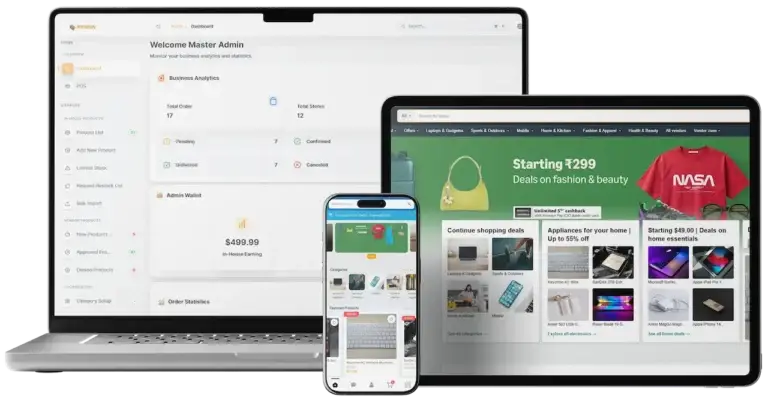
Noon Clone marketplace across a vendor dashboard, a storefront and a phone.02
Pick it if: Your range comes from independent sellers, not nearby shopsNoon Clone

A multi-vendor shopping marketplace with seller panels, an admin console and a storefront for regional online retail.

Explore Solution
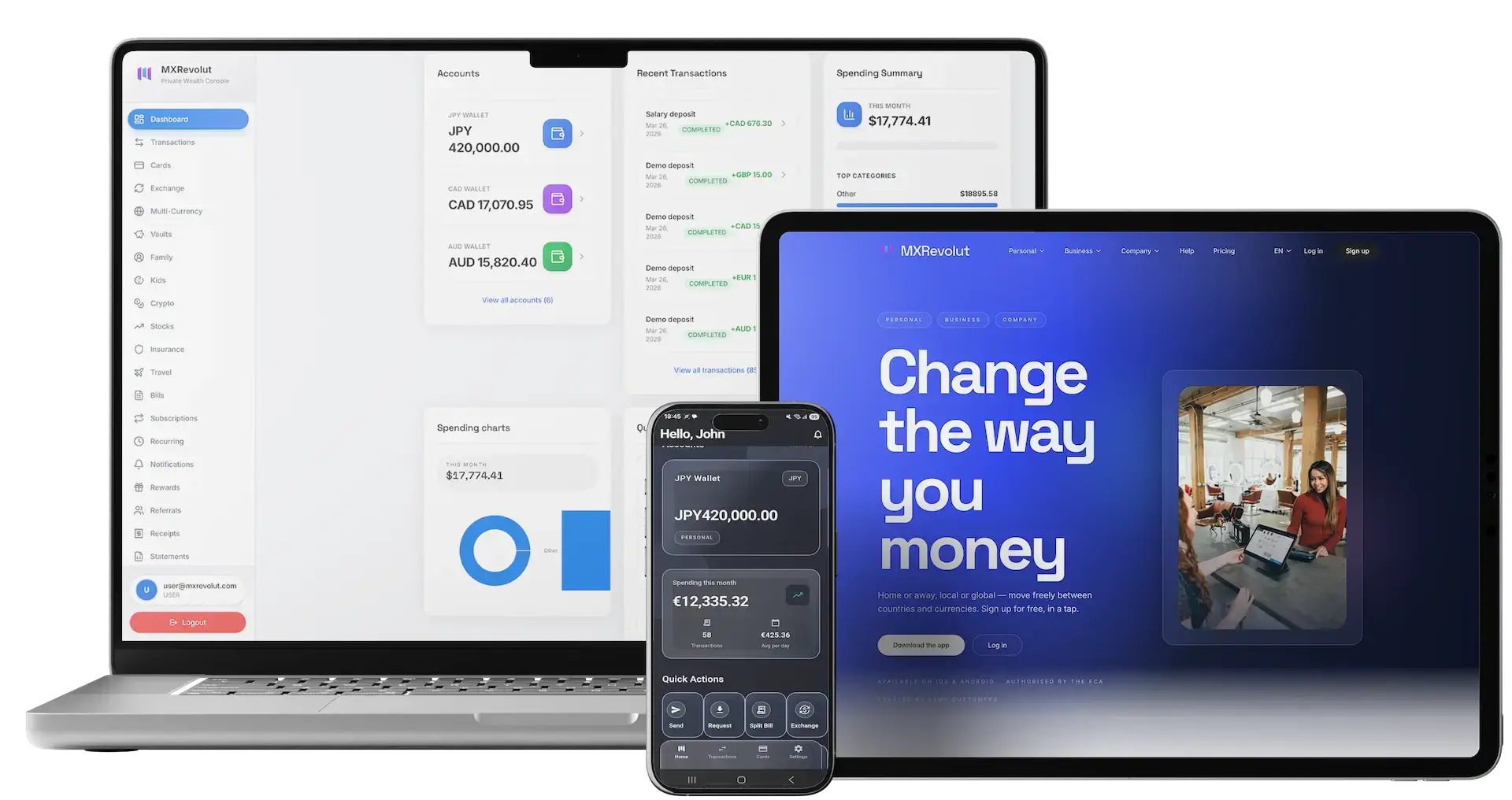
Revolut Clone digital wallet across a banking dashboard, a web landing page and a phone.03
Pick it if: You want a wallet product of its ownRevolut Clone

A digital wallet and banking platform with an admin console, built for a licensed or sponsor-bank operator.

Explore Solution
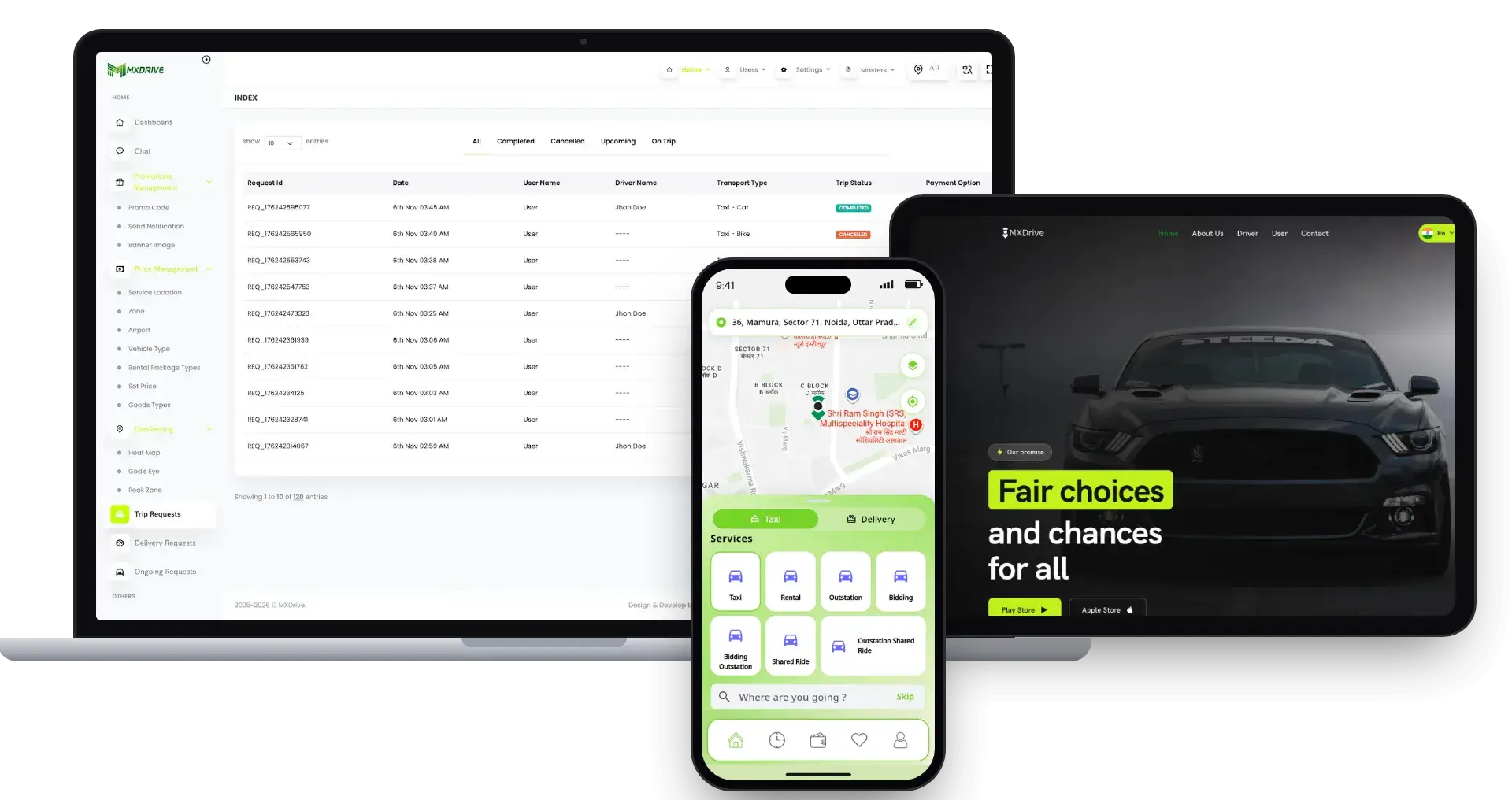
inDrive Clone ride-hailing across a dispatch table, a rider app and a web landing page.04
Pick it if: People are part of your plan, not only parcelsinDrive Clone

A ride-hailing product where riders name a fare and drivers bid, with live tracking and an admin dashboard.

Explore Solution
Full rangeBrowse all 90+ solutions

09The business case

Market Benchmarks

Multi-Category Delivery Market Benchmarks - Independent 2025-2026 Data

The revenue models above are ours. The figures below are not. They come from Delivery Hero's FY 2025 results, Grab's 2025 results release and New York City's published fee caps, reproduced as published. They show how much volume multi-category delivery platforms process, what they keep from it, and where a regulator sets a ceiling on merchant fees.

Delivery Hero01

EUR 49.2bn in GMV at Delivery Hero in 2025

Delivery Hero reports Group GMV of EUR 49.2 billion for 2025, up 9 percent like-for-like, and adjusted EBITDA of EUR 903 million, or 1.8 percent of GMV. Its Quick Commerce vertical passed EUR 7.5 billion of GMV and AdTech revenue is approaching EUR 1.5 billion, according to the company's FY 2025 results presentation of 26 March 2026.

Grab Holdings02

$14.2bn in Grab Deliveries GMV in 2025

Grab reports Deliveries GMV of $14,236 million and Deliveries revenue of $1,800 million for 2025, both up 21 percent, with a segment adjusted EBITDA margin of 2.0 percent. Revenue is about 12.6 percent of GMV, our arithmetic on reported figures. Grab's annual report states that merchant-partners pay a commission at an agreed rate on the goods ordered.

NYC DCWP03

15% Fee Cap on Delivery Apps in New York City

New York City's Department of Consumer and Worker Protection lists the fee caps that third-party delivery apps may charge restaurants: 15 percent to deliver the order, 5 percent for a basic listing service, 20 percent for enhanced service and 3 percent to process electronic payment. An enhanced service fee is allowed only if a basic service is priced at or under 5 percent.

Where each figure comes from.

Delivery Hero SE, FY 2025 Results Presentation, 26 March 2026 - ir.deliveryhero.com

Grab Holdings Ltd, Grab Reports Fourth Quarter and 2025 Results, Form 6-K exhibit 99.1, 12 February 2026; and Annual Report on Form 20-F for the year ended 31 December 2025, filed 6 March 2026 - sec.gov

New York City Department of Consumer and Worker Protection, We Want Your Feedback on the City's Fee Caps, April 2026 - nyc.gov

All figures are the publishers’ own, reproduced as published from company results and a city regulator's rules. Metric definitions differ by company, Grab's segment figures are unaudited, and the Grab revenue-to-GMV ratio is our arithmetic on reported figures. They describe the companies and rules named, not any platform Miracuves builds, and nothing here is a revenue projection for your business.

Why It Pays

Marketability, Revenue Potential & Business Prospects

Revenue starts when stores believe in the app enough to list and customers believe in it enough to come back. The points below make both easier, and keep each relationship with you once it forms.

  1. 01

    A Cut of Every Order

    You keep a share of each order, so income climbs with the number of stores and baskets, not with the size of your team.

  2. 02

    Several Lines, One Console

    Delivery fees, sponsored placement, plans and parcel jobs are distinct levers in one admin panel, so any of them can be turned on without reworking the rest.

  3. 03

    Stores and Customers You Own

    Store accounts, customer wallets, reviews and order history live in your own database, so the value accumulates with you and not with some larger app.

  4. 04

    Freedom to Move

    The full source code and the schema are yours, so moving to a new host, team or direction later needs nobody's consent.

Main Revenue Levers
  • Commission From Stores
  • Delivery Fees
  • Sponsored Placement
  • Wallet Balances
  • Subscription Plans
  • Parcel Job Fees
Long-Term Value

A delivery marketplace holds its ground through supply and repeat use rather than through features.

  1. 01A store that has loaded its catalog and prices rarely walks away
  2. 02Customers with an address, a wallet and a history return
  3. 03Data gathers from launch day and remains in your database
  4. 04Dependable dispatch and honest reviews add a second moat
Example Revenue Scenarios

Only the number of live stores differs across these three cases, and each one points to the lever that matters most at that size. They are planning examples, never forecasts of what a marketplace will earn.

City Pilot25Stores Live

Commission on each order carries early revenue.

One district, roughly two dozen live stores, and commission on every paid order paying the running costs. An example scale for planning, not a forecast.

Regional Launch250Stores Live

Commission plus delivery fees and placement.

A regional service where many stores compete for the same neighborhoods, so sponsored placement and delivery fee rules begin to matter next to commission. A sample size for planning, not a forecast.

Multi-City Network2,500Stores Live

Several cities, with plans and the wallet active.

A network across several cities, where subscription plans, wallet habits and parcel jobs add up beside commission, and the admin reports point to where to focus. A sample size for planning, not a forecast.

10Why Miracuves

Why Miracuves

How Miracuves Stacks Up Against Other HungerStation Clone Developers

A bilingual HungerStation clone can come from a bought script, a freelancer, an agency commission or a ready-made Miracuves base with launches behind it. Whoever you talk to, ask whether the language switch lives in the product or a translation file, where a refund goes and who sees it, and whether the code lands unencrypted in your own repository.

The Case for Miracuves

  • 01

    Language Switch Included

    Customers choose their language in the account menu and the admin can translate labels automatically, which many generic scripts leave to a custom project.

  • 02

    Wallet Already Wired

    Orders can be paid from a wallet that logs recharges, tips and refunds, so the money trail is clear from order one.

  • 03

    Six Surfaces, One Codebase

    Three apps and three web panels already work together, so you are not stitching six separate projects.

  • 04

    You Own the Codebase

    Everything arrives unencrypted together with the schema and deployment notes, so no one can reprice the product or alter the terms afterwards.

  • 05

    Already Delivered to a Client

    Miracuves delivered Talokitoko on this base in 2024 with most of the platform reused (19 of 24 blocks), and the case study publishes the scope ledger.

  • 06

    Straight Talk on Scope

    We separate what the base includes from the add-ons and from what you provide yourself, such as gateway accounts, hosting and store developer accounts.

Development Company

How to Choose a HungerStation Clone Development Company

A bilingual delivery builder should show the language switch, wallet and offer tools in the product itself.

What to look for Miracuves

  • Language in the product A language row in the account menu plus auto-translate across features
  • A wallet with a memory One balance holds top-ups, tips and refunds, each logged for support
  • Offers you can schedule Discount codes, referral rewards and seasonal promotions set from the admin
  • A running business Talokitoko was built on it for Izi Technologies in 2024
  • Source you hold Complete, unencrypted code and schema in your own repository
  • Time and aftercare Six working days, then overlapping support periods

Walk away from any vendor who

  • Treats Arabic as a translation file to deliver later
  • Keeps refunds outside the customer's wallet history
  • Needs a developer to switch on every seasonal offer
  • Bills per order or per seat after launch
  • Will not say where card details are stored

Where the HungerStation Clone Wins Against Generic Scripts and Agencies

CriteriaMiracuvesMiracuves HungerStation CloneGeneric Ordering ScriptCustom Dev Agency
Time to LaunchSix working days on our sideUnknown, or do it yourselfScoped per project, often several months
Who Owns the CodeYou do, complete and unencryptedFrequently restricted or lockedUsually you, per the contract
Delivery DepthSix categories, dispatch, tracking and a walletBasic ordering pagesAs far as the budget stretches
LanguagesLanguage switch with auto-translateDepends on the scriptTranslation work billed separately
Offers & LoyaltyCoupons, loyalty points, referrals and seasonal promotionsCoupons at bestDesigned and built to order
Admin & ReportsDashboard, commission, dispatch and reportingThin or missingBuilt to order at extra cost
Security & ComplianceSeparate logins, card data kept at your gateway, plain limitsMinimalDiffers from agency to agency
Cost vs Speed vs QualityFixed price on a tested base, built fastCheap but riskyCostly and slow
Ongoing Support & Updates60 days of guidance, 6 months of bug fixes, 12 months of updatesSeldom offeredWhatever the contract says

After the first busy month, the four routes look very different. The table shows where.

Talk to Our Team

Changelog

Release Log of the HungerStation-Style Base: Versions and Updates

Newest releases come first and cover the web platform and the apps. There are no dates, and each entry is a plain-language summary.

VersionChangesWhat changed
V2.125 changes and 1 correctionNew or improved
Flutter apps moved to a newer SDK and kept in step with the latest Android Studio
Caching on both the backend and the front end speeds up loads, starting with business settings and the home page
Leaner asset files make the apps respond faster
Clearer wording across system messages and labels
UI and UX polish
Corrected
A round of fixes for smoother daily operation
V2.117 changes and 1 correctionNew or improved
One central login with manual, one-time code and social methods, each switched on or off by the admin
Sign-in by mobile code through Firebase
A Top Offers Near Me list for stores running store-wide discounts
Search improved for both items and stores
Stock can be updated straight from the product list, with warnings when it runs low
Item campaigns can show nutrition, allergy and general details
Stores and delivery partners can register from pages built into the web storefront
Corrected
Assorted fixes, tuned queries and faster pages
V2.108 changes and 1 correctionNew or improved
The admin home page now shows the delivery zones
Tapping a push notification opens the matching page
Chat offers ready-made message suggestions
Tags for nutrition and allergy details on food and grocery items, plus generic group names for medicines
Subscribed customers can be exported as a filtered mailing list
Point-of-sale screens improved in many places
Order details gained a chat link to the admin
reCAPTCHA v3 added for security
Corrected
Assorted fixes, tuned queries and faster pages
V2.9.12 changes and 1 correctionNew or improved
Phone sign-in by one-time code through Firebase
Flutter SDK update
Corrected
Corrections in the web panels and in the apps
V2.98 changes and 1 correctionNew or improved
Paid ad promotion sections
Admins can switch notifications, email and SMS on or off for each store
Any list of stores, items or categories can be sorted by hand from the admin panel
Guests are asked at checkout whether to create an account
Auto-translate for every feature
Subscriptions now cover many more cases
Currency and payment gateway settings are validated, with every check shown to the admin when a setting changes
UI and UX refinements on mobile and web
Corrected
Known issues cleared for steadier performance
V2.8.12 changes and 1 correctionNew or improved
Flutter SDK update
The delivery app and the web storefront stayed as they were
Corrected
Corrections to the web panels and to the customer app

Start the conversation

Ready to open your own delivery brand? Let's turn the plan into a live platform.

Request a free consultation and leave with a fixed timeline and straightforward answers. Earning your trust counts for more with us than a fast sale.

  • Under 2 hours to first reply
  • Free consultation
  • No lock-in contracts
  • Full source code ownership

11Keep reading

Blog & Resources

Latest Reading on Delivery Apps Like HungerStation

Guides on how this kind of delivery business is organized and earns, what a complete feature list looks like and how to think about security before launch.
About the platform7 questions

01What is the HungerStation Clone?

It is a ready-made, white-label delivery marketplace from Miracuves. A customer app, a store app, a delivery app, a web storefront, a store panel and an admin panel come from one codebase, so you can open a food, grocery, pharmacy, e-commerce and parcel delivery service under your own name.

02Does it support Arabic and English?

Customers change language from the account menu, and release 2.9 added auto-translate across the features, so Arabic and English can sit side by side. A right-to-left layout is set up for Arabic storefronts, a guided call walks you through it before you commit, and any adjustment your market needs is scoped and quoted in writing.

03How far can I customize it to fit my business?

Branding, categories, pricing rules, commission and delivery charges are yours to set, and the source code arrives complete and unencrypted. New flows or integrations beyond the base are scoped and priced on their own.

04Which kinds of orders can the platform carry?

Six categories open the home screen: Food, Grocery, Pharmacy, Parcel, E-commerce and Liquor. Pickup-and-drop parcels travel through the same delivery app as store orders.

05Can it grow into a large operation?

The platform is made of separate applications with a realtime channel, an API gateway that limits traffic and an event bus with retries. Because the source is yours, capacity comes down to hosting and settings, and extra work gets its own quote.

06Does it come as an Android and iOS app?

Yes. The customer, store and delivery apps are Flutter apps that run on both platforms, and we help publish them from your own developer accounts. Review by Apple and Google follows their own timetable and is not part of the 6 days.

07Can I run a delivery service like this legally?

The software holds no licence and gives no legal advice. Whether you may sell medicine or alcohol, how you contract couriers, whether holding wallet balances is regulated and what tax rules apply depend on your country. Take advice from local professionals before you open orders.

Customers, languages & wallet7 questions

08How does a customer place an order?

They sign in or carry on as a guest, choose a category, search or browse a store, fill a basket, confirm the address and pay by card, cash on delivery or wallet. The order page then lists the schedule and a delivery verification code beside a Track Order button.

09Can customers order for a later time?

Yes. An order can go out right away or be scheduled for a chosen slot, and the order page shows the scheduled time.

10How do customers follow their delivery?

The app tracks the delivery partner by GPS from pickup to drop-off, and push notifications report each status change.

11What can the wallet do?

The account menu shows a wallet balance, and an order can be paid from it. The wallet takes recharges, tips and refunds and keeps a history of each, so customers and your support team can see every movement.

12Which payment methods work?

Cards, digital wallets, cash on delivery and integrated payment gateways. You connect your own gateway account, and release 2.9 added validation of currency and gateway settings when they change.

13Can I run Ramadan or festival offers?

You can create discount codes, referral programs and seasonal promotions in the admin panel, and the customer app shows them through an offers banner, a special-offer row and a Top Offers Near Me list. You set each offer and its dates yourself, so a Ramadan campaign runs on the same promotion tools as any other season.

14Do customers earn rewards for ordering?

The account menu carries Loyalty Points, Coupon and Refer and Earn rows. A separate Social Sharing Rewards module is available as an add-on.

Stores, delivery & admin9 questions

15How do stores join the platform?

A store signs up from the app or the web storefront, fills in its profile and lists products, then starts receiving orders once the admin approves it.

16Can stores change their products and prices?

Yes. Stores manage their catalog, change prices in real time, update stock quickly from the product list and get low-stock alerts at thresholds they choose.

17What happens when a store gets an order?

The store is notified, prepares the order and hands it to a delivery partner, and the status moves along for the customer and the admin to see.

18Can a store set its own delivery fee?

Stores can use custom delivery fees or follow the platform pricing, depending on how you configure it.

19How do delivery partners sign up and receive orders?

Partners register, upload their documents and are approved by the admin. Orders are offered by proximity, and a partner can accept or decline each one.

20Do delivery partners get navigation and an earnings view?

Yes. The delivery app gives turn-by-turn GPS navigation, and an earnings screen with trip history and payout summaries. Cash-on-delivery money is handled according to the policy you set.

21What does the admin control?

The admin panel manages customers, stores and delivery partners, sets commission and delivery charges, follows live orders, runs promotions and reads reports on sales, customer trends, rider performance and revenue.

22Can I set commission and delivery charges myself?

Yes. You define the commission percentage for stores and the delivery charges, and dynamic pricing can be configured in the admin.

23What reports does the admin get?

Sales, customer trends, rider performance, revenue breakdowns and platform growth, alongside a dashboard of order counts and a yearly sales chart.

Money, launch & Miracuves11 questions

24How can the platform earn money?

Through commission on orders, delivery fees, sponsored placement for stores, subscription plans, wallet and parcel lines. Each is a separate lever in the admin, and the take-rate table above shows published benchmarks for them.

25What does first revenue realistically look like?

Order commission is the usual starting point for a delivery marketplace, since no additional product has to be sold and the first paid order already generates it. Delivery fees are next, set by your own pricing rules. Once enough stores compete for the same customers, sponsored placement and subscription plans follow, and the wallet and parcel lines grow as customers return. Other lines sometimes suggested for platforms like this, such as adverts on branded delivery bags or API access for other systems, depend on your own commercial deals; they are agreed separately and never built in.

26How hard is it for a rival to copy a delivery marketplace?

A delivery marketplace holds its ground through supply and repeat use rather than through features. Stores that loaded their catalogs and prices do not casually move, and customers with a saved address, a wallet balance and an order history have a reason to return. The platform lets that build-up start at launch and keeps it in your own database. Reliable dispatch and honest reviews form the second moat, because an app people trust is hard to copy.

27How long does deployment take?

The ready-made base takes 6 working days of our build time, including rebranding and deployment to your hosting. Apple and Google review the stores separately, and you provide hosting, developer accounts, branding and business details. Support has three overlapping periods. Platform guidance lasts 60 days, priority bug fixes 6 months and updates 12 months.

28Do I receive the source code?

Yes. The web platform and both mobile apps come as complete, unencrypted source code, together with the database schema, so your team can change and redeploy freely.

29What must I provide before launch?

A server and domain, a verified account with the app stores, your logo and company details, a payment gateway that has completed KYC, and keys for outside services like maps, text messages and push notifications.

30Where does Miracuves stand out when building a HungerStation clone?

With 9,000+ projects delivered, Miracuves also delivered this exact base to a delivery business, Talokitoko, in 2024. You get a fixed price of $3,399, complete source code and a team that spells out what the base includes, what costs extra and what you bring yourself.

31What does a HungerStation clone cost?

A fixed $3,399, paid once, for all six surfaces of the product: three Flutter apps, the storefront and two web panels, with unencrypted source, the database, your branding and deployment to your hosting done by us. Miracuves takes no share of your orders. Paid add-ons or custom changes get a written quote before anyone starts.

32Ready-made HungerStation clone or a bespoke build: which fits a regional launch?

For a regional food and grocery launch the ready-made base is usually the better bet. Language switching, auto-translate, the wallet and seasonal offers already work, Talokitoko was built on this same base, and your launch lands 6 working days from kick-off for a known price. A bespoke build is quoted against scope and takes far more time, while extras on our base are priced in writing, usually 2-8 weeks.

33Which steps lead from demo to a live HungerStation clone?

Try the demo in all three roles, customer, store owner and delivery partner, switching languages as you go. Settle your categories, languages and first city. We brand all six surfaces, install them on your server and domain with your keys, and set commission, charges and a trial offer. Six working days later the build is done, and app store review runs on Apple and Google time.

34Can I launch a food delivery app like HungerStation in Saudi Arabia?

Yes, the platform is set up for Arabic and English shoppers. Customers switch language from the account menu, auto-translate covers the features, and a right-to-left layout is ready for Arabic stores. You connect your own payment gateway, and licensing and compliance in your market remain your decision, since the software gives no legal advice.

Disclaimer

Miracuves is an independent software development company. We are not affiliated with, connected to, sponsored by, or endorsed by HungerStation.

Read our full Legal Notice & Disclaimer →
Why this name

“HungerStation Clone” is used descriptively. It is how the software industry refers to building a platform with functionality similar to HungerStation, and how clients search for it.

Who built this

The entire design and codebase is built by our own team. The product contains no code, design, graphics, or content originating from the HungerStation website or applications.

Trademarks

HungerStation and all other third-party names and marks are the property of their respective owners, referenced here solely to describe the category of software offered.