Courier Marketplace App · Production Ready

Glovo Clone App - White-Label Multi-Category Delivery Platform

Miracuves' ready-made, white-label Glovo clone runs meals, groceries, pharmacy and parcels on one courier fleet. Android and iOS apps for shoppers, stores and couriers, the storefront, store panel and admin console are unencrypted code you own, live and dispatching in six working days.

A new order goes to the store, which accepts it and sets the preparation time; nearby couriers accept or decline the job, and a verification code confirms the handover. Apple and Google review sits outside the six days, and a shopping assistant or delivery windows are separate add-ons. Reports beyond the standard set, or an alternative payout cycle for stores, are scoped and quoted in writing, then usually built in 2-8 weeks.

Launch in 6 Days with

  • Source Code
  • Customer App
  • Store App
  • Courier App
  • Web Storefront
  • Admin Panel

StackFlutter · React · Bootstrap · PHP · Laravel · MySQL · Google Maps · Firebase

MXLovo console · DispatchIllustrative
Orders today86
Couriers online23
Stores open41

Fleet activity

Glovo Clone customer app home screen with an offers banner, category tiles for grocery, food, pharmacy, e-commerce, parcel and liquor, and a delivery address picker.
Every job lands in one queuefor the whole fleet
  • 5Job Types, One Courier Queuefood, grocery, pharmacy, parcel and e-commerce
  • 6Order Stages Counted Liveunassigned, accepted by a courier, packaging, delivered, canceled and refunded
  • 0%Revenue Share With Miracuvesno cut of store commission, delivery fees or paid promotion
  • 3Separate Wallet Entriescustomer payments, store earnings and courier earnings behind every payout screen
  • 6Days to Launchand if the delay is ours, we keep going free
  • $3,399Paid Once, Not Rentedsource code yours, no per-seat fee, no monthly rental

Live in six working days, or we keep working free until you launch. Every build carries 60 days guidance, 6 months bug fixes and 12 months updates.Verify every figure

Talokitoko Launched on This Base

Izi Technologies opened Talokitoko, a food and grocery delivery business, on the Glovo Clone base in 2024, with 19 of 24 building blocks reused as they were.

Stores Approved Before They Sell

New stores register on built-in pages and wait for your approval, then run products, prices and stock from an app or panel, with low-stock alerts at their own thresholds.

Card Numbers Stay at the Gateway

Cards go straight to the payment gateway you connect, on a merchant account you hold, and the platform keeps a payment reference beside wallet and cash-on-delivery entries.

Ready to put your own delivery marketplace on the map?Talk to Product Expert

Chosen by 6,000+ clients across the globe

Miracuves is listed by Expertise.com as a managed IT service provider.Miracuves is an official member of the Forbes Business Council.Miracuves is a verified agency on DesignRush, listed among top design agencies in India.Miracuves is reviewed on Trustpilot as a software development company.Miracuves is listed by The Manifest among top managed software development companies.Miracuves is listed by DesignRush as a top software development company.Miracuves is recognized by GoodFirms as a top software development company.Miracuves is ranked among the top 1000 companies globally by Clutch.Miracuves is a top managed service provider in the United States on Clutch.

01See it live

Live in Action

Glovo Clone App Demo - Customer, Store & Courier Apps, Web Storefront & Admin Panel

Try the Miracuves Glovo Clone script with your own hands. Three demo logins from Miracuves cover the Glovo clone's customer, store and courier, and the web demo opens the storefront, the store panel and the admin panel. Place a basket, follow the order, then switch sides and take the job as a courier.
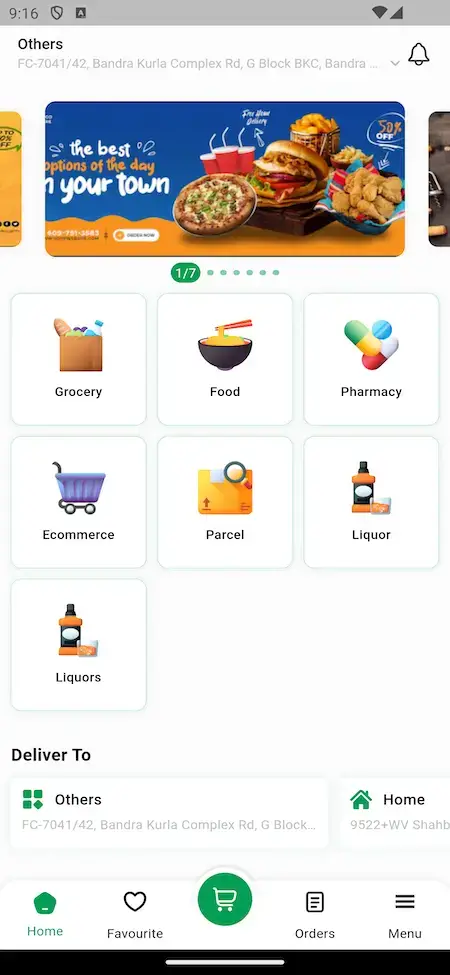
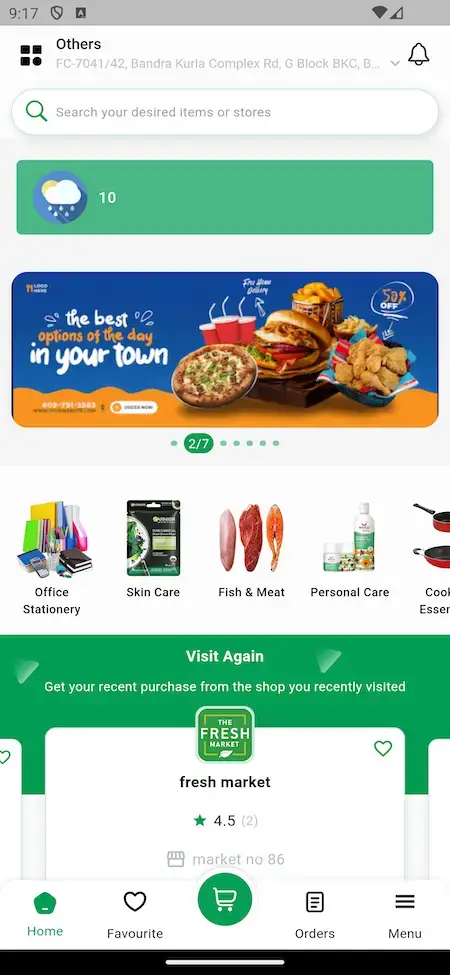
Glovo Clone customer app home screen with an offers banner, category tiles for grocery, food, pharmacy, e-commerce, parcel and liquor, and a delivery address picker.Glovo Clone customer app home screen with a search bar, an offers banner and a row of store categories.
Customer app

Glovo Clone - Customer App

On the shopper's phone, a person chooses a category, searches for items and stores, pays and tracks the order by status and verification code.

  1. 1Open the app portal and pick your phone
  2. 2Sign in with the demo login below
  3. 3Explore: Home, Search, Cart, Orders
Try:+911234567890 | User_321
Glovo Clone web storefront landing page with category tabs, seller and delivery partner sign-up sections, app download buttons and a newsletter footer.
Store app

Store App - Counter in a Pocket

The merchant side on a phone: receive incoming orders, update products and stock, and keep an eye on what is waiting for pickup.

  1. 1Open the app portal and pick your phone
  2. 2Log in with the store details below
  3. 3Explore: Orders, Products, Stock
Try:food@demo.com | Store_321
Glovo Clone web storefront landing page with category tabs, seller and delivery partner sign-up sections, app download buttons and a newsletter footer.
Courier app

Courier App - Jobs, Navigation & Earnings

On the rider's phone: a nearby job arrives, the rider accepts or declines it, follows the route to the store and then the customer, and checks earnings.

  1. 1Open the app portal and pick your phone
  2. 2Log in with the courier details below
  3. 3Explore: Jobs, Route, Earnings
Try:+919876543210 | Delivery_321
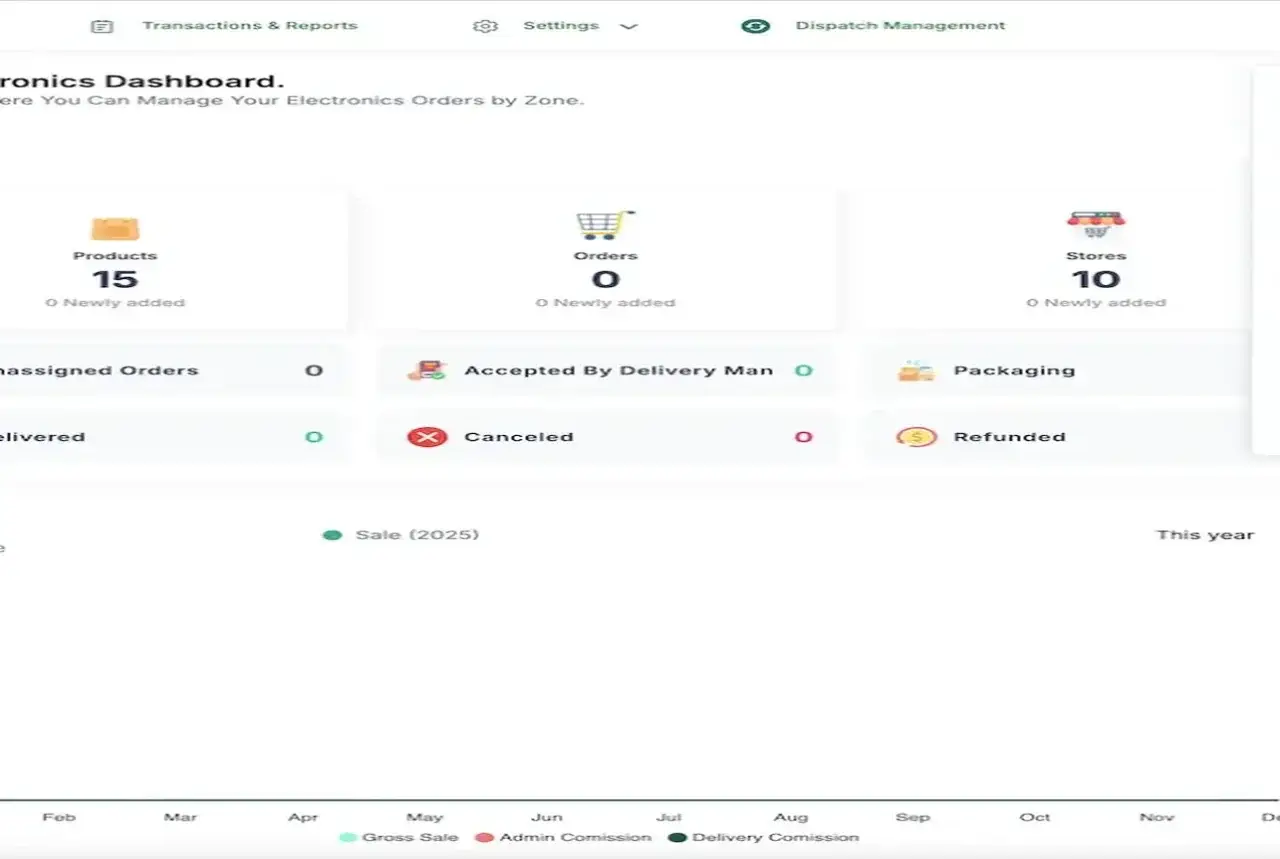
Glovo Clone admin dashboard with product, order and store counts, order status tiles, a yearly sales chart and a dispatch management menu.
Web & panels

Web Storefront, Store Panel & Admin Panel

The web side: a storefront with category tabs and sign-up sections for sellers and couriers, a panel where stores run their counter, and the admin panel with dispatch.

  1. 1Open the web demo in a browser tab
  2. 2Open the store panel or the admin panel
  3. 3Explore: Storefront, Stores, Admin dashboard
Admin login:shared on a guided call
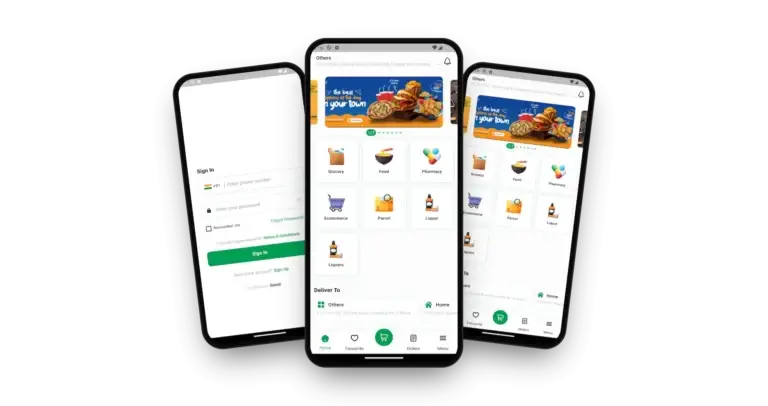
Glovo Clone on three phones: the home with service categories, the sign-in screen and the home with service categories

See It With Us

Watch an App Like Glovo at Work: Ordering, Store Counter, Courier Dispatch & Admin

The quickest way to see how the pieces fit is a live call. In 30 minutes we open the customer app, the store app, the courier app and the admin panel together, and tie each one to your own plan: your categories, your commission, your fleet size and your launch date.

Schedule a live walkthrough call.

Every Screen Mapped

How the Glovo-Style Apps Flow - Customer App, Admin Dashboard & Web Storefront

From the sign-in screen to a tracked order, these are the real screens of the Glovo clone Miracuves ships: the customer app, the admin dashboard and the web storefront, in the order a delivery actually moves.
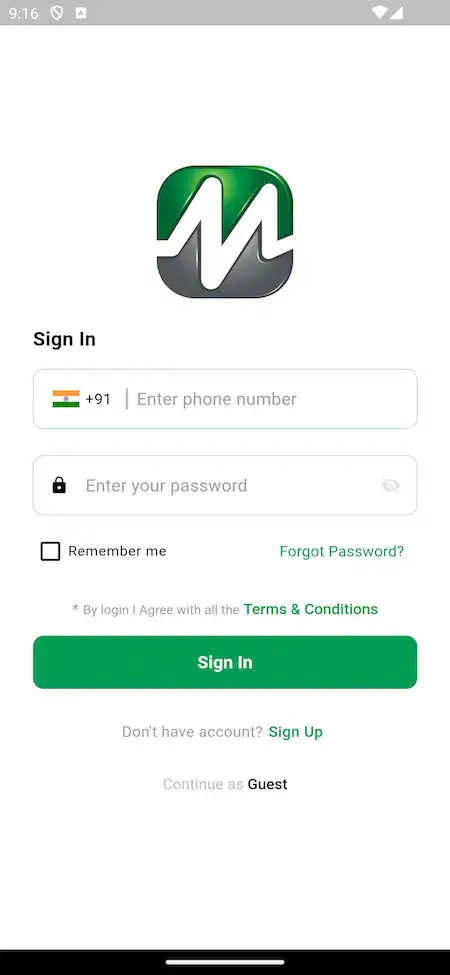
Glovo Clone customer app sign-in screen with phone number, password, remember me and a guest option.
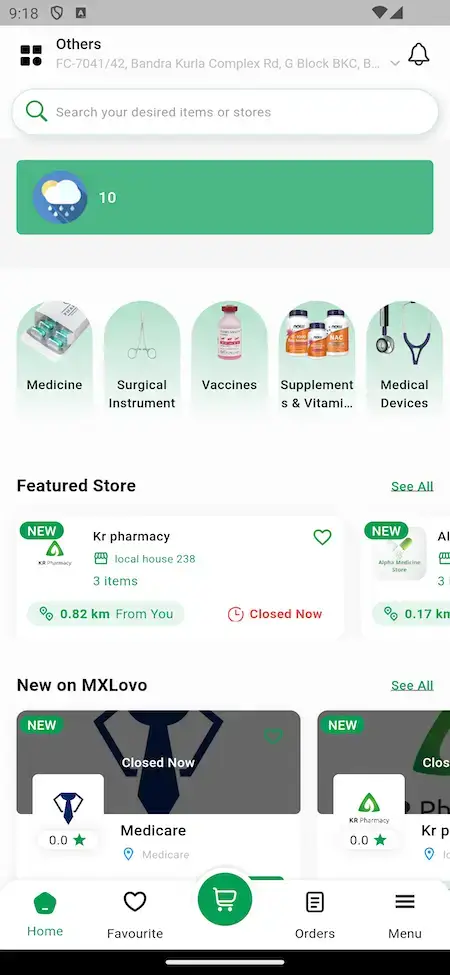
Glovo Clone customer app home screen with an offers banner, category tiles for grocery, food, pharmacy, e-commerce, parcel and liquor, and a delivery address picker.
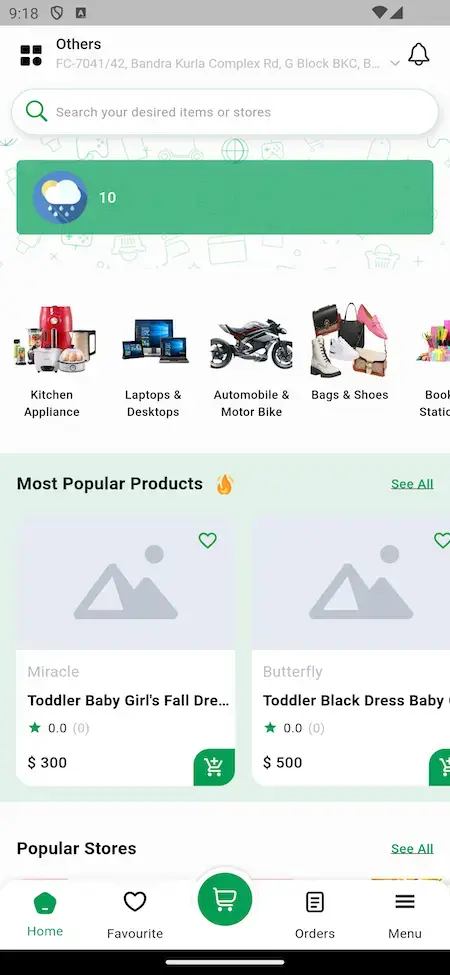
Glovo Clone customer app home screen with a search bar, an offers banner and a row of store categories.
Glovo Clone pharmacy category with medicine, surgical instrument, vaccine and supplement tiles, and a featured store list with distance and open status.
Glovo Clone category rows for appliances, laptops, bikes and bags, with most popular products and popular stores below.
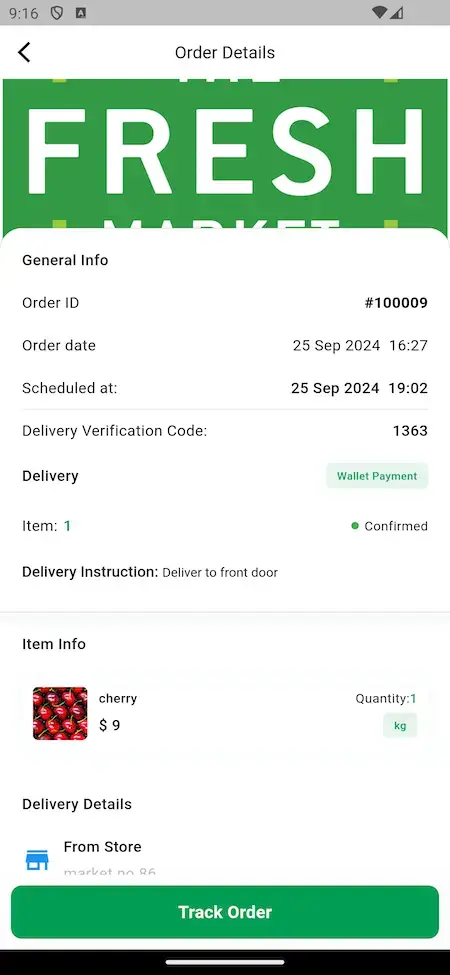
Glovo Clone order details screen with order ID, schedule, delivery verification code, wallet payment, item list and a Track Order button.
6 screens · scroll →
Glovo Clone admin dashboard with product, order and store counts, order status tiles, a yearly sales chart and a dispatch management menu.
1 screen
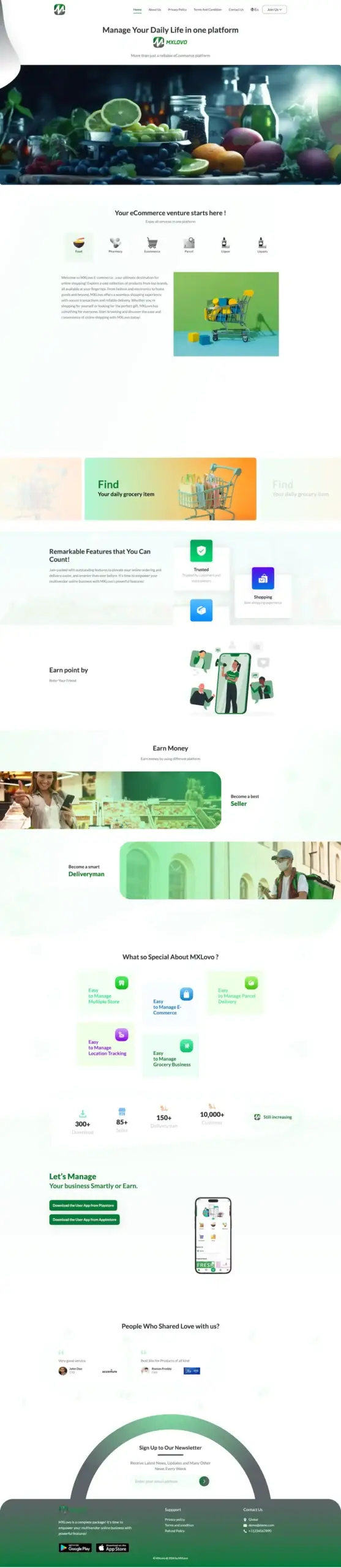
Glovo Clone web storefront landing page with category tabs, seller and delivery partner sign-up sections, app download buttons and a newsletter footer.
1 screen

Follow a customer from sign-in through a category and a search to a store and a tracked order, then switch to the admin dashboard to see the same orders from the operator side.

Explore Our Solutions

02Proof

Client Voices

Glovo Clone Client Reviews - Operators in Their Own Words

What clients say about building on Miracuves bases. The first four describe food, grocery, parcel and courier businesses; the others come from other industries and appear exactly as their authors gave them.

CCharles EveillardManaging Partner, Izi Technologies
“Talokitoko is grocery and food delivery for the African diaspora market in Europe. The rider app, dispatch and the merchant console were already built, so we spent the engagement on our own local payment mix, the vendor onboarding flow and the regions we actually operate in. The platform was live inside a month, which was months faster than our internal estimate.”
CClick2Deliver TeamFounding team, Click2Deliver
“Two order types, one courier fleet. The base handled multi-vertical ordering, so the work was our merchant mix and the grocery-specific substitution and weight rules. Live inside a month.”
MMarsha WilliamsFounder, Bmore On Demands LLC
“The team was running it on a dispatcher and a Google Sheet, and we needed a real platform quickly, because we were about to onboard a major retail client. Miracuves’s Delivery Genie base gave us the rider app, the dispatch console, and live tracking. We launched in 6 weeks and cleared 4x the previous order volume in the first month.”
MMustafa H.CTO, Speedyven Networks
“Speedyven is a hyperlocal courier network — packages, food, and same-day essentials across a few metros. The dispatch and rider app were the parts where we needed to move fastest, because riders have low tolerance for clunky tools. Miracuves's Delivery Genie base gave us the rider app, the dispatch console, and live tracking. We added our custom surge-pricing engine, our multi-merchant order router, and a custom rider-incentives module. We launched in 7 weeks. Rider activation is high and the platform's been stable through weekend peaks.”
AAndre GittensCEO, Ride Corporation
“Turo is the obvious reference, but the Caribbean specifics, from different insurance norms to different payment rails, meant we needed a real partner, not just a clone. Miracuves’s MXCar base covered the listing, the trip flow, and the host payouts. We launched in 6 working days and are live in three islands.”
TTiffany DandreaOperations Director, Best Cabo Yacht Rentals
“We were running it on phone calls and a paper calendar, and we were losing bookings to bigger OTAs. Miracuves’s GetmyBoat Clone base gave us the calendar, the booking flow, and the payment engine. Online bookings are up roughly 70% in the first six months, and the ops team finally has a live view of the fleet.”
DDr. Vivek RungtaFounder & Chief Dermatologist, Dermacian
“Every HMS I tried was built for general physicians, with no lesion mapping, no before/after tracking, and no procedure-based billing. Their MXHealth base gave us the patient app, doctor app, EMR and video consult out of the box. Front-desk time on scheduling and follow-ups is down ~70%, and we went fully digital in 9 months, where a fully custom job would have been 18.”
DDr. Carlos A. PalermoCo-founder & CEO, Doctta Health
“Building a compliant telehealth stack from scratch in three markets would have been a year-plus effort. Miracuves’s MXHealth base covered the patient and doctor apps, video consult, e-prescription and the pharmacy integrations. We launched in our first market in 9 weeks and rolled out to two more in the following six months.”
BBrian LatailleVP Logistics Technology, IBC Tanks Canada
“We were juggling spreadsheets, a third-party GPS provider, and a phone. We needed a single operations console. Miracuves’s MXLogistics base covered the trip lifecycle, the driver app, and the customer tracking page. We’ve cut operations admin time by about 40%.”
Read More Client TestimonialsOperators and founders in their own words

Proof in Production

Glovo Clone Case Study - Talokitoko Delivery Platform

The story of Izi Technologies launching Talokitoko, a food and grocery delivery business, on the Miracuves Glovo Clone base. It is a summary of the published case study and covers what was delivered in 2024.

Case Study
Food and Grocery Delivery Platform

Izi Technologies needed a food and grocery delivery platform for Talokitoko. Miracuves started from the Glovo Clone base, built the five parts that were the client's own and transferred the source code at handover.

Izi TechnologiesClient
Food and grocery deliveryIndustry
2024Delivered
6 daysBuild time
19 of 24Blocks reused
4Applications shipped
Glovo Clone admin dashboard with product, order and store counts, order status tiles, a yearly sales chart and a dispatch management menu.
Challenges
  • Food, groceries and parcels need different baskets, substitutions and handling rules on one platform
  • Assignment, batching and re-routing, with AI-powered dispatch available as an add-on, have to hold up while the courier is already moving
  • Every new store brings a catalog, an accept flow and a settlement account
Goal
  • Stand up a delivery platform without rebuilding the parts already proven on the base
  • Spend the effort on the five decisions that were the client's own
  • Hold the source code, schema and deployment configuration outright
Solution by Miracuves
  • Customer, store, driver and admin applications, each with its own permissions
  • Store network, delivery zones, fees and commission, payment gateways and branding set for the client
  • Brand and theming applied across every surface
  • Source, schema, deployment configuration and architecture notes handed over
  • Build window of 6 working days on the ready-made base

“Talokitoko is grocery and food delivery for the African diaspora market in Europe. The rider app, dispatch and the merchant console were already built, so we spent the engagement on our own local payment mix, the vendor onboarding flow and the regions we actually operate in. The platform was live inside a month, which was months faster than our internal estimate.”Charles Eveillard · Managing Partner, Izi Technologies

Read the full case studySee the scope ledger and the 19 of 24 blocks that were reused.

03The product

The Basics

What a Multi-Category Delivery App Like Glovo Does for Customers, Stores and Couriers

A Glovo clone is a ready-made delivery marketplace built around a courier fleet, and in the Miracuves version that one fleet carries every category. Customers order from nearby stores in several categories, stores prepare what was ordered, couriers carry it to the door, and the operator watches the whole chain from an admin panel that includes dispatch, commission and payouts.

Glovo Clone on three phones: the home with service categories, the sign-in screen and the home with service categories

More Than a Category Grid

The value sits behind the home screen: store counters, courier dispatch, a wallet, order statuses and an admin console that follows sales and commission.

Not a Locked Box

Source code comes complete and unencrypted. As the business grows your team can rework flows and screens freely, and no per-seat fee applies.

Plain About What Is Extra

A shopping assistant, community pickup points, sharing rewards and custom delivery windows are add-ons priced on their own. They are listed as add-ons and never counted as base features.

Web, Android & iOS

What Is a Glovo Clone Script?

The hard part of an anything-delivery app is not the category grid. It is the work behind it: stores that each manage their own products and stock, couriers who receive jobs of every kind, and the wallet and commission trail the operator has to stand behind. Those parts ship working.

Glovo Clone admin dashboard with product, order and store counts, order status tiles, a yearly sales chart and a dispatch management menu.
  1. 01Category home screen with search and offers
  2. 02Store pages with ratings, distance and open status
  3. 03Cart, checkout and order tracking with a verification code
  4. 04Store app and panel for products, stock and orders
  5. 05Courier app and an admin panel with dispatch and reports

You receive three apps and three web panels: the customer, store and courier apps, plus the storefront, the store panel and an admin panel with dispatch. The Flutter source and the complete source code come with it.

Everything Included

Glovo Clone Features - Home Screen, Stores, Checkout, Courier Dispatch, Wallet & Admin

Miracuves traces every Glovo clone feature below to an app screen, the admin panel or the release log. Anything that needs an extra module is named as an add-on further down the page.

Feature 01 / 12

Multi-Category Home Screen

One home screen opens every kind of delivery: category tiles for grocery, food, pharmacy, e-commerce, parcel and liquor, an offers banner that slides, and a delivery address picker at the top.

  • Category tiles for grocery, food, pharmacy, e-commerce, parcel and liquor
  • Sliding offers banner with a position counter
  • Deliver To picker with Home and Others addresses
  • Bottom tabs for Home, Favorite, Cart, Orders and Menu
  • Guest option on the sign-in screen
Feature 02 / 12

Store Pages & Product Lists

Stores sit in featured, new and popular lists with a rating, a distance from the customer and an open or closed status, and each category opens into its own rows of subcategories and products.

  • Featured, new and popular store lists
  • Rating, distance and Closed Now status on store cards
  • Subcategory tiles such as medicine, vaccines and supplements
  • Most popular products rows
  • Favorite hearts to save stores and items
Feature 03 / 12

Search & Discovery

A search bar at the top of the home screen looks across items and stores, and offers are surfaced both in the banner and in a list of stores with discounts near the customer.

  • Search across items and stores
  • Top Offers Near Me list of discounted stores
  • Improved item and store search in release 2.11
  • New on the platform section for fresh stores
Feature 04 / 12

Cart, Checkout & Payments

The cart carries quantities and options, checkout adds the address, a note for the courier and the payment method, and the order can be paid from the in-app wallet, by card, by cash on delivery or through a connected gateway.

  • Cart review with quantity changes
  • Delivery instruction field such as leave at the front door
  • Wallet payment shown on the order
  • Cards, digital wallets and cash on delivery supported
  • Account prompt for guest checkout
Feature 05 / 12

Scheduled & Instant Orders

Customers can send an order right away or pick a later time, and the order record keeps both the order date and the scheduled time, with an order history to repeat a favorite basket.

  • Immediate or scheduled delivery
  • Order date and Scheduled at on every order
  • Order history to revisit past baskets
  • Item, quantity and unit lines on the order
Feature 06 / 12

Courier App & Job Queue

Couriers register with their documents, start after approval, receive jobs near them and accept or decline, then follow the route to the store and the customer from the same app.

  • Registration with uploaded documents and approval
  • Jobs assigned by proximity, accept or decline
  • Map navigation to store and customer
  • Earnings view with trip history and payout summary
  • Cash on delivery handled to your platform policy
Feature 07 / 12

Live Tracking & Handover Code

A Track Order button follows the courier from pickup to the door, and each order carries a delivery verification code, a status label and a message thread for questions.

  • Track Order button on the order screen
  • A Delivery Verification Code accompanies each order
  • Status labels such as Confirmed
  • Predefined message suggestions in chat
  • Chat with the admin from the order details page
Feature 08 / 12

Store App & Store Panel

Stores sign up through built-in registration pages, wait for admin approval, then run their counter from an app or a panel: products, prices, stock levels and the orders that come in.

  • Store registration pages on the web
  • Admin approval before orders arrive
  • Quick stock update from the product list
  • Low-stock alerts at custom thresholds
  • Own delivery charges or platform pricing
Feature 09 / 12

Dispatch Management

The admin panel has a Dispatch Management area and order management tiles that count unassigned orders, orders accepted by a courier, packaging, delivered, canceled and refunded jobs.

  • Dispatch Management menu in the admin panel
  • Unassigned and accepted-by-courier counters
  • Packaging, delivered, canceled and refunded counters
  • Live view of orders, stores and courier locations
Feature 10 / 12

Zones & Category Modules

Orders are organized by delivery zone and by module, so the dashboard can show, for example, the electronics orders of one zone, and item forms change with the category.

  • Dashboards per module and per zone
  • Delivery zone information on the admin landing page
  • Nutrition and allergy tags for food and grocery items
  • Medicine generic group names and filters for pharmacy items
Feature 11 / 12

Wallet, Commission & Payouts

A sales chart separates gross sale, admin commission and delivery commission, the admin sets commission percentages and delivery charges, and stores withdraw earnings through the platform.

  • Sales chart with gross sale, admin commission and delivery commission
  • Commission percentages set by the admin
  • Store withdrawals from platform payments
  • Currency and payment gateway settings validated
Feature 12 / 12

Promotions, Ads & Subscriptions

Operators run discount codes and seasonal offers, sell paid promotion slots to stores, and offer subscription plans that were widened in later releases.

  • Discount codes and seasonal offers
  • Paid ad promotion sections for stores
  • Subscription feature with more plan cases
  • Export of the subscribed customer list with filters
  • Custom sorting of stores, items and categories

Before you buy, note this: You get a finished platform already carrying your brand. What we ask of you is hosting and a domain, a store-ready verified developer account, your branding and business details, a payment gateway with onboarding and KYC behind it, plus any third-party keys. How long Apple and Google take to review the apps is up to them and sits outside our 6-day build time.

Talk to Our Team

How Operators Earn

Glovo Clone Revenue Models - Store Commission, Delivery Fees, Promotion & Delivery Passes

A delivery app like Glovo earns in several places at once, and Miracuves keeps each line apart so that changing one leaves the others as they were.

Two lines usually move the numbers most: the commission on each store order and the fee on each delivery leg.

  1. 01

    Store Commission

    The operator keeps a percentage of every order placed through the platform. The commission rate is a setting in the admin panel, and the sales chart shows it as its own line.

  2. 02

    Delivery Fees

    The courier leg is priced on its own, with charges the admin sets and stores can override with a fee of their own, so delivery earns separately from the goods.

  3. 03

    Paid Promotion

    Stores can buy placement in promoted sections of the store lists, a line that grows with the number of stores competing for the same customers.

  4. 04

    Delivery Pass Subscriptions

    A recurring plan for customers who order often, backed by the subscription feature that later releases widened to cover more plan types.

  5. 05

    Peak-Hour Pricing

    Delivery charges can follow demand, so a rainy evening rush is priced differently from a quiet afternoon, with the rules set by the admin.

  6. 06

    Parcel Pickup Fees

    Pick-up-and-drop jobs between two addresses carry a fee of their own, so the fleet earns from errands as well as from store orders.

What published delivery businesses and one city regulator show for the lines this platform can run: commission, delivery fees, promotion, card costs and passes.
Revenue streamHow it is chargedTake rateTypical take rateWhat sets the ceiling
Store CommissionA percentage of the order value, charged to the store when an order goes through the platform.Grab: around 15%-30% of order value. Its Deliveries revenue was about 12.6% of GMV in 2025 (our arithmetic).What stores can give up before the margin is gone. Grab adds that card costs of about 2.5%-3% are covered from the same commission.
Delivery FeesA fee on each delivery, billed to the customer, the store or both, according to how you configure the platform.New York City caps the delivery fee an app may charge restaurants at 15% of the order.Local law where there is one. The same New York rule caps basic service at 5%, enhanced service at 20% and payment fees at 3%.
Paid PromotionStores pay for placement in promoted sections and offer lists on the customer app.Delivery Hero reports advertising revenue near EUR 1.5 billion on EUR 49.2 billion GMV, about 3% (our arithmetic).How many stores compete for the same shoppers. A young marketplace has fewer buyers of placement than an established one.
Card PaymentsCard costs are absorbed inside the commission or passed on as a service charge.Grab puts its card costs at roughly 2.5%-3%, and Stripe US charges 2.9% + 30c on a domestic card payment.The gateway you onboard with, your country and your card mix, since one processor prices differently across markets.
Delivery Pass SubscriptionsA recurring plan with lower delivery fees, paid by the customer each period.Swiggy counts subscriptions as one of four revenue lines in its quick-commerce business.Whether the app stores class the plan as a digital purchase. If so, Apple lists 30% (15% for small business members and qualifying subscriptions) and Google's US, UK and EEA fees changed on 30 June 2026.

How to read this. The commission range and card cost come from Grab's own merchant commission explainer, and its revenue-to-order-value ratio is our arithmetic on the 2025 results release. The advertising share is ours too, from Delivery Hero's FY 2025 presentation. Fee ceilings are the New York City delivery app rules, card pricing is Stripe US pricing, and store billing comes from Apple and Google Play. These are other companies' published numbers and one local cap, offered as modeling inputs. They are neither a quote nor a forecast, and your own rates belong in the admin settings.

Revenue Model

Glovo Clone Revenue Model, Stage by Stage

The Glovo clone Miracuves delivers runs every job type through one courier queue, so each new income line rides on a fleet you already pay.

Launch

The first stores bring commission on each order, and delivery fees price the courier leg apart from the goods from day one.

Traction

Once couriers have quiet hours, parcel pickup fees turn them into errand earnings, and peak-hour pricing lifts the rush without touching the apps.

Scale

With many stores competing, paid promotion slots start to sell, and delivery pass subscriptions keep frequent customers ordering through your app.

Store commission, delivery fees and promotion income stay entirely with you, since Miracuves keeps 0% of them, and every payout traces back to separate wallet entries for shoppers, stores and couriers.

Want a revenue model built around your own courier fleet?Design My Revenue Model

Operate It Day to Day

Glovo Clone Admin Panel - Dispatch, Stores, Couriers, Zones & Payouts

In the Glovo clone admin panel from Miracuves, one console covers the operator's day: what is waiting for a courier, which stores are open, what is owed to them and what the customer app is showing.

Glovo Clone admin dashboard with product, order and store counts, order status tiles, a yearly sales chart and a dispatch management menu.
Glovo Clone web storefront landing page with category tabs, seller and delivery partner sign-up sections, app download buttons and a newsletter footer.

Admin Panel Sections

  • 01

    Dashboard & Sales

    Counts of products, orders and stores, status tiles for every order state and a yearly sales chart that splits gross sale from admin and delivery commission.

  • 02

    Dispatch Management

    The place where orders still waiting for a courier are handled and assigned, with live counters for what is unassigned and what a courier has accepted.

  • 03

    Stores & Products

    Approve new stores, review what they list and keep the catalog tidy, with category-specific fields for items such as food, groceries and medicines.

  • 04

    Couriers & Customers

    Onboard couriers once their documents are in, manage customer accounts and export the list of subscribed customers with filters.

  • 05

    Zones & Modules

    Delivery zones and category modules with a dashboard of their own, so each zone can be read on its own.

  • 06

    Promotions & Ads

    Discount codes, seasonal offers, paid promotion sections and subscription plans in one place for the marketing side.

  • 07

    Transactions & Reports

    A Transactions and Reports menu for payments, commissions and withdrawals, so money in the dashboard can be checked against what moved.

  • 08

    Settings & Tools

    Business settings, currency and payment gateway integration checks, custom list sorting, auto-translate and on-off controls for notifications, email and SMS.

Money Movement

The finance side of the console, from the customer payment to the store withdrawal.

  • Gross sale, admin commission and delivery commission
  • Commission and delivery charge settings
  • Store withdrawals through the platform
  • Courier earnings and payout summaries

Controls & Tools

The switches behind the apps and the daily operation.

  • Notification, email and SMS switches per store
  • Point-of-sale area for counter orders
  • Customer support chat with the admin from the order screen
  • Language auto-translate across features

Should the console cover more ground? Reports beyond the standard set, an alternative payout cycle, additional languages or a tailored approval step each receive their own scope. Let us know what your operations team requires and our quote will be in writing.

Talk to Our Team

04Package and price

The Full Package

What You Own With the Glovo Clone Script: Full Source, Three Apps & Deployment

What you buy from Miracuves is a Glovo clone script that already runs, not a kit: web storefront, three apps, store and admin panels, the source code and its schema. It becomes yours outright, with no seat or order charges and no license to renew. Running costs go to their own providers: hosting and a domain, the payment gateway, Google Maps, SMS and your Apple and Google developer accounts.

01

Full Source Code

The complete source for the web platform and the mobile apps, with no encryption, so your team can change it to suit your business.

  • Web platform source, unencrypted
  • Flutter source for the Android and iOS apps
  • Yours to modify, extend and redeploy
  • Delivered into your own repository
02

Schema & Migrations

The database structure behind orders, stores, couriers, customers, wallets and zones, delivered so it can be rebuilt from empty.

  • Database schema with migrations
  • MySQL data tier
  • Orders, stores, couriers and customers
  • Wallets, payments and zone tables
03

Dispatch & Notifications

The job queue that reaches couriers, the order status updates customers see and the push messages that open the right screen when tapped.

  • Courier job assignment by proximity
  • Order status updates in real time
  • Push taps that open the matching page
  • Notification, email and SMS switches
Glovo Clone web storefront landing page with category tabs, seller and delivery partner sign-up sections, app download buttons and a newsletter footer.
04

Web Storefront & Panels

The responsive storefront with category tabs and seller and courier sign-up sections, plus the store panel for owners who prefer a desktop.

  • Category tabs and offers on the storefront
  • Seller and courier sign-up sections
  • Store panel for products, stock and orders
  • Language selector and newsletter sign-up
05

Customer, Store & Courier Apps

Three Flutter apps, one for each role, covering ordering, running a store counter and taking deliveries.

  • Customer app: browse, order, track
  • Store app: orders, products, stock
  • Courier app: jobs, route, earnings
  • Publishing from your own developer accounts
Glovo Clone customer app home screen with a search bar, an offers banner and a row of store categories.
Glovo Clone admin dashboard with product, order and store counts, order status tiles, a yearly sales chart and a dispatch management menu.
06

Admin Panel

The operator console with dispatch, dashboards by zone and module, stores, couriers, customers, promotions, transactions and settings.

  • Dashboards with sales chart and status tiles
  • Dispatch Management and live orders
  • Stores, couriers, customers and zones
  • Promotions, reports and business settings
07

Access & Security Layer

Separate logins and permissions for customer, store, courier and admin, with the protections the web platform ships with.

  • Separate roles with their own permissions
  • reCAPTCHA v3 on public forms
  • Credentials kept out of the repository
  • Payment details handled by the gateway
08

Handover & Support

Branding and deployment done for you, a handover pack, and the three support periods that run side by side from launch.

  • Rebranding with your logo, icons and colors
  • Deployment to your hosting
  • Deployment configuration and architecture notes
  • 60 days guidance, 6 months bug fixes, 12 months updates

Want to see it before deciding? Log in to the demo as a customer, a store or a courier, or ask for a guided tour. We can walk you through a basket, a store accepting it, a courier taking the job and the money trail afterwards, each shown against your own delivery plan.

Talk to Our Team

Transparent Pricing

How Much Does It Cost to Build a Delivery App Like Glovo?

The launch-ready white-label Glovo Clone has a fixed price of $3,399. Anything beyond the base, such as add-ons, extra integrations or custom flows, is scoped and quoted separately in writing.

Most Popular

Professional

Ready-Made Launch Package
$3,399paid once
Ships in 6 days

Chosen by: Delivery startups, courier companies going consumer-facing, grocery and retail chains

The platform arrives as the demo shows it, rebranded to your logo, icons and colors, and deployed on your own hosting.

Get Started

Enterprise

Custom Builds for Larger Scope
Customquote
Go-live: based on final scope

Chosen by: Delivery groups, multi-country operators, franchise networks

Need flows the base does not have? We build to your requirements and agree the scope and price before work starts.

Request a Quote
Development Cost

Glovo Clone Development Cost in 2026

The Glovo clone from Miracuves costs $3,399, paid once, for Android and iOS shopper, store and courier apps, a storefront, a store panel and a dispatching admin console, as unencrypted source with its schema. Your branding lands on all six surfaces, and couriers start taking jobs on your own servers six working days later.

$3,399 Paid once
6 working days Rebranded and live
0% Revenue share

Running costs billed by other providers

  • Hosting and a domain
  • Your payment gateway, onboarded with KYC
  • Google Maps usage for routes and locations
  • Text messages through the SMS service you connect
  • Apple and Google developer accounts

Need a different store payout cycle, extra reports or an added approval step? Miracuves scopes and prices it in writing and builds it in about 2-8 weeks, while delivery groups spanning several countries or franchise outlets go to the Enterprise plan.

Compare Your Options

Ready-Made Glovo Clone vs Custom Development vs SaaS

A courier business that carries meals, groceries, medicine and parcels can start three ways, one of them the ready-made Glovo clone from Miracuves. Below, our ready-made Glovo base is set against a from-scratch build and a rented delivery tool.

CriteriaMiracuvesReady-Made Glovo CloneCustom DevelopmentSaaS
Launch time6 working days, deployed on your hostingQuoted in writing, usually 2-8 weeksFast signup, vendor sets the limits
Upfront cost$3,399 fixed, paid oncePriced against your written scopeSmall start, then recurring bills
Source code ownershipUnencrypted source for apps and panelsDepends on the contract you signCode never leaves the vendor
CustomizationCategories, zones, commission editable in codeAnything you specify and fundOnly the toggles offered
Ongoing feesNo per-order or per-seat chargeMaintenance retainer as agreedSubscription or per-order fees
Branding & app-store listingYour logo, your developer accountsYour brand, designed from zeroVendor name often stays visible
Best forCourier fleets serving many store typesFlows no existing base coversTrying one city before committing

Where It Fits

Use Cases for an App Like Glovo - Anything Delivery, Courier Fleets, Groceries, Pharmacy & Parcels

Different operators lean on different parts of the Glovo-style app Miracuves delivers. A startup puts the category home screen and offers first, a courier company puts dispatch and earnings first, and a pharmacy group puts the category rows and store approval first. You set the emphasis in configuration.

AnythingDeliveryAnything-Delivery App

Open one app for meals, groceries, pharmacy items and parcels in a city, with a single courier fleet taking every kind of job and one admin panel overseeing all of it.

01
Glovo Clone customer app home screen with an offers banner, category tiles for grocery, food, pharmacy, e-commerce, parcel and liquor, and a delivery address picker.
CourierFleetCourier Company Goes Consumer-Facing

Give an existing fleet a customer app and a store list, so couriers who carry business parcels can also carry neighborhood orders in the quiet hours.

02
Glovo Clone admin dashboard with product, order and store counts, order status tiles, a yearly sales chart and a dispatch management menu.
GroceryRetailGrocery & Convenience Chain

Put every outlet on the platform as a store with its own stock levels and low-stock alerts, and let customers search items across shops they trust.

03
Glovo Clone customer app home screen with a search bar, an offers banner and a row of store categories.
PharmacyWellnessPharmacy & Wellness Delivery

Run a medicine and supplement category with subcategories, generic group names and filters, while your licensed pharmacists handle what the law requires.

04
Glovo Clone pharmacy category with medicine, surgical instrument, vaccine and supplement tiles, and a featured store list with distance and open status.
ParcelErrandsParcel Pickup & Drop

Offer a send-a-package category beside shopping, with a verification code at handover so both sides can tell the parcel reached the right hands.

05
Glovo Clone order details screen with order ID, schedule, delivery verification code, wallet payment, item list and a Track Order button.
LocalStoresNeighborhood Marketplace

Sign local shops one by one, show them in featured and new store lists, and let offers and paid promotion decide which ones lead the home screen.

06
Glovo Clone web storefront landing page with category tabs, seller and delivery partner sign-up sections, app download buttons and a newsletter footer.
Business Model

Glovo Clone Business Model: Three Ways to Run It

A Glovo clone business model pays off when couriers stay busy between meal rushes with grocery, pharmacy and parcel jobs, and three kinds of operator get there differently.

Anything-Delivery Startup

Open a single city with meals, groceries, pharmacy items and parcels, letting one fleet and one admin panel cover every kind of order.

Courier Company Going Consumer

An existing courier company gains a customer app and a store list, putting dispatch and courier earnings first while its riders take on store orders.

Vertical Inside a Super App

A team already running a platform attaches a proven delivery vertical instead of writing stores, dispatch and payouts from scratch.

Whichever route you pick, you set which categories open first, the commission rate and which stores join, all on unencrypted code you own outright.

One product, six ways to use it. All six share the same apps, the same panels and the same fleet logic. What differs is which categories you open, what commission you set, which stores you sign and how it is branded, so there is a single codebase to look after.

Talk to Our Team

Market Timing

Why Build a Multi-Category Delivery App in 2026?

Local delivery is still decided street by street: who has the stores, who has the riders and who owns the customer. A platform under your own brand lets you collect all three advantages in one place.

01

One App Beats Four Downloads

Shoppers who need dinner, milk, a prescription and a parcel sent would rather open one app than four. A category home screen answers all four errands from the same place.

02

Mixed Jobs Keep Couriers Busy

A fleet that only carries meals idles between rushes. When groceries, parcels and pharmacy runs share the queue, the same riders have something to do through the day.

03

Stores Want a Real Counter

Local shops need orders, stock and payouts in an app rather than in a spreadsheet and a phone call, and a platform that gives them that earns their loyalty.

04

Customers Pay in Different Ways

Some want cash on delivery, others prefer a wallet or a card. A platform that handles all three side by side serves each group without a second system.

05

Your Name on the Relationship

When the marketplace is yours, the customer list, the store contracts and the reviews stay with you instead of with a larger delivery brand.

06

Buy Versus Build Is Quick to Settle

Ordering, dispatch, wallets and an admin console make up most of a delivery business. After 6 days of our build time, a white-label copy runs on your own hosting.

Platform by the Numbers

3

Apps, One Codebase

3

Web Panels

6

Days of Build Time

12

Months of Updates

Most of a delivery business is the unglamorous middle: store onboarding, courier jobs, order states, a wallet and an admin console that reconciles them. Here that middle is already built.

Industries

Industries We Serve

Miracuves' Glovo clone suits any on-demand delivery app business that moves goods from local stores to customers. Restaurants and bakeries list meals. Grocery and convenience stores list everyday items. Pharmacies list medicines and wellness products. Retailers of electronics, bags and appliances list their ranges. Courier companies run pickup and drop jobs. Franchise networks put every outlet on one app. Gift and flower shops send same-day orders. Regulated retailers, such as liquor shops, sell only where the law allows.

  1. 01Restaurant Chains
  2. 02Grocery Stores
  3. 03Pharmacies
  4. 04Retail & E-commerce
  5. 05Courier & Parcel
  6. 06Liquor Retail
  7. 07Convenience Stores
  8. 08Bakeries & Cafes
  9. 09Flowers & Gifts
  10. 10Pet Supplies
  11. 11Electronics Shops
  12. 12Franchise Networks

Miracuves’ Glovo Clone is a delivery platform you can adapt to many store categories, with the courier app, wallet and admin panel carrying your name from the first screen.

06Under the hood

End to End

How the Glovo Clone Works - Sign In, Browse, Search, Choose a Store, Fill the Cart & Track

To a customer of a Glovo clone built by Miracuves, an order is a few taps. Underneath it is a strict chain of store acceptance, courier assignment, tracking and settlement. Below is the customer side of that chain, followed by the architecture that carries the rest.

Customer Journey - From Sign-In to a Tracked Order

  1. Glovo Clone customer app sign-in screen with phone number, password, remember me and a guest option.
    1Log In With a Phone Number or Order as a Guest

    Ordering on this Glovo clone app starts with a phone number and password, or with a guest session that asks the customer to create an account at checkout.

    • Phone number and password sign-in
    • Remember me and forgot-password options
    • Continue as Guest at the bottom of the screen
  2. Glovo Clone customer app home screen with an offers banner, category tiles for grocery, food, pharmacy, e-commerce, parcel and liquor, and a delivery address picker.
    2Choose Food, Grocery, Pharmacy or Parcel Delivery

    Category tiles sit under a sliding offers banner, and the chosen delivery address stays visible just above the bottom tabs.

    • Tiles for grocery, food, pharmacy and more
    • Offers banner that slides
    • Home and Others delivery addresses
  3. Glovo Clone customer app home screen with a search bar, an offers banner and a row of store categories.
    3Search Any Store or Product

    A single search bar finds products and stores at once, and the rows of stores and products underneath suit anyone who would rather scroll.

    • Search your desired items or stores
    • Offers banner and category row
    • New on the platform store list
  4. Glovo Clone pharmacy category with medicine, surgical instrument, vaccine and supplement tiles, and a featured store list with distance and open status.
    4Find a Store That Is Open Now

    Every store card carries its distance, its rating and an open or closed label, so the customer knows at a glance who can take the order.

    • Featured stores with distance and rating
    • Open and Closed Now labels
    • Subcategory tiles inside a category
  5. Glovo Clone category rows for appliances, laptops, bikes and bags, with most popular products and popular stores below.
    5Fill the Cart

    Each product lists a price and a rating, popular items get a row of their own and the cart button never leaves the bottom bar.

    • Most popular products rows
    • Popular stores below them
    • Cart button in the bottom bar
  6. Glovo Clone order details screen with order ID, schedule, delivery verification code, wallet payment, item list and a Track Order button.
    6Place the Order and Track the Courier

    The order screen holds the order ID, schedule, payment method, items and a delivery verification code, and Track Order opens the courier on the map.

    • Order ID, date and scheduled time
    • Wallet payment and item lines
    • Delivery Verification Code and Track Order
Visual Flow DiagramSign inBrowseOrderAcceptDeliverSettle

How It's Built

Platform Architecture & Order Lifecycle Behind a Glovo-Style App

Talk to Our Team
  1. Stage 01

    One Order Record, Three Views

    The customer, the store and the courier each see the same order through their own app, so a status change in one place appears in the other two.

  2. Stage 02

    Store Queue

    A new order reaches the store, which accepts it and sets how long preparation takes before a courier is asked to pick it up.

  3. Stage 03

    Courier Dispatch

    Jobs are offered to couriers by proximity and can be batched, and the courier accepts or declines from the app.

  4. Stage 04

    Live Tracking & Handover

    Route and arrival estimates follow the courier, and the delivery verification code confirms the handover at the door.

  5. Stage 05

    Wallet & Payouts

    Customer payments, store earnings and courier earnings are recorded as separate wallet entries, which is what the payout screens report from.

  6. Stage 06

    Realtime Channel & Events

    Status changes travel over a realtime channel, while notifications and retries run as background events behind it.

Under the Hood

Tech Stack Behind the Glovo-Style App - PHP, Laravel, MySQL, Flutter & Google Maps

Miracuves chose the Glovo clone stack around four needs: a dependable web tier, a database that keeps orders consistent, a realtime layer for status changes and apps that feel native in a courier's hand. This is what the platform is built with, as listed on the product pages.

WEB & ADMIN

Web Platform

PHP Laravel Bootstrap
  • Web storefront, store panel and admin panel
  • React web front end named in the release notes
  • Bootstrap-based responsive interface
  • Built-in store and courier registration pages
DATABASE

Data Tier

MySQL
  • Orders, stores, couriers and customers
  • Wallets, zones and payment records
  • Schema and migrations delivered with the source
  • Rebuildable from empty
MOBILE

Customer, Store & Courier Apps

Flutter Android iOS
  • Flutter apps with current dependencies
  • One app per role
  • SDK upgrades listed in the release log
  • Published from your own developer accounts
REALTIME

Gateway & Events

API Gateway Realtime Channel Event Bus
  • Authentication and rate limits at the gateway
  • Order status and courier location updates
  • Retried background events for notifications
  • Listed as parts of the base in the Talokitoko case study
INTEGRATIONS

Maps, Messaging & Payments

Google Maps Twilio Firebase
  • Google Maps for location and routes
  • Twilio and Firebase listed among the integrations
  • Payment gateway APIs and an in-app wallet
  • Your own gateway account and KYC required
HANDOVER

Source & Documentation

Repository Schema Config
  • Application source with full history
  • Mobile projects with signing documented
  • Deployment configuration written down
  • Architecture notes transferred
Tech buyer notes:

The web and admin side is listed as PHP with Bootstrap and Laravel on a MySQL database, the release notes also name a React web front end, and the three apps are Flutter. Third-party services such as Google Maps, Twilio, Firebase, payment gateways and translation need your own accounts and keys, which you supply at deployment. Everything named here is mainstream and easy to hire for.

Talk to Our Team

Build to Scale

Built to Scale - Separate Apps, Realtime Updates & Growth Headroom

Miracuves builds the Glovo clone as separate applications around shared building blocks, so adding stores, couriers and orders is a matter of capacity and configuration rather than a rewrite.

Four Applications, Four Release Paths. Customer, store, courier and admin each carry their own permissions, so a change to one does not have to ship with the rest.

One Order, Many Observers. The order record is the single source that customers, stores and couriers read from, which keeps three screens telling the same story.

Media Stored Apart From the App. Catalog images sit in object storage in your own bucket and region, which keeps the web tier light as product lists grow.

Money Entries That Reconcile. Customer payments, store earnings and courier earnings are separate wallet entries, so the dashboard figures can be checked against them.

01

Separate Applications

Customer, store, courier and admin applications each have their own permissions and release path, so each can change without touching the others.

02
OrderStatusTracking

Order Record at the Center

One order record feeds the three role apps, with status labels that follow it from confirmation to the doorstep.

  • Confirmed and later states
  • Same record for three roles
  • Schedule kept on the order
  • Chat attached to the order
03

Gateway in Front

Requests pass an API gateway that handles authentication and rate limits before they reach the order logic.

  • Authentication at the gateway
  • Rate limits on public traffic
  • reCAPTCHA v3 on forms
  • Separate logins per role
04
BucketRegionMedia

Images Kept Apart

Catalog media is held in object storage in your own bucket and region instead of in the web tier.

  • Your bucket, your region
  • Media served separately
  • Product and store images
  • Lighter web servers
05

Recorded Wallet Entries

Payments, store earnings and courier earnings are written as wallet entries, with commission shown on its own line.

  • Customer payment entries
  • Store and courier earnings
  • Commission as a separate line
  • Withdrawals tracked
06

Documented Handover

Source, schema, deployment configuration and architecture notes are handed over so another team can run the platform unaided.

Room to Change and Grow. Every delivery business ends up needing something particular to its streets, its stores or its fleet. With the complete Glovo clone script source code and a conventional technology stack, adding a screen, a rule or an integration is ordinary development work that your team or ours can carry out.

If you are launching a delivery platform: Begin with the stores and couriers you can bring in and grow on the one deployment you already have. As order volume rises, capacity is a hosting and configuration decision, and anything beyond the base is scoped and quoted on its own.

Talk to Our Team

07Security and trust

Built to Be Checked

What Protects a Glovo-Like Delivery Platform - Separate Roles, Payments Through Gateways & Honest Limits

A delivery platform holds addresses, phone numbers, order histories and payment references, so what matters most is who can see which record, where card data goes and what is still left to do before launch. This section says what the platform does and what remains your work.

  1. 01 · Roles
    Role Separation

    Customer, store, courier and admin each see only what their role allows, enforced on the server instead of hidden in the screen, so a store cannot open the operator console.

    • Store Approval: New stores wait for admin approval before orders reach them, which keeps the store list from filling with shops nobody has reviewed.
    • Courier Onboarding: Couriers register, upload their documents and start delivering once they are approved, so every rider on the road has been through the same gate.
    • Login Control: The admin decides which sign-in methods are live, whether manual, one-time code or social, and phone codes can be sent through Firebase.
  2. 02 · Audit
    Audit Trail

    The base keeps a record of who changed what and when, so a dispute over an order can be answered from the record and not from memory.

  3. 03 · Transport
    Transport & Storage

    Traffic runs over TLS, credentials are stored hashed, and sensitive values at rest are encrypted rather than merely obscured.

    • Form Protection: Public forms are guarded by reCAPTCHA v3, reducing automated sign-ups and abuse.
  4. 04 · Secrets
    Secrets Handling

    Keys live in environment configuration on your own infrastructure and never inside the repository that is handed over.

    • Named Launch Tasks: Penetration testing, key rotation, a restore drill and a review of your own gateway settings are listed as pre-launch work, not assumed to be done.
  5. 05 · Cards
    Cards Stay at the Gateway

    Card details travel straight to the payment gateway you connect, and the platform keeps a payment reference instead of a card number.

    • Payout Controls: Commission and withdrawals are admin settings, so how much a store keeps and when it can withdraw it is a decision you control.
  6. 06 · Backups
    Backups & Restore

    Scheduled backups are part of the deployment, and a restore is tried before launch because an untested backup is only a guess.

The base is built around the controls security teams expect, with evidence open to any reviewer. Secret rotation, a restore drill and penetration testing are put on the go-live calendar with you. Miracuves writes the platform to the control sets in ISO 27001, SOC 2 and GDPR. As operator you take the audit forward with independent audit partners, and the attestation they obtain is held by your company, never by us. See the audit partner facts.

Discuss Security Before Launch

Marketplace Readiness

Operator Readiness for a Delivery App Like Glovo - What Ships in the Box and What Remains Your Job

A delivery marketplace puts food, medicine, parcels and sometimes alcohol into strangers' hands. Miracuves builds the ordering, dispatch, wallet and review tooling; deciding who may sell, which goods are allowed, how couriers are engaged and what the law demands where you operate stays with you as the operator.

Built for a marketplace; certified under no regime.

On this page, ready describes software you can watch working in the demo or the admin panel. It is not a statement that the platform or Miracuves has been licensed, certified or approved by anyone, and nothing here is legal advice.

Built Into the Software

Category home screen, store lists with open status, cart and checkout, wallet and cash on delivery, scheduled orders, order tracking with a verification code, store and courier approval, dispatch management, commission and delivery settings, and an admin panel with reports.

Left to the Operator

Your terms of service and privacy policy, which stores and couriers you accept, what documents you ask them to show, how disputes and refunds are settled, and how you engage and pay couriers under local employment and tax rules.

Regulated Goods

The demo shows pharmacy and liquor categories. Whether you may sell medicines or alcohol, which licenses you need, how age is checked and what a pharmacist must review are legal questions for each market. The platform does not verify age or licenses, and it does not replace licensed staff.

Where You Operate

Food safety, consumer protection, data protection, courier engagement and delivery fee rules differ by country and often by city. Check them for each market you serve with qualified local advisers before you take orders.

08Grow the platform

Included coreMXLovo
  • Customer, store & courier apps
  • Dispatch & live tracking
  • Store panel & admin panel
  • Wallet, commission & payouts

Adding a module

  1. 1
    Choose a module

    Growth tools or route tools, at launch or later on.

  2. 2
    Quote before work

    Every module gets a written scope and price before anyone starts.

  3. 3
    Added to your code

    The finished module lands in the source you already own.

Ask About Custom Modules

Go Further

Optional Add-Ons for a Glovo-Style App - Shopping Assistant, Pickup Points, Rewards & Delivery Windows

Ordering, dispatch and payouts already run end to end in the Miracuves base platform. The four modules below are separate add-ons, each scoped and priced by itself because the work depends on how your fleet and stores operate.

  • Growth

    Virtual Shopping Assistant

    A guide inside the app that helps customers choose, suggests items from what they usually buy and shortens the walk from a search to a filled cart.

    Assistant · Shopping
  • Operations

    Community Delivery Points

    Fixed neighborhood pickup spots where a courier leaves a batch of orders and customers collect them, which trims the final leg of every route.

    Pickup · Points
  • Growth

    Social Sharing Rewards

    A reward scheme that credits customers when friends join through them, so growth leans on word of mouth rather than on paid ads alone.

    Rewards · Sharing
  • Operations

    Custom Delivery Windows

    Time slots customers pick at checkout, so an order arrives when somebody is home to take it from the courier.

    Delivery · Windows

Delivery & Mobility Neighbors

Moving More Than Orders? These Four Sit Next Door.

This platform is built around a courier fleet that serves many kinds of stores. If your plan leans toward one narrow category, or toward people and freight, these four products pick up from there.

UberEats Clone cross-platform solution with customer, restaurant and delivery apps.01
Pick it if: Your whole catalog is restaurant menusUberEats Clone

A restaurant-first food delivery platform with customer, restaurant and delivery apps, live tracking and payments.

Explore Solution
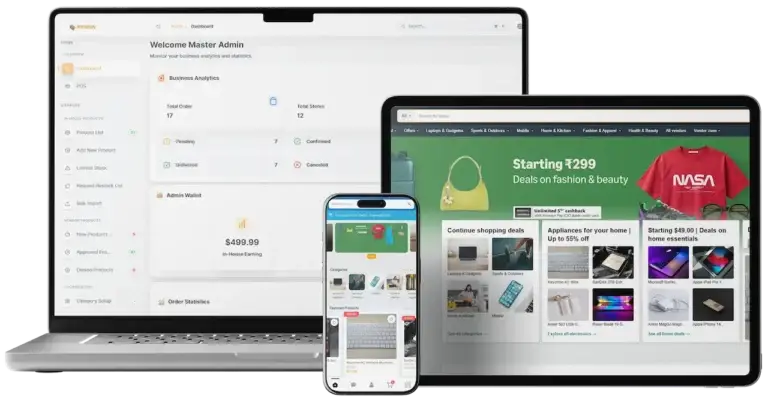
Amazon Clone marketplace across storefront, vendor and admin interfaces.02
Pick it if: You sell from a seller catalog, not from local shopsAmazon Clone

A global e-commerce marketplace in Flutter, with vendor panels and a secure checkout.

Explore Solution
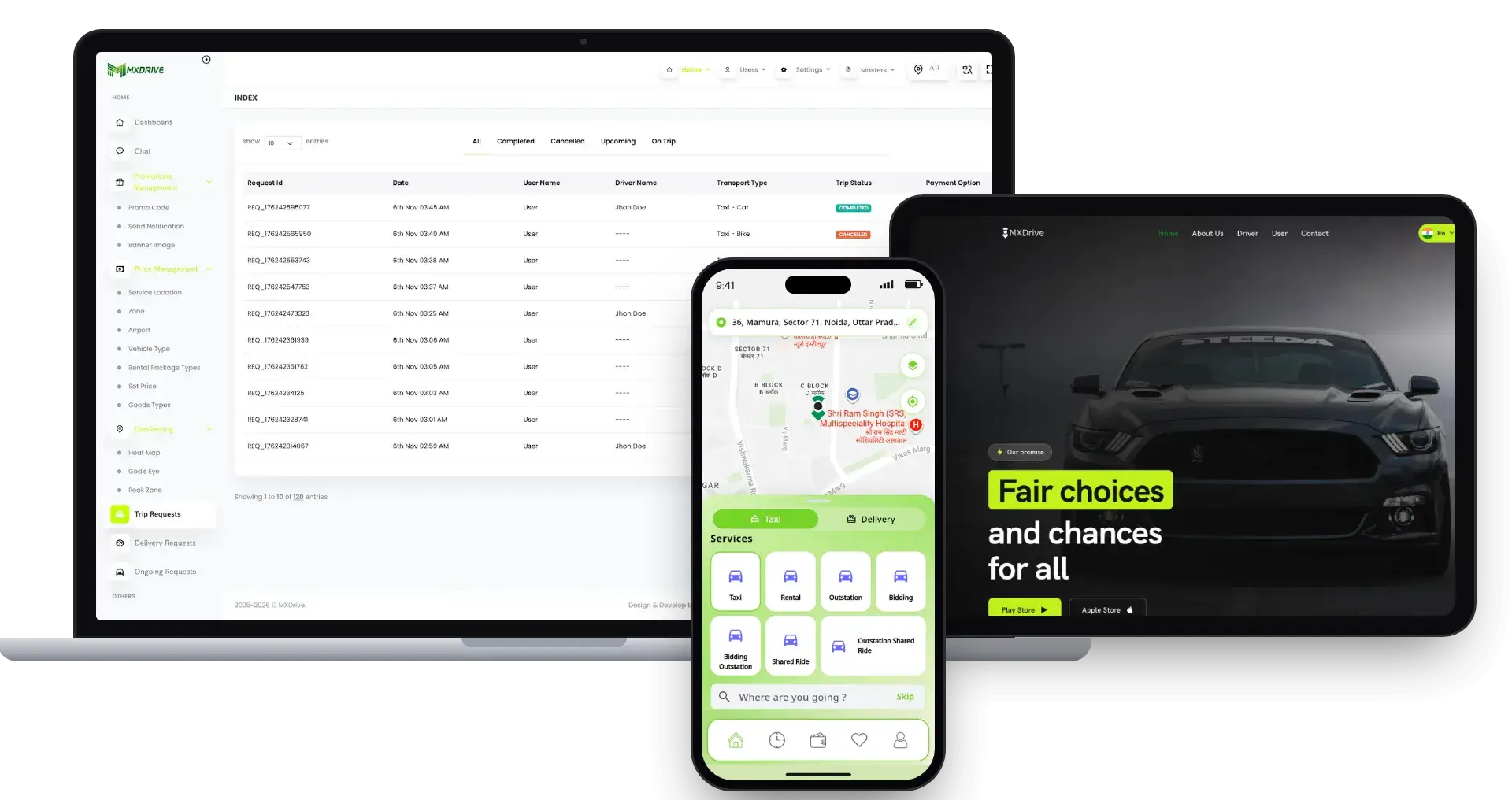
inDrive Clone ride-hailing across rider, driver and admin screens.03
Pick it if: Passengers matter as much as parcelsinDrive Clone

A ride-hailing platform with fare negotiation, driver bids, live tracking and admin control.

Explore Solution
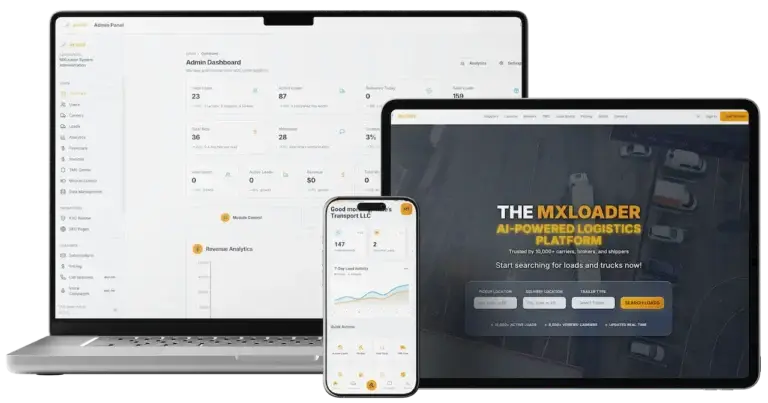
DAT Load Board Clone freight marketplace across shipper, carrier and admin screens.04
Pick it if: Your loads are pallets rather than parcelsDAT Load Board Clone

A freight marketplace with multi-stop loads, counter-offers, carrier tools, GPS tracking and KYC.

Explore Solution
CatalogAll 90+ solutions

09The business case

Market Benchmarks

Multi-Category Delivery Market Benchmarks - Independent 2025-2026 Data

The revenue models above are ours. The figures below are not. They come from Delivery Hero's FY 2025 results, Grab's 2025 results release and New York City's published fee caps, reproduced as published. They show how much volume multi-category delivery platforms process, what they keep from it, and where a regulator sets a ceiling on merchant fees.

Delivery Hero01

EUR 49.2bn in GMV at Delivery Hero in 2025

Delivery Hero reports Group GMV of EUR 49.2 billion for 2025, up 9 percent like-for-like, and adjusted EBITDA of EUR 903 million, or 1.8 percent of GMV. Its Quick Commerce vertical passed EUR 7.5 billion of GMV and AdTech revenue is approaching EUR 1.5 billion, according to the company's FY 2025 results presentation of 26 March 2026.

Grab Holdings02

$14.2bn in Grab Deliveries GMV in 2025

Grab reports Deliveries GMV of $14,236 million and Deliveries revenue of $1,800 million for 2025, both up 21 percent, with a segment adjusted EBITDA margin of 2.0 percent. Revenue is about 12.6 percent of GMV, our arithmetic on reported figures. Grab's annual report states that merchant-partners pay a commission at an agreed rate on the goods ordered.

NYC DCWP03

15% Fee Cap on Delivery Apps in New York City

New York City's Department of Consumer and Worker Protection lists the fee caps that third-party delivery apps may charge restaurants: 15 percent to deliver the order, 5 percent for a basic listing service, 20 percent for enhanced service and 3 percent to process electronic payment. An enhanced service fee is allowed only if a basic service is priced at or under 5 percent.

Where each figure comes from.

Delivery Hero SE, FY 2025 Results Presentation, 26 March 2026 - ir.deliveryhero.com

Grab Holdings Ltd, Grab Reports Fourth Quarter and 2025 Results, Form 6-K exhibit 99.1, 12 February 2026; and Annual Report on Form 20-F for the year ended 31 December 2025, filed 6 March 2026 - sec.gov

New York City Department of Consumer and Worker Protection, We Want Your Feedback on the City's Fee Caps, April 2026 - nyc.gov

All figures are the publishers’ own, reproduced as published from company results and a city regulator's rules. Metric definitions differ by company, Grab's segment figures are unaudited, and the Grab revenue-to-GMV ratio is our arithmetic on reported figures. They describe the companies and rules named, not any platform Miracuves builds, and nothing here is a revenue projection for your business.

The Commercial Case

Marketability, Revenue Potential & Business Prospects

A delivery marketplace earns when stores trust it enough to list, couriers trust it enough to sign on and customers trust it enough to order twice. Everything that follows is about making those three decisions easier, and about owning the relationship once they have been made.

  1. 01

    Commission on Every Order

    The operator keeps a share of each order, so revenue grows with the number of stores and orders rather than with headcount.

  2. 02

    Several Lines, One Console

    Delivery fees, paid promotion and subscription plans are separate levers in the same admin panel, so one can be switched on without redesigning the rest.

  3. 03

    Owned Stores, Couriers and Customers

    Store accounts, courier records and order history sit in your database, so the value of the marketplace builds up with you and not with a larger brand.

  4. 04

    Exit Optionality

    You hold the complete source code and the schema, so a future change of host, team or direction needs no one's permission.

Main Revenue Levers
  • Store Commission
  • Delivery Fees
  • Paid Promotion
  • Delivery Pass Subscriptions
  • Peak-Hour Pricing
  • Parcel Pickup Fees
Long-Term Value

Defensibility comes from supply and habit rather than features.

  1. 01Stores that loaded their catalogs do not casually move
  2. 02Couriers who earn steadily stay on the platform
  3. 03Customers with saved addresses and history have a reason to return
  4. 04Reliable dispatch and honest reviews are the second moat
Example Revenue Scenarios

These three cases differ only in how many stores have signed, and each names the lever that leads at that size. They are examples for planning conversations, not predictions of what any marketplace will earn.

Neighborhood Pilot25Stores Signed

Store commission and delivery fees carry early revenue.

A small pilot where a few dozen stores and a handful of couriers cover one district, and the commission on each order pays for running it. Illustrative size, not a forecast.

City-Wide Network250Stores Signed

Commission and fees, with promotion starting to matter.

A network spread across a city, where stores compete for the same shoppers, so paid promotion and delivery passes start to add to commission. Illustrative size, not a forecast.

Metro Platform2,500Stores Signed

All four lines active at once.

A platform covering a large metro area, where commission, fees, promotion and subscriptions all run together and the admin reports show where to push next. Illustrative size, not a forecast.

10Why Miracuves

Why Miracuves

Miracuves Compared With Other Glovo Clone Developers

A Glovo clone can start as a stock script, a hire from the freelance market, an agency contract or a proven Miracuves base whose makers have shipped launches. Whoever you shortlist, ask whether every category shares one courier queue, who keeps the code and its history, where card numbers go and which modules the price really covers.

Why Founders Choose Miracuves

  • 01

    Courier App Included

    Couriers get their own app with job offers, navigation and an earnings view, where many scripts stop at the customer and the store.

  • 02

    Store Side Built In

    Stores register, wait for approval and run products, stock and incoming orders from an app or a panel, with no extra project to add that side.

  • 03

    Three Apps, One Codebase

    Customer, store and courier apps arrive as separate applications that already talk to each other, instead of three projects to join.

  • 04

    Full Source Code Ownership

    The whole codebase arrives unencrypted, with the schema and deployment notes, so nobody can reprice it or change the terms later.

  • 05

    A Proven Base

    The same base carried Talokitoko in 2024, with 19 of 24 building blocks reused as they were, and the published case study shows the scope ledger.

  • 06

    Plain Readiness Language

    This page says what is a base feature, what is an add-on and what you supply yourself, including gateway accounts, hosting and store developer accounts.

Development Company

How to Choose a Glovo Clone Development Company

A courier-first builder should prove that every category shares one queue.

What to look for Miracuves

  • One queue for every job Food, grocery, pharmacy, parcel and e-commerce jobs reach the same couriers
  • A real courier app Job offers by proximity, navigation and earnings
  • A self-run store side Approved stores manage products and stock from an app or panel
  • A checkable money trail Payments, store earnings and courier earnings as separate wallet entries
  • Proof on the same base Talokitoko launched on it in 2024 with 19 of 24 blocks reused
  • Ownership and support Unencrypted source, plus guidance, bug fixes and updates after launch

Walk away from any vendor who

  • Treats couriers as a later add-on to the customer app
  • Runs a separate courier queue for each category
  • Sends card numbers through its own servers
  • Leaves the price open until after the demo
  • Hands over code without its schema or history

How the Glovo Clone Stacks Up Against Scripts and Agencies, Row by Row

CriteriaMiracuvesMiracuves Glovo CloneGeneric Delivery ScriptCustom Dev Agency
Time to Launch6 days of our build timeUnknown or DIYScoped per project, usually months
Source-Code OwnershipComplete, unencryptedOften limited or lockedUsually yes
Delivery DepthCategories, stores, dispatch, tracking and walletPlain ordering screensWhatever the budget allows
Courier ToolsCourier app with jobs, route and earningsRarely includedBuilt to order
Payments & WalletIn-app wallet, cards, cash on deliveryVaries by scriptCustom integration
Admin & ReportsDashboard, dispatch, commission and reportsThin or absentBuilt to order, extra cost
Security & ComplianceRole logins, gateway-held card data, honest limitsMinimalVaries widely
Cost vs Speed vs QualityFixed price, fast, tested baseLow price, high riskExpensive and slow
Ongoing Support & Updates60 days guidance, 6 months bug fixes, 12 months updatesRarely offeredSet by the contract

Few routes to a delivery platform arrive at the first busy weekend unchanged. This is where they part ways.

Talk to Our Team

Changelog

Release Log for the Glovo-Style Platform - Versions & Updates

Release notes for the web platform and apps, newest first. The notes carry no dates, and the wording here is a plain-language summary of each release.

VersionChangesWhat changed
V2.126 updates, 1 fixAdded or updated
Flutter apps upgraded to a newer SDK
Works with the latest Android Studio
Backend and front-end caching introduced to speed up loads, for business settings and home page requests
Asset files slimmed down for quicker app response
System messages and labels rephrased to read more clearly
UI and UX improvements
Fixed
Various fixes for smoother operation
V2.119 updates, 2 fixesAdded or updated
One centralized login with three methods, manual, one-time code or social, all switched on and off by the admin
Phone code sign-in through Firebase
Top Offers Near Me list for stores with store-wide discounts
Better search for items and stores
Quick stock update from the product list
Low-stock alerts at custom thresholds
Nutrition, allergy and general information on item campaigns
Built-in registration pages for stores and couriers on the React web
Flutter SDK update
Fixed
Assorted fixes
Faster queries and pages
V2.1010 updates, 2 fixesAdded or updated
Admin landing page improved and now shows delivery zone information
Push notification taps open the matching page
Predefined message suggestions in chat
Nutrition and allergy tags for food and grocery items
Medicine generic group names and filters for pharmacy items
Export of the subscribed customer mailing list with filters
Many improvements in the point-of-sale area
Chat with the admin from the order details page
reCAPTCHA v3 added
App UI and content touch-ups
Fixed
Assorted fixes
Faster queries
V2.9.12 updates, 1 fixAdded or updated
Phone authentication with one-time codes through Firebase
Flutter SDK update
Fixed
Assorted fixes in the web panels and apps
V2.98 updates, 1 fixAdded or updated
Paid ad promotion sections
On and off controls for notifications, email and SMS, managed by the admin for each store
Custom sorting for stores, items, categories and other lists from the admin panel
Create-account prompt for guests at checkout
Auto-translate across features
Subscription feature extended to more cases
Currency and payment gateway settings validated, with every check shown when settings change
UI and UX improvements on the app and the web
Fixed
Known issues fixed for stability and performance
V2.8.12 updates, 1 fixAdded or updated
Flutter SDK update
No changes in the courier app or the React web
Fixed
Assorted fixes in the web panels and the customer app

Let's build together

Ready to put your own couriers on the road? Let's make it yours.

Sit down with us for a free consultation and you will get a clear timeline plus direct replies to whatever you ask. Winning your trust is worth more to us than a fast sale.

  • First reply in under 2 hours
  • Free consultation
  • No lock-in contracts
  • Full source code ownership

11Learn more

Blog & Resources

Delivery Apps Like Glovo: Fresh Guides & Insights

Stay current with guides on what a multi-category delivery app includes, why founders pick a ready-made base over a custom build and what to look at before choosing a builder.
The product5 questions

01What is the Glovo Clone solution?

The Miracuves Glovo Clone is a ready-made white-label delivery marketplace in the Glovo style. Customers order from nearby stores in categories such as food, grocery, pharmacy and parcel, stores run their counters from their own app, and one courier fleet carries the orders. It ships as three apps and three web panels with the complete source code, for a fixed $3,399.

02Can I customize the platform to match my business needs?

Yes. Your logo, icons and colors go on every surface Miracuves rebrands, and with the unencrypted source code in your hands, either your team or ours can adjust features, pricing rules and categories. Anything beyond the base gets a written scope and quote ahead of the work.

03What types of deliveries can this platform support?

The demo shows food, grocery, pharmacy, e-commerce, parcel and liquor categories, so one fleet can carry meals, shopping, medicine and plain pickup-and-drop jobs. Which categories you open is your decision, and regulated goods depend on the law where you operate.

04Is the platform scalable for large operations?

It is built as separate customer, store, courier and admin applications, with an API gateway and a realtime channel in front of one order record, so growth is mostly a hosting and configuration decision. Unusually large volumes are scoped with you, and anything beyond the base is quoted separately.

05Is it legal to launch a delivery app like Glovo?

Running a delivery marketplace is lawful in many places, but the rules differ by country and by city, and several categories are regulated. Medicines, alcohol, food handling, courier engagement and data protection all carry local requirements. Miracuves provides software and gives no legal advice, so check each market with local advisers before you take orders.

Orders & stores9 questions

06How can users place an order?

A customer signs in or continues as a guest, picks a category, searches for items or stores, fills the cart, confirms the address and payment, and places the order. The order screen then shows its ID, schedule and items, with a Track Order button beneath.

07Can users schedule a delivery?

Yes. An order can go out immediately or be set for a later time, and the order record keeps both the order date and the scheduled time.

08How do users track their deliveries?

Each order has a Track Order button that follows the courier from pickup to the door, and a delivery verification code that is checked at handover.

09What payment options are available?

Customers can pay from the in-app wallet, by card, with cash on delivery or through a payment gateway you connect. The gateway is your choice, and it needs your own merchant account with KYC completed.

10How do stores register on the platform?

Stores sign up on the built-in registration pages, fill in their profile and start receiving orders once the admin approves them.

11Can stores update their menu or product listings?

Yes. Store owners add products, change prices and update stock from their app or panel, with a quick stock update from the product list and low-stock alerts at thresholds they choose.

12How do stores handle incoming orders?

A store is notified when an order arrives, prepares it, and the order then moves on to a courier. The admin controls the push, email and SMS switches for each store.

13Can stores set their own delivery charges?

Stores can set delivery fees of their own, or you can apply platform-wide pricing. The admin decides which approach is in force.

14How do stores receive payments?

Payments run through the platform, and a store withdraws its earnings from it. The Transactions and Reports area of the admin panel shows what was paid and when.

Couriers5 questions

15How do delivery agents sign up?

Couriers register, upload the documents you require and start taking jobs once the admin approves them.

16How do delivery partners receive orders?

Available orders are offered by proximity, and a courier accepts or declines from the app depending on availability.

17Is there a real-time navigation system?

Yes. Couriers follow a map from the store to the customer. Google Maps is among the integrations, and you supply your own account and keys.

18Can delivery agents track their earnings?

Yes. The courier app has an earnings view with trip history and payout summaries.

19How do riders handle cash-on-delivery orders?

A courier collects the cash at the door. How it is settled, whether paid in to the platform or handed to the store, follows the policy you set for your operation.

Admin, money & revenue8 questions

20How does the admin manage users, stores, and delivery agents?

The admin panel lets the operator approve stores and couriers, manage customer accounts, watch live orders and assign work from Dispatch Management.

21Can the admin set commission rates and delivery fees?

Yes. The admin sets commission percentages for stores and delivery charges, and can configure dynamic pricing rules. The sales chart then shows gross sale, admin commission and delivery commission as separate lines.

22How does the admin monitor real-time orders and deliveries?

Order tiles count what is unassigned, accepted, packaging, delivered, canceled or refunded, and live order tracking shows active deliveries, store status and courier locations.

23Can the admin manage promotions and discount campaigns?

Yes. The admin can create discount codes and seasonal offers, sell paid promotion sections to stores and manage subscription plans. Referral-style sharing rewards are an add-on.

24What kind of reports and analytics does the admin get?

Reports cover sales, customers, couriers, commissions and withdrawals, with a yearly sales chart on the dashboard.

25What are the revenue models supported by this platform?

Store commission, delivery fees, paid promotion for stores and delivery pass subscriptions are the lines the platform can run, with peak-hour pricing and parcel pickup fees as variations on the delivery fee. The take-rate table above shows published figures for each line.

26Realistically, what steps lead to first revenue?

Most delivery marketplaces start with the commission on store orders, because it needs no extra product to sell: the first completed order earns it. Delivery fees come with the same orders. Paid promotion and subscription plans follow once enough stores compete for attention and enough customers order often. Other lines named for this kind of platform, such as licensing the white-label deployment to another operator, depend on your own commercial arrangements and are agreed rather than built in.

27How defensible is a delivery marketplace?

Habit and supply hold a delivery business together more than features do. Stores that have loaded their catalogs and learned the order screen seldom move, couriers who earn steadily stay on the platform, and customers with an order history and saved addresses have a reason to return. That accumulation can begin at launch, and the platform keeps it in your database. Reliable dispatch and honest store reviews make up the second moat, since speed and trust are hard to copy.

Launch & Miracuves10 questions

28How soon can the solution go live?

Miracuves builds the ready-made platform in 6 days: rebranding, deployment to your hosting and publishing from your developer accounts. Apple and Google review the apps on their own schedule, outside that build time. Anything custom gets its own written quote.

29Is the source code included in the purchase?

Yes, the complete source code with no encryption, for the web platform and the mobile apps, together with the database schema and deployment notes. There is no license to keep it running and nothing is charged per seat or per order.

30What should I have ready ahead of launch?

Hosting and a domain, a verified developer account for the stores, your branding and business details, a payment gateway that is onboarded with KYC done, and any third-party keys such as maps or messaging. Miracuves does not apply for gateways on your behalf or write your legal documents.

31What support comes after launch?

All ready-made solutions include 60 days of platform guidance, 6 months of priority bug fixes and 12 months of updates, and the three periods start together at launch. The first response comes within 2 hours, Monday to Saturday, 10:00-19:00 IST.

32Why choose Miracuves to build a Glovo clone?

Miracuves has delivered 9,000+ projects for more than 6,000 clients, and this platform ships ready-made: the courier app, the store side and the admin panel arrive together with the complete source code. The base is documented in a published case study with 19 of 24 blocks reused, the price is fixed at $3,399 and the support terms are written down.

33What does a Glovo clone cost?

The Miracuves Glovo clone is a fixed $3,399, paid once, for the customer, store and courier apps, the web storefront, the store panel and the admin panel, with every line of source code, put under your brand and installed for you. Miracuves charges nothing per order or per seat afterward, and each add-on or custom change gets a written quote first.

34Ready-made Glovo clone or a custom build: which suits a courier startup?

For most courier startups the ready-made base wins. It moves food, grocery, pharmacy and parcel jobs through one courier queue, it is the base Talokitoko was built on for Izi Technologies, and your branded platform runs 6 working days after kick-off at a price agreed up front. A build from zero is priced on scope and needs many more weeks before the first basket ships. Anything the base lacks gets a written scope and quote, typically delivered in 2-8 weeks.

35How do I launch my Glovo clone, step by step?

Open the live demo in all three roles, customer, store and courier. Share your logo, colors, opening categories, delivery zones and commission rules. Your brand then goes onto the three apps, the storefront and both panels, everything is installed on your servers, and the apps go out under Apple and Google developer accounts registered to you. The build takes 6 working days, while store review runs on Apple and Google timing, outside those days.

36Can I build an app like Glovo without technical expertise?

Yes, because nothing has to be coded. You open the live demo in all three roles, share your logo, colors, opening categories, delivery zones and commission rules, and Miracuves brands the three apps, deploys them to your hosting and submits them through your developer accounts. You supply hosting, a domain, a verified developer account and a payment gateway with KYC done.

37What features should an app like Glovo include?

Customers need category browsing across food, grocery, pharmacy and parcel, scheduled orders, order tracking and a delivery verification code. Stores need product and stock updates with low-stock alerts, couriers need map navigation and an earnings view, and the admin needs commissions, Dispatch Management, promotions and reports. The Glovo clone ships all of these.

Disclaimer

Miracuves is an independent software development company. We are not affiliated with, connected to, sponsored by, or endorsed by Glovo.

Read our full Legal Notice & Disclaimer →
Why this name

“Glovo Clone” is used descriptively. It is how the software industry refers to building a platform with functionality similar to Glovo, and how clients search for it.

Who built this

The entire design and codebase is built by our own team. The product contains no code, design, graphics, or content originating from the Glovo website or applications.

Trademarks

Glovo and all other third-party names and marks are the property of their respective owners, referenced here solely to describe the category of software offered.