Food Marketplace App · Production Ready

Delivery Hero Clone App - White-Label Multi-City Delivery Aggregator

Built by Miracuves, the ready-made, white-label Delivery Hero clone gathers restaurants, grocers and pharmacies under one brand, with complete source code you own for the customer, vendor and rider apps, a browser storefront and admin panel, rebranded and deployed in six working days.

The admin reads every order by delivery zone and sets the store commission, delivery charges and dynamic pricing; riders take or turn down close-by jobs, and a code confirms each handover. The Flutter apps build for Android and iOS, reviewed by Apple and Google after the six days, and pickup points are an add-on. A separate fee table per zone, or commission tiers by vendor type, is custom work, quoted in writing first and usually ready in 2-8 weeks.

Launch in 6 Days with

  • Source Code
  • Customer App
  • Vendor App
  • Rider App
  • Web Storefront
  • Admin Panel

StackFlutter · Dart · React · Bootstrap · PHP · Laravel · MySQL · Firebase

MXLovo console · ZonesIllustrative
Orders so far today318
Open zones12
Vendors live74

Live marketplace feed

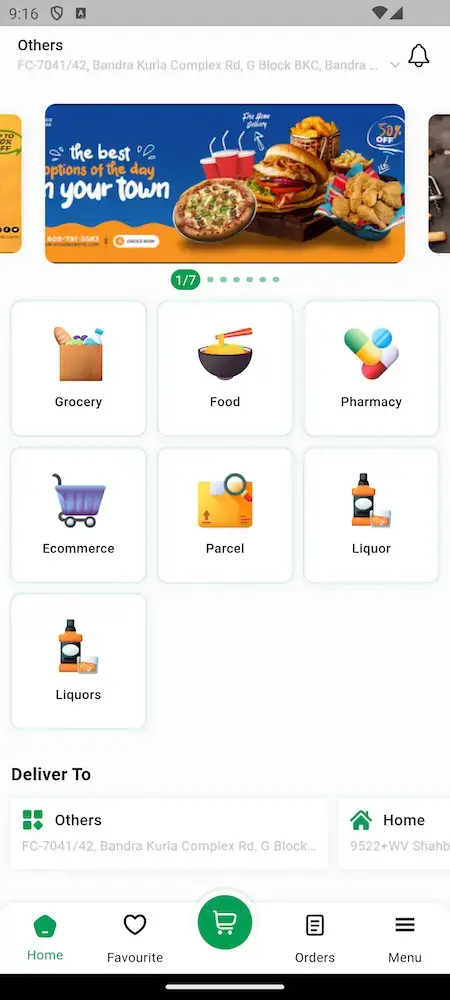
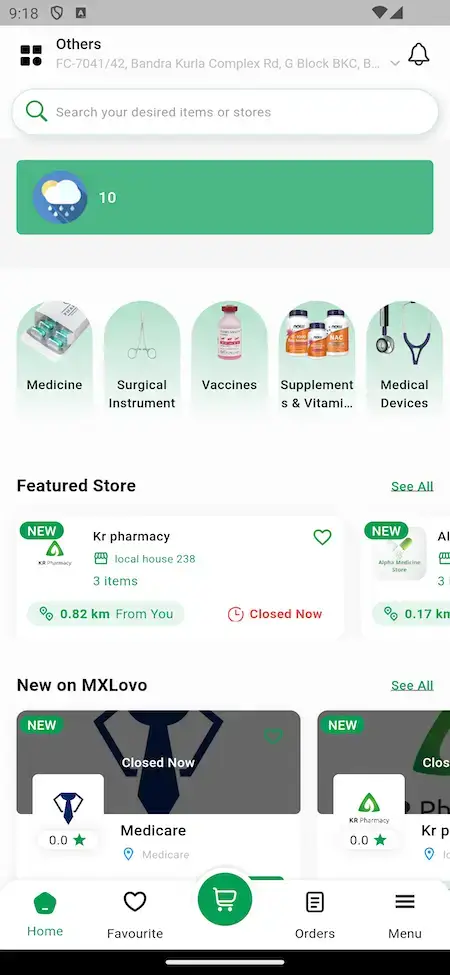
Delivery Hero Clone customer app home screen with an offers banner, grocery, food, pharmacy, e-commerce, parcel and liquor tiles and a deliver-to row.
Riders get nearby jobsto accept or decline
  • 6Vendor Kinds Side by Siderestaurants, grocers, pharmacies, electronics sellers, parcel services and liquor retailers
  • 2Commission Lines on the Chartadmin commission and delivery commission beside gross sales
  • 0%Revenue Share With Miracuvesno cut of vendor commission or delivery charges, in any zone
  • 4Seats Already Builtvendors, riders, customers and the operator
  • 6Days to Launchand if the delay is ours, we keep going free
  • $3,399Paid Once, Not Rentedsource code yours, no per-seat fee, no monthly rental

Live in six working days, or we keep working free until you launch. Every build carries 60 days guidance, 6 months bug fixes and 12 months updates.Verify every figure

Talokitoko Tuned Zones and Fees

Miracuves delivered Talokitoko, food and groceries for Izi Technologies, on this base in 2024, kept 19 of 24 modules as they were and spent the project on where to operate and what to charge.

Paid Placement for Vendors

Vendors can buy visibility in paid promotion sections, and the admin decides the order in which stores, items and categories appear to customers.

Cards Left to Your Gateway

The gateway you connect deals with card numbers on a merchant account you hold, so the platform holds only wallet entries and payment references.

Mapping out a delivery marketplace that grows district by district?Arrange a Quick Call

Chosen by more than 6,000 clients around the world

Miracuves is listed by Expertise.com as a managed IT service provider.Miracuves is an official member of the Forbes Business Council.Miracuves is a verified agency on DesignRush, listed among top design agencies in India.Miracuves is reviewed on Trustpilot as a software development company.Miracuves is listed by The Manifest among top managed software development companies.Miracuves is listed by DesignRush as a top software development company.Miracuves is recognized by GoodFirms as a top software development company.Miracuves is ranked among the top 1000 companies globally by Clutch.Miracuves is a top managed service provider in the United States on Clutch.

01See it working

Open the Demo

Try the Delivery Hero Clone App Yourself: Customer, Vendor and Rider Apps Plus Web Panels

Miracuves lets you sit in each chair of its Delivery Hero clone marketplace in turn. The three mobile apps come with logins ready to use, and the browser build adds the customer storefront, a vendor panel and the admin screens. Browse a category, place an order and then see what the vendor and the rider see of it.
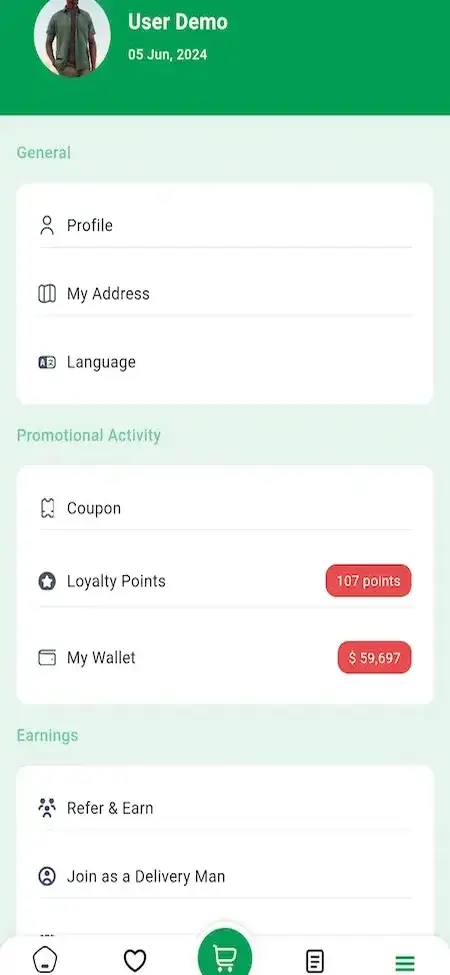
Delivery Hero Clone customer app home screen with an offers banner, grocery, food, pharmacy, e-commerce, parcel and liquor tiles and a deliver-to row.Delivery Hero Clone account menu with profile, address, language, coupon, loyalty points, wallet balance, refer and earn and join as a delivery man rows.
Customer app

Six Categories on One Home Screen

What the shopper uses: tiles that cover meals, groceries, pharmacy items, e-commerce goods, parcels and liquor, a search bar, vendor cards that give distance and open status, and an order page ending in a Track Order button.

  1. 1Choose the customer build from the portal
  2. 2Type in the credentials below
  3. 3Tap a category tile, then open Orders
Customer account:+911234567890 | User_321
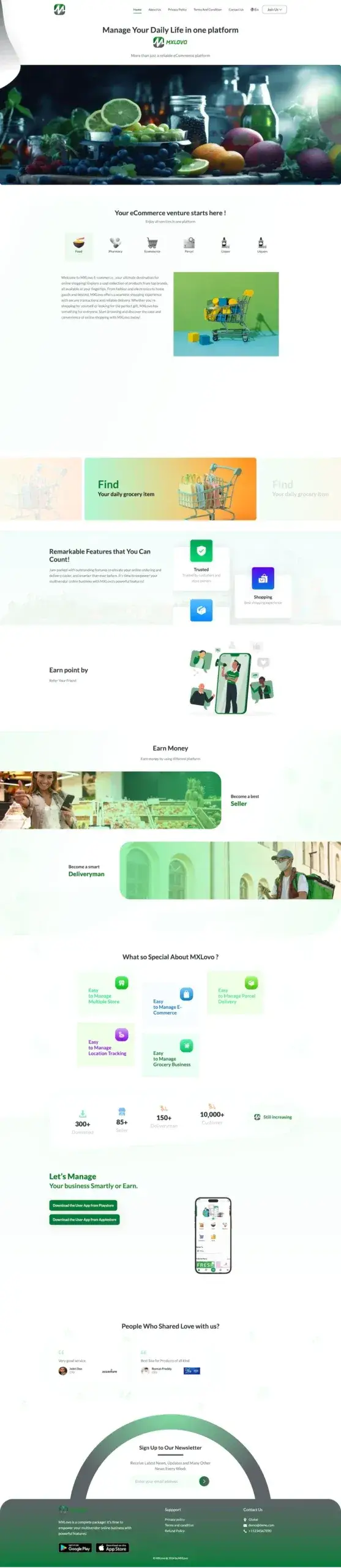
Delivery Hero Clone web storefront landing page with category tabs, seller and deliveryman sign-up sections, app download buttons and a newsletter footer.
Vendor app

Where a Listed Vendor Works

What a restaurant partner or other listed vendor uses, named the store app in the demo: orders as they come in, the product list with its prices and stock, and a status on each order until the rider picks it up.

  1. 1Choose the vendor build from the portal
  2. 2Type in the store credentials below
  3. 3Look at the order queue and the product list
Store account:food@demo.com | Store_321
Delivery Hero Clone web storefront landing page with category tabs, seller and deliveryman sign-up sections, app download buttons and a newsletter footer.
Delivery app

Rider Tools for Every Order

What a rider uses: close-by jobs to take or turn down, turn-by-turn directions, cash handed over at the door and a summary of earnings.

  1. 1Choose the delivery build from the portal
  2. 2Type in the rider credentials below
  3. 3Open Jobs, then Directions, then Earnings
Rider account:+919876543210 | Delivery_321
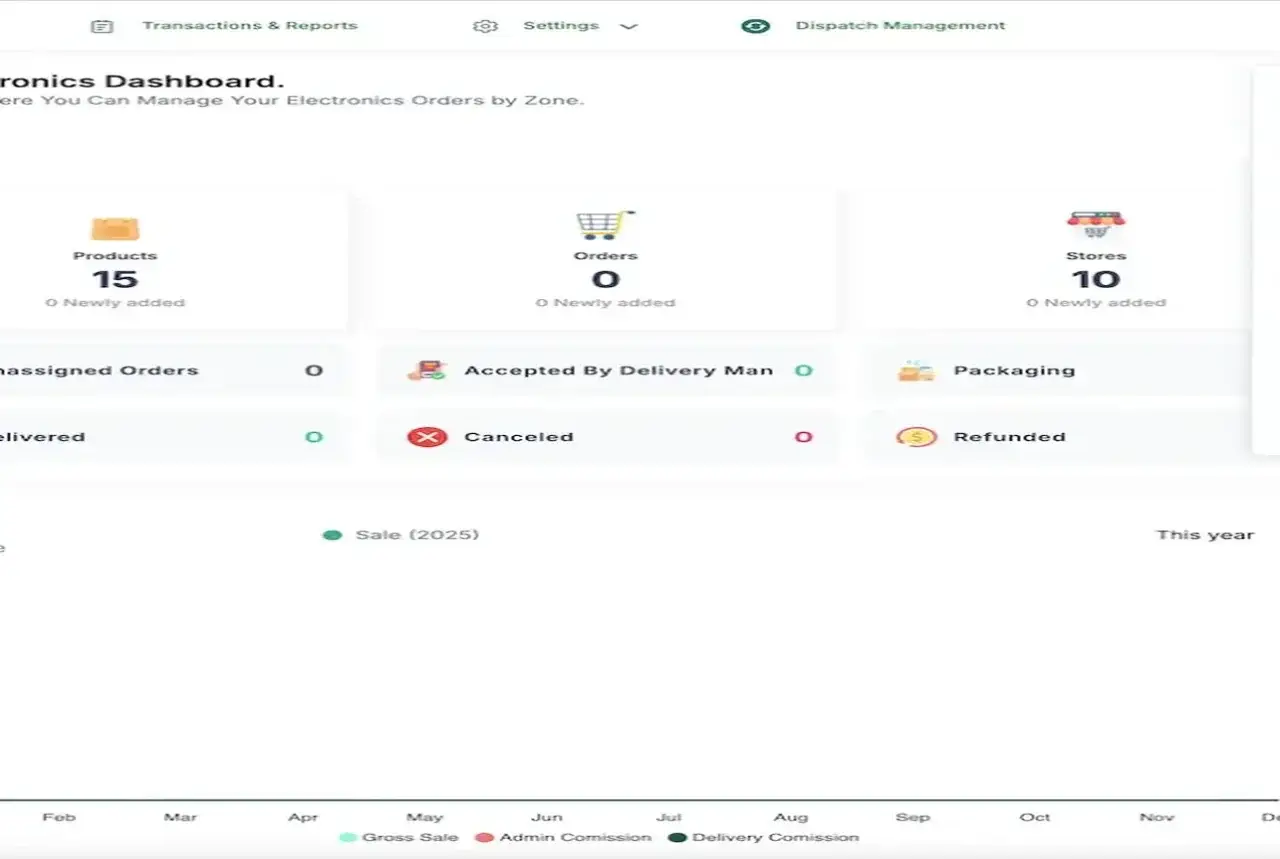
Delivery Hero Clone admin dashboard with product, order and store counts, order status tiles, Transactions and Reports, Settings and Dispatch Management in the top bar, and a yearly sales chart.
Web & panels

The Browser Storefront and Both Panels

On a desktop screen: a storefront with one tab per category, sign-up areas for sellers and deliverymen, a vendor panel, and the operator's admin panel with its dashboard and Dispatch Management.

  1. 1Launch the web demo in your browser
  2. 2Choose between the store and admin entrances
  3. 3Go through the storefront, then the dashboard
Admin access:given out on a guided tour
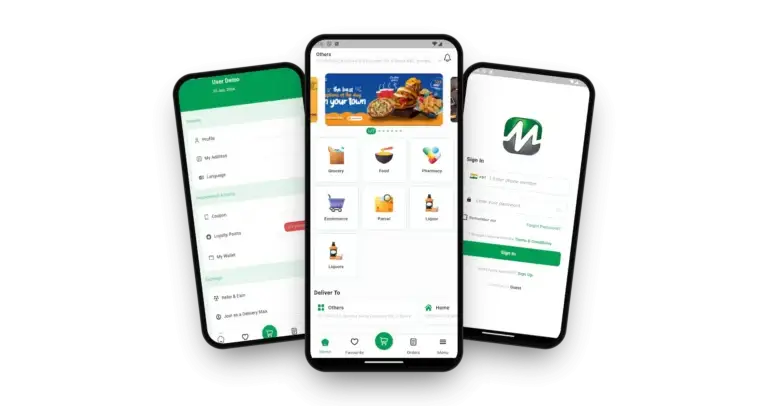
Delivery Hero Clone on three phones: the customer home with category grid and promo banner, the customer menu with coupons, loyalty points and earnings and the customer sign-in screen

Walk It Through With Us

A Guided Call on an App Like Delivery Hero: Zones, Categories, Vendors, Riders and Commission

You judge a marketplace better with your own city plan beside it. During half an hour on a call we open the apps and the admin panel side by side, follow a single order from the vendor's listing to the rider at the door, and point out where zone and commission settings live.

Book a guided demo call

Real Screens

Screens of a Delivery Aggregator Like Delivery Hero, From the Shopper's Phone, the Operator's Dashboard and the Browser

These are genuine demo screens, laid out as a customer meets them, from sign-in and the category home through search, two aisles, parcel and an order to the account menu, and then the operator dashboard and the browser storefront.
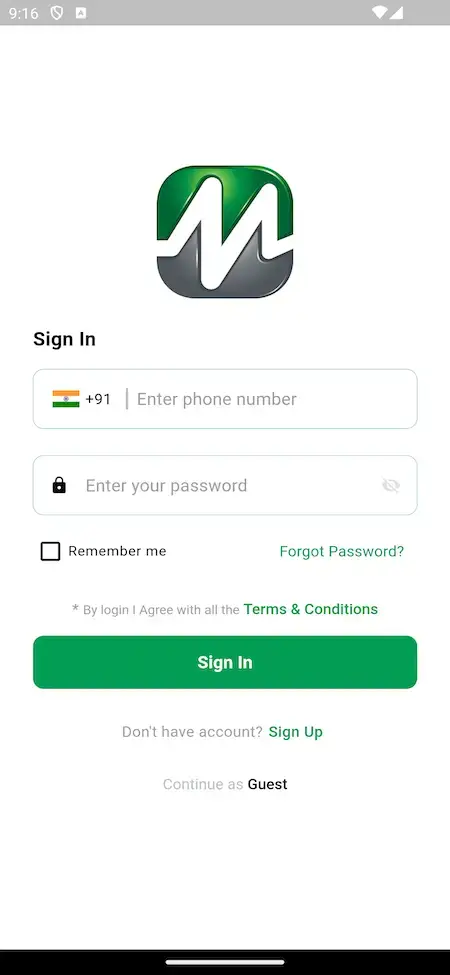
Delivery Hero Clone customer app sign-in screen with a phone number field, a password field, a remember me box and a sign-up link.
Delivery Hero Clone customer app home screen with an offers banner, grocery, food, pharmacy, e-commerce, parcel and liquor tiles and a deliver-to row.
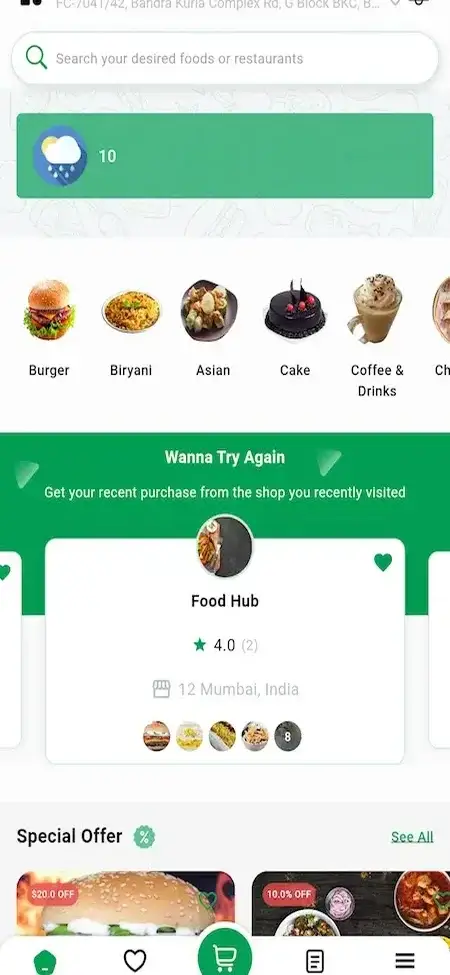
Delivery Hero Clone app search screen with food category icons, a visit-again vendor card and a special offer row.
Delivery Hero Clone pharmacy aisle with medicine, surgical instrument and vaccine tiles, a featured vendor with distance and an open or closed label.
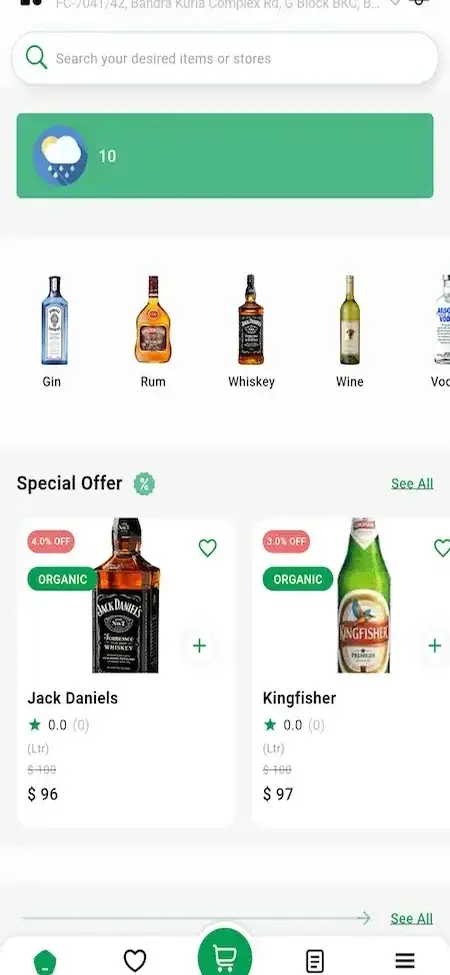
Delivery Hero Clone liquor aisle with gin, rum, whiskey and wine tiles and special offer product cards.
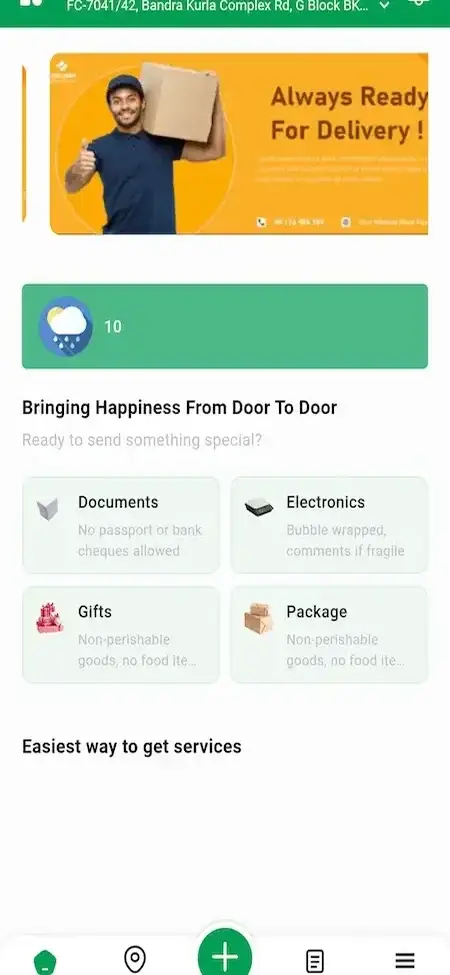
Delivery Hero Clone parcel screen with a courier banner and four parcel types: documents, electronics, gifts and package.
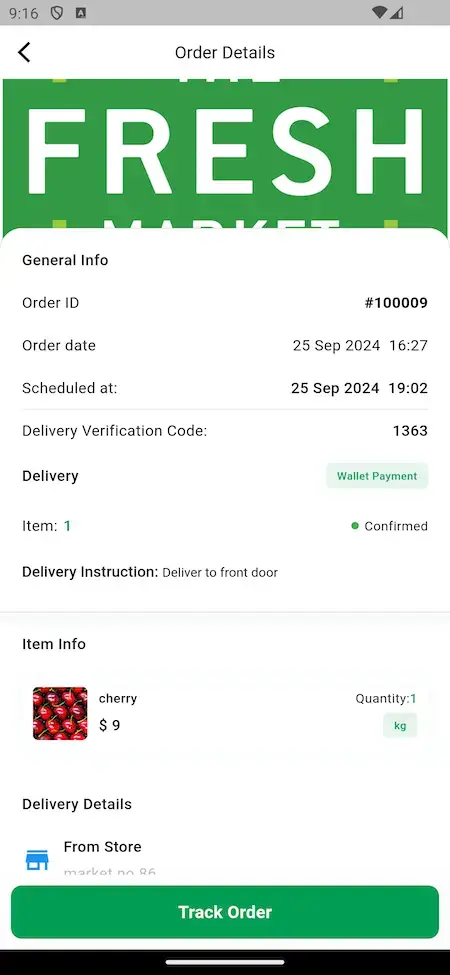
Delivery Hero Clone order details screen with order ID, order date, a scheduled time, a delivery verification code, wallet payment, an item and a Track Order button.
Delivery Hero Clone account menu with profile, address, language, coupon, loyalty points, wallet balance, refer and earn and join as a delivery man rows.
8 images · scroll →
Delivery Hero Clone admin dashboard with product, order and store counts, order status tiles, Transactions and Reports, Settings and Dispatch Management in the top bar, and a yearly sales chart.
1 image
Delivery Hero Clone web storefront landing page with category tabs, seller and deliveryman sign-up sections, app download buttons and a newsletter footer.
1 image

Trace the shopper from sign-in through the home tiles, a search, the pharmacy and liquor aisles and the parcel tab, on to one scheduled order and the account menu, and end on the admin dashboard.

Browse Other Solutions

02Social proof

Client Voices

Delivery Hero Clone Reviews: What Operators Say Once They Have Built on a Miracuves Base

Spanning nine clients, this set runs from restaurant brands such as Mega Chicken to multi-merchant couriers like Speedyven. Several name their own work, whether payment partners at Aeygo, store apps at Makaalu or the local payment mix at Talokitoko.

MMega Chicken TeamFounding team, Mega Chicken
“Menus, order routing and dispatch were solved. Our work was the store-level menu control and the packaging and prep rules our brand needs. Live in weeks and the stores adopted it without a training programme.”
YYOpido TeamFounding team, YOpido
“Menus, ordering, dispatch and the merchant console came ready. Our work was the restaurant mix, the delivery zones and the payment methods our customers use. Live inside a month.”
BBharat Eat Mods TeamFounding team, Bharat Eat Mods
“Menus, order routing and courier dispatch were solved. Our work was the local ordering habits, the payment mix and the restaurant onboarding flow. Live in weeks and the kitchens picked it up without training.”
CCharles EveillardManaging Partner, Izi Technologies
“Talokitoko is grocery and food delivery for the African diaspora market in Europe. The rider app, dispatch and the merchant console were already built, so we spent the engagement on our own local payment mix, the vendor onboarding flow and the regions we actually operate in. The platform was live inside a month, which was months faster than our internal estimate.”
CClick2Deliver TeamFounding team, Click2Deliver
“Two order types, one courier fleet. The base handled multi-vertical ordering, so the work was our merchant mix and the grocery-specific substitution and weight rules. Live inside a month.”
MMarsha WilliamsFounder, Bmore On Demands LLC
“The team was running it on a dispatcher and a Google Sheet, and we needed a real platform quickly, because we were about to onboard a major retail client. Miracuves’s Delivery Genie base gave us the rider app, the dispatch console, and live tracking. We launched in 6 weeks and cleared 4x the previous order volume in the first month.”
MMustafa H.CTO, Speedyven Networks
“Speedyven is a hyperlocal courier network — packages, food, and same-day essentials across a few metros. The dispatch and rider app were the parts where we needed to move fastest, because riders have low tolerance for clunky tools. Miracuves's Delivery Genie base gave us the rider app, the dispatch console, and live tracking. We added our custom surge-pricing engine, our multi-merchant order router, and a custom rider-incentives module. We launched in 7 weeks. Rider activation is high and the platform's been stable through weekend peaks.”
AAeygo TeamFounding team, Aeygo
“Our market, our payment partners and our categories were the work. Dispatch, the rider and driver apps and the merchant console were already built and proven. Live inside a month on infrastructure that had already run at volume elsewhere.”
MMakaalu TeamFounding team, Makaalu
“We needed three apps that agree with each other: customer, driver and store. The shared state model was already built, which is the part people underestimate. Live inside a month with all three in the stores.”
Read More Client TestimonialsOperators and founders speaking for themselves

Delivered Work

Talokitoko: Zones and Fees Tuned to One Market on the Base Behind the Delivery Hero Clone

Talokitoko brings food and groceries to customers. Miracuves built it for Izi Technologies on the base that also drives the Miracuves Delivery Hero Clone, and each fact below comes from the public write-up of that 2024 project.

Real Project
A Food and Grocery Marketplace Built on a Proven Base

Izi Technologies planned a delivery brand covering food and groceries. Miracuves began with the base under this product, which left the project time for what only the client could settle, such as where to operate and what to charge.

Izi TechnologiesCompany
2024Delivered
Food and groceryField
6Working days for the base
19 / 24Modules reused as is
4Apps and consoles
Delivery Hero Clone admin dashboard with product, order and store counts, order status tiles, Transactions and Reports, Settings and Dispatch Management in the top bar, and a yearly sales chart.
What Was Hard
  • Restaurants and grocers feeding one catalog, one pool of riders and a single checkout
  • Delivery zones plus a fee and commission arrangement that suited the client's own economics
  • A payment mix and a vendor sign-up flow that fit the shoppers it really serves
What Was Wanted
  • Open for business without redoing ordering, dispatch and wallet logic that was already proven
  • Put the work into the five decisions only the client could take
  • Own the source code outright
What We Delivered
  • Three mobile apps and an admin console
  • Five choices for the client to make: which vendors to sign, where to deliver, how to charge, which gateways to use and how to brand it
  • 19 of 24 platform modules carried over untouched
  • The source transferred to the client's own account
  • Ready-made base first, set up in 6 working days

“Talokitoko is grocery and food delivery for the African diaspora market in Europe. The rider app, dispatch and the merchant console were already built, so we spent the engagement on our own local payment mix, the vendor onboarding flow and the regions we actually operate in. The platform was live inside a month, which was months faster than our internal estimate.”Charles Eveillard · Managing Partner, Izi Technologies

See the Talokitoko write-upThe scope ledger there names the 19 modules that shipped unchanged.

03The product itself

In Short

What an App Like Delivery Hero Does for a Multi-Category Delivery Marketplace

Restaurants, grocers, pharmacies and parcel services trade under a single name in the Delivery Hero clone Miracuves built for multi-vendor operators. Customers choose a category tile, find a vendor with its distance and open status, order and follow the rider. Vendors keep their own catalogs, delivery riders take nearby jobs, and the operator watches orders by zone from the admin panel.

Delivery Hero Clone on three phones: the customer home with category grid and promo banner, the customer menu with coupons, loyalty points and earnings and the customer sign-in screen

Six Categories, One Flow

One home screen carries tiles for meals, groceries, medicine, e-commerce, parcels and liquor, so vendors of very different kinds can list in the same marketplace.

Zones in the Operator's View

The admin dashboard is organized by zone, and the admin landing page names the delivery zones that are open.

The Take Is Visible

The yearly chart on the dashboard separates gross sales from the admin commission and the delivery commission.

Apps and Web

What Is in the Package?

Running a marketplace means serving four seats that want different things: vendors need control of stock and prices, riders need directions and earnings, customers need tracking, and the operator needs the whole picture. All four seats are built and waiting for your brand and your zones.

Delivery Hero Clone admin dashboard with product, order and store counts, order status tiles, Transactions and Reports, Settings and Dispatch Management in the top bar, and a yearly sales chart.
  1. 01Customer, vendor and rider apps
  2. 02A browser storefront and a vendor panel
  3. 03An admin panel with dashboard, dispatch and reports
  4. 04Wallet balance, offers and referral rewards
  5. 05Source code, database schema and deployment notes

The package brings the customer, vendor and rider apps, a browser storefront and the admin panel, along with the Flutter projects and the complete web source.

What Is Included

Delivery Hero Clone Features - Categories, Zones, Commission, Vendor & Rider Apps, Tracking

Each Delivery Hero clone feature Miracuves lists here shows up on an app screen, an admin page or a release note, and anything that would need extra build work sits apart as an add-on lower down.

Feature 01 / 12

Six Category Tiles

The customer home screen opens on tiles for meals, groceries, pharmacy items, e-commerce goods, parcels and liquor, which is how a single marketplace can hold vendors of very different kinds.

  • Six tiles under the offers banner
  • Saved addresses kept in a deliver-to row
  • Pharmacy and liquor aisles that have tiles of their own
  • Tags on food and grocery items covering nutrition and allergies
  • Generic group names for pharmacy items
Feature 02 / 12

Vendor Discovery

Shoppers use one search bar for both items and vendors, and each vendor card states how far away it is and whether it is open, so choosing a nearby place takes a glance.

  • A single search over items and vendors
  • Distance plus an open or closed label on each vendor card
  • A visit-again card for places ordered from before
  • Featured vendors at the head of every aisle
  • Special offer rows on the home screen
Feature 03 / 12

Zones & Dispatch

Orders are viewed by zone. The dashboard is framed that way, the landing page names the zones now open, and Dispatch Management has a place in the top bar.

  • A dashboard titled around managing orders by zone
  • Open delivery zones named on the admin landing page (release 2.10)
  • Dispatch Management in the top bar of the admin
  • A tile for each status, unassigned to refunded
  • A separate tile for orders a delivery man has accepted
Feature 04 / 12

Commission & Delivery Charges

The admin decides what the marketplace keeps. A commission percentage for stores, delivery charges and dynamic pricing are all set there, and both commission lines appear on the chart.

  • The commission percentage for stores, chosen by the admin
  • Delivery charges set in the admin
  • Dynamic pricing configured by the admin
  • Chart legends for gross sale and for the admin and delivery commission
  • A vendor's own delivery fee, wherever you allow one
Feature 05 / 12

Vendor Onboarding & Catalog

A vendor applies from the app or the web storefront, waits for the admin to approve it and then looks after its own catalog, prices and stock.

  • Registration pages for stores and delivery men built into the web storefront (release 2.11)
  • An application that needs the admin's approval
  • Price changes that take effect on saving
  • Stock changed from the product list, with low-stock warnings at levels the vendor picks
  • A notice when a fresh order comes in
Feature 06 / 12

Rider App

A delivery man signs up with documents, waits to be approved and then receives close-by jobs, driving directions and an earnings page.

  • Sign-up with uploaded documents, followed by approval
  • Jobs nearby that can be taken or declined
  • Turn-by-turn GPS navigation
  • An earnings view listing trips and payout totals
  • Cash taken at the door, handled as your own policy sets out
Feature 07 / 12

Orders & Scheduling

The order page sets out the order ID and order date, adds a scheduled time on its own line and gives a verification code for the handover.

  • The order ID and the date it was placed
  • The scheduled time on a separate line
  • A verification code for the delivery
  • A delivery instruction such as deliver to front door
  • Guests invited to open an account when checking out
Feature 08 / 12

Tracking & Alerts

Track Order shows the rider moving by GPS, while push messages and chat keep the customer in the picture.

  • A Track Order button on each order
  • The rider followed from collection to drop-off
  • Push messages that open the page they refer to
  • A link from the order details to a chat with the admin
  • Suggested replies for quick chat answers
  • Store-by-store switches for push, email and SMS
Feature 09 / 12

Wallet & Payments

Shoppers pay by card, from the wallet or in cash when the order arrives, and the account menu always shows the wallet balance.

  • A wallet payment tag on the order
  • My Wallet displaying the balance
  • Cash taken at the door by the rider
  • Currency and gateway settings validated each time they are saved
Feature 10 / 12

Offers, Points & Plans

Coupon, Loyalty Points and Refer and Earn each have a row in the account menu, and the admin builds promotions and subscription plans.

  • Coupons and promo codes
  • Loyalty points kept as a running balance
  • Refer and Earn invitations
  • Subscription plans, extended in release 2.9
  • Subscriber mailing lists, exportable with filters
Feature 11 / 12

Promoted Placement & Sorting

Vendors can buy visibility through paid ad promotion sections, and the admin sets the order in which stores, items and categories show.

  • Paid ad promotion sections (release 2.9)
  • Stores, items and categories sorted by hand
  • Top Offers Near Me, listing vendor-wide discounts (release 2.11)
  • Special offers called out in the customer app
Feature 12 / 12

Languages & Logins

A single central login offers a password, a one-time code or social sign-in, each enabled by the admin, and features can be auto-translated.

  • Password, OTP and social login, each enabled by the admin
  • One-time codes to a phone via Firebase
  • Auto-translate across all features (release 2.9)
  • A Language row in the account menu
  • reCAPTCHA v3 on the public forms

Your side of the deal: Our part is a rebranded platform, already deployed. On your side: a hosted domain, Apple and Google developer accounts, the logo and company details, a merchant account with a payment gateway and keys for each outside service you connect. Store review follows Apple and Google timing, after the 6-day build rather than within it.

Talk to Our Team

Income Lines

How the Delivery Hero Clone Makes Money: Vendor Commission, Delivery Charges, Dynamic Pricing, Placement, Plans & Parcel Jobs

An app like Delivery Hero, as Miracuves builds it, hosts many kinds of vendor and earns from several directions together. Here every direction is a separate admin setting, so you can adjust one and leave the others alone.

Commission on vendor orders is the base, with delivery charges next to it. Placement, plans and parcel jobs build on that as vendors and riders pile up in each zone.

  1. 01

    Vendor Commission

    Every vendor hands the marketplace a percentage of its order value, which the admin sets. On the dashboard that commission is drawn as its own line next to gross sales.

  2. 02

    Delivery Charges

    Delivery charges are defined by the admin, and the dashboard reports the delivery commission separately from goods. A vendor can add a fee of its own if you permit that.

  3. 03

    Dynamic Pricing

    Dynamic pricing is turned on and configured in the admin, which lets delivery pricing react to conditions of your choosing while the apps stay as they are.

  4. 04

    Promoted Placement

    Paid ad promotion sections arrived with release 2.9, giving a vendor the chance to buy a prominent spot in the customer app instead of depending on its plain listing.

  5. 05

    Delivery Plans

    A customer can pay a regular fee to get cheaper delivery, and release 2.9 stretched the subscription feature to cover more situations.

  6. 06

    Parcel Jobs

    The parcel tile makes a trip between two addresses into a job that carries its own fee and needs no vendor order behind it.

Five of the platform's income lines, each placed beside fees, caps and filings that other firms, a city government and the app stores have made public.
Revenue streamBilling methodRateTypical takeWhat limits it
Vendor CommissionA share of every order's value, held back from what the vendor is paid and set in the admin.Grab says merchants pay roughly 15%-30% of order value on average, while Wolt bills a percentage of the order subtotal that is tiered by how the order is fulfilled and fixed in each contract.What vendors can afford. Grab adds that card charges of around 2.5%-3% come out of its commission and that country and contract change the rate, so one figure cannot suit every market.
Delivery ChargesA fee on every delivery, borne by the customer, the vendor or both according to your rules.New York City limits what an app may charge a restaurant to 15% for delivery, 5% for basic service, 20% for enhanced service and 3% for electronic payment.Whatever the local law says. A cap such as this binds only within its own city, so a marketplace spread over several cities needs to read each rulebook.
Promoted PlacementVendors pay to hold a highlighted slot within the customer app.Delivery Hero reports near EUR 1.5 billion of advertising revenue, set against EUR 49.2 billion of GMV in 2025, about 3% (our arithmetic).The number of vendors bidding for the same customers. A young marketplace has fewer bidders and so less to sell.
Parcel JobsA fee you set for the trip, charged to whoever sends the parcel, with no vendor commission involved.Grab recorded $1,800 million of Deliveries revenue out of $14,236 million of GMV in 2025, about 12.6%, in a segment that includes express parcels (our arithmetic).Distance, what riders are paid and what senders locally will accept. That ratio ignores incentives and costs, and the segment earned a 2.0% adjusted EBITDA margin.
Delivery PlansA subscription-style charge that buys the customer cheaper delivery.If a store counts the plan as a digital purchase, Apple keeps 30% (15% for qualifying subscriptions) and Google keeps 10% plus a 5% billing fee on subscriptions in the US, UK and EEA. Stripe charges 2.9% + 30c on a US card.Whether a store treats the plan as a digital purchase, which depends on where and how it is sold. Google moved the US, UK and EEA to a new fee structure from 30 June 2026.

Where the figures come from. The commission range is from Grab's merchant explainer for Thailand, which does not carry a date, and the tiered percentage model from the Wolt merchant fee page. The advertising ratio uses Delivery Hero's FY 2025 results and the parcel ratio Grab's fourth-quarter 2025 release; both divisions are our own arithmetic. Delivery caps come from New York City, card pricing from Stripe and store billing from Apple and Google Play. Read them as raw inputs for your own spreadsheet, taken from separate companies and one city. None of them is a quote for your platform or a prediction of its earnings.

Revenue Model

Delivery Hero Clone Revenue Model, Zone by Zone

In the Delivery Hero clone admin, store commission, delivery charges and dynamic pricing are each set on their own, so the income mix can widen as each new zone fills with vendors and riders.

First Zone

In a single district, commission on vendor orders carries the business, and delivery charges set in the admin cover the rider leg from the first paid order.

More Districts

As neighboring zones open, dynamic pricing lets delivery fees react to conditions you choose and parcel jobs give riders paid trips that need no vendor order behind them.

Many Cities

Across several cities, paid ad promotion sections and delivery plans build up beside commission, while the zone dashboard points to where demand is growing.

Admin commission and delivery commission are charted on separate lines, and Miracuves takes no cut of either in any zone.

Need commission and delivery rules that match each market you enter?Shape My Revenue Model

Operator View

The Delivery Hero Clone Admin Panel: Zones, Dispatch, Commission, Promotions and Reports

Miracuves puts a single console in front of the Delivery Hero clone operator all day: it shows which zone has orders in motion, which orders still need a rider, how much commission the marketplace has taken and what promotions are live.

Delivery Hero Clone admin dashboard with product, order and store counts, order status tiles, Transactions and Reports, Settings and Dispatch Management in the top bar, and a yearly sales chart.
Delivery Hero Clone web storefront landing page with category tabs, seller and deliveryman sign-up sections, app download buttons and a newsletter footer.

Inside the Admin Panel

  • 01

    Dashboard & Yearly Sales

    Totals for products, orders and stores head the analytics dashboard page, and beneath them a year-long chart divides gross sales from the admin commission and the delivery commission.

  • 02

    Orders by Zone

    The dashboard is organized around managing orders by zone, while the landing page names the delivery zones that are open at the moment.

  • 03

    Status Tiles & Dispatch

    Each stage of an order gets a tile (unassigned, accepted by a delivery man, packaging, delivered, canceled, refunded), and Dispatch Management has a place in the top bar, with AI-assisted dispatch suggestions available as an add-on.

  • 04

    Vendors, Riders & Customers

    Approve stores and delivery men, oversee customer accounts and pull out subscribers as a mailing list with filters.

  • 05

    Commission & Delivery Settings

    Choose the commission percentage for stores, define what delivery costs and switch dynamic pricing on.

  • 06

    Offers & Paid Promotion

    Create coupons, referral programs and seasonal promotions, and oversee the paid ad promotion sections that vendors may buy.

  • 07

    Transactions & Reports

    Under Transactions and Reports you get sales totals, customer trends, rider performance, revenue breakdowns and growth numbers.

  • 08

    Settings & Sorting

    Settings hold auto-translate, together with notification, email and SMS switches store by store, and stores, items and categories can be sorted manually.

Money Trail

The money side of the console, running from a wallet payment to whatever a vendor is owed.

  • Transactions and Reports as a menu of its own
  • Admin commission and delivery commission reported on separate lines
  • Wallet payments and refunds on the record
  • Currency and gateway entries checked on saving

Reach & Control

The switches that govern what customers, vendors and riders hear from you.

  • Notification, email and SMS channels toggled per store
  • Push messages that land on the correct page
  • An exportable list of subscribed customers
  • Sign-in methods picked by the admin

Missing a screen? More reports, another payout schedule, extra languages or a custom approval step are quoted individually. Describe what your operations people lack and we reply with a written proposal and a price.

Talk to Our Team

04Package and price

The Full Package

Inside the Delivery Hero Clone Script: Source Code, Apps, Panels and a Marketplace Ready to Run

Instead of loose components, the Delivery Hero clone script from Miracuves arrives as a marketplace that already trades: customer, vendor and rider apps, a web storefront, the vendor and admin panels, every line of code and the database behind it. Ownership is permanent, no seat fees apply and keeping it online needs no license. Opening another city leaves that price unchanged; what grows are usage bills for maps, SMS, push and one-time codes, the gateway and hosting capacity, plus any local licenses.

01

Full Source Code

The code for the web platform and for the mobile apps is supplied without encryption, so your developers can alter any screen or rule they like.

  • Web source with no encryption
  • The Flutter projects the mobile apps are built from
  • Yours to change, grow and redeploy
  • Moved into a repository you control
02

Database & Schema

Orders, stores, customers, wallets and delivery zones are all described in the schema, and you get it so a database can be rebuilt from zero.

  • The schema is delivered with the source
  • MySQL holding the data
  • Records for orders, stores, customers and delivery men
  • Tables for wallet entries, coupons and delivery zones
03

Three Mobile Apps

Ordering, vendor work and deliveries each get their own Flutter app for Android and iOS, one for customers, one for vendors and one for riders, and every app sits behind a separate login.

  • The customer app, with tiles, search, orders and wallet
  • The store app, with orders, products and stock
  • The delivery app, with jobs, directions and earnings
  • Published from your developer accounts
Delivery Hero Clone customer app home screen with an offers banner, grocery, food, pharmacy, e-commerce, parcel and liquor tiles and a deliver-to row.
Delivery Hero Clone web storefront landing page with category tabs, seller and deliveryman sign-up sections, app download buttons and a newsletter footer.
04

Web Storefront & Vendor Panel

A storefront with a tab for each category invites sellers and deliverymen to sign up, and a desktop panel serves the vendors.

  • Tabs that mirror your categories
  • Sign-up areas for sellers and deliverymen
  • A panel to manage catalogs and orders
  • Registration pages for each of the two groups
Delivery Hero Clone admin dashboard with product, order and store counts, order status tiles, Transactions and Reports, Settings and Dispatch Management in the top bar, and a yearly sales chart.
05

Admin Panel

This is the operator's console, gathering overview counts, order status tiles, a yearly sales chart, dispatch, the zone list, commission and promotion settings and reports in one place.

  • An overview topped by a yearly sales chart
  • Dispatch Management and a list of open zones
  • Commission, coupons and referrals
  • Reports, transactions and settings
06

Messaging & Notifications

Messages go out as push notifications, emails and texts, every order has a chat link, and the admin controls on-off switches store by store.

  • Tapping a push message lands on the right page
  • Emails and texts the admin is able to switch off
  • Chat offering suggested replies
  • Your own keys for the SMS and push providers
07

Logins & Protection

Each of the customers, vendors, riders and the admin has a login and permissions of its own, and the admin picks the sign-in methods that are on offer.

  • Sign in by password, one-time code or social account
  • Phone codes delivered by Firebase
  • reCAPTCHA v3 in front of public forms
  • Card details left with your gateway
08

Handover & Support

Your branding goes on, the platform is deployed and a pack of documents is handed across, after which three support periods start running together on launch day.

  • Set up on hosting you own
  • Your branding on each screen
  • Written notes on deployment settings and architecture
  • 60 days of guidance, then 6 months of bug fixes and 12 months of updates

Prefer to see it first? Use the demo as a customer or as a vendor, or book a guided session. We place an order in one category, follow it through to the door and show where zone and commission settings sit, all around your own plan.

Talk to Our Team

Transparent Pricing

How Much Does It Cost to Launch a Multi-Category Delivery Marketplace Like Delivery Hero?

For one payment of $3,399 you receive a white-label Delivery Hero Clone that is ready to launch, and that is everything the price covers. Add-ons, extra integrations and custom flows are priced separately and put on paper.

Most Popular

Professional

Ready-to-Run Package
$3,399one-time payment
Launch in 6 days

Chosen by: Multi-category operators, regional delivery brands, vendor marketplaces

The platform comes as the demo presents it, wearing your own logo, icons and colors and deployed to hosting you own.

Get Started

Enterprise

Custom Builds for Bigger Plans
Customquote
Timing depends on the scope agreed

Chosen by: Multi-city groups, retail chains, logistics firms

Want flows the base does not include? We scope them together and settle the price before any work starts.

Request a Quote
Development Cost

Delivery Hero Clone Development Cost in 2026

Miracuves sells the Delivery Hero clone for $3,399, paid once. That buys the customer, vendor and rider apps, the browser storefront, vendor and admin panels, and unencrypted source with the MySQL schema, deployed with your branding in six working days. A new city costs nothing extra.

$3,399 Paid once
6 working days Rebranded and live
0% Revenue share

Costs that sit outside the software invoice

  • Hosting capacity and a domain for the markets you serve
  • Google Maps, Twilio text and Firebase sign-in charges
  • A merchant account with your payment gateway
  • Developer accounts on the App Store and Google Play
  • Local licenses for categories such as medicine or liquor

Rules past the base, like zone-specific fee tables or vendor-type commission slabs, get a written quote first and usually ship in 2-8 weeks as custom work; multi-city groups and retail chains can take the Enterprise route.

Compare Your Options

Ready-Made Delivery Hero Clone vs Custom Development vs SaaS

An aggregator like Delivery Hero juggles many vendor types and zones, and the ready-made Miracuves base already carries both. You can buy that ready, commission it from scratch or rent it, and each route changes what you control from the first city onward.

CriteriaMiracuvesReady-Made Delivery Hero CloneCustom DevelopmentSaaS
Launch time6 working days for the first zonesQuoted in writing, roughly 2-8 weeksQuick start inside vendor limits
Upfront cost$3,399 flat, no floorGrows with each extra requirementMonthly fees that rise with volume
Source code ownershipSource handed over, yours to keepNegotiated in the build contractVendor retains the codebase
CustomizationZones, vendor types, commission in codeWhatever the specification listsSettings menu only
Ongoing feesNo license or per-order feeSupport contract on topPer-order or tiered plan charges
Branding & app-store listingThree apps under your brandBrand built in from day oneListing may carry vendor branding
Best forAggregators opening city after cityRules that no base supportsSingle-zone tests on a budget

In Practice

Six Ways to Use a Multi-City Delivery App Like Delivery Hero: City Launches, Food, Grocery, Pharmacy, Parcels & Vendor Networks

Different operators rely on different parts of the product Miracuves built behind its Delivery Hero clone. A city launch begins with the zone view, a grocery brand with its catalogs, a pharmacy with its aisle, a marketplace with commission and paid placement. Which part leads is settled by configuration.

ZonesLaunchOpening One City at a Time

Begin in a single district, follow its orders by zone on the dashboard and check the open-zone list on the admin landing page to see where service is live before widening the map.

01
Delivery Hero Clone admin dashboard with product, order and store counts, order status tiles, Transactions and Reports, Settings and Dispatch Management in the top bar, and a yearly sales chart.
FoodGroceryFood & Grocery Marketplace

Restaurants and grocers list next to each other with catalogs of their own, items can carry nutrition and allergy tags, and a visit-again card draws shoppers back.

02
Delivery Hero Clone app search screen with food category icons, a visit-again vendor card and a special offer row.
PharmacyAislesPharmacy Aisle Inside a Wider App

Offer medicine tiles, generic group names with filters, and featured pharmacies that show distance and open status, in an app that sells other things too.

03
Delivery Hero Clone pharmacy aisle with medicine, surgical instrument and vaccine tiles, a featured vendor with distance and an open or closed label.
ParcelsRidersParcel Pickup Beside Vendor Orders

A parcel delivery tile for documents, electronics, gifts and packages is served by the same riders and paid for from the same wallet as everything else.

04
Delivery Hero Clone parcel screen with a courier banner and four parcel types: documents, electronics, gifts and package.
VendorsPlacementVendor Network With Paid Placement

Sign up vendors, keep a commission on their orders and sell visibility through the paid ad promotion sections to those who want to be seen more.

05
Delivery Hero Clone customer app home screen with an offers banner, grocery, food, pharmacy, e-commerce, parcel and liquor tiles and a deliver-to row.
RidersDispatchOne Rider Pool, Many Categories

Nearby jobs from every category reach the same riders, and the operator watches assignments through Dispatch Management and the status tiles.

06
Delivery Hero Clone order details screen with order ID, order date, a scheduled time, a delivery verification code, wallet payment, an item and a Track Order button.
Business Model

Delivery Hero Clone Business Model: Three Ways to Run It

In the Delivery Hero clone business model from Miracuves, local vendors pay commission on each order, while the same zones, riders and six category tiles can carry three very different operators.

City-by-City Aggregator

Open one district, sign restaurants, grocers and pharmacies side by side, and widen the zone map once the open-zone list shows steady demand.

Category Brand Grown Wider

A brand known for meals or groceries adds pharmacy, e-commerce and parcel tiles under the same name, carried by the riders it already pays.

Vendor Network or Reseller

Sign many independent vendors and sell paid placement to those chasing more orders, or rebrand the source for delivery clients of your own.

Whichever model you pick, the commission percentage, delivery charges and dynamic pricing are settings you control.

Six uses, one product. The apps, the panels and the wallet serve every one of them. What varies is the categories you open, the zones you cover, the fees you charge and the vendors you sign, so a single codebase handles every scenario.

Talk to Our Team

Why Now

Does 2026 Suit the Launch of a Multi-Category Delivery Marketplace?

Delivery has moved beyond the dinner order. Shoppers want one on-demand delivery app that brings groceries, a prescription through pharmacy delivery and a parcel, and operators offering all of that under their own name can fit the promise to every city they enter.

01

One App Covers Many Needs

A shopper who can order dinner, medicine, a parcel pickup and a bottle in one place has little reason to open another app. Six category tiles put all of it on a single home screen.

02

Every City Plays by Its Own Rules

Fee caps, licensing and delivery rules vary between cities. Zones, delivery charges and the commission percentage are admin settings, so they can be reshaped for the next place you open.

03

Vendors Widen Your Range for You

Vendors join once approved and manage their own catalog, prices and stock, which means your range grows with each vendor you sign instead of with each feature you build.

04

Riders Work Across Categories

Close-by jobs reach riders whatever category they come from, so working hours fill with meals, groceries, medicine and parcels instead of stalling between lunches.

05

You Hold the Customer Relationship

With orders flowing through your own app, the customers, reviews and repeat orders stay yours rather than going to a bigger platform that sits between you and the vendor.

06

Buying Usually Beats Building

An aggregator is mostly five things: ordering, vendor tooling, rider tooling, a wallet and an operator console. All five ship in this package, and six days after kick-off your branded copy sits installed on a server of yours.

The Platform by Numbers

3

Mobile Apps

6

Category Tiles

3

Ways to Sign In

6

Days to Launch

What makes a marketplace hard is its unexciting core: approving vendors, keeping stock straight, passing orders between people, posting wallet entries and reporting on all of it. In this product that core is finished.

Industries

Industries We Serve

Any business that gathers local vendors under a single banner can run the Delivery Hero clone from Miracuves. Restaurants and dark kitchens list menus, grocery chains and convenience stores sell baskets, pharmacies deliver essentials, electronics and retail sellers promise same-day shipping, and courier firms carry parcels. Liquor retailers join where law permits, gift and flower shops list as vendors, and local marketplaces pull them all under one brand.

  1. 01Restaurants & Food
  2. 02Grocery Chains
  3. 03Pharmacies
  4. 04Electronics Sellers
  5. 05Parcel & Courier
  6. 06Spirits & Wine Retail
  7. 07Corner Stores
  8. 08Dark Kitchens
  9. 09Flower & Gift Shops
  10. 10Local Marketplaces
  11. 11Retail Chains
  12. 12Agencies & Resellers

The Miracuves Delivery Hero Clone serves many types of vendor together as a multi-vendor delivery app, with category tiles, zones and an admin panel and your brand leading on the opening screen.

06How it is built

Order Journey

One Order on the Delivery Hero Clone: Sign In, Pick a Category, Choose a Vendor, Order, Track

In the Miracuves Delivery Hero clone, the shopper taps only a handful of times. Behind each tap runs a chain of vendor approval, stock, scheduling, payment, dispatch and tracking. We follow a single order from sign-in to arrival here, and the list underneath names what ties the stages together.

One Shopper, Start to Finish

  1. Delivery Hero Clone customer app sign-in screen with a phone number field, a password field, a remember me box and a sign-up link.
    1Register, Sign In or Shop as a Guest

    Shoppers enter with a phone number and password, create an account or carry on as guests, and the operator can turn on one-time code login from the admin.

    • A phone number and a password
    • Links for Remember me and Forgot Password
    • Guests are offered an account at checkout
  2. Delivery Hero Clone customer app home screen with an offers banner, grocery, food, pharmacy, e-commerce, parcel and liquor tiles and a deliver-to row.
    2Choose From Six Delivery Categories

    Six tiles cover parcel and liquor next to food, grocery, pharmacy and e-commerce, above a deliver-to row, and the bottom bar holds Home, Favorite, Orders and Menu.

    • Six category tiles
    • Saved addresses kept in a deliver-to row
    • A cart button centered in the bottom bar
  3. Delivery Hero Clone app search screen with food category icons, a visit-again vendor card and a special offer row.
    3Search Vendors and Items

    One search bar covers vendors and items together, and visit-again and special-offer rows send shoppers back to vendors they already trust.

    • A search across items and vendors
    • Food category icons for fast browsing
    • Special offers and a visit-again card
  4. Delivery Hero Clone pharmacy aisle with medicine, surgical instrument and vaccine tiles, a featured vendor with distance and an open or closed label.
    4Open a Vendor Aisle

    Each category leads to more tiles and featured vendors marked by distance and open status, a pharmacy aisle, say, with medicine, surgical instruments and vaccines.

    • Tiles inside every aisle
    • Featured vendors showing distance and open status
    • Medicine groups that can be filtered
  5. Delivery Hero Clone order details screen with order ID, order date, a scheduled time, a delivery verification code, wallet payment, an item and a Track Order button.
    5Pay by Wallet, Schedule and Follow the Rider

    The order page lists the order ID, date placed, wallet payment, delivery verification code and scheduled time, and Track Order shows the rider on the way.

    • The order ID plus order and scheduled dates
    • A code to verify the delivery
    • A wallet tag beside the Track Order button
  6. Delivery Hero Clone account menu with profile, address, language, coupon, loyalty points, wallet balance, refer and earn and join as a delivery man rows.
    6Reorder With Coupons, Points and Referrals

    The account menu opens coupons, loyalty points, language, saved addresses, wallet, referrals and the profile, with a row for joining as a delivery partner.

    • Language, Coupon and Loyalty Points entries
    • My Wallet and its balance
    • Refer and Earn, plus a route to riding for you
Visual Flow DiagramLog inCategoryVendorAisleScheduleTrack

Behind the Screens

The Mechanics of a Delivery Hero-Style Marketplace: How an Order Travels From Vendor to Rider to Customer

Talk to Our Team
  1. Part 01

    Four Programs, Four Sets of Permissions

    Customer, store, delivery and admin programs run apart from each other, each behind its own login, which leaves a vendor no way into the operator tools.

  2. Part 02

    A Shared Order Record

    Customer, vendor and rider all read the same order record, so whatever status one of them sets is what the others see next.

  3. Part 03

    Rider on the Map

    Track Order shows the rider by GPS from collection to drop-off, with Google Maps providing addresses and routes.

  4. Part 04

    Alerts You Can Switch

    Push, email and text messages announce what happens to an order, and each channel can be turned on or off per store by the admin.

  5. Part 05

    Wallet & Card Payments

    Orders can be settled by card, from the wallet or with cash, and a wallet payment is tagged on the order it covered.

  6. Part 06

    Zones & Settings

    Orders are handled by zone, and what a delivery earns follows commission, delivery charges and dynamic pricing as the admin has set them.

Under the Hood

What Powers an Aggregator Like Delivery Hero: Laravel, MySQL, Flutter and Payment Gateways

Miracuves picked the Delivery Hero clone stack for dinner-rush load: web servers that hold steady at peak, MySQL that keeps every order and wallet entry consistent, and Flutter apps that feel native on Android and iOS. These are the parts this product uses, as its pages list them.

WEB

Web Layer

PHP Laravel Bootstrap
  • One storefront, one vendor panel and one admin panel
  • Bootstrap gives the pages a responsive layout
  • Store and delivery-man registration pages included
  • Source for the web side is not encrypted
DATA

Data Store

MySQL
  • MySQL keeps orders, vendors, customers and wallets
  • You receive the schema with the code
  • An empty database can be rebuilt from it
  • Release 2.12 introduced caching
APPS

Mobile Apps

Flutter Dart
  • Built in Flutter on up-to-date dependencies
  • Separate apps for customers, vendors and riders
  • Each release note records the SDK version
  • Published under your own store accounts
PAYMENTS

Payments

Gateway APIs Wallet
  • Pay by card, in cash on delivery or from the wallet
  • Gateway and currency fields are validated when saved
  • Wallet payments are named on the order page
  • Bring a gateway account that has completed KYC
SERVICES

Connected Services

Firebase Twilio Google Maps
  • Addresses and live tracking come from Google Maps
  • Twilio is the named text-message service
  • Firebase handles one-time code sign-in
  • A translation service backs auto-translate
CODE

Code Handover

Code Schema Deployment notes
  • Application code is moved into your repository
  • Mobile projects come with signing steps spelled out
  • Deployment settings are put in writing
  • Architecture notes complete the pack
For your developers:

The product pages name PHP with Bootstrap and Laravel for the web and admin sides, with MySQL as the database and Flutter for the apps, kept on current dependencies. Maps, texts, push messages, payments and translation plug in through accounts and keys that belong to you and are passed over when we deploy. Every item is mainstream, so hiring developers is easy.

Talk to Our Team

Room to Grow

How a Delivery Hero-Like Platform Grows: Role Apps, Cached Pages and Capacity You Control

Miracuves sets one codebase and one database under all four programs, so more vendors, riders and orders call for extra capacity and some settings, not a rebuild.

Four Programs, Separate Releases. Customers, stores, riders and the admin each have a program with its own permissions, updated on whatever schedule suits you.

Quicker Pages. Release 2.12 introduced data caching in the backend as well as the front end, business settings and the home page first, so load times stay low as traffic climbs.

Catalogs That Keep Expanding. Vendors list products, change prices and update stock from the product list, while the admin sets the sequence of stores, items and categories.

Records You Can Verify. Wallet payments, commissions and refunds are listed under Transactions and Reports, where the dashboard totals can be compared with them.

01

Programs Split by Role

Every role has its own program, permissions and release path, so changing one leaves the others undisturbed.

  • A login for customers, vendors, riders and the admin
  • Permissions assigned role by role
  • Releases shipped program by program
  • One codebase underneath
02
PlacedMovingDelivered

Live Order Tracking

Each order carries a Track Order button, and the rider's position is followed from collection to drop-off.

  • Track Order on every order
  • GPS from collection to drop-off
  • Status seen by all three roles
  • Addresses supplied by Google Maps
03

Cached Pages

Data caching now runs in the backend and the front end, which makes repeat visits quicker; business settings and the home page were cached first.

  • Backend and front-end data caching
  • Home page and business settings come first
  • Introduced in release 2.12
04
AlertsMailTexts

Notifications for Every Party

Push, email and text messages carry order events, and every channel has its own on-off switch per store.

  • Push taps that open the relevant page
  • Email and SMS with on-off switches
  • Suggested replies within chat
  • A warning when a vendor gets an order
05

Catalogs That Grow

Vendors manage products, prices and stock without waiting on you, and the admin can put stores, items and categories in the order it likes.

  • A product list showing current prices
  • Stock edits with low-stock warnings
  • Hand sorting inside the admin panel
06

Documented Handover

Whoever takes over finds it all in the handover pack, from the code and schema to deployment settings and architecture notes.

Room to Adjust. Every market asks for something particular, whether a zone arrangement, a local payment or another screen. The code is yours and the stack is ordinary, so developers on either side can make such changes as routine work.

Starting small? Open with the vendors and zones you are able to sign, on a deployment you already own. As volume rises, capacity becomes a hosting and settings question, and whatever lies beyond the base is priced on paper.

Talk to Our Team

07Security and readiness

Straight Talk

Security for a Multi-Vendor App Like Delivery Hero: Data Access, Login Methods and the Checks Still Open

The Delivery Hero clone Miracuves delivers stores delivery addresses, mobile numbers, wallet balances and references to payments. Three questions therefore count: who may view which data, how users authenticate and what is examined before launch. Below you will find what the platform already does and what remains for you.

  1. 01 · Roles
    Role Separation

    Every program displays only what its role allows, which keeps a vendor, a rider and a customer out of the operator console.

    • Four logins: customer, store, rider and admin
    • Permissions and releases handled separately
    • Only the operator may enter the admin panel
  2. 02 · Sign-in
    Login Options

    A single login screen accepts a password, a one-time code or a social media account, and codes sent to phones pass through Firebase.

    • Sign-In Control: Which login methods are available is set by the admin, so any method you would sooner not offer can be turned off.
  3. 03 · Approvals
    Vendor and Rider Approval

    The admin examines each vendor and delivery man before either may join the marketplace.

    • Vendor and Rider Checks: Delivery men register, upload documents and get jobs only once approved, and a vendor lists nothing until the admin approves it.
  4. 04 · Forms
    Form Guard

    Public forms are guarded by reCAPTCHA v3, and a guest checking out is offered an account but can decline it.

    • Public Form Guard: reCAPTCHA v3 stands in front of public forms to keep out bots and fake sign-ups.
  5. 05 · Payments
    Cards Are Left to Your Gateway

    The gateway you connect deals with card numbers, so the platform holds only wallet entries and payment references.

    • Wallet Trail: Wallet payments and refunds leave entries in the transaction and report menus, which allows a disputed balance to be traced back.
  6. 06 · Launch
    Reviews Before Launch

    The base includes its protections, yet your own deployment still needs a look from people other than its builders.

    • A penetration test of your deployment
    • Secrets rotated before launch
    • Pre-Launch Reviews: A penetration test, a trial restore from backup, key rotation and a look over your gateway settings are named jobs before launch and are never presumed finished.

What you receive is separate roles, login methods you can disable, approval gates and guarded public forms. Items that rest on your own infrastructure, such as an intrusion test, fresh keys and a backup trial, are booked with you well before launch. For the multi-vendor app, Miracuves writes code against ISO 27001, SOC 2 and GDPR requirements. Your audit is led by independent audit partners, and the finished attestation is registered to your operating company (see our compliance record).

Schedule a Security Review

Readiness Check

Readiness: What a Delivery Hero-Style Platform Delivers and What You Decide

A multi-category marketplace brings vendors, riders and customers together around meals, medicine, parcels and payments. The ordering, wallet and admin tools come from Miracuves, whereas which vendors may sell what, how riders are engaged and what each city's law requires stay as your choices.

Marketplace software with its controls built in.

Wherever this page says “ready”, read it as: that feature already works, and the demo app or admin console shows it. It is no statement that the platform or Miracuves carries a license, certificate or approval, nor is it legal advice.

Built Into the Code

Approval steps for vendors and riders, a parcel tile among the categories, an order page that shows both dates and a verification code, a wallet that leaves a trail, together with coupons and promotions, loyalty points, referral rewards, dispatch, commission settings and reporting.

Left With the Operator

Privacy policy and terms of service, vendor admission and the licenses you ask vendors for, rider engagement and pay, tax invoices, and any refund rules tighter than the defaults.

Medicine, Alcohol & Parcels

Pharmacy, liquor and parcel tiles appear in the demo. Local law sets what may travel from one address to another, and also whether the online sale of medicine or alcohol is allowed at all, and through which licensed seller. Prescriptions need licensed pharmacists, and the platform neither verifies a licence nor inspects a parcel.

Wallets & Each New City

In some countries, keeping balances for customers can be regulated as stored value or e-money, and rules on consumer protection, data protection and delivery labor change from one city to the next. Ask qualified local advisers before accepting orders or wallet payments in a new market.

08Add more

Included in the baseMXLovo
  • Apps for customers, vendors and riders
  • Six category tiles & parcel jobs
  • Storefront & admin panel
  • Wallet balance, offers & referral rewards

Adding an extra

  1. 1
    Choose a module

    Take one or several, now or after launch.

  2. 2
    Quote in writing

    Scope and price are settled on paper ahead of the first day of work.

  3. 3
    Joins your source

    Once finished, the module becomes part of the code you own.

Request a Custom Module

Extras

Paid Add-Ons That Extend an App Like Delivery Hero: Shopping Guide, Pickup Points, Referral Rewards and Time Windows

Orders, categories, zones, wallet, coupons and dispatch already work in the Miracuves base. The four modules below are optional, and each is scoped and priced on its own because the effort varies with your markets and your vendors.

  • Shopper growth

    Virtual Shopping Assistant

    Inside the customer app, a guide that walks shoppers through choosing products and keeps the order moving, meant for catalogs wide enough that browsing alone slows people down.

    Guide · Shopping
  • Route logistics

    Community Delivery Points

    Agreed neighborhood pickup spots where finished orders wait to be collected, sparing riders the final stretch to each front door.

    Pickup · Points
  • Shopper growth

    Social Sharing Rewards

    A referral scheme that rewards customers when friends join, letting word of mouth carry the app into a new district.

    Referral · Rewards
  • Route logistics

    Custom Delivery Windows

    Arrival time slots that a customer picks, suited to people who are only home at certain hours.

    Slots · Windows

Neighboring Products

Running More Than Deliveries? Four Products Worth a Look.

This product belongs to a wider Miracuves range that spans delivery, marketplaces, freight and mobility. Should your plans lean toward restaurant-only service, shipped retail, loads or rides, one of the four below is where to look next.

UberEats Clone food delivery platform across an admin table, a tablet storefront and a phone.01
Pick it if: Every listing you carry is a restaurant menuUberEats Clone

Restaurant delivery that combines a diner app, a kitchen app and a rider app, all run from an operations console that follows each order live.

Explore Solution
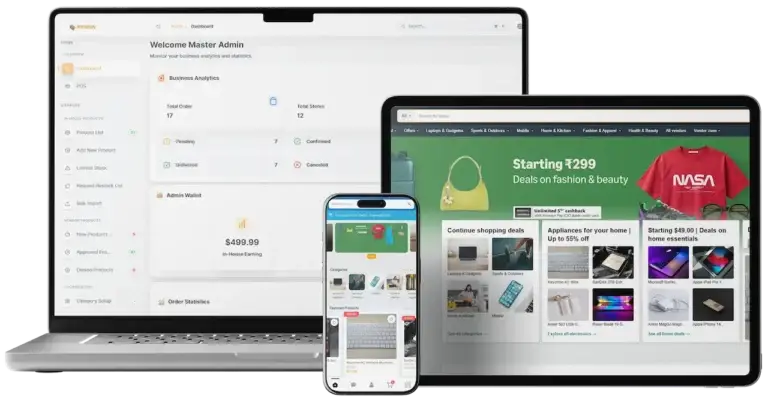
Amazon Clone marketplace across a vendor dashboard, a storefront and a phone.02
Pick it if: You sell shipped goods from online sellers instead of local vendorsAmazon Clone

A marketplace where independent sellers each get a panel, with a customer storefront in front and an admin console behind it.

Explore Solution
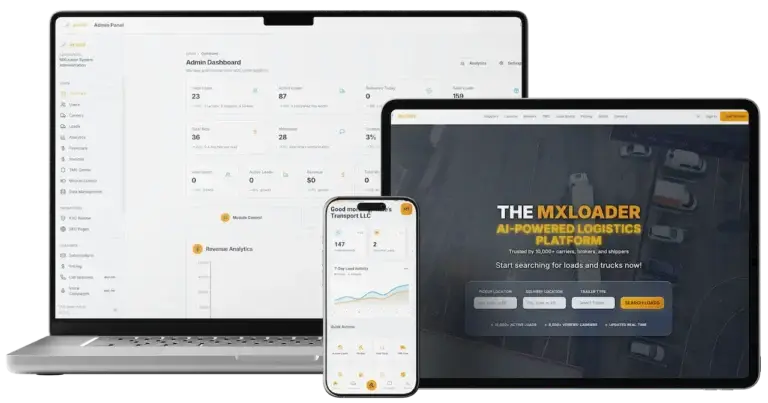
DAT Load Board Clone freight marketplace across shipper, carrier and admin screens.03
Pick it if: Your cargo moves by pallet and truckload, not by parcelDAT Load Board Clone

A load board on which shippers post freight and carriers answer with counter-offers, with GPS tracking, identity checks and loads that make several stops.

Explore Solution
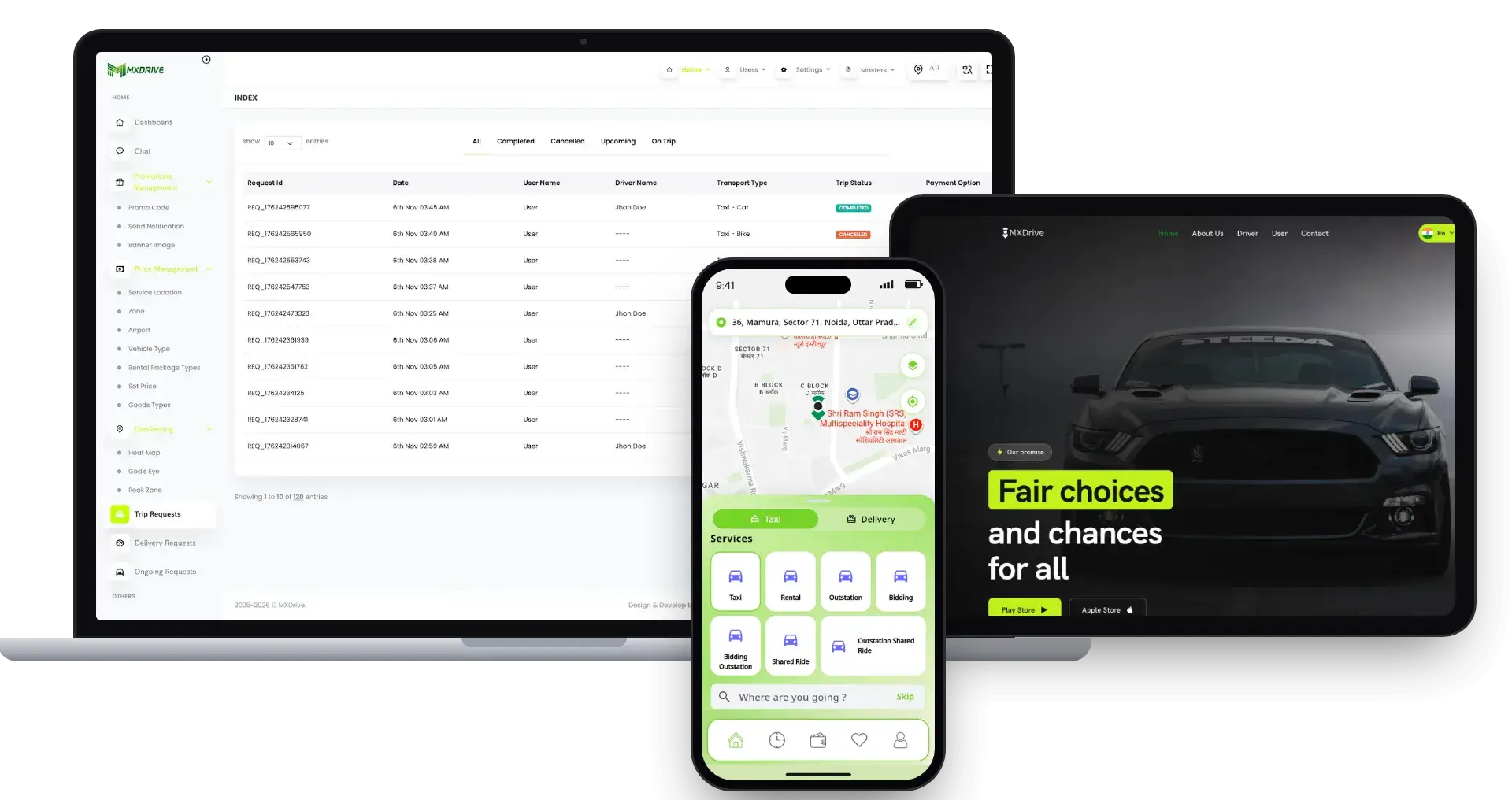
inDrive Clone ride-hailing across a dispatch table, a rider app and a web landing page.04
Pick it if: You mean to carry passengers as well as ordersinDrive Clone

Ride-hailing in which riders propose a fare and drivers bid for the trip, with live tracking of every journey and a dashboard for the operator.

Explore Solution
Full rangeBrowse the full Miracuves range

09Money matters

Market Benchmarks

Multi-Category Delivery Market Benchmarks - Independent 2025-2026 Data

The revenue models above are ours. The figures below are not. They come from Delivery Hero's FY 2025 results, Grab's 2025 results release and New York City's published fee caps, reproduced as published. They show how much volume multi-category delivery platforms process, what they keep from it, and where a regulator sets a ceiling on merchant fees.

Delivery Hero01

EUR 49.2bn in GMV at Delivery Hero in 2025

Delivery Hero reports Group GMV of EUR 49.2 billion for 2025, up 9 percent like-for-like, and adjusted EBITDA of EUR 903 million, or 1.8 percent of GMV. Its Quick Commerce vertical passed EUR 7.5 billion of GMV and AdTech revenue is approaching EUR 1.5 billion, according to the company's FY 2025 results presentation of 26 March 2026.

Grab Holdings02

$14.2bn in Grab Deliveries GMV in 2025

Grab reports Deliveries GMV of $14,236 million and Deliveries revenue of $1,800 million for 2025, both up 21 percent, with a segment adjusted EBITDA margin of 2.0 percent. Revenue is about 12.6 percent of GMV, our arithmetic on reported figures. Grab's annual report states that merchant-partners pay a commission at an agreed rate on the goods ordered.

NYC DCWP03

15% Fee Cap on Delivery Apps in New York City

New York City's Department of Consumer and Worker Protection lists the fee caps that third-party delivery apps may charge restaurants: 15 percent to deliver the order, 5 percent for a basic listing service, 20 percent for enhanced service and 3 percent to process electronic payment. An enhanced service fee is allowed only if a basic service is priced at or under 5 percent.

Where each figure comes from.

Delivery Hero SE, FY 2025 Results Presentation, 26 March 2026 - ir.deliveryhero.com

Grab Holdings Ltd, Grab Reports Fourth Quarter and 2025 Results, Form 6-K exhibit 99.1, 12 February 2026; and Annual Report on Form 20-F for the year ended 31 December 2025, filed 6 March 2026 - sec.gov

New York City Department of Consumer and Worker Protection, We Want Your Feedback on the City's Fee Caps, April 2026 - nyc.gov

All figures are the publishers’ own, reproduced as published from company results and a city regulator's rules. Metric definitions differ by company, Grab's segment figures are unaudited, and the Grab revenue-to-GMV ratio is our arithmetic on reported figures. They describe the companies and rules named, not any platform Miracuves builds, and nothing here is a revenue projection for your business.

What It Pays Back

Marketability, Revenue Potential & Business Prospects

Vendors list and customers return when they trust a platform enough to do so, and income follows. The four points below smooth both choices and leave the relationship with you.

  1. 01

    A Cut of Each Vendor Order

    A percentage of every order stays with you, so income rises along with vendors and baskets while your headcount stays put.

  2. 02

    Parcel Jobs With No Vendor

    A parcel job earns a fee without any vendor, drawing on the riders and the wallet you already run for vendor orders.

  3. 03

    Vendors and Customers You Own

    Vendor accounts, wallets, reviews and past orders are saved in your database, so whatever builds up is yours and not a bigger app's.

  4. 04

    Room to Change Course

    With the whole source and the schema in your hands, a later switch of host, team or direction needs nobody's say-so.

Main Revenue Levers
  • Vendor Commission
  • Delivery Charges
  • Dynamic Pricing
  • Promoted Placement
  • Delivery Plans
  • Parcel Jobs
Long-Term Value

Supply and habit, more than features.

  1. 01Vendors that loaded catalogs rarely move
  2. 02Saved addresses, wallets and histories bring customers back
  3. 03The build-up starts at launch, in your database
  4. 04Riders who show up and honest reviews form a second layer
Example Revenue Scenarios

Three scenarios follow, varying only in how many vendors are live, and each points to the lever that counts most at that size. Treat them as planning illustrations and not as a forecast of any platform's earnings.

Single District25Vendors Live

Early income rests on vendor commission.

One district and two dozen or so vendors: commission on each paid order pays the running costs, and the odd parcel job fills quiet spells between meals. These figures are planning illustrations, not a forecast.

Regional Rollout250Vendors Live

Commission, delivery charges and parcel jobs together.

A regional service in which plenty of vendors compete across the same neighborhoods, so delivery-charge rules, parcel jobs and paid placement begin to count next to commission. These figures are planning illustrations, not a forecast.

Several Cities2,500Vendors Live

Plans and placement join the mix.

A network spanning several cities in which delivery plans, paid placement and parcel jobs accumulate beside commission, while the admin reports indicate which zones merit attention. These figures are planning illustrations, not a forecast.

10Why us

The Miracuves Difference

How Miracuves Stacks Up Against Other Delivery Hero Clone Developers

A Delivery Hero clone can be bought as a stock script, hired out to a freelancer or an agency, or started from a Miracuves base with launches behind it, and each choice moves cost, delay and risk around. Ask any developer to show three vendor types in one basket flow, say where zones and commission live, and quote a price rather than an opening bid.

What Sets Miracuves Apart

  • 01

    Six Categories Ready

    Six tiles, spanning meals, groceries, medicine, e-commerce, parcels and liquor, ship in the base, where plenty of ordering scripts offer restaurants only.

  • 02

    Geography Built In

    The dashboard is organized around zones and the landing page names the open ones, so where you operate belongs to the product rather than being tacked on.

  • 03

    The Take Is Charted

    Admin commission and delivery commission each get a line beside gross sales, so what the marketplace keeps shows at a glance.

  • 04

    Your Code, Fully

    It arrives with no encryption and with the schema and deployment notes, which stops anyone from raising the product's price or rewriting its terms later.

  • 05

    Already Running Live

    Talokitoko was delivered on this base in 2024, reused 19 of its 24 modules as they were, and its public case study carries the whole scope ledger.

  • 06

    Honest About Scope

    We spell out what the base covers, what only an add-on covers and what you must bring, namely gateway accounts, hosting and developer accounts for the stores.

Development Company

How to Choose a Delivery Hero Clone Development Company

A multi-vendor delivery partner should demo zones, commission and several vendor types before you sign.

What to look for Miracuves

  • Many vendor kinds Six category tiles, from meals to liquor, in the base
  • Zones in the product A zone-based dashboard and a list of open zones
  • A visible take Both commission lines charted beside gross sales
  • A delivered business Talokitoko, built for Izi Technologies in 2024, reused 19 of 24 modules
  • Code you keep Unencrypted source, schema and deployment notes in your repository
  • Launch and aftercare Six working days to launch, when all three support periods begin

Walk away from any vendor who

  • Offers restaurants only and calls it multi-category
  • Cannot show where zones and commission are set
  • Folds the commission line into a single sales total
  • Quotes an opening bid instead of a fixed price
  • Encrypts the source or charges a license to stay online

Delivery Hero Clone Against Ready Scripts and Custom Agencies

Compared onMiracuvesDelivery Hero CloneGeneric ScriptCustom Agency Build
Time to LaunchWe build in six working daysUnclear, or left to youQuoted by project, often a few months
Who Owns the CodeYou, in full and without encryptionFrequently restricted or lockedNormally you, per the contract
Category CoverageSix category tiles, a parcel service, dispatch, live tracking and a walletPlain ordering pagesWhatever the budget reaches
Zones & CommissionOrders by zone, a commission percentage for stores and delivery charges, all in the adminDiffers by scriptCustom-designed and coded for you
Offers & LoyaltyCoupons, loyalty points, referral rewards and seasonal promotionsPromo codes at bestCustom-designed and coded for you
Admin & ReportsDashboard, commission controls, dispatch tools and reportingThin or absentCoded from nothing at extra cost
Security & ComplianceSeparate logins, cards kept at your gateway, limits stated openlyMinimalVaries between agencies
Cost vs Speed vs QualityOne fixed price for a tested base, delivered quicklyCheap yet riskyCostly and slow
Ongoing Support & UpdatesGuidance for 60 days, bug fixes for 6 months, updates for 12Seldom offeredAs the contract states

One month after launch the four routes feel nothing alike, and the table shows why.

Talk to Our Team

Changelog

What Changed in Each Release of This Delivery Hero-Style Platform, Newest First

Each release below covers the web platform and the apps together. None of the entries carries a date, and each one is a short summary in plain language.

VersionSizeDetails
V2.125 new or improved, 1 repairedNew and improved
All Flutter apps were made compatible with SDK 3.27.1 and with the latest Android Studio
Data caching was introduced in the backend as well as the front end, beginning with business settings and home page data, to cut waiting time
Asset files were slimmed down, which makes the apps quicker to respond
Wording in system messages and labels was clarified
General UI and UX polish
Repaired
Minor repairs for smoother daily use
V2.117 new or improved, 1 repairedNew and improved
One central login now takes a manual entry, a one-time code or a social account, and the admin enables each option separately
Mobile one-time code sign-in goes through Firebase
Stores offering store-wide discounts are collected in Top Offers Near Me
Search for items and stores was improved
Stock can be changed directly in the product list, and low-stock alerts trigger at limits you set
Campaign items accept nutrition, allergy and other general details
Built-in registration pages for stores and delivery men were added to the React web storefront
Repaired
Assorted repairs and quicker queries
V2.108 new or improved, 1 repairedNew and improved
The admin landing page was refined and now reports which delivery zones are available
Tapping a push notification now opens the page it concerns
Chat gained suggested ready-made messages
Food and grocery items received nutrition and allergy tags, and pharmacy medicines received generic group names with filters
Mailing lists of subscribers can now be exported and filtered in many ways
The point-of-sale section improved in many places
The order details page links to a chat with the admin
reCAPTCHA v3 now protects public forms
Repaired
Assorted repairs and quicker queries
V2.9.12 new or improved, 1 repairedNew and improved
Phone sign-in with a one-time code via Firebase
Compatibility with Flutter SDK 3.22.3
Repaired
Repairs across web panels and apps
V2.98 new or improved, 1 repairedNew and improved
Stores can pay for promoted positions in new paid ad promotion sections
Admins switch notifications, emails and SMS on or off store by store
Lists of stores, items and categories can be hand-sorted from the admin panel
Guest checkout now includes an option to create an account
All features can be translated automatically
Subscriptions cover far more cases than before
Currency and payment gateway settings are now validated, and every check that fails appears on screen
UI and UX improvements on mobile and web
Repaired
Known defects cleared for steadier behavior
V2.8.12 new or improved, 1 repairedNew and improved
Flutter SDK 3.22.2 compatibility
No changes were made to the delivery app or to the React web storefront
Repaired
Issues fixed in the panels and in the customer app

Let us talk

Want local vendors of every kind listed under your own brand? Let's turn your city plan into a marketplace that works.

Book a consultation at no charge and leave with a firm timeline and straight answers. Earning your trust matters more to us than a fast sale.

  • A first reply inside 2 hours
  • Consultation at no charge
  • No lock-in contract
  • The full source code is yours

11Keep reading

Blog & Resources

Reading for Founders Building an App Like Delivery Hero: Guides and Insights

Three reads for operators on building a delivery app from nothing, what the feature list of a delivery marketplace holds and what to ask about security before you launch.
The platform itself7 questions

01What do I actually get with the Delivery Hero Clone?

It is a white-label delivery marketplace that Miracuves sells ready-made. Three mobile apps serve customers, vendors and riders, and a web storefront, a vendor panel and an admin panel round out the set, all built from the same codebase. The brand on every screen is yours.

02Which categories can it carry?

Six tiles greet the customer, covering meals, groceries, medicine, e-commerce, parcels and liquor. Vendors of any of those kinds list in the one marketplace, and a single pool of riders serves them all.

03How are delivery zones handled?

The dashboard in the admin is titled around managing orders by zone, and from release 2.10 the landing page names the delivery zones that are open. Per-zone fee tables are available as custom work, with the scope and cost for your zones set out in writing.

04How much of the platform can I change?

Branding, categories, commission, delivery charges and dynamic pricing are all settings you control, and you get the whole source, unencrypted, to change anything else. Whatever goes past the base is scoped and priced as its own job.

05Can the apps appear in other languages?

Release 2.9 added auto-translate for every feature, and the account menu has a Language row. Translation runs through a service you connect with your own account and key.

06Which mobile platforms are supported?

Android and iOS both. All three apps are Flutter builds that target both platforms, and we help put them in the stores from developer accounts you own. How long Apple and Google take to review them is outside our control and outside the 6 days.

07Is it legal to run a delivery marketplace like this?

The software carries no licence of its own and Miracuves offers no legal advice. What is allowed for medicine, alcohol and parcels, how riders can be engaged, wallet balances and tax varies between countries and between cities, so consult local professionals before taking orders.

Orders, payments & tracking7 questions

08How does an order get placed?

The customer logs in or goes on as a guest, taps a category tile, searches or opens a vendor, builds a basket, confirms an address and pays by card, wallet or cash on delivery. After that the order page shows the date placed and the scheduled time. It also holds a verification code for the handover, then a button to Track Order.

09Can an order be scheduled for later?

Yes. Shoppers may ask for delivery at once or at a set time, and the order page prints the date it was placed and the scheduled time on two lines.

10Where does the customer follow a delivery?

Inside the app. A Track Order button shows the rider by GPS between collection and drop-off, and push notifications report every status change.

11Which payment methods work?

Cards, the in-app wallet, cash on delivery and any gateways you connect. The merchant account behind a gateway is yours, and since release 2.9 the currency and gateway settings are validated each time they are changed.

12Is there anything for customers who order often?

Yes. Loyalty Points, Coupon and Refer and Earn all have rows in the account menu, and a Social Sharing Rewards module can be bought as an extra.

13Can a customer choose a delivery slot?

In the base, each order has a scheduled time. A slot picker for customers is the Custom Delivery Windows module, which is sold on its own, with a separate scope and price.

14Can guests check out without an account?

A guest sees an offer to open an account at checkout and may decline it, which has been so since release 2.9.

Vendors, riders & admin8 questions

15How does a vendor join the marketplace?

A vendor registers in the app or on the web storefront, completes a profile and adds products. Release 2.11 put registration pages for stores and delivery men into the storefront. Once the admin approves the vendor, orders can begin to arrive.

16Can vendors manage their own products and prices?

They can. Each vendor keeps its own catalog, edits prices freely, adjusts stock from the product list and receives low-stock alerts at levels it picks.

17Can a vendor set its own delivery charge?

That is a configuration choice: a vendor can charge its own delivery fee, or it can follow the platform's prices.

18How do riders sign up and get jobs?

Riders register and upload documents, then wait for the admin to approve them. Close-by jobs are then offered, and a rider is free to take or decline each one.

19Do riders see directions and their earnings?

Riders get turn-by-turn GPS navigation in the delivery app, along with an earnings page that lists past trips and payout totals. What happens to cash taken at the door follows a policy you write.

20What does the admin panel let an operator do?

It manages customers, vendors and riders, sets commission and delivery charges, follows orders through Dispatch Management and the dashboard organized by zone, runs promotions and produces reports covering sales, customer behavior, rider performance and revenue.

21Who sets the commission and delivery charges?

The decision is yours. In the admin you pick the commission percentage for stores, decide what delivery costs and may set up dynamic pricing as well.

22Can I charge a different commission for each vendor type?

What the admin sets is a commission percentage for stores. Commission tiers by vendor type are available as custom work, with restaurant, grocery or pharmacy rates scoped and costed in writing first.

Revenue, launch & Miracuves13 questions

23Where does income come from on this platform?

Vendor commission, delivery charges, dynamic pricing, paid placement, delivery plans and parcel jobs can each contribute. Each has its own setting in the admin, with published figures for comparable lines in the take-rate table earlier on this page.

24What does the first revenue look like on a multi-category delivery marketplace?

Usually it begins with commission on vendor orders, because every paid order earns it from the first day. Delivery charges come next under rules you set, and parcel jobs bring in a fee that involves no vendor. Paid placement and delivery plans follow once enough vendors compete for the same customers. Items such as white-label licensing or franchise fees rest on commercial deals you make yourself and are not part of the build.

25What stops a delivery marketplace from being copied in the next city?

Supply and habit, more than features. Vendors who have uploaded catalogs and prices seldom leave, and shoppers with saved addresses, funded wallets and an order history tend to come back. The platform begins storing that build-up on launch day, in a database that belongs to you. A second layer comes from riders who turn up and reviews that stay honest, because an app's reputation cannot be copied quickly.

26How soon can we launch?

Rebranding and deploying to your hosting takes us 6 working days on the ready-made base. Store review happens separately, and what you supply is hosting, developer accounts, branding and company details. Support comes as three overlapping periods: 60 days of platform guidance, 6 months of priority bug fixes and 12 months of updates.

27Do I receive the source code?

Every bit of it. You receive the web platform and the mobile apps as source without encryption, plus the database schema, so your own team can alter and redeploy whatever it likes.

28What must I arrange before launch?

Hosting and a domain name, a verified developer account with each app store, your logo and business details, a merchant account at a payment gateway with KYC finished, and keys for third-party services like maps, SMS and push.

29What makes Miracuves a good team to build a Delivery Hero clone?

Miracuves has completed 9,000+ projects, and Miracuves delivered Talokitoko, a food and grocery business, on this base in 2024. For a fixed $3,399 you get the complete source and a team that states openly what the base includes, what costs more and what falls to you.

30What does a Delivery Hero clone cost?

The Miracuves Delivery Hero clone costs $3,399 once, with no floor and no per-order fee. That price covers customer, vendor and rider apps, a web storefront, vendor and admin panels, full source and the database, all carrying your brand on hosting you choose. Paid add-ons and custom rules are quoted in writing before any work begins.

31Is buying a ready-made Delivery Hero clone smarter than a custom aggregator build?

For a multi-vendor aggregator, usually yes. Six vendor categories, zones, store commission, dynamic pricing and the rider app already run in this base, and Talokitoko, built for Izi Technologies, set its own fees on it. Your branded marketplace is ready 6 working days after kick-off, for a price fixed before you sign. A custom aggregator is priced against scope and takes much longer, while extras on our base are quoted in writing, usually 2-8 weeks.

32Which steps take my Delivery Hero clone from demo to launch?

Run the demo as shopper, vendor and rider. Agree your first categories, first zones and the commission you will charge. We brand the three apps, the storefront and the two panels, install them on hosting you own with your keys connected, then rehearse the orders most likely to cause complaints. Building takes 6 working days, and the two stores review the apps afterward at their own pace.

33Can the customer, vendor and rider apps share the same data?

Yes. The three Flutter apps, the web storefront and the vendor and admin panels are all built from the same codebase and the same database. An order a customer places is approved and prepared on the vendor side, offered to a nearby rider, and followed through Dispatch Management and the admin dashboard, so every role sees the same order.

34How are payments split between the platform, vendors and riders?

You set the split in the admin. Pick the commission percentage for stores, decide what delivery costs and optionally switch on dynamic pricing. Riders see an earnings page with past trips and payout totals, and cash taken at the door follows a policy you write yourself. Rate tiers by vendor type are custom work, scoped in writing first.

35Do I pay more when I open the Delivery Hero clone in another city?

No. The $3,399 price stays the same, ownership is permanent and no seat fees apply. What grows with a new city are usage bills for maps, SMS, push and one-time codes, gateway and hosting capacity, plus any local licenses. Zones are managed from the admin dashboard, so a new area is a configuration step.

Disclaimer

Miracuves is an independent software development company. We are not affiliated with, connected to, sponsored by, or endorsed by Delivery Hero.

Read our full Legal Notice & Disclaimer →
Why this name

“Delivery Hero Clone” is used descriptively. It is how the software industry refers to building a platform with functionality similar to Delivery Hero, and how clients search for it.

Who built this

The entire design and codebase is built by our own team. The product contains no code, design, graphics, or content originating from the Delivery Hero website or applications.

Trademarks

Delivery Hero and all other third-party names and marks are the property of their respective owners, referenced here solely to describe the category of software offered.