Handyman Marketplace App · Production Ready

Uber for X - White-Label On-Demand Home Service Booking Marketplace

Built by Miracuves, the Uber for X clone arrives ready-made and white-label: source code you own for the customer and provider Flutter apps, a customer website, a provider panel and an admin panel, rebranded for your services business and live in six working days.

Customers compare providers by rating, book an address and a time slot, or post a job with a budget and take bids; providers add an extra charge when work grows on site. You approve every provider before they work, and four optional modules, such as remote consultations, are quoted on their own. A new settlement schedule or extra admin reports count as custom work: we set the scope and price in writing first, and delivery usually takes 2-8 weeks.

Launch in 6 Days with

  • Source Code
  • Customer App
  • Provider App
  • Provider Panel
  • Admin Panel
  • Android + iOS

StackFlutter · TypeScript · PHP 8.2 · Bootstrap · MySQL · Twilio

MXHandy console · MarketplaceIllustrative
Bookings today31
Open requests7
Providers live48

Marketplace activity

Admin · Admin DashboardReal screen
Uber for X - White-Label On-Demand Home Service Booking Marketplace - real admin screen, Admin Dashboard
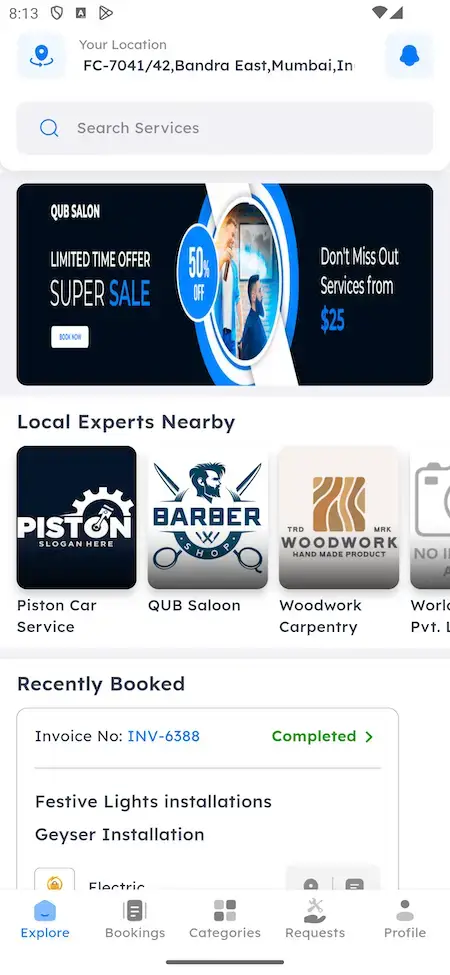
Uber for X Clone app home screen with a Search Services bar, a banner, Local Experts Nearby and Recently Booked.
Customers choose by ratingon every provider page
  • 5Surfacescustomer app, customer website, provider app, provider panel and admin panel
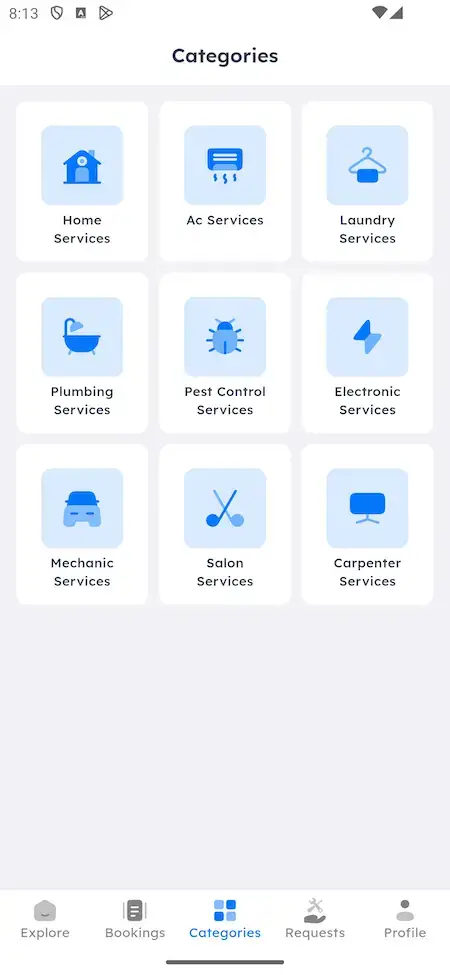
  • 9Demo Categorieshome, AC, laundry, plumbing, pest control, electronic, mechanic, salon and carpenter
  • 0%Revenue Share With Miracuvesno cut of any booking, settlement or provider payout
  • 5Revenue Lines in the Basebooking commission, extra charges, featured rows, AdMob ad slots and provider plans
  • 6Days to Launchand if the delay is ours, we keep going free
  • $2,799Paid Once, Not Rentedsource code yours, no per-seat fee, no monthly rental

Live in six working days, or we keep working free until you launch. Every build carries 60 days guidance, 6 months bug fixes and 12 months updates.Verify every figure

Any Trade on One Deployment

Services and categories are data the admin adds one by one or imports from a CSV file, so repairs, cleaning or salon visits share the same platform.

Check It Before You Buy

No client launch of this product is published, so the proof is a customer login, a provider login and release notes from version 2.6.0 to 3.1.0.

Card Handling Stays With the Gateway

Stripe, Razorpay, Paystack, PayPal and Flutterwave can run side by side; with their hosted checkout, card handling stays on the gateway's side, under an account you onboard and clear for KYC yourself.

Ready to open your own on-demand services marketplace?Talk to Product Expert

Chosen by 6,000+ clients across the globe

Miracuves is listed by Expertise.com as a managed IT service provider.Miracuves is an official member of the Forbes Business Council.Miracuves is a verified agency on DesignRush, listed among top design agencies in India.Miracuves is reviewed on Trustpilot as a software development company.Miracuves is listed by The Manifest among top managed software development companies.Miracuves is listed by DesignRush as a top software development company.Miracuves is recognized by GoodFirms as a top software development company.Miracuves is ranked among the top 1000 companies globally by Clutch.Miracuves is a top managed service provider in the United States on Clutch.

01See it live

Open the Demo

Uber for X Clone Demo - Customer App, Provider App, Web & Admin Panels

Use the Uber for X Clone yourself. Miracuves gives you two app logins for its Uber for X clone, one customer and one provider, while the customer website and both panels sit open on the demo host and the panel logins are shared on a guided call. Pick a category, open a provider, read a booking and look at the requests list.
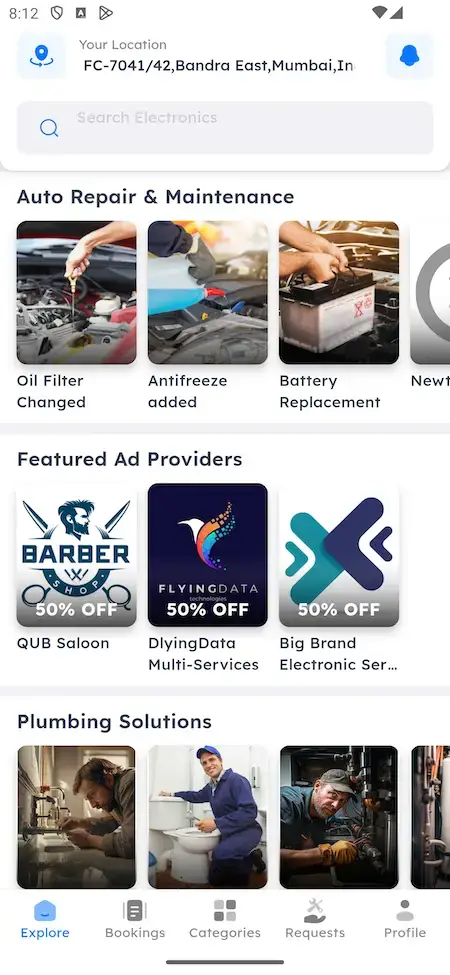
Uber for X Clone app home screen with a Search Services bar, a banner, Local Experts Nearby and Recently Booked.Uber for X Clone app home screen with rows for Auto Repair and Maintenance, Featured Ad Providers and Plumbing Solutions.
Customer app

Uber for X Clone - Customer App

Customers use their phone to search services, browse categories, open a provider page, book a time slot, post a custom request and track each booking.

  1. 1Open the app portal and pick your phone
  2. 2Sign in with the demo login below
  3. 3Explore: Categories, a provider page, Bookings, Requests
Try:+919876543210 | User_321
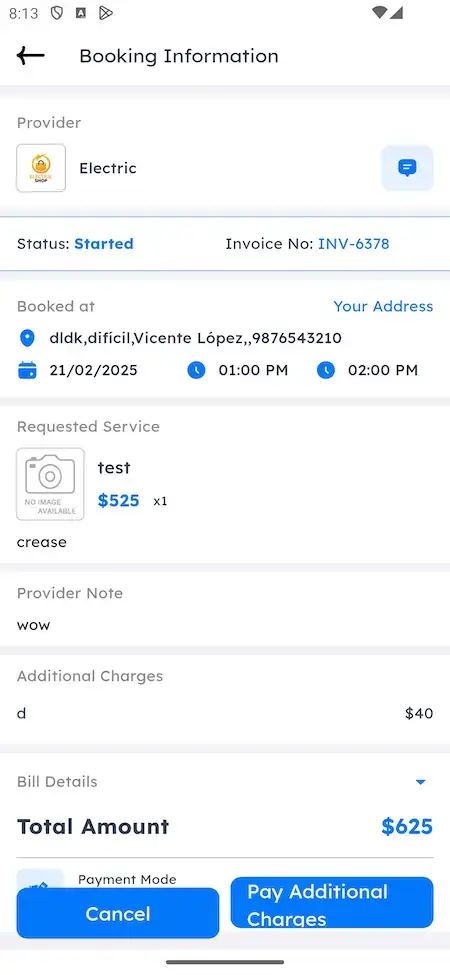
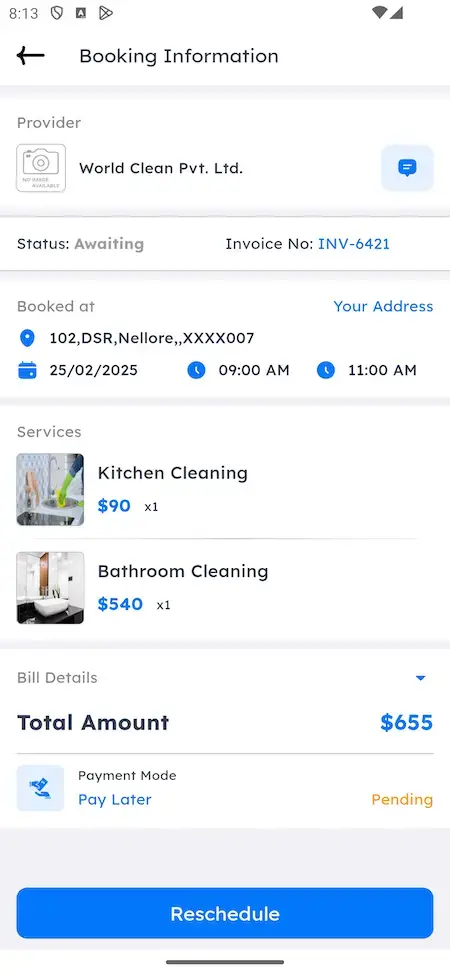
Uber for X Clone booking screen in Started status with a provider note, an additional charge, a total and a Pay Additional Charges button.Uber for X Clone booking information screen with provider, Awaiting status, address, time slot, services, bill details and a Reschedule button.
Provider app

Provider App - Jobs, Extra Charges & Chat

Providers use their phone to accept incoming bookings, add an extra charge at the end of a job and reply to customers before and after a booking.

  1. 1Open the app portal and pick your phone
  2. 2Sign in with the provider login below
  3. 3Explore: Bookings, Chat, Extra charges
Try:+919876543211 | Provider_321
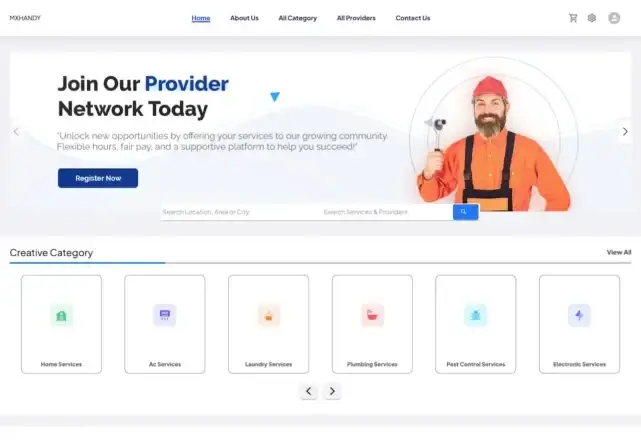
Uber for X Clone customer website with a Join Our Provider Network banner, a location and service search and category rows.
Customer website

Customer Website

The responsive site with a location and service search, category rows, provider pages and a Join Our Provider Network banner that sends new providers to register.

  1. 1Open the demo site in a browser tab
  2. 2Search by area and service, or open a category
  3. 3Explore: Providers, Categories, Contact
Login:ask for one on a guided call
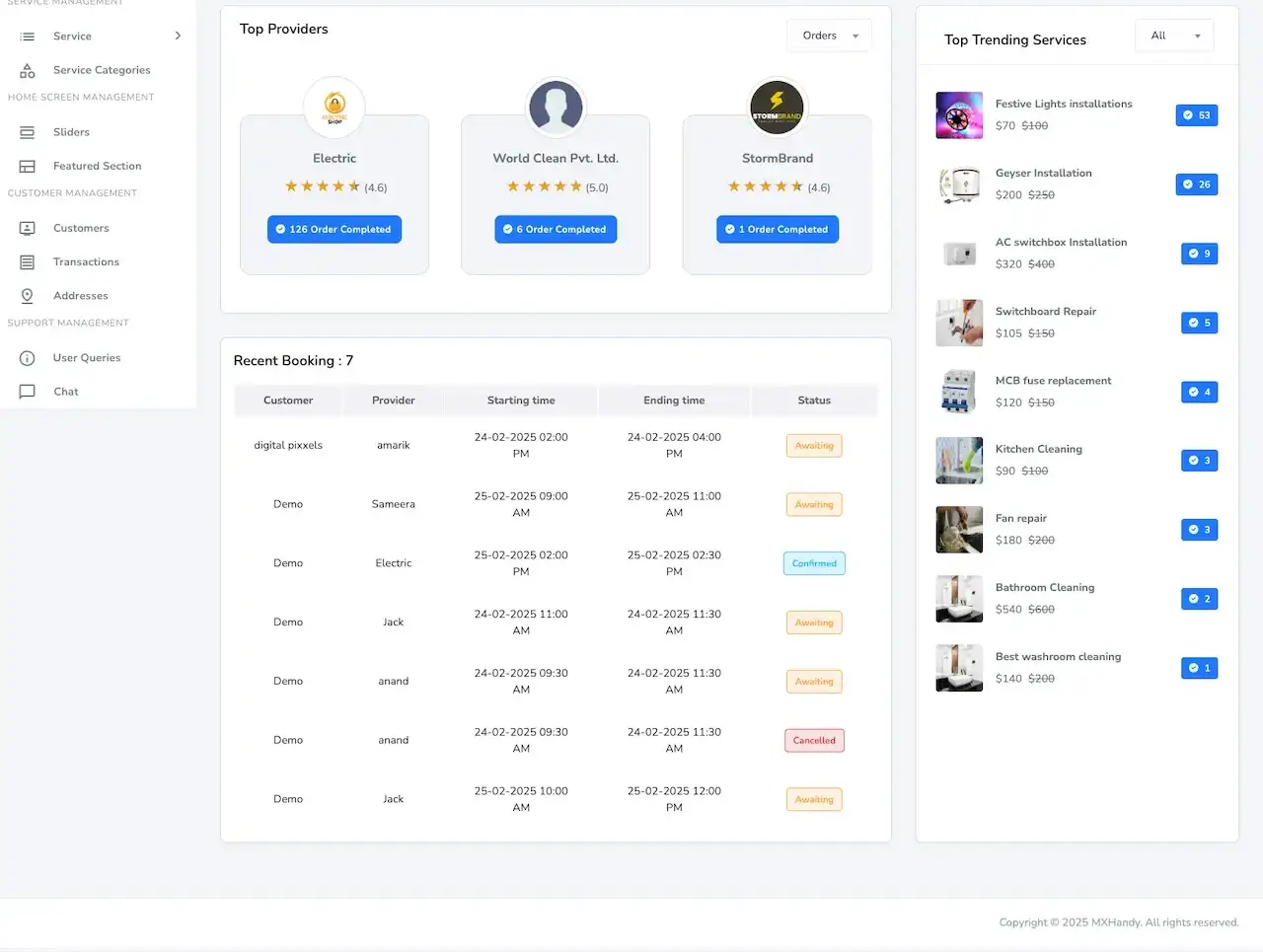
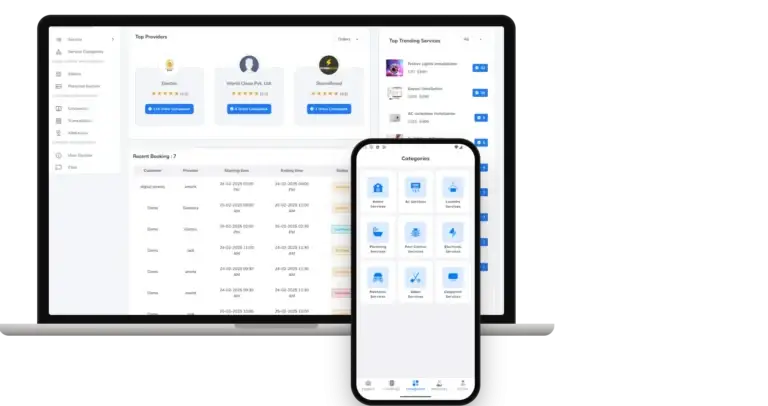
Uber for X Clone admin dashboard with top providers, recent bookings with status and top trending services.
Admin & provider panels

Admin Panel & Provider Panel

The operator console for providers, bookings, settlements, services and homepage content, and the provider panel where a service business runs its own side.

  1. 1Open the admin or the provider login page
  2. 2Ask the team for the login
  3. 3Explore: Dashboard, Bookings, Providers, Settlements
Panel logins:shared on a guided call
Uber for X shown across a laptop and phone: the admin console dashboard with providers and bookings and the service categories grid

See It With Us

Uber for X App Walkthrough: Categories, Bookings, Custom Requests & Admin Panel

A guided call is the quickest way to see all five surfaces working together. In 30 minutes we open the customer app, the provider side and the admin panel and set each against your own plan: your service list, your commission rate and your target launch date.

Schedule a live walkthrough call.

Every Screen Mapped

On-Demand Services App Screens - Customer App, Admin Dashboard & Website Home

From the Match with Providers welcome screen to the profile management page, the Miracuves Uber for X customer app appears screen by screen in booking order, followed by the admin dashboard and the customer website.

Uber for X Clone app onboarding screen with the line Match with Providers and a Get Started button.
Uber for X Clone app home screen with a Search Services bar, a banner, Local Experts Nearby and Recently Booked.
Uber for X Clone app home screen with rows for Auto Repair and Maintenance, Featured Ad Providers and Plumbing Solutions.
Uber for X Clone app Categories screen: home, AC, laundry, plumbing, pest control, electronic, mechanic, salon and carpenter services.
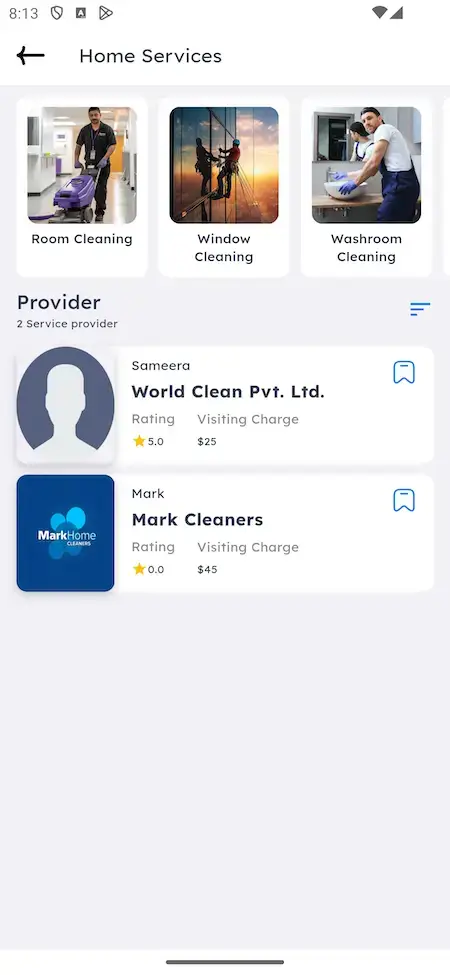
Uber for X Clone app Home Services screen with sub-services and two providers shown with rating and visiting charge.
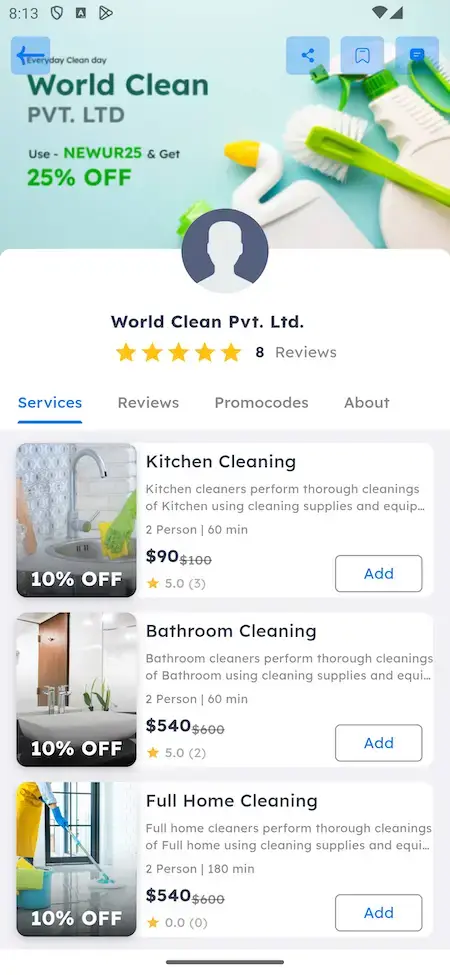
Uber for X Clone provider page with a five-star rating, eight reviews, Services, Reviews, Promocodes and About tabs and priced services with an Add button.
Uber for X Clone booking information screen with provider, Awaiting status, address, time slot, services, bill details and a Reschedule button.
Uber for X Clone booking screen in Started status with a provider note, an additional charge, a total and a Pay Additional Charges button.
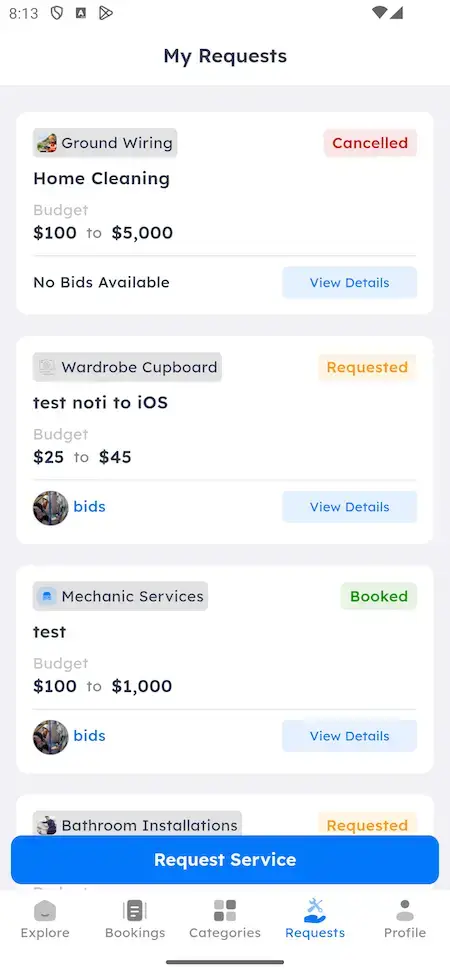
Uber for X Clone My Requests screen with custom jobs, budget ranges, bids, status labels and a Request Service button.
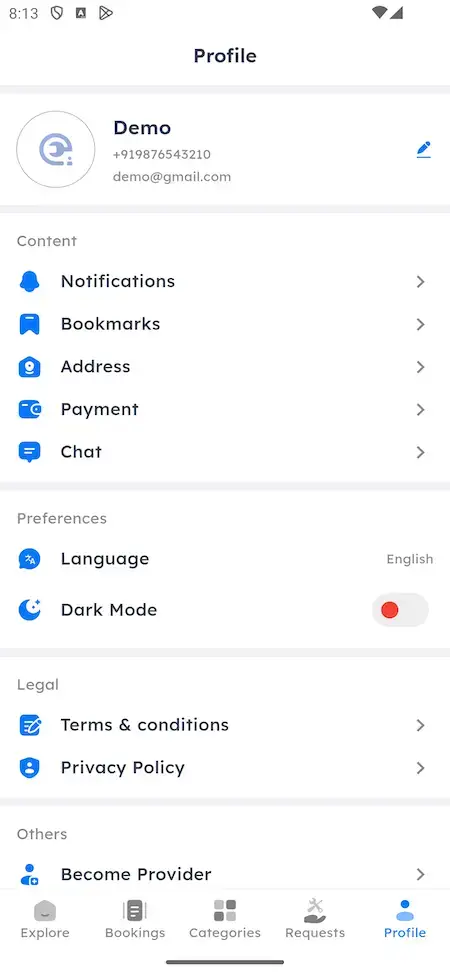
Uber for X Clone profile screen with notifications, bookmarks, address, payment, chat, language, dark mode and Become Provider.
10 screens · scroll →
Uber for X Clone admin dashboard with top providers, recent bookings with status and top trending services.
1 screen
Uber for X Clone customer website with a Join Our Provider Network banner, a location and service search and category rows.
1 screen

Follow a customer from the category grid to a provider page, a booking with a time slot and an extra charge, and on to a custom request with a budget, then see the same activity in the admin dashboard.

Explore Our Solutions

02Proof

In Their Words

Uber for X Clone Client Reviews - What Service Founders Say

Four service platforms appear here. Servica, Appforany and Z-gig each run several service types on one platform with Miracuves configuring those services rather than rebuilding infrastructure, and Saas Home Services added its own categories and vetting rules to a ready booking core.

SServica TeamFounding team, Servica
“We run several service types off one platform. The dispatch and booking core already supported that, so the work was our service definitions and pricing. Delivered under a month.”
SSaas Home Services TeamFounding team, Saas Home Services
“Provider onboarding, quoting, booking and payments came off the shelf. We added our service categories and our vetting rules. Both sides of the marketplace were live inside a month.”
AAppforany TeamFounding team, Appforany
“Several on-demand services under one brand was the requirement, not several apps. The multi-service base supported that natively, so we configured verticals instead of building them. Delivered inside a month.”
ZZ-gig TeamFounding team, Z-gig
“Several gig verticals in one product. Because multi-service dispatch was already solved, we spent the time defining categories and provider onboarding rather than infrastructure. Delivered under a month.”
Read More Client TestimonialsOperators and founders in their own words

Honest Status

Uber for X Clone Case Study - What Is Published and What You Can Check

No named client deployment of this exact product is published. This section lists what you can verify yourself, rather than borrowing the result of a different product.

Not Yet Published
No Named Deployment of This Product

Miracuves has published service-marketplace case studies, but they describe a different product, so none is attached here. What exists for this one is a demo you can open and a release history you can read line by line.

Five demo surfacesLive demo
Any bookable serviceModel
No client namedStatus
5Demo hosts
2App logins
0Invented results
Uber for X Clone app home screen with a Search Services bar, a banner, Local Experts Nearby and Recently Booked.
Check in the demo
  • Sign in as the demo customer and open a category
  • Open a provider page and read its rating and services
  • Open a booking to see its status, bill and extra charge
  • Look at the custom requests list with its budgets and bids
  • Ask for the panel logins to see the admin and provider sides
Why no client is named
  • A case study is published only for a real client launch
  • Case studies of other products do not describe this one
  • We never make up client names, logos or figures
  • If a client agrees to be named, this becomes a true case study
What we will not do
  • Show a quote or number that does not trace to a client
  • Pass a demo screen off as a client result
  • Promise bookings, providers or revenue
  • Conceal the fact that anyone can use the demo logins

03The product

The Basics

What an Uber-Like App for Services Does for Customers and Providers

The Uber for X clone from Miracuves is a ready-made marketplace for services that are booked and delivered at an address. Customers search or browse categories, pick a provider by rating and book a slot, providers take the jobs, and the operator runs everything from an admin panel with settlements and homepage controls.

Uber for X shown across a laptop and phone: the admin console dashboard with providers and bookings and the service categories grid

More Than a Booking Form

The value sits around the booking: provider pages with ratings, promo codes, custom requests, extra charges, chat and an admin console that follows settlements.

Not a Locked Box

The complete source code arrives with no encryption, so your own developers can reshape any flow or screen later without asking us or paying a fee per user.

Plain About What Is Extra

An in-app marketplace, service packages, virtual consultations and a skill-sharing section are add-ons priced on their own. They are listed as add-ons and never counted as base features.

Web, Android & iOS

What Is an Uber for X Clone Script?

The idea is one marketplace carrying many kinds of work. The hard part is not the booking button but everything around it: a catalog of categories and services, provider pages people can compare, extra charges added when a job ends and a settlement trail the operator can stand behind. Those parts ship working.
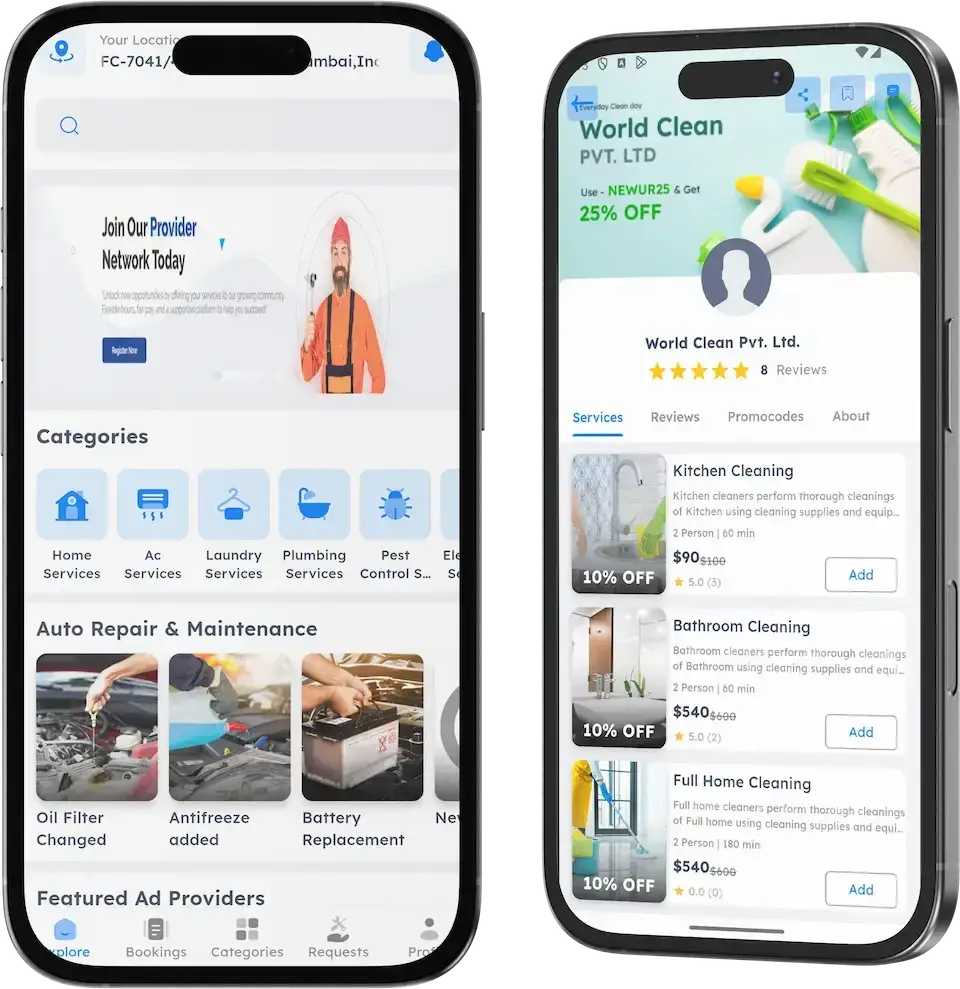
Uber for X Clone app on two phones: the home screen with categories and a provider page with services and prices.
  1. 01Service categories, search and provider pages
  2. 02Slot booking with an address, a status and a bill
  3. 03Custom requests with a budget and bids
  4. 04Extra charges, promo codes and booking chat
  5. 05Admin panel with settlements and a revenue chart

You receive five surfaces: the customer app and website, the service provider app and provider panel, and an admin panel. The apps are built in Flutter, and the complete source code comes with them.

What Is in the Box

Uber for X Clone Features - Categories, Provider Ratings, Bookings, Custom Requests, Chat & Admin

Every feature Miracuves lists for this Uber for X clone script shows up in a demo screen, an admin menu or a release note. Anything that would need an extra module is named as an add-on lower on the page.

Feature 01 / 12

Categories & Service Search

Customers start from a search bar and a grid of categories, then open the sub-services inside each one, such as room, window or washroom cleaning.

  • Search Services bar on the app home screen
  • Category grid covering home, AC, laundry, plumbing, pest control, electronic, mechanic, salon and carpenter
  • Sub-services listed under each category
  • Location and service search on the customer website
  • Location bar showing the customer address
Feature 02 / 12

Provider Pages & Ratings

Each provider has a page with a star rating, a review count and tabs for Services, Reviews, Promocodes and About, so customers compare before they book.

  • Rating and review count at the top of the page
  • Services tab with durations and prices
  • Reviews, Promocodes and About tabs
  • Visiting charge shown on provider cards
  • Bookmark icon to save a provider for later
Feature 03 / 12

Slot Booking & Status

A booking carries the provider, the address, a date and a time range, the chosen services and a status label such as Awaiting or Started.

  • Address, date and time range on every booking
  • Status labels such as Awaiting, Started and Completed
  • Invoice number on each booking
  • Reschedule and Cancel buttons on the booking screen
  • Recently booked and ongoing bookings on the home screen
Feature 04 / 12

Custom Job Requests

Instead of picking a catalog service, a customer can post a request with a budget range and let providers bid on it.

  • Request Service button on the Requests tab
  • Budget range shown on every request
  • Bids from providers on the request card
  • Status labels such as Requested, Booked and Cancelled
  • Custom Job Requests menu in the admin panel
Feature 05 / 12

Extra Charges at Job End

When the work turns out bigger than booked, the provider adds an extra charge as the booking ends and the customer pays it from the same booking screen.

  • Extra charges added by the provider as a booking closes (release 3.0.0)
  • Additional charges listed on the booking screen
  • Pay Additional Charges button for the customer
  • Total amount updated in the bill details
  • Payment mode shown on the bill, such as Pay Later
Feature 06 / 12

Promo Codes & Offers

Providers show promo codes on their page, banners advertise offers, and the admin can duplicate promo codes to launch new ones quickly.

  • Promocodes tab on every provider page
  • Percent-off labels on service cards
  • Offer banners in the home screen rows
  • Duplicate service, provider and promo code options (release 2.6.0)
  • Featured Ad Providers row with offer tags
Feature 07 / 12

Chat Before & After Booking

Customers and providers can message each other from the booking screen, and the admin decides globally whether pre-booking and post-booking chat is on.

  • Chat icon on the booking information screen
  • Pre-sale enquiries chat with a provider (release 2.6.0)
  • Pre-booking and post-booking chat setting in the admin panel
  • Chat with providers and admin on the website (release 2.8.0)
  • Chat menu in the admin sidebar
Feature 08 / 12

Notifications, SMS & OTP

Twilio SMS can carry one-time codes, booking updates and review messages, and the admin chooses which of SMS, push and email are switched on.

  • Twilio SMS for one-time codes, bookings and review messages (release 2.8.0)
  • Switches for SMS, push and email in the admin panel
  • Notifications entry in the customer profile
  • Booking OTP shown on the website (release 2.7.0)
  • Customizable email templates (release 2.6.0)
Feature 09 / 12

Provider Management

The admin panel keeps providers, payment requests, settlements and cash collection together, and a provider radius can be set in miles.

  • Providers list in the admin panel
  • Payment Request, Settlements and Cash Collection menus
  • Provider radius option with miles (release 2.8.0)
  • Nearby Providers option for featured sections (release 2.8.0)
  • Manage providers by CSV file (release 2.7.0)
  • Provider panel for service businesses to run their own side
Feature 10 / 12

Services & Catalog Management

Services and categories are data. The admin adds them one by one or imports a CSV file, and providers manage their own services from the provider panel.

  • Service and Service Categories menus
  • Manage services by CSV file in both panels (release 2.7.0)
  • Duplicate a service (release 2.6.0)
  • Media gallery section in both panels (release 2.7.0)
  • Search menus in the admin and provider panels (release 2.7.0)
Feature 11 / 12

Homepage, Sliders & Featured Rows

The home screen is assembled from sliders, banners and featured sections that the admin controls, with separate images for the app and the web.

  • Sliders menu in the admin panel
  • Separate app and web images per slider (release 2.9.0)
  • Banners in featured sections (release 2.9.0)
  • URL option on sliders (release 2.9.0)
  • Landing-page data can be enabled or disabled (release 2.9.0)
Feature 12 / 12

Payments, Languages & Sign-In

Stripe, Razorpay, Paystack, PayPal and Flutterwave are supported, several gateways can be on at once, and customers can sign in with Google or Apple.

  • Flutterwave payment gateway (release 2.8.0)
  • Paystack options improved (release 2.8.0)
  • Option to enable several payment gateways at once
  • Google and Apple login in the customer app (release 2.6.0)
  • Language and dark mode settings in the customer profile
  • Right-to-left layouts on the customer web and the panels

Before you buy, note this: The platform arrives finished and rebranded with your identity. What you provide: hosting and a domain, a verified developer account on each app store, your branding and business details, a payment gateway with onboarding and KYC already complete, plus any third-party keys. Apple and Google run app store review, which falls outside our 6-day build time.

Talk to Our Team

How Operators Earn

Uber for X Clone Revenue Models - Commission, Extra Charges, Featured Rows, Ad Slots & Provider Plans

Miracuves splits the earning side of this on-demand services app into separate lines, so turning one on leaves the others untouched.

Early on, two lines usually do the heavy lifting: commission on each completed booking, and extra charges that enlarge a booking.

  1. 01

    Booking Commission

    The operator keeps a share of completed bookings. The admin panel has Payment Request, Settlements and Cash Collection menus, which is where what each provider is owed gets reviewed.

  2. 02

    Extra Charges at Job End

    A provider adds an extra charge as a job ends, so a booking that grows on site is billed at its real size, and a percentage-based commission then runs on the larger total.

  3. 03

    Featured Placement

    Featured sections, offer banners and Nearby Providers rows decide who customers see first. Selling those slots to providers is an arrangement you make; the admin controls what appears.

  4. 04

    In-App Ad Slots

    Google AdMob is supported in the customer and provider apps, so ad inventory can earn alongside bookings once you connect an AdMob account of your own.

  5. 05

    Provider Memberships

    Provider plans ship in the base: set a price (free plans are allowed), a duration, order and service limits, and an optional commission rate per plan. Providers without an active plan are hidden from customers.

  6. 06

    Client Service Fee

    A fee on top of the booking, paid by the customer, is another published model. The demo screens show no client-side fee line, so it would be scoped as custom work.

Published fees and filings from home services marketplaces, set beside four of the revenue lines above: what each company charges or reports, and what limits it.
Revenue streamHow it is chargedTake rateTypical take rateWhat sets the ceiling
Booking CommissionA share of each completed booking, kept before the provider is settled.About 35% of transaction value at Urban Company India (our arithmetic, includes product sales).What providers accept before they move to a rival. Thumbtack takes a percentage on preset jobs without publishing it, and a Stripe US card payment costs 2.9% + 30c before you keep anything.
Featured PlacementProviders pay for visibility, as an advertising contract or as a price per lead.Angi booked $214.9M of U.S. advertising revenue in 2025, on contracts averaging about a year.How many providers compete for one area. Thumbtack lets each pro set a lead price under a weekly budget cap, and publishes no list price.
Provider MembershipsA recurring plan for providers, billed monthly or yearly.Angi earned $29.4M from U.S. pro membership subscriptions in 2025.Whether providers see a return. Sold as an in-app subscription, the stores take a cut: Apple 30%, then 15% after a year, and Google Play 10% plus a 5% billing fee in the US, UK and EEA.
Client Service FeeA percentage added to the customer's bill on top of the provider's price.Taskrabbit's blog puts its Trust & Support fee at usually 5-15% of the task price.Price sensitivity at checkout. Taskrabbit also charges a Service Fee on the hourly rate without printing the percentage, so fees on one task stack.

How to read this. Urban Company's ratio is worked out from its Q2 FY27 shareholders' letter, the advertising and membership revenue from the Angi annual report, the lead-price model from a Thumbtack pro guide, and the client fee from a Taskrabbit post and its help center. Store and card costs come from Apple, Google Play and Stripe support pages. The 35% is our own division of two reported figures and mixes in product sales, so read it as a ratio, not a commission. Use each figure as an input to your own model. The table is neither a quote nor a forecast, and the rates on your platform are settings you choose.

Revenue Model

Uber for X Clone Revenue Model, Stage by Stage

Miracuves keeps each revenue line of the Uber for X clone separate in one admin panel, so you open on the lines that pay first and add the rest as provider supply grows.

Launch

In a first city, booking commission carries the business at a rate you set, and extra charges at job end lift each booking to its real size.

Traction

Once several providers compete for the same neighborhoods, featured rows, offer banners and Nearby Providers placement become slots worth selling, while promo codes bring customers back.

Scale

Across many cities, Google AdMob slots in both apps earn through your own AdMob account, paid provider plans come built in, and a client service fee can be added as scoped custom work.

Payment requests, settlements and cash collection keep each provider's share reviewable, and Miracuves takes no cut of any booking.

Need a revenue plan that fits your own services marketplace?Design My Revenue Model

Operate It Day to Day

Uber for X Clone Admin Panel - Providers, Bookings, Settlements & Homepage Content

Miracuves fits the operator's whole day into one Uber for X admin panel: what is booked, what providers are owed, which services and categories are live, what the home screen shows and which questions customers have asked.

Uber for X Clone admin dashboard with top providers, recent bookings with status and top trending services.
Uber for X Clone customer website with a Join Our Provider Network banner, a location and service search and category rows.

Admin Panel Sections

  • 01

    Dashboard & Revenue

    Counts of customers, services and orders sit beside an income revenue chart that switches between Total, Admin and Provider views.

  • 02

    Providers & Settlements

    Providers, payment requests, settlements and cash collection are grouped together under one Provider Management heading.

  • 03

    Bookings & Custom Jobs

    Every booking with its provider, start and end time and status, a list of booking payments and a queue of custom job requests.

  • 04

    Services & Categories

    Add and edit services and the categories they sit in, or load them in bulk from a CSV file.

  • 05

    Sliders & Featured Rows

    Home screen sliders, banners and featured sections decide what customers see first, with separate app and web images.

  • 06

    Top Providers & Trends

    The dashboard ranks top providers by completed orders and lists top trending services, which shows where demand sits.

  • 07

    Customers & Transactions

    Customer records, their transactions and their saved addresses live under Customer Management.

  • 08

    Support & Settings

    A User Queries inbox, a Chat menu, switches for SMS, push and email, a database backup and a language switcher.

Money Movement

The finance side of the console, from a completed booking to a settled provider.

  • Payment Request menu
  • Settlements and Cash Collection menus
  • Booking payments list
  • Transactions under Customer Management

Controls & Tools

The switches behind the daily operation.

  • Database backup (release 2.7.0)
  • Email template editor and email marketing (release 2.6.0)
  • Search menus across the admin panel
  • Amazon S3 option for external storage (release 3.1.0)

Need the console to do more than it does? Additional reports or another settlement schedule are scoped as separate work. Tell us what your operations team requires and we will quote it in writing.

Talk to Our Team

04Package and price

What Ships With It

Uber for X Clone Script Delivery: Source Code, Apps & Deployment

Miracuves delivers a marketplace that already takes bookings, with the Flutter source for both apps, the web and panel code and the database schema, deployed to your hosting and published from your developer accounts, so you keep it outright and never pay a seat, run or license fee. The parts that normally swell an on-demand quote, a catalog that holds any trade, trusted provider pages, booking states, requests with bids and money settled after the job, are all inside the $2,799.

01

Full Source Code

The complete source of the Uber for X script, covering the web platform and the Flutter apps, with no encryption, so your developers can change anything in it.

  • Web and panel source, unencrypted
  • Flutter source for the Android and iOS apps
  • Yours to modify, extend and redeploy
  • Delivered into your own repository
02

Database & Backup

The database structure behind providers, services, bookings, requests and settlements, plus a backup option in the admin panel.

  • Schema for providers, services and bookings
  • Custom requests and settlements covered
  • Backup option in the admin panel (release 2.7.0)
  • Amazon S3 option for storage (release 3.1.0)
03

Chat, SMS & Alerts

Chat between customer and provider, Twilio SMS for one-time codes and booking messages, and notification settings the admin controls.

  • Booking chat for customers and providers
  • Twilio SMS for codes, bookings and review messages
  • SMS, push and email switches in the admin panel
  • Email templates and email marketing
Uber for X Clone customer website with a Join Our Provider Network banner, a location and service search and category rows.
04

Website & Provider Panel

The responsive customer website with search and category rows, and the provider panel where a service business runs its own side.

  • Location and service search on the home page
  • Category rows, featured sections and banners
  • Provider panel with its own login
  • Right-to-left layout on web and panels
05

Customer & Provider Apps

Two Flutter apps, one for customers and one for providers, covering booking, requests, chat and profile.

  • Customer app with Explore, Bookings, Categories, Requests, Profile
  • Provider app for incoming work
  • Google and Apple login in the customer app
  • Published from your own developer accounts
Uber for X Clone My Requests screen with custom jobs, budget ranges, bids, status labels and a Request Service button.
Uber for X Clone admin dashboard with top providers, recent bookings with status and top trending services.
06

Admin Panel

The operator console with a dashboard, providers, bookings, custom requests, services, sliders, featured sections, customers and settlements.

  • Dashboard with revenue chart and top providers
  • Providers, bookings and custom job requests
  • Services, categories, sliders and featured sections
  • Settlements, payment requests and cash collection
07

Access & Safety Layer

Separate logins for customer, provider and admin, with the checks the platform ships with.

  • Separate logins for customer, provider and admin
  • Booking OTP shown on the website (release 2.7.0)
  • Payments run through the gateway you connect
  • Backup option in the admin panel
08

Handover & Support

Branding and deployment done for you, a handover pack, and the three support periods that run side by side from launch.

  • Rebranding with your logo, icons and colors
  • Deployment to your hosting
  • Publishing from your developer accounts
  • 60 days guidance, 6 months bug fixes, 12 months updates

Prefer to look first? Log into the demo as a customer or a provider, or book a guided walkthrough where we go through a category, a provider page, a booking with an extra charge and a custom request, and compare each with your own plan.

Talk to Our Team

Transparent Pricing

What Does an On-Demand Services App Like Uber for X Cost to Launch?

The launch-ready white-label Uber for X Clone costs a fixed $2,799. Anything beyond the base, from add-ons and extra integrations to custom flows, is scoped by Miracuves and quoted in writing as a separate item.

Most Popular

Professional

Ready-Made Launch Package
$2,799paid once
Ships in 6 days

Suited to: Handyman and home-service startups, regional service marketplaces, franchise networks

The platform arrives as the demo shows it, rebranded with your logo, icons and colors, and deployed on your own hosting.

Get Started

Enterprise

Custom Builds for Larger Scope
Customquote
Go-live: based on final scope

Suited to: Multi-city operators, service franchises, marketplaces with several verticals

If you need flows the base does not have, we build to your requirements and agree the scope and the price before any work starts.

Request a Quote
Development Cost

Uber for X Clone Development Cost in 2026

One $2,799 payment buys all five demo surfaces, both Flutter apps, the website and two panels, as unencrypted source with schema. Six working days after kickoff, the Match with Providers welcome screen wears your logo, icons and colors, and no seat, monthly or booking fee follows.

$2,799 Paid once
6 working days Rebranded and live
0% Revenue share

What moves your total sits outside the software invoice

  • A domain plus hosting for the website and both panels
  • Apple and Google developer accounts the apps publish from
  • Fees on Stripe, PayPal or any other gateway you switch on
  • Twilio SMS, Google Maps and Firebase usage on your own keys
  • Any of the four optional modules, each quoted on its own

A different settlement cycle or extra admin reports are priced in writing first, and typically ship in 2-8 weeks.

Compare Your Options

Ready-Made Uber for X Clone vs Custom Development vs SaaS

An Uber for X marketplace has to hold every trade, from repairs to salon visits, with ratings, custom requests and charges added at job end. Compare owning the ready-made Uber for X clone from Miracuves with building one, the custom on-demand app development route, or renting one.

CriteriaMiracuvesReady-Made Uber for X CloneCustom DevelopmentSaaS
Launch time6 working days, under your brandQuoted on paper, often 2-8 weeksUp quickly, on someone else's terms
Upfront cost$2,799 fixed, one paymentSet by the scope agreedFees every month, indefinitely
Source code ownershipUnencrypted source plus schema, yoursAs the build contract definesNot available to you
CustomizationNew trades added as data, not codeWhatever you can specifyLimited to vendor features
Ongoing feesNo commission taken by MiracuvesPaid upkeep afterwardPlan charges, sometimes per booking
Branding & app-store listingCustomer and provider apps in your nameBrand designed from scratchVendor branding may linger
Best forFounders covering many trades at onceA single unusual workflowChecking interest before investing

Where It Fits

Use Cases for a Multi-Service On-Demand Marketplace - Home Repair, Custom Jobs, Cleaning, Multi-Service Apps & Salon Visits

Miracuves ships one Uber for X product, and each operator gives it a different focus. A repair marketplace puts provider ratings and time slots first, a custom job board starts from requests and bids, and a franchise network builds on areas and the dashboard. Which part leads is set through configuration.

RepairTradesHome Repair Marketplace

List plumbers, electricians, carpenters and mechanics under their categories, let customers compare providers by rating and book a time slot at their own address.

01
Uber for X Clone provider page with a five-star rating, eight reviews, Services, Reviews, Promocodes and About tabs and priced services with an Add button.
CustomJobsCustom Job Board

Let customers describe a one-off job with a budget range, collect bids from providers and keep the request, its status and the booking in one list.

02
Uber for X Clone My Requests screen with custom jobs, budget ranges, bids, status labels and a Request Service button.
CleaningLaundryCleaning & Laundry Service

Sell sub-services such as room, window or washroom cleaning with a duration and a price each, and bill an extra charge when a job runs bigger than booked.

03
Uber for X Clone app Home Services screen with sub-services and two providers shown with rating and visiting charge.
AggregatorWebMulti-Service Aggregator

Run many categories in one app, with search by area and service on the website and an admin who decides which rows come first.

04
Uber for X Clone customer website with a Join Our Provider Network banner, a location and service search and category rows.
FranchiseAreasRegional Franchise Network

Operate one brand across several areas, with the available-provider radius set in miles and the admin watching top providers and recent bookings on one dashboard.

05
Uber for X Clone admin dashboard with top providers, recent bookings with status and top trending services.
SalonBeautyBeauty & Salon Visits

Use the Salon category and offer tags for beauty providers, with promo codes on each provider page to bring customers back.

06
Uber for X Clone app home screen with rows for Auto Repair and Maintenance, Featured Ad Providers and Plumbing Solutions.
Business Model

Uber for X Clone Business Model: Three Ways to Run It

Commission on completed jobs in any trade, from cleaning to salon visits, pays for this services marketplace, and a single install supports three very different operators.

Open marketplace

Independent providers list their own services and prices, and the operator keeps a commission on each finished booking, which grows when extra charges enlarge a job on site.

Managed service brand

A cleaning, repair or salon company sends its own crews through the provider app and sells sub-services at set prices, so the margin sits in its own price list.

Agency resale

A studio hands a proven services base to its client, white-labeled with the complete source code, and charges for setup and ongoing changes.

In every model the operator sets the categories, commission and promo codes, and none of what it earns is shared with Miracuves.

One product, six ways to use it. Every case runs on the same customer app and website, provider app and panel and admin panel. What changes is your category list, your commission, the providers you invite and the brand on top, so there is still a single codebase to look after.

Talk to Our Team

The 2026 Case

Why Launch an On-Demand Services Marketplace in 2026?

Service demand is local, repeated and often urgent, yet most customers and providers still meet through a few large directories, which is the opening Miracuves' on-demand services marketplace software is built for. Running the marketplace under your own brand means the providers, the customers and the commission that those directories keep today flow to you instead.

01

Customers Already Book From a Phone

People arrive at a search bar and a category grid expecting providers, ratings and a time slot. A marketplace that gives them that in a few screens meets a habit that already exists.

02

Providers Want a Channel They Control

A provider page with their own services, prices and promo codes, plus a panel to manage jobs, gives independent trades a storefront that is theirs to run.

03

Ratings Replace Guesswork

When every provider shows a star rating and a review count, choosing between strangers gets quicker, and good providers are rewarded with more bookings.

04

Jobs Do Not Always Fit a Menu

A custom request with a budget lets customers describe work that no catalog line covers, and lets providers bid for it.

05

Your Brand, Not a Listing on Another Site

Under your own name, each customer, each review and each repeat booking builds an asset that you own.

06

Buy Versus Build Settles Quickly

Categories, provider pages, bookings, extra charges and an admin console make up most of a services marketplace. Six days of our build time later, a white-label copy can be running on hosting of your own.

This Platform in Numbers

5

Surfaces, One Codebase

5

Customer App Tabs

6

Release Versions Logged

6

Days of Build Time

Most of the effort in a services marketplace sits in the unglamorous middle: category and service data, provider pages, booking states, extra charges and an admin console that reconciles all of it. Here that work is already done.

Service Types

Service Types We Cover

Miracuves made its Uber for X clone for any business that sends a provider to a customer or books a customer with a provider. Handyman and repair crews list carpenters, electricians and mechanics. Cleaning and laundry operators sell visits by the hour. Pest control and AC services book recurring jobs. Plumbing teams take urgent calls. Salon and beauty networks sell appointments. Electronics repair shops collect devices. Multi-service apps put all of these behind one search bar.

  1. 01Handyman Services
  2. 02Home Cleaning
  3. 03Laundry
  4. 04Plumbing
  5. 05Electrical Work
  6. 06Pest Control
  7. 07Auto Repair
  8. 08Salon & Beauty
  9. 09Carpentry
  10. 10AC Services
  11. 11Electronics Repair
  12. 12Multi-Service Apps

Miracuves’ Uber for X Clone is a services marketplace you can shape around any bookable trade, with the provider app, the panels and the category list all carrying your name from the first screen.

06Under the hood

End to End

How the Uber for X Clone Works - Welcome, Browse, Compare, Open, Book & Pay

To a customer, booking a service in the Uber for X app Miracuves delivers takes a handful of taps. Underneath it is a chain of category, provider, slot, status and payment. Below is that chain from sign-in to a settled bill, followed by how the platform is put together.

Customer Journey - From the Welcome Screen to a Settled Bill

  1. Uber for X Clone app onboarding screen with the line Match with Providers and a Get Started button.
    1Open the App and Sign In

    The Match with Providers welcome screen leads to Get Started, and the customer signs in with a phone number, Google or Apple.

    • Match with Providers welcome screen
    • Phone-number login in the demo
    • Google and Apple login (release 2.6.0)
  2. Uber for X Clone app Categories screen: home, AC, laundry, plumbing, pest control, electronic, mechanic, salon and carpenter services.
    2Choose a Service Category

    A grid of service types fills the Categories screen, and every tile opens the sub-services it contains.

    • Home, AC, laundry and plumbing categories
    • Pest control, electronic, mechanic, salon, carpenter
    • Search Services bar on the home screen
  3. Uber for X Clone app Home Services screen with sub-services and two providers shown with rating and visiting charge.
    3Compare Nearby Providers by Rating

    Each service lists its providers on cards with star ratings, visiting charges and a bookmark for saving favorites.

    • Provider count under the service list
    • Star rating and visiting charge on each card
    • Bookmark to save a provider
  4. Uber for X Clone provider page with a five-star rating, eight reviews, Services, Reviews, Promocodes and About tabs and priced services with an Add button.
    4Check the Provider Profile

    Profiles show the review count, a priced list of services with durations and discounts, and Reviews, Promocodes and About tabs.

    • Rating and review count
    • Services with duration and price
    • Reviews, Promocodes and About tabs
  5. Uber for X Clone booking information screen with provider, Awaiting status, address, time slot, services, bill details and a Reschedule button.
    5Book a Time Slot

    On the booking screen the customer sets the address, date and time range, sees the chosen services and gets a bill with payment mode and status.

    • Address, date and time range
    • Services with price and quantity
    • Bill details and payment mode
  6. Uber for X Clone booking screen in Started status with a provider note, an additional charge, a total and a Pay Additional Charges button.
    6Approve Extra Charges and Pay

    When the work turns out bigger, the provider adds an extra charge at the end and the customer pays it from that same booking screen.

    • Provider note and additional charges
    • Total amount updated in the bill
    • Pay Additional Charges button
Visual Flow DiagramSign inBrowseCompareOpenBookPay

How It's Built

How the Uber for X App Is Put Together

Talk to Our Team
  1. Part 01

    Five Surfaces, Separate Logins

    The customer app, customer website, provider app, provider panel and admin panel each have their own entry point, so a provider never lands in the operator console.

  2. Part 02

    Booking Status Trail

    A booking moves from Awaiting through Confirmed or Started to Completed, or ends Cancelled, and each status shows in the app and in the admin booking list.

  3. Part 03

    Services, Prices & Discounts

    Every service carries a duration, a price and an optional discount, which is why a provider page can show a struck-through price beside a percent-off label.

  4. Part 04

    Settlements & Cash Collection

    Payment requests, settlements and cash collection are separate admin menus, so each payout can be reviewed in its own step.

  5. Part 05

    Chat & Messages

    Pre-booking and post-booking chat can be switched on or off globally, and Twilio SMS carries one-time codes and booking messages.

  6. Part 06

    Landing Page Control

    Sliders, banners and featured sections can be turned on or off and given their own app and web images, so the home screen changes without a code release.

Under the Hood

Uber for X Software Stack - PHP, Flutter, Twilio & Payment Gateways

Three things carry a services marketplace: a web tier that stays up, a database that keeps bookings consistent and apps that feel native on a phone. Here is what Miracuves built the Uber for X software stack with, as the product page and the release history state it.

WEB & ADMIN

Web Platform

PHP Bootstrap TypeScript
  • Customer website, provider panel and admin panel
  • PHP 8.2 on the panels (release 3.1.0)
  • TypeScript on the customer website (release 2.7.0)
  • Right-to-left layouts on the web and panels
DATABASE

Data Tier

MySQL
  • Data tier lists MySQL
  • Backup option in the admin panel
  • Providers and services loadable by CSV file
  • Amazon S3 option for external storage
MOBILE

Customer & Provider Apps

Flutter Android iOS
  • Flutter apps with every component, built on current dependencies
  • Flutter 3.27 in the latest release
  • One customer app and one provider app
  • Published from your own developer accounts
PAYMENTS

Gateways & Payment Modes

Stripe PayPal Razorpay
  • Flutterwave support (release 2.8.0)
  • Paystack options improved (release 2.8.0)
  • Several gateways can be enabled at once
  • Pay Later appears as a payment mode in the app
INTEGRATIONS

Third-Party Services

Google Maps Twilio Firebase
  • Google Maps for location
  • Twilio SMS for OTPs and messages
  • Firebase links moved to Flutter deep links (release 2.6.0)
  • Google AdMob and Google and Apple login in the apps
HANDOVER

Source & Documentation

Repository Schema Config
  • Web, panel and Flutter source, unencrypted
  • Database schema delivered with it
  • Deployment configuration written down
  • Handover notes for your developers
Tech buyer notes:

The release history records PHP 8.2 on the panels, TypeScript on the customer website and Flutter for the apps. The product page also lists PHP with Bootstrap and MySQL for the web and admin side. Google Maps, Twilio, Firebase, payment gateways and translation services need your own accounts and keys, which you supply at deployment. Everything named here is mainstream and easy to hire for.

Talk to Our Team

Room to Grow

Growing Without a Rewrite - Bulk Imports, External Storage & Separate Surfaces

Adding providers, services and areas should be a matter of data and configuration, not a rebuild. This is what the platform gives you for that.

Bulk Imports. Providers and services can be loaded from a CSV file in the admin panel, and services also from the provider panel, so opening a new city is a spreadsheet rather than a week of typing.

Separate Surfaces. Customer, provider and admin each have their own app or panel, so a change to one does not have to ship with the others.

Storage Outside the Web Server. An Amazon S3 option in the admin panel keeps uploaded media in external storage as the catalog grows.

Area Control. The provider radius is set in miles and Nearby Providers rows are built in the admin panel, so coverage can widen one area at a time.

01

Separate Surfaces

Customer app, customer website, provider app, provider panel and admin panel each have their own entry, so each can change without touching the others.

02
ProvidersServicesPromos

Bulk Imports

Providers and services load from CSV files, and a service, a provider or a promo code can be duplicated.

  • Providers by CSV file
  • Services by CSV file
  • Duplicate service, provider or promo code
  • Media gallery in both panels
03

Area Controls

The provider radius is chosen in miles, and Nearby Providers rows are created for featured sections.

  • Provider radius in miles
  • Nearby Providers rows
  • Featured sections and banners
  • Search menus in the panels
04
StorageBackupMedia

External Storage

An Amazon S3 option keeps media outside the web server, and a database backup option sits in the admin panel.

  • Amazon S3 option
  • Media gallery
  • Separate app and web slider images
  • Database backup
05

Several Gateways

More than one payment gateway can be switched on at once, which helps when customers in different countries pay differently.

  • Stripe, Razorpay and PayPal
  • Paystack and Flutterwave
  • Several gateways at once
  • Pay Later mode
06

Documented Hand-Over

Source, schema, deployment configuration and handover notes are passed to you so another team can run the platform unaided.

Room to Change and Grow. Sooner or later a services marketplace needs something specific to its own city or trade. With the complete source code and a conventional stack, a new screen, rule or integration is ordinary development work, and either your team or ours can do it.

For a first launch: start with the providers and categories you can bring in and grow on the one deployment you already have. As traffic rises, capacity is a hosting and configuration decision, and anything beyond the base is scoped and quoted on its own.

Talk to Our Team

07Security and trust

Security You Can Inspect

Security in an On-Demand Services App: Separate Logins, Gateway Payments & Honest Limits

A services marketplace holds identities, addresses, bookings and payment references, so the controls that matter most are who can see what, where payments go and what happens before launch. This section says what the platform does and what stays your work.

  1. 01 · Roles
    Role Separation

    Customer, provider and admin each use their own login page and surface, so a provider account opens the provider panel and never the operator console.

    • Provider Vetting: Providers submit a national ID or passport, address proof, a tax number and bank details at sign-up, and the admin approves each account before it takes jobs. License, insurance and background checks remain your own process.
    • Dispute Handling: Disagreements between a customer and a provider are settled by your team, using the booking record, the status history and the chat as evidence.
  2. 02 · OTP
    One-Time Codes

    A booking OTP is shown to the customer on the website (release 2.7.0), and Twilio SMS can carry one-time codes for bookings and other messages (release 2.8.0).

    • Notification Choices: The notification settings decide which of SMS, push and email go out, so you choose what customers and providers receive.
  3. 03 · Gateway
    Payments Stay at the Gateway

    Payments run through the gateways you switch on, for example Stripe, PayPal or Razorpay. Use their hosted checkout so card handling stays on their side, and treat the gateway setup as part of your launch checks.

    • Third-Party Accounts: Twilio, Google Maps, Firebase and your payment gateways need accounts and keys of your own, which are set up at deployment.
    • Payout Controls: Payment requests and settlements are reviewed in the admin panel, so how quickly providers are paid is your decision.
  4. 04 · Backup
    Backup & Storage

    A database backup option sits in the admin panel, and an Amazon S3 option keeps media in external storage. A restore test is scheduled into the launch plan, because a backup earns trust once it has been restored.

    • Named Launch Tasks: Penetration testing, key and secret rotation, a restore drill and a review of your gateway settings are listed as pre-launch work, not assumed to be done.
  5. 05 · Support
    Chat & Support Trail

    Booking in-app chat, the User Queries inbox and the admin Chat menu leave a written record that helps resolve a dispute between a customer and a provider.

  6. 06 · Launch
    Honest Scope

    This page lists controls that appear in the demo and the release history. When your launch needs a compliance audit, we take you through it with an independent audit partner, and the certificate is issued to your company.

The base ships with role-based access, and every rule behind it sits in code your reviewers can read. Outside pen testing, secret changes and a restore test go onto the go-live schedule we keep with your team. The role-based access in the base is built to ISO 27001, SOC 2 and GDPR controls. Assessment is carried out by independent audit partners alongside you, and any attestation is issued to your own company (published scope of support).

Discuss Security Before Launch

Marketplace Readiness

Readiness of the Uber for X Platform - Software Coverage and the Duties You Keep as Operator

A services marketplace sends one stranger to another person's door. Miracuves builds the booking, payment and rating tools; which providers you accept, what licences they need, which insurance applies and what the law requires where you operate stays with you as the operator.

Built for a marketplace; certified under no regime.

A dispatch screen, a driver app or a payout row counts as ready when it works in the live demo. Local licensing for your ride or service business sits with your operating entity.

Built Into the Software

Categories and services, provider pages with ratings, bookings with a status and a bill, custom requests with bids, extra charges, chat, settlements, separate customer, provider and admin logins, and an admin panel with a revenue chart.

Left to the Operator

Your terms of service and privacy policy, which providers you accept and what proof you ask them for, how disputes are settled, and the cancellation and refund policy you publish on top of the defaults you set.

Safety & Insurance

Whether a provider is qualified, whether their work is insured and who pays for damage are decisions for you and your providers. The platform collects ID documents from providers at sign-up for your approval and shows ratings and reviews; license checks, background screening and cover for a loss stay with you.

Where You Operate

Trade licensing, consumer protection, tax on service income and the rules on whether providers count as contractors or employees differ by country and often by state or city. Check them for each market with qualified local advisers before bookings open.

08Grow the platform

At the centerMXHandy
  • Categories, providers & search
  • Bookings, requests & extra charges
  • Customer app & provider app
  • Admin panel & settlements

Adding a module

  1. 1
    Choose the module

    Pick one now or after launch, once real bookings show what your customers ask for.

  2. 2
    Quote before work

    Each module gets a written scope and a price before anything is built.

  3. 3
    Added to your code

    Once complete, the module is added to the source code you already own.

Ask for a Custom Module

Go Further

Add-Ons for an Uber-Like Services App - In-App Marketplace, Service Packages, Virtual Consultations & Skill Sharing

Miracuves delivers the Uber for X platform working end to end, and you can check that in the demo. The four modules below are optional, each is quoted on its own and none of them is counted among the base features.

  • Commerce

    In-App Marketplace

    A store area inside the app where customers can buy products or extra services that go with a booking, next to the service itself.

    Marketplace · In-app
  • Commerce

    Customizable Service Packages

    Providers combine several of their services into one bundle with its own price, so a customer can book a set of jobs in a single step.

    Packages · Bundles
  • Service

    Virtual Consultations

    A remote advice session between a customer and a provider, offered next to the chat that the base already includes.

    Remote · Advice
  • Service

    Skill Sharing Platform

    A section where providers run virtual workshops or tutorials, so customers learn from their expertise and providers build a following.

    Workshops · Learning

Nearby Service Products

Selling One Kind of Service Instead of Many? Look at These Four Products.

The Uber for X Clone is the broad template for anything that can be booked. If your business is built around a single kind of work, one of these products may fit it more closely.
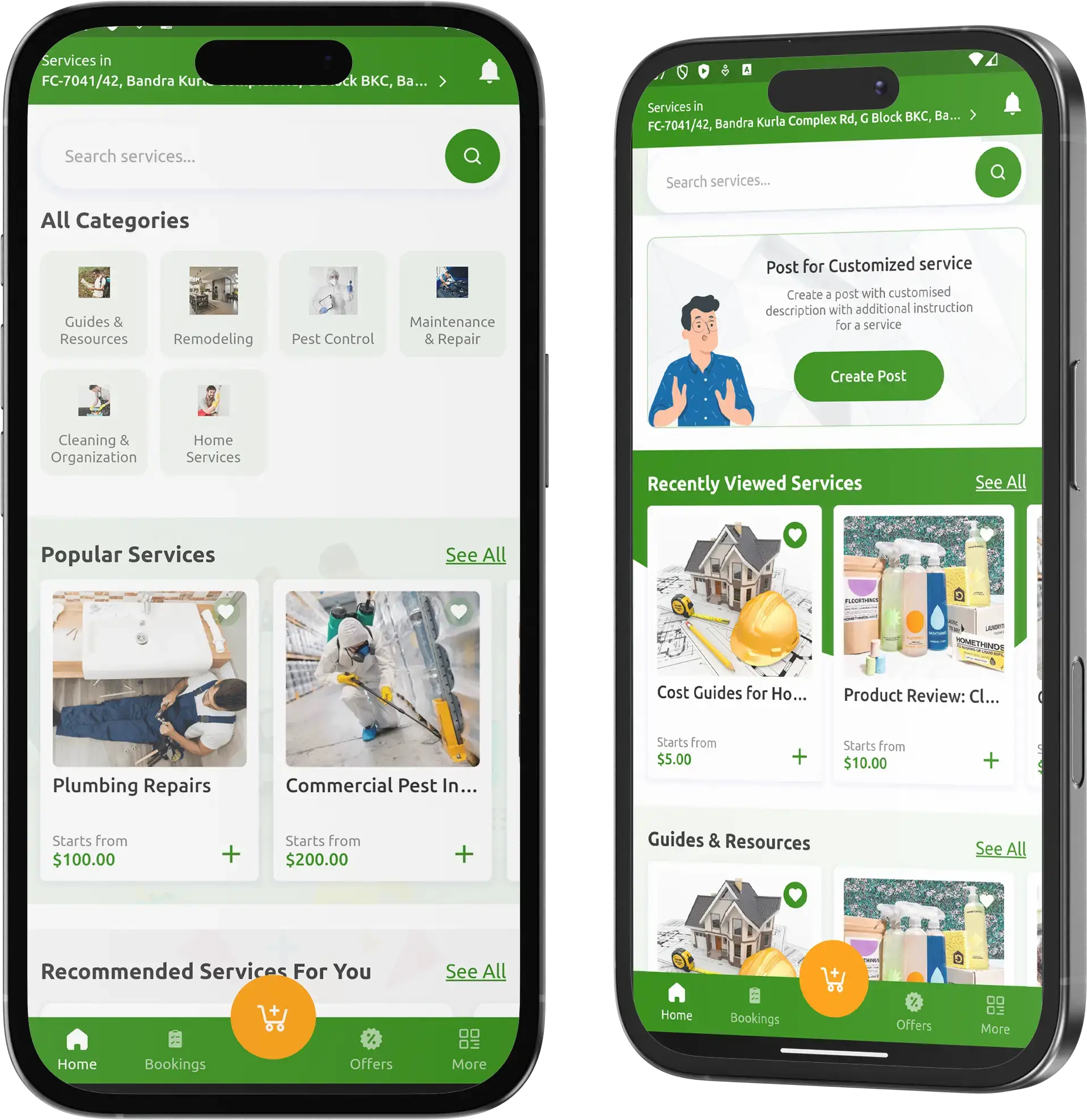
Two phones showing the MXHandy task app: categories, top services and a posted task.01
Pick it if: Customers post errands and choose a bidTaskRabbit Clone

The same MXHandy build set up as a task marketplace for handyman jobs, assembly and errands, at the same price.

Explore Solution

Uber for Massage product image: a rolled towel, candles and stacked stones on a wooden table.02
Pick it if: Every booking is a massage or spa visitUber for Massage

On-demand wellness booking where customers pick a therapist or a branch, and therapists and branches get dashboards, packages and coupons.

Explore Solution

Rover Clone pet-care marketplace: a person giving a treat to a dog.03
Pick it if: Your service is walking, boarding or grooming petsRover Clone

A pet-care marketplace with walking, boarding, grooming and training providers, each role working from its own panel.

Explore Solution

Practo Clone online doctor appointment platform: a doctor on a video call.04
Pick it if: Your providers are doctors or clinicsPracto Clone

Patients find a doctor, reserve an appointment slot and can consult online as well as in person.

Explore Solution
CatalogAll 90+ solutions

09The business case

Market Benchmarks

Home Services Marketplace Market Benchmarks - Independent 2025-2026 Data

The revenue models above are ours. The figures below are not. They come from the Angi and ServiceTitan annual reports on Form 10-K, Urban Company's Q2 FY27 shareholders' letter and the US Bureau of Labor Statistics, reproduced as published. Together they show how many jobs a home services marketplace routes, what the trades volume behind it looks like, and how deep the supply of skilled workers runs.

Angi 10-K01

20.2 Million Leads Sent to Pros by Angi in 2025

Angi's annual report on Form 10-K shows 15.5 million Service Requests and 20.2 million Leads in 2025, with about 111,000 Average Monthly Active Pros in the fourth quarter. Total revenue was $1,030.5 million, down 13 percent, of which U.S. Lead revenue was $587.1 million, advertising $214.9 million, services $72.4 million and membership subscriptions $29.4 million.

Urban Company02

INR 1,432 Cr Quarterly NTV at Urban Company

Urban Company's letter for the quarter ended 30 September 2026 reports Net Transaction Value up 39 percent to INR 1,432 crore and revenue from operations up 41 percent to INR 537 crore, with 10.0 million annual transacting users and 94,845 monthly active service partners. In India consumer services excluding InstaHelp, revenue of INR 336 crore on NTV of INR 963 crore is about 35 percent (our arithmetic on reported figures).

ServiceTitan 10-K03

$82.1bn of Trades Work Processed on ServiceTitan

ServiceTitan's annual report on Form 10-K for the fiscal year ended 31 January 2026 states it processed $82.1 billion of gross transaction volume, up from $68.5 billion a year earlier, defined as total dollars invoiced by its customers through the platform. Revenue was $961.0 million, up 24 percent, about 1.2 percent of that volume (our arithmetic on reported figures).

US BLS04

821,000 US Electricians, Jobs Up 9% by 2035

The US Bureau of Labor Statistics reports that electricians held about 821,000 jobs in 2025 and projects employment to grow 9 percent from 2025 to 2035. The median annual wage for electricians was $63,190 in May 2025, against $59,540 for the construction and extraction group, which gives a sense of the skilled labor a home services marketplace recruits from.

Where each figure comes from.

Angi Inc., Annual Report on Form 10-K for the year ended 31 December 2025, dated 20 February 2026 - sec.gov

Urban Company Limited, Shareholders' Letter and Report, Q2 FY27, results dated 16 October 2026 - investorrelations.urbancompany.com

ServiceTitan, Inc., Annual Report on Form 10-K for the fiscal year ended 31 January 2026, signed 25 March 2026 - sec.gov

US Bureau of Labor Statistics, Occupational Outlook Handbook: Electricians, last modified 27 August 2026 - bls.gov

All figures are the publishers’ own, reproduced as published from annual filings, a results letter and a government statistics page. Metric definitions differ by company and are as each publisher states them. The Urban Company and ServiceTitan ratios are our arithmetic on reported figures. They describe the companies and occupations named, not any platform Miracuves builds, and nothing here is a revenue projection for your business.

Commercial Logic

Marketability, Revenue Potential & Business Prospects

A services marketplace earns once providers trust it enough to list and customers trust it enough to book. Everything that follows is about making those two decisions easier, and about owning the relationship once they are made.

  1. 01

    Commission on Every Booking

    The operator earns a share of completed bookings, so income climbs with every provider and job added, without a matching rise in staff.

  2. 02

    Several Lines, One Console

    Extra charges, featured placement, ad slots and any provider plans are separate levers in one admin panel, so one can be switched on without redesigning the rest.

  3. 03

    Owned Customers and Providers

    Customer records, provider pages, ratings and every past booking are stored in your own database, so what the marketplace is worth keeps accumulating on your side.

  4. 04

    Exit Optionality

    Because the complete source code and schema are yours, moving to a new host, team or direction later requires no one's approval.

Main Revenue Levers
  • Booking Commission
  • Extra Charges at Job End
  • Featured Placement
  • In-App Ad Slots
  • Provider Memberships
  • Client Service Fee
Long-Term Value

Defensibility here comes from provider supply and customer trust, not from any one feature.

  1. 01Providers with their own page and prices do not casually leave
  2. 02Customers with ratings and a booking history have a reason to return
  3. 03It begins accumulating at launch and remains in your database
  4. 04Handling provider quality and disputes well is the second moat
Example Revenue Scenarios

The three cases below change only one thing, the number of listed providers, and each names the revenue lever that leads at that size. Treat them as material for a planning conversation, not as a prediction of earnings.

Single-City Start10Providers Listed

Early revenue comes mainly from the booking commission.

A small launch in one city, where a handful of providers cover a few categories and the commission on completed bookings pays for running the platform. Illustrative size, not a forecast.

Regional Marketplace100Providers Listed

Commission plus extra charges and featured rows.

A marketplace spanning a region, where providers compete for the same neighborhoods, so extra charges and featured placement start to count next to the commission. Illustrative size, not a forecast.

Multi-City Platform1,000Providers Listed

Several cities, with ad slots and any provider plans active.

A platform spanning many cities, where ad inventory and paid provider plans add up next to commission, and the dashboard shows where to focus. Illustrative size, not a forecast.

10Why Miracuves

Why Teams Pick Miracuves

Miracuves Compared With Other Uber for X Clone Developers

A many-trade marketplace can start from a stock booking script, freelance help, agency work or a base its team has already shipped. Ask any of them whether adding a new trade is data entry or a code change, what happens when a job turns out bigger than booked, whether customers can request unlisted work and whether the source arrives unencrypted with its schema.

Why Founders Choose Miracuves

  • 01

    Rating-Led Choice Built In

    Provider pages with stars, reviews, priced services and promo codes are part of the base, where generic booking scripts often stop at a list of names.

  • 02

    Custom Requests and Extra Charges

    Customers can post a request with a budget, and providers can add an extra charge as a job ends, so work that changes size is covered.

  • 03

    Five Surfaces, One Codebase

    The customer app and site, the provider app and panel and the admin panel already work together, instead of five projects to join up.

  • 04

    Full Source Code Ownership

    The whole codebase arrives unencrypted, with the schema and deployment notes, so nobody can reprice it or change the terms later.

  • 05

    Past Releases, Written Down

    The log shows versions 2.6.0 to 3.1.0 and what each one added, so you can see how the product has moved before you buy it.

  • 06

    Plain Readiness Language

    Each line says whether it ships in the base build, comes as a priced add-on such as the in-app marketplace, or depends on an account you hold, like gateway accounts, hosting and developer accounts.

Development Company

How to Choose an Uber for X Clone Development Company

Before signing with any Uber for X clone developer, test what makes a services marketplace hard.

What to look for Miracuves

  • New trades without code Categories and services are admin data, added singly or by CSV import
  • Jobs that change size Providers add extra charges at job end, paid within the same booking
  • Proof in the product Customer and provider demo logins, plus release notes from 2.6.0 to 3.1.0
  • Source ownership Unencrypted web, panel and Flutter source, with the schema
  • Support after launch Guidance for 60 days, priority bug fixes for 6 months, updates for 12 months

Walk away from any vendor who

  • Needs a code change to add a new trade
  • Bills a grown job at its booked size
  • Ships a customer app with no provider app or panel
  • Encrypts the source or charges for it per seat

How the Uber for X Clone Stacks Up Against Scripts and Agencies, Row by Row

CriteriaMiracuvesMiracuves Uber for X CloneGeneric Booking ScriptCustom Dev Agency
Time to Launch6 days of our build timeUnknown or DIYScoped per project, usually months
Source-Code OwnershipComplete, unencryptedOften limited or lockedUsually yes
Service-Marketplace DepthCategories, provider pages, requests, extra charges and chatPlain listing pagesWhatever the budget allows
Provider ToolsProvider app and provider panelRarely includedBuilt to order
PaymentsFive gateways plus a Pay Later modeVaries by scriptCustom integration
Admin & ReportsDashboard, settlements and a revenue chartThin or absentBuilt to order, extra cost
Security & ComplianceSeparate logins, gateway-held cards, honest limitsMinimalVaries widely
Cost vs Speed vs QualityFixed price, fast, tested baseLow price, high riskExpensive and slow
Ongoing Support & Updates60 days guidance, 6 months bug fixes, 12 months updatesRarely offeredSet by the contract

Not many routes to a marketplace survive their first real month unchanged. This is where they part ways.

Talk to Our Team

Changelog

Release Log for the Uber for X Platform - Versions & Updates

Release notes for the platform, newest first. The notes carry no dates, and a line about the framework behind the panels is left out.

VersionChangesWhat changed
V3.1.03 updates, 1 fixAdded or updated
Amazon S3 option for external storage in the admin panel
Panels moved to PHP 8.2
Apps updated for Flutter 3.27 and the latest Android Studio
Fixed
Assorted improvements and fixes in the apps, web and panels
V3.0.04 updatesAdded or updated
Custom job request option for customers
A provider can add extra charges when closing out a booking
Right-to-left support on the customer web
Apps updated for Flutter 3.24.5
V2.9.07 updates, 1 fixAdded or updated
Banners in the featured section of the admin panel
Global setting for pre-booking and post-booking chat
Latest and in-progress bookings on the website home page
URL option on sliders in the web, apps and panels
Separate app and web images for each slider
Landing-page data can be enabled or disabled
Apps updated for Flutter 3.24.3
Fixed
General improvements and bug fixes
V2.8.011 updates, 1 fixAdded or updated
Extra landing-page sections on the website
Chat with providers and admin on the web
Flutterwave payment gateway support
Right-to-left layout in the admin and provider panels
Option to enable several payment gateways at once
Featured sections can show Nearby Providers
Provider radius selectable in miles
Twilio SMS gateway for OTPs, bookings, reviews and other messages
Switches for SMS, push and email notifications
Paystack improvements for more payment options in the apps
Interface refinements in the customer and provider apps
Fixed
General improvements and bug fixes
V2.7.09 updates, 1 fixAdded or updated
A database backup option in the admin panel
Manage providers by CSV file
Manage services by CSV file in the admin and provider panels
Media gallery in both panels
Search menus in both panels
Search for services and providers on the web
Booking OTP shown on the web
Booking start and completion images or videos shown on the web
TypeScript on the web for type safety
Fixed
Improvements and bug fixes
V2.6.09 updates, 1 fixAdded or updated
Duplicate a service, a provider or a promo code
Customizable email templates
Email marketing option
Pre-sale enquiries chat with a provider
AdMob advertising in both the customer and provider apps
Google and Apple login in the customer app
Chat settings in the admin panel
Setting to allow pre-booking and post-booking enquiry chat
Firebase dynamic links migrated to Flutter deep links
Fixed
Improvements and bug fixes

Let's build together

Let's turn your on-demand services idea into a platform people can book.

Reserve a free consultation and you walk away with a clear timeline and honest answers to your questions. To us, winning your trust counts for more than a fast sale.

  • First reply in under 2 hours
  • Free consultation
  • No lock-in contracts
  • Full source code ownership

11Learn more

Reading Corner

Uber for X App Development Reading List - Guides on Building, Earning and Securing

Guides from the Miracuves blog on how on-demand services apps are built, how they earn and how to launch one without starting from scratch.


The product5 questions

01What is an “Uber for X” clone solution?

An Uber for X clone is a ready-made marketplace for services that are booked and delivered at an address. The Miracuves Uber for X Clone gives customers a search bar and a category grid, shows each provider with a star rating and its services, and lets a customer book a time slot or post a custom request. Providers work from their own app and panel, and the operator runs the platform from an admin panel. It launches white-label under your brand.

02How far can I customize this clone for my own business?

Branding is part of delivery: we rebrand the web platform and both apps with your logo, icons and color scheme and deploy them. Because you receive the complete source code with no encryption, your team can also change flows, screens and integrations later. Categories and services are data in the admin panel, so the list of services you offer is yours to set. Bigger changes are scoped and quoted in writing before any work starts.

03Which technologies power the platform, and can it scale?

The release history records PHP 8.2 on the panels and TypeScript on the customer website, and the product page also lists Bootstrap and MySQL. The customer app and the provider app are built with Flutter. For growth, providers and services can be imported from CSV files, media can sit in Amazon S3 storage, and the five surfaces are separate, so you add capacity through hosting and configuration rather than a rewrite.

04Is the app available on both iOS and Android?

Yes. The customer app and the provider app are both built in Flutter and run on Android and iOS, while the customer website adapts to whatever browser is used. The apps are published by us from your own developer accounts. Apple and Google then run store review on their own timeline, separate from the 6-day build.

05Which services can I list on the platform?

Any service that is booked and delivered at an address. The demo shows home, AC, laundry, plumbing, pest control, electronic, mechanic, salon and carpenter categories, and an auto repair row. Categories and services are records in the admin panel, so you can add your own or import them from a CSV file.

Customers & providers8 questions

06How does a customer sign up and request a service?

A customer opens the app, taps Get Started and signs in with a phone number, a Google account or an Apple ID. On the home screen they search or open a category, choose a provider, then pick an address, a date and a time range and confirm the booking. Or they post a custom request from the Requests tab with a budget range.

07What payment methods are supported, and is my data secure?

Stripe, Razorpay, Paystack, PayPal and Flutterwave are built in, several of them can be switched on at once, and the booking screen also offers Pay Later, so a customer can pay on service. Any other gateway can be added as scoped custom work, connected to a gateway account you have already onboarded. Payments run through the gateway you connect, so card handling stays on its side, and the security section above lists the controls in place and the work planned at go-live.

08How can I track my service provider and manage my bookings?

Each booking lists its provider, address, time range, services, bill and a status like Awaiting, Started or Completed, while the Bookings tab and home screen keep current and past bookings visible. Customers can chat with the provider about a booking. Live map tracking of a provider en route is available as scoped custom development, quoted in writing before work starts.

09Can a customer post a custom job instead of picking a service?

Yes. The Requests tab has a Request Service button, a request carries a budget range and providers bid on it. Each request shows a status such as Requested, Booked or Cancelled, and the admin panel has a Custom Job Requests queue. This arrived in release 3.0.0.

10Can a provider add to the price after a job?

Yes. From release 3.0.0 the provider can add extra charges as a booking is closed out. The customer sees them on the booking screen as additional charges with a Pay Additional Charges button, and the total in the bill details is updated.

11How do I register as a provider and what are the basic requirements?

A provider can start from the Join Our Provider Network banner on the website, the Become Provider entry in the customer profile or the provider panel, and then works from the provider app or the provider panel. At sign-up the provider enters KYC details such as a national ID or passport, address proof, a tax number and bank details, and goes live only once your admin team approves; you can also require approval for each service a provider adds. The admin panel manages providers from its Providers menu, and providers can also be loaded in bulk from a CSV file.

12How do I get paid, and what is the commission model?

The admin panel groups Payment Request, Settlements and Cash Collection under Provider Management, which is where what a provider is owed gets reviewed and settled. The operator keeps a commission on completed bookings and decides the rate. The demo does not fix a payout method, so how money reaches providers depends on the gateways and arrangements you set up.

13What if I need support or encounter an issue while providing services?

A provider talks to the customer in the booking chat. Your team settles disagreements using the booking record, its status and the chat history, and the admin panel carries a User Queries inbox and a Chat menu for that work. Miracuves itself stands behind the platform with 60 days of guidance, 6 months of priority bug fixes and 12 months of updates, running side by side from launch.

Admin, money & payments5 questions

14How do I manage users and service providers through the admin panel?

Provider Management holds providers, payment requests, settlements and cash collection. Customer Management lists customers, their transactions and their addresses, Service Management holds services and categories, and Booking Management lists bookings, booking payments and custom job requests. Services, providers and promo codes can be duplicated, and providers and services can be loaded from CSV files.

15Can I manage promotional campaigns or offer discounts?

Yes. Provider pages carry a Promocodes tab, service cards show percent-off labels, and the home screen has offer banners and Featured Ad Providers rows. The admin panel controls the sliders and the featured sections, and promo codes can be duplicated to launch new ones quickly. An email marketing option arrived in release 2.6.0.

16How do I track revenue and bookings from the dashboard?

The dashboard shows counts for customers, services and orders, an income revenue chart that switches between Total, Admin and Provider views, top providers by completed orders, top trending services and the latest bookings with their status. Settlements and cash collection have their own menus.

17What is the realistic path to first revenue?

The usual first revenue is the commission on completed bookings, because the first paid job earns it and nothing else has to be built or sold. Extra charges at job end raise the size of each booking. Featured placement and any provider plans follow once enough providers compete for the same area to want visibility, and ad slots need your own AdMob account and enough traffic to matter.

18How defensible is an on-demand services marketplace?

Defensibility in this model comes from provider supply and customer trust rather than any single feature. Providers who have set up a page with their own services, prices and promo codes rarely walk away, and customers with ratings, bookmarks and a booking history have reasons to return. From launch, the platform lets that accumulation begin, held in your database. Handling provider quality and disputes well is the second moat, since a marketplace people trust is hard to copy.

Launch & Miracuves11 questions

19When will the solution be up and running?

Miracuves needs 6 days to deliver a ready-made build: rebranding, deployment onto your hosting and publishing the apps from your developer accounts are all part of that time. Apple, Google and your gateway provider run store review and payment gateway onboarding, so those 6 days do not include them. Whatever goes past the base gets a written scope and quote before we begin.

20What does the Uber for X Clone cost?

The launch-ready white-label Uber for X Clone is a fixed price of $2,799. That covers the apps, the web platform, rebranding, deployment and the complete source code. Add-ons and custom flows are quoted separately in writing.

21Will the source code be handed over to me?

Yes. You receive the complete source code for the web platform and the Flutter apps with no encryption, plus the schema, deployment configuration and handover notes, with no per-seat fee or runtime license.

22Which features are add-ons?

An in-app marketplace, customizable service packages, virtual consultations and a skill-sharing platform are optional modules, each quoted on its own. They are not counted among the base features.

23What do I need to supply before launch?

Hosting and a domain, a verified developer account the apps are published from, your branding and business details, an already onboarded payment gateway with KYC complete, and any third-party keys such as Google Maps, Twilio and Firebase. Gateway applications and your terms and privacy policy stay with you as the operator.

24Why would you pick Miracuves to develop an Uber for X clone?

Because the booking flow, the provider tools and the admin panel arrive working, with a release history you can read from version 2.6.0 to 3.1.0. Miracuves has delivered 9,000+ projects for 6,000+ clients, and the ready-made product comes with 60 days of platform guidance, 6 months of priority bug fixes and 12 months of updates, running side by side. No named client deployment of this exact product is published, and this page does not invent one.

25Is a ready-made Uber for X clone better than building a custom on-demand app?

For a marketplace that covers many trades, the ready base is usually better. Categories with sub-services, provider ratings, slot bookings, custom requests with bids and extra charges at job end already work, and a fixed $2,799 puts your branded version online within 6 working days. Building from scratch means a scope-based price and a much longer road to the first booking, while new flows on our base get written quotes and normally land within 2-8 weeks.

26What is the business model of an Uber for X app?

An Uber for X marketplace earns on each completed job across many trades. Commission on completed bookings is the main line, and providers can add charges at job end that flow through the same booking. Featured rows, offer banners and ad slots in both apps can be sold to providers who want more visibility, and promo codes help win repeat customers. Provider plans and the add-on modules can follow once supply grows.

27What are the steps to launch my Uber for X clone?

Book a service and send a custom request in the demo, then switch to the provider app and the admin panel. Pick your opening trades, service area and commission. We rebrand the customer and provider apps, the website and the panels, put everything on servers you control and send the apps for review from Apple and Google accounts you own. That takes 6 working days, and store review then follows its own timeline.

28What is included in the Uber for X script?

The Uber for X Clone delivers five surfaces: a customer app, a provider app, the customer website, an admin panel and a provider panel. With them come rebranding, deployment onto your hosting, the complete unencrypted source code and handover notes. All of it sits inside the fixed $2,799 price, and add-ons or custom flows are quoted separately in writing.

29Can I try the Uber for X demo before I buy?

Yes. Miracuves provides two app logins, one for the customer and one for the provider, and the customer website plus both panels remain open on the demo host. Panel logins are shared during a guided call. We use that half hour to walk the customer app, the provider app and the admin panel using your service list, commission rate and launch date.

Disclaimer

Miracuves is an independent software development company. We are not affiliated with, connected to, sponsored by, or endorsed by Uber or by any other brand or platform named on this page.

Read our full Legal Notice & Disclaimer →
Why this name

“Uber for X Clone” is used descriptively. It is how the software industry refers to building an on-demand services platform with functionality comparable to a known service, and how clients search for it.

Who built this

The entire design and codebase is built by our own team. The product contains no code, design, graphics, or content originating from any third-party website or application.

Trademarks

Uber and all other third-party names and marks are the property of their respective owners, referenced here solely to describe the category of software offered.