Medicine Marketplace App · Production Ready

1mg Clone App - White-Label Online Pharmacy Aggregator

Built by Miracuves, this one-catalog, ready-made, white-label 1mg clone for many pharmacies includes three Flutter apps for shoppers, pharmacies and couriers on Android and iOS, four browser panels and every line of source you own, deployed under your name in six working days.

Items from every pharmacy you onboard share one search and category list, each card naming the store that sells it; the shopper orders from the pharmacy they prefer and a courier makes the run. Checking each store's license and pharmacists is your job, and telemedicine or refill plans are quoted as add-ons. Additional reports or extra languages are custom work, priced in writing up front and generally finished in 2-8 weeks.

Launch in 6 Days with

  • Source Code
  • Shopper App
  • Pharmacy App
  • Courier App
  • Vendor Panel
  • Admin Panel

StackFlutter · PHP · Bootstrap · MySQL · Firebase · Google Maps

MXMeds console · Marketplace overviewIllustrative
Orders today52
Prescriptions waiting6
Pharmacies live23

Marketplace activity

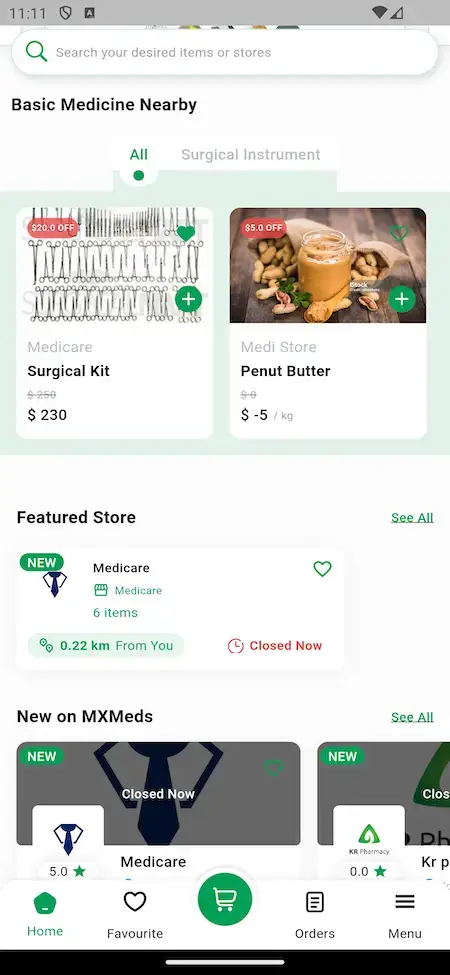
1mg Clone customer app home screen: a search field for items or stores, Basic Medicine Nearby cards that name their store, a Featured Store card with distance and a closed label, and a New on MXMeds row.
Every pharmacy keeps its own shelfstock and prices per store
  • 2Home-Screen Store RowsFeatured Store and newly added stores
  • 3Network-Wide Viewsorders, revenue and traffic across every store
  • 0%Revenue Share With Miracuvesno cut of any pharmacy's sales or routing fee
  • 4Ways the Network Earnspharmacy commission, store placement, routing fees and wallet balances
  • 6Days to Launchand if the delay is ours, we keep going free
  • $2,799Paid Once, Not Rentedsource code yours, no per-seat fee, no monthly rental

Live in six working days, or we keep working free until you launch. Every build carries 60 days guidance, 6 months bug fixes and 12 months updates.Verify every figure

Distance and Open Status Up Front

Each store card prints how far the pharmacy is, whether it is open, its rating and item count, so a shopper picks one that can serve now.

Onboarding Stays in Your Hands

The admin adds each pharmacy and can approve, deny, block or unblock users with an email notice; the panel does not verify a store's credentials for you.

Gateways on Your Account

PayPal, Stripe or Razorpay take cards, UPI, wallets or net banking, depending on the gateway, on your own account; cash on delivery is a toggle and invoices print or email.

Planning a marketplace for pharmacies in your city?Talk to Product Expert

Chosen by 6,000+ clients across the globe

Miracuves is listed by Expertise.com as a managed IT service provider.Miracuves is an official member of the Forbes Business Council.Miracuves is a verified agency on DesignRush, listed among top design agencies in India.Miracuves is reviewed on Trustpilot as a software development company.Miracuves is listed by The Manifest among top managed software development companies.Miracuves is listed by DesignRush as a top software development company.Miracuves is recognized by GoodFirms as a top software development company.Miracuves is ranked among the top 1000 companies globally by Clutch.Miracuves is a top managed service provider in the United States on Clutch.

01See it live

Hands-On Demo

Live Demo of the 1mg Clone - Shopper, Pharmacy & Delivery Apps Plus Web, Vendor and Admin Panels

Miracuves keeps its 1mg clone open for you to click around. Three logins cover a shopper, a pharmacy and a delivery partner, and the web panels open from the links below. Search an item, note which store each card names, then log in as the pharmacy and watch one shelf being run.
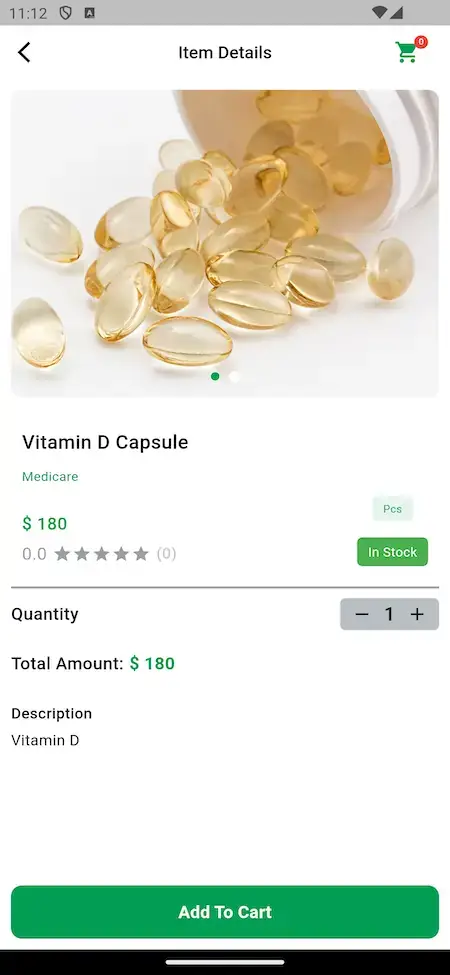
1mg Clone customer app home screen: a search field for items or stores, Basic Medicine Nearby cards that name their store, a Featured Store card with distance and a closed label, and a New on MXMeds row.1mg Clone item screen for Vitamin D Capsule with the selling store, price, In Stock label, quantity stepper, total and Add To Cart button.
Customer app

Shopper App - 1mg Clone

What a shopper sees on a handset: one search for items or stores, the pharmacy named on every card with its distance, an item page and a wallet.

  1. 1Choose Android or iOS in the app portal
  2. 2Log in with the credentials below
  3. 3Look at: Home, a store card, Item, Orders, Wallet
Demo login:+919876543210 | User_321
mxmeds.mimeld.com
Pharmacy app

Store-Side App for One Pharmacy

A single pharmacy on a phone, handling its own daily orders. It pairs with the vendor panel, also called the pharmacy panel, in the browser, where that pharmacy edits its products, stock and prices.

  1. 1Install the pharmacy app from the portal
  2. 2Log in with the pharmacy credentials
  3. 3Look at: orders, products and stock
Demo login:pharmacy@demo.com | Store_321
mxmeds.mimeld.com
Delivery app

Courier App for Deliveries

A courier on a phone: fresh delivery requests arrive live and can be accepted or declined, and a map guides the way to the address.

  1. 1Install the delivery app from the portal
  2. 2Log in with the courier credentials
  3. 3Look at: requests, route and handover
Demo login:+919876543211 | Driver_321
mxmeds.mimeld.com
Browser panels

Browser Panels for Shoppers, Vendors, Couriers & Admins

The browser side: the shopper website, the vendor panel a pharmacy works in, the delivery panel and the operator's admin panel.

  1. 1Open the demo host in a fresh browser tab
  2. 2Choose the shopper, vendor or admin entrance
  3. 3Reuse the app logins; the admin one comes on a call
Admin login:handed over on a guided call
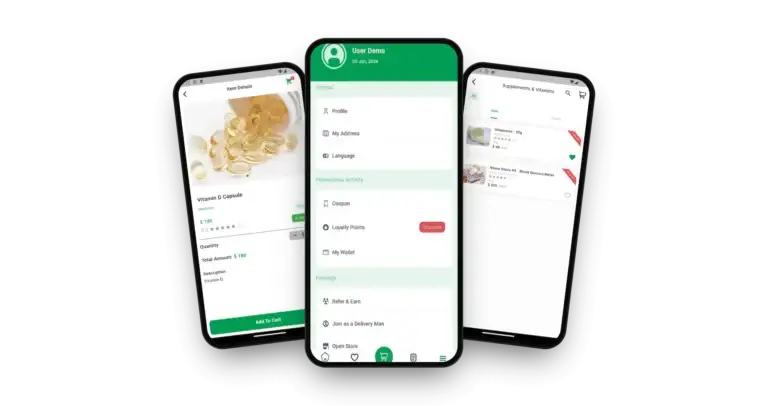
1mg Clone on three phones: the member menu with coupons, loyalty points and earnings, the medicine item detail screen and the supplements and vitamins listing

Walk It With Us

Walkthrough of an App Like 1mg: Many Pharmacies, One Catalog, One Admin Panel

The quickest way to see the network side is a guided call. In about 30 minutes we open the shopper app, then a pharmacy's vendor panel and the delivery app, and finish in the admin panel where pharmacies are onboarded, tying each step to your own city, commission and launch date.

Book a guided walkthrough.

App Walkthrough

Screens of a Medicine Delivery App Like 1mg - Store Search, Item, Order, Wallet & Rewards

These are genuine screens from the shopper app Miracuves ships with its 1mg clone, in the order a purchase unfolds: choose a store, open an item, order, pay and gather rewards. The pharmacy, courier and admin sides are walked through on a call.
1mg Clone customer app home screen: a search field for items or stores, Basic Medicine Nearby cards that name their store, a Featured Store card with distance and a closed label, and a New on MXMeds row.
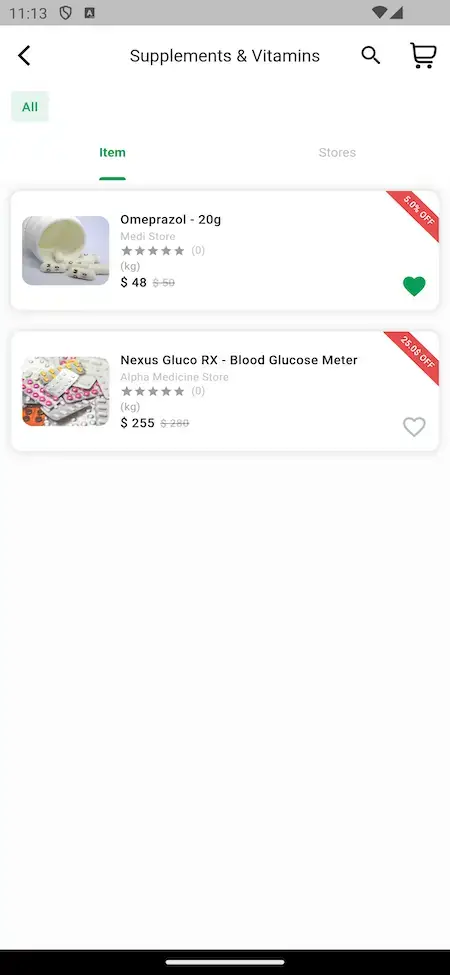
1mg Clone Supplements and Vitamins category with Item and Stores tabs, each row naming its selling store beside a rating, a price and a discount ribbon.
1mg Clone item screen for Vitamin D Capsule with the selling store, price, In Stock label, quantity stepper, total and Add To Cart button.
3 screens · scroll →
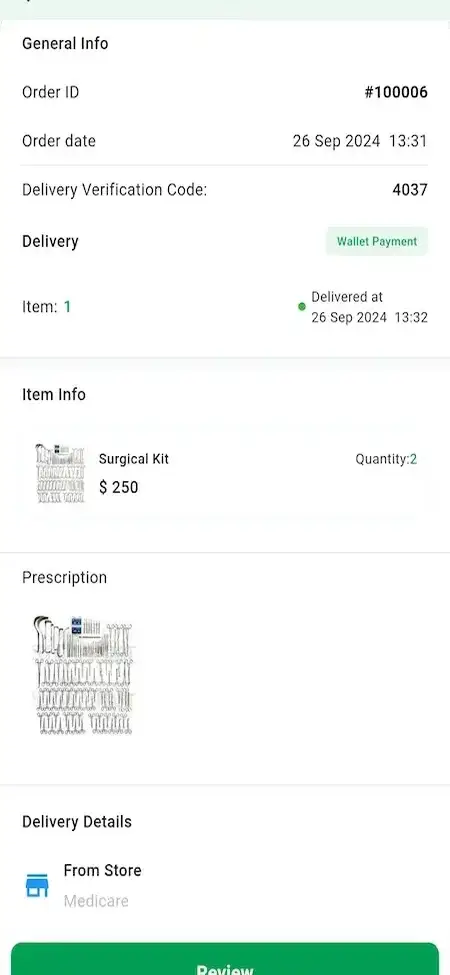
1mg Clone order details screen with an order id, delivery verification code, wallet payment, the item, an attached prescription and a From Store delivery line.
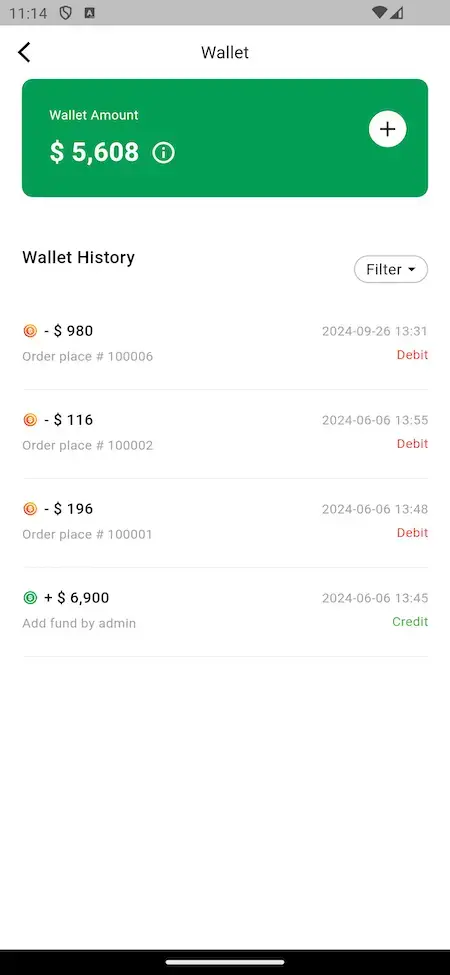
1mg Clone wallet screen with the balance, an add-funds button and a filterable history of debits for orders and a credit for funds added.
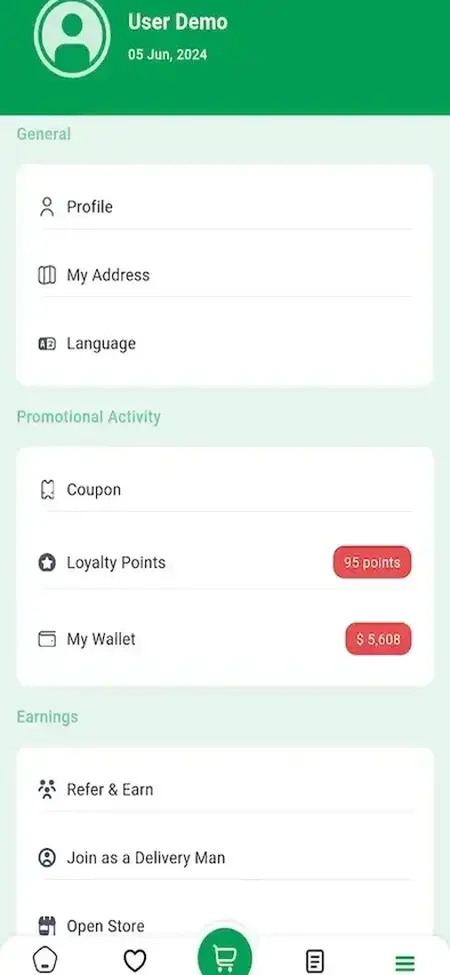
1mg Clone menu screen listing profile, address and language, then coupon, loyalty points and wallet balances, refer and earn, join as a delivery man and open store.
3 screens · scroll →

Begin on the home screen and its store cards, enter a category with its item and store tabs, open an item, read an order with its prescription, then end in the wallet and the menu.

Explore Our Solutions

02Proof

Client Voices

1mg Clone Client Reviews - What Builders Say About Our Bases

Prescriptions reaching fulfillment, and clinics seeing stock, is what MyDocPharma needed. Dr. Vivek Rungta, Dr. Carlos A. Palermo and Marsha Williams come from a skin clinic, a telehealth group and a courier, so none is a pharmacy chain.

CCharles EveillardManaging Partner, MyDocPharma
“Appointments, doctor profiles and consultations were all ready. What we needed on top was the pharmacy side: prescriptions flowing to fulfilment, and stock the clinics could actually see. That was the work, and it shipped in weeks.”
DDr. Vivek RungtaFounder & Chief Dermatologist, Dermacian
“Every HMS I tried was built for general physicians, with no lesion mapping, no before/after tracking, and no procedure-based billing. Their MXHealth base gave us the patient app, doctor app, EMR and video consult out of the box. Front-desk time on scheduling and follow-ups is down ~70%, and we went fully digital in 9 months, where a fully custom job would have been 18.”
MMarsha WilliamsFounder, Bmore On Demands LLC
“The team was running it on a dispatcher and a Google Sheet, and we needed a real platform quickly, because we were about to onboard a major retail client. Miracuves’s Delivery Genie base gave us the rider app, the dispatch console, and live tracking. We launched in 6 weeks and cleared 4x the previous order volume in the first month.”
DDr. Carlos A. PalermoCo-founder & CEO, Doctta Health
“Building a compliant telehealth stack from scratch in three markets would have been a year-plus effort. Miracuves’s MXHealth base covered the patient and doctor apps, video consult, e-prescription and the pharmacy integrations. We launched in our first market in 9 weeks and rolled out to two more in the following six months.”
Read More Client TestimonialsWords straight from client builds

Proof, Honestly

1mg Clone Case Study - Where Proof Stands Today and How to Test the Product

The state of proof for the aggregator model today, and a way to try the product before you commit.

Case Study
No Named Client Runs This Aggregator in Public Yet

No client case study for a pharmacy aggregator is published by Miracuves, and none will be borrowed from another product. What stands here instead is what you can verify in the demo, plus a plain promise about what we will not make up.

None yetNamed clients published
Demo and a callWays to verify
Pharmacy aggregatorModel
3Mobile apps to try out
4Browser panels to open
6 working daysBase build
1mg Clone customer app home screen: a search field for items or stores, Basic Medicine Nearby cards that name their store, a Featured Store card with distance and a closed label, and a New on MXMeds row.
Challenges
  • Shoppers should meet many pharmacies as one catalog, yet each pharmacy must keep its own stock and prices
  • Pharmacies join at different speeds, so the admin needs a clean way to onboard and manage them
  • Prescription items wait for a pharmacist's call, and that call belongs to the licensed operator
Goal
  • Follow one order from the shopper app through a pharmacy to a courier before spending anything
  • Test the store rows, the wallet and the coupon rules against your own city and pricing
  • Read the code and release notes for anything a demo leaves out
Solution by Miracuves
  • Logins for a shopper, a pharmacy and a courier
  • Four browser panels you can open right now
  • A call that adds a pharmacy and follows its first order in the admin console
  • Release notes from 14.0 to 15.0 with a line on every change
  • Fixed pricing and a 6-day build

No invented client, no made-up quote and no result nobody measured will stand here. A named launch takes this place only once the client agrees to be named and a real case study is published.Miracuves · How we treat proof

Browse the published case studiesThe portfolio lists projects built on other Miracuves bases, healthcare included.

03The product

Start Here

What the 1mg Clone App Does for Shoppers, Stores & Operators

Miracuves' 1mg clone script is a ready-made pharmacy aggregator and medicine delivery app. One search shows shoppers items and stores from every pharmacy on the platform; pharmacies maintain their own shelves, prices and offers; couriers handle the runs; and the operator onboards stores and oversees the network from the admin panel.

1mg Clone on three phones: the member menu with coupons, loyalty points and earnings, the medicine item detail screen and the supplements and vitamins listing

One Catalog, Many Shelves

Items from every onboarded pharmacy appear together in search and category lists, each tagged with the store that sells it.

You Own the Network and the Code

The complete source code arrives with no encryption, so your team can change screens, rules and flows as the network grows.

Add-Ons Stay Add-Ons

Telemedicine, refill plans, an interaction checker and a health dashboard are quoted on their own. Doctor consults come through the telemedicine add-on, and lab-test booking can be scoped as one more module.

Android, iOS & Web

Understanding the 1mg Clone Script

An aggregator does not hold the medicine itself. Its value is the one place where many shelves meet: a single search, a single wallet and a single set of rewards, with each order handled by the pharmacy that has the item. Those mechanics ship working.

1mg Clone customer app home screen: a search field for items or stores, Basic Medicine Nearby cards that name their store, a Featured Store card with distance and a closed label, and a New on MXMeds row.
  1. 01One search field for items and stores
  2. 02Store cards showing distance and whether the store is open
  3. 03Item pages that name the selling pharmacy
  4. 04A vendor panel and store app for every pharmacy
  5. 05Admin and delivery panels for running the network

The delivery is three mobile apps for shoppers, pharmacies and couriers, four browser panels, and every line of source, Flutter included.

Inside the Base Package

1mg Clone Features - Multi-Pharmacy Catalog, Store Search, Stock, Onboarding, Wallet & Delivery

Every feature Miracuves lists for the 1mg clone here is visible in the demo or written into the release notes. Whatever needs an extra module is called an add-on further down the page.

Feature 01 / 12

One Catalog Across Pharmacies

Items from every onboarded pharmacy sit side by side in search and category lists, and each card names the store that sells it.

  • One search box covering items and stores
  • A category page that flips between Item and Stores
  • Every card shows the pharmacy behind it
  • "Medicine Nearby" rows on the home screen
  • Category chips, for example All and Surgical Instrument
  • Heart icon to save favourite items and stores
Feature 02 / 12

Nearby Stores, Open or Closed

Each store card shows how far away it is and whether it is open, so shoppers pick a pharmacy that can serve them right now.

  • A Featured Store row on the home screen
  • A separate row for newly added stores
  • Distance from the shopper printed on each store card
  • Open or closed label per store
  • Rating and item count on the card
  • Geolocation helps shoppers find pharmacies near them
Feature 03 / 12

Stock & Pricing per Pharmacy

Every pharmacy owns its shelf. Its vendor panel adds, edits and removes products, and counts and prices follow the pharmacy's day.

  • Products added, changed or removed in the store dashboard
  • Stock counts and prices edited live
  • An In Stock label on the item page
  • Low-stock popup for admins and vendors
  • Clearance listings highlighted on store pages and the home screen
  • Discount badges on product cards
Feature 04 / 12

Pharmacy Onboarding & Network Control

The operator controls who joins: the admin adds pharmacies, handles their inventories and tracks order, revenue and traffic totals for the whole network.

  • The admin adds each pharmacy and sets it up
  • One console for every store's inventory
  • A network-wide view of orders, revenue and traffic
  • Roles for store managers, pharmacists and support staff
  • An Open Store entry sits in the shopper menu
  • Users can be blocked, unblocked, approved or denied, with an email notice
Feature 05 / 12

Store-Level Offers & Deals

Pharmacies run their own promotions: codes, discounts and campaigns on chosen medicines, with flash and featured deals that can carry several products.

  • Per-store promo codes and discounts
  • Campaigns aimed at selected medicines or products
  • Flash and featured deals can bundle several products
  • A call-to-action block on product pages
  • Admin or store can require a minimum order amount
  • Free delivery starts above an amount you choose
Feature 06 / 12

Couriers & Handover Checks

Couriers get live requests in a dedicated app and can take or turn them down. A code confirms the handover and each action is logged.

  • Live delivery requests the courier can accept or decline
  • Turn-by-turn directions through a map service
  • A verification code printed on the order
  • Image and OTP verification as an alternative
  • Not-home options: contact, wait or reschedule
  • Shoppers can follow the order status
  • A Join as a Delivery Man entry in the menu
Feature 07 / 12

Wallet & Add-Fund Bonus

Shoppers hold a balance inside the app, top it up from web or phone, and read every debit and credit in a history they can filter.

  • Balance shown with an add-funds button
  • Top-ups from the website or the app
  • A bonus credited on top-ups
  • Order debits and fund credits in one history
  • The history can be filtered
  • The order screen names wallet payment when it was used
Feature 08 / 12

Loyalty Points, Coupons & Referrals

One menu gathers the retention tools: a coupon entry, a points balance and a referral reward that follow the shopper from store to store.

  • Loyalty Points entry with a running balance
  • A coupon entry in the menu
  • Referral reward paid once the invited shopper's first order is delivered
  • Wallet and points balances shown next to each other
  • Reward entries placed beside address and language settings
Feature 09 / 12

Cash on Delivery & Gateway Payments

Payment adapts to the market: wallet funds, cash on delivery that the admin toggles, and gateways linked to your own account.

  • An admin toggle for cash on delivery
  • Paying from the wallet at checkout
  • Gateways like PayPal, Stripe and Razorpay can be connected
  • Cards, UPI, wallets and net banking, depending on the gateway
  • A refund details page
  • Invoices can be printed and emailed
Feature 10 / 12

Prescription Upload & Pharmacist Review

A prescription can travel with the order. Before the order moves on, the store owner or an authorized pharmacist reads it and approves or rejects it.

  • A prescription can be attached to an order
  • The store owner or an authorized pharmacist checks it
  • They approve or reject it on validity
  • The image appears on the order details screen
  • A prescription management module for stores
  • Local pharmacy compliance remains the operator's task
Feature 11 / 12

Reorders & Restock Requests

Earlier orders stay in the Orders tab and can start the next basket. If something sells out, a shopper can ask for it and hears when it is back.

  • The Orders tab lists earlier purchases
  • Past orders offer a reorder option
  • Check out chosen items and keep the rest in the cart
  • Shoppers can request an out-of-stock item
  • Admin and store both see each request
  • The shopper is told when the item returns
Feature 12 / 12

Admin Reports, Roles & Sign-In

A single console reports on the whole network, while shoppers get several ways to sign in, saved addresses and alerts that pull them back.

  • Sales broken down by day, week and month
  • Customer and subscriber exports, filtered as needed
  • POS screens in admin, store panel and store app
  • Several languages through translation support
  • Manual, OTP and social sign-in controlled by the admin
  • Push notifications can open a chosen page

Before you buy: Rebranding and deployment of the web platform and the apps are on us. You supply hosting with a domain, one verified developer account per app store, your brand assets and company details, a payment gateway that has completed KYC, the third-party keys, and whatever licences and pharmacists your market demands. Apple and Google review the apps on their own clock, outside our 6-day build time.

Talk to Our Team

Where the Money Comes From

1mg Clone Revenue Models - Pharmacy Commission, Placement, Routing Fees, Wallet & Refill Plans

Commission, placement, routing fees, wallet top-ups and refill plans each run as a separate line in Miracuves' 1mg clone, so tuning one leaves the others untouched.

Commission on what the stores sell usually carries the most weight at the start, with placement, routing fees and plans layered on as the network grows.

  1. 01

    Commission on Each Pharmacy's Sales

    The operator keeps a share of every order a pharmacy fills, so income grows with the number of stores and the baskets they win.

  2. 02

    Featured & New-Store Placement

    Because the home screen carries a Featured Store row and a row of new stores, premium placement is something pharmacies can be charged for.

  3. 03

    Per-Order Routing Fees

    Where a partner pharmacy fulfills on its own, you can charge a fee for each order you send it instead of taking a share of the basket.

  4. 04

    Wallet Balances & Top-Up Bonus

    Shoppers top up, with a bonus if you want one, and the balance stays on your platform until spent. That lifts repeat spend and shapes cash flow.

  5. 05

    Medication Subscription Plans (Add-On)

    This add-on makes regular medicines a recurring line: a shopper chooses a plan and gets refills on a schedule. Its price is separate from the base.

  6. 06

    Sponsored Product Slots

    Suppliers get a slot to promote products through call-to-action blocks, flash deals and clearance listings, which can be sold as advertising.

Fees published by delivery and retail marketplaces, two health companies and the app stores, placed next to the income lines a pharmacy aggregator can run, with each figure tied back to its publisher.
Revenue streamHow it is chargedTake rateTypical take rateWhat sets the ceiling
Commission on Each Pharmacy's SalesA cut of every order total, kept by the platform before the pharmacy is paid out.DoorDash lists 15%, 25% and 30% by plan; Amazon lists 8% or 15% for health and personal care.How much a pharmacy can give up and still earn. In India the trade margin on 42 anti-cancer drugs is capped at 30% by the regulator, so some medicines leave little room for a commission.
Per-Order Routing FeesA percentage or a fixed fee paid for each order or fill you send to a partner pharmacy.GoodRx reports a percentage or fixed payment per fill; prescription transactions were 68% of its 2025 revenue.Whether partners value the volume you route. It depends on a counterparty willing to pay per fill, and on how many shoppers you can send.
Featured & New-Store PlacementA fee a pharmacy or a manufacturer pays for a top slot or a promoted product.At GoodRx, pharma direct advertising reached $151.4 million in 2025: 19% of revenue, up 41%.How many advertisers want your audience, which depends on its size and its intent to buy.
Medication Subscription Plans (Add-On)A recurring fee, monthly or yearly, that a shopper pays to receive scheduled refills.Hims & Hers: $81 a month per subscriber in 2025 and a 74% gross margin. GoodRx earned $83.8 million from subscriptions.How much shoppers will pay monthly, less store billing on digital goods: Apple takes 30% in year one and 15% afterwards on subscriptions; Google Play takes 10% plus 5% billing in the US, UK and EEA.
Wallet Top-Ups & Card FeesA processing fee on each card payment or top-up, passed to the shopper or absorbed.A Stripe help article cites 2.9% plus 30c on each US credit card payment.Your gateway's price for your country and card mix. Cash on delivery can be switched on or off in the admin panel, so it sits beside this line.

How to read this. Two published fee pages, DoorDash merchant pricing and Amazon seller fees, supply the commission levels; the trade-margin cap is from an Indian government press release. The routing-fee, advertising and subscription figures come from the 2025 annual reports on Form 10-K of GoodRx and Hims & Hers. The Apple and Google Play pages give store billing, and the card example is a Stripe help article. Treat every number as another company's published input for your own modeling; the table is neither a quote nor a prediction of what your marketplace will earn.

Revenue Model

1mg Clone Revenue Model, Stage by Stage

Commission, placement rows, routing fees, wallet bonuses and sponsored slots each get their own setting in the 1mg clone admin panel, and each pays best at a different network size, so the mix shifts as pharmacies join.

Launch

With a handful of pharmacies live, commission on every order they fill is the line that earns first, because it needs nothing extra to sell.

Traction

Once several stores chase the same shoppers, the Featured Store row, the new-store row and per-order routing fees start earning beside commission.

Scale

Across many cities, sponsored product slots, wallet top-up bonuses and the refill plans add-on stack on commission, while sales reports and Excel exports show which cities to grow next.

A rate can differ by city or pharmacy, and the full take from every line goes to you at a 0% revenue share.

Want a revenue plan shaped around your own pharmacy partners?Design My Revenue Model

Run the Network

Pharmacy Marketplace Admin Panel - Onboarding, Inventories, Orders, Offers & Roles

A pharmacy aggregator lives or dies on how well its operator manages many stores at once, which is why Miracuves puts the whole network in one admin console. One console shows who is live, what sells, which offers run, who holds which permissions and what the figures say.

Panels to open in the demo

What the Admin Panel Covers

  • 01

    Pharmacy Onboarding

    Bring pharmacies into the network and set them live, then follow orders, revenue and traffic for all of them on one screen.

  • 02

    Inventories per Store

    Products, quantities and prices are kept under each pharmacy's own entry, and long lists can be sorted in a custom order.

  • 03

    Orders & Dispatch

    Track each order, run dispatch and fulfilment, and confirm deliveries by code or OTP, with a refund details page behind it.

  • 04

    Stock Signals

    Low-stock popups for admins and vendors, and the restock requests shoppers file for sold-out items.

  • 05

    Offers & Thresholds

    Promo codes and discounts, flash and featured deals, clearance listings, plus a minimum basket value and a free-delivery level.

  • 06

    Money Settings

    A cash-on-delivery toggle, the wallet top-up bonus, emailed printable invoices and whichever gateways suit your market.

  • 07

    Reports & Exports

    Daily, weekly and monthly sales, active users and best-selling items, with exports filtered by customer or subscriber and Excel downloads.

  • 08

    Roles, Support & Content

    Roles for managers, pharmacists and support agents, each with its own access, plus shopper-to-admin chat, languages, SEO controls and email templates.

Checkout Rules

The rules that decide a basket before payment.

  • Guest checkout, with account creation optional
  • Checkout of selected items, or a buy-now order
  • Delivery and billing addresses that can be edited
  • Reordering from earlier orders

Controls & Integrations

The switches behind the public site and the day-to-day run.

  • An admin login URL that you can change
  • Amazon S3 as a storage option
  • Maintenance mode controllable module by module
  • Firebase push, OTP and SMS gateways

Missing something in the console? Additional reports, another prescription step or more languages are scoped separately. Share what your operations team needs and we will price it in writing.

Talk to Our Team

04Package and price

The Full Package

1mg Clone Script and Apps - Panels, Source Code & Setup Included

Miracuves hands over a running medicine marketplace in one delivery: three apps and four browser panels plus their complete source, all owned by you. Third-party bills after launch are settled directly with each provider, never via Miracuves: hosting and storage, a KYC-approved gateway, Google Maps, SMS and Firebase, the Apple and Google developer accounts, and the pharmacy licenses and pharmacists your market requires.

01

Source & Project Codes

The full source and project codes come unencrypted, so your team can change whatever the business needs.

  • The web platform source
  • Flutter code for each app
  • Left unencrypted
  • Free to modify, grow and redeploy
02

Rebranding & Deployment

Your logo, icons and color scheme are applied to web and apps, and we deploy the result at no extra charge.

  • Your identity on web and apps
  • Deployed to your hosting
  • Done by the Miracuves team
  • Store review is separate from the 6 days
03

Delivery App

The courier app, with live requests, navigation and handover checks.

  • Requests as they arrive
  • Accept or decline depending on availability
  • Map directions to the address
  • Handover proved with a code or an OTP
04

Web Panels

Four browser panels come with the product: shopper website, vendor panel, delivery panel and admin panel.

  • The shopper website
  • A vendor panel per pharmacy
  • A panel for couriers
  • The operator's admin panel
05

Customer & Pharmacy Apps

The shopping app and the store-side app, both written in Flutter, run on Android and iOS.

  • Five tabs: Home, Favourite, Cart, Orders, Menu
  • Wallet, coupons, loyalty points and referral entries in the menu
  • Order pages with the order status, the prescription and the delivery code
  • A separate app for the pharmacy side
1mg Clone order details screen with an order id, delivery verification code, wallet payment, the item, an attached prescription and a From Store delivery line.
06

Admin Panel

The operator console for onboarding pharmacies and watching inventories, orders, offers, reports, roles and settings.

  • Onboard stores and follow inventories
  • Orders, dispatch and refunds
  • Promotions plus wallet bonus and limits
  • Reports, exports, roles and settings
07

App Publishing

Both stores receive the apps from developer accounts you own. Review and approval are Apple's and Google's call.

  • Published from developer accounts you own
  • Android and iOS
  • Approval rests with the stores
  • You provide the verified accounts
08

Support Timeline

Three post-launch support periods start at launch and run alongside each other, free of charge.

  • 60 days of dedicated platform guidance
  • 6 months of priority bug resolution
  • 12 months of continuous product evolution
  • Response in under 2 hours, Monday to Saturday, 10:00-19:00 IST

Prefer to see it first? Log in to the demo as a shopper, a pharmacy or a courier, or book a guided tour. We follow one search, one item page, one prescription order and the wallet, all measured against your own pharmacy network.

Talk to Our Team

Transparent Pricing

How Much Does a Pharmacy Aggregator Like 1mg Cost to Launch?

The launch-ready white-label 1mg Clone has one fixed price: $2,799. Anything past the base, such as add-ons, extra integrations or custom flows, is scoped and quoted separately in writing.

Most Popular

Professional

Ready-Made Launch Package
$2,799one-time fee
Live in 6 days

Best for: Pharmacy aggregator startups, chains opening a marketplace, regional pharmacy groups

What the demo shows, rebranded with your identity and installed on infrastructure you control.

Get Started

Enterprise

Custom Builds for Larger Scope
Customquote
Go-live: based on final scope

Best for: Health groups, operators across several cities or countries

Need flows beyond the base? We build to your brief and settle scope and price before work begins.

Request a Quote
Development Cost

1mg Clone Development Cost in 2026

Paying $2,799 once makes the 1mg clone script yours outright: three Flutter apps, the shopper website plus vendor, delivery and admin panels, unencrypted source, your rebrand and deployment on hosting you control, all inside six working days. No order commission or yearly license follows.

$2,799 Paid once
6 working days Rebranded and live
0% Revenue share

Bills your pharmacy network settles with its own providers

  • Hosting, a domain and file storage such as Amazon S3 on your own account
  • A KYC-approved gateway plus Google Maps, SMS, Twilio and Firebase usage
  • Play Console and Apple Developer memberships in your own name
  • Pharmacy licenses and the pharmacists your market requires
  • Telemedicine, refill plans, an AI-powered health assistant chat, the interaction checker or the health dashboard as add-ons

Extra reports or more languages are custom work with a written quote first, typically finished in 2-8 weeks.

Compare Your Options

Ready-Made 1mg Clone vs Custom Development vs SaaS

A multi-pharmacy marketplace can be rented, commissioned or bought outright as Miracuves' ready-made 1mg clone. These rows compare the three for an operator planning to develop an app like 1mg.

CriteriaMiracuvesReady-Made 1mg CloneCustom DevelopmentSaaS
Launch timeLive in 6 working days, then store reviewQuoted in writing, 2-8 weeksFast signup on vendor servers
Upfront cost$2,799, one-timePriced per written scopeMonthly plan from day one
Source code ownershipWeb source and Flutter apps, unencrypted, yoursDepends on the agreementRemains the vendor's
CustomizationChange catalog, fees, flows and panelsAny scope, billed extraTemplate options only
Ongoing feesNo license fee, no order commission to usSupport retainer billedPer-order or per-store fees
Branding & app-store listingShopper, pharmacy and courier apps in your nameYour brand, longer buildVendor brand often visible
Best forAggregators uniting many local pharmacies fastNovel health modelsTesting one store online

In Practice

Online Pharmacy App Use Cases - Neighborhood Networks, Chains, New Stores, Cash on Delivery & Wallet

Operators of Miracuves' 1mg clone each start from a different strength: a cooperative leads with its store list, a chain with branch stock, a growth team with placement. Emphasis is set in configuration.

NetworkStoresNeighborhood Pharmacies Under One Brand

Local pharmacies each list their health products, stock and prices, and a shopper sees every store nearby with its distance and open status.

01
1mg Clone customer app home screen: a search field for items or stores, Basic Medicine Nearby cards that name their store, a Featured Store card with distance and a closed label, and a New on MXMeds row.
ChainPartnersChain Branches Beside Partners

A chain lists its own branches next to independent partners, so one admin panel runs both kinds of store.

02
1mg Clone Supplements and Vitamins category with Item and Stores tabs, each row naming its selling store beside a rating, a price and a discount ribbon.
PlacementGrowthSpotlight on New Stores

A Featured Store row and a row for newly added stores let you put a freshly onboarded pharmacy in front of shoppers early.

03
1mg Clone item screen for Vitamin D Capsule with the selling store, price, In Stock label, quantity stepper, total and Add To Cart button.
CashDeliveryCash-on-Delivery Cities

Where people like to pay at the door, the admin panel can enable cash on delivery, and gateway payments stay available alongside it.

04
1mg Clone order details screen with an order id, delivery verification code, wallet payment, the item, an attached prescription and a From Store delivery line.
WalletLoyaltyOne Wallet Across Stores

A single wallet balance, a points total and a referral reward travel with the shopper from one pharmacy to the next.

05
1mg Clone wallet screen with the balance, an add-funds button and a filterable history of debits for orders and a credit for funds added.
RestockDemandDemand Signals From Sold-Out Items

Sold-out items turn into requests that the store and the admin can see, showing what to restock or which pharmacy to bring on.

06
1mg Clone menu screen listing profile, address and language, then coupon, loyalty points and wallet balances, refer and earn, join as a delivery man and open store.
Business Model

1mg Clone Business Model: Three Ways to Run It

Partner pharmacies hold the medicine, while you hold the catalog, the shoppers and the order history that connect them, so the 1mg clone network grows without a single shelf of your own.

Cooperative network

Independent neighborhood pharmacies join under one brand and app, and commission on each order they fill keeps the network running.

Chain plus partners

A chain lists its own branches beside independent stores, so one admin panel runs both and placement rows decide who shoppers see first.

Multi-city aggregator

An operator onboards pharmacies city by city and layers routing fees, sponsored slots and wallet bonuses on commission as each market fills.

Under all three, pharmacy listings, shopper wallet balances and loyalty points are stored in your own database.

One product, six ways to run it. Each runs on the same three apps and four browser panels. Only the listed pharmacies, the offers, the payment mix and the branding change, so you maintain a single codebase.

Talk to Our Team

Market Timing

Why Launch a Pharmacy Aggregator in 2026?

A pharmacy aggregator like the one Miracuves builds earns by being the place where many pharmacies and many shoppers meet. Under your own brand, the store relationships, the order history and the wallet balances all live in your database.

01

Shoppers Want Choice Over One Shelf

A single pharmacy rarely stocks everything. Showing several stores lets a shopper find the item, the store and the price they want in one app.

02

You Grow Without Buying Stock

An aggregator lists other pharmacies' shelves, so the catalogue grows as fast as you can onboard stores, not as fast as you can buy inventory.

03

Phones Are the Counter Now

Shoppers want to search, see a price and place an order from a handset. A search field, store cards and a short checkout meet them there.

04

Local Pharmacies Need a Front Door

Many independent pharmacies have no app of their own. A shared platform gives them orders and delivery without building anything.

05

A Wallet and Points Tie Shoppers to You

Topped-up funds and loyalty points get spent on your platform whichever pharmacy fills the order, and the history keeps each debit and credit in view.

06

Buy-or-Build Is Quick to Settle

Search, stores, vendor panels, orders, wallet, delivery and admin make up most of a pharmacy aggregator. After our 6-day build time, a white-label copy runs on your own hosting.

The Product in Numbers

3

Mobile Apps

4

Browser Panels

5

Tabs in the App

6

Build Days

Most of the engineering in an aggregator is the plumbing between shelves: per-store stock, offers, a wallet, a handover code and an admin console that ties the stores together. It is already built.

Industries

Industries We Serve

Any business that gathers pharmacies and health shops behind one app can run Miracuves' 1mg clone. Aggregators list many stores. Chains place their branches beside partners. Independent pharmacies club together under a shared brand. Vitamin and supplement sellers keep shoppers with points and a wallet. Personal care and sports nutrition shops can share the same cart, and surgical and home-care suppliers can list kits and instruments. Hospital pharmacies and regional health brands can cover a single city or a whole country.

  1. 01Pharmacy Aggregators
  2. 02Pharmacy Chains
  3. 03Independent Pharmacies
  4. 04Hospital Pharmacies
  5. 05Vitamins & Supplements
  6. 06Daily Care Products
  7. 07Sports Nutrition
  8. 08Surgical & Medical Supplies
  9. 09Home Care
  10. 10Wellness Shops
  11. 11Medicine Couriers
  12. 12Regional Health Brands

The Miracuves 1mg Clone is a pharmacy marketplace platform you can bend to many health retail models, with the store listings, wallet and admin panel wearing your name from the first screen.

06Under the hood

End to End

1mg Clone Order Journey - Search, Pick a Store, Order, Pay & Collect Rewards

To a shopper, ordering medicine takes a few taps. Behind them runs a chain of search, store stock, a prescription decision, payment and delivery. What follows traces it from the first search to the rewards menu, then shows the architecture underneath.

Shopper Journey - From the First Search to the Rewards Menu

  1. 1mg Clone customer app home screen: a search field for items or stores, Basic Medicine Nearby cards that name their store, a Featured Store card with distance and a closed label, and a New on MXMeds row.
    1Search Medicines Online

    One search field on the home screen finds medicines or stores, and below it Medicine Nearby cards name the selling pharmacy beside a Featured Store card and the latest arrivals.

    • Items and stores searched from one field
    • The selling pharmacy named on each medicine card
    • Distance and opening status on store cards
  2. 1mg Clone Supplements and Vitamins category with Item and Stores tabs, each row naming its selling store beside a rating, a price and a discount ribbon.
    2Pick & Compare Pharmacies

    Inside a category like Supplements and Vitamins, a tab flips between products and the pharmacies stocking them, each row showing its rating, price and discount.

    • Item and Stores tabs
    • Selling store shown on every row
    • A heart to save favourites
  3. 1mg Clone item screen for Vitamin D Capsule with the selling store, price, In Stock label, quantity stepper, total and Add To Cart button.
    3Check Price & Stock

    The product screen lists the photo, the pharmacy, the price and an In Stock tag, and the total updates as the quantity stepper moves.

    • Pharmacy named under the item name
    • In-stock label with a quantity control
    • Add To Cart at the bottom
  4. 1mg Clone order details screen with an order id, delivery verification code, wallet payment, the item, an attached prescription and a From Store delivery line.
    4Order With a Prescription Upload

    Checkout asks for delivery options and a prescription upload whenever the medicine requires one; the placed order then stores its details, a code and the source pharmacy.

    • Prescription image stored on the order
    • A delivery verification code
    • A From Store delivery line
  5. 1mg Clone wallet screen with the balance, an add-funds button and a filterable history of debits for orders and a credit for funds added.
    5Pay by Wallet, Cash or Card

    Shoppers settle from the in-app wallet, whose history records every debit and top-up, or choose cash on delivery or the connected gateway.

    • Balance with an add-funds button
    • Dated debit and credit rows
    • A filter control on the history
  6. 1mg Clone menu screen listing profile, address and language, then coupon, loyalty points and wallet balances, refer and earn, join as a delivery man and open store.
    6Collect Rewards & Reorder Medicines

    Coupons, loyalty points and the referral reward sit in the menu, and any past order can start the next basket in one tap.

    • Points and wallet balances
    • The refer-and-earn reward
    • Reorder from an earlier order
Visual Flow DiagramSearchPick a storeCheckOrderPayRewards

How It's Built

Architecture of a 1mg-Like Platform - How an Order Moves Through It

Talk to Our Team
  1. Part 01

    Roles Kept Apart

    Shoppers, pharmacies, couriers and the operator get separate apps or panels with separate logins, which keeps a pharmacy away from the operator console.

  2. Part 02

    An Order Passes Three Hands

    An order starts in the shopper app, is prepared by the pharmacy holding the item and is carried by a courier who accepts the run and closes it with a code.

  3. Part 03

    Stock Stays With the Store

    Each pharmacy owns its products, quantities and prices, and restock requests and low-stock warnings grow out of that data.

  4. Part 04

    Every Payment on Record

    Every payment route, whether wallet, cash on delivery or gateway, is written onto the order, and a refund details page stands behind it.

  5. Part 05

    Order Alerts on Many Channels

    Firebase push, one-time codes on mobile, SMS gateways and templated emails deliver order updates and offers.

  6. Part 06

    Cache and Storage

    Both tiers cache, and product photos and files can go to Amazon S3, which keeps them off the web server.

Behind the Screens

Technology Behind the Pharmacy Aggregator - Web, Admin, Data, Mobile, Payments & Integrations

For the 1mg clone, Miracuves paired a sturdy web tier with a database that stays consistent across many stores' stock and apps with a native feel. Below is the stack as the product pages and the release notes list it.

WEB & ADMIN

Web and Admin Tier

PHP Bootstrap
  • Shopper site plus vendor, delivery and admin panels
  • A responsive layout built on Bootstrap
  • Translation support across languages
  • An admin login URL that can be changed
DATABASE

Databases

MySQL
  • Queries tuned in release 14.9
  • MySQL is listed as the database
  • Amazon S3 can hold files
  • Cache layers at the backend and the front end
MOBILE

Mobile Apps

Flutter Android iOS
  • Flutter apps on up-to-date dependencies
  • One app per role: shopper, pharmacy, courier
  • Flutter SDK 3.27.1 appears in the latest notes
  • Published from developer accounts you hold
PAYMENTS

Payments

Wallet COD Gateways
  • Wallet payment recorded on the order
  • Admin switch for cash on delivery
  • PayPal, Stripe and Razorpay among the gateways
  • Your own gateway account with KYC done
INTEGRATIONS

Services

Google Maps Twilio Firebase
  • Google Maps handles location and distance
  • Twilio is one of the integrations
  • Firebase supplies push and mobile OTP
  • An SMS gateway and translation APIs
ANALYTICS

Marketing Tags

GA GTM Pixels
  • Google Tag Manager with Google Analytics
  • Pixels covering Pinterest, X, Snapchat, TikTok, LinkedIn and Meta
  • Customer and subscriber exports with filters
  • Admin data exportable to Excel
For technical buyers:

The apps are written in Flutter, and the listed web and admin stack is PHP and Bootstrap, with MySQL. Payment gateways, SMS, Firebase, Twilio and Google Maps each require accounts and keys of your own, added at deployment. All of it is mainstream and easy to staff.

Talk to Our Team

Build to Scale

Built to Scale - More Pharmacies, Caching, Storage & Room to Grow

Shoppers, pharmacies, couriers and the operator each work in their own apps and panels, so a longer store list, a bigger catalogue or more orders call for capacity and configuration, not a rewrite.

Any Number of Stores, One Console. Pharmacies are onboarded by the admin and keep their shelves separate, so a bigger network adds data, not code.

Caching Where It Helps. Both the backend and the front end cache, and a later release tuned the database queries.

Media Off the Web Server. Amazon S3 can hold product photos and files, leaving the web tier light as the catalogue fills.

Alerts That Keep Pace. Push, OTP, SMS and email are separate channels, so a busy day never depends on one of them.

01

Many Pharmacies, One Console

Every pharmacy has its own panel or app and permissions, and the admin onboards stores and watches orders, revenue and traffic for the whole set.

  • A panel and an app for each store
  • Onboarding handled by the admin
  • Order and revenue totals across the stores
  • Roles with access levels
02
ServerBrowser sideQueries

Two Layers of Caching

Caching arrived in release 14.9.1, covering backend and front end, after release 14.9 tuned the queries; lists and pages stay quick as catalogues grow.

  • Caching in the backend
  • Caching in the front end
  • Optimized database queries
  • Tidied asset files
03

Storage Beyond the Server

Product photos and files can go to Amazon S3, which keeps them off the web server and leaves the web tier light.

  • Amazon S3 connection for storage
  • Responsive asset files
  • Images served away from the web server
  • Configured on your own account
04
PushOTPEmail

Alerts on Several Channels

Firebase push, one-time passwords on mobile, SMS gateways and templated emails deliver order updates and offers, so no single channel carries everything.

  • Firebase push notifications
  • OTP sign-in on mobile
  • SMS gateway support
  • Editable email templates
05

Maintenance Without Panic

Maintenance can be scoped to individual modules, and the admin still browses the live site, so an update need not take everything offline.

  • Options per module
  • The admin can still browse the site
  • Empty states handled throughout
  • Warnings when stock runs low
06

Code a New Team Can Pick Up

The complete source and project codes arrive unencrypted, so another team could carry the platform forward whenever you decide.

Room to Reshape It. Every pharmacy market ends up wanting something of its own. Because you hold the full source and the stack is mainstream, adding a screen, a rule or an integration is ordinary online pharmacy app development that your team or ours can take on.

Launching now? Start with the pharmacies and catalogue you can sign up, and grow on the one deployment you already own. When orders climb, capacity becomes a hosting and configuration choice, and anything past the base is scoped and priced separately.

Talk to Our Team

07Security and trust

Open to Inspection

Online Pharmacy App Security - Access Roles, Sign-In, Handover Proof and Honest Limits

In the 1mg clone Miracuves delivers, many stores' data ends up in one place: identities, addresses, prescriptions and payment references. That puts the weight on access rules, sign-in methods, handover proof and pre-launch checks. The summary below separates what the platform does from what you still do.

  1. 01 · Access
    Access Roles

    Managers, pharmacists and support agents each hold a defined access level, and the store panel sits apart from the admin panel, so a single pharmacy never reaches the operator console.

    • Prescription Review: A store owner or an authorized pharmacist approves or rejects each prescription. The platform passes it along and does not judge it; the licensed reviewer is yours to supply.
    • Your Policies: Privacy policy, terms and health-data rules come from you and your advisers. They are not shipped with the software.
  2. 02 · Sign-in
    Ways to Sign In

    The admin chooses the doors: manual login, mobile OTP via Firebase Authentication, social sign-in, plus Apple sign-in in the shopper app.

    • Key Rotation: Firebase, Twilio, maps and gateway keys are issued on your accounts and rotated ahead of launch, so no demo credential survives.
  3. 03 · Handover
    Proof at Handover

    A delivery verification code rides on each order, and image plus OTP checks are an alternative, so every handover leaves evidence.

  4. 04 · Admin URL
    Custom Admin Address

    The admin and staff sign-in address can be pointed at a URL you pick, replacing a fixed default.

    • Penetration Test: Pen testing your own deployment is pre-launch work, which leaves you with a written report in place of an assumption.
  5. 05 · Upkeep
    Maintenance & User Gatekeeping

    Maintenance mode can be tuned per module, and the admin can approve, deny, block or unblock users while email notices go out.

    • Restore Test: A backup schedule means little until a restore has worked, so one is rehearsed on your own data before the first order.
  6. 06 · Payments
    Your Gateway, Your Account

    Card payments run through the gateway linked to your own account, while the platform keeps the order and the refund details on record.

    • Gateway Review: Gateway settings, refund rules and the cash-on-delivery switch are checked together before the first payment is accepted.

The admin picks the sign-in methods, each order carries handover evidence, and the base goes through quality testing and code assessments before delivery. Pen testing, a key refresh and a restore test are written into the deployment calendar with you. Prescriptions and multi-store data sit in code written around the controls in HIPAA, GDPR, ISO 27001 and SOC 2. Your pharmacy business holds the attestation, and independent audit partners are part of the audit with you. See the facts ledger.

Talk Through Security Pre-Launch

Operator Duties

Running a White-Label 1mg App - What the Platform Handles and What Pharmacies Own

A pharmacy aggregator passes prescriptions, personal health details and legally controlled medicines between many licensed stores. Miracuves supplies the search, store, wallet and delivery tooling. Licences, pharmacists, the list of medicines you may sell and the protection of patient data stay with you.

Features built to support your own privacy program.

In this section, ready refers to a function you can find in the demo, in the release notes or in the admin panel. The software is a retail ordering platform rather than a medical device, and the privacy program your market expects is yours to run, with the platform's features supporting it.

In the Software

OTP sign-in, order records, delivery verification, store-side approve or reject for prescription uploads, access levels for store and courier roles, and admin reports.

Left to the Operator

The licences held by you and by each store you add, the pharmacists who review prescriptions, the medicines you may list, your privacy policy and terms, and the way patient data is kept and shared.

Every Partner Pharmacy

Check each store's licence and each pharmacist's authority yourself before the store goes live. The admin panel onboards a store without verifying its credentials.

Where You Operate

Online medicine sales, prescription handling, telehealth, wallets that hold customer money and health data are regulated differently by country and often by state. Have a qualified local adviser confirm the rules in every market before launch.

08Grow beyond the base

The coreMXMeds
  • Multi-pharmacy search
  • Vendor & store panels
  • Wallet, rewards & reorders
  • Delivery app & admin

How an add-on arrives

  1. 1
    Pick a module

    Start with one now or bolt it on after launch.

  2. 2
    Price in writing

    Scope and cost are agreed before any work begins.

  3. 3
    Joins your source

    The finished module lands in the code you already own.

Ask About Custom Modules

Optional Extras

Ready Add-Ons for Your Pharmacy App - Telemedicine Marketplace, Refill Plans, Interaction Checks & Health Dashboard

The pharmacy aggregator is complete as delivered, and you can try it in the demo. Health services are sold as modules on top of it: the four below are quoted on their own. Lab-test booking is not in the base or the demo either; if you want it, it is scoped as one more module in the same way.

  • Safety

    Drug Interaction Checker

    Uses AI to read a shopper's medication list and flag combinations that may interact, attaching a recommendation. Sold as a module and not part of the base.

    Interaction · Checker
  • Safety

    Health Dashboard Integration

    Connected tracking devices feed a personal dashboard covering vital signs, activity and medication adherence.

    Health · Dashboard
  • Growth

    Telemedicine Marketplace

    A dedicated section for booking video consultations with specialists. Doctors and consultations live here as an add-on, not in the pharmacy base.

    Telemedicine · Marketplace
  • Growth

    Medication Subscription Plans

    Shoppers pick a plan and get their regular medicines on a schedule. This is where recurring refills live, since the base only reorders from past orders.

    Subscription · Refills

Nearby Platforms

Selling More Than Medicine, or Holding Your Own Stock? Look Here.

The 1mg Clone aggregates other people's pharmacies. If your plan has you stocking shelves, booking doctors or carrying other categories, these four platforms sit closest.
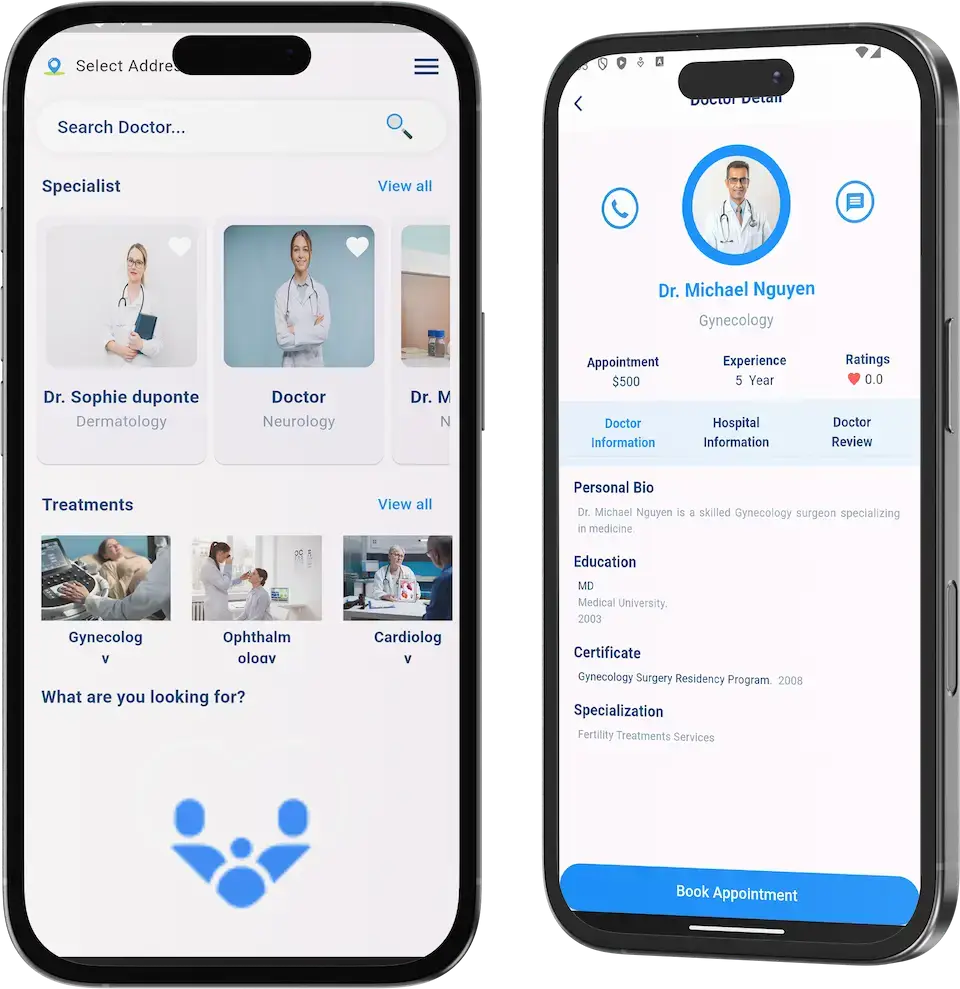
Practo Clone doctor booking app screens with a specialist search and a doctor profile.01
Pick it if: Doctors and labs are the headline, pharmacies a sidePracto Clone

Doctor booking leads here, with video consults, e-prescriptions, labs and pharmacies running on a single stack.

Explore Solution

Glovo Clone courier in a red cap handing an order to a smiling customer who pays by card machine.02
Pick it if: Pharmacy items ride with many other categoriesGlovo Clone

A courier-first delivery app for food, groceries, pharmacy items and parcels, shipped with separate apps for customers, stores and couriers.

Explore Solution

Blinkit Clone courier cycling with a bag of fresh groceries.03
Pick it if: You hold the stock yourself instead of listing partnersBlinkit Clone

Quick commerce out of your own dark stores, with branch stock, delivery fee rules and live rider tracking.

Explore Solution

Instacart Clone delivery courier in a face mask handing over a grocery order.04
Pick it if: You aggregate grocers and other shops beside pharmaciesInstacart Clone

A grocery marketplace where one manager looks after many stores, with a shopper app and synchronized inventory.

Explore Solution
CatalogAll 90+ solutions

09The business case

Market Benchmarks

Online Pharmacy Market Benchmarks - Independent 2025-2026 Data

The revenue models above are ours. The figures below are not. They come from the Hims & Hers and GoodRx annual reports on Form 10-K, the US Centers for Medicare & Medicaid Services and Apollo Hospitals' Q4FY26 results release, reproduced as published. They show how large online prescription revenue has become, what it is built from and where Indian digital pharmacy stands.

Hims 10-K01

$2.31bn in Online Revenue at Hims and Hers

Hims & Hers reports in its 2025 annual report on Form 10-K that Online Revenue was $2,311.4 million, up 61 percent, within total revenue of $2,347.6 million. Subscribers grew 13 percent to about 2,511,000, and Monthly Online Revenue per Average Subscriber was $81, up from $64. Gross margin was 74 percent, down from 79 percent.

GoodRx 10-K02

68% of GoodRx Revenue Is Prescription Fees

GoodRx's 2025 annual report on Form 10-K shows prescription transactions revenue of $544.0 million, 68 percent of $796.9 million total revenue and down 6 percent. The filing says GoodRx receives a percentage of the amount a pharmacy benefit manager is paid, or a fixed payment, per fill. Pharma direct advertising revenue rose 41 percent to $151.4 million.

CMS03

$467.0bn of US Prescription Drug Spending, 2024

The US Centers for Medicare & Medicaid Services reports in its National Health Expenditure fact sheet that prescription drug spending increased 7.9 percent to $467.0 billion in 2024, slower than the 10.8 percent growth in 2023. It is the pool of spending that online pharmacies, pharmacy benefit managers and retail chains compete for.

Apollo Hospitals04

About 12% of Apollo HealthCo Revenue Is Digital

Apollo Hospitals' Q4FY26 results release of 20 May 2026 reports Apollo HealthCo revenue of Rs 2,848 crore, of which offline pharmacy distribution was Rs 2,518 crore and the digital platform Rs 330 crore, up from Rs 292 crore. GMV of Apollo 24/7 was Rs 528 crore, up 20 percent. The digital share is our arithmetic on reported figures.

Where each figure comes from.

Hims & Hers Health, Inc., Annual Report on Form 10-K for the year ended 31 December 2025, filed 23 February 2026 - sec.gov

GoodRx Holdings, Inc., Annual Report on Form 10-K for the year ended 31 December 2025, filed 26 February 2026 - sec.gov

Centers for Medicare & Medicaid Services, NHE Fact Sheet, page last modified 24 June 2026 - cms.gov

Apollo Hospitals Enterprise Limited, Apollo Hospitals Announces Strong Q4FY26 Performance and Key Strategic Milestones, 20 May 2026 - apollohospitals.com

All figures are the publishers’ own, reproduced as published from annual filings, a government statistics page and a results release. Metric definitions differ by company and are as each publisher states them. The Apollo digital share is our arithmetic on reported figures (Rs 330 crore divided by Rs 2,848 crore). They describe the companies and market named, not any platform Miracuves builds, and nothing here is a revenue projection for your business.

Business Case

Business Model of a Pharmacy Aggregator Like 1mg - Revenue Potential & Prospects

An aggregator built on Miracuves' 1mg clone earns once pharmacies trust it with their shelf and shoppers trust it enough to order. Everything here concerns growing the network and owning the relationships that form around it.

  1. 01

    Commission on Every Pharmacy Order

    Each order a pharmacy fulfils earns the operator a share, which ties revenue to the number of stores and orders rather than to the size of your team.

  2. 02

    Several Levers, One Console

    Placement, routing fees, delivery settings, wallet bonuses and refill plans each sit behind their own admin toggle. Most aggregators open with commission alone, add featured placement and per-order routing once several pharmacies chase the same shoppers, and keep refill plans for the stage when repeat buyers dominate. Miracuves takes no percentage of any of it.

  3. 03

    Owned Network and Order History

    Pharmacy listings, shopper accounts, wallet balances, points and order history all sit in your database, so the value of the network accrues to you.

  4. 04

    Exit Optionality

    Holding the full source code means a move to a new host, team or direction needs no one's permission.

Main Revenue Levers
  • Commission on Each Pharmacy's Sales
  • Featured & New-Store Placement
  • Per-Order Routing Fees
  • Wallet Balances & Top-Up Bonus
  • Medication Subscription Plans (Add-On)
  • Sponsored Product Slots
Long-Term Value

Defensibility comes from the network more than from features.

  1. 01Each added pharmacy widens the shelf shoppers see
  2. 02Stores that loaded their stock do not casually leave
  3. 03Wallet balance and points keep spend on your platform
  4. 04Careful prescription handling is the second moat
Example Revenue Scenarios

The three cases below vary in one way, the number of live pharmacies, and each names the lever that matters most at that size. They are illustrations for planning, not predictions.

Neighborhood Pharmacy Group8Pharmacies Live

Commission on each order covers early running costs.

A handful of local pharmacies sell under one brand, and the commission on every order they fill pays for the platform. This is a scale illustration, not a forecast.

Regional Pharmacy Network60Pharmacies Live

Commission plus placement and routing fees.

A regional network in which many stores chase the same shoppers, so featured slots and per-order fees begin to count beside commission. This is a scale illustration, not a forecast.

Multi-City Health Marketplace400Pharmacies Live

Multiple cities, with offers and wallet bonuses running together.

Across many cities, promotions, wallet bonuses and refill plans stack on top of commission, and the reports point to where to focus. This is a scale illustration, not a forecast.

10Why Miracuves

Why Miracuves

How Miracuves Stacks Up Against Other 1mg Clone Builders

Medicine marketplaces tend to begin as a generic script, a freelancer job, an agency brief or a proven ready-made base, which is where the Miracuves 1mg clone sits, and those four diverge sharply once real pharmacies start filling orders. Before hiring anyone, ask to place a prescription order in a live demo, read the written list of exclusions and confirm the code arrives unencrypted.

Why Founders Pick Miracuves

  • 01

    Network Roles Already Wired

    You get the shopper, pharmacy and courier apps of your medicine delivery app plus four browser panels in one delivery, so no one stitches three projects together.

  • 02

    Shelves That Belong to Stores

    Each pharmacy's products, quantities and prices live with it, and its panel flags low stock.

  • 03

    Onboarding Under Your Control

    Pharmacies are added from the admin panel and you decide who goes live, instead of leaving it to self-serve sign-up.

  • 04

    Source Code You Own

    The code is delivered unencrypted, which means nobody can reprice it or rewrite the terms on you later.

  • 05

    A Straight Add-On Line

    Telemedicine, refill plans, an interaction checker and a health dashboard are named add-ons, never dressed up as base features.

  • 06

    Plain Readiness Language

    The software runs search, stores, wallet and delivery, and the pharmacy licenses, pharmacists, gateway account, hosting and developer accounts are yours to bring.

Development Company

How to Choose a 1mg Clone Development Company

Test a 1mg clone vendor by searching one medicine, comparing its price across pharmacies and watching a courier close the order with a handover code.

What to look for Miracuves

  • A demo you can log into Shopper, pharmacy and courier logins plus four panels
  • Per-store stock Stock counts and prices per pharmacy, with low-stock popups
  • Source ownership Unencrypted web and Flutter source, owned by you
  • Time to launch Six working days of build
  • A written release history Notes up to V15.0, each naming its Flutter SDK
  • Support after launch 60-day guidance, six-month priority bug fixing and a 12-month update window

Walk away from any vendor who

  • Shows one shared catalog without per-pharmacy stock
  • Lets stores go live without your admin approval
  • Claims the software licenses your pharmacies
  • Takes a cut of every order your pharmacies fill
  • Locks the Flutter code or rents the platform back yearly

Weighed Against Scripts and Agencies

What you compareMiracuvesMiracuves 1mg CloneOff-the-Shelf Pharmacy ScriptCustom Agency Build
Speed to LaunchOur build takes 6 daysOpen-ended, often DIYScoped per brief, often months
Source-Code OwnershipWhole codebase, unencryptedFrequently restricted or lockedNormally included
Multi-Pharmacy DepthMany stores, per-store stock, store cards, offers and a walletSingle-catalogue pagesAs far as the budget stretches
Roles DeliveredShopper, pharmacy and delivery apps plus admin and vendor panelsA shopper site onlyBuilt to the brief
Payments & WalletWallet, a cash-on-delivery toggle and gatewaysDiffers per scriptCustom integration work
Admin & ReportsSales reports, exports, roles and POSThin or absentBuilt to the brief, charged extra
Security & ComplianceRole-based logins, OTP and handover codes; licenses stay with youMinimalVaries a lot
Cost vs Speed vs QualityFixed price, quick, tested baseCheap but riskyExpensive and slow
Ongoing Support & Updates60 days of guidance, 6 months of bug fixes, 12 months of updatesSeldom offeredWhatever the contract states

Few routes into pharmacy marketplaces survive a first busy month unchanged. The table shows where they part ways.

Talk to Our Team

Changelog

What Each Pharmacy Marketplace Release Added

The web platform and the apps, newest release first. The notes carry no dates, and entries on features a pharmacy never uses are omitted.

VersionChanges
V15.0Flutter SDK 3.27.1 under the apps
Admins can switch cash on delivery on and off
A clearance section for discounted stock on the home screen and store pages
Product pages gain a call-to-action block
Analytics hooks: Google Tag Manager, Google Analytics and pixels for Pinterest, X, Snapchat, TikTok, LinkedIn and Meta
Refund details page redesigned
POS order maths fixed
V14.9.1Flutter SDK 3.24.5
Asset files tidied so pages respond faster
Caching now covers backend and front end
Wording of system messages and labels clarified
V14.9Flutter SDK 3.24.4
Restock requests reach both admin and store, and the shopper is notified once stock returns
Requested items appear in the shopper profile
Customer and subscriber exports can be filtered
POS screens in admin, store panel and store app report amount paid and change
A new look for the admin login
Database queries tuned and cached
V14.8Flutter SDK 3.24.3
A tap on a push notification opens a page you choose
Maintenance mode gains per-module control
One login covers manual, OTP and social sign-in, all managed by the admin
Mobile OTP runs on Firebase Authentication
A shipping policy page
V14.7Flutter SDK 3.22.2
Amazon S3 can store files and images
SEO section controls
Improved translation tooling for several languages
Sellers can reply to reviews
Chat refinements
Flash and featured deals accept several products at once
Invoices can be printed and emailed
V14.6Flutter SDK 3.19.6
Custom sort order for admin lists
Dynamic email templates
Low-stock popups in the admin and vendor panels
Only the selected items go to checkout, and the rest remain in the cart
Buy-now checkout is kept separate from the cart
Guests can opt to create an account at checkout
Firebase push uses the HTTP v1 API
V14.5Flutter SDK 3.19.4
The admin can keep browsing while maintenance mode is on
Chat polished in the admin and seller panels
A switch for showing or hiding the Google Map
Screens with nothing to show now handle it gracefully
Invoices redesigned with translation support
Users can be approved, denied, blocked or unblocked, and emails announce it
V14.4Flutter SDK 3.16.9
An SMS gateway joins the integrations
Order review section strengthened
A chat line between shopper and admin, from the website and the app
More situations trigger mail and push notifications
Many database queries sped up
V14.0Flutter SDK 3.13.6
Shopper app redesigned
Wallet top-ups from the web and the app, carrying a fund bonus
Guest checkout
Delivery and billing addresses are editable
Admin and sellers can each set a minimum order amount
Free delivery above a chosen amount
Reordering from earlier orders
Refer and earn pays out when the referred shopper's first order is delivered
Apple sign-in in the shopper app
Dynamic admin login URL
Delivery verification by image and OTP

Start the conversation

Let's turn your pharmacy network idea into a platform shoppers open daily.

Book a free consultation and leave with a clear timeline and straight answers. We would rather earn your trust than close a quick sale.

  • First reply in under 2 hours
  • Free consultation
  • No lock-in contracts
  • Full source code ownership

11Learn more

Blog & Resources

Further Reading on the 1mg Clone and Pharmacy Marketplaces

Posts from the Miracuves blog on which pharmacy marketplaces are worth launching, how to build one and what an online pharmacy app costs.
The product8 questions

01What exactly is a 1mg Clone?

It is a ready-made pharmacy aggregator. Shoppers search the items and stores of every pharmacy you bring onto the platform. Each pharmacy gets a panel and an app for its own stock, prices and offers, couriers get an app, and you get an admin panel. Everything launches under your brand with full source code. This page covers only what the demo and the release notes actually show.

02Can many pharmacies sell through one app?

Yes. The admin onboards the pharmacies, and each one runs its own products, stock levels, prices and offers from a vendor panel or the store app. Shoppers see everything together: medicine cards name their pharmacy, and store cards give a distance and an open or closed label.

03Will shoppers see one medicine priced by several pharmacies side by side?

The demo shows every item with its own pharmacy, price and stock label, and a category lets shoppers flip between item lists and store lists. It does not show one merged listing that ranks several pharmacies for the same medicine, so price comparison is not promised in the base. If you want it, it is quoted as custom work.

04Are lab tests and doctor consultations part of the product?

No. The demo contains a shopper app, a pharmacy app and a delivery app. A telemedicine marketplace is a listed add-on, and lab-test booking appears in neither the base nor the demo, so it would be scoped as another module. Neither one is inside the $2,799 base price.

05Will shoppers get refill or medication reminders?

Not from the base. The demo and the release notes show reordering from earlier orders and restock requests that notify the shopper, but nothing scheduled. Scheduled refills come with the Medication Subscription Plans add-on, quoted separately once the scope is clear.

06Does the app read prescriptions automatically?

No. The shopper attaches a prescription image to an order, and a store owner or authorized pharmacist inspects it and approves or rejects it. There is no image recognition or automated verification, and the platform does not check the prescriber or the dose.

07Does the software cover pharmacy licensing and health regulations?

No. Medical-device status, certification and licences are not part of the software. What it offers are features: prescription upload with approve or reject at the store, role access levels and delivery verification. Pharmacy licences, pharmacists, the medicines you may sell and rules like HIPAA, GDPR, DPDP or local pharmacy law belong to the operator, and Miracuves offers no legal advice. See the readiness section above for the full split.

08Which platforms do the apps run on?

The apps are Flutter builds that run on both Android and iOS, and the web panels work in any current browser. Publishing happens from developer accounts you own, and Apple and Google review on their own timetable, outside our 6-day build.

Orders & pharmacies8 questions

09How does a shopper place an order?

The shopper searches or opens a category, taps an item, chooses how many and puts it in the cart. Checkout offers delivery options and payment methods, and a prescription can be attached when needed. Once placed, the order shows up under Orders along with its details, a verification code and a status to track.

10Can a shopper attach a prescription to an order?

Yes. The upload goes along with the order and its image can be seen on the order details screen. The store owner or an authorized pharmacist checks it on the store side before anything ships. Keeping within local pharmacy rules remains your job.

11Who approves or rejects an uploaded prescription?

The store owner or an authorized pharmacist, working in the prescription management module. They decide on validity. The platform carries and records the decision without making it.

12How does a pharmacy update its stock and prices?

In its store dashboard, where products are added, edited or removed and quantities and prices changed. Admin and vendor panels raise a low-stock popup, lists can be sorted in a custom order and exports can be filtered.

13How are promotions and discounts set up?

Stores build promo codes, discounts and campaigns around chosen medicines or products. A clearance section can feature discounted stock on the home screen and store pages, flash and featured deals can bundle several products, and the admin can fix a minimum order value and a free-delivery level.

14How do I add and manage pharmacies from the admin panel?

The admin panel is built around many stores: add a pharmacy, manage its inventory, and watch orders, revenue and traffic across the network from one dashboard. Pharmacies work inside their own panel or app, within their own permissions. Onboarding a store does not verify its licence; that check comes before it goes live.

15Can shoppers reorder something they bought before?

Yes. Previous purchases remain listed under Orders, and since release 14.0 each carries a reorder option, so the next basket can start where an earlier one left off. At checkout, shoppers can also send only some items through and keep the rest in the cart.

16What can a shopper do when an item has sold out?

Raise a restock request. Admin and store both see it, the shopper is notified when the product is back, and requested items are listed in their profile. Ahead of a sell-out, admin and vendor panels show a low-stock popup.

Couriers & delivery3 questions

17How do couriers receive and handle delivery requests?

Couriers use a mobile app of their own and a web panel. Requests arrive live, and the courier takes or declines each one according to availability. A verification code closes the handover, and image plus OTP verification is available too.

18Do couriers get route navigation?

Yes. The delivery app can lean on a mapping service, Google Maps or Apple Maps for instance, to give turn-by-turn directions and route suggestions. Google Maps is on the integration list, and the account and key are yours to supply.

19What happens if nobody is home at the delivery address?

The courier follows the steps set in the app: call the shopper, wait a set time or reschedule. Each action is logged in the app, so a disputed delivery has a trail behind it.

Payments & reporting6 questions

20Which payment methods can shoppers use?

The wallet, cash on delivery where you enable it, and whatever gateway you connect. PayPal, Stripe and Razorpay are typical choices, and cards, UPI, wallets and net banking work depending on the gateway. The gateway account, with KYC completed, is yours to provide.

21Is cash on delivery available?

Yes, wherever you turn it on. Release 15.0 gave the admin a switch for cash on delivery, so markets that prefer it can have it while wallet and gateway payments stay available.

22What reports does the admin panel give me?

Sales totals per day, week and month, active users and best-selling items. Exports can be filtered by customer or subscriber and downloaded to Excel, and release 15.0 also added Google Analytics, Google Tag Manager and several advertising pixels.

23Can I give staff different roles and access levels?

Yes. Define roles such as store manager, pharmacist and support agent, then decide what each can open, so everyone sees only what the job requires.

24How does a pharmacy aggregator earn its first revenue?

The simplest start is a commission on every order a pharmacy fills, because it needs nothing extra to sell: the first order that ships earns it. Placement, routing fees and sponsored promotions follow once several stores compete for the same shoppers, and the delivery settings can be tuned beside them. Refill plans arrive as a paid add-on. Check early whether your country permits a wallet balance or a given promotion.

25What makes a pharmacy aggregator hard to copy?

Defensibility comes from the network more than from features. Every pharmacy that loads its own stock and prices makes the shelf shoppers see wider, and a store that has done that does not casually leave. Shoppers holding an order history, wallet funds and loyalty points have reasons to stay too, and all of it sits in your database. Careful prescription handling is the second moat: a pharmacy network people trust is slow to rebuild.

Launching with Miracuves10 questions

26How quickly can I launch my own pharmacy marketplace?

Ready-made delivery means 6 days of Miracuves build time for rebranding, deployment to your hosting and app publishing from your developer accounts. Waiting for app store review, onboarding a gateway and obtaining any licence your market needs all happen outside that window. Anything beyond the base is quoted in writing, with its own timeline, before work starts.

27Will I get the source code?

Yes, all of it. The web platform and the Flutter apps arrive as unencrypted source and project codes, so your team or ours can reshape flows and screens as the business grows.

28What do I need to bring before launch?

Hosting and a domain, a verified developer account for publishing, your brand assets and company details, a payment gateway that has completed KYC, third-party keys such as Google Maps, Twilio or Firebase, plus the licences and pharmacists your market demands. Miracuves does not apply for gateways on your behalf or write your privacy policy and terms.

29What are the reasons to build the 1mg clone with Miracuves?

Three apps for the three roles, the pharmacy network tools and an admin panel arrive working, with the whole source code, for a fixed $2,799. Miracuves has delivered 9,000+ projects to 6,000+ clients and keeps 90+ ready-made solutions on the shelf, and support runs 60 days of guidance, 6 months of priority bug fixes and 12 months of updates side by side.

30How much does a 1mg clone cost?

The Miracuves 1mg Clone has a fixed price of $2,799, paid once. That covers the shopper, pharmacy and courier apps, the four browser panels, the unencrypted source code, rebranding and deployment. Telemedicine, refill plans, an interaction checker and a health dashboard are optional add-ons, while bespoke flows get their own paper quote up front.

31Is a ready-made 1mg clone better than custom development?

For a multi-pharmacy launch it usually is. Pharmacy onboarding, per-store stock, prescription upload, wallet, cash on delivery and courier handover already run in the demo, so you start trading within 6 working days. Coding the same aggregator from scratch involves a signed-off estimate and 2-8 weeks of development before the first medicine ships, and you still pay to test what the base already proves.

32How long until my 1mg clone is live on the App Store and Google Play?

Miracuves spends 6 working days on rebranding, deployment and publishing the Flutter apps from developer accounts in your name. Apple and Google then review each app on their own schedule, which is outside the 6 days, and the web shop and panels can trade in the meantime. Any pharmacy license your country requires also runs on its own timeline.

33What is the business model of an app like 1mg?

An aggregator like 1mg earns on orders it never stocks. Partner pharmacies keep the shelf, and the operator takes a commission on each order they fill, then layers in featured listings, delivery charges and wallet top-up incentives. Because every rate is set in the admin panel, the model can differ by city or by pharmacy.

34What is the step-by-step process to launch my 1mg clone?

Step one is the demo: log in as shopper, pharmacy and courier. Step two is your brief with brand assets, cities, commission rates and gateway. Step three, Miracuves rebrands and deploys the web shop, panels and apps on your hosting. Step four, both store submissions leave from your company accounts. Six working days cover our build; Apple and Google approve on their own clock after that.

35What features does an app like 1mg need?

A pharmacy marketplace needs search for medicines and stores, per-store stock and prices, prescription upload with pharmacist approval, a cart, a wallet, cash on delivery and courier handover. The admin side needs pharmacy management, reports and staff roles. The 1mg clone already runs all of these across three apps and four web panels.

Disclaimer

Miracuves is an independent software development company. We are not affiliated with, connected to, sponsored by, or endorsed by 1mg.

Read our full Legal Notice & Disclaimer →
Why this name

“1mg Clone” is used descriptively. It is how the software industry refers to building a platform with functionality similar to 1mg, and how clients search for it.

Who built this

The entire design and codebase is built by our own team. The product contains no code, design, graphics, or content originating from the 1mg website or applications.

Trademarks

1mg and all other third-party names and marks are the property of their respective owners, referenced here solely to describe the category of software offered.