Prescription Ordering App · Production Ready

Netmeds Clone App - White-Label Multi-Pharmacy Medicine Marketplace

Miracuves' ready-made, white-label Netmeds clone lets pharmacies trade side by side, with Flutter apps for shoppers, stores and couriers on Android and iOS, four web panels and the whole source unencrypted and yours, rebranded and deployed within six working days.

Shoppers search items and stores from one field, see how far each pharmacy is and whether it is open, and every card names the store that fills the order; couriers take live requests with map directions. Licenses, pharmacists and the medicines you list stay with you, and doctor consults and lab tests are outside the base. Extra reports or another language for your market are custom work: we price them in writing, and most such jobs take 2-8 weeks.

Launch in 6 Days with

  • Source Code
  • Shopper App
  • Store App
  • Courier App
  • Vendor Panels
  • Admin Panel

StackFlutter · PHP · Bootstrap · MySQL · Firebase · Amazon S3

MXMeds console · Order overviewIllustrative
Orders today64
Orders with a prescription9
Pharmacies live17

Order and review activity

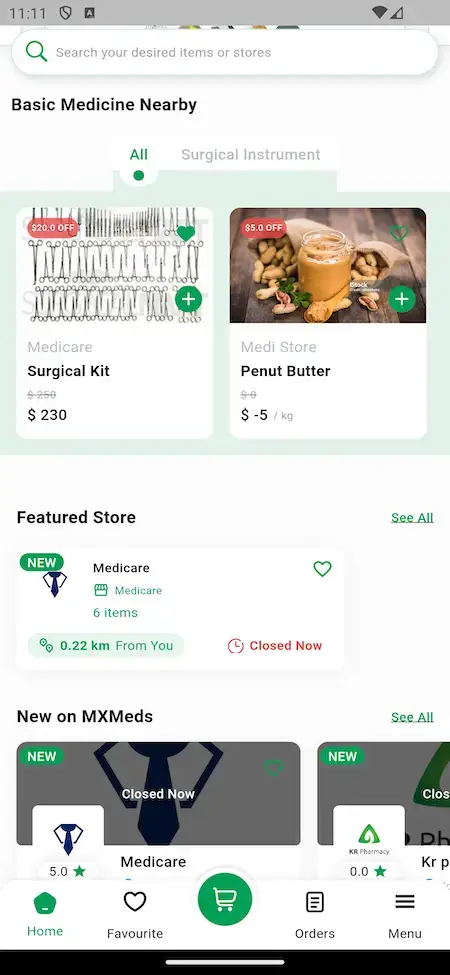
Netmeds Clone shopper app home screen with a search field for items or stores, Basic Medicine Nearby cards that name their pharmacy, a Featured Store card showing distance and a closed label, and a row of new stores.
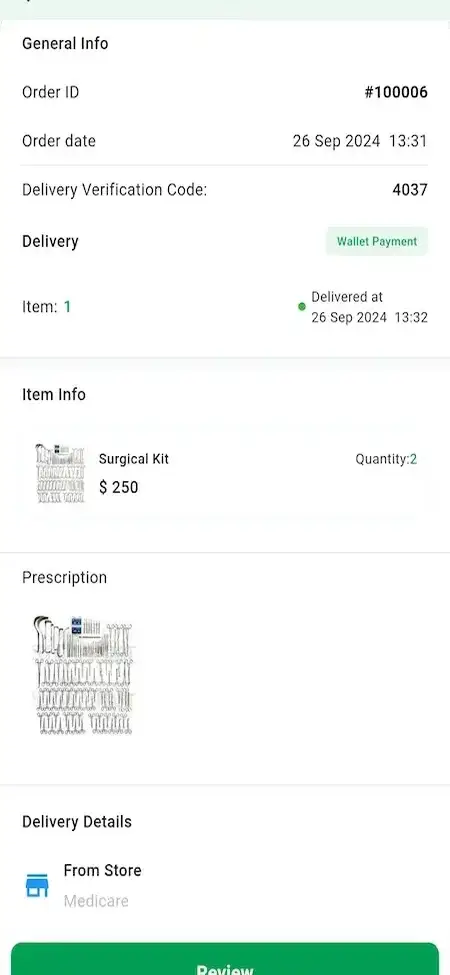
The prescription stays on the ordershown on the order details screen
  • 4Browser Panelsshopper site, vendor panel, courier panel and admin panel
  • 2Handover Checksa delivery verification code, or a photo with an OTP
  • 0%Revenue Share With Miracuvesno share of any pharmacy order or wallet top-up
  • 4Priced Add-Onstelemedicine, refill plans, interaction checks and a health dashboard
  • 6Days to Launchand if the delay is ours, we keep going free
  • $2,799Paid Once, Not Rentedsource code yours, no per-seat fee, no monthly rental

Live in six working days, or we keep working free until you launch. Every build carries 60 days guidance, 6 months bug fixes and 12 months updates.Verify every figure

The Prescription Rides on the Order

Attached at checkout, the image sits on the order details screen beside the delivery code, so pharmacy, courier and operator read one record. The platform never judges it.

You Choose Which Pharmacies Join

The admin creates every pharmacy and each keeps its own shelf and prices; you confirm each license first, since the panel adds a store without checking credentials.

Gateway on Your Own Account

Stripe, PayPal or Razorpay take card, UPI or net-banking payments on your KYC-cleared account, the platform records orders and refunds, and cash on delivery is an admin switch.

Opening an online pharmacy that has to check prescriptions?Talk to Product Expert

Chosen by 6,000+ clients across the globe

Miracuves is listed by Expertise.com as a managed IT service provider.Miracuves is an official member of the Forbes Business Council.Miracuves is a verified agency on DesignRush, listed among top design agencies in India.Miracuves is reviewed on Trustpilot as a software development company.Miracuves is listed by The Manifest among top managed software development companies.Miracuves is listed by DesignRush as a top software development company.Miracuves is recognized by GoodFirms as a top software development company.Miracuves is ranked among the top 1000 companies globally by Clutch.Miracuves is a top managed service provider in the United States on Clutch.

01Try it live

Try It Yourself

Netmeds Clone Live Demo - Shopper, Pharmacy & Delivery Apps Plus Four Web Panels

Try the Netmeds clone Miracuves built yourself, from pharmacy search to a prescription checkout, before you book a call. Separate demo credentials open the shopper, pharmacy and courier apps, and the web panels are linked underneath. Begin as a customer: search, look at the pharmacy a card names, then log in as that pharmacy and see the same order from behind its counter.
Netmeds Clone shopper app home screen with a search field for items or stores, Basic Medicine Nearby cards that name their pharmacy, a Featured Store card showing distance and a closed label, and a row of new stores.Netmeds Clone item page for Vitamin D Capsule showing the selling pharmacy, price, In Stock label, quantity stepper, total and an Add To Cart button.
Shopper app

Shopper App - Netmeds Clone

The buying side on a phone: search, nearby store cards with distance, an item page, the order with its prescription and delivery code, and a wallet.

  1. 1Select the Android or iOS link
  2. 2Enter the credentials listed here
  3. 3Explore: Home, a store card, an Item, Orders, Wallet
Shopper login:+919876543210 | User_321
mxmeds.mimeld.com
Store app

Pharmacy Order-Desk App

A single pharmacy runs its daily orders from this phone app. Its partner is the vendor panel on the web, which is where that pharmacy maintains products, stock levels and prices.

  1. 1Download the store app via the portal
  2. 2Enter the pharmacy credentials
  3. 3Explore: new orders, products, stock
Pharmacy login:pharmacy@demo.com | Store_321
mxmeds.mimeld.com
Courier app

Courier App for Doorstep Runs

The courier on a phone: new delivery requests arrive as they happen and can be taken or declined, with a map to the address.

  1. 1Download the courier app via the portal
  2. 2Enter the courier credentials
  3. 3Explore: requests, route, handover
Courier login:+919876543211 | Driver_321
mxmeds.mimeld.com
Web panels

Web, Vendor, Delivery & Admin Panels

On the web you get the shopper website, a vendor panel for each pharmacy, the courier panel and the admin panel the operator works in.

  1. 1Open the demo host in another tab
  2. 2Choose the entrance for shoppers, vendors or admins
  3. 3The app credentials work here too; admin access comes on a call
Admin access:arranged on a guided call
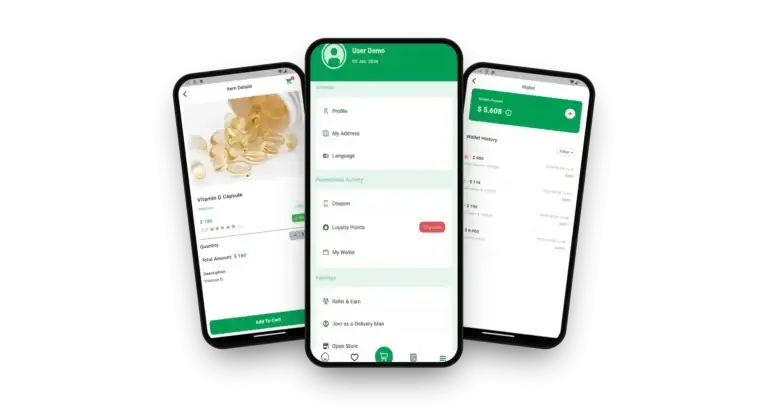
Netmeds Clone on three phones: the account menu, the medicine item details and the wallet history

See It Done Live

Walkthrough of an App Like Netmeds: From an Uploaded Prescription to a Delivered Order

No recorded video exists for this product, so we do it live. On a 30-minute call we place an order as a shopper, follow it into a pharmacy's panel where the prescription is reviewed, send it out with a courier and close in the admin panel, using your own city, your pharmacies and your launch date as the example.

Request a guided walkthrough.

Inside the App

Online Pharmacy App Screens - Browse Pharmacies, Upload a Prescription, Pay & Earn Rewards

Here are real shopper-app screens from Miracuves' Netmeds clone, in the order a prescription purchase happens: find a pharmacy, open the item, place the order with its prescription, pay from the wallet and collect rewards. The pharmacy, courier and admin ends are shown on a call.
Netmeds Clone shopper app home screen with a search field for items or stores, Basic Medicine Nearby cards that name their pharmacy, a Featured Store card showing distance and a closed label, and a row of new stores.
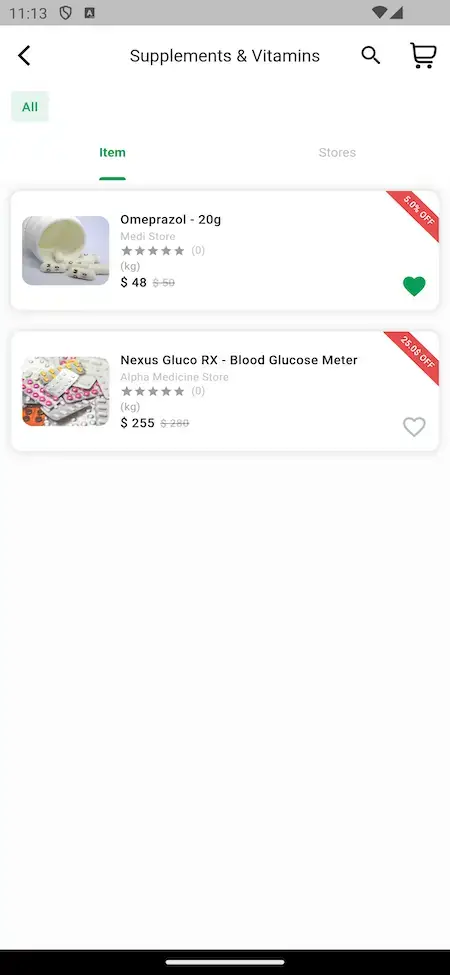
Netmeds Clone Supplements and Vitamins category with Item and Stores tabs; each row names the pharmacy selling it next to a rating, a price and a discount ribbon.
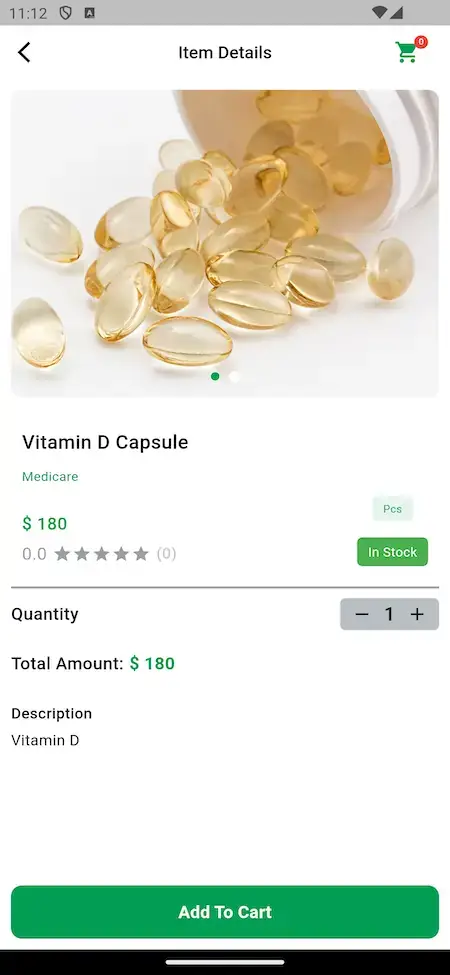
Netmeds Clone item page for Vitamin D Capsule showing the selling pharmacy, price, In Stock label, quantity stepper, total and an Add To Cart button.
3 screens · scroll →
Netmeds Clone order details screen with an order id, a delivery verification code, wallet payment, the ordered item, an attached prescription image and a From Store delivery line.
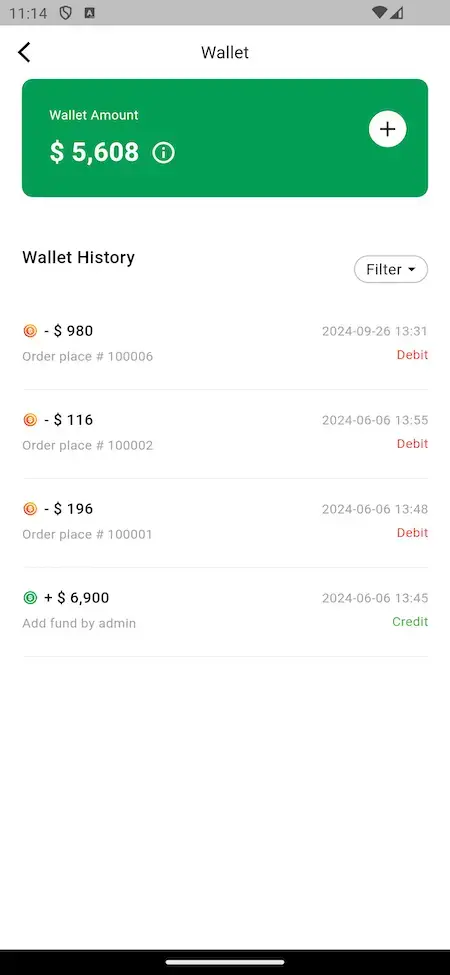
Netmeds Clone wallet screen with the balance, an add-funds button and a filterable history of order debits and a credit for added funds.
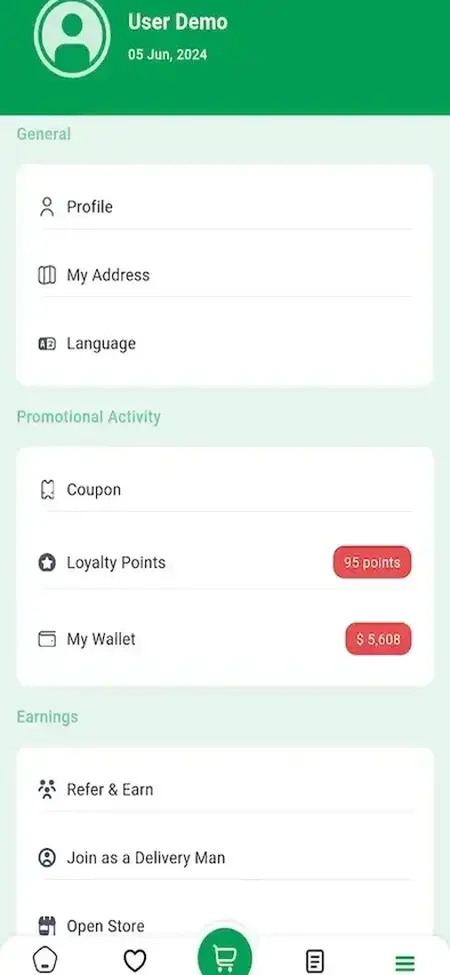
Netmeds Clone menu screen with profile, address and language entries, then coupon, loyalty points and wallet balances, refer and earn, join as a delivery man and open store.
3 screens · scroll →

Follow the order in sequence: the home screen and its store cards, a category with Item and Stores tabs, the item page, then an order with its prescription, and finally the wallet and the menu of rewards.

Explore Our Solutions

02Evidence

Client Voices

Netmeds Clone Client Reviews - Teams That Launched on Miracuves Bases

Clients describe in their own words what they built on Miracuves bases. Some run health and pharmacy businesses, the others come from different industries, and each quote appears exactly as its author gave it.

DDr. Vivek RungtaFounder & Chief Dermatologist, Dermacian
“Every HMS I tried was built for general physicians, with no lesion mapping, no before/after tracking, and no procedure-based billing. Their MXHealth base gave us the patient app, doctor app, EMR and video consult out of the box. Front-desk time on scheduling and follow-ups is down ~70%, and we went fully digital in 9 months, where a fully custom job would have been 18.”
AAndre GittensCEO, Ride Corporation
“Turo is the obvious reference, but the Caribbean specifics, from different insurance norms to different payment rails, meant we needed a real partner, not just a clone. Miracuves’s MXCar base covered the listing, the trip flow, and the host payouts. We launched in 6 working days and are live in three islands.”
MMarsha WilliamsFounder, Bmore On Demands LLC
“The team was running it on a dispatcher and a Google Sheet, and we needed a real platform quickly, because we were about to onboard a major retail client. Miracuves’s Delivery Genie base gave us the rider app, the dispatch console, and live tracking. We launched in 6 weeks and cleared 4x the previous order volume in the first month.”
TTiffany DandreaOperations Director, Best Cabo Yacht Rentals
“We were running it on phone calls and a paper calendar, and we were losing bookings to bigger OTAs. Miracuves’s GetmyBoat Clone base gave us the calendar, the booking flow, and the payment engine. Online bookings are up roughly 70% in the first six months, and the ops team finally has a live view of the fleet.”
DDr. Carlos A. PalermoCo-founder & CEO, Doctta Health
“Building a compliant telehealth stack from scratch in three markets would have been a year-plus effort. Miracuves’s MXHealth base covered the patient and doctor apps, video consult, e-prescription and the pharmacy integrations. We launched in our first market in 9 weeks and rolled out to two more in the following six months.”
BBrian LatailleVP Logistics Technology, IBC Tanks Canada
“We were juggling spreadsheets, a third-party GPS provider, and a phone. We needed a single operations console. Miracuves’s MXLogistics base covered the trip lifecycle, the driver app, and the customer tracking page. We’ve cut operations admin time by about 40%.”
CCharles EveillardManaging Partner, MyDocPharma
“Appointments, doctor profiles and consultations were all ready. What we needed on top was the pharmacy side: prescriptions flowing to fulfilment, and stock the clinics could actually see. That was the work, and it shipped in weeks.”
DDr. Carlos A. PalermoCo-founder & CEO, Doctta Health
“Building a compliant telehealth stack from scratch in three markets would have been a year-plus effort. Miracuves's MXHealth base covered the patient/doctor apps, video consult, e-prescription and the pharmacy integrations. We added Spanish-language UX across every flow, our asynchronous-queue logic, and a custom regulator module for each country. We launched in our first market in 9 weeks and rolled out to two more in the following six months. Honestly, this product wouldn't exist yet without that base.”
Read More Client TestimonialsStraight from the people who built

About Our Proof

Netmeds Clone Case Study - Our Evidence Today and How to Test the Product Yourself

The current state of proof for the online pharmacy marketplace model, and a way to try out the product before you commit.

Case Study
No Named Client Operates This Pharmacy Marketplace Publicly Yet

Miracuves has not published a client case study for an online pharmacy marketplace, and none is borrowed from a different product. Here you get what you can test in the demo yourself, plus a clear note on what we will never make up.

Not yetClients named in public
Demo or a callHow to verify
Pharmacy marketplaceModel type
3Apps you can log into
4Web panels to explore
6 daysOur build time
Netmeds Clone shopper app home screen with a search field for items or stores, Basic Medicine Nearby cards that name their pharmacy, a Featured Store card showing distance and a closed label, and a row of new stores.
Challenges
  • Prescription orders need review by a licensed person who belongs to the operator, not to the software
  • Pharmacies trade on one platform but must keep separate stock, pricing and promotions
  • Couriers need proof of handover when medicine reaches a door
Goal
  • Trace a prescription order across the shopper app, a pharmacy and a courier before spending money
  • Test the wallet, the coupons and the cash-on-delivery switch against your own market
  • Review the release notes and the source for whatever the demo cannot reveal
Solution by Miracuves
  • Test accounts for the shopper, pharmacy and courier roles
  • Four browser panels open today
  • A session in which we add a sample pharmacy and watch its first order in the admin console
  • Version notes from 14.0 through 15.0, itemized
  • A fixed price and a 6-day build

There will be no made-up client, no quote nobody gave and no result nobody measured on this page. A named launch will replace this card once the client agrees to be named and a real case study goes live.Miracuves · How we handle proof

See the published case studiesThe portfolio lists work done on other Miracuves platforms, a portion of it in healthcare.

03What you get

The Basics

How the Netmeds Clone App Serves Shoppers, Pharmacies & Operators

Think of the Netmeds clone by Miracuves as a finished online pharmacy marketplace and online medicine delivery app. Customers buy from the pharmacies you list and attach a prescription where an item requires it, and it travels with the order. A courier delivers, and you manage the whole network from one admin panel. How a pharmacy reviews prescriptions is walked through on a guided call or scoped as custom work.

Netmeds Clone on three phones: the account menu, the medicine item details and the wallet history

Prescription on the Order

The shopper attaches the prescription to the order and the order details screen shows it. The review step on the pharmacy side is shown on a guided call or scoped as custom work.

Several Pharmacies, One Storefront

Pharmacies you onboard appear together, and every item card names the store that sells it.

Add-Ons Stay Add-Ons

Four health modules (telemedicine, refill plans, drug interaction checks and a health dashboard) are priced on their own. Lab-test booking can be estimated as a separate module, and doctor consultations come through the telemedicine add-on.

Apps & Panels

How the Netmeds Clone Script Works

The marketplace itself never stocks medicine. It links the shopper, the pharmacy that has the item and the courier, and records each step along the way: the prescription on the order, the decision, the payment and the handover code. All of those mechanics ship ready to use.

Netmeds Clone shopper app home screen with a search field for items or stores, Basic Medicine Nearby cards that name their pharmacy, a Featured Store card showing distance and a closed label, and a row of new stores.
  1. 01Prescription attached to the order at checkout
  2. 02A pharmacy-side review step, shown on a guided call
  3. 03Store cards with distance and open status
  4. 04A vendor panel and a store app for each pharmacy
  5. 05Courier and admin panels to run the network

The delivery covers three mobile apps (shopper, pharmacy, courier), four web panels and the whole source, cross-platform Flutter code for the apps included.

What the Base Delivers

Netmeds Clone Features - Prescription Upload, Several Pharmacies, Wallet & Courier Delivery

Every Netmeds clone feature Miracuves lists below appears on a demo screen or carries a release-note entry. Whatever would need an additional module shows up further down as an add-on.

Feature 01 / 12

Prescription Upload on the Order

The prescription travels with the basket. At checkout the shopper attaches it, and the order keeps the image next to the items and the delivery code.

  • A prescription can be attached when the order is placed
  • Order details display the uploaded image
  • It stays tied to that order and to the store filling it
  • Delivery options and payment are chosen in the same checkout
  • Items that need no prescription check out without one
Feature 02 / 12

Pharmacy-Side Review (Guided Call)

We walk through the pharmacy-side review flow on a guided call, and it can be shaped to your own rules as scoped custom work.

  • The demo shows the prescription attached to the order
  • The pharmacy-side review flow is shown on a guided call
  • Anything beyond the demo is scoped as custom work and quoted in writing
  • The platform does not judge a prescription
  • Licences and the local rules a pharmacy must follow remain the operator's task
Feature 03 / 12

Several Pharmacies on One Platform

The admin onboards pharmacies, and shoppers browse them together. Each item card names the store behind it, so the shopper knows who will fill the order.

  • Admins create and configure every pharmacy
  • Search covers items and stores from one field
  • A category page flips between Item and Stores tabs
  • Every card shows the pharmacy that sells the item
  • Heart icon saves favorite items and stores
  • An Open Store entry in the shopper menu invites new pharmacies
Feature 04 / 12

Nearby Pharmacy Cards

Store cards help a shopper choose a pharmacy that can serve them now: how far it is, whether it is open, and how it is rated.

  • A home screen row for featured stores
  • Another row lists recently added stores
  • Each card shows how far away the store is
  • Every store is tagged open or closed
  • Stars and number of items appear on the card
  • Location services surface pharmacies close by
Feature 05 / 12

Stock & Prices per Pharmacy

Each pharmacy keeps its own shelf. It adds, edits and removes products in its store dashboard and changes quantities and prices as the day goes.

  • Catalogue edits (add, change, remove) happen in the store dashboard
  • Quantities and prices edited live
  • Item pages carry a stock status tag
  • Low-stock popups for admins and vendors
  • Clearance items stand out on store pages and on the home screen
  • Product cards can wear discount badges
Feature 06 / 12

Courier Requests & Handover Proof

Couriers have an app of their own. Requests come in as they are created, the courier takes or declines them, and a code closes the handover.

  • Live delivery requests the courier accepts or declines
  • Map-based directions to the address
  • Each order prints a delivery verification code
  • A photo plus OTP check is offered as an alternative
  • If the customer is out: call, wait or reschedule
  • The shopper can watch the order status
  • A menu link for couriers who want to join
Feature 07 / 12

In-App Wallet & Top-Up Bonus

The shopper holds a balance in the app, adds money on the website or the phone, and sees every charge and credit in a history that accepts filters.

  • The balance sits beside an add-funds button
  • Funds can be added on the website or in the app
  • Top-ups earn a bonus credit
  • One list mixes order charges and fund credits
  • The history accepts filters
  • The order screen shows when the wallet was used to pay
Feature 08 / 12

Cash on Delivery or Gateway Checkout

Payment adapts to the market: the wallet can pay, the admin turns cash on delivery on or off, and gateways connect through your own account.

  • Cash on delivery can be toggled by the admin
  • Wallet balance can pay at checkout
  • Connectable gateways: Stripe, PayPal, Razorpay
  • Card, UPI, wallet and net-banking support follows whichever gateway you pick
  • A page for refund details
  • Invoices can be printed or emailed
Feature 09 / 12

Promo Codes, Coupons & Flash Deals

Stores and the admin both create offers: promo codes, discounts and campaigns tied to selected medicines, and flash or featured deals that can bundle several products.

  • Each store can issue promo codes and discounts
  • Campaigns can target chosen medicines or products
  • Flash and featured deals may include multiple products
  • A call-to-action strip was placed on product pages
  • Admin or store sets a minimum order amount
  • Delivery is free beyond a threshold you define
Feature 10 / 12

Loyalty Points & Referral Rewards

The menu groups the loyalty tools: coupons, a running points total, and a referral reward released after the friend you invited gets a first order delivered.

  • Loyalty Points show a running balance
  • The menu has a place for coupons
  • The referrer is rewarded when the invitee's first order arrives
  • Wallet and points balances shown side by side
  • Rewards sit in the menu next to address and language options
Feature 11 / 12

Repeat Orders & Stock Requests

Earlier orders remain in the Orders tab and can seed a new basket. If something is sold out, the shopper can ask for it and receives a notice on restock.

  • Earlier purchases are listed in the Orders tab
  • Past orders can be reordered
  • Pay for ticked items only; the others wait in the cart
  • Shoppers can request an item that is out of stock
  • Each request is visible to admin and store
  • A notification tells the shopper it is back in stock
Feature 12 / 12

Staff Roles, Reports & Sign-In

One admin console covers the network. Staff roles carry access levels, reports break down sales over time, and shoppers get several ways to sign in.

  • Separate roles for managers, pharmacists and support staff
  • Sales broken down per day, week and month
  • Filtered exports of customers and subscribers
  • Point-of-sale screens across admin, store panel and store app
  • The admin decides which sign-in methods are live: password, OTP or social
  • Push messages can lead to whichever page you select

Your side of the launch: We take care of rebranding and deploying both the web platform and the apps. You provide the hosting and domain, verified developer accounts for the app stores, logos and company details, a payment gateway whose KYC is finished, the third-party keys, and whatever pharmacy licences and licensed pharmacists your market requires. App store reviews run on Apple's and Google's own timetable, which is not part of our 6-day build.

Talk to Our Team

How It Earns

Netmeds Clone Revenue Models - Commission, Referral Fees, Sponsored Slots, Wallet Balances and Refill Plans

A marketplace like Netmeds earns in more than one place, and Miracuves wires each of those places as its own setting, so tuning one leaves another untouched.

Order commission normally does most of the work at launch; routing fees, sponsored slots and refill plans join in as the pharmacy network matures.

  1. 01

    Share of Each Pharmacy Order

    The platform keeps a share of the order total as commission from pharmacies before the pharmacy that filled it is paid, so income rises with the number of stores and the size of their baskets.

  2. 02

    Fees for Orders You Route

    When a partner pharmacy fulfills an order you sent its way, a flat or percentage fee on that order can replace a share of the basket.

  3. 03

    Sponsored Store & Product Slots

    The Featured Store row, new-store row, flash deals and clearance listings give suppliers and pharmacies paid places to be seen.

  4. 04

    Delivery & Basket Rules

    Admin or store may set a minimum order value and a threshold above which delivery is free, steering basket size without hiding the delivery cost.

  5. 05

    Wallet Funding & Bonus

    Customers add funds and can earn a bonus; the balance stays with your platform until used, which encourages repeat orders.

  6. 06

    Medication Subscription Plans (Add-On)

    This paid add-on turns regular medicines into a recurring line: a shopper picks a plan and receives refills on a schedule, priced apart from the base.

Fees published by marketplaces, two listed health companies and the app stores, placed beside the income lines an online pharmacy marketplace can run; every figure comes from the publisher named.
Revenue streamHow it is chargedTake rateTypical take rateWhat sets the ceiling
Share of Each Pharmacy OrderA percentage of the order total, held back by the platform and followed by a payout to the pharmacy.DoorDash plans take 15%, 25% or 30%. Amazon charges 8% on items up to $10 and 15% above that in health and personal care.How much margin a pharmacy can part with. In India the price regulator set a 30% cap on trade margin for 42 anti-cancer drugs (PIB, March 2019), so for some medicines a commission has very little to work with.
Fees for Orders You RouteA share of an amount paid out, or a fixed sum, for each order or fill the platform sends to a partner.GoodRx is paid per fill, either as a percentage or as a fixed amount, and that prescription fee line made up 68% of its 2025 revenue.Whether the partner values the volume you send. Someone must be willing to pay per fill, and you must have shoppers to route.
Sponsored Store & Product SlotsA price paid by a pharmacy or a manufacturer for a prominent slot or a promoted product.Advertising sold to pharma manufacturers earned GoodRx $151.4 million in 2025, which is 19% of revenue and 41% more than a year earlier.Depends on how many advertisers want your audience, which in turn rests on its size and purchase intent.
Medication Subscription Plans (Add-On)A fee billed monthly or yearly in return for refills that arrive on schedule.Hims & Hers averaged $81 of online revenue per subscriber each month in 2025 with a 74% gross margin, and GoodRx subscription revenue reached $83.8 million.What shoppers accept paying each month, less store billing if the plan is sold as an in-app digital purchase: Apple keeps 30% in year one and 15% later, and Google Play adds a 5% billing fee on top of 10% in the US, UK and EEA.
Wallet Funding & BonusEach card payment or top-up carries a processing charge that you either absorb or pass on to the shopper.A Stripe help article gives 2.9% plus 30c for each US credit card payment.Set by your own gateway for your country and card types. The admin can also enable cash on delivery, and that option competes with this line.

How to read this. Commission levels rest on a pair of published fee pages, DoorDash merchant pricing plus Amazon seller fees; the trade-margin cap is quoted from an Indian government press release. The referral, advertising and subscription numbers come from the 2025 Form 10-K annual reports of GoodRx and Hims & Hers. App store charges are read off the Apple page and the Google Play page; the card-fee illustration comes from a Stripe help article. Use each number as another company's published input to your own model. The table is not a quote, and it does not forecast what your marketplace will earn.

Revenue Model

Netmeds Clone Revenue Model, Stage by Stage

A prescription marketplace earns in a set order, and the Netmeds clone from Miracuves ships each base line as an admin setting, so every one can wait for the moment it pays.

Launch

Prescription orders start the money: the platform holds back a cut of each order total before the filling pharmacy is paid, and the first shipped order earns it.

Traction

As pharmacies compete, sponsored store and product slots go on sale, and a free-delivery threshold with a minimum order value lifts each basket.

Scale

With a mature network, fees on orders you route to partner pharmacies, wallet funding bonuses and the refill subscriptions add-on join commission.

Miracuves keeps none of it: there is zero commission to us on any order or top-up.

Need a revenue plan that fits the pharmacies you can sign up?Design My Revenue Model

Operate the Network

Admin Panel for a Netmeds-Style Marketplace - Sign Up Pharmacies, Track Inventory, Orders and Offers, Manage Staff

Running many pharmacies means seeing all of them at once, so the Miracuves admin console brings every store onto one screen. One console shows which stores are live, what sells, which offers are active, what each staff role may open and how the figures trend.

Panels open in the demo

Admin Panel Coverage

  • 01

    Signing Up Pharmacies

    Create a pharmacy entry and switch it on. Order counts, revenue and traffic for every store then appear on one screen.

  • 02

    Inventory per Store

    Each pharmacy's entry holds its products with quantities and prices, and admins can arrange long product lists in a custom order.

  • 03

    Orders & Dispatch

    Orders can be followed one by one, dispatch and fulfilment managed, and deliveries confirmed by a code or an OTP; a refund details page completes the picture.

  • 04

    Stock Signals

    Admins and vendors get low-stock popups, and shopper restock requests for unavailable items land alongside them.

  • 05

    Offers & Thresholds

    Promo codes, discounts, flash deals, featured deals and clearance listings, together with a minimum basket value and the amount at which delivery becomes free.

  • 06

    Money Settings

    The cash-on-delivery switch, the wallet top-up bonus, invoices that can be printed or emailed, and the gateways that suit your market.

  • 07

    Reports & Exports

    Sales figures by day, week or month, plus active users and top-selling items; customer and subscriber lists export with filters, and Excel downloads are available.

  • 08

    Roles, Support & Content

    Distinct roles for shop managers, pharmacists and support agents carry their own access rights, and the console also covers shopper-to-admin chat, languages, SEO settings and email templates.

Checkout Rules

What decides a basket before the shopper pays.

  • Guest checkout, with the choice to create an account
  • Selected-item checkout or a buy-now order
  • Editable delivery and billing addresses
  • Reordering from earlier orders

Controls & Integrations

Settings that sit behind the public site and everyday operation.

  • The admin login URL can be changed
  • Optional Amazon S3 storage
  • Maintenance mode that can be set per module
  • Firebase push alongside OTP and SMS gateways

Missing a control? Extra reports, a changed prescription step or added languages are scoped individually. Tell us what your pharmacy operations need and the price comes back on paper.

Talk to Our Team

04Scope and price

The Full Package

Netmeds Clone App Package: Apps, Panels and the Full Source Code

From Miracuves, delivery means a functioning prescription marketplace, not components to assemble: three apps, four web panels and the full codebase, which becomes your property. Ongoing costs are billed by each provider to you directly and none passes through Miracuves: server and storage, gateway processing after KYC, maps, SMS and push, store memberships, and the licensed pharmacists who review prescriptions.

01

Source Code & Project Files

The complete source and project codes are delivered unencrypted, so your developers can change whatever the business calls for.

  • Source of the web platform
  • Flutter code behind every app
  • No part is encrypted
  • Change, extend and redeploy as you wish
02

Rebranding & Deployment

We apply your logo, icons and colors to the website and the apps, then deploy the result at no additional charge.

  • Your branding across site and apps
  • Installed on your hosting
  • Handled by the Miracuves team
  • Store review is not part of the 6 days
03

Courier App

The courier-side app, handling live requests, map directions and handover checks.

  • Requests as they come in
  • Accept or decline by availability
  • Directions to the door
  • A code or an OTP confirms the handover
04

Browser Panels

Four web panels come in the box: shopper site, vendor panel, courier panel and admin panel.

  • The customer-facing website
  • A vendor panel for every pharmacy
  • The courier panel
  • An admin panel built for you, the operator
05

Shopper & Store Apps

Flutter powers both the shopper app and the store app, on Android and iOS alike.

  • Tabs for Home, Favorite, Cart, Orders and Menu
  • The menu holds wallet, coupon, points and referral entries
  • Order pages carry the prescription and the delivery code
  • The pharmacy side has an app of its own
Netmeds Clone order details screen with an order id, a delivery verification code, wallet payment, the ordered item, an attached prescription image and a From Store delivery line.
06

Admin Console

The operator's console: sign up pharmacies, monitor inventory, orders and offers, and handle reports, roles and settings.

  • Sign up stores and follow their inventories
  • Orders, dispatch and refund handling
  • Promotions, wallet bonus and limits
  • Reporting, data exports, staff roles and settings
07

App Publishing

Apps are submitted to both stores through developer accounts you own; whether they are approved is for Apple and Google to decide.

  • Submitted through developer accounts you own
  • Both Android and iOS
  • Approval is decided by the stores
  • Verified accounts come from you
08

Support Timeline

Support comes in three periods that begin at launch and overlap, at no charge.

  • 60 days of dedicated platform guidance
  • 6 months of priority bug resolution
  • 12 months of continuous product evolution
  • A human reply within two hours, six days a week, 10:00-19:00 IST

Want a preview? Try the demo in the role of shopper, pharmacy or courier, or request a guided tour in which we follow a search, an item page, a prescription order and the wallet, with your pharmacy plan as the backdrop.

Talk to Our Team

Transparent Pricing

What Does an Online Pharmacy Marketplace Like Netmeds Cost to Launch?

The ready-to-launch white-label Netmeds Clone has a single fixed price: $2,799. Anything beyond the base, whether an add-on, an extra integration or a custom flow, is scoped and quoted in writing before work begins.

Most Popular

Professional

Launch-Ready Package
$2,799single payment
Launches in 6 days

Best for: Online pharmacy startups, pharmacy groups going digital and operators who have to review prescriptions

The product exactly as the demo shows it, rebranded as yours and running on servers under your control.

Get Started

Enterprise

Tailored Builds for Wider Scope
Customquote
Go-live date: set by final scope

Best for: Health groups and operators present in several cities or countries

Flows beyond the base are built to your brief, with scope and price settled before any work starts.

Request a Quote
Development Cost

Netmeds Clone Development Cost in 2026

The Netmeds clone costs $2,799, paid once to Miracuves for its shopper, pharmacy and courier apps plus the four web panels behind them, prescriptions attached to orders at checkout and unencrypted code, rebranded and deployed on your servers in six working days. No monthly license follows.

$2,799 Paid once
6 working days Rebranded and live
0% Revenue share

Running costs that never pass through our invoice

  • The licensed pharmacists who review prescriptions, and the pharmacy licenses behind them
  • Server and storage costs, billed to you by the provider
  • Gateway processing once your KYC clears
  • Maps, SMS and push usage, plus Apple and Google store memberships
  • Each health module you add later, from telemedicine and refill plans to drug interaction checks or the health dashboard, at its own price

Reworking the prescription step, adding reports or translating the apps into more languages is quoted as its own job in writing, and most of that work lands within 2-8 weeks.

Compare Your Options

Ready-Made Netmeds Clone vs Custom Development vs SaaS

Prescription orders, pharmacy onboarding and courier handover can be rented, built to order or owned through Miracuves' Netmeds clone. This is how the three options compare, from custom medicine delivery app development to a ready-made online pharmacy like Netmeds.

CriteriaMiracuvesReady-Made Netmeds CloneCustom DevelopmentSaaS
Launch time6 working days to go live, store review afterQuoted in writing, 2-8 weeksInstant account, shared stack
Upfront cost$2,799, paid a single timeEstimate agreed in writingSubscription billed monthly
Source code ownershipComplete unencrypted codebase handed to youNegotiated per contractNot available
CustomizationPrescription step, fees and panels editableBuilt to spec, extra costPreset options
Ongoing feesZero commission to MiracuvesMaintenance invoicesFees per order or store
Branding & app-store listingThree apps listed under your companyYour brand, slower startShared or vendor-branded
Best forPrescription-first pharmacy networksUnusual regulated workflowsSingle-store trials

In Daily Use

Prescription Delivery App Use Cases - Pharmacy Networks, Reorders, Cash on Delivery and Offers

Each operator highlights a different part of the single Miracuves product: prescription review leads for one, the store list for another, offers for a third. Which one gets the stress comes down to configuration.

PrescriptionsOrdersPrescription Orders

A shopper attaches the prescription at checkout and it travels with the order. The pharmacy-side review step is shown on a guided call or scoped as custom work.

01
Netmeds Clone order details screen with an order id, a delivery verification code, wallet payment, the ordered item, an attached prescription image and a From Store delivery line.
NetworkPharmaciesLocal Pharmacies Sharing One Brand

Each local pharmacy lists what it sells with stock and prices, and a shopper browsing sees which stores are close and whether they are open.

02
Netmeds Clone shopper app home screen with a search field for items or stores, Basic Medicine Nearby cards that name their pharmacy, a Featured Store card showing distance and a closed label, and a row of new stores.
ReorderRetentionRepeat Buyers of Regular Medicines

Past orders remain in the Orders tab with a reorder option, and restock requests keep sold-out items from simply disappearing.

03
Netmeds Clone Supplements and Vitamins category with Item and Stores tabs; each row names the pharmacy selling it next to a rating, a price and a discount ribbon.
DoorstepPaymentPay-at-the-Door Markets

In places where paying on the doorstep is common, the admin turns on cash on delivery, and wallet and gateway payments keep working beside it.

04
Netmeds Clone wallet screen with the balance, an add-funds button and a filterable history of order debits and a credit for added funds.
OffersClearanceSeasonal Offers and Stock Clearance

Promo codes, flash deals and a clearance section move short-dated or surplus stock, and a free-delivery level lifts basket size.

05
Netmeds Clone item page for Vitamin D Capsule showing the selling pharmacy, price, In Stock label, quantity stepper, total and an Add To Cart button.
RolesAccessOne Team Across Many Pharmacies

Store managers, pharmacists and support agents hold different access levels, so each person opens only what the job needs.

06
Netmeds Clone menu screen with profile, address and language entries, then coupon, loyalty points and wallet balances, refer and earn, join as a delivery man and open store.
Business Model

Netmeds Clone Business Model: Three Ways to Run It

The Netmeds clone business model puts the prescription at the center: licensed pharmacies fill the orders, patients attach prescriptions at checkout, and the operator earns without holding stock.

Prescription-first e-pharmacy

A founder partners with licensed pharmacies instead of stocking shelves, and earns commission on every prescription order they fill.

Pharmacy group going digital

A chain or franchise group sells through one app, with each branch and partner keeping its own shelf, prices and offers.

Hospital or clinic front end

A care provider gives its in-house pharmacy an ordering and delivery front end that partner stores can use too.

In each model the store roster, order history and wallet balances remain yours, backed by the source code.

One product, six ways to use it. All six rely on the same three apps and four web panels. Only the pharmacy roster, promotions, payment options and branding change, so maintenance stays in a single code repository.

Talk to Our Team

Market Timing

Why Launch an Online Pharmacy Marketplace in 2026?

A pharmacy marketplace makes money by connecting pharmacies and shoppers. Branded as yours, the store relationships, order history and wallet balances are all stored in your own database.

01

Customers Expect to Order Medicine From a Phone

Customers already search, shop and reorder on their phones, and a search box, store cards and a brief checkout bring the pharmacy to them.

02

A Prescription Step Builds Trust

Shoppers and regulators both want a licensed person to look at a prescription. A review step inside the order shows that someone has.

03

Partner Pharmacies Widen the Range Without Stock

Listing partner pharmacies' shelves lets the catalogue expand with each store you sign up, rather than with each box of stock you buy.

04

Small Pharmacies Need a Digital Front Door

Plenty of independent pharmacies have no app; a shared platform brings them customers and couriers with nothing to build.

05

Wallet Funds and Points Keep Spend With You

Money loaded into the wallet and points earned get spent on your platform, whichever pharmacy ends up fulfilling the order, and the history shows each charge and credit.

06

Buy-or-Build Is Settled Quickly

Search, stores, vendor panels, prescriptions, wallet, delivery and admin together are most of what a pharmacy marketplace and medicine ordering app needs. After our 6-day build, a white-label copy is live on your hosting.

The Platform at a Glance

3

Apps Delivered

4

Web Panels Delivered

5

Main App Tabs

6

Days to Deliver

Between the parties lies the hard engineering: stock per store, a prescription riding on an order, wallet logic, handover codes and an admin console that ties the pharmacies together. All of it exists already.

Industries

Industries We Serve

Anyone who sells medicine or health goods through licensed pharmacies can run the Netmeds clone app from Miracuves. Online pharmacies take prescription orders. Chains list their branches beside partner stores. Independent pharmacies share a brand. Hospital pharmacies reach patients at home. Sellers of vitamins, personal care and over-the-counter products keep shoppers with points and a wallet, while surgical and home-care suppliers list kits and instruments, and regional health brands cover one city or a country.

  1. 01E-Pharmacies
  2. 02Retail Chains
  3. 03Neighborhood Pharmacies
  4. 04Clinic Dispensaries
  5. 05OTC Retailers
  6. 06Nutrition & Supplements
  7. 07Beauty & Personal Care
  8. 08Medical Devices & Supplies
  9. 09Home-Care Kits
  10. 10Wellness Boutiques
  11. 11Prescription Courier Services
  12. 12National Health Brands

Whichever health retail model you pick, the Miracuves platform adapts, and the prescription step, store listings and admin panel all show your name from the very first screen.

06How it works inside

Step by Step

Netmeds Clone Buying Journey - Browse, Choose a Pharmacy, Attach a Prescription, Pay and Reorder

For the shopper, ordering medicine in a Miracuves-built Netmeds clone is a few taps. Behind those taps run a catalogue search, a store's stock, a prescription decision, a payment and a delivery. The steps below follow one order from the first search to the next reorder, then show the architecture beneath.

The Shopper's Path - First Search Through to the Next Reorder

  1. Netmeds Clone shopper app home screen with a search field for items or stores, Basic Medicine Nearby cards that name their pharmacy, a Featured Store card showing distance and a closed label, and a row of new stores.
    1Browse Online Medicine Stores

    The home screen starts with one search box for medicines and stores, followed by nearby-medicine cards tagged with their pharmacy, a Featured Store card and newly added stores.

    • Items and stores searched from a single field
    • The selling pharmacy named on each card
    • Distance and open status on store cards
  2. Netmeds Clone Supplements and Vitamins category with Item and Stores tabs; each row names the pharmacy selling it next to a rating, a price and a discount ribbon.
    2Choose a Nearby Pharmacy

    In a category such as Supplements and Vitamins the shopper toggles between products and the shops that carry them, with star rating, price and discount on each line.

    • Item and Stores tabs
    • The selling store on every row
    • A heart to save favorites
  3. Netmeds Clone item page for Vitamin D Capsule showing the selling pharmacy, price, In Stock label, quantity stepper, total and an Add To Cart button.
    3Open the Medicine Page

    Each medicine page carries a photo, the seller pharmacy, price, a stock label and a quantity control that keeps the total current.

    • The pharmacy appears below the item name
    • A stock status and a quantity control
    • An Add To Cart button at the foot of the page
  4. Netmeds Clone order details screen with an order id, a delivery verification code, wallet payment, the ordered item, an attached prescription image and a From Store delivery line.
    4Attach the Prescription & Place the Order

    Checkout collects delivery preferences and the prescription image for any medicine that needs one, and the order record keeps its details, a code and the pharmacy that sold it.

    • Prescription image stored with the order
    • A code for delivery verification
    • A delivery line reading From Store
  5. Netmeds Clone wallet screen with the balance, an add-funds button and a filterable history of order debits and a credit for added funds.
    5Pay With the Wallet or Cash on Delivery

    The wallet can settle the bill and logs each charge and top-up; cash on delivery or an online gateway are the other options.

    • Balance next to an add-funds button
    • Every charge and credit listed with its date
    • History can be filtered
  6. Netmeds Clone menu screen with profile, address and language entries, then coupon, loyalty points and wallet balances, refer and earn, join as a delivery man and open store.
    6Collect Rewards & Refill Past Orders

    Loyalty points, coupons and the referral bonus are in the menu, and order history turns a past purchase into a fresh basket for a repeat refill.

    • Points total and wallet balance
    • Rewards for referring friends
    • Reordering from an earlier order
Visual Flow DiagramBrowsePharmacyItemPrescriptionPaymentReorder

Inside the Platform

E-Pharmacy Architecture - The Route a Prescription Order Takes From Cart to Doorstep

Talk to Our Team
  1. Part 01

    Separate Roles

    Shopper, pharmacy, courier and operator each get their own app or panel and their own sign-in, so a pharmacy cannot reach the operator console.

  2. Part 02

    Prescription Route

    The prescription is attached to the order and shown on the order details screen. The review step on the pharmacy side is shown on a guided call or scoped as custom work; the order then goes to packing and a courier.

  3. Part 03

    Stock Belongs to Each Store

    Products, quantities and prices belong to the individual pharmacy, and the low-stock warnings and restock requests are derived from that data.

  4. Part 04

    Payments Always Recorded

    Whichever way the shopper paid, by wallet, cash on delivery or gateway, the method is recorded on the order, and a refund details page backs it up.

  5. Part 05

    Multi-Channel Alerts

    Firebase push, mobile one-time codes, SMS gateways and templated emails carry order updates and offers.

  6. Part 06

    Caching & File Storage

    Caching runs in both tiers, and Amazon S3 can take product photos and files off the web server.

Under the Interface

Technology Behind the Medicine Marketplace - Web, Admin, Database, Apps, Payments and Integrations

Miracuves built the Netmeds clone on the pieces a multi-pharmacy marketplace leans on: a sturdy web tier, a database keeping each pharmacy's stock and prescriptions in step, and apps that feel native. The stack that follows is taken from the product pages and from the release notes.

SERVER SIDE

Website, Panels & Admin

PHP with Bootstrap
  • Shopper website together with the vendor, courier and admin panels
  • Responsive pages on Bootstrap
  • Translation support for several languages
  • The admin login URL can be changed
DATA

Data Stores

MySQL
  • Release 14.9 tuned the queries
  • MySQL appears in the stack
  • Files can live in Amazon S3
  • Backend and front-end caching
APPS

Native-Feel Apps

Flutter Android iOS
  • Apps built with Flutter on recent dependencies
  • Each role has its own app
  • The latest notes mention Flutter SDK 3.27.1
  • Published through developer accounts of yours
MONEY

Checkout & Payments

Wallet COD Gateways
  • The order records wallet payments
  • Admin-controlled cash on delivery
  • Gateways include PayPal, Stripe and Razorpay
  • A gateway account of yours with KYC finished
SERVICES

Third-Party Services

Google Maps Twilio Firebase
  • Google Maps supplies location and distance
  • Twilio is an integration
  • Push and mobile OTP come from Firebase
  • SMS gateway and translation APIs available
TRACKING

Analytics & Ad Pixels

Google Analytics Tag Manager Pixels
  • Tag Manager plus Analytics support
  • Ad pixels for Meta, TikTok, Snapchat, LinkedIn, Pinterest and X
  • Exports of customers and subscribers with filters
  • Excel export of admin data
For technical buyers:

Flutter builds the apps, while the web and admin side is listed as PHP and Bootstrap, with MySQL for data. Google Maps, Twilio, Firebase, an SMS gateway and your payment gateways each need accounts and keys that you own, and those are added when we deploy. It is all mainstream and easy to hire for.

Talk to Our Team

Room to Grow

Built to Scale - More Pharmacies, More Orders, Caching and File Storage

Because Miracuves gives shoppers, pharmacies, couriers and the operator their own apps and panels, adding more pharmacies, a bigger catalog or heavier order traffic needs more capacity and new settings rather than a rewrite.

No Cap on Pharmacies in the Design. The admin signs up each store, and every store keeps a separate shelf, so a larger network means more data, not more code.

Caching on Both Sides. The backend and the front end are each cached, and a subsequent release optimized the database queries.

Files Off the Web Server. Product photos and other files can be stored in Amazon S3, so the web tier stays lean as the catalogue expands.

Alerts Over Independent Channels. Push, OTP, SMS and email run separately, so a failure in one leaves the others working.

01

Many Pharmacies, One Console

Every pharmacy gets its own panel or app with separate permissions; the admin signs stores up and keeps an eye on orders, income and traffic everywhere.

  • Each store gets a panel and an app
  • Admin handles onboarding
  • Network-wide order and revenue totals
  • Role-based access levels
02
Server codeBrowser codeDatabase

Caching at Two Levels

Release 14.9 optimized queries and 14.9.1 introduced caching at both ends, which keeps lists and pages quick while the catalogue fills up.

  • Cache on the backend
  • Cache on the front end
  • Optimized database queries
  • Cleaner asset files
03

Files Stored Elsewhere

Photos and files can be sent to Amazon S3, which takes them off the web server and keeps that tier light.

  • Amazon S3 connection available
  • Lean asset files
  • Images delivered from outside the web server
  • Configured under your account
04
PushSMSEmail

Alerts Through Several Channels

Order updates and offers travel over Firebase push, mobile OTP, SMS gateways and email templates, so no channel is a single point of dependence.

  • Push through Firebase
  • Mobile OTP sign-in
  • SMS via gateway
  • Email templates you can edit
05

Updates Without Downtime Drama

Maintenance mode can target individual modules while the admin keeps browsing the live site, so an update does not have to switch the whole platform off.

  • Module-level controls
  • Admins keep browsing the site
  • Empty states handled throughout
  • Low-stock warnings
06

Code Any Team Can Continue

All source and project code is handed over unencrypted, so a different team can continue the work whenever you choose.

Room to Adapt. Every pharmacy market eventually asks for its own twist. With the whole source in your hands and a mainstream stack, adding a screen, rule or integration is routine development that either side can pick up.

About to launch? Start with the pharmacies you can sign today and the catalogue they bring, then grow on the same deployment. As order volume rises, capacity comes down to hosting and configuration, and work beyond the base is scoped and priced on its own.

Talk to Our Team

07Safety and trust

Open for Review

Prescription App Security - Who Can Open What, Sign-In, Prescription Handling and Honest Limits

Miracuves' Netmeds clone ends up storing identities, addresses, prescriptions and payment references across many pharmacies, which puts the emphasis on who may open what, how people sign in, proof at handover and checks done before launch. The summary separates what the platform does from what remains yours to do.

  1. 01 · Access
    Role-Based Access

    Each role (store manager, pharmacist, support agent) fixes what a person may open, and the pharmacy panel lives apart from the admin panel, which shuts a pharmacy out of the operator console.

  2. 02 · Sign-in
    Login Choices

    The admin picks which entrances are open: a standard login, social login, and a mobile OTP that runs on Firebase Authentication. The shopper app adds Apple sign-in.

    • Key Rotation: Before launch we generate fresh keys under your own accounts, for Firebase, Twilio, maps and the gateway, so that no demo credential survives.
  3. 03 · Prescriptions
    Prescription Records

    The prescription image is attached to its order and the order details screen shows it, so everyone works from the same record.

    • Prescription Review: The platform attaches the image to the order and does not judge it. Whoever reviews prescriptions must be a licensed person you provide, and the review flow is shown on a guided call or scoped as custom work.
    • Your Policies: You and your advisers write the privacy policy, the terms and the rules on health data; none of them ships inside the software.
  4. 04 · Handover
    Handover Evidence

    Every order has a verification code for delivery, and an image-plus-OTP check is the alternative, so each handover leaves a record.

  5. 05 · Admin
    Admin Address & Maintenance

    You can set the admin and staff login to a URL of your choice, adjust maintenance mode module by module, and approve, deny, block or unblock users from the admin side.

    • Penetration Test: A pen test of your own deployment is pre-launch work, and it leaves you with a written report rather than an assumption.
    • Restore Test: Backups mean little until a restore has succeeded, so we rehearse one with your own data before the first order arrives.
  6. 06 · Payments
    Gateway on Your Account

    Card payments pass through the gateway tied to your own account, while order and refund records are kept by the platform.

    • Gateway Review: Ahead of the first payment we go through the gateway configuration, the refund rules and the cash-on-delivery toggle together.

Role-based access, prescription-linked orders and delivery verification are built in, and the code is shaped around the controls reviewers look at. The base is quality-tested and code-reviewed before handover, while pen testing, rotating keys and a backup restore drill take their place in your launch calendar.

Discuss Pre-Launch Security

Your Responsibilities

Launching a White-Label Netmeds App - What Ships in the Software and What You Must Handle

An online pharmacy marketplace carries prescriptions, personal health details and controlled medicines between licensed stores and patients. Miracuves provides the tooling for prescription upload, stores, wallet and delivery, while licences, pharmacists, the range of medicines you may sell and patient-data protection are yours.

Capabilities you can verify in the demo.

Ready, in this section, is a capability you can verify by trying the demo, reading the release notes or opening the admin console. Prescription handling, role access and delivery verification are features that support your own privacy programme, and licences and pharmacy rules stay with you as operator.

Built Into the Product

A prescription attached to the order, OTP login, order records, delivery verification, role-based access for stores and couriers, and admin reports.

Yours to Handle

Licences, both yours and those of every store you add; pharmacists to review the prescriptions; the decision on which medicines to list; your privacy policy and terms; and how you keep and share patient data.

Each Partner Store

Confirm every pharmacy's licence and every pharmacist's authority yourself before a store goes live; the admin panel adds a store without checking its credentials.

Your Market

Rules for selling medicine online, handling prescriptions, telehealth, customer-money wallets and health data differ from country to country and frequently from state to state. Ask a qualified local adviser to confirm them for each market before launch.

08Extend the base

The coreMXMeds
  • Prescription upload & review
  • Pharmacy vendor panels
  • Wallet, rewards & repeat orders
  • Courier app & admin

How modules get added

  1. 1
    Pick a module

    Take it now or once you are live.

  2. 2
    Written price

    Scope and cost are fixed in writing before any work starts.

  3. 3
    Joins your code

    The finished module becomes part of the source you already own.

Ask About Extra Modules

Add to the Base

Add-On Options for an Online Pharmacy - Telemedicine, Refill Subscriptions, Interaction Checks & a Health Dashboard

As delivered, the online pharmacy marketplace is complete, and the demo lets you try it. Health services are modules layered on top, and each of the four below is priced on its own. Lab-test booking is absent from both the base and the demo; should you need it, we would estimate it as a further module of its own.

  • Protection

    Medication Interaction Checker

    Reads a shopper's medication list with AI and flags combinations that may interact, attaching a recommendation. It is sold as a module and sits outside the base.

    Checker · Interactions
  • Protection

    Health Dashboard Integration

    Tracking devices feed a personal dashboard with medication adherence, activity and vital signs.

    Health · Dashboard
  • Expansion

    Telemedicine Marketplace

    Shoppers book video consultations with specialists in a section of their own. Doctors and consultations are delivered with this add-on, never with the pharmacy base.

    Telemedicine · Marketplace
  • Expansion

    Medication Subscription Plans

    The shopper selects a plan and regular medicines arrive on a schedule. Recurring refills belong here, since the base can only reorder from earlier purchases.

    Subscription · Refills

Nearby Platforms

Booking Doctors, Selling Groceries or Holding Stock? Start Here.

The Netmeds Clone lists licensed pharmacies and routes prescriptions to them. If your plan is to book doctors, stock your own shelves or deliver across categories, these four platforms are the nearest.

Practo Clone doctor booking app screens with a specialist search and a doctor profile.01
Pick it if: The doctor visit comes first and the pharmacy secondPracto Clone

Doctor booking is the centre of this one: video consults, e-prescriptions, labs and pharmacies on one stack.

Explore Solution

Instacart Clone delivery courier in a face mask handing over a grocery order.02
Pick it if: Your shelves hold groceries and other shops, beyond pharmaciesInstacart Clone

A marketplace for groceries where one manager oversees many stores, with a shopper app and inventory that stays in sync.

Explore Solution

Glovo Clone courier in a red cap handing an order to a smiling customer who pays by card machine.03
Pick it if: Medicine is only one of several categories you carryGlovo Clone

A courier-first marketplace for meals, groceries, pharmacy goods and parcels, where customers, shops and couriers each get an app.

Explore Solution

Blinkit Clone courier cycling with a bag of fresh groceries.04
Pick it if: You hold the stock instead of listing partnersBlinkit Clone

Fast grocery delivery from dark stores you run yourself, with stock kept per branch, delivery fee rules and rider tracking in real time.

Explore Solution
CatalogAll 90+ solutions

09The money side

Market Benchmarks

Online Pharmacy Market Benchmarks - Independent 2025-2026 Data

The revenue models above are ours. The figures below are not. They come from the Hims & Hers and GoodRx annual reports on Form 10-K, the US Centers for Medicare & Medicaid Services and Apollo Hospitals' Q4FY26 results release, reproduced as published. They show how large online prescription revenue has become, what it is built from and where Indian digital pharmacy stands.

Hims 10-K01

$2.31bn in Online Revenue at Hims and Hers

Hims & Hers reports in its 2025 annual report on Form 10-K that Online Revenue was $2,311.4 million, up 61 percent, within total revenue of $2,347.6 million. Subscribers grew 13 percent to about 2,511,000, and Monthly Online Revenue per Average Subscriber was $81, up from $64. Gross margin was 74 percent, down from 79 percent.

GoodRx 10-K02

68% of GoodRx Revenue Is Prescription Fees

GoodRx's 2025 annual report on Form 10-K shows prescription transactions revenue of $544.0 million, 68 percent of $796.9 million total revenue and down 6 percent. The filing says GoodRx receives a percentage of the amount a pharmacy benefit manager is paid, or a fixed payment, per fill. Pharma direct advertising revenue rose 41 percent to $151.4 million.

CMS03

$467.0bn of US Prescription Drug Spending, 2024

The US Centers for Medicare & Medicaid Services reports in its National Health Expenditure fact sheet that prescription drug spending increased 7.9 percent to $467.0 billion in 2024, slower than the 10.8 percent growth in 2023. It is the pool of spending that online pharmacies, pharmacy benefit managers and retail chains compete for.

Apollo Hospitals04

About 12% of Apollo HealthCo Revenue Is Digital

Apollo Hospitals' Q4FY26 results release of 20 May 2026 reports Apollo HealthCo revenue of Rs 2,848 crore, of which offline pharmacy distribution was Rs 2,518 crore and the digital platform Rs 330 crore, up from Rs 292 crore. GMV of Apollo 24/7 was Rs 528 crore, up 20 percent. The digital share is our arithmetic on reported figures.

Where each figure comes from.

Hims & Hers Health, Inc., Annual Report on Form 10-K for the year ended 31 December 2025, filed 23 February 2026 - sec.gov

GoodRx Holdings, Inc., Annual Report on Form 10-K for the year ended 31 December 2025, filed 26 February 2026 - sec.gov

Centers for Medicare & Medicaid Services, NHE Fact Sheet, page last modified 24 June 2026 - cms.gov

Apollo Hospitals Enterprise Limited, Apollo Hospitals Announces Strong Q4FY26 Performance and Key Strategic Milestones, 20 May 2026 - apollohospitals.com

All figures are the publishers’ own, reproduced as published from annual filings, a government statistics page and a results release. Metric definitions differ by company and are as each publisher states them. The Apollo digital share is our arithmetic on reported figures (Rs 330 crore divided by Rs 2,848 crore). They describe the companies and market named, not any platform Miracuves builds, and nothing here is a revenue projection for your business.

Business Case

How an App Like Netmeds Makes Money - Revenue Potential & Prospects

A Netmeds clone business built by Miracuves works once pharmacies trust the platform with their orders and patients trust it enough to upload a prescription. What follows is about growing that network while keeping the resulting relationships in your own hands.

  1. 01

    Commission on Each Fulfilled Order

    Every order a pharmacy fills earns the operator a share, which ties income to the number of stores and orders instead of the size of your staff.

  2. 02

    Separate Levers in One Console

    Sponsored slots, routing fees, delivery thresholds, wallet bonuses and refill plans are configured one by one in the admin panel. A prescription-led launch usually earns on commission first, then switches on sponsored slots and a free-delivery threshold as pharmacies compete, and Miracuves takes nothing from any of these lines.

  3. 03

    Network and Order History You Own

    Everything the network produces (pharmacy listings, accounts, wallet balances, points, orders) sits in your database, so its value is yours.

  4. 04

    Freedom to Move

    With the full source code in hand, switching host, team or direction requires no one else's consent.

Main Revenue Levers
  • Share of Each Pharmacy Order
  • Fees for Orders You Route
  • Sponsored Store & Product Slots
  • Delivery & Basket Rules
  • Wallet Funding & Bonus
  • Medication Subscription Plans (Add-On)
Long-Term Value

The network matters more than the feature list.

  1. 01Every stocked pharmacy widens the range
  2. 02A store with its shelf loaded rarely leaves
  3. 03Order history, wallet funds and points hold shoppers
  4. 04Careful prescription handling is a second barrier
Example Revenue Scenarios

What separates the three cases is the count of live pharmacies; each also names the revenue lever that weighs most at that size. Treat them as planning aids rather than predictions.

Local Pharmacy Cooperative8Pharmacies Live

Order commission covers early running costs.

Several local pharmacies trade under one banner and the commission on the orders they fill covers the platform's running costs. This illustrates scale only; it is no forecast.

Regional Pharmacy Alliance60Pharmacies Live

Commission plus sponsored slots and routing fees.

In a regional network stores compete for the same customers, which gives featured slots and per-order fees weight next to commission. This illustrates scale only; it is no forecast.

Cross-City Pharmacy Marketplace400Pharmacies Live

Operating across cities with promotions and wallet bonuses active together.

With several cities in play, offers, wallet bonuses and refill subscriptions add to commission income, and the reports show where effort should go. This illustrates scale only; it is no forecast.

10Why us

Why Miracuves

Miracuves Against Other Netmeds Clone Builders

A pharmacy marketplace can be started from a generic script, a freelancer or an agency brief, or by buying a ready-made base from a company that has launched one before. Once real pharmacies and real prescriptions show up, the four paths diverge sharply.

What Founders Value in Miracuves

  • 01

    Prescription Upload Built In

    A prescription travels with the order and shows on the order details screen, so attaching it is part of checkout from day one.

  • 02

    Network Roles Already Wired

    The shopper, pharmacy and courier apps and four web panels arrive together, sparing you the work of joining separate projects.

  • 03

    Shelves Owned by the Stores

    A pharmacy keeps its own products, quantities and prices, and its panel warns when stock runs low.

  • 04

    Onboarding on Your Terms

    Pharmacies are added through the admin panel, so you choose who goes live instead of allowing open sign-up.

  • 05

    Source Code That Is Yours

    Code is delivered unencrypted, which means no one can reprice it or change the terms afterwards.

  • 06

    A Straight Line on Add-Ons

    Telemedicine, refill plans, interaction checking and a health dashboard are labeled add-ons, never passed off as base features.

Development Company

How to Choose a Netmeds Clone Development Company

Judge a prescription marketplace vendor by how it carries the prescription from cart to courier.

What to look for Miracuves

  • Prescription on the order Attached at checkout and shown beside the delivery code
  • Roles kept apart Each staff role has its own access, and pharmacies never reach the operator console
  • Hands-on demo Logins for all three apps and a 30-minute guided walkthrough
  • Code you keep Every line of the web platform and Flutter apps, handed over unencrypted
  • Fixed price and timeline One payment and six working days of build
  • Support after launch A year of updates, priority fixes through month six and guidance for the first 60 days

Walk away from any vendor who

  • Says its software reads or verifies prescriptions automatically
  • Leaves the prescription image off the order record
  • Gives pharmacies a way into the operator console
  • Charges a fee per order or per store for as long as you run
  • Hides courier handover proof from its demo

Set Against Scripts and Agencies

Point of comparisonMiracuvesMiracuves Netmeds ClonePharmacy Script From a ShelfAgency-Built Custom App
Time to Launch6 days of our build timeNo fixed end, often self-assembledPlanned per brief, commonly months
Who Owns the CodeYes, completely, and nothing is encryptedOften restricted or lockedUsually yours
Prescription HandlingPrescription rides on the order into a pharmacy review flow, tailored to your rules on request; licenses stay with youRarely includedDesigned to the brief at extra cost
Multi-Pharmacy DepthMany pharmacies with separate stock, store cards, promotions and a walletOne shared catalogLimited only by budget
Apps and PanelsShopper, pharmacy and courier apps with admin and vendor web panelsA customer website onlyWhatever the brief lists
Checkout and WalletWallet balance, cash-on-delivery switch and gateway paymentsVaries from script to scriptIntegrations built on request
Admin and ReportingSales reporting, data exports, role control and POSThin or missingBuilt to order, billed on top
Price, Speed, QualityFixed price, quick delivery, tested baseLow price, higher riskHigh price, slow delivery
Support and Updates60 days of guidance, 6 months of bug fixes, 12 months of updatesRarely offeredAs the contract says

Very few ways of entering the pharmacy marketplace space hold up through a hectic first month, and the table marks where they diverge.

Talk to Our Team

Release Notes

What Each E-Pharmacy Software Version Brought

The web platform and the apps, with the latest version first. The notes carry no dates, and items on features no pharmacy needs have been left out.

VersionChanges
V15.0The admin panel has an on/off switch for cash on delivery
A clearance section for discounted stock appears on the home screen and on store pages
Product pages gained a call-to-action area
Connections are available for Google Tag Manager and Google Analytics, plus pixels for Meta, TikTok, Snapchat, LinkedIn, Pinterest and X
Redesigned screen for refund details
Fixed the order totals shown in the POS
Both platforms now build on Flutter SDK 3.27.1
V14.9.1Asset files were slimmed so pages answer faster
Caching now covers the backend and the front end
System messages and labels were rewritten to be clearer
Built on Flutter SDK 3.24.5 for both platforms
V14.9Restock requests go to both admin and store, and a shopper is told once the item is available again
Items a shopper has requested show in the profile
Exports of customers and subscribers accept filters
Point-of-sale screens (admin, store panel, store app) display the amount tendered and the change due
The admin login was restyled
Database queries were optimized and cached
Built on Flutter SDK 3.24.4 for both platforms
V14.8A tapped push notification can open a page you select
Maintenance mode can be controlled per module
A unified login handles password, OTP and social sign-in, each switched by the admin
Mobile OTP is delivered through Firebase Authentication
A shipping policy page was introduced
Built on Flutter SDK 3.24.3 for both platforms
V14.7Files and images can live in Amazon S3
SEO settings now offer section-level control
Several languages got better translation tools
Customer reviews can be answered by sellers
Chat was refined
A single flash or featured deal may include several products
Invoices can be printed or emailed
Both platforms are built on Flutter SDK 3.22.2
V14.6Admin lists accept a custom sort order
Email templates became dynamic
Low-stock popups appear in admin and vendor panels
Checkout takes just the ticked items, leaving the others in the cart
Buy-now purchases are handled apart from the cart
Guests may opt to open an account at checkout
Firebase push moved over to the HTTP v1 API
Built on Flutter SDK 3.19.6 for both platforms
V14.5Maintenance mode no longer stops admins from browsing the site
Chat was polished in admin and seller panels
The Google Map can be shown or hidden
Empty screens now show a sensible fallback
Invoices were redesigned and support translation
Accounts can be approved, refused, blocked or reinstated, with an email to the user
Built on Flutter SDK 3.19.4 for both platforms
V14.4SMS gateways joined the integration list
The order review area was reinforced
Shopper and admin can chat from the website and from the app
More events now trigger email and push messages
A large number of database queries got faster
Built on Flutter SDK 3.16.9 for both platforms
V14.0The shopper app was redesigned
Top-ups made on web or in the app earn a fund bonus
Checking out as a guest
Shoppers can edit their delivery and billing addresses
Admin and sellers can each define a minimum order
Delivery becomes free beyond a chosen amount
Earlier orders can be reordered
A referral earns its reward after the invitee receives a first order
Apple sign-in arrived in the shopper app
A dynamic admin login URL
Image-plus-OTP delivery verification
Built on Flutter SDK 3.13.6 for both platforms

Start the conversation

Let's make your online pharmacy plan a marketplace patients trust with their prescriptions.

Reserve a free consultation and leave with a firm timeline and plain answers. To us, your trust counts for more than closing a sale quickly.

  • First reply in under 2 hours
  • Free consultation
  • No lock-in contracts
  • Full source code ownership

11Read on

Blog & Guides

More to Read on the Netmeds Clone and Online Pharmacy Marketplaces

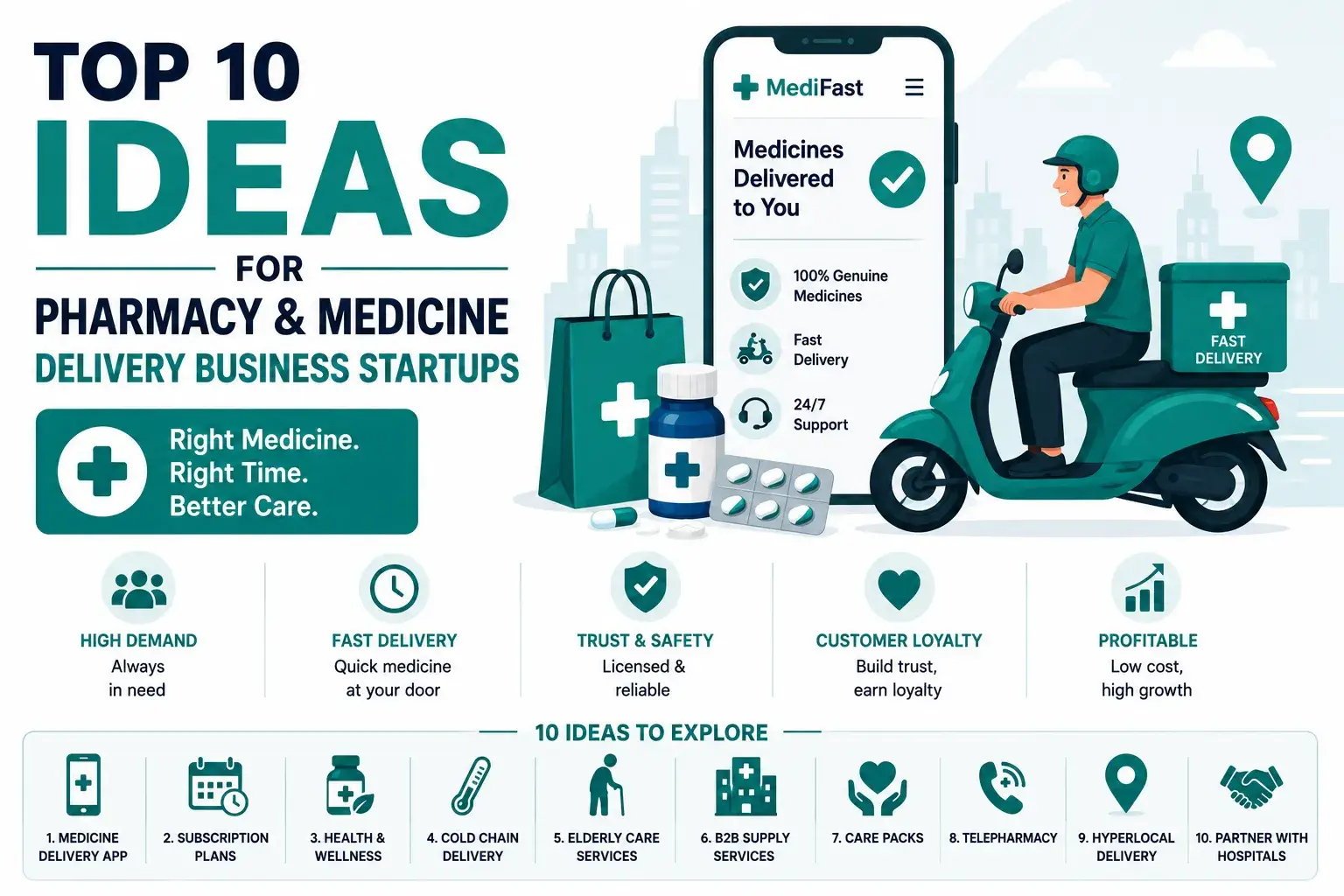
Blog posts from Miracuves on how online pharmacy apps earn, which pharmacy and medicine delivery business ideas are worth testing, and how to start an online pharmacy and delivery business.
About the product8 questions

01What is the Netmeds Clone product?

A Netmeds Clone is a finished online pharmacy marketplace you can launch under your own name. Pharmacies list medicines and health products, customers order from them, and a prescription can be attached to the order where one is needed. The pharmacy-side review flow is shown on a guided call or scoped as custom work. Couriers deliver the orders, you run everything from an admin panel, and the complete source code is yours.

02Can several pharmacies sell through the same app?

Yes. The admin creates each pharmacy, and each one then manages its own products, stock, prices and offers through a vendor panel or the store app. Customers search items and stores in a single box, and every card names the pharmacy behind it, so they know who will fill the order.

03Can shoppers compare one medicine across pharmacies?

No merged listing exists. In the demo every item has its own pharmacy, price and stock tag, and categories let shoppers toggle between lists of items and lists of stores. The same product is not ranked across pharmacies, which is why this page makes no price-comparison claim; if you need such a view, it can be scoped as custom work.

04Does the base include lab tests or doctor visits?

Neither is in the base. What the demo contains is three apps, for shoppers, pharmacies and couriers. Telemedicine is sold as an add-on module, while lab-test booking exists in neither the base nor the demo and would be priced as an additional module.

05Do shoppers get refill or medication reminders?

The base does not send them. According to the demo and release notes, a shopper can reorder from earlier orders and request an alert when a sold-out product comes back, but no refill is scheduled. Regular refills come through the Medication Subscription Plans add-on.

06Does the app read or verify prescriptions by itself?

No. A shopper attaches a prescription image to the order. Image recognition, automated verification and AI checks are not part of the product, and the platform never rules on a prescription's validity itself. How a pharmacy reviews it is shown on a guided call or scoped as custom work.

07Who holds the pharmacy licences and handles health regulation?

That sits with the operator. The software gives you the features: a prescription attached to the order, access by role and delivery verification, while the licences, the pharmacists and each country's rules stay with you.

08Which devices do the apps run on?

Both Android and iOS are covered by the Flutter apps, and the web panels run in any modern browser. We publish the apps from developer accounts that belong to you; Apple and Google decide on approval in their own time, which sits outside our 6-day build.

Prescriptions & orders7 questions

09What steps does a shopper follow to buy medicine?

A shopper searches or browses a category, opens an item, sets the quantity and puts it in the cart. Checkout then offers delivery options and payment methods, with the prescription added if the item calls for it, and the resulting order shows its details, a delivery code and the store it ships from.

10Can a shopper upload a prescription with an order?

Yes. It is attached as the order is placed, and the order details screen displays the image. What the pharmacy does with it next is shown on a guided call or scoped as custom work, and local rules about who may dispense are the operator's to follow.

11Is there a pharmacist review step for uploaded prescriptions?

The demo shows the prescription attached to the order. We walk through the pharmacy-side review flow on a guided call, and it can be tailored to your rules as scoped custom work. Whoever reviews prescriptions must be a licensed person you provide.

12How does a pharmacy keep its stock and prices current?

In the store dashboard, a pharmacy adds, edits or removes products and revises quantities and prices. A low-stock popup appears in admin and vendor panels, long lists can be ordered as you like, and discounted stock can be promoted in a clearance section on the home screen and store pages.

13Where do promo codes and discounts get created?

A store can set up promo codes, discounts and campaigns aimed at particular medicines or products. Several products fit in one flash or featured deal, admin or store may impose a minimum order amount, and free delivery can kick in once the basket passes a level you pick.

14Can a shopper reorder a past purchase?

Yes. The Orders tab keeps earlier purchases, and from release 14.0 onward each one offers reordering. When paying, a shopper can also send just part of the cart to checkout and keep the rest waiting.

15What happens when a medicine runs out of stock?

The shopper can raise a restock request, which both the admin and the store can see. When the product is back the shopper gets a notification, and requested items are kept in their profile. Earlier still, admin and vendor panels throw up a low-stock popup.

Pharmacies & couriers4 questions

16How does the operator onboard a new pharmacy?

The admin panel is multi-store by design. You create the pharmacy, look after its inventory, and follow the network's orders, revenue and traffic from one dashboard. From then on the pharmacy uses its own panel or app and has no way into the operator console.

17How does a courier take on a delivery?

A courier uses a dedicated mobile app or a web panel. Requests show up live and can be accepted or declined depending on whether the courier is free. The handover is closed with a verification code, and image plus OTP verification is the alternative.

18Do couriers get route directions?

Yes, through a mapping service. The delivery app can give turn-by-turn guidance and route suggestions via Google Maps or Apple Maps, and Google Maps appears on the integration list; you supply the account and the key.

19What if nobody answers the door?

The courier works through the procedure set up in the app, which can mean phoning the shopper, waiting a given time, or rescheduling. Each step is recorded, leaving a trail if the delivery is disputed.

Money & reports6 questions

20How can shoppers pay?

Shoppers can pay from the wallet, with cash on delivery if you turn it on, or through a gateway you connect. Typical gateways include Stripe, PayPal and Razorpay, and whether cards, UPI, wallets or net banking are offered depends on the gateway you choose. The gateway account and its KYC belong to you.

21Can customers pay cash on delivery?

Yes, once you enable it. An admin toggle for cash on delivery arrived in release 15.0, which lets markets that favor paying at the door use it while the wallet and gateways stay available.

22Which sales figures can the admin read?

Day, week and month sales totals, active user counts and best-selling items. Customer and subscriber exports accept filters and download to Excel, and release 15.0 brought in Google Analytics, Tag Manager and multiple ad pixels.

23Can staff have different permissions?

Yes. You can define roles, for instance a store manager, a pharmacist or a support agent, and choose what each is allowed to open, so people see only what their work needs.

24How soon can an online pharmacy marketplace expect its first revenue?

Commission on each order a pharmacy fulfills is where income begins, as nothing additional needs selling: the first shipped order earns it. Once stores compete for the same customers, sponsored slots and routing fees can follow, with delivery thresholds tuned beside them, and refill plans are available as a paid add-on. Find out early whether your country permits a stored wallet balance or a given promotion, and who must review a prescription before an order goes out.

25What stops an online pharmacy marketplace from being copied?

The network matters more than the feature list. A pharmacy that has entered its stock and prices adds to the range customers see, and a store that has done that rarely walks away. Shoppers with an order history, wallet funds and points also have reasons to stay, and everything is stored in your database. Handling prescriptions carefully is a second barrier, since it takes a long time to rebuild a pharmacy network people trust.

Getting live with Miracuves11 questions

26How long until my online pharmacy marketplace is live?

The ready-made package takes 6 days of Miracuves build time, covering rebranding, deployment to your hosting and publishing the apps from your developer accounts. Store review, payment gateway onboarding and signing your first pharmacies sit outside that window, and any change beyond the base gets a written quote before we start.

27Does the source code come with it?

Yes, every line. The web platform and the Flutter apps come as unencrypted source and project code, which lets your developers or ours change flows and screens as the business matures.

28What do I have to supply before go-live?

Plan to provide hosting and a domain, a verified developer account for each app store, your logo and company details, a gateway with KYC completed, third-party keys (Google Maps, Twilio or Firebase, for example), and the pharmacy licences and licensed pharmacists your market requires. Writing the privacy policy and terms is your job.

29Why would I hire Miracuves to make a Netmeds clone?

You get three apps, tools for running a pharmacy network, prescription upload, an admin panel and the entire source code, working from day one, for a fixed $2,799. Miracuves has shipped 9,000+ projects for 6,000+ clients and keeps 90+ ready-made solutions available; support gives 60 days of guidance, 6 months of priority bug fixes and 12 months of updates, all running together.

30How much does a Netmeds clone cost?

A single payment of $2,799 buys the Netmeds Clone: shopper, pharmacy and courier apps, four web panels, prescription upload at checkout and the full code. No monthly license applies. Telemedicine, refill subscriptions, interaction checks or a health dashboard can be added later as priced modules, and other changes are estimated on paper first.

31Is a ready-made Netmeds clone better than custom development?

When prescription orders need to start soon, yes. The prescription step, multi-pharmacy stock, wallet, cash on delivery and courier proof are working today, and go-live takes 6 working days. A ground-up e-pharmacy build starts with a negotiated estimate and runs about 2-8 weeks, money better kept for the features only your market needs.

32What is the business model of an app like Netmeds?

A prescription marketplace like Netmeds earns without holding stock. Listed pharmacies fill the orders, and the operator collects a commission per order, plus optional sponsored placement, routing fees, delivery charges below a free threshold and wallet top-up offers. Every rate lives in the admin panel, so you can tune it per pharmacy.

33What is the step-by-step process to launch my Netmeds clone?

1. Explore the demo as shopper, pharmacy and courier. 2. Send logo, colors, launch city, commission rates and gateway details. 3. Miracuves brands the storefront, the four panels and all three apps, then installs them on your servers. 4. Listings are filed through your Apple and Google memberships. Those two steps fit in 6 working days, and store approval timing rests with Apple and Google.

34How much does it cost to develop a medicine delivery app like Netmeds?

A ready-made Netmeds clone from Miracuves costs a single payment of $2,799, with no monthly license. The price includes the shopper, pharmacy and courier apps, four web panels, prescription upload at checkout and the full source code. Telemedicine and other extras are priced separately, and an e-pharmacy built from scratch begins with a negotiated estimate.

35Do you offer a white-label medicine delivery app?

Yes. We rebrand the storefront, the four panels and all three apps with your logo, colors and business details, then install them on your servers and publish the apps from your own developer accounts. The platform launches under your own name and takes 6 days of Miracuves build time.

36How do pharmacies register as sellers on a Netmeds-style app?

The operator creates each pharmacy in the admin panel. From then on, the pharmacy manages its own products, stock, prices and offers through its vendor panel or the store app, and it has no way into the operator console. Customers see the pharmacy named on every product card.

Disclaimer

Miracuves is an independent software development company. We are not affiliated with, connected to, sponsored by, or endorsed by Netmeds.

Read our full Legal Notice & Disclaimer →
Why this name

“Netmeds Clone” is used descriptively. It is how the software industry refers to building a platform with functionality similar to Netmeds, and how clients search for it.

Who built this

The entire design and codebase is built by our own team. The product contains no code, design, graphics, or content originating from the Netmeds website or applications.

Trademarks

Netmeds and all other third-party names and marks are the property of their respective owners, referenced here solely to describe the category of software offered.