Written by the Miracuves Editorial Team. Reviewed by Sakshi Kumari, SEO Specialist, Miracuves.
Key Takeaways
- Keep one buyer-facing order and split it twice. Create a sub-order per seller at payment, then split each sub-order into parcels once the maker knows how the goods will travel.
- Order splitting and label buying need different triggers. A confirmed payment creates seller tasks; only a packed, measured parcel should buy postage.
- Make every label purchase safe to retry. Record a purchase intent, reconcile timeouts before buying again, and keep label created, carrier accepted and delivered as separate package states.
- Track the shipping charge, the postage and the payout as three amounts. Then a cancellation or return changes only the affected line, refund and seller balance.
- Put customs data on the listing. HS code, origin and customs value drive the EU EUR 3 low-value duty and US duties now that de minimis is suspended, so they are pricing inputs.
A buyer orders a ceramic mug, a personalized notebook and a pair of earrings in one checkout. The mug is ready but needs protective packaging. The notebook will not be ready for four business days. The earrings leave from a different city. If the checkout promises one delivery date, or the backend generates one label for the whole basket, the mistake is already in the order before any maker starts packing.
If you are building a handmade marketplace, this is the problem to solve before you pick a carrier. After reading, you should be able to decide which records one purchase becomes, when postage gets bought, what the buyer sees while parts of the order are still in a workshop, and how refunds and payouts stay attached to the right line.
Two workflows are involved. Multi-vendor order splitting assigns purchased items to the sellers responsible for them. Shipping label automation turns a confirmed parcel into a postage purchase and a tracking record. They share identifiers, but not a trigger: buying postage the moment a buyer pays is a poor fit for goods that still need to be made or measured.
One checkout, several records
The buyer wants one place to review what they bought. The seller wants a task that contains only the products they must prepare. Support wants to find the payment, every affected item and every shipment without asking the buyer for three order numbers. One flat order record cannot serve all three.
A parent order for the purchase, sub-orders for seller work
The parent order holds the checkout reference, order-level totals and a summary of fulfillment progress. Each seller sub-order holds that seller’s lines, quantities, dispatch commitments and financial allocations. Store the seller identity and listing details as they were at checkout, so a later listing edit cannot change who owes the item or what the buyer agreed to buy.
A sub-order is an operational boundary, not necessarily a separate customer payment. Whether the buyer sees one charge or several depends on the checkout, the payment provider and the merchant arrangement. Do not assume that creating a seller record also creates a new payment or seller transfer.
Large handmade marketplaces already work this way from the buyer’s side. On Etsy, a cart with items from several shops is divided up by shop, and the buyer gets a separate email for each shop they bought from. You do not have to copy that experience, but the record structure underneath is the same: one purchase, several seller-owned fulfillment tasks.
Split again by parcel once you know how the goods travel
A seller may ship two items together or in separate boxes. A framed print needs a flat package while a ceramic piece from the same shop needs cushioning and a larger carton. So a sub-order must support several shipments, each with explicit line quantities. A seller with more than one dispatch location is another reason for separate shipments.
Do not combine goods from different sellers just because they share a destination. Consolidation is its own operating model: someone has to receive, inspect, combine and dispatch the goods. Without that physical handoff, a shared label is not a shipping strategy.
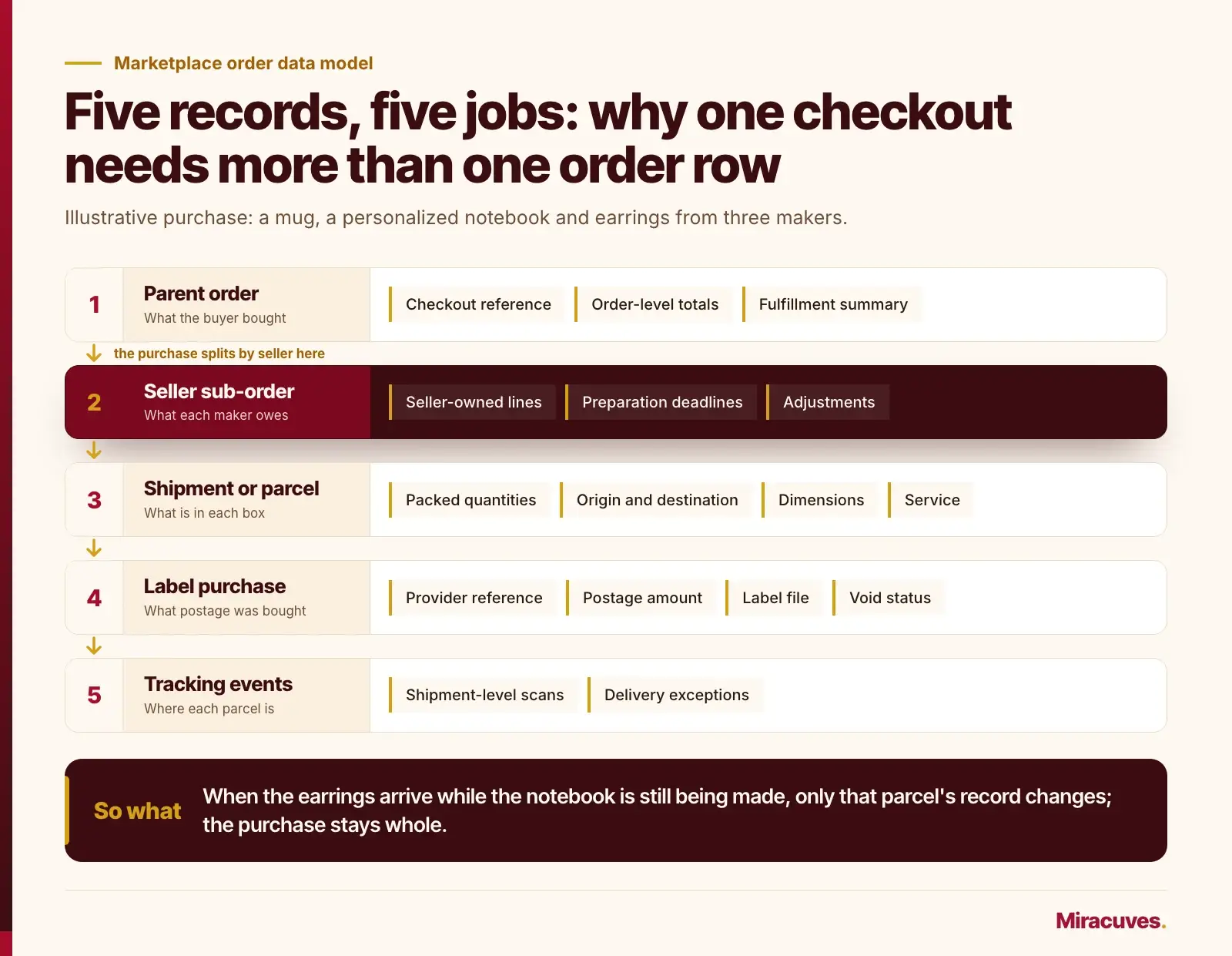
| Record | What it owns | Example |
|---|---|---|
| Parent order | Buyer-facing purchase and checkout references. | One purchase containing a mug, notebook, and earrings. |
| Seller sub-order | Seller-owned lines, preparation deadlines, and adjustments. | The notebook maker receives only the personalized notebook line. |
| Shipment or parcel | Packed quantities, origin, destination, dimensions, and service. | One maker sends a framed print and a ceramic piece in separate boxes. |
| Label purchase | Carrier or provider reference, postage amount, label file, and void status. | A label is replaced after the maker corrects the parcel dimensions. |
| Tracking events | Shipment-level scans and delivery exceptions. | The earrings are delivered while the notebook is still in production. |
Splitting the order without losing what the buyer agreed to
The split has to preserve physical and financial facts. If the buyer bought three units, they cannot become four across seller and parcel records. If the buyer used an order-wide discount, the platform needs to know how much of it applied to a line that is later cancelled.
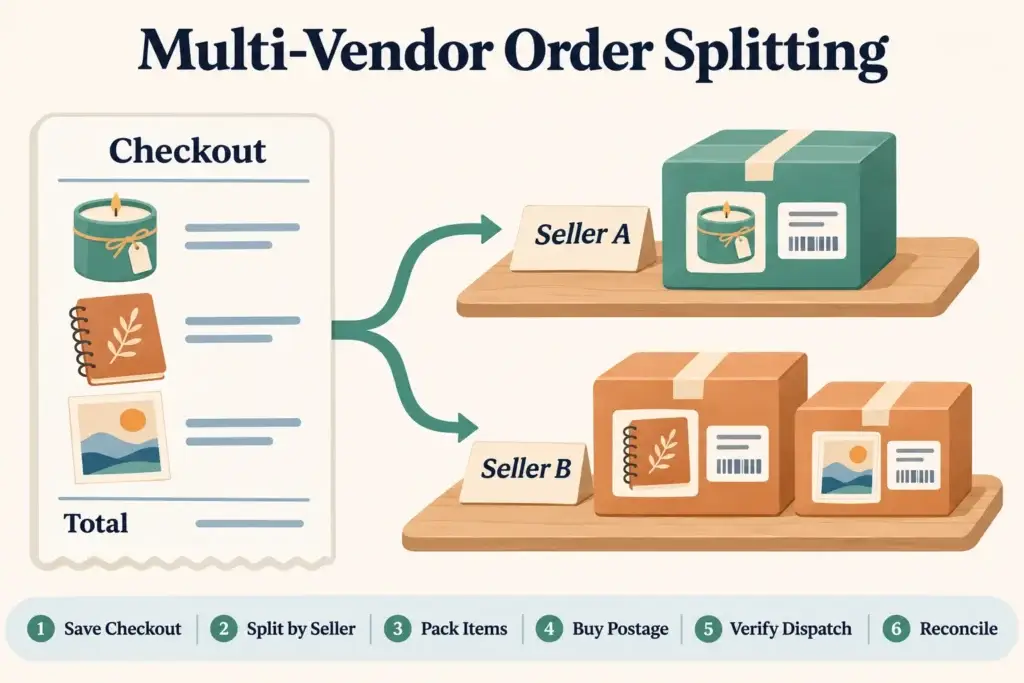
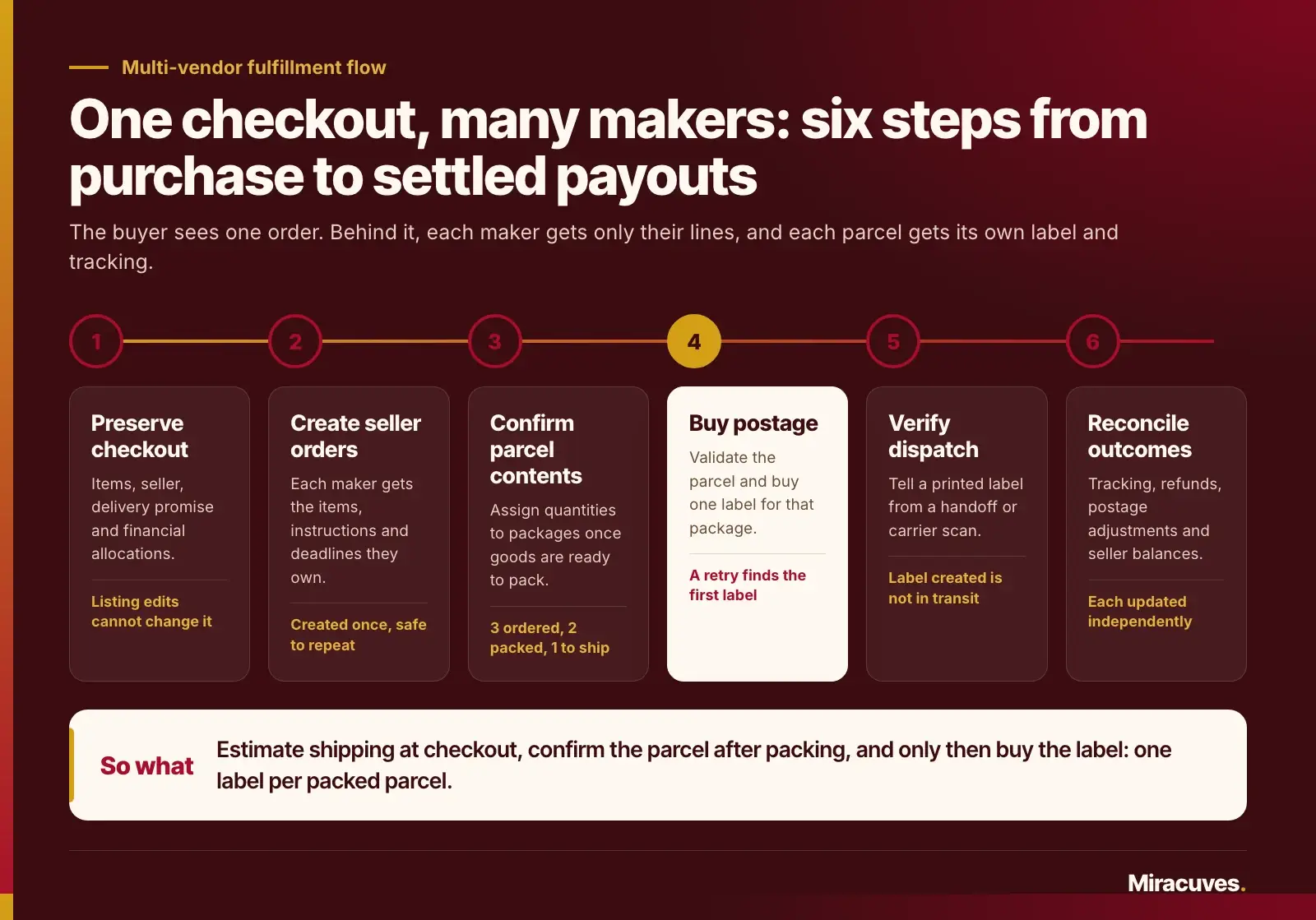
A Practical Multi-Vendor Fulfillment Flow
1. Preserve checkout: Record purchased items, seller ownership, delivery promises, and financial allocations.
2. Create seller orders: Route each maker the items, instructions, and deadlines they own.
3. Confirm parcel contents: Assign quantities to packages after the goods are ready to pack.
4. Buy postage: Validate the parcel and purchase one label for the intended package.
5. Verify dispatch: Distinguish a printed label from a handoff or carrier scan.
6. Reconcile outcomes: Update tracking, refunds, postage adjustments, and seller balances independently.
Step 1: Save the checkout as it happened
Record the seller, variant, personalization instructions, quantity, item price, discount allocation and quoted shipping for each line or fulfillment group, plus the delivery promise and the destination used to produce it. The engraving text for a personalized notebook belongs on the purchased line; editing the listing later must not change it.
Show delivery expectations by seller before payment, with production time separate from transit time.
Step 2: Create each seller sub-order exactly once
Group eligible lines by the seller recorded at checkout and create the sub-orders when the purchase reaches your defined fulfillment-ready state. Make the operation idempotent: if the payment provider delivers the same confirmation twice, the system finds the existing sub-orders instead of sending duplicate packing tasks.
Publish seller tasks only after the split is committed. If a notification fails, retry the notification, not the order creation.
Step 3: Show makers what is ready, due or blocked
A ready-to-ship candle goes straight to packing; a custom notebook may need a personalization check first. Give makers a deadline and a way to flag missing instructions, shortages or delays. When a promise slips, update only the affected lines and show the buyer the options, such as a new date or cancelling. The key design decision here is which seller state permits a postage purchase.
Step 4: Reconcile quantities before a parcel becomes a shipment
When the maker confirms a box, record which lines and quantities are inside. If three prints were ordered and two go in the first parcel, the dashboard should show one left to ship. A generic “fulfilled” checkbox hides the difference between the first package and the whole seller order.
The same rule applies to changes. An unshipped item can leave the parcel plan if its cancellation is still eligible. A shipped item needs a return or another resolution, not a silent edit to its packing record.
When to buy the label, and how to avoid buying it twice
Separate three actions: estimate shipping at checkout, confirm the parcel after packing, and buy a label for the chosen service. The estimate is a commercial decision made for the buyer. The label is a purchase based on real shipment inputs. A gap between them is an exception to account for, not a reason to rewrite the amount the buyer approved.
The label step runs through a shipping API: a direct carrier integration such as USPS, UPS or FedEx, or a multi-carrier service such as Shippo, EasyPost or ShipStation. Each label call returns the rate, the label file and a tracking number, stored against that parcel, and rates are shopped per parcel: a flat print and a padded ceramic box from one basket rarely share a cheapest service.
| Integration option | What it gives you | What to plan for |
|---|---|---|
| Direct carrier API (one carrier) | Carrier-specific services, negotiated rates on your own account, and the full tracking event detail that carrier exposes. | A separate integration, credential set, and label format for every carrier you add. Rate shopping across carriers is your own code. |
| Multi-carrier shipping API | One integration for rates, labels, tracking webhooks, voids, and return labels across several carriers, so the platform can compare services per parcel. | Per-label or subscription fees, the provider’s supported carrier list by country, and how it reports carrier adjustments back to you. |
| Seller’s own carrier account or external label | Makers keep existing discounts and habits, and the platform avoids holding postage balances. | You only see what the seller enters. Require a valid tracking number per parcel and the item quantities it contains, or the order record has gaps. |
Shipping profiles for quotes, real measurements for labels
Shipping profiles capture dispatch origins, processing times, eligible destinations, supported services and packaging defaults. A default weight is fine for quoting, but a padded mug in a double-wall box can cost more to ship than its product weight suggests.
Before purchase, validate sender and destination, confirm packed weight and dimensions, and check service eligibility. Never switch an address silently after validation; ask. For international parcels, block the purchase until the customs data described below is complete.
Automate service selection only inside agreed rules
The cheapest service may miss the promised window or lack the tracking the order needs. Define eligible services first, then choose on cost, delivery estimate and any signature requirement. Repeatable parcels with reliable defaults can be selected automatically; a high-value piece, an odd-shaped package or a rate above the seller’s threshold goes to review. Keep the rules per category, so a stationery default never applies to fragile ceramics.
Make label purchase safe to retry
A maker clicks Buy Label and the screen times out. The provider may already have accepted the purchase; sending the same request again could charge for two labels. Record a purchase intent for the parcel first, and use the provider’s idempotency key or reference field where it offers one.
While the outcome is unknown, show the purchase as pending and check the provider’s records before trying again. If the provider cannot confirm whether the first request succeeded, send it to manual review rather than buying again automatically. A reprint retrieves the same document; a replacement is a separate purchase with its own record.
A void is a request, not a guaranteed refund
If a maker spots a wrong weight or address before dispatch, they request a void and buy a corrected label. Keep both records and mark which is active; carrier rules decide whether the old postage is refunded, so track the void result separately. Labels also carry buyer addresses: check permissions before serving one, so no seller can fetch another maker’s label by changing an order ID.
International parcels: customs data and who pays at the border
International orders add a step that domestic ones skip. A parcel of goods crossing a customs border needs a customs declaration before a label can be bought, and the declaration needs facts the maker knows about the product, not the parcel. Capture them on the listing and confirm them at packing.
Postal shipments use the Universal Postal Union declarations: the short CN 22, and the longer CN 23 when the declared value of the contents exceeds 300 SDR (special drawing rights) or the sender prefers it. In the United States, PS Form 2976 is the CN 22 and PS Form 2976-A is the combined customs declaration and dispatch note; the USPS International Mail Manual sets which form each service requires, and Priority Mail International uses 2976-A at every value. Couriers use a commercial invoice. A shipping API generates these only from the data your platform supplies.
| Data | Where to capture it | Why it matters |
|---|---|---|
| Plain-language item description and materials | Listing, editable by the maker | “Gift” or “handmade item” is not an acceptable customs description. “Glazed stoneware mug” is. |
| Harmonized System (HS) code | Listing, with a category default the maker can override | Drives the duty rate at the destination. Wrong codes cause delays and reassessed duties. |
| Country of origin | Listing or maker profile | Required on declarations and used in duty and trade-rule decisions. |
| Customs value per line | Order line at checkout | Must match what the buyer paid for that item, after its share of any discount. |
| Parcel weight and contents | Parcel at packing | Each parcel needs its own declaration listing only the items inside it. |
| Duty and tax arrangement | Checkout and shipping profile | States whether the buyer pays at delivery or the platform collects at checkout. |
EU and US rules that change the checkout (as of November 2026)
Selling into the European Union: since 1 July 2021 the EU no longer exempts low-value imports from VAT, and the Import One-Stop Shop (IOSS) lets a seller or marketplace collect import VAT at checkout for consignments with an intrinsic value of up to EUR 150. Marketplaces facilitating these sales carry VAT obligations of their own, so decide early whether you register for IOSS or leave buyers to pay import VAT on delivery, often with a carrier clearance fee on top.
Since 1 July 2026 the EU also charges a temporary EUR 3 customs duty on parcels worth up to EUR 150, scheduled to run until 1 July 2028. It is set per tariff classification, not per unit, and the seller or importer declares and pays it. A parcel with two mugs owes EUR 3; a parcel with two mugs and a scarf owes EUR 6. That makes the HS code on each listing a pricing input, not just paperwork.
Selling into the United States: duty-free de minimis treatment for shipments of $800 or less was suspended for all countries from 29 August 2025. On 24 June 2026, U.S. Customs and Border Protection published interim final rules making the suspension indefinite for postal and non-postal shipments and adding a postal informal entry process. Low-value parcels from makers outside the US are therefore dutiable. Check CBP’s e-commerce FAQs for the current entry process before writing checkout copy.
The practical rule for a marketplace: let each maker choose the destinations they serve, refuse to buy an international label while any required customs field is empty, and show the buyer the duty and tax arrangement before payment, not after the parcel is held at the border.
Package-level tracking the buyer can follow
A label purchase means a shipping document exists, not that the carrier has the box. Keep “label created” separate from a seller-reported handoff and from carrier acceptance. Showing “in transit” too early sends buyers to support about parcels still in the workshop.
Group the buyer’s order by maker and package. Each package shows the items inside, the delivery estimate if there is one, and the latest meaningful tracking event. The parent order can summarize (“one of three packages delivered”) without hiding an item still being made.
Verify tracking webhooks with the provider’s signature method, and expect duplicate and late events. If an older “in transit” scan arrives after a delivery scan, do not move the package backward because the webhook came later. Handle genuine carrier corrections through a separate, logged path.
| What happened | What the buyer should see | What operations should check |
|---|---|---|
| Label bought, no acceptance scan | Label created or awaiting carrier acceptance. | Whether the seller handed over the parcel and whether a scan is overdue. |
| One maker ships two parcels | Two package records with the relevant items and tracking. | Whether all ordered quantities are allocated without duplication. |
| One parcel is delivered | Delivery for that package, not the entire purchase. | What remains in production, in transit, or under review. |
| Address exception or return to sender | An exception status and the next action, if one is available. | Whether the carrier, maker, buyer, or support team must act. |
| One seller cancels before shipping | The affected item and refund status; other shipments remain visible. | Refund allocation, unused postage, and seller-balance adjustments. |
Shipping charge, postage and payout are three different numbers
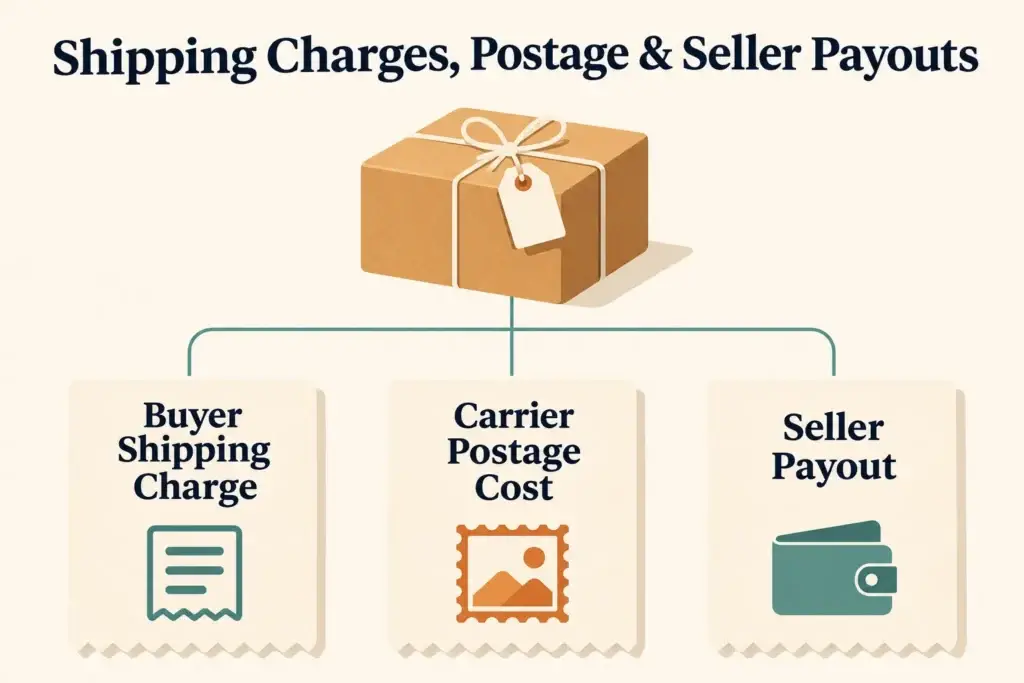
On the same parcel, what the buyer paid for shipping, what the carrier charged for postage and what the seller finally receives can all differ. A free-shipping promotion sets the first to zero while the carrier still bills the label. Record who absorbs that cost instead of inferring it from the checkout total.
Pick a documented allocation policy for order-wide discounts and shipping subsidies. Where rounding leaves a remainder, assign it deterministically so seller-level records add back to the checkout total. Decide too whether shipping counts toward the fee basis and who bears a carrier adjustment after dispatch; these are policies to record, not something a label API decides.
Later changes arrive as separate adjustments tied to the original order, parcel and payment references: a postage correction after the carrier measures the box, a void refund that settles after the buyer refund, a payout already sent before an exception closes. If the seller has been paid, follow the agreed policy and the payment provider’s supported process rather than assuming a transfer can be reversed. Holding, releasing and clawing back seller funds is covered in the guide to automated vendor payouts and escrow.
A worked example: three makers, four parcels, one partial refund
Take an illustrative checkout with three makers. The potter has two mugs that need separate protective boxes. The notebook maker has one personalized item. The jeweler has one pair of earrings. The platform creates one parent order and three seller sub-orders, and the first fulfillment plan has four parcels, not three, because the potter needs two boxes.
The potter buys two labels after confirming both boxes. The request for the second one times out. The parcel stays in a purchase-pending state, the app looks up the provider record and retrieves the label that was in fact created, instead of buying another.
The notebook maker then reports that the chosen cover material is out of stock. The buyer declines an alternative and cancels the line before packing, so there is no label to void. Assume the notebook was $30, its allocated share of the discount $3, and the policy refunds its $5 shipping charge: the refund is $32 before any tax adjustment. The pottery and jewelry orders carry on unchanged.
The earrings arrive first. The buyer sees one delivered package, two pottery packages in progress and a cancelled notebook with its own refund status. The point of the split is not that the buyer sees three orders; it is that one problem does not distort the rest of the purchase.
Return labels run the split in reverse
The buyer still sees one order, but a returned item goes back to the maker who shipped it, to the address that maker approves, under the return policy that applied to that line at checkout. Personalized and made-to-order items are often excluded from change-of-mind returns, so store return eligibility on the order line instead of reading it from the current listing.
- Authorize per line, not per order. The buyer picks items and quantities; the system checks each line’s eligibility and window and creates a return record linked to the original sub-order and parcel.
- Issue the label against the maker’s return address. Multi-carrier APIs can build a return label from the original shipment. In Shippo’s API, for example, you mark a new shipment as a return and the addresses are swapped for you.
- Prefer pay-on-use labels for buyer-initiated returns. Shippo’s USPS, UPS and FedEx return labels are scan-based: free to print and charged only if used, so a label the buyer never sends needs no void.
- Record who pays return postage. A damaged or wrong item is usually charged to the maker or the platform, a change of mind to the buyer. Keep that as its own adjustment, separate from the item refund.
- Choose the refund trigger. Refund on the first carrier scan for low-value items, or on receipt and inspection for fragile or high-value pieces, and show the trigger to both buyer and maker.
An exception queue operators can act on
Operators need one timeline joining seller orders, parcel contents, label references, tracking events and payment adjustments, and a clear owner for each exception. An address problem may need the buyer. An overdue dispatch belongs to the maker. A label purchase with an unknown outcome goes to whoever can reconcile the shipping account.
Make high-impact actions permission-based. When an operator overrides a dispatch state, reassigns a case or approves a refund, record who acted, what changed and why. These pilot metrics show whether the automation is working:
| Pilot metric | Suggested definition | What it helps diagnose |
|---|---|---|
| On-time dispatch rate | Eligible shipments handed off by the promised dispatch deadline, divided by eligible shipments due. | Unrealistic production promises, packing delays, or carrier handoff problems. |
| Unresolved label-purchase rate | Purchase attempts still awaiting reconciliation after the defined review window, divided by purchase attempts. | Integration timeouts and missing provider references. |
| Duplicate postage incidents | Confirmed unintended extra purchases for the same parcel. | Unsafe retries or accidental replacement purchases. |
| Postage variance | Actual postage, including confirmed adjustments, compared with the expected cost for the shipment. | Inaccurate packaging defaults and rate assumptions. |
| Partial-refund reconciliation time | Time from an approved partial refund to matched buyer and seller records. | Slow payment handling or unclear allocation rules. |
Break the numbers down by seller, category and service: a network-wide average can hide one fragile-goods category that keeps drawing carrier adjustments.
Common mistakes, and what to automate first
Buying every label at checkout
The buyer’s payment does not prove the item is made or that the box size is known. Prepare a shipment draft if it saves work, but wait to purchase postage until the parcel and service inputs are verified.
Assuming one seller always equals one package
The seller is responsible for the items; the parcel is how they travel. Model both. Otherwise, the platform may mark an entire seller order shipped after issuing the first label, even when some quantities remain at the workshop.
Treating estimated shipping as final postage
Packaging, service changes, and carrier adjustments can alter the cost. Reconcile that difference under a documented policy instead of retroactively changing what the buyer agreed to pay.
Overwriting the parent order with the latest package status
One delivery scan cannot close an order that still has undelivered or unresolved items. Calculate the summary from the underlying packages, lines, and exceptions; do not copy the latest event onto the purchase as a whole.
Checking a feature list instead of running a fulfillment test
A product may support multi-vendor checkout without supporting multiple parcels per maker, asynchronous label recovery, or line-level refunds. Ask for a demonstration of your actual order scenario. Treat anything not shown or documented as a scope question, not a bundled capability.
What to automate first depends on where makers lose time. If sellers copy addresses by hand, fixing the order-to-parcel handoff is worth more than adding another carrier:
Mostly Made-to-Order Goods
Start with production status and dispatch deadlines. Create parcel drafts early if useful, but purchase postage after the maker confirms readiness.
Repeatable Packaging
Pilot automatic service selection for verified box profiles and straightforward destinations. Keep a review path for unusual rates or measurements.
Frequent Partial Cancellations
Fix line-level allocation, refund visibility, and seller balance records before introducing more promotions or carrier services.
Mixed Seller Shipping Tools
Allow verified external tracking where appropriate, then bring common shipment patterns into the integrated label flow as sellers adopt it.
Whatever you start with, roll it out in phases and do not move on until the previous phase holds:
- Seller allocation and buyer visibility. With a few makers, run test baskets with several sellers and personalization. Check that sub-orders are created once and each dashboard shows only its own lines.
- Labels with seller review. Makers confirm address, dimensions, weight and service before purchase. Test a multi-parcel sub-order, a reprint, a replacement and an unknown purchase outcome.
- Tracking and refunds together. Deliver one parcel while another is delayed, cancel an unshipped line, and send a shipping adjustment after payout. Late scans should not corrupt status, and support should be able to rebuild the partial refund.
- Expand what proved reliable. Automate only the parcel types and routes that worked in the pilot. Keep manual review for odd dimensions and incomplete customs data.
Where Miracuves fits
Miracuves builds handmade marketplaces on a ready-made handmade marketplace foundation and extends it through marketplace development where the shipping work goes beyond it. Bring three real cases to the first conversation: a basket with several makers, a seller order that needs more than one parcel, and a cancellation that affects only part of a purchase. We will show which steps the foundation already handles and which need extra carrier, seller or finance integration.
Frequently Asked Questions
How does multi-vendor order splitting work?
The marketplace keeps one buyer-facing parent order and creates a sub-order for each seller, holding that seller’s items, quantities, deadlines and financial allocations. Once the seller knows how the goods will travel, each sub-order is split again into parcels with their own labels and tracking. The buyer still sees one order history with every item in it.
Can one seller order have more than one shipping label?
Yes. A single seller order can ship in several parcels, for example a flat print and a cushioned ceramic box, and each parcel needs its own label and tracking number. Record which line quantities sit in each parcel so the dashboard shows what has shipped and what is still in the workshop. A reprint should return the same label, not buy a new one.
When should a marketplace buy shipping labels automatically?
After the seller has confirmed the parcel contents, origin, destination, packed weight, dimensions and an eligible service. Payment alone is too early for handmade goods that still need to be made, personalized or packed. Repeatable parcels with reliable box profiles can be bought automatically; high-value, unusual or over-budget parcels should go to seller review first.
How do you stop a marketplace from buying duplicate shipping labels?
Record a purchase intent for the parcel before calling the provider and use its idempotency key or reference field where one exists. If the request times out, mark the parcel as purchase pending and check the provider’s records before trying again. Send unclear cases to manual review, and make reprints retrieve the existing label instead of creating a new purchase.
Why is the shipping charge at checkout different from the label cost?
The buyer’s shipping charge comes from the checkout policy, while the label cost depends on the carrier service and the real packed weight and dimensions. Free-shipping promotions, packaging and later carrier adjustments all open a gap. Record that gap as a separate adjustment and note who bears it, the seller or the platform, rather than rewriting what the buyer paid.
Who pays customs duty on a handmade item shipped to the EU or the US?
It depends on how the platform sets up checkout. In the EU, IOSS lets the seller or marketplace collect import VAT up front for parcels up to EUR 150, and a temporary EUR 3 duty per tariff classification applies from July 2026. In the US, de minimis is suspended, so low-value parcels are dutiable. Tell buyers before payment who pays and when.
Miracuves is an independent software development company. We are not affiliated with, connected to, sponsored by, or endorsed by any company or product named in this article.
Terms such as “X Clone” are used descriptively. It is how the software industry refers to building a platform with functionality comparable to a known service, and how clients search for it.
The entire design and codebase of our products is built by our own team. Our products contain no code, design, graphics, or content originating from any third-party website or applications.
All third-party names and marks referenced in this article are the property of their respective owners, referenced solely to identify the services discussed.