Key Takeaways
- An AI app builder needs more than a prompt box and code-generation model.
- The architecture must connect prompts, project files, previews, editing, and deployment.
- Project isolation protects user code, uploaded files, credentials, and runtime environments.
- Model routing helps balance generation quality, response speed, and AI usage costs.
- Reliable previews and functional outputs matter more than visually impressive first results.
Architecture Signals
- Check how the platform converts user prompts into structured development tasks.
- Review code generation, file management, version history, and regeneration workflows.
- Test live previews, runtime isolation, error handling, and debugging feedback.
- Verify deployment pipelines, environment variables, hosting limits, and rollback support.
- Confirm the admin dashboard tracks users, projects, model usage, failures, billing, and abuse.
Real Insights
- Fast code generation has limited value if users cannot edit or deploy the result.
- Failed generations still consume AI tokens, runtime resources, and support time.
- A focused first audience makes platform workflows easier to design and validate.
- AI-generated applications still require security checks, testing, and human review.
- Miracuves develops AI app builder platforms with prompt workflows, previews, deployment, billing, and admin control.
AI app builders are changing how founders, developers, agencies, and product teams think about software creation. Instead of starting with a blank code editor, users can describe what they want, generate an application structure, preview the result, make edits, and move closer to deployment from one workspace.
But the real value of an AI app builder platform is not the prompt box alone.
A prompt box is only the visible layer. Behind it sits a much deeper product system: prompt interpretation, AI model orchestration, project scaffolding, code generation, file management, live preview, deployment logic, user accounts, billing, credit tracking, security controls, and an admin dashboard.
That is why founders exploring AI software builder products should understand the platform architecture before thinking about features or pricing. A successful prompt-to-app platform needs to work reliably for real users, not just create an impressive demo.
For founders who want a faster launch path, Miracuves offers a ready-made AI app builder platform foundation that can be customized into a branded AI app builder platform.
What Is an AI App Builder Platform?
An AI app builder platform is a software product that helps users create applications through natural language prompts, guided editing, templates, and automated development workflows.
The user may begin with a prompt such as:
“Build a CRM dashboard for a small sales team with leads, deal stages, notes, reminders, and analytics.”
The platform then interprets the request, generates the application structure, writes code or configuration, creates interface components, sets up files, and gives the user a way to preview and improve the output.
A basic AI builder may only generate a frontend screen. A stronger platform supports the AI app builder platform features needed to manage the full product loop:
- Prompt input
- Requirement interpretation
- Project generation
- Code and file creation
- Live preview
- Error handling
- Editing and regeneration
- Deployment or export
- User account management
- Billing and usage control
- Admin visibility
This is why founders should think of AI app builders as SaaS platforms, not just AI tools. The business needs a reliable product layer around the AI engine, while the detailed product modules, user flows, and feature-level capabilities should be explored on the dedicated feature page.
Why Prompt-to-App Platforms Are Becoming a Serious Product Category
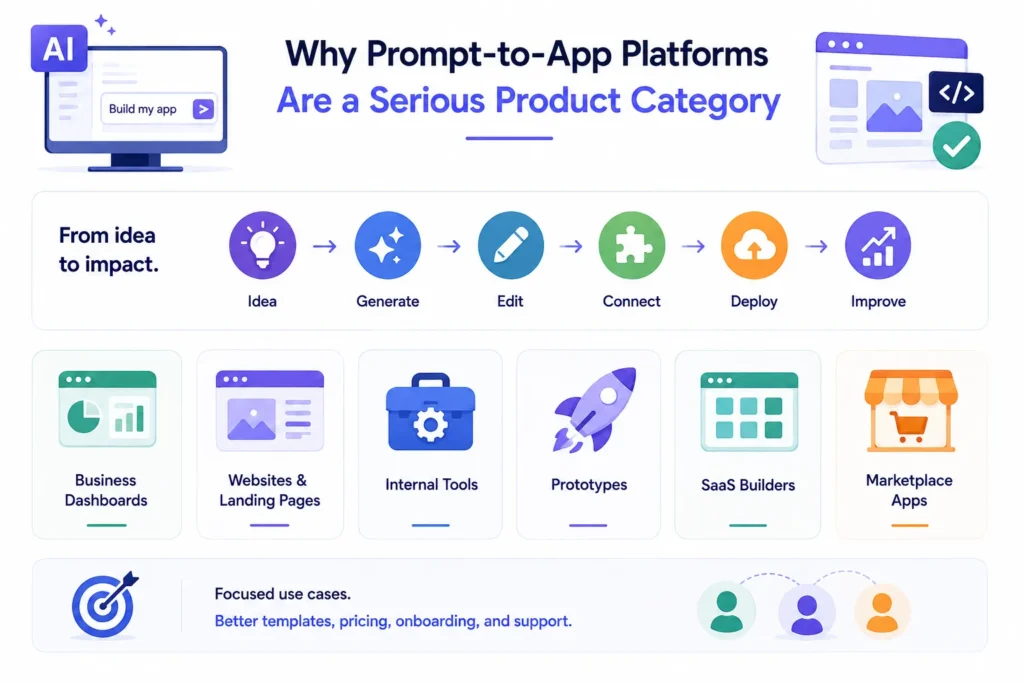
The demand for AI app builders is rising because software creation has always had friction. Founders need prototypes. Agencies need faster delivery. Internal teams need dashboards and tools. Non-technical operators need a way to turn ideas into working products without depending on long development cycles for every small experiment.
AI app builders reduce the gap between idea and execution.
However, they also create a new set of expectations. Users do not only want a generated screen. They want the platform to remember the project, let them edit it, fix errors, connect tools, deploy it, and keep improving it over time.
That shift creates opportunity for founders who want to build focused AI builder platforms for specific audiences.
For example, instead of building a generic tool for everyone, a founder may create:
- An AI app builder for small business dashboards
- An AI website and landing page builder for agencies
- An AI internal tools builder for operations teams
- An AI prototype builder for startup founders
- An AI SaaS builder for niche workflows
- An AI marketplace builder for service businesses
The more focused the use case, the easier it becomes to design templates, pricing, onboarding, prompts, and support workflows around a clear user segment.
Read More: AI App Builder vs Traditional Development: Which Approach Is Better for Fast Product Launches?
The Core Architecture Behind an AI App Builder Platform
An AI app builder platform has multiple layers working together. If one layer is weak, the user experience breaks quickly.
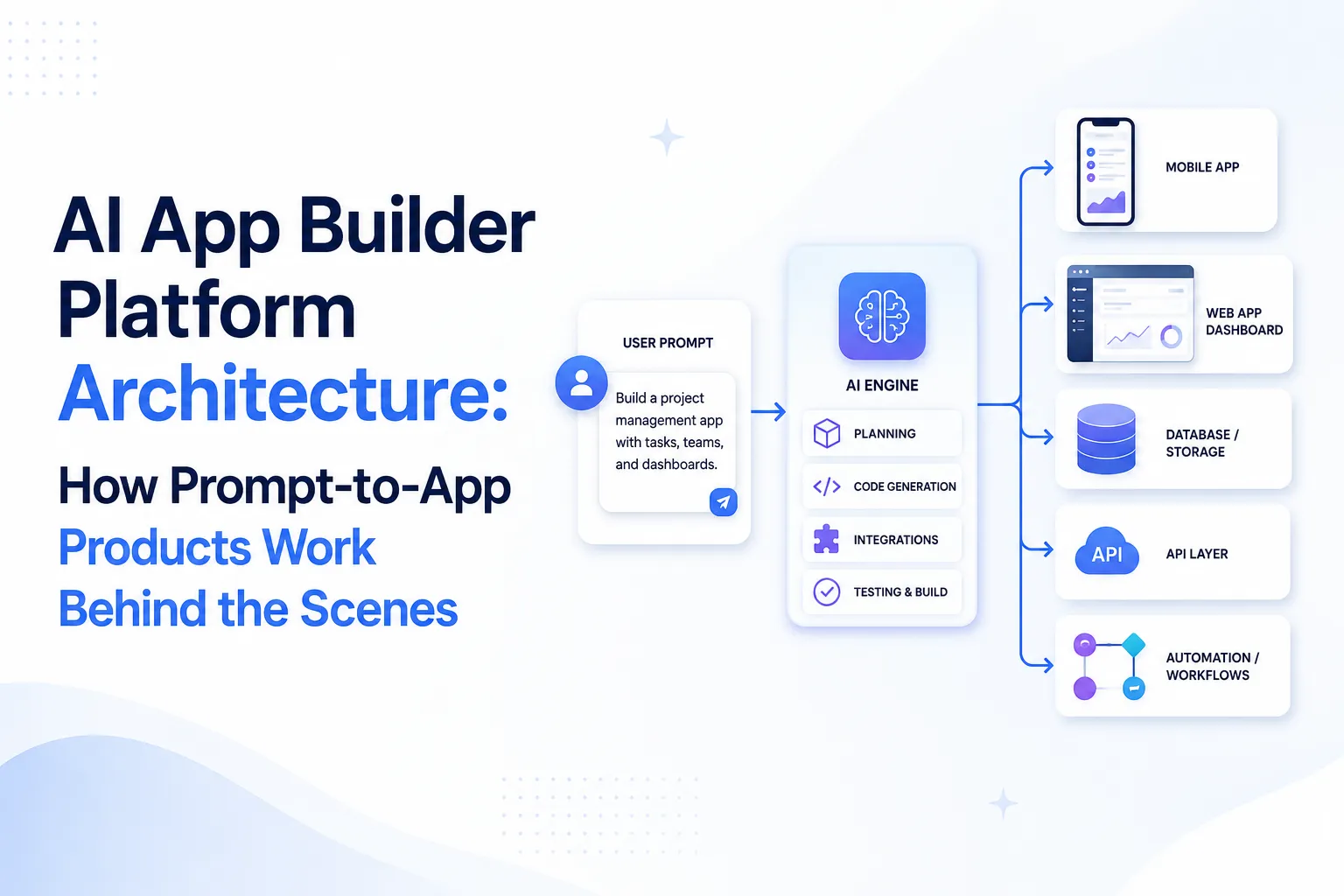
A user may think they are simply typing a prompt. In reality, the platform must convert that prompt into structured product requirements, pass those requirements to an AI model, generate usable files, run the project safely, display a preview, track usage, and store the entire workspace.
Here is the simplified architecture.
AI App Builder Platform Architecture Layers
| Architecture Layer | What It Does | Why It Matters for Founders |
|---|---|---|
| Prompt Input Layer | Captures user instructions, files, references, and follow-up requests. | Better prompts produce better outputs and reduce failed generations. |
| Prompt Processing Layer | Converts raw user language into structured tasks, app goals, components, and constraints. | This improves output consistency and reduces vague AI responses. |
| AI Model Orchestration | Routes requests to selected AI models for planning, coding, debugging, or refinement. | Model routing helps balance output quality, speed, and AI usage cost. |
| Code Generation Engine | Creates application files, components, logic, styles, and configuration. | This is the core product experience users judge first. |
| Project Workspace | Stores files, versions, project history, user edits, and generated assets. | Users need continuity instead of restarting after every prompt. |
| Live Preview Environment | Runs or renders the generated project so users can test the output. | Preview quality directly affects trust and retention. |
| Deployment and Export Layer | Lets users publish, export, or connect generated projects to hosting workflows. | Deployment turns the platform from a toy into a business tool. |
| Billing and Usage Metering | Tracks plans, credits, tokens, generations, limits, and upgrades. | Without usage control, AI costs can damage margins. |
| Admin Dashboard | Gives the operator control over users, plans, models, templates, usage, and system settings. | Admin control helps founders manage growth without developer dependency. |
How the Prompt-to-App Workflow Works
The user-facing workflow should feel simple. The backend workflow is not simple.
A strong prompt-to-app platform usually follows this sequence:
- The user describes the product idea.
- The platform identifies the app type, required pages, data structure, user roles, and core flows.
- The AI model creates an initial plan or project structure.
- The code generation engine creates files, components, routes, styles, and configuration.
- The project preview environment runs the output.
- The user reviews the result and asks for changes.
- The AI edits specific files instead of regenerating everything from zero.
- The platform stores project history, usage, and versions.
- The user exports, deploys, or continues improving the application.
The most important part is continuity. If every prompt destroys the previous work, users lose trust. A better platform understands context, keeps project history, and applies changes in a controlled way.
This is where many AI builder products fail. They generate something impressive once, but struggle when the user asks for practical changes such as:
- Add login
- Connect a database
- Fix this error
- Change the pricing page
- Add a dashboard chart
- Make the app mobile responsive
- Create a different user role
- Add export functionality
A serious AI app builder platform must handle iteration, not just first output.
Why the Live Preview Environment Is a Business-Critical Layer
Live preview is one of the biggest trust builders in an AI app builder.
Users want to see the result immediately. They do not want to download files, install dependencies, run commands, and troubleshoot local setup just to check whether the generated app works.
A live preview environment allows users to interact with the generated project inside the browser. This makes the product feel fast, practical, and accessible.
But preview systems also create technical and business risks.
The platform operator must think about:
- How projects run safely
- How broken code is handled
- How dependency errors are shown
- How preview sessions affect infrastructure cost
- How long preview environments stay active
- How user-generated code is isolated
- How logs and errors are captured
- How the system prevents abuse
For founders, preview quality can decide retention. If users repeatedly see broken screens, unclear errors, or slow loading, they may not trust the platform even if the AI model is strong.
AI Model Orchestration: Why One Model May Not Be Enough Forever
An AI app builder platform depends heavily on model quality. Different models may perform better for different tasks.
One model may be better at planning. Another may be better at frontend code. Another may be better at debugging. Another may be more cost-efficient for simple edits.
That is why model orchestration matters.
In the early version of a platform, founders may start with one primary AI model to simplify development and cost control. As the platform grows, multi-model routing can help improve reliability and manage operating cost.
Model orchestration can support:
- Task-specific model selection
- Fallback models when one provider fails
- Lower-cost models for simple edits
- Higher-quality models for complex generation
- Per-plan model access
- Usage limits by subscription tier
- Admin control over model availability
This is not only a technical decision. It affects pricing, margins, user satisfaction, and platform positioning.
A free user may not need access to the most expensive model. A team or enterprise user may expect better model quality, faster generation, higher usage limits, and stronger support.
Read More:What Is an AI App Builder and How Does It Turn Prompts Into Working Applications?
The Admin Dashboard Is Where the Business Actually Runs
Many founders focus on the builder interface because that is what users see. But the admin dashboard is where the platform becomes manageable as a business.
The admin panel should give the platform operator control over:
- Users
- Plans
- Credit limits
- AI model access
- Templates
- Generated projects
- Usage analytics
- Billing settings
- Feature access
- Support visibility
- Abuse monitoring
- Deployment settings
- System configuration
Without admin control, every small operational change becomes a development request. That slows growth and creates dependency on the technical team.
For an AI app builder platform, admin control is especially important because AI usage has a direct cost. If users can generate unlimited outputs without metering, the business model can break quickly.
A founder should be able to answer:
- Which users consume the most AI credits?
- Which plans are profitable?
- Which templates generate the most activity?
- Which models are too expensive for low-tier plans?
- Where are users failing during generation?
- Which prompts create the most support issues?
These answers help the operator improve the product and protect margins.
Founder Decision Signals
Speed
If the goal is faster market entry, start with a launch-ready foundation and customize the builder experience around one strong audience segment.
Cost
AI usage, preview infrastructure, deployment flows, and model selection affect operating cost. Pricing should be planned around usage behavior, not only feature access.
Scalability
The platform should support multiple users, projects, model limits, templates, and admin controls before growth starts creating operational pressure.
Market Fit
A focused AI builder for agencies, startups, internal tools, or ecommerce teams is usually easier to position than a generic builder for everyone.
Pricing Logic for AI App Builder Platforms
This section should be understood as platform pricing logic, not a direct quote for any specific product.
AI app builder pricing is different from ordinary SaaS pricing because each generation can create real operating cost. Every prompt may use AI tokens, compute resources, preview sessions, storage, deployment workflows, or third-party services.
That means founders need to design pricing around both user value and usage cost.
Common pricing models include:
| Pricing Model | How It Works | Best For |
|---|---|---|
| Freemium | Users get limited generations or credits before upgrading. | User acquisition and product-led growth |
| Credit-Based | Users buy or receive credits for prompts, generations, or model usage. | AI-heavy platforms with variable cost |
| Subscription Plans | Monthly plans unlock higher usage, features, or projects. | Predictable recurring revenue |
| Team Plans | Businesses pay for multiple users, shared projects, roles, and collaboration. | Agencies and internal teams |
| Enterprise Licensing | Larger organizations pay for custom limits, hosting, security, or governance. | High-value B2B customers |
| Template Marketplace | Users buy premium templates, components, or workflows. | Creator-led or community-driven platforms |
The strongest approach often combines subscriptions with usage controls. For example, a plan may include a fixed monthly credit allowance and allow users to buy additional credits when needed.
This helps the platform stay accessible while protecting margins.
What Actually Drives the Cost of Building an AI App Builder Platform?

Image Source: AI-generated visual by Miracuves
The cost of building an AI app builder platform depends on scope, architecture, integrations, model strategy, preview system, deployment flow, admin controls, and customization requirements.
Founders should avoid thinking only in terms of screens. A platform like this is not just a frontend interface. The backend logic, AI orchestration, security layer, billing engine, and preview environment often decide the real complexity.
Important cost drivers include:
- Prompt-to-app workflow depth
- Number of supported app types
- AI model integration strategy
- Code editor complexity
- Live preview architecture
- Template library
- Project storage and version history
- Deployment integrations
- Authentication and user roles
- Billing and credit metering
- Admin dashboard controls
- Analytics and reporting
- Security and abuse prevention
- Custom branding and UI changes
- Hosting and infrastructure setup
- Post-launch support requirements
A ready-made solution from Miracuves can reduce development time because the core product foundation already exists. The final cost should still be confirmed based on selected modules, branding, integrations, and customization scope.
Ready-Made Foundation vs Custom Development for AI Builders
Founders usually have two paths when building an AI app builder platform: start with a ready-made foundation or build everything from zero.
Neither path is automatically right for everyone. The decision depends on budget, launch urgency, differentiation needs, internal technical capacity, and long-term product roadmap.
| Build Approach | Advantages | Tradeoffs | Best For |
| Ready-Made Foundation | Faster launch, existing core workflows, reduced initial development effort, admin control available earlier. | May need customization to match unique positioning and brand logic. | Founders who want to validate demand faster. |
| Fully Custom Development | Maximum flexibility, architecture designed from scratch, deeper control over every workflow. | Longer timeline, higher planning effort, more technical risk before validation. | Funded teams with highly unique product requirements. |
| Hybrid Approach | Start with a ready-made base and customize strategically. | Requires clear prioritization to avoid over-customization. | Most founders who need speed plus differentiation. |
The practical founder question is not “Which path is more impressive?” The better question is: “Which path gets the right version of the product into the market with enough control to learn, monetize, and improve?”
Security and Governance Layers Founders Should Not Ignore
AI app builder platforms deal with user-generated prompts, generated code, project files, account data, third-party integrations, and sometimes deployment credentials. That makes security and governance important from the beginning.
A serious platform should consider:
- Secure authentication
- Role-based access control
- Encrypted data transfer
- Secure API integration
- Activity logs
- Abuse monitoring
- Prompt and output review workflows
- Project access permissions
- Billing security
- Admin access controls
- Provider key protection
- Deployment permission controls
- Usage limits and rate limiting
Founders should also define clear platform policies. Users need to know what they can build, what is restricted, how generated outputs are handled, and what responsibility remains with them before production deployment.
This is especially important for business users who may generate internal tools, dashboards, customer-facing apps, or prototypes connected to real data.
Mistakes Founders Should Avoid While Planning an AI App Builder
Building only a prompt box
A prompt box may look impressive in a demo, but users need project history, editing, previews, exports, deployment, and billing workflows to treat the platform seriously.
Ignoring AI usage cost
Every generation may create model and infrastructure cost. Without credits, limits, or usage visibility, the platform can grow traffic without growing profit.
Targeting everyone at once
A generic AI builder is harder to market. A focused builder for agencies, startups, ecommerce teams, or internal tools can have clearer messaging and stronger conversion.
Skipping admin controls
Operators need control over users, plans, models, templates, and system settings. Without this, small business changes require technical intervention.
Treating generated code as automatically production-ready
AI-generated applications still need review, testing, security checks, and deployment decisions before being used in serious business environments.
How Miracuves Helps Founders Build AI App Builder Platforms Faster
Miracuves helps founders build ready-made and white-label app solutions with source code, branded design, admin control, and faster deployment.
For AI app builder platforms, that means helping founders plan the product foundation around real usage: prompt workflows, AI generation logic, project workspaces, user management, billing flows, admin controls, deployment support, and customization needs.
Instead of starting every module from zero, founders can use a launch-ready foundation and customize it for their brand, audience, and business model.
This approach is useful when the founder wants to:
- Validate demand faster
- Launch under their own brand
- Own the source code
- Configure platform workflows
- Build subscription or usage-based pricing
- Add admin visibility
- Reduce early development uncertainty
- Improve after real user feedback
If the goal is to launch a focused AI builder platform, Miracuves can help turn the product concept into a structured build plan.
Final Thoughts: Build the Platform Layer, Not Just the AI Demo
AI app builder platforms are powerful because they turn software creation into a guided, prompt-driven workflow. But the products that survive will not be the ones with only a flashy generation screen.
The stronger products will combine AI generation with project control, live preview, editing, deployment, billing, usage governance, admin visibility, and clear audience positioning.
For founders, the smartest move is to think beyond “Can users generate an app?” and ask, “Can users keep improving, deploying, and managing what they build?”
That is where the business opportunity becomes real.
A focused AI app builder platform can help agencies, startups, internal teams, and operators create software faster. With the right architecture and launch strategy, founders can build a product that is useful, monetization-ready, and easier to improve after real user feedback.
FAQs
What is an AI app builder platform?
An AI app builder platform is a software product that allows users to create applications using natural language prompts, templates, guided editing, live preview, and deployment workflows. It usually combines AI code generation with a workspace where users can edit, test, and manage projects.
How does a prompt-to-app platform work?
A prompt-to-app platform captures the user’s request, converts it into structured requirements, generates code or configuration, creates a project workspace, shows a live preview, and allows the user to refine the result through follow-up prompts or manual edits.
Why is architecture important for an AI app builder?
Architecture is important because the platform must handle AI model calls, generated files, previews, users, billing, usage limits, templates, deployment, and admin controls. Without strong architecture, the platform may create broken outputs, high operating costs, or poor user retention.
What features should founders prioritize first?
Founders should prioritize prompt handling, project generation, live preview, user accounts, project history, billing logic, usage limits, templates, and admin controls. Advanced integrations can be added later based on user demand.
How do AI app builder platforms make money?
Common monetization models include subscriptions, usage-based credits, team plans, enterprise licensing, template marketplaces, and premium deployment features. Many platforms combine monthly plans with credit limits to control AI usage costs.
Is a ready-made AI app builder better than custom development?
A ready-made foundation is useful when the founder wants to launch faster and validate demand. Custom development is better when the product requires highly unique architecture or deep technical differentiation. Many founders choose a hybrid path: start with a ready-made base and customize strategically.
Can Miracuves help build a branded AI app builder platform?
Yes. Miracuves can help founders build a white-label, source-code-owned AI app builder platform with custom branding, admin control, AI workflows, usage logic, and deployment support.
Miracuves is an independent software development company. We are not affiliated with, connected to, sponsored by, or endorsed by any company or product named in this article.
Terms such as “X Clone” are used descriptively. It is how the software industry refers to building a platform with functionality comparable to a known service, and how clients search for it.
The entire design and codebase of our products is built by our own team. Our products contain no code, design, graphics, or content originating from any third-party website or applications.
All third-party names and marks referenced in this article are the property of their respective owners, referenced solely to identify the services discussed.