

Key Takeaways
- Ownership is a contract and an architecture question. Ask where the database lives, who holds the keys, and whether you can leave with your client records and your source code.
- Your own instance beats a shared pool for control. A single-tenant deployment keeps one operator per database, so client records are never mixed with another business.
- Roles must be enforced on the server. Members see only their own rows, coaches see only their caseload, and admins act through an audited console.
- An audit trail answers the first question after any incident. Look for a record of who changed a subscription plan, a price, a payout or a feature switch, and when.
- Export and deletion are product features, not support tickets. A download button for clients and a cancellable, time-delayed erasure request are what make a privacy promise real.
- Backups and residency are yours to set. When you host the instance, data residency follows your database host, and backup policy is a line in your own plan.
- Health data breaches are expensive. IBM puts the healthcare average at 7.42 million dollars per breach, so a checklist is cheaper than a clean-up.
A client who logs a meal, a weight and a sleep score in your app is trusting you with more than an email address. The diary says how they eat, the trend says how their body is changing, and the coach thread says what they worry about. For a clinic, a gym or a coaching brand, that record is the business. It is also the thing a buyer, a client or a regulator will ask about first.
Most founders handle this question late, usually when a corporate buyer sends a questionnaire. This guide moves it to the start. It walks through what to check before you commit to any nutrition app: who owns the data, how access is controlled, what is logged, how clients export and delete their records, where backups and hosting sit, and how easily you can leave. It uses the controls of a real, ready-made nutrition coaching platform as the worked example, and it names what remains your job as the operator.
Two limits up front. This is a buying guide, not legal advice, and it does not name any compliance framework, because a checklist of controls is more useful than a badge. And it is written for businesses that run the app for clients. If you want the consumer-side view of a coaching app, read our guide to weight-loss coaching app safety instead.
Why Data Ownership Comes Before Features
Founders compare nutrition apps on food logging, coaching tools and price. Those matter, but they are visible in a demo. Data ownership is invisible in a demo and decisive in year two, when you want to switch vendors, answer a client request, or sell the business. A weak answer here is expensive to fix after you have thousands of client records inside someone else’s system.
The cost of getting it wrong is measurable. IBM’s annual study, summarized by a healthcare technology news report, put the average healthcare data breach at 7.42 million dollars in 2025, with 279 days on average to identify and contain it. Healthcare was the costliest industry for the fourteenth year running. Treat the figure as a signal of scale rather than a forecast for your business. It still tells you that health data is the data attackers and regulators care about most.
There is a second reason, and it applies even to small operators. In the US, the FTC extended its Health Breach Notification Rule to health apps that fall outside traditional health-care privacy law. According to a law firm summary of the 2024 final rule, a reportable breach now includes unauthorized disclosure of health information, not only a cyberattack. The FTC also publishes its own business guidance on the rule. If your app shares client data with an ad network without clear consent, that can count. Ownership of the data flow is therefore a legal exposure as well as a commercial asset.
Rules differ by country and by the kind of service you offer, so confirm yours with a qualified adviser. What you can control today is the product you pick, and the rest of this guide shows how to judge that choice.
Who Owns the Client Data: SaaS Pool vs Your Own Instance
Start with the deployment model, because every other answer depends on it. There are three common shapes, and they differ on who holds the database, who can reach it, and what happens to your records if the relationship ends.
| What you check | Shared SaaS platform | Custom build by an agency | Your own instance of a ready-made platform |
|---|---|---|---|
| Where client records live | In the vendor’s shared database, next to other customers | Wherever the agency deploys, often its own cloud account at first | On the host and database you choose |
| Who holds the admin keys | The vendor, with a customer login on top | Shared during the project, then handed over if the contract says so | You, from day one |
| Source code access | Almost never | Yes, if written into the contract | Full source code delivered |
| What you take if you leave | An export in whatever format the vendor offers | The code and the database | The code, the database and the deployment |
| Monthly cost shape | Subscription that grows with seats or members | Project fee plus maintenance retainer | One-time price plus your own hosting |
| Hardest question to get answered | Can other customers’ staff or the vendor’s support read my data? | Who maintains security fixes after launch? | Who runs backups and patches on my host? (You do, with guidance) |
A shared platform is fast to start and can be a sound choice for a pilot, but you are renting space in a system built around the vendor’s interests. When you run your own instance, one operator owns one database. The reference platform in this guide is built that way: it is single-tenant, so a clinic, a coaching brand or an agency running a branded deployment for a client gets a separate application and database, never a slice of a shared one.
Single-tenant is a deliberate design choice, and it keeps the ownership story simple. A clinic or coaching brand runs its own instance, and an agency that serves several client brands gives each one a separate deployment, so no client’s records ever share a database with another business. Your instance is yours.
Questions that expose ownership gaps
- Who is the data controller on paper? If the vendor’s terms describe your clients’ records as the vendor’s data for any purpose beyond running the service, walk away.
- Can the vendor use client data to train or improve anything? The answer should be a flat no, in writing.
- What happens at termination? Ask for the export format, the time limit, and whether deletion on your side is confirmed in writing.
- Can you run it without the vendor? With source code and your own host, yes. With a closed platform, the honest answer is no.
Access Control: Roles, Sessions and Who Sees Which Client
A nutrition app has at least three kinds of people in it: clients, coaches, and the staff who run the business. Each needs a different slice of the data, and the app should enforce that slice on the server, not trust the screen.
Roles that map to a real clinic
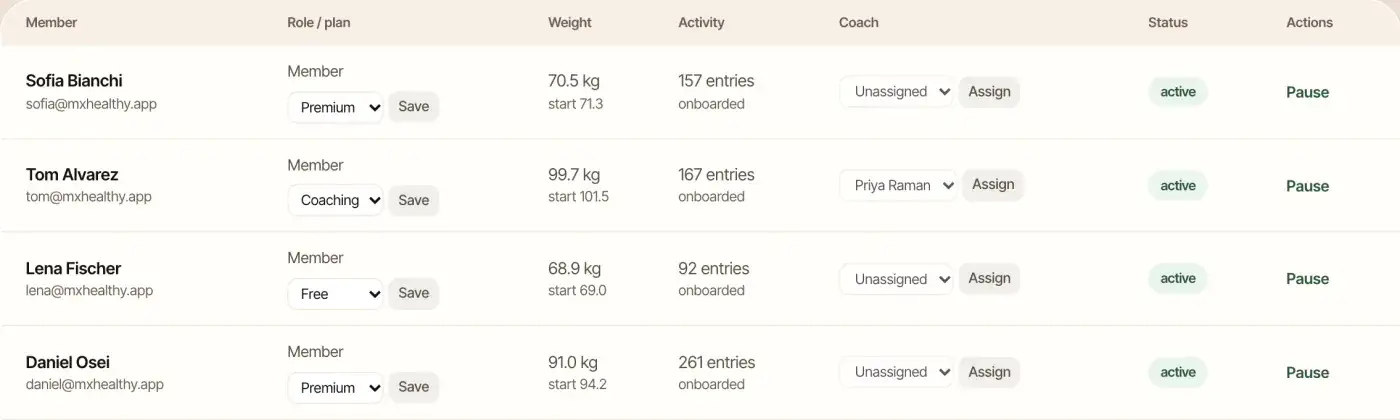
In the reference platform each account is a member, a coach or an admin. Role is checked when a page loads and again when an action runs, and identity always comes from the session the server holds, never from a value the browser sends. That detail matters. A common weakness in health apps is an interface that hides a button but still accepts the request behind it.
Scoping goes below the role. Members see only their own rows. A coach sees only the clients assigned to them, through a caseload link on the member record, and that same link attributes store orders to the right coach. An admin reaches the operator console, which is organized into 14 areas covering members, finance, store, coaches, AI routing and feature switches. For a clinic with several practitioners, this is the difference between a shared inbox and a controlled caseload.
Sessions and account status
Sign-in relies on an HTTP-only, same-site session cookie that page scripts have no access to, and no tokens sit in browser storage. Every session also rechecks whether the account is active, paused or cancelled, which means pausing a client or removing a departed coach takes effect on the next request, not at some later expiry.
Passwords are stored as salted hashes produced by a modern key derivation function, never as plain text. Database access uses parameterized SQL throughout, which removes the most common injection route. Uploaded images must match an allowed file type and stay under a size limit, and they are only served by a route that confirms the viewer’s rights.
What to ask any vendor
- Is every action authorized on the server, or only hidden in the interface?
- Can a coach open a client who is not on their caseload by changing a number in the address bar?
- How quickly does a removed staff member lose access?
- Where are passwords and session cookies handled, and are they readable by page scripts?
If a vendor cannot answer these in plain language, that is the answer.
Audit Trails: The Record You Will Want After Something Goes Wrong
An audit trail is the log that answers who changed what, and when. It is rarely the reason a clinic buys an app, and it is almost always the first thing asked for after a dispute, a refund argument or a suspected error. A good one makes the difference between a five-minute answer and a week of guessing.
The reference operator console records who acted, what they did and the details each time someone touches subscription plans, prices, payouts, feature switches, products, orders or health screenings. Because prices, trials, coupons and coach rates are all edited at runtime in the console, every one of those edits lands in the trail with a name on it. Month-end finance records are frozen when the month is closed, so last quarter’s figures cannot be quietly rewritten after the fact.
Clinical review is attributable too. When a screening questionnaire produces a higher-risk result, it moves to a review queue, and the reviewer, the time and a note are stored against the record. That does not make the product a clinical tool. It means a human on your team has a documented place to look at flagged cases, and you can show who did.
| Audit question | What a strong answer looks like | Why it matters |
|---|---|---|
| Who changed a client’s plan or price? | Actor, action and detail recorded for plan and price edits | Settles billing disputes and refund claims quickly |
| Who approved a coach payout? | Each payout carries a reference and is marked draft, then approved, then paid | Protects you from payout errors and coach disputes |
| Who switched a feature on? | Feature changes appear in the same trail | Lets you trace a behavior change to a decision |
| Who reviewed a flagged screening? | Reviewer, timestamp and note stored on the record | Shows your team followed its own review process |
| Can past figures be changed? | Month close freezes the period | Keeps finance reports reliable for investors and auditors |
The console trail covers every change made through the application. For complete coverage, pair it with database-level logging from your host, which records any direct edit to a row, and switch that on when you set up the instance.
Export and Deletion: Turning a Privacy Promise Into a Workflow
Clients ask for their data. Some leave and ask for it to be erased. Both requests are routine for a nutrition business, and both should take minutes of staff time, not days of engineering work. Whether they do depends on whether the product has these workflows built in.
The reference platform includes a self-service export, so a client can download their own records as a structured file. The export is behind a feature switch you control and each use is audited. It also handles deletion requests: a client asks, a waiting period starts, and the request can be cancelled before it completes, which protects both sides: a client who requests deletion and changes their mind has a window to reverse it, and your team has a clear state to act on once the window closes.
A careful reading of this is worth the space. These workflows give your team the mechanics for handling privacy requests, while the legal commitments sit in your own policy. What you promise clients in your policy, how long you keep records for tax or professional reasons, and which law applies to you are your decisions with your adviser. The product gives you the mechanics.
Apple and Google also expect it. Apple’s App Store guidance on account deletion requires apps that let people create an account to let them start deletion from inside the app, and Google Play has a similar data deletion policy. An app without a deletion path can be held up at store review, which matters if you are planning a launch date. Our nutrition app cost breakdown covers the other review and account steps that eat into a launch timeline.
A practical export and deletion test
- Create a test client, log a week of meals and weights, then export. Does the file contain what the client would expect to see?
- Request deletion on the test client. What does the client see, and what does your admin see?
- Cancel the deletion during the grace period. Does the account return intact?
- Complete a deletion. Check which tables are cleared and which records you must keep, such as invoices.
- Look in the audit trail. Are the export and deletion events there?
Run this test on a demo before you sign anything. It takes thirty minutes and tells you more than a questionnaire.
Backups, Hosting and Data Residency
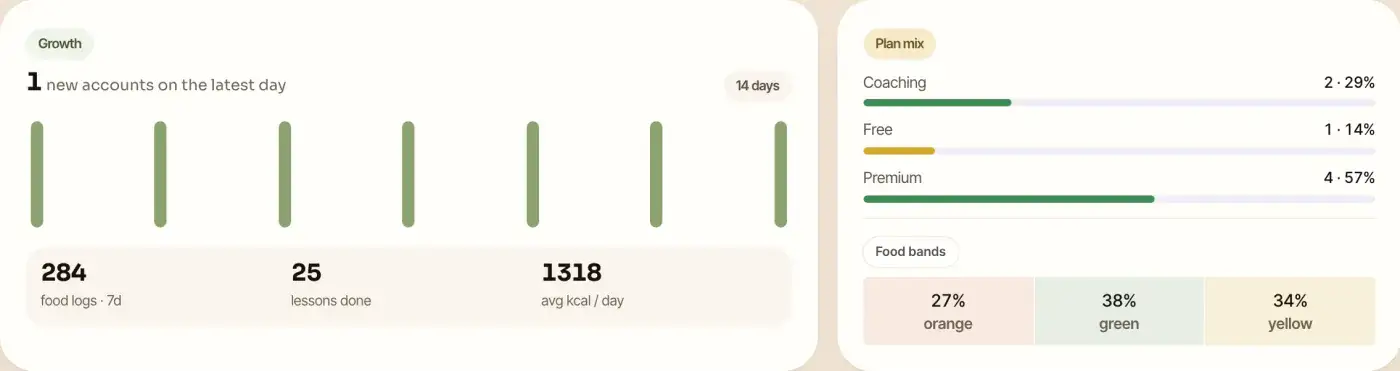
When you own the instance, you also own the operational questions. That is the right trade for most clinics, but it needs a plan. The reference platform runs as a single application process behind a reverse proxy with encryption in transit and a process supervisor. Deployments swap the application directory in one step and keep the previous build for rollback, so a bad release can be reversed quickly.
The data lives in PostgreSQL on a host you choose. That has three consequences.
- Residency follows your host. If your clients are in India, Europe or the Gulf, you pick a database region that matches your promises. The platform does not move data elsewhere on its own.
- Backups are your policy. Decide how often to snapshot the database, how long to keep copies, who can restore, and how often you test a restore. A backup nobody has restored is only an assumption.
- Media stays behind access control. Uploaded images are stored in PostgreSQL and served only through an authorizing route, so a client photo is never a public link. As upload volume grows, the documented scale path moves images to object storage on the host you choose.
There are no extra moving parts hidden behind this: no queue, no search cluster and no cache layer by design. One weekly scheduled job drives engagement nudges, and it is protected by a shared secret. Fewer components mean fewer places for data to leak and fewer systems to patch.
| Operations task | Who owns it on your own instance | What to put in writing |
|---|---|---|
| Choose the database region | You | Region and provider named in your privacy policy |
| Take and test backups | You, with Miracuves guidance during the support window | Frequency, retention and a restore test date |
| Apply operating-system and database patches | You or your hosting provider | Patch window and a named responsible person |
| Rotate secrets and provider keys | You, through the console and the environment | Rotation schedule and who holds access |
| Remove demo accounts before launch | You, with the delivery team | A go-live checklist item signed off |
| Review flagged health screenings | Your qualified staff | Who reviews, how fast, and what they do next |
If you do not want to run infrastructure, a managed PostgreSQL service and a managed host take most of that work off your desk. The ownership stays the same because the account is in your name.
Where Data Leaves the Core: Payments, Uploads and the AI Coach
Even a tightly built app talks to outside services. Each connection is a place where client data can travel beyond your control, so each deserves a line in your review.
Card data stays with the payment provider
Subscriptions and store orders run through Stripe, with rupee checkout available alongside it for Indian clients. Card numbers never touch the platform, and only provider references are stored. Webhooks from the payment provider are verified by signature and handled idempotently, so a replayed message cannot create a second charge record. Because settlement goes to the account you connect, the money and the card relationship are yours as well.
The AI coach and the provider you choose
The built-in AI coach answers from the member’s own logged day, such as calories so far, protein versus target, water intake and the weight trend. A transparency panel spells out what data the coach can read, which is the right habit for any feature that reads client data. Each member also has a daily limit on AI calls and tokens, which caps spend and exposure together. The AI coach gives general guidance and is not medical advice, and your own copy should say the same.
The point for procurement is that the AI runs against a provider you connect with your own key. That means client prompts travel to that provider under the terms you accept with them. Choose one whose data terms you have read, set the routing per task, and record the choice in your privacy notice. Keys typed into the console are hidden once saved, and deployment secrets live in environment settings, never in the code.
Connected Devices
Health sync records for steps and sleep exist in the data model. Native wearable adapters for specific device platforms are an available add-on, and so is smart scale and glucose monitor sync. Each device you connect adds another data source and another consent question, so treat these as separate decisions, not defaults.
Vendor Lock-In: What You Can Walk Away With
Lock-in is a data ownership problem seen from the exit. The question is not whether you plan to leave. It is whether leaving is possible without rebuilding your business from nothing.
Four things decide your exit position: the source code, the database, the integrations and the brand. With full source code delivered, a database on your own host, payment and AI accounts in your own name, and your own app store listings, every one of those is yours. With a closed platform you may hold only the brand and an export file.
| Lock-in point | Closed SaaS | Source code on your own instance |
|---|---|---|
| Application code | Not available | Delivered in full, so any developer can maintain it |
| Client database | Export on request, vendor formats | Direct access to the database you host |
| Payment relationship | Often through the vendor’s account | Your own provider account and your own settlement |
| Store listings | May publish under the vendor’s developer account | Published under your organization’s accounts |
| Price changes | Set by the vendor | Set by you in the console, with no store update needed |
| Roadmap | The vendor’s priorities | Your priorities, scoped and priced in writing |
Owning the code does not mean you must maintain it alone. A support window, a scoped custom-work process and a developer you trust fill that gap. It means that if the relationship with one vendor ends, you hire another and keep going.
For a dietitian practice weighing this decision, our guide to branded client apps for dietitians covers the launch side of the same choice.
A Procurement Checklist You Can Send to Any Vendor
Use this table as a questionnaire. Send it to every vendor on your shortlist and compare the answers side by side. The right column shows how the reference platform answers, so you can judge what a clear reply looks like.
| Question to send | A clear answer | MXHealthy answer |
|---|---|---|
| Is each customer on a separate deployment and database? | Yes, with a diagram | Single-tenant: one operator per instance |
| Do we receive full source code? | Yes, in the contract | Full source code is included |
| How are roles enforced? | On the server, per action | Member, coach and admin enforced per page and per action |
| Can coaches see clients outside their caseload? | No, and here is the test | Coach reads are scoped to the caseload |
| Is there an audit trail for admin changes? | Yes, with actor, action and detail | Logged for edits to plans, prices, payouts and more |
| Can clients export their own data? | Yes, self-service | JSON export, switchable and audited |
| Can clients request deletion? | Yes, with a documented process | Deletion request, waiting period, cancel option |
| How are passwords and sessions handled? | Salted hashes; HTTP-only cookies | Modern key derivation; HTTP-only, same-site cookie |
| Is SQL parameterized? | Yes, everywhere | Parameterized SQL, no raw string queries |
| Where do card numbers go? | To the provider only | Never stored; provider references only |
| Where is data hosted, and who picks the region? | The customer, in writing | Your host; residency follows your database |
| Which outside providers receive client data? | A named list | Payment, email, push and the AI provider you connect |
A word on how to read it. MXHealthy is built against a documented, VAPT-aligned control set that maps each control to the common web application risk categories, with test cases and a reviewer checklist you can hand to your own technical adviser. If a client or a corporate buyer asks for an independent penetration test of your deployment, schedule one before launch and keep the report on file.
Go-Live Hardening Before You Take Real Clients
Every web platform has a short list of settings the operator completes before real people sign up. MXHealthy documents its list, and the delivery team works through it with you as a launch checklist.
- Remove or rotate demo accounts. The demo logins and sample content let you try every role before launch. Delete them or reset every password before the public launch.
- Add login throttling at the proxy. Put rate limiting on the sign-in route at your reverse proxy, the standard production setting for any public login.
- Rotate secrets and provider keys. Enter fresh payment, AI and email keys in the console and the environment, and record who holds access.
- Test a restore. Schedule database snapshots and run one full restore before real client data arrives.
- Connect email and push delivery. Add your email provider and push credentials so receipts, reminders and coach nudges reach clients from day one.
- Set a storage milestone. Pick the upload volume at which images move to object storage, following the platform’s documented scale path.
None of these is exotic, and none is a defect. They are the normal hardening steps for any web application that goes public. The Miracuves team walks through them with you during the guidance period after launch, and the six-month priority bug resolution window covers genuine faults.
Operator duties sit alongside this list: reviewing health screenings with qualified staff, curating foods, recipes and lessons, choosing payment and AI providers, and meeting local health-claim and data-protection requirements for your market. The platform supports behavior change, not medical practice, and does not diagnose or treat. Keep your copy and your coaches inside that line.
Founder Decision Signals: Is Your Data Position Ready?
Data Location Is Named
Can you name the host, the region and the account that will hold your client database, and is that account in your company’s name?
Roles Are Tested
Have you tried to open a client outside a coach’s caseload in the demo and seen the request refused?
Export and Deletion Work
Have you run an export, a deletion request and a cancelled deletion on a test client and found each one in the audit trail?
Exit Is in the Contract
Does the agreement leave you with the source code, the database and your store listings if the relationship ends?
How Miracuves Helps You Own Your Client Data
Miracuves builds the ready-made nutrition coaching platform on MXHealthy, a full-stack product for weight-management and nutrition coaching businesses. You get member apps for Android and iOS together, alongside a browser version, a role-gated coach workspace and an operator console split into 14 areas, plus full source code. The stack is Next.js, TypeScript, PostgreSQL and Flutter, with Stripe subscriptions and rupee checkout, and the interface comes in English and Hindi, with Indian dishes in the food catalog.
The fixed one-time price is $3,399, paid once and not rented. A ready-made build goes live in 6 working days of Miracuves work, with app store review on a separate track. Custom work, for example a new report for your dietitians or a bespoke plan type takes 15 to 30 days, and larger scope runs 45 to 60. Support after launch runs as three cover periods: 60 days of dedicated platform guidance, then 6 months of priority bug fixing, then 12 months of continuous product evolution.
Everything in this guide maps to what you receive. Your instance runs on your hosting. Roles, scoping, the audit trail, export and deletion are built in. Clinics and wellness teams can browse more of our work in the healthcare solutions section, and the live demo lets you walk through all three roles before you speak to anyone.
Extra capabilities are sold as paid add-ons so your data footprint grows only when you choose: wearable adapters, smart scale and glucose monitor sync, live video coaching and group classes, a video lesson studio, a corporate wellness portal for employer plans, and regional language packs are each sold as an add-on with a written scope and price. You decide which data sources to switch on, and when.
Final Thoughts
Security for a nutrition business is mostly a set of decisions made before launch: where the data lives, who can see it, what is recorded, how clients reclaim it and how you leave. None of those needs a long audit to answer. They need a vendor willing to answer plainly, a demo you can test, and a checklist you actually use.
Run the export and deletion test, try the coach-scope test, ask for the backup and exit answers in writing, and record every outside provider. If a vendor passes, you have a platform you can grow on with confidence. If it does not, you have saved yourself a painful migration. Miracuves gives you the version where the answers are yes: your instance, your source code and your clients’ records under your control.
Frequently Asked Questions
Who owns client data in a nutrition app?
It depends on the deployment. On a shared SaaS platform the data sits in the vendor database under the vendor terms, so read the contract closely. On your own instance of a ready-made platform, the database runs on a host in your name and you hold the admin keys, the source code and the records.
What access roles does a clinic need in a coaching app?
At minimum three: client, coach and administrator. Clients should see only their own records, coaches only the clients on their caseload, and administrators should work through a console that logs what they change. Check that roles are enforced on the server for every action, not just hidden in the interface.
What should an audit trail record?
The person acting, the action taken and the detail, whenever money, access or settings change. It should let you answer who changed something and when, and period-end finance records should be frozen once a month is closed.
Can clients export or delete their data from the app?
They should be able to. A good app lets clients download their records on their own and file an erasure request that waits out a grace period, so anyone who changes their mind can cancel. App stores also expect an in-app account deletion path, so it affects your launch as well as your privacy posture.
Where is the data stored and who backs it up?
On a single-tenant instance the data is in PostgreSQL on the host you choose, so residency follows that host. Backup frequency, retention and restore testing are the operator responsibility, and a managed database service can handle much of the work. Test a restore before you take real clients.
Does a nutrition app need a third-party penetration test?
It depends on who your clients and partners are. A documented control set mapped to the common web application risks is a sound starting point, but a corporate buyer or insurer may ask for an independent test. Schedule one against your own deployment before launch and keep the report on file.
How do I avoid vendor lock-in with a nutrition app?
Ask for full source code, run the database on your own host, keep payment and AI provider accounts in your own name, and publish under your own app store accounts. With those four in place, another developer can take over if the relationship ends.
Is the AI coach safe to use with client data?
The coach should show what it can see, apply per-member usage caps and run against a provider you choose and have read the terms of. It gives general guidance and is not medical advice. Record the provider in your privacy notice, because client prompts travel to it.
What does Miracuves provide for data ownership?
A single-tenant instance on your hosting, full source code, role-based access with caseload scoping, an operator audit trail, self-service export and a deletion workflow, plus 60 days of dedicated platform guidance. You will find the fixed price listed on the product page.
Miracuves is an independent software development company. We are not affiliated with, connected to, sponsored by, or endorsed by any company or product named in this article.
Terms such as “X Clone” are used descriptively. It is how the software industry refers to building a platform with functionality comparable to a known service, and how clients search for it.
The entire design and codebase of our products is built by our own team. Our products contain no code, design, graphics, or content originating from any third-party website or applications.
All third-party names and marks referenced in this article are the property of their respective owners, referenced solely to identify the services discussed.