Key Takeaways
- Client Account Management around MT4 and MT5 should connect onboarding, KYC, wallets, trading account creation, account linking, funding, withdrawals, support, and reporting.
- MT4 and MT5 handle trading activity, while the client portal manages the wider trader relationship and account lifecycle.
- Trading account provisioning should correctly assign server, account group, leverage, currency, permissions, and account type.
- Wallet balances, trading account balances, deposits, withdrawals, and internal transfers should remain synchronized and explainable.
- Compliance, finance, support, partner, and admin teams should work through role-based controls with complete audit records.
Account Management Signals
- If traders already use MT4 or MT5, the portal should focus on managing the account lifecycle instead of replacing the terminal.
- Account linking should connect each client profile with the correct platform, server, login, group, leverage, and status.
- Funding should not become final until payment confirmation and reconciliation are complete.
- Multiple trading accounts should be manageable from one profile without creating cross-funding, currency, or account-type errors.
- Every important account state should have a clear client-facing status and an admin-visible explanation when something fails.
Real Insights
- The client portal is the brokerage operating layer around MT4 and MT5, not simply an extra dashboard.
- Weak synchronization between portal data and trading accounts can quickly create support, finance, and trust problems.
- Account access should be treated as a controlled state based on KYC, funding, permissions, jurisdiction, and risk rules.
- Withdrawal workflows need balance, KYC, payment method, restriction, fraud, and approval checks before funds leave the business.
- The strongest journey is: register client → verify KYC → create or link MT4/MT5 account → apply account rules → fund wallet → synchronize balances → manage multiple accounts → review withdrawals → maintain audit logs.
MT4 and MT5 are where traders watch charts, place orders, manage positions, and interact with the market. But the trader’s full relationship with a brokerage does not begin or end inside the terminal.
A Digital brokerage platform needs a client account management layer around MT4 and MT5.
This layer handles registration, KYC, wallet funding, trading account creation, account linking, server selection, leverage rules, account groups, documents, support, withdrawals, audit logs, partner attribution, and back-office reporting. Without it, brokerage teams end up managing critical workflows through spreadsheets, manual tickets, disconnected payment dashboards, and scattered compliance records.
This guide explains how client account management works around MT4 and MT5, why the client portal matters, and what founders should plan before launching or modernizing a forex, CFD, prop trading, or multi-asset brokerage operation.
Why MT4 and MT5 Need a Client Portal Around Them
MT4 and MT5 are powerful trading environments, but a brokerage business needs more than terminal access.
A trader still needs to register, verify identity, choose account type, fund a wallet, connect to the correct server, receive account credentials, request withdrawals, contact support, review documents, track performance, and manage multiple accounts. The brokerage team also needs to approve KYC, monitor funding, assign account groups, configure leverage, manage partner attribution, review withdrawals, and maintain audit records.
That is where the client portal becomes important.
The portal acts as the operational layer between the trader and the brokerage. It does not need to replace MT4 or MT5. Instead, it should manage everything that surrounds trading access.
A strong client account management layer helps answer:
- Has the trader completed onboarding?
- Has KYC been approved?
- Which MT4 or MT5 account belongs to this client?
- Which server, group, currency, and leverage should apply?
- Has the wallet been funded?
- Can the trader open a live account?
- Can they withdraw funds?
- Which partner or introducer referred the client?
- What did support, finance, or compliance change?
- Is every action recorded for review?
For founders, this matters because client account management is where operational trust is built. A smooth trading terminal cannot fix weak onboarding, unclear funding, or missing compliance evidence.
The Difference Between the Trading Terminal and the Client Account Layer
A common mistake is treating the trading terminal and the brokerage portal as the same product. They are connected, but they perform different jobs.
MT4/MT5 Terminal vs Client Account Management Layer
| Layer | What It Handles | Why It Matters |
|---|---|---|
| MT4 / MT5 Trading Terminal | Charts, orders, positions, indicators, expert advisors, market watch, and trading account connection. | This is where traders interact with the market and execute their trading activity. |
| Client Portal | Signup, KYC, wallet funding, account creation requests, document uploads, profile status, deposits, withdrawals, and support. | This is where the brokerage manages the trader relationship and account lifecycle. |
| Broker Back Office | KYC queues, finance approvals, withdrawal screening, account group setup, support notes, audit logs, and reporting. | This gives internal teams operational control without relying on disconnected manual processes. |
| Bridge / Integration Layer | Account provisioning, account linking, balance sync, trading account status, trade history, position sync, and reporting connections. | This connects the client portal with MT4/MT5 infrastructure and reduces manual account handling. |
The simplest way to understand the difference is this:
MT4 and MT5 are the trading environment. The brokerage portal is the client operating system around that environment.
Stage 1: Client Registration and Profile Creation
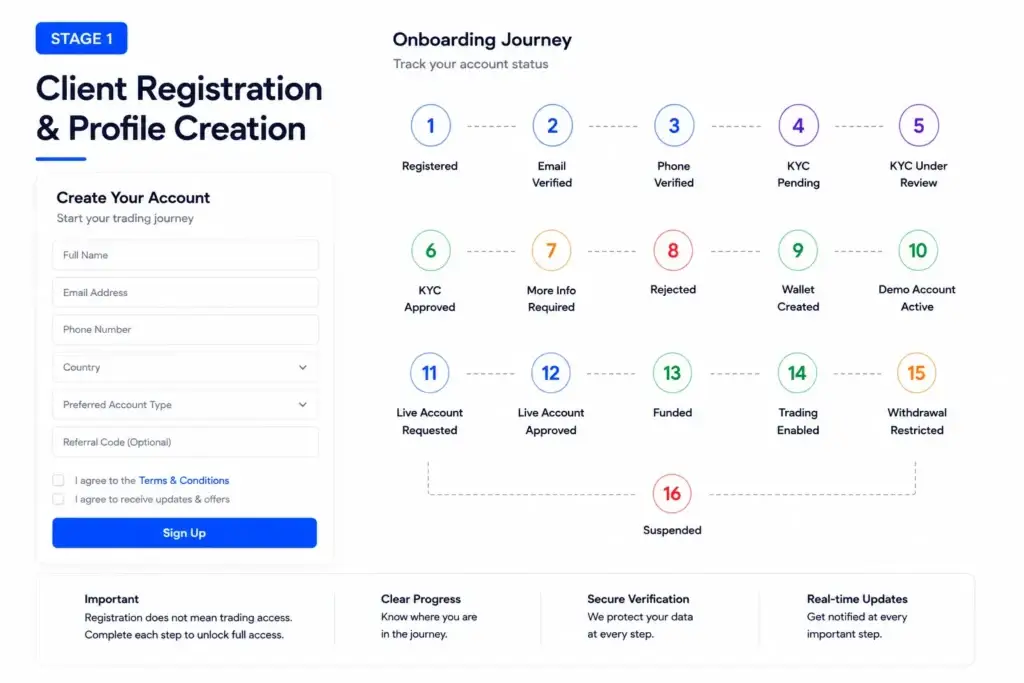
Client account management begins when a trader creates a brokerage profile.
This first step should collect enough information to create a reliable client record without making the signup process unnecessarily heavy. A brokerage may collect name, email, phone number, country, password, preferred account type, referral code, marketing source, consent acknowledgements, and communication preferences.
The important point is that profile creation should not automatically mean live trading access.
A client may move through several statuses before they can trade:
- registered
- email verified
- phone verified
- KYC pending
- KYC under review
- KYC approved
- more information required
- rejected
- wallet created
- demo account active
- live account requested
- live account approved
- funded
- trading enabled
- withdrawal restricted
- suspended
These statuses help traders understand where they are in the onboarding journey. They also help support, compliance, finance, and admin teams manage work without confusion.
Stage 2: KYC, Verification, and Eligibility Review
KYC is one of the most important parts of brokerage account management.
A trader may be able to create a profile quickly, but the platform should not allow full account activity until the required identity, address, and eligibility checks are completed according to the brokerage’s market, licence, risk policy, and operating model.
A strong KYC workflow should support:
- identity document upload
- address proof upload
- phone and email verification
- tax or residency details where required
- account suitability questions
- risk profile classification
- document expiry tracking
- resubmission requests
- manual review notes
- automated vendor integration
- compliance decision history
KYC should not be treated as a static upload folder. It should be a decision workflow. The operator needs to know what was submitted, whether the document was readable, who reviewed it, what decision was taken, and whether trading access was unlocked after approval.
The client should also see clear status updates. “Verification under review” is better than silence. “Please upload a clearer proof of address” is better than a generic rejection.
A compliance-ready foundation can support these workflows, but final compliance depends on jurisdiction, legal review, licensing, KYC/AML vendors, internal policies, and the brokerage’s operating model.
Stage 3: Creating or Linking MT4 and MT5 Accounts
Once a client profile exists and the required checks are complete, the platform can create or link a trading account.
There are usually two common flows.
The first flow is account provisioning. The brokerage creates an MT4 or MT5 account for the client, assigns the correct server, account group, leverage, base currency, and permissions, then shows the credentials or connection details inside the portal.
The second flow is account linking. The client may already have MT4 or MT5 credentials, and the portal links those details to the client profile so account status, reporting, funding, or support can be managed from one dashboard.
Account provisioning should capture:
- client ID
- trading platform type
- server
- login ID
- account type
- account group
- leverage
- base currency
- trading permission
- investor access where relevant
- status
- creation timestamp
- integration reference
- operator notes
This is where the brokerage needs careful integration planning. If account creation is manual, the admin console should still record the trading account relationship. If account creation is automated through a bridge or API layer, the system should handle retries, errors, duplicate requests, and permission checks safely.
Founders should also review the wider brokerage portal feature breakdown to understand how account provisioning, KYC queues, wallets, funding, partner tools, and admin control connect.
Stage 4: Account Groups, Leverage, Currency, and Permissions
Not every trader should receive the same trading account configuration.
Account groups, leverage, base currency, trading permissions, commission setup, swap settings, account type, and instrument access may vary by client segment, jurisdiction, deposit level, risk profile, or business model.
A modern brokerage portal should let operators manage or request these account settings clearly.
Important account rules include:
- demo or live account status
- standard, professional, funded, or evaluation account type
- base currency
- leverage level
- instrument access
- trading group
- commission model
- spread group
- bonus or promotion rules
- internal transfer permissions
- withdrawal eligibility
- trading enabled or disabled status
For prop trading workflows, the platform may also need challenge rules, drawdown limits, profit targets, breach detection, funded progression, payout eligibility, and account reset controls.
For traditional brokerage workflows, the platform may focus more on live account approval, deposit-based activation, multi-account management, and withdrawal restrictions.
The stronger approach is to treat account access as a controlled state, not a one-time setup screen.
Stage 5: Wallet Funding and Balance Movement
A trading account cannot operate in isolation from the funding layer.
The client portal should let traders deposit funds, view wallet balances, move funds between wallets and trading accounts, request withdrawals, and track the status of every transaction.
A brokerage wallet should track:
- available balance
- pending deposits
- confirmed deposits
- failed deposits
- internal transfers
- account credits
- account debits
- currency conversion
- withdrawal requests
- payout approval status
- rejected withdrawals
- chargeback or reversal notes
- finance adjustment logs
This matters because the client may see one balance in the portal and another balance in the trading terminal if synchronization is weak. A reliable platform should define where the source of truth lives for each balance type and how updates move between systems.
Deposits should not be credited as final until the payment status is confirmed. Withdrawals should not be processed until the platform checks available balance, account restrictions, KYC status, payment method ownership, and risk flags.
This is where founders should review digital brokerage development cost factors, because live payment rails, KYC vendors, account synchronization, liquidity relationships, market data, and bridge connectivity can affect the final launch scope.
Stage 6: Synchronizing Portal Data With MT4 and MT5
The client portal and MT4/MT5 environment should not drift apart.
If the portal says an account is active but the trading environment says it is disabled, support problems will follow. If a deposit is visible in the portal but not reflected where the trader expects it, trust drops. If trade history is not available in the portal, clients may contact support for basic reporting.
Useful synchronization points include:
- account creation status
- trading enabled or disabled status
- balance
- equity
- margin
- account group
- open positions where applicable
- closed trade history
- deposit and withdrawal history
- internal transfer status
- account performance
- partner attribution
- payout eligibility
The integration layer should also handle failure states. A request may fail because of wrong server details, duplicate account creation, missing permissions, delayed bridge response, gateway delay, or account mismatch. These failures should be visible to admins, not hidden inside technical logs.
For founders, the rule is simple: every important client-facing account state should have an admin-visible explanation.
Stage 7: Managing Multiple Trading Accounts Per Client
Many traders use more than one account.
A client may have a demo account, a live account, a high-leverage account, a low-risk account, a funded account, an evaluation account, or separate accounts by strategy, currency, or instrument group.
A good client portal should allow users to view and manage multiple accounts from one profile.
Useful capabilities include:
- account list view
- account type labels
- account currency
- balance and equity snapshot
- server information
- platform type
- status indicator
- account credentials or connection guidance
- deposit to selected account
- transfer between eligible accounts
- withdrawal from eligible balance
- trading report download
- account archive or closure request
For the operator, multiple account management must also be controlled. The platform should prevent accidental cross-funding, wrong-currency transfers, duplicate account creation, or account type mismatches.
This is especially important for brokerages that support both retail trading and prop-style workflows.
Stage 8: Support, Documents, and Client Communication
Client account management is also a communication problem.
A trader may ask why KYC is pending, why a deposit has not appeared, why a withdrawal is under review, why trading access is disabled, or why their account group changed.
If the support team cannot see the full client journey, response quality drops.
A strong portal should give support teams access to:
- client profile status
- KYC status
- document history
- account list
- deposit records
- withdrawal records
- support tickets
- notification history
- risk flags where permitted
- recent admin actions
- account restrictions
- internal notes
At the same time, support permissions should be limited. A support agent may need to view account status but should not approve KYC, adjust balances, change leverage, or approve payouts unless explicitly authorized.
This is where role-based access control becomes important. Brokerage platforms should separate support, compliance, finance, partner, risk, and admin responsibilities.
After the client account system is stable, founders can connect onboarding, retention, education, and funded account conversion with brokerage platform marketing strategies.
Stage 9: Withdrawals, Payouts, and Risk Review
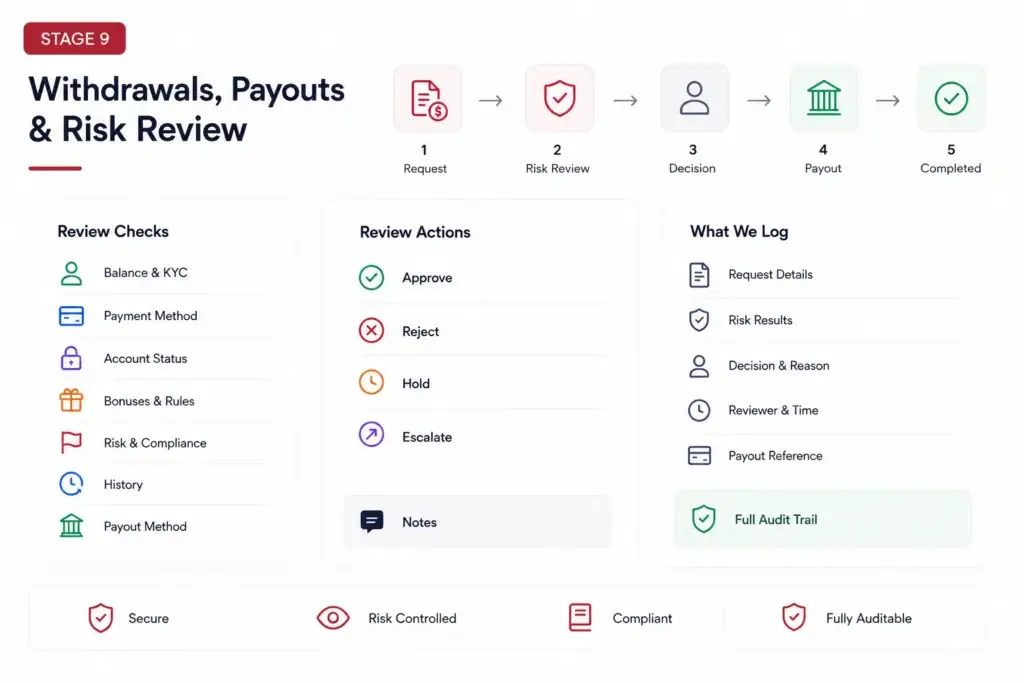
Withdrawals are one of the most sensitive workflows in brokerage operations.
A trader may request a withdrawal from their wallet, trading account, profit share, rebate balance, or funded account payout. The platform must verify that the request is valid before funds leave the business.
Withdrawal review should check:
- available balance
- KYC approval
- payment method ownership
- account status
- open account restrictions
- active bonus or promotion rules
- chargeback exposure
- trading rule breaches
- suspicious activity flags
- previous rejected requests
- finance approval status
- compliance escalation status
- payout method availability
The finance team should be able to approve, reject, hold, or escalate a withdrawal request with clear notes. Compliance should be able to review risk without directly processing finance actions unless the role allows it.
Every decision should be logged. In brokerage operations, auditability is not an afterthought. It is part of the product foundation.
Stage 10: Back-Office Reporting and Audit Logs
A brokerage portal should help operators understand what happened across the full client lifecycle.
Useful back-office reports include:
- registered clients
- KYC approval rate
- rejected documents
- funded accounts
- first deposit conversion
- active trading accounts
- deposits by method
- withdrawals by status
- trading account groups
- partner referrals
- rebate payouts
- support workload
- risk flags
- account restrictions
- admin activity logs
Audit logs should record important actions, including KYC decisions, account creation, leverage changes, group changes, funding adjustments, withdrawal approvals, permission updates, document reviews, and support escalations.
This gives the founder better visibility and gives internal teams a clearer operating structure. When the brokerage grows, the back office should not depend on memory, chat messages, or spreadsheet notes.
Client Account Management State Map Around MT4 and MT5
| Account State | Trigger | What the Portal Should Do | Risk to Control |
|---|---|---|---|
| Registered | Client creates profile | Create client record, start verification path, show next steps. | Fake, duplicate, or incomplete profiles entering the system. |
| KYC Under Review | Client submits documents | Route documents to compliance queue with status and notes. | Trading access before verification decision. |
| Verified | Compliance approves client | Unlock account request or funding path based on business rules. | Wrong jurisdiction, risk class, or eligibility setup. |
| Trading Account Created | Admin or integration provisions MT4/MT5 account | Store server, login, account group, leverage, and platform type. | Duplicate accounts, wrong group, or wrong leverage. |
| Funded | Deposit is confirmed and reconciled | Update wallet, trading account balance, or transfer status based on rules. | Crediting before payment confirmation or mismatched balances. |
| Trading Enabled | Account rules and funding conditions are satisfied | Allow trading access and show account status clearly to the trader. | Access granted with missing restrictions or incomplete setup. |
| Withdrawal Review | Client requests payout or withdrawal | Check balance, KYC, payment method, account restrictions, and risk flags. | Fraud, chargebacks, policy breaches, or finance errors. |
Admin Consoles Needed for Brokerage Account Management
A brokerage portal should not give every operator the same access.
The compliance team needs KYC queues, screening results, risk flags, document decisions, and audit notes. Finance needs deposits, withdrawals, balances, reconciliation, and payout approvals. Support needs client status and ticket history. Partner managers need referrals, IB structures, CPA tracking, and rebate reports. Admins need configuration and role control.
Important admin areas include:
- client management
- KYC review queue
- document management
- wallet ledger
- deposit review
- withdrawal review
- MT4/MT5 account mapping
- account group configuration
- leverage rules
- partner and IB attribution
- prop challenge management
- support tickets
- risk flags
- notifications
- reconciliation reports
- audit logs
- role-based access controls
If you are comparing technical teams, choose a brokerage platform development partner that understands client portals, MT4/MT5 account linking, funding workflows, compliance queues, partner economics, withdrawal screening, and admin-led operational control.
Founder Decision Signals
Terminal Fit
If your traders already use MT4 or MT5, build the portal around account management instead of trying to replace the terminal on day one.
Funding Trust
If wallet balances and trading account balances do not reconcile, support pressure and client anxiety will increase quickly.
Compliance Control
If KYC decisions, withdrawal reviews, and account permission changes are not logged, the business becomes harder to audit.
Scale
If every trading account setup requires manual back-and-forth between teams, growth will increase operational workload instead of reducing it.
Common Mistakes Founders Should Avoid
Trying to replace MT4 or MT5 too early
Many brokerage businesses should first build the account, funding, KYC, partner, and back-office layer around the terminal instead of recreating every trading feature from scratch.
Separating wallet data from trading account records
If the portal, payment provider, and trading account balance do not reconcile clearly, finance and support teams will struggle to explain client money movement.
Approving trading access without a recorded KYC decision
Account activation should depend on clear verification status, required documents, risk checks, and operating rules. The decision should be visible in the admin console.
Using one admin role for every team
Brokerage operations need role-based permissions. Support, compliance, finance, partners, and administrators should not have the same access to money movement and client decisions.
How Miracuves Helps Founders Build Brokerage Portals Around MT4 and MT5
Miracuves helps fintech founders build brokerage portals where onboarding, KYC, wallets, MT4/MT5 account mapping, funding workflows, partner management, withdrawal review, admin control, and reporting work as one connected system.
For founders planning a forex, CFD, prop trading, or multi-asset brokerage operation, a Digital brokerage platform can provide the launch-ready foundation for client account management around MT4 and MT5 without building every operational workflow from zero.
You can also explore Miracuves’ finance and investment app solutions or review digital banking app solutions if your roadmap includes wallets, accounts, payments, banking workflows, verification, or financial dashboards.
For businesses that need custom onboarding, account dashboards, wallet workflows, or compliance-ready operations, Miracuves also offers custom mobile app development services for mobile-first fintech products.
The goal is not to copy another brokerage brand. The stronger decision is to build a reliable operating layer around the trading terminal so clients, partners, finance teams, support teams, and compliance teams can work from one controlled system.
Final Thoughts: The Portal Around MT4 and MT5 Is the Brokerage Operating Layer
MT4 and MT5 may be the trading environment, but the brokerage relationship lives in the account management layer around them.
That layer decides how clients register, verify documents, open accounts, fund wallets, connect to servers, manage multiple trading accounts, request withdrawals, receive support, and move through the lifecycle from prospect to active trader.
For founders, the lesson is clear: do not treat client account management as an afterthought. The portal around MT4 and MT5 is where trust, compliance workflow, finance operations, partner attribution, and trader experience come together.
A strong Digital brokerage platform gives the business the control it needs before trading volume, client count, and operational pressure start to grow.
FAQs
What is client account management in a brokerage platform?
Client account management is the system that handles trader profiles, KYC, wallet funding, MT4/MT5 account mapping, account status, deposits, withdrawals, support, permissions, and back-office reporting.
Does a brokerage client portal replace MT4 or MT5?
No. A client portal usually works around MT4 and MT5. The terminal handles trading activity, while the portal manages onboarding, account operations, funding, documents, support, and reporting.
Why do brokers need MT4/MT5 account linking?
Account linking helps the brokerage connect a trader’s portal profile with the correct trading account, server, group, leverage, balance records, trade history, and operational permissions.
What should a Digital brokerage platform manage before trading access is enabled?
Before trading access is enabled, the platform should manage registration, KYC, eligibility checks, account type selection, server mapping, funding status, account rules, and compliance-related restrictions.
Why is wallet reconciliation important around MT4 and MT5?
Wallet reconciliation helps ensure that deposits, withdrawals, transfers, and trading balances match across the portal, payment provider, finance records, and trading account environment.
What admin controls are needed for brokerage account management?
Admins need tools for client profiles, KYC review, documents, wallets, deposits, withdrawals, account mapping, leverage rules, account groups, partner attribution, support, reports, and audit logs.
Can Miracuves help build a client portal around MT4 and MT5?
Yes. Miracuves helps founders build brokerage portals with onboarding, KYC, wallet funding, account management, MT4/MT5 account mapping, partner workflows, role-based admin control, source-code ownership, and faster deployment support.
Does brokerage portal software guarantee compliance?
No. Brokerage portal software can support compliance-ready workflows, but final compliance depends on jurisdiction, legal review, licensing, vendor integrations, internal policy, and operating model.
Miracuves is an independent software development company. We are not affiliated with, connected to, sponsored by, or endorsed by any company or product named in this article.
Terms such as “X Clone” are used descriptively. It is how the software industry refers to building a platform with functionality comparable to a known service, and how clients search for it.
The entire design and codebase of our products is built by our own team. Our products contain no code, design, graphics, or content originating from any third-party website or applications.
All third-party names and marks referenced in this article are the property of their respective owners, referenced solely to identify the services discussed.